How to Think Like a Computer Scientist
How to Think Like a Computer Scientist
Learning with Python
Allen Downey
Jeffrey Elkner
Chris Meyers
Green Tea Press
Copyright c2002 Allen Downey, Jeffrey Elkner, and Chris Meyers.
Edited by Shannon Turlington and Lisa Cutler. Cover design by Rebecca Gimenez.
Printing history:
April 2002: First edition.
August 2008: Second printing.
Green Tea Press 1 Grove St. P.O. Box 812901 Wellesley, MA 02482
Permission is granted to copy, distribute, and/or modify this document under the terms of the GNU Free Documentation License, Version 1.1 or any later version published by the Free Software Foundation; with the Invariant Sections being “Foreword,” “Preface,” and “Contributor List,” with no Front-Cover Texts, and with no Back-Cover Texts. A copy of the license is included in the appendix entitled “GNU Free Documentation License.”
The GNU Free Documentation License is available from www.gnu.orgor by writing to the Free Software Foundation, Inc., 59 Temple Place, Suite 330, Boston, MA 02111-1307, USA.
The original form of this book is LATEX source code. Compiling this LATEX source has
the effect of generating a device-independent representation of a textbook, which can be converted to other formats and printed.
The LATEX source for this book is available fromhttp://www.thinkpython.com
Publisher’s Cataloging-in-Publication (provided by Quality Books, Inc.) Downey, Allen
How to think like a computer scientist : learning with Python / Allen Downey, Jeffrey Elkner, Chris Meyers. – 1st ed.
p. cm.
Includes index. ISBN 0-9716775-0-6 LCCN 2002100618
1. Python (Computer program language) I. Elkner, Jeffrey. II. Meyers, Chris. III. Title
Foreword
By David Beazley
As an educator, researcher, and book author, I am delighted to see the completion of this book. Python is a fun and extremely easy-to-use programming language that has steadily gained in popularity over the last few years. Developed over ten years ago by Guido van Rossum, Python’s simple syntax and overall feel is largely derived from ABC, a teaching language that was developed in the 1980’s. However, Python was also created to solve real problems and it borrows a wide variety of features from programming languages such as C++, Java, Modula-3, and Scheme. Because of this, one of Python’s most remarkable features is its broad appeal to professional software developers, scientists, researchers, artists, and educators.
Despite Python’s appeal to many different communities, you may still wonder “why Python?” or “why teach programming with Python?” Answering these questions is no simple task—especially when popular opinion is on the side of more masochistic alternatives such as C++ and Java. However, I think the most direct answer is that programming in Python is simply a lot of fun and more productive.
vi Foreword In doing so, I don’t want to waste half of the semester trying to sort out obscure syntax problems, unintelligible compiler error messages, or the several hundred ways that a program might generate a general protection fault.
One of the reasons why I like Python is that it provides a really nice balance between the practical and the conceptual. Since Python is interpreted, beginners can pick up the language and start doing neat things almost immediately with-out getting lost in the problems of compilation and linking. Furthermore, Python comes with a large library of modules that can be used to do all sorts of tasks rang-ing from web-programmrang-ing to graphics. Havrang-ing such a practical focus is a great way to engage students and it allows them to complete significant projects. How-ever, Python can also serve as an excellent foundation for introducing important computer science concepts. Since Python fully supports procedures and classes, students can be gradually introduced to topics such as procedural abstraction, data structures, and object-oriented programming—all of which are applicable to later courses on Java or C++. Python even borrows a number of features from functional programming languages and can be used to introduce concepts that would be covered in more detail in courses on Scheme and Lisp.
In reading Jeffrey’s preface, I am struck by his comments that Python allowed him to see a “higher level of success and a lower level of frustration” and that he was able to “move faster with better results.” Although these comments refer to his introductory course, I sometimes use Python for these exact same reasons in advanced graduate level computer science courses at the University of Chicago. In these courses, I am constantly faced with the daunting task of covering a lot of difficult course material in a blistering nine week quarter. Although it is certainly possible for me to inflict a lot of pain and suffering by using a language like C++, I have often found this approach to be counterproductive—especially when the course is about a topic unrelated to just “programming.” I find that using Python allows me to better focus on the actual topic at hand while allowing students to complete substantial class projects.
Although Python is still a young and evolving language, I believe that it has a bright future in education. This book is an important step in that direction.
David Beazley University of Chicago
Preface
By Jeff Elkner
This book owes its existence to the collaboration made possible by the Internet and the free software movement. Its three authors—a college professor, a high school teacher, and a professional programmer—have yet to meet face to face, but we have been able to work closely together and have been aided by many wonderful folks who have donated their time and energy to helping make this book better.
We think this book is a testament to the benefits and future possibilities of this kind of collaboration, the framework for which has been put in place by Richard Stallman and the Free Software Foundation.
How and why I came to use Python
In 1999, the College Board’s Advanced Placement (AP) Computer Science exam was given in C++ for the first time. As in many high schools throughout the country, the decision to change languages had a direct impact on the computer science curriculum at Yorktown High School in Arlington, Virginia, where I teach. Up to this point, Pascal was the language of instruction in both our first-year and AP courses. In keeping with past practice of giving students two years of exposure to the same language, we made the decision to switch to C++ in the first-year course for the 1997-98 school year so that we would be in step with the College Board’s change for the AP course the following year.
viii Preface had to be a better language choice for our first-year class, I went looking for an alternative to C++.
I needed a language that would run on the machines in our Linux lab as well as on the Windows and Macintosh platforms most students have at home. I wanted it to be free and available electronically, so that students could use it at home regardless of their income. I wanted a language that was used by professional programmers, and one that had an active developer community around it. It had to support both procedural and object-oriented programming. And most importantly, it had to be easy to learn and teach. When I investigated the choices with these goals in mind, Python stood out as the best candidate for the job.
I asked one of Yorktown’s talented students, Matt Ahrens, to give Python a try. In two months he not only learned the language but wrote an application called pyTicket that enabled our staff to report technology problems via the Web. I knew that Matt could not have finished an application of that scale in so short a time in C++, and this accomplishment, combined with Matt’s positive assessment of Python, suggested that Python was the solution I was looking for.
Finding a textbook
Having decided to use Python in both of my introductory computer science classes the following year, the most pressing problem was the lack of an available textbook.
Free content came to the rescue. Earlier in the year, Richard Stallman had in-troduced me to Allen Downey. Both of us had written to Richard expressing an interest in developing free educational content. Allen had already written a first-year computer science textbook,How to Think Like a Computer Scientist. When I read this book, I knew immediately that I wanted to use it in my class. It was the clearest and most helpful computer science text I had seen. It emphasized the processes of thought involved in programming rather than the features of a particular language. Reading it immediately made me a better teacher.
How to Think Like a Computer Scientistwas not just an excellent book, but it had been released under a GNU public license, which meant it could be used freely and modified to meet the needs of its user. Once I decided to use Python, it occurred to me that I could translate Allen’s original Java version of the book into the new language. While I would not have been able to write a textbook on my own, having Allen’s book to work from made it possible for me to do so, at the same time demonstrating that the cooperative development model used so well in software could also work for educational content.
ix make instant changes whenever someone found a spelling error or difficult passage, I encouraged them to look for mistakes in the book by giving them a bonus point each time they made a suggestion that resulted in a change in the text. This had the double benefit of encouraging them to read the text more carefully and of getting the text thoroughly reviewed by its most important critics, students using it to learn computer science.
For the second half of the book on object-oriented programming, I knew that someone with more real programming experience than I had would be needed to do it right. The book sat in an unfinished state for the better part of a year until the free software community once again provided the needed means for its completion.
I received an email from Chris Meyers expressing interest in the book. Chris is a professional programmer who started teaching a programming course last year using Python at Lane Community College in Eugene, Oregon. The prospect of teaching the course had led Chris to the book, and he started helping out with it immediately. By the end of the school year he had created a companion project on our website athttp://www.ibiblio.org/obpcalledPython for Funand was working with some of my most advanced students as a master teacher, guiding them beyond where I could take them.
Introducing programming with Python
The process of translating and using How to Think Like a Computer Scientist
for the past two years has confirmed Python’s suitability for teaching beginning students. Python greatly simplifies programming examples and makes important programming ideas easier to teach.
The first example from the text illustrates this point. It is the traditional “hello, world” program, which in the C++ version of the book looks like this:
#include <iostream.h>
void main() {
cout << "Hello, world." << endl; }
in the Python version it becomes:
print "Hello, World!"
x Preface seeing this example are looking at their first program. Some of them are undoubt-edly a little nervous, having heard that computer programming is difficult to learn. The C++ version has always forced me to choose between two unsatisfying op-tions: either to explain #include, void main(), {, and}, and risk confusing or intimidating some of the students right at the start, or to tell them, “Just don’t worry about all of that stuff now; we will talk about it later,” and risk the same thing. The educational objectives at this point in the course are to introduce students to the idea of a programming language and to get them to write their first program, thereby introducing them to the programming environment. The Python program has exactly what is needed to do these things, and nothing more.
Comparing the explanatory text of the program in each version of the book fur-ther illustrates what this means to the beginning student. There are thirteen paragraphs of explanation of “Hello, world!” in the C++ version; in the Python version, there are only two. More importantly, the missing eleven paragraphs do not deal with the “big ideas” in computer programming but with the minutia of C++ syntax. I found this same thing happening throughout the book. Whole paragraphs simply disappear from the Python version of the text because Python’s much clearer syntax renders them unnecessary.
Using a very high-level language like Python allows a teacher to postpone talking about low-level details of the machine until students have the background that they need to better make sense of the details. It thus creates the ability to put “first things first” pedagogically. One of the best examples of this is the way in which Python handles variables. In C++ a variable is a name for a place that holds a thing. Variables have to be declared with types at least in part because the size of the place to which they refer needs to be predetermined. Thus, the idea of a variable is bound up with the hardware of the machine. The powerful and fundamental concept of a variable is already difficult enough for beginning students (in both computer science and algebra). Bytes and addresses do not help the matter. In Python a variable is a name that refers to a thing. This is a far more intuitive concept for beginning students and is much closer to the meaning of “variable” that they learned in their math courses. I had much less difficulty teaching variables this year than I did in the past, and I spent less time helping students with problems using them.
xi call (type) out its name.” Parameters go with definitions; arguments go with calls. There are no return types, parameter types, or reference and value parameters to get in the way, so I am now able to teach functions in less than half the time that it previously took me, with better comprehension.
Using Python has improved the effectiveness of our computer science program for all students. I see a higher general level of success and a lower level of frustration than I experienced during the two years I taught C++. I move faster with better results. More students leave the course with the ability to create meaningful programs and with the positive attitude toward the experience of programming that this engenders.
Building a community
I have received email from all over the globe from people using this book to learn or to teach programming. A user community has begun to emerge, and many people have been contributing to the project by sending in materials for the companion website athttp://www.thinkpython.com.
With the publication of the book in print form, I expect the growth in the user community to continue and accelerate. The emergence of this user community and the possibility it suggests for similar collaboration among educators have been the most exciting parts of working on this project for me. By working together, we can increase the quality of materials available for our use and save valuable time. I invite you to join our community and look forward to hearing from you. Please write to the authors [email protected].
Jeffrey Elkner
Contributor List
To paraphrase the philosophy of the Free Software Foundation, this book is free like free speech, but not necessarily free like free pizza. It came about because of a collaboration that would not have been possible without the GNU Free Docu-mentation License. So we thank the Free Software Foundation for developing this license and, of course, making it available to us.
We also thank the more than 100 sharp-eyed and thoughtful readers who have sent us suggestions and corrections over the past few years. In the spirit of free software, we decided to express our gratitude in the form of a contributor list. Unfortunately, this list is not complete, but we are doing our best to keep it up to date.
If you have a chance to look through the list, you should realize that each person here has spared you and all subsequent readers from the confusion of a technical error or a less-than-transparent explanation, just by sending us a note.
Impossible as it may seem after so many corrections, there may still be errors in this book. If you should stumble across one, please check the online version of the book athttp://thinkpython.com, which is the most up-to-date version. If the error has not been corrected, please take a minute to send us email at [email protected]. If we make a change due to your suggestion, you will appear in the next version of the contributor list (unless you ask to be omitted). Thank you!
• Lloyd Hugh Allen sent in a correction to Section 8.4.
• Yvon Boulianne sent in a correction of a semantic error in Chapter 5.
• Fred Bremmer submitted a correction in Section 2.1.
xiv Contributor List
• Michael Conlon sent in a grammar correction in Chapter 2 and an improve-ment in style in Chapter 1, and he initiated discussion on the technical aspects of interpreters.
• Benoit Girard sent in a correction to a humorous mistake in Section 5.6.
• Courtney Gleason and Katherine Smith wrotehorsebet.py, which was used as a case study in an earlier version of the book. Their program can now be found on the website.
• Lee Harr submitted more corrections than we have room to list here, and indeed he should be listed as one of the principal editors of the text.
• James Kaylin is a student using the text. He has submitted numerous cor-rections.
• David Kershaw fixed the brokencatTwicefunction in Section 3.10.
• Eddie Lam has sent in numerous corrections to Chapters 1, 2, and 3. He also fixed the Makefile so that it creates an index the first time it is run and helped us set up a versioning scheme.
• Man-Yong Lee sent in a correction to the example code in Section 2.4.
• David Mayo pointed out that the word “unconsciously” in Chapter 1 needed to be changed to “subconsciously”.
• Chris McAloon sent in several corrections to Sections 3.9 and 3.10.
• Matthew J. Moelter has been a long-time contributor who sent in numerous corrections and suggestions to the book.
• Simon Dicon Montford reported a missing function definition and several typos in Chapter 3. He also found errors in the increment function in Chapter 13.
• John Ouzts corrected the definition of “return value” in Chapter 3.
• Kevin Parks sent in valuable comments and suggestions as to how to improve the distribution of the book.
• David Pool sent in a typo in the glossary of Chapter 1, as well as kind words of encouragement.
• Michael Schmitt sent in a correction to the chapter on files and exceptions.
xv
• Paul Sleigh found an error in Chapter 7 and a bug in Jonah Cohen’s Perl script that generates HTML from LaTeX.
• Craig T. Snydal is testing the text in a course at Drew University. He has contributed several valuable suggestions and corrections.
• Ian Thomas and his students are using the text in a programming course. They are the first ones to test the chapters in the latter half of the book, and they have made numerous corrections and suggestions.
• Keith Verheyden sent in a correction in Chapter 3.
• Peter Winstanley let us know about a longstanding error in our Latin in Chapter 3.
• Chris Wrobel made corrections to the code in the chapter on file I/O and exceptions.
• Moshe Zadka has made invaluable contributions to this project. In addition to writing the first draft of the chapter on Dictionaries, he provided continual guidance in the early stages of the book.
• Christoph Zwerschke sent several corrections and pedagogic suggestions, and explained the difference betweengleichandselbe.
• James Mayer sent us a whole slew of spelling and typographical errors, including two in the contributor list.
• Hayden McAfee caught a potentially confusing inconsistency between two examples.
• Angel Arnal is part of an international team of translators working on the Spanish version of the text. He has also found several errors in the English version.
• Tauhidul Hoque and Lex Berezhny created the illustrations in Chapter 1 and improved many of the other illustrations.
• Dr. Michele Alzetta caught an error in Chapter 8 and sent some interesting pedagogic comments and suggestions about Fibonacci and Old Maid.
• Andy Mitchell caught a typo in Chapter 1 and a broken example in Chapter 2.
• Kalin Harvey suggested a clarification in Chapter 7 and caught some typos.
xvi Contributor List
• David Hutchins caught a typo in the Foreword.
• Gregor Lingl is teaching Python at a high school in Vienna, Austria. He is working on a German translation of the book, and he caught a couple of bad errors in Chapter 5.
• Julie Peters caught a typo in the Preface.
• Florin Oprina sent in an improvement in makeTime, a correction in printTime, and a nice typo.
• D. J. Webre suggested a clarification in Chapter 3.
• Ken found a fistful of errors in Chapters 8, 9 and 11.
• Ivo Wever caught a typo in Chapter 5 and suggested a clarification in Chap-ter 3.
• Curtis Yanko suggested a clarification in Chapter 2.
• Ben Logan sent in a number of typos and problems with translating the book into HTML.
• Jason Armstrong saw the missing word in Chapter 2.
• Louis Cordier noticed a spot in Chapter 16 where the code didn’t match the text.
• Brian Cain suggested several clarifications in Chapters 2 and 3.
• Rob Black sent in a passel of corrections, including some changes for Python 2.2.
• Jean-Philippe Rey at Ecole Centrale Paris sent a number of patches, includ-ing some updates for Python 2.2 and other thoughtful improvements.
• Jason Mader at George Washington University made a number of useful suggestions and corrections.
• Jan Gundtofte-Bruun reminded us that “a error” is an error.
• Abel David and Alexis Dinno reminded us that the plural of “matrix” is “matrices”, not “matrixes”. This error was in the book for years, but two readers with the same initials reported it on the same day. Weird.
xvii
• Roger Sperberg pointed out a twisted piece of logic in Chapter 3.
• Sam Bull pointed out a confusing paragraph in Chapter 2.
• Andrew Cheung pointed out two instances of “use before def.”
• Hans Batra found an error in Chapter 16.
• Chris Seberino suggested some improvements in the Preface.
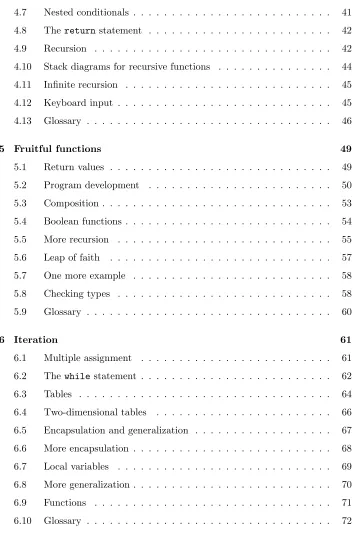
Contents
Foreword v
Preface vii
Contributor List xiii
1 The way of the program 1
1.1 The Python programming language . . . 1
1.2 What is a program? . . . 3
1.3 What is debugging? . . . 4
1.4 Formal and natural languages . . . 6
1.5 The first program . . . 8
1.6 Glossary . . . 8
2 Variables, expressions and statements 11 2.1 Values and types . . . 11
2.2 Variables . . . 12
2.3 Variable names and keywords . . . 13
2.4 Statements . . . 15
2.5 Evaluating expressions . . . 16
xx Contents
2.7 Order of operations . . . 17
2.8 Operations on strings . . . 18
2.9 Composition . . . 19
2.10 Comments . . . 19
2.11 Glossary . . . 20
3 Functions 23 3.1 Function calls . . . 23
3.2 Type conversion . . . 24
3.3 Type coercion . . . 24
3.4 Math functions . . . 25
3.5 Composition . . . 26
3.6 Adding new functions . . . 26
3.7 Definitions and use . . . 29
3.8 Flow of execution . . . 29
3.9 Parameters and arguments . . . 30
3.10 Variables and parameters are local . . . 31
3.11 Stack diagrams . . . 32
3.12 Functions with results . . . 33
3.13 Glossary . . . 34
4 Conditionals and recursion 37 4.1 The modulus operator . . . 37
4.2 Boolean expressions . . . 37
4.3 Logical operators . . . 38
4.4 Conditional execution . . . 39
4.5 Alternative execution . . . 39
Contents xxi
4.7 Nested conditionals . . . 41
4.8 Thereturnstatement . . . 42
4.9 Recursion . . . 42
4.10 Stack diagrams for recursive functions . . . 44
4.11 Infinite recursion . . . 45
4.12 Keyboard input . . . 45
4.13 Glossary . . . 46
5 Fruitful functions 49 5.1 Return values . . . 49
5.2 Program development . . . 50
5.3 Composition . . . 53
5.4 Boolean functions . . . 54
5.5 More recursion . . . 55
5.6 Leap of faith . . . 57
5.7 One more example . . . 58
5.8 Checking types . . . 58
5.9 Glossary . . . 60
6 Iteration 61 6.1 Multiple assignment . . . 61
6.2 Thewhilestatement . . . 62
6.3 Tables . . . 64
6.4 Two-dimensional tables . . . 66
6.5 Encapsulation and generalization . . . 67
6.6 More encapsulation . . . 68
6.7 Local variables . . . 69
6.8 More generalization . . . 70
6.9 Functions . . . 71
[image:21.486.81.436.78.623.2]xxii Contents
7 Strings 73
7.1 A compound data type . . . 73
7.2 Length . . . 74
7.3 Traversal and theforloop . . . 74
7.4 String slices . . . 76
7.5 String comparison . . . 76
7.6 Strings are immutable . . . 77
7.7 Afind function . . . 78
7.8 Looping and counting . . . 78
7.9 Thestringmodule . . . 79
7.10 Character classification . . . 80
7.11 Glossary . . . 81
8 Lists 83
8.1 List values . . . 83
8.2 Accessing elements . . . 84
8.3 List length . . . 85
8.4 List membership . . . 86
8.5 Lists andforloops . . . 86
8.6 List operations . . . 87
8.7 List slices . . . 88
8.8 Lists are mutable . . . 88
8.9 List deletion . . . 89
8.10 Objects and values . . . 91
8.11 Aliasing . . . 92
8.12 Cloning lists . . . 92
8.13 List parameters . . . 93
Contents xxiii 8.15 Matrices . . . 94
8.16 Strings and lists . . . 95
8.17 Glossary . . . 96
9 Tuples 97
9.1 Mutability and tuples . . . 97
9.2 Tuple assignment . . . 98
9.3 Tuples as return values . . . 99
9.4 Random numbers . . . 99
9.5 List of random numbers . . . 100
9.6 Counting . . . 101
9.7 Many buckets . . . 102
9.8 A single-pass solution . . . 104
9.9 Glossary . . . 105
10 Dictionaries 107
10.1 Dictionary operations . . . 108
10.2 Dictionary methods . . . 109
10.3 Aliasing and copying . . . 110
10.4 Sparse matrices . . . 110
10.5 Hints . . . 111
10.6 Long integers . . . 113
10.7 Counting letters . . . 113
10.8 Glossary . . . 114
11 Files and exceptions 117
11.1 Text files . . . 119
11.2 Writing variables . . . 120
xxiv Contents 11.4 Pickling . . . 123
11.5 Exceptions . . . 124
11.6 Glossary . . . 126
12 Classes and objects 129
12.1 User-defined compound types . . . 129
12.2 Attributes . . . 130
12.3 Instances as arguments . . . 131
12.4 Sameness . . . 131
12.5 Rectangles . . . 133
12.6 Instances as return values . . . 134
12.7 Objects are mutable . . . 134
12.8 Copying . . . 135
12.9 Glossary . . . 137
13 Classes and functions 139
13.1 Time . . . 139
13.2 Pure functions . . . 140
13.3 Modifiers . . . 141
13.4 Which is better? . . . 142
13.5 Prototype development versus planning . . . 143
13.6 Generalization . . . 144
13.7 Algorithms . . . 144
13.8 Glossary . . . 145
14 Classes and methods 147
14.1 Object-oriented features . . . 147
14.2 printTime. . . 148
Contents xxv 14.4 A more complicated example . . . 150
14.5 Optional arguments . . . 151
14.6 The initialization method . . . 152
14.7 Points revisited . . . 153
14.8 Operator overloading . . . 154
14.9 Polymorphism . . . 155
14.10 Glossary . . . 157
15 Sets of objects 159
15.1 Composition . . . 159
15.2 Cardobjects . . . 159
15.3 Class attributes and the str method . . . 161
15.4 Comparing cards . . . 162
15.5 Decks . . . 163
15.6 Printing the deck . . . 163
15.7 Shuffling the deck . . . 165
15.8 Removing and dealing cards . . . 166
15.9 Glossary . . . 167
16 Inheritance 169
16.1 Inheritance . . . 169
16.2 A hand of cards . . . 170
16.3 Dealing cards . . . 171
16.4 Printing a Hand . . . 171
16.5 TheCardGameclass . . . 172
16.6 OldMaidHandclass . . . 173
16.7 OldMaidGameclass . . . 175
xxvi Contents
17 Linked lists 181
17.1 Embedded references . . . 181
17.2 TheNodeclass . . . 181
17.3 Lists as collections . . . 183
17.4 Lists and recursion . . . 184
17.5 Infinite lists . . . 185
17.6 The fundamental ambiguity theorem . . . 186
17.7 Modifying lists . . . 186
17.8 Wrappers and helpers . . . 187
17.9 TheLinkedListclass . . . 188
17.10 Invariants . . . 189
17.11 Glossary . . . 190
18 Stacks 191
18.1 Abstract data types . . . 191
18.2 The Stack ADT . . . 192
18.3 Implementing stacks with Python lists . . . 192
18.4 Pushing and popping . . . 193
18.5 Using a stack to evaluate postfix . . . 194
18.6 Parsing . . . 194
18.7 Evaluating postfix . . . 195
18.8 Clients and providers . . . 196
18.9 Glossary . . . 197
19 Queues 199
19.1 The Queue ADT . . . 199
19.2 Linked Queue . . . 200
Contents xxvii 19.4 Improved Linked Queue . . . 201
19.5 Priority queue . . . 203
19.6 TheGolferclass . . . 205
19.7 Glossary . . . 206
20 Trees 207
20.1 Building trees . . . 208
20.2 Traversing trees . . . 209
20.3 Expression trees . . . 209
20.4 Tree traversal . . . 210
20.5 Building an expression tree . . . 212
20.6 Handling errors . . . 216
20.7 The animal tree . . . 216
20.8 Glossary . . . 219
A Debugging 221
A.1 Syntax errors . . . 221
A.2 Runtime errors . . . 223
A.3 Semantic errors . . . 227
B Creating a new data type 231
B.1 Fraction multiplication . . . 232
B.2 Fraction addition . . . 234
B.3 Euclid’s algorithm . . . 234
B.4 Comparing fractions . . . 235
B.5 Taking it further . . . 236
B.6 Glossary . . . 236
C Recommendations for further reading 239
C.1 Python-related web sites and books . . . 240
Chapter 1
The way of the program
The goal of this book is to teach you to think like a computer scientist. This way of thinking combines some of the best features of mathematics, engineering, and natural science. Like mathematicians, computer scientists use formal languages to denote ideas (specifically computations). Like engineers, they design things, assembling components into systems and evaluating tradeoffs among alternatives. Like scientists, they observe the behavior of complex systems, form hypotheses, and test predictions.
The single most important skill for a computer scientist is problem solving. Problem solving means the ability to formulate problems, think creatively about solutions, and express a solution clearly and accurately. As it turns out, the process of learning to program is an excellent opportunity to practice problem-solving skills. That’s why this chapter is called, “The way of the program.”
On one level, you will be learning to program, a useful skill by itself. On another level, you will use programming as a means to an end. As we go along, that end will become clearer.
1.1
The Python programming language
The programming language you will be learning is Python. Python is an example of a high-level language; other high-level languages you might have heard of are C, C++, Perl, and Java.
2 The way of the program languages.” Loosely speaking, computers can only execute programs written in low-level languages. Thus, programs written in a high-level language have to be processed before they can run. This extra processing takes some time, which is a small disadvantage of high-level languages.
But the advantages are enormous. First, it is much easier to program in a high-level language. Programs written in a high-high-level language take less time to write, they are shorter and easier to read, and they are more likely to be correct. Second, high-level languages areportable, meaning that they can run on different kinds of computers with few or no modifications. Low-level programs can run on only one kind of computer and have to be rewritten to run on another.
Due to these advantages, almost all programs are written in high-level languages. Low-level languages are used only for a few specialized applications.
Two kinds of programs process high-level languages into low-level languages: in-terpretersandcompilers. An interpreter reads a high-level program and exe-cutes it, meaning that it does what the program says. It processes the program a little at a time, alternately reading lines and performing computations.
OUTPUT SOURCE
CODE INTERPRETER
A compiler reads the program and translates it completely before the program starts running. In this case, the high-level program is called thesource code, and the translated program is called theobject codeor theexecutable. Once a program is compiled, you can execute it repeatedly without further translation.
OUTPUT CODE
OBJECT EXECUTOR CODE
SOURCE COMPILER
1.2 What is a program? 3
$ python
Python 2.4.1 (#1, Apr 29 2005, 00:28:56)
Type "help", "copyright", "credits" or "license" for more information. >>> print 1 + 1
2
The first line of this example is the command that starts the Python interpreter. The next two lines are messages from the interpreter. The third line starts with >>>, which is the prompt the interpreter uses to indicate that it is ready. We typedprint 1 + 1, and the interpreter replied2.
Alternatively, you can write a program in a file and use the interpreter to execute the contents of the file. Such a file is called ascript. For example, we used a text editor to create a file namedlatoya.pywith the following contents:
print 1 + 1
By convention, files that contain Python programs have names that end with.py.
To execute the program, we have to tell the interpreter the name of the script:
$ python latoya.py 2
In other development environments, the details of executing programs may differ. Also, most programs are more interesting than this one.
Most of the examples in this book are executed on the command line. Working on the command line is convenient for program development and testing, because you can type programs and execute them immediately. Once you have a working program, you should store it in a script so you can execute or modify it in the future.
1.2
What is a program?
A program is a sequence of instructions that specifies how to perform a com-putation. The computation might be something mathematical, such as solving a system of equations or finding the roots of a polynomial, but it can also be a symbolic computation, such as searching and replacing text in a document or (strangely enough) compiling a program.
The details look different in different languages, but a few basic instructions appear in just about every language:
4 The way of the program output: Display data on the screen or send data to a file or other device. math: Perform basic mathematical operations like addition and multiplication. conditional execution: Check for certain conditions and execute the
appropri-ate sequence of stappropri-atements.
repetition: Perform some action repeatedly, usually with some variation. Believe it or not, that’s pretty much all there is to it. Every program you’ve ever used, no matter how complicated, is made up of instructions that look more or less like these. Thus, we can describe programming as the process of breaking a large, complex task into smaller and smaller subtasks until the subtasks are simple enough to be performed with one of these basic instructions.
That may be a little vague, but we will come back to this topic later when we talk aboutalgorithms.
1.3
What is debugging?
Programming is a complex process, and because it is done by human beings, it often leads to errors. For whimsical reasons, programming errors are calledbugs and the process of tracking them down and correcting them is calleddebugging. Three kinds of errors can occur in a program: syntax errors, runtime errors, and semantic errors. It is useful to distinguish between them in order to track them down more quickly.
1.3.1
Syntax errors
Python can only execute a program if the program is syntactically correct; oth-erwise, the process fails and returns an error message. Syntax refers to the structure of a program and the rules about that structure. For example, in En-glish, a sentence must begin with a capital letter and end with a period. this sentence contains asyntax error. So does this one
1.3 What is debugging? 5
1.3.2
Runtime errors
The second type of error is a runtime error, so called because the error does not appear until you run the program. These errors are also called exceptions because they usually indicate that something exceptional (and bad) has happened.
Runtime errors are rare in the simple programs you will see in the first few chap-ters, so it might be a while before you encounter one.
1.3.3
Semantic errors
The third type of error is thesemantic error. If there is a semantic error in your program, it will run successfully, in the sense that the computer will not generate any error messages, but it will not do the right thing. It will do something else. Specifically, it will do what you told it to do.
The problem is that the program you wrote is not the program you wanted to write. The meaning of the program (its semantics) is wrong. Identifying semantic errors can be tricky because it requires you to work backward by looking at the output of the program and trying to figure out what it is doing.
1.3.4
Experimental debugging
One of the most important skills you will acquire is debugging. Although it can be frustrating, debugging is one of the most intellectually rich, challenging, and interesting parts of programming.
In some ways, debugging is like detective work. You are confronted with clues, and you have to infer the processes and events that led to the results you see.
Debugging is also like an experimental science. Once you have an idea what is going wrong, you modify your program and try again. If your hypothesis was correct, then you can predict the result of the modification, and you take a step closer to a working program. If your hypothesis was wrong, you have to come up with a new one. As Sherlock Holmes pointed out, “When you have eliminated the impossible, whatever remains, however improbable, must be the truth.” (A. Conan Doyle,The Sign of Four)
6 The way of the program For example, Linux is an operating system that contains thousands of lines of code, but it started out as a simple program Linus Torvalds used to explore the Intel 80386 chip. According to Larry Greenfield, “One of Linus’s earlier projects was a program that would switch between printing AAAA and BBBB. This later evolved to Linux.” (The Linux Users’ GuideBeta Version 1)
Later chapters will make more suggestions about debugging and other program-ming practices.
1.4
Formal and natural languages
Natural languagesare the languages that people speak, such as English, Span-ish, and French. They were not designed by people (although people try to impose some order on them); they evolved naturally.
Formal languagesare languages that are designed by people for specific appli-cations. For example, the notation that mathematicians use is a formal language that is particularly good at denoting relationships among numbers and symbols. Chemists use a formal language to represent the chemical structure of molecules. And most importantly:
Programming languages are formal languages that have been designed to express computations.
Formal languages tend to have strict rules about syntax. For example, 3 + 3 = 6 is a syntactically correct mathematical statement, but 3=+6$ is not. H2O is a syntactically correct chemical name, but2Zz is not.
Syntax rules come in two flavors, pertaining totokensand structure. Tokens are the basic elements of the language, such as words, numbers, and chemical elements. One of the problems with3=+6$is that$is not a legal token in mathematics (at least as far as we know). Similarly,2Zz is not legal because there is no element with the abbreviationZz.
The second type of syntax error pertains to the structure of a statement—that is, the way the tokens are arranged. The statement 3=+6$is structurally illegal because you can’t place a plus sign immediately after an equal sign. Similarly, molecular formulas have to have subscripts after the element name, not before.
1.4 Formal and natural languages 7 When you read a sentence in English or a statement in a formal language, you have to figure out what the structure of the sentence is (although in a natural language you do this subconsciously). This process is calledparsing.
For example, when you hear the sentence, “The other shoe fell,” you understand that “the other shoe” is the subject and “fell” is the predicate. Once you have parsed a sentence, you can figure out what it means, or the semantics of the sentence. Assuming that you know what a shoe is and what it means to fall, you will understand the general implication of this sentence.
Although formal and natural languages have many features in common—tokens, structure, syntax, and semantics—there are many differences:
ambiguity: Natural languages are full of ambiguity, which people deal with by using contextual clues and other information. Formal languages are designed to be nearly or completely unambiguous, which means that any statement has exactly one meaning, regardless of context.
redundancy: In order to make up for ambiguity and reduce misunderstandings, natural languages employ lots of redundancy. As a result, they are often verbose. Formal languages are less redundant and more concise.
literalness: Natural languages are full of idiom and metaphor. If I say, “The other shoe fell,” there is probably no shoe and nothing falling. Formal languages mean exactly what they say.
People who grow up speaking a natural language—everyone—often have a hard time adjusting to formal languages. In some ways, the difference between formal and natural language is like the difference between poetry and prose, but more so:
Poetry: Words are used for their sounds as well as for their meaning, and the whole poem together creates an effect or emotional response. Ambiguity is not only common but often deliberate.
Prose: The literal meaning of words is more important, and the structure con-tributes more meaning. Prose is more amenable to analysis than poetry but still often ambiguous.
Programs: The meaning of a computer program is unambiguous and literal, and can be understood entirely by analysis of the tokens and structure.
8 The way of the program learn to parse the program in your head, identifying the tokens and interpreting the structure. Finally, the details matter. Little things like spelling errors and bad punctuation, which you can get away with in natural languages, can make a big difference in a formal language.
1.5
The first program
Traditionally, the first program written in a new language is called “Hello, World!” because all it does is display the words, “Hello, World!” In Python, it looks like this:
print "Hello, World!"
This is an example of aprint statement, which doesn’t actually print anything on paper. It displays a value on the screen. In this case, the result is the words
Hello, World!
The quotation marks in the program mark the beginning and end of the value; they don’t appear in the result.
Some people judge the quality of a programming language by the simplicity of the “Hello, World!” program. By this standard, Python does about as well as possible.
1.6
Glossary
problem solving: The process of formulating a problem, finding a solution, and expressing the solution.
high-level language: A programming language like Python that is designed to be easy for humans to read and write.
low-level language: A programming language that is designed to be easy for a computer to execute; also called “machine language” or “assembly lan-guage.”
portability: A property of a program that can run on more than one kind of computer.
interpret: To execute a program in a high-level language by translating it one line at a time.
1.6 Glossary 9 source code: A program in a high-level language before being compiled. object code: The output of the compiler after it translates the program. executable: Another name for object code that is ready to be executed. script: A program stored in a file (usually one that will be interpreted). program: A set of instructions that specifies a computation.
algorithm: A general process for solving a category of problems. bug: An error in a program.
debugging: The process of finding and removing any of the three kinds of pro-gramming errors.
syntax: The structure of a program.
syntax error: An error in a program that makes it impossible to parse (and therefore impossible to interpret).
runtime error: An error that does not occur until the program has started to execute but that prevents the program from continuing.
exception: Another name for a runtime error.
semantic error: An error in a program that makes it do something other than what the programmer intended.
semantics: The meaning of a program.
natural language: Any one of the languages that people speak that evolved naturally.
formal language: Any one of the languages that people have designed for spe-cific purposes, such as representing mathematical ideas or computer pro-grams; all programming languages are formal languages.
token: One of the basic elements of the syntactic structure of a program, analo-gous to a word in a natural language.
parse: To examine a program and analyze the syntactic structure.
Chapter 2
Variables, expressions and
statements
2.1
Values and types
A value is one of the fundamental things—like a letter or a number—that a program manipulates. The values we have seen so far are2(the result when we added1 + 1), and’Hello, World!’.
These values belong to different types: 2 is an integer, and ’Hello, World!’ is a string, so-called because it contains a “string” of letters. You (and the interpreter) can identify strings because they are enclosed in quotation marks.
The print statement also works for integers.
>>> print 4 4
If you are not sure what type a value has, the interpreter can tell you.
>>> type(’Hello, World!’) <type ’str’>
>>> type(17) <type ’int’>
12 Variables, expressions and statements
>>> type(3.2) <type ’float’>
What about values like’17’ and ’3.2’? They look like numbers, but they are in quotation marks like strings.
>>> type(’17’) <type ’str’> >>> type(’3.2’) <type ’str’>
They’re strings.
When you type a large integer, you might be tempted to use commas between groups of three digits, as in1,000,000. This is not a legal integer in Python, but it is a legal expression:
>>> print 1,000,000 1 0 0
Well, that’s not what we expected at all! Python interprets 1,000,000 as a comma-separated list of three integers, which it prints consecutively. This is the first example we have seen of a semantic error: the code runs without producing an error message, but it doesn’t do the “right” thing.
2.2
Variables
One of the most powerful features of a programming language is the ability to manipulatevariables. A variable is a name that refers to a value.
Theassignment statementcreates new variables and gives them values: >>> message = "What’s up, Doc?"
>>> n = 17 >>> pi = 3.14159
This example makes three assignments. The first assigns the string"What’s up, Doc?" to a new variable namedmessage. The second gives the integer 17to n, and the third gives the floating-point number3.14159topi.
2.3 Variable names and keywords 13 A common way to represent variables on paper is to write the name with an arrow pointing to the variable’s value. This kind of figure is called a state diagram because it shows what state each of the variables is in (think of it as the variable’s state of mind). This diagram shows the result of the assignment statements:
message
n
pi
"What’s up, Doc?"
17
3.14159
The print statement also works with variables.
>>> print message What’s up, Doc? >>> print n 17
>>> print pi 3.14159
In each case the result is the value of the variable. Variables also have types; again, we can ask the interpreter what they are.
>>> type(message) <type ’str’> >>> type(n) <type ’int’> >>> type(pi) <type ’float’>
The type of a variable is the type of the value it refers to.
2.3
Variable names and keywords
Programmers generally choose names for their variables that are meaningful—they document what the variable is used for.
Variable names can be arbitrarily long. They can contain both letters and num-bers, but they have to begin with a letter. Although it is legal to use uppercase letters, by convention we don’t. If you do, remember that case matters. Bruce andbruceare different variables.
2.4 Statements 15
>>> 76trombones = ’big parade’ SyntaxError: invalid syntax >>> more$ = 1000000
SyntaxError: invalid syntax
>>> class = ’Computer Science 101’ SyntaxError: invalid syntax
76trombones is illegal because it does not begin with a letter. more$ is illegal because it contains an illegal character, the dollar sign. But what’s wrong with class?
It turns out that class is one of the Python keywords. Keywords define the language’s rules and structure, and they cannot be used as variable names.
Python has twenty-nine keywords:
and def exec if not return
assert del finally import or try
break elif for in pass while
class else from is print yield
continue except global lambda raise
You might want to keep this list handy. If the interpreter complains about one of your variable names and you don’t know why, see if it is on this list.
2.4
Statements
A statement is an instruction that the Python interpreter can execute. We have seen two kinds of statements: print and assignment.
When you type a statement on the command line, Python executes it and displays the result, if there is one. The result of a print statement is a value. Assignment statements don’t produce a result.
A script usually contains a sequence of statements. If there is more than one statement, the results appear one at a time as the statements execute.
For example, the script
print 1 x = 2 print x
16 Variables, expressions and statements
1 2
Again, the assignment statement produces no output.
2.5
Evaluating expressions
An expression is a combination of values, variables, and operators. If you type an expression on the command line, the interpreterevaluatesit and displays the result:
>>> 1 + 1 2
Although expressions contain values, variables, and operators, not every expres-sion contains all of these elements. A value all by itself is considered an expresexpres-sion, and so is a variable.
>>> 17 17 >>> x 2
Confusingly, evaluating an expression is not quite the same thing as printing a value.
>>> message = ’Hello, World!’ >>> message
’Hello, World!’ >>> print message Hello, World!
When the Python interpreter displays the value of an expression, it uses the same format you would use to enter a value. In the case of strings, that means that it includes the quotation marks. But if you use a print statement, Python displays the contents of the string without the quotation marks.
In a script, an expression all by itself is a legal statement, but it doesn’t do anything. The script
17 3.2
’Hello, World!’ 1 + 1
2.6 Operators and operands 17
2.6
Operators and operands
Operators are special symbols that represent computations like addition and multiplication. The values the operator uses are calledoperands.
The following are all legal Python expressions whose meaning is more or less clear:
20+32 hour-1 hour*60+minute minute/60 5**2 (5+9)*(15-7)
The symbols+,-, and/, and the use of parenthesis for grouping, mean in Python what they mean in mathematics. The asterisk (*) is the symbol for multiplication, and**is the symbol for exponentiation.
When a variable name appears in the place of an operand, it is replaced with its value before the operation is performed.
Addition, subtraction, multiplication, and exponentiation all do what you expect, but you might be surprised by division. The following operation has an unexpected result:
>>> minute = 59 >>> minute/60 0
The value of minute is 59, and in conventional arithmetic 59 divided by 60 is 0.98333, not 0. The reason for the discrepancy is that Python is performing integer division.
When both of the operands are integers, the result must also be an integer, and by convention, integer division always roundsdown, even in cases like this where the next integer is very close.
A possible solution to this problem is to calculate a percentage rather than a fraction:
>>> minute*100/60 98
Again the result is rounded down, but at least now the answer is approximately correct. Another alternative is to use floating-point division, which we get to in Chapter 3.
2.7
Order of operations
18 Variables, expressions and statements
• Parentheses have the highest precedence and can be used to force an ex-pression to evaluate in the order you want. Since exex-pressions in parentheses are evaluated first, 2 * (3-1) is 4, and(1+1)**(5-2) is 8. You can also use parentheses to make an expression easier to read, as in(minute * 100) / 60, even though it doesn’t change the result.
• Exponentiation has the next highest precedence, so2**1+1is 3 and not 4, and3*1**3is 3 and not 27.
• Multiplication andDivision have the same precedence, which is higher than Addition andSubtraction, which also have the same precedence. So2*3-1 yields 5 rather than 4, and 2/3-1 is -1, not 1 (remember that in integer division, 2/3=0).
• Operators with the same precedence are evaluated from left to right. So in the expressionminute*100/60, the multiplication happens first, yielding 5900/60, which in turn yields98. If the operations had been evaluated from right to left, the result would have been 59*1, which is59, which is wrong.
2.8
Operations on strings
In general, you cannot perform mathematical operations on strings, even if the strings look like numbers. The following are illegal (assuming that messagehas typestring):
message-1 ’Hello’/123 message*’Hello’ ’15’+2
Interestingly, the + operator does work with strings, although it does not do exactly what you might expect. For strings, the+ operator represents concate-nation, which means joining the two operands by linking them end-to-end. For example:
fruit = ’banana’
bakedGood = ’ nut bread’ print fruit + bakedGood
The output of this program is banana nut bread. The space before the word nut is part of the string, and is necessary to produce the space between the concatenated strings.
2.9 Composition 19 On one hand, this interpretation of+and*makes sense by analogy with addition and multiplication. Just as 4*3 is equivalent to 4+4+4, we expect ’Fun’*3 to be the same as ’Fun’+’Fun’+’Fun’, and it is. On the other hand, there is a significant way in which string concatenation and repetition are different from integer addition and multiplication. Can you think of a property that addition and multiplication have that string concatenation and repetition do not?
2.9
Composition
So far, we have looked at the elements of a program—variables, expressions, and statements—in isolation, without talking about how to combine them.
One of the most useful features of programming languages is their ability to take small building blocks and compose them. For example, we know how to add numbers and we know how to print; it turns out we can do both at the same time:
>>> print 17 + 3 20
In reality, the addition has to happen before the printing, so the actions aren’t actually happening at the same time. The point is that any expression involving numbers, strings, and variables can be used inside a print statement. You’ve already seen an example of this:
print ’Number of minutes since midnight: ’, hour*60+minute
You can also put arbitrary expressions on the right-hand side of an assignment statement:
percentage = (minute * 100) / 60
This ability may not seem impressive now, but you will see other examples where composition makes it possible to express complex computations neatly and con-cisely.
Warning: There are limits on where you can use certain expressions. For example, the left-hand side of an assignment statement has to be a variablename, not an expression. So, the following is illegal: minute+1 = hour.
2.10
Comments
20 Variables, expressions and statements For this reason, it is a good idea to add notes to your programs to explain in natural language what the program is doing. These notes are calledcomments, and they are marked with the#symbol:
# compute the percentage of the hour that has elapsed percentage = (minute * 100) / 60
In this case, the comment appears on a line by itself. You can also put comments at the end of a line:
percentage = (minute * 100) / 60 # caution: integer division
Everything from the #to the end of the line is ignored—it has no effect on the program. The message is intended for the programmer or for future programmers who might use this code. In this case, it reminds the reader about the ever-surprising behavior of integer division.
This sort of comment is less necessary if you use the integer division operation, //. It has the same effect as the division operator1
, but it signals that the effect is deliberate.
percentage = (minute * 100) // 60
The integer division operator is like a comment that says, “I know this is integer division, and I like it that way!”
2.11
Glossary
value: A number or string (or other thing to be named later) that can be stored in a variable or computed in an expression.
type: A set of values. The type of a value determines how it can be used in expressions. So far, the types you have seen are integers (typeint), floating-point numbers (typefloat), and strings (typestring).
floating-point: A format for representing numbers with fractional parts. variable: A name that refers to a value.
statement: A section of code that represents a command or action. So far, the statements you have seen are assignments and print statements.
assignment: A statement that assigns a value to a variable.
2.11 Glossary 21 state diagram: A graphical representation of a set of variables and the values
to which they refer.
keyword: A reserved word that is used by the compiler to parse a program; you cannot use keywords likeif,def, andwhileas variable names.
operator: A special symbol that represents a simple computation like addition, multiplication, or string concatenation.
operand: One of the values on which an operator operates.
expression: A combination of variables, operators, and values that represents a single result value.
evaluate: To simplify an expression by performing the operations in order to yield a single value.
integer division: An operation that divides one integer by another and yields an integer. Integer division yields only the whole number of times that the numerator is divisible by the denominator and discards any remainder.
rules of precedence: The set of rules governing the order in which expressions involving multiple operators and operands are evaluated.
concatenate: To join two operands end-to-end.
composition: The ability to combine simple expressions and statements into compound statements and expressions in order to represent complex com-putations concisely.
Chapter 3
Functions
3.1
Function calls
You have already seen one example of afunction call: >>> type("32")
<type ’str’>
The name of the function istype, and it displays the type of a value or variable. The value or variable, which is called the argument of the function, has to be enclosed in parentheses. It is common to say that a function “takes” an argument and “returns” a result. The result is called thereturn value.
Instead of printing the return value, we could assign it to a variable:
>>> betty = type("32") >>> print betty
<type ’str’>
As another example, the idfunction takes a value or a variable and returns an integer that acts as a unique identifier for the value:
>>> id(3) 134882108 >>> betty = 3 >>> id(betty) 134882108
24 Functions
3.2
Type conversion
Python provides a collection of built-in functions that convert values from one type to another. Theintfunction takes any value and converts it to an integer, if possible, or complains otherwise:
>>> int("32") 32
>>> int("Hello")
ValueError: invalid literal for int(): Hello
intcan also convert floating-point values to integers, but remember that it trun-cates the fractional part:
>>> int(3.99999) 3
>>> int(-2.3) -2
Thefloatfunction converts integers and strings to floating-point numbers:
>>> float(32) 32.0
>>> float("3.14159") 3.14159
Finally, thestrfunction converts to typestring:
>>> str(32) ’32’
>>> str(3.14149) ’3.14149’
It may seem odd that Python distinguishes the integer value1from the floating-point value1.0. They may represent the same number, but they belong to differ-ent types. The reason is that they are represdiffer-ented differdiffer-ently inside the computer.
3.3
Type coercion
Now that we can convert between types, we have another way to deal with integer division. Returning to the example from the previous chapter, suppose we want to calculate the fraction of an hour that has elapsed. The most obvious expression, minute / 60, does integer arithmetic, so the result is always 0, even at 59 minutes past the hour.
3.4 Math functions 25
>>> minute = 59
>>> float(minute) / 60 0.983333333333
Alternatively, we can take advantage of the rules for automatic type conversion, which is calledtype coercion. For the mathematical operators, if either operand is afloat, the other is automatically converted to afloat:
>>> minute = 59 >>> minute / 60.0 0.983333333333
By making the denominator afloat, we force Python to do floating-point division.
3.4
Math functions
In mathematics, you have probably seen functions likesinandlog, and you have learned to evaluate expressions likesin(pi/2)andlog(1/x). First, you evaluate the expression in parentheses (the argument). For example,pi/2is approximately 1.571, and1/xis 0.1 (ifxhappens to be 10.0).
Then, you evaluate the function itself, either by looking it up in a table or by performing various computations. Thesinof 1.571 is 1, and thelogof 0.1 is -1 (assuming thatlogindicates the logarithm base 10).
This process can be applied repeatedly to evaluate more complicated expressions likelog(1/sin(pi/2)). First, you evaluate the argument of the innermost func-tion, then evaluate the funcfunc-tion, and so on.
Python has a math module that provides most of the familiar mathematical func-tions. Amoduleis a file that contains a collection of related functions grouped together.
Before we can use the functions from a module, we have to import them:
>>> import math
To call one of the functions, we have to specify the name of the module and the name of the function, separated by a dot, also known as a period. This format is calleddot notation.
>>> decibel = math.log10 (17.0) >>> angle = 1.5
26 Functions The first statement setsdecibelto the logarithm of 17, base10. There is also a function calledlogthat takes logarithm basee.
The third statement finds the sine of the value of the variable angle. sin and the other trigonometric functions (cos,tan, etc.) take arguments in radians. To convert from degrees to radians, divide by 360 and multiply by2*pi. For example, to find the sine of 45 degrees, first calculate the angle in radians and then take the sine:
>>> degrees = 45
>>> angle = degrees * 2 * math.pi / 360.0 >>> math.sin(angle)
0.707106781187
The constantpiis also part of the math module. If you know your geometry, you can check the previous result by comparing it to the square root of two divided by two:
>>> math.sqrt(2) / 2.0 0.707106781187
3.5
Composition
Just as with mathematical functions, Python functions can be composed, meaning that you use one expression as part of another. For example, you can use any expression as an argument to a function:
>>> x = math.cos(angle + math.pi/2)
This statement takes the value ofpi, divides it by 2, and adds the result to the value ofangle. The sum is then passed as an argument to thecosfunction.
You can also take the result of one function and pass it as an argument to another:
>>> x = math.exp(math.log(10.0))
This statement finds the log base e of 10 and then raises eto that power. The result gets assigned tox.
3.6
Adding new functions
3.6 Adding new functions 27 problems is one of the most useful things about a general-purpose programming language.
In the context of programming, a functionis a named sequence of statements that performs a desired operation. This operation is specified in a function definition. The functions we have been using so far have been defined for us, and these definitions have been hidden. This is a good thing, because it allows us to use the functions without worrying about the details of their definitions.
The syntax for a function definition is:
def NAME( LIST OF PARAMETERS ): STATEMENTS
You can make up any names you want for the functions you create, except that you can’t use a name that is a Python keyword. The list of parameters specifies what information, if any, you have to provide in order to use the new function.
There can be any number of statements inside the function, but they have to be indented from the left margin. In the examples in this book, we will use an indentation of two spaces.
The first couple of functions we are going to write have no parameters, so the syntax looks like this:
def newLine(): print
This function is named newLine. The empty parentheses indicate that it has no parameters. It contains only a single statement, which outputs a newline character. (That’s what happens when you use a print command without any arguments.)
The syntax for calling the new function is the same as the syntax for built-in functions:
print "First Line." newLine()
print "Second Line."
The output of this program is:
First line.
Second line.
28 Functions
print "First Line." newLine()
newLine() newLine()
print "Second Line."
Or we could write a new function namedthreeLinesthat prints three new lines:
def threeLines(): newLine() newLine() newLine()
print "First Line." threeLines()
print "Second Line."
This function contains three statements, all of which are indented by two spaces. Since the next statement is not indented, Python knows that it is not part of the function.
You should notice a few things about this program:
1. You can call the same procedure repeatedly. In fact, it is quite common and useful to do so.
2. You can have one function call another function; in this case threeLines calls newLine.
So far, it may not be clear why it is worth the trouble to create all of these new functions. Actually, there are a lot of reasons, but this example demonstrates two:
• Creating a new function gives you an opportunity to name a group of state-ments. Functions can simplify a program by hiding a complex computation behind a single command and by using English words in place of arcane code.
• Creating a new function can make a program smaller by eliminating repet-itive code. For example, a short way to print nine consecutive new lines is to callthreeLinesthree times.
As an exercise, write a function called nineLines that uses
3.7 Definitions and use 29
3.7
Definitions and use
Pulling together the code fragments from Section 3.6, the whole program looks like this:
def newLine(): print
def threeLines(): newLine() newLine() newLine()
print "First Line." threeLines()
print "Second Line."
This program contains two function definitions: newLineandthreeLines. Func-tion definiFunc-tions get executed just like other statements, but the effect is to create the new function. The statements inside the function do not get executed until the function is called, and the function definition generates no output.
As you might expect, you have to create a function before you can execute it. In other words, the function definition has to be executed before the first time it is called.
As an exercise, move the last three lines of th