Applied Crypto Hardening
Wolfgang Breyha, David Durvaux, Tobias Dussa, L. Aaron Kaplan, Florian Mendel,
Christian Mock, Manuel Koschuch, Adi Kriegisch, Ulrich Pöschl, Ramin Sabet, Berg
San, Ralf Schlatterbeck, Thomas Schreck, Alexander Würstlein, Aaron Zauner, Pepi
Zawodsky
(University of Vienna, CERT.be, KIT-CERT, CERT.at, A-SIT/IAIK, coretec.at, FH Campus Wien, VRVis, MilCERT Austria, A-Trust, Runtux.com, Friedrich-Alexander University Erlangen-Nuremberg, azet.org, maclemon.at)
Acknowledgements
We would like to express our thanks to the following reviewers and people who have generously offered their time and interest (in alphabetical order):
Brown, Scott Brulebois, Cyril Dirksen-Thedens, Mathis
Diszeratis, Meiko Dulaunoy, Alexandre
Gühring Philipp Grigg, Ian Horenbeck, Maarten
Huebl, Axel Kovacic, Daniel Lenzhofer, Stefan Lorünser, Thomas Mehlmauer, Christian
Millauer, Tobias
Mirbach, Andreas O’Brien, Hugh Pacher, Christoph
Palfrader, Peter Pape, Tobias (layout) Petukhova, Anna (Logo)
Pichler, Patrick Riebesel, Nicolas
Roeckx, Kurt Rublik, Martin Schwarz, René («DigNative»)
Seidl, Eva (PDF layout) Wagner, Sebastian («sebix»)
Zangerl, Alexander
Abstract
“Unfortunately, the computer security and cryptology communities have drifted apart over the last 25 years. Security people don’t always understand the available crypto tools, and crypto people don’t always understand the real-world problems.”
— Ross Anderson in [And08]
This guide arose out of the need for system administrators to have an updated, solid, well re-searched and thought-through guide for configuring SSL, PGP, SSH and other cryptographic tools in the post-Snowden age. Triggered by the NSA leaks in the summer of 2013, many system admin-istrators and IT security officers saw the need to strengthen their encryption settings. This guide is specifically written for these system administrators.
As Schneier noted in [Sch13a], it seems that intelligence agencies and adversaries on the Internet are not breaking so much the mathematics of encryption per se, but rather use software and hardware weaknesses, subvert standardization processes, plant backdoors, rig random number generators and most of all exploit careless settings in server configurations and encryption systems to listen in on private communications. Worst of all, most communication on the internet is not encrypted at all by default (for SMTP, opportunistic TLS would be a solution).
This guide can only address one aspect of securing our information systems: getting the crypto settings right to the best of the authors’ current knowledge. Other attacks, as the above mentioned, require different protection schemes which are not covered in this guide. This guide is not an introduction to cryptography. For background information on cryptography and cryptoanalysis we would like to refer the reader to the references in appendixBandCat the end of this document.
The focus of this guide is merely to give currentbest practices for configuring complex cipher suites and related parameters in acopy & paste-able manner. The guide tries to stay as concise as is pos-sible for such a complex topic as cryptography. Naturally, it can not be complete. There are many excellent guides [IS12,fSidIB13,ENI13] and best practice documents available when it comes to cryptography. However none of them focuses specifically on what an average system administrator needs for hardening his or her systems’ crypto settings.
Contents
1. Introduction 7
1.1. Audience . . . 7
1.2. Related publications . . . 7
1.3. How to read this guide . . . 7
1.4. Disclaimer and scope. . . 8
1.5. Methods . . . 10
2. Practical recommendations 11 2.1. Webservers . . . 11
2.1.1. Apache . . . 11
2.1.2. lighttpd . . . 12
2.1.3. nginx . . . 14
2.1.4. MS IIS . . . 15
2.2. SSH . . . 18
2.2.1. OpenSSH. . . 18
2.2.2. Cisco ASA . . . 20
2.2.3. Cisco IOS . . . 21
2.3. Mail Servers . . . 22
2.3.1. SMTP in general . . . 22
2.3.2. Dovecot . . . 23
2.3.3. cyrus-imapd . . . 24
2.3.4. Postfix . . . 25
2.3.5. Exim . . . 27
2.4. VPNs . . . 31
2.4.1. IPsec . . . 31
2.4.2. Check Point FireWall-1 . . . 33
2.4.3. OpenVPN . . . 36
2.4.4. PPTP . . . 38
2.4.5. Cisco ASA . . . 38
2.4.6. Openswan . . . 40
2.4.7. tinc . . . 42
2.5. PGP/GPG - Pretty Good Privacy . . . 43
2.6. IPMI, ILO and other lights out management solutions. . . 43
2.7. Instant Messaging Systems . . . 44
2.7.1. General server configuration recommendations. . . 44
2.7.2. Prosody . . . 44
2.7.3. ejabberd . . . 45
2.7.4. Chat privacy - Off-the-Record Messaging (OTR) . . . 46
2.7.5. Charybdis . . . 46
2.7.6. SILC . . . 47
2.8. Database Systems . . . 47
2.8.1. Oracle . . . 47
2.8.2. MySQL . . . 47
Contents Contents
2.8.4. PostgreSQL . . . 49
2.9. Intercepting proxy solutions and reverse proxies . . . 50
2.9.1. Bluecoat . . . 50
2.9.2. Pound . . . 51
2.10.Kerberos . . . 52
2.10.1. Overview . . . 52
2.10.2. Implementations . . . 54
3. Theory 58 3.1. Overview . . . 58
3.2. Cipher suites. . . 58
3.2.1. Architectural overview . . . 58
3.2.2. Forward Secrecy . . . 60
3.2.3. Recommended cipher suites . . . 60
3.2.4. Compatibility . . . 62
3.3. Random Number Generators . . . 63
3.3.1. When random number generators fail . . . 63
3.3.2. Linux . . . 64
3.3.3. Recommendations . . . 64
3.4. Keylengths . . . 65
3.5. A note on Elliptic Curve Cryptography . . . 66
3.6. A note on SHA-1 . . . 67
3.7. A note on Diffie Hellman Key Exchanges . . . 67
3.8. Public Key Infrastructures . . . 68
3.8.1. Certificate Authorities . . . 68
3.8.2. Hardening PKI . . . 70
3.9. TLS and its support mechanisms . . . 70
3.9.1. HTTP Strict Transport Security . . . 70
A. Tools 76 A.1. SSL & TLS . . . 76
A.2. Key length . . . 77
A.3. RNGs . . . 77
A.4. Guides . . . 77
B. Links 78
C. Suggested Reading 79
D. Cipher Suite Name Cross-Reference 80
E. Further research 89
1. Introduction
1.1. Audience
Sysadmins. Sysadmins. Sysadmins. They are a force-multiplier.
1.2. Related publications
Ecrypt II [IS12], ENISA’s report on Algorithms, key sizes and parameters [ENI13] and BSI’s Technische Richtlinie TR-02102 [fSidIB13] are great publications which are more in depth than this guide. However, this guide has a different approach: it focuses oncopy & paste-able settingsfor system administrators, effectively breaking down the complexity in the above mentioned reports to an easy to use format for the intended target audience.
1.3. How to read this guide
This guide tries to accommodate two needs: first of all, having a handy reference on how to configure the most common services’ crypto settings and second of all, explain a bit of background on cryptography. This background is essential if the reader wants to chose his or her own cipher string settings.
System administrators who want to copy & paste recommendations quickly without spending a lot of time on background reading on cryptography or cryptanalysis can do so, by simply searching for the corresponding section in chapter2(“Practical recommendations”).
It is important to know that in this guide the authors arrived at two recommendations:Cipher string AandCipher string B. While the former is a hardened recommendation the latter is a weaker one but provides wider compatibility.Cipher strings A and Bare described in3.2.3.
However, for the quick copy & paste approach it is important to know that this guide assumes users are happy withCipher string B.
1.4. Disclaimer and scope 1.4. Disclaimer and scope
Start Introduction
No time, I just want
to copy & paste readPractical recommendations
To understand why we chose
certain settings, readTheoryfirst re-readPractical recommendations
Appendix: references, links yes
no
1.4. Disclaimer and scope
“A chain is no stronger than its weakest link, and life is after all a chain”
— William James
“Encryption works. Properly implemented strong crypto systems are one of the few things that you can rely on. Unfortunately, endpoint security is so terrifically weak that NSA can frequently find ways around it.”
— Edward Snowden, answering questions live on the Guardian’s website [Gle13]
This guide specifically does not address physical security, protecting software and hardware against exploits, basic IT security housekeeping, information assurance techniques, traffic analysis attacks, issues with key-roll over and key management, securing client PCs and mobile devices (theft, loss), proper Operations Security1, social engineering attacks, protection against tempest [Wik13c] attack techniques, thwarting different side-channel attacks (timing–, cache timing–, differential fault analysis, differential power analysis or power monitoring attacks), downgrade attacks, jamming the encrypted channel or other similar attacks which are typically employed to circumvent strong encryption. The authors can not overstate the importance of these other techniques. Interested
1.4. Disclaimer and scope 1.4. Disclaimer and scope
readers are advised to read about these attacks in detail since they give a lot of insight into other parts of cryptography engineering which need to be dealt with.2
This guide does not talk much about the well-known insecurities of trusting a public-key infrastruc-ture (PKI)3. Nor does this text fully explain how to run your own Certificate Authority (CA).
Most of this zoo of information security issues are addressed in the very comprehensive book “Security Engineering” by Ross Anderson [And08].
For some experts in cryptography this text might seem too informal. However, we strive to keep the language as non-technical as possible and fitting for our target audience: system administrators who can collectively improve the security level for all of their users.
“Security is a process, not a product.”
— Bruce Schneier
This guide can only describe what the authors currently believe to be the best settings based on their personal experience and after intensive cross checking with literature and experts. For a complete list of people who reviewed this paper, see theAcknowledgements. Even though multiple specialists reviewed the guide, the authors can giveno guarantee whatsoeverthat they made the right recommendations. Keep in mind that tomorrow there might be new attacks on some ciphers and many of the recommendations in this guide might turn out to be wrong. Security is a process.
We therefore recommend that system administrators keep up to date with recent topics in IT security and cryptography.
In this sense, this guide is very focused on getting the cipher strings done right even though there is much more to do in order to make a system more secure. We the authors, need this document as much as the reader needs it.
Scope
In this guide, we restricted ourselves to:
• Internet-facing services • Commonly used services
• Devices which are used in business environments (this specifically excludes XBoxes, Playsta-tions and similar consumer devices)
• OpenSSL
We explicitly excluded:
• Specialized systems (such as medical devices, most embedded systems, industrial control systems, etc.)
2An easy to read yet very insightful recent example is the "FLUSH+RELOAD" technique [YF13] for leaking cryptographic
keys from one virtual machine to another via L3 cache timing attacks.
3Interested readers are referred tohttps://bugzilla.mozilla.org/show_bug.cgi?id=647959orhttp://www.h-online.com/
1.5. Methods 1.5. Methods
• Wireless Access Points • Smart-cards/chip cards
1.5. Methods
“C.O.S.H.E.R - completely open source, headers, engineering and research
— A. Kaplan’s mail signature for many years
For writing this guide, we chose to collect the most well researched facts about cryptography settings and let as many trusted specialists as possible review those settings. The review process is completely open and done on a public mailing list. The document is available (read-only) to the public Internet on the web page and the source code of this document is on a public git server, mirrored on GitHub.com and open for public scrutiny. However, write permissions to the document are only granted to vetted people. The list of reviewers can be found in the section “Acknowledgements”. Every write operation to the document is logged via the “git” version control system and can thus be traced back to a specific author. We accept “git pull requests” on the github mirror4for this paper.
Public peer-review and multiple eyes checking of our guide is the best strategy we can imagine at the present moment5.
We invite the gentle reader to participate in this public review process.
4https://github.com/BetterCrypto/Applied-Crypto-Hardening
2. Practical recommendations
2.1. Webservers
2.1.1. Apache
Note that any cipher suite starting with EECDH can be omitted, if in doubt. (Compared to the theory section, EECDH in Apache and ECDHE in OpenSSL are synonyms1)
Tested with Versions
• Apache 2.2.22 linked against OpenSSL 1.0.1e, Debian Wheezy • Apache 2.4.6 linked against OpenSSL 1.0.1e, Debian Jessie
Settings
Enabled modulesSSLandHeadersare required. SSLProtocol All -SSLv2 -SSLv3
SSLHonorCipherOrder On SSLCompression off
# Add six earth month HSTS header for all users... Header set Strict-Transport-Security "max-age=15768000"
# If you want to protect all subdomains, use the following header # ALL subdomains HAVE TO support HTTPS if you use this!
# Strict-Transport-Security: "max-age=15768000 ; includeSubDomains"
SSLCipherSuite 'EDH+CAMELLIA:EDH+aRSA:EECDH+aRSA+AESGCM:EECDH+aRSA+SHA384:EECDH+\ \aRSA+SHA256:EECDH:+CAMELLIA256:+AES256:+CAMELLIA128:+AES128:+SSLv3:!aNULL:!\ \eNULL:!LOW:!3DES:!MD5:!EXP:!PSK:!DSS:!RC4:!SEED:!ECDSA:CAMELLIA256-SHA:AES256\ \-SHA:CAMELLIA128-SHA:AES128-SHA'
Listing 2.1:SSL configuration for an Apache vhost [configuration/Webservers/Apache/default-ssl]
2.1. Webservers 2.1.2. lighttpd
Additional settings
You might want to redirect everything tohttps:// if possible. In Apache you can do this with the following setting inside of a VirtualHost environment:
<VirtualHost *:80>
Redirect permanent / https://SERVER_NAME/ </VirtualHost>
Listing 2.2:https auto-redirect vhost [configuration/Webservers/Apache/hsts-vhost]
References
• Apache2 Docs on SSL and TLS:https://httpd.apache.org/docs/2.4/ssl/
How to test
See appendixA
2.1.2. lighttpd
Tested with Versions
• lighttpd/1.4.31-4 with OpenSSL 1.0.1e on Debian Wheezy
• lighttpd/1.4.33 with OpenSSL 0.9.8o on Debian Squeeze (note that TLSv1.2 does not work in openssl 0.9.8 thus not all ciphers actually work)
• lighttpd/1.4.28-2 with OpenSSL 0.9.8o on Debian Squeeze (note that TLSv1.2 does not work in openssl 0.9.8 thus not all ciphers actually work)
Settings
$SERVER["socket"] == "0.0.0.0:443" { ssl.engine = "enable"
ssl.use-sslv2 = "disable" ssl.use-sslv3 = "disable"
ssl.pemfile = "/etc/lighttpd/server.pem"
ssl.cipher-list = "EDH+CAMELLIA:EDH+aRSA:EECDH+aRSA+AESGCM:EECDH+aRSA+SHA384:\ \EECDH+aRSA+SHA256:EECDH:+CAMELLIA256:+AES256:+CAMELLIA128:+AES128:+SSLv3:!\ \aNULL!eNULL:!LOW:!3DES:!MD5:!EXP:!PSK:!DSS:!RC4:!SEED:!ECDSA:CAMELLIA256-SHA:\ \AES256-SHA:CAMELLIA128-SHA:AES128-SHA"
ssl.honor-cipher-order = "enable"
2.1. Webservers 2.1.2. lighttpd
# use this only if all subdomains support HTTPS!
# setenv.add-response-header = ( "Strict-Transport-Security" => "max-age\ \=15768000; includeSubDomains")
}
Listing 2.3:SSL configuration for lighttpd [configuration/Webservers/lighttpd/10-ssl.conf]
Starting with lighttpd version 1.4.29 Diffie-Hellman and Elliptic-Curve Diffie-Hellman key agreement protocols are supported. By default, elliptic curve "prime256v1" (also "secp256r1") will be used, if no other is given. To select special curves, it is possible to set them using the configuration options ssl.dh-fileandssl.ec-curve.
# use group16 dh parameters
ssl.dh-file = "/etc/lighttpd/ssl/dh4096.pem" ssl.ec-curve = "secp384r1"
Listing 2.4:SSL EC/DH configuration for lighttpd [configuration/Webservers/lighttpd/10-ssl-dh.conf]
Please read section3.7for more information on Diffie Hellman key exchange and elliptic curves.
Additional settings
As for any other webserver, you might want to automatically redirecthttp://traffic towardhttps://. It is also recommended to set the environment variableHTTPS, so the PHP applications run by the webserver can easily detect that HTTPS is in use.
$HTTP["scheme"] == "http" {
# capture vhost name with regex condition -> %0 in redirect pattern # must be the most inner block to the redirect rule
$HTTP["host"] =~ ".*" {
url.redirect = (".*" => "https://%0$0") }
# Set the environment variable properly setenv.add-environment = (
"HTTPS" => "on" )
}
Listing 2.5:https auto-redirect configuration [configuration/Webservers/lighttpd/11-hsts.conf]
Additional information
2.1. Webservers 2.1.3. nginx
Support for other SSL-libraries like GnuTLS will be available in the upcoming 2.x branch, which is currently under development.
References
• HTTPS redirection:http://redmine.lighttpd.net/projects/1/wiki/HowToRedirectHttpToHttps
• Lighttpd Docs SSL:http://redmine.lighttpd.net/projects/lighttpd/wiki/Docs_SSL
• Release 1.4.30 (How to mitigate BEAST attack)http://redmine.lighttpd.net/projects/lighttpd/ wiki/Release-1_4_30
• SSL Compression disabled by default:http://redmine.lighttpd.net/issues/2445
How to test
See appendixA
2.1.3. nginx
Tested with Version
• 1.4.4 with OpenSSL 1.0.1e on OS X Server 10.8.5
• 1.2.1-2.2+wheezy2 with OpenSSL 1.0.1e on Debian Wheezy • 1.4.4 with OpenSSL 1.0.1e on Debian Wheezy
• 1.2.1-2.2 bpo60+2 with OpenSSL 0.9.8o on Debian Squeeze (note that TLSv1.2 does not work in openssl 0.9.8 thus not all ciphers actually work)
Settings
ssl_prefer_server_ciphers on;
ssl_protocols TLSv1 TLSv1.1 TLSv1.2; # not possible to do exclusive
ssl_ciphers 'EDH+CAMELLIA:EDH+aRSA:EECDH+aRSA+AESGCM:EECDH+aRSA+SHA384:EECDH+\ \aRSA+SHA256:EECDH:+CAMELLIA256:+AES256:+CAMELLIA128:+AES128:+SSLv3:!aNULL:!\ \eNULL:!LOW:!3DES:!MD5:!EXP:!PSK:!DSS:!RC4:!SEED:!ECDSA:CAMELLIA256-SHA:AES256\ \-SHA:CAMELLIA128-SHA:AES128-SHA';
add_header Strict-Transport-Security max-age=15768000; # six months # use this only if all subdomains support HTTPS!
# add_header Strict-Transport-Security "max-age=15768000; includeSubDomains";
Listing 2.6:SSL settings for nginx [configuration/Webservers/nginx/default]
If you absolutely want to specify your own DH parameters, you can specify them via
ssl_dhparam file;
2.1. Webservers 2.1.4. MS IIS
Additional settings
If you decide to trust NIST’s ECC curve recommendation, you can add the following line to nginx’s configuration file to select special curves:
ssl_ecdh_curve secp384r1;
Listing 2.7:SSL EC/DH settings for nginx [configuration/Webservers/nginx/default-ec]
You might want to redirect everything tohttps:// if possible. In Nginx you can do this with the following setting:
return 301 https://$host$request_uri;
Listing 2.8:https auto-redirect in nginx [configuration/Webservers/nginx/default-hsts]
References
• http://nginx.org/en/docs/http/ngx_http_ssl_module.html
• http://wiki.nginx.org/HttpSslModule
How to test
See appendixA
2.1.4. MS IIS
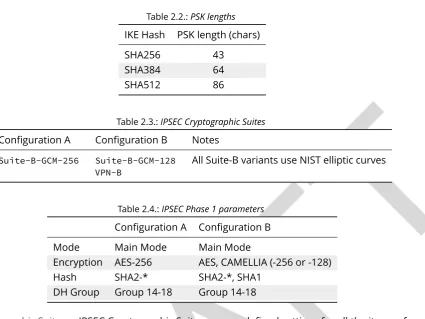
To configure SSL/TLS on Windows Server IIS Crypto can be used.2Simply start the Programm, no installation required. The tool changes the registry keys described below. A restart is required for the changes to take effect.
Instead of using the IIS Crypto Tool the configuration can be set using the Windows Registry. The following Registry keys apply to the newer Versions of Windows (Windows 7, Windows Server 2008, Windows Server 2008 R2, Windows Server 2012 and Windows Server 2012 R2). For detailed information about the older versions see the Microsoft knowledgebase article.3
[HKEY_LOCAL_MACHINE\SYSTEM\CurrentControlSet\Control\SecurityProviders\Schannel] [HKEY_LOCAL_MACHINE\SYSTEM\CurrentControlSet\Control\SecurityProviders\Schannel\\
\Ciphers]
[HKEY_LOCAL_MACHINE\SYSTEM\CurrentControlSet\Control\SecurityProviders\Schannel\\ \CipherSuites]
2.1. Webservers 2.1.4. MS IIS
[HKEY_LOCAL_MACHINE\SYSTEM\CurrentControlSet\Control\SecurityProviders\Schannel\\ \Hashes]
[HKEY_LOCAL_MACHINE\SYSTEM\CurrentControlSet\Control\SecurityProviders\Schannel\\ \KeyExchangeAlgorithms]
[HKEY_LOCAL_MACHINE\SYSTEM\CurrentControlSet\Control\SecurityProviders\Schannel\\ \Protocols]
Tested with Version
• Windows Server 2008 • Windows Server 2008 R2 • Windows Server 2012 • Windows Server 2012 R2
• Windows Vista and Internet Explorer 7 and upwards • Windows 7 and Internet Explorer 8 and upwards • Windows 8 and Internet Explorer 10 and upwards • Windows 8.1 and Internet Explorer 11
Settings
When trying to avoid RC4 (RC4 biases) as well as CBC (BEAST-Attack) by using GCM and to support perfect forward secrecy, Microsoft SChannel (SSL/TLS, Auth,.. Stack) supports ECDSA but lacks support for RSA signatures (see ECC suite B doubts4).
Since one is stuck with ECDSA, an elliptic curve certificate needs to be used.
The configuration of cipher suites MS IIS will use, can be configured in one of the following ways:
1. Group Policy5
2. Registry6
3. IIS Crypto7
4. Powershell
Table 2.1 shows the process of turning on one algorithm after another and the effect on the supported clients tested using https://www.ssllabs.com.
SSL 3.0,SSL 2.0andMD5are turned off.TLS 1.0andTLS 1.2are turned on.
4http://safecurves.cr.yp.to/rigid.html
5http://msdn.microsoft.com/en-us/library/windows/desktop/bb870930(v=vs.85).aspx 6http://support.microsoft.com/kb/245030
2.1. Webservers 2.1.4. MS IIS
Table 2.1.:Client support
Cipher Suite Client
TLS_ECDHE_ECDSA_WITH_AES_128_GCM_SHA256 only IE 10,11, OpenSSL 1.0.1e TLS_ECDHE_ECDSA_WITH_AES_128_CBC_SHA256 Chrome 30, Opera 17, Safari 6+ TLS_ECDHE_ECDSA_WITH_AES_128_CBC_SHA FF 10-24, IE 8+, Safari 5, Java 7
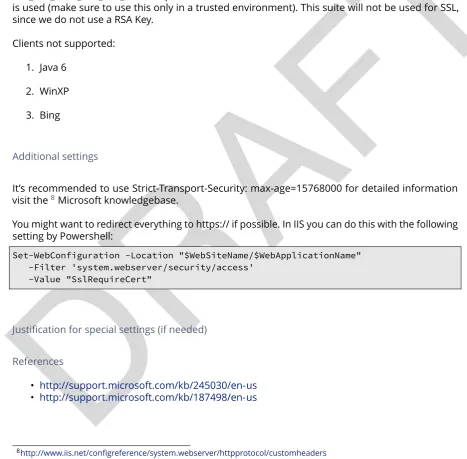
Table2.1shows the algorithms from strongest to weakest and why they need to be added in this order. For example insisting on SHA-2 algorithms (only first two lines) would eliminate all versions of Firefox, so the last line is needed to support this browser, but should be placed at the bottom, so capable browsers will choose the stronger SHA-2 algorithms.
TLS_RSA_WITH_RC4_128_SHAor equivalent should also be added if MS Terminal Server Connection is used (make sure to use this only in a trusted environment). This suite will not be used for SSL, since we do not use a RSA Key.
Clients not supported:
1. Java 6
2. WinXP
3. Bing
Additional settings
It’s recommended to use Strict-Transport-Security: max-age=15768000 for detailed information visit the8Microsoft knowledgebase.
You might want to redirect everything to https:// if possible. In IIS you can do this with the following setting by Powershell:
Set-WebConfiguration -Location "$WebSiteName/$WebApplicationName" -Filter 'system.webserver/security/access'
-Value "SslRequireCert"
Justification for special settings (if needed)
References
• http://support.microsoft.com/kb/245030/en-us
• http://support.microsoft.com/kb/187498/en-us
[image:17.595.62.530.246.705.2]2.2. SSH 2.2. SSH
How to test
See appendixA
2.2. SSH
Please be advised that any change in the SSH-Settings of your server might cause problems connecting to the server or starting/reloading the SSH-Daemon itself. So every time you config-ure your SSH-Settings on a remote server via SSH itself, ensconfig-ure that you have a second open connection to the server, which you can use to reset or adapt your changes!
2.2.1. OpenSSH
Tested with Version
OpenSSH 6.6p1 (Gentoo)
Settings
Protocol 2
# HostKeys for protocol version 2 HostKey /etc/ssh/ssh_host_rsa_key #HostKey /etc/ssh/ssh_host_dsa_key #HostKey /etc/ssh/ssh_host_ecdsa_key HostKey /etc/ssh/ssh_host_ed25519_key
PermitRootLogin no # or 'without-password' to allow SSH key based login StrictModes yes
PermitEmptyPasswords no
Ciphers [email protected],[email protected],aes128-gcm@openssh.\ \com,aes256-ctr,aes128-ctr
MACs [email protected],[email protected],umac-128-\ \[email protected],hmac-sha2-512,hmac-sha2-256,hmac-ripemd160
KexAlgorithms [email protected],diffie-hellman-group-exchange-sha256,\ \diffie-hellman-group14-sha1,diffie-hellman-group-exchange-sha1
Listing 2.9:Important OpenSSH 6.6 security settings [configuration/SSH/OpenSSH/6.6/sshd_config]
2.2. SSH 2.2.1. OpenSSH
Tested with Version
OpenSSH 6.5 (Debian Jessie)
Settings
Protocol 2
# HostKeys for protocol version 2 HostKey /etc/ssh/ssh_host_rsa_key #HostKey /etc/ssh/ssh_host_dsa_key #HostKey /etc/ssh/ssh_host_ecdsa_key HostKey /etc/ssh/ssh_host_ed25519_key
PermitRootLogin no # or 'without-password' to allow SSH key based login StrictModes yes
PermitEmptyPasswords no
Ciphers [email protected],[email protected],aes256-ctr,aes128-ctr MACs [email protected],[email protected],umac-128-\
\[email protected],hmac-sha2-512,hmac-sha2-256,hmac-ripemd160
KexAlgorithms diffie-hellman-group-exchange-sha256,diffie-hellman-group14-sha1,\ \diffie-hellman-group-exchange-sha1
Listing 2.10:Important OpenSSH 6.4 security settings [configuration/SSH/OpenSSH/6.5/sshd_config]
Tested with Version
OpenSSH 6.0p1 (Debian wheezy)
Settings
Protocol 2
# HostKeys for protocol version 2 HostKey /etc/ssh/ssh_host_rsa_key #HostKey /etc/ssh/ssh_host_dsa_key #HostKey /etc/ssh/ssh_host_ecdsa_key
PermitRootLogin no # or 'without-password' to allow SSH key based login StrictModes yes
PermitEmptyPasswords no Ciphers aes256-ctr,aes128-ctr
MACs hmac-sha2-512,hmac-sha2-256,hmac-ripemd160
KexAlgorithms diffie-hellman-group-exchange-sha256,diffie-hellman-group14-sha1,\ \diffie-hellman-group-exchange-sha1
2.2. SSH 2.2.2. Cisco ASA
Note: Older Linux systems won’t support SHA2. PuTTY (Windows) does not support RIPE-MD160. Curve25519, AES-GCM and UMAC are only available upstream (OpenSSH 6.6p1). DSA host keys have been removed on purpose, the DSS standard does not support for DSA keys stronger than 1024bit 9 which is far below current standards (see section 3.4). Legacy systems can use this configuration and simply omit unsupported ciphers, key exchange algorithms and MACs.
References
The OpenSSH sshd_config man page is the best reference:http://www.openssh.org/cgi-bin/man. cgi?query=sshd_config
How to test
Connect a client with verbose logging enabled to the SSH server
$ ssh -vvv myserver.com
and observe the key exchange in the output.
2.2.2. Cisco ASA
Tested with Versions
• 9.1(3)
Settings
crypto key generate rsa modulus 2048 ssh version 2
ssh key-exchange group dh-group14-sha1
Note: When the ASA is configured for SSH, by default both SSH versions 1 and 2 are allowed. In addition to that, only a group1 DH-key-exchange is used. This should be changed to allow only SSH version 2 and to use a key-exchange with group14. The generated RSA key should be 2048 bit (the actual supported maximum). A non-cryptographic best practice is to reconfigure the lines to only allow SSH-logins.
2.2. SSH 2.2.3. Cisco IOS
References
• http://www.cisco.com/en/US/docs/security/asa/asa91/configuration/general/admin_management. html
How to test
Connect a client with verbose logging enabled to the SSH server
$ ssh -vvv myserver.com
and observe the key exchange in the output.
2.2.3. Cisco IOS
Tested with Versions
• 15.0, 15.1, 15.2
Settings
crypto key generate rsa modulus 4096 label SSH-KEYS ip ssh rsa keypair-name SSH-KEYS
ip ssh version 2
ip ssh dh min size 2048
line vty 0 15 transport input ssh
Note: Same as with the ASA, also on IOS by default both SSH versions 1 and 2 are allowed and the DH-key-exchange only use a DH-group of 768 Bit. In IOS, a dedicated Key-pair can be bound to SSH to reduce the usage of individual keys-pairs. From IOS Version 15.0 onwards, 4096 Bit rsa keys are supported and should be used according to the paradigm "use longest supported key". Also, do not forget to disable telnet vty access.
References
2.3. Mail Servers 2.3. Mail Servers
How to test
Connect a client with verbose logging enabled to the SSH server
$ ssh -vvv myserver.com
and observe the key exchange in the output.
2.3. Mail Servers
This section documents the most common mail (SMTP) and IMAPs/POPs servers. Another option to secure IMAPs/POPs servers is to place them behind an stunnel server.
2.3.1. SMTP in general
SMTP usually makes use of opportunistic TLS. This means that an MTA will accept TLS connections when asked for it during handshake but will not require it. One should always support incoming opportunistic TLS and always try TLS handshake outgoing.
Furthermore a mailserver can operate in three modes:
• As MSA (Mail Submission Agent) your mailserver receives mail from your clients MUAs (Mail User Agent).
• As receiving MTA (Mail Transmission Agent, MX) • As sending MTA (SMTP client)
We recommend the following basic setup for all modes:
• correctly setup MX, A and PTR RRs without using CNAMEs at all. • enable encryption (opportunistic TLS)
• do not use self signed certificates
For SMTP client mode we additionally recommend:
• the hostname used as HELO must match the PTR RR
• setup a client certificate (most server certificates are client certificates as well)
• either the common name or at least an alternate subject name of your certificate must match the PTR RR
• do not modify the cipher suite for client mode
For MSA operation we recommend:
• listen on submission port 587
• enforce SMTP AUTH even for local networks
2.3. Mail Servers 2.3.2. Dovecot
• optionally use the recommended cipher suites if (and only if) all your connecting MUAs support them
We strongly recommend to allow all cipher suites for anything but MSA mode, because the alter-native is plain text transmission.
2.3.2. Dovecot
Tested with Version
• Dovecot 2.1.7, Debian Wheezy (without “ssl_prefer_server_ciphers” setting) • Dovecot 2.2.9, Debian Jessie
• 2.0.19apple1 on OS X Server 10.8.5 (without “ssl_prefer_server_ciphers” setting) • Dovecot 2.2.9 on Ubuntu 14.04 trusty
Settings
# SSL protocols to use
ssl_protocols = !SSLv3 !SSLv2
# SSL ciphers to use
ssl_cipher_list = EDH+CAMELLIA:EDH+aRSA:EECDH+aRSA+AESGCM:EECDH+aRSA+SHA384:EECDH\ \+aRSA+SHA256:EECDH:+CAMELLIA256:+AES256:+CAMELLIA128:+AES128:+SSLv3:!aNULL:!\ \eNULL:!LOW:!3DES:!MD5:!EXP:!PSK:!DSS:!RC4:!SEED:!ECDSA:CAMELLIA256-SHA:AES256-\ \SHA:CAMELLIA128-SHA:AES128-SHA
# Prefer the server's order of ciphers over client's. ssl_prefer_server_ciphers = yes
Listing 2.12:Dovecot SSL configuration
[configuration/MailServers/Dovecot/10-ssl.conf]
Additional info
Dovecot 2.0, 2.1: Almost as good as dovecot 2.2. Dovecot does not ignore unknown configuration parameters. Does not support ssl_prefer_server_ciphers
Limitations
Dovecot currently does not support disabling TLS compression. Furthermore, DH parameters greater than 1024bit are not supported. The most recent version 2.2.7 of Dovecot implements configurable DH parameter length10.
2.3. Mail Servers 2.3.3. cyrus-imapd
References
• http://wiki2.dovecot.org/SSL
How to test
openssl s_client -crlf -connect SERVER.TLD:993
2.3.3. cyrus-imapd
Tested with Versions
• 2.4.17
Settings
To activate SSL/TLS configure your certificate with
tls_cert_file: /etc/ssl/certs/ssl-cert-snakeoil.pem tls_key_file: /etc/ssl/private/ssl-cert-snakeoil.key
Listing 2.13:Activating TLS in cyrus
[configuration/MailServers/cyrus-imapd/imapd.conf]
Do not forget to add necessary intermediate certificates to the .pem file.
Limiting the ciphers provided may force (especially older) clients to connect without encryption at all! Sticking to the defaults is recommended.
If you still want to force strong encryption use
tls_cipher_list: EDH+CAMELLIA:EDH+aRSA:EECDH+aRSA+AESGCM:EECDH+aRSA+SHA384:EECDH+\ \aRSA+SHA256:EECDH:+CAMELLIA256:+AES256:+CAMELLIA128:+AES128:+SSLv3:!aNULL:!\ \eNULL:!LOW:!3DES:!MD5:!EXP:!PSK:!DSS:!RC4:!SEED:!ECDSA:CAMELLIA256-SHA:AES256-\ \SHA:CAMELLIA128-SHA:AES128-SHA
Listing 2.14:TLS cipher selection in cyrus
[configuration/MailServers/cyrus-imapd/imapd.conf]
cyrus-imapd loads hardcoded 1024 bit DH parameters using get_rfc2409_prime_1024() by default. If you want to load your own DH parameters add them PEM encoded to the certificate file given in tls_cert_file. Do not forget to re-add them after updating your certificate.
2.3. Mail Servers 2.3.4. Postfix
allowplaintext: no
Listing 2.15:Force encrypted connections in cyrus [configuration/MailServers/cyrus-imapd/imapd.conf]
This way MUAs can only authenticate with plain text authentication schemes after issuing the STARTTLS command. Providing CRAM-MD5 or DIGEST-MD5 methods is not recommended.
To support POP3/IMAP on ports 110/143 with STARTTLS and POP3S/IMAPS on ports 995/993 check the SERVICES section incyrus.conf
SERVICES {
imap cmd="imapd -U 30" listen="imap" prefork=0 maxchild=100 imaps cmd="imapd -s -U 30" listen="imaps" prefork=0 maxchild=100 pop3 cmd="pop3d -U 30" listen="pop3" prefork=0 maxchild=50 pop3s cmd="pop3d -s -U 30" listen="pop3s" prefork=0 maxchild=50 }
Listing 2.16:STARTTLS for POP3/IMAP and POP3S/IMAPS in cyrus [configuration/MailServers/cyrus-imapd/cyrus.conf]
Limitations
cyrus-imapd currently (2.4.17, trunk) does not support elliptic curve cryptography. Hence, ECDHE will not work even if defined in your cipher list.
Currently there is no way to prefer server ciphers or to disable compression.
There is a working patch for all three features:https://bugzilla.cyrusimap.org/show_bug.cgi?id= 3823
How to test
openssl s_client -crlf -connect SERVER.TLD:993
2.3.4. Postfix
Tested with Versions
2.3. Mail Servers 2.3.4. Postfix
Settings
MX and SMTP client configuration: As discussed in section2.3.1, because of opportunistic encryp-tion we do not restrict the list of ciphers. There are still some steps needed to enable TLS, all in main.cf:
# TLS parameters
smtpd_tls_cert_file=/etc/ssl/certs/ssl-cert-snakeoil.pem smtpd_tls_key_file=/etc/ssl/private/ssl-cert-snakeoil.key # use 0 for Postfix >= 2.9, and 1 for earlier versions smtpd_tls_loglevel = 0
# enable opportunistic TLS support in the SMTP server and client smtpd_tls_security_level = may
smtp_tls_security_level = may smtp_tls_loglevel = 1
# if you have authentication enabled, only offer it after STARTTLS smtpd_tls_auth_only = yes
tls_ssl_options = NO_COMPRESSION
Listing 2.17:Opportunistic TLS in Postfix [configuration/MailServers/Postfix/main.cf]
MSA: For the MSAsmtpdprocess, we first define the ciphers that are acceptable for the “manda-tory” security level, again inmain.cf:
smtpd_tls_mandatory_protocols = !SSLv2, !SSLv3 smtpd_tls_mandatory_ciphers=high
tls_high_cipherlist=EDH+CAMELLIA:EDH+aRSA:EECDH+aRSA+AESGCM:EECDH+aRSA+SHA384:\ \EECDH+aRSA+SHA256:EECDH:+CAMELLIA256:+AES256:+CAMELLIA128:+AES128:+SSLv3:!aNULL\ \:!eNULL:!LOW:!3DES:!MD5:!EXP:!PSK:!DSS:!RC4:!SEED:!ECDSA:CAMELLIA256-SHA:AES256\ \-SHA:CAMELLIA128-SHA:AES128-SHA
Listing 2.18:MSA TLS configuration in Postfix [configuration/MailServers/Postfix/main.cf]
Then, we configure the MSA smtpd inmaster.cfwith two additional options that are only used for this instance of smtpd:
submission inet n - - - - smtpd -o smtpd_tls_security_level=encrypt -o tls_preempt_cipherlist=yes
Listing 2.19:MSA smtpd service configuration in Postfix [configuration/MailServers/Postfix/master.cf]
For those users who want to use EECDH key exchange, it is possible to customize this via:
smtpd_tls_eecdh_grade=ultra
Listing 2.20:EECDH customization in Postfix [configuration/MailServers/Postfix/main.cf]
2.3. Mail Servers 2.3.5. Exim
Limitations
tls_ssl_options is supported from Postfix 2.11 onwards. You can leave the statement in the config-uration for older versions, it will be ignored.
tls_preempt_cipherlist is supported from Postfix 2.8 onwards. Again, you can leave the statement in for older versions.
References
Refer tohttp://www.postfix.org/TLS_README.htmlfor an in-depth discussion.
Additional settings
Postfix has two sets of built-in DH parameters that can be overridden with thesmtpd_tls_dh512_param_file andsmtpd_tls_dh1024_param_fileoptions. The “dh512” parameters are used for export ciphers,
while the “dh1024” ones are used for all other ciphers.
The “bit length” in those parameter names is just a name, so one could use stronger parameter sets; it should be possible to e.g. use the IKE Group14 parameters (see section3.7) without much interoperability risk, but we have not tested this yet.
How to test
You can check the effect of the settings with the following command:
$ zegrep "TLS connection established from.*with cipher" /var/log/mail.log | awk \ \'{printf("%s %s %s %s\n", $12, $13, $14, $15)}' | sort | uniq -c | sort -n
1 SSLv3 with cipher DHE-RSA-AES256-SHA
23 TLSv1.2 with cipher DHE-RSA-AES256-GCM-SHA384 60 TLSv1 with cipher ECDHE-RSA-AES256-SHA
270 TLSv1.2 with cipher ECDHE-RSA-AES256-GCM-SHA384 335 TLSv1 with cipher DHE-RSA-AES256-SHA
openssl s_client -starttls smtp -crlf -connect SERVER.TLD:25
2.3.5. Exim
Tested with Versions
2.3. Mail Servers 2.3.5. Exim
It is highly recommended to readhttp://exim.org/exim-html-current/doc/html/spec_html/ch-encrypted_ smtp_connections_using_tlsssl.htmlfirst.
MSA mode (submission): In the main config section of Exim add:
tls_certificate = /etc/ssl/exim.crt tls_privatekey = /etc/ssl/exim.pem
Listing 2.21:Certificate selection in Exim (MSA) [configuration/MailServers/Exim/configure.msa]
Don’t forget to add intermediate certificates to the .pem file if needed.
Tell Exim to advertise STARTTLS in the EHLO answer to everyone:
tls_advertise_hosts = *
Listing 2.22:TLS advertise in Exim (MSA) [configuration/MailServers/Exim/configure.msa]
If you want to support legacy SMTPS on port 465, and STARTTLS on smtp(25)/submission(587) ports set
daemon_smtp_ports = smtp : smtps : submission tls_on_connect_ports = 465
Listing 2.23:STARTTLS and SMTPS in Exim (MSA) [configuration/MailServers/Exim/configure.msa]
It is highly recommended to limit SMTP AUTH to SSL connections only. To do so add
server_advertise_condition = ${if eq{$tls_cipher}{}{no}{yes}}
Listing 2.24:SSL-only authentication in Exim (MSA) [configuration/MailServers/Exim/configure.msa]
to every authenticator defined.
Add the following rules on top of your acl_smtp_mail:
acl_smtp_mail = acl_check_mail acl_check_mail:
warn hosts = *
control = submission/sender_retain accept
Listing 2.25:Submission mode in Exim (MSA) [configuration/MailServers/Exim/configure.msa]
2.3. Mail Servers 2.3.5. Exim
It is not advisable to restrict the default cipher list for MSA mode if you don’t know all connecting MUAs. If you still want to define one please consult the Exim documentation or ask on the exim-users mailinglist.
The cipher used is written to the logfiles by default. You may want to add
log_selector = <whatever your log_selector already contains> +\ \tls_certificate_verified +tls_peerdn +tls_sni
to get even more TLS information logged.
Server mode (incoming): In the main config section of Exim add:
tls_certificate = /etc/ssl/exim.crt tls_privatekey = /etc/ssl/exim.pem
Listing 2.26:Certificate selection in Exim (Server) [configuration/MailServers/Exim/configure.server]
don’t forget to add intermediate certificates to the .pem file if needed.
Tell Exim to advertise STARTTLS in the EHLO answer to everyone:
tls_advertise_hosts = *
Listing 2.27:TLS advertise in Exim (Server) [configuration/MailServers/Exim/configure.server]
Listen on smtp(25) port only
daemon_smtp_ports = smtp
Listing 2.28:STARTTLS on SMTP in Exim (Server) [configuration/MailServers/Exim/configure.server]
It is not advisable to restrict the default cipher list for opportunistic encryption as used by SMTP. Do not use cipher lists recommended for HTTPS! If you still want to define one please consult the Exim documentation or ask on the exim-users mailinglist.
If you want to request and verify client certificates from sending hosts set
tls_verify_certificates = /etc/pki/tls/certs/ca-bundle.crt tls_try_verify_hosts = *
Listing 2.29:TLS certificate verifiaction in Exim (Server) [configuration/MailServers/Exim/configure.server]
tls_try_verify_hosts only reports the result to your logfile. If you want to disconnect such clients you have to use
2.3. Mail Servers 2.3.5. Exim
The cipher used is written to the logfiles by default. You may want to add
log_selector = <whatever your log_selector already contains> +\ \tls_certificate_verified +tls_peerdn +tls_sni
to get even more TLS information logged.
Client mode (outgoing): Exim uses opportunistic encryption in the SMTP transport by default.
Client mode settings have to be done in the configuration section of the smtp transport (driver = smtp).
If you want to use a client certificate (most server certificates can be used as client certificate, too) set
tls_certificate = /etc/ssl/exim.crt tls_privatekey = /etc/ssl/exim.pem
Listing 2.30:Certificate selection in Exim (Client) [configuration/MailServers/Exim/configure.client]
This is recommended for MTA-MTA traffic.
Do not limit ciphers without a very good reason. In the worst case you end up without encryption at all instead of some weak encryption. Please consult the Exim documentation if you really need to define ciphers.
OpenSSL: Exim already disables SSLv2 by default. We recommend to add
openssl_options = +all +no_sslv2 +no_compression +cipher_server_preference
to the main configuration.
Note: +all is misleading here since OpenSSL only activates the most common workarounds. But that’s how SSL_OP_ALL is defined.
You do not need to set dh_parameters. Exim with OpenSSL by default uses parameter initialization with the "2048-bit MODP Group with 224-bit Prime Order Subgroup" defined in section 2.2 of RFC 5114 [LK08] (ike23). If you want to set your own DH parameters please read the TLS documentation of exim.
GnuTLS: GnuTLS is different in only some respects to OpenSSL:
• tls_require_ciphers needs a GnuTLS priority string instead of a cipher list. It is recommended to use the defaults by not defining this option. It highly depends on the version of GnuTLS used. Therefore it is not advisable to change the defaults.
2.4. VPNs 2.4. VPNs
Exim string expansion: Note that most of the options accept expansion strings. This way you can e.g. set cipher lists or STARTTLS advertisement conditionally. Please follow the link to the official Exim documentation to get more information.
Limitations: Exim currently (4.82) does not support elliptic curves with OpenSSL. This means that ECDHE is not used even if defined in your cipher list. There already is a working patch to provide support:http://bugs.exim.org/show_bug.cgi?id=1397
How to test
openssl s_client -starttls smtp -crlf -connect SERVER.TLD:25
2.4. VPNs
2.4.1. IPsec
Settings
Assumptions: We assume the use of IKE (v1 or v2) and ESP for this document.
Authentication: IPSEC authentication should optimally be performed via RSA signatures, with a key size of 2048 bits or more. Configuring only the trusted CA that issued the peer certificate provides for additional protection against fake certificates.
If you need to use Pre-Shared Key authentication:
1. Choose a random, long enough PSK (see below)
2. Use a separate PSK for any IPSEC connection
3. Change the PSKs regularly
The size of the PSK should not be shorter than the output size of the hash algorithm used in IKE11.
For a key composed of upper- and lowercase letters, numbers, and two additional symbols12, table2.2gives the minimum lengths in characters.
11It is used in a HMAC, see RFC2104 [KBC97] and the discussion starting inhttp://www.vpnc.org/ietf-ipsec/02.ipsec/
msg00268.html.
2.4. VPNs 2.4.1. IPsec
Table 2.2.:PSK lengths
IKE Hash PSK length (chars)
SHA256 43
SHA384 64
SHA512 86
Table 2.3.:IPSEC Cryptographic Suites
Configuration A Configuration B Notes
Suite-B-GCM-256 Suite-B-GCM-128 VPN-B
All Suite-B variants use NIST elliptic curves
Table 2.4.:IPSEC Phase 1 parameters
Configuration A Configuration B
Mode Main Mode Main Mode
Encryption AES-256 AES, CAMELLIA (-256 or -128)
Hash SHA2-* SHA2-*, SHA1
DH Group Group 14-18 Group 14-18
Cryptographic Suites: IPSEC Cryptographic Suites are pre-defined settings for all the items of a configuration; they try to provide a balanced security level and make setting up VPNs easier.13
When using any of those suites, make sure to enable “Perfect Forward Secrecy“ for Phase 2, as this is not specified in the suites. The equivalents to the recommended ciphers suites in section3.2.3 are shown in table2.3.
Phase 1: Alternatively to the pre-defined cipher suites, you can define your own, as described in this and the next section.
Phase 1 is the mutual authentication and key exchange phase; table2.4shows the parameters.
Use only “main mode“, as “aggressive mode“ has known security vulnerabilities14.
Phase 2: Phase 2 is where the parameters that protect the actual data are negotiated; recom-mended parameters are shown in table2.5.
2.4. VPNs 2.4.2. Check Point FireWall-1
Table 2.5.:IPSEC Phase 2 parameters
Configuration A Configuration B
Perfect Forward Secrecy ✔ ✔
Encryption AES-GCM-16, AES-CTR,
AES-CCM-16, AES-256
AES-GCM-16, AES-CTR, AES-CCM-16, AES-256, CAMELLIA-256, AES-128, CAMELLIA-128
Hash SHA2-* (or none for AEAD) SHA2-*, SHA1 (or none for AEAD)
DH Group Same as Phase 1 Same as Phase 1
References
• “A Cryptographic Evaluation of IPsec”, Niels Ferguson and Bruce Schneier: https://www. schneier.com/paper-ipsec.pdf
2.4.2. Check Point FireWall-1
Tested with Versions
• R77 (should work with any currently supported version)
Settings
Please see section2.4.1for guidance on parameter choice. In this section, we will configure a strong setup according to “Configuration A”.
This is based on the concept of a “VPN Community”, which has all the settings for the gateways that are included in that community. Communities can be found in the “IPSEC VPN” tab of Smart-Dashboard.
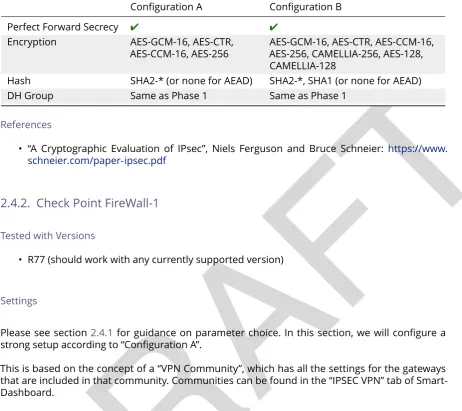
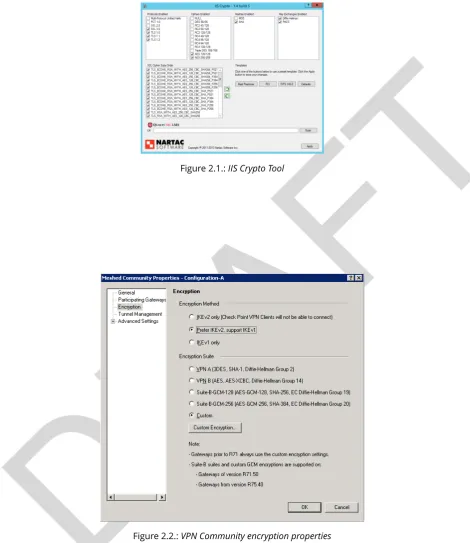
Either chose one of the encryption suites in the properties dialog (figure2.2), or proceed to “Custom Encryption...”, where you can set encryption and hash for Phase 1 and 2 (figure2.3).
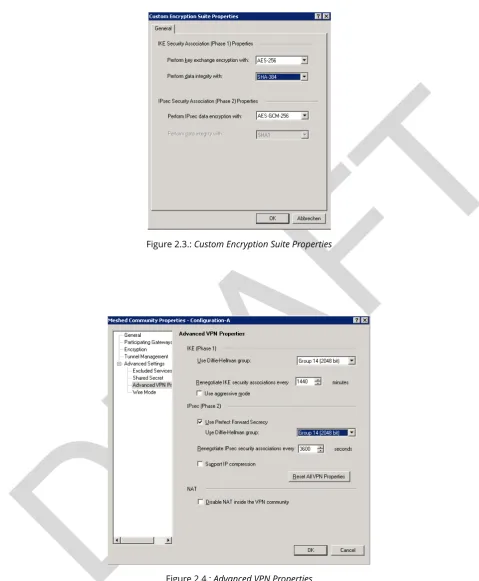
The Diffie-Hellman groups and Perfect Forward Secrecy Settings can be found under “Advanced Settings” / “Advanced VPN Properties” (figure2.4).
Additional settings
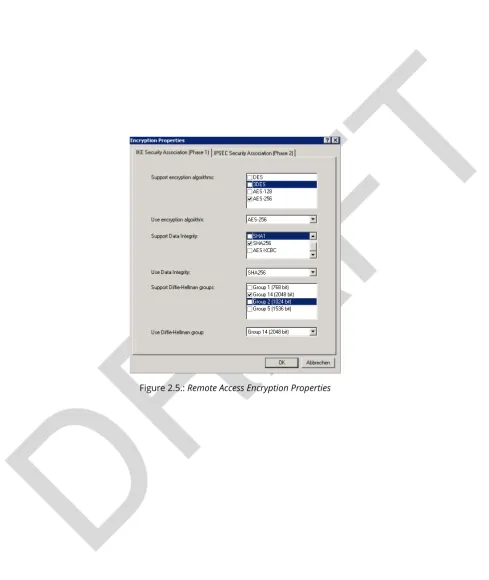
For remote Dynamic IP Gateways, the settings are not taken from the community, but set in the “Global Properties” dialog under “Remote Access” / “VPN Authentication and Encryption”. Via the “Edit...” button, you can configure sets of algorithms that all gateways support (figure2.5).
2.4. VPNs 2.4.2. Check Point FireWall-1
Figure 2.1.:IIS Crypto Tool
2.4. VPNs 2.4.2. Check Point FireWall-1
[image:35.595.58.538.87.669.2]Figure 2.3.:Custom Encryption Suite Properties
2.4. VPNs 2.4.3. OpenVPN
References
• Check PointVPN R77 Administration Guide(may require a UserCenter account to access)
2.4.3. OpenVPN
Tested with Versions
• OpenVPN 2.3.2 from Debian “wheezy-backports” linked against openssl (libssl.so.1.0.0) • OpenVPN 2.2.1 from Debian Wheezy linked against openssl (libssl.so.1.0.0)
• OpenVPN 2.3.2 for Windows
Settings
General We describe a configuration with certificate-based authentication; see below for details on theeasyrsatool to help you with that.
OpenVPN uses TLS only for authentication and key exchange. The bulk traffic is then encrypted and authenticated with the OpenVPN protocol using those keys.
Note that while thetls-cipheroption takes a list of ciphers that is then negotiated as usual with TLS, thecipher andauth options both take a single argument that must match on client and server.
Server Configuration
tls-cipher DHE-RSA-AES256-GCM-SHA384:DHE-RSA-AES256-SHA256:DHE-RSA-AES128-GCM-\ \SHA256:DHE-RSA-AES128-SHA256:DHE-RSA-CAMELLIA256-SHA:DHE-RSA-AES256-SHA:DHE-RSA\ \-CAMELLIA128-SHA:DHE-RSA-AES128-SHA:CAMELLIA256-SHA:AES256-SHA:CAMELLIA128-SHA:\ \AES128-SHA
cipher AES-256-CBC auth SHA384
Listing 2.31:Cipher configuration for OpenVPN (Server) [configuration/VPNs/OpenVPN/server.conf]
Client Configuration Client and server have to use compatible configurations, otherwise they can’t communicate. Thecipherandauthdirectives have to be identical.
tls-remote server.example.com
# Attention: it must fit in 256 bytes, so not the infamous CipherStringB! tls-cipher DHE-RSA-AES256-GCM-SHA384:DHE-RSA-AES256-SHA256:DHE-RSA-AES128-GCM-\
2.4. VPNs 2.4.3. OpenVPN
cipher AES-256-CBC auth SHA384
# https://openvpn.net/index.php/open-source/documentation/howto.html#mitm remote-cert-tls server
Listing 2.32:Cipher and TLS configuration for OpenVPN (Server) [configuration/VPNs/OpenVPN/client.conf]
Justification for special settings
OpenVPN 2.3.1 changed the values that thetls-cipheroption expects from OpenSSL to IANA ci-pher names. That means from that version on you will get “Deprecated TLS cici-pher name” warnings for the configurations above. You cannot use the selection strings from section3.2.3directly from 2.3.1 on, which is why we give an explicit cipher list here.
In addition, there is a 256 character limit on configuration file line lengths; that limits the size of cipher suites, so we dropped all ECDHE suites.
The configuration shown above is compatible with all tested versions.
References
• OpenVPN Documentation:Security Overview https://openvpn.net/index.php/open-source/ documentation/security-overview.html
Additional settings
Key renegotiation interval The default for renegotiation of encryption keys is one hour ( reneg-sec 3600). If you transfer huge amounts of data over your tunnel, you might consider configuring a shorter interval, or switch to a byte- or packet-based interval (reneg-bytesorreneg-pkts).
Fixing “easy-rsa” When installing an OpenVPN server instance, you are probably usingeasy-rsato generate keys and certificates. The filevarsin the easyrsa installation directory has a number of settings that should be changed to secure values:
export KEY_SIZE=4096 export CA_EXPIRE=1826 export KEY_EXPIRE=365
Listing 2.33:Sane default values for OpenVPN (easy-rsa) [configuration/VPNs/OpenVPN/vars]
2.4. VPNs 2.4.4. PPTP
NOTE: 4096 bits is only an example of how to do this with easy-rsa. See also section3.4for a discussion on keylengths.
In addition, edit thepkitool script and replace all occurrences ofsha1withsha256, to sign the certificates with SHA256.
Limitations
Note that the ciphersuites shown byopenvpn --show-tlsareknown, but not necessarilysupported 15.
Which cipher suite is actually used can be seen in the logs:
Control Channel: TLSv1, cipher TLSv1/SSLv3 DHE-RSA-CAMELLIA256-SHA, 2048 bit RSA
2.4.4. PPTP
PPTP is considered insecure, Microsoft recommends to “use a more secure VPN tunnel”16.
There is a cloud service that cracks the underlying MS-CHAPv2 authentication protocol for the price of USD 20017, and given the resulting MD4 hash, all PPTP traffic for a user can be decrypted.
2.4.5. Cisco ASA
The following settings reflect our recommendations as best as possible on the Cisco ASA platform. These are - of course - just settings regarding SSL/TLS (i.e. Cisco AnyConnect) and IPsec. For further security settings regarding this platform the appropriate Cisco guides should be followed.
Tested with Versions
• 9.1(3) - X-series model
Settings
crypto ipsec ikev2 ipsec-proposal AES-Fallback protocol esp encryption aes-256 aes-192 aes protocol esp integrity sha-512 sha-384 sha-256 crypto ipsec ikev2 ipsec-proposal AES-GCM-Fallback
15https://community.openvpn.net/openvpn/ticket/304
2.4. VPNs 2.4.5. Cisco ASA
protocol esp encryption aes-gcm-256 aes-gcm-192 aes-gcm protocol esp integrity sha-512 sha-384 sha-256
crypto ipsec ikev2 ipsec-proposal AES128-GCM protocol esp encryption aes-gcm
protocol esp integrity sha-512
crypto ipsec ikev2 ipsec-proposal AES192-GCM protocol esp encryption aes-gcm-192
protocol esp integrity sha-512
crypto ipsec ikev2 ipsec-proposal AES256-GCM protocol esp encryption aes-gcm-256
protocol esp integrity sha-512
crypto ipsec ikev2 ipsec-proposal AES protocol esp encryption aes
protocol esp integrity sha-1 md5
crypto ipsec ikev2 ipsec-proposal AES192 protocol esp encryption aes-192
protocol esp integrity sha-1 md5
crypto ipsec ikev2 ipsec-proposal AES256 protocol esp encryption aes-256
protocol esp integrity sha-1 md5
crypto ipsec ikev2 sa-strength-enforcement
crypto ipsec security-association pmtu-aging infinite
crypto dynamic-map SYSTEM_DEFAULT_CRYPTO_MAP 65535 set pfs group14
crypto dynamic-map SYSTEM_DEFAULT_CRYPTO_MAP 65535 set ikev2 ipsec-proposal \ \AES256-GCM AES192-GCM AES128-GCM AES-GCM-Fallback AES-Fallback
crypto map Outside-DMZ_map 65535 ipsec-isakmp dynamic SYSTEM_DEFAULT_CRYPTO_MAP crypto map Outside-DMZ_map interface Outside-DMZ
crypto ikev2 policy 1 encryption aes-gcm-256 integrity null
group 14
prf sha512 sha384 sha256 sha lifetime seconds 86400 crypto ikev2 policy 2
encryption aes-gcm-256 aes-gcm-192 aes-gcm integrity null
group 14
prf sha512 sha384 sha256 sha lifetime seconds 86400 crypto ikev2 policy 3
encryption aes-256 aes-192 aes integrity sha512 sha384 sha256 group 14
prf sha512 sha384 sha256 sha lifetime seconds 86400 crypto ikev2 policy 4
encryption aes-256 aes-192 aes integrity sha512 sha384 sha256 sha group 14
prf sha512 sha384 sha256 sha lifetime seconds 86400
2.4. VPNs 2.4.6. Openswan
crypto ikev2 remote-access trustpoint ASDM_TrustPoint0
ssl server-version tlsv1-only ssl client-version tlsv1-only
ssl encryption dhe-aes256-sha1 dhe-aes128-sha1 aes256-sha1 aes128-sha1 ssl trust-point ASDM_TrustPoint0 Outside-DMZ
Justification for special settings
New IPsec policies have been defined which do not make use of ciphers that may be cause for concern. Policies have a "Fallback" option to support legacy devices.
3DES has been completely disabled as such Windows XP AnyConnect Clients will no longer be able to connect.
The Cisco ASA platform does not currently support RSA Keys above 2048bits.
Legacy ASA models (e.g. 5505, 5510, 5520, 5540, 5550) do not offer the possibility to configure for SHA256/SHA384/SHA512 nor AES-GCM for IKEv2 proposals.
References
• http://www.cisco.com/en/US/docs/security/asa/roadmap/asaroadmap.html
• http://www.cisco.com/web/about/security/intelligence/nextgen_crypto.html
2.4.6. Openswan
Tested with Version
• Openswan 2.6.39 (Gentoo)
Settings
Note: the available algorithms depend on your kernel configuration (when using protostack=netkey) and/or build-time options.
To list the supported algorithms
$ ipsec auto --status | less
2.4. VPNs 2.4.6. Openswan
aggrmode=no
# ike format: cipher-hash;dhgroup # recommended ciphers:
# - aes
# recommended hashes:
# - sha2_256 with at least 43 byte PSK # - sha2_512 with at least 86 byte PSK # recommended dhgroups:
# - modp2048 = DH14 # - modp3072 = DH15 # - modp4096 = DH16 # - modp6144 = DH17 # - modp8192 = DH18 ike=aes-sha2_256;modp2048 type=tunnel
phase2=esp
# esp format: cipher-hash;dhgroup # recommended ciphers configuration A: # - aes_gcm_c-256 = AES_GCM_16
# - aes_ctr-256
# - aes_ccm_c-256 = AES_CCM_16 # - aes-256
# additional ciphers configuration B: # - camellia-256
# - aes-128 # - camellia-128
# recommended hashes configuration A: # - sha2-256
# - sha2-384 # - sha2-512
# - null (only with GCM/CCM ciphers) # additional hashes configuration B: # - sha1
# recommended dhgroups: same as above phase2alg=aes_gcm_c-256-sha2_256;modp2048 salifetime=8h
pfs=yes auto=ignore
How to test
Start the vpn and using
$ ipsec auto --status | less
2.4. VPNs 2.4.7. tinc
References
• https://www.openswan.org/
2.4.7. tinc
Tested with Version
• tinc 1.0.23 from Gentoo linked against OpenSSL 1.0.1e • tinc 1.0.23 from Sabayon linked against OpenSSL 1.0.1e
Defaults
tinc uses 2048 bit RSA keys, Blowfish-CBC, and SHA1 as default settings and suggests the usage of CBC mode ciphers. Any key length up to 8196 is supported and it does not need to be a power of two. OpenSSL Ciphers and Digests are supported by tinc.
Settings
Generate keys with
tincd -n NETNAME -K8196
Old keys will not be deleted (but disabled), you have to delete them manually. Add the following lines to your tinc.conf on all machines
Cipher = aes-256-cbc Digest = SHA512
Listing 2.34:Cipher and digest selection in tinc [configuration/VPNs/tinc/tinc.conf]
References
• tincd(8) man page
• tinc.conf(5) man page
2.6. IPMI, ILO and other lights out management solutions 2.5. PGP/GPG - Pretty Good Privacy
2.5. PGP/GPG - Pretty Good Privacy
The OpenPGP protocol18uses asymmetric encryption to protect a session key which is used to encrypt a message. Additionally, it signs messages via asymmetric encryption and hash functions. Research on SHA-1 conducted back in 200519has made clear that collision attacks are a real threat to the security of the SHA-1 hash function. PGP settings should be adapted to avoid using SHA-1.
When using PGP, there are a couple of things to take care of:
• keylengths (see section3.4) • randomness (see section3.3)
• preference of symmetric encryption algorithm (see section3.2) • preference of hash function (see section3.2)
Properly dealing with key material, passphrases and the web-of-trust is outside of the scope of this document. The GnuPG website20has a good tutorial on PGP.
ThisDebian How-to21is a great resource on upgrading your old PGP key as well as on safe default settings. This section is built based on the Debian How-to.
Hashing
Avoid SHA-1 in GnuPG. Edit $HOME/.gnupg/gpg.conf:
personal-digest-preferences SHA256 cert-digest-algo SHA256
default-preference-list SHA512 SHA384 SHA256 SHA224 AES256 AES192 AES CAST5 ZLIB \ \BZIP2 ZIP Uncompressed
Listing 2.35:Digest selection in GnuPG [configuration/GPG/GnuPG/gpg.conf]
Before you generate a new PGP key, make sure there is enough entropy available (see subsection 3.3.2).
2.6. IPMI, ILO and other lights out management solutions
Westronglyrecommend that any remote management system for servers such as ILO, iDRAC, IPMI based solutions and similar systemsneverbe connected to the public internet. Consider creating an unrouted management VLAN and access that only via VPN.
18https://tools.ietf.org/search/rfc4880
19https://www.schneier.com/blog/archives/2005/02/sha1_broken.html 20http://www.gnupg.org/
2.7. Instant Messaging Systems 2.7. Instant Messaging Systems
2.7. Instant Messaging Systems
2.7.1. General server configuration recommendations
For servers, we mostly recommend to apply what’s proposed by thePeter’s manifesto22.
In short:
• require the use of TLS for both client-to-server and server-to-server connections • prefer or require TLS cipher suites that enable forward secrecy
• deploy certificates issued by well-known and widely-deployed certification authorities (CAs)
The last point being out-of-scope for this section, we will only cover the first two points.
2.7.2. Prosody
Settings
Prosody is a Jabber server which is written in Lua. The following configuration is suggested to disable SSLv2 and SSLv3 and require a TLS connection. It is compliant with the OpenSSL string in 3.2.3 configuration B.
ssl = {
key = "/etc/ssl/jabber/privkey.pem"; certificate = "/etc/ssl/jabber/root.crt"; dhparam = "/etc/ssl/jabber/dhparam.pem"; options = {"no_sslv2", "no_sslv3" };
ciphers = "EDH+CAMELLIA:EDH+aRSA:EECDH+aRSA+AESGCM:EECDH+aRSA+SHA256:EECDH:+\ \CAMELLIA128:+AES128:+SSLv3:!aNULL:!eNULL:!LOW:!3DES:!MD5:!EXP:!PSK:!DSS:!RC4\ \:!SEED:!IDEA:!ECDSA:kEDH:CAMELLIA128-SHA:AES128-SHA";
depth = "1";
curve = "secp384r1"; }
c2s_require_encryption = true s2s_require_encryption = true
Listing 2.36:TLS setup for Prosody [configuration/IM/Prosody/prosody.cfg.lua]
2.7. Instant Messaging Systems 2.7.3. ejabberd
2.7.3. ejabberd
Tested with Versions
• Debian Wheezy 2.1.10-4+deb7u1
Settings
ejabberd is one of the popular Jabber servers. In order to be compliant with the manifesto, you should adapt your configuration23:
{listen, [
{5222, ejabberd_c2s, [ {access, c2s},
{shaper, c2s_shaper}, {max_stanza_size, 65536}, starttls,
starttls_required,
{certfile, "/etc/ejabberd/ejabberd.pem"} ]},
]}.
{s2s_use_starttls, required_trusted}.
{s2s_certfile, "/etc/ejabberd/ejabberd.pem"}.
Listing 2.37:TLS setup for ejabberd [configuration/IM/ejabberd/ejabberd.cfg]
Additional settings
Older versions of ejabberd (<2.0.0) need to be patched24to be able to parse all of the certificates in the CA chain.
Newer versions of ejabberd now support specifying the cipher string in the config file. See the
com-mit message:https://github.com/processone/ejabberd/commit/1dd94ac0d06822daa8c394ea2da20d91c8209124. However, this change did not yet make it into the stable release at the time of this writing.
References
TODO: ADD references!!
23http://www.process-one.net/docs/ejabberd/guide_en.html
2.7. Instant Messaging Systems 2.7.4. Chat privacy - Off-the-Record Messaging (OTR)
How to test
• https://xmpp.netis a practical website to test Jabber server configurations.
2.7.4. Chat privacy - Off-the-Record Messaging (OTR)
The OTR protocol works on top of the Jabber protocol25. It adds to popular chat clients (Adium, Pidgin...) the following properties for encrypted chats:
• Authentication • Integrity • Confidentiality • Forward secrecy
It basically uses Diffie-Hellman, AES and SHA1. Communicating over an insecure instant messaging network, OTR can be used for end to end encryption.
There are no specific configurations required but the protocol itself is worth to be mentioned.
2.7.5. Charybdis
There are numerous implementations of IRC servers. In this section, we chooseCharybdiswhich serves as basis forircd-seven26, developed and used by freenode. Freenode is actually the biggest IRC network27.Charybdisis part of theDebian&Ubuntudistributions.
/* Extensions */
#loadmodule "extensions/chm_sslonly_compat.so"; loadmodule "extensions/extb_ssl.so";
serverinfo {
ssl_private_key = "etc/test.key"; ssl_cert = "etc/test.cert"; ssl_dh_params = "etc/dh.pem";
# set ssld_count as number of cores - 1 ssld_count = 1;
}; listen {
sslport = 6697; };
Listing 2.38:SSL relevant configuration for Charybdis/ircd-seven [configuration/IM/Charybdis/ircd.conf]
2.8. Database Systems 2.7.6. SILC
2.7.6. SILC
SILC28is instant messaging protocol publicly released in 2000. SILC is a per-default secure chat protocol thanks to a generalized usage of symmetric encryption. Keys are generated by the server meaning that if compromised, communication could be compromised.
The protocol is not really popular anymore.
2.8. Database Systems
2.8.1. Oracle
Tested with Versions
• We do not test this here, since we only reference other papers for Oracle so far.
References
• Technical safety requirements byDeutsche Telekom AG(German). Please read section 17.12 or pages 129 and following (Req 396 and Req 397) about SSL and ciphersuiteshttp://www. telekom.com/static/-/155996/7/technische-sicherheitsanforderungen-si
2.8.2. MySQL
Tested with Versions
• Debian Wheezy and MySQL 5.5
Settings
[mysqld] ssl
ssl-ca=/etc/mysql/cacert.pem
ssl-cert=/etc/mysql/server-cert.pem ssl-key=/etc/mysql/server-key.pem # needs OpennSSL build
ssl-cipher=DH+CAMELLIA:EDH+aRSA:EECDH+aRSA+AESGCM:EECDH+aRSA+SHA384:EECDH+aRSA+\ \SHA256:EECDH:+CAMELLIA256:+AES256:+CAMELLIA128:+AES128:+SSLv3:!aNULL:!eNULL:!\ \LOW:!3DES:!MD5:!EXP:!PSK:!DSS:!RC4:!SEED:!ECDSA:CAMELLIA256-SHA:AES256-SHA:\ \CAMELLIA128-SHA:AES128-SHA
2.8. Database Systems 2.8.3. DB2
Listing 2.39:SSL configuration fo MySQL [configuration/DBs/MySQL/my.cnf]
References
• MySQL Documentation on SSL Connections.
https://dev.mysql.com/doc/refman/5.5/en/ssl-connections.html
How to test
After restarting the server run the following query to see if the ssl settings are correct:
show variables like '%ssl%';
2.8.3. DB2
Tested with Version
• We do not test this here, since we only reference other papers for DB2 so far.
Settings
ssl_cipherspecs: In the link above the whole SSL-configuration is described in-depth. The following command shows only how to set the recommended ciphersuites.
# recommended and supported ciphersuites
db2 update dbm cfg using SSL_CIPHERSPECS TLS_RSA_WITH_AES_256_CBC_SHA256,
TLS_RSA_WITH_AES_128_GCM_SHA256, TLS_RSA_WITH_AES_128_CBC_SHA256, TLS_ECDHE_RSA_WITH_AES_128_GCM_SHA256, TLS_ECDHE_ECDSA_WITH_AES_128_GCM_SHA256, TLS_ECDHE_RSA_WITH_AES_128_CBC_SHA256, TLS_ECDHE_ECDSA_WITH_AES_128_CBC_SHA256, TLS_RSA_WITH_AES_256_GCM_SHA384,
![Table 2.6.: Commonly supported Kerberos encryption types by implementation. Algorithm names ac-cording to RFC3961, except where aliases can be used or the algorithm is named differently altogetheras stated [Rae05a, Hud12, Rae05b, NYHR05, NYHR05, krb10, Jav, Shi].](https://thumb-us.123doks.com/thumbv2/123dok_us/8207525.262435/55.595.88.538.141.477/commonly-supported-kerberos-encryption-implementation-algorithm-differently-altogetheras.webp)