UNIVERSITI TEKNIKAL MALAYSIA MELAKA
Controlling Home Appliances By Using Bluetooth
This report is submitted in accordance with the requirement of the Universiti Teknikal Malaysia Melaka (UTeM) for the Bachelor of Computer Engineering
Technology (Computer Systems) with Honours.
by
CHRISTINA PELLIPUS B071410556 951203-13-5954
Cop Rasmi:
Tarikh: ________________________
Tarikh: _______________________ BORANG PENGESAHAN STATUS LAPORAN PROJEK SARJANA MUDA
TAJUK: CONTROLLING HOME APPLIANCES BY USING
BLUETOOTH
SESI PENGAJIAN: 2017/18 Semester 2
Saya CHRISTINA PELLIPUS (B071410556)
mengaku membenarkan Laporan PSM ini disimpan di Perpustakaan Universiti Teknikal Malaysia Melaka (UTeM) dengan syarat-syarat kegunaan seperti berikut:
1. Laporan PSM adalah hak milik Universiti Teknikal Malaysia Melaka dan
penulis.
2. Perpustakaan Universiti Teknikal Malaysia Melaka dibenarkan membuat salinan
untuk tujuan pengajian sahaja dengan izin penulis.
3. Perpustakaan dibenarkan membuat salinan laporan PSM ini sebagai bahan
pertukaran antara institusi pengajian tinggi.
4. **Sila tandakan ( )
SULIT
TERHAD
TIDAK TERHAD
(Mengandungi maklumat yang berdarjah keselamatan atau kepentingan Malaysia sebagaimana yang termaktub dalam AKTA RAHSIA RASMI 1972) (Mengandungi maklumat TERHAD yang telah ditentukan oleh organisasi/badan di mana penyelidikan dijalankan)
Alamat Tetap:
LOT 3973,LRG 22, JLN KUCHING, TMN TUNKU, 98000 MIRI SARAWAK.
Tarikh: ________________________
Disahkan oleh:
UNIVERSITI TEKNIKAL MALAYSIA MELAKA
DECLARATION
I hereby, declared this report entitled “CONTROLLING HOME APPLIANCES BY USING BLUETOOTH” is the results of my own research except as cited in references.
Signature : ………
Author’s Name : CHRISTINA PELLIPUS
APPOROVAL
This report is submitted to the Faculty of Engineering Technology (FTK) of Universiti Teknikal Malaysia Melaka (UTeM) as a partial fulfilment of the requirements for the Bachelor Degree of Engineering Technology Computer Engineering Technology (Computer System) with Honours. The member of the supervisory is as follow:
………
I
ABSTRACT
II
ABSTRAK
III
DEDICATION
IV
ACKNOWLEGMENT
I would like to express my gratitude and appreciation to the God for giving His bless upon completing my final year project throughout the hardship I have endured and giving me endless strength to face the project.
Moreover, I also want to address my supervisor DR Jamil Abedalrahim Jamil Alsayaydeh and my co supervisor Mdm Rosziana Binti Hashim for the motivation, patience and full commitment by helping me to completing my final year project successfully.
Moreover, not forgot my biggest gratitude toward my family especially my parent Pellipus Ajang and Shirley Saul anak Begis for giving endless support of money motivation and love for me.
My sincere gratitude also to all my friends who have helped me in completing this project and also on my writing report. Thank you.
V
TABLE OF CONTENT
Abstract……… l
Abstrak……… ll
Dedication……….. lll
Acknowledgement……….. lV
Table of content………..… V - Vll
List of table……… Vlll
List of figures……….Vlll - lX
List Abbreviations, Symbols and Nomenclatures……… Xl
CHAPTER 1: INTRODUCTION………. 1 - 6
1.1 Project Background………1 - 3
1.2 Problem statement ………...4 - 5
1.3 Objectives ……….. 6
1.4 Scope………..6
CHAPTER 2: LITERATURE REVIEW………..7 - 23
2.1 Home appliances……….7 – 8
2.1.1 Manual home appliances………...7
2.1.2 Automatic home appliances……… 8
2.2 Classifications of Android……….. 8 – 9
2.3 Classifications of Arduino………...10 - 15
VI 2.3.2 Arduino Mega……….. 12 - 13
2.3.3 Arduino Uno ……….. 14 – 15
2.4 Classifications of Sensor……….….. 16 - 20
2.4.1Magnetic contact on door opening………16
2.4.2 Infrared sensor (IR)……… ………..….. 17 - 18
2.4.3 Passive Infrared (PIR) sensor ……….… 19 – 20
2.5 Bluetooth module……….... 21 - 24
2.5.1 HC-05……….………...22
2.5.2 HC-06 ……….. 23
CHAPTER 3: METHODOLOGY………. 25 - 38
3.1 Research design ………..25 - 26
3.2 Requirement Analysis……… 27 - 28
3.2.1 Functional Requirement………....27
3.2.2 Non - Functional Requirement………..27
3.3 Material selection………28 - 30
3.3.1 Arduino Uno………...…28
3.3.2 HC – 05 Bluetooth module……… 29
3.3.3 PIR sensor………...29 - 30
3.4 Product preparation……….30 - 33
3.4.1 Coding designation……….……..30 – 31
3.4.2 Product designation ……….31 - 33
VII
3.5 Software Implementation………..34
3.6 Hardware Implementation………35
3.7 Testing………...35
3.8 Maintenance………. 36
3.9 Project Planning………36 - 38 CHAPTER 4: RESULT AND DISCUSSION………...39 - 48 4.0 Result and Discussion………...39
4.1 Application Interface ……….……… 39 -40 4.2 Hardware Setup ……….……….… 41 - 47 4.2.1 Hardware Circuit Connection ……….…...41
4.2.2 The Final Result of Hardware ………...42 -48 CHAPTER 5: CONCLUSION...…....49 - 50 5.0 Conclusion ………. 49
5.1 Recommendation……….50
VIII
LIST OF TABLES
Table 2.1: Arduino Yun specifications……….11
Table 2.2: Arduino Mega specifications………...13
Table 2.3: Arduino Uno specifications………...15
Table 3.1: Gantt chart for PSM 1………..37
Table 3.2: Gantt chart for PSM 2………..…38
IX
LIST OF FIGURES
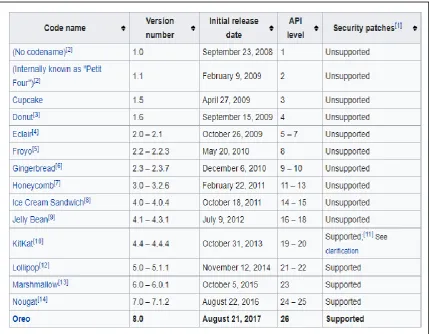
Figure 2.1: The history of the Android version……….…..9
Figure 2.2: Arduino Yun components board layout………..….…11
Figure 2.3 Arduino Mega components board layout……….….13
Figure 2.4: Arduino Uno components board layout……….…...15
Figure 2.5: The type of magnetic door sensors………..…….16
Figure 2.6: IR Break Beams Sensor design……….18
Figure 2.7: The receiver is on the left, it has three wires. The transmitter is on the right, it has two wires………..…….18
Figure 2.8: Round metal can with a rectangular crystal in the center………..……20
Figure 2.9: Older PIRs design……….…….20
Figure 2.10: New PIRs that have more adjustable settings and have a header installed in the 3-pin. ……….……….………20
Figure 2.11: Diagram of Bluetooth module front side and back side view…….….21
Figure 2.12: Diagram of HC-05 Bluetooth module front side and back side….…..22
Figure 2.13: Diagram of HC-06 Bluetooth module front side and back side….…..23
Figure 2.14: Bluetooth interface in smart phone………...……24
Figure 3.1: Flow chart of project……….….…25
Figure 3.2: Flow chart of project preparation………..……….……26
Figure 3.3: How the PIR sensor work………...30
Figure 3.4: The interface for the Arduino IDE………..…31
X Figure 3.6: Block diagram for controlling home appliances by using
Bluetooth………..…….…32
Figure 3.7: Flow chart of Bluetooth module connectivity…..……….….32
Figure 3.8: Flow chart of PIR sensor when detect motion…….………..….33
Figure 3.9: Controlling home appliances by using Bluetooth………..……….34
Figure 4.1: The configuration screen of the application…….………...………39
Figure 4.2: The connection of LEDs, PIR sensor, fan on Arduino Uno board…….40
Figure 4.3: The red LED will turn ON if the living room button is press……....….41
Figure 4.4: Living room button to turn ON and OFF the red led at the living room………...42
Figure 4.5: The green LED will turn ON if the bed room button is press………...42
Figure 4.6: Bed room button to turn ON and OFF the green led at the bed room….43 Figure 4.7: The red and green LED will turn ON if the living room and the bed room button is press………..43
Figure 4.8: Living room and bed room button to turn ON and OFF the green and red led at the living room and the bed room area………..……….44
Figure 4.9: The fan will turn ON if the fan button is press………...….44
Figure 4.10: The fan button to turn ON and OFF the fan………...……45
Figure 4.11: The LED will turn ON if the PIR sensor detect a motion………...….45
Figure 4.12: The LED will turn OFF if the PIR sensor detect no motion………..…46
Figure 4.13: The graph of performance of PIR sensor with distance…………..…...48
XI
LIST ABBREVIATIONS, SYMBOLS AND
NOMENCLATURES
PIR sensor - Passive infrared sensor
IR sensor - Infrared sensor
USB - Universal serial bas
DC - Direct current
FTDI - Future technology devices international
EEPROM - Electrically erasable programmable read-only memory
IDE - Integrated Development Environment
LED - Light emitting diode
OS - Operating System
PCB - Printed circuit board
PWM - Pulse Width Modulation -
ICSP - In-circuit serial programming
CMOS - Complementary metal–oxide–semiconductor
RISC - Reduced instruction set computer
AVR - Automatic Voltage Regulator
SRAM - Static Random Access Memory
1
CHAPTER 1
INTRODUCTION
1.0Introduction
The main concepts and development of the controlling home appliances by using Bluetooth are provided in this chapter. In this chapter, the explanation of the project background, problem statement, objectives and project scope will be make up into few parts. Moreover, explanation about this project system and how the system working will be explain in this chapter. Besides that, the very beginning of the preparation for this controlling home appliances using Bluetooth connectivity will beings serves also in chapter one. This section also important for the user because it will be the guidelines for the users. The developer also can achieve the desired goals based on the sections included in this chapter with the clearly specified statement stated.
1.1 Project Background
2 Home automation is one of the first projects one thinks about when want to make the life easier, comfort and to save the energy at home because it involves the control and managing the home equipment such as lighting, home appliances and etc. Because nowadays, there is a continuous need for automatic appliances at home, so that home automation that also known as Domotics is develop for the home. This is because we press switches dozens of times a day, sometimes when our hands are full and we often forget to turn off the lights that will consumes more energy and effect the electric bill budget. The user can control the equipment connected to the system by using a smartphone, a tablet or a personal computer, through Bluetooth or Internet.
3 This presents a project of controlling home appliances such as lamps and fans with the goals are to design a simple, low-cost system and widely use in future. The function of automation home appliances is to help the person to save the electric bill consumption to eliminate the situation of forgetting to switch OFF the lamps and fan if it remains ON unnoticed for long periods. This application system that plan to be implement will solves the problem of electricity wastage by switching ON and OFF the home appliances by using the Bluetooth if there no one at home, so that we can enhance the power efficiency and improve the quality of living. The system be able to control home appliances such as fans and lamps in their house. Using the android application that is installing to the smartphone, the users can switch ON or OFF the home appliances remotely. Some of these studies focused on predicting the probability that people will switch lights ON or OFF (Boyce et al., 2006, Lindelof and Morel, 2006).
4
1.2 Problem Statement
Problem today is the waste of energy resources in home. Energy is limited but most of us forget that energy is ready to use in great amount. In our lives, we count on energy for almost entirety in what we do. We desire to make our lives easy, comfortable and, productive. Unluckily, we have begun taking things for accepted and caused use the energy without thought begun unnecessarily, that because what we do not realize about the situation and just want the quality of our life to be maintained. We must use the energy resources wisely and always try to save the electrical power because the recourse is very important for us later. According to Gandhiji cited in Banerjee, (2015) “The earth provides enough to satisfy every man’s needs but not every man’s greed”. This is because one of the biggest motivators people have for conserving electricity in their homes is the accumulated savings in their energy bills at the end of the year. There are other reasons why conserving electricity is important beyond the impact on financial budget. We not only can cause to the depletion of natural energy that used to generate electricity, we also can make the electricity bills to increasing higher.
Human attitudes is one of the factor that contributing to the higher electric power consumption due to the wasting electricity become a habit which lead to the lack of awareness towards energy saving. Most of the people nowadays tend to forget to switch OFF the lamp and fan when leaves they house because it is already become a part of their behaviour. Based on what Ranjit et al, (2009) stated that, there are many cases where the consumers forgot to switched OFF the lamps when they come out
from the washroom especially children and teenagers. The use of electricity
5 The light control system of the application can provide an applicable application for both home utilization and for commercial building purposes. The controlling home appliances such as lamps comes with the application where the light could be switched ON and OFF by using the Bluetooth connectivity. The benefits of using Bluetooth connectivity in our daily life can minimize the involvement of people to turn ON and FF the switch, besides of the location of the power switch at the certain places is different and sometimes hidden lead to the problem occurrence towards the visitors. The visitors does not need to find the switch when want to use the bathroom because the use of power switch is not consumable. In this digital word we need every possible thing around us to be automatic which reduces human efforts. To save the energy, the uses of Bluetooth connectivity will help to turn OFF the lamps and fan when the person leaves the houses. Recent studies have dealt with the problem of identifying occupant light switching preferences. By using this circuit there is an advantage of preventing unwanted electric power wastage and save the electricity when there is no occupant in the houses.
6
1.3Objectives
The aim of this study is:
1. To prepare a circuit that suitable for the application of home automation.
2. To test and characterize the home automation using Bluetooth module.
3. To control home appliances such as lamp and fan by using Bluetooth
connectivity.
1.4Scope
Based on the objectives, the scopes of study are highlighted as follows:
1. To control home appliances system such as lamps and fan that using Bluetooth
connectivity when a person that inside the house.
2. This system can be applied at the household because it can save the electrical
7
CHAPTER 2
LITERATURE REVIEW
2.0Area of Project Study
The developer have to study on several ideas of the development for this project in this chapter. First, the developer must studies about the controlling home appliances using Bluetooth that include the common idea of the android Bluetooth connectivity and the appliances systems, with its applications development tools. Besides that, the functionality of the hardware tools and the combination of the software application are needed to complete the project.
2.1 Home appliances
2.1.1 Manual home appliances
8
2.1.2 Automatic home appliances
Automation plays an increasingly important role in the world economy and in daily life. Automatic systems are being preferred over manual system (Sindhu et al, 2016). The energy consumption is inevitable for providing a comfort working environment to maintain the quality of the production activities. One solution to save energy without decrease comfort levels is lighting control. Lighting control systems are widely used on both indoor and outdoor lighting of commercial, industrial, and residential spaces. Lighting control systems serve to provide the right amount of light where and when it is needed. Lighting control systems also to maximize the energy savings and the occupants can have more comfort in their house by switching the lights automatically because the automatic system can minimise the manual work.
2.2 Classification of Android
For this project the developer has chosen the Android as progress stage. This is because Android being used by mostly community now presently as the operating system in their smartphone. Besides that, in 2007 Android was the first introduced by Google, based on the Linux Kernel. After the sugary treat, the Google Android OS give name for each major of the Android OS in alphabetical order. In September 2008, Android 1.0 the earliest Android version is that being released and version 1.1 in February 2009. After that, Android "Cupcake" release of Android 1.5 in April 2009 that being developed by Google. By the situation, Google start to name Android version follow a desert name that was in alphabetical order. Android 2.0 that known as Eclair was released due to rapid development in 2009. Then, the other version of Android are shown in Figure 2.4: Android version history.