http://www.sciencepublishinggroup.com/j/ijics doi: 10.11648/j.ijics.20170206.11
ISSN: 2575-1700 (Print); ISSN: 2575-1719 (Online)
A Digitalized Smart Mobile Home Automation and Security
System via Bluetooth/Wi-Fi Using Android Platform
Abdulkareem Quadri Bolaji, Raji Ayodele Kamaldeen, Oyedepo Femi Samson,
Abdulrahman Tosho Abdullahi, Sadiq Kolawole Abubakar
Department of Computer Science, Kwara State Polytechnic, Ilorin, Nigeria
Email address:
[email protected] (Q. B. Abdulkareem), [email protected] (A. K. Raji),
[email protected] (F. S. Oyedepo), [email protected] (T. A. Abdulrahman), [email protected] (K. A. Sadiq)
To cite this article:
Abdulkareem Quadri Bolaji, Raji Ayodele Kamaldeen, Oyedepo Femi Samson, Abdulrahman Tosho Abdullahi, Sadiq Kolawole Abubakar. A Digitalized Smart Mobile Home Automation and Security System via Bluetooth/Wi-Fi Using Android Platform. International Journal of Information and Communication Sciences. Vol. 2, No. 6, 2017, pp. 93-99. doi: 10.11648/j.ijics.20170206.11
Received: October 5, 2017; Accepted: October 30, 2017; Published: November 15, 2017
Abstract:
Home automation involves introducing a degree of automatic control to certain electrical and electronic systems in a building such as lighting, temperature control etc. This work presents the design, specification, and prototype implementation of a composite home automation system using Bluetooth/Wi-Fi over android platform. The research work provides multiple yet simple design approaches for developing flexible and robust home automation system to cater for the deficiency in overall control of user appliances. It also tackles the problems with complex, multiple, incompatible standards and the resulting expenses in the existing systems. The proposed system features an Arduino Mega board with core AVR microcontroller (ATmega2560) interfaced to the ubiquitous ESP8266 Wi-Fi chip, Infrared transmitter and receiver mechanism, power relay interface as well as user contact LCD and Keypad. With the HTML5 based intuitive mobile and web applications, unlimited flexibility is induced in the system operations and management. Overall, the system extends the capabilities of home automation beyond the basic appliances switching and monitoring by giving broad control over the appliances’ functionalities in addition to switching their power.Keywords:
Home Automation, Arduino Mega Board, AVR Microcontroller, Security System, Android Phone, Android ADK1. Introduction
Home automation or Smart Homes can be described as introduction of technology within the home environment to provide convenience, comfort, security and energy efficiency to its occupants [1]. It involves introducing a degree of automatic control to certain electrical and electronic systems in a building, including lighting, temperature control, etc. [2]. Adding intelligence to home environment can provide increased quality of life for the elderly and disabled people who might otherwise require care givers or institutional care [3]. Today, Smart Phones are more than just Phones, they are now the main Human Interaction Devices and users thus want to control/accomplish most of their tasks from their Smart Phones rather than conventional ways. The many wireless protocols that come embedded on a Smart Phone has
introduced a wireless lifestyle reliving people from the “wired” cable chaos [4].
application in home automation. Home automation provides the following [3]:
a. Increase your independence and give you greater
control of your home environment.
b.Make it easier to communicate with your family. c. Save you time and effort.
d.Improve your personal safety.
e. Reduce your heating and cooling costs. f. Increase your home’s energy efficiency.
g.Alert you audibly and visually to emergency situations.
h.Allow you to monitor your home while you are away.
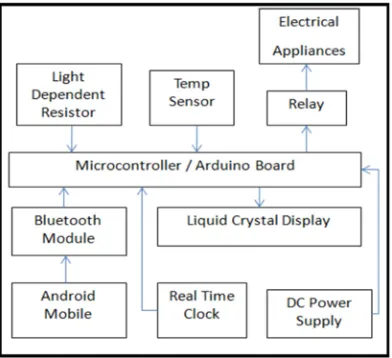
Figure 1 below shows a typical block diagram of home automation system which comprises of the user phone connected to home devices through Arduino BT controller.
Figure 1. Block diagram of home automation system [6].
However, this research work presents the design, specification, and prototype implementation of a composite home automation system using Bluetooth/Wi-Fi over an android platform. The design is based on a standalone embedded system board Android ADK (Accessory Development Kit) at Home. The work seeks to provide multiple yet simple design approaches for developing flexible and robust home automation system to cater for the
deficiency in overall control of user appliances.
Bluetooth/Wi-Fi based home automation project allows the control of electrical appliances using android smart mobile phone. The research demonstrates a simple Home automation system which contains a remote mobile host controller and several client modules (Home appliances). The client modules communicate with the host controller through a wireless device such as a Bluetooth enabled mobile phone using an Android based Smart phone. It also provides home security and emergency system to be activated.
2. Research Objectives
The aim of this research is to construct a complete home automation system which can control major electric components via Bluetooth/Wi-Fi using Android mobile phone. The objectives are:
i. To design smart home automation system that will allow people to control home appliances from anywhere. ii. To design a system that will give instant alerts in
critical situations.
iii.To set up a simple Prototype home automation
mechanism.
3. Related Work
There has been a significant increase in home automation in recent years due to higher affordability and advancement in Smart phones and tablets which allows vast connectivity [3]. A telephone and PIC based remote control system where pin- check algorithm was also been introduced by [5]. Researchers in [6] design home automation and security system using Android ADK. The design is based on a
standalone embedded system board Android ADK
(Accessory Development Kit) at home. Authors in [7] present a design and prototype implementation of new home automation system that uses Wi-Fi technology as a network infrastructure connecting its parts. Their proposed system consists of two main components; the first part is the server (web server), which presents system core that manages, controls, and monitors user's home.
Also, Authors in [8] present a low cost, flexible and secure cell phone based home automation system. The design is based on a standalone Arduino BT board and the home appliances are connected to the input/ output ports of this board via relays. The communication between the cell phone and the Arduino BT board is wireless. Researchers in [9] also presented the architecture for home automation where the system was based on a dedicated network. This system only shows how to solve home automation problems at software level and no hardware aspects were considered. Also to remotely control home appliances such as oven, air conditioner and computer by telephones which offer easy usage has been investigated by [10].
It is worth mentioning the contributions of authors in [18] that designed a flexible and secure cell phone based device automation system. The design is based on a standalone Arduino BT (ATMega 238) board and the home appliances are connected to the input/ output ports of this board via relays. The system can be used by any person who can operate an android phone. The system is low cost and scalable that allows variety of devices to be controlled with minimum changes to its core.
Finally, the above reviewed systems have made significant contributions to the design and development of home automation systems. None of them combined the use of Bluetooth and Wi-Fi together. Also the existing works were mainly focused on switching and controlling home appliances or connected devices rather than remotely monitoring of home environment.
4. Research Methodology
phone in order to control and monitor the function of target home appliances by using relay circuit. The microcontroller connects to sensor in order to monitor the temperature and humidity level at home. The main control board is designed so that it complies with the household electrical standards. The system features an Arduino Mega board with core AVR microcontroller (ATmega 2560) interfaced to the ubiquitous ESP8266 Wi-Fi chip, Infrared transmitter and receiver mechanism, power relay interface as well as user contact LCD and Keypad.
The GUI designed on computer is implemented with the HTML5 based intuitive mobile and web applications. The client modules communicate with the host controller through Bluetooth devices. As a central controller; we are using a standalone embedded module that communicates with an Android application, our user interface. Figures 2 and 3 below give the architectural details of composite home automation and block diagram of Home Automation System using Android respectively.
Figure 2. Composite Home Automation Architecture.
Figure 3. Overall Home Automation System Design.
4.1. Hardware Design
This section mainly discusses the hardware construction of main control board. The key hardware components that make up the home automation system are the Smart Phone, the Microcontroller Board, the Bluetooth module connected to the Microcontroller board and relay boards that drive the
electrical appliances. ADK stands for Accessory
Development Kit. Android accessory is a physical accessory that can be attached to your Android device. The Arduino ADK [6] is a microcontroller board based on the ATmega2560. It has a USB host interface to connect with Android based phones, based on the MAX3421e IC. Figure 3 below shows Arduino ADK. The Microcontroller on the Arduino is programmed in C++ through the Arduino IDE available freely.
Figure 4. Arduino Mega ADK [6].
(hotspot) to which other smart devices as phone, tablet and PC can connect. Usually, being the gateway, its IP address is 192.168.4.1 and other devices connected obtain addresses from 192.168.4.2 upward.
b.Wi-Fi Station (STA) - In station mode, the CPE is capable of connecting to an existing home wireless network. By default, it is configured to support DHCP and so it obtains IP address from the router. E.g. if it is connected to an android mobile hotspot whose gateway is typically 192.168.43.1, the CPE will acquire 192.168.43.XXX depending on the time.
c. EEPROM – Up to 1 Kb of data can be saved in this memory and the information can be retained even after restart. It is typically utilized for keeping the states of the appliances port after power off. Also, it is in where all the system configurations are saved.
d.Web Server – This is a custom configuration interface server which is accessible via smart phone, tablet or PC’s web browsers. Depending on the connection, this server listens on standard port 80 and on the URL bar of the web browser; either of the CPE IP can be entered.
e. Websocket Server – This allows the CPE to be
controlled within the local network. An android or a web application can communicate with this server through either of the CPE IP on port 600.
f. Websocket Client – The CPE communicates with the
cloud services platform through this client which runs on port 500. The CPE must be connected to an Internet gateway to be able to route packet to the server. The associated settings can be reviewed on the CPE configuration portal.
g.NTP Client – The time and date functionalities are synchronized with any chosen Network Time Server (NTP) at a certain refresh rate. The NTP address, port and associated settings are accessible via the CPE configuration portal.
h. OLED – The process flows and the states and
transitions are displayed on the dedicated 0.9-inch OLED screen. There are adequate delays for user to capture the information. The menu displays the current time, the connection states and importantly the CPE IP addresses.
i. LED – The operations of the CPE is coded in green LED flashes. The number of flashes represents a particular state/operation. It is mainly used in debugging the CPE and it is secondary to the display. j. USART – This is an advanced debugging tool and it
involves the use of a USB-to-TTL/ USB-Serial converter.
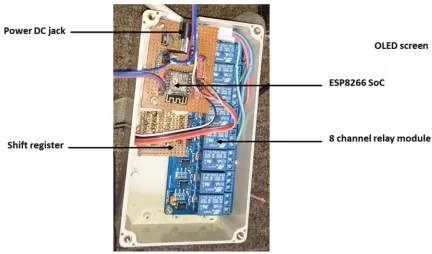
k. The hardware consists of the following as shown in the diagram.
Figure 5. Hardware details.
4.2. Software Design
Software design section includes the main functions of the system designed in the PIC (Port Interface Card) microcontroller and the two GUIs (Window and Android application). The GUI designed on computer is implemented with the HTML5 based intuitive mobile and web applications, unlimited flexibility are induced in the system
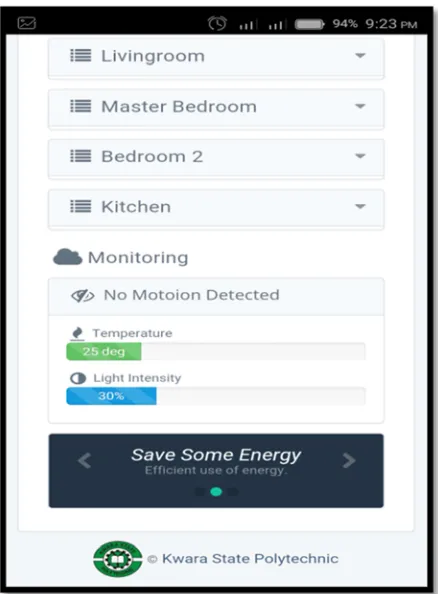
wants to control. Figures 6, 7 and 8 below indicate some examples of our graphical user interface.
Figure 6. Screenshot of Home Automation System Application.
Figure 7. Screenshot showing different rooms.
Figure 8. Screenshot showing different appliances.
5. System Setup and Implementation
Upon the execution of the program, it first checks if Bluetooth is already enabled on the phone. If Bluetooth is enabled, the device and service discovery process will run. The software will check if there are already predefined devices stored in the phone memory. The program then checks to see if the selected device is within range. It will then verify if the device is a Bluetooth transceiver (Arduino BT board). Now if there are no devices stored in memory, the program will search for Bluetooth-enabled devices within the area. Once discovered, these devices will be displayed on the screen and also stored in memory. Once it is confirmed that the device is indeed a transceiver, the software will store the unique addresses of all the controller modules connected to it, in this case Arduino BT. The following steps will be used to implement the system:
1. Plug in DC PSU plug to the jack of the CPE and plug
the AC plug to a power outlet.
2. The CPE will automatically start into boot mode and the operations and stages are displayed on the screen. 3. After the initialization; reading states of the ports,
configurations and all; the CPE starts the Wi-Fi STA
and attempts to connect to the last
configured/connected external AP. The default ssid: is CHAS and passkey is chas1234. So one optionally can set up a mobile hotspot with the above settings.
4. Upon successful association with AP, the CPE attempts
5. The CPE AP is started independently and the embedded servers (web server for configuration and Websocket server for control) begin to run.
6. The Websocket client starts successfully when it is able to complete a handshake with the cloud server. It is worth noting that both Websocket and NTP clients need internet connection, so the CPE should be associated with an Internet gateway, mobile hotspot or other source of wireless connection sharing Internet.
7. When the CPE has a connection to the Internet, then one can login to the cloud web app via http://cb.djade.net on a phone, tablet or PC web browser to control the appliance through the CPE. 8. The configuration portal can be opened via the CPE self
AP IP (192.168.4.1) or acquired IP from the external AP.
9. Just connect phone or PC to the CPE network and enter
192.168.4.1 in a web browser. Or have the phone or PC connected to the same external AP the CPE is connected, for example, if the phone is the hotspot, then it is already on the same network as the CPE. The IP address in this case is the DHCP assigned IP to the CPE and usually displayed on the display.
10.Further customization and settings are accessible through this configuration portal of the CPE.
6. Conclusion
The research work has introduced the design and implementation of a low cost android based home automation system. It gives basic idea of how to control various home appliances using Android phone. We have chosen Android platform so that most of the people can benefit because of its wide usage. User can interact with the android phone and send control signal to the Arduino which in turn will control other embedded devices. This will improve the security of home and also assist in conserving energy like if you left any home appliance switched on by mistake, then you can switch it off using the internet connectivity. We can also keep an eye on home through an internet connected to the user’s mobile phone or PC or laptop. This system can be easily manufactured on a large scale for mass adoption owing to its simplicity and ease of design. Another advantage of is the fact that application software is based on Android, which today has the largest smart phone base, any Android based Smart phone with built in support for Bluetooth/Wi-Fi can be used to access and control the devices at home. When a Wi-Fi connection is not available, mobile cellular networks such as 3G or 4G can be used to access the system.
Acknowledgements
All forms of praises and commendations are attributed to Almighty God for His protection and guidance throughout the duration of carrying out this research. Special gratitude to Tertiary Education Trust Fund (TetFund-Nigeria) for sponsoring this research. Thanks also to the Rector of Kwara State Polytechnic Alh. Mas'ud Elelu and other Management
team, Director IICT (Alh. L. Akewusola) and all members of staff of the Department of Computer Science, Kwara State Polytechnic, Ilorin. We acknowledge the efforts and hard work by the experts who have contributed towards the development of the different home automation systems. We also acknowledge the efforts of the reviewers of the journal for the suggestions and modifications to improve the quality of the paper. Finally, we appreciate the support and understanding of our family members.
References
[1] Y. Liu, "Study on Smart Home System Based on Internet of Things Technology," in Informatics and Management Science IV. vol. 207, W. Du, Ed.: Springer London, 2013, pp. 73-81.
[2] D. Javale et al, "Home Automation and Security System Using Android ADK", International Journal of Electronics Communication and Computer Technology (IJECCT), Volume 3 Issue 2, 2013. Pp 382-385.
[3] R. Piyare, "Internet of Things: Ubiquitous Home Control and Monitoring System using Android based Smart Phone", International Journal of Internet of Things 2013, 2(1): 5-11 DOI: 10.5923/j.ijit.20130201.02.
[4] S. Anwaarullah and S. V. Altaf, "RTOS based Home Automation System using Android" International Journal of Advanced Trends in Computer Science and Engineering, Vol.2, No.1, Pages: 480–484 (2013).
[5] E. Yavuz, B. Hasan, I. Serkan and K. Duygu (2007). “Safe and Secure PIC Based Remote Control Application for Intelligent Office”. International Journal of Computer Science and Network Security, Vol. 7, No. 5.
[6] D. Javale et al." Home Automation and Security System Using Android ADK", International Journal of Electronics Communication and Computer Technology (IJECCT), Volume 3 Issue 2, March 2013.
[7] A. ElShafee, K. A. Hamed "Design and Implementation of a Wi-Fi Based Home Automation System", World Academy of Science, Engineering and Technology, Vol:6 2012-08-28
[8] Rana, Jitendra Rajendra and Pawar, Sunil N., Zigbee Based Home Automation, April 10, 2010. Available at SSRN: http://ssrn.com/abstract=1587245or
http://dx.doi.org/10.2139/ssrn.1587245.
[9] G. B. Pradeep, S. Chandra, and M. Venkateswarao “Ad-Hoc Low Powered 802.15.1 Protocol Based Automation System for Residence using Mobile Devices”, Department of ECE, K L University, Vijayawada, Andhra Pradesh, India IJCST Vo l. 2.
[10] R. Al-Ali and M. AL-Rousan, “Java-Based Office Automation System” IEEE Transactions on Consumer Electronics, Vol. 50, No. 2, 2004.
[11] R. Piyare, M. Tazil, "Bluetooth based home automation system using cell phone", IEEE 15th International Symposium on Consumer Electronics, 2011.
[13] Home automation, (Retrieved on 12/12/2012, Available:http://en.wikipedia.org/wiki/Home_automation
[14] M. Murphy, "Beginning Android 3", Après. ISBN-13 (electronic): 978-1-4302-3298-8, 2011.
[15] A. K. Raji, A. K et al, Developing Digital Library: A Model of Kwara State Polytechnic Digital Library, International Journal of Advanced Research in Computer Science. Volume 4, No. 2, January-February 2013, Pp 65-69. Available Online at www.ijarcs.info.
[16] A. K. Raji et al, Wireless Internet Access Use by Staff and
Students at the Kwara State Polytechnic, Ilorin-Nigeria, International Journal of Advanced Research in Computer Science, Volume 3, No. 4, July-August 2012, Pp 279-282. Available Online at www.ijarcs.info.
[17] Addison-Wesley, "Android Wireless Application Development", 2nd edition, 2011 ISBN-13: 978-0-321-74301-5
![Figure 1. Block diagram of home automation system [6].](https://thumb-us.123doks.com/thumbv2/123dok_us/1166168.1619052/2.595.46.289.255.384/figure-block-diagram-home-automation.webp)