B
RUCE
P
ERENS
’ O
PEN
S
OURCE
S
ERIES
www.prenhallprofessional.com/perensBruce Perens’ Open Source Series is a definitive series of books on Linux and open
source technologies, written by many of the world’s leading open source professionals. It is also a voice for up-and-coming open source authors. Each book in the series is published under the Open Publication License (www.opencontent.org), an open source compatible book license, which means that electronic versions will be made available at no cost after the books have been in print for six months.
◆ Java™ Application Development on Linux® Carl Albing and Michael Schwarz
◆ C++ GUI Programming with Qt 3
Jasmin Blanchette and Mark Summerfield
◆ Managing Linux Systems with Webmin: System Administration and Module Development Jamie Cameron
◆ Understanding the Linux Virtual Memory Manager Mel Gorman
◆ PHP 5 Power Programming
Andi Gutmans, Stig Bakken, and Derick Rethans
◆ Linux® Quick Fix Notebook Peter Harrison
◆ Implementing CIFS: The Common Internet File System Christopher Hertel
◆ Open Source Security Tools: A Practical Guide to Security Applications Tony Howlett
◆ Apache Jakarta Commons: Reusable Java™ Components Will Iverson
◆ Linux® Patch Management: Keeping Linux® Systems Up To Date Michael Jang
◆ Embedded Software Development with eCos Anthony Massa
◆ Rapid Application Development with Mozilla Nigel McFarlane
◆ Subversion Version Control: Using the Subversion Version Control System in Development Projects
William Nagel
◆ Intrusion Detection with SNORT: Advanced IDS Techniques Using SNORT, Apache, MySQL, PHP, and ACID
Rafeeq Ur Rehman
◆ Cross-Platform GUI Programming with wxWidgets Julian Smart and Kevin Hock with Stefan Csomor
◆ Samba-3 by Example, Second Edition: Practical Exercises to Successful Deployment John H. Terpstra
◆ The Official Samba-3 HOWTO and Reference Guide, Second Edition John H. Terpstra and Jelmer R. Vernooij, Editors
User Mode Linux
®Jeff Dike
Upper Saddle River, NJ • Boston • Indianapolis • San Francisco New York • Toronto • Montreal • London • Munich • Paris • Madrid
Many of the designations used by manufacturers and sellers to distinguish their products are claimed as trademarks. Where those designations appear in this book, and the publisher was aware of a trademark claim, the designations have been printed with initial capital letters or in all capitals.
The author and publisher have taken care in the preparation of this book, but make no expressed or implied warranty of any kind and assume no responsibility for errors or omissions. No liability is assumed for inci-dental or consequential damages in connection with or arising out of the use of the information or programs contained herein.
The publisher offers excellent discounts on this book when ordered in quantity for bulk purchases or special sales, which may include electronic versions and/or custom covers and content particular to your business, training goals, marketing focus, and branding interests. For more information, please contact:
U.S. Corporate and Government Sales (800) 382-3419
For sales outside the United States, please contact:
International Sales
Visit us on the Web: www.prenhallprofessional.com
This Book Is Safari Enabled
The Safari® Enabled icon on the cover of your favorite technology book means the book is available through Safari Bookshelf. When you buy this book, you get free access to the online edition for 45 days.
Safari Bookshelf is an electronic reference library that lets you easily search thousands of technical books, find code samples, download chapters, and access technical information whenever and wherever you need it.
To gain 45-day Safari Enabled access to this book: • Go to http://www.prenhallprofessional.com/safarienabled
• Complete the brief registration form
• Enter the coupon code 84J7-DAEK-ZNZP-2JK4-FMBD
If you have difficulty registering on Safari Bookshelf or accessing the online edition, please e-mail [email protected].
Library of Congress Cataloging-in-Publication Data
Dike, Jeff.
User Mode Linux / Jeff Dike. p. cm.
Includes bibliographical references and index. ISBN 0-13-186505-6 (pbk. : alk. paper)
1. Linux. 2. Operating systems (Computers) 3. Application software porting. I. Title.
QA76.76.O63D545 2006 005.4'32--dc22
2006004225
Copyright © 2006 Pearson Education, Inc.
This material may be distributed only subject to the terms and conditions set forth in the Open Publication License, v1.0 or later (the latest version is presently available at http://www.opencontent.org/openpub/).
ISBN 0-13-186505-6
v
Contents
Preface ...ix
Acknowledgments ...xi
About the Author ... xiii
1 Introduction ...1
What Is UML?...1
Comparison with Other Virtualization Technologies ...2
Why Virtual Machines? ...3
A Bit of History ...4
What Is UML Used For? ...8
Server Consolidation ...8
Education ...10
Development ...12
Disaster Recovery Practice ...13
The Future ...14
2 A Quick Look at UML ... 17
Booting UML for the First Time ...20
Booting UML Successfully ...24
Looking at a UML from the Inside and Outside ...29
Conclusion ...37
3 Exploring UML ... 39
Logging In as a Normal User ...39
Consoles and Serial Lines ...40
Adding Swap Space ...47
Partitioned Disks ...49
vi Contents
Networking ... 54
Shutting Down ... 59
4 A Second UML Instance ... 61
COW Files... 61
Booting from COW Files... 67
Moving a Backing File... 69
Merging a COW File with Its Backing File... 70
Networking the UML Instances... 71
A Virtual Serial Line ... 79
5 Playing with a UML Instance ... 83
Use and Abuse of UML Block Devices ... 83
Networking and the Host ... 87
6 UML Filesystem Management ... 101
Mounting Host Directories within a UML... 101
hostfs... 104
humfs... 108
Host Access to UML Filesystems ... 114
Making Backups... 116
Extending Filesystems... 117
When to Use What ... 118
7 UML Networking in Depth ... 121
Manually Setting Up Networking... 121
TUN/TAP with Routing... 121
Bridging... 136
The UML Networking Transports ... 142
Access to the Host Network ... 143
Isolated Networks... 145
pcap... 145
How to Choose the Right Transport ... 146
Configuring the Transports... 147
An Extended Example ... 155
A Multicast Network ... 155
A Second Multicast Network... 156
Adding a uml_switch Network ... 160
Summary of the Networking Example ... 166
8 Managing UML Instances from the Host ... 167
The Management Console ... 167
MConsole Queries ... 168
The uml_mconsole Client... 182
Contents vii
The MConsole Perl Library...185
Requests Handled in Process and Interrupt Contexts ...186
MConsole Notifications ...186
Controlling a UML Instance with Signals ...188
9 Host Setup for a Small UML Server... 191
Host Kernel Version ...192
UML Execution Modes ...194
tt Mode...197
skas3 Mode ...198
skas0 Mode ...200
To Patch or Not to Patch? ...201
Vanderpool and Pacifica...202
Managing Long-Lived UML Instances ...203
Networking...206
UML Physical Memory...206
Host Memory Consumption ...208
umid Directories ...209
Overall Recommendations ...209
10 Large UML Server Management ... 211
Security ...212
UML Configuration ...212
Jailing UML Instances ...216
Providing Console Access Securely ...223
skas3 versus skas0...225
Future Enhancements...226
sysemu...226
PTRACE_FAULTINFO...227
MADV_TRUNCATE...227
remap_file_pages...230
VCPU...231
Final Points...232
11 Compiling UML from Source... 233
Downloading UML Source ...234
Configuration ...235
Useful Configuration Options...240
Compilation...249
12 Specialized UML Configurations ... 251
Large Numbers of Devices ...252
Network Interfaces...252
viii Contents
Clusters... 265
Getting Started ... 265
Booting the Cluster... 268
Exercises ... 272
Other Clusters ... 273
UML as a Decision-Making Tool for Hardware... 273
13 The Future of UML... 275
The externfs Filesystem... 277
Virtual Processes... 282
Captive UML ... 283
Secure mod_perl... 283
Evolution ... 286
Application Administration... 287
A Standard Application Programming Interface ... 289
Application-Level Clustering ... 289
Virtualized Subsystems ... 295
Conclusion ... 298
A UML Command-Line Options ... 301
Device and Hardware Specifications ... 301
Debugging Options... 303
Management Options... 304
Informational Options ... 305
B UML Utilities Reference ... 307
humfsify... 307
uml_moo... 308
uml_mconsole... 308
tunctl... 310
uml_switch... 311
Internal Utilities ... 312
ix
Preface
When I started the User Mode Linux (UML) project in 1999, I had no idea how large a project it would become or how much of my time it would end up consuming. As time went on, the UML user base grew, and people found new ways to use it. As a result of their requests, UML contains a number of features that would never have occurred to me.
xi
Acknowledgments
It is not much of an exaggeration to say that the User Mode Linux (UML) project would not exist without its users. They provide testing, bug reports, and suggestions for improvements. Therefore, I would first like to thank everyone who has used UML for taking part, especially those who have tested bleeding-edge versions and who have provided feedback, good or bad. I would especially like to thank Bill Stearns, who has supported UML in innumerable ways since its early days.
A number of people have made contributions to the UML code base by fixing bugs or by contributing new features. Some important features were contributed by users who saw a need and wrote the code. My thanks go out to them. Most significant are the contributions of Paolo Giarrusso, who has become my right-hand man during the last year or so. His contributions include bug fixes and features, documen-tation and support, and improvements to the hosts in order to allow them to better support UML.
The UML project has been supported financially by a number of organizations, some of whom contracted for specific improvements; oth-ers provided more general support. Among these, I would especially like to thank the Dartmouth Institute for Security Technology Studies, which saw in UML the potential for a new and powerful security tool.
xiii
About the Author
1
C H A P T E R
1
Introduction
W
HAT
I
S
UML?
User Mode Linux (UML) is a virtual Linux machine that runs on Linux. Technically, UML is a port of Linux to Linux. Linux has been ported to many different processors, including the ubiquitous x86, Sun’s SPARC, IBM and Motorola’s PowerPC, DEC’s (then Compaq’s and HP’s) Alpha, and a variety of others. UML is a port of Linux in exactly the same sense as these. The difference is that it is a port to the software interface defined by Linux rather than the hardware interface defined by the processor and the rest of the physical computer.
2 Chapter 1 Introduction
C
OMPARISON
WITH
O
THER
V
IRTUALIZATION
T
ECHNOLOGIES
UML differs from other virtualization technologies in being more of a virtual operating system (OS) rather than a virtual machine. In spite of this, I will stick to the common terminology and call UML a virtual machine technology rather than a virtual OS, which would be some-what more accurate.
Technologies such as VMWare really are virtual machines. They emulate a physical platform, from the CPU to the peripherals, well enough that any OS that runs on the physical platform also runs on the emulated platform provided by VMWare. This has the advantage that it is fairly OS-agnostic—in principle, any OS that runs on the platform can boot under VMWare. In contrast, UML can be only a Linux guest. On the other hand, being a virtual OS rather than a virtual machine allows UML to interact more fully with the host OS, which has advan-tages we will see later.
Other virtualization technologies such as Xen, BSD jail, Solaris zones, and chroot are integrated into the host OS, as opposed to UML, which runs in a process. This gives UML the advantage of being inde-pendent from the host OS version, at the cost of some performance. However, a lot (maybe all) of this performance can be regained without losing the flexibility and manageability that UML gains from being in userspace.
As we will see later, the benefits of virtualization accrue largely from the degree of isolation between users and processes inside the vir-tual machine or jail and those outside it. Most of these technologies (excluding Xen and VMWare) provide only partial virtualization and, thus, partial isolation.
The least complete virtualization is provided by chroot, which only jails processes into a directory. In all other respects, the processes are unconfined. Even then, on Linux, chroot can’t confine a process with root privileges, since its design allows superuser processes to escape.
Why Virtual Machines? 3
the bugs and security holes it contains. The inability to change firewall rules is a consequence of incomplete virtualization, as is the require-ment to share the kernel with the host.
Solaris zones are much closer to full-blown virtual machines and complete isolation. Processes within a zone can’t see outside files or processes, as is the case with a jail. Zones have their own logical devices, with some restrictions on their access to the network. For example, raw access to packets isn’t allowed. A zone can be assigned a certain number of shares within the global fair share scheduler, limit-ing the share of CPU that the processes within a zone can consume. We will see this concept later in the form of virtual processors in a multi-processor virtual machine. Zones, like the other technologies described so far, are implemented within the kernel and share the kernel version and configuration with each other and the host.
Finally, technologies such as VMWare, Xen, and UML implement full virtualization and isolation. They all have fully virtualized devices with no restrictions on how they may be used. They also confine their processes with respect to CPU consumption by virtue of having a cer-tain number of virtual processors they may use. They also all run sepa-rate instances of the OS, which may be different versions (and even a completely different OS in the case of VMWare) than the host.
W
HY
V
IRTUAL
M
ACHINES
?
A UML instance is a full-fledged Linux machine running on the host Linux. It runs all the software and services that any other Linux machine does. The difference is that UML instances can be conjured up on demand and then thrown away when not needed. This advantage lies behind the large range of applications that I and other people have found for UML.
In addition to the flexibility of being able to create and destroy vir-tual machines within seconds, the instances themselves can be dynam-ically reconfigured. Virtual peripherals, processors, and memory can be added and removed arbitrarily to and from a running UML instance.
4 Chapter 1 Introduction
makes it possible to test software for hardware you don’t own, but have to support, or to configure software for a network before the network is available.
In this book, I will describe the many uses of UML and provide step-by-step instructions for using it. In doing so, I will provide you, the reader, with the information and techniques needed to make full use of UML. As the original author and current maintainer of UML, I have seen UML mature from its decidedly cheesy beginnings to its current state where it can do basically everything that any other Linux machine can do (see Table 1.1).
A B
IT
OF
H
ISTORY
I started working on UML in earnest in February 1999 after having the idea that porting Linux to itself might be practical. I tossed the idea around in the back of my head for a few months in late 1998 and early 1999. I was thinking about what facilities it would need from the host and whether the system call interface provided by Linux was rich enough to provide those facilities. Ultimately, I decided it probably was, and in the cases where I wasn’t sure, I could think of workarounds.
[image:18.576.34.437.461.581.2]So, around February, I pulled a copy of the 2.0.32 kernel tree off of a Linux CD (probably a Red Hat source CD) because it was too painful to try to download it through my dialup. Within the resulting kernel tree, I created the directories my new port was going to need without putting any files in them. This is the absolute minimum amount of infra-structure you need for a new port. With the directories present, the ker-nel build process can descend into them and try to build what’s there.
Table 1.1 UML Development Timeline
Date Event
Late 1998 to early 1999 I think about whether UML is possible.
Feb. 1999 I start working on UML.
June 3, 1999 UML is announced to the Linux kernel mailing list.
Sept. 12, 2002 UML is merged into 2.5.34.
A Bit of History 5
Needless to say, with nothing in those directories, the build didn’t even start to work. I needed to add the necessary build infrastructure, such as Makefiles. So, I added the minimal set of things needed to get the kernel build to continue and looked at what failed next. Missing were a number of header files used by the generic (hardware-independent) portions of the kernel that the port needs to provide. I created them as empty files, so that the #include preprocessor directives would at least succeed, and proceeded onward.
At this point, the kernel build started complaining about missing macros, variables, and functions—the things that should have been present in my empty header files and nonexistent C source files. This told me what I needed to think about implementing. I did so in the same way as before: For the most part, I implemented the functions as stubs that didn’t do anything except print an error message. I also started adding real headers, mostly by copying the x86 headers into my include directory and removing the things that had no chance of compiling.
After defining many of these useless procedures, I got the UML build to “succeed.” It succeeded in the sense that it produced a program I could run. However, running it caused immediate failures due to the large number of procedures I defined that didn’t do what they were supposed to—they did nothing at all except print errors. The utility of these errors is that they told me in what order I had to implement these things for real.
So, for the most part, I plodded along, implementing whatever function printed its name first, making small increments of progress through the boot process with each addition. In some cases, I needed to implement a subsystem, resulting in a related set of functions.
6 Chapter 1 Introduction
Because of another design decision, UML, in effect, put itself in the background, making it impossible for it to accept input from the terminal. This became a problem when you tried to log in. I worked around this by writing what amounted to a serial line driver, allowing me to attach to a virtual serial line on which I could log in.
These are two of the most glaring examples of what didn’t work at that point. The full list was much longer and included other things such as signal delivery and process preemption. They didn’t prevent UML from working convincingly, even though they were fairly funda-mental problems, and they would get fixed later.
At the time, Linus was just starting the 2.3 development kernel series. My first “UML-ized” kernel was 2.0.32, which, even at the time, was fairly old. So, I bit the bullet and downloaded a “modern” kernel, which was 2.3.5 or so. This started the process, which continues to this day, of keeping in close touch with the current development kernels (and as of 2.4.0, the stable ones as well).
Development continued, with bugs being fixed, design mistakes rectified (and large pieces of code rewritten from scratch), and drivers and filesystems added. UML spent a longer than usual amount of time being developed out of pool, that is, not integrated into the mainline Linus’ kernel tree. In part, this was due to laziness. I was comfortable with the development methodology I had fallen into and didn’t see much point in changing it.
A Bit of History 7
but there is no denying that it did take time that would have been bet-ter spent on other things.
So, roughly in the spring of 2002, I started sending updated UML patches to Linus, requesting that they be merged. These were ignored for some months, and I was starting to feel a bit discouraged, when out of the blue, he merged my 2.5.34 patch on September 12, 2002. I had sent the patch earlier to Linus as well as the kernel mailing list and one of my own UML lists, as usual, and had not thought about it fur-ther. That day, I was idling on an Internet Relay Chat (IRC) channel where a good number of the kernel developers hang around and talk. Suddenly, Arnaldo Carvalho de Melo (a kernel contributor from Brazil and the CTO of Conectiva, the largest Linux distribution in South America) noticed that Linus had merged my patch into his tree.
The response to this from the other kernel hackers, and a little later, from the UML community and wider Linux community, was grat-ifying positive. A surprisingly (to me) large number of people were gen-uinely happy that UML had been merged, and, in doing so, got the recognition they thought it deserved.
At this writing, it is three years later, and UML is still under very active development. There have been ups and downs. Some months after UML was merged, I started finding it hard to get Linus to accept updated patches. After a number of ignored patches, I started main-taining UML out of tree again, with the effect that the in-tree version of UML started to bit-rot. It stopped compiling because no one was keeping it up to date with changes to internal kernel interfaces, and of course bugs stopped being fixed because my fixes weren’t being merged by Linus.
Late in 2004, an energetic young Italian hacker named Paolo Gia-rrusso got Andrew Morton, Linus’ second-in-command, to include UML in his tree. The so-called “-mm” tree is a sort of purgatory for kernel patches. Andrew merges patches that may or may not be suitable for Linus’ kernel in order to give them some wider exposure and see if they are suitable. Andrew took patches representing the current UML at the time from Paolo, and I followed that up with some more patches. Pres-ently, Andrew forwarded those patches, along with many others, to Linus, who included them in his tree. All of a sudden, UML was up to date in the official kernel tree, and I had a reliable conduit for UML updates.
8 Chapter 1 Introduction
Throughout this period, I had been working on UML on a volun-teer basis. I took enough contracting work to keep the bills paid and the cats fed. Primarily, this was spending a day a week at the Institute for Security Technology Studies at Dartmouth College, in northern New Hampshire, about an hour from my house. This changed around May and June of 2004, when, nearly simultaneously, I got job offers from Red Hat and Intel. Both were very generous, offering to have me spend my time on UML, with no requirements to move. I ultimately accepted Intel’s offer and have been an Intel employee in the Linux OS group since.
Coincidentally, the job offers came on the fifth anniversary of UML’s first public announcement. So, in five years, UML went from nothing to a fully supported part of the official Linux kernel.
W
HAT
I
S
UML U
SED
F
OR
?
During the five years since UML began, I have seen steady growth in the UML user base and in the number and variety of applications and uses for UML. My users have been nothing if not inventive, and I have seen uses for UML that I would never have thought of.
Server Consolidation
What Is UML Used For? 9
and run them all unchanged on a single host. It is less risky since the configuration of each is the same as on the physical server, so moving it poses no chance of upsetting an already-debugged environment.
In other cases, virtual servers may offer organizational or political benefits. Different services may be run by different organizations, and putting them on a single physical server would require giving the root password to each organization. The owner of the hardware would natu-rally tend to feel queasy about this, as would any given organization with respect to the others. A virtual server neatly solves this by giving each service its own virtual machine with its own root password. Hav-ing root privileges in a virtual machine in no way requires root privi-leges on the host. Thus, the services are isolated from the physical host, as well as from each other. If one of them gets messed up, it won’t affect the host or the other services.
Moving from production to development, UML virtual machines are commonly used to set up and test environments before they go live in production. Any type of environment from a single service running on a single machine to a network running many services can be tested on a single physical host. In the latter case, you would set up a virtual network of UMLs on the host, run the appropriate services on the vir-tual hosts, and test the network to see that it behaves properly.
In a complex situation like this, UML shines because of the ease of setting up and shutting down a virtual network. This is simply a mat-ter of running a set of commands, which can be scripted. Doing this without using virtual machines would require setting up a network of physical machines, which is vastly more expensive in terms of time, effort, space, and hardware. You would have to find the hardware, from systems to network cables, find some space to put it in, hook it all together, install and configure software, and test it all. In addition to the extra time and other resources this takes, compared to a virtual test environment, none of this can be automated.
10 Chapter 1 Introduction
environment would require separate physical testbeds for each person working on the project.
Implementing this sort of testbed using UML systems instead of physical ones results in the near-elimination of hardware requirements, much greater parallelism of development and testing, and greatly reduced turnaround time on configuration changes. This can reduce the time needed for testing and improve the quality of the subsequent deployment by increasing the amount and variety of testing that’s pos-sible in a virtual environment.
A number of open source projects, and certainly a much larger number of private projects, use UML in this way. Here are a couple that I am aware of.
☞
Openswan (http://www.openswan.org), the open source IPSec project, uses a UML network for nightly regression testing and its kernel development.☞
BusyBox (http://www.busybox.net), a small-footprint set of Linux utilities, uses UML for its testing.Education
Consider moving the sort of UML setup I just described from a corpo-rate environment to an educational one. Instead of having a temporary virtual staging environment, you would have a permanent virtual envi-ronment in which students will wreak havoc and, in doing so, hopefully learn something.
Now, the point of setting up a complicated network with inter-related services running on it is simply to get it working in the virtual environment, rather than to replicate it onto a physical network once it’s debugged. Students will be assigned to make things work, and once they do (or don’t), the whole thing will be torn down and replaced with the next assignment.
The educational uses of UML are legion, including courses that involve any sort of system administration and many that involve pro-gramming. System administration requires the students to have root privileges on the machines they are learning on. Doing this with physi-cal machines on a physiphysi-cal network is problematic, to say the least.
What Is UML Used For? 11
wittingly or unwittingly, spoofing IP addresses, setting up rogue DNS or DHCP servers, or poisoning ARP (Address Resolution Protocol)1
caches on other machines on the network.
These problems all have solutions in a physical environment. Machines can be completely reimaged between boots to undo whatever damage was done to the system software. The physical network can be isolated from any other networks on which people are trying to do real work. However, all this takes planning, setup, time, and resources that just aren’t needed when using a UML environment.
The boot disk of a UML instance is simply a file in the host’s file-system. Instead of reimaging the disk of a physical machine between boots, the old UML root filesystem file can be deleted and replaced with a copy of the original. As will be described in later chapters, UML has a technology called COW (Copy-On-Write) files, which allow changes to a filesystem to be stored in a host file separate from the filesystem itself. Using this, undoing changes to a filesystem is simply a matter of delet-ing the file that contains the changes. Thus, reimagdelet-ing a UML system takes a fraction of a second, rather than the minutes that reimaging a disk can take.
Looking at the network, a virtual network of UMLs is by default isolated from everything else. It takes effort, and privileges on the host, to allow a virtual network to communicate with a physical one. In addi-tion, an isolated physical network is likely to have a group of students on it, so that one sufficiently malign or incompetent student could pre-vent any of the others from getting anything done. With a UML instance, it is feasible (and the simplest option) to give each student a private network. Then, an incompetent student can’t mess up anyone else’s network.
12 Chapter 1 Introduction
UML is also commonly used for learning kernel-level program-ming. For novice to intermediate kernel programming students, UML is a perfect environment in which to learn. It provides an authentic kernel to modify, with the development and debugging tools that should already be familiar. In addition, the hardware underneath this kernel is virtualized and thus better behaved than physical hardware. Failures will be caused by buggy software, not by misbehaving devices. So, students can concentrate on debugging the code rather than diag-nosing broken or flaky hardware.
Obviously, dealing with broken, flaky, slightly out-of-spec, not-quite-standards-compliant devices are an essential part of an expert kernel developer’s repertoire. To reach that exalted status, it is neces-sary to do development on physical machines. But learning within a UML environment can take you most of the way there.
Over the years, I have heard of education institutions teaching many sort of Linux administration courses using UML. Some commer-cial companies even offer system administration courses over the Inter-net using UML. Each student is assigned a personal UML, which is accessible over the Internet, and uses it to complete the coursework.
Development
Moving from system administration to development, I’ve seen a num-ber of programming courses that use UML instances. Kernel-level pro-gramming is the most obvious place for UMLs. A system-level programming course is similar to a system administration course in that each student should have a dedicated machine. Anyone learning kernel programming is probably going to crash the machine, so you can’t really teach such a course on a shared machine.
What Is UML Used For? 13
Another bonus is that, for tracking down tricky timing bugs, the debugging tool of last resort, the print statement, can be used to dump data out to the host without affecting the timing of events within the UML kernel. With a physical machine, this ranges from extremely hard to impossible. Anything you do to store information for later retrieval can, and probably will, change the timing enough to obscure the bug you are chasing. With a UML instance, time is virtual, and it stops whenever the virtual machine isn’t in the host’s userspace, as it is when it enters the host kernel to log data to a file.
A popular use for UML is development for hardware that does not yet exist. Usually, this is for a piece of embedded hardware—an appli-ance of some sort that runs Linux but doesn’t expose it. Developing the software inside UML allows the software and hardware development to run in parallel. Until the actual devices are available, the software can be developed in a UML instance that is emulating the hardware.
Examples of this are hard to come by because embedded develop-ers are notoriously close-lipped, but I know of a major networking equipment manufacturer that is doing development with UML. The device will consist of several systems hooked together with an internal network. This is being simulated by a script that runs a set of UML instances (one per system in the device) with a virtual network run-ning between them and a virtual network to the outside. The software is controlling the instances in exactly the same that it will control the systems within the final device.
Going outside the embedded device market, UML is used to simu-late large systems. A UML instance can have a very large amount of memory, lots of processors, and lots of devices. It can have more of all these things than the host can, making it an ideal way to simulate a larger system than you can buy. In addition to simulating large systems, UML can also simulate clusters. A couple of open source clustering sys-tems and a larger number of cluster components, such as filesyssys-tems and heartbeats, have been developed using UML and are distributed in a form that will run within a set of UMLs.
Disaster Recovery Practice
14 Chapter 1 Introduction
The idea is that you make a virtual copy of a service or set of ser-vices, mess it up somehow, and figure out how to fix it. There will likely be requirements beyond simply fixing what is broken. You may require that the still-working parts of the service not be shut down or that the recovery be done in the least amount of time or with the smallest num-ber of operations.
The benefits of this are similar to those mentioned earlier. Virtual environments are far more convenient to set up, so these sorts of exer-cises become far easier when virtual machines are available. In many cases, they simply become possible since hardware can’t be dedicated to disaster recovery practice. The system administration staff can prac-tice separately at their desks, and, given a well-chosen set of exercises, they can be well prepared when disaster strikes.
T
HE
F
UTURE
This chapter provided a summary of the present state of UML and its user community. This book will also describe what I have planned for the future of UML and what those plans mean for its users.
Among the plans is a project to port UML into the host kernel so that it runs inside the kernel rather than in a process. With some restructuring of UML, breaking it up into independent subsystems that directly use the resources provided by the host kernel, this in-ker-nel UML can be used for a variety of resource limitation applications such as resource control and jailing.
This will provide highly customizable jailing, where a jail is con-structed by combining the appropriate subsystems into a single pack-age. Processes in such a jail will be confined with respect to the resources controlled by the jail, and otherwise unconfined. This struc-ture of layering subsystems on top of each other has some other advan-tages as well. It allows them to be nested, so that a user confined within a jail could construct a subjail and put processes inside it. It also allows the nested subsystems to use different algorithms than the host subsystems. So, a workload with unusual scheduling or memory needs could be run inside a jail with algorithms suitable for it.
However, the project I’m most excited about is using UML as a library, allowing other applications to link against it and thereby gain a captive virtual machine. This would have a great number of uses:
The Future 15
☞
Running scripts inside the embedded UML to control, monitor, and extend the application17
C H A P T E R
2
A Quick Look at UML
This chapter will take a quick look at the inside of a UML. I will con-centrate on the relationship between the UML and the host. For many people, encountering a virtual machine for the first time can be confus-ing because it may not be clear where the host ends and the virtual machine starts.
For example, the virtual machine obviously is part of the host since it can’t exist without the host. However, it is totally separate from the host in other ways. You can be root inside the UML and have no privileges1 whatsoever on the host. When UML is run, it is provided
some host resources to use as its own. The root user within UML has absolute control over those, but no control, not even access, to anything else on the host. It’s this extremely sharp distinction between what the UML has access to and what it doesn’t that makes UML useful for a large number of applications.
18 Chapter 2 A Quick Look at UML
A second common source of confusion is the duality of UML. It is both a Linux kernel and a Linux process. It is useful, and instructive, to look at UML from both perspectives. However, to many people, a ker-nel and a process are two completely different things, and there can be no overlap between them. So, we will look at a UML from both inside and outside, on the host, in order to compare the two views to each other. We will see different views of the same things. They will look dif-ferent but will both be correct in their own ways. Hopefully, by the end of the chapter, it will be clear how something can be both a Linux ker-nel and a Linux process.
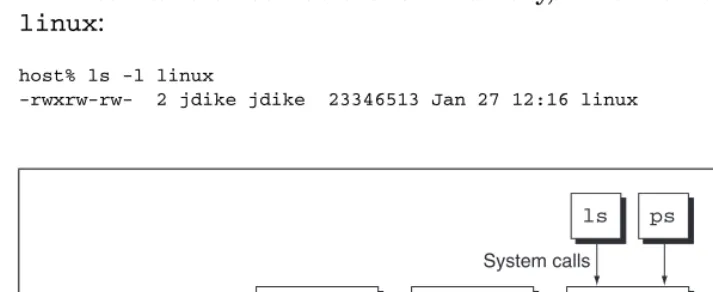
Figure 2.1 shows the relationship among a UML instance, the host kernel, and UML processes. To the host kernel, the UML instance is a normal process. To the UML processes, the UML instance is a kernel. Processes interact with the kernel by making system calls, which are like procedure calls except that they request the kernel do something on their behalf.
Like all other processes on the host, UML makes system calls to the host kernel in order to do its work. Unlike the other host processes, UML has its own system call interface for its processes to use. This is the source of the duality of UML. It makes system calls to the host, which makes it a process, and it implements system calls for its own processes, making it a kernel.
Let’s take a look at the UML binary, which is normally called linux:
host% ls -l linux
[image:32.576.78.435.426.572.2]-rwxrw-rw- 2 jdike jdike 23346513 Jan 27 12:16 linux
Figure 2.1 UML as both a process and a kernel
Host kernel
System calls
System calls
Hardware
UML
ps ls
A Quick Look at UML 19
This is a normal Linux ELF binary, as you can see by running file on it:
host% file linux
linux: ELF 32-bit LSB executable, Intel 80386, version 1 (SYSV), \ for GNU/Linux 2.2.5, statically linked, not stripped
It is also a Linux kernel, so it may be instructive to compare it to the kernel running on this machine:
host% ls -l /boot/vmlinuz-2.4.26
-rw-r--r-- 1 root root 945800 Sep 18 17:12 /boot/vmlinuz-2.4.26
The UML binary is quite a bit larger than the kernel on the host, but it has a full symbol table, as you can see from the output of file above. So, let’s strip it and see what that does:
host% ls -l linux
-rwxrw-rw- 2 jdike jdike 2236936 Jan 27 15:01 linux
It’s a bit more than twice as large as the host kernel, possibly because the configurations are different. I tend to build options into UML, which on the host are modules. Checking this by adding up the sizes of the modules loaded on the host yields this:
host% lsmod
Module Size Used by usblp 17473 0 parport_pc 31749 1 lp 16713 0
parport 39561 2 parport_pc,lp autofs4 23493 2
sunrpc 145541 1 ...
host% lsmod | awk '{n += $2} END {print n}' 1147092
Adding that to the file size of vmlinuz-2.4.26 gives us some-thing close to the size of the UML binary after the symbol table has been stripped off.
20 Chapter 2 A Quick Look at UML
B
OOTING
UML
FOR
THE
F
IRST
T
IME
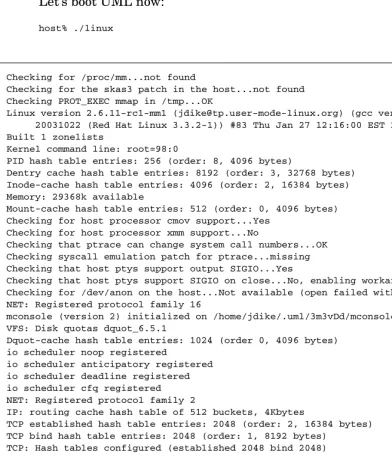
Let’s boot UML now:
host% ./linux
Checking for /proc/mm...not found
Checking for the skas3 patch in the host...not found Checking PROT_EXEC mmap in /tmp...OK
Linux version 2.6.11-rc1-mm1 ([email protected]) (gcc version 3.3.2 20031022 (Red Hat Linux 3.3.2-1)) #83 Thu Jan 27 12:16:00 EST 2005
Built 1 zonelists
Kernel command line: root=98:0
PID hash table entries: 256 (order: 8, 4096 bytes)
Dentry cache hash table entries: 8192 (order: 3, 32768 bytes) Inode-cache hash table entries: 4096 (order: 2, 16384 bytes) Memory: 29368k available
Mount-cache hash table entries: 512 (order: 0, 4096 bytes) Checking for host processor cmov support...Yes
Checking for host processor xmm support...No
Checking that ptrace can change system call numbers...OK Checking syscall emulation patch for ptrace...missing Checking that host ptys support output SIGIO...Yes
Checking that host ptys support SIGIO on close...No, enabling workaround Checking for /dev/anon on the host...Not available (open failed with errno 2) NET: Registered protocol family 16
mconsole (version 2) initialized on /home/jdike/.uml/3m3vDd/mconsole VFS: Disk quotas dquot_6.5.1
Dquot-cache hash table entries: 1024 (order 0, 4096 bytes) io scheduler noop registered
io scheduler anticipatory registered io scheduler deadline registered io scheduler cfq registered NET: Registered protocol family 2
IP: routing cache hash table of 512 buckets, 4Kbytes
TCP established hash table entries: 2048 (order: 2, 16384 bytes) TCP bind hash table entries: 2048 (order: 1, 8192 bytes)
TCP: Hash tables configured (established 2048 bind 2048) NET: Registered protocol family 1
NET: Registered protocol family 17 Initialized stdio console driver Console initialized on /dev/tty0
[image:34.576.49.441.108.563.2]Initializing software serial port version 1 VFS: Waiting 19sec for root device... VFS: Waiting 18sec for root device... VFS: Waiting 17sec for root device... VFS: Waiting 16sec for root device...
Booting UML for the First Time 21
VFS: Waiting 15sec for root device... VFS: Waiting 14sec for root device... VFS: Waiting 13sec for root device... VFS: Waiting 12sec for root device... VFS: Waiting 11sec for root device... VFS: Waiting 10sec for root device... VFS: Waiting 9sec for root device... VFS: Waiting 8sec for root device... VFS: Waiting 7sec for root device... VFS: Waiting 6sec for root device... VFS: Waiting 5sec for root device... VFS: Waiting 4sec for root device... VFS: Waiting 3sec for root device... VFS: Waiting 2sec for root device... VFS: Waiting 1sec for root device...
VFS: Cannot open root device “98:0” or unknown-block(98,0) Please append a correct “root=” boot option
Kernel panic - not syncing: VFS: Unable to mount root fs on unknown-block(98,0)
EIP: 0023:[<a015a751>] CPU: 0 Not tainted ESP: 002b:40001fa0 EFLAGS: 00000206 Not tainted
EAX: 00000000 EBX: 00002146 ECX: 00000013 EDX: 00002146 ESI: 00002145 EDI: 00000000 EBP: 40001fbc DS: 002b ES: 002b Call Trace:
a0863af0: [<a0030446>] printk+0x12/0x14
a0863b00: [<a003ff32>] notifier_call_chain+0x22/0x40 a0863b30: [<a002f9f2>] panic+0x56/0x108
a0863b40: [<a003c0f6>] msleep+0x42/0x4c
a0863b50: [<a0002d96>] mount_block_root+0xd6/0x188 a0863bb0: [<a0002e9c>] mount_root+0x54/0x5c a0863bc0: [<a0002f07>] prepare_namespace+0x63/0xa8 a0863bd0: [<a0002ebb>] prepare_namespace+0x17/0xa8 a0863bd4: [<a000e190>] init+0x0/0x108
a0863be4: [<a000e190>] init+0x0/0x108 a0863bf0: [<a000e291>] init+0x101/0x108
a0863c00: [<a0027131>] run_kernel_thread+0x39/0x40 a0863c18: [<a000e190>] init+0x0/0x108
a0863c28: [<a0027117>] run_kernel_thread+0x1f/0x40 a0863c50: [<a0013211>] unblock_signals+0xd/0x10 a0863c70: [<a002c51c>] finish_task_switch+0x24/0xa4 a0863c84: [<a000e190>] init+0x0/0x108
a0863c90: [<a002c5ad>] schedule_tail+0x11/0x124 a0863cc4: [<a000e190>] init+0x0/0x108
a0863cd0: [<a001ad58>] new_thread_handler+0xb0/0x104 a0863cd4: [<a000e190>] init+0x0/0x108
[image:35.576.54.440.103.541.2]a0863d20: [<a015a508>] __restore+0x0/0x8 a0863d60: [<a015a751>] kill+0x11/0x20
22 Chapter 2 A Quick Look at UML
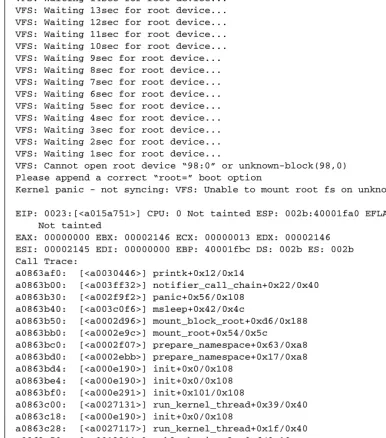
Notice two obvious things about the results, shown in Figure 2.2.
1. The output resembles the boot output of a normal Linux machine.
2. The boot was not very successful, as you can see from the panic and stack dump at the end.
It’s worth comparing this to the boot output of a Linux system, which is normally available by running dmesg. You’ll see a lot of simi-larities—many of the messages, such as the ones from the filesystem and network subsystems, are identical. Much of the rest are totally dif-ferent, although they should seem similar in purpose. This is largely due to hardware drivers initializing. UML doesn’t have the same hard-ware or drivers as the host, so their bootup messages will be different.
If you have access to Linux on several different architectures, such as x86 and x86_64 or ppc, you’ll see the same sorts of differences between their boot output. In fact, this is a very apt comparison because UML is a different architecture from the Linux kernel running on the host.
Let’s look at the output in more detail.
Checking for /proc/mm...not found
Checking for the skas3 patch in the host...not found Checking PROT_EXEC mmap in /tmp...OK
These are checking the environment on the host to see if it can run at all (the executable /tmp check) and whether the host kernel has capabilities that allow UML to run more efficiently. You’ll see more of this below, but these particular checks need to be done very early.
Checking for host processor cmov support...Yes Checking for host processor xmm support...No
Checking that ptrace can change system call numbers...OK
These are checking some more capabilities of the host. The first two are checking processor capabilities, and the last is checking whether the host has a feature that’s absolutely needed for UML to run (which all modern hosts do).
mconsole (version 2) initialized on /home/jdike/.uml/3m3vDd/mconsole ...
Initialized stdio console driver ...
Initializing software serial port version 1
Booting UML for the First Time 23
This is because UML uses resources on the host to support its virtual hardware, and there are many fewer types of these resources than there are different types of devices on a physical system. For example, every possible sort of block device within UML can be accessed as a host file, so block devices require a single UML driver. In contrast, the host has multitudes of block drivers, for IDE disks, SCSI disks, SATA disks, and so on. Because of the uniform interface provided by the host, UML requires many fewer drivers in order to access these devices and the data on them.
The first driver is the mconsole2 driver, which allows a UML to be
controlled and managed from the host. This has no hardware equiva-lent on most Linux systems. The last two are the console and serial line drivers, which obviously do have hardware equivalents, except that the UML drivers will communicate using virtual devices such as pseudo-terminals rather than physical devices such as a graphics card or serial line.
VFS: Waiting 1sec for root device...
VFS: Cannot open root device "98:0" or unknown-block(98,0) Please append a correct "root=" boot option
Kernel panic - not syncing: VFS: Unable to mount root fs on \ unknown-block(98,0)
Here is the panic that killed off this attempted run of UML. The problem is that we didn’t provide UML with a root device, so it couldn’t mount its root filesystem. This is fatal and causes the panic and the stack trace. You can make a physical Linux machine do exactly the same thing by putting a bogus root= option on the kernel command line using LILO or GRUB.3
Finally, an important point is that we just panicked a UML kernel, and the only result was that we were dropped back to the shell prompt. The host system itself, and everything else on the system, was totally unaffected by the crash. This demonstrates the basis of many of the advantages of UML over a physical system—it can be used in ways that may cause system crashes or other software malfunctions, but the
2. MConsole stands for “Management Console” and is a mechanism for con-trolling and monitoring a UML instance from the host.
24 Chapter 2 A Quick Look at UML
damage is limited to the virtual machine. As we will see later, even this damage can be undone quite easily.
That may have been interesting, but not very useful. Now, we will boot UML successfully and see how it looks inside.
B
OOTING
UML S
UCCESSFULLY
The problem was that we didn’t tell UML what its root device was. This is an important special case of a more general property of UML—its hardware is configured on the fly. In contrast to a physical system, whose hardware is fixed, a virtual system can be different every time it is booted. So, it expects to be told, either on the command line or later via the mconsole interface, what hardware it possesses.
Here, we will configure UML on the command line. The first order of business is to give it a proper root device so that it has something it can boot. As I mentioned earlier, UML devices are virtual and con-structed from host resources. Specifically, UML’s disks are generally (but not always, as we will see later) files in the host’s filesystem.
For example, here is the filesystem we will boot:
host% ls -l ~/roots/debian_22
-rw-rw-r-- 1 jdike jdike 1074790400 Jan 27 18:31 \ /home/jdike/roots/debian_22
One obvious thing here is that the filesystem imageis very large. file will tell us a bit more about it:
host% file ~/roots/debian_22
/home/jdike/roots/debian_22: Linux rev 1.0 ext2 filesystem data
This tells us that the data in this file is an ext2 filesystem image. In other words, we can loopback-mount it and see that it contains a full filesystem:
host# mount ~/roots/debian_22 ~/mnt -o loop host% ls ~/mnt
bfs boot dev floppy initrd lib mnt root tmp var bin cdrom etc home kernel lost+found proc sbin usr
Booting UML Successfully 25
The loopback driver on the host is doing exactly the same thing, except from within the host kernel, rather than from a process, where the UML block driver is.
So, in order to provide this file to UML as its root device, we need to tell the UML block driver (the ubd or UML Block Device driver) to attach itself to it. This is done with this option:
ubda=~/roots/debian_22
This is the easiest way to initialize a UML block device, and it simply says that the first UML block device is to be attached to the file ~/roots/ debian_22. Internally, UML tells the kernel initialization code to use the ubda device as its default root device (this can be overridden by specifying a different device with the root= switch, as the panic mes-sage suggested).
I’m going to add one more option to the command line to make the virtual machine’s configuration more explicit:
mem=128M
This makes UML believe it has 128MB of physical memory but does not actually allocate 128MB on the host. Rather, this creates a 128MB sparse file on the host. Being sparse, this file will occupy very little space until data starts being written to it. As the UML instance uses its memory, it will start putting data in the memory backed by this file. As that happens, the host will start allocating memory to hold that data. Since the file is fixed in size, the UML instance is limited to that amount of memory. Its memory consumption will approach this limit asymptotically as it reads file data from its own disks and caches it in its memory.
Since the host will be allocating memory for the UML instance dynamically, as needed, the actual consumption will be less than the maximum for a time. This conserves memory, making it possible to run a greater number of not-too-active UML instances than would be possi-ble otherwise.
26 Chapter 2 A Quick Look at UML
The UML instance will also swap if its workload exceeds its physi-cal memory. This is entirely independent from the host swapping the UML instance’s memory. Each system will swap when it needs more memory, so if the host is short of memory and the UML instance has plenty, the host will swap and the UML instance won’t. Conversely, if the UML instance is short of memory and the host isn’t, the UML instance will swap and the host won’t. The case where both are swap-ping at the same time is interesting and can lead to pathological perfor-mance problems.4
So, the UML command ends up looking like this:
~/linux mem=128M ubda=/home/jdike/roots/debian_22
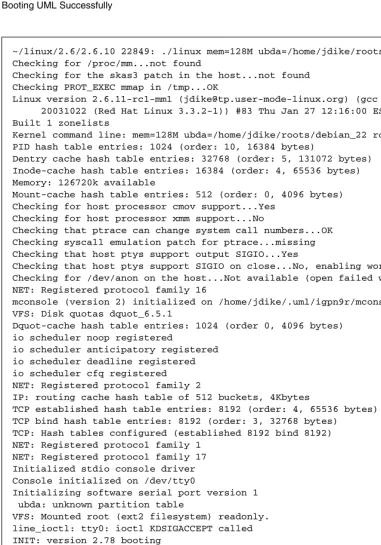
Figure 2.3 shows the results.
This is much more interesting than the last attempt. We get to see the filesystem booting. Note that it’s almost exactly the same as it would be if the same filesystem were booted on the host. The under-lying virtual machine shows through in only a couple of places. One is when the root filesystem is checked5:
/dev/ubd0: clean, 9591/131328 files, 64611/262144 blocks
where we see the UML device name, /dev/ubd0, rather than hda1 or sda1 as on a physical machine.
4. Consider the case where both the host and the UML instance are swapping at the same time. They may both choose the same page to swap out. If the host swaps it out first, then when the UML instance swaps it, the host will need to read it back from disk so that the UML instance can write it to its own swap device. This will cause the page to be read and written a total of three times, when only once was desirable. This will increase the I/O load on the host at a time when it is already under stress. Solutions for this sort of situation are under investigation and will be described in Chapter 10. 5. The fsck message refers to /dev/ubd0 rather than /dev/ubda. Devices
can be specified with either numbers or letters. Using letters is generally fa-vored since it is similar to current practice with other drivers, such as nam-ing IDE disks hda, hdb, and so on. It also makes the use of multiple ubd
Booting UML Successfully 27
~/linux/2.6/2.6.10 22849: ./linux mem=128M ubda=/home/jdike/roots/debian_22 Checking for /proc/mm...not found
Checking for the skas3 patch in the host...not found Checking PROT_EXEC mmap in /tmp...OK
Linux version 2.6.11-rc1-mm1 ([email protected]) (gcc version 3.3.2 20031022 (Red Hat Linux 3.3.2-1)) #83 Thu Jan 27 12:16:00 EST 2005
Built 1 zonelists
Kernel command line: mem=128M ubda=/home/jdike/roots/debian_22 root=98:0 PID hash table entries: 1024 (order: 10, 16384 bytes)
Dentry cache hash table entries: 32768 (order: 5, 131072 bytes) Inode-cache hash table entries: 16384 (order: 4, 65536 bytes) Memory: 126720k available
Mount-cache hash table entries: 512 (order: 0, 4096 bytes) Checking for host processor cmov support...Yes
Checking for host processor xmm support...No
Checking that ptrace can change system call numbers...OK Checking syscall emulation patch for ptrace...missing Checking that host ptys support output SIGIO...Yes
Checking that host ptys support SIGIO on close...No, enabling workaround Checking for /dev/anon on the host...Not available (open failed with errno 2) NET: Registered protocol family 16
mconsole (version 2) initialized on /home/jdike/.uml/igpn9r/mconsole VFS: Disk quotas dquot_6.5.1
Dquot-cache hash table entries: 1024 (order 0, 4096 bytes) io scheduler noop registered
io scheduler anticipatory registered io scheduler deadline registered io scheduler cfq registered NET: Registered protocol family 2
IP: routing cache hash table of 512 buckets, 4Kbytes
TCP established hash table entries: 8192 (order: 4, 65536 bytes) TCP bind hash table entries: 8192 (order: 3, 32768 bytes)
TCP: Hash tables configured (established 8192 bind 8192) NET: Registered protocol family 1
NET: Registered protocol family 17 Initialized stdio console driver Console initialized on /dev/tty0
Initializing software serial port version 1 ubda: unknown partition table
VFS: Mounted root (ext2 filesystem) readonly. line_ioctl: tty0: ioctl KDSIGACCEPT called INIT: version 2.78 booting
Activating swap...
Checking root file system...
Parallelizing fsck version 1.18 (11-Nov-1999)
/dev/ubd0: clean, 9591/131328 files, 64611/262144 blocks
Calculating module dependencies... depmod: get_kernel_syms: Function not implemented
done.
Loading modules: cat: /etc/modules: No such file or directory
[image:41.576.57.439.38.584.2](continues)
28 Chapter 2 A Quick Look at UML
The other is when the boot scripts try to synchronize the internal kernel clock with the system’s hardware clock:
Setting the System Clock using the Hardware Clock as reference... line_ioctl: tty1: unknown ioctl: 0x4b50
hwclock is unable to get I/O port access: the iopl(3) call \ failed.
The UML serial line driver is complaining about an ioctl it doesn’t implement, and the hwclock program inside UML is
complain-modprobe: Can’t open dependencies file /lib/modules/2.6.11-rc1-mm1/modules.dep (No such file or directory)
Checking all file systems...
Parallelizing fsck version 1.18 (11-Nov-1999) Setting kernel variables.
Mounting local filesystems...
mount: devpts already mounted on /dev/pts none on /tmp type tmpfs (rw)
Setting up IP spoofing protection: rp_filter. Configuring network interfaces: done.
Setting the System Clock using the Hardware Clock as reference... line_ioctl: tty1: unknown ioctl: 0x4b50
hwclock is unable to get I/O port access: the iopl(3) call failed. System Clock set. Local time: Thu Jan 27 18:51:28 EST 2005
Cleaning: /tmp /var/lock /var/run.
Initializing random number generator... done. Recovering nvi editor sessions... done. INIT: Entering runlevel: 2
Starting system log daemon: syslogd syslogd: /dev/xconsole: No such file or directory
klogd.
Starting portmap daemon: portmap.
Starting NFS common utilities: statd lockdlockdsvc: Function not implemented .
Starting internet superserver: inetd. Starting MySQL database server: mysqld. Not starting NFS kernel daemon: No exports. Starting OpenBSD Secure Shell server: sshd. Starting web server: apache.
/usr/sbin/apachectl start: httpd started
Debian GNU/Linux 2.2 usermode tty0
usermode login:
Looking at a UML from the Inside and Outside 29
ing that it tried to execute the iopl instruction and failed. These are both symptoms of hwclock trying different methods of accessing the hardware system clock and failing because the device doesn’t exist in UML. The UML kernel does have access to a clock, but it is not one that hwclock will recognize. Rather, it is simply a call to the host’s gettimeofday.
After that, you’ll notice that a relatively small number of services are started, but they do include such things as NFS, MySQL, and Apache. All of these run just as they would on a physical machine. This boot process took about 5 seconds on my laptop, demonstrating one of the conveniences of UML—the ability to quickly create and destroy vir-tual machines.
L
OOKING
AT
A
UML
FROM
THE
I
NSIDE
AND
O
UTSIDE
Finally, we’ll see a login prompt. Actually, I see three on my screen. One is in the xterm window in which I ran UML. The other two are in xterm windows run by UML in order to hold the second console and the first serial line, which are configured to have gettys running on them. We’ll log in as root (using the highly secure default root password of root that most of my UML filesystems have) and get a shell:
usermode login: root Password:
Last login: Thu Jan 27 18:51:35 2005 on tty0
Linux usermode 2.6.11-rc1-mm1 #83 Thu Jan 27 12:16:00 EST 2005 \ i686 unknown
usermode:~#
Again, this is identical to what you’d see if you logged in to a phys-ical machine booted on this filesystem.
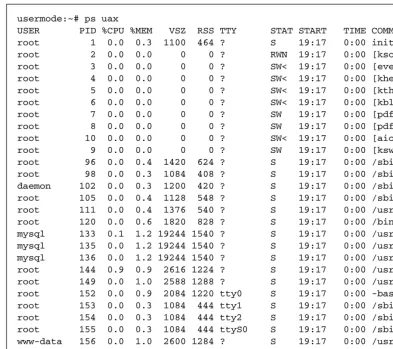
Now it’s time to start poking around inside this UML and see what it looks like. First, we’ll look at what processes are running, as shown in Figure 2.4.
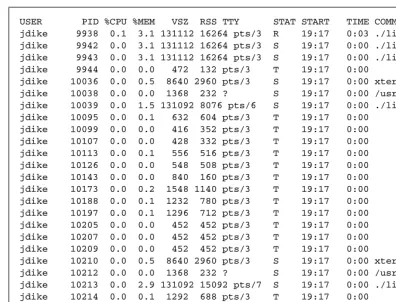
There’s not much to comment on except the total normality of this output. What’s interesting here is to look at the host. Figure 2.5 shows the corresponding processes on the host.
30 Chapter 2 A Quick Look at UML
Notice that the properties of the UML processes and the corre-sponding host processes don’t have much in common. All of the host processes are owned by me, whereas the UML processes have various owners, including root. The process IDs are totally different, as are the virtual and resident memory sizes.
This is because the host processes are simply containers for UML address spaces. All of the properties visible inside UML are maintained by UML totally separate from the host. For example, the owner of the host processes will be whoever ran UML. However, many UML pro-cesses will be owned by root. These propro-cesses have root privileges
usermode:~# ps uax
USER PID %CPU %MEM VSZ RSS TTY STAT START TIME COMMAND root 1 0.0 0.3 1100 464 ? S 19:17 0:00 init [2] root 2 0.0 0.0 0 0 ? RWN 19:17 0:00 [ksoftirqd/0] root 3 0.0 0.0 0 0 ? SW< 19:17 0:00 [events/0] root 4 0.0 0.0 0 0 ? SW< 19:17 0:00 [khelper] root 5 0.0 0.0 0 0 ? SW< 19:17 0:00 [kthread] root 6 0.0 0.0 0 0 ? SW< 19:17 0:00 [kblockd/0] root 7 0.0 0.0 0 0 ? SW 19:17 0:00 [pdflush] root 8 0.0 0.0 0 0 ? SW 19:17 0:00 [pdflush] root 10 0.0 0.0 0 0 ? SW< 19:17 0:00 [aio/0] root 9 0.0 0.0 0 0 ? SW 19:17 0:00 [kswapd0] root 96 0.0 0.4 1420 624 ? S 19:17 0:00 /sbin/syslogd root 98 0.0 0.3 1084 408 ? S 19:17 0:00 /sbin/klogd daemon 102 0.0 0.3 1200 420 ? S 19:17 0:00 /sbin/portmap root 105 0.0 0.4 1128 548 ? S 19:17 0:00 /sbin/rpc.statd root 111 0.0 0.4 1376 540 ? S 19:17 0:00 /usr/sbin/inetd root 120 0.0 0.6 1820 828 ? S 19:17 0:00 /bin/sh /usr/bin/ mysql 133 0.1 1.2 19244 1540 ? S 19:17 0:00 /usr/sbin/mysqld mysql 135 0.0 1.2 19244 1540 ? S 19:17 0:00 /usr/sbin/mysqld mysql 136 0.0 1.2 19244 1540 ? S 19:17 0:00 /usr/sbin/mysqld root 144 0.9 0.9 2616 1224 ? S 19:17 0:00 /usr/sbin/sshd root 149 0.0 1.0 2588 1288 ? S 19:17 0:00 /usr/sbin/apache root 152 0.0 0.9 2084 1220 tty0 S 19:17 0:00 -bash
root 153 0.0 0.3 1084 444 tty1 S 19:17 0:00 /sbin/getty 38400 root 154 0.0 0.3 1084 444 tty2 S 19:17 0:00 /sbin/getty 38400 root 155 0.0 0.3 1084 444 ttyS0 S 19:17 0:00 /sbin/getty 38400 www-data 156 0.0 1.0 2600 1284 ? S 19:17 0:00 /usr/sbin/apache www-data 157 0.0 1.0 2600 1284 ? S 19:17 0:00 /usr/sbin/apache www-data 158 0.0 1.0 2600 1284 ? S 19:17 0:00 /usr/sbin/apache www-data 159 0.0 1.0 2600 1284 ? S 19:17 0:00 /usr/sbin/apache www-data 160 0.0 1.0 2600 1284 ? S 19:17 0:00 /usr/sbin/apache root 162 2.0 0.5 2384 736 tty0 R 19:17 0:00 ps uax
[image:44.576.38.432.71.420.2]usermode:~#
Looking at a UML from the Inside and Outside 31
inside UML, but they have no special privileges on the host. This important fact means that root can do anything inside UML without being able to do anything on the host. A user logged in to a UML as root has no special abilities on the host and, in fact, may not have any abilities at all on the host.
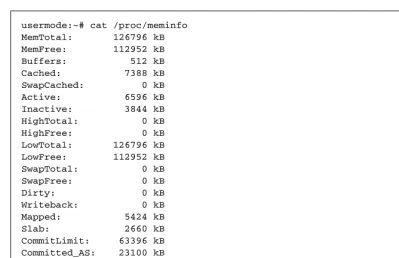
Now, let’s look at the memory usage information in /proc/mem-info, shown in Figure 2.6.
The total amount of memory shown, 126796K, is close to the 128MB we specified on the command line. It’s not exactly 128MB because some memory allocated during early boot isn’t counted in the total. Going back to the host ps output in Figure 2.5, notice that the linux processes have a virtual size (the VSZ column) of almost exactly 128MB. The difference of 50K is due to a small amount of memory in the UML binary, which isn’t counted as part of its physical memory.
USER PID %CPU %MEM VSZ RSS TTY STAT START TIME COMMAND jdike 9938 0.1 3.1 131112 16264 pts/3 R 19:17 0:03 ./linux [ps] jdike 9942 0.0 3.1 131112 16264 pts/3 S 19:17 0:00 ./linux [ps] jdike 9943 0.0 3.1 131112 16264 pts/3 S 19:17 0:00 ./linux [ps] jdike 9944 0.0 0.0 472 132 pts/3 T 19:17 0:00
jdike 10036 0.0 0.5 8640 2960 pts/3 S 19:17 0:00 xterm -T Virtual jdike 10038 0.0 0.0 1368 232 ? S 19:17 0:00 /usr/lib/uml/port jdike 10039 0.0 1.5 131092 8076 pts/6 S 19:17 0:00 ./linux [hwclock] jdike 10095 0.0 0.1 632 604 pts/3 T 19:17 0:00
jdike 10099 0.0 0.0 416 352 pts/3 T 19:17 0:00 jdike 10107 0.0 0.0 428 332 pts/3 T 19:17 0:00 jdike 10113 0.0 0.1 556 516 pts/3 T 19:17 0:00 jdike 10126 0.0 0.0 548 508 pts/3 T 19:17 0:00 jdike 10143 0.0 0.0 840 160 pts/3 T 19:17 0:00 jdike 10173 0.0 0.2 1548 1140 pts/3 T 19:17 0:00 jdike 10188 0.0 0.1 1232 780 pts/3 T 19:17 0:00 jdike 10197 0.0 0.1 1296 712 pts/3 T 19:17 0:00 jdike 10205 0.0 0.0 452 452 pts/3 T 19:17 0:00 jdike 10207 0.0 0.0 452 452 pts/3 T 19:17 0:00 jdike 10209 0.0 0.0 452 452 pts/3 T 19:17 0:00
jdike 10210 0.0 0.5 8640 2960 pts/3 S 19:17 0:00 xterm -T Virtual jdike 10212 0.0 0.0 1368 232 ? S 19:17 0:00 /usr/lib/uml/port jdike 10213 0.0 2.9 131092 15092 pts/7 S 19:17 0:00 ./linux [/sbin/ge jdike 10214 0.0 0.1 1292 688 pts/3 T 19:17 0:00
[image:45.576.50.446.68.370.2]jdike 10215 0.0 0.1 1292 676 pts/3 T 19:17 0:00 jdike 10216 0.0 0.1 1292 676 pts/3 T 19:17 0:00 jdike 10217 0.0 0.1 1292 676 pts/3 T 19:17 0:00 jdike 10218 0.0 0.1 1292 676 pts/3 T 19:17 0:00 jdike 10220 0.0 0.1 1228 552 pts/3 T 19:17 0:00
32 Chapter 2 A Quick Look at UML
Now, let’s go back to the host ps output and pick one of the UML processes:
jdike 9938 0.1 3.1 131112 16264 pts/3 R 19:17 0:03 \ ./linux [ps]
We can look at its open files by looking at the /proc/9938/fd direc-tory, which shows an entry like this:
lrwx--- 1 jdike jdike 64 Jan 28 12:48 3 -> \ /tmp/vm_file-AwBs1z (deleted)
This is the host file that holds, and is the same size (128MB in our case) as, the UML “physical” memory. It is created in /tmp and then deleted. The deletion prevents something else on the host from opening it and corrupting it. However, this has the somewhat undesirable side effect that /tmp can become filled with invisible files, which can con-fuse people who don’t know about this aspect of UML’s behavior.
To make matters worse, it is recommended for performance reasons to use tmpfs on /tmp. UML performs noticeably better when its memory
[image:46.576.34.433.64.322.2]usermode:~# cat /proc/meminfo MemTotal: 126796 kB MemFree: 112952 kB Buffers: 512 kB Cached: 7388 kB SwapCached: 0 kB Active: 6596 kB Inactive: 3844 kB HighTotal: 0 kB HighFree: 0 kB LowTotal: 126796 kB LowFree: 112952 kB SwapTotal: 0 kB SwapFree: 0 kB Dirty: 0 kB Writeback: 0 kB Mapped: 5424 kB Slab: 2660 kB CommitLimit: 63396 kB Committed_AS: 23100 kB PageTables: 248 kB VmallocTotal: 383984 kB VmallocUsed: 24 kB VmallocChunk: 383960 kB