Web Security & Commerce
Simson Garfinkel & Eugene H. Spafford
First Edition, June 1997
ISBN: 1-56592-269-7, 506 pages
Learn how to minimize the risks of the Web with this comprehensive guide.
It covers browser vulnerabilities, privacy concerns, issues with Java, JavaScript, ActiveX, and plug-ins, digital certificates, cryptography, Web server security, blocking software, censorship
Preface 1 The Web: Promises and Threats
About This Book
Conventions Used in This Book Comments and Questions Acknowledgments
i Introduction 13
1 The Web Security Landscape 14
1.1 Web Security in a Nutshell 1.2 The Web Security Problem
1.3 Credit Cards, Encryption, and the Web 1.4 Firewalls: Part of the Solution 1.5 Risk Management
ii User Safety 29
2 The Buggy Browser: Evolution of Risk 30
2.1 Browser History 2.2 Data-Driven Attacks
2.3 Implementation Flaws: A Litany of Bugs
3 Java and JavaScript 38
3.1 Java 3.2 JavaScript
3.3 Denial-of-Service Attacks
3.4 JavaScript-Enabled Spoofing Attacks 3.5 Conclusion
4 Downloading Machine Code with ActiveX and Plug-Ins 56 4.1 When Good Browsers Go Bad
4.2 Netscape Plug-Ins 4.3 ActiveX and Authenticode 4.4 The Risks of Downloaded Code 4.5 Is Authenticode a Solution?
4.6 Improving the Security of Downloaded Code
5 Privacy 69
5.1 Log Files 5.2 Cookies
5.3 Personally Identifiable Information 5.4 Anonymizers
5.5 Unanticipated Disclosure
iii Digital Certificates 77
6 Digital Identification Techniques 78
6.1 Identification
6.2 Public Key Infrastructure
6.3 Problems Building a Public Key Infrastructure 6.4 Ten Policy Questions
7 Certification Authorities and Server Certificates 98 7.1 Certificates Today
7.2 Certification Authority Certificates 7.3 Server Certificates
7.4 Conclusion
8 Client-Side Digital Certificates 111
8.1 Client Certificates
8.2 A Tour of the VeriSign Digital ID Center
9 Code Signing and Microsoft's Authenticode 123
9.1 Why Code Signing?
iv Cryptography 134
10 Cryptography Basics 135
10.1 Understanding Cryptography 10.2 Symmetric Key Algorithms 10.3 Public Key Algorithms 10.4 Message Digest Functions 10.5 Public Key Infrastructure
11 Cryptography and the Web 150
11.1 Cryptography and Web Security 11.2 Today's Working Encryption Systems 11.3 U.S. Restrictions on Cryptography 11.4 Foreign Restrictions on Cryptography
12 Understanding SSL and TLS 166
12.1 What Is SSL?
12.2 TLS Standards Activities 12.3 SSL: The User's Point of View
v Web Server Security 181
13 Host and Site Security 182
13.1 Historically Unsecure Hosts
13.2 Current Major Host Security Problems 13.3 Minimizing Risk by Minimizing Services 13.4 Secure Content Updating
13.5 Back-End Databases 13.6 Physical Security
14 Controlling Access to Your Web Server 196
14.1 Access Control Strategies
14.2 Implementing Access Controls with <Limit> Blocks 14.3 A Simple User Management System
15 Secure CGI/API Programming 209
15.1 The Danger of Extensibility 15.2 Rules To Code By
15.3 Specific Rules for Specific Programming Languages
15.4 Tips on Writing CGI Scripts That Run with Additional Privileges 15.5 Conclusion
vi Commerce and Society 222
16 Digital Payments 223
16.1 Charga-Plates, Diners Club, and Credit Cards 16.2 Internet-Based Payment Systems
16.3 How to Evaluate a Credit Card Payment System
17 Blocking Software and Censorship Technology 237 17.1 Blocking Software
17.2 PICS 17.3 RSACi
18 Legal Issues: Civil 248
18.1 Intellectual Property 18.2 Torts
19 Legal Issues: Criminal 256
19.1 Your Legal Options After a Break-In 19.2 Criminal Hazards That May Await You 19.3 Criminal Subject Matter
vii Appendixes 264
A Lessons from Vineyard.NET 265
A.1 Planning and Preparation A.2 IP Connectivity
A.3 Commercial Start-Up A.4 Ongoing Operations A.5 Conclusion
B Creating and Installing WebServer Certificates 278 B.1 Downloading and Installing Your Web Server
B.2 Apache-SSL
C The SSL 3.0 Protocol 288
C.1 History
C.2 SSL 3.0 Record Layer C.3 SSL 3.0 Protocols C.4 SSL 3.0 Handshake C.5 SSLeay
D The PICS Specification 306
D.1 Rating Services D.2 PICS Labels
E References 313
E.1 Electronic References E.2 Paper References
Attacks on government Web sites, break-ins at Internet service providers, electronic credit card fraud, invasion of personal privacy by merchants as well as hackers - is this what the World Wide Web is really all about?
Web Security & Commerce cuts through the hype and the front page stories. It tells you what the real risks are and explains how you can minimize them. Whether you're a casual (but concerned) Web surfer or a system administrator responsible for the security of a critical Web server, this book will tell you what you need to know. Entertaining as well as illuminating, it looks behind the headlines at the technologies, risks, and benefits of the Web. Whatever browser or server you are using, you and your system will benefit from this book.
Topics include:
•
User safety - browser vulnerabilities (with an emphasis on Netscape Navigator and Microsoft Internet Explorer), privacy concerns, issues with Java, JavaScript, ActiveX, and plug-ins.•
Digital certificates - what they are, how they assure identity in a networked environment, how certification authorities and server certificates work, and what code signing all about.•
Cryptography - an overview of how encryption works on the Internet and how different algorithms and programs are being used today.•
Web server security - detailed technical information about SSL (Secure Socket Layer), TLS (Transport Layer Security), host security, server access methods, and secure CGI/API programming.Preface
In the early morning hours of Saturday, August 17, 1996, a computer system at the U.S. Department of Justice was attacked. The target of the attack was the Department of Justice's web server, www.usdoj.gov. The attackers compromised the server's security and modified its home page - adding swastikas, obscene pictures, and a diatribe against the Communications Decency Act (which, ironically, had recently been declared unconstitutional by a federal court in Philadelphia).
The defaced web site was on the Internet for hours, until FBI technicians discovered the attack and pulled the plug. For the rest of the weekend, people trying to access the Department's home page saw nothing, because Justice didn't have a spare server.
The defaced web server publicly embarrassed the Department of Justice on national radio, TV, and in the nation's newspapers. The Department later admitted that it had not paid much attention to the security of its web server because the server didn't contain any sensitive information. After all, the web server was simply filled with publicly available information about the Department itself; it didn't have sensitive information about ongoing investigations.
By getting on the Web, the Department of Justice had taken advantage of a revolutionary new means of distributing information to the public - a system that lowers costs while simultaneously making information more useful and more accessible. But after the attack, it became painfully clear that the information on the web server didn't have to be secret to be sensitive. The web server was the Department's public face to the online world. Allowing it to be altered damaged the Department's credibility.
It was not an isolated incident. On September 18, 1996, a group of Swedish hackers broke into the Central Intelligence Agency's web site (http://www.odci.gov/cia). The Agency's response was the same as the FBI's: pull the plug first and ask questions later. A few months later, when a similar incident resulted in modification of the U.S. Air Force's home page, the Department of Defense shut down all of its externally available web servers for several days while seeking to secure its servers and repair the damage.
Then on Monday, March 3, 1997, a different kind of web threat reared its head. Paul Greene, a student at Worcester Polytechnic Institute, discovered that a specially written web page could trick Microsoft's Internet Explorer into executing practically any program with any input on a target computer. An attacker could use this bug to trash a victim's computer, infect it with a virus, or capture supposedly private information from the computer's hard drive. The bug effectively gave webmasters total control over any computer that visited a web site with Internet Explorer.
The Web: Promises and Threats
The Department of Justice, the Air Force, and the CIA were lucky. Despite the public humiliation resulting from the break-ins, none of these organizations had sensitive information on their web servers. A few days later, the systems were up and running again - this time, we hope, with the security problems fixed. But things could have been very different. Microsoft and the millions of users of Internet Explorer were lucky too. Despite the fact that the Internet Explorer bug was widely publicized, there were no attacks resulting in widespread data loss.
Instead of the heavy-handed intrusion, the anti-government hackers could have let their intrusion remain hidden and used the compromised computer as a base for attacking other government machines. Or they could have simply altered the pages a tiny bit - for example, changing phone numbers, fabricating
embarrassing quotations, or even placing information on the web site that was potentially libelous or pointed to other altered pages. The attackers could have installed software for sniffing the organization's networks, helping them to break into other, even more sensitive machines.
A few days before the break-in at www.usdoj.gov, the Massachusetts state government announced that drivers could now pay their speeding tickets and traffic violations over the World Wide Web. Simply jump to the Registry of Motor Vehicles' web site, click on a few links, and pay your speeding ticket with a credit card number. "We believe the public would rather be online than in line," said one state official.
To accept credit cards safely over the Internet, the RMV web site uses a "secure" web server. Here, the word secure refers to the link between the web server and the web browser. It means that the web server implements certain cryptographic protocols so that when a person's credit card number is sent over the Internet, it is scrambled so the number cannot be intercepted along the way.
But the web server operated by the Massachusetts Registry isn't necessarily more secure than the web server operated by the Department of Justice. Merely using cryptography to send credit card numbers over the Internet doesn't mean that the computer can't be broken into. And if the computer were compromised, the results could be far more damaging than a public relations embarrassment. Instead of altering web pages, the crooks could install software onto the server that would surreptitiously capture credit card numbers after they had been decrypted. The credit card numbers could be silently passed back to the outside and used for committing credit fraud. It could take months for credit card companies to discover the source of the credit card number theft. By then, the thieves could have moved on to other victims.1
Alternatively, the next time a web server is compromised, the attackers could simply plant violent HTML code that exploits the now well-known bugs in Netscape Navigator or Microsoft Internet Explorer.
These stories illustrate both the promise and the danger of the World Wide Web. The promise is that the Web can dramatically lower costs to organizations for distributing information, products, and services. The danger is that the computers that make up the Web are vulnerable. They can and have been compromised. Even worse: the more things the Web is used for, the more value organizations put online, and the more people are using it, the more inviting targets all of these computers become.
About This Book
This is a book about World Wide Web security and commerce. In its pages, we will show you the threats facing people in the online world and ways of minimizing them.
This book is written both for individuals who are using web browsers to access information on the Internet and organizations that are running web servers to make data and services available. It contains a general overview of Internet-based computer security issues, as well as many chapters on the new protocols and products that have been created to assist in the rapid commercialization of the World Wide Web.
Topics in this book that will receive specific attention include:
•
The risks, threats, and benefits of the online world•
How to control access to information on your web server•
How to lessen the chances that your server will be broken into•
Procedures that you should institute so that you can recover quickly if your server is compromised•
What encryption is, and how you can use it to protect both your users and your system•
Security issues arising from the use of Java, JavaScript, ActiveX, and Netscape plug-ins•
Selected legal issuesThis book covers the fundamentals of web security, but it is not designed to be a primer on computer security, operating systems, or the World Wide Web. For that, we recommend many of the other fine books published by O'Reilly & Associates, including Æleen Frisch's Essential System Administration, Chuck Musciano and Bill Kennedy's HTML: The Definitive Guide, Shishir Gundavaram's CGI Programming on the World Wide Web, Deborah Russell and G.T. Gangemi's Computer Security Basics, and finally our own book, Practical UNIX & Internet Security. An in-depth discussion of cryptography can be found in Bruce Schneier's Applied
Chapter-by-Chapter
This book is divided into seven parts; it includes 19 chapters and five appendixes:
Part I
describes the basics of computer security for computers connected to the Internet.
Chapter 1
gives a brief history of the Web, introduces the terminology of web security, and provides some e xamples of the risks you will face doing business on the Web.
Part II
looks at the particular security risks that users of particular web browsers face. It provides information on the two current browsers used most frequently: Microsoft's Internet Explorer and Netscape
Navigator. This part of the book is aimed at users.
Chapter 2
explains the history of browsers and looks at the biggest security threat of all: careless and hasty implementation leading to faults.
Chapter 3
looks at the specific security risks that can result from Java and JavaScript.
Chapter 4
looks at the serious dangers of running arbitrary code on your computer.
Chapter 5
looks at the questions of online privacy, cookies, and the disclosure of secrets.
Part III
explains what digital certificates are and how they are used to establish identity and trust on the Web.
Chapter 6
explains how cryptography is used to assure identity in a networked environment.
Chapter 7
gives a hands-on view of the particular kinds of digital certificates that are used to establish the identity of web servers.
Chapter 8
Part IV
gives an overview of cryptography and discusses how it pertains to the Web today. This part is especially useful to individuals and organizations interested in publishing and doing business on the World Wide Web.
Chapter 10
discusses the role of encryption and message digests.
Chapter 11
discusses the role of encryption on the Internet.
Chapter 12
is a general overview of the Secure Socket Layer and Transport Layer Security protocols.
Part V
explores techniques for securing web servers.
Chapter 13
contains information about basic UNIX and Windows NT security2 as well as physical security.
Chapter 14
discusses how you can restrict information on a web server to particular users by access control systems built into web servers.
Chapter 15
discusses security issues when writing CGI scripts and taking advantage of web server APIs.
Part VI
takes a look at the critical issues involving money and society on the World Wide Web. This part of the book is of general interest.
Chapter 16
looks at credit cards, digital cash, and other ways of paying for things online.
Chapter 17
examines at technologies that are used for controlling access to the Internet by children and people living in totalitarian countries.
Chapter 18
looks at a number of civil concerns involved with publishing information on the World Wide Web.
Chapter 19
continues our survey of legal issues by looking at criminal problems that can arise from web content.
2
The majority of current WWW servers seem to be running on these two operating systems, and both configurations present significant
Part VII
contains summary and technical information.
Appendix A
is a personal account of creating and running an Internet service provider and trying to ensure its security.
Appendix B
shows the installation of the Apache-SSL web server and the certificate procurement and installation process. Although the specific technical information contained in this chapter may be obsolete by the time this book is printed, the procedure illustrates the process that must be followed for most web servers in use.
Appendix C
is a technical walk through the details of the SSL 3.0 protocol. It includes sample code for creating a SSL (Secure Socket Layer) client and server and information on SSLeay.
Appendix D
is a technical walkthrough of the details of the PICS standard.
Appendix E
What You Should Know
Web security is a complex topic that touches on many aspects of traditional computer security, computer architectures, system design, software engineering, Internet technology, mathematics, and the law. To keep the size of this book under control, we have focused on conveying information and techniques that will not readily be found elsewhere.
To get the most out of this book, you should already be familiar with the operation and management of a networked computer. You should know how to connect your computer to the Internet; how to obtain, install, and maintain computer software; and how to perform routine system management tasks, such as backups. You should have a working knowledge of the World Wide Web, and you should know how to install and maintain your organization's web server.
Web Software Covered by This Book
A major difficulty in writing a book on web security is that the field is moving incredibly quickly. While we were working on this book, Netscape released three generations of web servers and browsers; Microsoft released its Internet Explorer 3.0 web browser and previewed its 4.0 browser; and WebTV Networks released a set-top box that allows people to surf the web without a PC and was eventually bought by Microsoft. At least three "secure" web servers were announced and released during that time period as well.
It is extremely difficult to track the field of web security, and it is impossible to do so in a printed publication such as this. So instead of providing detailed technical information regarding the installation and configuration of particular software that is sure to become obsolete shortly after the publication of this volume, we have instead written about concepts and techniques that should be generally applicable for many years to come.
In writing this book, we used a wide variety of software. Examples in this book are drawn from these web servers:
Apache-SSL/Stronghold
Apache-SSL is a cryptographically enabled web server that runs on a variety of UNIX operating systems. It is freely available worldwide (although its use may be restricted by local laws), and it supports military-grade 128-bit encryption. Because Apache-SSL uses a variety of patented
technologies, Apache-SSL must be licensed for commercial use within the United States. Community ConneXion sells a properly licensed version of this server called Stronghold.
Microsoft Internet Information Server
IIS is Microsoft's cryptographically enabled web server that is bundled with the Windows NT Server operating system.
Netscape FastTrack Server
The Netscape FastTrack server is a low-cost cryptographically enabled web server manufactured by Netscape Communications, Inc. Two versions of the FastTrack server are available: a U.S. version that includes 128-bit encryption and an export version that supports encryption with 40 bits of secret key.
WebStar Pro
WebStar Pro is a web server that runs on the Apple MacOS operating system. Originally based on the popular MacHTTP web server, WebStar Pro includes a cryptographic module. It is sold today by Star Nine Technologies, a division of Quarterdeck.
WebSite Pro
WebSite Pro is a cryptographically enabled web server that runs on the Windows 95 and Windows NT operating systems. WebSite Pro is sold by O'Reilly & Associates.
The following web browsers were used in the creation of this book:
Netscape Navigator
Netscape Navigator is the web browser that ignited the commercialization of the Internet. Versions 1, 2, 3, and 4 were used in the preparation of this book.
Why Another Book on Computer Security?
In June 1991, O'Reilly & Associates published our first book, Practical UNIX Security. The book was 450 pages and contained state-of-the-art information for securing UNIX computers on the Internet. Five years later, we published the revised edition of our book, now entitled Practical UNIX & Internet Security. During the intervening years, the field of computer security had grown substantially. Not surprisingly, so had our page count. The new volume was 1000 pages long.
Some people joked that the second edition was so big and took so long to read that its most likely use in the field of computer security was that of a weapon - if anybody tried to break into your computer, simply hit them on the head with the corner of the three-pound opus. It would stop them cold.
Perhaps. For the serious computer security administrator, 1000 detailed pages on running secure UNIX and Internet servers is a godsend. Unfortunately, much of the information in the book is simply not relevant for the administer who is seeking to manage a small web site securely. At the same time, the book misses key elements that are useful and important to the web administrator - technology developed in the year following the book's publication. Moreover, our 1996 book focuses on UNIX servers; not every site uses UNIX, and not every person is a system administrator.
Clearly, there is a need for a book that would give time-pressed computer users and system managers the "skinny" on what they need to know about using the Web securely. Likewise, there is a need for a new book that covers the newest developments in web security: SSL encryption, client-side digital signature
Conventions Used in This Book
The following conventions are used in this book:
Italic is used for file and directory names and for URLs. It is also used to emphasize new terms and concepts when they are introduced.
Constant Width is used for code examples and any system output.
Constant Width Italic is used in examples for variable input or output (e.g., a filename).
Constant Width Bold is used in examples for user input.
Strike-through is used in examples to show input typed by the user that is not echoed by the computer. This is mainly used for passwords and passphrases that are typed.
CTRL-X or ^X indicates the use of control characters. It means hold down the CONTROL key while typing the character "X."
Comments and Questions
We have tested and verified all of the information in this book to the best of our ability, but you may find that features have changed, typos have crept in, or that we have made a mistake. Please let us know about what you find, as well as your suggestions for future editions, by contacting:
O'Reilly & Associates, Inc. 101 Morris Street
Sebastopol, CA 95472
1-800-998-9938 (in the U.S. or Canada) 1-707-829-0515 (international/local) 1-707-829-0104 (FAX)
You can also send us messages electronically. To be put on the mailing list or request a catalog, send email to:
To ask technical questions or comment on the book, send email to:
We have a web site for the book, where we'll list examples, errata, and any plans for future editions. You can access this page at:
http://www.oreilly.com/catalog/websec
For more information about this book and others, see the O'Reilly web site:
Acknowledgments
Creating this book took a lot of work - far more than was anticipated when the project was begun. Debby Russell suggested the book to us in the spring of 1996, when we were still hard at work on Practical UNIX & Internet Security. Simson took the lead and wrote the bulk of this book. He started working on it in June 1996 and spent the first six months trying to find out what was happening in the world of web security and commerce - and trying to keep up with the steady stream of announcements. In the fall, Gene's schedule aligned with his interest, and he agreed to join the project.
Many, many people throughout the computer industry gave valuable input for this book.
•
At Consensus, Christopher Allen and Tim Dierks reviewed our chapters on SSL.•
At Cybercash, Carl Ellison sent us many email messages about the role and usefulness of certificates.•
At First Virtual, Marshall Rose and Lee Stein gave us lots of juicy information about what they were doing.•
At JavaSoft, David Brownell answered many questions regarding Java and Java's interaction with digital signatures.•
At Microsoft, Charles Fitzgerald, Barbara Fox, Rick Johnson, Thomas Reardon, and Michael Toutonghi spent a great number of days and nights acquainting us with the issues of SET, Java, JavaScript, and ActiveX security.•
At Netscape, Frank Chen, Eric Greenberg, Jeff Treuhaft, and Tom Weinstein provided us with many technical insights.•
At VeriSign, Michael Baum, Gina Jorasch, Kelly M. Ryan, Arn Schaeffer, Stratton Sclavos, and Peter Williams were very patient, answering many questions.•
At the World Wide Web Consortium (W3C), Paul Resnick reviewed the chapter on PICS and made several helpful suggestions.Adam Cain at UIUC provided interesting timing information about SSL for the SSL chapter. Brad Wood from Sandia National Labs gave us excellent comments about the role of encryption in securing web servers. John Guinasso at Netcom gave us interesting insights into the human problems facing ISPs. Mark Shuttleworth at Thawte and Sameer Parekh at Community ConneXion told us more about web servers and dealing with VeriSign than we ever imagined we might need to know. Nessa Feddis at the American Banker's Association straightened us out about many banking regulations. Eric Young, the author of SSLeay, answered many questions about his program and other aspects of SSL. Jon Orwant looked over the Perl code and answered questions for us.
We would like to thank our reviewers, who made this a better book by scanning the draft text for inaccuracies and confusions. Special thanks are due to Michael Baum, David Brownell, Carl Ellison, Barbara Fox, Lamont Granquist, Eric Greenberg, John Guinasso, Peter Neumann, Marshall Rose, Lincoln Stein, Ilane Marie Walberg, Dan Wallach, and David Waitzman (whose name was inadvertently misspelled in the acknowledgments of Practical UNIX & Internet Security). Special thanks to Kevin Dowd, who provided information on Windows NT host security for Chapter 13, to Bradford Biddle, who gave us permission to include the digital signature policy questions in Chapter 6, and to Bert-Jaap Koops, who let us use his table on export restrictions in Chapter 11.
Part I: Introduction
Chapter 1. The Web Security Landscape
In this chapter, we'll look at the basics of web security. We'll discuss the risks of running a web server on the Internet and give you a framework for understanding how to defend against those risks. We'll also look at the hype surrounding web security, analyze what companies (probably) mean when they use the phrase "secure web server," and discuss overall strategies for reducing the risks of operating a site and publishing
information on the World Wide Web.
1.1 Web Security in a Nutshell
In the book Practical UNIX & Internet Security, we gave a simple definition of computer security: A computer is secure if you can depend on it and its software to behave as you expect.
Using this definition, web security is a set of procedures, practices, and technologies for protecting web servers, web users, and their surrounding organizations. Security protects you against unexpected behavior.
Why should web security require special attention apart from the general subject of computer and Internet security? Because the Web is changing many of the assumptions that people have historically made about computer security and publishing:
•
The Internet is a two-way network. As the Internet makes it possible for web servers to publish information to millions of users, it also makes it possible for computer hackers, crackers, criminals, vandals, and other "bad guys" to break into the very computers on which the web servers are running. Those risks don't exist in most other publishing environments, such as newspapers, magazines, or even "electronic" publishing systems involving teletext, voice-response, and fax-back.•
The World Wide Web is increasingly being used by corporations and governments to distribute important information and conduct business transactions. Reputations can be damaged and money can be lost if web servers are subverted.•
Although the Web is easy to use, web servers and browsers are exceedingly complicated pieces of software, with many potential security flaws. Many times in the past, new features have been added without proper attention being paid to their security impact. Thus, properly installed software may still pose security threats.•
Once subverted, web browsers and servers can be used by attackers as a launching point for conducting further attacks against users and organizations.•
Unsophisticated users will be (and are) common users of WWW-based services. The current generation of software calls upon users to make security-relevant decisions on a daily basis, yet users are not given enough information to make informed choices.•
It is considerably more expensive and more time-consuming to recover from a security incident than to take preventative measures ahead of time.1.1.1 Why Worry about Web Security?
The World Wide Web is the fastest growing part of the Internet. Increasingly, it is also the part of the Internet that is most vulnerable to attack.
Web servers make an attractive target for attackers for many reasons:
Publicity
Proprietary information
Organizations are using web technology as an easy way to distribute information both internally, to their own members, and externally, to partners around the world. This proprietary information is a target for competitors and enemies.
Network access
Because they are used by people both inside and outside an organization, web servers effectively bridge an organization's internal and external networks. Their position of privileged network
connectivity makes web servers an ideal target for attack, as a compromised web server may be used to further attack computers within an organization.
Unfortunately, the power of web technology makes web servers and browsers especially vulnerable to attack as well:
Server extensibility
By their very nature, web servers are designed to be extensible. This extensibility makes it possible to connect web servers with databases, legacy systems, and other programs running on an organization's network. If not properly implemented, modules that are added to a web server can compromise the security of the entire system.
Browser extensibility
In the same manner that servers can be extended, so can web clients. Today, technologies such as ActiveX, Java, JavaScript, VBScript, and helper applications can enrich the web experience with many new features that are not possible with the HTML language alone. Unfortunately, these technologies can also be subverted and employed against the browser's user - often without the user's knowledge.
Disruption of service
Because web technology is based on the TCP/IP family of protocols, it is subject to disruption of service: either accidentally or intentionally through denial-of-service attacks. People who use this technology must be aware of its failings and prepare for significant service disruptions.
Complicated support
Web browsers require external services such as DNS (Domain Name Service) and IP (Internet Protocol) routing to function properly. The robustness and dependability of those services may not be known and can be vulnerable to bugs, accidents, and subversion. Subverting a lower-level service can result in problems for the browsers as well.
Pace of development
The explosive growth of WWW and electronic commerce has been driven by (and drives) a frenetic pace of innovation and development. Vendors are releasing new software features and platforms, often with minimal (or no) consideration given to proper testing, design, or security. Market forces pressure users to adopt these new versions with new features to stay competitive. However, new software may not be compatible with old features or may contain new vulnerabilities unknown to the general population.
1.1.2 Terminology
This book assumes that you are familiar with the basics of the Internet and the World Wide Web. However, because a variety of different terms have been used by authors to denote more or less the same systems, this section will briefly elucidate the terms used in this book.
A computer network is a collection of computers that are physically and logically connected together to exchange information. A Local Area Network, or LAN, is a network in which all of the computers are physically connected to short (up to a few hundred meters) segments of Ethernet, or token ring, or are connected to the same network hub. A Wide Area Network, or WAN, is a network in which the computers are separated by considerable distance, usually miles, sometimes thousands of miles. An internetwork is a network of computer networks. The largest internetwork in the world today is the Internet, which has existed in some form since the early 1970s and is based on the IP (Internet Protocol) suite.
Information that travels over the Internet is divided into compact pieces called packets . The way that data is divided up and reassembled is specified by the Internet Protocol. User information can be sent in streams using the Transmission Control Protocol (TCP/IP) or as a series of packets using the User Datagram Protocol (UDP). Other protocols are used for sending control information.
Computers can be connected to one or more networks. Computers that are connected to at least one network are called hosts . A computer that is connected to more than one network is called a multi-homed host . If the computer can automatically transmit packets from one network to another, it is called a gateway . A gateway that examines packets and determines which network to send them to next is functioning as a router . A computer can also act as a repeater, by forwarding every packet appearing on one network to another, or as a bridge, in which the only packets forwarded are those that need to be. Firewalls are special kinds of computers that are connected to two networks but selectively forward information. There are fundamentally two kinds of firewalls. A packet-filtering firewall decides packet-by-packet whether a packet should be copied from one network to another. Firewalls can also be built from application-level proxies, which operate at a higher level. Because they can exercise precise control over what information is passed between two networks, firewalls are thought to improve computer security.3
Most Internet services are based on the client/server model. Under this model, one program requests service from another program. Both programs can be running on the same computer or, as is more often the case, on different computers. The program making the request is called the client; the program that responds to the request is called the server. Often, the words "client" and "server" are used to describe the computers as well, although this terminology is technically incorrect. Most client software tends to be run on personal computers, such as machines running the Windows 95 or MacOS operating system. Most server software tends to run on computers running the UNIX or Windows NT operating system. But these operating system distinctions are not too useful because both network clients and servers are available for all kinds of operating systems.
The World Wide Web was invented in 1990 by Tim Berners-Lee while at the Swiss-based European Laboratory for Particle Physics (CERN). The Web was envisioned as a way of publishing physics papers on the Internet without requiring that physicists go through the laborious process of downloading a file and printing it out. Developed on NeXT computers, the Web didn't really gain popularity until a team at the University of Illinois at Champaign-Urbana wrote a web browser called Mosaic for the Macintosh and Windows operating systems. Jim Clark, a successful Silicon Valley businessman, realized the commercial potential for the new technology and started a company called Mosaic Communications to commercialize it. Clark asked Mark Andreessen, head of the original Mosaic development team, to join him. The company created a web browser called Mozilla, but soon renamed Netscape. Soon Clark's company was renamed Netscape Communications and the web browser was renamed Netscape Navigator.
Information is displayed on the World Wide Web as a series of pages . Web pages are written in the
Besides transmitting a file, a web server can run a program in response to an incoming web request.
Originally, these programs were invoked using the Common Gateway Interface (CGI). Although CGI makes it simple to have a web server perform a complicated operation, such as performing a database lookup, it is not efficient because it requires that a separate program be started for each incoming web request. A more efficient technique is to have the web server itself perform the external operation. A variety of Application Programmer Interfaces (APIs), such as the Netscape API (NSAPI), are now available to support this function.
The computer that hosts the web server may run other programs, such as mail servers, news servers, or DNS servers. They may even support interactive logins, although this is not a good idea from a security point of view.
Web technology was originally built for deployment on the worldwide Internet. Between 1995 and 1996, companies including Netscape realized that a much larger market for their products - at least initially - was companies that wanted to use the Web for publishing information and making services available for their own employees. These organizational networks that are cut off from the outside world are called intranets , a term that reflects the fact that they are intended to be used within an organization, rather than between
organizations.
A virus is a malicious computer program that makes copies of itself and attaches those copies to other programs. A worm is similar to a virus, except that it sends copies of itself to other computers, where they run as standalone programs. A Trojan horse is a program that appears to have one ubiquitous function, but actually has a hidden malicious function. For instance, a program that claims to be an address book, but actually reformats your hard drive when you run it, is a kind of Trojan horse.
1.1.3 What's a "Secure Web Server" Anyway?
In recent years, the phrase "secure web server" has come to mean different things to different people:
•
For the software vendors that sell them, a secure web server is a program that implements certain cryptographic protocols, so that information transferred between a web server and a web browser cannot be eavesdropped upon.•
For users, a secure web server is one that will safeguard any personal information that is received or collected. It's one that supports their privacy and won't subvert their browser to download viruses or other rogue programs onto their computer.•
For a company that runs one, a secure web server is resistant to a determined attack over the Internet or from corporate insiders.A secure web server is all of these things, and more. It's a server that is reliable. It's a server that is mirrored or backed up, so in the event of a hardware or software failure it can be reconstituted quickly. It's a server that is expandable, so that it can adequately service large amounts of traffic.
Unfortunately, when vendors use the phrase "secure web server," they almost always are referring to a World Wide Web server that implements certain cryptographic protocols. These protocols allow web browsers and servers to exchange information without the risk of eavesdropping by parties with access to the messages in between. Such encryption is widely regarded as a prerequisite for commerce on the Internet.
As we'll see in this book, while cryptographic protocols are certainly useful for protecting information that is sent over the Internet from eavesdropping, they are not strictly necessary for web security, nor are they sufficient to ensure it. That's why we'll use the term cryptographically enabled web server, rather than "secure web server," to describe a web server that implements the cryptographic protocols. To understand this distinction, consider an analogy that Gene Spafford has been using for the last few years:
"Secure" web servers are the equivalent of heavy armored cars. The problem is, they are being used to transfer rolls of coins and checks written in crayon by people on park benches to merchants doing business in cardboard boxes from beneath highway bridges. Further, the roads are subject to random detours, anyone with a screwdriver can control the traffic lights, and there are no police.
1.2 The Web Security Problem
The web security problem consists of three major parts:
•
Securing the web server and the data that is on it. You need to be sure that the server can continue its operation, the information on the server is not modified without authorization, and theinformation is only distributed to those individuals to whom you want it to be distributed.
•
Securing information that travels between the web server and the user. You would like to assure that information the user supplies to the web server (usernames, passwords, financial information, etc.) cannot be read, modified, or destroyed by others. Many network technologies are especially susceptible to eavesdropping, because information is broadcast to every computer that is on the local area network.•
Securing the user's own computer. You would like to have a way of assuring users that information, data, or programs downloaded to their systems will not cause damage - otherwise, they will be reluctant to use the service. You would also like to have a way of assuring that information downloaded is controlled thereafter, in accordance with the user's license agreement and/or copyright.Along with all of these considerations, we may also have other requirements. For instance, in some cases, we have the challenges of:
•
Verifying the identity of the user to the server•
Verifying the identity of the server to the user•
Ensuring that messages get passed between client and server in a timely fashion, reliably, and without replay•
Logging and auditing information about the transaction for purposes of billing, conflict resolution, "nonrepudiation," and investigation of misuse•
Balancing the load among multiple serversTo properly address these concerns requires the interaction of several of our three main components, along with the underlying network and OS fabric.
1.2.1 Securing the Web Server
Securing the web server is a two-part proposition. First, the computer itself must be secured using traditional computer security techniques. These techniques assure that authorized users of the system have the
capabilities to do their own work and only those capabilities. Thus, we may want to authorize anonymous users to read the contents of our main web page, but we do not want them to have the ability to shut down the computer or alter the system accounting files. These traditional techniques also assure that people on the Internet who are not authorized users of the system cannot break into it and gain control. Chapter 13, presents an overview of several generic techniques; the references in Appendix E, contain many more.
Server security is complicated when a computer is used both as a traditional time-sharing computer and as a web server. This is because the web server can be used to exploit bugs in the host security, and failings in host security can be used to probe for problems with the web server. For example, a poorly written CGI script may make it possible to change a web server's configuration file, which can then be modified so that the web server runs with excess privileges. By using a host security flaw, an attacker could then create a privileged CGI script that would lead to granting the attacker full access to the entire computer system. Thus, one of the best strategies for improving a web server's security is to minimize the number of services provided by the host on which the web server is running. If you need to provide both a mail server and a web server, your best bet is to put them on different computers.
1.2.2 Securing Information in Transit
Much of the attention that has been paid to web security has involved the problem of protecting information from unauthorized interception as it travels over the Internet.
There are many ways to protect information from eavesdropping as it travels through a network:
•
Physically secure the network, so that eavesdropping is impossible.•
Hide the information that you wish to secure within information that appears innocuous.•
Encrypt the information so that it cannot be decoded by any party who is not in possession of the proper key.Of these techniques, encryption is the only one that is practical. Physically securing the Internet is impossible. Information hiding only works if the people you are hiding it from do not know how it is hidden.
One of Netscape Communication's early innovations was its Secure Socket Layer (SSL), a system for automatically encrypting information as it is sent over the Internet and decrypting it before it is used.
SSL is an important part of web security, but it is only one component. Ironically, even though SSL was originally developed to allow the transmission of information such as credit card numbers over the Internet, new protocols may allow those kinds of financially oriented transmissions to be conducted more simply and more securely. Meanwhile, technologies such as digital certificates are eliminating the need to use SSL's cryptographic channel for sending usernames and passwords. The real promise of SSL, then, may be for providing secure administrative access to web servers and for allowing businesses to transmit proprietary information over public networks.
Current implementations of SSL in the U.S. provide two levels of security: export-grade and domestic. These two levels are a direct result of U.S. government restrictions on the export of cryptographic technology. Export-grade security protects data against casual eavesdropping, but cannot resist a determined attack. For instance, a relative novice with a single Pentium computer can forcibly decrypt an export-grade SSL message in less than one year4 using a brute force search (trying every possible encryption key). Domestic-grade
security is much stronger: for practical purposes, messages encrypted with SSL's typical domestic-grade encryption should resist brute force attempts at decryption for at least 10 years, and should possibly be secure for 30 years or longer.5 Unfortunately, most versions of Netscape Navigator in circulation provide only
for export-grade security, not domestic.
Another risk to information in transit is a denial-of-service attack resulting from a disruption in the network. A denial of service can result from a physical event, such as a fiber cut, or a logical event, such as a bug in the Internet routing tables. Or it can result from a sustained attack against your servers from attackers on the Internet: the attacker might try bombarding your web server with thousands of requests every second, preventing legitimate requests from getting through.
Today there is no practical way to defend against denial-of-service attacks (described further in Chapter 3), although redundancy and backup systems can help to minimize their impact. Ultimately, it will take effective use of the legal system to pursue and prosecute attackers to make these attacks less frequent.
4
Therefore, someone with access to a typical university computing lab or commercial workstation workgroup can break a key in as little as
a matter of hours. A modest investment in hardware and software beyond that further reduces the time to less than a few hundred seconds.
5
Although 128-bit symmetric encryption key used in an SSL transaction is likely to be uncrackable for thousands of years, advances in
1.2.3 Securing the User's Computer
Security flaws in web browsers have been front-page news. Magazines print horror stories of people who downloaded computer viruses and other rogue programs from the Internet. As a result of these accounts in the media, users are increasingly cautious of the Web.
Caution should increase in coming years as web-based computers are increasingly used for financial transactions. Attacks are already starting to appear. As this book went to press, the Chaos Computer Club demonstrated an ActiveX component written in Visual Basic that could initiate electronic funds transfers using Quicken. In another story, a U.S. court served a restraining order against a web site that gave users access to "free" pornography, provided that the user download and run a special "viewer." Unknown to the user, the viewer program disconnected the user's computer from the user's local Internet service provider and placed a long-distance phone call to Eastern Europe. It is not difficult to imagine a computer virus that remains dormant until a user types in the password to unlock an electronic wallet, then silently copies the user's credit card numbers and payment information over the Internet to an undisclosed location.
Although simple HTML and image files by themselves pose no direct threat to users (beyond the legal problems that might arise from the content of the files), they also limit the possibilities for interaction in the web-based experience. That's why companies developing web technology are promoting technologies such as JavaScript, Java, ActiveX, and plug-in technology. These programming languages and environments give developers a way to bring web pages "alive" and create new kinds of applications that aren't possible with simple HTML forms.
The added power of these active systems has also created added dangers. Following their introduction, there were repeated security problems publicized with JavaScript, Java, and ActiveX. We expect that these technologies will increasingly be looked at with suspicion as time goes on. The same is true of plug-ins for Netscape Navigator.
Web developers also wish to be protected from users. Companies putting pay-per-view information on a web site would like to prevent users from downloading this information and sharing it with others who have not paid for the service. Many web sites that provide information freely to the public would prefer that users pick up the data directly, so that the sites can track downloads, gain additional information about their readers, and possibly charge their advertisers more money.
1.3 Credit Cards, Encryption, and the Web
Protecting credit card numbers used in online transactions is the most often-cited example of the need for web security. So let's look at the typical credit card transactions, observe what the risks are, and see how web security makes a difference.
1.3.1 A Typical Transaction
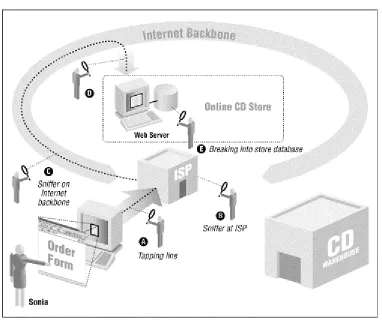
[image:27.595.113.491.205.627.2]Consider a typical transaction on the Web: buying a CD from an online music store with your credit card (Figure 1.1).
Figure 1.1. Buying a CD with your credit card over the Internet
Both the credit card holder (Sonia's dad) and the merchant face risks in this transaction. For the credit card holder, two risks are obvious and well-publicized:
•
The credit card number might be "sniffed" by some electronic villain as it travels across the Internet. That person could then use the credit card number to commit fraud. To make things worse, the credit card holder might not realize the card's number has been stolen until the statement is received. By that point, the card's credit limit has probably been maxed out with many thousands of dollars in fraudulent charges. Let's hope this doesn't happen while Dad is on a business trip.•
The credit card might get billed, but the CD might never show up. When Sonia tries to investigate, she finds that there is no electronic CD store: the whole thing was a scam, and Sonia has lost her dad's money. The company that billed the credit card doesn't even exist anymore.It's these two risks that Netscape's SSL was designed to combat. SSL uses encryption, a mathematical technique for scrambling information, so that data sent between Sonia's web browser and the online music store can't be surreptitiously monitored while it is in transit (see Figure 1.2). SSL also supports a
sophisticated system for digital identification, so that Sonia has some assurance that the people operating the online music store are really who they claim to be. (Encryption is described in Chapter 10, and digital IDs are described in Chapter 6.)
Figure 1.2. How SSL protects an online transaction
True Names
Cybercash's Carl Ellison notes that it is becoming less and less useful to know the "true name" of a particular business or web site operator. "In very old days (from stone age communities up through Walton's Mountain), people and things had only one name for a lifetime, your world would contain few enough people and things that you could remember and recall all their names, your
correspondents would be from your world, and you two would share the same name space. In a world like that, names meant something. With the `global village,' especially thanks to the Internet, the number of objects and people I correspond with are less and less from my personal world. . . . What Sonia cares about (quality of service, honesty, skill, size, lifetime...) is something she might have learned in ancient days by other channels and have tied to the true name - but today she doesn't have those other channels of information and because of the size of the name space, she's not likely to be able to tie anything to such a name and hold that information in her head. Today, entities change names rapidly (a good hotel I've stayed at has changed names twice in the last two years), and entities have multiple names. The assumptions upon which we humans built a reliance on names are breaking down, and we haven't replaced the use of names yet."
SSL does a good job of protecting information while the data is in transit and giving web users good
assurances that they are communicating with the sites they think they are. Programs that implement the SSL protocol come in two versions: a reduced-strength version that is sold by U.S. corporations overseas, and a full-strength version sold by foreign companies overseas as well as by U.S. companies for use within the United States. But even though a lot of fuss has been made because the reduced-strength version of the SSL program isn't all that secure, it is still probably good enough for encrypting most credit card transactions.6
Nevertheless, it's ironic that SSL was first proposed as a safe way for sending credit card numbers over the Internet, because it wasn't needed for this purpose. Here's why:
•
According to the laws that govern the use of credit cards in the United States, consumers are only liable for the first $50 of fraudulent credit card transactions. In most cases, credit card companies don't even enforce the $50 limit - consumers who report fraudulent charges can simply alert their banks and not pay. So there really isn't any risk to consumers in having their credit card numbers "sniffed" over the Internet.7•
If Sonia were billed for a CD and it never showed up, all her dad would have to do is write his credit card company to contest the charge.8•
There is no need for consumers to verify the identity of merchants that accept credit cards, because the banks that issue merchants their credit card accounts have already done this for the consumer. Merchants can't charge your credit card unless they first obtain a credit card merchant account, which involves an extensive application procedure, a background check, and usually an onsite visit. Indeed, credit card firms do a far better job of this verification than Sonia could ever hope to do by herself.The idea that SSL could secure credit card transactions was an important part of selling Internet commerce - and specifically Netscape's products - to consumers. The message was simple and effective: "Don't do business with companies that don't have secure (i.e., Netscape) web servers." But the message was too effective: many Internet users, including some journalists, were so intimidated by the idea of having their credit card information stolen on the Internet that they refused to do business with merchants that had cryptographic web servers as well.
Ironically, the people who were really protected by Netscape's technology weren't the consumers, but banks and merchants. That's because they are the ones who are ultimately responsible for credit card fraud. If a credit card merchant gets a credit card approved and ships out a CD, the bank is obligated to pay the merchant for the charge, even if the credit card is reported stolen later that day. The encryption also protects merchants: if a credit card number is stolen because of a merchant's negligence, then the merchant can be held liable by the bank for any fraud committed on the card. (Credit card companies have since stated that merchants are indeed responsible for any fraud that results from credit card numbers that are stolen if a merchant didn't use a cryptographically enabled web server. Nevertheless, at this point there has been no publicly reported example of a credit card number being "sniffed" over a network connection, encrypted or not.)
The American Bankers Association maintains that it's in the interest of consumers to protect banks and merchants from fraud. After all, fraud cuts into the profits of banks, forcing them to raise interest rates and making it harder for them to offer new services. Dealing with fraud can also be very difficult for some consumers. Some people panic when faced with a credit card bill that contains thousands of dollars in fraudulent charges. Others simply ignore it. Unfortunately, they do so at their peril: after a period of time (depending on the financial institution), consumers become liable for fraudulent charges that are not contested.
6
Weak encryption is good enough for most credit card transactions because these transactions are reversible and heavily audited. Fraud is
quickly discovered. And while it is true that an SSL transaction that's encrypted with a 40-bit key can be cracked in a matter of hours
by a graduate student with a laboratory of workstations, there is no easy way to tell before attempting to crack a message if it is a message
worth cracking. It's far, far easier to simply scan the Net for unencrypted credit card numbers.
7
However, note that debit cards, which are being widely promoted by banks nowadays, may not have a customer liability limit. If you use
a debit card, be sure to check the fine print in the agreement with your bank!
8
Under the law, he would need to write the credit card company to preserve his rights to contest the charge - a telephone call is not sufficient,
1.3.2 New Lessons from the Credit Card Example
It turns out that both Sonia and the merchant face many other risks when doing business over the Internet - risks that encryption really does not protect against. For Sonia, these risks include:
•
The risk that the information she provides for this transaction will be used against her at some time in the future. For instance, personal information may be obtained by a con artist and used to gain Sonia's trust. Or the address that she gives may end up on a mailing list and used to bombard Sonia with unwanted physical or electronic mail.•
The risk that the merchant may experiment with Sonia's sensitivity to price or determine the other stores at which Sonia is shopping, allowing the merchant to selectively raise the prices that are offered to Sonia so that they will be as high as she is willing (or able) to pay - and definitely higher than the prices that are charged the "average" consumer.•
The risk that the merchant might somehow take over Sonia's web browser and use it to surreptitiously glean information from her computer about her tastes and desires.•
The risk that a rogue computer programmer might figure out a way to gain control of Sonia's web browser. That browser could then be used to reformat Sonia's hard disk. Even worse: the rogue program might download a piece of software that scans Sonia's computer for sensitive information (bank account numbers, credit card numbers, access codes, Social Security Numbers, and so on) and then silently upload that information to other sites on the Internet for future exploitation.Likewise, the merchant faces real risks as well:
•
Sonia might try to click into the merchant's web site and find it down or terribly sluggish.Discouraged, she buys the records from a competitor. Even worse, she then posts her complaints to mailing lists, newsgroups, and her own set of WWW pages.
•
Sonia might in fact be a competitor - or, actually, a robot from a competing web site - that is systematically scanning the music store's inventory and obtaining a complete price list.•
Sonia might be Jason, a 14-year-old computer prankster who has stolen Sonia's credit card number and is using it illegally to improve his CD collection.•
Once the merchant obtains Sonia's credit card number, it is stored on the hard disk of the merchant's computer. Jason might break into the computer and steal all the credit card numbers, opening the merchant to liability.•
Once Jason breaks into the merchant's computer, he might introduce fraudulent orders directly into the company's order-processing database. A few days later, Jason receives thousands of CDs in the mail.•
Jason might have his own credit card. Having thoroughly compromised the merchant's computer, Jason begins inserting reverse charge orders into the merchant's credit card processing system. The credits appear on Jason's credit card. A few days later, he uses a neighborhood ATM machine to turn the credits into cash.•
As a prank, or as revenge for some imagined slight, Jason might alter the store's database or WWW pages so that the CDs customers receive are not the ones they ordered. This might not bediscovered for a week or two, after thousands of orders have been placed. The merchant would have the expense of paying for all the returned CDs, processing the refunds, and losing the customer's faith.
These are the real threats of doing business on the Internet. Some of them are shown in Figure 1.3.
Figure 1.3. The real threats of doing business on the Internet
There is nothing that is fundamentally new about these kinds of risks: they have existed for as long as people have done business by computer; some of these problems can also be experienced doing business by telephone or by mail. But the Internet and the World Wide Web magnify the risks substantially. One of the reasons for the heightened threat on today's networks is that the Internet makes it far easier for people to wage anonymous or nearly anonymous attacks against users and businesses. These attacks, in turn, can be automated, which makes it possible for an attacker to scan thousands of web sites and millions of users for any given vulnerability within a very short amount of time. Finally, these attacks can be conducted worldwide, an unfortunate consequence of the Internet's trans-national nature.
1.4 Firewalls: Part of the Solution
A firewall is a device (usually a computer running a specially written or modified operating system) that isolates an organization's internal network from the Internet at large, allowing specific connections to pass and blocking others. Ideally, firewalls are configured so that all outside connections to an internal network go through relatively few well-monitored locations. In so doing, firewalls are part of an organization's overall security strategy.
Unfortunately, many organizations have seized upon firewall technology as their sole security strategy. We have seen organizations that realize they have serious security problems on their internal networks - and then attempt to "solve" this problem by simply using a firewall to block external access.
Because firewalls are frequently misused, we are ambivalent about them. We have too often seen firewalls as a substitute for real problem fixing. And because many attacks come from disgruntled or dishonest
There are some real situations in which to use firewalls. One is that some organizations must use older "legacy systems" that cannot be secured: a firewall can be used to control access to these systems. (Such firewalls should probably be used to control all access to these systems, rather than merely access from outside the organization.) Another reason to use a firewall is that it is much more difficult to track down an attacker who comes from outside a network than one who comes from inside.
Thus, a firewall should only be used to gain additional security that works in conjunction with internal controls - and never as a replacement for them.
1.4.1 Locating Your Web Server with Respect to Your Firewall
If your organization uses a firewall to protect its internal network from external attacks, you have a number of choices of where to locate your web server:
[image:32.595.110.496.293.555.2]•
You can locate the web server outside your firewall (see Figure 1.4). The advantage of locating the server outside the firewall is that the web server may be subject to ongoing attacks from rogue Internet users; in the event that the web server is broken into, they will not have gained an increased foothold for launching further attacks against your organization. On the other hand, the web server will not be able to benefit from whatever protection the firewall affords.•
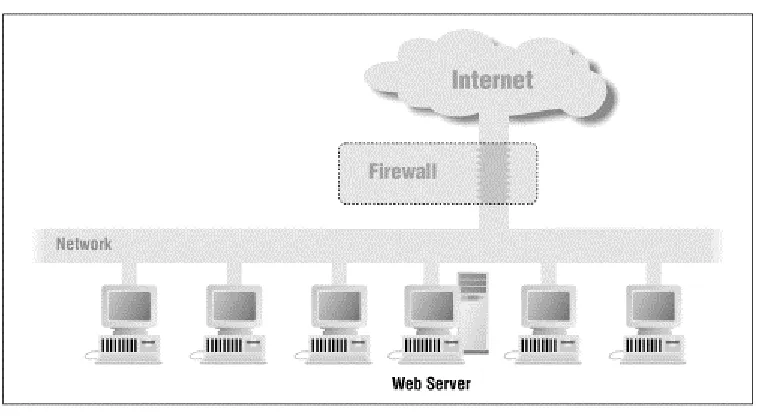
You can place the web server inside your firewall (see Figure 1.5). If you do this, you will need to configure your firewall so that it will pass transactions on TCP port 80, either by directly allowing the packets through or by using a suitable proxying mechanism. The advantage of locating the web server behind your firewall is that the firewall will block outsiders from using other Internet services, such as Telnet and FTP. However, if attackers manage to subvert your web server through a faulty CGI script, they will have full access to your internal network.Figure 1.5. A web server located inside a firewall