<J
o
o
o
c
[})OMA~N ~tal~Ctal~
ltalU19JijJ]al9J6
Referrerruce
Apollo Computer Inc. 330 Billerica Road Chelmsford, MA 01824
Copyright © 1986 Apollo Computer Inc. All rights reserved. Printed in U.S.A.
First Printing: Latest Printing: Updated:
September, 1981 January, 1987 December, 1986
This document was produced using the Interleaf Workstation Publishing Software (WPS). Interleaf and WPS are trademarks of Interleaf, Inc.
APOLLO and DOMAIN are registered trademarks of Apollo Computer Inc.
AEGIS, DGR, DOMAIN/BRIDGE, DOMAIN/DFL-10D, DOMAIN/DQC-100, DOMAIN/Dialogue, DOMAINIIX, DOMAIN/Laser-26, DOMAIN/PCI, DOMAIN/SNA, D3M, DPSS, DSEE, GMR, and GPR are trademarks of Apollo Computer Inc.
Apollo Computer Inc. reserves the right to make changes In specifications and other information contained In this publication without prior notice, and the reader should In all cases consult Apollo Computer Inc. to determine whether any such changes have been made.
THE TERMS AND CONDITIONS GOVERNING THE SALE OF APOLLO COMPUTER INC. HARDWARE PRODUCTS AND THE LICENSING OF APOLLO COMPUTER INC. SOFTWARE CONSIST SOLELY OF THOSE SET FORTH IN THE WRITTEN CONTRACTS BETWEEN APOLLO COMPUTER INC. AND ITS CUSTOMERS. NO REPRESENTATION OR OTHER AFFIRMATION OF FACT CONTAINED IN THIS PUBLICATION, INCLUDING BUT NOT LIMITED TO STATEMENTS REGARDING CAPACITY , RESPONSE-TIME PERFORMANCE , SUITABILITY FOR USE OR PERFORMANCE OF PRODUCTS DESCRIBED HEREIN SHALL BE DEEMED TO BE A WARRANTY BY APOLLO COMPUTER INC. FOR ANY PURPOSE, OR GIVE RISE TO ANY LIABILITY BY APOLLO COMPUTER INC. WHATSOEVER.
IN NO EVENT SHALL APOLLO COMPUTER INC. BE LIABLE FOR ANY INCIDENTAL, INDIRECT, SPECIAL OR CONSEQUENTIAL DAMAGES WHATSOEVER (INCLUDING BUT NOT LIMITED TO LOST PROFITS) ARISING OUT OF OR RELATING TO THIS PUBLICATION OR THE INFORMATION CONTAINED IN IT, EVEN IF APOLLO COMPUTER INC. HAS BEEN ADVISED, KNEW OR SHOULD HAVE KNOWN OF THE POSSIBILITY OF SUCH DAMAGES.
THE SOFTWARE PROGRAMS DESCRIBED IN THIS DOCUMENT ARE CONFIDENTIAL INFORMATION AND
PROPRIETARY PRODUCTS OF APOLLO COMPUTER INC. OR ITS L 1 C E N S O R S . , _ /
o.
0
0
o
Preface
The DOMAIN Pascal Language Reference explains how to code, compile, bind, and execute DOMAIN Pascal programs.
We've organized this manual as follows:
Chapter 1 Chapter 2
Chapter 3 Chapter 4
Chapter 5 Chapter 6 Chapter 7
Chapter 8
Chapter 9 Appendix A Appendix B Appendix C Appendix D Appendix E
Audience
Introduces DOMAIN Pascal and provides an overview of its extensions. Defines DOMAIN Pascal building blocks (like the length of an identifier) and describes the structure of the main program.
Explains all the DOMAIN Pascal data types.
Contains alphabetized listings describing all the functions, procedures, statements, and operators that you can use in the code portion of a pro-gram.
Explains how to declare and call procedures and functions. Details compiling, binding, debugging, and executing.
Describes how you can break your program into two or more separately-compiled modules (which can be in DOMAIN Pascal, DOMAIN FOR-TRAN, or DOMAIN C).
Contains an overview of the I/O resources available to DOMAIN Pascal programmers.
Covers errors and warnings and how to handle them.
ls a table of DOMAIN Pascal reserved words and predeclared identifiers. Is an ASCII table.
Describes DOMAIN Pascal's extensions to ISO/ANSI standard Pascal. Describes DOMAIN Pascal's deviations from ISO/ANSI standard Pascal. Describes built-in routines available for systems programmers.
We wrote this manual to serve programmers at a variety of levels of Pascal expertise. Our goal is to keep the writing as simple as possible, but to assume that you know the fundamentals of Pascal programming. If
Summary of Technical Changes
This manual describes the DOMAIN Pascal compiler available with Software Release 9.5 and supersedes ,/----'\ all earlier documents. The last update to the DOMAIN Pascal manual was at SR9.0. The following list
de-scribes some of the features added to DOMAIN Pascal since SR9. 0: "---. ../
• The compiler reports many new error and warning messages.
• The new built-in functions max and min return the larger and smaller, respectively, of two val-ues.
• The new built-in procedure discard explicitly discards the computed value of an expression.
• DOMAIN Pascal now supports the ISO/ANSI standard Pascal procedures pack and unpack.
• New compiler optimizations eliminate variable assignments that are never used.
• A new compiler directive, %slibrary, allows the use of precompiled library include files. Also, the new compiler option -slib allows you to precompile a file so that %slibrary can use it.
• The -opt compiler option now allows you to select a predetermined level of optimization for your program. You can select from level 0 (which is equivalent to -nopt) to level 3.
• The -cpu compiler option now accepts the following additional arguments for targeting the run-time CPU: 560
I
330I
90I
570I
580I
3000.• Three new routine options are available: nosave, noreturn, and dO_return.
• The volatile attribute has been changed so that the attribute no longer is inherited by an entire
record for which one field is declared volatile. .~ .
• Enumerated type variables can now have a maximum of 2048 elements. The old limit was 256.
• The compiler no longer requires that DOMAIN Pascal source filenames end with .pas. o A new optional parameter for the open procedure allows you to specify a buffer size.
• A new systems programming function, set_sr, saves the current value of the hardware status regis-ter and then inserts a new value.
Revisions to Manual
A number of changes have been made to this manual for this revision. To help you find the revisions, change bars like the one next to this paragraph appear on the revised pages indicating where new informa-tion has been added or existing informainforma-tion has been revised.
Related Manuals
• Getting Started With Your DOMAIN System (002348) explains the fundamentals of the DOMAIN system.
• The DOMAIN System User's Guide (005488) provides more detailed information on the DO-MAIN system.
• The DOMAIN C Language Reference (002093) describes the DOMAIN implementation of the C language.
Preface iv
. - , /
o
o
o
o
o
• The DOMAIN FORTRAN Language Reference (000530) describes the DOMAIN implementation of FORTRAN.
o The DOMAIN System Command Reference (002547) describes the Shell and Display Manager (DM) concepts and commands.
o The DOMAIN System Call Reference (007196) describes the system service routines provided by the operating system, and explains how to call these routines from user programs.
o Programming With General System Calls (005506) covers writing DOMAIN Pascal programs that use stream calls and many other important system calls.
o The DOMAIN Binder and Librarian Reference (004977) describes how to use the bind utility to link object modules and the librarian utility to create library files.
() The DOMAIN Language Level Debugger Reference (001525) describes the high-level language debugger, DEBUG.
• The DOMAIN Software Engineering Environment™ (DSEE) Reference (003016) describes the DOMAIN DSEE product.
o The DOMAIN@/Dialogue™ User's Guide (004299) describes the DOMAIN/Dialogue product.
Pascal Tutorials
o Jensen, K. and N. Wirth, revised by Mickel, A. and J. Miner. Pascal User Manual and Report. Third Edition. Springer-Verlag, New York: 1985.
o Grogono, Peter. Programming in Pascal. Revised Edition. Reading, Massachusetts: Addison-Wesley, 1980.
o Cooper, D., and M. Clancy. Oh! Pascal! New York: WW Norton, 1982.
Problems, Questions, and Suggestions
We appreciate comments from the people who use our system. In order to make it easy for you to com-municate with us, we provide the User Change Request (UCR) system for software-related comments, and the Reader's Response form for documentation comments. By using these formal channels you make it easy for us to respond to your comments.
You can get more information about how to submit a UCR by consulting the DOMAIN System Command
Reference. Refer to the crucr (CREATE_USER_CHANGE_REQUEST) Shell command description. You can view the same description on-line by typing:
$ help crucr
For your documentation comments, we've included a Reader's Response form at the back of each
Documentation Conventions
Unless otherwise noted in the text, this manual uses the following symbolic conventions.
boldface
lowercase
italics
typewriter
Extension
color
{ Braces}
<>
CTRL/Z
Preface
Boldface words or characters in descriptions of statement or keyword syntax represent the keywords that you must use literally.
Lowercase words or characters in descriptions of statement or keyword syntax represent values that you must supply.
Italicized words in descriptions of statement or keyword syntax represent optional items.
Typewriter font is used for examples and for variable, program, and rou-tine names within text.
The word "Extension" used in a section heading indicates that all the in-formation described in the section is a DOMAIN Pascal extension to the ISO standard.
Words printed in color denote user input to a program example or on a command line. Color also indicates an extension to ISO standard Pascal.
Braces enclose comments in a program or command.
A vertical bar separates items in a list of choices.
Angle brackets enclose the name of a key on the keyboard; e.g.,<RETURN>.
The notation CTRLI followed by the name of a key indicates a control character sequence. You should hold down <CTRL> while typing the character.
Horizontal ellipsis points in descriptions of statements and keyword syn-tax indicate that the preceding item may be repeated one or more times. In program examples, horizontal ellipsis points mean irrelevant parts of the example have been omitted.
Vertical ellipsis points mean that irrelevant parts of a figure or example have been omitted.
vi
---"'"
'--/ '
c
/~
o
o
o
Conienis
Chapter 1 Introduction
1.1 A Sample Program . . . 1-1 1.2 On-Line Sample Programs. . . .. 1-2 1.3 Overview of DOMAIN Pascal Extensions . . . 1-4 1.3.1 Extensions to Program Organization . . . .. 1-4 1.3.2 Extensions to Data Types . . . 1-4 1.3.3 Extensions to Code . . . 1-4 1.3.4 Extensions to Routines . . . 1-5 1.3.5 Extensions to Program Development . . . 1-5 1.3.6 External Routines and Cross-Language Communication . . . 1-5 1.3.7 Extensions to I/O . . . 1-6 1.3.8 Errors. . . .. 1-6
Chapter 2 Blueprint of a Program
2.1 Building Blocks of DOMAIN Pascal . . . 2-1 2.1.1 Identifiers . . . .. 2-1 2.1.2 Integers . . . 2-2 2.1.3 Real Numbers . . . 2-2 2.1.4 Comments . . . 2-3 2.1.5 Strings . . . 2-4 2.1.6 Case Sensitivity . . . 2-4 2.1. 7 Spreading Source Code Across Multiple Lines .... . . .. 2-4 2.2 Organization . . . 2-5 2.2.1 Program Heading. . . .. . . . .. 2-7 2.2.2 Declarations. . . .. 2-7 2.2.2.1 Label Declaration Part . . . 2-7 2.2.2.2 Const Declaration Part . . . 2-8 2.2.2.3 Type Declaration Part . . . .. 2-9 2.2.2.4 Var Declaration Part . . . 2-10 2.2.2.5 Define Declaration Part -- Extension . . . 2-10 2.2.3 Routines . . . 2-11 2.2.3.1 Routine Heading . . . 2-11 2.2.3.2 Declaration Part of a Routine . . . .. 2-11 2.2.3.3 Nested Routines ... '. . . . .. 2-11 2.2.3.4 Action Part of a Routine. . . . .. 2-12 2.2.4 Action Part of the Main Program ... 2-12 2.3 Global and Local Variables . . . ; 2-12 2. 4 Nested Routines . . . 2-13
Chapter 3 Data Types
3.2.4 Internal Representation of Integers . . . . 3.3 Real Numbers . . . . 3.3.1 Declaring Real Variables . . . . 3.3.2 Initializing Real Variables -- Extension . . . . 3.3.3 Defining Real Constants . . . . 3.3.4 Internal Representation of Real Numbers . . . . 3.4 Booleans . . . . 3.4.1 Initializing Boolean Variables -- Extension . . . . 3.4.2 Defining Boolean Constants . . . . 3.4.3 Internal Representation of Boolean Variables . . . . 3.5 Characters . . . . 3.5.1 Declaring Character Variables . . . . 3.5.2 Initializing Character Variables -- Extension . . . . 3.5.3 Defining Character Constants . . . . 3.5.4 Internal Representation of Char Variables . . . . 3.6 Enumerated Data . . . . 3.6.1 Internal Representation of Enumerated Variables . . . . 3.7 Subrange Data . . . . 3.7.1 Internal Representation of Subranges . . . . 3.8 Sets . . . ' ... . 3.8.1 Declaring Set Variables . . . . 3.8.2 Initializing Set Variables -- Extension . . . . 3.8.3 Internal Representation of Sets . . . . 3.9 Records . . . . 3.9.1 Fixed Records . . . . 3.9.2 Variant Records . . . . 3.9. 3 Unpacked Records and Packed Records .' . . . . 3.9.4 Initializing Data in a Record -- Extension . . . . 3.9.5 Internal Representation of Unpacked Records . . . . 3.9.6 Internal Representation of Packed Records . . . . 3.10 Arrays . . . . 3.10.1 Initializing Variable Arrays -- Extension . . . . 3.10.1.1 Defaulting the Size of an Array -- Extension . . . . 3.10.1.2 Using Repeat Counts to Initialize Arrays -- Extension ... . 3.10.2 Internal Representation of Arrays . . . . 3. 11 Files ... -. . . . 3.12 Pointers . . . . 3.12.1 Standard Pointer Type . . . . 3.12.2 Univ-.ptr -- Extension . . . . 3.12.3 Procedure and Function Pointer Data Types -- Extension ... . 3.12.4 Initializing Pointer Variables -- Extension . . . . 3.12.5 Internal Representation of Pointers . . . . 3.13 Putting Variables Into Sections -- Extension . . . . 3.14 Attributes for Variables and Types -- Extension . . . . 3.14.1 Volatile -- Extension . . . . 3.14.2 Device -- Extension . . . . 3.14.3 Address -- Extension . . . .. 3.14.4 Attribute Inheritance -- Extension . . . . 3.14.5 Special Considerations -- Extension
Chapter 4 Code
3-4 3-4 3-4 3-5 3-5 3-6 3-7 3-7 3-8 3-8 3-8 3-8 3-8 3-9 3-9 3-9 3-9 3-10 3-10 3-10 3-10 3-11 3-11 3-12 3-12 3-14 3-15 3-16 3-17 3-18 3-19 3-20 3-21 3-21 3-22 3-23 3-24 3-24 3-25 3-25 3-25 3-26 3-26 3-27 3-27 3-28 3-30 3-30 3-31
4.1 Overview: Conditional Branching . . . .. 4-1 4.2 Overview: Looping ... ,... 4-1 4.3 Overview: Mathematical Operators . . . 4-2 4.3.1 Expansion of Operands. . . .. 4-3 4.3.2 Predeclared Mathematical Functions . . . 4-4 4.4 Overview: I/O . . . 4-5
Contents viii
c
C)
o
o
C~
Record Operations. . . .. 4-125 Repeat/Until. . . .. 4-128 Replace -- Extension ... ... . . . .. 4-130 Reset . . . 4-131 Return -- Extension. . . .. 4-133 Rewrite. . . .. 4-134 Round . . . 4-136 Rshft -- Extension . . . 4-137 Set Operations. . . .. 4-139 Sin . . . 4-145 Sizeof -- Extension . . . 4-147 Sqr . . . 4-149 Sqrt . . . 4-150 Statements . . . 4-151 Succ . . . 4-152 Then . . . 4-154 To . . . 4-155 Trunc . . . .. 4-156 Type Transfer Functions -- Extension . . . 4-157 Unpack ... 4-160 Until. . . .. 4-162 While . . . 4-163 With . . . 4-165 Write, Writeln . . . . .. 4-169 Xor -- Extension . . . 4-174
Chapter 5 Procedures and Functions
5.1 Parameter List . . . .. 5-1 5.2 Parameter Types . . . 5 - 3 5.2.1 Variable Parameters and Value Parameters . . . 5-3 5.2.2 In, Out, and In Out -- Extension . . . 5-4 5.2.3 Univ -- Universal Parameter Specification -- Extension. . . .. 5-5 5.3 Routine Options . . . 5-8 5.3.1 Forward . . . 5-8 5.3.2 Extern -- Extension . . . . . . .. 5-9 5.3.3 Internal -- Extension . . . '. . . . .. 5-9 5.3.4 Variable -- Extension. . . .. 5-10
' ... _. ~./
5.3.5 Abnormal -- Extension . . . 5 -11
C"
55 .3
3
'76 vNalyaram E-- Ex~ension . . . .. 55- 1111 '" . . osave -- xtenslon...
-5.3.8 N oreturn -- Extension . . . 5 -11 5.3.9 DO_return -- Extension . . . 5-11 5.4 Attribute List -- Extension . . . 5-12 5.4. 1 Section -- Extension . . . 5 -12 5.5 Recursion . . . 5-14
Chapter 6 Program Development
6. 1 Compiling . . . .. 6-3 6.1.1 Compiler Output . . . 6-3 6.2 Compiler Options . . . 6-3 6.2.1 -Align and -Nalign: Longword Alignment . . . 6-5 6.2.2 -B and -Nb: Binary Output . . . 6-6 6.2.3 -Comchk and -Ncomchk: Comment Checking . . . 6-6 6.2.4 -Cond and -Ncond: Conditional Compilation . . . 6-7 6.2.5 -Config: Conditional Processing. . . .. 6-7 6.2.6 -Cpu: Target Workstation Selection . . . 6-8
Contents x
~.--~-()
o
o
6.2.7 -Db, -Ndb, -Dba, -Dbs: Debugger Preparation. . . .. 6-9 6.2.8 -Exp and -Nexp: Expanded Listing File ... '. . . .. 6-10 6.2.9 -Idir: Search Alternate Directories for Include Files . . . 6-10 6.2.10 -ISO and -NISO: Standard Pascal . . . 6-10 6.2.11 -L and -NL: Lising Files . . . .. 6-11 6.2.12 -Map and -Nmap: Symbol Map . . . 6-11 6.2.13 -Msgs and -Nmsgs: Informational Messages. . . . .. 6-12 6.2.14 -Opt and -Nopt: Optimized Code . . . .. 6-12 6.2.15 -Peb and -Npeb: Performance Enhancement . . . 6-13 6.2.16 -Slib: Precompilation of Include Files . . . 6-13 6.2.17 -Subchk and -Nsubchk: Subscript Checking . . . 6-14 6.2.18 -Warn and -Nwarn: Warning Messages . . . 6-15 6.2.19 -Xrs and -Nxrs: Register Saving . . . 6-15 6.3 Binding. . . .. 6-15 6.4 Using Libraries . . . 6-16 6.5 Executing the Program . . . 6-16 6.6 Debugging the Program. . . .. 6-16 6.6.1 Debug ... ~ . . . .. 6-16 6.6.2 Traceback (tb) . . . 6-17 6.6.3 Crefpas . . . 6-17 6.7 The DSEE Product. . . .. 6-18 6.8 DOMAIN/Dialogue . . . 6-19
Chapter 7 External Routines and Cross-Language Communication
Chapter 8 Input and Output
8.1 Some Background on DOMAIN I/O . . . 8-1 8.1.1 Input Output Stream (lOS) Calls. . . .. 8-2 8.1.2 VFMT Calls . . . 8-2 8.1.3 File Variables and Stream IDs . . . .. 8-3 8.1.4 Default Input Output Streams. . . .. 8-3 8.1.5 Interactive I/O . . . 8-3 8.1.6 Stream Markers. . . .. 8-5 8.1.7 File Organization. . . .. 8-5 8.2 Predeclared DOMAIN Pascal I/O Procedures . . . 8-5 8.2.1 Creating and Opening a New File . . . 8-5 8.2.2 Opening an Existing File. . . .. 8-6 8.2.3 Reading From a File. . . .. 8-6 8.2.4 Writing to a File . . . 8-6 8.2.5 Closing a File. . . .. 8-7
Chapter 9 Errors
9.1 Errors Reported by Open and Find. . . .. 9-1
9.1.1 Printing Error Messages . . . 9-1
0
9. 1. 2 Testing for Specific Errors . . . 9 - 29.2 Compiler Errors and Warnings. . . .. 9-4 9.2.1 Error and Warning Message Conventions . . . 9-4 9.2.2 Error and Warning Messages . . . 9-5
Appendix A Reserved Words and Predeclared Identifiers
Appendix B ASCII Table
Appendix C Extensions to Standard Pascal
C.l Extensions to Program Organization . . . C-1 C .1.1 Identifiers . . . C-1 C.l.2 Integers . . . C-1 C.l.3 Comments . . . C-2 C.l.4 Sections. . . .. C-2 C .1. 5 Declarations . . . .. C-2 C.l.6 Constants. . . .. C-2 C.l.7 Labels . . . C-3 C.2 Extensions to Data Types. . . .. C-3 C.2.1 Initializing Variables in the Var Declaration Part. . . .. C-3 C.2.2 Integers . . . C-3 C.2.3 Reals . . . C-4 C.2.4 Pointer Types . . . C-4 C.2.5 Named Sections . . . C-4 C.2.6 Variable and Type Attributes. . . .. C-4 C.3 Extensions to Code. . . .. C-4 C.3.1 Bit Operators. . . .. C-5 C.3.2 Bit-Shift Functions . . . . . . .. C-5 C.3.3 Compiler Directives. . . . .. C-5 C.3.4 Addr Function . . . C-5 C.3.5 Max and Min Functions . . . C-5 C.3.6 Discard Procedure . . . C-5 C.3.7 I/O Procecures . . . C-5 C.3.8 If Statement . . . C-6 C.3.9 Loops . . . C-6
Contents xii
\
'-..../
o
o
o
o
C.3.10 Range of a Specified Data Type . . . C-6 C.3.11 Integer Subrange Testing . . . C-7 C.3.12 Extensions to Read and Readln . . . .. C-7 C.3.13 Premature Return From Routines . . . C-7 C.3.14 Memory Allocation of a Variable . . . C-7 C.3.1S Extensions to With . . . . . . .. C-7 C.3.16 Type Transfer Functions . . . C-8 C.3.17 Extensions to Write and Writeln . . . C-8 C.4 Extensions to Routines. . . .. C-8 C.4.1 Direction of Data Transfer . . . " C-8 C.S Universal Parameter Specification. . . . . .. C-9 C. S.l Routine Options . . . C-9 C. S . 2 Routine Attribute List . . . .. C-9 C.6 Modularity ... : . . . .. C-l0 C.7 Other Features of DOMAIN Pascal . . . C-l0
Appendix D Deviations from Standard Pascal
D.l Deviations From the Standard. . . .. D-l D.2 Deviations From Specific Sections of the Standard. . . .. D-l
Appendix E Systems Programming Routines E.l Overview
E.2 Restrictions for Use . . . . Disable . . . . Enable . . . . Set_sr . . . .
E-l E-l E-2 E-3 E-4
Illustrations
/".---....\\ ....•. -_/
Figure Page
1-1 Sample Program . . . . 1-1 2-1 Format of Main Program in DOMAIN Pascal . . . . 2-5 2-2 Labeled Main Program . . . . 2-6 2-3 Nesting Example . . . . 2-14 3-1 Program Declaring All Available Data Types . . . . 3-2 3-2 16-Bit Integer Format . . . . 3-4 3-3 32-Bit Integer Format . . . . 3-4 3-4 Single-Precision Floating-Point Format . . . . 3-6 3-5 Double-Precision Floating-Point Format ... ~ ... . 3-7 3-6 Storage of Sample Set . . . . 3-12 3-7 Sample Record Layout . . . . 3-17 3-8 Sample Packed Record . . . . 3-9 POInter Variable Format . . . .
3-19
C
3-26 6-1 Steps in DOMAIN Pascal Program Development . . . . 6-2 7-1 Format of a Module . . . . 7-2 7-2 Method A for Accessing an External Routine . . . . 7-8 7 - 3 Method B for Accessing an External Routine . . . .. 7-9 7 -4 Another Example of Calling External Routines . . . .. 7-10
/---...
Contents xiv
o
o
o
o
Table 3-1 3-2 3-3 4-1 4-2 4-3 4-4 4-5 4-6 4-7 4-8 4-9 4-10 6-1 6-2 7-1 7-2 8-1 9-1 9-2 A-1 A-2 B-1 E-1
Tables
,,~
I
'----J
c'
( \
\ .... , - )
o
C)
o
o
Chapier
1
This manual describes DOMAIN Pascal, which is our version of ISO standard Pascal (ISO 7185-1982 Level 0). Niklaus Wirth developed Pascal in the late 19 60s to serve primarily for teaching and for realizing efficient, reliable, and portable programs. Since then, Pascal has become a widely used commercial lan-guage. Pascal contains a small set of constructs, and it is fairly easy to learn.
You should be somewhat familiar with Pascal before attempting to use this manual. If you are not, please consult a good Pascal tutorial. (We've listed some good tutorials in the Preface.) If you are somewhat fa-miliar with Pascal or if you are expert in a highly block-structured language such as PL/I, then you should be able to write programs in DOMAIN Pascal after reading this manual.
1.1 A Sample Program
The best way to get started with DOMAIN Pascal is to write, compile, and execute a simple program. Fig-ure 1-1 shows a simple program that you can use to get started. You are welcome to type in this program yourself, but you can use the getpas utility (described in the next section) to save some typing.
PROGRAM getting_started;
{A simple program to tryout.}
VAR
x integer16; y : integer32;
BEGIN
write('Enter an integer -- '); readln(x);
y := x
*
2;writeln;
writeln(y:l, ' is twice' x:l); END.
Suppose you store the program in file easy. pas. (Although it is not required that the filename end with the .pas extension, we recommend its use so that you can readily identify Pascal source programs.) To compile a program, simply enter the Shell command pas followed by the filename. If you do use the
. pas extension, you can include or omit that extension at this step. DOMAIN P(\scal doesn't care which way you type it. For example, to compile easy. pas, you can enter either of the following commands:
$ pas easy or
$ pas easy.pas
The compiler creates an executable object in filename easy. bin. To execute this object you merely enter its name; for example:
$ easy. bin
Enter an integer -- 15
30 is twice 15
1.2 On-Line Sample Programs
Many of the programs from this manual are stored on-line, along with sample programs from other DOMAIN manuals. These programs illustrate features of the Pascal language, and demonstrate program-ming with DOMAIN graphics calls and system calls.
The sample programs are stored in one master file (to conserve disk space). To extract a sample program from this master file, you must execute the getpas program. Getpas prompts you for the name of the sam-ple program and the pathname of the file to which you want to copy it.
Before you use getpas for the first time, you must create the proper links. If the on-line examples are stored on your node, you only need to create the following single link:
$ crl -com/getpas /domain_examples/pascal_examples/getpas
However, if the on-line examples are stored on another node, you need to create the following two links:
$ crl /domain_examples/pascal_examples @
$_ //othernode/domain_examples/pascal_examples
$ crl -com/getpas //othernode/domain_examples/pascal_examples/getpas
where othernode is the name of the disk on which the examples are stored. (The @ symbol on the first line of this example is the AEGIS shell's continuation character. You must include it to continue a com-mand on another line. In a DOMAIN/IX shell, the backslash (\) is the continuation character.)
Introduction 1-2
(
I
\ .
c
o
o
o
o
o
Once you create the appropriate links, you can execute the getpas program. Here is a getpas demonstra-tion:
$ getpas
Welcome to getpas -- please wait, initializing master file
Enter the name of the program you want to retrieve, or enter HELP to get a list of available programs, or enter QUIT to exit -- getting_started
Program getting_started has been found.
What pathname would you like to store getting_started in? (default is getting_started.pas) -- easy.pas
Program getting_started written to output file easY.pas
Enter the name of the program you want to retrieve, or enter HELP to get a list of available programs, or enter QUIT to exit -- quit
Getpas warns you if you try to write over an existing file.
1.3 Overview of DOMAIN Pascal Extensions
DOMAIN Pascal supports many extensions to ISO/ANSI standard Pascal. The purpose of this section is to / -~
provide an overview of these extensions. For a complete list of all the extensions, see Appendix C. From Chapter 2 to Chapter 5, all extensions to the standard are marked in color like this or are noted explicitly in text as an extension. For a list of all omissions from the standard, see Appendix D.
Naturally, the more you take advantage of DOMAIN Pascal extensions, the less portable your code will be. Therefore, if you are very concerned with portability, you should avoid using the following features.
1.3.1 Extensions to Program Organization
Chapter 2 describes the organization of a DOMAIN Pascal program contained within one file. Following is an overview of the extensions described within the chapter. You can:
• Specify an underscore
U
or dollar sign ($) in an identifier. • Specify integers in any base from 2 to 16.• Specify comments in three ways.
• Specify that the compiler assign the code or data in your program to nondefault named sections. • Declare the label, const, type, and var declaration parts in any order.
• Declare a define part, which is in addition to label, const, type, and var declaration parts. (Chapter 7 details this extension more fully.)
• Use constant expressions when declaring constants, as long as the components of the expressions are constants.
• Use both identifiers and integers as labels;
1.3.2 Extensions to Data Types
Chapter 3 describes the data types supported by DOMAIN Pascal. DOMAIN Pascal supports the following extensions that allow you to:
c
• Specify two additional pointer types. The first is a special pointer to procedures and functions. (''-'\ The second is a universal pointer type that will hold a pointer to a variable of any data type. "-. __
• Initialize static variables in the var declaration part of your program. • Group variables into named sections for better runtime performance.
• Specify variable and type attributes that let you better control compiler optimization.
1.3.3 Extensions to Code
Chapter 4 describes the action portion of your program. DOMAIN Pascal supports the following exten-sions to executable statements:
• An addr function that returns the address of a specified variable
• Bit operators or functions for bitwise and, not, or, and exclusive or operations
• Three bit-shift functions (rshft, arshft, and lshft)
Introduction 1-4
-o
o
o
o
• An open procedure for opening files and a close procedure for closing files
• Many compiler directives that enable features like include files and conditional compilation • A discard procedure for explicitly discarding an expression's value and so suppressing some
com-piler optimizations
• An exit statement for jumping out of the current loop
• A find procedure for locating a specified element in a file
• A firstof and a lastof function for returning the first and last possible value of a specified data type
• Some additional capabilities for the if statement
• An in_range function for determining whether a specified value is within the defined range of an integer subrange or enumerated type
• A max and a min function for finding the greater and lesser of two specified expressions • A next statement for skipping over the current iteration of a loop
• A replace procedure that allows you to modify an existing element in a file
• A return statement for causing a premature return to a calling procedure or function
• A sizeof function for returning the size (in bytes) that a specified data type requires in storage
• Additional type transfer functions that transform the data type of a variable or expression into some other data type
• Some additional capabilities for the with statement
1.3.4 Extensions to Routines
Chapter 5 describes procedures and functions (routines). This chapter documents extensions that allow you to:
• Specify the direction of parameter passing with the special in, out, and in out keywords.
• Use the univ keyword to suppress parameter type checking.
• Specify routine attribute clauses and routine options clauses to control how the compiler processes a routine.
1.3.5 Extensions to Program Development
Chapter 6 explains how to compile, bind, debug, and execute your program. Program development tools are an implementation-dependent feature of a Pascal implementation; that is, there is no standard for these tools.
1.3.6 External Routines and Cross-Language Communication
1.3.7 Extensions to I/O
Chapter 8 describes input and output from a DOMAIN Pascal programmer's point of view. DOMAIN Pascal supports all the standard I/O procedures. In addition, it supports the open, close, find, and re-place procedures. As a further extension to the standard, DOMAIN Pascal permits you to easily access the operating system's I/O and formatting system calls.
1.3.8 Errors
Chapter 9 lists compiletime and runtime error messages and explains how to deal with them. Error mes-sages are an implementation-dependent feature of Pascal.
Introduction 1-6
\ .... " ... , / , '
c
!~
Chapier
2
o
This chapter describes the building blocks and organization of a DOMAIN Pascal program.
o
2.1 Building B,locks of DOMAIN Pascal
o
o
When describing a language implementation, it is customary to describe the basic building blocks or ele-ments of that implementation. This section defines identifiers, integers, real numbers, comele-ments, and strings. It also explores case-sensitivity and spreading source code across multiple lines.
2.1.1 Identifiers
In this manual, the term "identifier" refers to any sequence of characters that meets the following criteria:
• The first character is a letter
• The remaining characters are any of the following: A .. Z and a .. z
0 .. 9
_ (underscore)
An identifier can be any length, but DOMAIN Pascal ignores any characters beyond the 32nd. Therefore, DOMAIN Pascal cannot distinguish between the following two identifiers (the column ruler at the top is there to help you with character counting):
{ ruler:
{
1 2 3 1234567890123456789012345678901234
Accounts_receivable_kansas_city_kn Accounts_receivable_kansas_city_mo
Identifiers are case-insensitive.
2.1.2 Integers
}
}
The first character of an integer must be a positive sign (+), a negative sign (-), or a digit. Each succeed-ing character must be a digit. (See the "Integers" section in Chapter 3 for a description of the range of various integer data types.)
An unsigned integer must begin with a digit. Each succeeding character must be a digit.
Note that Pascal prohibits two consecutive mathematical operators. If you want to divide 9 by negative 3, you might be tempted to use the following expression:
9 DIV -3
However, this produces an error, since Pascal interprets the negative sign as the subtraction operator (and that makes two mathematical operators in a row). Where the sign of an integer can be confused for an ad-dition or subtraction operator, enclose the integer with parentheses. Thus, the correct expression for 9 di-vided by negative 3 is:
9 DIV (-3)
Pascal assumes a default of base 10 for integers. If you want to express an integer in another base, use the following syntax:
base#value
For base, enter an integer from 2 to 16. For value, enter any integer within that base. If the base is greater than 10, use the letters A through F (or a through f) to represent digits with the values 10 through 15.
For example, consider the following integer constant declarations:
half_life
.-
5260; /* default (base 10) */hexograms
.-
16#1c6; /* hexadecimal (base 16) */luck
.-
2#10010; /* binary (base 2) */wheat·
.-
8#723; /* octal (base 8) */2.1.3 Real Numbers
DOMAIN Pascal supports the standard Pascal definition of a real number, which is
integer. unsigned _integerEinteger
In other words, a valid real number mayor may not contain a decimal point. If the number contains a decimal point, you must specify at least one digit to the left of the decimal point and at least one digit to the right of the decimal point. To express expanded notation (powers of 10), use the letter e or E followed by the exponent; for example:
Blueprint of a Program 2-2
~--./
C)
o
o
o
o
5.2 means +5.2 5.2EO means +5.2 -5.2E3 means -5200.0 5.2E-2 means +0.052
Compare the right and wrong way for writing decimals in your program: .5 {wrong}
0.5 {right}
5El {right}
Note that although using .5 in your source code causes an error at compiletime, entering .5 as input data to a real variable does not cause an error at runtime.
2.1.4 Comments
You can specify comments in any of the following three ways:
{ comment} (* comment *) "comment"
(The spaces before and after the comment delimiters are for clarity only; you don't have to include these spaces. If you use a compiler directive within comment delimiters you cannot use spaces; see the listing for
"Compiler Directives" in Chapter 4 for details.) For example, here are three comments: { This is a comment. }
(* This is a comment. *) "This is a comment."
Unlike standard Pascal, the comment delimiters of DOMAIN Pascal must match. For example, a com-ment that starts with a left brace doesn't end until the compiler encounters a right brace. Therefore, you can nest comments, for example:
{ You can (*nest*) comments inside other comments. }
Standard Pascal does not permit nested comments. If you want to use unmatched comment delimiters, as standard Pascal allows, you must compile with the -iso switch. Chapter 6 describes this switch.
The DOMAIN Pascal compiler ignores the text of the comment, and interprets the first matching delimit-er as the end of the comment.
Use quotation marks to set off comments only if you are converting existing applications to the DOMAIN system. In all other programs, you should use either of the other two methods.
Note that Pascal comments can stretch across multiple lines; for example, the following is a valid com-ment:
{ This is a comment that stretches across multiple lines. }
2.1.5 Strings
We refer to strings throughout this manual. In DOMAIN Pascal, a string is a sequence of characters that starts and ends with an apostrophe. Unlike an identifier, you can use any printable character within a string. Here are some sample strings:
'This is a string.'
, 18'
'b[2-{q"%pl' 'can"t'
To include an apostrophe in a string, write the apostrophe twice; for example: 'I can"t do i t . '
'Then don"t try!'
NOTE: Within a string, DOMAIN Pascal treats the comment delimiters as ordinary characters rather than as comment delimiters.
2.1.6 Case Sensitivity
DOMAIN Pascal, like standard Pascal, is case-insensitive to keywords and identifiers (Le., variables, con-stants, types, and labels), but case-sensitive to strings. That is, DOMAIN Pascal makes no distinction be-tween uppercase and lowercase letters except within a string. For example, the following three uses of the keyword begin are equivalent:
BEGIN begin Begin
However, the following two character strings are not equivalent: 'The rain in Spain';
'THE RAIN IN SPAIN';
2.1.7 Spreading Source Code Across Multiple Lines
In Pascal, you can start a statement or declaration at any column and spread it over as many lines as you want. However, note that you cannot split a token (keyword, identifier, or string) across a line. For exam-ple, consider the writeln statement which can take character strings as an argument. The following use of writeln is wrong because it splits the string across a line:
WRITELN('This is an uninteresting long string');
Instead, the line should appear this way:
WRITELN('This is an uninteresting long string');
NOTE: By default, any text file you open for reading can have a maximum of 256 char-acters per line. You can specify an optional buffer size when you open the file, however, to change that default.
Blueprint of
a
Program 2-4c
o
o
o
o
o
2.2 Organization
You can write a DOMAIN Pascal program in one file or across several files. This section explains the proper structure for a program that fits into one file. Chapter 7 details the structure for a program that is spread over several files.
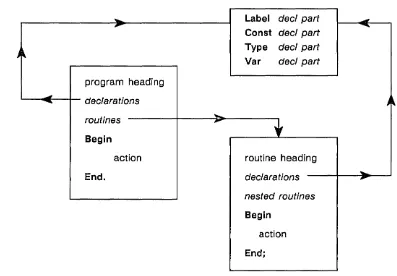
A DOMAIN Pascal program takes the format shown in Figure 2-1.
""'"
Label decl part...,
-
Const decl part--~~ Type decl part
Var decl part
program heading
-
declarations )~--routines
-
~•
Begin
action routine heading
End. declarations
"'"'
-nested routinesBegin
action
[image:27.617.103.500.132.408.2]End;
Figure 2-1. Format of Main Program in DOMAIN Pascal
Note that routines are themselves declarations.
PROGRAM labeled; {program heading}
{start of the declaration part of the main program. }
{These declarations will be global to the entire program.}
LABEL {LABEL declaration part}
finish;
CONST {CONST declaration part}
axiom 'Clarity is wonderful!';
TYPE {TYPE declaration part}
flavors (mint, lime, orange, beige);
VAR {VAR declaration part}
x, y, z : integer; ice_cream: flavors;
{End of the declaration part of the main program.}
{start of the roots procedure.}
Procedure roots; {routine heading}
{start of the declaration part of roots.} {These declarations will be local to roots.}
VAR {VAR declaration part}
q : real;
{End of the declaration part of roots.}
BEGIN {start of the action part of roots.}
write('Enter a number -- '); readln(q);
writeln('The square root of ' ,q:-l, ' is ' ,sqrt(q»;
END; {End of the action part of roots.}
{End of the roots procedure.}
BEGIN {start of the action part of the main program.}
writeln(axiom);
x := 5; y:= 7; z:= x + 5;
if z > 100 then goto finish;
for ice_cream := mint to beige do writeln(ice_cream);
roots; finish:
END. {End of the action part of the main program.}
Figure 2-2. Labeled Main Program
The following subsections detail the parts of a program.
o
o
o
o
o
2.2.1
Program Heading
Your program must contain a program heading. The program heading has the following format:
In DOMAIN Pascal, as in standard Pascal, you must supply a name for the program. Name must be an identifier. This identifier has no meaning within the program, but is used by the binder, the librarian, and the loader. (See the DOMAIN Binder and Librarian Utility manual for details on these utilities.)
In standard Pascal you can supply an optional file_list to the program heading. The file_list specifies the external files (including standard input and output) that you are going to access from the program. How-ever, unlike standard Pascal, the file_'ist in a DOMAIN Pascal program has no effect on program execu-tion; the compiler ignores it. (For details on I/O, see Chapter 8.)
COde_section_name and data_section_name are optional elements of the program heading. Use them to specify the names of the sections in which you want the compiler to store your code and data. A section is a named contiguous area of memory in which all entities share the same attributes. (See the DOMAIN Binder and Librarian Reference for details on sections and attributes.) By default, DOMAIN Pascal
as-signs all the code in your program to the PROCEDURE$ section and all the data in your program to the DATA$ section. To assign your code and data to nondefault sections, specify a code_section_name and a
data_section_name.
NOTE: In addition to nondefault code and data section names for the entire program, you can also specify a nondefault section name for a procedure, a function, or a group of variables. See Chapter 5 for an explanation of how to assign section names to procedures and functions, and see Chapter 3 to learn how to assign section names to groups of variables.
Let's now consider some sample program headings. Despite the options available, most DOMAIN Pascal program headings can look as simple as the following:
Program trapezoids;
Those of you desiring to write standard Pascal programs will also probably want to supply a file _list as in the next example:
Program trapezoids (input, output, datafile);
Finally, those of you wanting to capitalize on certain runtime features may wish to define your own section names. For example, if you want the compiler to store the code into section mycode and the data into section myda ta, you would issue the following program heading:
Program trapezoids, mycode, mydata;
2;2.2
Declarations
The declarations part of a program is optional. It can consist of zero or more label declaration parts, const declaration parts, type declaration parts, and var declaration parts. DOMAIN Pascal allows you to specify these parts in any order.
2.2.2.1 Label Declaration Part
You define labels in the label declaration part. A label has only one purpose -- to act as a target for a goto statement. In other words, the statement
GOTO 40;
The format for a label declaration part is
label
label1, ... labelN;
A label is either an identifier or an unsigned integer. If there are multiple labels, you must separate them with commas. Remember, though, to put a semicolon after the final label.
For example, the following is a sample label declaration:
LABEL
40, reprompt, finish, 9999;
See Chapter 4 for a description of the goto statement.
2.2.2.2 Canst Declaration Part
You define constants in the const declaration part. A constant is a synonym for a value that will not (and cannot) change during the execution of the program. The const declaration part takes the following syn-tax:
canst
identifier1 = value1 ;
identifierN = valueN;
An identifier is any valid DOMAIN Pascal identifier. A value must be a real, integer, string, char, or set constant expression. Value can also be the pointer expression nil.
For example, here is a sample const declaration part:
CONST
pi
=
3.14; cup = 8;key = 'Y';
blank " ;
words
=
'To be or not to be';v owe 1 s = [' a', ' e', ' i', ' 0 ' , ' u'] ;
ptr1 = nil;
{A real number.} {An integer.}
{A character.} {A character.} {A string.}
{A set.} {A pointer.}
The preceding sample involves simple expressions; however, you can also specify a more complex expres-sion for value. Such an expresexpres-sion can contain the following types of terms:
• A real number, an integer, a character, a string, a set, a Boolean, or nil
• A constant that has already been defined in the const declaration part (note that you cannot use a variable here)
o Any predefined DOMAIN Pascal function (e.g., chr, sqr, lshft, sizeof, but only if the argument to the function is a constant)
• A type transfer function
Blueprint of a Program 2-8
o
o
o
o
o
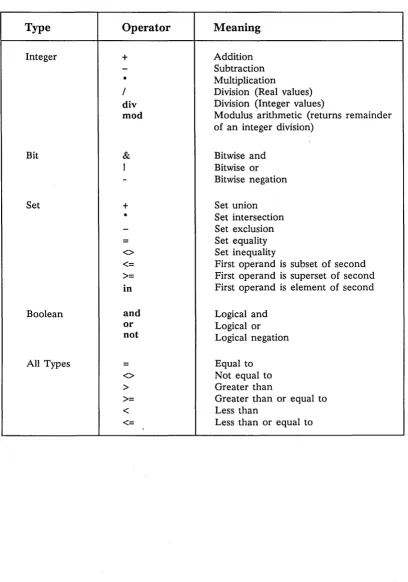
You can optionally separate these terms with any of the following operators:
Operator
+, -, *
Data Type of Operand Integer, real, or set
/ Real
mod, diy, I, &, - Integer
Chapter 4 describes these operators.
For example, the following const declaration part defines eight constants: CONST
x 10;
y
=
100;z
=
x + y;current_year leap_offset bell
pathname pathname_Ien
1994;
(current_year mod 4); chr(7);
'//et/go_home'; sizeof(pathname);
2.2.2.3 Type Declaration Part
Chapter 3 details the many predeclared data types DOMAIN Pascal supports. In addition to these Pascal-defined data types, you can create your own data types in the type declaration part. After creating your own data type, you can then declare variables (in the var declaration part) that have these data types. The format for a type part is as follows:
type
identifier1
=
data_type1 ;identifierN = data_typeN;
An identifier is any valid DOMAIN Pascal identifier. A data_type is any predeclared DOMAIN Pascal data type (like integer or real), any data type that you create, or the identifier of a data type that you cre-ated earlier in the type declaration part. For example, here is a sample type declaration part:
TYPE
long
=
integer32; {A predeclared DOMAIN Pascal student_name=
array[l .. 20] of long; {A user-defined colors=
(magenta, beige, mauve); {A user-defined hue=
set of colors; {A user-defined table=
array [magenta .. mauve] of real; {A user-defined2.2.2.4 Var Declaration Part
Declare variables in the var declaration part. A variable has two components -- a name and a data type. The format for the var declaration part is:
var
identifier list1 : data_type1;
identifier _listN : data_typeN;
An identifierJist consists of one or more identifiers separated by commas. Each identifier in the identifi-er_list has the data type of data_type. Data_type must be one of these:
• A predeclared DOMAIN Pascal data type
• A data type you declared in the type declaration part
• An anonymous data type (that is, a data type you declare for the variables in this identifier Jist
0
only) ~. j
For example, consider the following type declaration part and var declaration part: TYPE
names
=
array[1 .. 20] of char; colors=
(red, yellow, blue); VARcounter, x, y integer;
angles real;
char;
{integer is a predeclared DOMAIN Pascal data type.}
{real is a predeclared DOMAIN Pascal data type.}
{char is a predeclared DOMAIN Pascal data type.}
couch_colors evil
colors; boolean;
{colors is defined in the TYPE part. }
mystery_guest seniors
pet
{boolean is a predeclared DOMAIN Pascal data type.
names; {names is defined in the TYPE part. 67 .. 140; {An anonymous subrange data type.
(cat, dog); {An anonymous enumerated data type.
}
}
}
In the preceding example, note that counter, x I and yare three variables that have the same data
type (integer).
2.2.2.5 Define Declaration Part -- Extension
In addition to the const, type, var, and label declaration parts of standard Pascal, DOMAIN Pascal also supports an optional define declaration part, which is described in Chapter 7.
Blueprint of
a
Program 2-10o
o
o
o
o
2.2.3 Routines
A program can contain zero or more routines. There are two types of routines in DOMAIN Pascal: proce-dures and functions. A routine consists of three parts: a routine heading, an optional declaration part, and an action part.
2.2.3.1 Routine Heading
Routine headings take the following format:
attribute_list procedure name (parameter_list); routine_options;
or
attribute_list function name (parameter-1ist) data_type; routine_options
where:
o attribute_list is optional. Inside the attribute_list, you can specify nondefault section names for the routine's code and data. For a description, see Chapter 5.
• name is an identifier. You call the routine by this name.
• parameter _list is optional. It is here that you declare the names and data types of all the parame-ters that the routine expects from the caller. See Chapter 5 for details on the parameter_list.
• data_type is the data type of the value that the function returns. The difference between a proce-dure and a function is that the name of a procedure is simply a name, but the name of a function is itself a variable with its own data_type. You must assign a value to this variable at some point within the action part of the function. (It is an error if you don't.) You cannot assign a value to the name of a procedure. (It is an error if you do.)
o routine_options is an optional element of the routine heading. You can specify characteristics of the routine such as whether or not it can be called from another routine. Chapter 5 describes the
routine_options.
2.2.3.2 Declaration Part of a Routine
The optional declaration part of a routine follows the same rules (with one exception) as the optional dec-laration part under the program heading. The constants, data types, variables, and labels are local to the routine declaring them and to any routines nested within them. (See the "Global and Local Variables" and "Nested Routines" sections at the end of this chapter for details.)
The one difference between the declaration part of a routine and the declaration part of the main pro-gram is that the declaration part of, a routine cannot contain a define declaration part.
2.2.3.3 Nested Routines
2.2.3.4
Action Part of a Routine
The action part of a routine starts with the keyword begin and finishes with the keyword end. Between begin and end you supply one or more DOMAIN Pascal statements. (See Chapter 4 for a description of DOMAIN Pascal statements.) You must place a semicolon after the final end in a routine. For example, consider the following sample action part of a routine:
BEGIN
x := x
*
100; writeln(x);END;
2.2.4 Action Part of the Main Program
The action part of the main program is almost identical to the action part of a routine. Both start with be-gin, both finish with end, and both contain DOMAIN Pascal statements in between. The only difference is that you must place a period (rather than a semicolon) after the final end in the main program. For ex-ample, consider the following sample action part of the main program:
BEGIN
x := x
*
100; writeln(x);END.
2.3 Global and Local Variables
The declarations in the declaration part of the main program are global to the entire program. The decla-rations in the declaration part of a routine are local to that routine (assuming no nesting). For example, consider the following program. In it, variable g is global and variable I is local to procedure addlOO;
Program scope;
VAR
g : integer16;
Procedure addlOO;
VAR
I : integer16;
BEGIN
I .- g + 100;
END;
BEGIN
g := 10;
addlOO;
END.
Blueprint of a Program
{Variable I is accessible within this procedure only,} {while g is global and so is accessible anywhere. }
{Variable g is accessible because it is global. }
{Call the procedure. }
{Variable I is not accessible here because it is} {local to procedure addlOO. }
2-12
c
r~ \... ..
~.
\ i
o
o
o
o
What happens when you specify a local variable with the same name as a global variable? To answer this question, here are two more programs. In the program on the left (global_example), x is declared as a global variable. In the program on the right (local_example), x is declared twice. The first declaration specifies x as a global variable. The second declaration declares x as local to procedure convert.
Program global_example;
VAR {global declarations} x : integer16;
PROCEDURE convert;
BEGIN
x := -10;
writeln('In convert, x=',x:l); END;
BEGIN {main} x := +10; convert;
writeln('In main, x=' ,x:1); END.
Program local_example;
VAR {global declarations} x : integer16;
PROCEDURE convert;
VAR {local declarations} x : integer16;
BEGIN
x := -10;
writeln('In convert, x=' ,x:l); END;
BEGIN {main}
x := +10; convert;
writeln(In main, x=', x:l); END.
If you execute these programs, you get the following results:
Execution of global_example
In convert, X= -10 In main, X= -10
Execution of local_example
In convert, X= -10 In main, X= 10
In program local_example, within procedure convert, the declaration of the local variable x overrides the global declaration of x. Within convert, the fact that the local variable and the global variable have the same name (x) prevents procedure convert from accessing the global variable x at all.
Both programs are available on-line and are named global_example and local_example.
2.4 Nested Routines
A nested routine is a routine that is declared inside another routine. A nested routine can access any de-clared object (label, constant, type, or variable) in a routine outside it. The reverse is not true; that is, a routine cannot access an object in a routine nested inside it. Thus, the purpose of nesting routines is to create a hierarchy of access. You might view declared objects in the following way:
• Global to the entire program.
• . Local to a single routine.
• Local to the routine it is defined in and to all routines nested within it (i. e., neither truly local nor truly global). This is termed an "intermediate level" object.
Note that the main program is itself a routine, and that all routines are nested at least one level inside it. A
routine can call any routine nested one level inside it, but cannot explicitly call any routine nested two or more levels inside it. A routine can also call any routine at its level or outside it, though a routine cannot explicitly call the main program.
twob) can access the most variables. The least-nested procedure (the main program) can access the least number of variables.
Program nesting_example;
VAR
g : integer16;
procedure one; VAR
1 : integer16;
procedure twoa; VAR
n1 : integer16; BEGIN {twoa}
{can access g, I, and n1.} n1 := 1 + g + 500; END; {twoa}
procedure twob; VAR
n2 : integer16; BEGIN {twob}
{can access g, I, and n2.} n2 := 1 + g + 1000; END; {twob}
BEGIN {one}
{can access g and
I.}
1 := g + 10; twob;
END; {one}
BEGIN {main program} {can only access g.}
g := 1;
g := g
*
2;one;
END. {main program}
Figure 2-3. Nesting Example
Note that the main program can call procedure one, but cannot call procedure twoa or twob (since they are nested two levels inside it). Procedure one can call procedure twoa or twob. Procedure twob can call procedure twoa or one. In Pascal, you cannot make a forward reference to a routine unless you de-clare the routine with the forward option (described in Chapter 5). If you used forward in this example, procedure twoa could call twob or one.
Blueprint of a Program 2-14
,,- ---",
\" ... -'
,~
. \
I
-o
o
o
Cha~oier
3
This chapter explains DOMAIN Pascal data objects. Here, we explain how you declare variables using the predeclared DOMAIN Pascal data types, and how you can define your own data types. In addition, this chapter shows how DOMAIN Pascal represents data types internally.
3.1 Data Type Overview
The data types of DOMAIN Pascal can be sorted into three groups -- simple, structured, and pointer. The following list shows the supported simple data types:
• INTEGERS -- DOMAIN Pascal supports the three predeclared integer data types integer, inte-ger16, and integer32.
• REAL NUMBERS -- DOMAIN Pascal supports the three predeclared real number data types real, single, and double.
• BOOLEAN -- DOMAIN Pascal supports the predeclared data type boolean. • CHARACTER -- DOMAIN Pascal supports the predeclared char data type. • ENUMERATED -- DOMAIN Pascal supports enumerated data types.
• SUBRANGE -- DOMAIN Pascal supports a subrange of scalar data types. The scalar data types are integer, Boolean, character, and enumerated.
You can use the simple data types to build the following structured data types:
• SETS -- DOMAIN Pascal permits you to create a set of elements of a scalar data type. • RECORDS -- DOMAIN Pascal supports the record and packed record data types.
• FILES -- DOMAIN Pascal supports the file and text data types.
You can declare· a pointer data type that points to any of the previous data types, or you can declare one of these other pointer data types:
o U niv _ptr -- DOMAIN Pascal supports a predeclared universal pointer data type that is
compat-ible with any pointer type.
o PROCEDURE AND FUNCTION DATA TYPES -- DOMAIN Pascal supports a special data type
that points to procedures and functions.
The program shown in Figure 3-1 contains sample declarations of all the data types. This program is
avail-able on-line and is named sample_types.
PROGRAM sample_types;
TYPE
real_pointer
=
Areal;writers
=
(Amy, David, Phil);element = record
atomic_number INTEGER16;
atomic_weight SINGLE;
half_life DOUBLE;
end;
VAR
i1 INTEGER;
i2 INTEGER16;
i3 INTEGER32;
r1 REAL;
r2 SINGLE;
r3 DOUBLE;
consequences : BOOLEAN; onec : CHAR;
{This is a pointer type. }
{This is an enumerated type.}
{This is a record type. }
teenage_years: 13 .. 19; {teenage_years is a subrange variable.}
good_writers : writers; {good_writers is an enumerated variable.}
tw SET OF writers; {tw is a set variable.}
e element; {e is a record variable.}
cat_nums : array[l .. 5] of INTEGER16; {cat_nums is an array variable.}
c'
(
\.
a_sentence: STRING; {a_sentence is an array variable of 80 characters.}
C'
hamlets_soliloquy: TEXT; {hamlets_soliloquy is a text file variable.}
periodic_table: FILE OF element; {periodic_table is a file variable.}
r1_ptr real_pointer; {r1_ptr is a pointer variable.}
Any_Ptr UNIV_PTR; {Any-ptr is a universal pointer variable.}
pp APROCEDURE(IN x INTEGER);
BEGIN
writeln('Greetings.') ; END.
[image:38.615.87.521.205.642.2]{pp is a pointer to a procedure variable.}
Figure 3-1. Program Declaring All Available Data Types
3.2 Integers
This section explains how to declare variables as integers, how to initialize integer variables, and how to define integer constants. It also explains how DOMAIN Pascal represents integers internally.