PHP Oracle Web Development
Data Processing, Security, Caching, XML,
Web Services, and AJAX
A practical guide to combining the power, performance,
scalability, and reliability of Oracle Database with
the ease of use, short development time, and high
performance of PHP
Yuli Vasiliev
Data Processing, Security, Caching, XML, Web Services, and AJAX
Copyright © 2007 Packt Publishing
All rights reserved. No part of this book may be reproduced, stored in a retrieval system, or transmitted in any form or by any means, without the prior written permission of the publisher, except in the case of brief quotations embedded in critical articles or reviews.
Every effort has been made in the preparation of this book to ensure the accuracy of the information presented. However, the information contained in this book is sold without warranty, either express or implied. Neither the author, Packt Publishing, nor its dealers or distributors will be held liable for any damages caused or alleged to be caused directly or indirectly by this book.
Packt Publishing has endeavored to provide trademark information about all the companies and products mentioned in this book by the appropriate use of capitals. However, Packt Publishing cannot guarantee the accuracy of this information.
First published: August 2007
Production Reference: 1240707
Published by Packt Publishing Ltd. 32 Lincoln Road
Olton
Birmingham, B27 6PA, UK. ISBN 978-1-847193-63-6
www.packtpub.com
Credits
Author
Yuli Vasiliev
Reviewer
Anup Nanda
Acquisition Editor
Priyanka Baruah
Technical Editor
Akshara Aware
Code Testing
Bansari Barot
Editorial Manager
Dipali Chittar
Project Manager
Patricia Weir
Indexer
Bhushan Pangaonkar
Proofreader
Chris Smith
Production Coordinator
Shantanu Zagade
Cover Designer
About the Author
About the Reviewer
Table of Contents
Preface
1
Chapter 1: Getting Started with PHP and Oracle
5
Why PHP and Oracle? 6
Simplicity and Flexibility 6
Performance 7
Robustness 7
Exploring PHP and Oracle Alternatives 8
PHP and MySQL 8
JSF and Oracle 8
What You Need to Start 9
Pieces of Software Required 9
Oracle Database Considerations 10
Understanding the Oracle Database 10 Choosing Between Oracle Database Editions 11 Obtaining Oracle Database Software 12
PHP Considerations 13
Apache HTTP Server 13
Why PHP 5 14
Obtaining PHP 15
Making PHP and Oracle Work Together 15
Oracle Instant Client 15
Zend Core for Oracle 16
Using Oracle SQL*Plus 17
Why Use SQL*Plus in PHP/Oracle Development? 17 Connecting to a Database with SQL*Plus 18 Running Scripts in SQL*Plus 20
Putting It All Together 21
Creating Your First PHP/Oracle Application 23
Connecting to a Database 26
Fetching and Displaying Results 28
Summary 29
Chapter 2: PHP and Oracle Connection
31
Introducing the PHP OCI8 Extension 31
Why Use OCI8 Extension? 32
Processing SQL Statements with OCI8 32
Connecting to Oracle with OCI8 36
Defining a Connection String 37
OCI8 Functions for Connecting to Oracle 38
Parsing and Executing SQL Statements with OCI8 39
Preparing SQL Statements for Execution 39
Using Bind Variables 40
Executing SQL Statements 42
Handling Errors 42
Using the oci_error Function 42 Using the trigger_error Function 43
Using Exceptions 44
Fetching Results with OCI8 44
OCI8 Functions for Fetching 45
Fetching the Next Row 46
Fetching All the Rows 47
Alternatives to PHP OCI8 Extension 49
Using PEAR DB 49
Using ADOdb 51
Using PDO 52
Creating Your Own Library on Top of OCI8 53
Summary 54
Chapter 3: Data Processing
57
Implementing the Business Logic of a PHP/Oracle Application 58
When to Move the Data to the Processing 58
Advantages of Moving the Processing to the Data 59
Ways of Implementing Business Logic Inside the Database 60
Interaction between Components Implementing Business Logic 61
Using Complex SQL Statements 62
Employing Oracle SQL Functions in Queries 62
Oracle SQL Functions versus PHP Data Processing 62
Aggregate Functions 65
The GROUP BY Clause 66
Using Join Queries 66
The Key Benefits of Using Views 69 Hiding Data Complexity with Views 70 Using the WHERE Clause 71
Using Stored Subprograms 73
What are Stored Subprograms? 73
Advantages of Stored Subprograms 75
An Example of When to Use a Stored Subprogram 76
Creating Stored Subprograms 80
Calling Stored Subprograms from PHP 82
Using Triggers 83
Creating Triggers 84
Firing Triggers 85
Calling Stored Procedures from a Trigger 85
Summary 86
Chapter 4: Transactions
89
Overview of Transactions 89
What is a Transaction? 90
What are ACID Rules? 91
How Transactions Work in Oracle 92
Using Transactions in PHP/Oracle Applications 93
Structuring a PHP/Oracle Application to Control Transactions 96
Developing Transactional Code 99
Controlling Transactions from PHP 99
Moving Transactional Code to the Database 105
Using Triggers 105
Dealing with Statement-Level Rollbacks 106
Transaction Isolation Considerations 109
What OCI8 Connection Function to Choose 110
Concurrent Update Issues 113
Locking Issues 114
Lost Updates 115
Autonomous Transactions 118
Summary 121
Chapter 5: Object-Oriented Approach
123
Implementing PHP Classes to Interact with Oracle 123
Building Blocks of Applications 124
Creating a Custom PHP Class from Scratch 125 Testing the Newly Created Class 127 Taking Advantage of PHP 5's Object-Oriented Features 128
Functionality and Implementation 130
Distinguishing between Different Error Types 136 Are Exceptions Necessarily Errors? 138
Extending Existing Classes 138
Using Standard Classes 139
PEAR::Auth in Action 139
Securing Pages with PEAR::Auth 141
Customizing Standard Classes 144
Customizing PEAR::Auth 144 Building More Compact Client Code 146
Interactions between Objects 147
Composition 148
Aggregation 150
Event-Driven Communication 155 Using Oracle Object-Relational Features 157
Using Oracle Object Types 157
Implementing Business Logic with Methods of Oracle Objects 158
Using Oracle Objects to Simplify Application Creation 161
Summary 162
Chapter 6: Security
163
Securing PHP/Oracle Applications 164
Authenticating Users 164
Separating Security Management and Data 165
Using Two Database Schemas to Improve Security 166 Using Three Database Schemas to Improve Security 168 Employing PL/SQL Packages and Table Functions to Securely Access Database Data 169 Using the %ROWTYPE Attribute 173 Building a Custom Storage Container for the PEAR::Auth Class 175 Testing the Authentication System 176
Performing Authorization Based on the User Identity 178
Using Sessions to Hold Information about the Authenticated User 179 Holding a User's Information in Package Variables 179 Protecting Resources Based on Information about the Authenticated User 182
Hashing 186
Hashing Passwords 186
Modifying an Authentication System to Use Hashing 188
Setting Up Fine-Grained Access with Database Views 191
Implementing Column-Level Security with Views 192
Masking the Column Values Returned to the Application 195
Using the DECODE Function 195
Implementing Row-Level Security with Views 198
Using VPD to Implement Row-Level Security 201
Chapter 7: Caching
205
Caching Data with Oracle and PHP 205
Caching Queries on the Database Server 206
Processing SQL Statements 206 Using Bind Variables to Increase the Probability of Shared Pool Cache Hits 208
Using Oracle's Application Contexts for Caching 210
Creating a Global Application Context 212 Manipulating Data Held in a Global Context 214 Resetting Values in a Global Context 219
Caching Mechanisms Available in PHP 222
Choosing a Caching Strategy 223 Caching Function Calls with the PEAR::Cache_Lite Package 223
Updating Cached Data 227
Implementing Notification-Based Caching 229
Using Database Change Notification 231
Auditing Notification Messages 231 Building a PL/SQL Procedure Sending Notifications to the Web Server 232 Performing Configuration Steps Required for Change Notification 234 Building the Notification Handler 234 Creating a Query Registration for the Notification Handler 236
Quick Test 238
Implementing Notification-Based Caching with PEAR::Cache_Lite 238
Summary 241
Chapter 8: XML-Enabled Applications
243
Processing XML in PHP/Oracle Applications 243
Processing XML Data with PHP 244
Creating XML with the DOM PHP Extension 245 Querying a DOM Document with XPath 247 Transforming and Processing XML with XSLT 248
Performing XML Processing inside the Database 254
Using Oracle SQL/XML Generation Functions 254 Moving All the XML Processing into the Database 257 Storing XML Data in the Database 258 Performing XSLT Transformations inside the Database 260
Building PHP Applications on Oracle XML DB 261
Using Oracle Database for Storing, Modifying, and Retrieving XML Data 262
Database Storage Options for XML Data in Oracle Database 263 Using XMLType for Handling XML Data in the Database 265
Using XML Schemas 267
Retrieving XML Data 272
Accessing Relational Data Through XMLType Views 275
Using XMLType Views 276
Creating XML Schema-Based XMLType Views 277 Performing DML Operations on XML Schema-Based XMLType Views 280
Accessing Repository Resources with SQL 286 Taking Advantage of Standard Internet Protocols 287
Handling Transactions 289
Querying Data with Oracle XQuery 290
Using XQuery to Construct XML from Relational Data 291
Breaking up XML into Relational Data 293
Summary 294
Chapter 9: Web Services
295
Exposing a PHP/Oracle Application as a Web Service
Using PHP SOAP Extension 295
Communicating Using SOAP 296
What you Need to Build a SOAP Web Service 297
Building a SOAP Web Service on Top of a PHP/Oracle Application 299
Building the Business Logic of a Web Service Inside the Database 300
Creating an XML Schema to Validate Incoming Documents 301 Generating Unique IDs for Incoming Documents 304 Creating PL/SQL Subprograms Implementing the Business Logic of the Web Service 305
Building a PHP Handler Class 310
Using WSDL 312
Creating a SOAP Server with PHP's SOAP Extension 315
Building a SOAP Client to Test the SOAP Server 316
Adding Security 319
Implementing Authorization Logic Inside the Database 320
Creating a PHP Handler Class 323
Creating a WSDL Document 324
Creating a Client Script 326
Summary 327
Chapter 10: AJAX-Based Applications
329
Building AJAX-Based PHP/Oracle Applications 329
AJAX Interactions 330
Designing an AJAX/PHP/Oracle Monitoring Application 331
Building Blocks of an AJAX-Based Solution 333
Creating the Data Structures 333 Building the PHP Script that will Process AJAX Requests 334 Using the XMLHttpRequest JavaScript Object 335 Putting It All Together 340 Using Caching to Further Improve Responsiveness 342
Implementing Master/Detail Solutions with AJAX 342
Planning a Master/Detail Solution that uses AJAX 343
Building the Sample Application 344
Generating HTML with Oracle XQuery 348 Sending Post Requests with AJAX 350
Styling with CSS 352
Putting It All Together 353
Summary 354
Appendix A: Installing PHP and Oracle Software
355
Installing Oracle Database Software 355
Installing Oracle Database Enterprise/Standard Editions 356
Installing Oracle Database Express Edition (XE) 359
Installing Oracle Database XE on Windows 359 Installing Oracle Database XE on Linux 361
Installing Apache HTTP Server 361
Installing PHP 363
Installing PHP on Windows 363
Installing PHP on Unix-Like Systems 364
Testing PHP 365
Bridging the Gap Between Oracle and PHP 366
Oracle Instant Client 367
Enabling the OCI8 Extension in an Existing PHP Installation 368
Installing SQL*Plus Instant Client 368
Installing Zend Core for Oracle 369
Installing Zend Core for Oracle on Windows 369
Installing Zend Core for Oracle on Linux 370
Preface
Oracle Database is the premier commercial database available today, providing support for a wide range of features for professional developers. It's incomparable in terms of performance, reliability, and scalability. With the advent of Oracle Database XE, a lightweight edition of Oracle Database, you now have the option to use an Oracle database for free even in a final product.PHP is the most popular tool when it comes to building dynamic web applications. Unlike Oracle Database, PHP is an open-source product. The key reasons behind PHP's popularity are its ease of use, short development time, and high performance. Even if you are new to PHP, getting started is pretty simple. When used in a
complementary way, though, PHP and Oracle allow you to build high-performance, scalable, and reliable data-driven web applications with minimum effort.
PHP Oracle Web Development: Data processing, Security, Caching, XML, Web Services, and AJAX is a 100% practical book crammed full of easy-to-follow examples. The book provides all the tools a PHP/Oracle developer needs to take advantage of the winning combination. It addresses the needs of a wide spectrum of
PHP/Oracle developers, placing the emphasis on the most up-to-date topics, such as new PHP and Oracle Database features, stored procedure programming, handling transactions, security, caching, web services, and AJAX.
What This Book Covers
Chapter 1 gives an overview of the PHP and Oracle technologies, explaining why you might want to use PHP in conjunction with Oracle.
PHP/Oracle application into the database by using sophisticated SQL queries, stored PL/SQL subprograms, and database triggers.
Chapter 4 discusses the various mechanisms that can be used to perform transactions with PHP and Oracle.
Chapter 5 examines the object-oriented approach to developing PHP/Oracle
applications, as an efficient means to reduce the development time and complexity, and increase the maintainability and flexibility of your applications.
Chapter 6 looks at how to effectively use the security features of both PHP and Oracle together, examining the fundamental aspects of building a secure PHP/Oracle application.
Chapter 7 discusses how to effectively use caching mechanisms available in PHP and Oracle and provides several examples of caching in action.
Chapter 8 explains how to effectively use XML techniques and technologies available in PHP and Oracle when building XML-enabled PHP/Oracle applications.
Chapter 9 shows how to build a SOAP web service exposing the functionality of a PHP/Oracle application, using the PHP SOAP extension and Oracle XML technologies.
Chapter 10 explains how AJAX and some other client-side (browser-side) JavaScript technologies can be used along with the Oracle Database technologies as well as PHP features to improve the responsiveness of PHP/Oracle applications.
Appendix A discusses how to install and configure the PHP and Oracle software components required to follow the book's examples.
Who is This Book For?
Although the book covers only the most popular and up-to-date topic areas on the use of PHP in conjunction with Oracle, the author does not make any assumption about the skill level of the reader. Packed with information in an easy-to-read format, the book is ideal for any PHP developer who deals with Oracle.
Conventions
There are three styles for code. Code words in text are shown as follows: "We can include other contexts through the use of the include directive."
A block of code will be set as follows:
<?php
//File: dbtime.php
$dbHost = "localhost"; $dbHostPort="1521"; $dbServiceName = "orcl";
When we wish to draw your attention to a particular part of a code block, the relevant lines or items will be made bold:
$stmt = oci_parse($conn, $query); $deptno = '60';
oci_bind_by_name($stmt, ':deptid', $deptno);
oci_define_by_name($stmt, "EMPLOYEE_ID", $empno);
Any command-line input and output is written as follows:
# cp /usr/src/asterisk-addons/configs/cdr_mysql.conf.sample /etc/asterisk/cdr_mysql.conf
New terms and important words are introduced in a bold-type font. Words that you see on the screen, in menus or dialog boxes for example, appear in our text like this: "clicking the Next button moves you to the next screen".
Warnings or important notes appear in a box like this.
Tips and tricks appear like this.
Reader Feedback
Feedback from our readers is always welcome. Let us know what you think about this book, what you liked or may have disliked. Reader feedback is important for us to develop titles that you really get the most out of.
note in the SUGGEST A TITLE form on www.packtpub.com or email [email protected].
If there is a topic that you have expertise in and you are interested in either writing or contributing to a book, see our author guide on www.packtpub.com/authors.
Customer Support
Now that you are the proud owner of a Packt book, we have a number of things to help you to get the most from your purchase.
Downloading the Example Code for the Book
Visit http://www.packtpub.com/support, and select this book from the list of titles to download any example code or extra resources for this book. The files available for download will then be displayed.The downloadable files contain instructions on how to use them.
Errata
Although we have taken every care to ensure the accuracy of our contents, mistakes do happen. If you find a mistake in one of our books—maybe a mistake in text or code—we would be grateful if you would report this to us. By doing this you can save other readers from frustration, and help to improve subsequent versions of this book. If you find any errata, report them by visiting http://www.packtpub. com/support, selecting your book, clicking on the Submit Errata link, and entering the details of your errata. Once your errata are verified, your submission will be accepted and the errata added to the list of existing errata. The existing errata can be viewed by selecting your title from http://www.packtpub.com/support.
Questions
Getting Started with PHP
and Oracle
There are two kinds of database-driven applications. Ones that use databases just to store data, performing all the operations on it on the client side; and the others that use databases not only to store data, but also to process it, thus moving data processing to the data. While building the key business logic of a database-driven application inside the database is always a good idea, you should bear in mind that not all the databases available today allow you to put this into practice. However, the Oracle database offers record-breaking performance, scalability, and reliability. The partnership formed by Oracle and PHP, an open-source scripting language, is an excellent solution for building high-performance, scalable, and reliable data-driven web applications.This chapter contains technical information that will help you to quickly start developing PHP applications on top of Oracle. It begins with a concise discussion of why you might want to use PHP in conjunction with Oracle, followed by the PHP and Oracle alternatives. Having learned what advantages the PHP/Oracle combination has over its competitors, you might want to see its strengths in action. If you don't have PHP and Oracle database software installed, you can read the What You Need to Start section in this chapter. This section discusses the pieces of software required to run the examples provided in this book. You could also read Appendix A Installing PHP and Oracle Software, which provides a quick-and-dirty guide to installing and configuring these software components to work together in your system.
will not be interested in reading this quick-start chapter. If so, you can move to Chapter 2, which discusses how to use PHP's OCI8 extension, providing a common way to interact with Oracle database from PHP.
Why PHP and Oracle?
With Oracle as the back-end database, you can develop and deploy data-driven PHP applications with a powerful, proven, and industry-leading infrastructure, while still taking advantage of PHP's ease of use, short development time, and high performance.
Simplicity and Flexibility
One of the key reasons behind PHP's popularity is its simplicity. So, you don't have to be a PHP guru to start building PHP applications on Oracle. All you need to learn are a few APIs, which allow you to interact with the database and handle the received data. The example discussed later in this chapter will show you how to build a simple PHP/Oracle application by using a few OCI8 functions.
PHP's Object-Oriented features, available since PHP 3 and significantly improved in PHP 5, help you create complex applications easily and quickly. Once a class has been written and debugged, you can reuse it in a number of ways. This allows you to reuse well-designed pieces of object-oriented code over and over, reducing or eliminating redundant code in your applications. For a detailed discussion of how to combine the power of object-oriented PHP and Oracle, refer to Chapter 5
Object-Oriented Approach.
From a PHP developer's perspective, developing PHP/Oracle applications is much easier than developing, PHP/MySQL applications. This is because, in the case of Oracle database, you may implement key business logic of the application on the database side. This not only reduces the amount of PHP code, but also improves the performance and scalability of the entire application.
Performance
Although you can process your application data on the client side in the case of Oracle database, there are many advantages of processing data inside the database. From a performance standpoint, moving processing to the data allows you to:
Reduce the communication overhead between the web server and the database
Conserve the web server resources
Take advantage of optimizations and indexing techniques provided by the Oracle database
By using triggers and stored procedures, you can develop an application whose business logic resides entirely inside the database. Moving data processing to the database tier is particularly useful if your application is database intensive. This is because your application doesn't need to transfer a large amount of data between tiers while processing data inside the database; instead, it sends only the final product across the wire.
Robustness
Oracle gets high marks when it comes to performance, reliability, and scalability. Building and deploying your PHP applications on Oracle database enables you to combine the power and robustness of Oracle and the ease of use, short development time, and high performance of PHP. By using both of these technologies in a
complementary way, you will be able to:
Move key business logic of your application to the data Protect your application against data loss
Take advantage of Oracle security technologies Leverage the power of object-oriented technology Build transactional applications
Develop robust XML-enabled applications
All these capabilities make using PHP in conjunction with Oracle a natural choice when it comes to developing mission-critical, highly secure data-driven web applications.
• • •
Exploring PHP and Oracle Alternatives
Now that you have a rough idea of what the PHP/Oracle combination has to offer, it is worth taking a moment to familiarize yourself with some other popular combinations that can be used as alternatives to PHP and Oracle. Exploring such alternatives, including their advantages and disadvantages, can help you understand better whether PHP and Oracle best suit your needs or there is another combination that suits your needs better.Although PHP supports all the major relational databases, including commercial ones such as IBM's DB2 and Microsoft SQL Server, MySQL, an open-source database, is still a popular choice among PHP developers. The major reason behind MySQL's popularity is that it is completely free under the GPL license.
Of those based on Oracle, JSF and Oracle is probably one of the most powerful combinations available. To make JSF/Oracle application development easier, Oracle offers ADF Faces, a fully compliant JSF component library including over 100 JSF components.
PHP and MySQL
MySQL is extremely popular among the open-source community that uses PHP. There are several reasons behind MySQL's popularity among PHP developers. The most significant ones are as follows:
Completely free under the GPL license Low Total Cost of Ownership (TOC)
PHP natively supports MySQL—no additional modules are required All these factors make MySQL a natural choice for web hosts providing support for PHP. However, you should realize that the PHP/MySQL combination is a good solution for small data-driven web applications whereas professional-quality applications require much more.
JSF and Oracle
JavaServer Faces technology is a new server-side user interface (UI) component framework that is quickly becoming the standard web-application framework for J2EE applications. The biggest advantage of JavaServer Faces technology is that it enables web developers to apply the Model-View-Controller (MVC) principle, thus achieving a clean separation between the model and presentation layers of a web application. The entire user interaction with the application is handled by a front-end Faces servlet.
The only disadvantage the JSF and Oracle combination has compared to PHP and Oracle is that JavaServer Faces is a bit more difficult to learn than PHP.
What You Need to Start
Before you can proceed to PHP/Oracle development, you need to have PHP and Oracle database installed and working properly in your system. Moreover, to work with examples provided in this book, you will need an SQL command-line tool, such as SQL*Plus, allowing you to enter and execute SQL statements and PL/SQL code to manipulate database data, manage database objects, and perform database administration tasks.
This section briefly discusses all these pieces of software individually as well as how they fit into the big picture. For a discussion of how to install all the above software pieces and make them work together, see Appendix A Installing PHP and Oracle Software.
Pieces of Software Required
On jumping into a discussion of the software required for PHP/Oracle development, the first question you might ask is: "Which software components do I need to install in my system to be able to start developing PHP/Oracle applications?" Well, the list of required software components includes the following items:
Oracle Database Server software An Oracle database
Oracle Client libraries
A web server with activated support for PHP
An SQL command-line tool to interact with the database (or a GUI tool) While the above list just tells you what software components you need to install, the following list outlines general steps to take to install them in your system:
Install Oracle Database Server software. Make sure to create a database during installation.
Install a web server. Note that, in most production environments, the web server and Oracle database server reside on different machines located within the same network. But for simplicity, you might have both the web server and Oracle database server installed on the same machine.
Install PHP and configure the web server to use it. •
• • • •
• •
server and Oracle database server reside on the same machine. Configure the PHP installation to work with Oracle.
The above three steps are unnecessary when employing Zend Core for Oracle—a tool that allows you to install, deploy, and configure PHP to work with Oracle as quickly as possible. For a detailed discussion of Zend Core for Oracle, see the Installing Zend Core for Oracle section in Appendix A.
Install an SQL command-line tool to perform database administration tasks and manipulate database objects. Note that you don't need to worry about this if you are going to connect to the database from the same machine on which the Oracle database server has been installed. In this case, Oracle SQL*Plus—standard Oracle SQL command-line tool—is installed by default.
As a graphical alternative to Oracle SQL*Plus, you might use Oracle SQL Developer, a new, free GUI tool that can be used not only to perform database administration tasks and manipulate database objects, but also to edit and debug PL/SQL code. You can download Oracle SQL Developer from Oracle Technology Network (OTN) at: http://www. oracle.com/technology/software/products/sql. For more information, see the Oracle SQL Developer home page on OTN at: http://www.oracle.com/technology/products/database/ sql_developer/index.html.
Before proceeding to the installation of the above products, it is recommended that you read through the rest of this section to get an overview of the software components mentioned above. Then, you can proceed to Appendix A Installing PHP and Oracle Software, which provides a quick-and-dirty guide for each step presented in the above list.
Oracle Database Considerations
This section provides a brief overview of some of the issues related to the Oracle Database, which you need to be familiar with before installing Oracle Database software in your system.
Understanding the Oracle Database
Looking through the list of the software components that need to be installed in your system, you might notice that it distinguishes between Oracle Database Server software and an Oracle database. If you are new to Oracle, this may sound confusing to you. This needs a little explanation.
•
According to the Oracle terminology, an Oracle database is simply a collection of user and control data stored on a disk and is treated as a unit. It is obvious that a database itself is useless—you need software to operate it.
An Oracle database server consists of an Oracle database and an Oracle instance. While an Oracle database represents a collection of files that hold the database data and metadata, an Oracle instance represents the combination of the background processes operating on a database and shared memory used by those processes.
During the installation of the Oracle Database software, you have the option of creating a database or installing the software. It means that you can either install the Oracle software components designed to operate on a database and create a database itself or install only the Oracle software components. You might want to choose the later if, for example, you already have a database created and you want to use it with the newly installed software.
Choosing Between Oracle Database Editions
At the time of writing this book, the latest production release of Oracle's database was Oracle Database 10g Release 2, which is available in several editions
outlined below:
Oracle Database 10g Express Edition—a starter database for DBAs and developers. Being completely free of charge, this no-frills edition of Oracle Database supports up to 4 GB of user data and executes on one processor only. Built on the same core code as Oracle Database 10g Release 2, Express Edition provides the same set of integrated programming interfaces available in the other editions of Oracle Database 10g and can be easily upgraded to Standard or Enterprise Edition.
Oracle Database 10g Standard Edition One—a full-featured Oracle database that is ideal for small- to-medium-sized business environments. Standard Edition One provides the proven performance, ease of use, reliability and security of Oracle Database at a low cost. It can only be licensed on servers supporting up to two CPUs.
Oracle Database 10g Standard Edition—an ideal choice for medium-sized business environments. Unlike Standard Edition One, Standard Edition supports Real Application Clusters, an Oracle technology that enables the clustering of the Oracle Database, comprising several Oracle instances running on multiple clustered computers so that they operate as a single system. Standard Edition can be licensed on single or clustered servers with up to four processors.
•
•
operate on large amounts of information. Enterprise Edition contains all of the components of the Oracle Database, offering enterprise-class performance as well as reliable and secure data management for mission-critical applications.
For more information on the Oracle Database product family, see Oracle white papers and Oracle documentation available on the OTN web site at: http://www.oracle.com/technology.
You can choose the edition of Oracle Database that best suits your needs and budget. As for the examples provided in this book, they should work with any of the above editions, including Oracle Database Express Edition. Unless otherwise noted, all examples provided in this book will work with Oracle Database 10g Release 2, or higher, irrespective of its edition.
Obtaining Oracle Database Software
Since most of the Oracle products are available on a commercial basis, you may be asking yourself: "Is there any way to try Oracle software for free in order to determine if it suits my needs or not?" The Oracle Software Downloads page on the Oracle website gives us the following information: All software downloads are free, and each comes with a development license that allows you to use full versions of the products only while developing and prototyping your applications. You can buy Oracle products with full-use licenses at any time from the online Oracle Store or from your Oracle sales representative.
What this means in practice is that you can download for free any piece of Oracle software today, for example, Oracle Database Enterprise Edition, play with it while developing and prototyping your applications, and then pay for that piece of software only if you decide to use it in your final product. If you are not still satisfied with it and would like to keep using an Oracle database for free even in a final product, consider Oracle Database Express Edition—a lightweight Oracle database that is free to develop, deploy, and distribute.
All Oracle Database 10g software is available for download from Oracle Technology Network (OTN). For Oracle Database 10g Enterprise/Standard Editions, you start by visiting the following OTN page:
http://www.oracle.com/technology/software/products/database/ oracle10g/index.html
Oracle Database software is easy to install regardless of which edition of the database you choose. The Installing Oracle Database Software section in Appendix A provides the basic steps to install Oracle Database 10g on both Windows and UNIX systems. For detailed information on how to install Oracle Database software, see Oracle documentation: the Oracle Database Installation Guide for your operating system platform. Oracle documentation is available from the documentation section of the OTN website at:
http://www.oracle.com/technology/documentation/index.html
Besides the detailed installation steps specific to your operating system, the Oracle Database Installation Guide provides information on the issues to consider before installing the software and discusses platform-specific post-installation tasks that must be performed before you start using the database. It is highly recommended that you familiarize yourself with this information before installing Oracle Database software.
PHP Considerations
If you have already got your feet wet with PHP, you probably know that PHP is a server-side scripting language, which means that PHP code is executed on a web server. Therefore, before you install PHP, you must have a web server installed and working in your system.
Apache HTTP Server
Although PHP has support for most of the web servers worth mentioning, including Microsoft Internet Information Server, Personal Web Server, Netscape, and iPlanet servers, and many others, Apache/PHP remains the most popular combination among developers. Oracle itself incorporates open-source Apache technology in some of its products. For example, Oracle HTTP Server 10g, the web server
component of Oracle database, is based on the proven technology of both Apache 1.3 and Apache 2.0.
The Apache HTTP server is distributed under the Apache License, a free software/ open-source license authored by The Apache Software Foundation (ASF). The current version of the Apache License can be found on the licenses page of the Apache website at:
http://www.apache.org/licenses/
which in turn contains a link to the Compiling and Installing document.
Oracle recommends that you install a web server on another machine but on the same network as the database server. However, for simplicity, you can install both an Oracle database server and a web server, which will communicate with that database server, on the same machine.
For instructions on how to install Apache in your system, see the Installing Apache HTTP Server section in Appendix A.
Why PHP 5
Although PHP 4 is still very popular, the examples provided throughout this book assume that you will use PHP 5. We decided on PHP 5 because it offers a lot of new features and improvements that are not available in its predecessors.
One of the significant improvements in PHP 5 is the new object model, which allows you to leverage the power and flexibility of object-oriented programming in a number of useful ways. In particular, you can take advantage of interfaces, abstract classes, private/public/protected access modifiers, static members and methods, exception handling, and other features that are usually found in other object-oriented languages, such as Java, but were not available in prior releases of PHP.
Chapter 5 Object-Oriented Approach explains in detail how all these new object features of PHP 5 can be used in PHP/Oracle development.
Another significant improvement in PHP 5 is its renewed XML support; SAX, DOM, and XSLT extensions are now based on the single library, namely libxml2, thus allowing for better interoperability between the XML extensions.
Chapter 8 XML-enabled Applications discusses how to build and deploy robust XML-enabled PHP applications on Oracle Database.
While PHP 4 lacked native SOAP support, PHP 5 introduces the SOAP extension. Written in C, this built-in extension can serve as a good alternative to the
PEAR::SOAP package.
Obtaining PHP
PHP is licensed under the PHP License, a BSD-style license. For more information, visit the License Information page of the php.net website at:
http://www.php.net/license/
The current recommended releases of PHP are available for download from the downloads page of the php.net site at:
http://www.php.net/downloads.php
From this page, download the latest stable release of PHP 5 and then follow the installation steps—provided in the Installing PHP section in Appendix A. For further assistance along the way, you may consult the Installation and Configuration manual available on the php.net website at:
http://www.php.net/manual/install.php
Alternatively, you can read the install.txt file that is shipped with PHP.
Making PHP and Oracle Work Together
As you will learn in Chapter 2 PHP and Oracle Connection, there are several ways in which PHP can interact with Oracle. However, it is important to realize that most of these ways are based on using APIs provided by the PHP OCI8 extension, which is not enabled by default. To enable it in your existing PHP installation, you have to perform the following general steps:
Install the Oracle client libraries needed by the PHP OCI8 extension. On UNIX-like systems, recompile PHP to support the OCI8 extension. On Windows, uncomment the OCI8 extension line in php.ini.
Restart the web server.
As you can see from the above, you have to install the Oracle client libraries before you can enable the OCI8 extension in your existing PHP installation.
Oracle Instant Client
Consider Oracle Instant Client, a package containing the Oracle client libraries required to run OCI, OCCI, and JDBC-OCI applications. Note that Oracle Instant Client comes with a free license for both development and production environments.
If you have both the database and web server installed on the same computer then you already have all the required Oracle components—no Instant Client is required. However, in this case you still have to explicitly enable the OCI8 extension in your PHP installation.
You can download a copy of Oracle Instant Client specific to your platform from the Instant Client web page on OTN at:
http://www.oracle.com/technology/tech/oci/instantclient/ instantclient.html
Looking through this page, you may notice that there are in fact several Instant Client Packages available for download. You should choose the Basic Instant Client Package. It includes all the files required to run OCI, OCCI, and JDBC-OCI applications.
For a detailed instruction on how to install Oracle Instant Client and then enable the OCI8 extension, see the Enabling the OCI8 Extension in an Existing PHP Installation
section in Appendix A.
Zend Core for Oracle
As you learned in the previous sections, making PHP and Oracle software work together is a process involving many tedious tasks. You have to find, download, install, deploy, and configure a number of software pieces to get the job done. You might significantly speed up and simplify the whole process by taking advantage of Zend Core for Oracle, a pre-built stack that delivers a rapid development and deployment foundation for Oracle-driven PHP applications. In particular, Zend Core for Oracle saves you the trouble of performing the following steps:
Installing PHP and configuring the web server to use it Installing Oracle Client libraries
Configuring the PHP installation to work with Oracle Moreover, Zend Core for Oracle provides the following features:
Updated OCI8 driver re-factored for reliability and performance GUI-based tool that makes it easier to change the PHP configuration Easy access to PHP, PEAR and Zend Core for Oracle documentation •
• •
The installation steps in the Installing Zend Core for Oracle section in Appendix A will help you install this tool in your system.
Using Oracle SQL*Plus
After an Oracle Database server and a web server with activated support for PHP, which has the OCI8 extension enabled, are installed and working correctly, you can proceed to developing PHP/Oracle applications. However, before moving on, you might want to install another piece of software in your system in order to make your development work easier.
Why Use SQL*Plus in PHP/Oracle Development?
While using the PHP OCI8 extension you can execute any valid SQL statement or PL/SQL block against an Oracle database from your PHP script, it is generally not a good idea to do so when you need to perform a database administration task or create a database object.
The fact is that these kinds of tasks are usually performed with the help of batch scripts executed against the database. However, executing batch scripts from PHP is a tricky task and so you might want to use a more appropriate tool for this purpose.
The simplest way to perform the above tasks is to use an SQL command-line tool that will allow you to execute SQL statements and PL/SQL blocks in a batch or individually, and display the results of each statement once it has been executed. Consider Oracle SQL*Plus—an interactive and batch query command-line tool that is installed by default with every Oracle Database installation. Most of the examples in this book assume that you will use SQL*Plus when it comes to performing database administration or creating database objects. Since SQL*Plus is installed by default when installing the Oracle Database software, you don't need to install it again if you are going to use a local database. Otherwise, you might take advantage of SQL*Plus Instant Client—a stand-alone SQL*Plus command-line tool that allows you to communicate with a remote database.
This section discusses how to use SQL*Plus to interact with an Oracle database. The
From now on, we won't distinguish between SQL*Plus and SQL*Plus Instant Client—references will be made to SQL*Plus.
Connecting to a Database with SQL*Plus
To connect to a database with SQL*Plus, you specify the database using an Oracle Net connection identifier. For example, you might use the following Easy Connect syntax to connect as hr/hr to the orcl database running on yourmachine:1521 within yourdomain:
sqlplus hr/hr@//yourmachine.yourdomain:1521/orcl
However, if you are connecting to a local database you might use a simpler syntax:
sqlplus hr/hr
HR/HR is a demonstration database schema that is installed by default when you choose the Basic Installation and Create Starter Database options during Oracle Database installation. Some examples in this book use the default tables from this database schema.
If your HR/HR database schema is locked, you will see the following error message: ERROR:
ORA-28000: the account is locked
To unlock the HR database account, first connect as SYSTEM database user:
sqlplus system/system_pswd@//yourmachine.yourdomain:1521/orcl
And then enter the following SQL statement at the SQL> prompt:
ALTER USER HR IDENTIFIED BY hr ACCOUNT UNLOCK;
Now, to connect as hr/hr, you don't have to open another SQL*Plus session. From an existing SQL*Plus session, enter a CONNECT command as follows:
CONNECT hr/hr@//yourmachine.yourdomain:1521/orcl;
Warning: the Easy Connect Naming feature can be used only in a TCP/IP environment.
Alternatively, you might use the Local Naming method to connect to a database. The local naming method uses a localized configuration tnsnames.ora file to store net service names and their connect descriptors. So, you first create a connect descriptor in the tnsnames.ora file and then you can refer to that descriptor by name.
Normally, the tnsnames.ora file can be found in the [ORACLE_HOME]\network\admin directory on the client machine. However, if you are connecting to a remote database by means of SQL*Plus Instant Client, you should take into account that neither SQL*Plus Instant Client nor Basic Instant Client comes with a tnsnames.ora file and so you will have to create it yourself. For example, if you have installed the Instant Client to the c:\instantclient_10_2 directory, create the c:\instantclient_10_ 2\network\admin\ directory and then create a plain-text tnsnames.ora file in that directory.
Next, set the ORACLE_HOME environment variable to c:\instantclient_10_2\. Finally, create a connect descriptor in the tnsnames.ora file. For example, you might create the following connect descriptor for the orcl database running on yourmachine:1521 within yourdomain:
ORCL10g =
(DESCRIPTION =
(ADDRESS = (PROTOCOL = TCP)(HOST = yourmachine.yourdomain) (PORT = 1521)) (CONNECT_DATA =
(SERVICE_NAME = orcl) )
)
Once you have saved this entry in the tnsnames.ora file, you can then connect to the specified database with SQL*Plus as follows:
sqlplus hr/hr@orcl10g
Running Scripts in SQL*Plus
As you saw in the previous subsection, executing an SQL statement in SQL*Plus is very simple. To do this, you simply enter the SQL statement at the SQL> prompt. For example, you might enter the following statement at the SQL> prompt to obtain the current date from the database:
SELECT SYSDATE FROM DUAL;
Once you press the Enter key, the above should produce a result that might look like the following:
SYSDATE ---20-MAR-06
However, note that entering statements at the SQL> prompt manually may be an acceptable solution when dealing with a single statement that you are not going to use frequently in the future. Otherwise, you might want to save the statement or statements in a script and then run this script when necessary.
To create a script in SQL*Plus, you can use your operating system's default text editor. To do this, you simply enter the EDIT command followed by the name of the script file you want to create or edit. For example, if you want to create a dbdate.sql script, you have to enter the following command at the SQL> prompt:
EDIT dbdate
As a result, the dbdate.sql file is opened in the editor so that you can insert the desired statement or statements into the script. For simplicity, you might insert into the dbdate.sql script the same SQL statement as in the above example:
SELECT SYSDATE FROM DUAL;
Once you have saved the dbdate.sql script with the editor, you can then run it by entering the START command followed by the name of the script as follows:
START dbdate
This should produce the same output as in the previous example.
Now, if you want to edit the dbdate.sql script without leaving SQL*Plus, you can do it with the help of the EDIT command, as shown below:
This should open the dbdate.sql file with the editor for editing. You can edit the script as needed and then save the changes and quit the editor. For example, you might replace the existing SQL statement in the dbdate.sql script with the following:
SELECT TO_CHAR(SYSDATE, ‘MM-DD-YYYY HH:MI:SS') FROM DUAL;
So, the next time you run the dbdate.sql script with the START command, it will produce output that looks like:
TO_CHAR(SYSDATE,'MM ---03-20-2006 04:50:07
Here, the script outputs the current date and time.
No doubt you have realized, the dbdate.sql script is a toy example. In a real-world situation, you might need to create a script containing more than one statement. As noted previously, using batch scripts can be very handy when you need to perform database administration tasks or create database objects.
Putting It All Together
Now that you have a rough idea of what each piece of software required for PHP/ Oracle development is used for, let's look at how all these components interact with each other to get the job done. Let's summarize what each piece does individually to better understand its role in the entire architecture.
The following table gives a summary description for each piece of software you need to have installed to get started.
Software component Functional description Oracle Database Server
software Provides concurrent access to the database data while still delivering high performance. Also prevents unauthorized access to the data and provides efficient mechanism for backup and recovery.
Oracle Database Provides physical and logical structures in which user and control data is stored. A database is mounted and opened by an instance (may be more than one instance in the case of using Real Application Clusters).
Apache HTTP Server Provides secure, efficient, and feature-rich web server services. Provides the ability to incorporate new functionality in the form of third-party modules.
PHP Provides a way to add dynamic content into HTML. Supports a
Software component Functional description
Oracle Instant Client Provides the Oracle client libraries that allow client software to interact with an Oracle Database server.
Zend Core for Oracle Contains all the client-side components required for PHP/ Oracle development. Specifically, it contains an Apache HTTP server, PHP, and Oracle client libraries. All the components are configured so that you can quickly start developing PHP/Oracle applications.
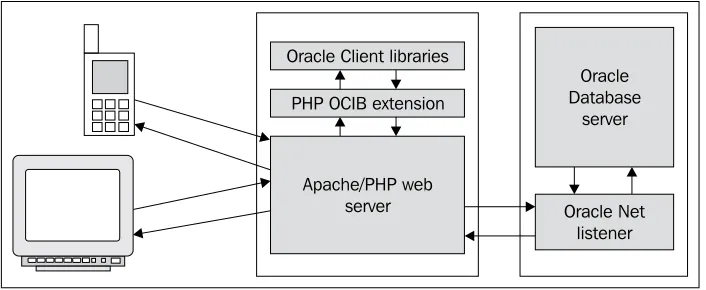
[image:37.612.131.484.291.436.2]While the above table gives a short functional description of each software component needed to start developing PHP/Oracle applications, the following figure illustrates how all these components fit together, giving you a high-level view of PHP/Oracle interactions.
Oracle Database
server Oracle Client libraries
PHP OCIB extension
Apache/PHP web
server Oracle Net
listener
Creating Your First PHP/Oracle
Application
Using the information provided in the What You Need to Start section earlier in this chapter, as well as the information provided in Appendix A Installing PHP and Oracle Software, you can easily install all the required pieces of software in your system. Once you are done with it, you are ready to create your first PHP/Oracle applications. The example provided in this section consists of one PHP script: dbtime.php. All this simple script does is display the current time obtained from the database. The result is a single string that should look like this:
The current time is 07:30:20
The following figure shows what this looks like in a web browser:
Despite the simplicity of the results produced, this PHP script is a good example of how a PHP application can interact with Oracle by means of PHP's OCI8 functions. To display a simple string representing the current time, dbtime.php performs the following sequence of steps:
Connects to the Oracle database
Executes a SELECT query against the database
Fetches the received result and then displays it to the user •
simple string representing the current time, you might want to look at the code. The dbtime.php script code is shown below:
<?php
//File: dbtime.php
$dbHost = "localhost"; $dbHostPort="1521"; $dbServiceName = "orcl"; $usr = "hr"; $pswd = "hr"; $dbConnStr = "(DESCRIPTION=(ADDRESS=(PROTOCOL=TCP) (HOST=".$dbHost.")(PORT=".$dbHostPort."))
(CONNECT_DATA=(SERVICE_NAME=".$dbServiceName.")))"; if(!$dbConn = oci_connect($usr,$pswd,$dbConnStr)) { $err = oci_error(); trigger_error(‘Could not establish a connection: ‘
. $err[‘message'], E_USER_ERROR); };
$strSQL = "SELECT TO_CHAR(SYSDATE, ‘HH:MI:SS') ctime FROM DUAL"; $stmt = oci_parse($dbConn,$strSQL); if (!oci_execute($stmt)) { $err = oci_error($stmt); trigger_error(‘Query failed: ‘ . $err[‘message'], E_USER_ERROR); };
oci_fetch($stmt); $rslt = oci_result($stmt, ‘CTIME'); print "<h3>The current time is ".$rslt."</h3>"; ?>
As you can see in the code, the connect descriptor contains location details for the database you want to connect to. In particular, it consists of the host name, the port on which the Oracle Net listener process is running, and the SID of the database. For further discussion, see the Connecting to a Database subsection later in this section.
This example assumes that you have HR/HR demonstration schema installed in your database. For the sake of this example, though, you could use any other database schema. For this, you simply set the $usr and $pswd variables to appropriate values.
Besides oci_connect, there are two other OCI8 functions that you can use to establish a connection to the database: oci_new_connect and oci_pconnect. For detailed discussion of the OCI8 connection functions see Chapter 4 Transactions.
Another important thing to note in the script is the use of the oci_error function. When used to obtain a connection error, the oci_error function is invoked without a parameter. Otherwise, you pass an appropriate connection identifier returned by the oci_connect function.
In this example, the trigger_error function triggers an error and then stops
execution because you pass predefined constant E_USER_ERROR as the third parameter.
The trigger_error function is covered in more detail in Chapter 2, section Using the trigger_error Function.
The query discussed in this example contains two standard Oracle SQL functions: SYSDATE, used here to obtain the current time from the operating system on which the database resides, and TO_CHAR, used here to convert a DATE value returned by SYSDATE to a string of characters.
Another thing to note here is the use of the column alias in the query. This will allow you to refer to the query result by its alias, in this example: ctime, later in the oci_result function. Otherwise, you would have to deal with a column name, which in this case is TO_CHAR(SYSDATE, ‘HH:MI:SS').
After the query string is defined, you use the oci_parse function that prepares the SQL statement for execution.
oci_parse doesn't look for errors in the SQL query. You have to execute the query to check if it is valid.
oci_execute returns a Boolean value: true on success and false on failure. Using the IF-THEN statement allows you to take appropriate steps in case of a failure. In this example, if oci_execute returns false, the script generates the error and stops execution.
the field's value from that row. As mentioned, in this particular case the query result consists of one row that contains one field.
Regardless of the way in which you specified a column name or a column alias name in the query, Oracle returns all field names in uppercase. So, you must specify all field names in uppercase when calling the oci_return function. Specifically, in this example you must use CTIME instead of ctime.
Connecting to a Database
No doubt you have realized that before your application can make use of the database data, it must first connect to the database. While the PHP OCI8 extension provides the oci_connect function for just this purpose, Oracle in fact allows you to configure connectivity information in several ways. This section discusses how to use the Local Naming and Easy Connect Naming Oracle methods when connecting to an Oracle database from PHP.
Using the Local Naming Method
By specifying localhost as the host name in the connect descriptor in the above example, you tell oci_connect that the database you are connecting to is local. In a real-world situation, however, you might need to establish a connection to a remote database. To do this, you can use either the IP address or network name of the host machine on which the Oracle Net listener is running. For example, if your Oracle database server resides on the computer whose network name is MyServer and IP address is 192.168.100.1, you might use either HOST = MyServer or HOST = 192.168.100.1 in the connect descriptor.
Using a connect descriptor is a common way of providing information required for establishing a connection to a remote database.
To make using connect descriptors easier, you might define them in the tnsnames. ora file, which is normally located in the ORACLE_HOME/network/admin directory on the client machine. Once you have a connect descriptor defined in the tnsnames.ora file, you can then refer to that descriptor by name. Doing so saves you the trouble of defining descriptor connections in your application code. For example, you might define the following connect descriptor in tnsnames.ora:
(ADDRESS = (PROTOCOL = TCP)(HOST = localhost)(PORT = 1521)) (CONNECT_DATA =
(SERVER = DEDICATED) (SERVICE_NAME = orcl) )
)
Once you have the above entry saved in the tnsnames.ora file, you can then pass the name that maps to the connect descriptor, namely, ORCL10gR2, as the third parameter to oci_connect, rather than passing the string representing the connect descriptor itself:
$dbDescName = "ORCLR10gR2";
$dbConn = oci_connect($usr,$pswd,$dbDescName);
It is important to note that you may not pass the third parameter to oci_connect at all if the database you are connecting to is local.
Using the Easy Connect Method
For TCP/IP environments, you might make use of Oracle Database 10g's Easy Connect Naming Method feature, which can eliminate the need for service name lookup in the tnsnames.ora file. We touched on this feature in the Using Oracle SQL*Plus section earlier in this chapter, when discussing some of the ways you can connect to a remote database with SQL*Plus. If you recall, the Easy Connect Naming method enables you to connect to an Oracle database server by simply providing the database user/password combination and the server computer's host name along with two optional parameters, namely, the service name of the database and the port on which the listener will accept connections. Note, however, that you cannot omit the service name when it comes to defining the third parameter of oci_connect:
$dbEasyConn = "//MyDbServer/orcl";
$dbConn = oci_connect($usr,$pswd,$dbEasyConn);
To specify an optional port, you use the following syntax:
$dbEasyConn = "//MyDbServer:1521/orcl";
It is important to realize that orcl in the above examples is not the name of a connect descriptor defined in the tnsnames.ora file, but the service name of the database.
enabling you to connect to a database server without any configuration.
Issuing an SQL Statement Against the
Database
In the example discussed earlier in this chapter, you used the oci_execute function to execute a SELECT statement against the database. It is important to note that oci_execute's use is not limited to QUERY operations—you can use this OCI8 function to execute any SQL or PL/SQL statements performing QUERY, DML, and DDL operations.
As mentioned, oci_execute returns a Boolean value: true on success and false on failure. In the case of a failure, you likely will want your script to perform certain actions in response. For example, you might use the trigger_error PHP function to either generate an error and stop execution or generate a warning and continue execution. Whether error_trigger stops script execution or not depends on what predefined error level constant you are passing to this function as the second parameter. For example, if you want the script to generate a warning message and continue execution, you must use the E_USER_WARNING predefined constant:
$err = oci_error();
trigger_error(‘Query failed: ‘ . $err[‘message'], E_USER_WARNING);
To terminate execution, you use the E_USER_ERROR constant.
Fetching and Displaying Results
If the oci_execute call returns true, you can then move on to fetching the results. Of course, this makes sense only when you are dealing with a QUERY operation—that is, you are issuing a SELECT statement.
There are several ways to fetch the result data using the PHP OCI8 extension. The example discussed earlier in this chapter demonstrates the use of oci_fetch in conjunction with oci_result:
oci_fetch($stmt);
$rslt = oci_result($stmt, ‘CTIME');
print "<h3>The current time is ".$rslt."</h3>";
It is important to note that with oci_fetch and oci_result you are not limited to using associative indices—you can use numeric indices as well. So, you might rewrite the above code as follows:
oci_fetch($stmt);
$rslt = oci_result($stmt, 1);
print "<h3>The current time is ".$rslt."</h3>";
While using oci_fetch assumes that you will then use oci_result to retrieve the fetched data from the internal result buffer, there are OCI8 fetch functions that fetch the next row from the result data directly into a PHP array, thus eliminating the need to use oci_result. One of these functions is oci_fetch_array. With this function, you can reduce the above three lines of code to the following two:
$rslt = oci_fetch_array($stmt, OCI_ASSOC);
print "<h3>The current time is ".$rslt[‘CTIME']."</h3>";
Or by using numeric indices:
$rslt = oci_fetch_array($stmt, OCI_NUM);
print "<h3>The current time is ".$rslt[0]."</h3>";
For further discussion on OCI8 fetch functions, see Chapter 2 PHP and Oracle Connection.
Summary
application has to deal with.
PHP and Oracle Connection
The sample in Chapter 1 represents a simple example of how the OCI8 functions can be used to interact with Oracle. However, besides OCI8, there are some other ways for Oracle and PHP to interact with each other. For example, you may choose from a number of open-source libraries such as PEAR DB and ADOdb, which provide a level of data abstraction. You might also create a set of your own PHP functions on top of the OCI8 extension to encapsulate its low-level functionality.However, it is important to realize that using another level of data abstraction can simplify the development process, but using direct database calls made through the OCI8 functions allows you to take full advantage of the Oracle database features and build faster and more reliable applications. That is why, in the examples throughout this book, the OCI8 extension is used as the primary way to communicate with an Oracle database.
This chapter covers the basics of using the PHP OCI8 extension to interact with an Oracle database from PHP. Covering them at this stage will ensure that you can go further and understand specific topics discussed in the subsequent chapters. It also briefly discusses some popular alternatives to the OCI8 extension available today.
Introducing the PHP OCI8 Extension
As a matter of fact, when it comes to working with Oracle, many PHP developers prefer the PHP OCI8 extension to any other tool enabling PHP and Oracle to interact with each other because OCI8 offers a lot of capabilities that the other tools lack.
then explains how SQL statements are processed with OCI8.
Why Use OCI8 Extension
One of the key differences between the OCI8 extension and the other popular tools such as PEAR DB, ADOdb, and PDO, which can also be used to access Oracle database from PHP, is that OCI8 was developed exclusively for interacting with Oracle database and hence provides a lot of options for PHP/Oracle developers. With the OCI8 extension, you can employ a connection cache when connecting to the database, bind PHP variables to Oracle placeholders, access and manipulate Oracle collections, handle transactions, and deal with LOBs, to name only a few possibilities. However, the key advantage of using the OCI8 extension is that it allows you to control all phases of SQL statement execution, thus allowing a very fine-grained control over script execution itself. The next subsection briefly outlines each step in processing an SQL statement by means of OCI8.
Processing SQL Statements with OCI8
From the example discussed in Chapter 1, you learned which steps are required when it comes to executing an SQL statement by means of the OCI8 extension. Nevertheless, there may be some circumstances that require some additional steps. This subsection outlines the general steps to be taken while processing an SQL statement with the help of OCI8 functions. However, functions can vary depending on the situation. The OCI8 extension offers many more functions for processing SQL statements than the ones mentioned in the following steps.
Another thing to note is that some steps involved in processing an SQL statement are not common to all types of SQL statements. For example, fetching the retrieved results makes sense only when dealing with a query (SELECT) statement, while taking care to explicitly commit or roll back the transaction makes sense only when performing a DML (INSERT, UPDATE, or DELETE) operation. However, it is important to note that there are also steps common to all SQL statements, regardless of the type of statement. For example, you must always perform the parsing and executing operations, whether you are dealing with a query or DML operation. Here are the general steps involved in processing a SELECT statement:
Step 1 (required): Prepare the SQL statement for execution by using the oci_parse function.