1712
Digital Forensic Static Acquisition Analysis For
Cloud Environments
Harris Simaremare, Reza Tanujiwa Putra, Rahmad Abdillah
Abstract: The application of digital forensic static acquisition on cloud environment was successfully built on Proxmox. It was used for acquisition and examine deleted digital evidence. The examination results yields that the digital evidence produce from the acquisition procedures was readable by the forensic software. Our results also show that the acquisition process runs only about 5 minutes which is much faster than other acquisition tools which was 39 minutes. Certainly, this result supported by automatic system can enhance the digital forensic performance.
Index Terms: Cloud Environment, Digital Forensic, Evidence, Forensic tools, Recovery, Static Acquisition, Virtualization. —————————— ——————————
1.
INTRODUCTION
The development of cloud technology plays an essential key in the innovations of various aspects of software and hardware. Hardware technology evolved into a virtualization technology so that many users from various small and medium enterprises switch to use this technology. Virtualization technology allows users to be able to customize hardware as needed. However, cloud technology service providers cannot guarantee that the operating system, applications and storage media are secure or maintained integrity [1]. Therefore, it is crucial to maintain integrity, such as monitoring of virtualization technology, especially on storage media [2]. One of the techniques for monitoring is evaluating files or files that are on storage media, whether they have been deleted or not. This technique can also be referred to as digital forensic. The tools commonly used in digital forensics such as EnCase and Access Data Forensic Toolkit (FTK) are not recommended for cloud computing technology [1]. Therefore, this study uses SNI 27037: 2014 as a framework for acquiring cloud computing technology. The use of SNI 27037: 2014 can be a solution to research problems based on recommendations from [3]. SNI 27037: 2014 was adopted from ISO 27037: 2012, which discusses specific guidelines on forensic digital investigation activities [4]. Static analysis has been widely used in digital forensic techniques, especially on virtualization, because the storage media is located on a particular server. The image file that is stored will be used as evidence if something happens. Several researchers [5][1][6][3] have investigated it partially forensic and forensic live offline. When the data acquisition process is directly feared damaged [6][7], the process of offline acquisition becomes an alternative solution [4]. Therefore, the offline acquisition is vital to maintain the integrity of the data. This research is about the implementation of acquisition techniques following SNI 27037: 2014 on server virtualization. We create an application that can load the operating system storage media based on a virtual server. The virtualization server that we use is Proxmox. The experimental results were successful in acquiring storage media when the target operating system was turned off. The data we have prepared is 75 files with 15 categories of files namely XLSX files, executable files, JPG files, GIF files, MKV files, MP3 files, MP4 files, TXT files, PDF files, PPT files, RAR files, ISO files, VSD files, DOC files and XML files. Then we delete the data permanently, and we try to restore it after the acquisition process has been done. The deleted data can also be returned. Data that has been returned matches the data that was deleted on the target operating system. The results of this study indicate the success of conducting the acquisition
process on the target operating system on server virtualization.
2 METHOD AND MATERIAL
2.1 SNI 27037:2014
SNI 27037: 2014 is the adoption of ISO 27037: 2014 with the concept of re-publishing. SNI 270037: 2014 has become the standard step in digital forensic work in Indonesia. The use of appropriate digital evidence collection methodologies can influence the strength of that evidence, whether it is acceptable or not in court. In addition to investigating the digital evidence, SNI is going to be also in general guidelines on how to collect non-digital evidence. Due to its potential for guiding investigating many cases such as a criminal case [4].
2.2 The Acquisition Process
The data acquisition process carried out for the current-target operating system is turned off since the data taken is non-volatile[8]. Following are the work steps of the acquisition process based on SNI 27037: 2014 by making adjustments to this study, namely static acquisition [4]:
1. Digital proof examination.
2. Execution of static acquisition procedures. 3. Implementation of the static acquisition.
4. Verify the acquisition results using the hash function.
3 RELATED WORKS
Proxmox. Also, the use of SNI 27037: 2014 standard as a methodology for the implementation of acquisition techniques. Whereas I. Riadi, R. Umar, and I. M. Nasrulloh used the National Institute of Standards and Technology (NIST) methodology as the basis for the implementation of digital forensic activities [14]. F. Albanna and I. Riadi used Guidelines for digital forensic examination inspectorate generals for research work steps [12]. Wahyudi, I. Riadi, and Y. Pray [11] used Virtualbox as a case study for their research. They use the Autopsy tool that can restore information that has been lost on a virtual machine disk [11]. However, it cannot restore lost information using a data destroyer tool. F. Albanna and I. Riadi used DC3DD and Autopsy as acquisition and analysis tools [12]. Whereas I. Riadi, R. Umar, and I. M. Nasrulloh [14], they used enhancements such as Tableau Forensic SATA / IDE Bridge to retrieve the system image from the SSD, then analyzed it using Autopsy. Based on research [12],[11],[14], the Autopsy and DC3DD tools can get more information on the SSD or on the VM Disk that has been removed. So, the idea of this research can be an innovation in digital forensic activities, especially using a framework or absolute standards. Because in some previous studies if there were intentionally deleted or unintentional files that could not be done at the level of the enterprise cloud service provider, namely Proxmox. Therefore, this study uses SNI 27037: 2014 as a guide for conducting digital forensic techniques and returning deleted data.
4 RESULT
4.1 Experiment
The initial step of this research is designing, building and implementing server virtualization with the Proxmox server operating system. Server virtualization will be built up into the physical server where the Linux Proxmox virtual environment operating system installed. Furthermore, the Proxmox server consists of two virtual machines. The two operating systems in the virtual machine are the Ubuntu Linux and the Microsoft Windows 10 operating system. Table 1 is a list of hardware and software specifications needed and used in building up server virtualization.
4.2 Experiments for Scenarios and Simulations
This study performs scenarios according to Table 2, and we prepare several files that will be used for digital forensic processes. The first scenario is done manually, which is permanently deleting files, then the acquisition process is done. The examination process is obtained from the acquisition which has been carried out. Before starting to carry out the acquisition process, we perform the hash process first. The hash process is the first step that must be done according to SNI guidelines called maintaining the integrity of digital evidence. The acquisition uses dc3dd tools, a command line-based tool.
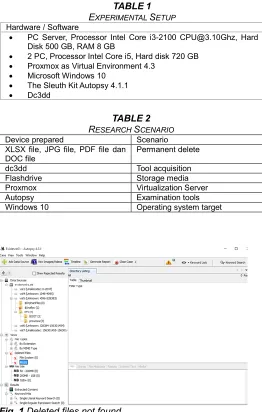
Fig. 1 Deleted files not found
Fig. 1 is the result of the deleted file examination using acquisition procedures. The overall results of the examination showed no data and deleted files found in Windows 10 and the Windows 10 partition. The result shows that in general, dc3dd tools cannot be used. Therefore we need the right acquisition system to be used in this Proxmox virtualization. Next, we build the command line based application that we installed on Proxmox. The general work process of the application that we built is as in Fig. 2.
TABLE1
EXPERIMENTAL SETUP Hardware / Software
PC Server, Processor Intel Core i3-2100 [email protected], Hard Disk 500 GB, RAM 8 GB
2 PC, Processor Intel Core i5, Hard disk 720 GB
Proxmox as Virtual Environment 4.3
Microsoft Windows 10
The Sleuth Kit Autopsy 4.1.1
Dc3dd
TABLE2
RESEARCH SCENARIO
Device prepared Scenario XLSX file, JPG file, PDF file dan
DOC file
Permanent delete
dc3dd Tool acquisition
Flashdrive Storage media
Proxmox Virtualization Server
Autopsy Examination tools
1714 Fig. 2 The process of acquisition was carried out
The application process that we built is based on shell script. The process begins with checking the operating system target, whether it is running or off. If the target condition of the operating system is off, then do a backup of the entire virtual disk. The backup results are formed in the VMA file format. The results of the file are converted in the form of RAW file format. The overall backup process can be seen in Fig. 3.
Fig.3 The Acquisition Process is ongoing
After the acquisition process is done, then the next step is to examine the RAW file. We use Autopsy tools to carry out the examination process.
Fig. 4 Data was successfully recovered
Fig. 4, shows that the RAW files which have been carried out in the previous acquisition process are readable on the Autopsy tools. This indicates that the application was successful when carrying out the acquisition process.
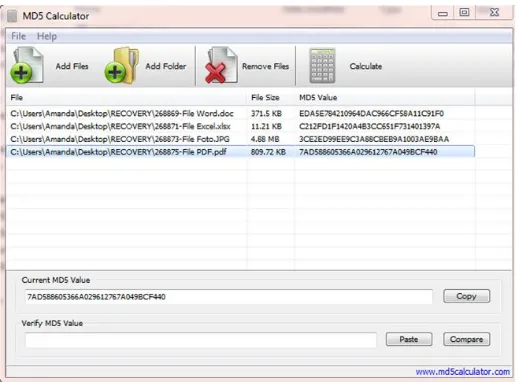
Fig. 5 Hash validation of files that were successfully recovered
Fig. 6 75 files are permanently deleted
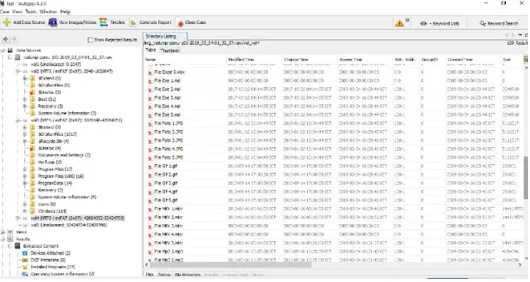
Then we do the examination process by using Autopsy tools like Fig. 7, for 75 files were found during the examination process.
Fig. 7 All 75 files can be found during the examination process
5 DISCUSSION
Result test shows that our application has successfully carried out the acquisition process in Proxmox and running well with standard acquisition procedures using dc3dd. Following the findings during our research.
1. Acquisition of Server Virtualization
The acquisition procedure is typically done by installing dc3dd into Proxmox and then performing the procedure for the acquisition of the entire contents of the hard drive contained in Proxmox. While the acquisition procedure using the system is done by uploading the system into Proxmox and only enough to choose the acquisition option and the choice of the operating system, the system will make acquisitions automatically.
2. Results of the Acquisition
The acquisition result shows that both reasonable acquisition procedures and acquisition procedures using the system were both successfully read by forensic software.
3. Structure of Files and Folders
Forensic software analysis shows that the standard acquisition procedures with dc3dd cannot read the desired Windows 10 partition. While the acquisition procedure with the system can read the entire contents of the structure of files and folders on
4. Rediscover deleted files
The standard acquisition procedure with dc3dd cannot recover the deleted file due to the structure of the Windows 10 partition file and folder cannot be found. If the partition cannot be found, it is not possible to find the deleted files. In the other hands, the acquisition process using the acquisition system found the deleted files.
5. Restore deleted files
Based on the findings of the deleted file, standard acquisition procedures with dc3dd cannot perform recovery. This is in line with the failure to find the deleted file. If the file is not found, the recovery process will automatically not be done. Whereas in the acquisition procedure with the acquisition system, the recovery process is successfully carried out and the deleted data can be recovered by the system. It is proven by the hash code of the files.
6. Duration of the Acquisition Process
The standard acquisition procedure using dc3dd takes 39 minutes to complete the acquisition process. Whereas if using an acquisition system only takes 5 minutes. The extent of this time difference shows that the acquisition procedure that is carried out using the system is far more optimal because it only takes a short time
6 CONCLUSION
The Acquisition System that was designed has been successfully used to carry out acquisition procedures on server virtualization and has successfully made acquisitions on virtual Windows 10 on Proxmox. Result shows that the digital evidence produced from the acquisition procedures using acquisition system, all the data, files, folders, deleted files could be read by forensic software. The system also have ability to restores deleted files. Based on the acquisition time, the acquisition process using dc3dd tool takes 39 minutes to complete all the steps. Whereas if using an acquisition system only takes 5 minutes. In term of acquisition time, the proposes acquisition system better than dc3dd tools. There are possibility the evidence stored in volatile data, especially in cloud computing technology. For the future studies, the system are expected to find the evidence in volatile data.
REFERENCES
[1] B. Hu, N. Li, Z. Liu, M. Li, and C. Liu, ―A Proactive Forensics Approach for Virtual Machines via Dynamic and Static Analysis,‖ in 2016 IEEE 18th International Conference on High Performance Computing and Communications; IEEE 14th International Conference on Smart City; IEEE 2nd International Conference on Data Science and Systems (HPCC/SmartCity/DSS), 2016, pp. 514–521.
[2] R. Di Pietro and F. Lombardi, ―Virtualization Technologies and Cloud Security: Advantages, Issues, and Perspectives,‖ vol. 11170, Springer International Publishing, 2018, pp. 166–185.
[3] S. Dija, T. R. Deepthi, C. Balan, and K. L. Thomas, ―Towards Retrieving Live Forensic Artifacts in Offline Forensics,‖ 2012, pp. 225–233.
[4] D. Sudyana, B. Sugiantoro, and A. Luthfi, ―Instrumen Evaluasi Framework Investigasi Forensika Digital Menggunakan SNI 27037:2014,‖ J. Inform. Sunan Kalijaga, vol. 1, no. 2, pp. 75–83, 2016.
1716
environment,‖ in 2018 41st International Convention on Information and Communication Technology, Electronics and Microelectronics (MIPRO), 2018, pp. 0850–0853.
[6] N. D. W. Cahyani, B. Martini, K.-K. R. Choo, and A. M. N. Al-Azhar, ―Forensic data acquisition from cloud-of-things devices: windows Smartphones as a case study,‖ Concurr. Comput. Pract. Exp., vol. 29, no. 14, p. e3855, Jul. 2017.
[7] M. Yu, Z. Qi, Q. Lin, X. Zhong, B. Li, and H. Guan, ―Vis: Virtualization enhanced live forensics acquisition for native system,‖ Digit. Investig., vol. 9, no. 1, pp. 22–33, Jun. 2012.
[8] M. Rafique and M. N. A. Khan, ―Exploring Static and Live Digital Forensics: Methods, Practices and Tools,‖ Int. J. Sci. Eng. Res., vol. 4, no. 10, pp. 1048–1056, 2013.
[9] Lei Zhang, Dong Zhang, and Lianhai Wang, ―Live digital forensics in a virtual machine,‖ in 2010 International Conference on Computer Application and System Modeling (ICCASM 2010), 2010, vol. 4, no. Iccasm, pp. V4-328-V4-332.
[10] J. Xiao, L. Lu, H. Wang, and X. Zhu, ―HyperLink: Virtual Machine Introspection and Memory Forensic Analysis without Kernel Source Code,‖ in 2016 IEEE International Conference on Autonomic Computing (ICAC), 2016, pp. 127–136.
[11] E. Wahyudi, I. Riadi, and Y. Pray, ―Virtual Machine Forensic Analysis And Recovery Method For Recovery And Analysis Digital Evidence,‖ Int. J. Comput. Sci. Inf. Secur., vol. 16, no. 2, pp. 1–7, 2018.
[12] F. Albanna and I. Riadi, ―Forensic Analysis of Frozen Hard Drive Using Static Forensics Method,‖ Int. J. Comput. Sci. Inf. Secur., vol. 15, no. 1, 2017.
[13] A. Prayogo, I. Riadi, and A. Luthfi, ―Mobile Forensics Development of Mobile Banking Application using Static Forensic,‖ Int. J. Comput. Appl., vol. 160, no. 1, pp. 5–10, Feb. 2017.