WEBOBJECTS
express or implied, as to any matter whatsoever relating to this manual, including without limitation the merchantability or fitness for any particular purpose. In no event shall they be liable for any indirect, special, incidental, or consequential damages arising out of purchase or use of this manual or the information contained herein. NeXT or Apple will from time to time revise the software described in this manual and reserves the right to make such changes without obligation to notify the purchaser.
Copyright 1997 by Apple Computer, Inc., 1 Infinite Loop, Cupertino, CA 95014. All rights reserved.
[7010.01]
No part of this publication may be reproduced, stored in a retrieval system, or transmitted, in any form or by any means, electronic, mechanical, photocopying, recording, or otherwise, without the prior written permission of the publisher or copyright owner. Printed in the United States of America. Published simultaneously in Canada. NeXT, the NeXT logo, OPENSTEP, Enterprise Objects, EOF, Enterprise Objects Framework, ProjectBuilder, Objective-C, Portable Distributed Objects, Workspace Manager, Database Wizard, WEBSCRIPT, and WEBOBJECTS are trademarks of NeXT Software, Inc. PostScript is a registered trademark of Adobe Systems, Incorporated. Windows NT is a trademark of Microsoft Corporation. UNIX is a registered trademark in the United States and other countries, licensed exclusively through X/Open Company Limited. ORACLE is a registered trademark of Oracle Corporation, Inc. SYBASE is a registered trademark of Sybase, Inc. All other trademarks mentioned belong to their respective owners. Restricted Rights Legend: Use, duplication, or disclosure by the Government is subject to restrictions as set forth in subparagraph (c)(1)(ii) of the Rights in Technical Data and Computer Software clause at DFARS 252.227-7013 [or, if applicable, similar clauses at FAR 52.227-19 or NASA FAR Supp. 52.227-86].
This manual describes WebObjects, version 3.5.
Written by Terry Donoghue, Katie McCormick, Matt Morse, Jean Ostrem, Kelly Toshach
With help from Eric Bailey, Craig Federighi, Patrice Gautier, Francois Jouaux, Charles Lloyd, and Dan Peknik Developmental Editing by Jeanne Woodward
v
Table of Contents
Introduction 9
About This Book 11
Other Useful Documentation 12
Part I
WebObjects Essentials
What Is a WebObjects Application? 17
The Ingredients of a WebObjects Application 19 Components 20
Template 21 Code or Script File 21 Bindings 22 Application Code 23 Session Code 23
A Note on WebObjects Classes 23 Application Directory 24
Running a WebObjects Application 25 WebObjects Adaptors 26
The WebObjects Application Executable 27
Dynamic Elements 29
Server-Side Dynamic Elements 31 How Server-Side Dynamic Elements Work 33 Binding Values to Dynamic Elements 35 Declarations File Syntax 36
Client-Side Java Components 37
Deciding When to Use Client-Side Components 37 How Client-Side Components Work 38
Common Methods 41
Action Methods 43
Initialization and Deallocation Methods 46 The Structures of init and awake 46 Application Initialization 47 Session Initialization 48 Component Initialization 49 Request-Handling Methods 50
Taking Input Values From a Request 51 Invoking an Action 52
Limitations on Direct Requests 53 Generating a Response 53
Debugging a WebObjects Application 55
Launching an Application for Debugging 57 Debugging WebScript 57
Debugging Java 57 Debugging Objective-C 58 Debugging Mixed Applications 58 Debugging Techniques 58
Writing Debug Messages 58 Using Trace Methods 59 Isolating Portions of a Page 60 Programming Pitfalls to Avoid 60
WebScript Programming Pitfalls 60 Java Programming Pitfalls 61
WebObjects Viewed Through Its Classes 63
The Classes in the Request-Response Loop 65 Server and Application Level 65
Session Level 66 Request Level 68 Page Level 69
Taking Values From the Request 73 Accessing the Session 74
Creating or Restoring the Request Page 76 Assigning Input Values 78
Invoking an Action 79 Generating the Response 80 How HTML Pages Are Generated 82
Component Templates 82
Associations and the Current Component 84 Associations and Client-Side Java Components 85 Subcomponents and Component References 86
Part II
Special Tasks
Creating Reusable Components 91
Benefits of Reusable Components 93
Centralizing Application Resources 93 Simplifying Interfaces 96
Intercomponent Communication 98
Synchronizing Attributes in Parent and Child Components 102 Sharing Reusable Components Across Applications 104 Search Path for Reusable Components 105
Designing for Reusability 106
Managing State 109
Why Do You Need to Store State? 111 When Do You Need to Store State? 112 Objects and State 113
The Application Object and Application State 113 The Session Object and Session State 115 Component Objects and Component State 118 State Storage Strategies 120
Comparison of Storage Options 121 A Closer Look at Storage Strategies 122
State in the Server 123
Custom State-Storage Options 128 Storing State for Custom Objects 131
Archiving Custom Objects in a Database Application 131 Archiving Custom Objects in Other Applications 132 Controlling Session State 133
Setting Session Time-Out 134 Using awake and sleep 135 Controlling Component State 135
Managing Component Resources 135 Adjusting the Page Cache Size 136 Using awake and sleep 137 pageWithName: and Page Caching 138 Client-Side Page Caching 139
Page Refresh and WODisplayGroup 140
Creating Client-Side Components 141
Choosing a Strategy 143
When You Have an Applet’s Source Code 144 When You Don’t Have an Applet’s Source Code 146
Deployment and Performance Issues 149
Recording Application Statistics 151 Maintaining a Log File 151 Accessing Statistics 152 Recording Extra Information 153 Error Handling 154
Automatically Terminating an Application 155 Performance Tips 156
vii
Part III WebScript
The WebScript Language 163
Objects in WebScript 165 WebScript Language Elements 166
Variables 166
Variables and Scope 167 Assigning Values to Variables 168 Methods 170
Invoking Methods 171 Accessor Methods 171
Sending a Message to a Class 172 Creating Instances of Classes 173 Data Types 174
Statements and Operators 175 Control-Flow Statements 176 Arithmetic Operators 176 Logical Operators 176 Relational Operators 176
Increment and Decrement Operators 177 Reserved Words 178
“Modern” WebScript Syntax 179 Advanced WebScript 181
Scripted Classes 181 Categories 182
WebScript for Objective-C Developers 183
Accessing WebScript Methods From Objective-C Code 185
WebScript Programmer’s Quick Reference to
Foundation Classes 187
Foundation Objects 189
Representing Objects as Strings 189 Mutable and Immutable Objects 189 Determining Equality 190
Writing to and Reading From Files 190 Writing to Files 190
Reading From Files 191
Working With Strings 191
Commonly Used String Methods 192 Creating Strings 192
Combining and Dividing Strings 193 Comparing Strings 194
Converting String Contents 194 Modifying Strings 195 Storing Strings 195 Working With Arrays 196
Commonly Used Array Methods 196 Creating Arrays 197
Querying Arrays 197 Sorting Arrays 198
Adding and Removing Objects 198 Storing Arrays 200
Representing Arrays as Strings 200 Working With Dictionaries 200 Commonly Used Dictionary Methods 201
Creating Dictionaries 202 Querying Dictionaries 203
Adding, Removing, and Modifying Entries 204 Representing Dictionaries as Strings 205 Storing Dictionaries 205
Working With Dates and Times 206 The Calendar Format 206 Date Conversion Specifiers 206 Commonly Used Date Methods 207
Creating Dates 207 Adjusting a Date 207
Representing Dates as Strings 208 Retrieving Date Elements 208
11
WebObjects is an object-oriented environment for developing and deploying World Wide Web applications. A WebObjects application runs on a server machine, receives requests from a user’s web browser on a client machine, dynamically generates the appropriate HTML page in response to those requests, and returns that page to the user. WebObjects provides you with a web application server, prebuilt application components, and a suite of tools for rapid development of World Wide Web applications.
WebObjects is flexible enough to suit the needs of any web programmer. You can, for instance, write code using one of three programming languages: Java, Objective-C, or WebScript. You can write simple WebObjects applications in a matter of minutes. And if your programming task is more complex, WebObjects still makes it as easy as possible by performing common web application tasks automatically and by allowing you to reuse objects you’ve written for other applications.
About This Book
This book describes concepts that you’ll need to know when writing a WebObjects application. Programmers of all skill levels will find all or part of the information in this book useful. To help you find what you are looking for, this book is organized into three parts:
• Part 1, “WebObjects Essentials,” is for programmers who are new to WebObjects.
Part 1 covers basic concepts that are required knowledge for even the simplest of WebObjects programs. It describes what a WebObjects application is and what pieces a WebObjects application contains. It describes how to debug applications and provides a checklist of hard-to-find errors. The final chapter in Part 1, “WebObjects Viewed Through Its Classes,” provides an in-depth description of the classes used in all WebObjects applications and explains how those classes process HTTP requests.
• Part 2, “Special Tasks,” is for intermediate-to-advanced WebObjects programmers.
client-side Java components that behave like dynamic elements, and how to design an application for deployment and improved performance.
• Part 3, “WebScript,” is for programmers who want to use a scripting language.
WebScript is a scripting language provided with WebObjects for rapid application development. Use of WebScript is entirely voluntary—you can write applications using Java or Objective-C if you prefer. Part 3 describes WebScript’s syntax and also describes how to use the Foundation
framework when writing an application using WebScript.
There are no prerequisites for learning WebObjects; however, it does help if you understand object-oriented programming concepts and are familiar with either Java or Objective-C. If you aren’t familiar with Java or Objective-C, you might want to pay special attention to Part 3 of this book. Part 3 provides a very brief introduction to object-oriented concepts—enough to get you started. Later, you’ll want to round out your knowledge either by reading the book Object-Oriented Programming and the Objective-C Language or any other book on object-oriented programming.
Other Useful Documentation
If you’re new to WebObjects programming, begin by reading the book Getting Started With WebObjects. It contains tutorials that teach the mechanics of creating a WebObjects application as well as the basic concepts behind WebObjects.
If you want to write an application that accesses a database, you’ll need to use Enterprise Objects in conjunction with WebObjects. And although database access is covered in the tutorials in Getting Started With WebObjects, you’ll probably also want to read the Enterprise Objects Framework Developer’s Guide for more in-depth information.
Other valuable information can be found online. To access online
documentation, use the WebObjects Home Page. The WebObjects Home Page is in your web server’s document root, and you can access it at this URL:
http://localhost/WebObjects/Documentation/WOHomePage.html
Other Useful Documentation
13
• WebObjects Tools and Techniques describes the development tools WebObjects Builder and Project Builder and shows how to use them to create WebObjects applications.
• Serving WebObjects describes how to administer and deploy WebObjects applications after you’ve written them.
• The WebObjects Class Reference provides a complete reference to the classes in the WebObjects framework. Reference material is provided for both the Java and Objective-C languages.
• The Dynamic Elements Reference documents the dynamic elements provided with WebObjects and shows examples of how to use them.
19
WebObjects is a product that makes it easy for you to write dynamic web-based applications (or WebObjects applications). Before you start
programming, however, you need to understand what a WebObjects application is.
This chapter answers the question what is a WebObjects application in two ways: first by showing you the pieces of a simple WebObjects application, and then by explaining what happens when a WebObjects application runs. In the rest of Part 1, you’ll learn how to construct these pieces and you’ll get more in-depth information about how they work.
Read this chapter if you want a very high-level overview. The rest of this book provides much more detailed information about how WebObjects applications work and how to write one.
When you’re ready to start programming, read the book Getting Started With WebObjects. It provides a series of tutorials that help you understand the tasks and tools involved in writing a WebObjects application.
The Ingredients of a WebObjects Application
WebObjects applications reside within a directory named WebObjects in your web server’s document root (<DocumentRoot>/WebObjects). Look in
<DocumentRoot>/WebObjects/Examples/WebScript, and you’ll see several directories. These are WebObjects application projects, provided with the WebObjects package as examples that you can use when learning WebObjects. These examples range from simple to highly complex. For now, you might want to focus on two of the simplest applications, named HelloWorld and Visitors.
When you look inside any of these project directories, you may see these pieces:
• .wo directories, which are called components. Components are dynamic HTML pages.
• An application code file (Application.wos), which creates and manages applicationwide resources.
• A session code file (Session.wos), which creates and manages sessionwide resources.
The following sections describe the WebObjects application ingredients in more detail.
Components
To write a WebObjects application, you create components and then connect them. A component is a web page, or a portion of one, that has both content and behavior. Usually a component represents an entire page, so the word “page” is used interchangeably with the word “component.” However, remember, that not all components represent an entire page. For example, a component might represent only a header or footer of a page, and you can nest that component inside of a component that does represent the entire page.
Each component is located in its own directory, named Component.wo, and generally contains these parts:
• A template that specifies how the component looks • Code that specifies how the component acts
• Bindings that associate the component’s template with its code
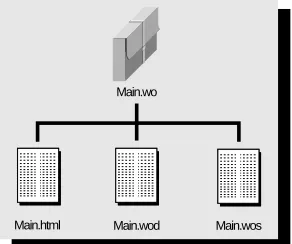
Figure 1 shows the contents of the Main.wo component from the HelloWorld example. (Main.wo is almost always the name of the first page of a WebObjects application.) In this example, the Main.wo component contains three files: a template in the form of an HTML file (Main.html), the code file (Main.wos), and the declarations file (Main.wod), which contains the bindings between the template and the code.
Figure 1. The Contents of a WebScript Component Directory
Typically, components contain some form of the three files shown in Figure 1; however, any given component might contain more or fewer files. For example, components whose code is written in a compiled language do not contain code
Main.html
Main.wo
The Ingredients of a WebObjects Application
21
files. A component may not need a code file at all; it may need only a template file and a declarations file. Another component might have a code file but no template file or declarations file. Plus, if you create a component using Project Builder or WebObjects Builder, you’ll get a fourth file,
Component.api, which contains API that should be made public to other components.
The next three sections describe more completely these template, code, and declarations files.
Template
You use a template(Main.html) to specify how the page you’re creating should look. This file typically contains static HTML elements (such as <H1> or
<P>) along with some dynamic elements. Dynamic elements are the basic building blocks of a WebObjects application. They link an application’s behavior with the HTML page shown in the web browser, and their contents are defined at runtime.
An HTML template can also contain a reference to another component (called a reusable component or subcomponent) that represents a portion of an HTML page. This reference behaves just like a reference to a dynamic element.
Code or Script File
You use the code file (Main.wos) to define your component’s attributes and actions. The attributes are called variables or instance variables, and the actions are called methods.
With WebObjects, you can write your code file in one of three programming languages: Java, Objective-C, or WebScript. Java is the language of choice for many people; others prefer Objective-C. Because both of these languages require compiling, they aren’t as well suited to rapid prototyping as a scripting language is. For this reason WebObjects provides a scripting language named WebScript, described in the chapter “The WebScript Language” (page 163). You may have noticed that the examples directory mentioned previously offers examples in all three languages.
Note:Java support is not available on the Mach or HP-UX platform.
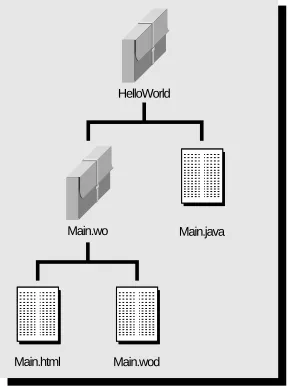
as shown in Figure 2. (In Project Builder, Java and Objective-C code files are shown under Classes instead of with the component under Web Components.)
Figure 2. Location of Code File for Java Component
You can mix languages. It’s common to use WebScript to write your interface logic (that is, the files described in this chapter) and use Java or Objective-C to write your business logic. Many simple applications are written entirely in WebScript. Some programmers prototype using WebScript and then create a compiled version of the same application to improve performance.
Bindings
You use a declarations file (Main.wod) to define the bindings, or mapping, between the methods and variables you defined in your code and the dynamic elements in your template. For example in the HelloWorld application, the HTML template for the Main component contains two dynamic elements. The declarations file specifies that the first dynamic element represents a text field whose value maps to the visitorName variable in the component’s script. When the user types a name in the text field, WebObjects assigns it to the visitorName
variable. The declarations file also specifies that the second dynamic element is a submit button and that when the user clicks the button, WebObjects invokes thesayHello method.
Main.html Main.wo
The Ingredients of a WebObjects Application
23
Application Code
In addition to having one or more components, your application can also includeapplication code. In application code, you declare and initialize application variables and perform tasks that affect the entire application.
The application code file is named Application and its extension is based on the programming language you use to create it (Application.wos,Application.java, or
Application.m).
Session Code
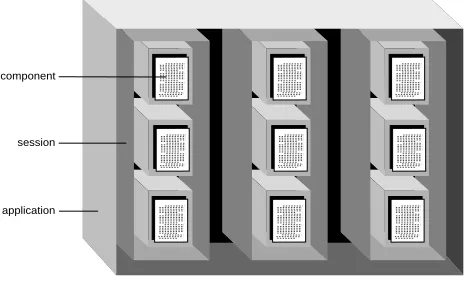
Sessions are periods during which one user is accessing your application. Because users on different clients may be accessing your application at the same time, a single application may have more than one session accessing it at a time (see Figure 3). Each session has its own copy of the components that its user has requested.
Figure 3. Application, Sessions, and Components
You perform tasks that affect a single session and store variables that persist throughout a session in the session code file. The session code file is named Session and has the appropriate extension (Session.wos,Session.java, or Session.m).
A Note on WebObjects Classes
True to its name, WebObjects is an object-oriented environment for writing web applications. Therefore, when you write a component, an application file, or a session file, you are really writing a class. This is true whether you use WebScript, Java, or Objective-C. You can learn about these classes and
application component
where they are used by reading the chapter “WebObjects Viewed Through Its Classes” (page 63).
Components are subclasses of a class named WOComponent. For example, in Figure 1 the component directory creates a WOComponent subclass named Main. Application files create subclasses of a class named WOApplication, and session files create subclasses of a class named WOSession.
WOComponent, WOApplication, and WOSession are defined, along with other classes, in the WebObjects Framework in
NeXT_ROOT/NextLibrary/Frameworks/WebObjects.framework. (NeXT_ROOT is an
environment variable defined at installation time. On Windows NT systems, it isC:\NeXT by default. On Mach systems, the NeXT_ROOT environment variable is undefined, but you can think of it as being the root directory /.)
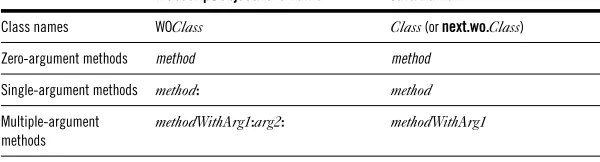
In Java, WebObjects classes have different names. The names shown previously are the WebScript names. (Objective-C uses the same names as WebScript.) In Java, WOComponent is called Component, WOApplication is WebApplication, and WOSession is WebSession. The Java classes are contained in the package
next.wo.
Note:This book generally uses the WebScript names for classes and methods. Usually, you can easily discern the Java name from the WebScript name, and vice versa. The following table tells you how to do so.
Where the mapping is not obvious, this book notes both the Java and WebScript/Objective-C names.
Application Directory
When you build a WebObjects application project, the result is a directory with the extension .woa. This directory contains the application executable, copies of the component files, copies of the script files (if any), and any resources that the application or the HTTP server needs access to. When you’re ready to deploy an application to your users, you use the .woa to run the application.
WebScript/Objective-C Name Java Name
Class names WOClass Class (or next.wo.Class)
Zero-argument methods method method
Single-argument methods method: method
Multiple-argument methods
Running a WebObjects Application
25
Now you’ve learned what a WebObjects application looks like and seen the pieces that you’ll have to write. The next section tells you how to run a WebObjects application.
Running a WebObjects Application
WebObjects applications run on a web server. Your users connect to a WebObjects application using web browsers that they run on their own (client) machines. How does a user start a WebObjects application, and how does the application communicate with the browser?
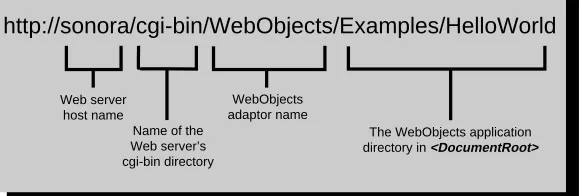
Users run a WebObjects application using a Uniform Resource Locator (URL) similar to the one shown in Figure 4. (Of course, you’d probably provide a button or a link on a static web page that would take users to this URL rather than forcing your users to type such a long string.)
Figure 4. A URL to Start a WebObjects Application
To start your own applications, you open a command shell window, go to the directory that contains your application, and enter the application
command. WebObjects starts up your application, opens the web browser, and enters the URL in the web browser for you. For example, to start the Java version of HelloWorld, go to the directory
<DocRoot>/WebObjects/Examples/Java/HelloWorldJava/HelloWorldJava.woa, which contains the executable file, and enter HelloWorld on the command line. On Windows NT, you can simply navigate to this directory in the Explorer and double-click the HelloWorld.exe file.
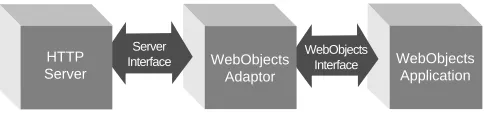
When you run a WebObjects application, it communicates with the web browser through the chain of processes shown in Figure 5.
http://sonora/cgi-bin/WebObjects/Examples/HelloWorld
Web server host name
Name of the Web server’s cgi-bin directory
WebObjects adaptor name
Figure 5. Chain of Communication Between the Browser and Your WebObjects Application
Here is a brief description of these processes:
• An HTTP server. Any HTTP server that uses the Common Gateway Interface (CGI), the Netscape Server API (NSAPI), or the Internet Server API (ISAPI).
• A WebObjects adaptor. A WebObjects adaptor connects WebObjects applications to the web by acting as an intermediary between web applications and HTTP servers.
• A WebObjects application executable. The application executable receives incoming requests and responds to them, usually by returning a dynamically generated HTML page.
Two of these, WebObjects adaptors and WebObjects application executables, are described next.
WebObjects Adaptors
A WebObjects adaptor receives requests from the server, repackages the requests in a standard format, and forwards them to an appropriate WebObjects application (see Figure 6).
Figure 6. The Role of a WebObjects Adaptor
All WebObjects adaptors communicate with WebObjects applications in the same way, but they communicate with HTTP servers using whatever interface is provided by a particular server. For example, the WebObjects CGI adaptor uses the Common Gateway Interface, the Netscape Interface adaptor uses the Netscape Server API (NSAPI), and the Internet Server adaptor uses the
HTTP Server Web
Browser WebObjectsAdaptor WebObjectsApplication
Server
Interface WebObjectsInterface
HTTP Server
WebObjects Adaptor
Running a WebObjects Application
27
Internet Server API (ISAPI). Thus, WebObjects adaptors can take advantage of server-specific interfaces but still provide server independence.
By default, WebObjects uses the WebObjects CGI adaptor. The Common Gateway Interface is supported by all HTTP servers, so you can use the CGI adaptor with any server—including those that are publicly available. As demands on performance increase, switch to one of the other adaptors with a server that supports the corresponding API (Netscape Server API or Internet Server API). Such servers are capable of dynamically loading the adaptor, eliminating the overhead of starting a new process for each request. As shown in Figure 7, the communication between the adaptor and the HTTP server occurs inside a single process.
Figure 7. The Netscape Interface Adaptor
The online document Serving WebObjects describes how to configure a WebObjects adaptor.
The WebObjects Application Executable
An application executable is an executable file, provided by you or by WebObjects, that receives incoming requests from the adaptor and responds to them, usually by returning a dynamically generated HTML page.
If your application is written entirely in WebScript, it can use the default application executable, NeXT_ROOT/NextLibrary/Executables/WODefaultApp, provided as part of the WebObjects package. If your application contains compiled code, you build your own executable and use it in place of
WODefaultApp.
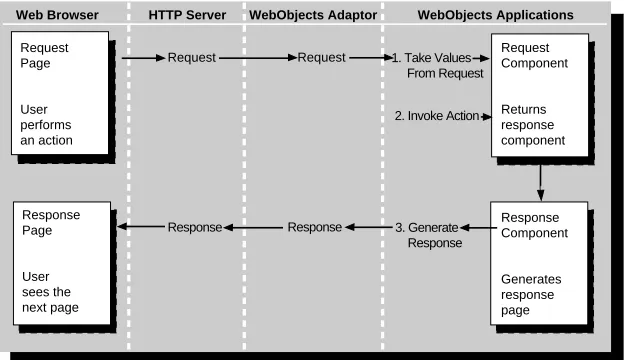
WebObjects applications are event driven, but instead of responding to mouse and keyboard events, they respond to HTTP requests. A WebObjects application receives a request, responds to it, and then waits for the next request. The application continues to respond to requests until it terminates. During each cycle of this request-response loop, the application extracts the user input from the request, invokes an action if one is
Netscape Commerce
Server
Netscape Interface Adaptor
WebObjects Application
associated with the user’s action, and generates a response—usually an HTML page (see Figure 8).
Figure 8. The Request-Response Loop
Web Browser HTTP Server WebObjects Adaptor WebObjects Applications
Request Page
User performs an action
Response Page
User sees the next page
Request Component
Returns response component
Response Component
Generates response page Request
2. Invoke Action
Response
1. Take Values From Request Request
31
In the previous chapter, you learned that a WebObjects application is made up of components, which in turn are made up of dynamic elements. Dynamic elements are the basic building blocks of a WebObjects application. They link an application’s behavior with the HTML page shown in the web browser, and their contents are defined at runtime.
There are two types of dynamic elements that you can place in a component:
• Server-side dynamic elements • Client-side Java components
This chapter describes each of these types and tells you how to decide when to use them. Before reading it, you should be familiar with the concepts presented in the previous chapter. To learn the mechanics of using dynamic elements, see the online book WebObjects Tools and Techniques.
Server-Side Dynamic Elements
Server-side dynamic elements are the simplest type of element to create and are supported by all web browsers. Needless to say, they are the most commonly used.
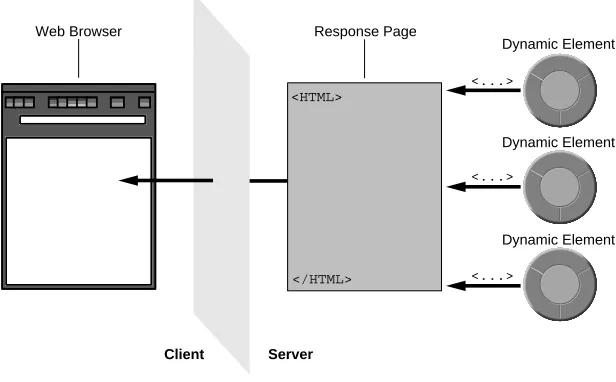
Server-side dynamic elements produce HTML at runtime. This HTML is composed of the same HTML elements you use when you’re creating a static web page. Like static elements, dynamic elements display formatted text, images, forms, hyperlinks, and active images. WebObjects provides several dynamic elements. For a complete list, see the online book Dynamic Elements Reference.
For an example of dynamic elements in action, look at the CyberWind sample application. It’s located in <DocRoot>/WebObjects/Examples/Java/CyberWindJava, where<DocRoot> is your web server’s document root. When you run CyberWind, its first page contains a list of hyperlinks, shown in Figure 9.
This list is not hard-coded into the page. Instead, it is produced by several dynamic elements. Figure 10 shows how this same part of the page looks in WebObjects Builder.
Figure 10. CyberWind Main Page in WebObjects Builder
The elements shown in Figure 10 are a WORepetition, a WOHyperlink, and a WOString. The WORepetition element corresponds to a for loop in C code. That is, it iterates through a list of items and, for each item in that list, prints its contents. In this example, the contents are a WOHyperlink and a WOString. The WOHyperlink is a hyperlink whose destination is determined at runtime, and the WOString is a string whose contents are determined at runtime.
When you run CyberWind, the WORepetition walks through an array of strings that the component’s code supplies. For each item in the array, it displays a hyperlink whose text is the text of the string item in the array. In this array, there are two strings—“See surfshop information” and “Buy a new sailboard”—so the WORepetition creates two hyperlinks, each containing the appropriate text.
Server-Side Dynamic Elements
33
Figure 11. Server-Side Dynamic Elements
How Server-Side Dynamic Elements Work
To learn how server-side dynamic elements work, look once more at the Main page of the CyberWind example in WebObjects Builder. If you switch over to raw mode, you see that the Main page contains this HTML code in its template:
Choose between the following menu options:<BR><BR> <WEBOBJECT NAME="OPTION_REPETITION">
<WEBOBJECT NAME="OPTION_LINK">
<WEBOBJECT NAME="OPTION_NAME"></WEBOBJECT> </WEBOBJECT>
</WEBOBJECT>
Each WEBOBJECT tag denotes the position of a dynamic element. Notice that the tag specifies only where the dynamic element should go; it does not specify the dynamic element’s type. The type is specified in the .wod file:
OPTION_REPETITION:WORepetition { list = allOptions;
item = currentOption };
OPTION_LINK:WOHyperlink { action = pickOption };
OPTION_NAME:WOString { value = currentOption };
Response Page Web Browser
Server Client
<HTML>
</HTML>
<...>
<...>
<...>
Dynamic Element
Dynamic Element
In the .wod file, each element is identified by name and then its type is specified. The outermost dynamic element in the HTML file
(OPTION_REPETITION) defines a WORepetition, the next element is a WOHyperlink, and the innermost element is a WOString.
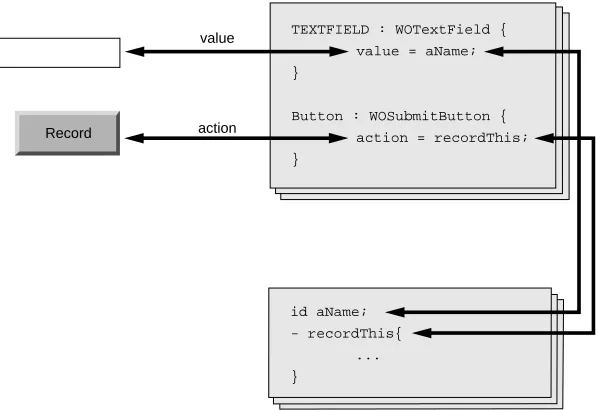
Each type specification is followed by a list of attributes. Dynamic elements define several attributes that you bind to different values to configure the element for your application. Usually, you bind attributes to variables or methods from your component’s code (see Figure 12).
Figure 12. Dynamic Element Bindings
In the CyberWind example, the Main component binds to two attributes of WORepetition:list and item. The list attribute specifies the list that the
WORepetition should iterate over. The item attribute specifies a variable whose value will be updated in each iteration of the list (like an index variable in a for
loop). CyberWind’s Main component binds the list attribute to an array named
allOptions and the item attribute to a variable named currentOption.
The WOHyperlink has an action attribute, which is bound to a method called
pickOptions. The action attribute specifies a method that should be invoked when the user clicks the link. In this case, the pickOptions method determines which link the user clicked and then returns the appropriate page.
Record
value
action
TEXTFIELD : WOTextField { value = aName; }
Button : WOSubmitButton { action = recordThis; }
id aName; - recordThis{
Server-Side Dynamic Elements
35
Finally, the WOString element defines a value attribute, which specifies the string you want displayed. This value attribute is bound to the currentOption
variable, which is also bound to the item attribute of the WORepetition. As you’ll recall, currentOption is updated with each iteration that the
WORepetition makes. So, for each item in the allOptions array (assigned to the WORepetition’s list attribute), the WORepetition updates the currentOption
variable to point to that item and then the WOString prints it on the page.
Binding Values to Dynamic Elements
In the CyberWind example, all of the dynamic elements are bound to variables and methods from the component that contains them (the Main component). It’s common to bind to variables and methods declared directly in the current component; however, you can bind to any value that the component can access.
This means, for instance, that you can bind to variables from the application or session object because the WOComponent class declares two instance variables,application and session, which point to the current application and the current session. Look at CyberWind’s Footer component in WebObjects Builder. This component displays, among other information, the date and time the CyberWind application was started.This date is stored in the application object, not in the Footer component. The Footer component’s
.wod file contains this declaration:
UP_SINCE:WOString {value = application.upSince.description};
To retrieve a value from this binding, WebObjects uses key-value coding, a standard interface for accessing an object’s properties either through methods designed for that purpose or directly through its instance variables. With key-value coding, WebObjects sends the same message
(takeValue:forKey:, or takeValue in Java) to any object it is trying to access. Key-value coding first attempts to access properties through accessor methods based on the key’s name.
For example, to resolve the binding for the WOString element in the Footer component using key-value coding, WebObjects performs the following steps:
• It resolves the value for the application key by looking for a method named
application in the component object.
In this case, WOComponent (Component in Java) defines the application
• It resolves the value for the upSince key by looking for a method named upSince
in the application object.
If the method is not found, it looks for an upSince instance variable. In this case, the upSince instance variable is defined in the application’s code file.
• It resolves the value for the description key by looking for a method named
description in the upSince object.
BecauseupSince is a date object, it defines a description method, which prints the object’s value as a string.
Note: The Java equivalent of the description method is toString, but you must use the WebScript name for methods and literals in the .wod file even though the application is written in Java.
Here are the general rules for binding dynamic element attributes:
• You must bind to a variable or method accessible by the current component. (You can also bind to constant values.)
• If you bind to a method, the method must take no arguments. (If you need to bind to a method that takes arguments, you can wrap it inside of a method that doesn’t take arguments.)
• You can bind to any key for objects that define keys.
For example, dictionary objects store key-value pairs. Suppose you declare aperson dictionary that has the keys name,address, and phone. These keys aren’t really instance variables in the dictionary, but because WebObjects accesses values using key-value coding, the following binding works:
myString : WOString { value = person.name };
• You must use the Objective-C names for methods and literals.
Even if your entire application is written in Java, you must use the Objective-C names for methods and for literals. For example, you must use
YES instead of true,NO instead of false, and description instead of toString.
Declarations File Syntax
Client-Side Java Components
37
elementName : elementType { attribute = value; attribute = value };
Notice that the last attribute/value pair before a closing brace (}) does not end with a semicolon (;).
As described in the previous section, value can be a constant, variable, or method. It can also be a string of messages joined by a dot, similar to the Java syntax for sending messages but without the parentheses. For example:
application.upSince.description
Client-Side Java Components
Instead of using server-side dynamic elements, you can create Java applets that run on the client. Typically, applets are downloaded to the client once and then have virtually no communication with the server. This is not the case with the client-side Java components provided with WebObjects. While these applets run on the client, they continuously synchronize their states with objects on the server. Client-side components can also trigger action methods on the server. For this reason, they may be said to work in virtually the same way as server-side dynamic elements.
To add a client-side component to your application, you drag it from the palette provided in WebObjects Builder. For a list of the client-side Java components that WebObjects provides, see the online book Client-Side Applet Controls Reference.
Deciding When to Use Client-Side Components
You should use client-side components whenever you want greater control over the appearance of your application. In general, client-side components have these advantages over server-side dynamic elements:
• Client-side components define a state-synchronization phase that does not reload the page.
As you learned in the first chapter, WebObjects applications are event driven. The events that trigger actions are HTTP requests. A WebObjects application receives an HTTP request from the client, processes it, and returns a response page. That is, the only
communication that takes place between the client and the
When client-side components are used, an HTTP request can result in either the resynchronization of state or the return of a new page. Thus, state can be synchronized without the page having to be redrawn (see Figure 13).
Figure 13. Client-Side Java Components
• Client-side components are more flexible than server-side dynamic elements.
Server-side dynamic elements always generate HTML, which means that they are limited to what HTML looks like and what HTML can do. You can create client-side components that look like just about any imaginable control: a dynamic calendar, a spreadsheet, or a graphing tool. To learn how to create a client-side component, see the chapter “Creating Client-Side Components” (page 141).
The disadvantage to using client-side components is that they require a Java-enabled browser. Thus, you can use client-side components only when you can be certain all of your users will have Java-enabled browsers. If you can’t guarantee this, you should use server-side dynamic elements.
How Client-Side Components Work
A client-side component is really just a special case of a particular server-side dynamic element named WOApplet. You use WOApplet when you want to include any Java applet in a WebObjects application. The difference between a client-side component and other Java applets is that client-side components can communicate with the server.
WOApplet Dynamic Element
attributes
Association Client-Side
Component
HTML Web Browser
Client-Side Java Components
39
When you look at client-side component’s bindings in the .wod file, it looks like this example:
INPUTFIELD : WOApplet {
code = "next.wo.client.controls.TextFieldApplet.class"; codebase = "/WebObjects/Java";
archive = "woextensions.jar"; width = "200";
height = "20";
associationClass = "next.wo.client.SimpleAssociation"; stringValue = inputString
};
Like any other server-side dynamic element, the WOApplet’s definition contains a list of attributes bound to constants or variables in the component’s code.
Thecode attribute specifies which client-side component this WOApplet should download. The codebase attribute specifies the path of the component relative to your web server’s document root. (For the provided client-side components, this path is always /WebObjects/Java.)
Thearchive attribute specifies .jar files that should be preloaded onto the client machine. If you don’t use this attribute, the applet downloads Java
.class files from the server one by one as it needs them. With the archive
attribute, you can package all necessary Java classes into archive files, and they are downloaded once. However, only web browsers that have Java 1.1 support can use .jar files. Because Java 1.1 is fairly new, there’s a good chance your users use browsers that don’t support .jar files. All of the provided client-side components are packaged in a single archive file named
woextensions.jar.
TheassociationClass attribute differentiates the client-side components from any other applet you might include in your application. This attribute specifies an object (a subclass of next.wo.client.Association) that the component uses to communicate with the application on the server. The Association object can get and set component state and cause methods to be invoked in the server when actions are triggered in the client. For the WebObjects-provided client-side components, this attribute is always
next.wo.client.SimpleAssociation. If you create your own client-side components, you provide your own Association subclass.
The final attribute, stringValue, is an attribute specific to the TextFieldApplet component. The Association object assigns the value of the inputString
43
The methods that you write for your WebObjects application provide the behavior that makes your application unique. Because you are writing subclasses of WOApplication, WOSession, and WOComponent (in Java, WebApplication, WebSession, and Component), you inherit the methods provided by those classes. These inherited methods take care of the details of receiving HTTP requests and generating responses. However, you’ll sometimes find that you need to override some of the inherited methods to perform certain tasks.
This chapter describes the types of methods that you generally write in a WebObjects application. These types are:
• Action methods
• Initialization and deallocation methods • Request-handling methods
In cases where you override existing methods, those methods are invoked at standard, predictable times during the application’s request-response loop (the main loop for a WebObjects application). For background on the request-response loop, see the chapter “WebObjects Viewed Through Its Classes” (page 63).
As you’re writing methods, refer to the class specifications for
WOApplication, WOSession, and WOComponent to learn which messages you can send to these objects. The class specifications are in the online bookWebObjects Class Reference.
Action Methods
Anaction method is a method you associate with a user action—for instance, clicking a submit button, an active image, or a hyperlink. To associate your method to a user action, you map it to a dynamic element that has an attribute named action. (In the examples just given, the dynamic elements associated with the user actions are WOSubmitButton, WOActiveImage, or WOHyperlink.) When the user performs the associated action, your method is invoked.
For example, in the HelloWorld example application (in
<DocRoot>/WebObjects/Examples/WebScript/HelloWorld, where <DocRoot> is your web server’s document root), the submit button is mapped to a method named
name and click the button. This initiates the application’s request-response loop, and sayHello is invoked.
Action methods take no arguments and return a page (component) that will be packaged with an HTTP response. For example, the sayHello method creates a new page named Hello and sends that page the name the user has typed into the text field.
//WebScript HelloWorld Main.wos - sayHello
{
id nextPage;
nextPage = [WOApp pageWithName:@"Hello"]; [nextPage setVisitorName:visitorName]; return nextPage;
}
If you’re programming in Java, you can look at the HelloWorldJava example, which is identical to HelloWorld but written in Java. Its sayHello method looks like this:
//Java HelloWorld Main.java public Component sayHello() {
Hello nextPage = (Hello)application().pageWithName("Hello"); nextPage.setVisitorName(visitorName);
return nextPage; }
In this example, the component Main is used to generate the page that handles the user request, and the component Hello generates the page that represents the response. Main is the request component or the request page, and Hello is the
response component or the response page.
It’s common for action methods to determine the response page based on user input. For example, the following action method returns an error page if the user has entered an invalid part number (stored in the variable partnumber); otherwise, it returns an inventory summary:
// WebScript example - showPart {
id errorPage; id inventoryPage;
if ([self isValidPartNumber:partnumber]) {
errorPage = [[self application] pageWithName:@"Error"]; [errorPage setErrorMessage:@"Invalid part number %@.",
partnumber]; return errorPage; }
inventoryPage = [[self application] pageWithName:@"Inventory"]; [inventoryPage setPartNumber:partnumber];
Action Methods
45
// Java example
public Component showPart() { Error errorPage;
Inventory inventoryPage;
if (isValidPartNumber(partNumber)) {
errorPage = (Error)application().pageWithName("Error"); errorPage.setErrorMessage("Invalid part number " +
partnumber); return errorPage; }
inventoryPage = (Inventory)
application().pageWithName("Inventory"); inventoryPage.setPartNumber(partnumber); return inventoryPage;
}
Action methods don’t have to return a new page. They can instead direct the application to use the request page as the response page by returning nil
(null in Java). For example, in the Visitors application, the recordMe action method in the Main page records the name of the last visitor, clears the text field, and redraws itself:
// WebScript Visitors Main.wos - recordMe
{
if ([aName length]) {
[[self application] setLastVisitor:aName]; [self setAName:@""]; // clear the text field }
}
// Java Visitors Main.java public Component recordMe {
if (aName.length != 0) {
((Application)application()).setLastVisitor(aName); aName = ""; // clear the text field
}
return null; }
Initialization and Deallocation Methods
Like all objects, WOApplication, WOSession, and WOComponent implement initialization methods (or constructors in Java). Because most subclasses require some unique initialization code, these are the methods that you override most frequently. In WebScript, the initialization methods are init and awake. In Java, the initialization methods are the constructor for the class and awake.
Bothinit and awake perform initialization tasks, but they are invoked at different times during an object’s life. The init message (or the constructor in Java) is sent once, when the object is first created. In contrast, awake is sent at the beginning of each cycle of the request-response loop that the object is involved in. Thus, it may be sent several times during an object’s life.
Complementingawake and init are the sleep and dealloc methods. These methods let objects deallocate their instance variables and perform other clean-up tasks. Thesleep method is invoked at the end of each cycle of the request-response loop, whereas the dealloc method is invoked at the end of the object’s life.
Thedealloc method is used primarily for Objective-C objects. Standard dealloc
methods in Objective-C send each instance variable a release message to make sure that the instance variables are freed. WebScript and Java, because they have automatic garbage collection, usually make a deallocation method unnecessary. If you find it necessary, you can implement dealloc in WebScript and
finalize in Java.
The Structures of init and awake
Theinit method must begin with an invocation of super’s init method and must end by returning self.
- init {
[super init];
/* initializations go here */ return self;
}
Likewise, in Java, the constructor must begin with an invocation of the superclass’s constructor (as with all Java classes):
public Application() { super();
/* initializations go here */ }
Initialization and Deallocation Methods
47
- awake {
/* initializations go here */ }
public void awake () {
/* initializations go here. */ }
Application Initialization
The application init method is invoked only once, when the application is launched. You perform two main tasks in the application’s init method:
• Initialize application variables • Configure applicationwide settings
For example, the Visitors application has this init method in Application.wos:
// WebScript Visitors Application.wos - init {
[super init]; lastVisitor = @""; [self setTimeOut:7200]; return self;
}
// Java Visitors Application.java public Application () {
super(); ...
lastVisitor = ""; setTimeOut(7200); ...
}
This method begins by calling the application’s init method. Then, it initializes the application variable lastVisitor to be the empty string. (The application has just started, so there has been no last visitor.) Finally, it sets the application to terminate after it has been running 2 hours.
This example sets the application time-out value. You might want to do other configurations in the application object’s init method as well. For example, you can control how pages and components are cached and how state is stored. For more information, read the chapter “Managing State” (page 109).
// WebScript DodgeDemo Application.wos - awake {
++requestCount;
[self logWithFormat:@"Now serving request %@", requestCount]; }
// Java DodgeDemo Application.java public void awake() {
++requestCount;
this.logString("Now serving request " + requestCount); }
Session Initialization
A session object is created each time the application receives a request from a new user. An application may have multiple sessions running concurrently. The session ends when a session time-out value is reached.
In the session object’s init method, you set the session’s time-out value and initialize variables that should have unique values for each session. For example, in the CyberWind application, each session keeps track of which number it is. These values are changed in the session object’s init method:
//From CyberWind Session.wos - init {
[super init];
[self setTimeOut:120]; // session idle time is 2 minutes. [[self application] setSessionCount:[[self application]
sessionCount + 1];
sessionNumber = [[self application] sessionCount]; return self;
}
//From CyberWindJava Session.java public Session() {
super();
Application application = (Application)application(); this.setTimeOut(120);
application.setSessionCount(application.sessionCount() + 1); sessionNumber = application.sessionCount();
}
The session object’s awake method is invoked each time the user associated with the session makes a new request. After the application object has performed its ownawake method, it restores the appropriate session object and sends it the
awake message too.
The CyberWind application keeps track of the number of requests per session. It increments the number in the session’s awake method.
- awake {
Initialization and Deallocation Methods
49
Component Initialization
A component object’s init method is invoked when the component object is created. Just how often a particular component object is created depends on whether the application object is caching pages. For more information, see “WebObjects Viewed Through Its Classes” (page 63). If page caching is turned on (as it is by default), the application object generally creates the component object once and then restores that object from the cache every time it is involved in a user request. If page caching is turned off, the component object is freed at the end of the request-response loop.
Note:ThepageWithName: method shown in the section “Action Methods” (page 43) always creates a new component object, even if page caching is turned on.
A component object’s init method usually initializes component variables. For example, in the EmployeeBook example, the Department.wos script uses
init to initialize the departments component variable:
// WebScript EmployeeBook Department.wos id departments;
- init {
id departmentsPath; [super init];
departmentsPath = [[self application]
pathForResourceNamed:@"Departments" ofType:@"array"]; departments = [NSArray arrayWithContentsOfFile:departmentsPath]; return self;
}
The component awake method is invoked immediately after the init method and each time the component object is restored from the page cache. Just as in init, you can implement an awake method that initializes component variables. For example, in the DodgeDemo application, the Car.wos script usesawake to initialize the shoppingCart component variable:
// WebScript DodgeDemo Car.wos - awake {
shoppingCart = [[self session] shoppingCart]; }
In general, you use init to initialize component instance variables instead of
ornull in Java). For more information, see the chapter “Managing State” (page 109).
Request-Handling Methods
Request-handling is performed in three phases, which correspond to three methods that you can override:
• Taking input values from the request (takeValuesFromRequest:inContext: or
takeValuesFromRequest)
• Invoking the action (invokeActionForRequest:inContext: or invokeAction) • Generating a response (appendToResponse:inContext: or appendToResponse)
Each of the methods is implemented by WOApplication, WOSession, and WOComponent. In each phase, WOApplication receives the message first, then sends it to the WOSession, which sends it to the WOComponent, which sends it to all of the dynamic element and component objects on the page.
The request-handling methods handle three types of objects:
• A request object (WORequest or Request in Java) is passed as an argument in the first two phases. This object represents a user request. You can use it to retrieve information about the request, such as the method line, request headers, the URL, and form values.
• A context object (WOContext or Context in Java) is passed as an argument in all three phases. This object represents the current context of the application. It contains references to information specific to the application, such as the path to the request component’s directory, the version of WebObjects that’s running, the application name, and the request page’s name.
• A response object (WOResponse in Java) is passed in the final phase. This object encapsulates information contained in the generated HTTP response, such as the status, response headers, and response content.
You should override these methods if you need to perform a task that requires this type of information or you need access to objects before or after the action method is invoked. For example, if you need to modify the header lines of an HTTP response or substitute a page for the requested page, you would override
Request-Handling Methods
51
As you implement request-handling methods, you must invoke the superclass’s implementation of the same methods. But consider where you invoke it because it can affect the request, response, and context
information available at any given point. In short, you want to perform certain tasks before super is invoked and other tasks after super is invoked.
Taking Input Values From a Request
ThetakeValuesFromRequest:inContext: method is invoked during the first phase of the request-response loop, immediately after all of the objects involved in the request have performed their awake methods. When this phase concludes, the request component has been initialized with the bindings made in WebObjects Builder.
OverridetakeValuesFromRequest:inContext: when you want to do one of the following:
• Access information from the request or context object. • Perform postprocessing on user input.
In the first case, you can place your code before the message to super. In the second case, you must place your code after the message to super. For example, the following implementation of takeValuesFromRequest:inContext:
records the kinds of browsers—user agents—from which requests are made:
// WebScript example
- takeValuesFromRequest:request inContext:context { id userAgent = [request headerForKey:@"user-agent"]; [self recordUserAgent:userAgent];
[super takeValuesFromRequest:request inContext:context]; }
The following example performs postprocessing. It takes the values for the
street,city,state, and zipCode variables and stores them in the address variable formatted as a standard mailing address.
// WebScript example
- takeValuesFromRequest:request inContext:context { [super takeValuesFromRequest:request inContext:context]; address = [NSString stringWithFormat:@"%@\n%@, %@ %@",
street, city, state, zipCode]; }
// Java example
public void takeValuesFromRequest(Request request, Context context) { super.takeValuesFromRequest(request, context);
Invoking an Action
The second phase of the request-response loop involves
invokeActionForRequest:inContext:. WebObjects forwards this method from object to object until it is handled by the dynamic element associated with the user action (typically, a submit button, a hyperlink, and active image, or a form).
UseinvokeActionForRequest:inContext:if you want to return a page other than the one requested. This scenario might occur if the user requests a page that has a dependency on another page that the user must fill out first. The user might, for example, finish ordering items from a catalog application and want to go to a fulfillment page but first have to supply credit card information.
The following example, implemented in Session.wos, returns a “CreditCard” page if the user hasn’t supplied this information yet:
// WebScript example
- invokeActionForRequest:request inContext:context { id creditPage;
id responsePage = [super invokeActionForRequest:request inContext:context];
id nameOfNextPage = [responsePage name]; if ([self verified]==NO &&
[nameOfNextPage isEqual:@"Fulfillment"]) { creditPage = [[self application]
pageWithName:@"CreditCard"]; [creditPage setNameOfNextPage:nameOfNextPage]; return creditPage; } return responsePage; } //Java example
public Element invokeActionForRequest(Request request, Context contenxt) {
Component creditPage;
Component responsePage = super.invokeActionForRequest(request, context);
String nameOfNextPage = responsePage.name(); if (verified()==false &&
(nameOfNextPage.compareTo("Fulfillment") == 0) { creditPage = application().pageWithName("CreditCard"); creditPage.setNameOfNextPage(nameOfNextPage);
return creditPage; }
return responsePage; }
Request-Handling Methods
53
following action method, the “CreditCard” component sets the verified
session variable to YES when the user has supplied valid credit information and returns the user to the original request page to try again.
- verifyUser {
if ([self isValidCredit]) {
[[self session] setVerified:YES];
return [[self application] pageWithName:nameOfNextPage]; }
return nil; }
Limitations on Direct Requests
Users can access any page in an application without invoking an action. All they need to do is type in the appropriate URL. For example, you can access the second page of HelloWorld without invoking the sayHello action by opening this URL:
http://serverhost/cgi-bin/WebObjects/Examples/HelloWorld.woa/-/Hello.wo/
When a WebObjects application receives such a request, it bypasses the user-input (takeValuesFromRequest:inContext:) and action-invocation
(invokeActionForRequest:inContext:) phases because there is no user input to store and no action to invoke. As a result, the object representing the requested page—Hello in this case—generates the response.
By implementing security mechanisms in invokeActionForRequest:inContext:, you can prevent users from accessing pages without authorization, but only if those pages are not directly requested in URLs. To prevent users from directly accessing pages in URLs, you must implement another strategy.
Generating a Response
TheappendToResponse:inContext: method is invoked in the final phase of the request-response loop, during which the application generates HTML for the response page. You can override this method to add to the response content or otherwise manipulate the HTTP response. For example, you can add or modify the HTTP headers as in the following example:
- appendToResponse:aResponse inContext:aContext {
[super appendToResponse:aResponse inContext:aContext]; [aResponse setHeader:@"True"
forKey:@"dshttpd-NoAutomaticFooter"]; }
appendToResponse:inContext: method adds bold and italic markup elements around a string’s value as follows:
id value; id escapeHTML; id isBold; id isItalic;
- appendToResponse:aResponse inContext:aContext {
id aString = [value description];
[super appendToResponse:aResponse inContext:aContext]; [aResponse appendContentHTMLAttributeValue:@"<p>"]; if (isBold) {
[aResponse appendContentHTMLAttributeValue:@"<b>"]; }
if (isItalic) {
[aResponse appendContentHTMLAttributeValue:@"<i>"]; }
if (escapeHTML) {
[aResponse appendContentString:aString]; } else {
[aResponse appendContentHTMLString:aString]; }
if (isItalic) {
[aResponse appendContentHTMLAttributeValue:@"</i>"]; }
if (isBold) {
[aResponse appendContentHTMLAttributeValue:@"</b>"]; }
}
After you invoke super’s appendToResponse:inContext:, the application generates the response page. At this point you could do something appropriate for the end of the request. For example, the following implementation terminates the current session:
public void appendToResponse(response, context) { super.appendToResponse(response, context); session().terminate();
}
57
In the previous chapters, you learned the pieces of a WebObjects application and the kinds of methods you need to write. Once you’ve put together an application, you should debug it to make sure it runs properly. The techniques you use to debug vary according to the languages you’ve used to write the application.
This chapter describes how to debug WebScript code, Java code, and Objective-C code in a WebObjects application. When you debug, you’ll be using the Project Builder application. To learn how to use Project Builder, see the online book WebObjects Tools and Techniques.
Before you debug, it’s a good idea to test your installation and verify that it works properly. If you haven’t already done so, follow the instructions in the online document Post-Installation Information.
Launching an Application for Debugging
You debug WebObjects applications using Project Builder, as described in the online book WebObjects Tools and Techniques. The executable you launch differs based on which language you used to write the application. This section tells you how to begin a debugging session for WebObjects applications written in each of the three available languages: WebScript, Java, and Objective-C.
Debugging WebScript
To debug WebScript code, you rely on log messages and trace statements described in the section “Debugging Techniques” (page 58).
If you’ve written an application entirely in WebScript, you typically debug it by running NeXT_ROOT/NextLibrary/Executables/WODefaultApp from the Project Builder launch panel, as described in WebObjects Tools and Techniques. When you do, the output from the debugging and trace statements is displayed in the launch panel.
Debugging Java
executable in the launch panel. Output from the debugging methods appears in the launch panel.
Debugging Objective-C
If all or part of your application is written in Objective-C, you can use the gdb
debugger in Project Builder. For more information on debugging an Objective-C application with Project Builder, see Project Builder’s online help.
If your application contains WebScript code as well as Objective-C code, you debug the WebScript portion using logWithFormat: and WOApplication trace statements as described in “Debugging Techniques” (page 58).
Debugging Mixed Applications
When you build a WebObjects application project, the result is a .woa file package inside of the project directory. You may notice that this file package contains all of the application’s components (including scripted components), and all ot