190
Available online at www.ijiere.com
International Journal of Innovative and Emerging
Research in Engineering
e-ISSN: 2394 - 3343 p-ISSN: 2394 - 5494
User Authentication on Smartphone via Behavioral Biometrics
using Keystroke Dynamic
Rajatkumar Bhosale, Pratik Deshmukh,PawanBhirad,PranayKarkande
Co-Author- Prof. P.A.Chadchankar
Information Technology,Zeal College of Engineering &Research,Pune,India
1[email protected]2[email protected]3[email protected]4pranaykarkande99@gmail
.com5[email protected]
ABSTRACT:
This system provides 3 levels in terms of security for transaction in banking applications. First we are making use of encryption for sending user id and password on server from the user’s mobile phone. Once the user is authenticated he will be shown with a graphical password screen.Second level authentication is done by using the CCP and Third level is comparing the KDA parameters to authenticate the user.
Keywords:CCP, Keystroke, KDA , AES Algorithm
I.
I
NTRODUCTIONThe textual passwords are the most common method used for authentication and user identity. But textual passwords are vulnerable to eves dropping, dictionary attacks and shoulder surfing. Graphical passwords are introduced as alternative techniques to textual passwords and secure this technique . Most of the graphical schemes are vulnerable to shoulder surfing. To address this problem, text can be combined with images to generate session passwords for authentication and authenticate the user. Session passwords can be used only once and every time a new password is generated. In this paper, we provide AES algorithm to generate session passwords using text which are resistant to shoulder surfing. We also one more providing simple yet elegant method called Cued Click Points (CCP) which is click based graphical password scheme, to solve the authentication problem in a ubiquitous manner. humans are good at identifying andrecollecting graphical patterns than textual password. After authentication using CCP, user can access respective machine. System showed very good Performance in terms of speed, accuracy, efficiency and ease of use. Users preferred CCP to Pass Points, saying that selecting and remembering only one point per image was easier .thatccp is helps considerably in recalling the click points. We are also providing KDA algorithm to authenticate the user for providing extra security.
A. Aim
The aim of this work is to provide 3 levels in terms of security for transaction in banking applications.To avoid unauthorized people accessing an information system, textiual password ,CCP (Cued Click Points) and keystroke dynamics based authentication (KDA) systems combine password knowledge with typing characteristics to enhance the security of password authentication systems.
II.
PROJECT
PERCEPTION
AND
STUDY
A. CURRENT SCENARIO:
Smartphones have become omnipresent platforms of personal computing for users to access the Internet and online services at anytime and anywhere. As more and more privacy information (e.g., text messages, emails, and contact list) and security information (e.g., passwords, CVS code of credit cards, and transaction information) are stored in smartphones, the risk of information leakage is becoming a major concern for the entire information society, especially with the consideration that the smartphones are much easier to get lost or stolen in comparison with conventional computing platforms, according to a recent survey on US state of Cybercrime
191 most smartphone users tend to choose simple and weak passcodes for the sake of convenience and memorability [2], and some recent studies have shown how simple an attacker can derive the PIN passcodes from the oily residues left on the screen [3] or the pattern passcodes from the shoulder surfing attack [4]. An attacker could even infer the passcodes from the accelerometer and gyroscope readings.
B. Previous Work:
The previous scheme consists of two phases: Registration and Authentication ,In the registration phase, the user needs to set the personal rhythm that will be captured by accelerometer sensor of smartphone. The original data captured will then be processed using the ‘‘data transformation’’ and ‘‘zero-shrinkage’’, in which a binary sequence template is created and the number of input beats is obtained. The user then confirms his/her rhythm a second time. However, it is very challenging for a user to input the exactly same rhythm twice due to various causes, such as holding instability, human cognitive behavior variance and input errors. Also, it is very difficult to digitally capture user’s behavior accurately given only a limited number of inputs. Therefore, to effectively validate two inputs and minimize the required number of input that are often seen during registration phase of other authentication methods, we proposed a fast verification algorithm consisting of ‘‘threshold matching’’,‘‘zero-shrinkage’’ and ‘‘e-error correction’’ mechanisms. The registration process is completed once the two inputs match. In the authentication phase, we propose a Fuzzy ARTMAP (FAM) based authentication scheme. FAM is an extension of ARTMAP neural network that performs incremental supervised learning of recognition categories in response to input vectors (analog or binary) presented in arbitrary order [11]. Compared with other artificial neural networks, FAM has many remarkable characteristics, including on-line learning, fast learning about rare events, many-to-one and one-to-many learning, extendibility and avoidance of local extremum. These characteristics make FAM an effective candidate for user authentication in this work. However, FAM system requires several logons samples to train the system before classifying, which greatly hampers the users’ experience. To avoid this problem, we propose a two-step authentication model. For the first several login attempts, we will adopt the fast verification algorithm used in the registration phase. At the same time, the original data captured and the results from the fast verification algorithm
will be used for the supervised learning of FAM. When FAM is well-trained, user authentication will switch from fast verification algorithm to FAM.
III.
PROPOSE
SYSTEM
This system consists of 3 phases: registration phase ,login phase and verification phase in our system. During registration, user enters his password in first method and user select grid from picture second method. During login phase, the user has to enter the password based on the interface displayed on the screen. The system verifies the password entered by comparing with content of the password generated during registration.
Textual passwords are the most common method used for authentication. But textual passwords are vulnerable to eves dropping, dictionary attacks, social engineering and shoulder surfing,and many more attacks. Graphical passwords are introduced as alternative techniques to textual passwords.
1st level authentication is done by comparing user-id and password in database. This user-id and password first encrypted by AES algorithm Then it is stored into database. At time of login phase user-id and password of user is authenticated if the user is authenticated then user can go to next step.
2nd level of authentication is done by collecting cued click point and comparing with the click points which is already stored in database
192
IV.SYSTEMARCHITECTURE
Graphical-Based Password Keystroke Dynamic Authentication System for Android phone
Select 4 Cude Click point on each image and raise request to
admin for approval Select N unique images Login by user id and password
User Web Client
Central Server Wifi Network
If the last keystroke and ccp is correct the next right image will be loaded Otherwise some random image will be loaded
User Android App
User login by textual password
Display Images in sequence
Select CCP on image and calculate keystroke values
Compare stored key stroke values and new keystroke values
Key Stroke Values
· Down-Up (DU) time · Down-Down (DD) time · Up-Down (UD) time · Up-Up (UU) time · Down-Up2 (DU2) time
Change keystroke and password
User Registration Approve/Reject User Upload Images Central Server Admin Modules User Administration
If user login first time then Register keystrokes
?
Register Keystroke
No Yes
Figure 1.
Graphical-Based Password Keystroke Dynamic Authentication for AndroidAdpted from graphical password by f.monrose.m.k.r 2011
The aim of this work is to provide 3 levels in terms of security for transaction in banking applications. First we are making use of encryption for sending user id and password on server from the user’s mobile phone. Once the user is authenticated he will be shown with a graphical password screenand .
Secondly User is shown with sequence of images with 4x4 blocks; user has to select one block from each image. If user enters an incorrect click-point during login, the next image displayed will also be incorrect.
Legitimate users who see an unrecognized image know that they made an error with their previous click point. Conversely, this implicit feedback is not helpful to an attacker who does not know the expected sequence of images.
193
IV.ALGORITHMS
In these system we are going to use 3 algorithms for providing three level of security.
1. AES Algorithm
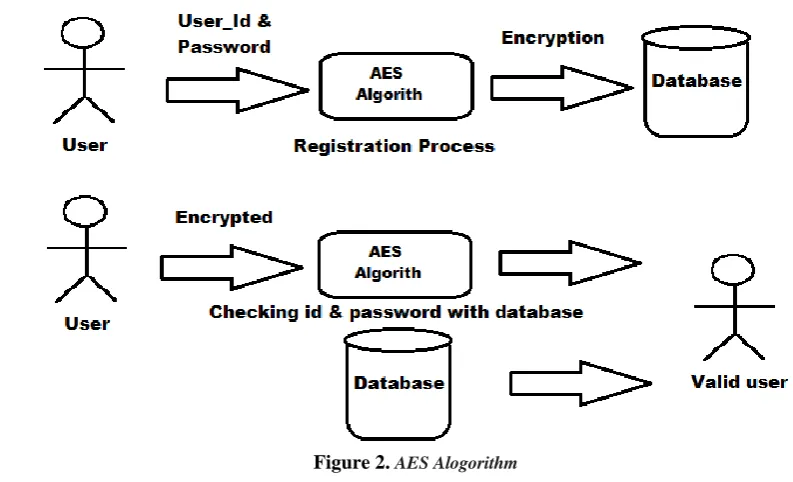
Figure 2.AES Alogorithm
This algorithm is used for authentication of user. We uses this for encryption and decryption standard.
Registration phase
In this phase initially user will enter his Id & password during the registration. AES algorithm encrypt that user id and password and Encrypted data get stored into the database.
Login phase
Authentication is done in login phase.In this phase ,when the user enter his id and password it get encrypted with the help of AES algorithm. Server check this encrypted data with the database ,if the user entered data is matching with the data stored in database then user get authenticated .
2.
clued click point (CCP)
194 Cued Click Points (CCP) is a proposed alternative to Pass Points. In CCP, the users click one point on each of images rather than on several points on one image . It offers cued-recall and introduces visual cues that instantly alert valid users if anyone have made a mistake when entering their latest click-point on image(at which point they can cancel their attempt and retry from the beginning). A wrong click leads down an incorrect path, with an explicit indication of authentication failure only after the final click on image. Users can choose his images only to the extent that their click-point dictates the next image.
3.
Keystroke Dynamic Authentication(KDA)
Figure 4.
Keystroke Dynamic Authrnticate Adpted from graphical password by f.monrose.m.k.r 2011Measuring of KDA Parameters
1. Down-Up (DU) time:
DU time is the interval between the same click being pressed and being released.
2. Down-Down (DD) time:
DD time is the interval between the click being pressed and the next click being pressed.
3. Up-Down (UD) time:
UD time is the interval between the click being released and the next click being pressed.
4. Up-Up (UU) time:
UU time is the interval between the click being released on 1st image and the next click being released.
5. Down-Up2 (DU2) time:
DU2 time is the interval between the click being pressed and the next click being released.
R
EFERENCES[1] L. K. Seng, N. Ithnin and H. K. Mammi, “Identifying the Reusability of Triangle Scheme and Intersection Scheme
on Mobile Device”, International Journal of Computer and Information Science, vol. 4, no. 4, (2011).
[2] F. Monrose, M.K.R. “GraphicalPassword.” //adrem.ua.ac.be/sites/adrem.ua.ac.be/files/chapter9-gp.pdf, (2011) July 19th.
[3] T. -Y. Chang, C. -J. Tsai and J. -H. Lin, “A Graphical-based Password keystroke Dynamic Authentication System for Touch Screen Handheld Mobile Devices”, International Journal of Systems and Software, vol. 5, no. 85, (2012), pp. 1157-1165.
[4] R. Dhamija, and A. Perrig. “Déjà Vu: A User Study Using Images for Authentication”. In 9th USENIX Security Symposium, 2000.
[5] Real User Corporation: Passfaces. www.passfaces.com
195 [7] A. F. Syukri, E. Okamoto, and M. Mambo, "A User Identification System Using Signature Written with Mouse," in
Third Australasian Conference on Information Security and Privacy (ACISP): Springer Verlag Lecture Notes in Computer Science (1438), 1998, pp. 403-441.
[8] G. E. Blonder, "Graphical passwords," in Lucent Technologies, Inc., Murray Hill, NJ, U. S. Patent, Ed. United States, 1996.
[9] 2015_tr_Performance Analysis of Touch-Interaction Behavior for Active Smartphone Authentication.pdf
[10]2015_tr_User-Habit-Oriented Authentication Model - Toward Secure,User-Friendly Authentication for Mobile Devices.pdf
[11]2014_On Continuous User Authentication via Typing_Keystroke.pdf
[12]2013-Adding Persuasive features in Graphical Password.pdf
[13]2013_An Exploration of Keystroke Dynamics Authentication.pdf
[14]IEEE 2013 Keystorke based SECURITY SYSTEM .pdf
[15]IEEE 2012 AN APPROACH FOR USER AUTHENTICATION Keystroke dynamics.pdf
[16]2015_tr_Performance Analysis of Touch-Interaction Behavior for Active Smartphone Authentication.pdf