Introduction –
Human Capabilities:
Lecture 1 Overview
Human Capabilities; People; Technology
■
HCI and Cognitive Frameworks
■
Perception
■
Attention / Memory
■
Knowledge / Conceptual Models
■
Learning
Cognitive Computing and its applications in HCI
Human Computer Interaction
Preece, J. Addison & Wesley
What is HCI?
HUMAN MACHINE
GOALS
functions actions
Central Aim and Approach of HCI
Approach:
User-Centred
■ Users should not have to adapt to the interface
■ Interface should be intuitive/natural to learn/use.
“Talking to users is not a luxury, it’s a necessity”
Aim:
To optimise performance of
The Parts of
User Interface Development
Development of the user interface
Development of the interaction component COGNITION Development of the interface software e.g. PRINCIPLES Constructional Behavioural
Poor interface may cause:
❖ Increased mistakes in data entry / system operation
❖ Inaccessible functionality
❖ User frustration: low productivity and/or under
utilisation
❖ System failure because of user rejection
Nearly half of entire software development effort relates to the user interface.
Cognitive scientists analyse
“What the mind does…”
Investigate mechanisms/processes from which mental phenomena emerge and nature/structure of human knowledge
Mental phenomena such as……
■ Perceiving – learning – remembering
■ Controlling actions
■ Thinking - Emotion
■ Planning – Imagining – Creating
■ Understanding language and others
■ Communicating with others
Model Human Processor
■ Perception (Visual)
■ Knowledge
■ Attention
■ Language etc
The Model Human Processor
■ Brain viewed as three interacting subsystems
(each with memory store and processor)
■ Perceptual system (storage of signals from senses
e.g. images, sounds; brief time memory = sensory register)
■ Cognitive system (‘think’, analyse, recall from LTM; storage
in STM/working memory)
■ Motor system (called on when physical response is required
– transmit signals to muscles)
Perception
–
Why do things look the way they do?
Perception is
translation of physical world
into pattern of neural activity
that can be used by brain
to guide behavior.
‘Perceptual organisation’
Understanding of how we put
together the basic features
(edges, colours, motion, depth etc.)
Perception in Computing
Fundamental for HCI
■ Perceive info presented at/through interface
■ Theories of perception influence interface design
■ Present info in easily understandable/unambiguous
manner i.e. user-centred
Why Study Perception ?
Practical reasons:
■ Identify/correct environmental hazards; ■ Design devices
■ to optimize perceptual performance; ■ for people with perceptual impairments.
Perception and pleasure:
■ Visual art/music/gourmet cuisine engage sensory system in ways that we find pleasurable
■ Understanding perception allows us to heighten our sensory experiences.
Visual Perception:
Perceptual world can be different from real world!
Human system is capable of perceiving objects
■ brightest of sunlight/darkest of night
■ rapidly moving objects/rapidly decaying events
Human system cannot perceive
■ Bullet being shot / Plant growing / Infrared light
So we can obtain info from displays
• which vary in quality, size and other characteristics
• but not with uniform efficiency across whole
Vision application:
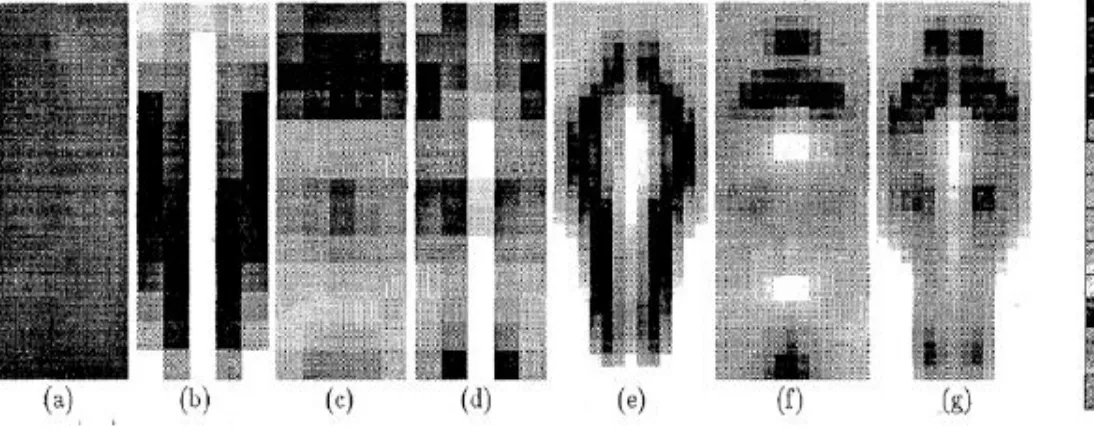
Pedestrian finding
■ many pedestrians look like lollipops (hands at
sides, torso wider than legs) most of the time
■ classify image regions, searching over scales
■ But what are features?
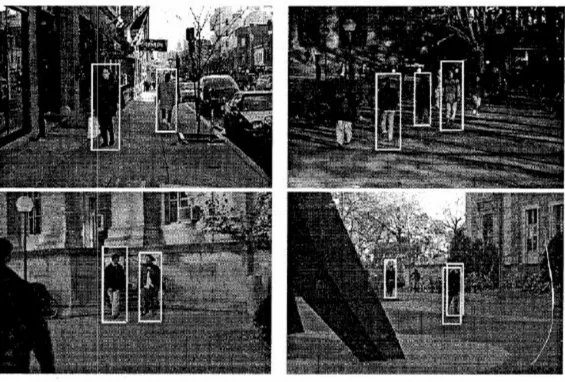
Vision application: Pedestrian finding
Result: Pedestrians found, search over scales
Perception =
‘
The way we see
’
:
Constructivist
vs. Ecologist (1)• Intervention of representations/memories
• View world by constructions from info in
environment / previously stored knowledge
• Don’t see replica/copy of world but model created by
transforming, enhancing, distorting and discarding info / retinal images.
• Effect = constant view of world
Sensitivity to Colour Combinations
(3 Cones sensitivity to colour/light of equal intensity)
Colour Pairs – avoid extremes
Extreme Colour Pairs
Saturated Colour Pairs
Causes of colour and their
appearance
Sensation of color is caused by brain.
■ Some ways to get this sensation include pressure on eyelids,
dreaming, hallucinations, etc. Main way to get it is response of visual system to presence/absence of light at various wavelengths.
Color appearance is strongly affected by (at least):
■ other nearby colors,
■ adaptation to previous views ■ “state of mind”
Background Colour and
Apparent Brightness and Size
Colour selection can effect presentation of info
■ Colours look brighter and larger against black
STROOP EFFECT
(Colour naming is affected by more than just physics)
Read ALOUD and FAST 1) colour names of XXXs
2) colour names of RHS (word/colour same) 3) colours of RHS
Colour Appearance and
Surrounding Colours (1)
Which is most appealing?
Why?
Colour Appearance and
Surrounding Colours (2)
Grey figures ARE same
Contrasting backgrounds
affect perception of colours
Guidelines for Use of Colour in Applications:
Visual Density & Balance
■
How `tightly packed’ text is on screen
■
Measure of amount of ‘White Space’ in relation
to amount of text
■
High density = lots of text and little white
space
■ More difficult to read
People perceive patterns/structures in displays
Visual and Other Coding
■ Differing Intensity (brightness, lightness)
■ Shape e.g. box frame (recognise/pickout)
■ Colour and/or shading
■ Underlining (not recommended in printed text – can
slow reading)
■ Character
size
andfont
■ Movement e.g. ‘micons’Causes of color and their
appearance
The sensation of color is caused by the brain.
Color appearance is strongly affected by (at
least):
■ other nearby colors,
■ adaptation to previous views
Colour
Attracts
Eye
:
■ Old PCs didn’t have power/RAM to use colour; Falling costs
■ Colour on computer screens?
■ Aesthetically pleasing (prefer to Black/White)
■ Improve human efficiency by adding extra coding dimension
■ Easier to find / distinguish e.g. search for ‘targets’ - characters, words etc ■ Memory better
■ Provides (useful) redundant coding e.g. Standard background colour for
screens
■ Limited advantage over monochrome display – only add
colour to enhance interface – should function without it
Value of Colour in
(Mainly) Text Screens
■ Help user search/distinguish between items ■ Used to segment screen into related info
■ Relates separate fields of info
■ i.e. same type = same colour
■ Used to Categorise e.g.
■ Actual and projected figures ■ More or less recent data
■ Caption or data field
■ User or computer provided data
Guidelines for Use of Colour -
Screens Containing Mainly Text (1)
■ Don’t use too many colours (<4/5)
■ Use colour coding to support user’s task (not hinder)
■ Identify similar instances
■ Exceptional instances e.g. warnings (bright to emphasise) ■ Common coding scheme
■ Green - normal or OK ■ Orange - caution
■ Red – problem/danger/hot
■ No universal/multicultural interpretations of colour
■ in chemical plant, red colour might just mean hot
‘Optimal Colour Combinations’ chart
Lecture 1: Review
■
HCI and Cognitive Frameworks
■
Perception
■
Attention / Memory
■
Knowledge / Conceptual Models
■