GRAMAP: THREE STAGE GRAPHICAL PASSWORD
AUTHENTICATION SCHEME
S.RAJARAJAN #1, M. PRABHU#2, S. PALANIVEL #1, M.P.KARTHIKEYAN #2
1Assistant Professor, Department of Computer Science and Engineering, SASTRA University
2Assistant Professor, Department of Computer Science and Engineering, SASTRA University
E-mail: 1{srajarajan, palanivel}@cse.sastra.edu, 2{prabhu, karthikeyanmp}@ict.sastra.edu
ABSTRACT
Computer systems employ user authentication as their primary means to protect system resources from unauthorised users and malicious attacks. Especially when multiple users share a set of systems and resources, effective authentication is very much required. Over the years, several authentication methods have been developed. The most commonly used method is the textual password based authentication. Users are required to choose a text comprising of alphabets, numbers and symbols. Once passwords are registered with the system, users need to recall and submit it each time of their login. Even though textual passwords are simple, they are vulnerable to many kinds of attacks. They are also cumbersome to be remembered. There are also biometric schemes that are based on user’s physical characteristics. They need expensive devices to implement. Recently images based graphical password schemes have received the attention of researchers. Human being’s ability to remember images is well established. So in this paper, a new graphical password scheme based on geographical maps is proposed. The proposed scheme has got three stages of authentication. Depending upon the level of security desired, users could opt for one or two or three stages. After the initial password creation, users could increase or decrease the number of stages at any time and they could also change the selected password in any particular stage. User studies were conducted on the proposed system to test its usability and memorability.
Keywords:- Authentication, Textual Passwords, Image Password, Graphical Passwords
1. INTRODUCTION
Security of computer systems and its resources is both a hardware and software issue. The physical protection of the systems is needed to protect against stealing, misusing, mishandling and damaging of system parts and hardware resources. But what is more difficult to tackle are the attacks at the software level. These attacks are aimed at causing loss of confidentiality, integrity and availability of system resources. The attacks on systems are classified into:
• Exposure This is when an insider reveals
the confidential and sensitive information to
outsiders. This could even happen
accidently due to hardware and software errors.
• Interception This is a very common attack
in Internet and other computer networks. A hacker manages to gain access to the communication happening between two
parties. Email capturing is an example for such an attack.
• Inference This happens by an adversary
observing the pattern of communication and
thereby gradually reconstructing
confidential information. Traffic analysis is a common attack in networks.
• Intrusion An unauthorized person getting
into the system by breaking its access control mechanisms to steal sensitive information.
They are classified based on the password entity. They are:
1. Knowledge based passwords: In this
type, users are expected to remember some information which they supply at the time of authentication. Only if it match with the
stored information, entry permitted
otherwise it is declined.
2. Token based authentication: This is with
the help of some physical object acting as an authentication proof. The person who holds that at the time of authentication will be treated as legitimate user and is allowed to proceed. Bank cards are of this type.
3. Bio-metric authentication : Here too
some physical object is used to
authentication, but unlike the token based authentication, this one is part of the user’s body. It could be the user’s finger prints, eye lids, voice etc. The advantage of this authentication is that it is more convenient for the user since no special effort is needed to carry them or to safe guard them.
4. Behavioural-biometric authentication: In
this scheme, some behavioural
characteristics of the users utilized for authentication. User’s ability to repeat the
actions is used for verifying his
authenticity. Signature authentication and keystroke dynamics are few examples.
5. Location based authentication: The
presence of the user at a required location may sometimes be used for authenticating him. GPRS based systems facilitate the location detections of users.
5. Hybrid authentication: Today there are
more security threats faced by systems. The use of any one particular method is less effective against fierce attacks of attackers. So nowadays multiple schemes are combined to make it more difficult to challenging to overcome.
Among these schemes, knowledge based schemes are very common. Even when other schemes are employed, an approach based on knowledge based scheme usually added to strengthen it. A common way of implementing knowledge based authentication is by making use of passwords. A password is nothing but a text of few characters. They are usually made up of alphabets, numbers and special symbols. But most of the current systems insist on choosing a password consisting of all the three types of
characters. Sometimes it is even mandatory to include one or two upper case letters. The reason for enforcing regulations on choosing passwords is that they are vulnerable to attacks. The common attacks against text passwords are shoulder surfing, keyboard logging, dictionary attacks and guess attacks by persons known to the original user. Besides these attacks, another common problem with text passwords is people’s difficulty in remembering these passwords. So sometimes the actual users fail in the authentication by providing incorrect password value. People also experience problems due to case sensitivity of passwords. A letter to be typed as “g” is wrong if it is typed as “G” by mistake. Selection of weak passwords is another common problem [1]. People have a tendency to use their name, data of birth and terms related to them like nationality, home town, and favourite celebrities etc. as part of their passwords [2].
Graphical passwords are an alternate to textual
passwords. They are generally termed as
recognition based passwords. In this, the system shows some collection images aimed at causing the user to recall the selections made during initial registration. They have many advantages over textual passwords. First and foremost, human beings have got superior ability to remember and recall pictures [3]. People find it more interesting to go through image based authentication due to the colourful and attractive images that are used as passwords. Generally the graphical password schemes do not involve typing by the keyboard. So the attack of keyword logging wherein a spyware program captures the keyboard entries to retrieve the password typed by the user is eliminated. Graphical passwords are also apt for mobile devices with touch screens and the devices without keyboards. In spite of the numerous advantages, graphical passwords suffer from few drawbacks. They are potentially susceptible to few attacks. The various attacks that could be made against graphical password schemes are:
• Shoulder Surfing: This refers to attacks in
which the attacker tries to acquire the password details by observing the password entry of the actual user. This could even be carried out through secret camera recordings. This is more serious problem in public environments and crowded places. [4]
• Brute force attack: In this attack, the attacker
selections one by one until the original password is revealed.
• Mouse loggers/Mouse trackers: There are
types of malwares that secretly enter into the systems and run without the knowledge of the users. They capture and record the mouse actions of users. These details are retrieved latter to find out the click points meant for the password entry [5].
• Hotspots This is a problem with schemes
which require the users to click on specific regions of images as a way of making their passwords. It is possible that users tend to select the predictable regions which are attractive, bright, unique or more familiar. Attackers use this weakness to trace the clicked regions.
• Social-engineering attacks: This is done
by capturing the password details through
social interactions like fake emails,
telephone calls, SMS requests etc [6].
A stronger graphical password scheme needs to withstand these attacks. Another typical problem with many of the graphical password schemes is the difficulty associated with the memorablity of them. Since most graphical password schemes involve users selecting a number of images in sequence and selection of a series of coordinates within the images, users tend to forget them very easily. In this paper, a stronger graphical password scheme which is also memorable is proposed. Our scheme makes use of maps of continents and countries. Since people are more familiar with geographical locations and they are experienced with the navigation of locations with the help of maps, the memorablity of this scheme is high. We have also introduced the idea of multiple levels of user authentication with the users having the option to choose the number of levels appropriate for their security requirements. Those who desire the highest level of security would opt for all the three levels. Those who prefer moderate security strength with less time taken for authentication would choose one or two levels. To our knowledge, this is the first such scheme with multiple optional levels of security. The rest of the paper is organized like this. Section 2 reviews some of the previous research works, section 3 provides a description of the proposed scheme, section 4 discusses the experimental results, section 5 discusses the advantages and finally conclusion in section 6.
2. RELATED WORKS
There have been plenty of research proposals on graphical password scheme. Variety of approaches for authenticating users based on images has been presented. In an approach called Click Passwords [7]. In this the users have to select few arbitrary points on the picture. Then for the authentication, they have to repeat the selections in the same sequence. To ease the pressure on the users to precisely reselect the same points, a tolerance limit is provided. In another technique named Draw-a-secret [8], the password is the free-form picture drawn by the user on a two dimensional grid. It has the difficulty that the users have to adhere to the drawing rules. A graphical password scheme that is resistant to shoulder surfing relies on the ability of people to form and remember stories [9]. Here, the users have to choose a set of images in a sequence and should develop a story based on the images. This will help them to choose the same images again during authentication based on the story.
Yet Another Password [10] is a scheme in which drawing by the user is treated as their password. PassPoints [11] is a scheme in which users have to choose multiple points on an image in a particular sequence. In this also there is a tolerance limit provided. But this scheme and many other schemes which are based on the idea of users clicking points on an image, suffer from the hotspots problem. There are schemes proposed to overcome this problem, but such schemes lack the usability qualities. They are generally tedious and time consuming to complete the authentication process. There is another interesting scheme based on 3D environment [12]. In this scheme, users will have to navigate through a three dimensional environment identifying the items over there. This scheme was specifically proposed to protect systems resources from unauthorised accesses. Though effective, this requires more computing power for processing three-dimensional content. An authentication scheme incorporating zooming of images was developed in [13].
approach based on drawing, Goldberg et al. [16] liberated the users to draw any object on a touch screen. Perhaps the only world map based authentication scheme that seem to have been proposed is the one called PassMap [17]. In this scheme users are shown the google map on their screen. Then they need to use the zoom facility to select two points in any geographical locations of their choice. This becomes their password. Because this schem uses google maps in its implementation, it is not usable in systems without Internet facility or google map support. Since google maps is a third part tool, it can not be fully integrated into the system by adjusting it according to our requirements. This scheme is not resistant to shoulder surfing attack which is the major problem to graphical passwords. Nevertheless, this scheme have got good memorability due to the usage of map for the password mechanism.
In this section, we reviewed a number of existing schemes proposed by various authors. We noticed that many of those schemes suffer from poor usability and memorability due to their complex password computation mechanisms. In order for a password scheme to be accepted by users, it needs to be not only offer high security but also need to be usable. Otherwise users would
develop dissatisfaction and disinterest in
participating in the authentication process. One of the ways to improve the usability is to carefully choose the types of images. Images with which people are more familiar in their day to day life are better candidates than some random images. Second observation made from the existing schemes is that the schemes offer a fixed level of security. So a scheme which has flexible security strength and allows the users to choose their required security level is desired. Based on these observations, the proposed scheme is designed.
3. PROPOSEDSCHEME
3.1 Overview of the Three Stages
In the proposed scheme GraMap, there are three stages of authentication. Initially at the time of enrolment with the system, users need to choose the number stages that they wish to include in their password system. They may choose between one, two and three stages. The users will be required to go through that many stages each time they attempt to login. But users may alter the number of stages latter. They may either increase the stages or decrease the stages as per their convenience. But this change is permitted only after their successful authentication based on the current selection. At the
completion of the authentication process, system would show them the option for the change of password. The password change may be employed either to revise a particular stage by changing the password selection in that stage or to add/remove an entire stage. The details of authentication mechanism in the three stages are explained next.
3.2 Stage 1- Map Navigation
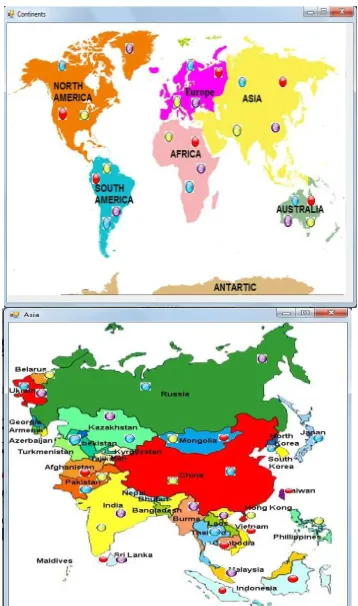
In this stage, users are presented a map comprising of seven continents of the world. Each continent consists of four gateway points which are presented as four buttons in four different colours. Although different colours are used within one continent, the same four colours are used across the seven continents. Users have to choose a particular continent and need to click on one of the gateway points located on that continent. They are required to remember their selections, both the continent and the gateway points. The usage of gateway point selection acts as an additional level of security. It also prevents users from clicking at borders leading to confusions about the continent that the user indented to choose and what was actually chosen. The unique colour of each gateway point helps the user to easily remember their selection. So they just need to remember the continent name and the colour of gateway point they selected. After the successful completion of continent selection, the appropriate map for that continent will be shown next. Users would see a map of all the countries pertaining to that continent on their screen. Now each country has got two gateway points in two different colours. Again a selection of country and an gateway point is required. In the last level of this stage, a map of the selected country is displayed. Now there is only one gateway point on each state. Clicking of a gateway point completes stage 1 and no more maps are shown. The whole selection has to be repeated during authentication.
gateway point values are concatenated and the final value stored as password into the table. For example, if the password stored is 112012, then only by precisely following the same gateway points that one could regenerate the correct password. Storing only a number also saves memory and reduces processing complexity. This stage is depicted in figure 1.
Figure.1. Location Selection from Maps for Continent and Country with Gateway Points as Coloured Circles in
Stage 1
3.3 Stage 2 – Image Selection
The second stage of password protection is optional and is displayed only if it was opted by the user. In this stage, a screen with a randomly picked image is shown. Users need to choose an image of their choice. If they do not prefer the present image displayed, they may navigate to other images using the forward and backward buttons. Once they decided to choose an image, they just need to click on the ‘Choose’ button provided at the bottom of the image. This confirms that the current image is selected to be the password image for the user. This concludes the second stage of authentication. In this stage, a clue to the users for verifying the correctness of their password entry in the previous stage is provided. In case if the user had wrongly
chosen the continent or country or state, the second stage will not be shown to him as it indicates that this is not the actual user and must be an attacker. But if the user correctly chosen the locations but gone trough the wrong gateway points, then the second stage will be available but the actual password image of the second stage will be excluded from the image collection. This would indirectly convey the user that a wrong selection was made with one or two gateway points and so he need to repeat stage 1. But this does not help an attacker who does not recognise that the actual image is missing. The screen shot of stage 2 is represented in figure 2.
Figure 2. Image Selection in Stage 2
3.4 Stage 3 – Click Points Selection
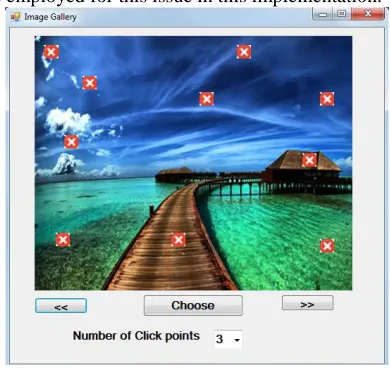
This is last stage in the authentication process. Again this is an optional stage. In the previous stage, the user would have chosen an image as his password image. Now in this stage, user should select one or few random points on that image by clicking at arbitrary locations. The number of click points is decided by the user. The minimum is one and the maximum is five. The actual number of click points is selected by using the combo box provided under the image. Fig.3. have an image of this stage. Since the number of click points is not fixed and it is as per the user’s choice, this becomes an additional level of security. An attacker needs to know both the positions of the points as well as the number of points to select.
[image:5.612.311.515.264.456.2]on points that are slightly away from the actual positions but are within the tolerance range. But it is still troublesome to the users. So a new technique is employed for this issue in this implementation.
Figure 3. Image with Hint Icons on in Stage 3
We provide something called “Hint Icons” on the image exactly at the actual click points. But there would be additional hint icons at random locations. For example, when there are two actual hint icons, eight additional icons are displayed. The actual user takes cue from the hint icons and clicks the needed ones. Here too the success of previous stage is linked to the correctness of hint icons shown. If the user had wrongly selected the image in the second stage, the hint icons are loaded in completely wrong positions excluding the correct points.
4. EXPERIMENTAL RESULTS
To evaluate the proposed scheme, we conducted a lab test of on the prototype of our
scheme. For this purpose, a complete
implementation with all the features as provided in section II was implemented. That was developed in VB.Net under Visual Studio 2010. A database for storing the user id and the password information was developep. The maps required for this implementation were gathered from the Internet. The maps were selected such that they are clear, same sized, colourful, visually appealing and are consistent. The images to be used in the second stage are also collected in the same way. After the implementation was over, a preliminary test was conducted on the software to verify its proper functioning and to identify any undetected mistakes in it. Then it was installed on a desktop system in the laboratory. The important aspect of this test is
the role of participants who are going to conduct the evaluation. Sixty students of the university who were pursuing the engineering courses were enrolled as participants.
We proposed for three phases of evaluations at a gap of fifteen days. After a detailed explanation and demonstration of the software, the participants were asked to create their user ids and passwords. In order to perform the test thoroughly, we instructed them to choose all the three stages
mandatorily. Immediately after the initial
registration, the first phase of user test was conducted. The details of the participant’s experiences during the initial sign up were noted down in a registry. During the second and the third phases, participants were presented the system again and were asked to authenticate themselves using their user ids and passwords that they created previously. The success rate of the tests was gathered. The summary of the test results are presented in Table I. Fig. 4 is the graph based on those values. The participants were presented a questionaries to learn their experience with the scheme and its idea. The results of the questionaries are given in Table II.
At the end of the experimental study of our scheme, the results vindicate our claims that our model has superior memorable and usable qualities than many of the existing models. The usage of the maps for authentication was highly appreciated by the participants as it drastically improves the memorability of the password.
Table 1: Success rates of the experimental evaluation
with 60 participants
Stages 1st Test 2nd Test 3rd Test
Stage1 91% 96% 96%
Stage 2 83% 90% 88%
[image:6.612.325.513.561.730.2]Stage 3 80% 88% 83%
Table 2: Summary of response of participants to questionaries
Queries Positive
Responses
Overall experience with the system was satisfactory
58/60 (96%)
Have experience with some other graphical password scheme before
60/60 (100%)
Found this easier & convenient than text based scheme
60/60 (100%)
Confident about the security provided
57/60 (95%)
Impossible to predict the password by someone who know them well
59/60 (98%)
Interesting to go through this authentication than non-graphical authentication
60/60 (100%)
incorporated into their existing systems
Like the idea of choosing number stages of authentication as per their wish
60/60 (100%)
Figure 4 Success rate of user evaluation
5. DICSUSSION
With the objective of developing better a graphical system that is memorable, usable, secured and likable for the users, the proposed scheme of GraMap was conceived. Taking into account the different levels of security requirements each user would expect from their password system, we have combined three password schemes into our scheme as three stages. We had also added the flexibility that the users may increase or decrease the number stages dynamically according to their new circumstances and requirements. We also ensured that the proposed scheme also remains guarded against possible attacks. The following are the protective measures attached into our scheme to withstand attacks:
• Three stages of authentication – Since
there are three optional stages of authentication in this scheme, an attacker needs to know the number of levels that the actual user had selected for. It is also unlikely to succeed in a brute force attack without knowing the actual stages.
• Gateway Points in map selections –
While user selecting the continents and countries, there is additional level of security to reduce the possibility of shoulder surfing. Users need to click one of the available gateway points present on the area they wish to select. Since these icons are tiny and are visible only within a small distance, the possibility an attacker observing the selection of gateway point is very remote.
• Image selection – In stage two, a user
need to correctly select the image associated with his password from a collection of images. The order of the images varies each time and so it not predictable based on the order of images. We have also included the idea that in the occurrence of wrong password entry in stage 1, the original image not provided in the image collection.
• Click Points – Users are required to
know the numbers of click points as well as the sequence of those click points on the image. An attacker can not gain the knowledge of these details. Due to the various security measures that are incorporated into the system as listed above, the strength of our graphical password scheme is superior. We have also added the user friendliness into our scheme by using maps, coloured gateway points and hint icons.
6. CONCLUSIONANDFUTUREWORK
A new graphical password scheme with three stages of password authentication was proposed in this work. Among the three stages of the scheme, the first stage is mandatory. But the other two stages are optional and it is up to the users to include them into their password system. The first stage of authentication is based on the user’s ability to navigate to a specific location with the help of a series of maps. It moves from the continent level to the level of a country and ends with the state in the country. The second stage is about the selection of an image correctly from a gallery of images. The third stage involves the clicking of few points on the picture. The
experimental analysis conducted on the
implementation and data collected through the questionnaires showed the proposed scheme is suitable for usage and it has adequate security protections.
for the whole authentication process to find whether it is within the user’s tolerable limits.
REFERENCES
[1] D.Florencio and C. Henrley., ”A large-scale
study of WWW password habits.”, 16th ACM
International World Wide Web
Conference(WWW), May 2007.
[2] Brown, A.S., Bracken, E., Zoccoli, S.
Douglas, K, “Generating and remembering passwords”, Applied Cognitive Psychology
18, 641-651, 2004
[3] A. Paivio, T. Rogers and P. Smythe., “Why
are pictures easier to recall than words?”,
Psychonomic Science, 11(4): 137-138, 1968
[4] Roth, Volker, Kai Richter, and Rene
Freidinger. "A PIN-entry method resilient against shoulder surfing.", Proceedings of the
11th ACM conference on Computer and communications security, pp. 236-245. ACM,
2004.
[5] Goofit, K.,”Picture Passwords Superiority
and Picture Passwords Dictionary Attacks”, 2007
[6] Lin, Phen-Lan, Li-Tung Weng, and Po-Whei Huang.,”Graphical Passwords Using Images
with Random Tracks of Geometric
Shapes”, Image and Signal Processing,
2008. CISP'08. Congress on, vol. 3, pp.
27-31. IEEE, 2008.
[7] Kirovski, D., Nebojsa J. Roberts, P., “Click
Passwords. Security and Privacy”, Dynamic
Env. 201, 351-363, 2006
[8] Jermyn, I., Mayer, A.., Monrose, F., Reiter,
M., Rubin, A., “The design and analysis of graphical passwords”, Institute of Science,
Bangalore, India, Jan. 1999.
[9] Gao, Haichang, Zhongjie Ren, Xiuling
Chang, Xiyang Liu, and Uwe Aickelin, “A new graphical password scheme resistant to shoulder-surfing.", Cyberworlds (CW), 2010
International Conference on, pp. 194-199.
IEEE, 2010.
[10] H. Gao, X. Guo, X. Chen, L. Wang, and X. Liu, “YAGP: Yet another graphical password strategy”, 24th Annual Computer Security
Applications Conference, ACSAC08,
California, 2008, 121-129.
[11] Wiedenbeck, Susan, Jim Waters, Leonardo Sobrado, and Jean-Camille Birget, “Design and evaluation of a shoulder-surfing resistant graphical password scheme”, Proceedings of
the working conference on Advanced visual interfaces, pp. 177-184. ACM, 2006.
[12] Fawaz A Alsulaiman, Abdulmotaleb El Saddik, “A Novel 3D Graphical Password Schema”, IEEE International Conference on
Virtual Environments, Human-Computer
Interfaces, and Measurement Systems La Coruña - Spain, 10-12 July 2006
[13] Kumar, Varun, M. K. Gupta, Ashish Chaturvedi, Anuj Bhardwaj, and Manu Pratap Singh.,”Click to Zoom-Inside Graphical Authentication”, Digital Image Processing,
2009 International Conference on, pp.
238-242. IEEE, 2009.
[14] Passfaces. http://www.realuser.com Last
accessed: December 1, 2006.
[15] A. F. Syukri, E. Okamoto, and M. Mambo,
“A User Identification System Using
Signature Written with Mouse”,Third
Australasian Conference on Information Security and Privacy (ACISP): Springer-Verlag Lect. Notes in Computer Science (1438), 1998.
[16] J. Goldberg, J. Hagman, and V. Sazawal,
“Doodling Our Way to Better
Authentication:, Proceedings of Human
Factors in Computing Systems (CHI),
Minneapolis, Minnesota, USA., 2002. [17] Sun, Hung-Min, Yao-Hsin Chen,
Chiung-Cheng Fang, and Shih-Ying Chang,
"PassMap: a map based graphical-password authentication system.", Proceedings of the
7th ACM Symposium on Information, Computer and Communications Security, pp.