Issue No. 60, June 1983 COPYright © 1983 by DATAPOINT Corporotion. All Rights Reserved. For Internal Use Only
D
A T
A
P O I N T
Zenith ARCNET
L
ocal
Area Network
Driver/Receiver Announced
DA T APOINT has recently announced that the LAND hybrid component for the DAT APOINT® ARCNET™ RIM (Resource Interface Module) designed and manufactured by Zenith under a non-exclusive license will be commer-cially available from Zenith CRT and Components Operations.
A complement to the RIM and transceiver chips already available through Standard Microsystems Cor-poration, the LAND replaces 30 discrete components. In addition, it provides the link interface between the controller and the transmission cable in the interface module for the
ARCNET network.
Designed to facilitate the manufactur-ing and quality control process as well as to reduce costs, the new line driver/receiver hybrid provides the cir-cuitry required to interface the con-troller to the baseband coaxial serial data link. In a 1 3/8" by 2"
compo-ARCNET Interface Module
Custom vendor _ _ _ design
Available from
<:
Standard
'-::====:::
Microsystems
r-Available from Zenith
nent, the LAND provides the
necessary noise immunity and filtering for interference-free transmission on the coaxial cable.
With the Standard Microsystems Cor-poration RIM chip and the new Zenith LAND, only the design of the pro-cessor interface is required to take ad-vantage of the ARCNET networking technology. The public availability of the new LAND hybrid is yet another step forward in making the ARCNET network easily accessible by non-DA T APOINT equipment. Zenith will feature the LAND hybrid at the Na-tional Computer Conference in Anaheim, California in May.
ARCNET
DA T APOINT first introduced the ARC® (Attached Resource Computer® ) local area network in 1977. Since then more than 5,000 DA T APOINT local area networks have been installed worldwide. Since
With the Standard Microsystems RIM (Resource Interface Module) and Transceiver chips and the new Zenith LAND (Local Area Network Driver), any vendor can take advantage of the proven DATAPOINT ARCNET local network by designing only the processor interface.
1981, when DATAPOINT made the RIM (Resource Interface Module) chip commercially available, vendors like Nestar and Tandy have taken advan-tage of the ARCNET technology to provide networking for IBM personal computers, Apple II and III computers, and the TRS-80 Model II, the TRS-80 Model 12, and the TRS-80 Model 16 computers.
With the new Zenith LAND, more ven-dors are expected to take advantage of the proven DA T APOINT local area network. Zenith CRT and Components Operations is a leading manufacturer of CRT displays, switching power sup-plies, and other high technology com-ponents for the electronics industry.D
Bolland Named Vice President, Sales/Systems
David H. Holland has recently been appointed Vice President, Sales/ Systems for the company's Office and Computer Products Group. In his new position, Holland will be responsible for
domestic sales and systems organiza-tions, educational and customer train-ing activities and national accounts. Holland comes to DA T APOINT from Xerox Corporation, where he held various sales, marketing and sales management positions. Joining Xerox in 1965, his most recent position was midwest regional sales manager for the Business Systems Group.
DATAPOINT Marketing News
ulliplan 1.2 Available
Multiplan, the DA T APOINT financialmodeling package, has been enhanced and is now available for RMSTM,
DOS.DIDOS.G, and DOS.H. The RMS version, MUltiplan R 1.2, was released with RMS 1.10, while the DOS-based versions-Multiplan D 1.2 and Multiplan H 1.2 have just been released. The
Model Description
Multiplan R 1.2 software (RMS)
Multiplan D 1.2 software (DOS.D, DOS.G) Multiplan H 1.2 software (DOS.H) Multiplan R Manual 1.2
Multiplan D Manual 1.2 Multiplan H Manual 1.2 MUltiplan R Kit (50758 + 61300) Multiplan D Kit (50757 + 61300) Multiplan H Kit (50731 + 61300) Multiplan Quick Reference Guide Multiplan Brochure
Multiplan Mailer
In addition, Multiplan now releases all of the temporary storage space used during expression evaluation, thereby avoiding some of the previously unwar-ranted "insufficient memory"
conditions.
A new COpy option allows a cell VALUE to be exported, as well as cell
Code Price
9873 9854 9874
50758 $25.00
50757 25.00
50731 25.00
50770 25.30
50771 25.30
50772 25.30
61300 .30
61415 1.35
61326 .25
·Media must be ordered separately. There is a one-time software license fee of $1500 for RMS Multiplan, unless the order
for the software accompanies an order for a DATA POINT processor. Monthly maintenance for RMS Multiplan is $20. There is no software license fee or monthly maintenance fee for DOS Multiplan.
new version contains many new features, functions and enhancements over the original DOS-only Multiplan 1.1.
New Functions
Functions added to the newly released 1.2 versions include standard deviation, factorial, compound interest, internal rate of return, sum-of-years digits and double-declining balance methods of depreciation, text centering and several Boolean functions. Some of the
enhancements in Multiplan 1.2 address the spreadsheet size and memory limitations of version 1.1. The newly released software provides an addi-tional 1K of work space, increasing the potential sheet size from 18K to 19K.
CONTENT. Copying with values takes less space and permits a user to export values to another sheet and then break the external link. Also, more informa-tion about named areas and supporting worksheets is now provided when PRINTing with expressions. Ex-traneous import and export information can be identified and removed, thus saving space.
Additlonal Enhancements
The linking process in Multiplan has been enhanced. More about the power-ful linking feature will appear in an up-coming issue of DA T APOINT Marketing News, but here are highlights of the newest version. Ex-port specifications are defined when cells or groups of cells are NAMEd, combining two previous steps into one.
Also, EXTERNAL OPEN now allows convenient unlinking of sheets. There
is no limit to the number of sheets which one worksheet can support. A TRANSFER LOAD of a worksheet will reflect the changes made to these immediately supporting sheets. There is no defined limit to the number of levels of supporting worksheets, but each sheet maintains information up to 26 levels of its supporting sheets. TRANSFER UPDATE recalculates
and updates through these 26 levels of
"An EXTERNAL LIST now
displays information on
whether or not supporting
sheets are up to date, along
with the relationships
between worksheets."
worksheets. An EXTERNAL LIST now displays information on whether
or not supporting sheets are up to date, along with the relationships bet
-ween worksheets. TRANSFER SAVE now performs a "failsoft" operation by writing a temporary file.
Several enhancements have been made
to the PRINT function. Multiplan 1.2 saves print margin specifications in each IMOD file. Either a print file or a text file may now be generated, and the new version allows non-contiguous areas to be printed, such as column one, column four, and column six. Complementing the new Multiplan software is new user documentation.
Multiplan manuals for each version are available, as are kits which contain the manual and a Multiplan Quick
Reference Guide. Here are the model codes and prices for Multiplan soft
-ware and documents.D
DATAPOINT Marketing News 3
The 962112 printer provides a high degree of functionality and reo
liability. Other features '//lake this printer an ideal output device for '//Iany applications.
H e Schedule Update
There are four product additions in the remanufactured section of the new U.S. Price Schedule. These include the 9022, 9020, 9605 and 5556 systems. Maintenance, installation and cost for each item has been listed below for
your convenience.
There are also a number of deleted products which will be handled by
special quotes through the Pricing
Department. If you require additional
information, call Mike Hoke, Tradi· tional Equipment Marketing, at extension 5119.0
Mike Hoke Ext. 5119
Remanufactured Equipment -- Product Additions
Model Code Maint. InstalL
5566 188 200
9605 16 40
9020 2 25
9022 14 25
Color Business Graphics
Enhances Sales
Presentations
If you have a Color Business Graphics
system available in the office, then you
have a valuable sales tool at your disposal. There are numerous
presenta-tions available for use on the CBG system. The following are some of the
presentations that have been prepared on CBG:
• The Datapoint Corporate Overview
• 8600 Hardware Configuration Guide • 1560 Sales Presentation
• CDR Sales Presentation • CBG Sales Presentation • LDCS Presentation • ACD Presentation • Multiplan
• Networking
• REP/OEM Program
List 4-10 11-25 26+
5200 4940 4836 4680
1550 1473 1442 1395
475 451 442 428
495 470 460 446
If you're giving a sales presentation
within the office, you can use the CBG
monitor as your presentation medium. You can "customize" the sales presen -tation by including the company's logo and financial data charted from their
annual report. Use font 5050 to draw proposed hardware configurations. If your presentation is at a customer site,
you can output the information to slides.
By using CBG to prepare these sales
presentations, you will increase the customer's perception of your
profes-sionalism while emphasizing the fact that DA T APOINT is indeed the leader in integrated electronic office systems.
No other competitor has a product
comparable to the CBG. It may be just the edge you need to close that sale.
For additional information, call Debbie Pena, Product Line Management, at extension 5327.0
Debbie Pen a Ext. 5327
For Internal Use Only
Product
Spec
for 160
CPS
Matrix
Printer Revised
The 962112 printer product specifica· tion sheet (#60793) has been revised
and is currently available through Soft-ware Services. Many of the changes made to this document pertain to the command options for character control
functions (i.e., expanded fonts and compressed print).
New users of the 962112 printer, par-ticularly those utilizing the 0061 ex -panded font option, should obtain the 1983 revision of this document. All systems engineers responsible for
sup-porting 962112 installions should ac
-quire a copy also.
The 962112 160 CPS matrix printer is a mature product in the DA T APOINT
printer line. It provides functionality and a high degree of reliability. Utili z-ing a 9 x 9 matrix character format, the 9621 offers:
1) expanded font. 2) compressed print.
3) double density printing (near
letter quality).
4) a prom option for creation of
custom design fonts.
These features, in conjunction with a
moderate level duty cycle, make the
962112 an ideal output device for many applications. For example, program development environments and
applica-tions that require printing of shelf labels have found the 962112 to be a very desirable device.
Additional information can be obtained
by contacting Jim Moore, Product Manager (Product Marketing). at exte
n-sion 7151.0
DATAPOINT Marketing News 4
Hub Aids Networking Functions
A lot of print has been devoted to theworkings of the ARCNET local net-work, with little having been said of the "HUB." Everyone probably has a fair understanding of what the RIM controller does for the ARCNET net-work, but the hub is not always fully appreciated for its contribution to the network. Let's look first at the dif-ficulties in tying a number of nodes together in a network.
Whenever a transmission line (an
ARCNET coaxial cable) is terminated, the possibility for a reflection from that termination exists. (A reflection is,
in the simplest terms, a portion of the transmitted energy which is unabsorb-ed at the termination. This unabsorbed
energy can't just go away, so it turns around and travels back towards the transmitter.) If a termination was
perfect, it would be able to absorb all the transmitted energy; unfortunately, the perfect line termination has yet to be built.
To make matters worse, if the line is terminated improperly (we're talking about a situation that's really bad --like the coax being connected to
ab-solutely nothing), reflections can ap-proach the original signal in intensity.
A transmission line was never intended to be tapped (that means intercepting the signal in the middle of the cable).
Attempting to do so usually results in the worst kind of difficulties im-aginable -- severe reflections and
diminishing signal intensity with each
additional tap.
Handling Line Reflections
So what does all this have to do with
our wonderful hub? When a distribu-tion scheme was being considered for the network under development in R&D some seven years ago, the
prQ-blem of line reflections was the number one item on a list of problems to be overcome. If one is willing to live within certain constraints regarding the placement of taps along the cable, it is possible to tap a coaxial cable and
"survive" the reflections. This is what the architects of ETHERNET have done.
Initially, this type of scheme was con-sidered in DA T APOINT Reasearch and Development for the ARCNET local network. It was quickly discard-ed. Instead, the idea of having one or more "hubs" in the system was pro-posed. One of the main requirements of this hub is that each of the ports must look like an "ideal" tap -- that is, the signal quality and strength should
not diminish as the number of ports in-creased, and each port should be able to supress any reflection. A bus exists
internal to the hub, linking all the ports together. Coupling the ports in this manner allows the ARCNET net-work to circumvent the traditional dif-ficulties of a baseband distribution system.
In a nutshell, the hub's operation can
be described as follows:
When a port detects any incoming ac-tivity, the circuitry within the hub in-hibits the transmitter portion of that port and disables the receiver portion of the other ports. This condition is maintained within the hub for a calculated period after the detection of any activity on the port with the in-coming data. (The period is the time it takes a transmitted signal to propogate down 2000 feet of RG62 cable and
reflect back.)
The hub is a very simple means of keeping a baseband communications network functioning at full capacity.
For Internal Use Only
What has been done, in fact, is to turn off the hub receivers during any time that a reflection can occur. A minimum turnaround exists in the RIMs,
guaranteeing that the hub "dead time" will always exist. This sort of scheme
"The very nature of the
hub-type architecture enhances
the ability to isolate a
problem within a system."
can only exist in a network that is con-tention free -- CSMA/CD cannot sup-port a HUB in its architecture.
Isolate Problems
A secondary, although probably more noticable, aspect of the hub architec-ture is its ability to isolate problems. The very nature of the hub-type architecture enhances the ability to isolate a problem within a system. By concentrating all the nodes within a small area (as is done in an ARCNET system), the system troubleshooter has enhanced his ability to analyze a pro-blem many times over.
A lot of time and space can be spent
describing exactly how the hub
ac-complishes these marvelous feats, but
the point I'm really stressing is that the hub is considerably more than a handy way to tie a bunch of coax lines together. It is a very simple, very elegant means of keeping a baseband communications network functioning at full capacity without the worries of proper cable lengths and proper ter-minations. It is as much a part of the success of the ARCNET local network as the token passing protocol carried out in the RIM controller. It is, in every sense, the focal point of the physical network. 0
DATAPOINT Marketing News
Wha
t
the
Competition
Tells Us
When evaluating the industry's
com-petition, there are many sources for in-formation: consultant reports,
articles in newspapers and magazines,
trade shows, advertisements, press releases, annual reports, and company publications.
DA T APOINT participates with seven
other companies (Data General, IBM,
Mohawk Data Services, Pertec,
Raytheon, Wang, and Texas I
n-struments) in a program called EP AI,
Exchange of Publicly Available
Infor-mation. The program functions in this way: each company exchanges two copies of each of their "publicly
available" publications with other
par-ticipating companies. In this way,
DA T APOINT is able to obtain product
specifications, price lists, user manuals,
new product announcements, software
catalogs, customer bulletins, and reference manuals from other companies.
Maintaining Information As a result of the EP AI program, DA T APOINT has excellent files in the Corporate Library on the products of
each of these seven companies. For
companies that do not yet participate in EP AI, financial information, press releases and brochures are requested directly.
As the Corporate Library develops its internal indexing systems, access to the contents of these EP AI materials will be enhanced (beyond filing by pro-duct number). This is an important
achievement, especially when
informa-tion is required on products which DA T APOINT is competing heavily against.
5
EPA I is an important resource for field personnel, both for answering direct questions about competitor products and as a support resource for our com-petitive analyst, Frank Bell, who is available to assist you in evaluating the competition.
Susan Hughes
Ext. 7151
For Internal Use Only
Price Schedule Utilizes
New Codes
For the first time the U.S. Price
Schedule (pink sheets) will include the
use of status codes for remanufactured equipment. Utilizing status codes for all equipment allows Traditional Equip-ment to move the 9504 Card Reader
into status five.
Status five is reserved for remanufac -tured products that have been restricted to specific customers only.
Purchase prices and delivery quota-tions are available on request by call -ing Traditional Equipment Marketing
at extension 5119.0
J.J. Vanderbrink III
Ext. 5119
S
pe
cial Pri
c
es Pro
mo
ted
Traditional Equipment Marketing
(TEM) is presently promoting a special program. This program offers c om-petitive pricing on the following pro-ducts: 1532s, 1536s, 1802s, 1804s, 4520s, 9367s, 9231s, 9232s, 9602s, 9280s and 9260s.
If you are involved in a competitive situation and any of these products can help meet your objectives, we can quote special prices and ASAP delivery dates.
Special bonuses will be paid to SRs,
SSRs, SMRs, AMs and OSMs on
these selected products. These bonuses are in addition to the normal field
in-centives for refurbished equipment.
"TEM Special Project Code 81" must be included on orders for payment of Schedule A Bonuses.
TEM is looking for ways to help meet your objectives. Give us a call at ex-tension 5119.0
DATAPOINT Mm-keling News 6
Serial Prinlers Allach
10
RMS
DA T APOINT offers a wide range of printers to meet speed, duty cycle, and print quality requirements of user ap -plications. This article will take the mystery out of connecting a major subset of these printers (those with "serial interfaces") to both local and remote processors running RMS. When Computer Terminal Corporation (DA T APOINT) introduced its initial desktop computer back in 1972, the DA T APOINT parallel "IIO Bus" was born. This parallel -interface served to connect all peripherals, even the keyboard/screen, to the central pro-cessor for high-speed data transfer. This architecture was continued as the processor and peripheral product line expanded during the 1970s. As technology has progressed, additional interfaces have developed to increase
connection distances and reduce cable sizes and cost. The interface of par-ticular interest to our printer discus-sion is the "serial interface."
"Serial" implies that data characters are serialized and transferred bit by bit rather than being presented one character at a time as in the parallel interface. The serial interface im -plemented by DA T APOINT printers (EIA RS-232C) permits data transfer at approximately 960 characters per sec-ond at distances up to fifty (50) feet over small, inexpensive "twisted-pair" cable. The chief advantage of serial printers is the freedom of physical placement given by this increased cable length, and the reduced cabling size and cost. The parallel interface is still needed when higher transfer rates are required (i.e., 900 LPM printer).
I-~
Serial Printer
8800
MPCA
3800 ICA
For Internal Use Only
L
o
cal Conne
c
ti
o
ns
Under the Resource Management System, serial printers can be used as "system" printers in exactly the same manner as parallel printers. An RMS
system printer can be used directly by all manner of RMS systems utilities, word processing, Multiplan, user pro-grams, etc. The user simply configures RMS to recognize the serial printer and specifies the connection means and speed. Local printers are generally configured for the top speed of 960 characters per second (i.e., 9600 bits per second), and physically attach to the system as illustrated (Fig. 1).
Processor Interface Options
8600 "KDS" Serial Port (Built-in)
-OR-MPCA Card (Option #0103) 8800 MPCA Card (Option #8806) 6600 MPCA Interface (9462)
DATAPOlNT Marketing News 7
modem/MPX
Multiplexor Application Example (Fig. 2)
Each 8600, 8800, and 6600 MPCA allows four, eight, and eight serial printers to be attached, respectively. Multiple MPCAs can be used if re-quired, up to a physical maximum of three MPCAs. However, the 3800
(3815, 3820) ICA permits only one
serial printer to be attached. 8800, 6600, and properly equipped 3800 systems can also attach parallel printers if required.
So now that you've got a 35 CPS printer attached to your 8600, how do
you make it print at 960 CPS? You
don't! Instead, the 35 CPS printer in-forms the processor when it can accept more data via a "BUFFER NOT FULL" indicator. The "BUFFER NOT FULL" indicator is cabled to the processor's interface as a "CLEAR TO SEND" signal. All of our serial
"As characters
are printed
and the buffer begins to
empty, the printer raises the
"BUFFER NOT FULL"
indicator
again and the
processor can resume
sending data to the printer."
printers are able to accept a con-siderable number of characters into their "buffer storage" prior to actually printing them.
When this buffer fills, the printer simply drops its "BUFFER NOT FULL" indicator to signal the pro-cessor's software to temporarily s
us-pend transfer of more charqcters. As characters are printed and the buffer begins to empty, the printer raises the "BUFFER NOT FULL" indicator again and the processor can resume sending data to the printer.
Remote Connections
The local RMS system printer connec -tions described above work if the
printer can be placed within 50 feet of the processor. But what if the printer
is across the building or even in another city? To permit the serial data to reach such a remote serial printer
via telephone lines requires additional
equipment -- modulator/demodulators. Modems, as they are known, convert
the serial data stream to and from audible signals that can be transferred by the telephone system. They make
the remote serial printer behave as if it were locally attached ... ALMOST.
Unfortunately, hooking up remote serial printers IS NOT like playing horseshoes. Even though the transfer rate is generally much slower (i.e., 120 CPS) than that of local printers, it still surpasses the print rate of many of our serial printers. This problem is par-ticularly evident when the proportion of paper movement commands (i.e., line feed, form feed) is highly relative
to actual printed characters or when
operator intervention is required (i.e.,
out of paper). With local printers this problem is avoided by using the serial
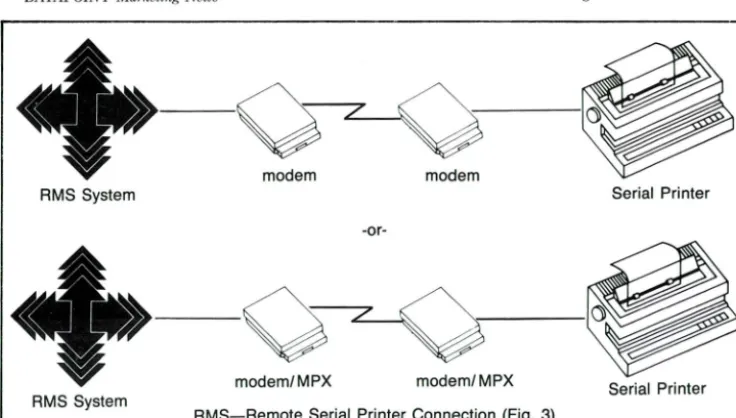
printers "BUFFER NOT FULL" in-dicator to signal "CLEAR TO SEND" to the processor. Unfortunately, stand-ard modems cannot transfer this indicator. (Fig. 3)
Dedicated Lines Never Die
Don't despair, since solutions DO exist!
If the cost of a dedicated communica-tions line can be justified, standard modems can be combined with
non-standard cables to solve the problem. Modems transfer data by altering (i.e., modulating) a carrier tone or signal. The presence or absence of this carrier signal is monitored by the receiving modem, and is provided by the modem as a "CARRIER DETECT" indicator.
Normally this signal is cabled to the processor's interface as "CARRIER DETECT" and when this signal drops,
For Internal Use Ollly
the software effectively "hangs up"
the telephone connection. However, in our case this signal is cabled to the processor's interface as "CLEAR TO SEND."
The remote serial printer's cabling is
then designed to tell the modem to raise/drop its carrier tone as the printer's buffer empties or fills. Specifically, the printer's "BUFFER NOT FULL" signal is cabled to the modem as "REQUEST TO SEND".
"The communications
protocol which drives ANY
serial printer does
not
provide for
correction
of
errors introduced into
the
data as it goes from the
processor interface to
the printer."
Thus, via a little slight of hand (i.e.,
special cables), a remote serial printer can be connected to a processor via dedicated lines and standard full-duplex asynchronous modems (i.e., DATA POINT 9478/9479, Bell 212, etc).
Another possible approach involves the use of third party "black boxes" which fit on the processor/printer ends of the modems and provide large buffer capacity (i.e., 32 to 64K) and magically "pass" the printer buffer status to the
processor. Such devices are relatively
inexpensive (i.e., $300 at each end) and avoid the need for specialized cabling.
One thing that must be considered when serial printers are hooked-up is error control, or more specifically, the
lack of same. The communications
pro-tocol which drives ANY serial printer (whether it is local or remote) does not
provide for correction of errors
DATAPOINT Marketing News 8
RMS System Serial Printer
-or-modem/MPX modem/MPX Serial Printer
RMS System
RMS-Remote Serial Printer Connection (Fig. 3)
Although it is very unlikely, it is possi-ble that loose connections, physical disturbance of the printer cable, elec-trical disturbances, etc., can cause
even a local serial printer to receive (i.e., print) data other than what was sent by the processor's program. While you might find this beneficial if the the printer put an amount of $9347 instead
of the intended $2347 on your check, Accounts Payable would fail to see the humor! For extremely critical data,
overprinting is a consideration. Errors
induced on the first printing would be printed over with different data on the
second pass, thus giving clear visual indication that an error had occurred.
Since the likelihood of a significant in-duced error is considerably higher for remote serial printers, techniques such
as overprinting should be strongly en-couraged when faithful reproduction is
critical. Alternatively, the multiplexor approach described below can be used on the dial or dedicated line to reduce the probability of induced error to the same low level as that of local serial
printers.
Multiplexors to the Rescue Another marvel of technology is the key to solving the dial-up problem
--THE MULTIPLEXOR. A multiplexor (MPX) typically combines the function
of a high speed modem (i.e.,
syn-chronous) with the function of logically
splitting this high transfer rate capability to attach multiple
lower-speed devices such as printers or ter-minals. In the example shown in Figure 2, several printers and
ter-minals are connected to an RMS system via a single dial-up line. De-pending on the sophistication (i.e. $$) of the multiplexor, a remote printer will consume one or two ports on the multiplexor.
The basic principle behind the printer
and processor cabling for multiplexors is to allow the remote serial printer's
"BUFFER NOT FULL" indicator to transfer to and control the processor's "CLEAR TO SEND" indicator.
Numerous advantages are gained by
"Display and print rates can
be improved dramatically, and
error-free transfer of data
is guaranteed."
using multiplexors. Besides reducing the number of communication lines and
modems required to connect a group of
remote users to the system, many multiplexors provide high speed, error-checked transfer to and from these users. Display and print rates can be improved dramatically, and error-free transfer of data is guaranteed (unlike the normal teletype protocol).
Dedicated lines are fine for many ap-plications, but they can be expensive in situations where printer usage is light. What about using the standard
dial telephone network? If you attempt the dedicated line solution for dail-up remote serial printers, the printer can
make the connection just fine.
Unfor-tunately, you cannot make the
pro-cessor's "CARRIER DETECT" signal go away to tell the software to hang up the telephone. Even if you could,
RMS would not disconnect the phone
since it doesn't know that remote serial printers exist! This means that if your user wants to connect remote serial printers to RMS vial dial-up phone lines, he must manually discon-nect the call at the processor end when he's through printing.
It Can be Done
Serial printers CAN be interfaced to RMS, both in local and remote situa-tions. Remote serial printers connected
For Internal Use Only
via dedicated lines require special
ca-bling or "black boxes" to accomplish the connection. Remote serial printers
can be similarly connected via dial-up lines but this will require the user to manually disconnect the call at the pro-cessor end. Multiplexors provide addi -tional benefits in terms of speed and
error correction. More details on multiplexors can be found in the Dispersed Data Processing Handbook (Model Code -61379, pp II 1.11-1.12). More details on cabling can be found in Software Operations News -25, Chapter Seven.D
Terry McDaneld Ext. 7151
New Director for
Guest Services
In case you haven't heard, Guest
Ser-vices has a new Director -- Al Colley.
Previously Director of Customer
Education, Colley brings several years
of customer relations experience to his new position.
Colley will report directly to Jim Whitehouse, who now holds the
posi-tion of Staff Assistant to David R. Fernald, Vice President of Marketing. In this position, Whitehouse will assist Fernald in a variety of marketing func-tions. In addition, he will retain responsibility for the President's and Achievement Clubs.
We are excited about the changes and hope you will continue to give your
support to this department.D
[image:8.627.28.396.22.231.2]DATAPOINT Marketing News 9
Mulli-Volume Copying on DOS.R
Have you ever had the need to copy a
file residing on a 93XX disk system to
a diskette when the file is larger than 1MB? As you know, it doesn't fit.
With the release of DOS.H 2.7, you
have the ability to do that copy. The
COpy command has an option that
allows multi-volume copies to or from diskettes; however, it only works with 93XX disk systems, not diskette to diskette. If you have a file that is in excess of 1MB in size and you wish to copy it to diskettes you can enter:
COpy <filename>, <new filename>;M
This starts the copying process to the diskette; when the diskette is full, it continues the copying to the next diskette that is online. If you want the same diskette drive to be used throughout the copy you simply add a drive specification to the M option.
Restoring to the disk from the diskette is done in exactly the same manner. Specific details are in the DOS.H Users Guide.
Another application of this is for backing-up disks to diskettes. Using LOAD15 is a fast and simple way to perform back-ups; however, if sectors have become locked out on the disk since the last backup, LOAD15 is
unable to properly restore the disk. If
you back-up with the following
pro-cedure, the problem disappears (though it will be slower):
• R'm FILES on the disk with the
output to a file. Edit the file into a chain file by inserting COpy before
each file name, adding a drive
specification to direct the output to
the diskette, and adding the M op-tion to each line. Noe run the chain file. It may be slower, but if sectors
get locked out on the disk you can still restore it from your back-up.
Let's clarify one point. The M option allows any file that may overflow the diskette to be continued onto another diskette. The file does not have to be larger than 1MB, and the diskette the
file is being copied to can even have files already on it. The new file will simply be added to it. You need never
see "FILE SPACE FULL" during a COPY from disk again.D
Darrell Deam
Ext. 5520
Crandell Named Director
of Production Operations
Edward C. Crandell has recently been appointed director, production opera-tions for the company's manufacturing
division. Reporting directly to John Novack, plant manager, Crandell will be responsible for the production and test operations within the plant.
Crandell joins DA T APOINT with 29 years of experience in manufacturing engineering, materials, production and general management. His most recent position was vice president and general manager for a division of Joy
Manufacturing.
A graduate of the University of Arkansas, Crandell has a bachelor of science degree in Industrial Engineer-ing. In addition, he holds an MBA from Oklahoma City University.D
F01· Intemal Use Only
IYITAPOINT
-'
.... ' -,-_ , ,-_ ,.,-_ ... r ,-_ ,-_ w "'... c.o .. "'_ ~'''_'
~~§:"5.~=:='?'--:---.
_'O9!O!00",,_
.", -=="..--:::::-~ _ [, 1 --r::::::J
[
~.-,-=_
..
--1===== 1_,,-, ... _ -~-~
-_ .. _-
--====--
----~
-
-
-
-~ ..;;::;;;;--Purchase
Upgrade
Program Revised
The Purchase Upgrade Program (PUP)
has been revised to show only one (1)
conversion:
Conversion
Type Definition
A Purchased 5500 traded in for
purchased 6600
Conversion Revenue Value $6.000
The Purchase Upgrade Program is
now a straight purchase for purchase program. Please note the new price that is now in effect.
Ordering procedures for PUP will stay
the same. When ordering, make sure code number "06" is designated in the Special Project Code section on the
Equipment Order Schedule (EOS).
Also, write "Purchase Upgrade Pro-gram" in the Special Instructions area on the EOS. This will ensure that the order is being processed properly. In addition, the serial number of the pro-cessor being traded in should be iden-tified on the order.
Customers should be made aware that
Traditional Equipment is on an "as
available" basis; therefore, product
availability may vary day-to-day.
Before quoting lead times for
Tradi-tional Equipment, please call Tradi-tional Equipment Marketing for cur -rent availability. Also, if there is a
delay between quoting lead times to your customer and your customer
ac-tually signing the order, please call again for verification of equipment availability. This will be of benefit to you in the long run and will ensure
customer satisfaction.D
Gerry Mulligan
DATAPOINT Marketing News 10
A Competitive Look
at the Automated Office
During the last two years, we havebeen buried under mountains of press
and trade articles and blitz
adver-tisements announcing the emergence of
such "new" technologies as Office
Automation, Local Area Networks, Multifunction/Multitasking
worksta-tions and Personal Computers.
In terms of user perception and market
share, the leaders in the office
automa-tion marketplace are IBM, Wang and
"Most
of these companies
have made dramatic
announcements stating the
redirection
of their research,
development and marketing
activities toward the
automated office."
DEC, respectively. Competing for
fourth place are DATAPOINT, Data
General, Prime, Honeywell, Burroughs, Sperry, Hewlett-Packard, NCR, and further down the list, Xerox, Four Phase, Basis Four and a host of others.
1\1ost of these companies have made dramatic announcements stating the
redirection of their research,
develop-ment and marketing activities toward the automated office.
A Closer Look
Let's take a look at Office Automation as offered by IBM and DEC. IBM's
statement of direction is probably best depicted with the 8100 Distributed
Office Support System.
The 8100 Series is intended primarily as a local data processing system run in conjunction with large 370-type mainframes in distributed
en-vironments. Its "new direction"
soft-ware is really the key to the 8100 in
distributed situations. Three systems software programs provide office automation functions under the DPCX (Distributed Processing Control Ex-ecutive) operating system. DOSF
(Distributed Office Support Facility) provides local document word
process-ing and storage facilities. DISOSS
(Distributed Office Support System) of-fers electronic mail and filing support
in conjunction with a central host
system and AAACX (DPCX
Automated Administrative Activities)
handles calendar/schedules, telephone messages, sign out/in and scratch pad features.
The 8100/DPCX DOSF/DISOSS/ AAACX processor with at least 768K
of main memory and 58MB of disk is
required to "distribute" office automa -tion abilities to its workstations. The processors range in price from $68,440
to $125,450 and the system software
required comes to about $1200 in mon-thly license and support charges. As is
typical with IBM, a special dedicated
terminal is required for specific
func-tions. The 3732 Text Display Station (at $3628) is required to display text
and access any of 29 embedded control
functions. Of course, if you want to
change the embedded format
con-trolled by DOSF, you will need an 8775 Display Terminal with Interactive Display Text Facility (IDTF). It ranges
from $4,733 to $5,791, depending on
how many ROM programmed utilities
you order with it.
If the user wishes to add more
"distributed processing" capability to his mainframe, IBM will be glad to
supply the 5520 Administration System
For Internal Use Only
which integrates word processing, files
processing and electronic mail func-tions. It also includes the ability to use Displaywriters and Personal Computers
as workstations. This is needed since the 5520 does no data processing and supports no programming languages. The price for the 5520 processor
averages $50,000 plus $389 a month
software license fee.
Now, the popular Displaywriter ($6,500) and Personal Computer
($3,500) workstations can be added.
"Like
IBM, DEC has
attempted to get a free ride
into the automated office by
using its existing base of
pre-office automation
computers as a ticket."
What is the cost per workstation? About $15,000 (if you already have an S-370 mainframe and $150,000 if you
don't) for a 16-workstation setup, without printers or disk storage.
Other Alternatives
Now let's look at DEC, since we can't
afford IBM's solution to the integrated,
distributed office. Like IBM, DEC has attempted to get.a free ride into the automated office by using it's existing
base of pre-office automation com-puters as a ticket. In previous years,
DEC has introduced several standalone attempts at wproviding machines for the office, most of which were less
than successful. Since it's statement of
redirection was made in 1981, DEC has decided on two ways to integrate
the office; Professional microcomputers
and/or office automation software.
DATAPOINT Marketing News
improved versions of the VAX* soft-ware offered previously. The package
is aimed at professionals and managers. Included are a desk calculator, on-line phone directory, calendar management and automatic meeting scheduler, electronic file cabinet and WP features including
laser printer support, a query language and graphics. Nice, but how much
does it cost?
As usual, DEC prefers to package
hardware and software when it sells
All-in-1, making the low end minimum
VAX 11/730 with software $93,000; however, you can .buy the software for $29,000. The top end is left to the im-agination, but if terminal and printer support and basic communications are
desired the CPU complex and software
could easily exceed $250,000.
Applicable All-in-1 workstations
in-clude DECmate* word processors
($4,000), Professional Computers ($5,000) or intelligent terminals
($2,500- $4,000). In order to access
"Such
common features (to
DATAPOINT) as
resource
sharing, modular growth
path, common
instruction set,
low
cost
expandable
local
area network,
etc.
are
still
on
the drawing
board or in
evaluation. "
such utilities as DECmail * (EMS),
word processing, networking
(DECnet*/Ethernet) and All-in-1, three
operating systems need be employed:
VMS on the VAX, P/OS on the
workstation and the RSX-11 control
program, total software cost about $45,000 or $2000 a month. What is the
cost per workstation -- about $17,000
without printers or disk storage. Keep
trying!
11
Still Trying
If it hasn't struck you yet, the fact is that IBM and DEC, along with Wang, Data General, Burroughs and a host of others are spending big bucks and
many man hours attempting to come
up with an integrable system capable of supporting the most basic re -quirements of office automation. Such common features (to DA T APOINT) as resource sharing, modular growth path, common instruction set, low cost
ex-pandable local area network, etc. are still on the drawing board or in
evaluation.
Resources are available if you are in -terested in knowing more about the current offering of our larger co m-petitors, such as:
IBM -- DISOSS, DIA, DCA, local area network, administrative systems, etc.
DEC -- All-in-1, Professional com-puters, DECnet
Wang --Alliance*, Professional Com-puters, Wangnet*
If there are any other "innovative" developments you may hear about,
please let us know. Up-to-date informa-tion is usually available through one or
more of the resources that are
available through the Corporate Library, competitive analysis in
Pro-duct Marketing, and the Small Business Computer Division.D
Frank Bell Ext. 7151
'All-in-I, VAX, DECmate, DECmail and DECnet
are trademarks of Digital Equipment Corporation.
Alliance and Wangnet are trademarks of Wang Laboratories.
For Internal Use Only
New Software
Handbook Available
The Software Ordering Handbook
(model code 61170) has been revised to
reflect current policies and procedures. Major changes include incorporation of the new Software & Documentation
In-ternal Order Form (model code 60601), recognition that the Software Order Form has replaced the Software Order Schedule as the preferred customer order form, and removal of the Sup-plies section. In addition, the entire
text has undergone a general dusting
off to tighten up prose and remove in
-consistencies and redundancies.
In case you're not yet familiar with the
Software Ordering Handbook, it's pur-pose is to reflect the forms and rules
for the easiest ordering and delivery of software. The material is based on in-put from the field as well as the home
office. The Software Ordering
Hand-book is part of the Software Ordering Guide (model code 61120) which also
contains the latest Software &
Documentation Price Schedule and
Software Catalog.
The last page of the Software Order
-ing Handbook is a Reader Suggestion
Form. The use of this form is en-couraged, especially if there are new topics which you feel should be added
or if you see something that "isn't
done that way here."D
DATAPOINT Marketing News 12 For Internal Use Only
Understanding ARCNET Token Passing Concepts
In the April issue of DATAPOINT
Marketing News, we considered access methods for local area networks. In
this article, we will discuss the total ARCNET token passing concept. DA T APOINT has held this informa-tion as proprietary (until September 1982) in order to protect our position as the leader in local area networking. Weare still the leader in this
technology, but the introductions by other vendors are confusing many customers.
This confusion is impeding the adop-tion of our proven network. The disclosure of the ARCNET network has enabled a wider acceptance of our proven techniques and helped ebb any migration to other networks. Anyone who installs an ARCNET network
becomes a potential market for DA T APOINT equipment and more im-portant, the DA T APOINT ARC local
area network!
Conventional Token PaSSing
Conventional token passing networks are usually based on the regeneration of messages at each node in a ring configuration. This technique suffers from hardware reliability and, conse
-quently, will destroy the entire net-work with a single point failure. Some implementations provide a dual system with a double ring and double system controllers in order to provide system reliability. Of course, the user must pay for these extras.
The DA T APOINT token "passing" technique differs significantly from conventional token passing and ring regeneration techniques. The token, and all traffic, is presented to the cable
such that all connected devices actually
receive entire transactions. This technique is known as the broadcast access method (BRAM).
Intelligence at each node allows only the information destined for that node to be interpreted. Only messages with the proper address are actually ac-cepted by the node interface. By
utiliz-ing this technique, the problem of a single break in a ring is totally eliminated. The BRAM technique removes the structural limitations im-posed by a ring or loop network.
Signals are broadcast over any free-form, physical layout; therefore, the break of any single node cannot destroy the network.
To enable such a system to operate properly, other considerations must be
understood. In order to ensure each
node receives the token in a timely fashion, the token must be addressed to each possible station on a network.
Each active address must wait for the token and, when a message transaction is completed, must pass the token to the "next" addressed node. A
tech-"Intelligence
at each node
allows only the information
destined for that node to be
interpreted.' ,
nique which allows the addition or
deletion of a node(s) at any time must
be accommodated (dynamic configura-tion). Messages must be acknowledged when transmissions are completed, in-cluding detection and re-creation of
lost tokens. In addition, a system must
meet the electrical conditions which connect a large unstructured topology.
The DAT APOINT ARCNET local net-work meets all the requirements for a successful token passing "ring" net-work. The ARCNET network is a bus
topology with "stars" at any points along the bus route and with minimal structure constraints. It operates logically as a ring -- the token always circulates in a predetermined path, based on the current active nodes, and returns to each station in a known se-quence. This structure is what makes
it appear to be a logical ring.
Understanding the System
To understand the actual "workings" of the ARCNET network, it is best to follow a system through its various message and configuration generations. Assuming a steady state of operation, a new node is attached to the network (or a station applies power). This ac-tion causes a message to be injected onto the bus, which destroys any traf-fic or tokens currently being ex-changed. The RECONfiguration burst is recognized by all interface units (RIMs) as an alert. Next, all RIMs enter the RECON mode of operation. This action takes place whenever the bus has been idle for a period of time corresponding to loss of the token in a network. If any node does not receive a token in a predetermined time (cor-responding to a maximum system with each station transmiting a maximum length message), a RECON is
generated.
Each unit establishes a time which is based on its specific RIM address. The
RIM with the highest address will time out first and assume initial control of
the network. That RIM will then
re-DATAPOINT Marketing News
quired for any message to be carried
from one end of a four mile cable and
back).
Following this wait, the RIM sends an invitation to the next RIM and co n-tinues until an acknowledgement is received. The address of this Next ID
"The total time required for a
system reconfiguration is
dependent on the number of
active RIMs and the
physical
length of the network."
(NID) is retained by the RIM for future token passing. (This saves time previously wasted in inviting non-existent RIMs to participate.) This results in the establishment of a "ring" that will be followed as each RIM
transfers control via the Invitation To Transmit (Token).
Reconfiguration Time
The total time required for a system reconfiguration is dependent on the
number of active RIMs and the
physical length of the network. To speed up the process and decrease transmission delay times, RIM ad-dresses must be assigned as
geographically sequential. A typical
system reconfigures in 50,000th of a
second.
When a node leaves the network, reconfiguration is not required. Only the previous node needs to know of the deletion, and this is handled
automatically when the token is not acknowledged by the departed node. The previous node then begins a search for the Next ID in the
recofiguration process and establishes a new NID address.
13
Once a node has the token, the right to initiate a data transfer to or from the
node is activated. The controlling s
ta-tion transmits a Free Buffer Inquiry to
the destination node. This eliminates
cluttering the network with transmis
-sions that can't be received. The
receiving node replies with either an
ACKnowledgement indicating it is
ready to receive the packet, or a
Negative ACKnowledgement (NACK)
denying accessibility.
The possibility of no response is handled by establishing a wait time
period. (Just as in the RECON, this is
the time required for a transmission to
travel four miles to the furthest possi-ble node and return). If the inquiry is
acknowledged, then the node in control
of the network sends the data packet.
Confirmation
Each data packet is appended with a
cyclic redundancy check character
(CRC) which is a logical combination of
selected bits in the data packet. The
receiving station calculates the CRC
based on the data received and sends
an ACK only if the CRC is correct. CRC failure will result in a NACK
being sent.
The implementation is such that the control station must relinquish the token to the NID node after one message is transmitted. The time in -volved will prohibit the node from
re-taining the token. In addition, the
other RIMs will force a recofiguration if the token is not passed within a specific time. This ensures each station is given an equal chance to participate
in the network at specific intervals.
So, in a system with ten active nodes,
each node will have the token over
3,500 times each second (if no messages are sent). It will have the
token 172 times per second if every
node sends a 100 byte message each
time. If only one station is sending
messages in this ten processor system,
F01' Intema! Use Only
it will be able to send 1,200 messages
per second or 120,000 bytes per second.
Token passing networks have been
proven to work reliably. Concerns
regarding single point failure,
installa-tion, maintenance and service have
been answered by the ARCNET net
-work implementation. DA T APOINT
provides the best network for totally
deterministic data transfer in a
dis-persed data processing system. Design
maturity has eliminated the "bugs"
that are still to be discovered in new,
emerging technologies. Other vendors
are beginning to recognize this
poten-tial and are implementing their
pro-cessors to attach to an ARCNET-type
network. 0
Al Malinger Ext- 7151
8600 Configuration
Guide Revised
The second edition of the 8600 Sales
Configuration Guide (model code
#61535) is now available from Soft
-ware Services. This printing has
eliminated some minor errors. Also in-cluded are new model codes for cables
and new maximum supported cable
lengths.
The 8600 Sales Configuration Guide
contains diagrams, model codes and
pertinent information regarding 8600
configurations. It is proving to be a valuable sales tool. If you have any
suggestions for future revisions, please
call Sam Walker or Philip Abdouch in
Product Marketing at speed 799 (ex-tension 7151).0
DATAPOINT Marketing News 14
A 1560 system with an ARCNET interface card can actively participate in a DOS D ARC local area network.
For Internal Use Only
DOS.D ARC •• The 1560 as an Applications Processor
Many of you may be skeptical, but itis true -- the 1560 can actively par-ticipate in a DOS.D ARC local net-work. A 1561 applications processor can do it. So can any 1560 system with an ARCNET interface card. In many cases, this is an extremely attractive solution for your customers.
Just how does it work? In the situation where your customer has an existing DOS.D ARC system installed and
"The 1561
must be
initially MOUNTed from
the
1560 file processor;
subsequent MOUNTs may
be from
either 1560 FPs
or from
DOS.D
FPs."
wants to add several multi-function workstations, the 1560 may be just the ticket. Add a single 1560 file processor (a 1565 or 1566 with 128K and an ARCNET interface card) to the ARC local network and as many 1561 ap-plications processors (AP) as are need-ed (within the 255 processor limit, of course).
Software
All of the DOS.H software must reside on the 1560 file processor (FP). This includes the operating system itself, and all "/CMD" code -- IEOS, Multiplan, DS1500, communication emulators, utilities, etc. The 1561 must be initially MOUNTed from the 1560 file processor; subsequent MOUNTs may be from either 1560 FPs or from DOS.D FPs. Note: IEOS support under ARC15 is scheduled for release in calendar Q3 FY83.
Machine level code (lCMD) must be loaded from the 1560 FP; everything else can come from the DOS.D FP.
This means that you can load the DA T ASHARE interpreter (DS1500) from the 1560 FP and execute
DA TABUS programs directly from the DOS.D FP against data files on the DOS.D FP. You can even execute code directly from the DA T ASHARE library on the DOS.D FP and use the /ISI files there, too.
Other Uses
The same holds true for IEOS and Multiplan. Load the software from the 1560 FP and execute it against files on the DOS.D FP. The IEOS libraries and Multiplan worksheets are the same ones that are used by DOS.D APs run-ning the same software.
Communication emulators are loaded from the 1560 FP. The data is
transmitted from, or received onto, the DOS.D FP. Application program source code is kept on the DOS.D FP and EDITed on the 1561. They can even be compiled on the 1561 using DBCMP15 -- just don't expect to use AIM™, or any of the other DS6 features that are not supported on the 1560.
Alternatives
Of course, there are situations when the 1561 is not a viable alternative to the 8600. For instance, the 1561 does not support COBOL, AP3270 or DS3270. Nor does the 1561 support more than four DAT ASHARE sta-tions. It cannot convert to RMS, although it can function as an RMS workstation by using EM820015, which should be released shortly.
But at $3,995 for a 128K processor, the 1561 offers an extremely attractive solution for customers usind
DA T ASHARE who do not necessarily
want to add 8600s to their system. If· your AP has local storage (either disk or diskette), it can run CP/M as a stand-alone system. Use the CPMCOPY utility to transfer DOS files to the local CP/M volume, ex-ecute CP/M programs against it, then transfer back to the DOS FP.
Stand-Alone Systems
A single 1560 system may also func-tion in a similar manner. By adding an ARCNET card to any 1560 system, either disk or diskette, your customer can gain access to all of the data on his DOS.D ARC system. Simply BOOT the 1560 from its local storage and execute the MOUNT15 command to get into the ARC network. All of
"This approach (Using a 1560
FP
and mUltiple
1561
APs)
may prove
to be the
most effective solution for
some of your prospective
sales situations."
the DOS.H software must come from the local storage, but data from the DOS.D FPs may be used as if it were available locally.
This approach (using a 1560 FP and multiple 1561 APs) may prove to be the most effective solution for some of your prospective sales situations. Don't discount it lightly. And don't be afraid to propose it. It could swing an order in your direction that you might other-wise lose in a price war with the competition.D
DATAPOINT Marketing News 15 For Internal Use Ollly
;
'
~
:?ffi
"
.. :·r·::::SN
A Provides Effective Interface to Mainframes
As the leader in dispersed data pro-cessing, DAT APOINT Corporation is committed to providing systems which interface effectively with our customers' mainframe computer systems. Compatibility with the data communications protocols and network structures of the primary mainframe computer manufacturers is essential. It allows the central and dispersed pro-cessor to work together to respond to the user's needs.
The IBM network structure, Systems Network Architecture (SNA), and the
bit oriented communications protocol-Synchronous Data Link Control
(SDLC), have gained considerable ac-ceptance among IBM mainframe users. DA T APOINT offers SNA/SDLC hard-ware and softhard-ware products to meet this market requirement. Our approach addresses two functional areas.
Accessing Programs
DATAPOINT systems are capable of accessing interactive host application programs. Our implementation pro -vides emulation of IBM 3270
informa-tion display system components. Specifically, the 3274 controller, with multiple 3278 display stations, and 328X printers may be emulated in ARC local network installations. The 3276 controller with the integral 3278
display station and a single 328X printer can be emulated in single workstation environments. This ap
-proach provides an effective interface to interactive processing functions in an SNA/SDLC communications network.
In addition, DATAPOINT systems are capable of batch transmission and reception of data. They provide simultaneous emulation of multiple SNA logical units. This approach is used by the IBM 3770 series products. Specifically, the IBM 3777 console and
its attached card readers, printers, and punches can be emulated. The
emulated SNA logical units can be
assigned to a variety of physical devices on the DATAPOINT system. This approach will provide an effective interface to batch processing functions in an SNA/SDLC communications network.
DATAPOINT offers ARC-based im-plementations using the ARCGA TE concept of the shared communications processor. The communications func-tion can be accessed from the users' workstations, while the physical com-munications is controlled by a com -munications processor running ACMLU software, (i.e., 6000 series processor with a 9481 multi-function communications adapter).
For interactive access from your
customer's workstations, use either a
DAT APOINT supported pass through
emulator, (AP3270 under DOS.D and
WS3270 under RMS), or create your
own interface to IBM programs by us-ing a DA T APOINT supported high-level language, (i.e., DATABUS, COBOL, etc.). For batch RJE, a
DAT APOINT supported DA T ABUS®
program may be used to access the IBM host through the ACMLU
pro-cessor. Depending upon configuration
ACMLU may access the IBM host
processor either through interactive, batch, or interactive and batch
simultaneously.
Access -- Interactive and Batch
DATAPOINT offers both interactive and batch SNA/SDLC access from single-user 1800 systems, and 3800 ARC application processors. With
EM3276S both 1800s or 3800s can
emulate a single station 3276 controller with optional attached printer.
With MLSNA, batch processing func-tions are accessable from most DA T ASHARE VI configurations. The
1560 also supports batch processing
using MLSNA15. Remember when
selling multilink software that you do
not imply they are emulations.
Multilink allows DA TABUS, a
high-level transaction language, to interact with an IBM host through a batch
communications access method. If you
want the DA TABUS program to
replace a remote batch terminal it will require extensive programming and may not answer your customer's
throughput requirements.
DATAPOINT is committed in its thrust
as the leader in Dispersed Data
Pro-cessing and Office Automation.
SNA/SDLC is an important part of our
commitment to the intergration of the
modern office.
Software Requirement IBM Model # Minimum Hardware If you have any questions or require additional informa-tion, please call Product Marketing at extension 7151.0
Interactive 3270-SDLC
ACMLU 3274 Model I C 120K 6XXX and 9481
AP3270 3278 Model 2 60K 3800 or 8600
WS3270 3278 Model 2 FilII Screen Workstation
with 36K
EM3276S 3276 Model 12 60K 1800/3800 and ICA
Batch 3770-SDLC
ACMLU 3776/3777 120K 6XXX and 9481
MLSNA 3776/3777 60K DATASHARE VI processor
MLSNA15 3776/3777 128K 1560 with MF'C board
Use this cli(l1't for hardware & sojtzmre req1liremellts.