reference manual
Title: PROC Reference Manual
Document No. 88A00780A02
I
I
Da teI
Revis ion RecordI
1---+---I
Mar 84 Original Issue
Feb 85 Revision A02 - Change Package (85A00518A01)
reference manual
88AOO780A02
CopyrightC by General Automation. Inc. 1045 South East Street P.O. Box 4883
Title: PROC Reference Manual
Document No. 88A00780A02
I
I
DateI
Revision Record \---+---\
\
Mar 84 Original Issue \
.1
Feb 85 Revision A02 - Change Package (85A00518A01)
I
I
I
I
1
1
I
I
I
I
1
---~---I
FOREWORD
This document is one of a family of ZEBRA reference manuals devoted to PICK processors that are on call within the PICK operating system. Before reading this document and using the processor described, it is recommended that you first become familiar with the PICK terminal control language and file
structure. These subjects are thoroughly covered in 88A00782A, listed below with other documents covering PICK processors.
Document No.
88A00757A 88A00758A 88A00759A 88A00760A 88A00774A 88A00776A 88A00777A 88A00778A 88A00779A 88A00781A 88A00782A 88A00783A
Title
PICK Operator Guide ACCU-PLOT Operator Guide COMPU-SBEET Operator Guide
Quick Guide for the PICK Operating System PICK Utilities Guide
PICK ACCESS Reference Manual PICK SPOOLER Reference Manual PICK BASIC Reference Manual PICK EDITOR Reference Manual PICK RUNOFF Reference Manual
Introduction to PICK TCL and FILE STRUCTURE PICK JET Word Processor Guide
TMACCU-PLOT is a trademark of ACCUSOFT Enterprises
TMCOMPU-SHEET is a trademark of Raymond-Wayne Corporation
TMpICK is a trademark of PICK Systems
. Section
1 PRoe 1.1 1.2 1.3 1.4 1.5 1.6 1.7 1.S 1.9 1.10 1.11
TABLE OF CONTENTS
Title
.
.
. .
.
.
.
.
. .
. .
. .
.
THE PROC PROCESSOR • • • • • PROC OVERVIEW. • • • • • • • • INPUT/OUTPUT BUFFER OPERATION.
AN OVERVIEW OF PROC COMMANDS • • • BUFFER SELECTION (SP, SS, AND ST) • • •
POINTER POSITION (S, F, B, AND BO) • • • • • • • • MOVING PARAMETERS (A). • • • • • • • • • • • • •
DATA INPUT (IS, IP, AND IT). • • • • '. • • DATA OUTPUT (0 AND D) • • • • • • • • • • TERMINAL OUTPUT AND CURSOR CONTROL (T) • SPECIFYING TEXT STRING~ AND CLEARING BUFFERS
1-1 1-1 1-2 1-4 1-7 1-9 1-11 1-13 1-15 1-17 1-19 (IH, Ht Ill, AND IlO). • • • • • • • • • • 1-21
1.12 TRANSFERRING CONTROL (GO AND SIMPLE IF). • • • • •• 1-23 1.13 RELATIONAL TESTING (IF). • • • • • • • • • • 1-25 1.14 THE PATTERN MATCHING IF COMMAND. • • • • • • • 1-27 1.15 FURTHER FORMS OF THE IF COMMAND (IF E AND IF S). 1-29 1.16 ADDITIONAL COMMANDS (PLUS (+), MINUS (-), 0, AND C). 1-31 1.17 PROC EXECUTION AND TERMINATION (P, PH, PP, PWt PX, AND X). 1-33
1.lS LINKING TO OTHER PIloes • • • • • • • • • • • • • • • • 1-31 1.19 SUBROUTINE CALL COMMANDS • • • • • • • • • • • • • • • 1-37 1.19.1 PRoe EXAMPLES. • • • • • • • • • • • • • • • • 1-39 1.19.1.1 PROe Use of SSELECT and COpy Verbs • 1-40 1.19.1.2 PaOC Use of Variable Testing
proc
1.1 THE PROC PROCESSOR
PROC allows you to prestore a complex sequence of Terminal Control Language (TCL) operations (and associated processor operations) which can then be . invoked by a single-word command. Any sequence of operations which can be executed at the TCL level can also be prestored via the PROC processor. This prestored sequence of operations (called PROC) is executed interpretively by the PROC processor and therefore requires no compilation phase.
The PROC processor has the following features:
1. Four variable length Input/Output (I/O) buffers
2. Parameter passing between buffers
3. Interactive terminal prompting
4. Extensive I/O and buffer control commands
5. Conditional and unconditional branching
6. Relational character testing
7. Pattern matching
8. Free-field and fixed-field character manipulation
9. Optional command labels
10. User-defined subroutine linkage
11. Inter-PROC linkage
1.2 PROC OVERVIEW
A PROC provides the means to catalogue a sequence of operations which can then be invoked from the terminal by a one-word command. Any operation that can be executed by the TCL can be performed in a PROC. This use of PROC is similar to the use of Job Control Language (JCL) in some computer systems. The PROC
language in PICK, however, is more powerful since it has conditional capabilities and can be used to interactively prompt the terminal user.
Additionally, a PROC can test and verify input data as it is entered from the terminal keyboard.
A PROC is executed interpretively by the PROC processor and therefore requires no compilation phase. A PROC stored as an item in the user's Master Dictionary (MD) is executed in the TCL environment by typing the item-id of the PROC, any optional arguments, and a carriage return.
While a PROC can exist in the MD, the actual body of the PROC may be within the same item, or it may be stored as an item in any dictionary or data file. The first attribute (first line) of a PROC is always the code PQ. This specifies to the system that what follows is to be executed by the PROC processor. All subsequent attribute values contain PROC statements that serve to generate TCL commands or insert parameters into a buffer for the interactive processors, such as the EDITOR. PROC statements consist of an optional numeric label, usually a one- or two-character command, and optional command arguments. PROCs can be created using the EDITOR.
Execution of a PROC is shown in the following example where the sample PROC named LISTU is invoked.
)LISTU [CR]
CRR PCBF NAME •••.•••• TIME ••• DATE.... LOCATION ••••.•••••
00 0200 SP 02 0240 CM 03 0260 LC 04 0280 JP *06 02CO SAL
10 0340 JET
The ability to pass arguments to a TCL level process via a PROC is illustrated as follows:
)LISTDICTS POLICY [CR]
POLICy ••••••••••••• D/CODE ••
AI
AMC •• V ICONV ••••• V/TYP VI
MAXAUDIT-PERIOD A 01 L 4
POLICY-PERIOD-FROM A 02 0 L 10
POLICY-PERIOD-TO A 03 0 L 11
EXPIRES A 04 0 L 12
Here LISTDICTS is the name of the prestored PROC, while POLICY is the argument being passed.
The ability to interactively prompt input data from the user (and subsequently verify this data) is illustrated as follows:
)ENTER-DATA [CR]
PART-NUMBER DESCRIPTION
QUANTITY
• 3215-19 [CR] • TRANSISTOR [CR] • FIFTY [CR]
ERROR:NUMERIC DATA ONLY I I
QUANTITY • 50 [CR]
The PROC then prompts the user for the required data. The PROC could then, for example, store this data in a buffer which could then be passed to the BASIC processor to update the file.
1.3 INPUT IOUTPUT BUFFER OPERATION
Operations specified within a PROC involve the movement of data from either of two input buffers (data storage areas) to either of two output buffers.
PROC utilizes four input/output buffers: 1) the primary input buffer, 2) the secondary input buffer, 3) the primary output buffer, and 4) the secondary output buffer (called the stack). The general interrelationship of these buffers is as follows:
Primary Input Buffer Primary Output Buffer
I I I I
~--~~---~--~---
---1\ /\
Secondary Input Buffer Secondary Output Buffer
I I I I
----~---1\
~---~---*Path taken depends on "currently active" buffers.
Essentially, the function of a PROC is to move data from either input buffer to either output buffer, thus forming the desired TCL and processor commands. At any given time, one of the~input buffers is specified as the "currently active" input buffer, while one 'of the output buffers is specified as the "currently active" output buffer. Buffers are selected as "currently active" via certain PROC commands (these commands are discussed in detail in this section). Thus,
'~en moving data between the buffers, the source of transfer is the currently active input buffer, while the destination of the transfer is the currently active output buffer.
The primary input buffer contains the PROC name and any optional arguments, exactly as they were entered when the PROC was invoked. The contents of this buffer remains the same throughout execution of the PRoe unless explicitly modi:ied by an IP, IT, IH, RI, Plus or Minus command.
The secondary input buffer contains data subsequently input by the user in response to an IS command. The data in this buffer is volatile: It ,is
overwritten by subsequent IS commands, and with ERRMSG numbers by Error Message generating processes.
The secondary input buffer is loaded with data from several system processors, most notably the spooler. Information such as last hold file entry number is
placed into this buffer. More information on this can be found in the PICK SPOOLER manual. Note that the secondary input buffer is a very temporary entity; if its contents is to be used, it should be used immediately after the execution of the processor which loaded the buffer.
The secondary output buffer (the stack) contains data that is to be used by the processor called by the PROC-generated TCL statement. Zero or more lines may be stored in the stack. Each request for terminal input by the called process, or, for example, each INPUT statement in BASIC, will be satisfied with a line of data from the stack. In the event that the called processor requests more data than exists in the stack, data will be requested from the terminal from that pOint'onwards.
Note that each line of data in the secondary output buffer must be terminated by a carriage return which is explicitly placed in the stack via an R command (see Section 1.11). This is not the case with the primary output buffer; a carriage return is automatically placed at the end of the TCL command in the primary output buffer upon execution of that buffer via the P, PW, PH, PI, or PP command.
When all desired data has been moved to the output buffers, control is passed to TCL via a P, PH, PX, PW, or PP command. The command which resides in the primary output buffer is executed at the TCL level and the data in the
I-toving data between the buffers is done by using "parameters." A parameter is defined as a string of characters (residing in one of the buffers) terminated by a space. If the character string includes spaces, the string is surrounded by single quotes. (The single quotes are considered part of the parameter and will be placed in the output buffer along with the parameter.) To keep track of the parameters, each buffer has a pointer which points to the "current" position in that buffer. These pointers are depicted in the buffer diagrams as small arrows placed beneath the buffer. As a general illustration of this concept, consider the following sample situation:
Primary Input Buffer Primary Output Buffer
I ABe XYZ I ---~ I XYZ I
---~----~---I'
Secondary Input Buffer Secondary Output Buffer
I I I I
'A'---.-.---
---
'"llere the PROe has been invoked by the characters ABe XYZ, which are then
automatically placed in the primary input buffer. PRoe commands have then been processed which position the input pointer of the primary input buffer to the second parameter (XYZ), and then subsequently move that parameter to the
1.4 AN OVERVIEW OF PROC COMMANDS
A PROC may consist of any number of PROC commands, one command per line.
The first line (attribute) of a PROC must contain the code PQ. This identifies the item as a PROC. The remaining lines in the PROC may contain any valid PROC commands. There is no limit to the number of lines in a PROC. However, each line may contain only one command and each command must begin in column
position one of the line.
PROC commands are summarized in Table 1-1. A complete description of each command is presented in the following sections.
Any PROC command may optionally be preceded by a numeric label. Such a label serves to uniquely identify its associated FROC command for purposes of
branching or looping within the PROC. Labels may consist of any number of numeric characters (e.g., 5, 999, 72, etc.). When a label is used, the FROC command must begin exactly one blank beyond the label. For example:
1 GO 5 23 A
99 IF A • ABC GO 3 2 ST ON
Only the first occurrence of the label is used as the destination of any control transfers (i.e., no check is made for erroneous duplicate labels).
As an introductory example to PROC commands, consider the following FROC stored as item 'DISPLAY' in the user's HD:
001 PQ
002 HLIST ONLY 003 A2
004 P
Assume that the user types in the following:
>DISPLAY INVENTORY [CR]
Table 1-1. Summary of PROC Commands
Command Description
A B BO C D F
G or GO
H IF IH IP IS IT 0 p PP PW PH PX RI RO S SP SS STON STOFF T U X
+ -
,
() [ 1Moves data from input to output buffers.
Backs up input pointer. Backs up output pointer.
Specifies comment.
Outputs from either input buffer to terminal.
Moves input pointer forward.
Unconditionally transfers control.
Moves text string to either output buffer.
Conditionally executes specified command.
Moves text string to either input buffer.
Inputs from terminal to either input buffer. Inputs from terminal to secondary input buffer. Inputs from tape label to primary input buffer.
Outputs text string to terminal.
Causes execution of a PROC.
Displays contents of output buffers and executes PROC. As above, waits for user response before proceeding.
As above, but suppresses all terminal output for the verb. Like P, but returns to TCL after processing, not to PROC.
Clears (resets) input buffer. Clears (resets) output buffer.
Positions input pointer.
Selects primary input buffer. Selects secondary input buffer.
Selects secondary output buffer (stack). Selects primary output buffer.
Provides formatted terminal output (cursor control).
Exits to user-defined subroutine.
Exits back to TCL level to calling PROC, or returns from subroutine.
Adds, subtracts decimal number to parameter in input buffer.
Links to another PROC.
1.5 BUFFER SELECTION
esp,
SS, AND ST)The SP and SS commands select the primary or secondary input buffer,
respectively, and set the input pointer at the beginning of the buffer. The STON will turn the stack on while the STOFF will turn the stack off.
The input buffers receive data from the terminal and store it so that it ~y be transferred to the output buffers. Only one of the two input buffers is
"currently active." The SP and SS commands are used to select one or the other input buffer.
At the initiation of a
paoc,
the primary input buffer is automaticallyselected, and the buffer-pointer is set to the start of the input buffer, which contains the name by which the
paoc
was called from TCL. After the execute-primary-output-buffer command (P, PH, PX, PP, or PW), the primary input buffer is selected and the pointer set to the beginning of the buffer on return of control to thepaoc
from TCL. The contents of the primary input buffer is not disturbed, however.The general form of the SP command is:
SP
It selects the primary input buffer and sets the input pointer at the beginning of the buffer.
The general form of the SS command is:
SS
It selects the secondary input buffer and sets the input pointer at the beginning of the buffer.
Note that the IS command will also select the secondary input buffer.
The primary output buffer is used to store one TCL statement that is eventually executed by a P, PH, PX, PP, or PW command. The secondary output buffer
(stack) is used to store zero or more lines of data to satisfy terminal input requests by the processor invoked by the above mentioned TeL statement. Note that the "stack" is a first-in, first-out queue.
Only one of the two output buffers is "currently active." The STON or STOFF commands are used to select one or the other output buffer. Upon initial entry to a
paoc,
the stack is off.The STON command selects the secondary output buffer (the stack) as the currently active output buffer (i.e., turns the stack on). Its general form is:
STON or ST ON
The STOFF command selects the primary output buffer as the currently active output buffer (1.e., turns the stack off). Its general form is:
When the stack is on, all data picked up by the A command is moved to the secondary output buffer. When the stack is off, this data is moved to the primary output buffer. The stack may be turned on or off at any point within the PROC.
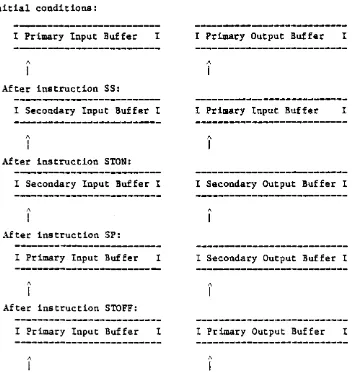
Figure 1-1 shows the results of these instructions. The pointers indicate currently active buffers in each case.
Initial conditions:
I Primary Input Buffer I I Primary Output Buffer I
~ ~
I
I
After instruction SS:
I Secondary Input Buffer I I Primary Input Buffer I
~ A
I
I
After instruction STON:
I Secondary Input Buffer I I Secondary Output Buffer I
~ ~
I
IAfter instruction SP:
I Primary Input Buffer I I Secondary Output Buffer I
~ A
I
I
After instruction STOFF:
I Primary Input Buffer I I Primary Output Buffer I
A A
[image:18.615.72.424.260.642.2]I I
1.6 POINTER POSITION (S, F, B, AND BO)
The S command positions the input pointer in the currently active input buffer. The F and B commands move the input pointer forward or backward one parameter, respectively. The BO command moves the output pointer backward one parameter. The general form of these commands:
General Form Descri2tion
Sp Moves input pointer to the pth parameter.
SO or Sl Moves input pointer to beginning of buffer.
F Moves input pointer forward one parameter.
B Moves current input pointer back one parameter.
BO Backs up current output pointer one parameter.
5p moves the input pointer to the pth parameter of the currently active
in~ut buffer, where the parameters are separated by blanks. If there is no pt parameter, then a backslash (\) will be inserted as a place holder for each null parameter until the pth parameters is reached. SO or 51 will set the pointer to the beginning of the buffer.
The F command causes the input pointer for the currently active input buffer to move forward one parameter. If the input buffer pointer is currently at the end of the buffer, this command has no effect.
The B command causes the input pointer for the currently active input buffer to move backward one parameter. If the input buffer pointer is currently at the beginning of the buffer, this command has no effect.
Examples of pointer commands:
*
**
Before Command
Secondary Input Buffer
I ABC DE FGHIJ I 53
*
Secondary Input Buffer
I ABC 123 DEF 456 I F
*
/\
Secondary Input Buffer
I ABC 123 DEF 456 I B
*
/\
Primary Output Buffer
I XXX YYY ZZZ I BO
**
1\
Active Buffer Prior to Command Execution
Primary or secondary input buffer. Primary output buffer.
Pointer
Secondary Input Buffer
I ABC DE FGHIJ I
/\
Secondary Input Buffer
I ABC 123 DEF 456 I
!\
Secondary Input Buffer
I ABC 123 DEF 456 I
/\
Primary Output Buffer
I XXX YYY ZZZ I
1.7 MOVING PARAMETERS (A)
The A command is used to move a parameter from the input buffer to the output buffer. Either the primary or secondary input buffer may be used. as the source, and either the primary or secondary output buffer may be used as the destination; the buffers used depend on commands executed prior to the A
command. The general form of the A command: A{c}{p}{,m}
where:
c is the surround character (must be non-numeric) p is the number of the parameter to be moved
,m is the number of characters to be moved (up to the first blank character)
The function parameters c, p, and m are mutually independent and may be used in any combination to achieve the desired result.
p is a decimal ordinal number which indicates the parameter to be moved from the input buffer. If specified, the input-buffer pointer will be reset to the first character of the pth parameter in the input buffer, and the
pth parameter which is surrounded by blanks will be moved. If p is not
specified, the input-buffer pointer remains pOinting to the character after the end of the last character moved or to the first character of a parameter, if the pOinter was previously set by an S or Sp command or an F or B command. Leading blanks are deleted from the parameter. The end of the parameter is designated by the first blank which is encountered, unless the entire parameter is enclosed in single quotes, in which case, the entire string including the surrounding quotes is moved.
If the primary output buffer 1s active (i.e., the stack is OFF), the parameter is copied with surrounding blanks if c is missing. If the character c is a backslash ( ), the parameter is copied without any surrounding blanks. When the form with c is used (where c is any non-numeric character except a left parenthesis), the character c surrounds the parameter. This feature is useful for picking up item-ids and values (which require double quotes) for processing by the ACCESS language processor. Note that c is inactive when the stack is ON
(i.e., parameters are always copied to the stack as they are).
Multiple parameters may be moved to the primary output buffer via a single A command if these parameters are separated by semicolons in the input buffer. The parameters will be moved to the primary output buffer with the semicolons deleted and surrounded by blanks or by the character c, if c is specified. This function has no effect in the secondary output buffer.
If the optional m is used, where m is a decimal number, only "m" characters of the parameter are moved to the output buffer. Examples of the A command are shown below. Each assumes that the output pointer is at the beginning of the buffer prior to the illustrated operation.
Buffer Command
Primary Input Buffer
I AB CD EF GHI JK I A
*
.'\
Primary Input Buffer
I AB CD EF GHI JK I AS,2
**
-~---~---Primary Input Buffer
I AAA BBB CCC I A\2
*
---
:\Primary Input Buffer
I ABC DEF GHIJK I A',2
*
---
1\Secondary Input Buffer
I ABC;DEF;GH JKL I An
***
---
"
Secondary Input Buffer
I A.AAA BB CCC D I A2
***
Active buffers prior to command execution:
Buffer
Primary Output Buffer
I CD I
---
,'\Secondary Output Buffer
IJK I
---
1\Primary Output Buffer
IBBB I
Primary Output Buffer
I 'DE' I
----~-~---,\
Primary Output Buffer
I "ABC""DEF''''GH'' I
---
1\Primary Output Buffer
I BB I
*
Primary or secondary input; primary output.**
Primary or secondary input; secondary output.1.8 DATA INPUT (IS, IP, AND~IT)
The IS command selects the secondary input buffer and accepts input from the terminal. The IP command accepts input from the terminal to the currently active input buffer. The IT command inputs the next tape label from tape. The general form of these commands:
Command
IS{r}
IP{r}
IT
Description
Input operation from terminal to secondary input buffer; "r" is the prompt character.
Input operation from terminal to currently
active input buffer; "r" is the prompt character.
Input operation from tape to primary input buffer. Reads next tape label from attached tape unit.
The IS command selects the secondary input buffer as the currently active input buffer and inputs data from the terminal into the buffer. If the r
specification is used, then that character is a prompt character at the terminal (r may be any character, including a blank). The prompt character will remain in effect until a new IS or IP command with a new r specification is executed. If r is omitted, then a colon (:) is used as a prompt. Data input by the user in response to the prompt is placed into the secondary input buffer. Subsequently, the data may be moved to an output buffer by using the A command. Any time the IS command is executed, input from the terminal
overwrites all previous data in the secondary input buffer.
The IP command inputs data from the terminal into the currently active input buffer. Data input at the terminal in response to an IP command replaces the current parameter (i.e., as pointed to by the input pointer) of the currently active input buffer. If several parameters are input at the terminal, then they will all replace the current parameters in the buffer. If the input pointer is at the end of the data in the input buffer, then the new input data will be appended to the end. The r specification is identical to the r
specification for the IS command.
Exa~ples of the use of these commands: Command
IS
IS-IP?
IT
Description
Selects secondary input buffer and inputs data from terminal. Prompt character is a colon (:).
Selects secondary input buffer and inputs data from terminal. Prompt character is an equal sign (-).
Replaces current parameter in currently active input buffer with data from terminal. Prompt character is a question mark (?).
1.9 DATA OUTPUT (0 AND D)
The 0 command (capital letter 0) is used to output a specified text string to the terminal. The D command is used to output parameters from either input buffer to the terminal. The general form of these commands:
Command
O{text}{+}
D{p}{, n}{ +}
Description
'text' is output to terminal; '+' suppresses carriage return.
p'th or current (if p omitted) parameter of active input buffer is output to terminal; '+' suppresses carriage return.
The 0 command causes the text which immediately follows the 0 to be output to the terminal. If the last character of the text is a plus sign (+), then a carriage return will not be executed at the end of the text output. This feature is useful when using the 0 command in conjunction with an input command. For example, consider the following commands:
OPART-NUMBER+
IS-These commands produce the following output on the terminal:
PART-NUMBER-The specified prompt character (-) is displayed adjacent to the output text since the 0 command ended with a plus sign (+). The user then enters the input data right after the prompt character. For example:
PART NUMBER-115020
Further examples of the 0 command:
Command Output to Terminal
omIS IS AN EXAMPLE THIS IS AN EXAMPLE [CR]
OTHIS IS AN EXAMPLE+ THIS IS AN EXAMPLE
The D command is used to output parameters from either input buffer to the terminal. If the form Dp is used, then the pth parameter of the
A plus sign (+) may be appended to the end of the D command, to specify the suppression of a carriage return. The D command does not affect the input pointer.
Examples of the D command:
Buffer Command
Primary Input Buffer
I AA BBB CC DDD I D
*
Secondary Input Buffer
I AA BBB CC DOD I D4+
**
/\
Primary Input Buffer
I ABC XYZ 123 I D,2
***
---~-~~---/\
.\ctive buffer prior to command execution:
*
Primary input buffer.**
Secondary input buffer.***
Primary or secondary input buffer. '\ PointerOutput to Terminal
BBB [CR]
DDD
1.10 TERMINAL OUTPUT AND CURSOR CONTROL (T)
The T command is used to specify terminal cursor positioning, to output
literals, or to output non-keyable character codes. The cursor functions are terminal independent. The special terminal function codes are also available. The T command has the following general form:
T {function},{function}, •••
where:
{function} is any of the following:
"Text" Causes the literal text to be output at the current position.
B Causes a BELL code to be output.
C Causes a Clear Screen code to be output.
Inn Causes the integer character nn to be output.
Inn Causes the hex character nn to be output.
(X,Y) Causes the terminal cursor to position to X,Y. This is controlled by the term type code.
The special function codes (-1 through -10) are also supported.
The T command allows the user to create formatted screens in PROCs. The prompting and positioning of formatted"screens generally appears cleaner and more acceptable to terminal operators. Note that this command does use the SYSTEM-CURSOR mode and so can be controlled terminal by terminal with the term type code. It is strongly recommended that the user employ the terminal
independent control codes -1 through -10 in place of 'hard coding' these functions for a single terminal type. These codes are:
(-1)
(-2)
(-3)
(-4J
(-5)
(-6)
(-7)
(-8)
(-9)
Generates the clear-screen character; clears the screen and
positions the cursor at 'home' (upper left corner of the screen).
Positions the cursor at 'home' (upper left corner).
Clears from cursor position to the end of the screen.
Clears from cursor position to the end of the line. Starts blinking on subsequently printed data.
Stops blinking.
Initiates 'protect' field. All printed data will be 'protected' (i.e., cannot be written over).
Stops protect field.
The T command may be continued onto multiple lines by ending the preceding line with a comma. Also, comments may be added after the critical command letters. Thus, the code to clear the screen (C) could also be spelled out as "CLEAR"; the code for a bell (B) could be "BELL", etc. The T command never automatically adds a carriage return or line feed. Examples of T command:
Command
T C,B,(10,5),"TITLE"
T (0,8),(-4)
T (-5),"twinkle",(-6)
T CLEAR,"TITLE", (5,5) Comment,"TEXT"
Output to Terminal
This sequence first clears the screen. It outputs a bell code to the terminal. The cursor is
positioned to column 10, row 5. The text "TITLE" is output.
This positions the cursor at column 0, row 8. It then clears the entire line assuming that the terminal used supports that function.
This starts a blinking field, prints the word "twinkle" and ends the blinking field. This assumes the terminal supports blinking.
1.11 SPECIFYING TEXT STRINGS AND CLEARING BUFFERS (IH, H, RI, AND. RO)
The IH and H commands are used to place a specified text string in the
currently active input or output buffer, respectively. The RI and RO commands are used to reset the input and output buffers (respectively) to the empty (null) condition. The general form of these commands:
Command
IH{text}
H{text}{<}
RI{p}
RO
Description
'text' replaces current parameter of active input buffer
'text' is placed in active output buffer; carriage return specification included.
primary input buffer (from pth parameter and on, if p is used) and secondary input buffer are reset.
both output buffers are reset.
The IH command causes the text (including any blanks) immediately following the IH to replace the current parameter (as specified by the input pointer) in the currently active input buffer. The input buffer pointer will remain pointing to the beginning of the inserted string.
The H command causes the text (including any blanks) which immediately follows the H to be placed in the currently active output buffer at the position pointed to by the output pointer.
When the last parameter of a desired output line has been moved to the
secondary output buffer (the stack), a carriage return specification
«)
mustbe placed in the stack. For example, the command HXYZ< would be used to place in the stack the text XYZ followed by a carriage return, while the command H< would place a carriage return (only) in the stack. If there 1s no carriage return in the stack, the system will place one after the last character in the stack.
If the form RI is used, then both input buffers are reset to the empty (null) condition. If the form RIp is used, then the primary input buffer from the p'th parameter to the end of the buffer (as well as the entire secondary input buffer) are reset to the empty (null) condition. The RI command also selects the primary input buffer as if an SP command has been executed.
Examples of the use of these commands:
Before Command After
Primary Input Buffer Primary Input Buffer
I AAA BBB CCC I IHXX YY I AAA XX YY CCC I
~---~---~---1\
---
1\Secondary Output Buffer Secondary Output Buffer
I XYZ ABC I H DE< I XYZ ABC DE [CR] I
---
1\Primary Input Buffer Primary Input Buffer
I ABC DEF GHI JKL I RI3 I ABC DEF I
---
1\1.12 TRANSFERRING CONTROL (GO AND SIMPLE IF)
Transfer of control (i.e., branching) may be specified within a PROC via use of the GO and IF commands. The GO command provides an unconditional branch
capability, while the IF command provides a conditional capability. The general form of these commands:
General Form
GO n or G n
IF {#}a-cmnd proc-cmnd
Description
Control is transferred to the statement with 'n' as the numeric label.
The IF command provides for the conditional execution of a specified PROC command.
The GO command causes control to transfer to the PROC command which begins with the label n. The user should note that several PROC commands may begin with the same label. If this is the case, the GO command transfers control to the first PROC command which begins with the specified label (scanning from the top) •
The PROC branch command, G or GO, allows for variable branching. Specifically, the user may use commands of the form GO A or GO An, where "A" and
"An"
reference specific parameters in the primary input buffer. These commands will cause a branch to the label referred to by the contents of these buffer
parameters. Note that if the label referenced does not exist, the PROC will simply continue with the next statement following the branch instruction. For example:
001 PQ 002 RI
003 0 ENTER MENU NUMBER +
004 Sl
005 IP: 006 GO Al
007 X-INVALID RESPONSE!
Define PReC
Clear input buffers
Point to parameter position Get response from CRT
Branch based on response Missing label number
The IF command takes on three forms in the general form, where a-cmnd is any legal form of the A command (refer to Section 1.7), except for the form using the character surround feature (i.e., Ac), and where proc-cmnd is any legal PROe command. If the optional , is not used, the IF command simply tests for the existence of a parameter in the input buffer as specified by the A
command. If a parameter exists, the specified PROe command is executed; otherwise, control passes to the next sequential PRoe command. For example:
This command tests for the existence of a second parameter in the currently active input buffer. If a parameter exists, control passes to the PROC command beginning with label 15; otherwise control passes to the next sequential PROC command. If the
H
option is used, the test is reversed. For example:IF HA2 GO 15
This command causes control to transfer to the command with label 15 if a second parameter does not exist. Note that when using an A command as a test condition of an IF command, parameters are not moved to an output buffer as they would be if the A command were used alone. Rather, the A command is used simply to specify which parameter in the input buffer is to be tested.
However, the input pointer will be repositioned as specified by the A command.
A number of examples illustrating the simple form of the IF command are shown below. For a discussion of the other two forms of the IF command, refer to Sections 1.13, Relational Testing, and 1.14, Pattern Testing.
Command
IF A GO 27
IF A3 OHELLO
IF A4 OHELLO
IF A1,1 G 2
NOTE
The following examples assume that the primary input buffer is the currently active input buffer and contains the following parameters:
I ABC AAA XYZ I
---
AExplanation
Control is transferred to the command with label 27.
Message HELLO is output to terminal; control then continues with next sequential command.
Message is not output; control continues with next sequential command.
1.13 RELATIONAL TESTING (IF)
The relational form of the IF command allows parameters in the input buffers to
be tested relationally. The relational form of the IF command is an extended version of the simple IF form (see Section 1.12, Transferring Control) The relational form is:
IF a-cmnd op string proc-cmnd
where:
a-cmnd and proc-cmnd
op
string
For example:
IF A,3 • YES GO 5
are as defined for the simple IF form.
is one of the relational operators listed in Table 1-2.
is a literal string of characters which the parameter is to be compared against.
Here the PROC would transfer control to the command with the label 5 if the first 3 characters of the current parameter in the currently active input buffer are YES.
To resolve a relational condition, character pairs (one from the selected parameter and one from the literal string) are compared one at a time from leftmost characters to rightmost. If no unequal character pairs are found, the strings are considered to be equal. If an unequal pair of characters are
found, the characters are ranked according to their numeric ASCII code
equivalents. The character string contributing the higher numeric ASCII code equivalent is considered to be greater than the other string. For example, AAB is considered to be greater than AAAA, and 02 is considered greater than 005.
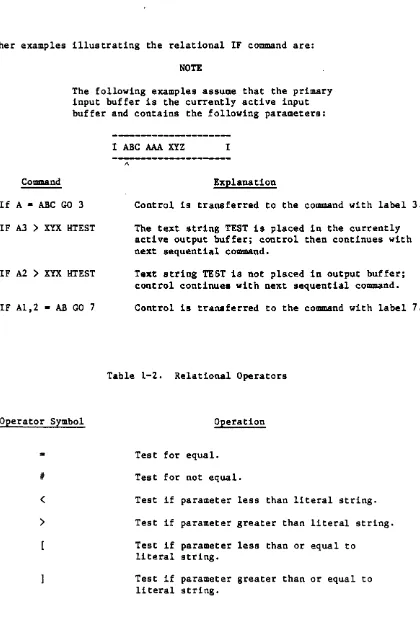
Further examples illustrating the relational IF command are:
NOTE
The following examples assume that the primary input buffer is the currently active input buffer and contains the following parameters:
Command
If A • ABC GO 3
IF A3
>
XYX HTESTIF A2
>
XYX HTESTIF A1,2 • AB GO 7
I ABC AAA XYZ I
---~
...
---~-..
---"
Explanation
Control is transferred to the command with label 3.
The text string TEST is placed in the currently active output buffer; control then continues with next sequential command.
Text string TEST is not placed in output buffer; control continues with next sequential command.
Control is transferred to the command with label 7.
Table 1-2. Relational Operators
Operator Symbol Operation
• Test for equal • Test for not equal.
<
Test if parameter less than literal string.>
Test if parameter greater than literal string.Test if parameter less than or equal to literal string.
[image:34.615.68.488.91.733.2]1.14 THE PATTERN MATCHING IF COMMAND
The pattern matching form of the IF command allows parameters in the input buffers to be tested for a specific pattern match. The pattern matching form of the IF command is an extended version of the simple IF form (see Section 1.12, Transferring Control). The pattern matching form is:
If a-cmnd op (pattern) proc-cmnd
where:
a-cmnd and proc-cmnd
op
pattern
are as defined for the simple IF form.
is one of the relational operators described for "the relational IF form.
is used to test a parameter for a specified combination of numeric characters, alpha characters, alphanumeric characters, or literals.
The pattern specification in an IF statement consists of any combination of the following:
•
An
integer number followed by the letter N (which tests for that number of numeric characters).•
An integer number followed by the letter A (which tests for that number of alpha characters).•
An
integer number followed by the letter X (which tests for that number of alphanumeric characters).•
A literal string (which tests for that literal string of characters).As an example, consider the folloWing command: If A • (3NABC) G 3
This command causes a transfer of control to the command with label 3 when the current parameter of the currently active input buffer consists of three
numerals followed by the characters ABC (e.g., 123ABC).
If the integer number used in the pattern is 0, the test is true only if all the characters in the parameter conform to character type. The following command, for example, outputs the message OK if the characters of the current parameter are all alpha characters:
Further examples of the pattern matching form of the IF command:
NOTE
The following examples assume that the primary input buffer is the currently active input buffer and contains the following parameters:
I ABC 10/09/77 XYZ B123C 33 I
1\
Command
IF A - (3A) G 7
IF A2 • (2N/2N/lN) G 5
IF A4 • (ON) G 9
I F AS • (ON) GO 2
IF A4 - (1A3NC) OGOOO
IF A1 • (3X) IF A1 > ABB G 9
Explantion
Control is transferred to the command with label 7.
Control is transferred to the command with label 5.
Control continues with next sequential command.
Control is transferred to the command with label 2.
The message GOOD is output to the terminal; control continues with next sequential command.
Control is transferred to the command with label 9.
Note that for any of the three IF command forms, the PROC statement which is conditionally executed may, in turn, be another IF command (i.e., IF commands may be nested). The following command, for example, transfers control to label 99 if the current parameter consists of two numerals in the range 10 through 19
(inclusive):
I FA· ( 2N) IF A ] 10 I F A [ 19 GO 99
1.15 FURTHER FORKS OF THE IF COMMAND (IF E AND IF S)
The IF E form of the IF command may be used to test for errors generated by a preceding PROC-generated statement. The IF S form of the IF command may be used to test whether a LIST, as generated by a SELECT, SSELECT, QSELECT, or GET-LIST statement, is in effect. The general form of IF E and IF S:
IF {I}E {op string} proc-cmnd
IF {#}S proc-cmnd
The IF E command allows PROCs to test for system-generated errors (as specified in the ERRMSG file). The E command is valid only after a P type command (i.e., when a PROC-generated statement has completed execution and control is returned to the PROC). The E command uses the secondary input buffer and, therefore, is valid only until an IS command is executed.
The errors tested for may be unspecified (i.e., any error) or they may be specified by the error number. The relational operators "-", ">",
"<,,. "[",
"]" may also be used to test for errors in specified ranges. Thus, the error command may be used in two ways.
An
example of the first would be:015 IF E X ENCOUNTERED AN ERROR AT LINE 15
whereby control will transfer to TCL and the text "ENCOUNTERED AN ERROR AT LINE 15" will be printed if any error were encountered.
An example of a statement that tests for an error range is:
015 IF E > 91 IF E < 99 X TAPE ERROR!
in which case control will transfer to TCL and the text will be printed if an error in the range 92-98 has been encountered.
The IF S command will test for the presence of a selected list; the selected list will be present only if a select-type TCL statement has already been executed at the time that the IF S command is encountered.
If the select statement has generated an error, such as "NO ITEMS PRESENT" or "ITEM NOT ON FILE," the select list will not exist and the IF S may be used to check on this condition.
Examples of the IF S usage:
TESTI 001 PQ
002 HGET-LIST
003 OENTER LIST-NAME+ 004 IP?
005 A
006 STON 007 H< 008 P
009 IF
IS
XILLEGAL LIST-NAME!010 HLIST INVENTORY LPTR all P
012 next statement
TEST2 001 PQ
002 HGET-LIST
003 ENTER LIST-NMtE+ 004 IP?
005 A 006 STON
007 HLIST INVENTORY LPTR
008 P
009 next statement
The PROC's TEST1 and TEST2 will operate identically if the GET-LIST statement executes without an error (i.e., if the list exists on file). However, TEST2 will continue with PROC execution even if the list is not on file, since there cannot be an IF S test after the stacked L·IST state-ment executes. TEST1, on the other hand, has a null line in the stack when the GET-LIST executes; therefore, control is returned to the PROC, which can test to see if it executed properly. If the list is not on
1.16 ADDITIONAL COMMANDS (PLUS (+), MINUS (-), Up AND C)
The Plus and Minus commands are used to add or subtract (respectively) a
specified decimal number to/from the current parameter of the currently active input buffer.
An
exit to a user-defined subroutine may be accomplished via the U command. The C command is used to place comments within the body of the PROC. The general form of these commands:General Form
-n
Umode-id
C{text }
Description
Decimal number is added to current parameter of active input buffer.
Decimal number is subtracted from current parameter of active input buffer.
'Umode-id' exits to user-defined subroutine.
Comment is ignored by PROC processor.
The Plus (+) command causes the decimal number n to be added to the current parameter (as pointed to by the input pointer) of the currently active input buffer. The current parameter must be numeric.
The Minus (-) command causes the decimal number n to be subtracted from the current parameter (as pointed to by the input pointer) of the currently active input buffer. The current parameter must be numeric.
The Plus or Minus commands will have no effect if the input pointer is currently at the end of the buffer. Also, the user must take care that the updated value of the parameter is the same length as the original parameter, since no automatic check for this is made.
The U command is used to provide an exit to a user-defined subroutine. The format for this command is identical to the P command using the mode-id option; however, the U command is meant to be used for a Simple subroutine call. Upon return from the subroutine, control is passed to the command immediately following the U command.
WARlfING
The C command is used to place comments within the body of the PROC. The general form of this command is as follows:
C{text}
All the text following the C command will be ignored by the PROC processor. For example:
013 C THIS IS A COMMENT
The C command may be used freely throughout the PROC for purposes of clarity and documentation; however, note that making a PROC excessively long will slow its execution.
Sample use of the Plus and Minus commands:
Before Command
Primary Input Buffer
I ABC 001 XYZ I +99
*
-~--~---1\
-Secondary Input Buffer
I XXXX YY 39 I -5
**
---~---~---~~--1\
Primary Input Buffer
I ABC 001 XYZ I +99
*
---~---1\
Active buffer prior to command execution:
*
Primary input buffer.**
Secondary input buffer. ,\ PointerPrimary Input Buffer
I ABC 100 XYZ I
~---~---~---1\
Secondary Input Buffer
I XXXX YY 34 I
----~---~~---1\
Primary Input Buffer
1.17 PRoe EXECUTION AND TERMINATION (P, PH, PP, PW, PX, AND X)
The P command causes the PROe to execute via TCL. The PH command is similar to the P, but causes terminal output to be suppressed. The PX command acts like the P, but turns off any further interaction with the PROC. The PP and PW commands are identical to the P command, except that the content of both output buffers are displayed at the terminal prior to execution. The X command is used to exit from the PROC. The general form of these commands:
General Form
P
PX
PH
PP
PW
X{ text}
Description
Causes PROC to execute the primary output buffer area.
As above, PRoe control is terminated after the statement has executed.
Causes the PROC to execute with terminal output suppressed totally.
Causes PRoe to execute after displaying content of both output buffers.
Causes PRoe to display both output buffers and wait for command from the terminal.
Causes termination of PROC and display of optional text message.
TheP command causes the PRoe to execute by submitting the content of the
primary output buffer to TCL for processing; the contents of the stack (if any) is used to feed interactive processors such as BASIC or EDITOR. After
execution via TCL, the PROe regains control at the statement immediately following the P command.
The PX command acts just like the P does, with the exception that control is not returned to the PROe after the TCL statement has been executed.
The PP command causes execution of the contents of the buffer just like the P command, except that the content of both output buffers is displayed on the terminal.
The PH command executes the contents of the buffer, but suppresses any output from the executed process.
Any other character will cause PROC action to continue. The PW command is normally used as a debugging tool and may be replaced by a P command once the user has determined that the PROC is functioning properly.
The X command is used to exit from the PROC. Normally, PROC control is terminated with execution of the final PROC statement, in which case an X
command is not needed. However, the X command may be used at intermediate points in the PROC coding to cause termination of the PROC. Any text following
the X will be output as a message upon termination of the PROC. For example:
X***EXIT TO TCL***
If the PROC was called as a subroutine, the X command will cause a return to the calling PROC.
Examples of the use of these commands:
CotDlDand
X
XHURRY BACK
XHURRY BACK+
Explanation
PROe is terminated. However, If the PROe was called as a subroutine, then the X command will return control to the calling PROe and continue at the next command.
PRoe is terminated and the message "HURRY BACK" is displayed on the terminal.
1.18 LINKING TO OTHER PROCS
A Link command in one PROC causes control to transfer to the first command of another PROC, which may reside in any dictionary or data file. This allows the storage of PROCs (except for the LOGON PROC) outside of the MD. Also, large PROCs can be broken into smaller PROCs to minimize processing time.
The general form of the Link command is:
({OICT} file-name {item-id}) {n}
where:
OICT
file-name
item-id
n
If used, specifies the dictionary portion of the file.
Specifies the file.
If used, specifies the name of the PROC invoked. If omitted, the current parameter (as specified by the input pointer) of the currently active input buffer is retrieved and used as the item-ide
If used, control is transferred to the line whose label is #n#.
The first line of the linked-to PROC is skipped, since it is assumed that this line contains the PQ code.
As an example of the Link command, consider the situation where a PROC named EXECUTE is used to execute anyone of a series of PROCs in a file named PROC-FILE. The specific PROC executed is specified by a single-character alphabetic code input by the user. This sample PROC is shown below:
Item EXECUTE
001 PQ
002 OPLEASE INPUT COOE+ 003 IS?
004 IF A ~ (lA) (PROC-FlLE) 005 XILLEGAL RESPONSE
If, for example, the user#s response to the IS command of line 3 is the
Consider next the situation where the PROC named LISTU previously was present in each user's MD. Assume that LISTU was then moved to the dictionary section of a file named PROCLIB and the PROC shown below was then placed in each user's
~m. The LISTU PROC which was moved to the PROCLIB file will now be invoked by the Link command in the PROC shown below and, thus, the LISTU PROC need not be duplicated in each user's MD.
Item 'LISTU' in MD
001 PQ
002 (DICT PROCLIB LISTU)
1 .19 SUBROUTINE CALL COMMANDS
One PROC can call another as a subroutine, or a local subroutine call can be invoked using the call command. The subroutine call commands have the following general form:
General Form Description
[] n Local subroutine call to line "n";
returns on first X command following the label "n".
[{DICT} file-name {item-id}] {n} External subroutine call; transfers control to label n of the called
subroutine. Returns on first X command encountered. If item-id is not specified, the current parameter of the currently active input buffer will be used.
The local subroutine call command will store the location of the next PROC command in the PROC subroutine stack and transfer control to the command whose label is n. Excecution of PROC commands continues from that point (including P, PP, and PW commands), until an X command is executed, which will return control to the PROC command following the call command.
In the external subroutine call, "DICT" , "file-name" , and "item-id" are identical to the Link command described in Section 1.18. If item-id is not specified, the name of the called subroutine is taken from the current param-eter (as specified by the input pointer) of the currently active input buffer.
The optional n indicates that subroutine execution is to begin at label n, rather than at the second line of the subroutine PROC.
As with local subroutine calls, an X command wil~ return control to the calling PROC.
Examples of subroutine calls:
Local Subroutine Call
001 PQ 002 [] 3 003 OFIRST 004 3 OSECOND 005 X+
SECOND FIRST SECOND
NOTE: '+' suppresses carriage return after X returns.
Output on Terminal
External Subroutine Call
001 PQ
002 [Me LISTU]
003 ODONE WITH LISTU
Output to Terminal
CHD PCBF NAME •••••••• TIME ••• DATE •••• LOCATION ••••••••••
00 0200 SP 02 0240 CM 03 0260 LC 04 0280 JP *06 02CO SAL
10 0340 JET
DONE WITH LISTU
1.19.1 PRoe EXAMPLES
A sample EDITOR operation which changes attibute 3 of item 11115 of file ACCOUNT to the value ABC is as follows:
>EDIT ACCOUNT 11115 [CR] TOP
.G3 [CR]
003 100 AVOCADO .R [CR]
003 ABC
'11115' FILED
A PROe named CHANGE which will perform the same operation is as follows:
Item CHANGE IN MD
001 PQ
002 REDIT 003 A2
004 A3 005 STON 006 HG 007 A4
008
H<
009HR<
-010 A5011
H<
012 HFI< 013 Pc,
~l 'r- I;';
.:... ..
Note that the PROC has been written in such a manner that it updates any specified attribute in any specified item in any specified file. The format used to invoke this PROe is as follows:
CHANGE file item attribute-no new-value
If, for example, the user wishes to perform the same operation shown in the first example, the PROC must be invoked as follows:
I
>CHANGE ACCOUNT 11115 3 ABC [CR]
A sample operation at the TCL level using the SSELECT verb and then the COpy verb is as follows:
)SSELECT INVENTORY WITH QOH ) "900" BY-DSND QOH [CR] 19 ITEMS SELECTED
)COPY INVENTORY [CR] TO: (HOLD-FILE) [CR] 19 ITEMS COPIED
An identical operation is performed by the PROC named TEST shown as tollows:
Item 'TEST' in MD
001 PQ
002 HSSELECT INVENTORY WITH QOH ) "900" BY-DSND QOH 003 STON
004 HCOPY INVENTORY< 005 H(HOLD-FILE)< 006 P
Upon execution of the TEST PROC, the output buffers contain the data shown as follows:
Primary Output Buffer
I SSELECT INVENTORY WITH QOH )"900" BY-DSND QOH [CR] I
Secondary Output Buffer
I COpy INVENTORY [CR] (HOLD-FILE) [CR] I
Note that SSELECT sentence is contained in the primary output buffer, while the secondary output buffer contains both input elements of the copy operation, each terminated by a carriage return.
For further information regarding the SSELECT verb, refer to the ACCESS
1.19.1.2 PROC Use of Variable Testing (GO and D Commands)
A sample tape positioning PROC is:
T-SPACE 001 PQ
002 4 IF #A2 GO 3 003 IF A2 • (ON) G 7 004 IHOOO
005 7 53 006 IHOO 007 HT-ATT 008 P
009 IF E • 95 X
010 IF E • 93 X
011 2 HT-RDLBL 012 P
013 IF E • 94 GO 9 014 RP (I)
015 P 016 HT-FWD 017 P 018 HP (L) 019 P 020 53 021 +1 022 52 023 -1
024 IF A • 0 X 025 IF A • 00 X 026 IF A • 000 X 027 GO 2
028 3 ONO. OF FILES+ 029 IP?
030 GO 4
031 9 OEND OF RECORDED DATA - (+ 023 D3+
033 X FILES)
Note that PROC may be executed by entering "T-SPACE" or "T-SPACE n" at the TCL level; if no parameter is entered, the PROC will request one.
The input buffer contains the following data:
Parameter#
where:
1
T-SPACE
2
n
3 xx
4
n is the number of files to be spaced over
xx is the count of such files, initialized to "00" at line 6
The PROC will attach the tape unit (T-ATT)j check for errors 95 and 93,
terminating execution if either error occurs. Then it will execute a T-RDLBL to read the tape label and print it on the terminal; if error 94 (EOF) occurs on this statement, the end-of-tape data has been reached; the message on line 31 will be printed along with the file-count from parameter 3.
If T-RDLBL executes successfully, the tape file is spaced over by executing a T-F\ID (the print is turned off and on around this command by the command P (I) and P (L), to inhibit spurious messages).