A Case for Parallelizing Web Pages
Haohui Mai, Shuo Tang, Samuel T. King
University of Illinois
and
Valkyrie Computer Systems
Calin Cascaval, Pablo Montesinos
Qualcomm Research
A
BSTRACTMobile web browsing is slow. With advancement of networking techniques, future mobile web browsing is increasingly limited by serial CPU performance. Researchers have proposed techniques for improving browser CPU performance by parallelizing browser al-gorithms and subsystems. We propose an alternative approach where we parallelize web pages rather than browser algorithms and subsystems. We present a pro-totype, called Adrenaline, to perform a preliminary eval-uation of our position. Adrenaline is a server and a web browser for parallelizing web workloads. The Adrenaline system parallelizes current web pages automatically and on the fly – it maintains identical abstractions for both end-users and web developers.
Our preliminary experience with Adrenaline is en-couraging. We find that Adrenaline is a perfect fit for modern browser’s plug-in architecture, requiring only minimal changes to implement in commodity browsers. We evaluate the performance of Adrenaline on a quad-core ARM system for170popular web sites. For one ex-periment, Adrenaline speeds up web browsing by3.95x, reducing the page load latency time by 14.9 seconds. Among the 170 popular web sites we test, Adrenaline speeds up151 out of170 (89%) sites, and reduces the latency for39(23%) sites by two seconds or more.
1
I
NTRODUCTIONWeb browsing on mobile devices is slow, yet recent reports from industry show that performance is criti-cal [11, 19]. Google and Microsoft reported that a200ms increase in page load latency times resulted in “strong negative impacts”, and that delays of under500ms sec-onds “impact business metrics” [16].
One source of overhead for web-based applications (web apps) is the network [18]. Engineers have attempted to mitigate this source of overhead with increased net-work bandwidth, prefetching, caching, content delivery networks, and by ordering network requests carefully.
A second and increasing source of overhead for web apps is the client CPU [6, 10]. Web browsers combine a parser (HTML), a layout engine, and a language en-vironment (JavaScript), where the CPU sits squarely on the critical path [3, 7, 12]. Even though the serial per-formance of mobile CPUs continues to increase, the constraints on mobile device form factors and battery power imposes fundamental limitations on further im-provement.
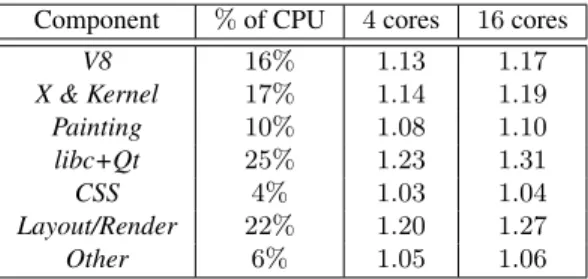
Component %of CPU 4cores 16cores
V8 16% 1.13 1.17 X & Kernel 17% 1.14 1.19 Painting 10% 1.08 1.10 libc+Qt 25% 1.23 1.31 CSS 4% 1.03 1.04 Layout/Render 22% 1.20 1.27 Other 6% 1.05 1.06
Table 1: Breakdown of CPU time spent on web brows-ing. The last two columns predict the ideal speed ups with Amdahl’s law, assuming that either4 or 16cores are available.
Recent work proposes exploiting parallelism to improve browser performance on multi-core mobile platforms [5, 15], including parallel layout algo-rithms [3, 12], and applying task-level parallelism to the browser [9]. These special cases, however, only speed up web apps that make heavy use of specific features, like cascading style sheets (CSS), or they are limited to the tasks that the browser developers identify ahead of time. Unfortunately, years of sequential optimizations, the sheer size of modern browsers, and the fundamen-tally single-threaded event-driven programming model of modern browsers make it challenging to generalize this approach to refactor today’s browsers into parallel applications.
Our position is that browser developers should
fo-cus on parallelizing web pages. By taking a holistic
approach, we anticipate an architecture that can work on a wide range of existing commodity browsers with only a few minor changes to their implementation, rather than a major refactoring of existing browsers or a re-implementation of these mature and feature-rich appli-cations.
To back up our position, we present the design for Adrenaline, a prototype system that attempts to speed up web apps for multi-core mobile devices, like smart phones and tablets. Adrenaline consists of two com-ponents, a server-side preprocessor and a client (i.e., browser) that renders pages concurrently on the mobile device. The Adrenaline server decomposes existing web pages on the fly into loosely coupled sub pages, ormini
pages. The Adrenaline browser processes mini pages in
parallel. Each mini page is a “complete” web page that consists of HTML, JavaScript, CSS, and so on, running in a separate process. Therefore, the Adrenaline browser can download, parse, and render this web content in
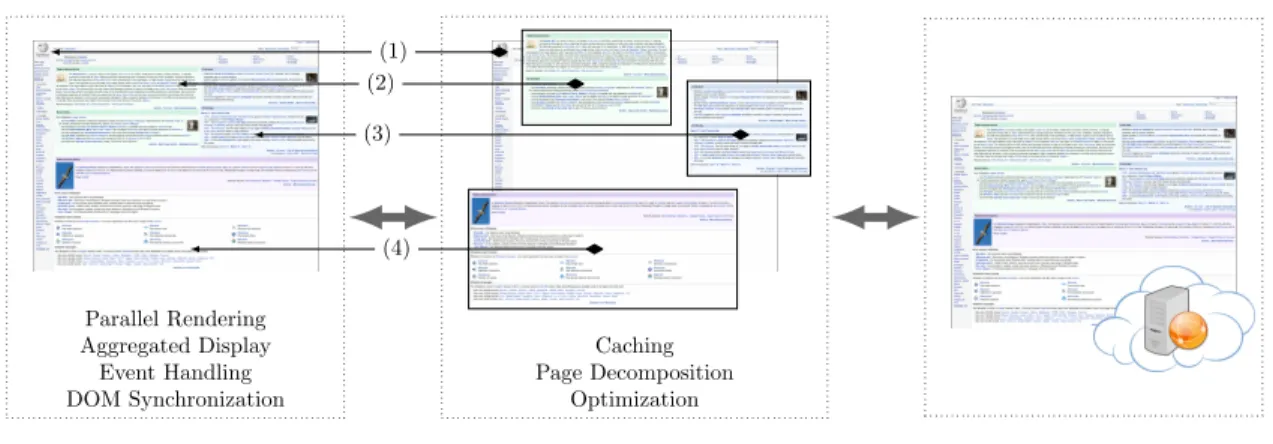
Caching Page Decomposition Optimization Adrenaline Server Parallel Rendering Aggregated Display Event Handling DOM Synchronization
Adrenaline Browser Internet
(1) (2) (3)
(4)
Figure 1: Workflow of Adrenaline when accessingwikipedia.org. In this figure, each of the numbers, 1-4, show the four mini pages Adrenaline uses for this web page. The Adrenaline server acts as a proxy between the Adrenaline browser and the Internet. It fetches the web page, optimizes and decomposes it into mini pages, then sends them back to the Adrenaline browser. The Adrenaline browser downloads and renders mini pages in parallel using multiple processes. To preserve the proper visual and programmatic semantics, the Adrenaline browser aggregates the displays for all mini pages, forwards DOM and UI events between mini pages, and synchronizes DOM interactions. Solid lines between the Adrenaline browser and the Adrenaline server show the mappings of mini pages.
parallel while still using a single-threaded and mature browser on the client.
2
W
HYA
DRENALINE?
To support our position, we present the performance characteristics of web browsing workloads to estimate potential performance improvements from parallelizing web browser subsystems.
We picked170web pages from the250most popular web sites according to Alexa [1], and mirrored them on our local network. We ran a QtWebkit-based browser and loaded each web page20times on a quad-core,400MHz ARM Cortex-A9 platform (refer to Section 6 for detailed set up), and instrumented its execution with OProfile [14] to derive the time spent on different components in the browser.
Table 1 categorizes the CPU time spent on web browsing into six components: (1) the V8 JavaScript en-gine [8] (V8), (2) The Linux kernel and X server (X &
Kernel), (3) Qt Painting and rendering (Painting), (4) libc
and other components in Qt (libc+qt), (5) CSS Selection (CSS), (5) WebKit layout and rendering ( Layout/Ren-der), (6) everything else (Other). Table 1 also shows the ideal speed-ups based on Amdahl’s law when the plat-form has4or16cores, assuming each component can be parallelized completely.
Table 1 shows two findings: (i) no single component dominates the execution time, and (ii) potential gains from component-level task parallelism are moderate (up to1.31x speed-ups for16cores).
These results suggest that browser developers should
look at system-level ways to exploit parallelism in web browsing – parallelizing a single component results in limited speed-ups. For example, Meyerovich et al. re-ported a 80x speed up for their parallel layout algo-rithm [12], yet when other researchers implemented a similar scheme in Firefox their results showed a more modest speed up (1.6x), even on a layout-dominated web site [3]. It is challenging to estimate the overall speedup from parallelizing each component, in partic-ular, because redesigning a component for task-level parallelism provides benefits beyond the exploiting the concurrency of the algorithm: the component becomes thread-safe, and therefore its execution may overlap with other components. The overlap is bounded by the web specifications and page structure, thus providing addi-tional evidence that web page decomposition is required to achieve the full potential of browser parallelization.
3
T
HEA
DRENALINE ARCHITECTURE This section describes the overall Adrenaline architec-ture. Figure 1 shows the workflow when a user accesses wikipedia.orgwith the Adrenaline browser. First, the browser issues a request to the Adrenaline server. Sec-ond, the Adrenaline server fetches the contents of the web page, optimizes and decomposes it into mini pages. Third, the browser downloads, parses, and renders each of these mini pages in separate processes running in par-allel. The browser is responsible for properly aggregating content into a single display, synchronizing global data structures, and propagating DOM and UI events to main-tain correct web semantics. In this figure, the serverde-composes thewikipedia.orgpage into four mini pages and the browser runs four processes in parallel to render the page.
This architecture offers four unique advantages com-pared to other techniques for parallelizing web browsers. First, Adrenaline is a data parallel system. It parallelizes web pages, rather than specific components in web browsers. Conceptually all components in a web browser can now be executed in parallel. Second, decomposition reduces the total amount of work from some tasks, par-ticularly layout and rendering because of smaller work-ing sets for each mini page. Third, careful decomposi-tion could potentially remove serializadecomposi-tion bottlenecks. Specifically, Adrenaline isolates JavaScript into a sin-gle mini page to allow tasks such as layout and ren-dering in other mini pages to run concurrently. Fourth, pre-processing the pages on the Adrenaline server cre-ates opportunities to shift computation from the client to the server.
This architecture does also introduce two sources of overhead that the Adrenaline system must overcome. Fundamentally, the architecture places a proxy in be-tween the Adrenaline browser and the Web. This ad-ditional component will add latency for individual net-work connections when compared to connecting to web sites directly. In addition, this architecture uses more re-sources on the mobile device through its use of multiple processes. Despite these inherent sources of overhead, the Adrenaline browser speeds up the overwhelming ma-jority of sites we tested, as we demonstrate in Section 6.
4
D
ESIGN CHALLENGESDesigning the Adrenaline system presents three key challenges. First, Adrenaline has to generate web apps that look the same from the user’s perspective. Second, Adrenaline has to ensure that the semantics of web apps remains the same, from the web developer’s perspective. Third, Adrenaline has to minimize the overhead induced by this multi-process architecture.
In this section, we discuss our techniques for main-taining visual compatibility, JavaScript and DOM com-patibility, and techniques to reduce synchronization over-head. In Section 5, we describe our server-side algorithm for decomposing web pages.
4.1
Visual compatibility
The Adrenaline browser is designed to be visually com-patible with traditional mobile browsers, and to maintain identical side effects when the user interacts with a page. In the Adrenaline browser, amain pageis responsible for this compatibility.
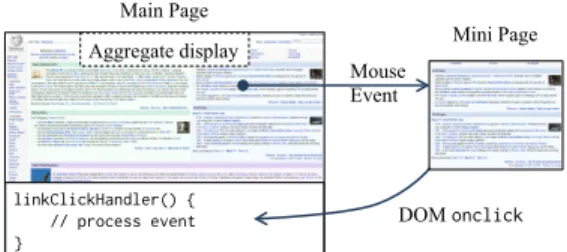
The main page assembles other mini pages in its dis-play, and captures all external UI events. It is also re-sponsible for rerouting events to mini pages. Figure 2
Main Page Mini Page linkClickHandler() { // process event } Mouse Event DOM onclick Aggregate display
Figure 2: Event routing. This figure shows how Adrenaline handles a mouse click on a link. All data is forwarded through Adrenaline’s inter-process communi-cation (IPC) channels.
Foo = g e t E l e m e n t B y I d ( ’ Bar ’); g e t E l e m e n t B y I d ( id ) { f o r e a c h ( m in m i n i p a g e s ) if ( m - > c o n t a i n s ( id )) { // Mer ge n = c r e a t e N o d e ( f e t c h D O M ()); m - > parent - > r e p l a c e C h i l d (n , m ); } · · · } <div> <p> <p id="Bar"> · · · <p> <p id="Bar"> (1) (2) (3) (4) (5)
Figure 3: Merging a mini page. During merging, Adrenaline (1) issues a request to the remote mini page that (2) reads, (3) serializes, and (4) returns the results back to the main page. Then (5) the main page inserts the remote DOM into its own DOM before terminating the remote mini page.
shows an example of Adrenaline’s event routing mecha-nisms. Consider the case where a user clicks on a link in a mini page. First, the main page routes the mouse event to the corresponding mini page based on the location of the mouse pointer. After the mini page processes the mouse event and determines that the click was on a link, the mini page wraps it into aonclick DOM event, like a traditional browser would. Then, the mini page forwards the DOM event to the main page where the JavaScript event handler runs.
4.2
JavaScript and DOM compatibility
Adrenaline has to preserve the semantics of JavaScript in order to run legacy web apps correctly. The problem becomes challenging if JavaScript is distributed across multiple mini pages. Therefore, the current implementa-tion of Adrenaline chooses to put all JavaScript into one process (i.e., the main page) as a solution.
When JavaScript code accesses remote DOM states, it merges mini pages into the main page on demand. A common example is that the JavaScript code calls getElementById()to get a reference for a DOM ele-ment. In Figure 3, the first line of JavaScript runs in the main page and gets a reference to the elementBar. The Adrenaline browser runs this code, and once it finds out
that the elementBar resides in a remote mini page, it asks the remote mini page to serialize its entire DOM and to send it back to the main page. The main page then inserts the remote mini page’s DOM into its own DOM and terminates the remote mini page. After the main page merges a mini page, it can access the DOM states locally that used to reside in the mini page, and JavaScript exe-cution can proceed.
Although Adrenaline runs all JavaScript in a single mini page, this architecture still has significant benefits for web pages where the JavaScript code accesses only a subset of the DOM. For these types of web pages the Adrenaline browser can process the DOM elements not accessed by JavaScript in separate mini pages, in
paral-lel,withoutblocking on JavaScript execution like a
tra-ditional browser would.
The architecture of Adrenaline could introduce races when rendering web pages, but the Adrenaline browser handles these cases correctly. When traditional web browsers encounter JavaScript code, they exe-cute the code with the current state of the DOM. In the Adrenaline browser each mini page builds up its own DOM structure in parallel, so when JavaScript code executes, the Adrenaline browser has to ensure that JavaScript accesses the correct DOM state. The Adrenaline browser inspects the program counter and call stack to ensure correctness. We omit the details here.
4.3
Minimizing synchronization overhead
JavaScript code calls getElementById() to get a ref-erence for a specific DOM element, thus calls to getElementById()must check against each mini page for the requested element. The Adrenaline server com-putes a Bloom filter [4] for all elements in each mini page, and sends the filters along with the main page. The main page only sends inter-process requests to mini pages that can possibly contain the element (whose cor-responding Bloom filters will have positive results), thus saving inter-process communication.
This is a safe optimization because a Bloom filter can only have false positives but not false negatives, meaning that an element is absent in the set if the testing result of Bloom filter is negative.
5
T
HEA
DRENALINE SERVERFrom a high level, the Adrenaline server renders the web page, and extracts information about the rendered web page (e.g., element sizes, bounding boxes, and where el-ements are located visually on the page). It uses this in-formation as inputs to a heuristic algorithm to decompose the page into mini pages. After the Adrenaline browser loads the page, it provides feedback to the server, such as any unanticipated DOM merges, to help the server adjust future decomposition of the same page.
In general, the algorithm tries to balance three main constraints. First, Adrenaline tries to keep JavaScript code and the DOM elements that the JavaScript code ac-cesses in the same mini page to avoid merge operations. Second, Adrenaline uses only a continuous segment of the original DOM in mini pages to help simplify the im-plementation of merging. Third, Adrenaline ensures that mini pages occupy non-overlapping visual blocks (rect-angles) to simplify mini page display and event handling. In addition to decomposing pages, the Adrenaline server also optimizes mini pages and sends extra in-formation to the browser. For example, the Adrenaline server customizes CSS rules for each individual mini page, and provides the Adrenaline browser with hints about resources that the page includes to enable pre-fetching.
Due to space limitations, we omit the full details of the Adrenaline decomposition algorithm and the full de-tails of the server-side optimizations we perform on mini pages.
6
E
XPERIENCE WITHA
DRENALINE We implemented the Adrenaline server as a HTTP proxy that fetches web pages and decomposes them on the fly automatically. This architecture mirrors closely the server-side architecture for other mobile browsers, like Opera mini, Skyfire, and Amazon Silk [2, 13, 17].The Adrenaline browser uses the WebKit rendering engine and the V8 JavaScript engine. We use the Qt Toolkit to implement the platform specific portions of the browser. Mini pages are implemented as browser plugins in Adrenaline to reuse existing mechanisms to maintain visual compatibility. Our changes were rather minimal, and we believe that the same techniques are applicable to commodity browsers.
To test the performance of our prototype and to test the efficacy of the basic Adrenaline approach, we ran the Adrenaline browser on a CoreTile Express A9x4 ARM development board. The board has a quad-core Cortex-A9 CPU running at 400MHz and 768MB of DDR2 RAM. We tested Adrenaline on170of the most popular web sites (according to Alexa), and we com-pared against an unmodified version of a WebKit-based browser (which is called QtBrowser in later sections). To isolate the effects our our algorithms we mirror the web pages on our local network and connect to the server via a FastEthernet connection.
Our preliminary experience with Adrenaline is en-couraging. Overall, Adrenaline reduces the page load la-tency by1.75s on average, where industry considers a 0.5second latency reduction as meaningful [11, 16, 19]. Adrenaline improves the page load latency time by1.54x on average across the entire workload. For one exper-iment, Adrenaline speeds up web browsing by 3.95x,
reducing the page load latency time by 14.9 seconds. Among the170popular web sites we tested, Adrenaline speeds up151 out of170 (89%) sites, and reduces the latency for39(23%) sites by two seconds or more.
7
C
ASE STUDY:
WIKIPEDIAThis section describes a case study for the perfor-mance characterization of the Wikipedia entry for the Nokia page. We instrument the execution of both the Adrenaline browser and the QtBrowser with OProfile to collect run-time statistics.
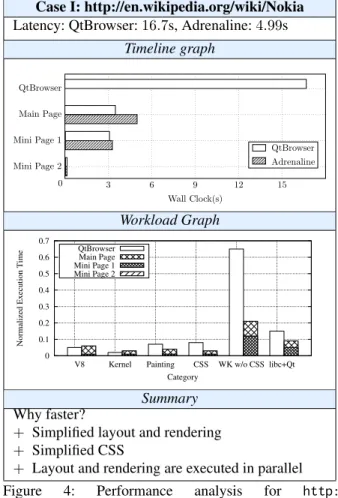
Figure 4 describes the high-level performance char-acteristics of this case. Adrenaline reduces the page load-ing time by11.7seconds.
The case study contains atimeline graphand a
work-load graph. The timeline graph plots the total page
load-ing time for QtBrowser and for Adrenaline. The top-most bar represents the total page load latency for QtBrowser. The shaded bars below represent the page load latency of the Adrenaline main page and mini pages. Thus, the total page load latency for the Adrenaline browser is de-termined by the shaded bar that completes last. For com-parison, we load each mini page individually with Qt-Browser and report its execution time with the corre-sponding white bar.
The workload graph classifies the workload of the two browsers into six disjoint categories: (1) the V8 JavaScript engine (V8), (2) The Linux kernel (Kernel), (3) Qt Painting and rendering (Painting), (4) CSS Se-lection (CSS), (5) WebKit sans CSS SeSe-lection (WK w/o CSS), and (6) libc and other components in Qt (libc+Qt). These six categories consume most of the CPU time. The execution time of each of these six components is nor-malized with respect to the total time spent by the Qt-Browser to load the original page. For comparison, the workload graph stacks the execution of all Adrenaline processes into one bar even though their execution over-laps in the system.
The timeline graph in Figure 4 shows that the Adrenaline server decomposes the page into three pages, and the Adrenaline browser is able to render them in par-allel. This page is large enough for Adrenaline to harvest a sufficient amount of independent work for each mini page.
Parallelism by itself, however, does not fully explain why Adrenaline is so much faster than QtBrowser. The workload graph shows that there is almost a3x reduction for both CSS and WK without CSS. For CSS, the decom-position brings in two benefits: (1) the Adrenaline server speeds up CSS for Mini Page1 and2through inlining CSS rules. (2) CSS selection runs on fewer elements in the main page (30%of the original page), reducing the total amount of work.
Case I: http://en.wikipedia.org/wiki/Nokia Latency: QtBrowser:16.7s, Adrenaline:4.99s
Timeline graph Wall Clock(s) 0 3 6 9 12 15 QtBrowser Main Page Mini Page 1 Mini Page 2 QtBrowser Adrenaline Workload Graph 0 0.1 0.2 0.3 0.4 0.5 0.6 0.7
V8 Kernel Painting CSS WK w/o CSS libc+Qt
Normalized Execution Time
Category QtBrowser Main Page Mini Page 1 Mini Page 2 Summary Why faster?
+ Simplified layout and rendering + Simplified CSS
+ Layout and rendering are executed in parallel Figure 4: Performance analysis for http: //en.wikipedia.org/wiki/Nokia.
For WK without CSS, analysis reveals that the execu-tion time reducexecu-tion can be attributed to layout and render-ing primarily. The decomposition enables the main page to treat both Mini Page1 and Mini Page2 as “black-boxes” during layout and rendering. The main page is no longer responsible for rendering elements inside mini pages, as the mini pages running are responsible for ren-dering them, which happens in parallel. For layout, the main page has fewer elements to layout, since it only needs to layout the remaining elements plus the contain-ers of mini pages. Relayout, which the browser could trigger during loading in response to various events, is also simplified for the same reason: the rendering of in-dividual elements in mini pages is deferred to the mini pages themselves and happens in parallel.
8
S
UMMARY AND FUTURE WORKIn this paper, we advocated that browser develop-ers should think about parallelizing web pages, rather than individual components of web browsers. Based on our initial experience with Adrenaline, we believe that Adrenaline can improve significantly the performance of web browsing on mobile devices.
We plan to further investigate the performance of Adrenaline under more realistic network conditions and hardware configurations. In addition, we plan to explore more heuristics on page decomposition, as well as pro-viding APIs for web developers to express page-level parallelism. Finally, we plan to apply Adrenaline to a larger set of web sites to evaluate our techniques more comprehensively.
A
CKNOWLEDGEMENTSWe would like to thank the anonymous reviewers who provided insigtful and detailed feedback on our paper. This research was funded in part by NSF grants CNS 0834738 and CNS 0831212, grant N0014-09-1-0743 from the Office of Naval Research, AFOSR MURI grant FA9550-09-01-0539, and by a grant from the Internet Services Research Center (ISRC) of Microsoft Research.
R
EFERENCES[1] Alexa.http://www.alexa.com/topsites.
[2] Amazon.com, Inc. Amazon silk browser. http://
amazonsilk.wordpress.com/, Sept 2011.
[3] C. Badea et al. Towards parallelizing the layout engine of firefox. InHotPar, 2010.
[4] B. H. Bloom. Space/time trade-offs in hash coding with allowable errors.CACM, 13:422–426, July 1970.
[5] Broadcom Inc. Bcm28150 - 1080p
4g hspa+ smartphone processor, 2011.
http://www.broadcom.com/products/
Cellular/3G-Baseband-Processors/BCM28150.
[6] S. Dubey. AJAX performance measurement methodol-ogy for internet explorer 8 beta 2. CODE Magazine, Vol. 5 Issue 3, 2008.http://www.code-magazine.com/
Article.aspx?quickid=0811102.
[7] E. Fortuna, O. Anderson, L. Ceze, and S. Eggers. A limit study of javascript parallelism. InIISWC, 2010. [8] Google V8 Team.http://code.google.com/p/v8. [9] C. Grier, S. Tang, and S. T. King. Secure web browsing
with the OP web browser. InIEEE S&P, 2008.
[10] C. G. Jones et al. Parallelizing the web browser. In Hot-Par, 2009.
[11] M. Mayer. Google I/O ’08 keynote, 2008.http://www.
youtube.com/watch?v=6x0cAzQ7PVs.
[12] L. A. Meyerovich and R. Bod´ık. Fast and parallel web-page layout. InWWW, 2010.
[13] Opera Software.http://www.opera.com/mobile. [14] OProfile.http://oprofile.sourceforge.net. [15] Samsung Inc. Samsung introduces high
perfor-mance, low power dual cortex - a9 application processor for mobile devices, September 2010. http://www.samsung.com/global/business/
semiconductor/newsView.do?news id=1195.
[16] E. Schurman and J. Brutlag. Performance related changes and their user impact. http://velocityconf.com/
velocity2009.
[17] SkyFire Labs, Inc.http://www.skyfire.com.
[18] Z. Wang, F. X. Lin, L. Zhong, and M. Chishtie. Why are web browsers slow on smartphones? InHotMobile’11. [19] Z. Yang. Every millisecond counts, 2009. http://www.