D. Wells and L. Williams (Eds.): XP/Agile Universe 2002, LNCS 2418, pp. 100–111, 2002. © Springer-Verlag Berlin Heidelberg 2002
Software Development
Jason Bowers, John May, Erik Melander, Matthew Baarman, and Azeem Ayoob
Motorola, Commercial Government and Industrial Solutions Sector, Private Radio Networks Engineering
.EWSR&S[IVW$QSXSVSPEGSQ
Abstract. A plethora of subjective evidence exists to support the use of agile development methods on non-life-critical software projects. Until recently, Ex-treme Programming and Agile Methods have been sparsely applied to Mission Critical software products. This paper gives some objective evidence, through our experiences, that agile methods can be applied to life critical systems. This paper describes a Large System Mission Critical software project developed using an agile methodology. The paper discusses our development process through some of the key components of Extreme Programming (XP).
1
Introduction
We develop "soft real-time" software for an infrastructure product for public safety communication systems. Our group has been using a 8 year-old common process that fits well into the business needs of our organization. The business needs drive the process to move relatively slowly and produce a product with extremely high quality. We are currently rated at SEI-CMM level 3.
The infrastructure product is 10 years old and consists of over a million lines of, primarily, C code. The latest release required significant changes to one of the oldest, most complex, architectural components in the box. We took this opportunity to re-design this component (over 88 staff-months) using object-oriented techniques and integrating the C++ implementation with the legacy C code.
Our team had varying degrees of familiarity with OOD and C++. We decided to use an iterative life cycle to mitigate risks with early, frequent feedback. The team caught the XP buzz and adopted it as a coherent set of best practices for iterative de-velopment.
Our team was just one of several teams “piloting” XP in our division of Motorola. We use the word pilot carefully here because we cannot say we used every bit of the standard XP – right out of the book. From our point of view, we took XP, adopted some practices, dropped others, and supplemented others with practices from the world of the heavyweights. An outsider could easily interpret this process as a CMM based process with some of the XP practices added to it. It is not our objective in this paper to discuss the marriage between CMM and XP.
This paper will relate what we saw as the advantages and disadvantages of our tai-lored version of XP as applied to our project. The paper also highlights how we di-verged from the standard XP as defined in “Extreme Programming Explained” by Kent Beck i.
2
Small Releases
The goal of small releases is to deliver working software sooner by breaking the re-lease into small increments. These increments, or rere-leases, should be made as small as possible without breaking up a feature [1, 56].
2.1 Divergence
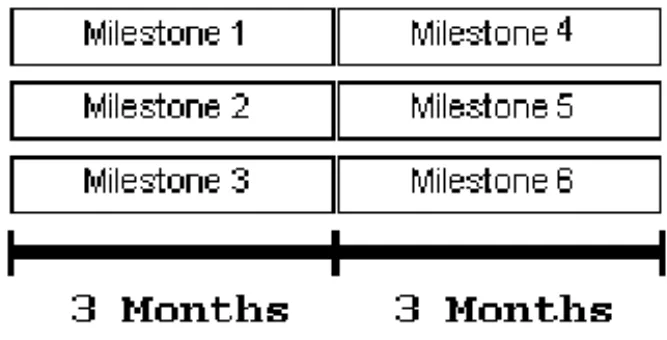
The redesigned software component had fifteen different features. Thus, our project was broken into fifteen milestones with three lined up simultaneously into a single increment. See Fig. 1 for an illustration of the first six milestones.
Fig. 1. Our Small Releases
The features were defined by more requirements than could be implemented in a two week release - as XP suggests. We chose to extend the duration of our releases instead of breaking up the feature. Our releases were extended to 3 months mainly due to the fear of iterating through individual requirements of a feature. In essence, we were afraid to be agile within the scope of one feature.
The team was accustomed to releases that spanned one year or more. As a result, a move to 3-month development cycles was an extreme jump. If we were to plan a proj-ect now we would be less afraid to break the feature up into requirements for smaller one to two week releases.
We chose a longer milestone length, also, because the three-month duration aligned each release with System Integration and Testing (SIT) delivery schedules. In our project, two releases were completed before the first SIT load delivery. Each subse-quent release only contained the features needed in the next SIT load.
2.2 Pros
The smaller releases provided the opportunity to alleviate development risks much earlier than the traditional waterfall lifecycle. Our first few milestones focused on proving the feasibility of a new compiler and the C++ Standard Template Library
(STL) while implementing a limited feature set. The smaller release allowed us to learn these new areas faster and gave us confidence in the compiler and the STL very early in the project.
2.3 Cons
Narrowing our focus on a single feature did not allow enough time to consider all feature interactions. Many defects were traced back to feature interactions that were not thoroughly investigated.
Developing software incrementally, using small releases, shifted the most complex design tasks toward the end of the project. In the early releases, many feature interac-tions had not yet been introduced. In the later releases, all feature interacinterac-tions and exception cases must be considered. At this point in the project, the team must bal-ance defect repair and requirements investigation. In our experience, the requirements investigation often suffered. In hindsight, we realize how important a dedicated cus-tomer, who can focus on these feature interactions, is to a project using small releases.
3
Continuous Integration
Continuous integration assures developers that a common, tested baseline exists on a frequent basis. XP suggests an integration scheme where developers can integrate frequently and on their own free will.
3.1 Divergence
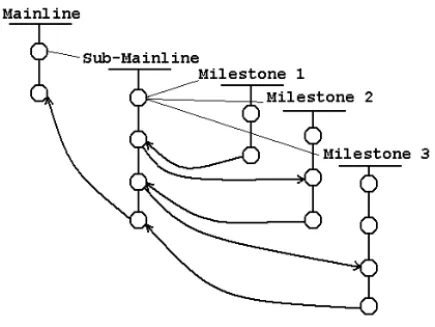
The illustration in Fig. 2 shows our branching scheme and merging process to foster parallel development.
Continuous integration had a few different connotations in our process. First, each milestone branch was “integrated” daily, sometimes hourly. This integration simply consisted of a pair checking in a file. The integration was not complete until the unit test suite was completely passing on the milestone branch.
Second, each of three milestone branches were integrated, or merged, to the Sub-mainline every couple of days. The merging had to be completed one milestone at a time. It may sound complex but in practice it was pretty smooth. Our “build mon-key” set up scripts that performed these integrations at the push of a button.
Finally, the sub-mainline branch was integrated to mainline less often. Actually, as we were building up the initial code baseline, we were integrating to mainline every day or two. These merges were also automated with buttons on our configuration management and version control tool.
As the project progressed, integrations to the mainline were taking place less often because the rest of our product team caught up with us in their coding phase. At this time, the Change Control Board (CCB) began exercising its power to control what changes were integrated. The CCB is clearly a non-agile component of our process. The board met weekly to plan the next build; therefore, integrations took place weekly.
Besides the obvious managing and limiting of code changes, the purpose of the CCB is to make sure a change request is ready to be built into the product. Our full product builds take a full day to complete (6-8 hours). As a result, it is very important to make sure a change will not affect the build.
3.2 Pros
The introduction of the CCB forced the team to slow down. At times, we felt like we were flying through each task. Sometimes, in our environment, it is better to slow down and think about the effects of a change. For example, the extra time gave us an opportunity to further test a private build.
3.3 Cons
The CCB clashed with many of the XP principles. XP recommends frequent integra-tions for a reason. The staler a branch got the more difficult the merge became. For example, the CCB postponed integration of a “below the line” defect. Meanwhile, significant changes were made to the code before the defect was approved. By this time, the file version with the defect fix is very different from the mainline version. In this situation, the merge was non-trivial and had to be done manually.
4
Pair Programming
Historically, programming has been an individual activity because of the fact there is only one keyboard and one mouse. This is a fallacy considering the work being done when programming is much more than typing and using the mouse [3].
4.1 Divergence
In the beginning of our project, we were highly disciplined pair programmers. We began by pairing for all development activities: design, writing unit tests, and code. We skipped the formal technical reviews (FTR), which were mandated by the CMM based process. We added informal reviews of the design to supplement the pair de-signing activities.
As the project progressed, we paired less often for a number of reasons: less need for mentoring, schedule pressure, office ergonomics, responsibilities on other projects, difficulty finding a pair, management displeasure with the idea of pair programming and no formal reviews, and a new corporate FTR initiative. These are nothing but excuses. We are quick to admit that pair programming is an essential component to an XP-like development process.
Our pair programming discipline descended a slippery slope. We transitioned into a process where pairing was only mandated when writing code. Test cases were writ-ten in pairs, if possible. Soon each developer became busy with other things and pairing on the code was happening less often as well. Eventually we fell into a proc-ess where pairing on code and tests occurred, at the minimum, when making risky changes.
We instituted formal reviews of test cases and code because of pressure from our formal review centered organization, defects missed in pair programming, and less pair programming. We began reviewing test cases by looking at descriptions of the tests (this tied the unit tests to higher level box testing scenarios) and not the actual code of the test. We realized this was filling holes in the test suite but it was not im-proving the current tests. Thus, the bodies of the test cases were inspected as well. 4.2 Pros
When we formally reviewed test cases we found missing tests and ways to improve the test suite through better assertions, helper test classes, and helper test methods. We have found that the discussions that take place in reviews, involving developers with many different points of view, are very valuable to the development process.
Through pair programming, we have spread the knowledge of the Standard Tem-plate Library (STL) and OOD patterns. In doing so, we were able to re-use STL im-plementations and design patterns throughout our code.
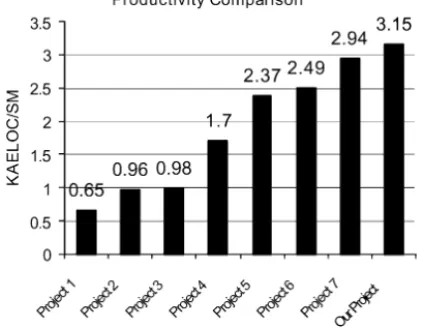
We certainly saw no decrease in productivity because of pair programming. Fig. 3 shows the increase in productivity from example projects representing a waterfall lifecycle (Project 1, 2, and 3), to an iterative OO lifecycle (Project 4), and finally four XP pilot projects (Project 5-8). The productivity is measured in KAELOC per staff month. Our project came out with the highest productivity numbers out of them all. 4.3 Cons
The likelihood of pair programming eliminating all mistakes during coding is small. We feel that, in our environment, formal code and test case reviews can complement pair programming.
Fig. 3. Productivity in KAELOC/Staff Month
In our complex environment, it is not a safe assumption that a pair of people in the group will be able to consider the effects on the entire system. We live in a group where experts and feature owners emerge. This attitude tends to prevail over common knowledge across the team. Our dynamic pairing scheme projected a feeling of col-lective ownership. However, you usually could associate a feature (but not classes or methods) with a particular developer or pair.
Sometimes it is difficult to find a pair. If you are forced to code with a pair, what happens when you cannot find someone? If you followed pure XP you would not be able to code without a pair. We ran into this problem many times. To handle this we balanced pair programming and solo programming with the level of risk involved with a change that was being made.
Our office is a sea of cubicles. The ergonomics that result from a cube are ideal for an individual programmer but far from ideal for a pair. We attempted to set up our cubes in a pair-friendly manner by moving the keyboard, mouse, and monitor to a corner of the cube. This set up provided a better environment to pair program. How-ever, it was far from perfect. A large room with no dividers between each pair would have been nice but the space limitations (at the time) would not allow it.
5
Simple Design
The goal of simple design is to only design for the requirement (s) of the current mile-stone. By doing so, developers ignore what impact future milestones may have on the current software design.
5.1 Divergence
Our team did not design for one specific test case, implement it, and then move on to the next test case as is outlined in standard XP. When designing, we took into consid-eration the full set of use cases and scenarios that composed the current milestone. We did not "design for future milestones," but we did develop a detailed design model that we felt sufficiently covered all outlined scenarios. Doing this was possible, in part, due to the static nature of requirements in our environment. Typically, our proj-ects are based on contracts between the business team and a single customer. The requirements rarely change because of the diligent creation of these contracts.
5.2 Pros
The extra time spent designing for the entire 3-month milestone gave us more confi-dence going into the implementation phases. We were able to design for some of the feature interactions appearing across the concurrent milestones.
5.3 Cons
Had we spent more time in the design phase, we may have better identified high-risk areas of code during design discussions. This may seem counterintuitive to XP princi-ples. Since our project focused on redesigning one side of a well defined interface, however, the assumptions and dependencies across our interface were not sufficiently explored. Until the entire application was built, these dependencies were not under-stood.
6
The Planning Game
The goal of the planning game is to maximize the value of the delivered software by prioritizing the functionality. As defined in the standard XP, ideally, the actual user will provide priorities for high-level functionality. The developers will then refine the high-level functionality descriptions into a detailed implementation plan.
6.1 Divergence
We did not have the luxury of a business team or customer. Our business team was a system design group that we rarely had access to. Our customer was a system expert with limited time to offer to our project. Each developer played the role of the cus-tomer by learning as many requirements as possible during each milestone.
Team members did not choose their assignments. The project manager selected appropriate developers for certain tasks. Prior to the planning game, use cases were completed and reviewed in the place of user stories.
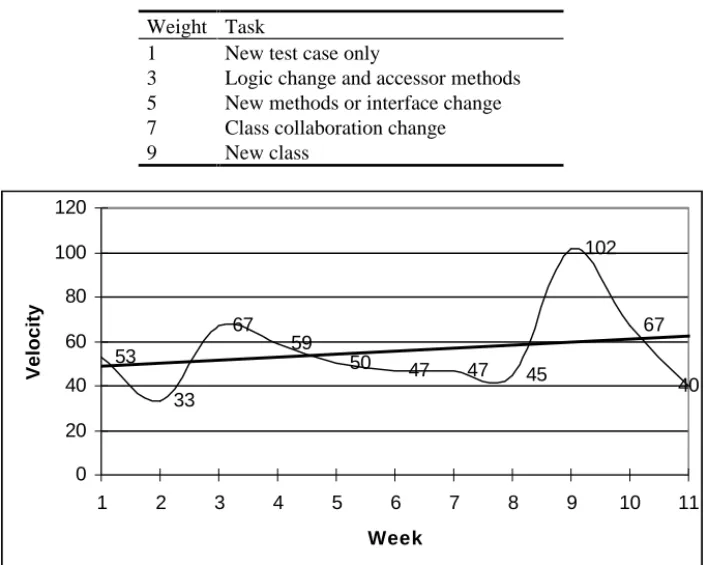
Each person was responsible for estimating the effort for each task. The tasks, along with their weights, were individually written on 3x5 work cards. The cards were based on specific implementation tasks. The relative cost of change determined the weight. Our weighting scheme is described in Table 1.
Table 1. Task weighting guidelines Weight Task
1 New test case only
3 Logic change and accessor methods 5 New methods or interface change 7 Class collaboration change
9 New class 53 33 67 59 50 47 47 45 102 67 40 0 20 40 60 80 100 120 1 2 3 4 5 6 7 8 9 10 11 Week Velo cit y
Fig. 4. Weekly velocity
Upon completion, work cards were placed in an empty James Brown compact disc case hanging in the project manager’s office. The activity of handing over completed work cards gave developers the feeling of accomplishment on a regular basis.
The team’s velocity was calculated by summing the weights from every completed work card. The velocity was used as a guideline for how productive we were in any given week. Fig. 4 shows the velocity we had during each week of one milestone.
During this milestone, we created 12 new classes and eliminated 5 classes. The av-erage was 54.5 per week or 9 per developer per week. The project manager used these numbers (Yesterday’s Weather) as an estimate as to how long a particular milestone would take to complete.
6.2 Pros
The planning game provided a stage to clearly define functionality and schedule re-sponsibility for each team member. The exercise gave each team member a focus on what the milestone’s goals and priorities were. It also allowed the team to estimate the amount of work for each detailed task. By measuring the work necessary for each task, we were able to evaluate a reasonable workload for each team member. In addi-tion, the planning game also provided a stage for the team to share initial design and implementation ideas.
6.3 Cons
In the beginning, we did not have a baseline as to how to measure each task. Hence, it is difficult to determine how much can be done in the duration of a milestone. In addition, it is difficult to adjust the work effort based on previous milestones. For example, if we need to make a change that is similar to a previous change the weight was not adjusted. However, the work put forth for the previous change made things easier the second time around. As a result, the team may feel that they can move faster than they did before for all types of changes, when they were only able to move faster because of previous work
The single most significant flaw in our planning game was the absence of a dedi-cated customer or business team. With each developer playing the role of the cus-tomer, we were able to catch 80-90 percent of the requirements of each milestone. The remaining 10-20 percent of requirements were discovered during implementation or testing. We highly recommend a dedicated customer since mixing the roles creates a conflict of interest between the developer and customer. The developer wants to be done and move on while the customer is more focused on certifying a milestone for acceptance. If a dedicated customer role is not an option, the majority of requirements should be established before beginning the first iteration.
7
Refactoring
Refactoring encompasses any changes to the system that leaves its behavior un-changed but enhances some nonfunctional quality (i.e. simplicity, flexibility, under-standability, or performance).
7.1 Divergence
The main difference in our refactoring methods was the degree to which they were controlled. Each developer was encouraged to think of refactoring ideas but to ask permission before implementing them. Our “courage” for refactoring changes was taken away by managers and the Change Control Board to minimize risk to the prod-uct release. This control increased in intensity as the final release grew closer (and as refactorings occasionally broke a previously working feature).
To help manage the refactoring work, the team kept a "refactoring wish list" on a white-board in a public area. When conditions allowed, developers would take on refactoring work identified in the list. Refactoring jobs can come in both large and small sizes. Large refactorings were often managed in their own smaller milestones, while very small jobs could sometimes be completed in conjunction with a defect repair. A Change Control Board (CCB) was always there to approve the change based on the size and risk of the job.
The CCB would classify some of its weekly builds as "restricted" when the build could not afford any additional risk (i.e. just prior to a release turnover). Other weekly builds were classified as "anything goes", and open to refactoring changes. These builds were completed far enough in advance of a turnover to allow adequate box-level regression testing to mitigate any risks introduced by refactoring changes.
7.2 Pros
Because we were encouraged to look for opportunities to simplify and otherwise im-prove the code base, the system evolved without getting too unwieldy.
Since the test cases in the regression suite act as an "insurance policy" against re-factoring changes, rere-factoring positively reinforced the need to write high quality unit test cases and supplement those with box testing.
7.3 Cons
The desire to encourage refactoring changes clashed with the CCB’s desire to mini-mize changes to the code base. Groups that have always used waterfall life-cycles are quick to label the develop-extend-refactor activities of XP as "hacking.” In a culture that encourages a "get it right the first time" approach to development, the need to refactor is seen as a failure of the process.
Large refactorings created some significant defects on our project. These defects were mainly due to extreme feature interaction in our design. The flaws in the refac-tored design were not exposed in either the unit test suite, during pair programming, or during the formal review of the code or test cases. We relied on our test suite too heavily at times. It is very difficult to write a complete test suite; therefore, there is a risk that the changes will create defects that go undetected.
There is seemingly no limit to the refactoring opportunities presented during a proj-ect. For this reason, it is critical that the refactoring work be managed with the same scrutiny as the feature development. Refactoring changes were more common in the later stages of the project.
8
Testing
One of the main goals of automated regression unit testing is to decrease the risk of introducing defects through source code changes.
8.1 Divergence
Of the principles and behaviors outlined in XP, automated regression testing is the one that our group has most passionately adopted. We have found its inclusion to be criti-cal when refactoring. Our group has relied on our regression test suite to uncover new and existing bugs when refactoring since devoting time to comprehensive box testing after minor refactoring changes is often unrealistic.
The team as a whole was not very disciplined when it came to test first coding (with new code). While everyone saw the value of thinking with the unit test hat on before writing any code, team members had varying degrees of test first compliance. The test first protocol mandated by the team with new code was to write test case descriptions and titles, at a minimum, before writing code. All bug fixes followed the test first process as is defined in standard XP. A unit test was written to reproduce the defect, it failed, then the code was written to fix the defect. Sometimes this was done even with new code, it just depended on who you were pairing with that day.
After all was said and done, we ended up with over 1,500 automated unit test cases. All 1,500 tests were executed after every change. Execution of the test suite was completed in a short time frame (about one minute).
8.2 Pros
The automated regression test suite quickly exposed some of the bugs introduced during refactoring. The suite gave the developers confidence that a change did not break existing functionality. This confidence promoted faster development and re-duced the risks associated to refactoring. Watching the tests pass is an enjoyable, up-lifting, addicting experience. At times we would run the suite over and over just to see the successful completion of all of the tests.
8.3 Cons
The confidence inherent with the automated unit test suite was a double-edged sword for our team. For example, we have occasionally found bugs that should have been caught in the unit test suite but the test was missing or written poorly. Since the test suite is only as good as the tests included in it, and tests are only as good as the tester who writes them, a test suite is never perfect. As a result, it is the developer’s and the project leader’s responsibility to strike a balance between code reviews, automated regression tests, and box tests (our acceptance tests).
As the regression test suite grows, so does the effect of a code change on the test suite. For example, some interface changes led to hundreds lines of test code modifi-cations. Unfortunately, the fear of major test suite changes would intermittently creep into some of our design decisions.
The absence of an existing regression test suite that tested the dependencies of every legacy interface was a key error on our part. The majority of the defects we found were related to dependencies embedded within the legacy code. Had we created a suite that tested the dependencies of this interface, any incorrect assumptions we made would have been immediately exposed.
9
Key Lessons Learned
? In a mission critical product development culture, management is reluctant to allow pair programming without formal reviews.
? The XP defined customer role is crucial. Mixing developers, managers, and coaches as the customer is not recommended.
? There are many benefits to completely developing 80-90% of the full set of re-quirements prior to beginning the first milestone.
? The Unit Test Suite cannot be solely relied upon to counteract negative effects of refactoring. Automated box level (acceptance) testing, expert blitz testing, and FTRs are valuable quality assurance techniques as well.
? In a redesign, the unit test suite should be created to test all existing requirements of the old code. This should then be used as the minimum acceptance tests for the re-designed code.
10 Conclusion
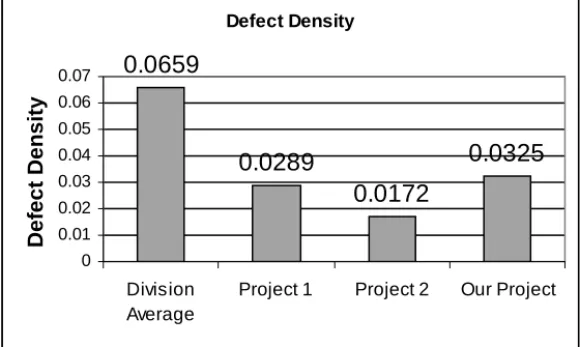
We feel very positive about the future of agile processes in our organization. Despite our “XP rookie mistakes,” the quality of our product was well within expectations. In the project post mortem, very few defects could be traced directly to XP practices. However, many defects could be traced to the uneven execution of the practices. See Fig. 5 for an illustration of defect density of our project. Defect density is defined as the number of SIT (System Integration and Test) found defects per KAELOC.
Defect Density
0.0659
0.0289
0.0172
0.0325
0 0.01 0.02 0.03 0.04 0.05 0.06 0.07 Division AverageProject 1 Project 2 Our Project
De fe c t De ns ity
Fig. 5. The density of defects that were discovered in Systems Integration and Testing The division average is calculated from many different projects developed with multiple languages. Both Project 1 and Project 2 were XP projects that were devel-oped with an object oriented language.
The process needed tailoring along the way to fit into our mission critical cus-tomer’s needs. There are two ways to view our tailoring efforts. In one sense, we “added a few pounds” to a lightweight process to better meet our business needs. Alternately, we attempted to pull some XP practices into our heavyweight culture to improve our agility. The bottom line is we feel we have found some middle ground that we intend to build upon.
References
1. Beck, Kent: Extreme Programming Explained. Addison-Wesley Publishing Company (1999)
2. Grenning, James: Using XP in a Big Process Company: A Report from the Field. XP Agile Universe (2001)
3. Williams, Laurie. http://www.pairprogramming.com, http://collaboration.csc.ncsu.edu/laurie.