ibm.com/redbooks
Using LDAP for
or
Directory Integration
Steven Tuttle
Kedar Godbole
Grant McCarthy
Integration guidelines for systems
administrators
Examples to help you integrate
directories
Includes IBM Tivoli
Directory Integrator
Using LDAP for Directory Integration
February 2004
International Technical Support Organization
© Copyright International Business Machines Corporation 2003, 2004. All rights reserved.
Second Edition (February 2004)
This edition applies to IBM Tivoli Directory Server V5 release 2, IBM Tivoli Directory Integrator V5 release 2, IBM Lotus Domino Server V6 release 5, and Microsoft Windows 2000 Advanced Server Active Directory.
Note: Before using this information and the product it supports, read the information in
© Copyright IBM Corp. 2003, 2004. All rights reserved. iii
Contents
Notices . . . vii
Trademarks . . . viii
Preface . . . ix
The team that wrote this redbook. . . ix
Become a published author . . . x
Comments welcome . . . xi
Summary of changes . . . xiii
February 2004, Second Edition . . . xiii
Chapter 1. Introduction to Directory Integration . . . 1
1.1 Introduction . . . 2
1.2 Directories . . . 2
1.3 Advantages of using a directory . . . 6
1.4 Directory Components. . . 8
1.5 IBM Tivoli Directory Integrator . . . 12
1.5.1 Directory Integrator software components . . . 13
1.5.2 Solution building approach . . . 14
1.6 IBM Tivoli Directory Server . . . 15
1.7 IBM Lotus Domino 6.5 . . . 16
1.8 Microsoft Active Directory . . . 17
1.8.1 Naming contexts . . . 18
1.8.2 Logical elements . . . 18
1.8.3 Physical elements: sites and domain controllers . . . 19
1.8.4 Architecture . . . 19
1.8.5 The role of DNS . . . 21
1.8.6 Special roles . . . 21
Chapter 2. Scenario 1: Domino and Active Directory . . . 23
2.1 Scenario 1 . . . 24
2.2 Synchronizing Active Directory and Domino Directory using ADSync . . . 25
2.3 Installing the ADSync tool . . . 26
2.4 Enabling Domino Directory synchronization . . . 27
2.5 Registering users of Active Directory . . . 32
2.5.1 Registering existing Active Directory users in Domino . . . 32
2.5.2 Registering new users in both Active Directory and Domino . . . 37
2.6 Registering users using the Domino Administrator client . . . 41
2.7.1 Deleting users with Active Directory . . . 45
2.7.2 Deleting users with the Domino Administrator client . . . 46
2.8 Data synchronization using Directory Integrator . . . 47
Chapter 3. Scenario 2: Directory Server and Active Directory . . . 49
3.1 Introduction . . . 50
3.2 Scenario 2 . . . 50
3.2.1 The Test Environment. . . 50
3.2.2 The testing procedure . . . 51
3.3 Installation and configuration of Directory Integrator . . . 52
3.3.1 Installation of Directory Integrator . . . 52
3.3.2 Configuration of Directory Integrator . . . 53
Chapter 4. Scenario 3: Directory Server and Domino . . . 75
4.1 Scenario 3A. . . 76
4.1.1 Prerequisites . . . 76
4.1.2 Importing data using Directory Integrator . . . 78
4.1.3 Importing data into Directory Server . . . 78
4.2 Scenario 3B. . . 88
4.2.1 Importing data into the Domino Directory . . . 89
4.2.2 Synchronization between Directory Server and Domino Directory . . 96
4.3 Scenario 3C. . . 96
4.3.1 LDAP Domino Upgrade Service . . . 97
4.3.2 Migrating entries from LDAP Directory into a Domino Directory . . . . 97
Chapter 5. Scenario 4: Integrating data from three different sources . . 105
5.1 Scenario 4 . . . 106
5.2 Building the Assembly Line . . . 107
5.2.1 The File System Connector. . . 107
5.2.2 The Lookup Connectors . . . 109
5.2.3 The AddOnly connector . . . 111
5.2.4 The Update connector. . . 113
5.3 The result . . . 115
Appendix A. Configurations . . . 117
Directory Server . . . 118
Operating System . . . 118
Directory Server setup . . . 118
IBM Lotus Domino Server . . . 119
Operating System . . . 119
IBM Lotus Domino 6.5 setup . . . 119
Microsoft Active Directory. . . 119
Operating System . . . 119
Contents v
Appendix B. LDAP standards. . . 121
LDAP standards . . . 122
Abbreviations and acronyms . . . 123
Related publications . . . 125
IBM Redbooks . . . 125
Other publications . . . 125
Online resources . . . 125
How to get IBM Redbooks . . . 126
Help from IBM . . . 126
© Copyright IBM Corp. 2003, 2004. All rights reserved. vii
Notices
This information was developed for products and services offered in the U.S.A.
IBM may not offer the products, services, or features discussed in this document in other countries. Consult your local IBM representative for information on the products and services currently available in your area. Any reference to an IBM product, program, or service is not intended to state or imply that only that IBM product, program, or service may be used. Any functionally equivalent product, program, or service that does not infringe any IBM intellectual property right may be used instead. However, it is the user's responsibility to evaluate and verify the operation of any non-IBM product, program, or service.
IBM may have patents or pending patent applications covering subject matter described in this document. The furnishing of this document does not give you any license to these patents. You can send license inquiries, in writing, to:
IBM Director of Licensing, IBM Corporation, North Castle Drive Armonk, NY 10504-1785 U.S.A.
The following paragraph does not apply to the United Kingdom or any other country where such provisions are inconsistent with local law: INTERNATIONAL BUSINESS MACHINES CORPORATION PROVIDES THIS PUBLICATION "AS IS" WITHOUT WARRANTY OF ANY KIND, EITHER EXPRESS OR IMPLIED, INCLUDING, BUT NOT LIMITED TO, THE IMPLIED WARRANTIES OF NON-INFRINGEMENT,
MERCHANTABILITY OR FITNESS FOR A PARTICULAR PURPOSE. Some states do not allow disclaimer of express or implied warranties in certain transactions, therefore, this statement may not apply to you. This information could include technical inaccuracies or typographical errors. Changes are periodically made to the information herein; these changes will be incorporated in new editions of the publication. IBM may make improvements and/or changes in the product(s) and/or the program(s) described in this publication at any time without notice.
Any references in this information to non-IBM Web sites are provided for convenience only and do not in any manner serve as an endorsement of those Web sites. The materials at those Web sites are not part of the materials for this IBM product and use of those Web sites is at your own risk.
IBM may use or distribute any of the information you supply in any way it believes appropriate without incurring any obligation to you.
Information concerning non-IBM products was obtained from the suppliers of those products, their published announcements or other publicly available sources. IBM has not tested those products and cannot confirm the accuracy of performance, compatibility or any other claims related to non-IBM products. Questions on the capabilities of non-IBM products should be addressed to the suppliers of those products.
This information contains examples of data and reports used in daily business operations. To illustrate them as completely as possible, the examples include the names of individuals, companies, brands, and products. All of these names are fictitious and any similarity to the names and addresses used by an actual business enterprise is entirely coincidental.
COPYRIGHT LICENSE:
This information contains sample application programs in source language, which illustrates programming techniques on various operating platforms. You may copy, modify, and distribute these sample programs in any form without payment to IBM, for the purposes of developing, using, marketing or distributing application programs conforming to the application programming interface for the operating platform for which the sample programs are written. These examples have not been thoroughly tested under all conditions. IBM, therefore, cannot guarantee or imply reliability, serviceability, or function of these programs. You may copy, modify, and distribute these sample programs in any form without payment to IBM for the purposes of developing, using, marketing, or distributing application programs conforming to IBM's application programming interfaces.
Trademarks
The following terms are trademarks of the International Business Machines Corporation in the United States, other countries, or both:
Eserver® Eserver® Redbooks (logo) ™ Eserver™ ibm.com® iSeries™ Domino® DB2® IBM® Lotus Notes® Lotus® Notes® Redbooks™ RDN™ SecureWay® Tivoli Enterprise™ Tivoli® WebSphere® The following terms are trademarks of other companies:
Intel, Intel Inside (logos), MMX, and Pentium are trademarks of Intel Corporation in the United States, other countries, or both.
Microsoft, Windows, Windows NT, and the Windows logo are trademarks of Microsoft Corporation in the United States, other countries, or both.
Java and all Java-based trademarks and logos are trademarks or registered trademarks of Sun Microsystems, Inc. in the United States, other countries, or both.
UNIX is a registered trademark of The Open Group in the United States and other countries. SET, SET Secure Electronic Transaction, and the SET Logo are trademarks owned by SET Secure Electronic Transaction LLC.
© Copyright IBM Corp. 2003, 2004. All rights reserved. ix
Preface
This IBM Redbook is intended for directory administrators who are faced with today’s directory management challenges.
This book explains directory and LDAP concepts, and it deals with some basic and advanced scenarios that demonstrate ways to tackle directory integration challenges. These scenarios use some leading products that are available including the IBM Tivoli Directory Server, IBM Tivoli Directory Integrator, IBM Lotus Domino, and Microsoft’s Active Directory.
The team that wrote this redbook
This redbook was produced by a team of specialists from around the world working at the International Technical Support Organization, Raleigh Center.
Steven Tuttle is a Project Leader for the International Technical Support
Organization (ITSO), Austin center. He has 13 years of experience in the IT industry. He has worked at IBM for 10 years, with 5 years of experience with IBM security products. He holds a degree in Computer Science from Clarkson University in Potsdam, New York, with concentrations in Mathematics and Psychology. His areas of expertise include the IBM Tivoli Enterprise products and the IBM Tivoli Security products. Before joining the ITSO, he worked for IBM Tivoli Services in the Security Practice as an enterprise security solution
designer using IBM Tivoli software products.
Kedar Godbole is a Software Engineer working with IBM Global Services in
Pune, India. He has over four years of experience in the IT industry. He has worked for IBM for over two years. He holds a master’s degree in Electrical Engineering from Government College of Engineering in Pune, India with a specialization in Control Systems. His areas of expertise include products like IBM Tivoli Directory Integrator and IBM Transarc Distributed File System.
Grant McCarthy is an Advisory IT Specialist with IBM South Africa. He is
certified in Domino Administration and has 7 years of administration and development experience in the Domino/Notes environment. He has recently received the EMEA 2003 Outstanding Technical Achievement Award for his work on an Domino/Notes project in the security environment for South Africa. He has also developed numerous other Domino applications that are being used by IBM South Africa. Currently, he is the Domino Administrator for a large account in IBM Global Services, South Africa.
Thanks to the following people for their contributions to this project:
Tamikia Barrow, Tony Bhe, Linda Robinson, and Margaret Ticknor
International Technical Support Organization
David Byrd
IBM Software Services for Lotus, IBM Software Group
David G. Druker, Ph.D.
Consulting I/T Specialist, IBM Tivoli Americas National Team
Nathan Owen
Security Solutions Architect, IBM Software Group
Stanislav Ovcharov
Senior Developer for Directory Services Integration, Musala Software Ltd.
Vishakha V. Vaidya
Software Engineer, IBM Global Services
Chunhui Yang
Metadirectory Architect and Directory Services Consultant, IBM Software Group
Become a published author
Join us for a two- to six-week residency program! Help write an IBM Redbook dealing with specific products or solutions, while getting hands-on experience with leading-edge technologies. You'll team with IBM technical professionals, Business Partners, and/or customers.
Your efforts will help increase product acceptance and customer satisfaction. As a bonus, you'll develop a network of contacts in IBM development labs, and increase your productivity and marketability.
Find out more about the residency program, browse the residency index, and apply online at:
Preface xi
Comments welcome
Your comments are important to us!
We want our Redbooks to be as helpful as possible. Send us your comments about this or other Redbooks in one of the following ways:
Use the online Contact us review redbook form found at: http://www/ibm.com/redbooks
Send your comments in an Internet note to: mailto:[email protected]
Mail your comments to:
IBM Corporation, International Technical Support Organization Dept. JN9B Building 003 Internal Zip 2834
11400 Burnet Road Austin, Texas 78758-3493
© Copyright IBM Corp. 2003, 2004. All rights reserved. xiii
Summary of changes
This section describes the technical changes made in this edition of the book and in previous editions. This edition may also include minor corrections and editorial changes that are not identified.
Summary of Changes for SG24-6163-01
for Using LDAP for Directory Integration as created or updated on February 11, 2004.
February 2004, Second Edition
This revision reflects the addition, deletion, or modification of new and changed information described below.
New information
Overview and Use of IBM Tivoli Directory Integrator
Changed information
Updated the versions of products used in the scenarios
Scenarios updated or created to use the functionality of ADSync and IBM Tivoli Directory Integrator when possible.
© Copyright IBM Corp. 2003, 2004. All rights reserved. 1
Chapter 1.
Introduction to Directory
Integration
This chapter introduces the concept and advantages of directories in the corporate environment. It describes the Lightweight Directory Access Protocol (LDAP) and defines standards and terminologies involved in accessing directories. This provides a framework for discussing common directory definitions, the particularities of implementation, and the part that a corporate directory can play in an integrated environment. Finally, it introduces the applications that make use of LDAP, which are used in this book.
1.1 Introduction
People and businesses are increasingly relying on networked computer systems to support distributed applications. These distributed applications might interact with computers on the same local area network (LAN), within a corporate intranet, or anywhere in the world on the Internet. To improve functionality, provide ease of use, and enable cost-effective administration of distributed applications, information about the services, resources, users, and other objects accessible from the applications needs to be organized in a clear and consistent manner. Much of this information can be shared among many applications, but it must also be protected to prevent unauthorized modification or the disclosure of private information. Security, however, is not the only consideration when applying a service policy to a piece of communication. The quality of service to be delivered is another major element, and directories today are capable of holding millions of objects.
Information describing the various users, applications, files, printers, and other resources accessible from a network is often collected into a special database that is sometimes called a directory. As the number of different networks and applications has grown, the number of specialized directories of information has also grown. This growth results in islands of information that are difficult to share and manage. If all of this information could be maintained and accessed in a consistent and controlled manner, it would provide a focal point for integrating a distributed environment into a consistent and seamless system.
LDAP is an open industry standard that has evolved to meet these needs. LDAP defines a standard method for accessing and updating information in a directory. LDAP is gaining wide acceptance as the directory access method of the Internet and is therefore also becoming strategic within corporate intranets. It is being supported by a growing number of software vendors and is being increasingly incorporated into applications. For example, the two most popular Web browsers, Netscape Navigator/Communicator and Microsoft Internet Explorer, support LDAP as a base feature.
1.2 Directories
A directory is a listing of information about objects arranged in some order that gives details about each object. Common examples are a city telephone directory and a library card catalog. For a telephone directory, the objects listed are people; the names are arranged alphabetically, and the details given about each person are address and telephone number. Books in a library card catalog are ordered by author or by title, and information such as the ISBN number of the book and other publication information is given.
Chapter 1. Introduction to Directory Integration 3
In computer terms, a directory is a specialized database, also called a data repository, that stores typed and ordered information about objects. A particular directory might list information about printers (the objects) consisting of typed information such as location (a formatted character string), speed in pages per minute (numeric), print streams supported (for example PostScript or ASCII), and so on.
Directories allow users or applications to find resources that have the
characteristics needed for a particular task. For example, a directory of users can be used to look up a person's e-mail address or fax number. A directory can be searched to find a nearby PostScript color printer. Finally, a directory of
application servers could be searched to find a server that can access customer billing information.
The terms white pages and yellow pages are sometimes used to describe how a directory is used. If the name of an object (such as a person or printer) is known, its characteristics (such as phone number or pages per minute) can be retrieved. This is similar to looking up a name in the white pages of a telephone directory. If the name of a particular individual object is not known, the directory can be searched for a list of objects that meet a certain requirement. This is like looking up a listing of hairdressers in the yellow pages of a telephone directory. However, directories stored on a computer are much more flexible than the yellow pages of a telephone directory because they can usually be searched by specific criteria, not just by a predefined set of categories.
A directory is often described as a database, but it is a specialized database that has characteristics that set it apart from general-purpose relational databases. One special characteristic of directories is that they are accessed (read or searched) much more often than they are updated (written). Just as hundreds of people might look up an individual's phone number, thousands of print clients might look up the characteristics of a particular printer. However, the phone number or printer characteristics rarely change.
Because directories must be able to support high volumes of read requests, they are typically optimized for read access. Write access might be limited to system administrators or to the owner of each piece of information. A general-purpose database, on the other hand, needs to support applications, such as airline reservations and banking applications, with relatively high-update volumes. Because directories are meant to store relatively static information and are optimized for that purpose, they are not appropriate for storing information that changes rapidly. For example, the number of jobs currently in a print queue probably should not be stored in the directory entry for a printer because that information would have to be updated frequently to be accurate. Instead, the directory entry for the printer can contain the network address of a print server. The print server can be queried to get the current queue length if desired. The
information in the directory (the print server address) is static, while the number of jobs in the print queue is dynamic.
Another difference between directories and general-purpose databases is that most directory implementations still do not support transactions. However, transactions are supported in LDAP. These transactions are limited to
transactions within the LDAP directory and do not include other transactions (for example, database operations). Transactions are all-or-nothing operations that must be completed in total or not at all. For example, when transferring money from one bank account to another, the money must be debited from one account and credited to the other account in a single transaction. If only half of this transaction completes or if someone accesses the accounts while the money is in transit, the accounts will not balance. General-purpose databases usually support such transactions, which complicates their implementation.
Because general-purpose databases must support arbitrary applications such as banking and inventory control, they allow arbitrary collections of data to be stored. Directories may be limited in the type of data they allow to be stored (although the architecture does not impose such a limitation). For example, a directory specialized for customer contact information might be limited to storing only personal information such as names, addresses, and phone numbers. If a directory is extensible, it can be configured to store a variety of types of information, making it more useful to a variety of programs.
Another important difference between a directory and a general-purpose database is in the way information can be accessed. Most databases support a standardized and very powerful access method called Structured Query
Language (SQL). SQL allows complex update and query functions at the cost of program size and application complexity. Directories, such as an LDAP directory, on the other hand, use a simplified and optimized access protocol that can be used in slim and relatively simple applications.
Because directories are not intended to provide as many functions as
general-purpose databases, they can be optimized to economically provide more applications with rapid access to directory data in large distributed environments. If your intended use of the directory is to be read, mostly in a non-transactional environment, both the directory client and directory server can be simplified and optimized.
A request is typically performed by the directory client, and the process that looks up information in the directory is called the directory server. In general, servers provide a specific service to clients. Sometimes a server might become the client of other servers in order to gather the information necessary to process a request.
Chapter 1. Introduction to Directory Integration 5
A directory service is only one type of service that might be available in a client/server environment. Other common examples of services are file services, mail services, print services, Web page services, and so on. The client and server processes might or might not be on the same machine. A server is capable of serving many clients. Some servers can process client requests in parallel. Other servers queue incoming client requests for serial processing if they are currently busy processing another client's request.
An application programming interface (API) defines the programming interface a particular programming language uses to access a service. The format and contents of the messages exchanged between client and server must adhere to an agreed-upon protocol.
LDAP defines a message protocol used by directory clients and directory servers. The LDAP Protocol uses a variety of messages. For example, a
bindRequest may be sent from the client to the LDAP server at the beginning of a connection. A searchRequest is used to search for a specific entry in the directory.
There are also associated LDAP APIs for the C language and ways to access LDAP from within a Java application. Additionally, within the Microsoft
development environment, you can access LDAP directories through its Active Directory Service Interface (ADSI). In general with LDAP, the client is not dependent upon a particular implementation of the server; the server can implement the directory however it chooses.
LDAP defines a communication protocol. That is, it defines the transport and format of messages used by a client to access data in an X.500-like directory. LDAP does not define the directory service itself. When people talk about the LDAP directory, they refer to the information that is stored and can be retrieved by the LDAP protocol.
The Comite Consultatif International Telephonique et Telegraphique or Consultative Committee on International Telephony and Telegraphy (CCITT), which is now called the International Telecommunications Union -
Telecommunication Standardization Sector (ITU-T), defined the X.500 standard in 1988. The X.500 standard then became International Standards Organization (ISO) 9594, Data Communications Network Directory, Recommendations X.500/X.521 in 1990, though it is still commonly referred to as X.500.
X.500 organizes directory entries in a hierarchical name space capable of supporting large amounts of information. It also defines powerful search
capabilities to make information retrieval easier. Because of its functionality and scalability, X.500 is often used together with add-on modules for interoperation between incompatible directory services.
X.500 specifies that communication between the directory client and the directory server uses the Directory Access Protocol (DAP). However, as an application layer protocol, the DAP requires the entire Open Systems Interconnection (OSI) protocol stack to operate. Supporting the OSI stack requires more resources than are available in many small environments. Therefore, an interface to an X.500 directory server using a less
resource-intensive or lightweight protocol (in this case, LDAP) is desired. An application client program initiates an LDAP message by calling an LDAP API. But an X.500 directory server does not understand LDAP messages. In fact, the LDAP client and X.500 server even use different communication protocols (TCP/IP versus OSI). The LDAP client actually communicates with a gateway process (also called a proxy or front end) that forwards requests to the X.500 directory server. This gateway is known as an LDAP server. It services requests from the LDAP client. It does this by becoming a client of the X.500 server. At the beginning, the LDAP server implementations supported both OSI and TCP/IP to be able to translate requests received by LDAP clients to DAP requests required to access X.500 directories. Newer LDAP server implementations, such as the IBM SecureWay Directory server, support only the LDAP protocol to access the directory. The LDAP server on the iSeries server is called Directory Services and implements the IBM SecureWay Directory.
All modern LDAP directory servers are based on LDAP Version 3. You can use a Version 2 client with a Version 3 server. However, you cannot use a Version 3 client with a Version 2 server unless you bind as a Version 2 client and use only Version 2 APIs.
All LDAP servers share many basic characteristics since they are based on industry-standard Request for Comments (RFCs). However, due to
implementation differences, they are not all completely compatible with each other when there is not a standard defined.
1.3 Advantages of using a directory
An application-specific directory stores only the information needed by a particular application and is not accessible by other applications. Because a full-function directory service is complex to build, application-specific directories are typically very limited. They probably store only a specific type of information, do not have general search capabilities, do not support replication and
partitioning, and probably do not have a full set of administration tools. An application-specific directory could be as simple as a set of editable text files, or it could be stored and accessed in an undocumented, proprietary manner.
Chapter 1. Introduction to Directory Integration 7
In such an environment, each application creates and manages its own application-specific directory, which quickly becomes an administrative nightmare. The same e-mail address stored by the calendar application might also be stored by a mail application and by an application that notifies system operators of equipment problems. Keeping multiple copies of information up-to-date and synchronized is difficult, especially when different user interfaces and even different system administrators are involved.
What is needed is a common, application-independent directory. If application developers could be assured of the existence of a directory service, then application-specific directories would not be necessary. However, a common directory must address the problems mentioned above. It must be based on an open standard that is supported by many vendors on many platforms. It must be accessible through a standard API. It must be extensible so that it can hold the types of data needed by arbitrary applications. Also, it must provide full
functionality without requiring excessive resources on smaller systems. Since more users and applications will access and depend on the common directory, it must also be robust, secure, and scalable.
When such a directory infrastructure is in place, application developers can devote their time to developing applications instead of application-specific directories. In the same way that developers rely on the communications infrastructure of TCP/IP and remote procedure call (RPC) to free them from low-level communication issues, they must be able to rely on powerful, full-function directory services. LDAP is the protocol to be used to access this common directory infrastructure. Like HTTP (hypertext transfer protocol) and FTP (file transfer protocol), LDAP has become an indispensable part of the Internet's protocol suite.
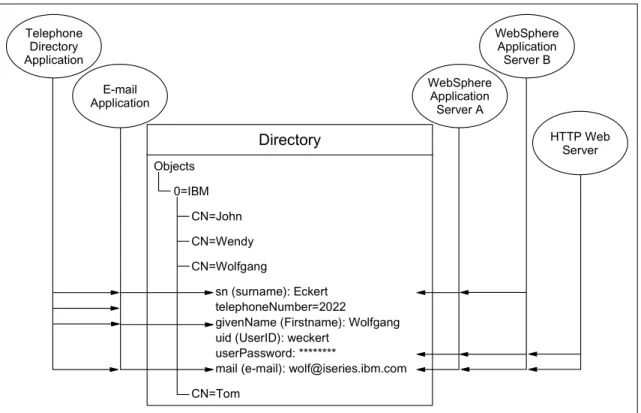
When applications access a standard common directory that is designed in a proper way instead of using application-specific directories, redundant and costly administration can be eliminated and security risks are more controllable. For example, the telephone directory, mail, and Web applications shown below can all access the same directory to retrieve an e-mail address or other information stored in a single directory entry. The advantage is that the data is kept and maintained in one place. Various applications can use individual attributes of an entry for different purposes (assuming that the they have the correct authority). New uses for directory information will be realized, and a synergy will develop as more applications take advantage of the common directory. Figure 1-1 on page 8 depicts the advantages of this arrangement.
Figure 1-1 Several Applications using attributes of the same entry
Storing data in a directory and sharing it among applications saves you time and money by keeping administration effort and system resources down. Many IBM applications also utilize directories to centrally store and share information. The number of applications that support LDAP directories is constantly increasing. For example, LDAP directory support, such as for authentication and
configuration management, is provided in various IBM Operating Systems, IBM WebSphere Application Server, WebSphere Portal Server, Tivoli Access Manager, Directory Server (Directory Server), IBM HTTP server, Lotus Domino, and so on.
1.4 Directory Components
A directory contains a collection of objects organized in a tree structure. The LDAP naming model defines how entries are identified and organized. Entries are organized in a tree-like structure called the Directory Information Tree (DIT). Entries are arranged within the DIT based on their distinguished name (DN). A DN is a unique name that unambiguously identifies a single entry. DNs are made Telephone Directory Application Directory Objects 0=IBM CN=John CN=Wendy CN=Wolfgang sn (surname): Eckert telephoneNumber=2022
givenName (Firstname): Wolfgang uid (UserID): weckert
userPassword: ********
mail (e-mail): [email protected] CN=Tom WebSphere Application Server A WebSphere Application Server B HTTP Web Server E-mail Application
Chapter 1. Introduction to Directory Integration 9
up of a sequence of relative distinguished names (RDNs). Each RDN in a DN corresponds to a branch in the DIT leading from the root of the DIT to the directory entry. A DN is composed of a sequence of RDNs separated by commas, such as cn=thomas,ou=itso,o=ibm.
You can identify common names (CNs) within DNs. You also can organize entries, for example, after organizations. You can further split the tree into organizational units within a single organization as needed. You can define your DIT based on your organizational needs as in the simple example below. If you have, for example, one company with different divisions, you may want to start with your company name under the root as the organization (o) and then branch into organizational units (ou) for the individual divisions. In case you store data for multiple organizations within a country, you may want to start with a country (c) and then branch into organizations. Figure 1-2 provides an example of this approach.
Figure 1-2 Example of a directory information tree
Each object also referred to as an entry in a directory belongs to one or more object classes. An object class describes the content and purpose of the object. It also contains a list of attributes, such as a telephone number or surname, that can be defined in an object of that class. You can publish entries of different
Directory Root (top)
o=IBM c=US
ou=Marketing ou=Support o=ACMESupply o=iSeriesShop cn=mbarlen objectClass=Person objectClass=ePerson [email protected] sn=Barlen givenName=Marion telephoneNumber=112 cn=Klaus objectClass=Person objectClass=ePerson [email protected] sn=Tebbe cn=tbarlen objectClass=Person objectClass=ePerson [email protected] sn=Barlen deviceID=PrinterSales objectClass=cimPrinter objectClass=ePrinter
location=Printer room 3rd floor owner=John Doe
queuename=lsprt01 maxCopies=10
object classes under another object. This is shown in Figure 1-2 on page 9, where an ePrinter object and a Person object are published under the organization ACMESupply.
Figure 1-3 ePrinter Object Class
The object class also defines which of the attributes must be defined (are required) when creating an object of this class and which attributes are optional. As shown in Figure 1-3, the object class with the name ePrinter has a required attribute deviceID and three optional attributes that may or may not be filled in when creating an ePrinter object. Object classes also can inherit characteristics, such as attributes from other object classes. In the example of the ePrinter, the class inherits all of the attributes that are defined in the class cimPrinter. Therefore, you must define the deviceID when you create an ePrinter object. Optionally, you can specify the location, owner, and queuePtr attribute of ePerson and all of the attributes of cimPrinter.
Attributes themselves also have certain characteristics. The surname attribute name, for example, is defined as sn and surName and describes a person's family name. The attribute definition also specifies the syntax rules for the attribute value. A telephone number may only contain numbers and hyphens, while the surname consists of alpha characters. Other specifications include whether this attribute can contain only one or many values, the matching rules, the Object Identifier (OID), and so on. The Directory Server (ITDS) product also includes some IBM proprietary extensions for each attribute. Other
manufacturers, such as Microsoft, have similar extensions. The IBM extensions include also an access class, which is used in combination with access control
Chapter 1. Introduction to Directory Integration 11
lists (ACLs) to control who can perform a certain action on the attribute value (such as read, write, search, or compare operations).
All the objects and attributes with their characteristics are defined in schemas. The schema specifies what can be stored in the directory. Schema-checking ensures that all required attributes for an entry are present before an entry is stored. Schema-checking also ensures that attributes not in the schema are not stored in the entry. Optional attributes can be filled in at any time. A schema also defines the following:
Inheritance
Subclassing of objects
Where in the DIT structure (hierarchy) objects may appear
Information about the IBM Tivoli Directory Schema schema can be found at: http://publib.boulder.ibm.com/tividd/td/IBMDS/IDSschema52/en_US/HTML/schema .html
An attribute definition is shown in Figure 1-4.
Object classes and attributes including their specifications are defined as OIDs in an ASN.1 notation format. All these OIDs are registered with a public
organization, such as the American National Standards Institute (ANSI)
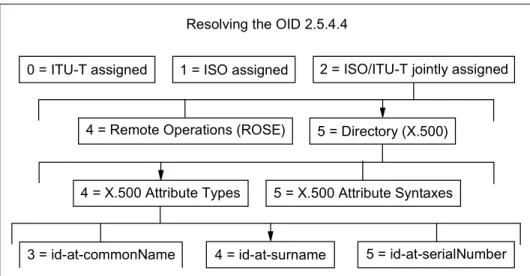
organization (http://www.ansi.org) for the United States. The number notation refers to a hierarchy. For example, the OID 2.5.4.4 resolves into a surName attribute as shown in Figure 1-5.
.
Figure 1-5 Example of Object Identifiers as defined by the ANSI organization
1.5 IBM Tivoli Directory Integrator
IBM Tivoli Directory Integrator (Directory Integrator) synchronizes identity data residing in directories, databases, collaborative systems, applications used for human resources (HR), customer relationship management (CRM), and Enter-prise Resource Planning (ERP), and other corporate applications.
By serving as a flexible, synchronization layer between a company's identity structure and the application sources of identity data, Directory Integrator elimi-nates the need for a centralized datastore. For those enterprises who do choose to deploy an enterprise directory solution, Directory Integrator can help ease the process by connecting to the identity data from the various repositories through-out the organization.
With some built-in connectors, an open-architecture Javadevelopment environ-ment to extend or modify these connectors, and tools to apply logic to data as
Resolving the OID 2.5.4.4
0 = ITU-T assigned 1 = ISO assigned 2 = ISO/ITU-T jointly assigned
4 = Remote Operations (ROSE) 5 = Directory (X.500)
4 = X.500 Attribute Types 5 = X.500 Attribute Syntaxes
Chapter 1. Introduction to Directory Integration 13
data is processed, Directory Integrator can help you by:
Synchronizing and exchanging information between applications or directory sources
Managing data across a variety of repositories, thus providing the consistent directory infrastructure needed for a wide variety of applications that include security and provisioning
Creating the authoritative data spaces needed to expose only trustworthy data to advanced software applications such as Web services
1.5.1 Directory Integrator software components
The components of the Directory Integrator include the following:
An Assembly Line methodology that
– Builds a compound information object from connected information sources – Performs modifications on received data
– Creates new entries altogether and adds/updates/deletes the new information object to the assigned destinations
An Event Handler framework that adds to the flexibility of Directory Integrator by providing the ability to wait for, and react to, specific events that have taken place in the infrastructure: These events include changes in a directory, arriving e-mails, records updated in certain databases, incoming HTML pages from a Web server or browser, arriving Web services-based Simple Object Access Protocol (SOAP) messages, and other types of events defined by the user.
Connectors to support numerous protocols and access mechanisms that are included with the product or can be easily created or modified
Parsers to interpret and translate information from a byte stream into a structure information object, where each piece of information is accessible by name: You also can translate a structured information object into a byte stream. You can select from the wide range of extensible parsers such as
comma separated values, fixed column, LDAP Data Interchange Format
(LDIF), Extensible Markup Language (XML), SOAP, and Directory Services Markup Language (DSML). Finally, you can create a new parser from scratch.
Hooks to enable the definition of certain actions to be executed under specific circumstances or at desired points in the execution of the AssemblyLine process
Password Synchronization plug-ins that are separately installable entities available with Directory Integrator: These plug-ins can detect when a
password is changed or created. Once the plug-ins detect this change, they act to propagate the information to a backend store.
The plug-and-play functionality of these Directory Integrator components facilitate rapid prototyping and implementation of intelligent data flows.
Additionally, it is possible to extend virtually all of these integration components (such as Connectors, Parsers, and EventHandlers), functions, and attributes through Java scripts. Directory Integrator supports JavaScript and Perl plug-in scripting languages that can be used with every AssemblyLine, Parser, and Connector.
1.5.2 Solution building approach
Directory Integrator is designed and built on the premise that integration problems can be broken down into three basic components:
Systems involved in the communication
Data flows between these systems
Events that trigger the data flows
With Directory Integrator, you turn this atomic understanding of the integration problem directly into the solution. You can build your solution incrementally, one flow at a time, with continuous feedback and verification.
This means that integration projects become easier to estimate and plan. Since you are developing the solution flow-by-flow visually and interactively, you can report (and demonstrate) progress to both project and corporate management at any time.
Directory Integrator manages the technicalities of connecting to and interacting with the various data sources that you want to integrate, abstracting away the details of their APIs, transports, protocols and formats. Instead of focusing on data, Directory Integrator lifts your view to the information level, enabling you to concentrate on the transformation, filtering, and other business logic required to perform each exchange.
Directory Integrator enables you to build libraries of components and business logic that can be maintained, extended, and reused to address new challenges. Development projects across your organization can all share Directory Integrator assets, resulting in independent projects (even point solutions) that immediately fit into a coherent and integrated infrastructure.
This approach results in a more rational and predictable use of resources, as you bring your data source and technology experts in at the very start of a project in order to set up your libraries. When in place, these integration assets are
Chapter 1. Introduction to Directory Integration 15
available across the network, letting you leverage them to create new solutions and enhance existing ones.
1.6 IBM Tivoli Directory Server
IBM Tivoli Directory Server (ITDS) is the IBM LDAPv3 Directory offering. ITDS implements the Internet Engineering Task Force (IETF) LDAP V3 specifications. It also includes enhancements added by IBM in functional and performance areas. This version uses IBM DB2 Universal Database as the backing store to provide per LDAP operation transaction integrity, high performance operations, and online backup and restore capability. ITDS interoperates with the IETF LDAP V3-based clients. Major features include:
A Graphical User Interface (GUI) that can be used to administer and configure the IBM Directory: The administration and configuration functions enable the administrator to
– Perform the initial setup of the directory – Change configuration parameters and options
– Manage the daily operations of the directory, such as adding or editing objects (for example, object classes, attributes, and entries)
A dynamically extensible directory schema: This means that administrators can define new attributes and object classes to enhance the directory schema. Changes can be made to the directory schema, also, that are subject to consistency checks. Users may dynamically modify the schema content without restarting the directory server. Because the schema itself is part of the directory, schema update operations are done through standard LDAP APIs. The major functions provided by the LDAPv3 dynamic extensible schema are
– Queriable schema information through LDAP APIs – Dynamic schema changes through LDAP APIs – Server Root Directory Services Engine (DSE)
UTF-8 (Universal Character Set Transformation Format): An Directory Server supports data in multiple languages and allows users to store, retrieve and manage information in a native language code page.
Simple Authentication and Security Layer (SASL): This support provides for additional authentication mechanisms. The Secure Sockets Layer (SSL) provides encryption of data and authentication using X.509v3 public-key certificates. A server may be configured to run with or without SSL support.
Replication: Replication is supported, which makes additional read-only copies of the directory available, improving performance and reliability of the
directory service. Replication topologies also support forwarding and gateway servers.
Referrals: Support for LDAP referrals is provided, allowing directories to be distributed across multiple LDAP servers where a single server may contain only a subset of the whole directory data.
Access control model: A powerful, easy-to-manage access control model is supported through ACLs.
Change log
Password policy
Security audit logging
Dynamic configuration changes using LDAP APIs
1.7 IBM Lotus Domino 6.5
IBM Lotus Domino is an enterprise-class messaging and collaboration system, designed to take full advantage of the e-business revolution. It runs on a variety of different hardware platforms and operating systems.
IBM Lotus Domino server supports industry standards like Simple Mail Transfer Protocol (SMTP), Multipurpose Internet Mail Extensions (MIME), Post Office Protocol (POP3), LDAP, and SSL.
IBM Lotus Domino is designed to simplify integration into a multi-directory environment. With IBM Lotus Domino (Domino) 6 (or later), you have the option of moving from a distributed directory architecture and making Domino the central directory. This allows you to take advantage of a centralized directory configuration that provides added control and less overhead and is easier to manage. Domino Server comes with the Domino Upgrade Services tool. This tool is used to import users from a server-based foreign directory and register those users in the Domino Directory. Domino Upgrade Services migrates data from many different systems, some of which include LDAP Data Interchange Format (LDIF) files, LDAP-compliant foreign directories (such as Directory Server), Microsoft Windows NT Server, and Active Directory.
IBM Lotus Domino 6.5 also has enhanced the implementation of LDAP capabilities and improved the performance of LDAP directory access. A new Domino LDAP Schema database allows you to maintain and extend the schema. Other directory schemas can be imported via LDIF files.
Chapter 1. Introduction to Directory Integration 17
Other Domino features include the following:
Support for X.500 naming conventions, including hierarchical naming and extensible attributes, for maximum flexibility in configuring the namespace
LDAP protocol support in both the client and the server providing lookup (read), add, delete, and modify (write) support for non-Notes clients (for example Web browsers) and servers such as Active Directory (Active Directory) and Four11: This support allows for developing a distributed user authentication mechanism, making it easier to achieve a single sign-on environment.
Rule-based domain relationships for faster lookups across large namespaces
Hierarchical naming and trust between domains to support the relationship of entries across domains
Support for a Public Key Infrastructure
A dynamically extensible directory schema, ideal for customizing the directory to meet specific business requirements)
Multi-master replication, a key element for reliable directory synchronization and maximum availability
An open architecture that can easily incorporate support for emerging standards
1.8 Microsoft Active Directory
The Microsoft Windows 2000 operating system includes Active Directory, an LDAP Version 3-compliant directory service. Active Directory follows RFC 2247 conventions for naming contexts, meaning that its naming context suffixes map directly to the DNS tree.
Some Active Directory features include:
Centralized management
Group policies
A global catalog
IntelliMirror desktop management and automated software distribution
Multi-master replication
Kerberos authentication
Smart card support
PKI/x.509 certificate support
1.8.1 Naming contexts
In Active Directory, naming contexts are the primary unit of replication. Active Directory always has at least three naming contexts:
The schema
The configuration, which holds the replication topology and metadata
User naming contexts, which are the body of the directory and hold the actual directory objects
1.8.2 Logical elements
Logical elements in Active Directory include the following:
1. Domains: Active Directory is made up of at least one domain. Microsoft defines a domain as “a logical grouping of network servers and other computers that share common security and user account information.” The main implications of this concept are:
– A domain can span multiple physical locations. Since it is a logical grouping, it bears no relation to the underlying physical network.
– A domain is a completely independent unit. If all other domains that have relationships to it were to disappear, all objects in the domain would be unaltered in the functionality.
– A domain has its own security. This means every element of a domain must comply with its security and cannot be under the influence of the security of other domains. Each element may have security relationships to other domains.
2. Trees: One or more domains that share a contiguous namespace are called a tree. The domains in the tree are linked, from a security standpoint, by implicit Kerberos trusts. These Kerberos trusts are transitive and hierarchical. A tree is usually called by the name of the domain at its root.
3. Forests: When you have two or more trees with non-contiguous namespaces, you have a forest. Forests do not have actual names because they are just a set of cross references and Kerberos trusts, but it is usual to call them by the name of the tree that is at the root of the forest (from a Kerberos security hierarchy standpoint).
Note: For more information about Microsoft Windows NT and Microsoft
Windows 2000 domains, please refer to the documentation for the respective products.
Chapter 1. Introduction to Directory Integration 19
Both trees and forests share a common schema, configuration, and global catalog.
1.8.3 Physical elements: sites and domain controllers
The main physical elements of Active Directory are sites and domain controllers. A site represents a physical location, usually with good network connectivity. A site is composed of one or more Internet Protocol (IP) subnets. The main purpose of the site is to separate the logical, administrative aspects of the network from the physical, performance-related ones, so that network administrators do not have to worry about the physical network when designing the logical domain.
A domain controller is a computer that holds a complete replica of the Active Directory subtree that represents its domain. The number and location of the domain controllers in a forest and at a given site will greatly influence the performance and reliability of the network, as well as those of any directory-enabled applications that may be in use.
It is a very simple mechanism, because (1) the DNS server will always provide the client machine with a list of IP addresses to all domain controllers, and, (2) since the client already knows its own address, it will always be able to find domain controllers in its own site (provided that they exist, of course). The client will always try those servers first. Replication traffic between domain controllers will also have different behaviors regarding scheduling and network bandwidth used, depending on how the domain controllers map to the sites.
1.8.4 Architecture
The architecture of Active Directory includes
A data model
Naming conventions
Administration
Data model
The data model of Active Directory is derived from the X.500 model. The three main concepts are the schema, classes and objects.
The schema represents the universe of all possible classes, attributes, and objects. In Active Directory implementation, the schema itself is stored as a set of classes in the database (as opposed to a flat text file, loaded at initialization time). This carries several advantages: easier access from applications, dynamic changes to the schema without the need to stop and restart the directory service, and uniform security (by using the same ACLs used for objects).
For each class there may be mandatory attributes, additional attributes, and a list of possible parents (classes). Each class must have an OID that will identify it unambiguously. Each individual or organization that wishes to extend the schema should obtain a root OID from an issuing authority. The OIDs are represented in dotted decimal form, so, for example, every LDAP standard class starts with 2.5.6. This designation means that it is jointly defined by ISO and the ITU (2) as part of the Directory Standard (5) and that it is a class (6). The individual or organization can then manage further
branches of its root OID to suit his/her/its needs.
The objects are actual instances of the classes. As an analogy, you may think of the classes as tables in a database and the objects as the data in these tables.
Naming conventions
Some of the naming conventions used in Active Directory implementation are
The Distinguished Name (DN) represents the full object name, from the root, such as “CN=ADuser1 S_ADuser1, CN=Users, DC=itso, DC=ibm, DC=com” and uses the format defined on RFC 2247. The DN is guaranteed to be unique across the forest.
The Relative Distinguished Name (RDN) represents the portion of the DN that is an attribute of the object itself. In the preceding example, the RDN of the user is “ADuser1 S_ADuser1” and the RDN of the “Users” container is “CN=Users”.
The User Principal Name (UPN) is an easy-to-remember alias for the user, in the form <username>@<DNS domain name>, and very similar to the user’s Internet e-mail address. It is guaranteed to be unique, but only security principals (that means objects that can be used on ACLs such as users and security groups) have UPNs. (See “Administration” on page 21 for more information about ACLs.)
The Globally Unique Identifier (GUID) is an identifier that is statistically guaranteed to be unique for all objects in the database. All objects are identified by their GUIDs for as long as they exist. The GUID is created when the object is created. It never changes, and, when the object is destroyed, its GUID is lost forever.
The Security Identifier (SID) is a unique identifier assigned to security principals (users and security groups). The object's SID is actually composed of two parts: the domain SID, common to all objects in a domain, and the Relative Identifier (RID), that is unique within a domain. The SID is used on all ACLs for authorization (permissions) purposes. The SID's behavior is very similar to the GUID's.
Chapter 1. Introduction to Directory Integration 21
Administration
All authorization and authentication must come from a higher authority, usually Kerberos. Each object in Active Directory, including the schema objects, has a set of actions that can be performed on it called an ACL. The ACL contains sets of GUIDs and the rights associated with these, so it basically says who can do what on the object.
The ACLs are inherited down a subtree. Therefore, unless the inheritance is explicitly blocked, the ACLs will propagate down from containers to
subcontainers and leaf objects. This provides for a somewhat easy form of delegation that functions by assigning ACLs to OUs.
Finally, the Directory Services Agent (DSA) manages physical storage of the objects and classes in the directory database, providing for client isolation.
1.8.5 The role of DNS
Microsoft Active Directory is heavily dependent on the DNS service for all its operations. The main roles that DNS performs are:
Name resolution: DNS maps host names to IP addresses without the need
for Windows Internet Naming Service (WINS): (Please note that there will still be a need for WINS for older Windows clients to access Windows 2000.)
Namespace definition: The Active Directory namespace maps to the DNS
namespace, simplifying the namespace design and use.
Locating physical components of the DNS service by using Service Record (SRV) records: Windows 2000 clients and servers may find site and
domain controller information quite easily.
1.8.6 Special roles
Although most operations on Active Directory are multi-master operations (meaning that you can read or write to any domain controller indiscriminately), a few operations need a “focal point” for greater consistency or performance reasons. These have been divided according to their scope:
Forest-wide roles (at least one per forest)
– Global catalog: The global catalog stores a subset of the attributes of all objects in the forest. Those are usually the attributes most used on searches. The careful placement of global catalog servers greatly improves performance, especially if you are using directory-enabled applications. You should have at least one global catalog server on each physical site.
– Schema master: The schema master is the focal point for making changes to the schema. Because this is a very infrequent and sensitive operation, Active Directory allows making changes to the schema only through the schema master. There can be only one schema master per forest. – Domain naming master: The domain naming master is responsible for
controlling the addition or removal of domains in the forest. There can be only one domain naming master per forest.
Domain-wide roles (at least one per domain) – RID master: RID (after domain SID)
– RID master: Responsible for allocating RIDs from the domain's RID pool. (RID is the part of the object's SID located after the domain SID.)
– Primary Domain Controller (PDC) Emulator: Services non-Windows 2000 clients for logons and password changes. The emulator also provides preferential replication of passwords on Windows 2000.
– Infrastructure Master: Updates group-to-user references when membership changes (for example, user display name).
© Copyright IBM Corp. 2003, 2004. All rights reserved. 23
Chapter 2.
Scenario 1: Domino and Active
Directory
This chapter describes how to synchronize an Domino Directory and an Active Directory. We will describe some of the capabilities of the Domino 6.5 server and the new feature that enables you to synchronize the Domino Directory with Active Directory called
ADSync
. We describe in detail how to install and set up the ADSync tool. We give detailed instructions for creating users in Domino Directory using Active Directory Users and Computers Console. We also show how to register users into Active Directory from Domino.2.1 Scenario 1
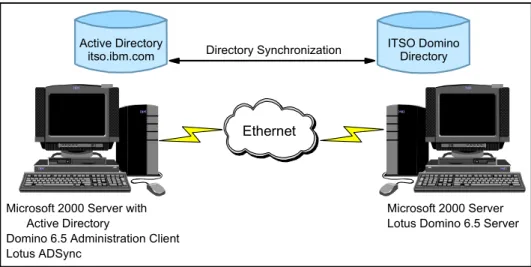
A fictitious company has a Microsoft Windows 2000 Advanced server that runs Active Directory. The company also has an Domino 6.5 server that is situated on another Microsoft Windows 2000 Server, which is their primary mail server. This setup is shown in Figure 2-1.
Figure 2-1 Scenario 1 setup
Every time somebody new joins the company, the administrators of each system have to register the new person in Active Directory. They also must create a mail file and Notes ID in Domino. Similarly, if someone leaves the company, the administrators need to remove the entry from both directories and ensure that the mail file is deleted. Finally, the administrators would like to be able to synchronize the two systems to ensure that any addition, deletion, or change made on one system is also carried out on the other system.
A new feature called ADSync was introduced in Domino 6 (and is available in any Domino 6 or later server). This tool allows you to synchronize all (or a set of) entries found in Active Directory with the Domino Directory. This means that you can add, delete, or update users for both directories using a single interface. ADSync has two interfaces that can be used, namely, the Domino Administrator client interface and the Active Directory Users and Computers Console. (You can use either tool depending on your comfort level with each one.) When you create new users and groups in Active Directory, those changes are reflected in the
Note: The Domino server could be set up on any of the other platforms that
Domino supports, for example, Linux.
Microsoft 2000 Server with Active Directory
Domino 6.5 Administration Client Lotus ADSync
Microsoft 2000 Server Lotus Domino 6.5 Server
Ethernet
Directory Synchronization Active Directory
Chapter 2. Scenario 1: Domino and Active Directory 25
Domino Directory, including the creation of person or group documents, Notes IDs, passwords, and mail files for the users.
In order to accomplish these tasks, the Active Directory administrator must have a properly certified Notes ID and appropriate access to make changes in the Domino Directory. The registration server must be Domino 6 or later, and the Domino Administration client must be a 6 or later client. Additionally, policies must be created that contain sub-policies, either implicit or explicit, for all Domino certifiers where users will be created. Finally, you must have the appropriate rights in Active Directory to add users and groups and to synchronize passwords. The only requirement for using the ADSync tool is to work from a workstation that administers the Active Directory and that also has the Domino 6 or later
Administration client installed.
2.2 Synchronizing Active Directory and Domino
Directory using ADSync
User and group accounts in Active Directory can be synchronized with the corresponding Person and Group documents in the Domino Directory. Synchronization facilitates some of the administrative functions, for example, user registration and deletion. These functions can be initiated from the Active Directory Users and Groups console in Windows or from the Domino
Administration client. Users can now have common passwords for Microsoft Windows and the Domino Internet password. Synchronization copies all mapped field values from user or group objects in Active Directory, as well as member lists of the groups to corresponding documents stored in the Domino Directory. Synchronization is initiated at these times:
After the user or group is registered in Domino from the Active Directory Users and Groups console using ADSync
When one or more users or groups are selected on the results pane of the Active Directory Users and Groups console and the Synchronize with
Domino option is selected from the context menu or the toolbar
When you change any of the properties of the user or group object and confirm your changes by clicking the OK or Apply buttons
Note: ADSync is a replacement for the original Microsoft Windows NT User
Manager Integration function. This provided for similar operation in Domino R5 and Microsoft Windows NT 4 Server.
During each synchronization, ADSync attempts to match the Active Directory object with an entry in the Domino Directory. If more than one match is found, ADSync prompts you to specify the match from those that have been located. The Field Mappings table designates which fields to synchronize during synchronization. This setting are explained in greater detail with the other synchronization settings in “Enabling Domino Directory synchronization” on page 27.
2.3 Installing the ADSync tool
To use Lotus Active Directory Synchronization, you must install the Domino Administration client on the same workstation used to manage users and computers within your Active Directory. You also must turn on Domino Directory W2000 Sync Services during the installation of the Domino Administration client. This option is only available with the customize button during the Domino Administration client installation. The synchronization option is not selected by default; therefore, check the appropriate box.
After installing the Domino Administration client, open a DOS command prompt window, and navigate to the directory where you installed the client. Enter the following command and press Enter.
c:\Program Files\Lotus\Notes> regsvr32 nadsync.dll
This command adds a container entry for Lotus Domino Options to the Active Directory Users and Computers management screen and returns the
confirmation shown in Figure 2-2.
Figure 2-2 Successful registration of the ADSync DLL
You are now ready to administer users and groups in Active Directory.
Tip: To simplify the administration, copy the cert.id file from the Domino server
Chapter 2. Scenario 1: Domino and Active Directory 27
2.4 Enabling Domino Directory synchronization
Before you start synchronizing users and groups in Active Directory and the Domino Directory, you must enable the Domino Directory Synchronization. Use the following steps to do this:
1. From the Active Directory Container shown in Figure 2-3, click the Lotus
Domino Options entry.
Figure 2-3 Active Directory Users and Computers
2. Double-click the entry for Domino Directory synchronization in the results pane to initialize the ADSync tool. This will require the password for the Domino administrator working from the Active Directory Users and Groups console.
3. Select an Domino server for all Active Directory/Notes user synchronizations (Figure 2-4). Then, select the appropriate Domino server from the drop-down selection box.
Figure 2-4 The Choose Server dialog box
4. If the initialization was successful, you should see the window shown in Figure 2-5 on page 28.
Figure 2-5 Lotus ADSync initialized successfully
With ADSync initialization complete, you have the opportunity to choose several synchronization options.
The Options window is accessible by right-clicking the Domino Directory
Synchronization entry and choosing Options or simply by double-clicking the
entry. The window is shown in Figure 2-6.
Chapter 2. Scenario 1: Domino and Active Directory 29
From the Notes Synchronization Options tab, you can
Enable or disable all synchronization operations
Customize synchronization options with Select synchronization operations
to enable
Configure prompting options from the drop-down selection box
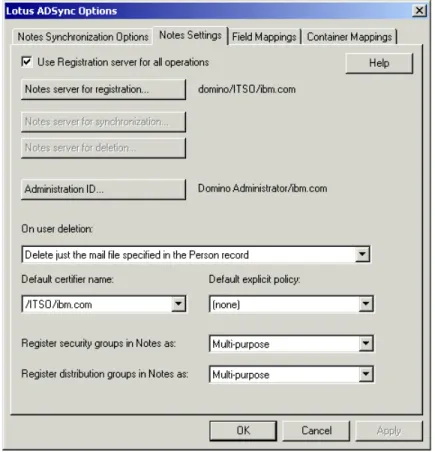
Choose to use the CA process for user registration Figure 2-7 shows the Notes Settings tab.
Figure 2-7 Lotus ADSync: Notes Settings tab On the Notes Settings tab, you can specify:
The registration server (which Domino server will be used for registration)
The administration ID (which user ID will have administrative privileges)
The user deletion options (accessed from the drop-down selection box and used to choose which actions should take place when a user is deleted)
The default certifier and policy
The group type mappings
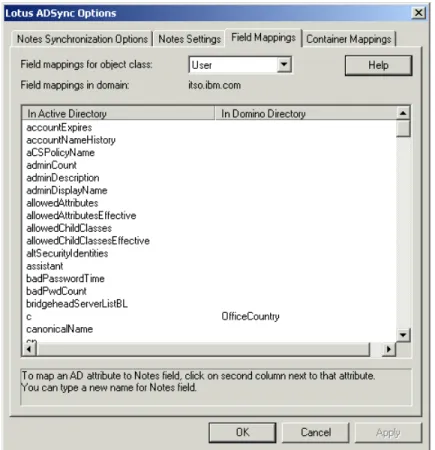
Figure 2-8 shows the Field Mappings tab.
Figure 2-8 Lotus ADSync: Field Mappings tab
The Field Mappings tab, shown in Figure 2-8, is where you select which Active Directory fields are to be mapped to Domino Directory fields. During ADSync tool initialization, the schemas from Active Directory and Domino are mapped based on default settings. If additional field mappings are needed, left-click in the right column under “In Domino Directory” and a drop-down selection box with Domino directory fields is presented. This box is depicted in Figure 2-9 on page 31.
Chapter 2. Scenario 1: Domino and Active Directory 31 Figure 2-9 Lotus ADSync: Container Mappings tab
The Container Mappings tab, shown in Figure 2-9, is where you can map Active Directory containers to Notes certifiers