Trustwave SIEM LP Software and
SIEM Operations Edition
Security Target
Version 1.12 June 28, 2012
Trustwave 70 West Madison Street
Suite 1050 Chicago, IL 60602
DOCUMENT INTRODUCTION Prepared By:
Common Criteria Consulting LLC 15804 Laughlin Lane
Silver Spring, MD 20906 http://www.consulting-cc.com
Prepared For: Trustwave
70 West Madison Street Suite 1050
Chicago, IL 60602
http://www.trustwave.com
REVISION HISTORY Rev Description
1.0 May 21, 2011, Initial release
1.1 May 29, 2011, Addressed vendor comments
1.2 August 3, 2011, Addressed ORs/CRs from the ST evaluation 1.3 August 23, 2011, addressed ORs/CRs from the ST evaluation 1.4 September 19, 2011, Addressed ORs/CRs from the ST evaluation 1.5 October 4, 2011, Addressed ORs/CRs from the ST evaluation 1.6 December 7, 2011, FSP consistency
1.7 December 16, 2011, changed the TOE versions 1.8 February 22, 2012, changes for test consistency
1.9 February 25, 2012, additional changes for SIEM OE 5.9
1.10 April 10, 2012, added HF5 and HF6 to the SIEM OE and SP10 to SIEM LP evaluated versions
1.11 April 13, 2012, corrected SIEM LP build number and added report information 1.12 June 28, 2012, Added another guidance document to the TOE boundary
TABLE OF CONTENTS
1. SECURITY TARGET INTRODUCTION ... 8
1.1 Security Target Reference ... 8
1.2 TOE Reference ... 8
1.3 Evaluation Assurance Level ... 8
1.4 Keywords ... 8
1.5 TOE Overview ... 8
1.5.1 Usage and Major Security Features ... 8
1.5.1.1 SIEM OE ... 8
1.5.1.2 SIEM LP Software ... 11
1.5.2 TOE Type... 12
1.5.3 Required Non-TOE Hardware/Software/Firmware ... 12
1.6 TOE Description ... 14
1.6.1 Physical Boundary ... 15
1.6.2 Logical Boundary ... 16
1.6.2.1 Audit ... 16
1.6.2.2 Management ... 16
1.6.2.3 Security Information and Event Management (SIEM) ... 16
1.6.2.4 I&A ... 17
1.6.3 TOE Data ... 17
1.7 Evaluated Configuration ... 22
2. CONFORMANCE CLAIMS ... 24
2.1 Common Criteria Conformance ... 24
2.2 Security Requirement Package Conformance ... 24
2.3 Protection Profile Conformance ... 24
3. SECURITY PROBLEM DEFINITION ... 25
3.1 Introduction ... 25
3.2 Assumptions... 25
3.3 Threats ... 25
3.4 Organisational Security Policies ... 26
4. SECURITY OBJECTIVES ... 27
4.1 Security Objectives for the TOE ... 27
4.2 Security Objectives for the Operational Environment... 27
5. EXTENDED COMPONENTS DEFINITION ... 29
5.1 Extended Security Functional Components ... 29
5.1.1 Class IDS: Intrusion Detection ... 29
5.1.1.1 IDS_ANL Analyser Analysis ... 29
5.1.1.2 IDS_RCT Analyser React ... 30
5.1.1.3 IDS_RDR Restricted Data Review ... 31
5.1.1.4 IDS_STG Analyser Data Storage ... 32
6.1.1 Security Audit (FAU) ... 34
6.1.1.1 FAU_GEN.1 Audit Data Generation ... 34
6.1.1.2 FAU_SAR.1 Audit Review ... 37
6.1.1.3 FAU_SAR.2 Restricted Audit Review ... 38
6.1.1.4 FAU_SAR.3 Selectable Audit Review ... 38
6.1.1.5 FAU_SEL.1 Selective Audit ... 38
6.1.1.6 FAU_STG.2 Guarantees of Audit Data Availability ... 38
6.1.1.7 FAU_STG.4 Prevention of Audit Data Loss ... 39
6.1.2 Identification and Authentication (FIA) ... 39
6.1.2.1 FIA_AFL.1 Authentication Failure Handling... 39
6.1.2.2 FIA_ATD.1 User Attribute Definition ... 39
6.1.2.3 FIA_UAU.1 Timing of Authentication ... 39
6.1.2.4 FIA_UID.1 Timing of Identification ... 40
6.1.3 Security Management (FMT) ... 40
6.1.3.1 FMT_MOF.1 Management of Security Functions Behaviour ... 40
6.1.3.2 FMT_MTD.1 Management of TSF Data ... 40
6.1.3.3 FMT_SMF.1 Specification of Management Functions ... 43
6.1.3.4 FMT_SMR.1 Security Roles ... 43
6.1.4 Protection of the TSF (FPT) ... 44
6.1.4.1 FPT_ITT.1 Basic Internal TSF Data Transfer Protection ... 44
6.1.5 Intrusion Detection (IDS) ... 44
6.1.5.1 IDS_ANL.1 Analyser Analysis ... 44
6.1.5.2 IDS_RCT.1 Analyser React ... 44
6.1.5.3 IDS_RDR.1 Restricted Data Review ... 45
6.1.5.4 IDS_STG.1 Guarantee of Analyser Data Availability ... 45
6.1.5.5 IDS_STG.2 Prevention of Analyser data loss ... 45
6.2 TOE Security Assurance Requirements ... 46
6.3 CC Component Hierarchies and Dependencies ... 46
7. TOE SUMMARY SPECIFICATION ... 48
7.1 FAU_GEN.1 ... 48 7.2 FAU_SAR.1, FAU_SAR.2 ... 48 7.3 FAU_SAR.3 ... 49 7.4 FAU_SEL.1 ... 49 7.5 FAU_STG.2, FAU_STG.4 ... 49 7.6 FIA_AFL.1 ... 49 7.7 FIA_ATD.1 ... 50 7.8 FIA_UAU.1, FIA_UID.1 ... 50 7.9 FMT_MOF.1 ... 50 7.10 FMT_MTD.1 ... 50 7.11 FMT_SMF.1 ... 50 7.12 FMT_SMR.1 ... 51 7.13 FPT_ITT.1 ... 51 7.14 IDS_ANL.1, IDS_RCT.1 ... 51 7.15 IDS_RDR.1 ... 52
8.1 TOE Type Consistency ... 53
8.2 Security Problem Definition Consistency ... 53
8.3 Security Objectives Consistency ... 53
8.4 Security Functional Requirements Consistency ... 53
8.5 Security Assurance Requirements Consistency ... 54
9. RATIONALE ... 55
9.1 Rationale for IT Security Objectives... 55
9.2 Security Requirements Rationale ... 57
9.2.1 Rationale for Security Requirements of the TOE Objectives ... 57
LIST OF FIGURES
Figure 1 - Representative SIEM OE Deployment ... 10
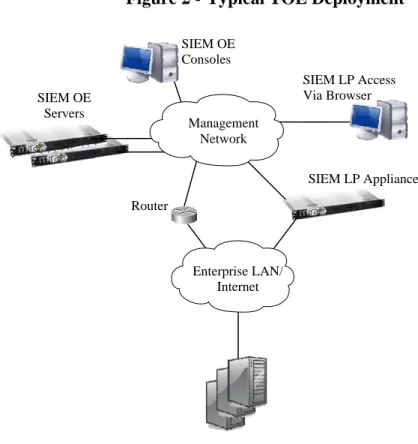
Figure 2 - Typical TOE Deployment ... 15
Figure 3 - Physical Boundary ... 15
LIST OF TABLES Table 1 - SIEM OE Minimum Hardware/Software Requirements ... 12
Table 2 - Console Minimum Hardware/Software Requirements ... 13
Table 3 - SIEM Appliances ... 13
Table 4 - SIEM OE TOE Data Descriptions ... 17
Table 5 - SIEM LP Software TOE Data Descriptions ... 19
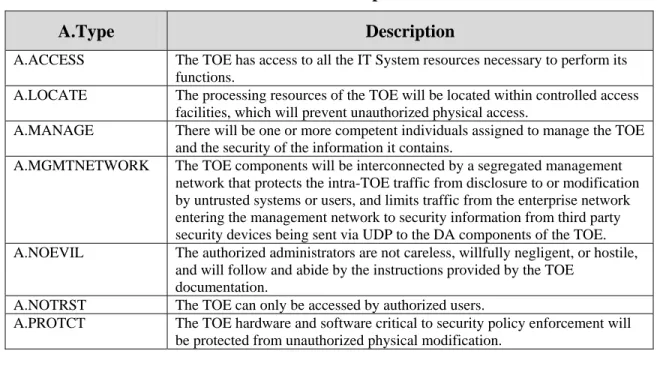
Table 6 - Assumptions ... 25
Table 7 - Threats... 25
Table 8 - Organisational Security Policies ... 26
Table 9 - Security Objectives for the TOE ... 27
Table 10 - Security Objectives of the Operational Environment ... 27
Table 11 - Auditable Events for SIEM OE ... 34
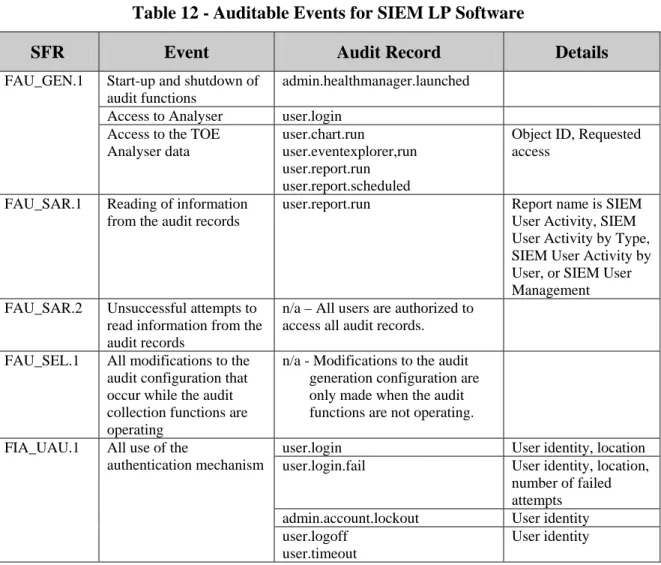
Table 12 - Auditable Events for SIEM LP Software... 36
Table 13 - SIEM OE TSF Data Access Details... 41
Table 14 - SIEM LP Software Data Access Details ... 42
Table 15 - EAL3+ Assurance Requirements ... 46
Table 16 - TOE SFR Dependency Rationale ... 46
Table 17 - Security Objectives Mapping ... 55
Table 18 - Rationale For Security Objectives Mappings ... 56
Table 19 - SFRs/SARs to Security Objectives Mapping ... 58
ACRONYMS LIST
CC ... Common Criteria CCEVS ...Common Criteria Evaluation and Validation Scheme DA ... Data Acquisition DBMS ... DataBase Management System EAL ... Evaluation Assurance Level FTP ... File Transfer Protocol GUI ... Graphical User Interface IDS ... Intrusion Detection System IP... Internet Protocol IPS ... Intrusion Prevention System IT ... Information Technology I&A ... Identification & Authentication JDBC ... Java DataBase Connectivity NIAP ...National Information Assurance Partnership OE ... Operations Edition OID ... Object IDentifier PC ... Personal Computer PP ... Protection Profile RHEL ... Red Hat Enterprise Linux SAR... Security Assurance Requirement SCP ... Secure CoPy SDW ... Secure Data Warehouse SFR ... Security Functional Requirement SIEM ... Security Information and Event Management SNMP ... Simple Network Management Protocol SOC ... Security Operations Center ST ...Security Target TD ... Threat Detector TE ... Threat Evaluator TOE ... Target of Evaluation TSF ... TOE Security Function UDP ... User Datagram protocol URL ... Uniform Resource Locator
1. Security Target Introduction
This Security Target (ST) describes the objectives, requirements and rationale for the Trustwave SIEM LP Software and SIEM Operations Edition. The language used in this Security Target is consistent with the Common Criteria for Information Technology Security Evaluation, Version 3.1, Revision 3. As such, the spelling of terms is presented using the internationally accepted English.
1.1 Security Target Reference
Trustwave SIEM LP Software and SIEM Operations Edition Security Target, Version 1.12, dated June 28, 2012
1.2 TOE Reference
Trustwave SIEM Operations Edition Version 5.9.0 (Build 44 with Hotfixes 1-6), and SIEM LP Software Version 1.2.1 (Build 269 with SP-10and DM-7).
1.3 Evaluation Assurance Level
Assurance claims conform to EAL3 (Evaluation Assurance Level 3) augmented by ALC_FLR.2 from the Common Criteria for Information Technology Security Evaluation, Version 3.1
Revision 3. 1.4 Keywords
Security information and event management, SIEM, security information management, SIM, threats, risk, collection, analysis, correlation.
1.5 TOE Overview
1.5.1 Usage and Major Security Features
Trustwave Security Information and Event Management Operations Edition (SIEM OE) and SIEM LP are separate products that may be operated as stand-alone products or in cooperation with one another. In this evaluation, the products are operating in cooperation with one another. 1.5.1.1 SIEM OE
SIEM OE is a comprehensive security information solution that monitors security information according to configured criteria. Users may:
Monitor and investigate events generated by third party devices and alerts generated according to configured rules. These third party devices may include Intrusion Detection System (IDS)/Intrusion Prevention System (IPS) sensors and/or scanners, firewalls, servers, or other types of systems capable of sending security information to the TOE.
Generate reports
Monitor alert information
Configure alert monitoring, escalation and correlation information
These tasks are performed using the SIEM OE Consoles (Administration or Operations) and related web applications. Tasks that can be performed with the Operations Console are:
View correlated alerts
View primary and secondary alerts
Take ownership of alerts
View alert details
View raw log details
Visually analyze detailed alert and event information graphically
Monitor system health
Monitor reporting device status
Open incidents (this functionality is not included in the evaluation)
The Administration Console provides all of the functionality of the Operations Console, and also permits configuration of:
Alert actions
Event correlation criteria
Event escalation criteria
Rules for processing events
Users and groups
Assets and asset groups
The Web Applications available to users via the Operations Console include:
Security Manager Reports — generate compliance, control, event and alert reports.
Event View — monitor and investigate events.
Log View — monitor raw log file information.
Visual Analysis — analyze groups of events graphically, to explore and uncover hidden relationships.
The Administration Console provides access to these additional web applications:
Event ID Manager — edit, import and export taxonomy information.
List Manager — add alert items to lists that are referenced by correlations.
Asset/Zone Manager — configure the properties of networks, contacts, assets and asset groups.
Data Export — export event data to external files. This functionality is not included in the evaluation.
One Security Data Warehouse (SDW) component is responsible for packaging alerts and preparing report and Visual Analysis data for review in a browser window
One each Threat Detector (TD) and Threat Evaluator (TE) components are responsible for collecting data, applying correlation rules to alerts, and sending them to the SOC server. In environments with a high volume of security information, additional TD and/or TE instances may be deployed.
One Security Operations Center (SOC) component, which is responsible for presentation of alerts on Administration and Operations Consoles
One or more Administration and/or Operations Consoles on one or more Windows PCs Figure 1 - Representative SIEM OE Deployment
Security Data Warehouse Server
The Security Data Warehouse (SDW) server stores the raw and processed events received from the Data Acquisition (DA) servers, as well as the alerts that are generated by the Threat Detector (TD) and Threat Evaluator (TE) servers, and all SIEM OE configuration.
The SIEM OE database resides on the SDW server. It is a MySQL database that is installed automatically during the SIEM OE installation.
Threat Detector and Threat Evaluator Servers
The Threat Detector (TD) and Threat Evaluator (TE) servers collect information from the DA servers and apply correlation rules to events and alerts. The collected information is then routed to the SOC server.
Security Operations Center Server
The Security Operations Center server (SOC) collects information from the Threat Detector (TD) and Threat Evaluator (TE) servers and populates the alert routing tables. The alert information is then presented to the user on the Administration or Operations Consoles.
Administration or Operations Consoles
Consoles provide the user interface to SIEM OE. These Consoles can be installed on many computers throughout a network, so that multiple users can have access to SIEM OE. The Administration Console provides access to Trustwave administrative functions. The Operations Console provides more restricted access to operator functions such as reviewing Events and Alerts.
Incident Management
The optional Incident Management web application manages trouble tickets generated by SIEM OE as incidents are detected. Since users may choose to send trouble tickets to third party incident management products instead, this functionality is not included in the evaluation. 1.5.1.2 SIEM LP Software
SIEM LP is a family of logging and event management appliances. SIEM LP appliances work together or stand alone to collect, store, search and report on logs and events. SIEM LP Software is the software added to the hardened Linux kernel on the appliance to perform the custom functions specific to SIEM functionality. SIEM LP Software collects information from third party devices, analyzes that information locally, and forwards the data upstream to a SIEM OE Data Acquisition server. In this mode SIEM LP appliances are between the third party devices and the DA components of SIEM OE.
SIEM LP Software provides a web server for user access via remote web browsers. Browser sessions are used to control and monitor the SIEM LP Software (limited to Administrators) and for analysis of security information (available to Administrators and Users). The security information available for review is limited to the information received by each SIEM LP Software instance or information it generated (e.g. Alerts or local audit records).
SIEM LP appliances support a high availability configuration. This configuration is not included in the evaluation.
Trustwave SIEM solutions include other models, LA and XL, which provide a subset of the LP functionality. These models are not included in the evaluation.
1.5.2 TOE Type IDS Analyzer
1.5.3 Required Non-TOE Hardware/Software/Firmware
The TOE consists of software executing on multiple platforms. The dependencies for each of the software components are described in subsequent paragraphs.
SIEM OE server components must be installed on one or more dedicated servers meeting the minimum requirements in the following table. Distribution of the components across multiple platforms provides higher performance and processing power for large installation, but the security functionality is equivalent for any installation scenario. If multiple components are installed on a single server, the maximum requirement for any installed components from the following table should be used.
Table 1 - SIEM OE Minimum Hardware/Software Requirements
Item Requirements
Operating System
Red Hat Enterprise Linux (RHEL) 5, or AS 4/ES 4 (Update 4 or Update 5), 32 bit/64 bit
The minimal RPMs required are specified in RPMs for Minimal Install
Processors Two single-core processors or a single dual-core processor, 3.0 GHz CPU or higher
Memory
SDW: 8G recommended for both 32-bit and 64-bit install DA, TD/TE, and SOC: 4G recommended for 32-bit install and 6G recommended for 64-bit install
Hard Disk Free Space 20GB for /opt 150GB for /var
Other Hardware 533 MHz front-side bus SCSI drive
Other Software (installed
automatically during the SIEM OE installation)
MySQL J2SDK 1.5.0_09
Apache Web Server (SOC only) syslog-ng (DA only)
A complete list of required software can be found in Trustwave SIEM Operations Edition Installation Guide 5.7.
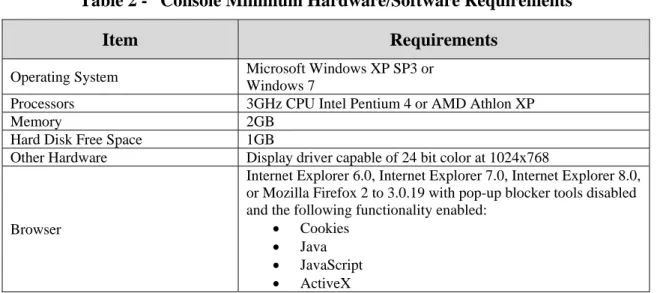
Administration and Operations Consoles must be installed on Windows PCs meeting the minimum requirements in the following table. Any number of Consoles may be installed, the only caveat being that at least one Administration Console must be installed in order to manage the TOE. Administration Consoles and Operations Consoles cannot both be installed on the same PC.
Table 2 - Console Minimum Hardware/Software Requirements
Item Requirements
Operating System Microsoft Windows XP SP3 or Windows 7
Processors 3GHz CPU Intel Pentium 4 or AMD Athlon XP Memory 2GB
Hard Disk Free Space 1GB
Other Hardware Display driver capable of 24 bit color at 1024x768
Browser
Internet Explorer 6.0, Internet Explorer 7.0, Internet Explorer 8.0, or Mozilla Firefox 2 to 3.0.19 with pop-up blocker tools disabled and the following functionality enabled:
Cookies Java JavaScript ActiveX
SIEM LP Software is installed on hardened Linux servers. The operating system and SIEM LP Software are pre-installed on appliances supplied by Trustwave. SIEM LP Software is available on multiple models; all models have equivalent security functionality. The only differences involve processing power and storage capacity, which facilitate processing differing amounts of security information from third party devices. The following appliance choices are supported.
Table 3 - SIEM Appliances
Model HW Item LP1 LP2 LP3 LP4 LP5 CPU(s) Intel Quad-core Xeon E5630 2.53Ghz Intel Hexa-core Xeon X5650, 2.66Ghz Intel Hexa-core Xeon X5650, 2.66Ghz Dual Intel Hexa-core Xeon X5650, 2.66Ghz Dual Intel Hexa-core Xeon X5650, 2.66Ghz RAM 8GB 12GB 16GB 24GB 48GB Disk 1T / RAID 5 2T / RAID 5 4T / RAID 5 6T / RAID 5 12T / RAID 5 RAID with
battery backup PERC 6/i with 256MB battery-backed cache
NIC Two dual-port embedded Broadcom® NetXtreme IITM 5709c Gigabit Ethernet NIC with failover and load balancing
Software The following software is pre-installed on the appliance by the vendor: Linux, MySQL, Tomcat, snmpd, ldap, ntpd, Syslog-ng, java.
The TOE components communicate with one another via a segregated management network to prevent disclosure or modification of the data exchanged between TOE components. It is the responsibility of the operational environment to protect the traffic on the management network from other (non-TOE) devices.
Third party devices supply security information to TOE components; this information may be sent to SIEM LP components (on their Enterprise Network interface) or to SIEM OE Data Acquisition (DA) servers. This traffic is limited to one-way UDP traffic from the third party devices to those TOE components. If the security information is sent to a SIEM OE DA interface connected to the management network, at least one router must interconnect the management network with the Enterprise Network. Any routers performing this function must be configured so that one-way UDP security information from the third party devices is
permitted to flow from the Enterprise Network to the SIEM OE DA interfaces on the
management network. No other traffic between devices connected to the management network and devices in the Enterprise Network is required by the TOE and should be blocked by the router.
1.6 TOE Description
The TOE provides Security Information and Event Management (SIEM) functionality to normalize and correlate security information received from third party security devices and generate alerts for configured conditions. These third party security devices may include
IDS/IPS sensors and/or scanners, firewalls, servers, or other types of systems capable of sending security information to the TOE. The TOE consists of software only.
SIEM OE server components are installed on one or more dedicated Red Hat Linux servers; SIEM OE Consoles are installed on one or more Windows systems.
SIEM LP Software is pre-installed on appliances by Trustwave. Each instance is installed on a dedicated appliance.
Figure 2 - Typical TOE Deployment
1.6.1 Physical Boundary
The physical boundary of the TOE is depicted in the following diagram (shaded items are within the TOE boundary).
Figure 3 - Physical Boundary SIEM LP
Appliance SIEM LP Applications and
Services
MySQL, Apache Tomcat, snmpd, ldap, ntpd, Syslog-ng, J2RE Linux Hardware SIEM OE Server SIEM OE SOC, TD, TE, DA, and/or SDW
Applications and Services
MySQL, Apache Tomcat, Syslog-ng, J2SDK
Red Hat Enterprise Linux Hardware SIEM OE Console SIEM OE Administration and/or Operations Console Applications Internet Explorer or Mozilla, J2RE Microsoft Windows Hardware SIEM LP Appliance Enterprise LAN/ Internet SIEM OE Consoles Router SIEM OE Servers Management Network SIEM LP Access Via Browser
The physical boundary of the TOE includes the services and applications distributed by Trustwave to perform the SIEM-specific functions described in this document.
The hardware, operating system (Linux or Windows), DBMS (MySQL), web server (Apache Tomcat), and Java Virtual Machine are not included in the TOE boundary.
The physical boundary includes the following guidance documentation:
1. Trustwave SIEM Operations Edition - Installation Guide – Version 5.9
2. Trustwave SIEM Operations Edition - Getting Started Guide – Version 5.9
3. Trustwave SIEM Operations Edition - Configuration Guide - Version 5.9
4. Trustwave SIEM Operations Edition - Administration Guide – Version 5.9
5. Trustwave SIEM Operations Edition - Alert Management User Guide - Version 5.9
6. Trustwave SIEM Operations Edition - Reporting Guide - Version 5.9
7. Trustwave SIEM Administration Guide for LP and XL
8. Trustwave SIEM User Guide for LP and XL
9. Trustwave SIEM Quick Start Guide
10. Trustwave SIEM Administration Guide for LP and XL
11. Trustwave SIEM Notifications Guide
12. Trustwave SIEM Common Criteria Supplement
1.6.2 Logical Boundary 1.6.2.1 Audit
Audit records are generated for specific actions performed by users. The audit records are saved and may be reviewed by authorized administrators.
1.6.2.2 Management
The TOE provides functionality for administrators to configure and monitor the operation of the TOE via the Consoles and web browser sessions. The following administrator roles are
supported on SIEM OE: Administrators, Security_admins, Analysts, Operators and Everyone. On SIEM LP Software, Administrators (members of the Administrators group) and Users (members of the Public group).
1.6.2.3 Security Information and Event Management (SIEM)
The TOE receives and normalizes security information and event messages from remote security devices. This information is received by the SIEM LP Software and/or Data Acquisition
components of SIEM OE via real-time feeds (e.g. syslog) or files. The received information is correlated and analyzed by SIEM LP Software and/or SIEM OE to determine if any alerts should be generated.
1.6.2.4 I&A
The TOE identifies and authenticates users of Consoles and web sessions before they are granted access to any TSF functions or data. When valid credentials are presented, security attributes for the user are bound to the session.
Syslog feeds from remote security devices may be received without I&A. 1.6.3 TOE Data
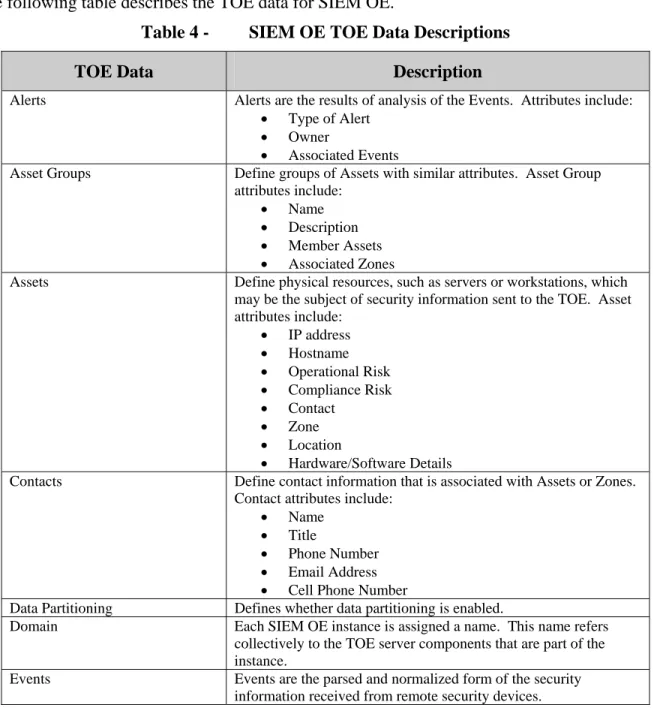
The following table describes the TOE data for SIEM OE.
Table 4 - SIEM OE TOE Data Descriptions
TOE Data Description
Alerts Alerts are the results of analysis of the Events. Attributes include: Type of Alert
Owner
Associated Events
Asset Groups Define groups of Assets with similar attributes. Asset Group attributes include:
Name Description Member Assets Associated Zones
Assets Define physical resources, such as servers or workstations, which may be the subject of security information sent to the TOE. Asset attributes include: IP address Hostname Operational Risk Compliance Risk Contact Zone Location Hardware/Software Details
Contacts Define contact information that is associated with Assets or Zones. Contact attributes include:
Name Title
Phone Number Email Address Cell Phone Number
Data Partitioning Defines whether data partitioning is enabled.
Domain Each SIEM OE instance is assigned a name. This name refers collectively to the TOE server components that are part of the instance.
Events Events are the parsed and normalized form of the security information received from remote security devices.
TOE Data Description
Graph Permissions Define the User Accounts and/or Group Accounts authorized to access each Graph. For each account, the Graph Permission may be configured as for any or all of the following:
View the graph,
Add operators, edges, and nodes, Delete operators, edges, and nodes, Modify operators, edges, and nodes, Modify Graph Permissions
Graphs Define views that are used to display Events and/or Analyzer Data. The information included on each Graph may be configured by accounts with the Add, Delete, or Modify permission for the Graph.
Group Accounts Define the set of Groups that are used to assign access permissions to users. Per the evaluated configuration, the default Group Accounts are used.
Inbox Status Settings Defines status parameters for devices sending data to the TOE via an inbox, including:
Name of the inbox used to receive data
Maximum latency time for receipt of data from each device using the inbox
Networks Define networks to assist in associating security information with an Asset when IP addresses are not unique, such as MSSP environments. Network attributes include:
Name
Detector IP address or hostname DA IP address or hostname Acquiring IP address or hostname Associated Assets and/or Asset Groups
Report Permissions Define what Group Accounts have access to the interactions to generate Reports.
Reports Published Reports that may be viewed via the Report Server. Rules Define the analysis of Events for correlation and alert generation.
Attributes include:
Correlation parameters Alert triggers
Alert notifications
System Latency Settings Define the maximum time allowed for receipt of data from each source before an Alert is generated, and whether Alert generation for this condition is enabled.
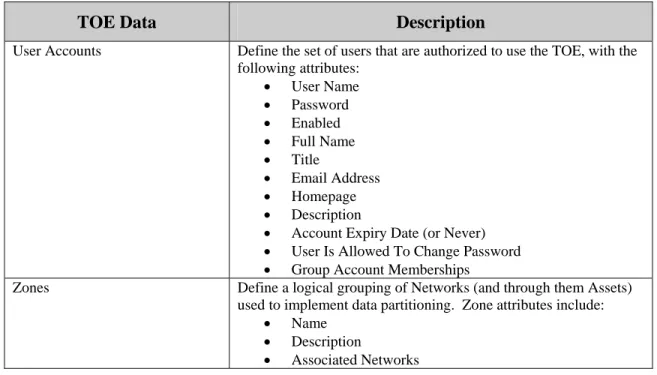
TOE Data Description
User Accounts Define the set of users that are authorized to use the TOE, with the following attributes: User Name Password Enabled Full Name Title Email Address Homepage Description
Account Expiry Date (or Never) User Is Allowed To Change Password Group Account Memberships
Zones Define a logical grouping of Networks (and through them Assets) used to implement data partitioning. Zone attributes include:
Name Description
Associated Networks The following table describes the TOE data for SIEM LP Software.
Table 5 - SIEM LP Software TOE Data Descriptions
TOE Data Description
Alarm Setup Define the setup for Alarms that are generated. Attributes include: Email parameters (enabled, server, credentials, applicable
types, recipients)
SNMP parameters (enabled, applicable types, server, version)
Alarm Categories (associated Event, name, message text, and severity)
Alarm Actions (protocols and servers for sending an Alarm to multiple destinations)
Email Groups (set of email addresses)
Alarms Alarms indicate the occurrence of configured conditions detected about the SIEM LP Software or appliance. Attributes include:
Unique ID
Application (source)
State (Unacked, Acked or Cleared) Message
Category Severity Time stamp Workstation
TOE Data Description
Asset Groups Define groups of Assets with similar attributes. Asset Group attributes include: Name IP address mask/range Zone name Network name Contact Location Hardware/Software Details Description
Assets Define physical resources, such as servers or workstations, which may be the subject of security information sent to the TOE. Asset attributes include: IP address Hostname Zone name Network name Contact Location Hardware/Software Details
Contacts Define contact information that is associated with Assets or Zones. Contact attributes include:
Name Title
Phone Number Email Address Cell Phone Number
Dashboards Define one or more charts containing summary or statistical data. Attributes include:
Public or private Owner
Refresh interval Charts included
Devices Define vendor device types which may provide security information to the TOE. A single Device may have multiple instances configured if more than one protocol may be used to transfer security information. Some Device types have type-specific attributes. Attributes include:
Whether security information receipt is enabled
Normalization parameters (raw log or full parsing (must be full), timezone setting, priority mappings, priority filtering)
Acquisition parameters (type (Syslog, SNMP, JDBC, SCP, FTP, or adapters), listening port, filters, credentials) Whether security information for the Device is forwarded
to SIEM OE Data expiry values
TOE Data Description
Email and SNMP Configuration Define the parameters for Email and SNMP servers used when sending report status, report results or Notifications. Attributes include:
Server addresses and ports Email recipient address SNMP version
OID
Events Events are the parsed and normalized form of the security information received from remote security devices.
Networks Define networks to assist in associating security information with an Asset when IP addresses are not unique. Network attributes include:
Name
Detector IP address or hostname Acquiring IP address or hostname Associated Assets and/or Asset Groups
Notifications Define the analysis of Events for correlation and Email or SNMP message generation. Attributes include:
Send a message via Email or SNMP
Type-specific parameters to trigger the Notification Filters to exclude Events
Whether the Notification is enabled
Scheduled Reports Define the Reports that are scheduled to be run. Attributes include: Time submitted
Report type Name Frequency
Status (enabled or not) Filter criteria
Upstream Data Transfer Parameters
Define the parameters used to forward security information from third party security devices to SIEM OE. Attributes include:
Whether Events are consolidated when forwarded (must be No)
Transmission Method (must be Push Without Acknowledgement)
Syslog Forwarding (must be Full) SIEM OE DA Address
User Accounts Define the set of users that are authorized to use the TOE, with the following attributes: User Name Password Enabled Full Name Group memberships Assigned Devices Assigned Zones Title
TOE Data Description
Zones Define a logical grouping of Networks used to implement data partitioning. Zone attributes include:
Name Description
Associated Networks 1.7 Evaluated Configuration
The evaluated configuration of the TOE includes: 1. SOC – 1 instance
2. SDW – 1 instance
3. TD – 1 or more instances 4. TE – 1 or more instances 5. DA – 1 or more instances
6. Administration Console – 1 or more instances 7. Operations Console – 0 or more instances
8. SIEM LP Software – 1 or more instances, each installed on a dedicated appliance The SIEM OE server components may be installed on a common server or on separate servers. SIEM LP Software instances are configured to forward information to SIEM OE.
The following configuration restrictions apply to the evaluated configuration:
1. The administrator configures the Linux servers hosting SIEM OE components as specified in Chapter 13, “Securing the Servers in Your Environment”, of the Trustwave SIEM Operations Edition Administration Guide.
2. SIEM LP Software instances are configured to push security information received from third party security devices to SIEM OE.
3. The default SIEM OE Group Accounts and their default permission sets are used to assign access permissions to users.
4. Non-administrators in SIEM OE are not permitted to change their own password. 5. Data expiry on the DA is disabled (this is the default behavior).
6. Integration of external URLs with the SIEM OE context menus is not configured. 7. SIEM LP instances are configured to generate an alarm for the Resources Error Alarm
category, in order to provide an alarm when the file system fills up and audit or analyzer data must be discarded. Trustwave recommends that the Resources Warning Alarm category is also configured to generate an alarm.
9. The Graph operators and elements in SIEM OE are only modified with the assistance of Trustwave personnel.
10.On SIEM OE, data expiry is configured and enabled on the DA and SDW components during installation.
11.On systems hosting SIEM OE server components, the iptables firewall is configured to reject incoming traffic to any ports not required for TOE functions.
12.On SIEM OE, the Health Manager is configured to monitor the filesystems of all the systems hosting TOE server components. SNMP traps messages are configured to be sent when any file system is full.
13.On SIEM OE, the configuration of the composition rules for passwords is not modified from the factory default.
14.On SIEM OE, access to the following Reports bookmarks on the Security Reports Manager Navigation Pane is restricted to the administrators Group Account: Report Requests, SM User Access and Authorization, Security Manager Activity, Security Manager Activity by Account, Security Manager Activity by Type, All SM Activity, All SM Activity by Account, and All SM Activity by Type.
2. Conformance Claims
2.1 Common Criteria Conformance
Common Criteria version: Version 3.1 Revision 3, dated July 2009 Common Criteria conformance: Part 2 extended and Part 3 conformant 2.2 Security Requirement Package Conformance
EAL3 augmented by ALC_FLR.2
The TOE does not claim conformance to any security functional requirement packages. 2.3 Protection Profile Conformance
The TOE claims demonstrable conformance to the U.S. Government Protection Profile Intrusion Detection System Analyzer For Basic Robustness Environments, version 1.3, dated July 25, 2007.
3. Security Problem Definition 3.1 Introduction
This chapter defines the nature and scope of the security needs to be addressed by the TOE. Specifically this chapter identifies:
A) assumptions about the environment, B) threats to the assets and
C) organisational security policies.
This chapter identifies assumptions as A.assumption, threats as T.threat and policies as P.policy. 3.2 Assumptions
The specific conditions listed in the following subsections are assumed to exist in the Operational Environment.
Table 6 - Assumptions
A.Type Description
A.ACCESS The TOE has access to all the IT System resources necessary to perform its functions.
A.LOCATE The processing resources of the TOE will be located within controlled access facilities, which will prevent unauthorized physical access.
A.MANAGE There will be one or more competent individuals assigned to manage the TOE and the security of the information it contains.
A.MGMTNETWORK The TOE components will be interconnected by a segregated management network that protects the intra-TOE traffic from disclosure to or modification by untrusted systems or users, and limits traffic from the enterprise network entering the management network to security information from third party security devices being sent via UDP to the DA components of the TOE. A.NOEVIL The authorized administrators are not careless, willfully negligent, or hostile,
and will follow and abide by the instructions provided by the TOE documentation.
A.NOTRST The TOE can only be accessed by authorized users.
A.PROTCT The TOE hardware and software critical to security policy enforcement will be protected from unauthorized physical modification.
3.3 Threats
The threats identified in the following table are addressed by the TOE and the Operational Environment.
Table 7 - Threats
T.Type Description
T.COMDIS An unauthorized person may attempt to disclose the data analyzed and produced by the TOE by bypassing a security mechanism.
T.Type Description
T.FALASC The TOE may fail to identify vulnerabilities or inappropriate activity based on association of IDS data received from all data sources.
T.FALREC The TOE may fail to recognize vulnerabilities or inappropriate activity based on IDS data received from each data source.
T.IMPCON The TOE may be susceptible to improper configuration by an authorized or unauthorized person causing potential intrusions to go undetected.
T.INFLUX An unauthorized user may cause malfunction of the TOE by creating an influx of data that the TOE cannot handle.
T.LOSSOF An unauthorized person may attempt to remove or destroy data analyzed and produced by the TOE.
T.NOHALT An unauthorized person may attempt to compromise the continuity of the TOE’s analysis functionality by halting execution of the TOE.
T.PRIVIL An unauthorized user may gain access to the TOE and exploit system privileges to gain access to TOE security functions and data.
3.4 Organisational Security Policies
The Organisational Security Policies identified in the following table are addressed by the TOE and the Operational Environment.
Table 8 - Organisational Security Policies
P.Type Description
P.ACCACT Users of the TOE shall be accountable for their actions within the IDS. P.ACCESS All data analyzed and generated by the TOE shall only be used for authorized
purposes.
P.ANALYZ Analytical processes and information to derive conclusions about intrusions (past, present, or future) must be applied to IDS data and appropriate response actions taken.
P.DETECT Static configuration information that might be indicative of the potential for a future intrusion or the occurrence of a past intrusion of an IT System must be collected. P.INTGTY Data analyzed and generated by the TOE shall be protected from modification. P.MANAGE The TOE shall only be managed by authorized users.
P.PROTCT The TOE shall be protected from unauthorized accesses and disruptions of analysis and response activities.
4. Security Objectives
This section identifies the security objectives of the TOE and the TOE’s Operational
Environment. The security objectives identify the responsibilities of the TOE and the TOE’s Operational Environment in meeting the security needs. Objectives of the TOE are identified as
O.objective. Objectives that apply to the operational environment are designated as
OE.objective.
4.1 Security Objectives for the TOE
The TOE must satisfy the following objectives.
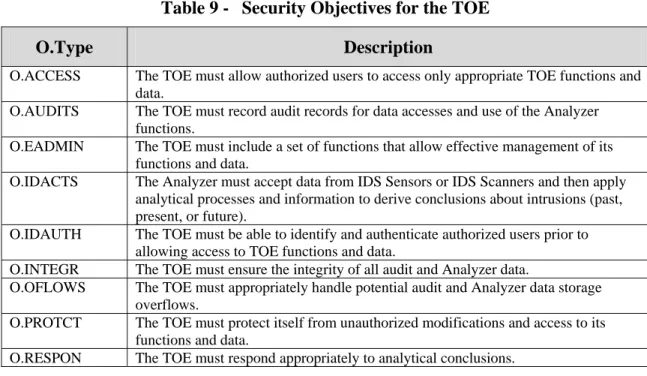
Table 9 - Security Objectives for the TOE
O.Type Description
O.ACCESS The TOE must allow authorized users to access only appropriate TOE functions and data.
O.AUDITS The TOE must record audit records for data accesses and use of the Analyzer functions.
O.EADMIN The TOE must include a set of functions that allow effective management of its functions and data.
O.IDACTS The Analyzer must accept data from IDS Sensors or IDS Scanners and then apply analytical processes and information to derive conclusions about intrusions (past, present, or future).
O.IDAUTH The TOE must be able to identify and authenticate authorized users prior to allowing access to TOE functions and data.
O.INTEGR The TOE must ensure the integrity of all audit and Analyzer data.
O.OFLOWS The TOE must appropriately handle potential audit and Analyzer data storage overflows.
O.PROTCT The TOE must protect itself from unauthorized modifications and access to its functions and data.
O.RESPON The TOE must respond appropriately to analytical conclusions.
4.2 Security Objectives for the Operational Environment
The TOE’s operational environment must satisfy the following objectives. Table 10 - Security Objectives of the Operational Environment
OE.Type Description
OE.AUDIT_PRO TECTION
The IT Environment will provide the capability to protect audit information.
OE.AUDIT_SOR T
The IT Environment will provide the capability to sort the audit information.
OE.CREDEN Those responsible for the TOE must ensure that all access credentials are protected by the users in a manner which is consistent with IT security.
OE.INSTAL Those responsible for the TOE must ensure that the TOE is delivered, installed, managed, and operated in a manner which is consistent with IT security.
OE.Type Description OE.MGMTNET
WORK
The operational environment will provide a segregated management network interconnecting the TOE components that protects the intra-TOE traffic from disclosure to or modification by untrusted systems or users, and limits traffic from the enterprise network entering the management network to security information from third party security devices being sent via UDP to the DA components of the TOE.
OE.PERSON Personnel working as authorized administrators shall be carefully selected and trained for proper operation of the Analyzer.
OE.PHYCAL Those responsible for the TOE must ensure that those parts of the TOE critical to security policy are protected from any physical attack.
5. Extended Components Definition
5.1 Extended Security Functional Components 5.1.1 Class IDS: Intrusion Detection
All of the components in this section are taken directly from the U.S. Government Protection Profile Intrusion Detection System Analyzer For Basic Robustness Environments.
This class of requirements is taken from the IDS Analyzer PP to specifically address the data analysed by an IDS analyzer. The audit class of the CC (FAU) was used as a model for creating these requirements. The purpose of this class of requirements is to address the unique nature of analyser data and provide for requirements about analyzing, reviewing and managing the data. Application Note: The PP does not provide hierarchy and dependency information for the extended SFRs defined in
the PP. This information has been derived from the model SFRs referenced by the PP.
5.1.1.1 IDS_ANL Analyser Analysis Family Behaviour:
This family defines the requirements for the TOE regarding analysis of information related to security events received from remote IT systems.
Component Levelling:
IDS_ANL.1 Analyser Analysis provides for the functionality to require TSF controlled analysis of data received from remote IT systems regarding information related to security events.
Management:
The following actions could be considered for the management functions in FMT:
IDS_ANL Analyser Analysis 1
IDS_RCT Analyser React 1
IDS_RDR Restricted Data Review 1
IDS_STG System Data Storage
1 2
There are no auditable events foreseen. IDS_ANL.1 Analyser Analysis Hierarchical to: No other components. Dependencies: None
IDS_ANL.1.1 The TSF shall perform the following analysis function(s) on all IDS data received:
a) [selection: statistical, signature, integrity]; and b) [assignment: other analytical functions].
Application Note: Statistical analysis involves identifying deviations from normal patterns of behaviour. For example, it may involve mean frequencies and measures of variability to identify abnormal usage. Signature analysis involves the use of patterns corresponding to known attacks or misuses of a system. For example, patterns of system settings and user activity can be compared against a database of known attacks. Integrity analysis involves comparing system settings or user activity at some point in time with those of another point in time to detect differences.
IDS_ANL.1.2 The TSF shall record within each analytical result at least the following information:
a) Date and time of the result, type of result, identification of data source; and
b) [assignment: other security relevant information about the result]. Application Note: The analytical conclusions drawn by the analyser should both describe the conclusion and identify
the information used to reach the conclusion. 5.1.1.2 IDS_RCT Analyser React
Family Behaviour:
This family defines the requirements for the TOE regarding reactions to the analysis of information related to security events received from remote IT systems when an intrusion is detected.
Component Levelling:
IDS_RCT.1 Analyser React provides for the functionality to require TSF controlled reaction to the analysis of data received from remote IT systems regarding information related to security events when an intrusion is detected.
Management:
The following actions could be considered for the management functions in FMT: a) the management (addition, removal, or modification) of actions. Audit:
IDS_RCT.1 Analyser React
Hierarchical to: No other components.
Dependencies: IDS_ANL.1 Analyser Analysis
IDS_RCT.1.1 The TSF shall send an alarm to [assignment: alarm destination] and take [assignment: appropriate actions] when an intrusion is detected.
Application Note: There must be an alarm, though the ST should refine the nature of the alarm and define its target (e.g., administrator console, audit log). The TSF may optionally perform other actions when intrusions are detected; these actions should be defined in the ST. An intrusion in this requirement applies to any conclusions reached by the analyser related to past, present, and future intrusions or intrusion potential.
5.1.1.3 IDS_RDR Restricted Data Review Family Behaviour:
This family defines the requirements for the TOE regarding review of the analyser data collected by the TOE.
Component Levelling:
IDS_RDR.1 Restricted Data Review provides for the functionality to require TSF controlled review of the analyser data collected by the TOE.
Management:
The following actions could be considered for the management functions in FMT:
a) maintenance (deletion, modification, addition) of the group of users with read access right to the analyser data records.
Audit:
The following actions should be auditable if FAU_GEN Security audit data generation is included in the ST:
a) Basic: Attempts to read analyser data that are denied.
b) Detailed: Reading of information from the analyser data records. IDS_RDR.1 Restricted Data Review
Hierarchical to: No other components.
Dependencies: IDS_ANL.1 Analyser Analysis
IDS_RDR.1.1 The Analyser shall provide [assignment: authorised users] with the capability to read [assignment: list of Analyser data] from the Analyser data.
Application Note: This requirement applies to authorised users of the Analyser. The requirement is left open for the writers of the ST to define which authorised usersmay access what Analyser data.
IDS_RDR.1.3 The Analyser shall prohibit all users read access to the Analyser data, except those users that have been granted explicit read-access.
5.1.1.4 IDS_STG Analyser Data Storage Family Behaviour:
This family defines the requirements for the TOE to be able to create and maintain a secure analyser data trail.
Component Levelling:
IDS_STG.1 Guarantee of Analyser Data Availability requires that the analyser data be protected from unauthorised deletion and/or modification and defines the behaviour when specific
conditions occur.
IDS_STG.2 Prevention of Analyser Data Loss defines the actions to be taken if the analyser data storage capacity has been reached.
Management: IDS_STG.1
The following actions could be considered for the management functions in FMT:
a) maintenance of the parameters that control the analyser data storage capability.
Management: IDS_STG.2
The following actions could be considered for the management functions in FMT:
a) maintenance (deletion, modification, addition) of actions to be taken in case analyser data storage capacity has been reached.
Audit: IDS_STG.1
There are no auditable events foreseen. Audit: IDS_STG.2
There are no auditable events foreseen.
IDS_STG.1 Guarantee of Analyser Data Availability Hierarchical to: No other components.
Dependencies: IDS_ANL.1 Analyser Analysis
IDS_STG.1.1 The Analyser shall protect the stored Analyser data from unauthorised deletion.
IDS_ STG.1.2 The Analyser shall protect the stored Analyser data from modification. IDS_STG Analyser Data Storage
1 2
Application Note: Authorised deletion of data is not considered a modification of Analyser data in this context. This requirement applies to the actual content of the Analyser data, which should be protected from any modifications.
IDS_ STG.1.3 The Analyser shall ensure that [assignment: metric for saving Analyser data] Analyser data will be maintained when the following conditions occur: [selection: Analyser data storage exhaustion, failure, attack].
Application Note: The ST needs to define the amount of Analyser data that could be lost under the identified scenarios.
IDS_STG.2 Prevention of Analyser data loss Hierarchical to: No other components.
Dependencies: IDS_ANL.1 Analyser Analysis
IDS_STG.2.1 The Analyser shall [selection: 'ignore Analyser data', 'prevent Analyser data, except those taken by the authorised user with special rights', 'overwrite the oldest stored Analyser data'] and send an alarm if the storage capacity has been reached.
Application Note: The ST must define what actions the analyser takes if the result log becomes full. Anything that causes the Analyser to stop analysing events may not be the best solution, as this will only affect the Analyser and not the system on which it is analysing data (e.g., shutting down the Analyser).
5.2 Extended Security Assurance Components None
6. Security Requirements
This section contains the functional requirements that are provided by the TOE. These requirements consist of functional components from Part 2 of the CC.
The CC defines operations on security requirements. The font conventions listed below state the conventions used in this ST to identify the operations.
Assignment: indicated in italics
Selection: indicated in underlined text
Assignments within selections: indicated in italics and underlined text
Refinement: indicated with bold text
Iterations of security functional requirements may be included. If so, iterations are specified at the component level and all elements of the component are repeated. Iterations are identified by numbers in parentheses following the component or element (e.g., FAU_ARP.1(1)).
6.1 TOE Security Functional Requirements
The functional requirements are described in detail in the following subsections. Additionally, these requirements are derived verbatim from Part 2 of the Common Criteria for Information Technology Security Evaluation with the exception of completed operations.
6.1.1 Security Audit (FAU)
6.1.1.1 FAU_GEN.1 Audit Data Generation
Refinement Rationale: The specifics of the audit records generated by SIEM OE and SIEM LP Software are different. FAU_GEN.1 is iterated and refined to clearly define the specifics for each of the products that comprise the TOE.
FAU_GEN.1.1(1) The TSF shall be able to generate an audit record of the following auditable events involving SIEM OE components:
a) Start-up and shutdown of the audit functions; b) All auditable events for the basic level of audit; and
c) Access to the Analyser and access to the TOE and Analyser data. Table 11 - Auditable Events for SIEM OE
SFR Event Audit Record Details
FAU_GEN.1 Start-up and shutdown of audit functions
startup.component, where
component may be:
td for Threat Detector te for Threat Evaluator da for Data Acquisition soc for Security
Operations Center sdw for Security Data
SFR Event Audit Record Details te for Threat Evaluator
da for Data Acquisition soc for Security
Operations Center sdw for Security Data
Warehouse
Access to Analyser auth.remote.ssl.info IP address and TCP port, cipher suite name, SSL/TLS protocol type (e.g. TLSv1)
Access to the TOE Analyser data
infosec.permission.success URL accessed
report.query Names of requested
report FAU_SAR.1 Reading of information
from the audit records
infosec.permission.success URL is /alert/status_sm_audit or
/alert/status/sm_audit FAU_SAR.2 Unsuccessful attempts to
read information from the audit records
infosec.permission.deny URL is
/alert/status_sm_audit or
/alert/status/sm_audit FAU_SEL.1 All modifications to the
audit configuration that occur while the audit collection functions are operating
conf.auth.rule.operation.success, where operation is create, modify, or delete
FIA_UAU.1 All use of the
authentication mechanism
conf.auth.login.success conf.auth.login.deny conf.auth.login.lockout
User identity, location
FIA_UID.1 All use of the
identification mechanism
conf.auth.login.success conf.auth.login.deny conf.auth.login.lockout
User identity, location
FMT_MOF.1 All modifications in the behaviour of the functions of the TSF
alert.suppress.source/target/etc
FMT_MTD.1 All modifications to the values of TSF data
alert.closed alert.own alert.relinquish alert.reopen
conf.auth.user.operation.success, where operation is add, update, or delete
conf.graph.object.operation.succes s, where object is graph or node and operation is create, modify, or delete
Name added or deleted; type of update Object identifier
FMT_SMR.1 Modifications to the group of users that are
FAU_GEN.1.2(1) The TSF shall record within each audit record involving SIEM OE components at least the following information:
a) Date and time of the event, type of event, subject identity (if applicable), and the outcome (success or failure) of the event; and
b) For each audit event type, based on the auditable event definitions of the functional components included in the PP/ST, the associated TOE server component, the IP address of the associated Administration or Operations Console, and the additional information specified in the Details column of the preceding table.
FAU_GEN.1.1(2) The TSF shall be able to generate an audit record of the following auditable events involving SIEM LP Software instances:
a) Start-up and shutdown of the audit functions; b) All auditable events for the basic level of audit; and
c) Access to the Analyser and access to the TOE and Analyser data. Table 12 - Auditable Events for SIEM LP Software
SFR Event Audit Record Details
FAU_GEN.1 Start-up and shutdown of audit functions
admin.healthmanager.launched
Access to Analyser user.login Access to the TOE
Analyser data
user.chart.run
user.eventexplorer,run user.report.run user.report.scheduled
Object ID, Requested access
FAU_SAR.1 Reading of information from the audit records
user.report.run Report name is SIEM User Activity, SIEM User Activity by Type, SIEM User Activity by User, or SIEM User Management FAU_SAR.2 Unsuccessful attempts to
read information from the audit records
n/a – All users are authorized to access all audit records.
FAU_SEL.1 All modifications to the audit configuration that occur while the audit collection functions are operating
n/a - Modifications to the audit generation configuration are only made when the audit functions are not operating.
FIA_UAU.1 All use of the
authentication mechanism
user.login User identity, location user.login.fail User identity, location,
number of failed attempts
admin.account.lockout User identity
SFR Event Audit Record Details FIA_UID.1 All use of the
identification mechanism
user.login User identity, location user.login.fail User identity, location,
number of failed attempts
admin.account.lockout User identity user.logoff
user.timeout
User identity
FMT_MOF.1 All modifications in the behaviour of the functions of the TSF
user.notification.edit Notification identifier
FMT_MTD.1 All modifications to the values of TSF data
admin.objecttype.operation, where
objecttype identifies the object type being modified (e.g. user) and operation is add, delete, disable, edit, or enable user.password.edit user.report.scheduled user.schedule.report.launched user.schedule.report.finished Object identifier FMT_SMR.1 Modifications to the group of users that are part of a role
admin.account.enable admin.account.disable
User identity
IDS_RDR.1 Attempts to read analyser data that are denied
n/a – The user is not presented with an option to attempt to access unauthorized Analyzer data.
FAU_GEN.1.2(2) The TSF shall record within each audit record involving SIEM LP Software instances at least the following information:
a) Date and time of the event, type of event, subject identity (if applicable), and the outcome (success or failure) of the event; and
b) For each audit event type, based on the auditable event definitions of the functional components included in the PP/ST, the additional information specified in the Details column of the preceding table.
6.1.1.2 FAU_SAR.1 Audit Review
Refinement Rationale: The specifics of the audit review by SIEM OE and SIEM LP Software are different. FAU_SAR.1 is iterated and refined to clearly define the specifics for each of the products that comprise the TOE.
FAU_SAR.1.1(1) The TSF shall provide authorized users of SIEM OE that are members of the administrators group with the capability to read the timestamp, TOE server component
FAU_SAR.1.1(2) The TSF shall provide allauthorized users of SIEM LP Software with the capability to read all audit information from the audit records.
FAU_SAR.1.2(2) The TSF shall provide the audit records of SIEM LP Software in a manner suitable for the user to interpret the information.
6.1.1.3 FAU_SAR.2 Restricted Audit Review
FAU_SAR.2.1 The TSF shall prohibit all users read access to the audit records, except those users that have been granted explicit read-access.
6.1.1.4 FAU_SAR.3 Selectable Audit Review
FAU_SAR.3.1 The TSF shall provide the ability to perform sorting of audit data based on date and time, subject identity, type of event, and success or failure of related event.
Refinement Rationale: The word “apply” was replaced with “perform” to match the PP SFR presentation, which was based on an earlier version of the CC.
6.1.1.5 FAU_SEL.1 Selective Audit
Refinement Rationale: The specifics of the audit record selectivity generated by SIEM OE and SIEM LP Software are different. This SFR is iterated and refined to clearly define the specifics for each of the products that comprise the TOE.
FAU_SEL.1.1(1) The TSF shall be able to include or exclude auditable events on SIEM OE from the set of audited events based on the following attributes:
a) event type;
b) TOE Server component; and IP address of the associated Administration or Operations Console.
FAU_SEL.1.1(2) The TSF shall be able to include or exclude auditable events on SIEM LP Software instances from the set of audited events based on the following attributes:
a) event type;
b) no other attributes.
6.1.1.6 FAU_STG.2 Guarantees of Audit Data Availability
FAU_STG.2.1 The TSF shall protect the stored audit records from unauthorised deletion. FAU_STG.2.2 The TSF shall be able to prevent unauthorised modifications to the audit records.
Refinement Rationale: The words “stored audit records in the audit trail” were replaced with “audit records” to match the PP SFR presentation, which was based on an earlier version of the CC. The intent of the 2 versions of the SFR is understood to be the same.
Refinement Rationale: The “detect” assignment from the PP was replaced with the “prevent” assignment option from the original SFR. Preventing modifications is more restrictive than detecting modifications after the fact.
FAU_STG.2.3 The TSF shall ensure that the most recent audit records will be maintained when the following conditions occur: audit storage exhaustion.
Refinement Rationale: The words “stored audit records” were replaced with “audit records” to match the PP SFR presentation, which was based on an earlier version of the CC. The intent of the 2 versions of the SFR is understood to be the same.
6.1.1.7 FAU_STG.4 Prevention of Audit Data Loss
FAU_STG.4.1 The TSF shall overwrite the oldest stored audit records and send an alarm if the audit trail is full.
6.1.2 Identification and Authentication (FIA)
6.1.2.1 FIA_AFL.1 Authentication Failure Handling
Refinement Rationale: The instance of this SFR specified in the PP has been deleted per NIAP/CCEVS PD-0127; it is not required because no I&A is performed between TOE components. This instance has been inserted to describe the behaviour of the TOE upon repeated failed login attempts by users. FIA_AFL.1.1 The TSF shall detect when 3 unsuccessful authentication attempts occur related to
consecutive login failure attempts of an individual User Account.
FIA_AFL.1.2 When the defined number of unsuccessful authentication attempts has been met or surpassed, the TSF shall disable the User Account.
6.1.2.2 FIA_ATD.1 User Attribute Definition
FIA_ATD.1.1 The TSF shall maintain the following list of security attributes belonging to individual users:
a) User identity; b) Authentication data; c) Authorisations; and
d) Status (enabled or disabled).
6.1.2.3 FIA_UAU.1 Timing of Authentication
FIA_UAU.1.1(1) The TSF shall allow a list of main web pages that may be accessed via the Reports Server to be displayed on behalf of the user to be performed before the user is authenticated by SIEM OE.
FIA_UAU.1.2(1) The TSF shall require each user to be successfully authenticated before allowing any other TSF-mediated actions on behalf of that user by SIEM OE.
FIA_UAU.1.1(2) The TSF shall allow no actions on behalf of the user to be performed before the user is authenticated by SIEM LP Software.
FIA_UAU.1.2(2) The TSF shall require each user to be successfully authenticated before allowing any other TSF-mediated actions on behalf of that user by SIEM LP Software.
6.1.2.4 FIA_UID.1 Timing of Identification
Refinement Rationale: The specifics of the options made available to users before identification by SIEM OE and SIEM LP Software are different. This SFR is iterated and refined to clearly define the specifics for each of the products that comprise the TOE.
FIA_UID.1.1(1) The TSF shall allow a list of main web pages that may be accessed via the Reports Server to be displayed on behalf of the user to be performed before the user is identified by SIEM OE.
FIA_UID.1.2(1) The TSF shall require each user to be successfully identified before allowing any other TSF-mediated actions on behalf of that user by SIEM OE.
FIA_UID.1.1(2) The TSF shall allow no actions on behalf of the user to be performed before the user is identified by SIEM LP Software.
FIA_UID.1.2(2) The TSF shall require each user to be successfully identified before allowing any other TSF-mediated actions on behalf of that user by SIEM LP Software.
6.1.3 Security Management (FMT)
6.1.3.1 FMT_MOF.1 Management of Security Functions Behaviour
FMT_MOF.1.1 The TSF shall restrict the ability to modify the behaviour of the functions of analysis and reaction to authorised Analyser administrators.
6.1.3.2 FMT_MTD.1 Management of TSF Data
Refinement Rationale: The specifics of the options made available to users before identification by SIEM OE and SIEM LP Software are different. This SFR is iterated and refined to clearly define the specifics for each of the products that comprise the TOE.
Refinement Rationale: The first two operations (selection and assignment) of the official SFR have been refined to reflect the wording of the PP. The meaning of the refined SFR is the same as the official SFR.
Table 13 - SIEM OE TSF Data Access Details
TSF Data administrators security_admins analysts operators Alerts Query and Modify
for authorized Zones and Assets
Delete
None Query and Modify
for authorized Zones and Assets
Query and Modify for authorized Zones and Assets
Asset Groups Create, Modify, Query, Delete
Query Query Query subject to
authorized Assets Assets Create, Modify,
Query, Delete
Query Query Query subject to
authorized Assets Contacts Create, Modify,
Query, Delete
None None None
Data Partitioning
Query, Modify None None None
Events Query for
authorized Zones and Assets
Query for authorized Zones and Assets
Query for authorized Zones and Assets
Query for authorized Zones and Assets
Graph Permissions
Query, Modify Query, Modify if the Graph Permissions explicitly authorize the user
Query, Modify if the Graph Permissions explicitly authorize the user
Query, Modify if the Graph Permissions explicitly authorize the user
Graphs Query if the Graph Permissions authorize the user to View the Graph. Information displayed is limited to authorized Zones and Assets.
Modify the Graph operators, edges, or nodes if the Graph Permissions
authorize the user to Add, Modify or Delete those items
Query if the Graph Permissions authorize the user to View the Graph. Information displayed is limited to authorized Zones and Assets.
Modify the Graph operators, edges, or nodes if the Graph Permissions authorize the user to Add, Modify or Delete those items
Query if the Graph Permissions authorize the user to View the Graph. Information displayed is limited to authorized Zones and Assets. Modify the Graph operators, edges, or nodes if the Graph Permissions
authorize the user to Add, Modify or Delete those items
Query if the Graph Permissions authorize the user to View the Graph. Information displayed is limited to authorized Zones and Assets.
Modify the Graph operators, edges, or nodes if the Graph Permissions authorize the user to Add, Modify or Delete those items
Group Accounts
Query (Per the evaluated configuration, the default Group Accounts are used).
None None None
Inbox Status Settings
Query, Modify Query, Modify None None
Networks Create, Modify, Query, Delete
Create, Modify, Query, Delete
None None