*Authors contributed equally to this work
A TABLET-BASED MATH TUTOR FOR BEGINNING ALGEBRA
Technology in Practice Strand
Guan Wang*, Nathaniel Bowditch*, Robert Zeleznik
Brown University {wang, nbowditch, bcz}@cs.brown.edu
Musik Kwon
Samsung Electronics, Co., Ltd.
Joseph J. LaViola, Jr.
University of Central Florida [email protected]
1. ABSTRACT
This paper presents an interactive mathematical tutor application to assist middle school students with solving single-variable linear and quadratic equations and two-variable systems of linear equations. The system uses a gestural, pen-based interface to mimic and enhance the traditional step-by-step method of solving algebraic problems on paper. After the student handwrites each step, the system detects any mistakes, highlights incorrect terms or wrong expressions, and provides specific, localized messages to help the student understand their errors. Two qualitative user studies were conducted at a local school to gather general feedback from some students and their math teacher. Results indicate that most students found the application easy to learn and fun to use. Real-time mistake detection and highlighting of incorrect terms informed students of their errors and improved their ability to solve similar problems. Although many students found the mistake detection and highlighting helpful, our studies also suggested that some students needed more active help. We are currently conducting a Wizard of Oz study to rapidly investigate enhancements to the user experience which may address this limitation.
2. PROBLEM STATEMENT AND CONTEXT 2.1. Problem Statement
Traditionally in middle school mathematics, students first learn a new method or concept in class through their teacher. For algebra problems, methods of solving are taught to be executed step by step, with each step resulting in a new equation that is closer to the solution. Students then practice applying these methods by solving equations outside of the classroom, using pencil
and paper. However, if a student makes a mistake while doing the assignment, it will go unnoticed until after the teacher has corrected and returned the assignment, and the student will have missed an opportunity to learn at the time of the mistake.
Though real-time error detection systems do exist for such problems, they do not support pen-and-touch handwriting for math, and usually only work for a limited set of problems tailored for the system [8]. That is to say, they only allow students to work on the problems stored in a database, which limits the number of practice problems. Additionally, existing step-by-step feedback systems often fail to accurately detect the wrong term when a student makes a mistake. Usually the extent of the feedback is a general indication of error, such as a message saying “You’ve made a mistake.” Though this is useful, it is insufficient for many students who have not fully mastered the mathematical concepts. Furthermore, most existing systems support a limited number of solution methods, often accepting only a single solution path. Students should be encouraged to be proficient in many different solution methods [6, 10]. Finally, most existing intelligent tutoring systems (ITS) are time-consuming to design and build, requiring considerable manual effort to enter the specific information for each area of study.
In this paper, we present an interactive mathematical tutor application, Math Tutor, to help middle school students solve beginner-level algebra equations with an experience similar to traditional pen-and-paper methods using touch screen control. Math Tutor is an Android application designed to run on tablets and large touch-screen devices. It helps students solve equations by having them write out each step one at a time and checks their work using rule-based error detection. The application strives for an experience like that of writing on “intelligent” paper, although its internal rule-based nature means it is not an ITS. Students can directly handwrite mathematical expressions, scribble over mistakes to erase their input, make scratch-work in the margins of previous steps, and use familiar pinch-to-zoom and panning gestures to interact with the plots of the equations. The application is partly powered by a math recognizer developed by Samsung Electronics that interprets the students’ handwriting as mathematical expressions. By doing the work on a tablet, students get the same self-guided practice as on paper, with the addition of automatic, in situ feedback. The current scope includes:
linear single-variable equations
quadratic single-variable equations
two-variable systems of linear equations
The system is generalized so that it works on any equation within this scope, and is not limited by a specific database of problems. Moreover, as long as a student’s solution steps are valid, the system allows any method of reaching a solution. By analyzing each expression the student enters, the system can identify mistakes as they occur and identify the likely cause of the error. The system then provides user feedback in the form of highlighting “wrong” terms, and displaying a text message specific to the mistake and intended to explain why the input is wrong.
2.2. Related Work
There have been numerous attempts at creating interactive tutoring applications, with some works spanning back decades. In a 2011 study, Kurt Van Lehn demonstrated that automatic,
computer-based tutoring systems, ITSs, were about as effective at teaching students as human tutoring [8]. The physics tutors used in the study are very similar to ours in that they work at finer granularities than answer-based systems [10]. His model inspired us to focus on step-by-step feedback to students and to make feedback more specific and helpful.
Anderson, J.R. has led his team in CMU and his company, Carnegie Learning, to apply cognitive psychology to education, and developed a set of ITS projects. They provide cognitive tutors with a large scope of math and spend years to evaluate their effect [5]. Another project, a website (http://mathtutor.web.cmu.edu), covers a wide breadth of beginner-level algebra and arithmetic, and uses a variety of modules for different topics. Like our application, the modules are interactive and inform the student of mistakes. However, the interface for the module on solving algebra equations is primarily implemented through textboxes and other WIMP controls. Additionally, the error messages fail to highlight the mistake in the problem itself [1, 9]. Finally, the system draws on a database of problems, rather than working for any general problem. Students cannot, for example, use the system for help on problems from their textbooks.
There are also many other websites that can solve equations and algebra problems, such as Mathomatic, IXL, Khan Academy, Algebra.com, Wolfram Alpha and more [3,4,6,7]. While many of these sites, such as Wolfram Alpha, provide solutions to any general equation, there is little to no feedback about how to reach these solutions. When they provide paths to a solution, they do not support following a student through the solution process and pointing out mistakes as they are made. Moreover, almost all of these products take only typing and clicking as input, and distance students from the familiar process of solving equations out in hand-writing.
3. METHOD EMPLOYED 3.1. User Experience
From a user experience standpoint, Math Tutor strives to feel similar to solving a problem with pen and paper [2]. In order for the system to catch mistakes, it requires that steps be entered one at a time. Our interface divides the screen into top and bottom sections. The top section holds the input from the previous step, and allows for scratch-work to be overdrawn. Scratch-work is ignored by the system, but can be useful to the student. The bottom section expects the next step; this can be one or two equations, depending on the type of the problem. As previously mentioned, the user writes an equation by hand using a stylus. The input is interpreted by a math recognizer and rendered in a typeset font at the top of this section so that the user can ensure the interpretation is correct. When the user is satisfied with the input, he can submit the step to be checked for mistakes. If a mistake is detected, the system will attempt to highlight what it believes to be incorrect, and provide the user with a message explaining the mistake. If the step is a correct final solution, the user has the option to view a graph of the original problem in a floating widget. Since this interface only allows two steps (the previous and current steps) to be viewed at a time, we include a sidebar listing the entire step history for review.
3.2. Implementation
It is important to note that while our application has behavior similar to ITSs, it cannot be classified as such, since it is powered by a set of algebraic rules rather than deep-model artificial
intelligence. At each step in the problem we first calculate the solutions to the newly-entered expression. We then check whether or not the user’s input has the same solutions as the original problem. If it doesn’t, we must determine what mistake was made. To do this, we look at the previous step and perform a pattern matching analysis. Internally, our application maps a list of rules to certain patterns of equations. We divide the rules into different categories:
Basic algebra rules: adding (to both sides of the equation), subtracting, multiplying, dividing, combining like terms, simplifying, factoring out coefficient, distributing
Quadratic problems: quadratic formula, making square term, extracting roots, factorizing
System of equations problems: combining equations, substituting
With a combination of the rules, we can support more than thirty kinds of logical user actions. Thus, for any given equation, we can analyze what rules apply to it and create a set of new equations that could logically follow as the next step. Each equation in this set is annotated by the rules that were used to reach this equation. We then compare the user’s input to each of the equations in this set and look for the most similar match. As a result we can form an accurate guess of what the user was trying to do when the mistake was made, as well as what specific term is incorrect. This information is used to highlight the problematic term and create an error message to inform the user of the mistake. If no close match is found, the mistake is too “out of bounds” for the system to recognize, and a general error message is displayed.
Because of its rule-based structure, our system is easy to design, build, and extend. Unlike most traditional ITS systems that require complementary pedagogical models for new content, our application can support a new scope of algebra by simply adding a solver for the new type of problems, new rules for valid next steps, and new actions and error messages. All the general mistakes that have been supported will work automatically for new scopes. Our model makes it possible to save large amount of work time for extension, which is important to tutoring system.
3.3. Use Case Scenario
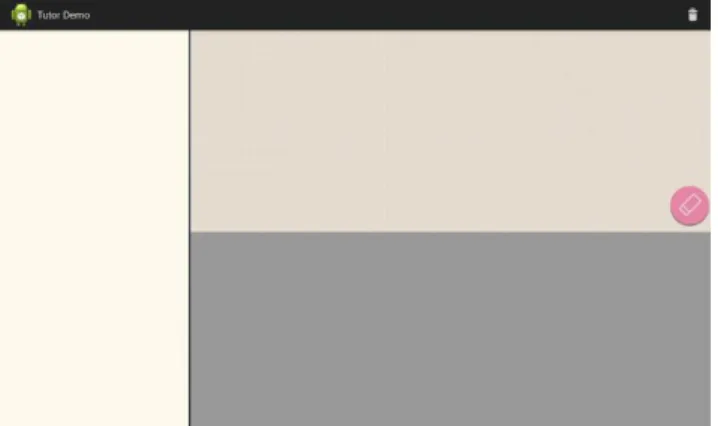
When a student begins using the application, the first step is to enter the problem to be solved. The user is presented with three main sections, as previously described. The first step is special because there is no previous step, so the handwriting area is in the top section. We make this clear by graying out the bottom section. Additionally, the user can clear the contents of the handwriting area using the eraser button on the bottom right of the section, as seen in Figure 1.
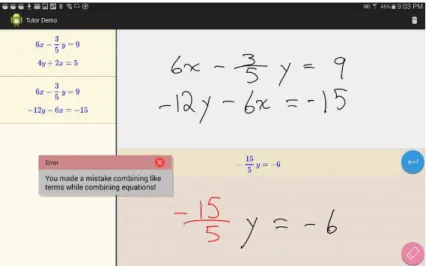
In this example, the user is attempting to solve a system of equations, as seen in Figure 2. The application automatically detects it is solving a system when the first equation has two variables. After entering the equations, the background texture of the top section changes to solid white and the buttons disappear. A new handwriting section slides in on the bottom with the same “handwriting” background texture. Additionally, the user can review all the past steps on the left sidebar. In this example, the user is trying to combine the equations to isolate a variable. To do this, he wants to multiply both sides of the equation by “-3.” To make this clear to himself, he marks it in the margins of the previous step. The application’s internal rules anticipate this strategy, so when the user makes a mistake multiplying, it can highlight the incorrect term and provide a specific error message.
Figure 2: A highlighted incorrect term and error message when a mistake is detected Thanks to the error message, the user can quickly identify and correct the error. The next step is to combine the equations to get rid of the “y”. The user tries to combine the coefficients, but makes a mistake. Fortunately, the application also has a rule on how to combine equations to isolate a variable, so it anticipates a similar input and finds a close match to this mistake. It can once again highlight the incorrect term, the coefficient of the “y” term, in Figure 3.
Figure 3: Another error message from miscalculating while combining equations
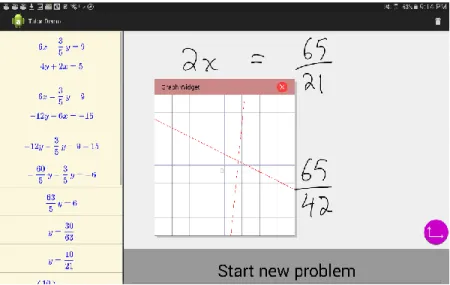
After the user has entered solutions for both “x” and “y,” a button appears giving the user the option to graph the original problem, as seen in Figure 4. In this example, the solution is at the intersection of the two lines represented by the starting equations. The graph is displayed in a small floating widget that can be moved around and manipulated to explore with pinch-to-zoom and pan gestures. Another large button appears at the bottom of the screen providing the option to start a new problem.
Figure 4: The floating graph widget
3.4. User Study
Two pilot studies were conducted at a local private school, The Wheeler School, in Providence, Rhode Island. Before these studies, we had a set of discussions with the math teachers there, and collected useful feedback and suggestions regarding the Math Tutor user experience.
3.4.1 First pilot study
The first study was implemented to test the learning curve of our application, and to get a general idea of the whole user experience. Five 8th grade students participated in the study with their math teacher. We used four Galaxy Note 10.1 tablets to run our application. Videos of the students’ performance with the application were taken. Initially, we gave no instruction for the application, and let the students play with it to see which parts of the interface were confusing. Problems that the students had were recorded together with comments from the students and the teacher. After giving the students a detailed instruction of the user interface and an explanation of the application’s functionality, we let them use the application to solve a set of problems that we prepared. While they were trying to solve the problems, we observed their behavior and recorded any difficulties or issues that arose. Additionally, with the teacher’s encouragement, we let the students use our application to review the problems of a test they had taken in class before our user study. In the end, we asked each student and the teacher for general feedback they had for our application and gathered their suggestions.
3.4.2. Second study
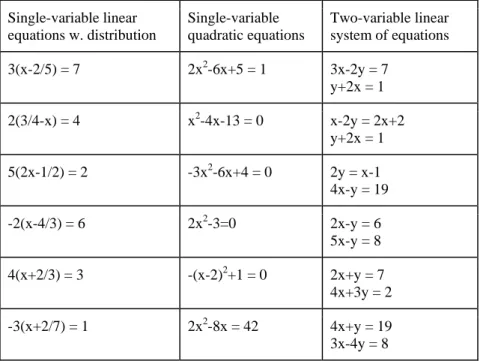
The second user study aimed to test the learning of concepts and to gauge the usefulness of error suggestion messages. Two 7th grade students and three 8th grade students participated in the study with their math teacher. We prepared three different categories of problems, as seen in Table 1: single-variable linear problems necessitating the distribution of a term, quadratic problems with single variable, and linear problems with two variables. For each category, we prepared twelve problems. We began with a “learning period,” where we asked the students use our application to solve problems of a particular category. If a student made no mistake in the first two problems, we considered that the student already knew the concept too well to learn from our application, and progressed to the next category. Once the student made a mistake, he or she would continue doing more problems until solving two consecutive problems completely without error. If the student got to the sixth problem without achieving this (i.e., still making mistakes), we considered that the student had not obviously improved, and removed the student from the study. After solving two consecutive problems without error, the student moved into the “testing period,” where he or she used pen and paper to do same number of problems completed in the learning period. We then compared their performances in the learning period and the testing period. In the end, we got some suggestions and feedback of how the students felt about our application. Single-variable linear equations w. distribution Single-variable quadratic equations Two-variable linear system of equations 3(x-2/5) = 7 2x2-6x+5 = 1 3x-2y = 7 y+2x = 1 2(3/4-x) = 4 x2-4x-13 = 0 x-2y = 2x+2 y+2x = 1 5(2x-1/2) = 2 -3x2-6x+4 = 0 2y = x-1 4x-y = 19 -2(x-4/3) = 6 2x2-3=0 2x-y = 6 5x-y = 8 4(x+2/3) = 3 -(x-2)2+1 = 0 2x+y = 7 4x+3y = 2 -3(x+2/7) = 1 2x2-8x = 42 4x+y = 19 3x-4y = 8
4. RESULTS AND EVALUATION 4.1. First study
In general, following brief instruction from a researcher, students learned how to use the application after playing with it for only a few minutes. While using the application, one student quickly found mistakes that he had made in a test that he had taken earlier that day in class. The system helped him identify the reason for his mistake and correct it. All of the students gave positive feedback of the user experience, and said they would use the application for assignments if it was available.
The results were also helpful in finding how to improve the application. Before we provided instructions, some students were confused about how to use the application. One student tried to solve the whole problem in the margins of the first step. Others wrote the equation as an expression when one side was equal to zero. However, most problems we found during the study were related to the math recognizer. The immediate, on-the-fly recognition algorithm used context and thus became more accurate as more was written, but this often confused students in the midst of writing. Other times, characters were simply misinterpreted. Some common confusions were seven and one, two and alpha, four and y, and five and s. We hypothesize that this is caused by differences between U.S. and Korean writing of math since the recognizer is driven by training data collected in Korea. Unfortunately, we were not able to have changes made to the recognizer, as we did not have access to the necessary training data.
4.2. Second study
The second study provided additional qualitative data. Since the system did not allow wrong solution steps, all the students finished their problems correctly with the application. Throughout the study, we observed the frequency of particular types of mistakes decreasing for each student. For example, one student initially made several mistakes with fractions, but after continued use of the application she succeeded in solving two consecutive problems without error. This may have resulted from students developing a better understanding of the concepts. It may also be a result of students being more attentive to a particular concept. We observed a clear trend in that students solved problems faster as the study progressed. This may indicate a growing familiarity with the concepts of the problems, and might also suggest increased experience with the application. At the end of the study, we asked students for general feedback. According to the students, the application helped them more quickly recognize mistakes that may have otherwise gone unnoticed and was enjoyable to use.
In this study, we did not require the students to finish the tasks in controlled environment. They could ask for the teacher’s hints sometimes when they got stuck. As before, some students had trouble getting the math recognizer to correctly understand their input. All students made use of the highlighted handwriting when they made mistakes; often the highlighted mistake term was enough for them to recognize their error. However, we noticed that some students did not spend time reading the error messages, particularly in two cases: (1) Students who were confident with the concepts usually tended to ignore the error messages; they only cared about whether there was a mistake and which part of their handwriting was highlighted as incorrect. (2) Students who did not get enough help from the error messages; they often lacked the understanding of a basic
concept, and needed the teacher to tell them where to begin or what to do next. Additionally, in rare cases, students gamed the system and used trial and error to search for the correct next step.
4.3. Conclusions
Although there are a wide variety of existing math tutors aimed at the middle school level, we believe that there is no system that allows for a flexible, investigative approach that closely mimics the established method of solving an equation on paper. We have provided a first version of such a system for solving beginner-level algebra problems with pen-and-touch control. Unlike other step-based intelligent tutors, our system allows students to solve any general problem within our initial (though admittedly narrow) mathematical scope using any method to reach a solution. Additionally, Math Tutor provides a familiar and yet novel user experience by sidestepping a traditional forms-based tutor interface in favor of an interface based on intuitive handwritten input. Mistakes found by our application are conveniently highlighted and explained to the student without any need for them to define what solution strategy they applied. Unlike some traditional ITS systems that require significant manual effort to design and build a new area of study, our model is straightforward and requires relatively little effort to extend. When presented to a small group of students in a pilot study, results demonstrated that the application provided an enjoyable experience and helped students be more careful in their work. Qualitative observations also suggested that students became more efficient and less prone to error as they used the application. However, there was also indication that our general approach did not help students who had not sufficiently mastered the basic concepts enough to know how to take a “next” step. Additionally, the system was limited by a student’s ability to write clearly enough for the recognizer to understand their input. We believe the free-form nature of this application, like traditional pen-and-paper methods, creates a unique challenge for the research that it requires a deep understanding of the underlying concepts. We feel there is great promise in the continued work on this application informed by the results of our studies.
5. FUTURE WORK
Although the error messages were helpful to students who made careless mistakes, they were not helpful to students who did not understand some concept in the first place. This can lead to students being unsure of how to correct a mistake or what to do next at a given step. Many other tutors use some kind of hint mechanism, but these generally only appear as a block of text explaining what step to take next. Our study suggested that such messages are often ignored by students. We are doing a “Wizard of Oz” study to get feedback for user experiences that go beyond the original Math Tutor design.
In the study, Students will solve algebraic problems in similar pen-and-touch environment, except the system’s visual feedback will be generated by an unseen researcher. We will study: (1) a reverse-scaffolding model that provides different messages when the same types of mistakes occur repeatedly. If a student makes a mistake, he or she must demonstrate an understanding of the concept by solving a simpler example. As the student continues to make mistakes, the problems will continue to get simpler, until the student reaches a problem he or she is comfortable with. From there, standard scaffolding techniques will be used to rebuild understanding. (2) a description and example model that gives information from the text book
(e.g., transformation rules), to students when needed. (3) a “What to do” model that sends hints when he or she has no idea of next step. (4) Other models suggested by students and teachers.
Further work should also be done to expand the scope of math to include more complex problems. Students and teachers also suggested connecting with one another through a platform for assignments and tests so that teachers can review student’s work and use our application to find gaps in a student’s understanding, or receive help from the teacher.
6. ACKNOWLEDGEMENT
This work has been supported in part by funding from Samsung Electronics Co., Ltd. Professor Andries van Dam has provided guidance as supervisor. Ben Most, Alex Hills, Ruixiang Li and Siyi Zhang have contributed to the implementation. The user study of this work was made possible at The Wheeler School with the help of Page Stites, Ianthe Hershberger, and the teachers in the math department.
7. REFERENCES
[1] ALEVEN, VINCENT, ROLL, IDO, McLAREN, BRUCE M. and KOEDINGER, KENNETH R. (2010) 'Automated, Unobtrusive, Action-by-Action Assessment of Self-Regulation During Learning With an Intelligent Tutoring System', Educational Psychologist, 45: 4, 224 — 233.
[2] Donald P. Carney, Andrew Forsberg, Joseph J. LaViola Jr., Robert Zeleznik, Elizabeth Osche, Judah Leblang, Debra R. Smith and Carol Baldassari. “Webfluidmath: Evaluating A One-to-one (1:1) Teaching Tool For High School Algebra.” WIPTTE 2014.
[3] Heffernan, N. & Heffernan, C. (2014). The ASSISTments Ecosystem: Building a Platform that Brings Scientists and Teachers Together for Minimally Invasive Research on Human Learning and Teaching. International Journal of Artificial Intelligence in Education. 24(4), 470-497.
[4] Joyner, David. "OSCAS: maxima." ACM Communications in Computer Algebra40.3-4 (2006): 108-111.
[5] Ritter, S., Anderson, J. R., Koedinger, K. R., & Corbett, A. (2007) Cognitive Tutor: Applied research in mathematics education. Psychonomic Bulletin & Review, 14, 249-255.
[6] Salden, R. J. C. M., Aleven, V. A. W. M. M., Schwonke, R., & Renkl, A. (2010). The expertise reversal effect and worked examples in tutored problem solving: Benefits of adaptive instruction.Instructional Science, 38(3), 289-307. doi: 10.1007/s11251-009-9107-8
[7] Sangwin, Chris. "The DragMath equation editor." MSOR Connections 12.2 (2012): 5-8. [8] VanLehn, Kurt. "The relative effectiveness of human tutoring, intelligent tutoring systems, and other tutoring systems."Educational Psychologist 46.4 (2011): 197-221.
[9] Vincent Aleven, Bruce M. McLaren, Jonathan Sewall, "Scaling Up Programming by
Demonstration for Intelligent Tutoring Systems Development: An Open-Access Web Site for Middle School Mathematics Learning", IEEE Transactions on Learning Technologies, vol.2, no. 2, pp. 64-78, April-June 2009, doi:10.1109/TLT.2009.22
[10] Woolf, Beverly, et al., eds. Intelligent Tutoring Systems: 9th International Conference on Intelligent Tutoring Systems, ITS 2008, Montreal, Canada, June 23-27, 2008, Proceedings. Vol. 5091. Springer, 2008.