TR-143
Enabling Network Throughput Performance Tests and
Statistical Monitoring
Notice
The DSL Forum is a non-profit corporation organized to create guidelines for DSL network system development and deployment. This Technical Report has been approved by members of the Forum. This document is not binding on the DSL Forum, any of its members, or any developer or service provider. This document is subject to change, but only with approval of members of the Forum.
This document is provided "as is," with all faults. Any person holding a copyright in this document, or any portion thereof, disclaims to the fullest extent permitted by law any representation or warranty, express or implied, including, but not limited to,
(a) any warranty of merchantability, fitness for a particular purpose, non-infringement, or title;
(b) any warranty that the contents of the document are suitable for any purpose, even if that purpose is known to the copyright holder;
(c) any warranty that the implementation of the contents of the documentation will not infringe any third party patents, copyrights, trademarks or other rights.
Issue History
Issue Number Issue Date Issue Editor Changes
1 May 2008 Tim Spets, Westell Larry Jones, Verizon Richard Jia, Verizon Greg Bathrick, PMC-Sierra
Original
Technical comments or questions about this document should be directed to:
Editor: Larry Jones Verizon [email protected]
Richard Jia Verizon [email protected]
Tim Spets Westell [email protected]
Greg Bathrick PMC-Sierra [email protected]
DSLHome WG Chairs
Greg Bathrick PMC-Sierra [email protected]
TABLE OF CONTENTS
1 PURPOSE... 7
2 SCOPE ... 7
2.1 DEFINITIONS... 8
2.2 ABBREVIATIONS... 8
2.3 CONVENTIONS... 9
3 REFERENCES... 9
4 ACTIVE MONITORING ... 11
4.1 CPE INITIATED DIAGNOSTICS... 12
4.2 NETWORK INITIATED DIAGNOSTICS... 14
5 PARAMETER DEFINITIONS ... 14
6 NOTIFICATION REQUIREMENTS ... 22
7 PROFILE DEFINITIONS ... 23
7.1 NOTATION... 23
7.2 DOWNLOAD PROFILE... 23
7.3 DOWNLOADTCPPROFILE... 23
7.4 UPLOAD PROFILE... 24
7.5 UPLOADTCPPROFILE... 24
7.6 UDPECHO PROFILE... 25
7.7 UDPECHOPLUS PROFILE... 25
APPENDIX A: THEORY OF OPERATIONS ... 26
A.1 UDPECHO PLUS... 26
A.1.1 Introduction... 26
A.1.2 Motivation ... 26
A.1.3 Security Considerations – Network initiated tests ... 27
A.1.4 UDP Echo Plus Packet format ... 27
A.1.5 UDP Echo and UDP Echo Plus server setup. ... 28
A.1.6 UDP Echo Plus Client ... 28
A.1.7 UDP Echo Plus server ... 29
A.1.8 Performance Metrics examples with UDP Echo Plus ... 29
A.2 DOWNLOADDIAGNOSTICS UTILIZING FTP TRANSPORT... 33
A.3 UPLOADDIAGNOSTICS UTILIZING FTP TRANSPORT... 36
A.4 DOWNLOADDIAGNOSTICS UTILIZING HTTP TRANSPORT... 41
A.5 UPLOADDIAGNOSTICS UTILIZING HTTP TRANSPORT... 44
APPENDIX B: TEST RESULTS ... 46
B.1 UPLOADDIAGNOSTICS AND DOWNLOADDIAGNOSTICS TEST RESULTS... 46
List of Figures
Figure 1 Performance testing components... 12
Figure 2 CPE DownloadDiagnostics using HTTP transport. ... 13
Figure 3 UDP Echo Plus event sequence... 32
Figure 4 DownloadDiagnostics using FTP transport... 36
Figure 5 UploadDiagnostics utilizing FTP transport ... 40
Figure 6 DownloadDiagnostics utilizing HTTP transport ... 43
Figure 7 UploadDiagnostics utilizing HTTP transport... 45
List of Tables Table 1 Parameter definition for Network Throughput Tests... 15
Table 2 Parameters for which Active Notification MAY be denied by the CPE ... 22
Table 3 Download:1 profile definition for a Device:1 and an InternetGatewayDevice:1 23 Table 4 DownloadTCP:1 profile definition for a Device:1 and an InternetGatewayDevice:1 ... 24
Table 5 Upload:1 profile definition for a Device:1 and an InternetGatewayDevice:1... 24
Table 6 UploadTCP:1 profile definition for a Device:1 and an InternetGatewayDevice:1 ... 24
Table 7 UDPEcho:1 profile definition for a Device:1 and an InternetGatewayDevice:1 25 Table 8 UDPEchoPlus:1 profile definition for Device:1 and an InternetGatewayDevice:1 ... 25
Table 9 UDP Echo Plus packet format ... 27
Table 10 Statistics and Protocol layer reference for FTP DownloadDiagnostics... 33
Table 11 Statistics and Protocol layer reference for FTP UploadDiagnostics... 37
Table 12 Statistics and Protocol layer reference for HTTP DownloadDiagnostics... 41
Table 13 Statistics and Protocol layer reference for HTTP UploadDiagnostics ... 44
Summary
This document defines the CPE data model objects for Network Service Providers to initiate performance throughput tests and monitor data on the IP interface of a CPE using the Diagnostic mechanism defined in TR-069 Amendment 2 [1].
The Network Service Provider provides network infrastructure and services to its customers, such as Content Service Providers who source the information and end users who consume the information. In order to minimize the downtime of network services, the Network Service Provider needs tools to enable monitoring the performance of the network continuously and diagnose the problem when it occurs.
1
Purpose
As broadband Network Service Providers endeavor to provide quantitative QoS and/or qualitative QoS distinctions, they require some means of base lining nominal service levels and validating such QoS objectives. Active Monitoring of the broadband access network represents one important tool for achieving this objective. The key benefit of Active Monitoring is that it allows the network operator to characterize the performance of end to end paths and/or path segments depending on the scope of the probing. An example use case is to perform active tests between the subscriber RG and a Network Test Server located at the Network Service Provider’s Point of Presence (POP). This scenario gives the Network Service Provider the ability to measure the contribution of the Network Service Provider network (i.e. the portion of the end to end path under the provider’s control) to the overall user experience (which is dictated by the composite effect of the segments their applications traverse end to end). A natural extension of this use case is to place Network Test Servers at multiple locations in the subscriber path towards the provider’s Internet Peering Point. Moreover, Active Monitoring enables the measurement of performance metrics conducive to establishing Service Level Agreements for guaranteed and business class service offerings.
The throughput tests proposed in this document are intended to measure the user experience via traffic emulation. Though it is arguable that the user experience can be inferred solely from network performance parameters (e.g. packet loss, packet delay, etc.), network operators can benefit from having the ability to measure user level performance metrics such as transaction throughput and response time in a proactive or an on-demand basis. This document includes throughput and response time test types in an overall portfolio of Active Monitoring. Such tests inherently account for the nuances and n-th order effects of transport protocol behavior such as TCP flow control by emulating application layer transactions (HTTP, FTP) and explicitly measuring parameters of interest such as transaction throughput, round trip time, and transaction response time. Since the network operator can bound the scope of the measurement segment (e.g. to within a broadband access network or autonomous domain, etc.) these measurements greatly enhance the performance characterization of network segments of interest in a manner most intuitively aligned with the user experience. A preliminary set of test transaction types are proposed but the concept is extensible to other transaction types.
2
Scope
on-demand fashion. These generic tools provide a platform for the validation of QoS objectives and Service Level Agreements.
This document introduces a Network Test Server, which is a conceptual endpoint for the testing described herein. Operation of this server is out of scope for this document.
2.1 Definitions
The following terminology is used throughout this document.
Active Monitoring Actively transmitting or receiving data in a controlled test. Content Service Provider Provides services to the customer premise via the Network
Service Provider Network.
Internet Peering Point A location within the Network Service Provider network where the Network Test Server is placed.
Network Service Provider Provides the broadband network between the customer premise and the Internet.
Network Test Server Peer testing endpoint for the CPE within the Network Service Provider network.
Quality of Service Quality of service is the ability to provide different priority to different applications, users, or data flows, or to guarantee a certain level of performance to a data flow.
Service Level Agreement An agreement between the Network Service Provider and the Content Service Provider to insure Quality of Service.
UDP Echo Service Services that ‘echos’ a UDP packet back to the client. UDP Echo Plus Service Extension to UDP Echo Service defined in [4]
2.2 Abbreviations
This document defines the following abbreviations:
CPE Customer Premise Equipment
FTP File Transfer Protocol HTTP Hypertext Transfer Protocol
ICMP Internet Control Message Protocol
IPDV IP Delay Variation POP Point of Presence
QoS Quality of Service
RG Residential Gateway TCP Transmission Control Protocol
TR Technical Report
WG Working Group
2.3 Conventions
In this document, several words are used to signify the requirements of the specification. These words are often capitalized.
MUST This word, or the adjective “REQUIRED”, means that the definition is an absolute requirement of the specification.
MUST NOT This phrase means that the definition is an absolute prohibition of the specification.
SHOULD This word, or the adjective “RECOMMENDED”, means that there may exist valid reasons in particular circumstances to ignore this item, but the full implications must be understood and carefully weighted before choosing a different course.
MAY This word, or the adjective “OPTIONAL”, means that this item is one of an allowed set of alternatives. An implementation that does not include this option MUST be prepared to interoperate with another implementation that does include the option.
3
References
The following references constitute provisions of this Technical Report. At the time of publication, the editions indicated were valid. All references are subject to revision; users of this document are therefore encouraged to investigate the possibility of applying the most recent edition of the references listed below. A list of the currently valid DSL Forum Technical Reports is published at www.dslforum.org.
TR-069 Amendment 2, CPE WAN Management Protocol, DSL Forum Technical Report, 2007
[1]
[2] RFC 2616, Hypertext Transfer Protocol -- HTTP/1.1,
http://www.ietf.org/rfc/rfc2616.txt, 1999
RFC 3986, Uniform Resource Identifier (URI): Generic Syntax,
http://www.ietf.org/rfc/rfc3986.txt, 2005 [3]
RFC 862, Echo Protocol, http://www.ietf.org/rfc/rfc862.txt, 1983 [4]
RFC 3393, IP Packet Delay Variation Metric for IP Performance Metrics (IPPM),
http://www.ietf.org/rfc/rfc3393.txt, 2002 [5]
RFC 959, File Transfer Protocol, http://www.ietf.org/rfc/rfc959.txt, 1985 [6]
RFC 3449, TCP Performance Implications of Network Path Asymmetry,
http://www.ietf.org/rfc/rfc3449.txt, 2002 [7]
TR-106 Amendment 1, Data Model Template for TR-069-Enabled Devices, DSL Forum Technical Report, 2006
4
Active Monitoring
Active Monitoring is described by the introduction of controlled traffic diagnostic suites that are network layer centric and are agnostic to the underlying access network. Diagnostics that use standard TCP and UDP based protocols and are controlled through diagnostic objects can be applied to any CPE device. The remote endpoints can be placed throughout the Provider network at strategic locations to determine possible points of network congestion or fault. Active Monitoring can also be used to characterize the quality of paths in the broadband access network. This document defines a basic monitoring architecture that can provide some operational experience in CPE based monitoring to be refined, and expanded upon in future releases
The UDP Echo Plus test is a UDP Echo as defined in [4] with the addition of performance specific fields in the payload. The UDP Echo Plus payload allows for time-stamping and sequencing to support additional inferences on packet loss and jitter beyond the capabilities of the standard UDP Echo. Using UDP Echo Plus packets as probes, the UDP Echo Plus test provides a sampling based monitoring approach.
The CPE Upload and Download Diagnostic throughput test simulates the client behavior in the client/server paradigm performing an FTP or HTTP transaction to a corresponding remotely located FTP or HTTP server. The CPE throughput tests provides a bulk transfer based measurement approach, to perform throughput and response time measurements for the test initiated (injected) transaction over select network links.
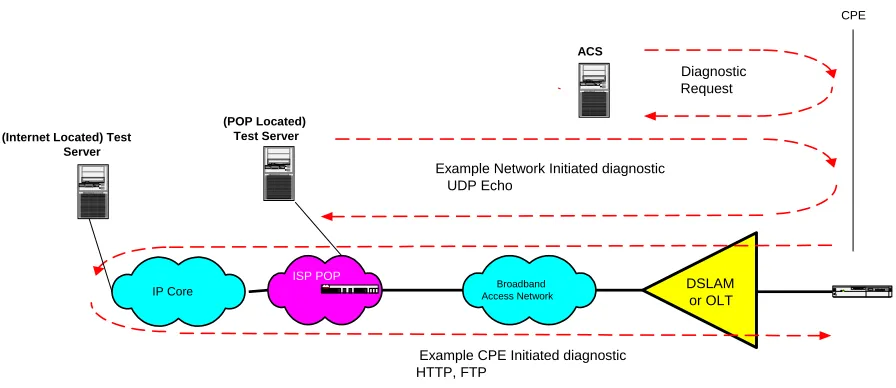
Figure 1 Performance testing components
4.1 CPE initiated diagnostics
In a CPE initiated UploadDiagnostics and DownloadDiagnostics the following endpoints perform the following functions.
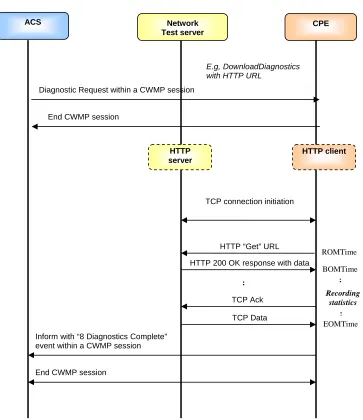
The ACS initiates the DownloadDiagnostics request to the CPE, setting test parameters and initiating the test. The CPE initiates the Diagnostic (FTP or HTTP client transaction), and stores the test results. A Network Test Server responds to the Diagnostic (FTP or HTTP) requestvia a HTTP/FTP server.
In Figure 2 is an example diagram of a DownloadDiagnostics using an HTTP URL.
Sniffermonitoring/analysisServer
Broadband Access Network
IP Core CISCOSYSTEMS
Dat aG en eral
ISP POP
DSLAM or OLT
(POP Located) Test Server
Dat a Ge neral
(Internet Located) est T
Server
DataGeneral ACS
CPE
Data General
Diagnostic Request
Example Network Initiated diagnostic UDP Echo
:
:
Network Test server
HTTP server
TCP connection initiation
CPE
HTTP “Get” URL
HTTP 200 OK response with data
E.g, DownloadDiagnostics with HTTP URL
TCP Ack
TCP Data
:
Recording statistics
EOMTime BOMTime ROMTime
End CWMP session
Inform with “8 Diagnostics Complete” event within a CWMP session
End CWMP session
Diagnostic Request within a CWMP session
[image:13.612.129.492.113.533.2]HTTP client ACS
4.2 Network initiated diagnostics
The Network initiated diagnostics represents an alternative approach to minimize the burden on the ACS for Network Service Providers that want to support continual proactive monitoring of samplings of CPE. For example, dedicated Network Test Servers distributed per serving area can perform Network initiated diagnostics to continually characterize the state of broadband access paths to samplings of subscribers and build performance trends on those paths. For the Network Initiated diagnostics model, the ACS would first need to enable the CPE to function as a server (UDPEchoConfig). For security the source IP address of the Network Test are the only requests the CPE protocol servers will respond to. Defined in A.1 is the UDP Echo tests sourced by the Network Test Server and responded to by the CPE UDP Echo server. In a Network initiated UDP Echo test the following sequence is used to perform the test;
The ACS configures the CPE to enable the UDP Echo server. The Network Test Server initiates the client request, and sends the UDP echo packets. The CPE UDP Echo server responds to the UDP echo packets.
5
Parameter Definitions
To support the functionality defined in this specification, an extension to the Device data model is specified in Table 1. This extension is considered part of Device:1.2(version 1.2 of the Device data model), which extends version 1.1 of the Device data model defined in TR-106 Amendment 1 [8].
If the CPE is an Internet Gateway, the same extension applies to the InternetGatewayDevice data model. This extension is considered part of InternetGatewayDevice:1.3 (version 1.3 of the InternetGatewayDevice data model), which extends version 1.2 of the InternetGatewayDevice data model defined in TR-098 Amendment 1 [9].
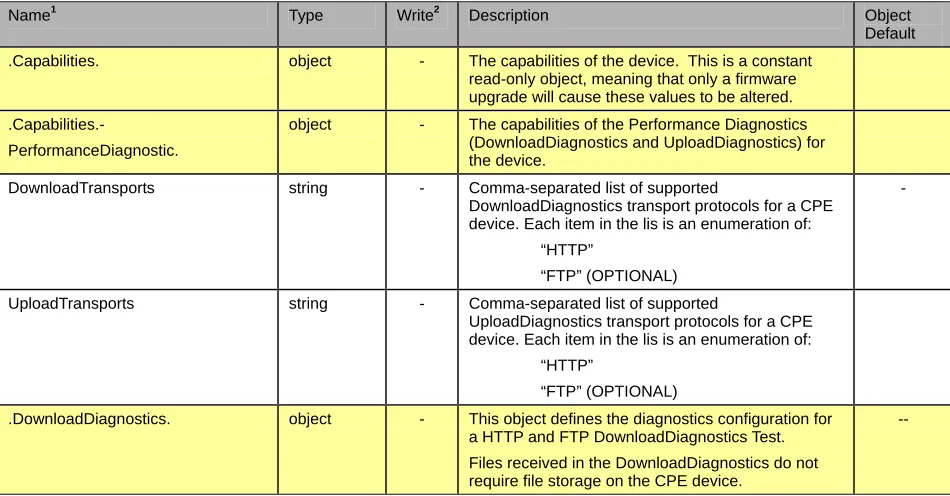
Table 1 lists the objects associated with Network Throughput Tests and their associated parameters. The notation used to indicate the data type of each parameter follows the notation defined in [8].
Table 1 Parameter definition for Network Throughput Tests
Name1 Type Write2 Description Object
Default
.Capabilities. object - The capabilities of the device. This is a constant
read-only object, meaning that only a firmware upgrade will cause these values to be altered.
.Capabilities.-
PerformanceDiagnostic.
object - The capabilities of the Performance Diagnostics
(DownloadDiagnostics and UploadDiagnostics) for the device.
DownloadTransports string - Comma-separated list of supported
DownloadDiagnostics transport protocols for a CPE device. Each item in the lis is an enumeration of:
“HTTP”
“FTP” (OPTIONAL)
-
UploadTransports string - Comma-separated list of supported
UploadDiagnostics transport protocols for a CPE device. Each item in the lis is an enumeration of:
“HTTP”
“FTP” (OPTIONAL)
.DownloadDiagnostics. object - This object defines the diagnostics configuration for
a HTTP and FTP DownloadDiagnostics Test.
Files received in the DownloadDiagnostics do not require file storage on the CPE device.
--
1
The name of a Parameter is formed from the concatenation of the base path, (refer to [8]section 2.1), the object name shown in the yellow header, and the individual Parameter name.
2
Name1 Type Write2 Description Object Default
DiagnosticsState string W Indicate the availability of diagnostic data. One of:
“None” “Requested” “Completed” “Error_InitConnectionFailed” “Error_NoResponse ” “Error_TransferFailed” “Error_PasswordRequestFailed” “Error_LoginFailed” “Error_NoTransferMode” “Error_NoPASV” “Error_IncorrectSize” “Error_Timeout”
If the ACS sets the value of this parameter to Requested, the CPE MUST initiate the
corresponding diagnostic test. When writing, the only allowed value is Requested. To ensure the use of the proper test parameters (the writable
parameters in this object), the test parameters MUST be set either prior to or at the same time as (in the same SetParameterValues) setting the DiagnosticsState to Requested.
When requested, the CPE SHOULD wait until after completion of the communication session with the ACS before starting the diagnostic.
When the test is completed, the value of this parameter MUST be either Completed (if the test completed successfully), or one of the Error values listed above.
If the value of this parameter is anything other than Completed, the values of the results parameters for this test are indeterminate.
When the diagnostic initiated by the ACS is completed (successfully or not), the CPE MUST establish a new connection to the ACS to allow the ACS to view the results, indicating the Event code "8 DIAGNOSTICS COMPLETE" in the Inform
message.
After the diagnostic is complete, the value of all result parameters (all read-only parameters in this object) MUST be retained by the CPE until either this diagnostic is run again, or the CPE reboots. After a reboot, if the CPE has not retained the result parameters from the most recent test, it MUST set the value of this parameter to “None”.
Modifying any of the writable parameters in this object except for this one MUST result in the value of this parameter being set to “None”.
While the test is in progress, modifying any of the writable parameters in this object except for this one MUST result in the test being terminated and the value of this parameter being set to “None”.
While the test is in progress, setting this parameter to Requested (and possibly modifying other writable parameters in this object) MUST result in the test being terminated and then restarted using the current values of the test parameters.
Name Type Write Description Object Default
Interface string(256) W Specifies the IP-layer interface over which the test is
to be performed. The content is the full hierarchical parameter name of the interface.
The value of this parameter MUST be either a valid interface or an empty string. An attempt to set this parameter to a different value MUST be rejected as an invalid parameter value.
If an empty string is specified, the CPE MUST use the default routing interface.
-
DownloadURL string(256) W The URL as defined in [3], for the CPE to perform
the download on. This parameter MUST be in the form of a valid HTTP [2] or FTP [6] URL.
When using FTP transport, FTP binary transfer MUST be used.
When using HTTP transport, persistent connections MUST be used and pipelining MUST NOT be used.
When using HTTP transport the HTTP Authentication MUST NOT be used.
-
DSCP unsignedInt [0:63]
W The DiffServ code point for marking packets transmitted in the test.
The default value SHOULD be zero.
-
EthernetPriority unsignedInt
[0:7]
W Ethernet priority code for marking packets transmitted in the test (if applicable).
The default value SHOULD be zero.
-
ROMTime dateTime - Request time in UTC, which MUST be specified to
microsecond precision.
For example: 2008-04-09T15:01:05.123456
For HTTP this is the time at which the client sends the GET command.
For FTP this is the time at which the client sends the RTRV command.
-
BOMTime dateTime - Begin of transmission time in UTC, which MUST be
specified to microsecond precision
For example: 2008-04-09T15:01:05.123456
For HTTP this is the time at which the first data packet is received.
For FTP this is the time at which the client receives the first data packet on the data connection.
-
EOMTime dateTime - End of transmission in UTC, which MUST be
specified to microsecond precision.
For example: 2008-04-09T15:01:05.123456
For HTTP this is the time at which the last data packet is received.
For FTP this is the time at which the client receives the last packet on the data connection.
-
TestBytesReceived unsignedInt - The test traffic received in bytes during the
FTP/HTTP transaction including FTP/HTTP headers, between BOMTime and EOMTime,
-
TotalBytesReceived unsignedInt - The total number of bytes received on the Interface
between BOMTime and EOMTime.
Name1 Type Write2 Description Object Default
TCPOpenRequestTime dateTime - Request time in UTC, which MUST be specified to
microsecond precision.
For example: 2008-04-09T15:01:05.123456
For HTTP this is the time at which the TCP socket open (SYN) was sent for the HTTP connection.
For FTP this is the time at which the TCP socket open (SYN) was sent for the data connection.
Note: Interval of 1 microsecond SHOULD be supported.
-
TCPOpenResponseTime dateTime - Response time in UTC, which MUST be specified to
microsecond precision.
For example: 2008-04-09T15:01:05.123456
For HTTP this is the time at which the TCP ACK to the socket opening the HTTP connection was received.
For FTP this is the time at which the TCP ACK to the socket opening the data connection was received.
Note: Interval of 1 microsecond SHOULD be supported.
-
.UploadDiagnostics. object - This object defines the diagnostics configuration for
a HTTP or FTP UploadDiagnostics test.
Files sent by the UploadDiagnostics do not require file storage on the CPE device, and MAY be an arbitrary stream of bytes
Name Type Write Description Object Default
DiagnosticsState string W Indicate the availability of diagnostic data. One of:
“None” “Requested” “Completed” “Error_InitConnectionFailed” “Error_NoResponse” “Error_PasswordRequestFailed” “Error_LoginFailed” “Error_NoTransferMode” “Error_NoPASV” “Error_NoCWD” “Error_NoSTOR” “Error_NoTransferComplete”
If the ACS sets the value of this parameter to Requested, the CPE MUST initiate the
corresponding diagnostic test. When writing, the only allowed value is Requested. To ensure the use of the proper test parameters (the writable
parameters in this object), the test parameters MUST be set either prior to or at the same time as (in the same SetParameterValues) setting the DiagnosticsState to Requested.
When requested, the CPE SHOULD wait until after completion of the communication session with the ACS before starting the diagnostic.
When the test is completed, the value of this parameter MUST be either Completed (if the test completed successfully), or one of the Error values listed above.
If the value of this parameter is anything other than Completed, the values of the results parameters for this test are indeterminate.
When the diagnostic initiated by the ACS is completed (successfully or not), the CPE MUST establish a new connection to the ACS to allow the ACS to view the results, indicating the Event code "8 DIAGNOSTICS COMPLETE" in the Inform
message.
After the diagnostic is complete, the value of all result parameters (all read-only parameters in this object) MUST be retained by the CPE until either this diagnostic is run again, or the CPE reboots. After a reboot, if the CPE has not retained the result parameters from the most recent test, it MUST set the value of this parameter to “None”.
Modifying any of the writable parameters in this object except for this one MUST result in the value of this parameter being set to “None”.
While the test is in progress, modifying any of the writable parameters in this object except for this one MUST result in the test being terminated and the value of this parameter being set to “None”.
While the test is in progress, setting this parameter to Requested (and possibly modifying other writable parameters in this object) MUST result in the test being terminated and then restarted using the current values of the test parameters.
Name1 Type Write2 Description Object Default
Interface string(256) W IP-layer interface over which the test is to be
performed. The content is the full hierarchical parameter name of the interface.
The value of this parameter MUST be either a valid interface or an empty string. An attempt to set this parameter to a different value MUST be rejected as an invalid parameter value.
If an empty string is specified, the CPE MUST use the default routing interface.
-
UploadURL string(256) W The URL as defined in [3], for the CPE to Upload to.
This parameter MUST be in the form of a valid HTTP [2] or FTP [6] URL.
When using FTP transport, FTP binary transfer MUST be used.
When using HTTP transport, persistent connections MUST be used and pipelining MUST NOT be used.
When using HTTP transport the HTTP Authentication MUST NOT be used.
-
DSCP unsignedInt [0:63]
W DiffServ code point for marking packets transmitted in the test.
The default value SHOULD be zero.
-
EthernetPriority unsignedInt [0:7]
W Ethernet priority code for marking packets transmitted in the test (if applicable).
The default value SHOULD be zero.
-
TestFileLength unsignedInt W The size of the file (in bytes) to be uploaded to the
server.
The CPE MUST insure the appropriate number of bytes are sent.
-
ROMTime dateTime - Request time in UTC, which MUST be specified to
microsecond precision.
For example: 2008-04-09T15:01:05.123456
For HTTP this is the time at which the client sends the PUT command
For FTP this is the time at which the STOR command is sent.
-
BOMTime dateTime - Begin of transmission time in UTC, which MUST be
specified to microsecond precision.
For example: 2008-04-09T15:01:05.123456
For HTTP this is the time at which the first data packet is sent.
For FTP this is the time at which the client receives the ready for transfer notification.
-
EOMTime dateTime - End of transmission in UTC, which MUST be
specified to microsecond precision.
For example: 2008-04-09T15:01:05.123456
For HTTP this is the time when the HTTP successful response code is received.
For FTP this is the time when the client receives a transfer complete.
-
TotalBytesSent unsignedInt - The total number of bytes sent on the Interface
between BOMTime and EOMTime.
Name Type Write Description Object Default
TCPOpenRequestTime dateTime - Request time in UTC, which MUST be specified to
microsecond precision.
For example: 2008-04-09T15:01:05.123456
For HTTP this is the time at which the TCP socket open (SYN) was sent for the HTTP connection.
For FTP this is the time at which the TCP socket open (SYN) was sent for the data connection
Note: Interval of 1 microsecond SHOULD be supported.
-
TCPOpenResponseTime dateTime - Response time in UTC, which MUST be specified to
microsecond precision.
For example: 2008-04-09T15:01:05.123456
For HTTP this is the Time at which the TCP ACK to the socket opening the HTTP connection was received.
For FTP this is the Time at which the TCP ACK to the socket opening the Data connection was received.
Note: Interval of 1 microsecond SHOULD be supported.
-
.UDPEchoConfig. object - This object allows the CPE to be configured to
perform the UDP Echo Service defined in [4] and UDP Echo Plus Service defined in Appendix A.1.
-
Enable boolean W MUST be enabled to receive UDP echo. When
enabled from a disabled state all related timestamps, statistics and UDP Echo Plus counters are cleared.
-
Interface string(256) W IP-layer interface over which the CPE MUST listen
and receive UDP echo requests on. The content is the full hierarchical parameter name of the interface.
The value of this parameter MUST be either a valid interface or an empty string. An attempt to set this parameter to a different value MUST be rejected as an invalid parameter value.
If an empty string is specified, the CPE MUST listen and receive UDP echo requests on all interfaces.
Note: Interfaces behind a NAT MAY require port forwarding rules configured in the Gateway to enable receiving the UDP packets.
-
SourceIPAddress string W The Source IP address of the UDP echo packet. The
CPE MUST only respond to a UDP echo from this source IP address.
-
UDPPort unsignedInt W The UDP port on which the UDP server MUST listen
and respond to UDP echo requests.
-
EchoPlusEnabled boolean W If True the CPE will perform necessary packet
processing for UDP Echo Plus packets.
-
EchoPlusSupported boolean - True if UDP Echo Plus is supported. -
PacketsReceived unsignedInt - Incremented upon each valid UDP echo packet
received.
-
PacketsResponded unsignedInt - Incremented for each UDP echo response sent. -
BytesReceived unsignedInt - The number of UDP received bytes including
payload and UDP header after the UDPEchoConfig is enabled.
-
BytesResponded unsignedInt - The number of UDP responded bytes, including
payload and UDP header sent after the UDPEchoConfig is enabled.
Name1 Type Write2 Description Object Default
TimeFirstPacketReceived dateTime - Time in UTC, which MUST be specified to
microsecond precision.
For example: 2008-04-09T15:01:05.123456,
The time that the server receives the first UDP echo packet after the UDPEchoConfig is enabled.
-
TimeLastPacketReceived dateTime - Time in UTC, which MUST be specified to
microsecond precision.
For example: 2008-04-09T15:01:05.123456
The time that the server receives the most recent UDP echo packet.
-
6
Notification Requirements
[image:22.612.83.565.72.211.2]CPE MUST support Active Notification as described in [1], for all parameters defined in the Parameter Definitions (section 5) with the exception of those parameters listed in Table 2. For only those parameters listed in Table 2, the CPE MAY reject a request by an ACS to enable Active Notification via the SetParameterAttributes RPC by responding with fault code 9009 as defined in [1] (Notification request rejected).
[image:22.612.91.539.388.687.2]CPE MUST support Passive Notification as described in [1], for all parameters defined in the Parameter Definitions (section 5), with no exceptions.
Table 2 Parameters for which Active Notification MAY be denied by the CPE Parameter5
.UDPEchoConfig.
PacketsReceived
PacketsResponded
BytesReceived
BytesResponded
TimeFirstPacketReceived
TimeLastPacketReceived
.DownloadDiagnostics.
DiagnosticsState
ROMTime
BOMTime
EOMTime
TestBytesReceived
TotalBytesReceived
TCPOpenRequestTime
TCPOpenResponseTime
.UploadDiagnostics.
DiagnosticsState
ROMTime
5
Parameter5
BOMTime
EOMTime
TotalBytesSent
TCPOpenRequestTime
TCPOpenResponseTime
7
Profile Definitions
7.1 Notation
The following abbreviations are used to specify profile requirements:
Abbreviation Description
R Read support is REQUIRED
W Both Read and Write support is REQUIRED
P The object is REQUIRED to be present
C Creation and deletion of the object via AddObject and DeleteObject is REQUIRED
[image:23.612.83.535.258.331.2]7.2 Download Profile
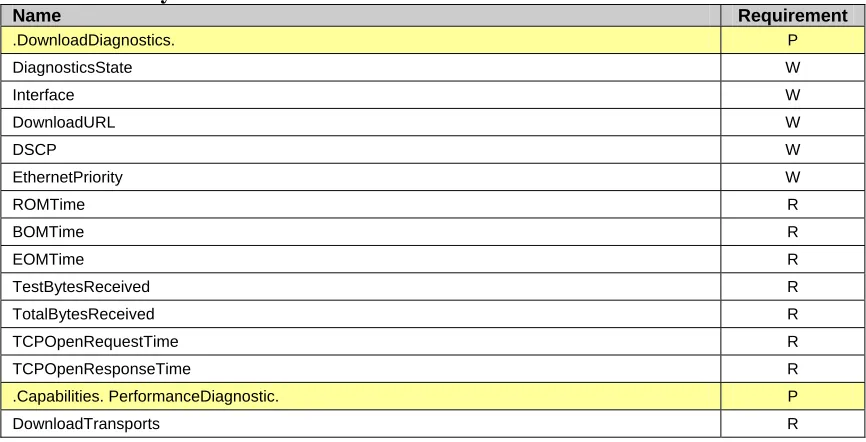
[image:23.612.91.524.454.675.2]Table 3 defines the Download:1 profile for a Device:1 and an InternetGatewayDevice:1 object. The minimum required version for this profile is Device:1.2 and InternetGatewayDevice:1.3.
Table 3 Download:1 profile definition for a Device:1 and an InternetGatewayDevice:1
Name Requirement
.DownloadDiagnostics. P
DiagnosticsState W
Interface W
DownloadURL W
DSCP W
EthernetPriority W
ROMTime R
BOMTime R
EOMTime R
TestBytesReceived R
TotalBytesReceived R
TCPOpenRequestTime R
TCPOpenResponseTime R
.Capabilities. PerformanceDiagnostic. P
DownloadTransports R
The DownloadTCP:1 profile for a Device:1 and an InternetGatewayDevice:1 object is defined as the union of the Download:1 profile and the additional requirements defined in Table 4. The minimum required version for this profile is Device:1.2 and InternetGatewayDevice:1.3.
Table 4 DownloadTCP:1 profile definition for a Device:1 and an InternetGatewayDevice:1
Name Requirement
.DownloadDiagnostics. P
TCPOpenRequestTime R
TCPOpenResponseTime R
7.4 Upload Profile
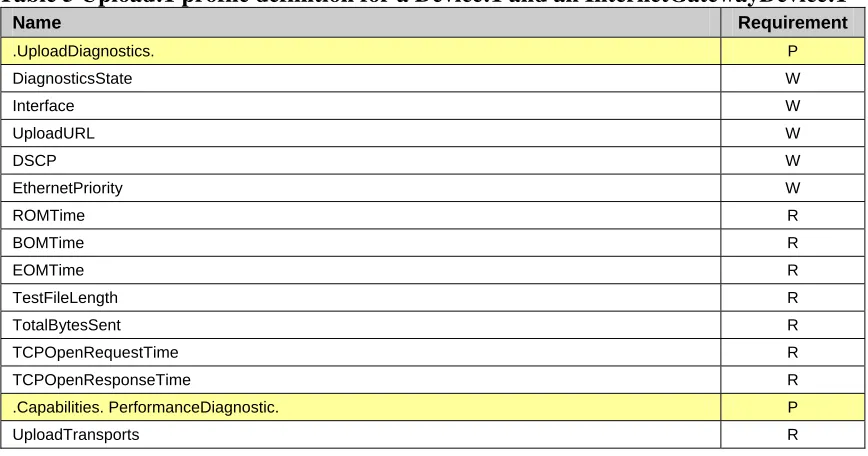
[image:24.612.91.525.329.557.2]Table 5 defines the Upload:1 profile for a Device:1 and an InternetGatewayDevice:1 object. The minimum required version for this profile is Device:1.2 and InternetGatewayDevice:1.3.
Table 5 Upload:1 profile definition for a Device:1 and an InternetGatewayDevice:1
Name Requirement
.UploadDiagnostics. P
DiagnosticsState W
Interface W
UploadURL W
DSCP W
EthernetPriority W
ROMTime R
BOMTime R
EOMTime R
TestFileLength R
TotalBytesSent R
TCPOpenRequestTime R
TCPOpenResponseTime R
.Capabilities. PerformanceDiagnostic. P
UploadTransports R
7.5 UploadTCP Profile
The UploadTCP:1 profile for the Device:1 and an InternetGatewayDevice:1 object is defined as the union of the Upload:1 profile and the additional requirements defined in Table 6. The minimum required version for this profile is Device:1.2 and InternetGatewayDevice:1.3.
Table 6 UploadTCP:1 profile definition for a Device:1 and an InternetGatewayDevice:1
Name Requirement
.UploadDiagnostics. P
Name Requirement
TCPOpenResponseTime R
7.6 UDPEcho Profile
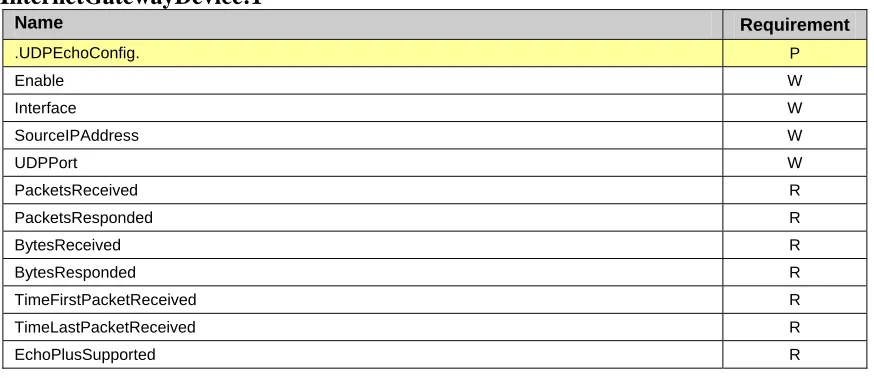
[image:25.612.90.527.204.393.2]Table 7 defines the UDPEcho:1 profile for a Device:1 and an InternetGatewayDevice:1 object. The minimum required version for this profile is Device:1.2 and InternetGatewayDevice:1.3.
Table 7 UDPEcho:1 profile definition for a Device:1 and an InternetGatewayDevice:1
Name Requirement
.UDPEchoConfig. P
Enable W
Interface W
SourceIPAddress W
UDPPort W
PacketsReceived R
PacketsResponded R
BytesReceived R
BytesResponded R
TimeFirstPacketReceived R
TimeLastPacketReceived R
EchoPlusSupported R
7.7 UDPEchoPlus Profile
The UDPEchoPlus:1 profile for a Device:1 and a InternetGatewayDevice:1 object is defined as the union of the UDPEcho:1 profile and the additional requirements defined in Table 8. The minimum required version for this profile is Device:1.2 and InternetGatewayDevice:1.3.
Table 8 UDPEchoPlus:1 profile definition for Device:1 and an InternetGatewayDevice:1
Name Requirement
.UDPEchoConfig. P
Appendix A: Theory of
Operations
A.1 UDP Echo Plus
A.1.1 Introduction
The UDP Echo Service is defined by [4]. UDP Echo Plus utilizes the UDP Echo Service and extends it by additional packet field definitions and new server behaviors. The UDP Echo server utilizes improved security provided by UDPEchoConfig object.
A.1.2 Motivation
The notion of active probe based sampling of network paths and/or path segments has long been established as a viable methodology for making inferences on the state of such paths (and path segments), with regard to link and network layer performance metrics such as packet/frame/cell loss, delay, delay variation and others. A very useful tool for realizing probing and general debugging (such as path continuity and integrity verification), is an echo service. In the link layer context, OAM loopback messages such as defined ITU-T I.610, for the ATM case, have been employed. In the IP context, ICMP echo (i.e. ping) has been widely used for such purposes due to its ubiquitous availability in network routers and hosts. However, the viability of using ping measurements suffers from the fact that many routers process pings with lower priority than actual user packet’s and may delay or discard ICMP echo requests in a manner that skews the measurement results. The UDP Echo Service is defined at the UDP (or TCP) port level rectifies this issue (unless explicitly port filtered at an intermediate or end host or router). UDP echo packets traverse the same intermediate nodes and logical queuing paths as the user data traffic of the same class of service. The class of service is dictated by DHCP code bit settings, etc. or other network operator specific criteria.
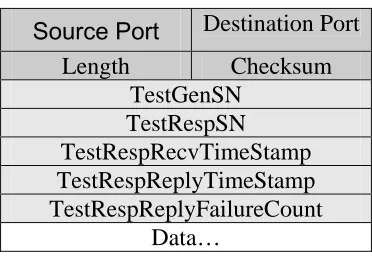
UDP Echo Plus proposes extensions to UDP echo for improved monitoring capabilities. UDP Echo Plus is backwards compatible with UDP echo and devices capable of supporting UDP Echo Plus have no discernable effect on cooperating devices running standard UDP echo. However, when both cooperating devices are UDP Echo Plus capable, the utility of UDP echo is extended by the additional information provided in the five data fields specified in Table 9.
UDP Echo Plus provides additional capability beyond UDP Echo Service including: • The ability to discern which direction packet drops occur (i.e. one way packet loss
per each direction).
• The ability to discern packets discarded in the network from those discarded at the UDP Echo Plus server device.
A.1.3 Security Considerations – Network initiated tests
A UDP Echo Plus Network initiated test requires the CPE device to respond to the UDP echo request on the defined interface(s). In order to prevent a DOS (Denial of Service) attack on the CPE, the CPE will only respond to the UDP request from a Source address defined in SourceIPAddress, and will only service the port defined in UDPPort.
A.1.4 UDP Echo Plus Packet format
The UDP Echo Plus packet contains the packet fields specified in Table 9. Each field is 4 bytes (32 bits) each. Timestamps require a continuous wrapping 32 bit (Big Endean) counter that begins on startup and counts inmicroseconds.
When a UDP Echo Plus capable service receives a standard UDP Echo packet, the UDP Echo Plus server just reflects the request back towards the source with no payload modification.
[image:27.612.213.399.438.566.2]When UDP Echo request packets are larger than the minimal packet length for UDP Echo Plus packets, the first 20 bytes of payload are filled as described in this section, with the remaining payload unmodified.
Table 9 UDP Echo Plus packet format
Source Port Destination Port Length Checksum
TestGenSN TestRespSN TestRespRecvTimeStamp TestRespReplyTimeStamp TestRespReplyFailureCount
Data…
• TestGenSN – The packet’s sequence number set by the UDP client in the echo request packet, and is left unmodified in the response. It is set to an initial value upon the first requests and incremented by 1 for each echo request sent by the UDP client.
Note the initial value of TestGenSN is implementation specific.
• TestRespRecvTimeStamp is set by the UDP Echo Plus server to record the reception time of echo request packet and is sent back to the server in this data field of the echo response packet.
• TestRespReplyTimeStamp is set by the UDP Echo Plus server to record the forwarding time of the echo response packet.
• TestRespReplyFailureCount is set by the UDP Echo Plus server to record the number of locally dropped echo response packets. This count is incremented if a valid echo request packet is received but for some reason can not be responded to (e.g. due to local buffer overflow, CPU utilization, etc...). It is a cumulative count with its current value placed in all request messages that are responded to. This count is set to 0 when the UDP Echo server is enabled.
Note #1: The counter will roll over every 71.5 minutes. Every two successive UDP Echo Plus packets used in the same test would need to be sent within that interval for jitter computation (loss computation of course would not have this restriction).
Note #2: Devices that don't support 1usec timestamp resolution, will still compute the timestamp in microseconds, providing a multiplier. For example a device with 1msec resolution, will increment the 32bit timestamp field in steps of 1000 (instead of steps of 1).
A.1.5 UDP Echo and UDP Echo Plus server setup.
When enabled the UDP Echo server will accept UDP Echo packets. When enabled the UDP Echo Plus server will accept UDP Echo Plus packets and perform the specific operation in the following sections. When UDP Echo server is enabled all counters are reset to 0.
A.1.6 UDP Echo Plus Client
The UDP Echo client sends packets that match the UDP Echo Plus server configuration (Destination and Source IP address, UDP port). The UDP Echo Plus client controls the provisional settings such as DHCP code point settings, packet size and inter-arrival spacing. The UDP Echo Plus client will place a 32 bit sequence number value, which increments by 1 for each request packet sent, in the TestGenSN field of each UDP Echo Plus request.
A.1.7 UDP Echo Plus server
After UDP Echo Plus server configuration and enabling, the UDP Echo Plus server waits for the arrival of UDP Echo Plus (or regular UDP Echo) packets. The UDP Echo server determines a valid request by criteria specified in UDPEchoConfig such as the source IP address of the request, transport protocol and destination port number. An example reference behavior for a UDP Echo Plus server is as follows.
1. The UDP Echo server determines that the UDP Echo Plus request is a valid request, if not, the request is ignored.
2. If the “valid echo request” criteria is met, the arrival time of the UDP Echo Plus request (i.e. time the last bit of the packet is read from the media), is time stamped with TestRespRecvTimeStamp.
3. The UDP Echo Plus server prepares a UDP Echo response packet with the data from the request packet.
4. If the packet size is large enough to support the UDP Echo Plus data fields, then the first 20 bytes are populated according to Table 9:
• TestGenSN is left unmodified.
• TestRespSN is a sequence number maintained by the server which indicates the number of requests that have been successfully responded to.
• TestRespRecvTimeStamp is the timestamp recorded in step 2.
• TestRespReplyTimeStamp is the timestamp indicating the time the last bit of the response is placed on the physical media.
• TestRespReplyFailureCount is the cumulative number of valid requests that the UDP Echo Plus server could not respond to for whatever reason up to that point in time since the server was enabled. (Due to processing, buffer resource limitations, etc.).
A.1.8 Performance Metrics examples with UDP Echo Plus
The metrics presented in the section are some examples of what can be inferred by UDP Echo Plus measurements.
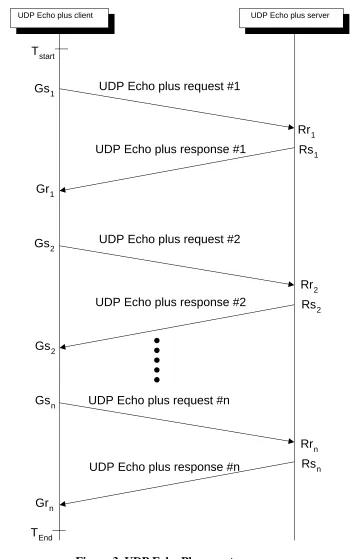
For all example metrics refer to the UDP Echo Plus event sequence diagram depicted in Figure 3. This depicts the sequence of UDP Echo Plus requests and corresponding responses during time interval Tstart to Tend. These time boundaries could correspond to
the time duration which the UDP Echo Plus server is provisioned to actively respond to request packets (i.e. the time period for which UDP Echo Plus server is enabled).
• Gsi, is the time the UDP Echo Plus client sends the UDP Echo Plus request.
• Gri is the time the UDP Echo Plus client receives the UDP Echo Plus response.
• Rri is the time the UDP Echo Plus server receives the UDP Echo Plus request
(TestRespRecvTimeStamp) .
• Rsi is the time the UDP Echo Plus server sends the UDP Echo Plus response
(TestRespReplyTimeStamp).
server begin with sequence numbers equal to 1. The UDP Echo Plus client may also require a successful round trip of the UDP Echo Plus to give the proper sequence number offset.
A.1.8.1 One Way Packet Loss
The UDP Echo Plus client keeps a local tally of the number of request packets that were successfully responded to (within some timer expiration threshold). Refer to this value as the SucessfulEchoCnt. Then upon receiving a UDP Echo Plus response packet from the UDP Echo Plus server at some time Gri, the UDP Echo Plus client can determine
RoundTripPacketLoss as :
RoundTripPacketLoss = (TestGenSN – SucessfulEchoCnt)
Sent packet loss (from UDP Echo Plus client to UDP Echo Plus server path) is determined by subtracting the total requests received by the UDP Plus server (TestRespSN) from the total request sent by the UDP Echo Plus client (TestGenSN). The total request received by the UDP Echo Plus server is conveyed to the UDP Echo plus client via the sum TestRespSN + TestRespReplyFailureCount. Therefore upon receiving a UDP Echo Plus response packet from the UDP Echo Plus server at some time Gri, the UDP Echo Plus client can determine:
Sent packet loss = TestGenSN – (TestRespSN + TestRespReplyFailureCount)
Receive packet loss (the UDP Echo Plus server to UDP Echo Plus client path Packet loss), can be calculated upon receiving a UDP Echo Plus response packet from the UDP Echo Plus server at some time Gri, by:
Receive packet loss = RoundTripPacketLoss – Sent packet loss
A.1.8.2 Round Trip Delay
Upon receiving a UDP Echo Plus response packet from the UDP Echo Plus server at some time Gri, corresponding to the “i-th” request sent, like standard UDP Echo, a UDP
Echo Plus client can compute the Round Trip Delay (RTD) simply according to: RTDi = Gri - Gsi
UDP Echo Plus capability allows for the removal of the UDP Echo Plus server’s delay component from each RTD value and removes the processing delays at the UDP Echo Plus server. Denoting the RTD measurements with UDP Echo Plus server delay contribution removed as Effective-RTD, then at time Gri the UDP Echo Plus client can
compute:
A.1.8.3 One Way IP Packet Delay Variation (IPDV)
UDP Echo Plus capability can also provide the computation of IPDV (IP Delay Variation) singletons as defined in [5] for each direction to infer One Way IPDV statistics of a time interval over which UDP Echo Plus is performed.
This is done by first defining GsPrevious ,GrPrevious, RrPrevious, RsPrevious as the times a
previous UDP Echo Plus round trip was successful, then comparing those time stamps against the current successful round trip times stamps in the below calculations:
• An IPDV singleton on the Sent path (from UDP Echo Plus client to UDP Echo plus server) measured at the UDP Echo Plus client at time Gri by
Send time delta= Gsi - GsPrevious
Receive time delta = Rri – RrPrevious
Sent path IPDV (i) = Send time delta – Receive time delta
• An IPDV singleton on the Receive path (from UDP Echo Plus server to UDP Echo Plus client) measured at the UDP Echo Plus client at time Gri by
Response time delta = Rsi – RsPrevious
Receive time delta = Gri - GrPrevious
Receive path IPDV (i) = Response time delta – Receive time delta
UDP Echo plus server UDP Echo plus client
Tstart
UDP Echo plus request #1 Gs1
Rr1 UDP Echo plus response #1 Rs1
Gr1
UDP Echo plus request #2 Gs2
Rr2 UDP Echo plus response #2 Rs
2
Gs2
UDP Echo plus request #n Gsn
Rrn Rs UDP Echo plus response #n n
Grn
-
[image:32.612.127.477.65.624.2]TEnd
A.2 DownloadDiagnostics utilizing FTP transport
The DownloadDiagnostics test is being used to test the streaming capabilities and responses of the CPE and the WAN connection. The measurements are made during the download process, the ‘files’ that are Downloaded are arbitrary, and are only temporary. The file received is a stream of arbitrary bytes of a specified length. There is no bound on file size.
The FTP [6] server response to the FTPSIZE command gives the CPE the size of the file being Downloaded. The FTP server response to the FTP [6] RTRV command will initiate the data sent on the FTP [6]data connection.
The CPE counts the number of file bytes received successfully and compares it to the response to the FTP [6] SIZE command. The CPE is not required to retain the file in memory.
[image:33.612.83.532.426.515.2]Once the CPE has successfully received the number of file bytes specified in the FTP [6] SIZE command it must terminate the FTP control connection.
Table 10 Statistics and Protocol layer reference for FTP DownloadDiagnostics
Above Socket (FTP [6]) Socket Layer Below Socket
ROMTime EOMTime TotalBytesReceived (Ethernet)
BOMTime EthernetPriority (Ethernet)
TCPOpenRequestTime DSCP setting (IP) TCPOpenResponseTime TestBytesReceived
For the DownloadDiagnostics test utilizing FTP transport, the FTP client emulates an FTP download transaction to an FTP URL as specified by DownloadURL. A sequence of events and corresponding actions are described below, reference of Figure 4.
1. Open a TCP socket for the FTPcontrol connection.
2. Upon receiving the control connection response:
• If a FTPpositive response is received, send a FTPUSER command with user value set to “anonymous” to indicate an anonymous user login is being request.
3. Upon receiving an “enter password” request:
• Perform a PASS command using any string (e.g. “dummypwd@”) to be used as the password for the anonymous login.
Error Condition -If the “enter password” request fails or times out, then set DiagnosticsState to Error_PasswordRequestFailed and terminate the test.
4. Upon receiving a password response:
• If the response was “successfully logged in”, then send a TYPE command with argument character set to ‘I’ for binary mode.
Error Condition -If a “successfully logged in” is not received or the response times out, then set DiagnosticsState to Error_LoginFailed and terminate the test.
5. Upon receiving an transfer mode response:
• If the transfer mode was set successfully, send a PASV command to request the server be placed in passive mode.
Error Condition -If a transfer mode response fails or times out, then set DiagnosticsState to Error_NoTransferMode and terminate the test.
6. Upon receiving passive mode response:
• If the passive mode response is successful, request the establishment of the FTPdata connection.
• Set TCPOpenRequestTime to the current time.
Error Condition -If a passive mode response fails or times out, then set DiagnosticsState to Error_NoPASV and terminate the test.
7. Upon receiving the TCP data connection response: for the FTP date connection: • If it was successfully established then set TCPOpenResponseTime, equal to
the current time value.
Error Condition -If the connection could not be opened or times out, then set DiagnosticsState to Error_NoResponse and terminate the test.
• Send the SIZE command on the FTPcontrol connection to obtain the size of the file to be downloaded.
8. Upon receiving the response to the SIZE command:
• Record the file size in bytes. Send a RTRV command to request the contents of the file.
Error Condition - If a valid response was not received from the server in response to the SIZE command or a timeout has occurred, then set DiagnosticsState to Error_IncorrectSize and terminate the test.
9. Upon receiving the first unit of data (at the socket interface) of the FTP data connection (i.e. corresponding to the first segment of data in the file):
• Set BOMTime equal to the current time value.
• Record the current value of the Ethernet bytes received on the Interface, to be used has reference later in TotalBytesReceived calculation.
Error Condition - If the FTP transfer times out, then set DiagnosticsState to Error_Timeout and terminate the test.
10.Upon receiving the last packet of data on the FTP data connection (i.e. corresponding to the last segment of data in the file):
• Set EOMTime equal to the current time value.
• Record the current value of the Ethernet bytes received on the Interface and calculate the TotalBytesReceived (using the previous value sampled at BOMTime).
Note: In binary transfer mode, a count of the total bytes received at the socket level can be maintained and compared to the file size obtained by the SIZE command in step #8 above.
11.Once the EOMTime is set:
• Set DiagnosticsState to the Completed state.
USER anonymous + ACK SYN
SYN + ACK ACK
220 FTP Server Ready
331 Enter Password + ACK
PASS dummypwd@ + ACK
230 User Logged In + ACK
TYPE I + ACK
200 Transfer Mode Set to Bin + ACK
PASV + ACK
227 Entering Passive Mode + ACK
SYN SYN + ACK
ACK
SIZE ftp-url + ACK 213 file size (in bytes) + ACK
RETR ftp-url + ACK 125 Downloading ftp-url + ACK
226 Transfer Complete+ ACK
ACK DATA DATA ACK DATA DATA ACK FIN ACK
Event: Start Diagnostic
Action: Req Open FTP control connection
Event: Rcv TCP socket open ACK
Event: Rcv server ready response
Action: Send USER command
Event: Rcv enter password response
Action: Send PASS command
Event: Rcv user logged in response
Action: TYPE command
Event: Rcv transfer mode response
Action: Send PASV command
Event: Rcv entering passive mode response
Action: Req Open FTP Data connection Set TCPOpenRequestTime
Event: Rcv TCP socket open ACK
Action: Set TCPOpenResponseTime
Action: Send SIZE command
Event: Rcv size of file in bytes
Action: Record file size Send RTRV command Set ROMTime
Event: Rcv downloading notofication
Event: Rcv first data packet in file
Action: Set BOMTime
Event: Rcv last data packet in file
Action: Set EOMTime
Event: Rcv TCP FIN (close indication)
Event: Rcv transfer complete notofication
FIN
ACK
Action: Release FTP control connection
[image:36.612.113.511.78.565.2]FTP data port FTP data port FTP control port FTP control port TCP socket Interface
Figure 4 DownloadDiagnostics using FTP transport
A.3 UploadDiagnostics utilizing FTP transport
storage requirements on the CPE for the Uploaded files. The CPE sends a file of size TestFileLength (actual values in bytes sent is arbitrary). There is no bound on file size.
The FTP[6] server response to the FTP STOR command gives the CPE a ready for transfer and it may begin the file transfer.
The CPE counts the number of bytes sent successfully on the FTP data socket. The CPE is not required to retain the file in memory.
[image:37.612.81.533.292.367.2]Once the CPE has successfully sent the number of bytes specified in the FTP [6] SIZE command and receives the transfer complete, it must terminate the FTP control and data connections.
Table 11 Statistics and Protocol layer reference for FTP UploadDiagnostics
Above Socket (FTP[6]) Socket Layer Below Socket
ROMTime EOMTime TotalBytesSent (Ethernet)
BOMTime EthernetPriority (Ethernet)
TCPOpenRequestTime DSCP setting (IP) TCPOpenResponseTime
For the UploadDiagnostics test utilizing FTP transport, the FTP client emulates a FTP upload transaction to an FTP server with filename as specified by UploadURL. A sequence of events and corresponding actions are described below, reference Figure 5.
1. Open a TCP socket for the FTPcontrol connection.
2. Upon receiving the FTP control connection response:
• If a FTPserver ready response is received, send a FTPUSER command with user value set to “anonymous” to indicate an anonymous user login is being request.
Error Condition - If a FTPnegative response is received, or a timeout has occurred, then set DiagnosticsState to Error_InitConnectionFailed and terminate the test.
3. Upon receiving an “enter password” request:
• Perform a PASS command using any string (e.g. “dummypwd@”) to be used as the password for the anonymous login.
Error Condition -If the enter password request times out, then set the DiagnosticsState to Error_PasswordRequestFailed and terminate the test.
4. Upon receiving a password response:
with argument character set to ‘I’ for binary mode.
Error Condition -If a “successfully logged in” response was not received or times out, set the DiagnosticsState to Error_LoginFailed and terminate the test.
5. Upon receiving a transfer mode response:
• If the transfer mode was set successfully, send a PASV command to request the server be placed in passive mode.
Error Condition -If the set transfer mode failed or times out, then set DiagnosticsState to Error_NoTransferMode and terminate the test.
6. Upon receiving passive mode response:
• If the passive mode was successful, request establishment of a TCP socket for the FTPdata connection.
• Set TCPOpenRequestTime to the current time.
Error Condition -If a setting the passive mode fails or times out, then set DiagnosticsState to Error_NoPASV and terminate the test.
7. Upon receiving the TCP socket response for the FTPdata connection:
• If it was successfully established then set TCPOpenResponseTime, equal to the current time value.
Error Condition -If the connection could not be opened or a timeout has occurred, then set DiagnosticsState to Error_NoResponse and terminate the test.
• Send a CWD command to change to the directory to the directory in the UploadURL.
Note: The client is not always required to send a CWD command prior to sending the STOR command in cases where the upload is performed in the home directory of the anonymous login.
8. Upon receiving a CWD response:
• If a new directory change notification was received, send a STOR command to request uploading (storing) a file using the file name value specified in UploadURL.
• When the STOR command is sent set ROMTime to the current time value.
Error Condition -If the CWD fails or times out set the DiagnosticsState to Error_NoCWD _and terminate the test.
9. Upon receiving a STOR command response:
value of the Ethernet bytes sent on the Interface, to be used has reference later in TotalBytesSent calculation.
• Begin file upload over the FTPdata connection, set BOMTime to the current time value.
Error Condition -If an error code is returned by the server and/or a timeout has occurred prior to receiving a “ready for transfer” notification then set the DiagnosticsState to Error_NoSTOR and terminate the test.
10.Upon completing the file upload:
• If the client receives a “transfer complete” notification. set EOMTime to the current time value.
• Record the current value of the Ethernet bytes sent on the Interface and calculate the TotalBytesSent using previous value sampled at BOM Time.
Error Condition – If and error code is returned by the server and/or a timeout has occurred prior to receiving a “transfer complete” notification, then set the DiagnosticsState to Error_NoTransferComplete and terminate the test.
11.Once the EOMTime is set, close the connections (FTP data and control) to the server.
USER anonymous + ACK SYN
SYN + ACK ACK
220 FTP Server Ready
331 Enter Password + ACK
PASS dummypwd@ + ACK
230 User Logged In + ACK
TYPE I + ACK
200 Transfer Mode Set to Bin + ACK
PASV + ACK
227 Entering Passive Mode + ACK
SYN SYN + ACK
ACK
CWD ftp-url dir + ACK 250 Changed to ftp-url dir + ACK
STOR ftp-url filename + ACK 150 Ready for transfer + ACK
226 Transfer Complete+ ACK ACK DATA DATA ACK DATA DATA ACK FIN ACK FTP control port FTP data port TCP socket Interface
Event: Start Diagnostic
Action: Req Open FTP control connection
Event: Rcv TCP socket open ACK
Event: Rcv server ready response
Action: Send USER command
Event: Rcv enter password response
Action: Send PASS command
Event: Rcv user logged in response
Action: Send TYPE command
Event: Rcv transfer mode response
Action: Send PASV command
Event: Rcv passive mode response
Action: Req Open FTP Data connection, Set TCPOpenRequestTime
Event: Rcv TCP socket open ACK
Action: Set TCPOpenResponseTime
Action: Send CWD command
Event: Rcv Changed to new directory notification
Action: Send STOR command Set ROMTime
Event: Rcv Ready for transfer notofication
Action: Begin file upload Set BOMTime
Event: Last packet in file sent
Event: Rcv transfer complete notification
Action: Set EOMTime
Action: Release FTP data connection FIN
ACK
Action: Release FTP control connection
[image:40.612.112.503.77.546.2]FTP control port FTP data port
A.4 DownloadDiagnostics utilizing HTTP transport
The DownloadDiagnostics test is being used to test the streaming capabilities and responses of the CPE and the WAN connection. The measurements are made during the download process, the ‘files’ that are Downloaded are arbitrary, and are only temporary. There are no storage requirements on the CPE for the downloaded files. The file received is a stream of arbitrary bytes of a specified length. There is no bound on file size.
The HTTP [2]server response to the HTTP Get includes the first TCP block of the file and either the HTTP header with the total file size or chunked encoding.
The CPE counts the number of file bytes received successfully. The CPE is not required to retain the file in memory.
Once the CPE has successfully received the number of file bytes specified in the HTTP response or chunked header the HTTP connection is closed.
HTTPimplementation notes:
• Pipelining is not supported.
• The CPE counts the number of bytes received on the Interface for the duration of the test.
• HTTP authentication is not supported.
• HTTP headers may be 1.0 or 1.1. HTTPS is not supported.
Table 12 Statistics and Protocol layer reference for HTTP DownloadDiagnostics
Above Socket (HTTP) Socket Layer Below Socket
EOMTime ROMTime TotalBytesReceived (Ethernet)
BOMTime EthernetPriority (Ethernet)
TCPOpenRequestTime DSCP setting (IP) TCPOpenResponseTime TestBytesReceived
For the DownloadDiagnostics test utilizing HTTP transport, the HTTP client emulates an HTTP Get (download transaction) to an HTTP URL as specified by DownloadURL. A sequence of events and corresponding actions are described below, reference Figure 6.
1. Open a TCP socket for the HTTPconnection. • Set TCPOpenRequestTime to the current time.
Error Condition -If the connection could not be opened or a timeout has occurred, then set the DiagnosticsState to the Error_InitConnectionFailed and terminate the test.
• Send a GET command to request the contents of the file. • Set the ROMTime to the current timestamp value.
3. Upon receiving the first packet of data and HTTP successful response: • Set BOMTime equal to the current time value.
• Record the current value of the Ethernet bytes received on the Interface, to be used has reference later in TotalBytesReceived calculation.
Note: The content length field may return in the first packet of data (which also includes the server HTTP response code) and may be used to determine the number of bytes to count to indicate the file download is complete. If the response uses chunked encoding the chucked header is used to determine file size.
Error Condition - If a HTTP successful response code was not received from the server in response to the GET command or a timeout has occurred, then set DiagnosticsState to the Error_NoResponse and terminate the test.
4. Upon receiving the last packet of data in the file: • Set EOMTime equal to the current time value.
• Record the current value of the Ethernet bytes received on the Interface, and calculate the TotalBytesReceived using previous value sampled at BOM Time.
Note: The last segment of file data has been received once a number of bytes received is equal to content length as determined from the step #3 above, or an EOF character sequence has been detected.
Error Condition - If the number of bytes received did not match the bytes expected or, a timeout has occurred, then set DiagnosticsState to Error_TransferFailed state and terminate the test.
HTTP HTTP
[image:43.612.112.503.85.341.2]port port TCP socket
Figure 6 DownloadDiagnostics utilizing HTTP transport
SYN SYN + ACK
ACK
200 OK + DATA
FIN ACK
Interface
Event: Start Diagnostic
Action: Req Open HTTP connection , Set TCPOpenRequestTime
Event: Rcv TCP socket open ACK
Action: Set TCPOpenResponseTime
Action: Send GET command Set ROMTime
Event: Rcv HTTP RESP Code and first data packet in file
Action: Set BOMTime
Event: Rcv TCP FIN (close indication ) GET http -url
ACK
DATA ACK DATA DATA ACK
DATA DATA
Event: Rcv last data packet in file ACK
Set EOMTime
![Table 2. For only those parameters listed in Table 2, the CPE MAY reject a request by an ACS to enable Active Notification via the SetParameterAttributes RPC by responding with fault code 9009 as defined in [1] (Notification request rejected)](https://thumb-us.123doks.com/thumbv2/123dok_us/889515.601421/22.612.83.565.72.211/parameters-notification-setparameterattributes-responding-defined-notification-request-rejected.webp)