FREE Monthly
Technology Updates
One-year Vendor
Product Upgrade
Protection Plan
FREE Membership to
Access.Globalknowledge
If it’s a
high-risk, high-impact,
must-not-fail situation,
it’s MISSION CRITICAL!
Robin Walshaw, MCSE
Technical Editor:
D. Lynn White, MCPS, MCSE, MCT, MCP+I
”This book is perfect for administrators who
need an advanced Windows 2000 reference.
I will turn to it again and again.“
–Eric Livingston,
With over 1,500,000 copies of our MCSE, MCSD, CompTIA, and Cisco
study guides in print, we have come to know many of you personally. By
listening, we've learned what you like and dislike about typical computer
books. The most requested item has been for a web-based service that
keeps you current on the topic of the book and related technologies. In
response, we have created
[email protected], a service that
includes the following features:
■
A one-year warranty against content obsolescence that occurs as
the result of vendor product upgrades. We will provide regular web
updates for affected chapters.
■
Monthly mailings that respond to customer FAQs and provide
detailed explanations of the most difficult topics, written by content
experts exclusively for
[email protected].
■
Regularly updated links to sites that our editors have determined
offer valuable additional information on key topics.
■
Access to “Ask the Author”™ customer query forms that allow
readers to post questions to be addressed by our authors and
editors.
Once you've purchased this book, browse to
www.syngress.com/solutions
.
To register, you will need to have the book handy to verify your purchase.
Thank you for giving us the opportunity to serve you.
M I S S I O N C R I T I C A L !
Syngress Publishing, Inc., the author(s), and any person or firm involved in the writing, editing, or production (collectively “Makers”) of this book (“the Work”) do not guarantee or warrant the results to be obtained from the Work.
There is no guarantee of any kind, expressed or implied, regarding the Work or its contents. The Work is sold AS IS and WITHOUT WARRANTY. You may have other legal rights, which vary from state to state.
In no event will Makers be liable to you for damages, including any loss of profits, lost savings, or other inci-dental or consequential damages arising out from the Work or its contents. Because some states do not allow the exclusion or limitation of liability for consequential or incidental damages, the above limitation may not apply to you.
You should always use reasonable case, including backup and other appropriate precautions, when working with computers, networks, data, and files.
Syngress Media® and Syngress® are registered trademarks of Syngress Media, Inc. “Career Advancement Through Skill Enhancement™,” “Ask the Author™,” “Ask the Author UPDATE™,” and “Mission Critical™” are trademarks of Syngress Publishing, Inc. Brands and product names mentioned in this book are trademarks or service marks of their respective companies.
KEY SERIAL NUMBER 001 9TATW2ADSE 002 NF4TRA7TC4 003 CDE3C28FV7 004 DC5C8NVT4N 005 Z745QQE2BR 006 PF62RT652H 007 DTP252ZX44 008 NT3F743RTG 009 6532M977LS 010 SMWR8P554N
PUBLISHED BY
Syngress Publishing, Inc. 800 Hingham Street Rockland, MA 02370
Mission Critical Windows 2000 Server Administration
Copyright © 2000 by Syngress Publishing, Inc. All rights reserved. Printed in the United States of America. Except as permitted under the Copyright Act of 1976, no part of this publication may be reproduced or dis-tributed in any form or by any means, or stored in a database or retrieval system, without the prior written per-mission of the publisher, with the exception that the program listings may be entered, stored, and executed in a computer system, but they may not be reproduced for publication.
Printed in the United States of America
1 2 3 4 5 6 7 8 9 0
ISBN: 1-928994-16-4
Copy edit by: Beth Roberts Proofreading by: Fred Lanigan
Technical edit by: D. Lynn White Page Layout and Art by: Reuben Kantor Index by: Robert Saigh and Shannon Tozier
Co-Publisher: Richard Kristof
v
Acknowledgments
We would like to acknowledge the following people for their kindness and sup-port in making this book possible.
Richard Kristof, Duncan Anderson, Jennifer Gould, Robert Woodruff, Kevin Murray, Dale Leatherwood, Rhonda Harmon, and Robert Sanregret of Global Knowledge, for their generous access to the IT industry’s best courses, instructors and training facilities.
Ralph Troupe and the team at Callisma for their invaluable insight into the challenges of designing, deploying and supporting world-class enterprise net-works.
Karen Cross, Kim Wylie, Harry Kirchner, John Hays, Bill Richter, Kevin Votel, Brittin Clark, Sarah Schaffer, Ellen Lafferty and Sarah MacLachlan of
Publishers Group West for sharing their incredible marketing experience and expertise.
Mary Ging, Caroline Hird, and Simon Beale of Harcourt International for making certain that our vision remains worldwide in scope.
Annabel Dent, Anneka Baeten, Clare MacKenzie, and Laurie Giles of Harcourt Australia for all their help.
David Buckland, Wendi Wong, David Loh, Marie Chieng, Lucy Chong, Leslie Lim, Audrey Gan, and Joseph Chan of Transquest Publishers for the enthu-siasm with which they receive our books.
Kwon Sung June at Acorn Publishing for his support.
Ethan Atkin at Cranbury International for his help in expanding the Syngress program.
Special thanks to the professionals at Osborne with whom we are proud to publish the best-selling Global Knowledge Certification Press series.
vi
From Global Knowledge
At Global Knowledge we strive to support the multiplicity of learning styles required by our students to achieve success as technical professionals. As the world's largest IT training company, Global Knowledge is uniquely positioned to offer these books. The expertise gained each year from pro-viding instructor-led training to hundreds of thousands of students world-wide has been captured in book form to enhance your learning experience. We hope that the quality of these books demonstrates our commitment to your lifelong learning success. Whether you choose to learn through the written word, computer based training, Web delivery, or instructor-led training, Global Knowledge is committed to providing you with the very best in each of these categories. For those of you who know Global Knowledge, or those of you who have just found us for the first time, our goal is to be your lifelong competency partner.
Thank your for the opportunity to serve you. We look forward to serving your needs again in the future.
Warmest regards,
Duncan Anderson
vii
About the Author
Robin Walshaw(B.Sc Computer Science, MCSE, DPPM) is an independent consultant who delivers strategic Windows 2000 solutions to large corpora-tions around the globe. Born in England, Robin spent the majority of his ear-lier years in Scotland and South Africa. One of the first MCSEs in Africa, he enjoys being at the forefront of new developments in network and operating system architecture.
With a flair for developing strategic IT solutions for diverse clients, he has worked in the world of computers in eight countries, and has traveled to over thirty countries in the last ten years. A veteran of numerous global pro-jects, Robin has honed his skills across of a wide variety of platforms and technologies.
Though an industrious computer professional by day, by ‘night’ Robin is an experienced mountain guide. Robin is a keen sportsman and has man-aged to balance work with a passion for climbing the world’s highest moun-tains, culminating in an attempt on the North Ridge of Mount Everest.
viii
Contributors
Melissa Craft(CCNA, MCSE, Network+, CNE-3, CNE-4, CNE-5, CNE-GW, MCNE, Citrix) is a Director of e-Business Offering Development for MicroAge. MicroAge is a global systems integrator headquartered in Tempe, Arizona. MicroAge provides IT design, project management and support for distributed computing systems. Melissa develops enterprise-wide technology solutions and methodologies for client organizations. These technology solutions touch every part of a system’s lifecycle—from network design, testing and implementation to operational management and strategic planning. Melissa holds a bachelor’s degree from the University of Michigan and is a member of the IEEE, the Society of Women Engineers and American MENSA, Ltd. Melissa currently resides in Phoenix, Arizona with her family, Dan, Justine and Taylor, and her two dogs, Marmaduke and Pooka.
Debra Littlejohn Shinder (MCSE, MCP+I, MCT) is an Instructor in the AATP program at Eastfield College, Dallas County Community College District, where she has taught since 1992. She is Webmaster for the cities of Seagoville and Sunnyvale, Texas, as well as the family Web site at www.shinder.net. She and her husband, Dr. Thomas W. Shinder, provide consulting and technical support services to Dallas area organizations. She is also the proud mom of a daughter, Kristen, who is currently serving in the U.S. Navy in Italy, and a son, Kris, who is a high school chess champion. Deb has been a writer for most her life, and has published numerous articles in both technical and non-technical fields. She can be contacted at [email protected].
ix
Technical Editor
D. Lynn White(MCPS, MCSE, MCT, MCP+I) is President of Independent Network Consultants, Inc. Lynn has more than 14 years experience in net-working and programming. She has been a system manager in the mainframe environment as well as a software developer for a process control company. She is a technical author, editor, trainer, and consultant in networking and computer-related technologies. Lynn has been delivering mainframe,
Contents
xi
Chapter 1: Introduction to Windows 2000 Server
1
Introduction 2 What’s New in Windows 2000 Server? 3 The Key to Unlocking Your Network: Active Directory 5 Why Should I Use the Active Directory? 6 Change and Configuration Management 7
Group Policies 10
Windows 2000 Security 11
Why the Change? 12
Differences in Windows 2000 Server Security 12 Windows 2000 Network Services 13 Managing and Supporting Windows 2000 Server 14 Integrated Directory Services 15 Comprehensive Management Solutions 15 Comprehensive File, Print, and Web Services 17 What’s Not New in Windows 2000 Server? 20
Core Architecture 21
Application Support 21
User Interface 21
Client Support 22
Windows 2000 Challenges 22
Summary 24 FAQs 25
Chapter 2: Active Directory—The Heart of
Windows 2000 Server
27
Introduction 28 Mission-Critical Active Directory Concepts 29
Where Active Directory Fits in the Overall Windows
2000 Architecture 30
Active Directory Concepts 30
What’s in a Name? 30
Developing a Naming Strategy 40 Active Directory’s Integration with DNS 41 How Active Directory Uses DNS 43
Forest Plan 45
Domain and DNS Strategy 48
Organizational Units (OUs) 49
Site Topology 52
Naming Conventions 53
Defining DNS Names 53
Defining DNS Zones 55
Naming Conventions for Active Directory 55
Virtual Containers 56
Designing Active Directory Domains 56
Forest Plan 58
Domain Plan Including DNS Strategy 58
Organizational Unit Strategy 60
Organizational Unit Structure 60
OU Objects in the Active Directory 60
Group Policy and OUs 60
Delegating Administration 61
Site Topology 62
Summary 63 FAQs 64
Chapter 3: Migrating to Windows 2000 Server
67
Introduction 68
Server Migration Strategies 69
Primary Domain Controllers (PDCs) 76 Changes Required when Upgrading a
Domain Controller 78
Backup Domain Controllers (BDCs) 79
Member Servers 81
Promoting Member Servers with DCPROMO 81 Upgrading with the Windows 2000 Setup Wizard 82 Installing Active Directory Services 84
Interim Mixed Domains 87
Mixed Mode 88
Native Mode 88
Migrating Components 90
Using Organizational Units (OUs) to Create a
Hierarchical Structure 91
User Accounts 92
Nested Groups 94
Global Groups 95
Delegating Administrative Authority 95 Insert into the Replication Topology 96 Migrating from Novell Directory Services 97 Upgrade Clients to Windows 2000 Professional 98 Summary 100 FAQs 102
Chapter 4: Implementing Domains, Trees
and Forests
103
Introduction 104
Implementing a Domain 104
Installing the First Domain in Active Directory 105
Active Directory Wizard 106
Integrating DNS into the Active Directory 110
Configuring DNS 111
Active Directory Integrated Zones 112
About Zones 112
Service Resource Record Registration 114
Creating Organizational Units 114
Managing Objects in Active Directory 115
Managing User Accounts 116
Managing Groups 117
Managing Computers 119
Managing Shares 120
Managing Printers 121
Common Object Management 122
Nesting Groups 122
Role-Based Administration 123
Microsoft Management Console 123
Administrative Roles 123
Delegating Administration 124
Object-Based Access Control 126
Building Trees and Forests 127
Forest Characteristics 128
Common Schema 128
Common Configuration 128
Global Catalog 128
Contiguous Namespace 129
Trust Relationships 129
Planning a Forest Structure 134
The Domain Tree Structure 137
Sizing the Active Directory Store 139
Managing the Forest 142
Summary 145 FAQs 147
Chapter 5: Planning and Implementing Active
Directory Sites
149
Introduction 150 The Function of Sites in Active Directory 150 Default-First-Site-Name 153 Replicated Active Directory Components 153
Domain Partitions 153
Global Catalog 154
Schema and Configuration Containers 155
Modifying the Schema 155
Configuring Site Replication Components 166
Creating Site Objects 166
Creating Connection Objects 167
Creating Site Links 167
Creating Site Link Bridges 168
Replication Protocols 169
Replication in Active Directory 170
Replication Topology 171
Planning a Site Structure 174
Placing Domain Controllers 177
Where to Place Global Catalog Servers 177 Implementing a Site Structure in Active Directory 178
Replication Utilities 183
Replication Monitor (REPLMON) 183
Replication Administrator (REPADMIN) 183 DSASTAT 183 Understanding Time Synchronization in Active Directory 184 Summary 185 FAQs 187
Chapter 6: Advanced Active Directory
189
Introduction 190 Interfacing with Active Directory 190 ADSI 190 RPC 192
Windows Sockets 192
Microsoft’s Metadirectory 195
VIA Architecture 199
Implementing a Disaster Recovery Plan 200 Modeling Sites with Disaster Recovery in Mind 201 The Active Directory Database File Structure 204 Backup 205 Creating an Emergency Repair Disk 206 Recovering a Failed Domain Controller 208 Authoritative Restore of Deleted Objects 208
Startup Options 209
The Recovery Console 210
For Experts 211
PDC Emulation and Native Mode 211
How Active Directory Prevents Unnecessary
Replication 212 How an LDAP Query Accesses Active Directory 213
Renaming Domains 214
Add a Server to Two Different Sites Simultaneously 214
Removing Phantom Objects 215
Phantom Domains 215
Transferring FSMO Roles 216
Troubleshooting Tips 219
Avoiding Errors When Migrating a Domain 220 Remote Procedure Call (RPC) Errors 220 Summary 221 FAQs 222
Chapter 7: Configuring IntelliMirror
223
Introduction 224
What Is IntelliMirror? 224
Configuring Group Policies 226
How Group Policies Are Applied 229
Refresh Interval 230
Blocking and Enforcing 230
Group Policy Information Storage 231
Administrative Templates 232
Registry.pol 233
Group Policy Settings 233
Computer Configuration 235
User Configuration 235
Link a Group Policy Object to a Container 241 Keeping Groups from Growing Over Time 242 Delegating Control of Group Policy 243
Troubleshooting Group Policies 245
Policy Does Not Execute 245
Policy Executes in the Wrong Way 246
Logging On Takes a Long Time 246
Security 247
Groups 247
Group Strategy 249
Viewing Security Features in Active Directory
Users and Computers 250
Domain Security Console 250
Account Policies 250
Local Policies 254
Event Log 254
Restricted Groups 255
System Services 255
Registry 255
File System 255
Public Key Policies 256
IP Security Policies on Active Directory 256
Security Templates 256
Object Protection 256
Access Control Lists (ACLs) 256
Access Control Entries (ACEs) 257
Security Descriptor 258
Security Identifier (SID) 259
Summary 260 FAQs 261
Chapter 8: Managing Settings, Software, and User
Data with IntelliMirror
263
Introduction 264 Deploying Software with Group Policies 264
Assigning Software 265
User Assignments 265
Computer Assignments 266
Publishing Software 266
Enhancements within Add/Remove Programs 266
Packaging an Application 268
Windows Installer 269
Creating a Package 272
ZAP Files 273
Customizing a Package 273
Creating Distribution Points 274
Targeting Software and Using the Software
MMC Snap-In 274
Using the Software Policy MMC Snap-In 275 Using Group Policy to Assign or Publish
an Application 276
Managing Software with Group Policies 277
Upgrading Software 278
Upgrading Windows 2000 279
Removing Software 280
Redeploying Software 281
Software Installation Options 281
Group Policy Settings 283
Application Deployment Walkthrough 285
Deployment Methods 287
Managing User and Computer Settings 287
Using Administrative Templates 288
Assigning Registry-Based Policies 290 Creating Custom Administrative Templates 293 Adding Administrative Templates 299
Using Scripts 300
Assigning Script Policies to Users and Computers 301
Folder Redirection 303
Summary 305 FAQs 306
Chapter 9: Managing Users and Groups
309
Introduction 310
Setting Up User Accounts 310
Defining an Acceptable Use Policy 310 Requirements for New User Accounts 312
Default User Account Settings 313
Logon Mechanics 313
Creating User Accounts 314
Setting Account Policies 315
Account Policy Configuration 315
Modifying Properties for User Accounts 317
Managing User Accounts 319
Deleting User Accounts 319
Resetting Passwords 319
Disabling an Account 320
Other Active Directory Users and Computers
Functions 320
Moving User Accounts 320
Mapping a Certificate to a User 321 Using Groups to Organize User Accounts 323
Group Types 323
Security Groups 323
Distribution Lists 324
Group Scope 324
Local 324
Domain Local 325
Global 325 Universal 325
Implementing Groups 326
Creating a Group 328
Assigning Users to a Group 328
Adding Users through Group Settings 328
Configuring Group Settings 328
Managing Groups 329
Changing a Group’s Scope 330
Deleting Groups 330
Implementing Local Groups 331
Preparing to Create Local Groups 331
Creating a Local Group 331
Implementing Built-in Groups 332
Built-In Group Behavior 332
Groups—Best Practices 335
Administering User Accounts 336
User Profiles Overview 337
Types of User Profiles 337
Contents of a User Profile 338
Settings Saved in a User Profile 339
Local User Profiles 340
Roaming User Profiles 340
Creating Individualized Roaming User Profiles 341
Mandatory Profiles 341
Setting Up a Roaming User Profile 342 Assigning Customized Roaming Profiles 343
Creating Home Directories 343
Home Directories and My Documents 343
Creating Home Directories 344
Advanced Techniques 345
Creating New Active Directory Users in Bulk 346 Importing Users from Novell Directory Services (NDS) 348 Summary 348 FAQs 349
Chapter 10: Managing File and Print Resources
351
Introduction 352
Windows 2000 Data Storage 352
Understanding Disk Types 352
Basic Disks 353
Dynamic Disks 354
Configuring Disks 355
Understanding Windows 2000 File Systems 357 CDFS 358 UDF 358 FAT 358 NTFS 359
Configuring File Systems 364
Configuration Options for Windows 2000 Storage 365
Logical Disk Manager 366
Removable Storage Manager 366
Remote Storage Server 367
Distributed File System 367
File Replication Service 368
Indexing Service 369
Backup Utility 369
Defragmentation Utility 369
Administering NTFS Resources 370
How NTFS Permissions Are Applied 370
Access Control Lists 371
Combining NTFS Permissions 371
Permission Inheritance 372
NTFS Folder Permissions 372
NTFS File Permissions 372
Managing NTFS Permissions 373
Special Access Permissions 375
Using Special Access Permissions 375
Changing NTFS Permissions 378
Copying and Moving Files and Folders 378
Copying Files 378
Moving Files 379
Administering Shared Resources 380
Securing Network Resources 380
Creating Shared Folders 381
Administrative Shares 381
Creating a Shared Folder 383
Assigning Permissions to a Shared Folder 383
Managing Shared Folders 384
Administering Printers 385
Planning the Print Environment 386
Local, Remote, and Network Printers 386
Creating the Print Environment 386
Installing a Local Printer 386
Installing a Network Printer 387
Installing a Printer from Another Server 388
Loading Printer Drivers 388
Managing Printer Permissions 389
Security/Sharing Permissions 389
Printer Ownership 390
Managing Printers 390
Creating a Printer Pool 390
Specifying Printer Priorities 391
Redirecting a Printer 391
Removing Printer Drivers 391
Managing Documents in a Print Queue 392 Setting Priority, Notification, and Printing Time 392 Administering Printers by Using a Web Browser 393 Summary 394 FAQs 396
Chapter 11: Inside Windows 2000 TCP/IP
397
Introduction 398
A TCP/IP Primer 398
IP Address Classes and Subnets 398
Subnets and Routing 399
The OSI Model 400
Seven Layers of the Networking World 401
The TCP/IP Protocol Suite 403
TCP/IP Core Protocols 404
TCP 404 UDP 405 IP 405 ARP 408 ICMP 408 IGMP 408
TCP/IP Applications 408
Windows 2000 TCP/IP Stack Enhancements 410
NetBT and WINS 410
DHCP 412 DNS 412 SNMP 412
Using TCP/IP Utilities 412
ARP 412 Hostname 413 Ipconfig 413 Nbtstat 414 Netstat 415 Nslookup 415 Ping 416 Route 417 Tracert 417 Pathping 418 Netdiag 419 SNMP 421
How Does SNMP Work? 421
Installing the Agent 422
Using Windows 2000 Monitoring Tools 425
Basic Monitoring Guidelines 425
Performance Logs and Alerts 426
Counters 427
Log File Format 427
Alerts 427
Network Monitor 428
Filtering 428
Security Issues 429
Using Network Monitor 429
Capture Window Panes 430
Buffers 430
Collecting Data 430
Filtered Captures 433
Summary 437 FAQs 439
Chapter 12: Managing Windows 2000 DHCP Server
441
Introduction 442
DHCP Overview 442
DHCPACKNOWLEDGMENT (DHCPACK) 444 DHCP Negative Acknowledgment (DHCPNACK) 444
Integration of DHCP with DNS 445
What Are Leases? 447
Leasing Strategy 447
Operating without a DHCP Server 448
Automatic Client Configuration 448
Manual IP Addresses 450
Design of a DHCP Configuration 450
Placement of Servers 450
Using DHCP Routers or DHCP Relay Agents 451
RRAS Integration 452
Configuring a DHCP Server 452
DHCP Scopes 453
Configuring Leases 453
DHCP Options 453
Server Options 454
Scope Options 455
Client Options 456
DHCP Options Order of Precedence 456
BOOTP/DCHP Relay Agent 457
Vendor-Specific Options 457
User Class Options 458
BOOTP Tables 459
Similarities between DHCP and BOOTP 459 Differences between DHCP and BOOTP 460 Superscopes 460
Managing DHCP Servers 461
Enhanced Monitoring and Statistical Reporting for
DHCP Servers 461
Authorizing DHCP Servers 461
How Rogue DHCP Servers Are Detected 462
Authorizing a DHCP Server 463
Deploying DHCP 464
Best Practices 465
Optimizing Lease Management Practices 466
Lengthening Lease Duration 466
Shortening Lease Duration 466
Determining the Number of DHCP Servers to Use 467
Fault-Tolerant Planning 467
Router Support Required 468
DHCP Walkthroughs 468
Installing a DHCP Server 468
Troubleshooting DHCP 471
The DHCP Database 472
Multiple Clients Fail to Obtain IP Addresses 472
Duplicate Addresses 473
Summary 473 FAQs 474
Chapter 13: Managing Windows 2000 DNS Server
477
Introduction 478
Understanding DNS 478
Domain Namespace 479
Domain Naming Conventions 480
Host and Domain Names 480
Host Names 481
Fully Qualified Domain Names 481
Zones 482
Using Zones 482
Reverse Lookup Zones 483
Zone Transfer 484
Methods of Zone Transfer 485
The Retry Interval 485
Compatibility of DNS Server Versions 485
Incremental Zone Transfers 485
DDNS Dynamic Updates 486
Understanding Name Resolution 487
Recursive Queries 487
Iterative Queries 487
Looking Up an Address from a Name 488 Looking Up a Name from an Address 489 Active Directory and DNS Integration 490
Using Active Directory to Replicate and
Synchronize DNS 491
RFC 2137 Secure DNS Updates 491
Changing Zone Types 491
Integration with DHCP 492
Registration of Server in DNS Using the SRV Record 493
Installing DNS Server Service 494
DNS Server Roles and Security Topology 494
Primary DNS Server 494
Secondary DNS Server 496
Caching-Only Servers 496
Configuring DNS Services 503
Creating Forward Lookup Zones 503
Creating Reverse Lookup Zones 507
Record Types 508
Manually Adding Records 510
Configuring the DNS Client 511
Manually 511
Using DHCP 512
DNS Walkthroughs 513
Installation of a DNS Server 513
Creating a Forward Lookup Zone 514
Creating a Reverse Lookup Zone 514
Testing the DNS Server 516
Summary 517 FAQs 518
Chapter 14: Managing Windows 2000 WINS Server
521
Introduction 522
WINS Functional Description 522
NetBIOS Name Resolution 523
B-Node 524 P-Node 524 M-Node 524 H-Node 525
What Does WINS Do? 526
Broadcasting vs. WINS 527
LMHosts vs. WINS 528
NetBIOS Name Registration Request 528
Name Renewal 529
NetBIOS Name Release 531
NetBIOS Name Query Request 532
WINS Configuration 532
Configuring Static Entries 532
Connecting WINS Servers through Replication 535 Designing a Network of Multiple WINS Servers 538
Backing Up WINS Databases 540
New Features in Windows 2000 WINS 541
Persistent Connections 541
Manual Tombstoning 542
Improved Management Tools 544
Higher Performance 546
Enhanced Filtering and Record Searching 547 Dynamic Record Deletion and Multiselect 548
Burst Handling 549
Dynamic Reregistration 551
WINS Walkthrough 551
Installing and Configuring a WINS Server 551 Configuring Replication Partners 554 Summary 557 FAQs 559
Chapter 15: Windows 2000 Security Services
561
Introduction 562 Windows 2000 Security Infrastructure 562
Authentication Protocols 563
NTLM and LM 564
Kerberos 565 Private/Public Key Pairs and Certificates 566
Encryption Technologies 567
Security Configuration Tool Set 567 Secure Authentication Using Kerberos 567
Basic Concepts 567
Key Distribution Center 568
Session Tickets 569
Ticket-Granting Tickets 570
Services Provided by the Key Distribution Center 570 Tickets 572
Kerberos and Windows 2000 573
Key Distribution Center 573
Kerberos Policy 574
Contents of a Microsoft Kerberos Ticket 576
Delegation of Authentication 576
Preauthentication 576
Security Support Providers 577
Credentials Cache 578
DNS Name Resolution 578
UDP and TCP Ports 578
Using the Security Configuration Tool Set 579 Security Configuration Tool Set Overview 579 Security Configuration and Analysis Snap-In 579 Security Configuration and Analysis Database 581 Security Configuration and Analysis Areas 581 Security Configuration Tool Set User Interfaces 582
Configuring Security 585
Account Policies 585
Local Policies and Event Log 586
Restricted Groups 586
Registry Security 587
File System Security 587
System Services Security 588
Analyzing Security 588
Group Policy Integration 589
Security Configuration in Group Policy Objects 589
Additional Security Policies 589
Using the Tools 589
Using the Security Configuration and
Analysis Snap-In 590
Using Security Settings Extension to
Group Policy Editor 591
Encrypted File System 591
How EFS Works 591
User Operations 592
File Encryption 593
Decrypting a File 594
Cipher Utility 594
Directory Encryption 595
Recovery Operations 595
Summary 596 FAQs 597
Chapter 16: Securing TCP/IP Connections
599
Introduction 600
Secure Sockets Layer 600
Overview of SSL 600
How a Secure SSL Channel Is Established 601 Symmetric and Asymmetric Encryption 602
Symmetric Encryption 603
Asymmetric Encryption 603
Hash Algorithms 604
Digital Certificates 605
Certificate Authorities 606
SSL Implementation 606
Secure Communications over Virtual Private Networks 609
Tunneling Basics 609
VPN Definitions and Terminology 609
How Tunneling Works 610
IP Addressing 610
Security Issues Pertaining to VPNs 610
Encapsulation 610
Data Security 611 Windows 2000 Security Options 611
Common VPN Implementations 614
Remote User Access Over the Internet 614 Connecting Networks Over the Internet 615 Tunneling Protocols and the Basic Tunneling
Requirements 616 Windows 2000 Tunneling Protocols 617 Point to Point Tunneling Protocol (PPTP) 617 Layer 2 Tunneling Protocol (L2TP) 618
Using PPTP with Windows 2000 618
How to Configure a PPTP Device 618
Using L2TP with Windows 2000 619
How to Configure L2TP 619
How L2TP Security Differs from PPTP 619 Interoperability with Non-Microsoft VPN Clients 621
IPSec for Windows 2000 621
Overview of IPSec Cryptographic Services 622
Message Integrity 622
Message Authentication 623
Confidentiality 624
IPSec Security Services 624
Authentication Header (AH) 624
Encapsulating Security Payload (ESP) 625 Security Associations and IPSec Key Management
Procedures 626
IPSec Key Management 627
Deploying IPSec 628
Building Security Policies with Customized
IPSec Consoles 628
Building an IPSec MMC Console 629
Flexible Security Policies 629
Rules 631
Flexible Negotiation Policies 634
Filters 635
Creating a Security Policy 635
Making the Rule 636
Summary 642 FAQs 643
Chapter 17: Connecting Windows 2000 Server
645
What Do You Need to Use ICS? 646
ICS and TCP/IP 647
How APIPA Works 647
ICS Address Autoconfiguration and the
DHCP Allocator 648
Private Network Addresses vs. Public Addresses 648 Using Internet Connection Sharing 649 Using ICS with a VPN Connection 649
On-Demand Dialing 649
Configuring Applications and Services 649
ISP Static IP Addressing 650
What Happens When You Enable ICS? 650 Network Address Translation (NAT) 651
How NAT Differs from ICS 651
What Is NAT? 651
Setting Up the NAT Computer 652
Multiple Public Addresses 656
Setting Up the NAT Client Computers 656
A NAT Example 656
Accessing Other Computers’ Printers and
Network Drives 658
Accessing Other Computers’ Resources
over the Internet 659
Protecting Your Computer from Unauthorized
Access 659 Comparison of ICS, NAT, and Windows Routing 660 A Windows 2000 Routed Connection 660
Performance Considerations 660
Security 661 How Do NAT and ICS Protect My Network? 661 Security Issues with Routed Connections 662
Comparison of Features 662
Establishing VPNs over the Internet 662
PPTP and L2TP 662
VPN Solutions 664
Client/Server VPN 664
Creating a VPN Router 665
Connecting a VPN Client 667
Tunneling Non-TCP/IP Protocols 669
Dial-Up Access 669
Configuring RAS 670
Security Concerns 671
Secure the Telephone Number 671
Authentication and Encryption 672
Caller ID and Callback 672
Outsourcing Dial-Up Access 673
RADIUS 673 Summary 674 FAQs 675
Just a few short years ago, no one could have foreseen the huge impact that the personal computer would have on the working lives of so many people. Idling on the desk of millions of office workers around the world is a tireless instrument that extends and facilitates our ability to deliver work. Today, the personal computer and the operating systems that run it are as ubiquitous as the car, with which it shares several pow-erful characteristics.
The modern car comes with a surfeit of features—sleek lines, aggressive low-cut features, and a powerful engine—all intended to tempt the buyer. But, it is the road that the car travels along that makes it truly productive. Without the road, the modern car would be sleek, beautiful, and useless. Windows 2000 Professional and most other modern personal operating systems are armed with the same sleek lines, powerful engines, and aggressive features as the modern car. To guide operating systems such as Windows 2000 Professional down the road of increased productivity, flexibility, and reliability, a robust and mission-critical server operating system infrastructure is required—an operating system infrastructure like Windows 2000 Server.
A significant portion of the design objectives for the Windows 2000 development team was to ensure that Windows 2000 Server was the most efficient, scalable, and reliable Microsoft operating system for the enterprise. Complex decision-making issues that arose during the design of Windows 2000 Server were handled with ruthless efficiency. If a choice arose between compatibility and stability, it was ruled as no competition—stability won every time. That has left us with an
oper-Introduction
ating system that has gone through one of the most rigorous testing cycles in operating system history. Compound this with the involve-ment of some of the best minds in the computing business, and you have a network operating system that can only be described as a winner.
What does Windows 2000 Server signify to information tech-nology professionals? It means an exciting opportunity to learn new skills, provide better services, and enhance productivity (and to use cool-sounding words like ADSI and Kerberos). Windows 2000 Server ushers in a bevy of features that leverage best-of-breed technology sets. This is not technology for technology’s sake, but a technical architecture geared toward providing an infrastructure based on delivery.
Even on first appearances, it is obvious that Windows 2000 Server is a vastly complex operating system. With functionality liter-ally bursting from the seams, it creates the dual opportunity for success and failure. The correctly prepared professional who under-stands the nature and complexities of Windows 2000 Server can provide an outstanding infrastructure based on its reliable, exten-sible, and flexible feature set. Those unprepared for managing and working with a product as far-reaching and complex as Windows 2000 Server should prepare for a good deal of confusion and reac-tive problem solving.
Windows 2000 Server is the next-generation operating system from Microsoft that not only replaces, but also revolutionizes the network operating system product space that Windows NT 4 Server occupied. With adequate preparation, appreciable benefits can be realized by all information technology professionals, from the Dilbert-style network manager, to the technical developer who sits in a lotus position chanting C++ mantras. But, more importantly, your clients—the users—will be able to reap the rewards that go hand in hand with Windows 2000 Server.
Mission-Critical Windows—A Contradiction
in Terms?
Rightly or wrongly, Microsoft has been soundly chastised on more than one occasion for supplying server-based operating systems that fail ungracefully under pressure. Mention Windows and
choke on their coffee. In the last 10 years, mainframes and several flavors of UNIX have been the first choice for providing mission-crit-ical services, and for very good reasons. The message chanted by hardware and software vendors alike was, “Don’t use Microsoft for anything that just can’t go down”—a statement that most times I would have agreed with. Windows 2000 Server has changed all of that.
The Windows 2000 product group represents the largest and most technically advanced body of work undertaken by the most successful software company in the world. It is considered by many to be the single most important milestone in the evolutionary devel-opment of the Windows family. By providing a computing platform that offers stability, high productivity, and compatibility, Microsoft is extending its software presence even further into the server space.
The deluge of complaints that Microsoft has received (not to mention the battering suffered at the hands of the press) regarding its server-based operating systems has ensured that the Windows 2000 core services are built around a reliable and scalable architec-ture. Don’t get me wrong, blue screens of death are not a thing of the past, nor have required reboots been relegated to the dust pile of Windows anachronisms. What has changed is the refocus on sta-bility and on user requirements.
I am not alone in wanting 99.999% uptime, scalable directory services, and a secure computing platform. Windows NT went some way to addressing all of those concerns, but not nearly far enough. Mission critical means different things to different organizations—to supermarkets, point-of-sale systems are mission critical; to e-busi-nesses, Web farms are mission critical. The common thread that runs through these disparate businesses is the requirement to provide a stable, supporting infrastructure that technologically enables mission-critical business services—a requirement to which Windows 2000 Server provides an almost unbeatable solution. That’s the good news. The bad news is that you need more than a superficial level of understanding of your network operating system, you need to get your hands dirty with the real technical nuts and bolts.
Who Should Read This Book?
If you work with Windows 2000 Server, or are planning to, then this book will be of use to you. It is not meant to be light bedtime
reading, but an exploration of the more technical issues of Windows 2000 Server. I recommend that you gain some familiarity with Windows 2000 Server concepts before reading this book (though it is not entirely necessary, since most chapters have introductory material), and that you understand general networking and oper-ating system concepts. Don’t let that scare you though—you don’t need a degree in Quantum Physics, or need to own a personalized pocket protector to derive value from this book. What you do need is a will to get involved with the most exciting development in oper-ating systems in the new millennium.
Windows 2000 Server is not a lightweight operating system. As users have become more demanding, there has been an associated increase in the complexity of the supporting technical infrastruc-ture. But even among scary-sounding Windows 2000 Server
acronyms like FSMO, SDOU, and LDAP, you will find concepts such as ease of use, security, and decreased support overhead. These are certainly concepts that most people can identify with, and if you do, then you wantto understand the contents of this book.
How This Book Is Organized
When I was initially putting together the outline for this book, I realized that it would be impossible to cover all the technology sets in as great a detail as I would have liked—not unless I was prepared to have a book published that no one was physically able to pick up! As a result, certain features of Windows 2000 Server have received greater coverage than others. Core Windows 2000 Server features like Active Directory, IntelliMirror, network services, and security rightfully receive the lion’s share of the coverage.
Windows 2000 Serverwill take on the appearance of a truly useful book—in other words dog-eared and discolored, with a fair amount of pencil work in the margins!
Acknowledgments
There are a number of people I must thank; some of them provided invaluable help in writing this book, while others taught me many of the things worth knowing in life. Thanks go to Sonia Barrett, for teaching me to laugh, to smile, and to appreciate real music. To Ray Walshaw, for gifting me with confidence and teaching me the
courage of my convictions. Martin Walshaw—big brothers just don’t come any better. Costas Kellas, for starting me down the road. The lads from the valley—Uruman Gwuafi, Alex Harris, David Ker, Sean Disney—thanks for teaching me that no mountain is too high—liter-ally. Andrew Williams and Syngress, for being all the things a good publisher should be. D. Lynn White, for a great job of technical editing this back breaker.
Introduction to
Windows 2000
Server
Solutions in this chapter:
■
What’s New in Windows 2000 Server?
■
What’s Not New in Windows 2000 Server?
■
Windows 2000 Challenges
Chapter 1
Introduction
Significant changes in the way that computers are used in the workplace have heralded an increased focus on issues such as security, manage-ability, scalmanage-ability, and reliability. The use of information technology has ushered in an era characterized by high availability, high productivity, and increased support levels. Unfortunately, the burden of responsibility rests squarely on the shoulders of the IT professional to ensure that the infras-tructure meets the requirements of the modern demanding user.
It is no great secret, or surprise, that legacy technologies are beginning to creak under the strain of ever-increasing user requirements, stability initiatives, and management drives to lower the cost of ownership. A new technology set was needed to provide services that existing operating sys-tems could not. Microsoft itself was guilty of a lack of technical delivery with glaring omissions in the Windows NT 4 technical strategy that
included the lack of a perceived stable mission-critical server platform and the absence of a cohesive infrastructure to manage configuration changes.
With a vision of providing an operating system for the future, Microsoft began development on its most ambitious project to date: Windows 2000. The aims of the design team, though simple in theory, proved to be much more difficult to achieve in reality. They had to provide scalable answers to the deficiencies in Windows NT 4, and satisfy design objectives that
included:
■ Increasing reliability, availability, and scalability
■ Reducing costs through simplified management
■ Providing a powerful and robust Internet and application server
Much has been said about the complexity and size of this new brain-child. The modern-day software malady of ever-increasing size and com-plexity has certainly directly affected Windows 2000 Server, but not necessarily in the manner that many people perceive.
Whether you plan to deploy it or are already using it, a lasting first impression of Windows 2000 Server is the vast array of integrated function-ality. Casual inspection reveals a hauntingly familiar interface—is it just Windows NT 4 with a slick version of the Windows 98 GUI? Actually, nothing could be further from the truth. By probing a little deeper it soon becomes apparent that Windows 2000 Server combines an evolutionary upgrade path with a revolutionary feature set.
This chapter touches on the powerful features of Windows 2000 Server, and its effect on the organization and Administrators. Windows 2000 Server presents a radical change from its predecessor, and knowledge of its myriad of features is required to leverage its true power.
What’s New in Windows 2000 Server?
When confronted by the sea of features and changes that accompany Windows 2000 Server, it is easy to understand the need to address some of the new features in detail, while touching on others in no more than a cur-sory fashion. Microsoft supplies a “feature highlight” that includes almost 80 major features—enough to make the eyes water!
Microsoft, to its credit, has learned that it is not possible to satisfy the diverse set of server requirements with a “one package fits all” strategy. To allow Windows 2000 Server to scale from the small business right into the multinational corporate server farm, it has been divided into a family of server operating systems (Table 1.1).
Each of the various flavors supports the much-touted Active Directory, which is probably the most critical element of the Windows 2000 Server family. Active Directory simplifies management, extends interoperability with applications and devices, and improves security.
The entry-level and most commonly used edition is Windows 2000 Server Standard Edition. The nomenclature for Windows 2000 Advanced Server hearkens back to the early days of Windows NT, when the name Advanced Server made its debut. Aside from its nostalgic name, Advanced Server maps most closely to Windows NT Server Enterprise Edition. It con-tains all the features and benefits of Windows 2000 Standard Edition, but includes support for larger deployments. The inclusion of support for net-work load balancing, clustering, and a more scalable memory and CPU architecture makes Advanced Server an excellent candidate for large SQL Server databases, for high-end Web servers, and for meeting the demands of high-end, critical file and application services.
Windows 2000 DataCenter is Microsoft’s top-of-the-line model. In addi-tion to having all the features of the Standard Ediaddi-tion and Advanced Server, DataCenter supports more processors and larger amounts of
deployments with the most demanding needs, such as high-end clustering, data warehousing, and Internet Service Providers (ISPs).
As usual, Microsoft has published a minimum hardware specification for the Windows 2000 Server family (Table 1.2)—and also, as usual, you can totally disregard them. I would be sorely taxed to think of anything as mind-numbingly boring as watching Windows 2000 Server run on a
Pentium 133MHz. So this said, the recommendations should be read
care-Table 1.1
Windows 2000 Server FamilyDescription Features
Windows Designed to be a ■ During upgrade four-way SMP
2000 powerful support. Fresh install supports Server multipurpose server. two-way SMP.
Ideal for workgroup ■ Supports 4GB of memory.
and departmental ■ Active Directory.
servers. ■ Kerberos security.
■ Enhanced Internet and Web
services.
Windows Designed for ■ All Windows 2000 Server features.
2000 intensive enterprise ■ Up to eight-way SMP support.
Advanced applications. Provides ■ Supports up to 8GB of memory.
Server further availability ■ 32-node network load balancing.
and scalability ■ Two-node clustering.
enhancements.
Windows Designed for massive ■ All Windows 2000 Advanced
2000 enterprise solutions Server features.
DataCenter providing maximum ■ Up to 32-way SMP support.
levels of scalability ■ Supports up to 64GB of memory.
and availability. ■ Four-node clustering.
Table 1.2
Minimum Hardware Requirements for Windows 2000Microsoft published minimum requirements for Windows 2000 Server and Windows 2000 Advanced Server
■ 133MHz or higher Pentium-compatible CPU ■ 256MB RAM (128MB minimum supported)
fully, and then thrown away. Hardware specifications are very much
dependant on the type and volume of usage, but to provide a decent level of performance for the base operating system (but without leaving too much room for applications), I would recommend at a minimum a Pentium II 500MHz, 256MB of RAM, and a 100MB network interface card (NIC). The same rule that applies to luck also applies to RAM in the context of Windows 2000 Server: There is no such thing as too much of it!
The Key to Unlocking Your Network: Active Directory
The success or failure of a Windows 2000-enabled network will, in the majority of cases, hinge on the implementation of Microsoft’s directory ser-vice, Active Directory. It is a fundamental change that affects the Windows operating system and Windows networking from top to bottom, and pro-vides a structure for other applications to integrate more tightly into your Windows network than ever before.
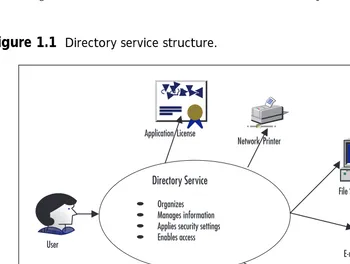
“What exactly is a directory service?” you ask. A directory is a place to store interesting (and sometimes not-so-interesting) information (Figure 1.1). A directory service includes both the entire directory and the method of storing it on the network so that it is available to any client or server.
Address
[image:42.612.94.444.339.603.2]Hostname
The type of information that is stored in a directory falls into three basic categories:
Resources Resources are the items attached to the network and made available to users. A resource can be a server’s hard drive, an IP address, an application, a fax modem, a scanner, a printer, or any “thing” that can be used by a client workstation.
Services A service is a function on the network that makes resources shareable. Most services are simply network applications. These two cate-gories are typically related. For most services, there is an analogous resource, and for most resources, there is an analogous service. Sometimes, however, a resource or a service stands alone.
Accounts The final category in a directory is an account. An account is usually a logon ID and associated password used for access to the network. It is used to grant the right to use a service or a resource.
Now that we know what a directory service is, we now need to find out how the Active Directory fits into the picture. Active Directory offers a nearly ideal set of directory characteristics so that a single directory and logon is available to all users. It also allows administration to be centralized or distributed according to requirements. The directory and its inherent security can be extended and scaled from small to large enterprises. Simply put, the Active Directory allows your users to find the resources they need on the network, while simultaneously facilitating administration, flexibility, and scalability.
Why Should I Use the Active Directory?
At first, it can be difficult to see the need for a directory service when, on first inspection, your current infrastructure suffices. This is abetted by the fact that many IT professionals live by the tried and tested maxim “if it ain’t broke, don’t fix it.” Active Directory should only be implemented if it meets well-defined business requirements, and if it satisfies carefully thought-out tech-nical considerations. Once it is implemented, though, you will wonder how you ever lived without it. Some of the advantages of Active Directory include:
Inherent scalability Active Directory has been designed to provide reliable services that scale from the small office to the multinational corporation. Multiple indexes of the directory provide swift information retrieval even in large distributed environments.
Enhanced security Active Directory integrates with a number of security mechanisms. It includes support for Kerberos, Secure Sockets Layer (SSL), smart cards, and X.509 certificates.
name-space. This also implies that Active Directory can be easily integrated into an Internet or intranet environment.
Extensibility Active Directory provides a host of built-in functionality, including an inherent extensibility supplied through a definable schema and the Active Directory Services Interface (ADSI). Active Directory also provides tools for synchronizing with other directory services and managing identity information stored in multiple directory services.
Ease of administration Active Directory acts as publishing service for resources, allowing for centralized administration. The hierarchical direc-tory structure simplifies administrative tasks and allows for the delegation of authority.
Inherent flexibility and scalability provides almost limitless applications for Active Directory, whether it is as the backbone of your distributed secu-rity environment or as a framework for client management and support. With the adoption of Active Directory by software vendors, the benefits of the Windows 2000 directory services will not only be available to the sup-porting infrastructure, but to applications themselves.
Change and Configuration Management
A great deal of attention has been focused on the cost of owning computing platforms; in particular, client workstations. Microsoft has aggressively addressed this issue by providing a series of technologies for Windows 2000 that support change and configuration management (Figure 1.2). The term
change and configuration management encompasses all of the corrective,
con-figurative, and preventative tasks that an Administrator must perform to keep his user base productive, including the deployment of software to the desktop. As is typical in the computing world, fancy multibarreled words can be boiled down to very basic principles: Change and configuration manage-ment is quite simply desktop and user managemanage-ment and configuration.
After consulting customers and the IT sector, Microsoft realized that its change and configuration management feature set needed to meet at least the following requirements:
■ The ability to store user data centrally.
■ Support of a personalized computing environment; data and
appli-cations should follow the users as they roam around the network.
■ The ability to work on or offline.
■ Reduction of administrative overhead by providing the ability to
centrally configure clients by policy, including software deployment by policy.
■ Self-healing desktops that reduce support call incidents.
■ The ability to add/replace desktops without prestaging.
A number of factors have contributed to the increased costs associated with managing and owning a network and its infrastructure; more
demanding users, increasingly complex products, and a growing user base are just a few of them. Windows 2000 certainly does not break the mold when it comes to developing complex products, but it does provide an infrastructure to lower the cost of owning a Windows-based infrastructure.
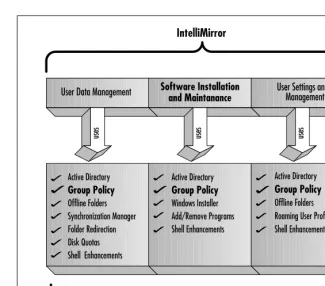
Change and configuration management centers are the continuing requirement for Administrators to manage the change and configuration issues that arise during the support of their user base. Two main concepts that support the new change and configuration management techniques are IntelliMirror and remote operating system installation. IntelliMirror is a set of tools and technologies that increase availability, reduce support costs, and allow the users’ software, settings, and data to follow them. Three pillars support the IntelliMirror technology:
User data management Users can have access to their data whether they are online or offline. This feature leverages the Active Directory, Group Policy, folder redirection, disk quotas, and file synchronization—technolo-gies that increase data availability. In Microsoft parlance: “My data and documents follow me.”
User settings management Allows preferences to follow the user. The user’s personalized settings such as desktop arrangements and software and operating system settings follow the user. This feature includes the Active Directory, Group Policy, roaming profiles, and particular shell enhancements—technologies that increase computer availability. In Microsoft parlance: “My preferences follow me.”
that increase application availability. In Microsoft parlance: “My software follows me.”
NOTE
A word of caution, do not tell friends or family that your software, data, and preferences are following you. They could take it upon themselves to retire you to a room with soft padded walls.
The second concept, remote operating system installation, allows Administrators to build a functional, standardized workstation remotely. Providing a solid and flexible infrastructure for operating system deploy-ment is imperative for a successful operating system installation strategy.
A brief summary of some of the technologies used with IntelliMirror include (Figure 1.3):
Active Directory A scalable directory service that stores information about the network that can be accessed by users and Administrators alike. It can act as both an information source and a centralized administrative tool. Group Policy A technology that enables Administrators to precisely define the configuration of the users’ computing environment. It can sat-isfy such diverse requirements as setting security settings to application deployment. Group Policy can control both user- and machine-based con-figuration settings.
Offline Files and Folders A technology that allows users to access defined files and folders while offline. Entire mapped drives can even be accessed while offline. The Synchronization Manager can be used to synchronize offline resources.
Folder Redirection The ability to point a folder, such as My Documents, to another (network) location.
Distributed File System (DFS) This service can build a single namespace consisting of multiple shares on different servers. DFS provides the ability to load share and increase data availability.
Roaming User Profiles A centrally stored user profile that follows the user around the network.
Windows Installer A standardized, scalable installation service that is cus-tomizable, consistent, and provides diagnosis and self-repair functionality.
Group Policies
At times, it seems that as soon as your back is turned, more clients attach themselves to the network. The growing hunger of businesses to technologi-cally enable their workforce is creating a mounting headache for the
Administrator of today’s networks. Maintaining and enforcing a standardized configuration while allowing the users freedom to work unhindered is a jug-gling act that sometimes requires the Administrator to have too many balls in the air at once. The only way to ensure that the configuration of possibly thousands of workstations is maintained in a consistent manner is by allowing the network to enforce the rules for software deployment and other change and configuration issues. Policy-based management is one answer to Windows 2000 change and configuration management challenges.
Group policies can be used throughout Windows 2000 to define user and computer configuration settings such as scripts, software policies, security settings, application deployment, user settings, and document options. Using group policies, these settings can be controlled centrally and
[image:47.612.100.426.82.369.2]
applied across the business. Group Policy leverages the Active Directory and supports the IntelliMirror technology to control the scope and granu-larity of changes in configuration. By providing a well-managed desktop environment through group policies, Windows 2000 eases the resolution and elimination of change and configuration management issues.
The ability to control and manage the network in a scalable environ-ment ensures that small, medium, and large businesses have the tools to lower the cost of owning PCs and supporting users. The vast array of con-figurable settings ensure that there is a wealth of usage scenarios for Group Policy, with just a few of those possible being:
■ Install the accounting package on all computers in Finance.
■ Run acclogon.cmd when users in the Accounts department log on.
■ Do not save settings on exit for all consultants.
■ Disable the RunAs service for the whole organization except
Administrators.
■ Launch this Web page at user logon.
Windows 2000 Security
Windows 2000 Server serves up a great number of security enhancements compared to what was available in previous incarnations of the operating system. These enhancements include Public Key Infrastructure capabilities, the Kerberos v5 authentication protocol, smart card support, the Encrypted File System (EFS), and IPSec. These new additions to security are neces-sary to protect data as more organizations come to the realization that their information technology infrastructure is business critical. It can be very hard to quantify the benefits of an enhanced security infrastructure—that is, until it’s too late. Legacy security infrastructure and exploitable vulnera-bilities have the potential to leave the doors in your network invitingly ajar, allowing havoc to be wreaked on mission-critical systems.
In today’s ever-changing global environment, the more security that can be provided by a network operating system, the better off the organizations that use it will be. Security for Microsoft’s network operating system has undergone major surgery with the arrival of Windows 2000 Server. What has emerged from the operating theatre is a product family that includes extensible, standards-based, mission-critical security. Some of the new fea-tures include:
■ Multiple methods of authenticating internal and external users
■ Protection of data stored on disk drives using encryption
■ Per-property access control for objects
■ Smart card support for securing user credentials securely
■ Transitive trust relationships between domains
■ Public Key Infrastructure (PKI)
Why the Change?
The change in security in Windows 2000 Server is necessary as more organi-zations use the operating system for mission-critical applications. The more widely an operating system is used in industry, the more likely it is to become a target. The weaknesses of Windows NT came under constant attack as it gained popularity. One group, L0pht Heavy Industries, harshly highlighted the frailties of Windows NT’s password encryption for the LAN Manager hash. Due to the fact that the LAN Manager hash was always sent (by default) when a user logged in, L0pht produced a tool to crack the password. Microsoft made provisions for fixing the problem in a Service Pack release, but in Windows 2000 Server, it has replaced the default authentication with Kerberos v5 for an all-Windows 2000 domain controller based network—a system where pass-words are never transmitted along the network.
Alarming figures based on intrusion detection statistics indicate that the majority of security violations occur internal to the corporate network. Accordingly, emphasis has moved from protecting against “black hat” external hackers to securing the corporate network as a whole.
Differences in Windows 2000 Server Security
One of the enhancements to the security in Windows 2000 Server is the support for two authentication protocols, Kerberos v5 and NTLM (NT LAN Manager). Kerberos v5 is the default authentication method for Windows 2000 domains, and NTLM is provided for backward compatibility with Windows NT 4.0 and earlier operating systems. Transitive trust relation-ships—a feature of Kerberos v5—are established and maintained automati-cally. Transitive trusts rely on Kerberos v5, so they are applicable only to Windows 2000 Server-only domains.
Another security enhancement is the addition of the Encrypted File System (EFS). EFS allows users to encrypt and decrypt files on their
system on the fly. This provides an even higher degree of protection for files than was previously available using NTFS (NT File System) only.
The inclusion of IPSec (IP Security) in Windows 2000 Server enhances security by protecting the integrity and confidentiality of data as it travels over the network. It’s easy to see why IPSec is important; today’s networks consist of not only intranets, but also branch offices, remote access for travelers, and, of course (fade in scary music), the Internet.
available at all levels of the Active Directory. Smart cards are supported in Windows 2000 Server to provide an additional layer of protection for client authentication, as well as providing secure e-mail. The extra protection is derived from adversaries needing not only the smart card, but also the Personal Identification Number (PIN) of the user to activate the card—a fea-ture called two-factor authentication. Windows 2000 Server depends heavily on Public Key Infrastructure (PKI). PKI consists of several components: public keys, private keys, certificates, and certificate authorities (CAs).
Windows 2000 Network Services
The cliché that the world is getting smaller is used and derided on a daily basis, but that does not detract from the fact that it has become a truism. Communications, both data- and voice-based, have reduced the world to a global village. One of the factors that have hastened the arrival of the global village is the drive to well-connected networks. Operating systems such as Windows 2000 Server provide a number of advanced network services that facilitate reliable and scalable communication and connectivity. A few of the network services Windows 2000 offers include:
Certificate Services Several of the services available in the Windows NT 4.0 Option Pack are now included in Windows 2000 Server, including Certificate Services. Certificates are used most commonly to implement Secure Socket Layer communications on Web servers for the transmission of private information—your credit card number, for example. Certificate Services can also be used to make e-mail secure, provide digital signatures, and set up certification authorities that issue and revoke certificates.
DHCP Dynamic Host Control Protocol (DHCP) is certainly not new, but now interfaces with DNS and Active Directory. This feature illustrates an important point: Active Directory integration is pervasive throughout Windows 2000, and you’ll find it in the most unlikely places!
DNS Domain Name Services (DNS) have been included with Windows 2000 as the default namespace provider. Additional benefits include the adoption of Dynamic Domain Name Service (DDNS), allowing clients to update
details in DNS automatically.
Internet Authentication Service Internet Authentication Service (IAS) brings the ability to manage the authentication, accounting, authorization, and auditing of dial-up or virtual private network (VPN) clients. IAS uses the Remote Authentication Dial-In User Service (RADIUS). Setting up a VPN will allow you to provide secure network connections to users over the Internet, and IAS is a service used to manage these types of connections.
share an Internet connection with a small network with a service that pro-vides network address translation (NAT), addressing, and name resolution for other computers on the network.
Internet Information Services 5.0 The newest version of Microsoft’s Web services is much like IIS 4.0, but has a truckload of new features. These include support for Web Distributed Authoring and Versioning (WebDAV), Web Folders, integrated FrontPage Server Extensions, support for some of the latest Internet standards, FTP Restart, Browser Capabilities Component, Self-Tuning ASP, encoded ASP scripts, process throttling, and the list goes on.
Network Address Translation Network Address Translation (NAT) is a feature that is used on many routers to connect networks using private IP address ranges to the Internet. NAT, as its name implies, translates addresses on IP packets so that devices on the Internet return all packets to the computer or router running NAT. The NAT device then forwards the data to the client that initiated the communication. This service also pro-vides a layer of security, because a device on the Internet can only initiate communications with a host that has a routable IP address. Computers communicating behind a NAT device are much safer from outside attack than systems that have Internet routable IP addresses.
Quality of Service Windows Quality of Service (QoS) allows you to tune how applications are allotted bandwidth. With the increased use of audio and video over networks, it is necessary to ensure that enough bandwidth is available for these appli