Python
E S S E N T I A L R E F E R E N C E
informit.com/devlibrary Developer’s Library
ESSENTIAL REFERENCES FOR PROGRAMMING PROFESSIONALS
Developer’s Librarybooks are designed to provide practicing programmers with unique, high-quality references and tutorials on the programming languages and technologies they use in their daily work.
All books in the Developer’s Libraryare written by expert technology practitioners who are especially skilled at organizing and presenting information in a way that’s useful for other programmers.
Key titles include some of the best, most widely acclaimed books within their topic areas:
PHP and MySQL Web Development Luke Welling & Laura Thomson ISBN 978-0-672-32916-6 MySQL
Paul DuBois
ISBN-13: 978-0-672-32938-8 Linux Kernel Development Robert Love
ISBN-13: 978-0-672-32946-3
Python Essential Reference David Beazley
ISBN-13: 978-0-672-32862-6 Programming in Objective-C Stephen G. Kochan
ISBN-13: 978-0-321-56615-7 PostgreSQL
Korry Douglas
ISBN-13: 978-0-672-33015-5
Python
E S S E N T I A L R E F E R E N C E
David M. Beazley
Fourth Edition
Upper Saddle River, NJ •Boston•Indianapolis•San Francisco New York •Toronto •Montreal•London•Munich•Paris •Madrid
All rights reserved. No part of this book shall be reproduced, stored in a retrieval system, or transmitted by any means, electronic, mechani-cal, photocopying, recording, or otherwise, without written permission from the publisher. No patent liability is assumed with respect to the use of the information contained herein. Although every precaution has been taken in the preparation of this book, the publisher and author assume no responsibility for errors or omissions. Nor is any liability assumed for damages resulting from the use of the informa-tion contained herein.
ISBN-13: 978-0-672-32978-4 ISBN-10: 0-672-32978-6
Printed in the United States of America First Printing June 2009
Library of Congress Cataloging-in-Publication data is on file.
Trademarks
All terms mentioned in this book that are known to be trademarks or service marks have been appropriately capitalized. Addison-Wesley cannot attest to the accuracy of this information. Use of a term in this book should not be regarded as affecting the validity of any trade-mark or service trade-mark.
Warning and Disclaimer
Every effort has been made to make this book as complete and as accurate as possible, but no warranty or fitness is implied. The infor-mation provided is on an “as is” basis. The author and the publisher shall have neither liability nor responsibility to any person or entity with respect to any loss or damages arising from the information con-tained in this book.
Bulk Sales
Addison-Wesley offers excellent discounts on this book when ordered in quantity for bulk purchases or special sales. For more information, please contact
U.S. Corporate and Government Sales
1-800-382-3419
For sales outside of the U.S., please contact
International Sales
To register this product and gain access to bonus content, go to www.informit.com/register to sign in and enter the ISBN. After you register the product, a link to the additional content will be listed on your Account page, under Registered Products.
❖
For Paula,Thomas., and his brother on the way.
Part I: The Python Language
1 A Tutorial Introduction 5
2 Lexical Conventions and Syntax 25
3 Types and Objects 33
4 Operators and Expressions 65
5 Program Structure and Control Flow 81
6 Functions and Functional Programming 93
7 Classes and Object-Oriented Programming 117
8 Modules, Packages, and Distribution 143
9 Input and Output 157
10 Execution Environment 173
11 Testing, Debugging, Profiling, and Tuning 181
Part II: The Python Library
12 Built-In Functions 201
13 Python Runtime Services 219
14 Mathematics 243
15 Data Structures, Algorithms, and Code Simplification 257
16 String and Text Handling 277
17 Python Database Access 297
18 File and Directory Handling 313
19 Operating System Services 331
20 Threads and Concurrency 413
21 Network Programming and Sockets 449
22 Internet Application Programming 497
23 Web Programming 531
24 Internet Data Handling and Encoding 545
25 Miscellaneous Library Modules 585
Part III: Extending and Embedding
26 Extending and Embedding Python 591
Appendix: Python 3 621
Table of Contents
Introduction 1
I: The Python Language
1 A Tutorial Introduction 5
Running Python 5
Variables and Arithmetic Expressions 7
Conditionals 9
File Input and Output 10
Strings 11
Lists 12
Tuples 14
Sets 15
Dictionaries 16
Iteration and Looping 17
Functions 18
Generators 19
Coroutines 20
Objects and Classes 21
Exceptions 22
Modules 23
Getting Help 24
2 Lexical Conventions and Syntax 25
Line Structure and Indentation 25
Identifiers and Reserved Words 26
Numeric Literals 26
String Literals 27
Containers 29
Operators, Delimiters, and Special Symbols 30
Documentation Strings 30
Decorators 30
Source Code Encoding 31
3 Types and Objects 33
Terminology 33
Object Identity and Type 33
Reference Counting and Garbage Collection 34
First-Class Objects 36
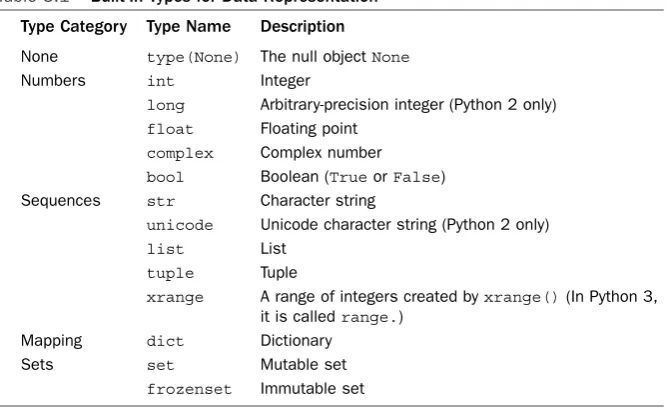
Built-in Types for Representing Data 37
The None Type 38
Numeric Types 38
Sequence Types 39
Mapping Types 44
Set Types 46
Built-in Types for Representing Program Structure 47
Callable Types 47
Classes, Types, and Instances 50
Modules 50
Built-in Types for Interpreter Internals 51
Code Objects 51
Frame Objects 52
Traceback Objects 52
Generator Objects 53
Slice Objects 53
Ellipsis Object 54
Object Behavior and Special Methods 54
Object Creation and Destruction 54
Object String Representation 55
Object Comparison and Ordering 56
Type Checking 57
Attribute Access 57
Attribute Wrapping and Descriptors 58
Sequence and Mapping Methods 58
Iteration 59
Mathematical Operations 60
Callable Interface 62
Context Management Protocol 62
Object Inspection and dir() 63
4 Operators and Expressions 65
Operations on Numbers 65
Operations on Sequences 67
String Formatting 70
Advanced String Formatting 72
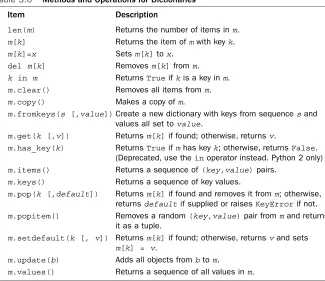
Operations on Dictionaries 74
Operations on Sets 75
ix
Contents
The Attribute (.) Operator 76
The Function Call () Operator 76
Conversion Functions 76
Boolean Expressions and Truth Values 77
Object Equality and Identity 78
Order of Evaluation 78
Conditional Expressions 79
5 Program Structure and Control Flow 81
Program Structure and Execution 81
Conditional Execution 81
Loops and Iteration 82
Exceptions 84
Built-in Exceptions 86
Defining New Exceptions 88
Context Managers and the with Statement 89
Assertions and _ _debug_ _ 91
6 Functions and Functional Programming 93
Functions 93
Parameter Passing and Return Values 95
Scoping Rules 96
Functions as Objects and Closures 98
Decorators 101
Generators and yield 102
Coroutines and yield Expressions 104
Using Generators and Coroutines 106
List Comprehensions 108
Generator Expressions 109
Declarative Programming 110
The lambda Operator 112
Recursion 112
Documentation Strings 113
Function Attributes 114
eval(),exec(), and compile() 115
7 Classes and Object-Oriented Programming 117
TheclassStatement 117 Class Instances 118
Scoping Rules 118
Polymorphism Dynamic Binding and Duck Typing 122
Static Methods and Class Methods 123
Properties 124
Descriptors 126
Data Encapsulation and Private Attributes 127
Object Memory Management 128
Object Representation and Attribute Binding 131
_ _slots_ _ 132 Operator Overloading 133
Types and Class Membership Tests 134
Abstract Base Classes 136
Metaclasses 138
Class Decorators 141
8 Modules, Packages, and Distribution 143
Modules and the import Statement 143
Importing Selected Symbols from a Module 145
Execution as the Main Program 146
The Module Search Path 147
Module Loading and Compilation 147
Module Reloading and Unloading 149
Packages 149
Distributing Python Programs and Libraries 152
Installing Third-Party Libraries 154
9 Input and Output 157
Reading Command-Line Options 157
Environment Variables 158
Files and File Objects 158
Standard Input, Output, and Error 161
TheprintStatement 162 Theprint()Function 163
Variable Interpolation in Text Output 163
Generating Output 164
Unicode String Handling 165
Unicode I/O 167
Unicode Data Encodings 168
Unicode Character Properties 170
10 Execution Environment 173
Interpreter Options and Environment 173
Interactive Sessions 175
Launching Python Applications 176
Site Configuration Files 177
Per-user Site Packages 177
Enabling Future Features 178
Program Termination 179
11 Testing, Debugging, Profiling, and Tuning 181
Documentation Strings and the doctest Module 181
Unit Testing and the unittest Module 183
The Python Debugger and the pdb Module 186
Debugger Commands 187
Debugging from the Command Line 189
Configuring the Debugger 190
Program Profiling 190
Tuning and Optimization 191
Making Timing Measurements 191
Making Memory Measurements 192
Disassembly 193
Tuning Strategies 194
II: The Python Library 199
12 Built-In Functions and Exceptions 201
Built-in Functions and Types 201
Built-In Exceptions 212
Exception Base Classes 212
Exception Instances 212
Predefined Exception Classes 213 Built-In Warnings 216
future_builtins 217
13 Python Runtime Services 219
atexit 219
copy 219
Notes 220
xi
gc 220
Notes 222 inspect 222
marshal 226
Notes 226
pickle 226
Notes 229
sys 229
Variables 229
Functions 233 traceback 235
types 237
Notes 237
warnings 238
Notes 239
weakref 240
Example 242
Notes 242
14 Mathematics 243
decimal 243
Decimal Objects 244
Context Objects 244
Functions and Constants 247
Examples 248
Notes 249 fractions 250
math 251
Notes 252
numbers 252
Notes 253 random 254
Seeding and Initialization 254
Random Integers 254
Random Sequences 254
Real-Valued Random Distributions 255
15 Data Structures, Algorithms, and Code Simplification 257
abc 257
array 259
Notes 261
bisect 261
collections 262
deque and defaultdict 262
Named Tuples 263
Abstract Base Classes 265 contextlib 267
functools 268
heapq 269
itertools 270
Examples 273 operator 273
16 String and Text Handling 277
codecs 277
Low-Level codecs Interface 277
I/O-Related Functions 279
Useful Constants 279
Standard Encodings 280
Notes 280
re 281
Pattern Syntax 281
Functions 283
Regular Expression Objects 284
Match Objects 285
Example 286
Notes 287 string 287
Constants 287
Formatter Objects 288
Template Strings 289
Utility Functions 290 struct 290
Packing and Unpacking Functions 290
Struct Objects 291
xiii
Format Codes 291
Notes 292 unicodedata 293
17 Python Database Access 297
Relational Database API Specification 297
Connections 297
Cursors 298
Forming Queries 300
Type Objects 301
Error Handling 302
Multithreading 302
Mapping Results into Dictionaries 303
Database API Extensions 303
sqlite3 Module 303
Module-Level Functions 304
Connection Objects 305
Cursors and Basic Operations 308 DBM-Style Database Modules 310
shelve Module 311
18 File and Directory Handling 313
bz2 313
filecmp 314
fnmatch 316
Examples 316 glob 317
Example 317
gzip 317
Notes 317
shutil 318
tarfile 319
Exceptions 322
Example 322 tempfile 323
zipfile 324
19 Operating System Services 331
commands 331
Notes 332
configParser, Configparser 332
The ConfigParser Class 332
Example 334
Notes 336
datetime 336
date Objects 336
time Objects 338
datetime objects 339
timedelta objects 340
Mathematical Operations Involving Dates 341
tzinfo Objects 342
Date and Time Parsing 343 errno 343
POSIX Error Codes 344
Windows Error Codes 346 fcntl 347
Example 348
Notes 349
io 349
Base I/O Interface 349
Raw I/O 350
Buffered Binary I/O 351
Text I/O 353
Theopen()Function 354 Abstract Base Classes 354
logging 355
Logging Levels 355
Basic Configuration 355
Logger Objects 356
Handler Objects 362
Message Formatting 364
Miscellaneous Utility Functions 366
Logging Configuration 366
Performance Considerations 369
Notes 369
xv
mmap 369
Notes 372 msvcrt 372
optparse 374
Example 377
Notes 378
os 378
Process Environment 379
File Creation and File Descriptors 381
Files and Directories 386
Process Management 390
System Configuration 395
Exceptions 396
os.path 396
signal 399
Example 401
Notes 401 subprocess 402
Examples 404
Notes 404
time 405
Notes 407
winreg 408
Notes 411
20 Threads and Concurrency 413
Basic Concepts 413
Concurrent Programming and Python 414
multiprocessing 415
Processes 415
Interprocess Communication 417
Process Pools 424
Shared Data and Synchronization 426
Managed Objects 428
Connections 433
Miscellaneous Utility Functions 434
General Advice on Multiprocessing 435
threading 436
Thread Objects 436
Lock Objects 438
RLock 438
Semaphore and Bounded Semaphore 439
Events 440
Condition Variables 441
Working with Locks 442
Thread Termination and Suspension 443
Utility Functions 443
The Global Interpreter Lock 444
Programming with Threads 444 queue, Queue 444
Queue Example with Threads 445
Coroutines and Microthreading 446
21 Network Programming and Sockets 449
Network Programming Basics 449
asynchat 452
asyncore 455
Example 457
select 459
Advanced Module Features 460
Advanced Asynchronous I/O Example 460
When to Consider Asynchronous Networking 467
socket 469
Address Families 470
Socket Types 470
Addressing 471
Functions 473
Exceptions 485
Example 485
Notes 486 ssl 486
Examples 489 SocketServer 489
Handlers 490
Servers 491
Defining Customized Servers 492
Customization of Application Servers 494
xvii
22 Internet Application Programming 497
ftplib 497
Example 500
http Package 500
http.client (httplib) 502
http.server (BaseHTTPServer, CGIHTTPServer, SimpleHTTPServer) 506
http.cookies (Cookie) 511
http.cookiejar (cookielib) 513 smtplib 513
Example 514
urllib Package 514
urllib.request (urllib2) 515
urllib.response 520
urllib.parse 520
urllib.error 523
urllib.robotparser (robotparser) 523
Notes 524
xmlrpc Package 524
xmlrpc.client (xmlrpclib) 524
xmlrpc.server (SimpleXMLRPCServer, DocXMLRPCServer) 527
23 Web Programming 531
cgi 533
CGI Programming Advice 537
Notes 538
cgitb 539
wsgiref 540
The WSGI Specification 540
wsgiref Package 542 webbrowser 544
24 Internet Data Handling and Encoding 545
base64 545
binascii 547
csv 548
Dialects 551
email Package 552
Parsing Email 552
Composing Email 555
Notes 558 hashlib 559
hmac 559
Example 560
HTMLParser 561
Example 562
json 563
mimetypes 566
quopri 567
xml Package 568
XML Example Document 569
xml.dom.minidom 570
xml.etree.ElementTree 573
xml.sax 580
xml.sax.saxutils 583
25 Miscellaneous Library Modules 585
Python Services 585
String Processing 586
Operating System Modules 586
Network 587
Internet Data Handling 587
Internationalization 587
Multimedia Services 588
Miscellaneous 588
III: Extending and Embedding 589
26 Extending and Embedding Python 591
Extension Modules 591
An Extension Module Prototype 593
Naming Extension Modules 595
Compiling and Packaging Extensions 596
Type Conversion from Python to C 597
Type Conversion from C to Python 602
xix
Adding Values to a Module 604
Error Handling 605
Reference Counting 607
Threads 607
Embedding the Python Interpreter 608
An Embedding Template 608
Compilation and Linking 608
Basic Interpreter Operation and Setup 608
Accessing Python from C 610
Converting Python Objects to C 611
ctypes 612
Loading Shared Libraries 612
Foreign Functions 612
Datatypes 613
Calling Foreign Functions 615
Alternative Type Construction Methods 616
Utility Functions 617
Example 618
Advanced Extending and Embedding 619
Jython and IronPython 620
Appendix Python 3 621
Who Should Be Using Python 3? 621
New Language Features 622
Source Code Encoding and Identifiers 622
Set Literals 622
Set and Dictionary Comprehensions 623
Extended Iterable Unpacking 623
Nonlocal Variables 624
Function Annotations 624
Keyword-Only Arguments 625
Ellipsis as an Expression 626
Chained Exceptions 626
Improved super() 627
Advanced Metaclasses 627
Common Pitfalls 629
Text Versus Bytes 629
print()andexec()Functions 631 Use of Iterators and Views 632
Integers and Integer Division 633
Comparisons 633
Iterators and Generators 633
File Names, Arguments, and Environment Variables 633
Library Reorganization 634
Absolute Imports 634 Code Migration and 2to3 634
Porting Code to Python 2.6 634
Providing Test Coverage 635
Using the 2to3 Tool 635
A Practical Porting Strategy 637
Simultaneous Python 2 and Python 3 Support 638
Participate 638
Index 639
xxi
Python community since 1996. He is probably best known for his work on SWIG, a popular software package for integrating C/C++ programs with other programming languages, including Python, Perl, Ruby,Tcl, and Java. He has also written a number of other programming tools, including PLY, a Python implementation of lex and yacc. Dave spent seven years working in the Theoretical Physics Division at Los Alamos National Laboratory, where he helped pioneer the use of Python with massively parallel supercomputers. After that, Dave went off to work as an evil professor, where he enjoyed tormenting college students with a variety of insane programming projects. However, he has since seen the error of his ways and is now working as an independent software developer, consultant, Python trainer, and occasional jazz musician living in Chicago. He can be contacted at http://www.dabeaz.com.
About the Technical Editor
Noah Gift is the co-author of Python For UNIX and Linux System Administration (O’Reilly) and is also working on Google App Engine In Action(Manning). He is an author, speaker, consultant, and community leader, writing for publications such as IBM developerWorks,Red Hat Magazine, O’Reilly, and MacTech. His consulting company’s website is http://www.giftcs.com, and much of his writing can be found at http://noahgift.com.You can also follow Noah on Twitter.
Acknowledgments
This book would not be possible without the support of many people. First and fore-most, I’d like to thank Noah Gift for jumping into the project and providing his amaz-ing feedback on the fourth edition. Kurt Grandis also provided useful comments for many chapters. I’d also like to acknowledge past technical reviewers Timothy
value your opinion and want to know what we’re doing right, what we could do better, what areas you’d like to see us publish in, and any other words of wisdom you’re willing to pass our way.
You can email or write me directly to let me know what you did or didn’t like about this book—as well as what we can do to make our books stronger.
Please note that I cannot help you with technical problems related to the topic of this book, and that due to the high volume of mail I receive, I might not be able to reply to every message.
When you write, please be sure to include this book’s title and author as well as your name and phone or email address. I will carefully review your comments and share them with the author and editors who worked on the book.
Email: [email protected] Mail: Mark Taber
Associate Publisher Pearson Education 800 East 96th Street Indianapolis, IN 46240 USA
Reader Services
Introduction
T
his book is intended to be a concise reference to the Python programming language. Although an experienced programmer will probably be able to learn Python from this book, it’s not intended to be an extended tutorial or a treatise on how to program. Rather, the goal is to present the core Python language, and the most essential parts of the Python library in a manner that’s accurate and concise.This book assumes that the reader has prior programming experience with Python or another language such as C or Java. In addition, a general familiarity with systems programming topics (for example, basic operating system concepts and network programming) may be useful in under-standing certain parts of the library reference.Python is freely available for download at http://www.python.org.Versions are avail-able for almost every operating system, including UNIX,Windows, and Macintosh. In addition, the Python website includes links to documentation, how-to guides, and a wide assortment of third-party software.
This edition of Python Essential Referencecomes at a pivotal time in Python’s evolu-tion. Python 2.6 and Python 3.0 are being released almost simultaneously.Yet, Python 3 is a release that breaks backwards compatibility with prior Python versions. As an author and programmer, I’m faced with a dilemma: do I simply jump forward to Python 3.0 or do I build upon the Python 2.x releases that are more familiar to most programmers?
Years ago, as a C programmer I used to treat certain books as the ultimate authority on what programming language features should be used. For example, if you were using something that wasn’t documented in the K&R book, it probably wasn’t going to be portable and should be approached with caution.This approach served me very well as a programmer and it’s the approach I have decided to take in this edition of the Essential Reference. Namely, I have chosen to omit features of Python 2 that have been removed from Python 3. Likewise, I don’t focus on features of Python 3 that have not been back-ported (although such features are still covered in an appendix). As a result, I hope this book can be a useful companion for Python programmers, regardless of what Python version is being used.
The fourth edition of Python Essential Referencealso includes some of the most excit-ing changes since its initial publication nearly ten years ago. Much of Python’s develop-ment throughout the last few years has focused on new programming language fea-tures—especially related to functional and meta programming. As a result, the chapters on functions and object-oriented programming have been greatly expanded to cover topics such as generators, iterators, coroutines, decorators, and metaclasses.The library chapters have been updated to focus on more modern modules. Examples and code fragments have also been updated throughout the book. I think most programmers will be quite pleased with the expanded coverage.
to include outside reference material.This is especially true for low-level system and networking modules in which effective use of a module normally relies on a myriad of options listed in manuals and outside references. In addition, in order to produce a more concise reference, a number of deprecated and relatively obscure library modules have been omitted.
In writing this book, it has been my goal to produce a reference containing virtually everything I have needed to use Python and its large collection of modules. Although this is by no means a gentle introduction to the Python language, I hope that you find the contents of this book to be a useful addition to your programming reference library for many years to come. I welcome your comments.
I
The Python Language
1 A Tutorial Introduction
2 Lexical Conventions and Syntax
3 Types and Objects
4 Operators and Expressions
5 Program Structure and Control Flow
6 Functions and Functional Programming
7 Classes and Object-Oriented Programming
8 Modules, Packages, and Distribution
9 Input and Output
10 Execution Environment
1
A Tutorial Introduction
T
his chapter provides a quick introduction to Python.The goal is to illustrate most of Python’s essential features without getting too bogged down in special rules or details. To do this, the chapter briefly covers basic concepts such as variables, expressions, con-trol flow, functions, generators, classes, and input/output.This chapter is not intended to provide comprehensive coverage. However, experienced programmers should be able to extrapolate from the material in this chapter to create more advanced programs. Beginners are encouraged to try a few examples to get a feel for the language. If you are new to Python and using Python 3, you might want to follow this chapter using Python 2.6 instead.Virtually all the major concepts apply to both versions, but there are a small number of critical syntax changes in Python 3—mostly related to printing and I/O—that might break many of the examples shown in this section. Please refer to Appendix A, “Python 3,” for further details.Running Python
Python programs are executed by an interpreter. Usually, the interpreter is started by simply typing pythoninto a command shell. However, there are many different imple-mentations of the interpreter and Python development environments (for example, Jython, IronPython, IDLE, ActivePython,Wing IDE, pydev, etc.), so you should consult the documentation for startup details.When the interpreter starts, a prompt appears at which you can start typing programs into a simple read-evaluation loop. For example, in the following output, the interpreter displays its copyright message and presents the user with the >>>prompt, at which the user types the familiar “Hello World” command:
Python 2.6rc2 (r26rc2:66504, Sep 19 2008, 08:50:24) [GCC 4.0.1 (Apple Inc. build 5465)] on darwin
Type "help", "copyright", "credits" or "license" for more information. >>> print "Hello World"
Note
If you try the preceding example and it fails with a SyntaxError, you are probably using Python 3. If this is the case, you can continue to follow along with this chapter, but be aware that the printstatement turned into a function in Python 3. Simply add parentheses around the items to be printed in the examples that follow. For instance:
>>> print("Hello World") Hello World
>>>
Putting parentheses around the item to be printed also works in Python 2 as long as you are printing just a single item. However, it’s not a syntax that you commonly see in existing Python code. In later chapters, this syntax is sometimes used in examples in which the primary focus is a feature not directly related to printing, but where the exam-ple is supposed to work with both Python 2 and 3.
Python’s interactive mode is one of its most useful features. In the interactive shell, you can type any valid statement or sequence of statements and immediately view the results. Many people, including the author, even use interactive Python as their desktop calculator. For example:
>>> 6000 + 4523.50 + 134.12
10657.620000000001 >>> _ + 8192.32
18849.940000000002 >>>
When you use Python interactively, the special variable _holds the result of the last
operation.This can be useful if you want to save or use the result of the last operation in subsequent statements. However, it’s important to stress that this variable is only defined when working interactively.
If you want to create a program that you can run repeatedly, put statements in a file such as the following:
# helloworld.py print "Hello World"
Python source files are ordinary text files and normally have a .pysuffix.The # charac-ter denotes a comment that extends to the end of the line.
To execute the helloworld.pyfile, you provide the filename to the interpreter as follows:
% python helloworld.py
Hello World %
On Windows, Python programs can be started by double-clicking a .pyfile or typing the name of the program into the Run command on the Windows Start menu.This launches the interpreter and runs the program in a console window. However, be aware that the console window will disappear immediately after the program completes its execution (often before you can read its output). For debugging, it is better to run the program within a Python development tool such as IDLE.
On UNIX, you can use #!on the first line of the program, like this:
7
Variables and Arithmetic Expressions
The interpreter runs statements until it reaches the end of the input file. If it’s running interactively, you can exit the interpreter by typing the EOF (end of file) character or by selecting Exit from pull-down menu of a Python IDE. On UNIX, EOF is Ctrl+D; on Windows, it’s Ctrl+Z. A program can request to exit by raising the SystemExit
exception.
>>> raise SystemExit
Variables and Arithmetic Expressions
The program in Listing 1.1 shows the use of variables and expressions by performing a simple compound-interest calculation.
Listing 1.1 Simple Compound-Interest Calculation
principal = 1000 # Initial amount rate = 0.05 # Interest rate numyears = 5 # Number of years year = 1
while year <= numyears:
principal = principal * (1 + rate)
print year, principal # Reminder: print(year, principal) in Python 3 year += 1
The output of this program is the following table:
1 1050.0 2 1102.5 3 1157.625 4 1215.50625 5 1276.2815625
Python is a dynamically typed language where variable names are bound to different values, possibly of varying types, during program execution.The assignment operator simply creates an association between a name and a value. Although each value has an associated type such as an integer or string, variable names are untyped and can be made to refer to any type of data during execution.This is different from C, for exam-ple, in which a name represents a fixed type, size, and location in memory into which a value is stored.The dynamic behavior of Python can be seen in Listing 1.1 with the
principalvariable. Initially, it’s assigned to an integer value. However, later in the pro-gram it’s reassigned as follows:
principal = principal * (1 + rate)
This statement evaluates the expression and reassociates the name principalwith the result. Although the original value of principalwas an integer 1000, the new value is now a floating-point number (rateis defined as a float, so the value of the above expression is also a float).Thus, the apparent “type” of principaldynamically changes from an integer to a float in the middle of the program. However, to be precise, it’s not the type of principalthat has changed, but rather the value to which the principal
name refers.
A newline terminates each statement. However, you can use a semicolon to separate statements on the same line, as shown here:
Thewhilestatement tests the conditional expression that immediately follows. If the tested statement is true, the body of the whilestatement executes.The condition is then retested and the body executed again until the condition becomes false. Because the body of the loop is denoted by indentation, the three statements following whilein Listing 1.1 execute on each iteration. Python doesn’t specify the amount of required indentation, as long as it’s consistent within a block. However, it is most common (and generally recommended) to use four spaces per indentation level.
One problem with the program in Listing 1.1 is that the output isn’t very pretty.To make it better, you could right-align the columns and limit the precision of principal
to two digits.There are several ways to achieve this formatting.The most widely used approach is to use the string formatting operator (%) like this:
print "%3d %0.2f" % (year, principal)
print("%3d %0.2f" % (year, principal)) # Python 3
Now the output of the program looks like this:
1 1050.00 2 1102.50 3 1157.63 4 1215.51 5 1276.28
Format strings contain ordinary text and special formatting-character sequences such as
"%d","%s", and "%f".These sequences specify the formatting of a particular type of data such as an integer, string, or floating-point number, respectively.The special-character sequences can also contain modifiers that specify a width and precision. For example,"%3d"formats an integer right-aligned in a column of width 3, and "%0.2f"
formats a floating-point number so that only two digits appear after the decimal point. The behavior of format strings is almost identical to the C printf()function and is described in detail in Chapter 4, “Operators and Expressions.”
A more modern approach to string formatting is to format each part individually using the format()function. For example:
print format(year,"3d"),format(principal,"0.2f")
print(format(year,"3d"),format(principal,"0.2f")) # Python 3
format()uses format specifiers that are similar to those used with the traditional string formatting operator (%). For example,"3d"formats an integer right-aligned in a col-umn of width 3, and "0.2f"formats a float-point number to have two digits of accura-cy. Strings also have a format()method that can be used to format many values at once. For example:
print "{0:3d} {1:0.2f}".format(year,principal)
print("{0:3d} {1:0.2f}".format(year,principal)) # Python 3
9
Conditionals
Conditionals
Theifandelsestatements can perform simple tests. Here’s an example:
if a < b:
print "Computer says Yes" else:
print "Computer says No"
The bodies of the ifandelseclauses are denoted by indentation.The elseclause is optional.
To create an empty clause, use the passstatement, as follows:
if a < b:
pass # Do nothing else:
print "Computer says No"
You can form Boolean expressions by using the or,and, and notkeywords:
if product == "game" and type == "pirate memory" \ and not (age < 4 or age > 8): print "I'll take it!"
Note
Writing complex test cases commonly results in statements that involve an annoyingly long line of code. To improve readability, you can continue any statement to the next line by using a backslash (\) at the end of a line as shown. If you do this, the normal inden-tation rules don’t apply to the next line, so you are free to format the continued lines as you wish.
Python does not have a special switchorcasestatement for testing values.To handle multiple-test cases, use the elifstatement, like this:
if suffix == ".htm": content = "text/html" elif suffix == ".jpg":
content = "image/jpeg" elif suffix == ".png":
content = "image/png" else:
raise RuntimeError("Unknown content type")
To denote truth values, use the Boolean values TrueandFalse. Here’s an example:
if 'spam' in s: has_spam = True else:
has_spam = False
All relational operators such as <and>return TrueorFalseas results.The in opera-tor used in this example is commonly used to check whether a value is contained inside of another object such as a string, list, or dictionary. It also returns TrueorFalse, so the preceding example could be shortened to this:
File Input and Output
The following program opens a file and reads its contents line by line:
f = open("foo.txt") # Returns a file object
line = f.readline() # Invokes readline() method on file while line:
print line, # trailing ',' omits newline character # print(line,end='') # Use in Python 3
line = f.readline() f.close()
Theopen()function returns a new file object. By invoking methods on this object, you can perform various file operations.The readline()method reads a single line of input, including the terminating newline.The empty string is returned at the end of the file.
In the example, the program is simply looping over all the lines in the file foo.txt. Whenever a program loops over a collection of data like this (for instance input lines, numbers, strings, etc.), it is commonly known as iteration. Because iteration is such a com-mon operation, Python provides a dedicated statement,for, that is used to iterate over items. For instance, the same program can be written much more succinctly as follows:
for line in open("foo.txt"): print line,
To make the output of a program go to a file, you can supply a file to the print state-ment using >>, as shown in the following example:
f = open("out","w") # Open file for writing while year <= numyears:
principal = principal * (1 + rate) print >>f,"%3d %0.2f" % (year,principal) year += 1
f.close()
The>>syntax only works in Python 2. If you are using Python 3, change the print
statement to the following:
print("%3d %0.2f" % (year,principal),file=f)
In addition, file objects support a write()method that can be used to write raw data. For example, the printstatement in the previous example could have been written this way:
f.write("%3d %0.2f\n" % (year,principal))
Although these examples have worked with files, the same techniques apply to the stan-dard output and input streams of the interpreter. For example, if you wanted to read user input interactively, you can read from the file sys.stdin. If you want to write data to the screen, you can write to sys.stdout, which is the same file used to output data produced by the printstatement. For example:
import sys
sys.stdout.write("Enter your name :") name = sys.stdin.readline()
In Python 2, this code can also be shortened to the following:
11
Strings
In Python 3, the raw_input()function is called input(), but it works in exactly the same manner.
Strings
To create string literals, enclose them in single, double, or triple quotes as follows:
a = "Hello World" b = 'Python is groovy' c = """Computer says 'No'"""
The same type of quote used to start a string must be used to terminate it.Triple-quoted strings capture all the text that appears prior to the terminating triple quote, as opposed to single- and double-quoted strings, which must be specified on one logical line.Triple-quoted strings are useful when the contents of a string literal span multiple lines of text such as the following:
print '''Content-type: text/html
<h1> Hello World </h1>
Click <a href="http://www.python.org">here</a>. '''
Strings are stored as sequences of characters indexed by integers, starting at zero.To extract a single character, use the indexing operator s[i]like this:
a = "Hello World"
b = a[4] # b = 'o'
To extract a substring, use the slicing operator s[i:j].This extracts all characters from
swhose index kis in the range i<=k<j. If either index is omitted, the beginning or end of the string is assumed, respectively:
c = a[:5] # c = "Hello" d = a[6:] # d = "World" e = a[3:8] # e = "lo Wo"
Strings are concatenated with the plus (+) operator:
g = a + " This is a test"
Python never implicitly interprets the contents of a string as numerical data (i.e., as in other languages such as Perl or PHP). For example,+always concatenates strings:
x = "37" y = "42"
z = x + y # z = "3742" (String Concatenation)
To perform mathematical calculations, strings first have to be converted into a numeric value using a function such as int()orfloat(). For example:
z = int(x) + int(y) # z = 79 (Integer +)
Non-string values can be converted into a string representation by using the str(),
repr(), or format()function. Here’s an example:
Althoughstr()andrepr()both create strings, their output is usually slightly differ-ent.str()produces the output that you get when you use the printstatement, whereas repr()creates a string that you type into a program to exactly represent the value of an object. For example:
>>> x = 3.4
>>> str(x)
'3.4' >>> repr(x)
'3.3999999999999999' >>>
The inexact representation of 3.4 in the previous example is not a bug in Python. It is an artifact of double-precision floating-point numbers, which by their design can not exactly represent base-10 decimals on the underlying computer hardware.
Theformat()function is used to convert a value to a string with a specific format-ting applied. For example:
>>> format(x,"0.5f")
'3.40000' >>>
Lists
Listsare sequences of arbitrary objects.You create a list by enclosing values in square brackets, as follows:
names = [ "Dave", "Mark", "Ann", "Phil" ]
Lists are indexed by integers, starting with zero. Use the indexing operator to access and modify individual items of the list:
a = names[2] # Returns the third item of the list, "Ann" names[0] = "Jeff" # Changes the first item to "Jeff"
To append new items to the end of a list, use the append()method:
names.append("Paula")
To insert an item into the middle of a list, use the insert()method:
names.insert(2, "Thomas")
You can extract or reassign a portion of a list by using the slicing operator:
b = names[0:2] # Returns [ "Jeff", "Mark" ]
c = names[2:] # Returns [ "Thomas", "Ann", "Phil", "Paula" ] names[1] = 'Jeff' # Replace the 2nd item in names with 'Jeff' names[0:2] = ['Dave','Mark','Jeff'] # Replace the first two items of
# the list with the list on the right.
Use the plus (+) operator to concatenate lists:
a = [1,2,3] + [4,5] # Result is [1,2,3,4,5]
An empty list is created in one of two ways:
13
Lists
Lists can contain any kind of Python object, including other lists, as in the following example:
a = [1,"Dave",3.14, ["Mark", 7, 9, [100,101]], 10]
Items contained in nested lists are accessed by applying more than one indexing opera-tion, as follows:
a[1] # Returns "Dave" a[3][2] # Returns 9 a[3][3][1] # Returns 101
The program in Listing 1.2 illustrates a few more advanced features of lists by reading a list of numbers from a file specified on the command line and outputting the minimum and maximum values.
Listing 1.2 Advanced List Features
import sys # Load the sys module
if len(sys.argv) != 2 # Check number of command line arguments : print "Please supply a filename"
raise SystemExit(1)
f = open(sys.argv[1]) # Filename on the command line lines = f.readlines() # Read all lines into a list f.close()
# Convert all of the input values from strings to floats fvalues = [float(line) for line in lines]
# Print min and max values
print "The minimum value is ", min(fvalues) print "The maximum value is ", max(fvalues)
The first line of this program uses the importstatement to load the sysmodule from the Python library.This module is being loaded in order to obtain command-line argu-ments.
Theopen()function uses a filename that has been supplied as a command-line option and placed in the list sys.argv.The readlines()method reads all the input lines into a list of strings.
The expression [float(line) for line in lines]constructs a new list by looping over all the strings in the list linesand applying the function float()to each element.This particularly powerful method of constructing a list is known as a list com-prehension. Because the lines in a file can also be read using a forloop, the program can be shortened by converting values using a single statement like this:
fvalues = [float(line) for line in open(sys.argv[1])]
Tuples
To create simple data structures, you can pack a collection of values together into a sin-gle object using a tuple.You create a tuple by enclosing a group of values in parentheses like this:
stock = ('GOOG', 100, 490.10) address = ('www.python.org', 80) person = (first_name, last_name, phone)
Python often recognizes that a tuple is intended even if the parentheses are missing:
stock = 'GOOG', 100, 490.10 address = 'www.python.org',80 person = first_name, last_name, phone
For completeness, 0- and 1-element tuples can be defined, but have special syntax:
a = () # 0-tuple (empty tuple)
b = (item,) # 1-tuple (note the trailing comma) c = item, # 1-tuple (note the trailing comma)
The values in a tuple can be extracted by numerical index just like a list. However, it is more common to unpack tuples into a set of variables like this:
name, shares, price = stock host, port = address
first_name, last_name, phone = person
Although tuples support most of the same operations as lists (such as indexing, slicing, and concatenation), the contents of a tuple cannot be modified after creation (that is, you cannot replace, delete, or append new elements to an existing tuple).This reflects the fact that a tuple is best viewed as a single object consisting of several parts, not as a collection of distinct objects to which you might insert or remove items.
Because there is so much overlap between tuples and lists, some programmers are inclined to ignore tuples altogether and simply use lists because they seem to be more flexible. Although this works, it wastes memory if your program is going to create a large number of small lists (that is, each containing fewer than a dozen items).This is because lists slightly overallocate memory to optimize the performance of operations that add new items. Because tuples are immutable, they use a more compact representa-tion where there is no extra space.
Tuples and lists are often used together to represent data. For example, this program shows how you might read a file consisting of different columns of data separated by commas:
# File containing lines of the form "name,shares,price" filename = "portfolio.csv"
portfolio = []
for line in open(filename):
fields = line.split(",") # Split each line into a list
name = fields[0] # Extract and convert individual fields shares = int(fields[1])
price = float(fields[2])
stock = (name,shares,price) # Create a tuple (name, shares, price) portfolio.append(stock) # Append to list of records
15
Sets
looks like a two-dimension array of rows and columns. Each row is represented by a tuple and can be accessed as follows:
>>> portfolio[0]
('GOOG', 100, 490.10) >>> portfolio[1]
('MSFT', 50, 54.23) >>>
Individual items of data can be accessed like this:
>>> portfolio[1][1]
50
>>> portfolio[1][2]
54.23 >>>
Here’s an easy way to loop over all of the records and expand fields into a set of variables:
total = 0.0
for name, shares, price in portfolio: total += shares * price
Sets
Asetis used to contain an unordered collection of objects.To create a set, use the
set()function and supply a sequence of items such as follows:
s = set([3,5,9,10]) # Create a set of numbers
t = set("Hello") # Create a set of unique characters
Unlike lists and tuples, sets are unordered and cannot be indexed by numbers. Moreover, the elements of a set are never duplicated. For example, if you inspect the value of tfrom the preceding code, you get the following:
>>> t
set(['H', 'e', 'l', 'o'])
Notice that only one 'l'appears.
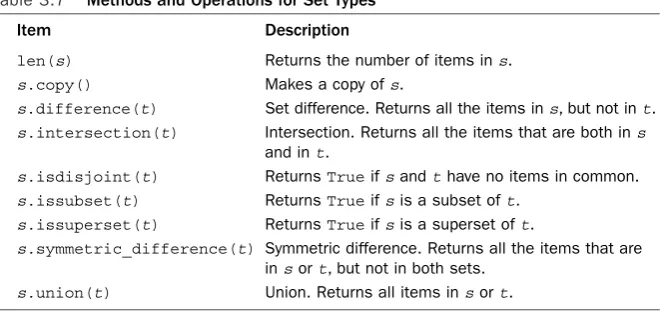
Sets support a standard collection of operations, including union, intersection, differ-ence, and symmetric difference. Here’s an example:
a = t | s # Union of t and s b = t & s # Intersection of t and s
c = t – s # Set difference (items in t, but not in s)
d = t ^ s # Symmetric difference (items in t or s, but not both)
New items can be added to a set using add()orupdate():
t.add('x') # Add a single item s.update([10,37,42]) # Adds multiple items to s
An item can be removed using remove():
Dictionaries
Adictionaryis an associative array or hash table that contains objects indexed by keys. You create a dictionary by enclosing the values in curly braces ({ }), like this:
stock = {
"name" : "GOOG", "shares" : 100, "price" : 490.10 }
To access members of a dictionary, use the key-indexing operator as follows:
name = stock["name"]
value = stock["shares"] * shares["price"]
Inserting or modifying objects works like this:
stock["shares"] = 75
stock["date"] = "June 7, 2007"
Although strings are the most common type of key, you can use many other Python objects, including numbers and tuples. Some objects, including lists and dictionaries, cannot be used as keys because their contents can change.
A dictionary is a useful way to define an object that consists of named fields as shown previously. However, dictionaries are also used as a container for performing fast lookups on unordered data. For example, here’s a dictionary of stock prices:
prices = {
"GOOG" : 490.10, "AAPL" : 123.50, "IBM" : 91.50, "MSFT" : 52.13 }
An empty dictionary is created in one of two ways:
prices = {} # An empty dict prices = dict() # An empty dict
Dictionary membership is tested with the inoperator, as in the following example:
if "SCOX" in prices: p = prices["SCOX"] else:
p = 0.0
This particular sequence of steps can also be performed more compactly as follows:
p = prices.get("SCOX",0.0)
To obtain a list of dictionary keys, convert a dictionary to a list:
syms = list(prices) # syms = ["AAPL", "MSFT", "IBM", "GOOG"]
Use the delstatement to remove an element of a dictionary:
del prices["MSFT"]
17
Iteration and Looping
Iteration and Looping
The most widely used looping construct is the forstatement, which is used to iterate over a collection of items. Iteration is one of Python’s richest features. However, the most common form of iteration is to simply loop over all the members of a sequence such as a string, list, or tuple. Here’s an example:
for n in [1,2,3,4,5,6,7,8,9]:
print "2 to the %d power is %d" % (n, 2**n)
In this example, the variable nwill be assigned successive items from the list
[1,2,3,4,…,9]on each iteration. Because looping over ranges of integers is quite common, the following shortcut is often used for that purpose:
for n in range(1,10):
print "2 to the %d power is %d" % (n, 2**n)
Therange(i,j [,stride])function creates an object that represents a range of inte-gers with values itoj-1. If the starting value is omitted, it’s taken to be zero. An optional stride can also be given as a third argument. Here’s an example:
a = range(5) # a = 0,1,2,3,4 b = range(1,8) # b = 1,2,3,4,5,6,7 c = range(0,14,3) # c = 0,3,6,9,12 d = range(8,1,-1) # d = 8,7,6,5,4,3,2
One caution with range()is that in Python 2, the value it creates is a fully populated list with all of the integer values. For extremely large ranges, this can inadvertently con-sume all available memory.Therefore, in older Python code, you will see programmers using an alternative function xrange(). For example:
for i in xrange(100000000): # i = 0,1,2,...,99999999 statements
The object created by xrange()computes the values it represents on demand when lookups are requested. For this reason, it is the preferred way to represent extremely large ranges of integer values. In Python 3, the xrange()function has been renamed to
range()and the functionality of the old range()function has been removed. Theforstatement is not limited to sequences of integers and can be used to iterate over many kinds of objects including strings, lists, dictionaries, and files. Here’s an example:
a = "Hello World"
# Print out the individual characters in a for c in a:
print c
b = ["Dave","Mark","Ann","Phil"] # Print out the members of a list for name in b:
print name
c = { 'GOOG' : 490.10, 'IBM' : 91.50, 'AAPL' : 123.15 } # Print out all of the members of a dictionary
for key in c: print key, c[key]
for line in f: print line,
Theforloop is one of Python’s most powerful language features because you can cre-ate custom iterator objects and generator functions that supply it with sequences of val-ues. More details about iterators and generators can be found later in this chapter and in Chapter 6, “Functions and Functional Programming.”
Functions
You use the defstatement to create a function, as shown in the following example:
def remainder(a,b):
q = a // b # // is truncating division. r = a - q*b
return r
To invoke a function, simply use the name of the function followed by its arguments enclosed in parentheses, such as result = remainder(37,15).You can use a tuple to return multiple values from a function, as shown here:
def divide(a,b):
q = a // b # If a and b are integers, q is integer r = a - q*b
return (q,r)
When returning multiple values in a tuple, you can easily unpack the result into sepa-rate variables like this:
quotient, remainder = divide(1456,33)
To assign a default value to a function parameter, use assignment:
def connect(hostname,port,timeout=300): # Function body
When default values are given in a function definition, they can be omitted from subse-quent function calls.When omitted, the argument will simply take on the default value. Here’s an example:
connect('www.python.org', 80)
You also can invoke functions by using keyword arguments and supplying the ments in arbitrary order. However, this requires you to know the names of the argu-ments in the function definition. Here’s an example:
connect(port=80,hostname="www.python.org")
When variables are created or assigned inside a function, their scope is local.That is, the variable is only defined inside the body of the function and is destroyed when the func-tion returns.To modify the value of a global variable from inside a funcfunc-tion, use the
globalstatement as follows:
count = 0 ... def foo():
global count
19
Generators
Generators
Instead of returning a single value, a function can generate an entire sequence of results if it uses the yieldstatement. For example:
def countdown(n):
print "Counting down!" while n > 0:
yield n # Generate a value (n) n -= 1
Any function that uses yieldis known as a generator. Calling a generator function cre-ates an object that produces a sequence of results through successive calls to a next()
method (or _ _next_ _()in Python 3). For example:
>>> c = countdown(5)
>>> c.next()
Counting down! 5
>>> c.next()
4
>>> c.next()
3 >>>
Thenext()call makes a generator function run until it reaches the next yield state-ment. At this point, the value passed to yieldis returned by next(), and the function suspends execution.The function resumes execution on the statement following yield
whennext()is called again.This process continues until the function returns.
Normally you would not manually call next()as shown. Instead, you hook it up to aforloop like this:
>>> for i in countdown(5):
... print i,
Counting down! 5 4 3 2 1 >>>
Generators are an extremely powerful way of writing programs based on processing pipelines, streams, or data flow. For example, the following generator function mimics the behavior of the UNIX tail -fcommand that’s commonly used to monitor log files:
# tail a file (like tail -f) import time
def tail(f):
f.seek(0,2) # Move to EOF while True:
line = f.readline() # Try reading a new line of text
if not line: # If nothing, sleep briefly and try again time.sleep(0.1)
continue yield line
Here’s a generator that looks for a specific substring in a sequence of lines:
def grep(lines, searchtext): for line in lines:
Here’s an example of hooking both of these generators together to create a simple pro-cessing pipeline:
# A python implementation of Unix "tail -f | grep python" wwwlog = tail(open("access-log"))
pylines = grep(wwwlog,"python") for line in pylines:
print line,
A subtle aspect of generators is that they are often mixed together with other iterable objects such as lists or files. Specifically, when you write a statement such as for item in s,scould represent a list of items, the lines of a file, the result of a generator func-tion, or any number of other objects that support iteration.The fact that you can just plug different objects in for scan be a powerful tool for creating extensible programs.
Coroutines
Normally, functions operate on a single set of input arguments. However, a function can also be written to operate as a task that processes a sequence of inputs sent to it.This type of function is known as a coroutineand is created by using the yieldstatement as an expression (yield)as shown in this example:
def print_matches(matchtext): print "Looking for", matchtext while True:
line = (yield) # Get a line of text if matchtext in line:
print line
To use this function, you first call it, advance it to the first (yield), and then start sending data to it using send(). For example:
>>> matcher = print_matches("python")
>>> matcher.next() # Advance to the first (yield) Looking for python
>>> matcher.send("Hello World")
>>> matcher.send("python is cool")
python is cool
>>> matcher.send("yow!")
>>> matcher.close() # Done with the matcher function call >>>
A coroutine is suspended until a value is sent to it using send().When this happens, that value is returned by the (yield)expression inside the coroutine and is processed by the statements that follow. Processing continues until the next (yield)expression is encountered—at which point the function suspends.This continues until the coroutine function returns or close()is called on it as shown in the previous example.
Coroutines are useful when writing concurrent programs based on producer-consumer problems where one part of a program is producing data to be consumed by another part of the program. In this model, a coroutine represents a consumer of data. Here is an example of using generators and coroutines together:
# A set of matcher coroutines matchers = [
21
Objects and Classes
# Prep all of the matchers by calling next() for m in matchers: m.next()
# Feed an active log file into all matchers. Note for this to work, # a web server must be actively writing data to the log.
wwwlog = tail(open("access-log")) for line in wwwlog:
for m in matchers:
m.send(line) # Send data into each matcher coroutine
Further details about coroutines can be found in Chapter 6.
Objects and Classes
All values used in a program are objects. An objectconsists of internal data and methods that perform various kinds of operations involving that data.You have already used objects and methods when working with the built-in types such as strings and lists. For example:
items = [37, 42] # Create a list object items.append(73) # Call the append() method
Thedir()function lists the methods available on an object and is a useful tool for interactive experimentation. For example:
>>> items = [37, 42]
>>> dir(items)
['_ _add_ _', '_ _class_ _', '_ _contains_ _', '_ _delattr_ _', '_ _delitem_ _', ...
'append', 'count', 'extend', 'index', 'insert', 'pop', 'remove', 'reverse', 'sort']
>>>
When inspecting objects, you will see familiar methods such as append()and
insert()listed. However, you will also see special methods that always begin and end with a double underscore.These methods implement various language operations. For example, the _ _add_ _()method implements the +operator:
>>> items._ _add_ _([73,101])
[37, 42, 73, 101] >>>
Theclassstatement is used to define new types of objects and for object-oriented programming. For example, the following class defines a simple stack with push(),
pop(), and length()operations:
class Stack(object):
def _ _init_ _(self): # Initialize the stack self.stack = [ ]
def push(self,object): self.stack.append(object) def pop(self):
return self.stack.pop() def length(self):
return len(self.stack)
In the first line of the class definition, the statement class Stack(object)declares
method always refers to the object itself. By convention,selfis the name used for this argument. All operations involving the attributes of an object must explicitly refer to the
selfvariable. Methods with leading and trailing double underscores are special meth-ods. For example,_ _init_ _is used to initialize an object after it’s created.
To use a class, write code such as the following:
s = Stack() # Create a stack
s.push("Dave") # Push some things onto it s.push(42)
s.push([3,4,5])
x = s.pop() # x gets [3,4,5] y = s.pop() # y gets 42 del s # Destroy s
In this example, an entirely new object was created to implement the stack. However, a stack is almost identical to the built-in list object.Therefore, an alternative approach would be to inherit from listand add an extra method:
class Stack(list):
# Add push() method for stack interface # Note: lists already provide a pop() method. def push(self,object):
self.append(object)
Normally, all of the methods defined within a class apply only to instances of that class (that is, the objects that are created). However, different kinds of methods can be defined such as static methods familiar to C++ and Java programmers. For example:
class EventHandler(object): @staticmethod
def dispatcherThread(): while (1):
# Wait for requests ...
EventHandler.dispatcherThread() # Call method like a function
In this case,@staticmethoddeclares the method that follows to be a static method.
@staticmethodis an example of using an a decorator, a topic that is discussed further in Chapter 6.
Exceptions
If an error occurs in your program, an exception is raised and a traceback message such as the following appears:
Traceback (most recent call last): File "foo.py", line 12, in <module>
IOError: [Errno 2] No such file or directory: 'file.txt'
The traceback message indicates the type of error that occurred, along with its location. Normally, errors cause a program to terminate. However, you can catch and handle exceptions using tryandexceptstatements, like this:
try:
f = open("file.txt","r") except IOError as e:
23
Modules
If an IOErroroccurs, details concerning the cause of the error are placed in eand con-trol passes to the code in the exceptblock. If some other kind of exception is raised, it’s passed to the enclosing code block (if any). If no errors occur, the code in the
exceptblock is ignored.When an exception is handled, program execution resumes with the statement that immediately follows the last except block.The program does not return to the location where the exception occurred.
Theraisestatement is used to signal an exception.When raising an exception, you can use one of the built-in exceptions, like this:
raise RuntimeError("Computer says no")
Or you can create your own exceptions, as described in the section “Defining New Exceptions” in Chapter 5, “ Program Structure and Control Flow.”
Proper management of system resources such as locks, files, and network connections is often a tricky problem when combined with exception handling.To simplify such programming, you can use the withstatement with certain kinds of objects. Here is an example of writing code that uses a mutex lock:
import threading
message_lock = threading.Lock() ...
with message_lock:
messages.add(newmessage)
In this example, the message_lockobject is automatically acquired when the with
statement executes.When execution leaves the context of the withblock, the lock is automatically released.This management takes place regardless of what happens inside thewithblock. For example, if an exception occurs, the lock is released when control leaves the context of the block.
Thewithstatement is normally only compatible with objects related to system resources or the execution environment such as files, connections, and locks. However, user-defined objects can define their own custom processing.This is covered in more detail in the “Context Management Protocol” section of Chapter 3, “Types and Objects.”
Modules
As your programs grow in size, you will want to break them into multiple files for easi-er maintenance.To do this, Python allows you to put definitions in a file and use them as a module that can be imported into other programs and scripts.To create a module, put the relevant statements and definitions into a file that has the same name as the module. (Note that the file must have a .pysuffix.) Here’s an example:
# file : div.py def divide(a,b):
q = a/b # If a and b are integers, q is an integer r = a - q*b
return (q,r)
To use your module in other programs, you can use the importstatement:
import div
Theimportstatement creates a new namespace and executes all the statements in the associated.pyfile within that namespace.To access the contents of the namespace after import, simply use the name of the module as a prefix, as in div.divide()in the pre-ceding example.
If you want to import a module using a different name, supply the importstatement with an optional asqualifier, as follows:
import div as foo a,b = foo.divide(2305,29)
To import specific definitions into the current namespace, use the fromstatement:
from div import divide
a,b = divide(2305,29) # No longer need the div prefix
To load all of a module’s contents into the current namespace, you can also use the following:
from div import *
As with objects, the dir()function lists the contents of a module and is a useful tool for interactive experimentation:
>>> import string
>>> dir(string)
['_ _builtins_ _', '_ _doc_ _', '_ _file_ _', '_ _name_ _', '_idmap', '_idmapL', '_lower', '_swapcase', '_upper', 'atof', 'atof_error', 'atoi', 'atoi_error', 'atol', 'atol_error', 'capitalize', 'capwords', 'center', 'count', 'digits', 'expandtabs', 'find', ...
>>>
Getting Help
When working with Python, you have several sources of quickly available information. First, when Python is running in interactive mode, you can use the help()command to get information about built-in modules and other aspects of Python. Simply type help()by itself for general information or help('modulename')for information about a specific module.The help()command can also be used to return information about specific functions if you supply a function name.
Most Python functions have documentation strings that describe their usage.To print the doc string, simply print the _ _doc_ _attribute. Here’s an example:
>>> print issubclass._ _doc_ _
issubclass(C, B) -> bool
Return whether class C is a subclass (i.e., a derived class) of class B. When using a tuple as the second argument issubclass(X, (A, B, ...)), is a shortcut for issubclass(X, A) or issubclass(X, B) or ... (etc.). >>>
2
Lexical Conventions and
Syntax
T
his chapter describes the syntactic and lexical conventions of a Python program. Topics include line structure, grouping of statements, reserved words, literals, operators, tokens, and source code encoding.Line Structure and Indentation
Each statement in a program is terminated with a newline. Long statements can span multiple lines by using the line-continuation character (\), as shown in the following example:
a = math.cos(3 * (x - n)) + \ math.sin(3 * (y - n))
You don’t need the line-continuation character when the definition of a triple-quoted string, list, tuple, or dictionary spans multiple lines. More generally, any part of a pro-gram enclosed in parentheses (...), brackets [...], braces {...}, or triple quotes can span multiple lines without use of the line-continuation character because they clearly denote the start and end of a definition.
Indentation is used to denote different blocks of code, such as the bodies of func-tions, conditionals, l