Corporate Headquarters
Cisco Systems, Inc. 170 West Tasman Drive San Jose, CA 95134-1706 USA
http://www.cisco.com Tel: 408 526-4000
800 553-NETS (6387) Fax: 408 526-4100
Cisco IOS
Quality of Service Solutions
Command Reference
THE SPECIFICATIONS AND INFORMATION REGARDING THE PRODUCTS IN THIS MANUAL ARE SUBJECT TO CHANGE WITHOUT NOTICE. ALL STATEMENTS, INFORMATION, AND RECOMMENDATIONS IN THIS MANUAL ARE BELIEVED TO BE ACCURATE BUT ARE PRESENTED WITHOUT WARRANTY OF ANY KIND, EXPRESS OR IMPLIED. USERS MUST TAKE FULL RESPONSIBILITY FOR THEIR APPLICATION OF ANY PRODUCTS.
THE SOFTWARE LICENSE AND LIMITED WARRANTY FOR THE ACCOMPANYING PRODUCT ARE SET FORTH IN THE INFORMATION PACKET THAT SHIPPED WITH THE PRODUCT AND ARE INCORPORATED HEREIN BY THIS REFERENCE. IF YOU ARE UNABLE TO LOCATE THE SOFTWARE LICENSE OR LIMITED WARRANTY, CONTACT YOUR CISCO REPRESENTATIVE FOR A COPY.
The Cisco implementation of TCP header compression is an adaptation of a program developed by the University of California, Berkeley (UCB) as part of UCB’s public domain version of the UNIX operating system. All rights reserved. Copyright © 1981, Regents of the University of California.
NOTWITHSTANDING ANY OTHER WARRANTY HEREIN, ALL DOCUMENT FILES AND SOFTWARE OF THESE SUPPLIERS ARE PROVIDED “AS IS” WITH ALL FAULTS. CISCO AND THE ABOVE-NAMED SUPPLIERS DISCLAIM ALL WARRANTIES, EXPRESSED OR IMPLIED, INCLUDING, WITHOUT
LIMITATION, THOSE OF MERCHANTABILITY, FITNESS FOR A PARTICULAR PURPOSE AND NONINFRINGEMENT OR ARISING FROM A COURSE OF DEALING, USAGE, OR TRADE PRACTICE.
IN NO EVENT SHALL CISCO OR ITS SUPPLIERS BE LIABLE FOR ANY INDIRECT, SPECIAL, CONSEQUENTIAL, OR INCIDENTAL DAMAGES, INCLUDING, WITHOUT LIMITATION, LOST PROFITS OR LOSS OR DAMAGE TO DATA ARISING OUT OF THE USE OR INABILITY TO USE THIS MANUAL, EVEN IF CISCO OR ITS SUPPLIERS HAVE BEEN ADVISED OF THE POSSIBILITY OF SUCH DAMAGES.
CCIP, CCSP, the Cisco Arrow logo, the Cisco Powered Network mark, Cisco Unity, Follow Me Browsing, FormShare, and StackWise are trademarks of Cisco Systems, Inc.; Changing the Way We Work, Live, Play, and Learn, and iQuick Study are service marks of Cisco Systems, Inc.; and Aironet, ASIST, BPX, Catalyst, CCDA, CCDP, CCIE, CCNA, CCNP, Cisco, the Cisco Certified Internetwork Expert logo, Cisco IOS, the Cisco IOS logo, Cisco Press, Cisco Systems, Cisco Systems Capital, the Cisco Systems logo, Empowering the Internet Generation, Enterprise/Solver, EtherChannel, EtherSwitch, Fast Step, GigaStack, Internet Quotient, IOS, IP/TV, iQ Expertise, the iQ logo, iQ Net Readiness Scorecard, LightStream, MGX, MICA, the Networkers logo, Networking Academy, Network Registrar, Packet, PIX, Post-Routing, Pre-Routing, RateMUX, Registrar, ScriptShare, SlideCast, SMARTnet, StrataView Plus, Stratm, SwitchProbe, TeleRouter, The Fastest Way to Increase Your Internet Quotient, TransPath, and VCO are registered trademarks of Cisco Systems, Inc. and/or its affiliates in the U.S. and certain other countries.
All other trademarks mentioned in this document or Web site are the property of their respective owners. The use of the word partner does not imply a partnership relationship between Cisco and any other company. (0304R)
Cisco IOS Quality of Service Solutions Command Reference
Copyright © 2002–2003, Cisco Systems, Inc. All rights reserved.
iii
Cisco IOS Quality of Service Solutions Command Reference
C O N T E N T S
Quality of Service Commands
QR-1QR-1
Cisco IOS Quality of Service Solutions Command Reference
Quality of Service Commands
Use the commands in this chapter to configure quality of service (QoS), a measure of performance for a transmission system that reflects its transmission quality and service availability. The commands are arranged alphabetically.
For QoS configuration information and examples, refer to the Cisco IOS Quality of Service Solutions
Quality of Service Commands access-list rate-limit
access-list rate-limit
To configure an access list for use with committed access rate (CAR) policies, use the access-list
rate-limit command in global configuration mode. To remove the access list from the configuration, use
the no form of this command.
access-list rate-limit acl-index {precedence | mac-address | exp | mask mask} no access-list rate-limit acl-index {precedence | mac-address | exp | mask mask}
Syntax Description
Defaults No CAR access lists are configured.
Command Modes Global configuration
Command History
acl-index Access list number. To classify packets by
• IP precedence, use any number from 1 to 99
• MAC address, use any number from 100 to 199
• Multiprotocol Label Switching (MPLS) experimental field, use any number from 200 to 299
precedence IP precedence. Valid values are numbers from 0 to 7.
mac-address MAC address.
exp MPLS experimental field. Valid values are numbers from 0 to 7.
mask mask Mask. Use this option if you want to assign multiple IP precedences or MPLS experimental field values to the same rate-limit access list.
Release Modification
11.1 CC This command was introduced.
12.1(5)T This command now includes an access list based on the MPLS experimental field.
12.2(2)T This command was integrated into Cisco IOS Release 12.2(2)T. 12.2(4)T This command was implemented on the Cisco MGX 8850 switch and
the MGX 8950 switch with a Cisco MGX RPM-PR card. 12.2(4)T2 This command was implemented on the Cisco 7500 series.
Quality of Service Commands
access-list rate-limit
QR-3
Cisco IOS Quality of Service Solutions Command Reference
Usage Guidelines Use this command to classify packets by the specified IP precedence, MAC address, or MPLS
experimental field values for a particular CAR access list. You can then apply CAR policies, using the
rate-limit command, to individual rate-limit access lists. When packets in an access list are classified in
this manner, the packets with different IP precedences, MAC addresses, or MPLS experimental field values are treated differently by the CAR process.
You can specify only one command for each rate-limit access list. If you enter this command multiple times using the same access list number, the new command overwrites the previous command.
Use the mask keyword to assign multiple IP precedences or MPLS experimental field values to the same rate-limit list. To ascertain the mask value, perform the following steps:
Step 1 Decide which precedences you want to assign to this rate-limit access list.
Step 2 Convert the precedences or MPLS experimental field values into 8-bit numbers with each bit corresponding to one value. For example, an MPLS experimental field value of 0 corresponds to 00000001; 1 corresponds to 00000010; 6 corresponds to 01000000; and 7 corresponds to 10000000.
Step 3 Add the 8-bit numbers for the selected MPLS experimental field values. For example, the mask for MPLS experimental field values 1 and 6 is 01000010.
Step 4 The access-list rate-limit command expects hexadecimal format. Convert the binary mask into the corresponding hexadecimal number. For example, 01000010 becomes 42 and is used in the command. Any packets that have an MPLS experimental field value of 1 or 6 will match this access list.
A mask of FF matches any precedence, and 00 does not match any precedence.
Examples In the following example, MPLS experimental fields with the value of 7 are assigned to the rate-limit access list 200:
Router(config)# access-list rate-limit 200 7
You can then use the rate-limit access list in a rate-limit command so that the rate limit is applied only to packets matching the rate-limit access list.
Router(config)# interface atm4/0.1 mpls
Router(config-if)# rate-limit input access-group rate-limit 200 8000 8000 8000
conform-action set-mpls-exp-transmit 4 exceed-action set-mpls-exp-transmit 0
Related Commands Command Description
rate-limit Configures CAR and DCAR policies.
Quality of Service Commands auto qos voip
auto qos voip
To configure the AutoQoS — VoIP feature on an interface, use the auto qos voip command in interface configuration mode or Frame Relay DLCI configuration mode. To remove the AutoQoS — VoIP feature from an interface, use the no form of this command.
auto qos voip [trust] [fr-atm] no auto qos voip [trust] [fr-atm]
Syntax Description
Defaults No default behavior or values
Command Modes Interface configuration
Frame Relay DLCI configuration (for use with Frame Relay DLCIs)
Command History
Usage Guidelines To enable the AutoQoS — VoIP feature for Frame Relay-to-ATM interworking, the fr-atm keyword must be configured explicitly. However, the fr-atm keyword affects low-speed DLCIs only. It does not affect high-speed DLCIs.
Note DLCIs with link speeds lower than or equal to 768 kbps are considered low-speed DLCIs; DLCIs with link speeds higher than 768 kbps are considered high-speed DLCIs.
Depending on whether the trust keyword has been configured for this command, the AutoQoS — VoIP feature automatically creates one of the two following policy maps:
• “AutoQoS-Policy-Trust” (created if the trust keyword is configured)
• “AutoQoS-Policy-UnTrust” (created if the trust keyword is not configured)
Both of these policy maps, designed to handle the Voice over IP (VoIP) traffic on an interface or a permanent virtual circuit (PVC), can be modified to suit the quality of service (QoS) requirements of the network. To modify these policy maps, use the appropriate Cisco IOS command.
trust (Optional) Indicates that the differentiated services code point (DSCP) markings of a packet are trusted (relied on) for classification of the voice traffic. If the optional trust keyword is not specified, the voice traffic is classified using network-based application recognition (NBAR), and the packets are marked with the appropriate DSCP value.
fr-atm (Optional) Enables the AutoQoS — VoIP feature for the Frame
Relay-to-ATM links. This option is available on the Frame Relay data-link connection identifiers (DLCIs) for Frame Relay-to-ATM interworking only.
Release Modification
Quality of Service Commands
auto qos voip
QR-5
Cisco IOS Quality of Service Solutions Command Reference
These policy maps should not be attached to an interface or PVC by using the service-policy command. If the policy maps are attached in this manner, the AutoQoS — VoIP feature (that is, the policy maps, class maps, and access control lists (ACLs)) will not be removed properly when the no auto qos voip command is configured.
For low-speed Frame Relay DLCIs interconnected with ATM PVCs in the same network, the fr-atm keyword must be explicitly configured in the auto qos voip command to configure the AutoQoS — VoIP feature properly. That is, the command must be configured as auto qos voip fr-atm.
For low-speed Frame Relay DLCIs configured with Frame Relay-to-ATM, Multilink PPP (MLP) over Frame Relay (MLPoFR) is configured automatically. The subinterface must have an IP address. When MLPoFR is configured, this IP address is removed and put on the MLP bundle. The AutoQoS — VoIP feature must also be configured on the ATM side by using the auto qos voip command.
The auto qos voip command is not supported on subinterfaces. The auto qos voip command is available for Frame Relay DLCIs. Disabling AutoQoS — VoIP
The no auto qos voip command disables the AutoQoS — VoIP feature and removes the configurations associated with the feature.
When the no auto qos voip command is used, the no forms of the individual commands originally generated by the AutoQoS — VoIP feature are configured. With the use of individual no forms of the commands, the system defaults are reinstated. The no forms of the commands will be applied just as if the user had entered the commands individually. As the configuration reinstating the default setting is applied, any messages resulting from the processing of the commands are displayed.
Note If you delete a subinterface or PVC (either ATM or Frame Relay PVCs) without configuring the
no auto qos voip command, the AutoQoS — VoIP feature will not be removed properly.
Examples The following example shows the AutoQoS — VoIP feature configured on a serial point-to-point subinterface 4/1.2. In this example, both the trust and fr-dlci keywords are configured.
Router> enable
Router# configure terminal
Router(config)# interface s4/1.2 point-to-point Router(config-if)# bandwidth 100
Router(config-if)# ip address 192.168.0.0 255.255.255.0 Router(config-if)# frame-relay interface-dlci 102 Router(config-fr-dlci)# auto qos voip trust fr-dlci Router(config-if# exit
Related Commands Command Description
service policy Attaches a policy map to an input interface or VC, or an output interface or VC, to be used as the service policy for that interface or VC.
show auto qos Displays the configurations created by the AutoQoS — VoIP feature on a specific interface or all interfaces.
Quality of Service Commands bandwidth (policy-map class)
bandwidth (policy-map class)
To specify or modify the bandwidth allocated for a class belonging to a policy map, use the bandwidth command in policy-map class configuration mode. To remove the bandwidth specified for a class, use the no form of this command.
bandwidth {bandwidth-kbps | remaining percent percentage | percent percentage} no bandwidth {bandwidth-kbps | remaining percent percentage | percent percentage}
Syntax Description
Defaults No default behavior or values
Command Modes Policy-map class configuration
Command History
Usage Guidelines You should use the bandwidth command when you configure a policy map for a class defined by the
class-map command. The bandwidth command specifies the bandwidth for traffic in that class.
Class-based weighted fair queueing (CBWFQ) derives the weight for packets belonging to the class from the bandwidth allocated to the class. CBWFQ then uses the weight to ensure that the queue for the class is serviced fairly.
bandwidth-kbps Amount of bandwidth, in number of kbps, to be assigned to the class. The amount of bandwidth varies according to the interface and platform in use.
remaining percent Amount of guaranteed bandwidth, based on a relative percent of available bandwidth.
percentage Used in conjunction with the remaining percent keyword, a percentage. The percentage can be a number from 1 to 100.
percent Amount of guaranteed bandwidth, based on an absolute percent of available bandwidth.
percentage Used in conjunction with the percent keyword, the percentage of the total available bandwidth to be set aside for the priority class. The percentage can be a number from 1 to 100.
Release Modification
12.0(5)T This command was introduced.
12.0(5)XE This command was incorporated into Cisco IOS Release 12.0(5)XE. Support for Versatile Interface Processor (VIP)-enabled Cisco 7500 series routers was added.
12.0(7)T The percent keyword was added.
12.1(5)T This command was integrated into Cisco IOS Release 12.1(5)T. Support for VIP-enabled Cisco 7500 series routers was added.
Quality of Service Commands
bandwidth (policy-map class)
QR-7
Cisco IOS Quality of Service Solutions Command Reference
Besides specifying the amount of bandwidth in kbps, you can specify bandwidth as a percentage of either the available bandwidth or the total bandwidth. During periods of congestion, the classes are serviced in proportion to their configured bandwidth percentages. Available bandwidth is equal to the interface bandwidth minus the sum of all bandwidths reserved by the Resource Reservation Protocol (RSVP) feature, the IP RTP Priority feature, and the Low Latency Queueing (LLQ) feature.
Note It is important to remember that when the bandwidth remaining percent command is configured, hard bandwidth guarantees may not be provided and only relative bandwidths are assured. That is, class bandwidths are always proportional to the specified percentages of the interface bandwidth. When the link bandwidth is fixed, class bandwidth guarantees are in proportion to the configured percentages. If the link bandwidth is unknown or variable, class bandwidth guarantees in kbps cannot be computed.
The following restrictions apply to the bandwidth command:
• The amount of bandwidth configured should be large enough to also accommodate Layer 2 overhead.
• A policy map can have all the class bandwidths specified in kbps or all the class bandwidths specified in percentages but not a mix of both in the same class. However, the unit for the priority command in the priority class can be different from the bandwidth unit of the nonpriority class.
• When the bandwidth percent command is configured, and a policy map containing class policy configurations is attached to the interface to stipulate the service policy for that interface, available bandwidth is assessed. If a policy map cannot be attached to a particular interface because of insufficient interface bandwidth, the policy is removed from all interfaces to which it was successfully attached. This restriction does not apply to the bandwidth remaining percent command.
For more information on bandwidth allocation, refer to the chapter “Congestion Management Overview” in the Cisco IOS Quality of Service Solutions Configuration Guide, Release 12.2.
Examples CBWFQ Bandwidth Guarantee Example
The following example illustrates how bandwidth is guaranteed when only CBWFQ is configured: ! The following commands create a policy map with two classes:
policy-map policy1 class class1
bandwidth percent 50 exit
class class2
bandwidth percent 25 exit
end
!The following commands attach the policy to interface s3/2: interface s3/2
service output policy1 end
Quality of Service Commands bandwidth (policy-map class)
The following output from the show policy-map command shows the configuration for the policy map called policy1:
Router# show policy-map policy1 Policy Map policy1
Class class1
Weighted Fair Queueing
Bandwidth 50 (%) Max Threshold 64 (packets) Class class2
Weighted Fair Queueing
Bandwidth 25 (%) Max Threshold 64 (packets)
The output from the show policy-map interface command shows that 50 percent of the interface bandwidth is guaranteed for the class called class1, and 25 percent is guaranteed for the class called class2. The output displays the amount of bandwidth as both a percentage and a number of kbps. Router# show policy-map interface s3/2
Serial3/2
Service-policy output:policy1 Class-map:class1 (match-all) 0 packets, 0 bytes
5 minute offered rate 0 bps, drop rate 0 bps Match:none
Weighted Fair Queueing
Output Queue:Conversation 265 Bandwidth 50 (%)
Bandwidth 772 (kbps) Max Threshold 64 (packets) (pkts matched/bytes matched) 0/0
(depth/total drops/no-buffer drops) 0/0/0 Class-map:class2 (match-all)
0 packets, 0 bytes
5 minute offered rate 0 bps, drop rate 0 bps Match:none
Weighted Fair Queueing
Output Queue:Conversation 266 Bandwidth 25 (%)
Bandwidth 386 (kbps) Max Threshold 64 (packets) (pkts matched/bytes matched) 0/0
(depth/total drops/no-buffer drops) 0/0/0 Class-map:class-default (match-any)
0 packets, 0 bytes
5 minute offered rate 0 bps, drop rate 0 bps Match:any
In this example, interface s3/2 has a total bandwidth of 1544 kbps. During periods of congestion, 50 percent (or 772 kbps) of the bandwidth is guaranteed to the class called class1, and 25 percent (or 386 kbps) of the link bandwidth is guaranteed to the class called class2.
Quality of Service Commands
bandwidth (policy-map class)
QR-9
Cisco IOS Quality of Service Solutions Command Reference
CBWFQ and LLQ Bandwidth Allocation Example
The following output from the show policy-map command shows the configuration for a policy map called p1:
Router# show policy-map p1 Policy Map p1
Class voice
Weighted Fair Queueing Strict Priority
Bandwidth 500 (kbps) Burst 12500 (Bytes) Class class1
Weighted Fair Queueing
Bandwidth remaining 50 (%) Max Threshold 64 (packets) Class class2
Weighted Fair Queueing
Bandwidth remaining 25 (%) Max Threshold 64 (packets)
The following output from the show policy-map interface command on serial interface 3/2 shows that 500 kbps of bandwidth is guaranteed for the class called voice1. The classes called class1 and class2 receive 50 percent and 25 percent of the remaining bandwidth, respectively. Any unallocated bandwidth is divided proportionally among class1, class2, and any best-effort traffic classes.
Note Note that in this sample output (unlike many of the others earlier in this section) the bandwidth is displayed only as a percentage. Bandwidth expressed as a number of kbps is not displayed because the bandwidth remaining percent keyword was used with the
bandwidth command. The bandwidth remaining percent keyword allows you to allocate
bandwidth as a relative percentage of the total bandwidth available on the interface. Router# show policy-map interface s3/2
Serial3/2
Service-policy output:p1 Class-map:voice (match-all) 0 packets, 0 bytes
5 minute offered rate 0 bps, drop rate 0 bps Match:ip precedence 5
Weighted Fair Queueing Strict Priority
Output Queue:Conversation 264
Bandwidth 500 (kbps) Burst 12500 (Bytes) (pkts matched/bytes matched) 0/0
(total drops/bytes drops) 0/0 Class-map:class1 (match-all) 0 packets, 0 bytes
5 minute offered rate 0 bps, drop rate 0 bps Match:none
Weighted Fair Queueing
Output Queue:Conversation 265
Bandwidth remaining 50 (%) Max Threshold 64 (packets) (pkts matched/bytes matched) 0/0
Quality of Service Commands bandwidth (policy-map class)
Class-map:class2 (match-all) 0 packets, 0 bytes
5 minute offered rate 0 bps, drop rate 0 bps Match:none
Weighted Fair Queueing
Output Queue:Conversation 266
Bandwidth remaining 25 (%) Max Threshold 64 (packets) (pkts matched/bytes matched) 0/0
(depth/total drops/no-buffer drops) 0/0/0 Class-map:class-default (match-any)
0 packets, 0 bytes
5 minute offered rate 0 bps, drop rate 0 bps Match:any
Related Commands Command Description
class (policy-map) Specifies the name of the class whose policy you want to create or change, and the default class (commonly known as the class-default class) before you configure its policy.
class-map Creates a class map to be used for matching packets to a specified class.
max-reserved-bandwidth Changes the percent of interface bandwidth allocated for CBWFQ, LLQ, and IP RTP Priority.
policy-map Creates or modifies a policy map that can be attached to one or more interfaces to specify a service policy.
queue-limit Specifies or modifies the maximum number of packets the queue can hold for a class policy configured in a policy map.
random-detect (interface) Enables WRED or DWRED. random-detect
exponential-weighting-constant
Configures the WRED and DWRED exponential weight factor for the average queue size calculation.
random-detect precedence
Configures WRED and DWRED parameters for a particular IP precedence.
show policy-map Displays the configuration of all classes for a specified service policy map or all classes for all existing policy maps.
show policy-map interface
Displays the packet statistics of all classes that are configured for all service policies either on the specified interface or subinterface or on a specific PVC on the interface.
Quality of Service Commands
bump
QR-11
Cisco IOS Quality of Service Solutions Command Reference
bump
To configure the bumping rules for a virtual circuit (VC) class that can be assigned to a VC bundle, use the bump command in VC-class configuration mode. To remove the explicit bumping rules for the VCs assigned to this class and return to the default condition of implicit bumping, use the no bump explicit command or the bump implicit command. To specify that the VC bundle members do not accept any bumped traffic, use the no form of this command.
To configure the bumping rules for a specific VC or permanent virtual circuit (PVC) member of a bundle, use the bump command in bundle-vc or SVC (switched virtual circuit)-bundle-member configuration mode. To remove the explicit bumping rules for the VC or PVC bundle member and return to the default condition of implicit bumping, use the bump implicit command. To specify that the VC or PVC bundle member does not accept any bumped traffic, use the no bump traffic command.
bump {explicit precedence-level | implicit | traffic} no bump {explicit precedence-level | implicit | traffic}
Syntax Description
Defaults Implicit bumping
Permit bumping (VCs accept bumped traffic)
Command Modes VC-class configuration (for a VC class)
Bundle-vc configuration (for an ATM VC bundle member) SVC-bundle-member configuration (for an SVC bundle member)
explicit precedence-level Specifies the precedence level to which traffic on a VC or PVC will be bumped when the VC or PVC goes down. Valid values for the
precedence-level argument are numbers from 0 to 7.
implicit Applies the implicit bumping rule, which is the default, to a single VC or PVC bundle member or to all VCs in the bundle (VC-class mode). The implicit bumping rule stipulates that bumped traffic is to be carried by a VC or PVC with a lower precedence level.
traffic Specifies that the VC or PVC accepts bumped traffic (the default condition). The no form stipulates that the VC or PVC does not accept any bumped traffic.
Quality of Service Commands bump
Command History
Usage Guidelines Use the bump command in bundle-vc configuration mode (for an ATM VC bundle member),
SVC-bundle-member configuration mode (for an SVC bundle member) to configure bumping rules for a discrete VC or PVC bundle member. Use the bump command in vc-class configuration mode to configure a VC class that can be assigned to a bundle member.
The effects of different bumping configuration approaches are as follows:
• Implicit bumping: If you configure implicit bumping, bumped traffic is sent to the VC or PVC configured to handle the next lower precedence level. When the original VC or PVC that bumped the traffic comes back up, the traffic that it is configured to carry is restored to it. If no other positive forms of the bump command are configured, the bump implicit command takes effect.
• Explicit bumping: If you configure a VC or PVC with the bump explicit command, you can specify the precedence level to which traffic will be bumped when that VC or PVC goes down, and the traffic will be directed to a VC or PVC mapped with that precedence level. If the VC or PVC that picks up and carries the traffic goes down, the traffic is subject to the bumping rules for that VC or PVC. You can specify only one precedence level for bumping.
• Permit bumping: The VC or PVC accepts bumped traffic by default. If the VC or PVC has been previously configured to reject bumped traffic, you must use the bump traffic command to return the VC or PVC to its default condition.
• Reject bumping: To configure a discrete VC or PVC to reject bumped traffic when the traffic is directed to it, use the no bump traffic command.
Note When no alternative VC or PVC can be found to handle bumped traffic, the bundle is declared down. To avoid this occurrence, configure explicitly the bundle member VC or PVC that has the lowest precedence level.
To use this command in VC-class configuration mode, you must enter the vc-class atm global configuration command before you enter this command.
To use this command to configure an individual bundle member in bundle-VC configuration mode, first issue the bundle command to enter bundle configuration mode for the bundle to which you want to add or modify the VC member to be configured. Then use the pvc-bundle command to specify the VC to be created or modified and enter bundle-vc configuration mode.
This command has no effect if the VC class that contains the command is attached to a standalone VC; that is, if the VC is not a bundle member. In this case, the attributes are ignored by the VC.
VCs in a VC bundle are subject to the following configuration inheritance guidelines (listed in order of next-highest precedence):
• VC configuration in bundle-vc mode
• Bundle configuration in bundle mode (with effect of assigned VC-class configuration)
Release Modification
12.0(3)T This command was introduced.
12.2(4)T This command was made available in SVC-bundle-member configuration mode.
12.0(23)S This command was made available in vc-class and bundle-vc configuration modes on the 8-port OC-3 STM-1 ATM line card for Cisco 12000 series Internet routers.
Quality of Service Commands
bump
QR-13
Cisco IOS Quality of Service Solutions Command Reference
• Subinterface configuration in subinterface mode
Examples The following example configures the class called “five” to define parameters applicable to a VC in a bundle. If the VC goes down, traffic will be directed (bumped explicitly) to a VC mapped with precedence level 7.
vc-class atm five ubr 5000
precedence 5 bump explicit 7
The following example configures the class called “premium-class” to define parameters applicable to a VC in a bundle. Unless overridden with a bundle-vc bump configuration, the VC that uses this class will not allow other traffic to be bumped onto it.
vc-class atm premium-class no bump traffic
bump explicit 7
Related Commands Command Description
class Assigns a map-class or VC-class to a PVC or PVC bundle member.
class-vc Assigns a VC class to an ATM PVC, SVC, or VC bundle member.
dscp (frame-relay vc-bundle-member)
Specifies the DSCP value or values for a specific Frame Relay PVC bundle member.
precedence Configures precedence levels for a VC or PVC class that can be assigned to a VC or PVC bundle and thus applied to all members of that bundle.
protect Configures a VC or PVC class with protected group or protected VC or PVC status for application to a VC or PVC bundle member.
pvc-bundle Adds a PVC to a bundle as a member of the bundle and enters bundle-vc configuration mode in order to configure that PVC bundle member.
pvc (frame-relay vc-bundle)
Creates a PVC and PVC bundle member and enters frame-relay vc-bundle-member configuration mode.
svc-bundle Creates or modifies a member of an SVC bundle.
ubr Configures UBR QoS and specifies the output peak cell rate for an ATM PVC, SVC, VC class, or VC bundle member.
ubr+ Configures UBR QoS and specifies the output peak cell rate and output minimum guaranteed cell rate for an ATM PVC, SVC, VC class, or VC bundle member.
vbr-nrt Configures the VBR-NRT QoS and specifies output peak cell rate, output sustainable cell rate, and output maximum burst cell size for an ATM PVC, SVC, VC class, or VC bundle member.
Quality of Service Commands bundle
bundle
To create a bundle or modify an existing bundle to enter bundle configuration mode, use the bundle command in subinterface configuration mode. To remove the specified bundle, use the no form of this command.
bundle bundle-name no bundle bundle-name
Syntax Description
Defaults No default behavior or values
Command Modes Subinterface configuration
Command History
Usage Guidelines From within bundle configuration mode you can configure the characteristics and attributes of the bundle and its members, such as the encapsulation type for all virtual circuits (VCs) in the bundle, the bundle management parameters, the service type, and so on. Attributes and parameters you configure in bundle configuration mode are applied to all virtual circuit (VC) members of the bundle.
VCs in a VC bundle are subject to the following configuration inheritance guidelines (listed in order of next highest precedence):
• VC configuration in bundle-vc mode
• Bundle configuration in bundle mode
• Subinterface configuration in subinterface mode
To display status on bundles, use the show atm bundle and show atm bundle statistics commands.
Examples The following example configures a bundle called new-york. The example specifies the IP address of the subinterface and the router protocol—the router uses Intermediate System-to-Intermediate System (IS-IS) as an IP routing protocol—then configures the bundle.
interface a1/0.1 multipoint
ip address 10.0.0.1 255.255.255.0 ip router isis
bundle new-york
bundle-name Specifies the name of the bundle to be created. Limit is 16 alphanumeric characters.
Release Modification
Quality of Service Commands
bundle
QR-15
Cisco IOS Quality of Service Solutions Command Reference
Related Commands Command Description
class-bundle Configures a VC bundle with the bundle-level commands contained in the specified VC class.
oam-bundle Enables end-to-end F5 OAM loopback cell generation and OAM
management for all VC members of a bundle, or for a VC class that can be applied to a VC bundle.
pvc-bundle Adds a PVC to a bundle as a member of the bundle and enters bundle-vc configuration mode in order to configure that PVC bundle member.
show atm bundle Displays the bundle attributes assigned to each bundle VC member and the current working status of the VC members.
show atm bundle statistics
Quality of Service Commands bundle svc
bundle svc
To create or modify a switched virtual circuit (SVC) bundle, use the bundle svc command in interface configuration mode. To remove the specified bundle, use the no form of this command.
bundle svc bundle-name nsap nsap-address no bundle svc bundle-name nsap nsap-address
Syntax Description
Defaults No SVC bundle is created or modified.
Command Modes Interface configuration
Command History
Usage Guidelines This command causes the system to enter SVC-bundle configuration mode. The bundle name must be the same on both sides of the VC.
From SVC-bundle configuration mode, you can configure the characteristics and attributes of the bundle and its members, such as the encapsulation type for all virtual circuits (VCs) in the bundle, the bundle management parameters, the service type, and so on. Attributes and parameters you configure in SVC-bundle configuration mode are applied to all VC members of the bundle.
VCs in a VC bundle are subject to the following configuration inheritance guidelines (listed in order of next-highest precedence):
• VC configuration in bundle-VC mode
• Bundle configuration in bundle mode
• Subinterface configuration in subinterface mode
To display the status of bundles, use the show atm bundle svc and show atm bundle svc statistics commands.
bundle-name Unique bundle name that identifies the SVC bundle in the router. The bundle names at each end of the virtual circuit (VC) must be the same. Length limit is 16 alphanumeric characters.
nsap nsap-address Destination network services access point (NSAP) address of the SVC bundle.
Release Modification
Quality of Service Commands
bundle svc
QR-17
Cisco IOS Quality of Service Solutions Command Reference
Examples The following example configures an SVC bundle called “sanfrancisco”: interface ATM1/0.1 multipoint
ip address 170.100.9.2 255.255.255.0 atm esi-address 111111111111.11
bundle svc sanfrancisco nsap 47.0091810000000003E3924F01.999999999999.99 protocol ip 170.100.9.1
broadcast
oam retry 4 3 10 encapsulation aal5snap oam-bundle manage svc-bundle seven class-vc seven svc-bundle six class-vc six svc-bundle five class-vc five svc-bundle four class-vc four svc-bundle three class-vc three svc-bundle two class-vc two svc-bundle one class-vc one svc-bundle zero class-vc zero
Related Commands Command Description
class-bundle Configures a VC bundle with the bundle-level commands contained in the specified VC class.
oam-bundle Enables end-to-end F5 OAM loopback cell generation and OAM
management for all VC members of a bundle, or for a VC class that can be applied to a VC bundle.
pvc-bundle Adds a PVC to a bundle as a member of the bundle and enters bundle-vc configuration mode in order to configure that PVC bundle member.
show atm bundle svc Displays the bundle attributes assigned to each bundle VC member and the current working status of the VC members.
show atm bundle svc statistics
Quality of Service Commands class (policy-map)
class (policy-map)
To specify the name of the class whose policy you want to create or change or to specify the default class (commonly known as the class-default class) before you configure its policy, use the class command in QoS policy-map configuration mode. To remove a class from the policy map, use the no form of this command.
class {class-name | class-default} no class {class-name | class-default}
Syntax Description
Defaults No default behavior or values
Command Modes QoS policy-map configuration
Command History
Usage Guidelines Enter the policy-map command to identify the policy map and enter QoS policy-map configuration mode before you use the class command. After you specify a policy map, you can configure policy for new classes or modify policy for any existing classes in that policy map.
The class name that you specify in the policy map ties the characteristics for that class—that is, its policy—to the class map and its match criteria, as configured using the class-map command. When you configure policy for a class and specify its bandwidth and attach the policy map to an interface, class-based weighted fair queueing (CBWFQ) determines if the bandwidth requirement of the class can be satisfied. If so, CBWFQ allocates a queue for the bandwidth requirement.
When a class is removed, available bandwidth for the interface is incremented by the amount previously allocated to the class.
The maximum number of classes you can configure for a router—and, therefore, within a policy map—is 64.
The predefined default class called class-default is the class to which traffic is directed if that traffic does not satisfy the match criteria of other classes whose policy is defined in the policy map.
class-name The name of the class for which you want to configure or modify policy.
class-default Specifies the default class so that you can configure or modify its policy.
Release Modification
12.0(5)T This command was introduced.
12.0(5)XE This command was integrated into Cisco IOS Release 12.0(5)XE. 12.0(7)S This command was integrated into Cisco IOS Release 12.0(7)S. 12.1(1)E This command was integrated into Cisco IOS Release 12.1(1)E.
Quality of Service Commands
class (policy-map)
QR-19
Cisco IOS Quality of Service Solutions Command Reference
You can define a class policy to use either tail drop (by using the queue-limit command) or Weighted Random Early Detection (WRED) packet drop (by using the random-detect command). The
queue-limit and random-detect commands cannot be used in the same class policy, but they can be used
in two class policies in the same policy map.
You can configure the bandwidth command when either the queue-limit or the random-detect command is configured in a class policy. The bandwidth command specifies the amount of bandwidth allocated for the class.
For the default class, you can configure the fair-queue (class-default) command. The fair-queue command specifies the number of dynamic queues for the default class. The fair-queue command can be used in the same class policy as either the queue-limit or random-detect command. It cannot be used with the bandwidth command.
Examples The following example configures three class policies included in the policy map called policy1. Class1 specifies policy for traffic that matches access control list 136. Class2 specifies policy for traffic on interface ethernet101. The third class is the default class to which packets that do not satisfy configured match criteria are directed.
! The following commands create class-maps class1 and class2 ! and define their match criteria:
class-map class1 match access-group 136 class-map class2
match input-interface ethernet101
! The following commands create the policy map, which is defined to contain policy ! specification for class1, class2, and the default class:
policy-map policy1 class class1 bandwidth 2000 queue-limit 40 class class2 bandwidth 3000 random-detect
random-detect exponential-weighting-constant 10 class class-default
fair-queue 16 queue-limit 20
Class1 has these characteristics: A minimum of 2000 kbps of bandwidth are expected to be delivered to this class in the event of congestion, and the queue reserved for this class can enqueue 40 packets before tail drop is enacted to handle additional packets.
Class2 has these characteristics: A minimum of 3000 kbps of bandwidth are expected to be delivered to this class in the event of congestion, and a weight factor of 10 is used to calculate the average queue size. For congestion avoidance, WRED packet drop is used, not tail drop.
The default class has these characteristics: 16 dynamic queues are reserved for traffic that does not meet the match criteria of other classes whose policy is defined by the policy map called policy1, and a maximum of 20 packets per queue are enqueued before tail drop is enacted to handle additional packets.
Quality of Service Commands class (policy-map)
Note Note that when the policy map containing these classes is attached to the interface to stipulate the service policy for that interface, available bandwidth is assessed, taking into account all class policies and Resource Reservation Protocol (RSVP), if configured.
The following example configures policy for the default class included in the policy map called policy2. The default class has these characteristics: 20 dynamic queues are available for traffic that does not meet the match criteria of other classes whose policy is defined by the policy map called policy2, and a weight factor of 14 is used to calculate the average queue size. For congestion avoidance, WRED packet drop is used, not tail drop.
policy-map policy2 class class-default
fair-queue 20 random-detect
random-detect exponential-weighting-constant 14
The following example configures policy for a class called acl136 included in the policy map called policy1. Class acl136 has these characteristics: a minimum of 2000 kbps of bandwidth are expected to be delivered to this class in the event of congestion, and the queue reserved for this class can enqueue 40 packets before tail drop is enacted to handle additional packets. Note that when the policy map containing this class is attached to the interface to stipulate the service policy for that interface, available bandwidth is assessed, taking into account all class policies and RSVP, if configured.
policy-map policy1 class acl136 bandwidth 2000 queue-limit 40
The following example configures policy for a class called int101 included in the policy map called policy8. Class int101 has these characteristics: a minimum of 3000 kbps of bandwidth are expected to be delivered to this class in the event of congestion, and a weight factor of 10 is used to calculate the average queue size. For congestion avoidance, WRED packet drop is used, not tail drop. Note that when the policy map containing this class is attached to the interface to stipulate the service policy for that interface, available bandwidth is assessed.
policy-map policy8 class int101 bandwidth 3000
random-detect exponential-weighting-constant 10
The following example configures policy for the class-default default class included in the policy map called policy1. The class-default default class has these characteristics: 10 hashed queues for traffic that does not meet the match criteria of other classes whose policy is defined by the policy map called policy1, and a maximum of 20 packets per queue before tail drop is enacted to handle additional enqueued packets.
policy-map policy1 class class-default fair-queue 10 queue-limit 20
The following example configures policy for the class-default default class included in the policy map called policy8. The class-default default class has these characteristics: 20 hashed queues for traffic that does not meet the match criteria of other classes whose policy is defined by the policy map called policy8, and a weight factor of 14 is used to calculate the average queue size. For congestion avoidance, WRED packet drop is used, not tail drop.
Quality of Service Commands
class (policy-map)
QR-21
Cisco IOS Quality of Service Solutions Command Reference policy-map policy8
class class-default fair-queue 20
random-detect exponential-weighting-constant 14
Related Commands Command Description
bandwidth (policy-map class) Specifies or modifies the bandwidth allocated for a class belonging to a policy map.
class-map Creates a class map to be used for matching packets to a specified class.
fair-queue (class-default) Specifies the number of dynamic queues to be reserved for use by the class-default class as part of the default class policy.
policy-map Creates or modifies a policy map that can be attached to one or more interfaces to specify a service policy.
queue-limit Specifies or modifies the maximum number of packets the queue can hold for a class policy configured in a policy map.
random-detect (interface) Enables WRED or DWRED.
random-detect
exponential-weighting-constant
Configures the WRED and DWRED exponential weight factor for the average queue size calculation.
random-detect precedence Configures WRED and DWRED parameters for a particular IP Precedence.
Quality of Service Commands class-bundle
class-bundle
To configure a virtual circuit (VC) bundle with the bundle-level commands contained in the specified VC class, use the class-bundle command in bundle or SVC (switched virtual circuit)-bundle
configuration mode. To remove the VC class parameters from a VC bundle, use the no form of this command.
class-bundle vc-class-name no class-bundle vc-class-name
Syntax Description
Defaults No VC class is assigned to the VC bundle.
Command Modes Bundle configuration SVC-bundle configuration
Command History
Usage Guidelines To use this command, you must first enter the bundle or bundle svc command to create the bundle and enter bundle or SVC-bundle configuration mode.
Use this command to assign a previously defined set of parameters (defined in a VC class) to an ATM VC bundle. Parameters set through bundle-level commands that are contained in a VC class are applied to the bundle and its VC members.
You can add the following commands to a VC class to be used to configure a VC bundle: broadcast,
encapsulation, inarp, oam-bundle, oam retry, and protocol.
Bundle-level parameters applied through commands that are configured directly on a bundle supersede bundle-level parameters applied through a VC class by the class-bundle command. Some bundle-level parameters applied through a VC class or directly to the bundle can be superseded by commands that you directly apply to individual VCs in bundle-VC configuration mode.
Examples In the following example, a class called “class1” is created and then applied to the bundle called “bundle1:”
! The following commands create the class class1: vc-class atm class1
encapsulation aal5snap broadcast
vc-class-name Name of the VC class that you are assigning to your VC bundle.
Release Modification
12.0 T This command was introduced, replacing the class command for configuring ATM VC bundles.
Quality of Service Commands
class-bundle
QR-23
Cisco IOS Quality of Service Solutions Command Reference protocol ip inarp
oam-bundle manage 3 oam 4 3 10
! The following commands apply class1 to the bundle called bundle1: bundle bundle1
class-bundle class1
With hierarchy precedence rules taken into account, VCs belonging to the bundle “bundle1” will be characterized by these parameters: aal5snap, encapsulation, broadcast on, use of Inverse Address Resolution Protocol (Inverse ARP) to resolve IP addresses, and Operation, Administration, and Maintenance (OAM) enabled.
Related Commands Command Description
broadcast Configures broadcast packet duplication and transmission for an ATM VC class, PVC, SVC, or VC bundle.
bundle Creates a bundle or modifies an existing bundle to enter bundle configuration mode.
class-int Assigns a VC class to an ATM main interface or subinterface.
class-vc Assigns a VC class to an ATM PVC, SVC, or VC bundle member.
encapsulation Sets the encapsulation method used by the interface.
inarp Configures the Inverse ARP time period for an ATM PVC, VC class, or VC bundle.
oam-bundle Enables end-to-end F5 OAM loopback cell generation and OAM
management for all VC members of a bundle, or for a VC class that can be applied to a VC bundle.
oam retry Configures parameters related to OAM management for an ATM PVC, SVC, VC class, or VC bundle.
protocol (ATM) Configures a static map for an ATM PVC, SVC, VC class, or VC bundle. Enables Inverse ARP or Inverse ARP broadcasts on an ATM PVC by configuring Inverse ARP either directly on the PVC, on the VC bundle, or in a VC class (applies to IP and IPX protocols only).
pvc-bundle Adds a PVC to a bundle as a member of the bundle and enters bundle-vc configuration mode in order to configure that PVC bundle member.
Quality of Service Commands class-map
class-map
To create a class map to be used for matching packets to a specified class, use the class-map command in global configuration mode. To remove an existing class map from the router, use the no form of this command.
class-map class-map-name [match-all | match-any] no class-map class-map-name [match-all | match-any]
Syntax Description
Defaults No default behavior or values
Command Modes Global configuration
Command History
Usage Guidelines Use this command to specify the name of the class for which you want to create or modify class map match criteria. Use of the class-map command enables class-map configuration mode in which you can enter one of the match commands to configure the match criteria for this class. Packets arriving at the output interface are checked against the match criteria configured for a class map to determine if the packet belongs to that class.
You can use one of the following commands in a class map:
• match access-group • match input-interface • match mpls experimental • match protocol
class-map-name Name of the class for the class map. The name can be a maximum of 40 alphanumeric characters. The class name is used for both the class map and to configure policy for the class in the policy map.
match-all | match-any (Optional) Determines how packets are evaluated when multiple match
criteria exist. Packets must either meet all of the match criteria (match-all) or one of the match criteria (match-any) in order to be considered a member of the class.
Release Modification
12.0(5)T This command was introduced.
12.0(5)XE This command was integrated into Cisco IOS Release 12.0(5)XE. 12.0(7)S This command was integrated into Cisco IOS Release 12.0(7)S. 12.1(1)E This command was integrated into Cisco IOS Release 12.1(1)E.
Quality of Service Commands
class-map
QR-25
Cisco IOS Quality of Service Solutions Command Reference
If you specify more than one command in the class map, only the last command entered applies. The last command overrides the previously entered commands. For more information about match criteria and the Modular Quality of Service Command-Line Interface (CLI), refer to the Cisco IOS Quality of Service
Solutions Configuration Guide.
Examples The following example specifies class101 as the name of a class, and it defines a class map for this class. The class called class101 specifies policy for traffic that matches access control list 101.
class-map class101
match access-group 101
Related Commands Command Description
class (policy-map) Specifies the name of the class whose policy you want to create or change, and the default class (commonly known as the class-default class) before you configure its policy.
class class-default Specifies the default class for a service policy map.
match access-group Configures the match criteria for a class map on the basis of the specified ACL.
match input-interface Configures a class map to use the specified input interface as a match
criterion.
match mpls experimental
Configures a class map to use the specified EXP field value as a match criterion.
match protocol Configures the match criteria for a class map on the basis of the specified protocol.
policy-map Creates or modifies a policy map that can be attached to one or more interfaces to specify a service policy.
Quality of Service Commands clear ip rsvp authentication
clear ip rsvp authentication
To eliminate Resource Reservation Protocol (RSVP) security associations before their lifetimes expire, use the clear ip rsvp authentication command in EXEC mode.
clear ip rsvp authentication [ip-address | hostname]
Syntax Description
Note The difference between ip-address and hostname is the difference of specifying the neighbor by its ip address or by its name.
Defaults The default behavior is to clear all security associations.
Command Modes EXEC
Command History
Usage Guidelines Use the clear ip rsvp authentication command for the following reasons:
• To eliminate security associations before their lifetimes expire
• To free up memory
• To resolve a problem with a security association being in some indeterminate state
• To force reauthentication of neighbors
You can delete all RSVP security associations if you do not enter an IP address or a host name, or just the ones with a specific RSVP neighbor or host.
If you delete a security association, it is re-created as needed when the trusted RSVP neighbors start sending more RSVP messages.
Examples The following command shows how to clear all security associations before they expire: Router# clear ip rsvp authentication
ip-address (Optional) Frees security associations with a specific neighbor.
hostname (Optional) Frees security associations with a specific host.
Release Modification
Quality of Service Commands
clear ip rsvp authentication
QR-27
Cisco IOS Quality of Service Solutions Command Reference
Related Commands Command Description
ip rsvp authentication lifetime hh:mm:ss
Controls how long RSVP maintains security associations with other trusted RSVP neighbors.
show ip rsvp authentication
Displays the security associations that RSVP has established with other RSVP neighbors.
Quality of Service Commands clear ip rsvp counters
clear ip rsvp counters
To clear (set to zero) all IP Resource Reservation Protocol (RSVP) counters that are being maintained by the router, use the clear ip rsvp counters command in EXEC mode.
clear ip rsvp counters [confirm]
Syntax Description
Defaults No default behavior or values
Command Modes EXEC
Command History
Usage Guidelines Use the clear ip rsvp counters command to reset all IP RSVP counters to zero so that you can see changes easily.
Examples The following command shows that all IP RSVP counters that are being maintained are cleared: Router# clear ip rsvp counters
Clear rsvp counters [confirm]
Note The following sample outputs show how you can use the show ip rsvp counters and the clear ip
rsvp counters commands together.
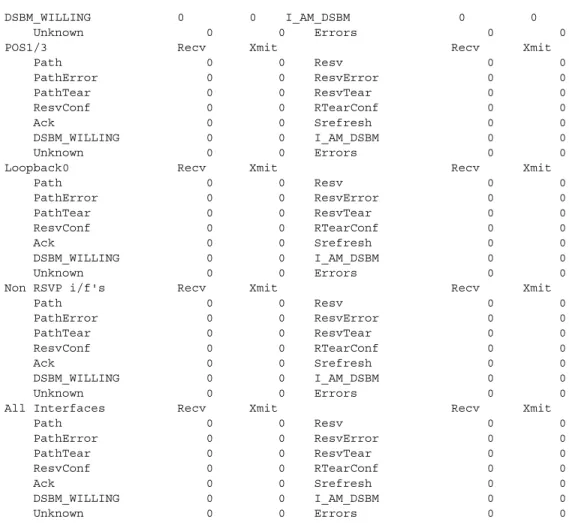
The following command shows the non-zero counters for the interfaces that have RSVP enabled: Router# show ip rsvp counters
POS0/0 Recv Xmit Recv Xmit Path 0 300 Resv 371 0 PathError 0 0 ResvError 0 0 PathTear 0 150 ResvTear 0 0 ResvConf 0 0 RTearConf 0 0 Ack 20 28 Srefresh 10 10 DSBM_WILLING 0 0 I_AM_DSBM 0 0 Unknown 0 0 Errors 0 0 POS1/0 Recv Xmit Recv Xmit Path 300 0 Resv 0 300 PathError 0 0 ResvError 0 0 PathTear 150 0 ResvTear 0 0 ResvConf 0 0 RTearConf 0 0
confirm (Optional) Requests a confirmation that all IP RSVP counters were cleared.
Release Modification
12.0(14)ST This command was introduced.
Quality of Service Commands
clear ip rsvp counters
QR-29
Cisco IOS Quality of Service Solutions Command Reference DSBM_WILLING 0 0 I_AM_DSBM 0 0 Unknown 0 0 Errors 0 0 POS1/3 Recv Xmit Recv Xmit Path 0 0 Resv 0 0 PathError 0 0 ResvError 0 0 PathTear 0 0 ResvTear 0 0 ResvConf 0 0 RTearConf 0 0 Ack 0 0 Srefresh 0 0 DSBM_WILLING 0 0 I_AM_DSBM 0 0 Unknown 0 0 Errors 0 0 Loopback0 Recv Xmit Recv Xmit Path 0 0 Resv 0 0 PathError 0 0 ResvError 0 0 PathTear 0 0 ResvTear 0 0 ResvConf 0 0 RTearConf 0 0 Ack 0 0 Srefresh 0 0 DSBM_WILLING 0 0 I_AM_DSBM 0 0 Unknown 0 0 Errors 0 0 Non RSVP i/f's Recv Xmit Recv Xmit Path 0 0 Resv 0 0 PathError 0 0 ResvError 0 0 PathTear 0 0 ResvTear 0 0 ResvConf 0 0 RTearConf 0 0 Ack 0 0 Srefresh 0 0 DSBM_WILLING 0 0 I_AM_DSBM 0 0 Unknown 0 0 Errors 0 0 All Interfaces Recv Xmit Recv Xmit Path 0 0 Resv 0 0 PathError 0 0 ResvError 0 0 PathTear 0 0 ResvTear 0 0 ResvConf 0 0 RTearConf 0 0 Ack 0 0 Srefresh 0 0 DSBM_WILLING 0 0 I_AM_DSBM 0 0 Unknown 0 0 Errors 0 0
Table 1 describes the fields shown in the display.
Related Commands
Table 1 show ip rsvp counters Command Field Descriptions
Field Description
POS0/0, POS0/1...All Interfaces Interface name; type of RSVP messages on a specified interface or all interfaces.
Recv Number of messages received on the specified interface or on all interfaces.
Xmit Number of messages transmitted from the specified interface or from all interfaces.
Command Description
Quality of Service Commands clear ip rsvp signalling rate-limit
clear ip rsvp signalling rate-limit
To clear (set to zero) the number of Resource Reservation Protocol (RSVP) messages that were dropped because of a full queue, use the clear ip rsvp signalling rate-limit command in EXEC mode.
clear ip rsvp signalling rate-limit
Syntax Description This command has no arguments or keywords.
Defaults No default behavior or values
Command Modes EXEC
Command History
Usage Guidelines Use the clear ip rsvp signalling rate-limit command to clear the counters recording dropped messages.
Examples The following command shows how all dropped messages are cleared: Router# clear ip rsvp signalling rate-limit
Related Commands
Release Modification
12.2(13)T This command was introduced.
Command Description
debug ip rsvp rate-limit
Displays debug messages for RSVP rate-limiting events.
ip rsvp signalling rate-limit
Controls the transmission rate for RSVP messages sent to a neighboring router during a specified amount of time.
show ip rsvp signalling rate-limit
Quality of Service Commands
clear ip rsvp signalling refresh reduction
QR-31
Cisco IOS Quality of Service Solutions Command Reference
clear ip rsvp signalling refresh reduction
To clear (set to zero) the counters associated with the number of retransmissions and the number of out-of-order Resource Reservation Protocol (RSVP) messages, use the clear ip rsvp signalling refresh
reduction command in EXEC mode.
clear ip rsvp signalling refresh reduction
Syntax Description This command has no arguments or keywords.
Defaults No default behavior or values
Command Modes EXEC
Command History
Usage Guidelines Use the clear ip rsvp signalling refresh reduction command to clear the counters recording retransmissions and out-of-order RSVP messages.
Examples The following command shows how all the retransmissions and out-of-order messages are cleared: Router# clear ip rsvp signalling refresh reduction
Related Commands
Release Modification
12.2(13)T This command was introduced.
Command Description
ip rsvp signalling refresh reduction
Enables refresh reduction.
show ip rsvp signalling refresh reduction
Quality of Service Commands compression header ip
compression header ip
To configure Real-Time Transport Protocol (RTP) or TCP IP header compression for a specific class, use the compression header ip command in policy-map class configuration mode. To remove RTP or TCP IP header compression for a specific class, use the no form of this command.
compression header ip [rtp | tcp] no compression header ip
Syntax Description
Defaults If you do not specify either RTP or TCP header compression (that is, you press the enter key after the command name) both RTP and TCP header compressions are configured. This is intended to cover the “all compressions” scenario.
Command Modes Policy-map class configuration
Command History
Usage Guidelines Using any form of the compression header ip command overrides any previously entered form. The compression header ip command can be used at any level in the policy map hierarchy configured with the Modular Quality of Service (QoS) Command-Line Interface (CLI) (MQC) feature.
Examples In the following example, the compression header ip command has been configured to use RTP header compression for a class called “class1”. Class1 is part of policy map called “policy1”.
Router(config)# policy-map policy1 Router(config-pmap)# class-map class1
Router(config-pmap-c)# compression header ip rtp Router(config-pmap-c)# exit
rtp (Optional) Configures RTP header compression.
tcp (Optional) Configures TCP header compression.
Release Modification
Quality of Service Commands
compression header ip
QR-33
Cisco IOS Quality of Service Solutions Command Reference
Related Commands Command Description
show policy-map Displays the configuration of all classes for a specified service policy map or all classes for all existing policy maps.
show policy-map class Displays the configuration for the specified class of the specified policy map.
show policy-map interface
Displays the packet statistics of all classes that are configured for all service policies either on the specified interface or subinterface or on a specific PVC on the interface.
Quality of Service Commands custom-queue-list
custom-queue-list
To assign a custom queue list to an interface, use the custom-queue-list command in interface configuration mode. To remove a specific list or all list assignments, use the no form of this command.
custom-queue-list [list-number] no custom-queue-list [list-number]
Syntax Description
Defaults No custom queue list is assigned.
Command Modes Interface configuration
Command History
Usage Guidelines Only one queue list can be assigned per interface. Use this command in place of the priority-list
interface command (not in addition to it). Custom queueing allows a fairness not provided with priority
queueing. With custom queueing, you can control the bandwidth available on the interface when the interface is unable to accommodate the aggregate traffic enqueued. Associated with each output queue is a configurable byte count, which specifies how many bytes of data should be delivered from the current queue by the system before the system moves on to the next queue. When a particular queue is being processed, packets are sent until the number of bytes sent exceeds the queue byte count or until the queue is empty.
Use the show queueing custom and show interfaces commands to display the current status of the custom output queues.
Examples In the following example, custom queue list number 3 is assigned to serial interface 0: interface serial 0
custom-queue-list 3
list-number Any number from 1 to 16 for the custom queue list.
Release Modification
Quality of Service Commands
custom-queue-list
QR-35
Cisco IOS Quality of Service Solutions Command Reference
Related Commands Command Description
priority-list interface Establishes queueing priorities on packets entering from a given interface.
queue-list default Assigns a priority queue for those packets that do not match any other rule in the queue list.
queue-list interface Establishes queueing priorities on packets entering on an interface.
queue-list queue byte-count Specifies how many bytes the system allows to be delivered from a
given queue during a particular cycle.
queue-list queue limit Designates the queue length limit for a queue.
show interfaces Displays statistics for all interfaces configured on the router or access server.
show queue Displays the contents of packets inside a queue for a particular interface or VC.