BIND versus DJBDNS: A Comparison of Performance,
Ease of Configuration, and Security
John J. Steniger
ABSTRACT
DNS (Domain Name Service) provides IP to name mapping for hosts that access the Internet and the vast majority of DNS servers are running software that has been the victim of many high-profile security attacks: the Berkeley Internet Domain (BIND). Given the critical importance of the DNS infrastructure to the overall operation of the World Wide Web, is BIND the only answer with no viable software alternatives? This paper seeks to explore possible alternatives to BIND. The two software suites (BIND and DJBDNS) will be compared on ease of configuration and security to determine if DJBDNS is indeed a possible replacement for BIND, or should we keep looking?
1.
INTRODUCTION
As the World Wide Web grows, the mapping of IP numbers to human-readable names becomes even more important. The majority of people use domain names as opposed to IP’s, which allows for those who are not familiar with IP numbers to use the Internet. BIND, the Berkeley Internet Domain package, is the de facto standard [1] of DNS software. BIND was designed in the early days of the Internet (1980-1983) when security was an afterthought; trust in other people and machines was the rule rather than the exception. Therefore, BIND has been exposed through numerous security attacks and exploits throughout the years [2]. And yet, DNS and BIND have become almost synonymous with one another.
There are several possible reasons for the continued prevalence of BIND in the DNS infrastructure despite its apparent weaknesses in the area of security, and two are of particular interest: there are no viable software alternatives, and even if there are, perhaps BIND is not as insecure as reports might indicate. It is possible that there have been improvements made to the software as its maintainers have addressed past security issues to the point that there is no need for an alternative.
DJBDNS is a suite of DNS software that bills itself as an alternative to BIND. The main goal of this paper is to compare and contrast DJBDNS versus BIND on the basis of configuration and security. An attempt will be made to answer the above two questions; if BIND turns out to be a more robust and secure piece of software, then there is no need for an alternative and perhaps BIND is just a victim of “bad press”. However, if DJBDNS turns out to perform better overall in these areas, then we will have found our alternative software.
1.1 Domain Name Service: A Brief Overview
The DNS infrastructure can be represented by a tree, with the root node known as the root domain. A label is string that uniquely identifies a node; labels are connected together with a dot notation. As the tree is traversed from the leaf nodes to the root, the nodes become less specific. The left most label in a Fully Qualified Domain Name (FQDN) is the host name, whereas the next label to the right is the local domain; this local domain can
also be a sub domain of another domain. The parent domain is next to the right, and so on until the root of the tree is reached. When reverse resolution is needed (host name to IP), DNS proceeds in the same way, writing the IP in reverse order; for this reason IP addresses in DNS are represented typically in reverse order.
DNS information that resides on the server is commonly referred to as a “zone”. Each zone has Resource Records (RR), and there are several types of Resource Records:
Table 1: Resource Record Types
DNS can be separated into several services:
• A DNS server that returns authoritative answers for a particular zone.
• A caching resolver that is non-authoritative but returns answers for any DNS query.
• A transfer server that allows for the transfer of zones served by the DNS server to backup DNS servers. Often these services are simply lumped together as “DNS”. However, they each provide a distinct and separate service. DNS transactions utilize any one of the services described above. A DNS client will make a request for service for a record; the DNS server will first decide if it is authoritative for the zone of the record that is being requested. If it is not, and a caching resolver is present on the same server, the DNS server will pass that record onto the DNS cache in an attempt to find an authoritative answer for that domain. It will query all the way up to one of the root DNS servers if necessary and then return the answer to the client. These transactions all take place using UDP, typically over port 53. DNS servers will also often transfer zones to update secondary and tertiary servers to return accurate information; this is done using the transfer service which listens for TCP requests on port 53.
From a security standpoint, there are advantages to separating these services. Because there may be DNS security vulnerabilities that affect only authoritative DNS servers and not DNS caches, and having both running on the same IP would expose the unaffected software to the buggy software’s problems, both RFC 2010 [3] and 2870 [4] instruct root DNS operators to separate DNS servers and DNS caches. Keeping the servers separate also allows you to independently choose software to run each one. Ease of separation of services will be a factor in determining whether DJBDNS is a viable alternative to BIND.
Record Description Usage
A An address record Maps FQDN into an IP address PTR A pointer record Maps an IP address into FQDN NS A name server record Denotes a name server for a zone SOA Start of Authority record Specifies attributes about a zone CNAME A canonical name record Defines an alias
1.2 Zone files
Authoritative DNS information must be presented to the DNS server by whoever is administrating that zone. This authoritative DNS information is typically provided in the form of a zone file; zone files differ from software suite to software suite. The complexity of zone files is an important factor in determining the viability of DNS software. Questions that should be asked include:
• How many configuration files are there?
• Are they human readable?
• Must we edit them directly?
• Are example files provided in the documentation, or easily found?
Zone and other configuration files for both BIND and DJBDNS will be reviewed in this paper for complexity, length, readability, and ease of modification. The question of whether we must edit directly is important; obviously, the more access one is given to a file, the greater the likelihood of a critical mistake.
1.3 Inherent DNS Protocol Flaws and
DNSSEC
While this paper will deal with security vulnerabilities for the specific DNS software suites, it should be acknowledged that DNS as a protocol also suffers from security vulnerabilities that will not come into play when comparing software. There are 3 specific vulnerabilities that warrant mentioning [5]:
Table 2: DNS Protocol Attacks
The details of each attack are beyond the scope of this paper; however, steps have been taken to deal with these attacks in the
form of DNS Security Extensions (DNSSEC) [6], which contains augmentations to the original protocol that include encryption and authentication. While DNSSEC “provides the source authenticity and data integrity needed to solve these shortcomings” [7], due to backward compatibility issues, some feel DNSSEC will not be implemented for quite some time [5]. In fact, in May of 2003 a version of BIND was released that disabled DNSSEC [8] and more recently a security vulnerability was found in the latest release ofBIND that necessitated the disabling of DNSSEC functionality [9]. While DNSSEC is viewed by many as a possible solution for many DNS problems, it is beyond the scope of this paper and DNSSEC support will not be used as criteria for judging the software suites.
2. DESCRIPTION OF RESEARCH
To adequately test both DNS software suites, the following will be performed and detailed in this paper:
1. Each software suite will be downloaded
2. Each software suite will be installed on a “clean” server. Software and hardware specifications of our test server are found in Table 3.
3. The install process will be documented in detail; each step in the process will be recorded. Both sets of software will be built from source.
4. Each server will be tested for basic functionality. 5. No third party software will be used to enhance either
software package
6. The tests will be performed on a Dell Pentium III 733 megahertz CPU, with 512 megabytes of RAM and a 20 gigabyte disk, running OpenBSD 3.6.
The “final state” for each server must provide the following services:
1. A caching DNS resolver to provide non-authoritative answers to clients
2. Access to the DNS resolver must be restricted to the local subnet (in this case, 192.168.0.0/24)
3. An authoritative DNS server to serve the zone “steniger.com”, as well as the reverse zone “0.168.192.in-addr.arpa”. Between these two zones there must exist examples of:
a. An SOA record b. A NS record c. A records d. PTR records e. CNAME records
4. Both services must exist in a chroot’ed jail, running as a non-privileged user for security purposes.
2.1 Criteria for Comparison:
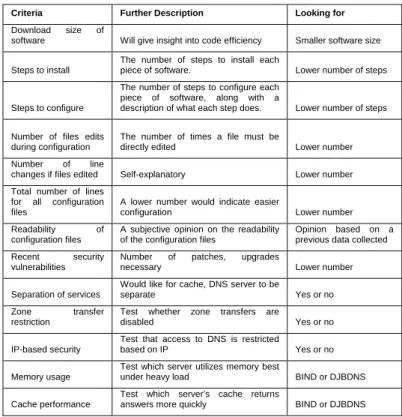
Table 3 describes the specific criteria for comparison of the two software suites:
Table 3: Criteria for Comparison
Criteria Further Description Looking for Download size of
software Will give insight into code efficiency Smaller software size
Steps to install
The number of steps to install each
piece of software. Lower number of steps
Steps to configure
The number of steps to configure each piece of software, along with a
description of what each step does. Lower number of steps
Number of files edits during configuration
The number of times a file must be
directly edited Lower number Number of line
changes if files edited Self-explanatory Lower number Total number of lines
for all configuration files
A lower number would indicate easier
configuration Lower number
Readability of configuration files
A subjective opinion on the readability of the configuration files
Opinion based on a previous data collected Recent security
vulnerabilities
Number of patches, upgrades
necessary Lower number
Separation of services
Would like for cache, DNS server to be
separate Yes or no
Zone transfer restriction
Test whether zone transfers are
disabled Yes or no
IP-based security
Test that access to DNS is restricted
based on IP Yes or no
Memory usage
Test which server utilizes memory best
under heavy load BIND or DJBDNS
Cache performance
Test which server’s cache returns
answers more quickly BIND or DJBDNS DNS Protocol Attack Description
DNS Cache Poisoning
Forcing a DNS server to cache false information
DNS Spoofing
Answering a DNS query that was intended for another server
2.2 Some notes on criteria
The criteria listed above represents a best effort to compare and contrast the two software suites on similar grounds. While the importance of the separation of services has already been explained, some may not fully understand other criteria, especially in terms of security.
One must consider the recent trends in Internet vulnerabilities; Code Red, Nimda and other recent worms all took advantage of vulnerabilities for which patches had already been released. In response to the criteria “Recent Security Vulnerabilities”, one may ask why “Patch Availability” was also not included. While the availability of patches is important in terms of security, more important would be the lack of vulnerability altogether, especially in the face of mounting evidence that indicates patch management is severely lacking amongst a majority of system administrators. The Gartner Group reports that approximately 90% of successful Internet-based attacks occur on systems that were not properly
configured or patched [10]. That such a high percentage of attacks occur against misconfigured or unpatched systems illustrates dueling points of views on how to deal with Internet security issues: build more secure software with less vulnerability, or address the lack of proper patch management at a system administrator level. Ideally the security community will want to address both these issues, but at the moment in the “real world”, it is likely that a vulnerability will not be patched by a large portion of the Internet community. The reality that systems will not be patched is especially relevant to our discussion here; CERT announced on June 4th 2002 a denial of service vulnerability in version 9 of BIND servers, it was revealed that at least 139 of the Fortune 1000 companies were running BIND versions that were vulnerable to this and other vulnerabilities [11]. At ICANN’s November 2001 Annual Meeting it was estimated by the presenters that 12 percent of the 139 million DNS servers were running a version of BIND that was not properly patched [12]. Therefore, the existence of security vulnerabilities will be frowned upon in this comparison, regardless of whether they are patched or not.
It is also important to notice the word configured in the Gartner statistic. A misconfigured server is often just as bad as one that has a software vulnerability; indeed, the end result is the same: the server is vulnerable to outside attack. As of February 2003, it was estimated that 68.4 percent of .com zones are misconfigured in some way [13]. This large percentage of poorly configured zones represents a serious threat to the functionality of the DNS infrastructure on the Internet. The number of steps to configure each piece of software is therefore important, the idea being that the easier it is to configure the software, the less likely the software will be configured incorrectly. Also important is the necessity to edit configuration files; direct editing of files allows for the possibility of mistakes versus files that are modified with tools.
3. BIND vs. DJBDNS
3.1 Installation and Configuration
Table 4 details the steps taken to install the two software suites – note that both pieces of software were built from the source:
Table 4: Installation Steps
BIND DJBDNS gunzip bind-9.3.0.tar.gz gunzip daemontools-0.76.tar.gz tar xfv find-9.3.0.tar.gz tar xfv daemontools-0.76.tar cd bind-9.3.0 cd admin/daemontools-0.76 ./configure package/install
make cd ../..
make install gunzip ucspi-tcp-0.88.tar.gz tar xfv ucspi-tcp-0.88.tar
cd ucspi-tcp-0.88
Make make setup check
cd ..
gunzip djbdns-1.05.tar.gz
tar xfv djbdns-1.05.tar
cd djbdns-1.05
echo gcc -O2 -include /usr/include/errno.h >conf-cc Make
make setup check
Table 5 lists the file edits for each piece of software – please note that although both pieces of software require you to edit /etc/resolv.conf, this is largely a configuration for the operating system itself to inform it of the nameserver to use, and not specific to the software:
Table 5: File Edits
File edits:
BIND: 3 DJBDNS: 0
Table 6 lists the number of edits for configuration files for BIND:
Table 6: Edits for BIND Configuration Files
Changes to BIND default named.conf:
Line modifications: 6
Line deletions: 24
Line adds: 6
Total: 36
Table 7 lists the total number of lines in the configuration files for BIND:
Table 7: Total Lines for BIND Configuration
Total lines:
BIND: named.conf 53
BIND: steniger.com 19
BIND: 192.168.0.0 15
BIND TOTAL: 87
Table 8 lists the total number of lines in the configuration files for DJBDNS:
Table 8: Total Lines for DJBDNS Configuration
Total lines: DJBDNS: /etc/tinydns/root/data 6 DJBDNS: /etc/tinydns/env/IP 1 DJBDNS: /etc/dnscache/env/IP 1 DJBDNS: /etc/dnscache/root/ip/192.168.0 0 DJBDNS: /etc/dnscache/root/servers/steniger.com 1 DJBDNS: /etc/dnscache/root/servers/0.168.192.in-addr.arpa 1 DJBDNS TOTAL: 10
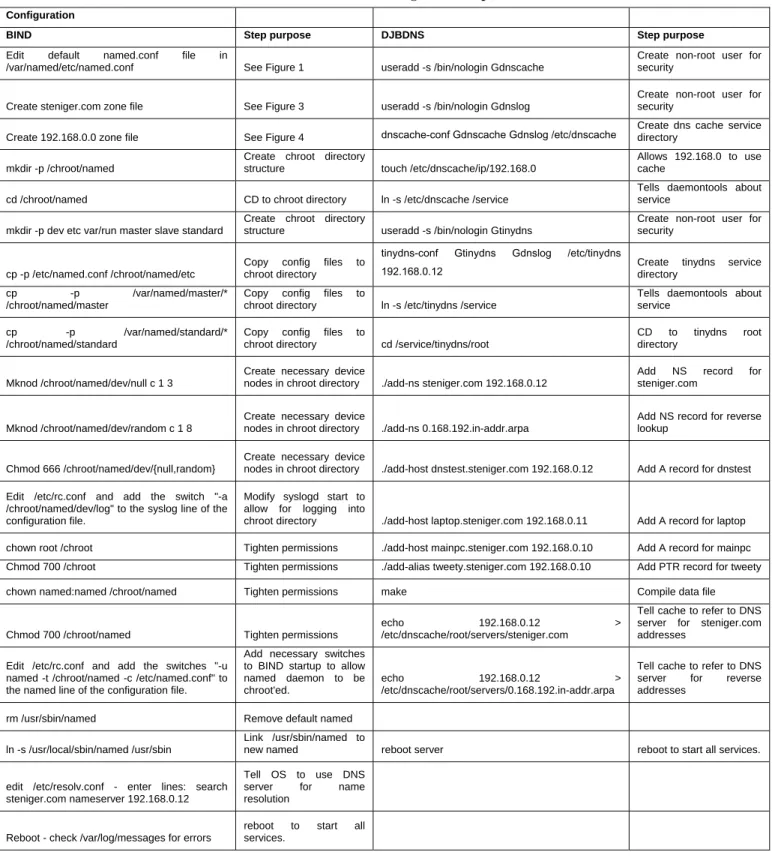
Table 9 details the steps to configure each piece of software. This table lists the actual step to configure as well as the purpose of each step:
Table 9: Configuration Steps Configuration
BIND Step purpose DJBDNS Step purpose
Edit default named.conf file in
/var/named/etc/named.conf See Figure 1 useradd -s /bin/nologin Gdnscache
Create non-root user for security
Create steniger.com zone file See Figure 3 useradd -s /bin/nologin Gdnslog
Create non-root user for security
Create 192.168.0.0 zone file See Figure 4 dnscache-conf Gdnscache Gdnslog /etc/dnscache
Create dns cache service directory
mkdir -p /chroot/named
Create chroot directory
structure touch /etc/dnscache/ip/192.168.0
Allows 192.168.0 to use cache
cd /chroot/named CD to chroot directory ln -s /etc/dnscache /service
Tells daemontools about service
mkdir -p dev etc var/run master slave standard
Create chroot directory
structure useradd -s /bin/nologin Gtinydns
Create non-root user for security
cp -p /etc/named.conf /chroot/named/etc
Copy config files to chroot directory
tinydns-conf Gtinydns Gdnslog /etc/tinydns
192.168.0.12 Create tinydns service directory
cp -p /var/named/master/* /chroot/named/master
Copy config files to
chroot directory ln -s /etc/tinydns /service
Tells daemontools about service
cp -p /var/named/standard/* /chroot/named/standard
Copy config files to
chroot directory cd /service/tinydns/root
CD to tinydns root directory
Mknod /chroot/named/dev/null c 1 3
Create necessary device
nodes in chroot directory ./add-ns steniger.com 192.168.0.12
Add NS record for steniger.com
Mknod /chroot/named/dev/random c 1 8
Create necessary device
nodes in chroot directory ./add-ns 0.168.192.in-addr.arpa
Add NS record for reverse lookup
Chmod 666 /chroot/named/dev/{null,random}
Create necessary device
nodes in chroot directory ./add-host dnstest.steniger.com 192.168.0.12 Add A record for dnstest Edit /etc/rc.conf and add the switch "-a
/chroot/named/dev/log" to the syslog line of the configuration file.
Modify syslogd start to allow for logging into
chroot directory ./add-host laptop.steniger.com 192.168.0.11 Add A record for laptop
chown root /chroot Tighten permissions ./add-host mainpc.steniger.com 192.168.0.10 Add A record for mainpc
Chmod 700 /chroot Tighten permissions ./add-alias tweety.steniger.com 192.168.0.10 Add PTR record for tweety
chown named:named /chroot/named Tighten permissions make Compile data file
Chmod 700 /chroot/named Tighten permissions
echo 192.168.0.12 > /etc/dnscache/root/servers/steniger.com
Tell cache to refer to DNS server for steniger.com addresses
Edit /etc/rc.conf and add the switches "-u named -t /chroot/named -c /etc/named.conf" to the named line of the configuration file.
Add necessary switches to BIND startup to allow named daemon to be chroot'ed.
echo 192.168.0.12 > /etc/dnscache/root/servers/0.168.192.in-addr.arpa
Tell cache to refer to DNS server for reverse addresses
rm /usr/sbin/named Remove default named
ln -s /usr/local/sbin/named /usr/sbin
Link /usr/sbin/named to
new named reboot server reboot to start all services.
edit /etc/resolv.conf - enter lines: search steniger.com nameserver 192.168.0.12
Tell OS to use DNS server for name resolution
Reboot - check /var/log/messages for errors
reboot to start all services.
3.2 Security
Table 10 lists the recent security vulnerabilities for each piece of software:
Table 10: Security Vulnerabilities (last 5 years) Vulnerabilitie
s Link Description
DJBDNS None
BIND http://www.kb.cert.org/vuls/id/327633 Issue: Remote denial of
service
BIND
http://www.cert.org/advisories/CA-2002-19.html
Buffer overflow allows for possibility of remote compromise
BIND http://www.kb.cert.org/vuls/id/938617 Issue: Remote denial of
service
BIND http://www.kb.cert.org/vuls/id/196945
Buffer overflow allows for possibility of remote compromise
BIND http://www.kb.cert.org/vuls/id/572183
Buffer overflow allows for possibility of remote compromise
BIND http://www.kb.cert.org/vuls/id/868916
Buffer overflow allows for possibility of remote compromise
BIND http://www.kb.cert.org/vuls/id/325431 Environmental variable
disclosure
The comparison of zone files will be detailed in the discussion of results section, as it merits a more detailed analysis.
Table 11 lists the results of query attempts of multiple types from subnets that were not specifically allowed through configuration:
Table 11: Query results Softwar
e
Query Type Result
BIND ping mainpc.steniger.co m
DNS Query
ping: unknown host mainpc.steniger.com DJBDNS ping mainpc.steniger.co m DNS Query
ping: unknown host mainpc.steniger.com BIND ping
www.yahoo.com
Cache lookup
ping: unknown host www.yahoo.com DJBDNS ping
www.yahoo.com
Cache lookup
ping: unknown host www.yahoo.com
BIND dig -t AXFR
@192.168.0.12 steniger.com Zone transfer ; Transfer failed. DJBDNS dig -t AXFR @192.168.0.12 steniger.com Zone transfer ;; communications error to 24.2.222.18#53: end of file
3.3 Performance
Figure 1 shows the performance of DJBDNS and BIND in regards to cache lookups. Measurements are in milliseconds:
Figure 1: Cache Performance Comparison
Table 12 shows the results of a memory test in which both DJBDNS and BIND were subjected to 500,000 random IP reverse lookups. Shown is the time it took to complete as well as the maximum memory usage:
Table 12: 500,000 IP lookup
Software Max RAM Usage
Time Taken
BIND 57 megabytes 31 hours
DJBDNS 10 megabytes 37 hours
4. DISCUSSION OF RESEARCH RESULTS
4.1 Install Steps and Download
DJBDNS suffers due to the separate download and builds, whereas BIND only has one download. However, BIND’s download is much larger than DJBDNS’s 3 downloads combined, which would indicate the possibility of code bloat. In fact, DJBDNS has only 7,000 instructions whereas BIND has over 100,000 [8]. There would seem to be the added benefit that BIND is previously installed on a default OpenBSD 3.6 build; this would negate the need to even install BIND. However, the version of BIND is 9.2.3, which has a security exploit [9]. BIND’s prevalence ensures that it comes pre-built on numerous operating systems, and due to the numerous releases and patches to that software, very often (and in this case) the default build is a vulnerable version. This prevalence could contribute to the fact that successful attacks target systems that could have been patched, possibly months earlier [14].
To conclude the discussion on installation, although DJBDNS takes more steps to install (23 for DJBDNS and 6 for BIND), BIND is much larger and more complex from a code perspective, and also has the drawback of having a previous, vulnerable version pre-installed on the operating system.
4.2 Configuration and File Edits
The data indicates that DJBDNS takes 20 steps to configure to meet the specifications described earlier, whereas BIND takes 22 steps to configure. This number appears to be rather close, but BIND also requires one to edit 3 files, whereas DJBDNS does not require you to edit files. DJBDNS adds records to its data file through the use of tools; although you can edit the main zone file if one would like, it is not necessary to build the server. BIND, however, requires that you edit and configure several files directly, and some must be built from scratch.
acl clients {
localnets; ::1; };
options {
version ""; // remove this to allow version queries listen-on { any; }; listen-on-v6 { any; }; allow-query { clients; }; allow-transfer { none; }; allow-recursion { clients; }; }; logging {
category lame-servers { null; }; }; // Standard zones // zone "." { type hint; file "standard/root.hint"; }; zone "localhost" { 0 2000 4000 6000 8000 10000 12000 14000 66.235.220 IP’s Miliseconds BIND DJBDNS
type master; file "standard/localhost"; allow-transfer { localhost; }; }; zone "127.in-addr.arpa" { type master; file "standard/loopback"; allow-transfer { localhost; }; }; zone "0.0.0.0.0.0.0.0.0.0.0.0.0.0.0.0.0.0.0.0.0.0.0.0.0.0.0.0.0.0.0.ip6.arpa" { type master; file "standard/loopback6.arpa"; allow-transfer { localhost; }; }; zone "com" { type delegation-only; }; zone "net" { type delegation-only; };
Figure 2: default named.conf
The zone file itself appears to be rather complex, resembling a programming language rather than the English language. Although the DJBDNS zone file does not require editing, it is shown here as a point of comparison:
steniger.com:192.168.0.12:a:259200 .0.168.192.in-addr.arpa:192.168.0.12:a:259200 =dnstest.steniger.com:192.168.0.12:86400 =laptop.steniger.com:192.168.0.11:86400 =mainpc.steniger.com:192.168.0.10:86400 +tweety.steniger.com:192.168.0.10:86400
Figure 3: DJBDNS data file
The DJBDNS configuration file is also not easily readable without instruction, but is much smaller and more concise. The difference becomes even more apparent when one realizes that
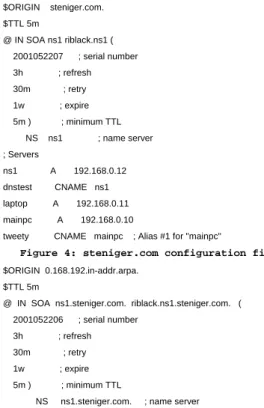
named.conf is only one of 3 necessary configuration files to meet our specifications. The other two files (steniger.com and
192.168.0.0) are included as figures 4and 5 below, respectively:
$ORIGIN steniger.com. $TTL 5m @ IN SOA ns1 riblack.ns1 ( 2001052207 ; serial number 3h ; refresh 30m ; retry 1w ; expire 5m ) ; minimum TTL NS ns1 ; name server ; Servers ns1 A 192.168.0.12 dnstest CNAME ns1 laptop A 192.168.0.11 mainpc A 192.168.0.10
tweety CNAME mainpc ; Alias #1 for "mainpc"
Figure 4: steniger.com configuration file
$ORIGIN 0.168.192.in-addr.arpa. $TTL 5m
@ IN SOA ns1.steniger.com. riblack.ns1.steniger.com. ( 2001052206 ; serial number
3h ; refresh 30m ; retry 1w ; expire 5m ) ; minimum TTL
NS ns1.steniger.com. ; name server 10 PTR mainpc.steniger.com. 11 PTR laptop.steniger.com. 12 PTR ns1.steniger.com.
Figure 5: 192.168.0.0 configuration file
These 2 files needed to be created from scratch. The final
named.conf required 34 total lines of changes (either adds, modifies or deletes) to meet our specifications, and steniger.com and 192.168.0.0 contain a total of 34 lines, for a total of 68 line changes and 87 total lines of configuration. DJBDNS, in contrast, has a total of 6 lines in its main data file, as well as an additional 4 lines of configuration split up over 4 files (these files are one-liners to inform the DNS server who should be allowed to query). This leaves DJBDNS with a total of 10 lines of configuration, none of which need to be edited directly.
The discrepancy in ease of configuration between the two software suites is large. DJBDNS is easier to configure as well as maintain, due to the tools provided by the author to modify the data files. BIND files are difficult to read and not only contain more instructions, but also more risk for misconfiguration due to the fact that they are edited directly. Also, given the time it takes to edit the named.conf file directly and then create the two zone files, it is also far timelier to configure and set up DJBDNS.
4.3 Security
Since 2000, there have been 7 recorded security vulnerabilities for different versions of BIND [2]. There have been no vulnerabilities discovered for DJBDNS. Clearly, the advantage here goes to DJBDNS.
Also in DJBDNS’s favor is that it separates its services automatically; there is no way to run a DNS server and a caching DNS resolver using DJBDNS on the same IP. They can be run on the same server, as we have done here, with one listening on an external IP and the other accepting forwards on the localhost IP. However, the processes themselves are both separate.
BIND, however, does not provide process separation. BIND uses one binary, named, and it listens on one IP address. Theoretically it would be possible to run two copies of BIND, with separate configuration files listening on separate IP’s, but this is not what the default install describes. Since it is possible to run non-separate servers using BIND, where it is not possible using DJBDNS, DJBDNS has the advantage in this area as well. Also worth discussion is the concept of “chroot”. A process is considered “chroot’ed” when it is locked within a directory structure and is unable to access files outside of this structure. This protects the rest of the operating system in case the process is somehow hijacked or compromised. Along with chroot’ing is the concept of process ownership; BIND, by default, runs as root, which means that if it is compromised, the attacker will have full root privileges. In comparison, DJBDNS by default runs as non-privileged users. DJBDNS also runs by default in a chroot’ed jail, whereas BIND by default does not. For purpose of this study we have taken steps to chroot BIND and run it under a non-privileged user (named), but that only added complexity to the BIND configuration.
Both BIND and DJBDNS provided security based on IP restrictions – attempts at cache and domain queries from an IP that was not specifically authorized were not answered. Also, zone transfers were also disallowed from any IP. Restricting zone transfers is important, as a zone transfer provides complete IP information to your domain, giving a potential intruder a more complete overview of your network setup. It is important to note, however, that in terms of zone transfers, BIND allows zone
transfers by default from anyone; zone transfers in BIND have to be specifically disabled by adding the line “allow-transfer { none; };” in the global portion of the master configuration file, named.conf. If this line is not present or typed incorrectly, zone transfers will be permitted from any IP. DJBDNS functions in the opposite manner; since its services are not bundled in one monolithic server binary, the zone transfer service needs to be configured and told to run. If this configuration is not done, there is no listener on TCP port 53, which provides zone transfer service. This is another benefit of the separation of services that DJBDNS provides.
4.4 Performance
Tests were run on both recursive cache lookup performance as well as memory usage. The DNS Performance Monitor [15] was used to perform the test on recursive cache lookup performance. The tool provides several lists of sites to use as benchmarks; for this test the “PC Mag Top 100” list of sites was used. Given a list of sites to lookup, the tool listens on the Ethernet interface of the client and records all DNS traffic as well as the time in milliseconds of the return query. Both DJBDNS and BIND failed to lookup a portion of the sites, and often the software would more than one query for one site request. In the case of failed query returns, I matched only the sites that both DJBDNS and BIND were able to return, and in the case of multiple returns, I selected the return that took the longest, as this return came first, followed by several others that took less time but occurred after the first lookup.
Results indicate that DJBDNS performs much better than BIND in regards to the time it took to return an answer. The visual representation is rather telling, and DJBDNS returned an answer in an average of 327.79 ms whereas BIND returned an answer in an average of 5179.83 seconds. Clearly, DJBDNS outperformed BIND in this area.
5. CONCLUSIONS
From the research and comparison of results, it appears the DJBDNS is a viable alternative to BIND, and is in fact superior in many areas. Table 13 below summarizes the tests applied to both BIND and DJBDNS and tabulates both the positives and negatives of each software:
Table 13: Summary of Test Results Test
BIND Results
DJBDNS
Results Winner
Download size of software
4727751
bytes 178720 bytes DJBDNS
Steps to install 6 steps 17 steps BIND
Steps to configure 22 steps 20 steps DJBDNS
File Edits 3 files 0 files DJBDNS
File Edits - total line
changes 34 lines 0 lines DJBDNS
Total lines of configuration 87 lines 10 lines DJBDNS
Security vulnerabilities 7 0 DJBDNS Cache performance comparison 5179 ms average 327 ms average DJBDNS
Memory usage/heavy load 57 megs 10 megs DJBDNS
IP security restrictions yes yes TIE
Zone transfer restrictions yes yes DJBDNS
Separation of services no yes DJBDNS
The results above clearly indicate that not only is DJBDNS a viable alternative but it is superior in many areas. BIND scores only on steps to install, with 6 steps versus DJBDNS’s 17. DJBDNS is smaller in size than BIND, which would indicate a smaller, more efficient code base. DJBDNS also takes less steps to configure, but the number of steps realistically is further apart than Table 13 indicates, because BIND requires 3 file edits, for a total of 34 line changes towards 87 total lines of configuration for BIND versus only 10 for DJBDNS. Several of these files for BIND need to be created from scratch, and all this direct file editing introduces human error and the possibility of an incorrectly configured DNS server, which at best would not serve domains correctly and at worst would be a security problem. In terms of security, the results again favor DJBDNS. BIND has had 7 security vulnerabilities [2] in the last 5 years, whereas DJBDNS has had none. Both DJBDNS and BIND, when configured correctly, provide the same IP-level restrictions against queries. And although BIND and DJBDNS both restricted zone transfers during testing, DJBDNS is given the nod as superior because DJBDNS by default disables zone transfers while BIND enables zone transfers with no restrictions by default. BIND requires an additional line in configuration to disable zone transfers, which factors against it. DJBDNS has zone transfers disabled because the service runs completely separate from the recursive cache service and the DNS service, whereas BIND’s services are all tied up in one monolithic server, named.
DJBDNS’s default configuration has it chroot’ed running as a non-root user, while extra configuration steps are required to accomplish this with BIND.
DJBDNS also scores higher from a performance standpoint. When each software was given a list of 100 sites to look up and measured on the time it took to return an answer, DJBDNS scored better, with an average return time of 3.27 ms versus a 5149 ms average for BIND. Also, in regards to the reverse lookup of 500,000 random IP’s: although BIND performed better from a performance standpoint, it was observed that BIND’s memory usage increased throughout the test and even after the test was completed, the memory was not released. This represents a security problem in that multiple clients could request the same service from the BIND server in sequence and possibly use up all memory on the system. DJBDNS, however, topped out at 10 megabytes of memory with no further increase, and the excess memory used was released when the test was completed. Due to the possibility of BIND utilizing all available memory, DJBDNS is noted as the winner in this test.
DJBDNS outperformed BIND in terms of ease of configuration, security, and performance. BIND was originally conceived over 20 years ago, when security was not an issue. BIND has been continually patched to accommodate threats that have arisen over these 20 years, whereas DJBDNS was designed with these threats in mind. This is reflected in the overall performance of DJBDNS, and it proves itself as a viable, even superior, alternative to BIND.
6. FUTURE RESEARCH
BIND’s own prevalence possibly hurt it in this study; is DJBDNS more secure only because it hasn’t been as “worked out” as BIND on the Internet? Also, now that DJBDNS has been proven as a
viable, even superior, alternative, why is BIND still so prevalent? Why do system administrators continue to put their trust in BIND?
7. REFERENCES
[1] John Holmblad, The Evolving Threats to the Availability and Security of the Domain Name Service, December 13 2003, (http://www.sans.org/rr/papers/index.php?id=1264) [2] Internet Systems Consortium, Inc., BIND Vulnerabilities,
(http://www.isc.org/index.pl?/sw/bind/bind-security.php) [3] B. Manning, P. Vixie, Operational Criteria for Root Name
Servers, October 1996,
(http://www.ietf.org/rfc/rfc2010.txt?number=2010) [4] R. Bush, D. Karrenberg, M. Kosters, R. Plzak, Root Name
Server Operational Requirements, June 2000, (http://www.ietf.org/rfc/rfc2870.txt?number=2870) [5] Florent Carli, Security Issues with DNS, June 2, 2003
(http://www.sans.org/rr.papers/index.php?id=1069) [6] D. Eastlake, Domain Name System Security Extensions,
March 1999
(http://www.ietf.org/rfc/rfc2535.txt?number=2535) [7] Wes Griffin, Russ Mundy, Same Weiler, Dan Massey,
Nasheed Vora, Fault-Tolerant Mesh of Trust Applied to DNS
Security, 2003, Proceedings of the DARPA Information Security Survivability Conference and Exposition
[8] DJ Bernstein, Security,
(http://cr.yp.to/djbdns/blurb/security.html)
[9] Vulnerability Note VU#938617, BIND 9.3.0 vulnerable to denial of service in validator code,
(http://www.kb.cert.org/vuls/id/938617)
[10] J.C. Perez, “Gartner: Most IT Security Problems Self-Inflicted,” Computerworld, 9 Oct. 2001.
(www.computerworld.com/securitytopics/security/story/0,10 801,64605,00.html)
[11] BIND Vulnerability,
(http://www.miceandmen.com/6000/6200_bind_research.ht ml)
[12] James Sweetman, Current Issues in DNS Security: ICANN’s November 2001 Annual Meeting, November 28, 2001 (http://www.sans.org/rr.papers/index.php?id=568) [13] Domain Health Survey for .com - February 2003,
(http://www.miceandmen.com/6000/61_recent_survey.html) [14] W. Arbaugh, W. Fithen, and J. McHugh, “Windows of
Vulnerability: A Case Study Analysis,” Computer, vol.33, no. 12, Dec. 2000, pp. 52–59.
[15] The DNS Performance Monitor Home Page, (http://www.cc.gatech.edu/~cyan/dnspm/)