django-import-export Documentation
Release 2.0.2
Bojan Mihelac
User Guide
1 Installation and configuration 3
1.1 Settings . . . 3
1.2 Example app . . . 4
2 Getting started 5 2.1 Creating import-export resource . . . 6
2.2 Exporting data . . . 6
2.3 Customize resource options . . . 6
2.4 Declaring fields. . . 7
2.5 Advanced data manipulation on export . . . 8
2.6 Customize widgets . . . 8
2.7 Importing data . . . 9
2.8 Signals . . . 9
2.9 Admin integration . . . 10
3 Import data workflow 15 3.1 Transaction support . . . 16 4 Changelog 17 4.1 2.0.2 (2020-02-16) . . . 17 4.2 2.0.1 (2020-01-15) . . . 17 4.3 2.0 (2019-12-03) . . . 17 4.4 1.2.0 (2019-01-10) . . . 19 4.5 1.1.0 (2018-10-02) . . . 19 4.6 1.0.1 (2018-05-17) . . . 19 4.7 1.0.0 (2018-02-13) . . . 20 4.8 0.7.0 (2018-01-17) . . . 20 4.9 0.6.1 (2017-12-04) . . . 20 4.10 0.6.0 (2017-11-23) . . . 20 4.11 0.5.1 (2016-09-29) . . . 21 4.12 0.5.0 (2016-09-01) . . . 21 4.13 0.4.5 (2016-04-06) . . . 22 4.14 0.4.4 (2016-03-22) . . . 22 4.15 0.4.3 (2016-03-08) . . . 22 4.16 0.4.2 (2015-12-18) . . . 22 4.17 0.4.1 (2015-12-11) . . . 22 4.18 0.4.0 (2015-12-02) . . . 23 i
4.21 0.2.9 (2015-11-12) . . . 23 4.22 0.2.8 (2015-07-29) . . . 23 4.23 0.2.7 (2015-05-04) . . . 23 4.24 0.2.6 (2014-10-09) . . . 24 4.25 0.2.5 (2014-10-04) . . . 24 4.26 0.2.4 (2014-09-18) . . . 24 4.27 0.2.3 (2014-07-01) . . . 24 4.28 0.2.2 (2014-04-18) . . . 24 4.29 0.2.1 (2014-02-20) . . . 24 4.30 0.2.0 (2014-01-30) . . . 25 4.31 0.1.6 (2014-01-21) . . . 25 4.32 0.1.5 (2013-11-29) . . . 25 4.33 0.1.4 . . . 25 4.34 0.1.3 . . . 25 4.35 0.1.2 . . . 25 4.36 0.1.1 . . . 25 4.37 0.1.0 . . . 26 5 Admin 27 6 Resources 31 6.1 Resource . . . 31 6.2 ModelResource. . . 33 6.3 ResourceOptions (Meta) . . . 34 6.4 modelresource_factory . . . 35 7 Widgets 37 8 Fields 43 9 Instance loaders 45 10 Temporary storages 47 10.1 TempFolderStorage . . . 47 10.2 CacheStorage. . . 47 10.3 MediaStorage. . . 47 11 Results 49 11.1 Result . . . 49 12 Forms 51
Python Module Index 53
Index 55
django-import-export Documentation, Release 2.0.2
django-import-export is a Django application and library for importing and exporting data with included admin inte-gration.
Features:
• support multiple formats (Excel, CSV, JSON, . . . and everything else thattablibsupports) • admin integration for importing
• preview import changes • admin integration for exporting • export data respecting admin filters
Fig. 1: A screenshot of the change view with Import and Export buttons.
CHAPTER
1
Installation and configuration
django-import-export is available on the Python Package Index (PyPI), so it can be installed with standard Python tools likepiporeasy_install:
$ pip install django-import-export
This will automatically install many formats supported by tablib. If you need additional formats likecliorPandas DataFrame, you should install the appropriate tablib dependencies (e.g. pip install tablib[pandas]). Read more on the‘tablib format documentation page‘_.
Alternatively, you can install the git repository directly to obtain the development version:
$ pip install -e git+https://github.com/django-import-export/django-import-export.git ˓→#egg=django-import-export
Now, you’re good to go, unless you want to use django-import-export from the admin as well. In this case, you need to add it to yourINSTALLED_APPSand let Django collect its static files.
# settings.py INSTALLED_APPS = (
...
'import_export', )
$ python manage.py collectstatic
All prerequisites are set up! SeeGetting startedto learn how to use django-import-export in your project.
1.1 Settings
You can use the following directives in your settings file:
IMPORT_EXPORT_USE_TRANSACTIONS Global setting controls if resource importing should use database trans-actions. Default isFalse.
IMPORT_EXPORT_SKIP_ADMIN_LOG Global setting controls if creating log entries for the admin changelist should be skipped when importing resource. The skip_admin_log attribute ofImportMixinis checked first, which defaults toNone. If not found, this global option is used. This will speed up importing large datasets, but will lose changing logs in the admin changelist view. Default isFalse.
IMPORT_EXPORT_TMP_STORAGE_CLASS Global setting for the class to use to handle temporary storage of the uploaded file when importing from the admin using an ImportMixin. Thetmp_storage_classattribute of Im-portMixin is checked first, which defaults to None. If not found, this global option is used. Default is
TempFolderStorage.
IMPORT_EXPORT_IMPORT_PERMISSION_CODE Global setting for defining user permission that is required for users/groups to execute import action. Django builtin permissions are change, add, anddelete. It is possible to add your own permission code. Default isNonewhich means everybody can execute import action.
IMPORT_EXPORT_EXPORT_PERMISSION_CODE Global setting for defining user permission that is required for users/groups to execute export action. Django builtin permissions arechange,add, anddelete. It is possible to add your own permission code. Default isNonewhich means everybody can execute export action.
1.2 Example app
There’s an example application that showcases what django-import-export can do. You can run it via: cd tests
./manage.py runserver
Username and password for admin areadminandpassword.
CHAPTER
2
Getting started
For example purposes, we’ll use a simplified book app. Here is ourmodels.py:
# app/models.py
class Author(models.Model):
name = models.CharField(max_length=100)
def __str__(self): return self.name class Category(models.Model):
name = models.CharField(max_length=100)
def __str__(self): return self.name class Book(models.Model):
name = models.CharField('Book name', max_length=100) author = models.ForeignKey(Author, blank=True, null=True)
author_email = models.EmailField('Author email', max_length=75, blank=True) imported = models.BooleanField(default=False)
published = models.DateField('Published', blank=True, null=True)
price = models.DecimalField(max_digits=10, decimal_places=2, null=True, ˓→blank=True)
categories = models.ManyToManyField(Category, blank=True)
def __str__(self): return self.name
2.1 Creating import-export resource
To integratedjango-import-export with ourBookmodel, we will create aModelResourceclass inadmin.py
that will describe how this resource can be imported or exported: # app/admin.py
from import_export import resources from core.models import Book
class BookResource(resources.ModelResource):
class Meta: model = Book
2.2 Exporting data
Now that we have defined aModelResourceclass, we can export books: >>> from app.admin import BookResource
>>> dataset = BookResource().export() >>> print(dataset.csv)
id,name,author,author_email,imported,published,price,categories 2,Some book,1,,0,2012-12-05,8.85,1
2.3 Customize resource options
By defaultModelResourceintrospects model fields and createsField-attributes with an appropriateWidgetfor each field.
To affect which model fields will be included in an import-export resource, use thefieldsoption to whitelist fields:
class BookResource(resources.ModelResource):
class Meta: model = Book
fields = ('id', 'name', 'price',)
Or theexcludeoption to blacklist fields:
class BookResource(resources.ModelResource):
class Meta: model = Book
exclude = ('imported', )
An explicit order for exporting fields can be set using theexport_orderoption:
class BookResource(resources.ModelResource):
class Meta: model = Book
(continues on next page)
django-import-export Documentation, Release 2.0.2
(continued from previous page) fields = ('id', 'name', 'author', 'price',)
export_order = ('id', 'price', 'author', 'name')
The default field for object identification isid, you can optionally set which fields are used as theidwhen importing:
class BookResource(resources.ModelResource):
class Meta: model = Book
import_id_fields = ('isbn',)
fields = ('isbn', 'name', 'author', 'price',)
When definingModelResourcefields it is possible to follow model relationships: class BookResource(resources.ModelResource):
class Meta: model = Book
fields = ('author__name',)
Note: Following relationship fields setsfieldas readonly, meaning this field will be skipped when importing data.
By default all records will be imported, even if no changes are detected. This can be changed setting the
skip_unchangedoption. Also, thereport_skippedoption controls whether skipped records appear in the importResultobject, and if using the admin whether skipped records will show in the import preview page:
class BookResource(resources.ModelResource):
class Meta: model = Book
skip_unchanged = True report_skipped = False
fields = ('id', 'name', 'price',)
See also: Resources
2.4 Declaring fields
It is possible to override a resource field to change some of its options: from import_export.fields import Field
class BookResource(resources.ModelResource):
published = Field(attribute='published', column_name='published_date')
class Meta: model = Book
Other fields that don’t exist in the target model may be added:
from import_export.fields import Field
class BookResource(resources.ModelResource): myfield = Field(column_name='myfield')
class Meta: model = Book
See also:
Fields Available field types and options.
2.5 Advanced data manipulation on export
Not all data can be easily extracted from an object/model attribute. In order to turn complicated data model into a (generally simpler) processed data structure on export,dehydrate_<fieldname>method should be defined: from import_export.fields import Field
class BookResource(resources.ModelResource): full_title = Field()
class Meta: model = Book
def dehydrate_full_title(self, book):
return '%s by %s' % (book.name, book.author.name) In this case, the export looks like this:
>>> from app.admin import BookResource >>> dataset = BookResource().export() >>> print(dataset.csv)
full_title,id,name,author,author_email,imported,published,price,categories Some book by 1,2,Some book,1,,0,2012-12-05,8.85,1
2.6 Customize widgets
AModelResourcecreates a field with a default widget for a given field type. If the widget should be initialized with different arguments, set thewidgetsdict.
In this example widget, thepublishedfield is overridden to use a different date format. This format will be used both for importing and exporting resource.
class BookResource(resources.ModelResource):
class Meta: model = Book widgets = {
'published': {'format': '%d.%m.%Y'}, }
See also:
django-import-export Documentation, Release 2.0.2
Widgets available widget types and options.
2.7 Importing data
Let’s import some data!1 >>> import tablib
2 >>> from import_export import resources 3 >>> from core.models import Book
4 >>> book_resource = resources.modelresource_factory(model=Book)() 5 >>> dataset = tablib.Dataset(['', 'New book'], headers=['id', 'name']) 6 >>> result = book_resource.import_data(dataset, dry_run=True)
7 >>> print(result.has_errors()) 8 False
9 >>> result = book_resource.import_data(dataset, dry_run=False)
In the fourth line we usemodelresource_factory() to create a defaultModelResource. The ModelRe-source class created this way is equal to the one shown in the example in sectionCreating import-export resource. In fifth line aDatasetwith columnsidandname, and one book entry, are created. A field for a primary key field (in this case,id) always needs to be present.
In the rest of the code we first pretend to import data usingimport_data()anddry_runset, then check for any errors and actually import data this time.
See also:
Import data workflow for a detailed description of the import workflow and its customization options.
2.7.1 Deleting data
To delete objects during import, implement thefor_delete()method on yourResourceclass.
The following is an example resource which expects adeletefield in the dataset. An import using this resource will delete model instances for rows that have their columndeleteset to1:
class BookResource(resources.ModelResource):
delete = fields.Field(widget=widgets.BooleanWidget())
def for_delete(self, row, instance):
return self.fields['delete'].clean(row) class Meta:
model = Book
2.8 Signals
To hook in the import export workflow, you can connect topost_import,post_exportsignals: from django.dispatch import receiver
from import_export.signals import post_import, post_export
@receiver(post_import, dispatch_uid='balabala...')
(continues on next page)
(continued from previous page) def _post_import(model, **kwargs):
# model is the actual model instance which after import pass
@receiver(post_export, dispatch_uid='balabala...') def _post_export(model, **kwargs):
# model is the actual model instance which after export pass
2.9 Admin integration
2.9.1 Exporting
Exporting via list filters
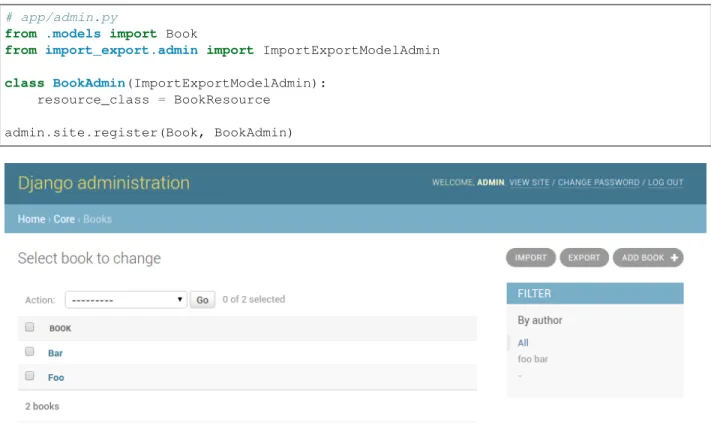
Admin integration is achieved by subclassing ImportExportModelAdmin or one of the available mixins (ImportMixin,ExportMixin,ImportExportMixin):
# app/admin.py
from .models import Book
from import_export.admin import ImportExportModelAdmin
class BookAdmin(ImportExportModelAdmin): resource_class = BookResource
admin.site.register(Book, BookAdmin)
Fig. 1: A screenshot of the change view with Import and Export buttons.
Exporting via admin action
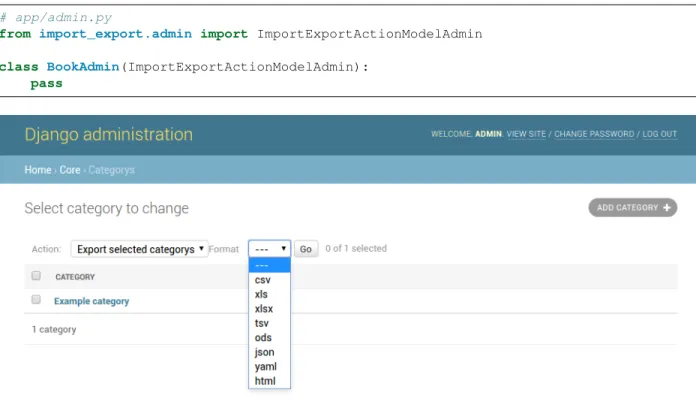
Another approach to exporting data is by subclassingImportExportActionModelAdminwhich implements export as an admin action. As a result it’s possible to export a list of objects selected on the change list page:
django-import-export Documentation, Release 2.0.2
Fig. 2: A screenshot of the import view.
Fig. 3: A screenshot of the confirm import view.
# app/admin.py
from import_export.admin import ImportExportActionModelAdmin
class BookAdmin(ImportExportActionModelAdmin): pass
Fig. 4: A screenshot of the change view with Import and Export as an admin action.
Note that to use the ExportMixin or ExportActionMixin, you must declare this mixin before admin. ModelAdmin:
# app/admin.py
from django.contrib import admin
from import_export.admin import ExportActionMixin
class BookAdmin(ExportActionMixin, admin.ModelAdmin): pass
Note thatExportActionMixinis declared first in the example above!
2.9.2 Importing
It is also possible to enable data import via standard Django admin interface. To do this subclass ImportExportModelAdminor use one of the available mixins, i.e.ImportMixin, orImportExportMixin. Customizations are, of course, possible.
Customize admin import forms
It is possible to modify default import forms used in the model admin. For example, to add an additional field in the im-port form, subclass and extend theImportForm(note that you may want to also considerConfirmImportForm as importing is a two-step process).
To use the customized form(s), overloadImportMixinrespective methods, i.e. get_import_form(), and also get_confirm_import_form()if need be.
django-import-export Documentation, Release 2.0.2
For example, imagine you want to import books for a specific author. You can extend the import forms to include
authorfield to select the author from. Customize forms:
from django import forms
class CustomImportForm(ImportForm): author = forms.ModelChoiceField(
queryset=Author.objects.all(), required=True)
class CustomConfirmImportForm(ConfirmImportForm): author = forms.ModelChoiceField(
queryset=Author.objects.all(), required=True)
CustomizeModelAdmin:
class CustomBookAdmin(ImportMixin, admin.ModelAdmin) resource_class = BookResource
def get_import_form(self): return CustomImportForm
def get_confirm_import_form(self): return CustomConfirmImportForm
def get_form_kwargs(self, form, *args, **kwargs):
# pass on `author` to the kwargs for the custom confirm form if isinstance(form, CustomImportForm):
if form.is_valid():
author = form.cleaned_data['author'] kwargs.update({'author': author.id}) return kwargs
admin.site.register(Book, CustomBookAdmin)
To further customize admin imports, consider modifying the following ImportMixin methods: get_form_kwargs(),get_import_resource_kwargs(),get_import_data_kwargs().
Using the above methods it is possible to customize import form initialization as well as importing customizations. See also:
Admin available mixins and options.
CHAPTER
3
Import data workflow
This document describes the import data workflow in detail, with hooks that enable customization of the import process. The central aspect of the import process is a resource’simport_data()method which is explained below.
import_data(dataset,dry_run=False,raise_errors=False)
Theimport_data()method ofResourceis responsible for importing data from a given dataset.
datasetis required and expected to be atablib.Datasetwith a header row.
dry_runis a Boolean which determines if changes to the database are made or if the import is only simulated. It defaults toFalse.
raise_errorsis a Boolean. IfTrue, import should raise errors. The default isFalse, which means that eventual errors and traceback will be saved inResultinstance.
This is what happens when the method is invoked:
1. First, a newResultinstance, which holds errors and other information gathered during the import, is initial-ized.
Then, an InstanceLoader responsible for loading existing instances is intitalized. A different BaseInstanceLoader can be specified via ResourceOptions’s instance_loader_class at-tribute. ACachedInstanceLoader can be used to reduce number of database queries. See the source for available implementations.
2. Thebefore_import()hook is called. By implementing this method in your resource, you can customize the import process.
3. Each row of the to-be-imported dataset is processed according to the following steps:
#. Thebefore_import_row()hook is called to allow for row data to be modified before it is imported 1. get_or_init_instance()is called with currentBaseInstanceLoaderand current row of the
dataset, returning an object and a Boolean declaring if the object is newly created or not.
If no object can be found for the current row,init_instance()is invoked to initialize an object. As always, you can override the implementation of init_instance()to customized how the new object is created (i.e. set default values).
2. for_delete()is called to determine if the passedinstanceshould be deleted. In this case, the import process for the current row is stopped at this point.
3. If the instance was not deleted in the previous step,import_obj()is called with theinstanceas current object,rowas current row anddry run.
import_field() is called for each field inResourceskipping many- to-many fields. Many-to-many fields are skipped because they require instances to have a primary key and therefore assignment is postponed to when the object has already been saved.
import_field()in turn callssave(), ifField.attributeis set andField.column_name
exists in the given row.
4. It then is determined whether the newly imported object is different from the already present object and if therefore the given row should be skipped or not. This is handled by calling skip_row()with
originalas the original object andinstanceas the current object from the dataset.
If the current row is to be skipped,row_result.import_typeis set toIMPORT_TYPE_SKIP. 5. If the current row is not to be skipped,save_instance() is called and actually saves the instance
whendry_runis not set.
There are two hook methods (that by default do nothing) giving you the option to customize the import process:
• before_save_instance() • after_save_instance()
Both methods receiveinstanceanddry_runarguments. 6. save_m2m()is called to save many to many fields.
7. RowResultis assigned with a diff between the original and the imported object fields, as well as and
import_typeattribute which states whether the row is new, updated, skipped or deleted.
If an exception is raised during row processing and import_data() was invoked with
raise_errors=False (which is the default) the particular traceback is appended to RowResult
as well.
If either the row was not skipped or theResourceis configured to report skipped rows, theRowResult
is appended to theResult
8. Theafter_import_row()hook is called 4. TheResultis returned.
3.1 Transaction support
If transaction support is enabled, whole import process is wrapped inside transaction and rollbacked or committed respectively. All methods called from inside ofimport_data(create / delete / update) receiveFalsefordry_run
argument.
CHAPTER
4
Changelog
4.1 2.0.2 (2020-02-16)
• Add support for tablib >= 1.0 (#1061)• Add ability to install a subset of tablib supported formats and save some automatic dependency installations (needs tablib >= 1.0)
• Use column_name when checking row for fields (#1056)
4.2 2.0.1 (2020-01-15)
• Fix deprecated Django 3.0 function usage (#1054) • Pin tablib version to not use new major version (#1063) • Format field is always shown on Django 2.2 (#1007)
4.3 2.0 (2019-12-03)
• [django2.2] Add real support of Django 2.2 before 3.0 is out (#1021) • fix: DateTimeWidget not timezone sensitive (#813) (#943)
• Move actions definition to ExportActionMixin (#992) • Add language support: Turkish (#1013)
• Fix exception import for Django 3 (#1010)
• Fix potential header / row column mismatches for invalid rows in. . . (#995) • Assume user is importing new data if id fields not included (#996)
• Fix bug with spaces in export filename, pass request and queryset (#980) • Simplify Django version in TravisCI (#970)
• Merge pull request #966 from andrewgy8/bump-stale-bot-time • Align error in rtl mode (#954)
• Add dutch translations (#951, #1024) • Add 3.8-dev to travis ci (#926) • Fix style in getting_started docs (#952)
• Update documentation to show that mixins must be referenced before admin.ModelAdmin. (#946) • JSONWidget updated with null value fix (#928)
• Import rows have background color (#929)
• Use resource get_queryset in ModelInstanceLoader (#920) • Simplify coerce to text type (#887)
• More flexibility in ConfirmImportForm, forms and resource kwargs (#893) • Add JSON B type field mapping (#904)
• Scale back stale bot’s time-to-stale (#918) • test: explicitly order qs in ManyToManyWidget • Add mysql to travis
• Expand doc strings to include Mixin superclasses (#914) • Remove python2 compatibility decorator
• chore: fix Imports are incorrectly sorted. • Use global env vars for postgres
• Used non-fixed id for test. Database is not torn down after each run, which means that the id is incrementing • Fix warning from assertEquals
• Add psycopg2 as postgres driver to test requirements • Add django version to the matrix
• Add matrix for sqlite and postgres testing • Correct mistaken assertTrue() -> assertEquals() • chore: add package long_description
• chore: add python wheels to dev requirements (#890) • Add github directory with PR and issue templates • Isort all the things
• Use coveralls master branch tag in the readme • Remove support for Django < 2.0 and Python < 3.5
django-import-export Documentation, Release 2.0.2
4.4 1.2.0 (2019-01-10)
• feat: Better surfacing of validation errors in UI / optional model instance validation (#852) • chore: Use modern setuptools in setup.py (#862)
• chore: Update URLs to usehttps://(#863) • chore: remove outdated workarounds
• chore: Run SQLite tests with in-memory database • fix: Change logging level (#832)
• fix: Changedget_instance()return val (#842)
4.5 1.1.0 (2018-10-02)
• fix: Django2.1 ImportExportModelAdmin export (#797) (#819) • setup: add django2.1 to test matrix
• JSONWidget for jsonb fields (#803) • Add ExportActionMixin (#809)
• Add Import Export Permissioning #608 (#804) • write_to_tmp_storage() for import_action() (#781) • follow relationships on ForeignKeyWidget #798 • Update all pypi.python.org URLs to pypi.org • added test for tsv import
• added unicode support for TSV for python 2 • Added ExportViewMixin (#692)
4.6 1.0.1 (2018-05-17)
• Make deep copy of fileds from class attr to instance attr (#550)
• Fix #612: NumberWidget.is_empty() should strip the value if string type (#613) • Fix #713: last day isn’t included in results qs (#779)
• use Python3 compatible MySql driver in development (#706) • fix: warning U mode is deprecated in python 3 (#776) • refactor: easier overridding widgets and default field (#769) • Updated documentation regardign declaring fields (#735) • custom js for action form also handles grappelli (#719)
• Use ‘verbose_name’ in breadcrumbs to match Django default (#732) • Add Resource.get_diff_class() (#745)
• Fix and add polish translation (#747)
• Restore raise_errors to before_import (#749)
4.7 1.0.0 (2018-02-13)
• Switch to semver versioning (#687) • Require Django>=1.8 (#685) • upgrade tox configuration (#737)4.8 0.7.0 (2018-01-17)
• skip_row override example (#702)• Testing against Django 2.0 should not fail (#709) • Refactor transaction handling (#690)
• Resolves #703 fields shadowed (#703) • discourage installation as a zipped egg (#548)
• Fixed middleware settings in test app for Django 2.x (#696)
4.9 0.6.1 (2017-12-04)
• Refactors and optimizations (#686, #632, #684, #636, #631, #629, #635, #683) • Travis tests for Django 2.0.x (#691)
4.10 0.6.0 (2017-11-23)
• Refactor import_row call by using keyword arguments (#585)
• Added {{ block.super }} call in block bodyclass in admin/base_site.html (#582) • Add support for the Django DurationField with DurationWidget (#575)
• GitHub bmihelac -> django-import-export Account Update (#574) • Add intersphinx links to documentation (#572)
• Add Resource.get_import_fields() (#569) • Fixed readme mistake (#568)
• Bugfix/fix m2m widget clean (#515)
• Allow injection of context data for template rendered by import_action() and export_action() (#544) • Bugfix/fix exception in generate_log_entries() (#543)
• Process import dataset and result in separate methods (#542) • Bugfix/fix error in converting exceptions to strings (#526)
django-import-export Documentation, Release 2.0.2
• Fix admin integration tests for the new “Import finished. . . ” message, update Czech translations to 100% cov-erage. (#596)
• Make import form type easier to override (#604)
• Add saves_null_values attribute to Field to control whether null values are saved on the object (#611) • Add Bulgarian translations (#656)
• Add django 1.11 to TravisCI (#621)
• Make Signals code example format correctly in documentation (#553) • Add Django as requirement to setup.py (#634)
• Update import of reverse for django 2.x (#620)
• Add Django-version classifiers to setup.py’s CLASSIFIERS (#616) • Some fixes for Django 2.0 (#672)
• Strip whitespace when looking up ManyToMany fields (#668) • Fix all ResourceWarnings during tests in Python 3.x (#637)
• Remove downloads count badge from README since shields.io no longer supports it for PyPi (#677) • Add coveralls support and README badge (#678)
4.11 0.5.1 (2016-09-29)
• French locale not in pypi (#524)• Bugfix/fix undefined template variables (#519)
4.12 0.5.0 (2016-09-01)
• Hide default value in diff when importing a new instance (#458)
• Append rows to Result object via function call to allow overriding (#462) • Add get_resource_kwargs to allow passing request to resource (#457) • Expose Django user to get_export_data() and export() (#447) • Add before_export and after_export hooks (#449)
• fire events post_import, post_export events (#440) • add**kwargs to export_data / create_dataset
• Add before_import_row() and after_import_row() (#452)
• Add get_export_fields() to Resource to control what fields are exported (#461) • Control user-visible fields (#466)
• Fix diff for models using ManyRelatedManager • Handle already cleaned objects (#484)
• Add after_import_instance hook (#489) • Use optimized xlsx reader (#482)
• Adds resource_class of BookResource (re-adds) in admin docs (#481) • Require POST method for process_import() (#478)
• Add SimpleArrayWidget to support use of django.contrib.postgres.fields.ArrayField (#472) • Add new Diff class (#477)
• Fix #375: add row to widget.clean(), obj to widget.render() (#479) • Restore transactions for data import (#480)
• Refactor the import-export templates (#496)
• Update doc links to the stable version, update rtfd to .io (#507) • Fixed typo in the Czech translation (#495)
4.13 0.4.5 (2016-04-06)
• Add FloatWidget, use with model fields models.FloatField (#433) • Fix default values in fields (#431, #364)
Field constructor default argument is NOT_PROVIDED instead of None Field clean method checks value againstField.empty_values[None, ‘’]
4.14 0.4.4 (2016-03-22)
• FIX: No static/ when installed via pip #427
• Add total # of imports and total # of updates to import success msg
4.15 0.4.3 (2016-03-08)
• fix MediaStorage does not respect the read_mode parameter (#416) • Reset SQL sequences when new objects are imported (#59) • Let Resource rollback if import throws exception (#377)
• Fixes error when a single value is stored in m2m relation field (#177) • Add support for django.db.models.TimeField (#381)
4.16 0.4.2 (2015-12-18)
• add xlsx import support4.17 0.4.1 (2015-12-11)
• fix for fields with a dyanmic default callable (#360)
django-import-export Documentation, Release 2.0.2
4.18 0.4.0 (2015-12-02)
• Add Django 1.9 support• Django 1.4 is not supported (#348)
4.19 0.3.1 (2015-11-20)
• FIX: importing csv in python 34.20 0.3 (2015-11-20)
• FIX: importing csv UnicodeEncodeError introduced in 0.2.9 (#347)
4.21 0.2.9 (2015-11-12)
• Allow Field.save() relation following (#344) • Support default values on fields (and models) (#345) • m2m widget: allow trailing comma (#343)
• Open csv files as text and not binary (#127)
4.22 0.2.8 (2015-07-29)
• use the IntegerWidget for database-fields of type BigIntegerField (#302) • make datetime timezone aware if USE_TZ is True (#283).
• Fix 0 is interpreted as None in number widgets (#274) • add possibility to override tmp storage class (#133, #251) • better error reporting (#259)
4.23 0.2.7 (2015-05-04)
• Django 1.8 compatibility• add attribute inheritance to Resource (#140)
• make the filename and user available to import_data (#237) • Add to_encoding functionality (#244)
• Call before_import before creating the instance_loader - fixes #193
4.24 0.2.6 (2014-10-09)
• added use of get_diff_headers method into import.html template (#158)
• Try to use OrderedDict instead of SortedDict, which is deprecated in Django 1.7 (#157) • fixed #105 unicode import
• remove invalid form action “form_url” #154
4.25 0.2.5 (2014-10-04)
• Do not convert numeric types to string (#149) • implement export as an admin action (#124)
4.26 0.2.4 (2014-09-18)
• fix: get_value raised attribute error on model method call • Fixed XLS import on python 3. Optimized loop
• Fixed properly skipping row marked as skipped when importing data from the admin interface. • Allow Resource.export to accept iterables as well as querysets
• Improve error messages
• FIX: Properly handle NullBoleanField (#115) - Backward Incompatible Change previously None values were handled as false
4.27 0.2.3 (2014-07-01)
• Add separator and field keyword arguments to ManyToManyWidget • FIX: No support for dates before 1900 (#93)
4.28 0.2.2 (2014-04-18)
• RowResult now stores exception object rather than it’s repr
• Admin integration - add EntryLog object for each added/updated/deleted instance
4.29 0.2.1 (2014-02-20)
• FIX import_file_name form field can be use to access the filesystem (#65)
django-import-export Documentation, Release 2.0.2
4.30 0.2.0 (2014-01-30)
• Python 3 support4.31 0.1.6 (2014-01-21)
• Additional hooks for customizing the workflow (#61)
4.32 0.1.5 (2013-11-29)
• Prevent queryset caching when exporting (#44)
• Allow unchanged rows to be skipped when importing (#30) • Update tests for Django 1.6 (#57)
• Allow differentResourceClassto be used inImportExportModelAdmin(#49)
4.33 0.1.4
• Usefield_nameinstead ofcolumn_namefor field dehydration, FIX #36
• Handle OneToOneField, FIX #17 - Exception when attempting access something on the related_name. • FIX #23 - export filter not working
4.34 0.1.3
• Fix packaging• DB transactions support for importing data
4.35 0.1.2
• support for deleting objects during import • bug fixes
• Allowing a field to be ‘dehydrated’ with a custom method • added documentation
4.36 0.1.1
• added ExportForm to admin integration for choosing export file format
• refactor admin integration to allow better handling of specific formats supported features and better handling of reading text files
• include all available formats in Admin integration • bugfixes
4.37 0.1.0
• Refactor apiCHAPTER
5
Admin
For instructions on how to use the models and mixins in this module, please refer toAdmin integration.
class import_export.admin.ExportActionMixin(*args,**kwargs)
Mixin with export functionality implemented as an admin action.
export_admin_action(request,queryset)
Exports the selected rows using file_format.
class import_export.admin.ExportActionModelAdmin(*args,**kwargs)
Subclass of ModelAdmin with export functionality implemented as an admin action.
class import_export.admin.ExportMixin
Export mixin.
This is intended to be mixed with django.contrib.admin.ModelAdminhttps://docs.djangoproject.com/en/2.1/ref/ contrib/admin/#modeladmin-objects
change_list_template = 'admin/import_export/change_list_export.html'
template for change_list view
export_template_name = 'admin/import_export/export.html'
template for export view
formats = [<class 'import_export.formats.base_formats.CSV'>, <class 'import_export.formats.base_formats.XLS'>, <class 'import_export.formats.base_formats.XLSX'>, <class 'import_export.formats.base_formats.TSV'>, <class 'import_export.formats.base_formats.ODS'>, <class 'import_export.formats.base_formats.JSON'>, <class 'import_export.formats.base_formats.YAML'>, <class 'import_export.formats.base_formats.HTML'>]
available export formats
get_export_data(file_format,queryset,*args,**kwargs)
Returns file_format representation for given queryset.
get_export_formats()
Returns available export formats.
get_export_queryset(request)
Returns export queryset.
Default implementation respects applied search and filters.
get_export_resource_class()
Returns ResourceClass to use for export.
has_export_permission(request)
Returns whether a request has export permission.
resource_class = None
resource class
to_encoding = 'utf-8'
export data encoding
class import_export.admin.ImportExportActionModelAdmin(*args,**kwargs)
Subclass of ExportActionModelAdmin with import/export functionality. Export functionality is implemented as an admin action.
class import_export.admin.ImportExportMixin
Import and export mixin.
change_list_template = 'admin/import_export/change_list_import_export.html'
template for change_list view
class import_export.admin.ImportExportModelAdmin(model,admin_site)
Subclass of ModelAdmin with import/export functionality.
class import_export.admin.ImportMixin
Import mixin.
This is intended to be mixed with django.contrib.admin.ModelAdminhttps://docs.djangoproject.com/en/2.1/ref/ contrib/admin/#modeladmin-objects
change_list_template = 'admin/import_export/change_list_import.html'
template for change_list view
formats = [<class 'import_export.formats.base_formats.CSV'>, <class 'import_export.formats.base_formats.XLS'>, <class 'import_export.formats.base_formats.XLSX'>, <class 'import_export.formats.base_formats.TSV'>, <class 'import_export.formats.base_formats.ODS'>, <class 'import_export.formats.base_formats.JSON'>, <class 'import_export.formats.base_formats.YAML'>, <class 'import_export.formats.base_formats.HTML'>]
available import formats
from_encoding = 'utf-8'
import data encoding
get_confirm_import_form()
Get the form type (class) used to confirm the import.
get_form_kwargs(form,*args,**kwargs)
Prepare/returns kwargs for the import form.
To distinguish between import and confirm import forms, the following approach may be used: if isinstance(form, ImportForm): # your code here for the import form kwargs # e.g.
up-date.kwargs({. . . })
elif isinstance(form, ConfirmImportForm): # your code here for the confirm import form kwargs # e.g. update.kwargs({. . . })
. . .
get_import_data_kwargs(request,*args,**kwargs)
Prepare kwargs for import_data.
get_import_form()
Get the form type used to read the import format and file.
get_import_formats()
Returns available import formats.
get_import_resource_class()
Returns ResourceClass to use for import.
django-import-export Documentation, Release 2.0.2
get_import_resource_kwargs(request,*args,**kwargs)
Prepares/returns kwargs used when initializing Resource
get_resource_class()
Returns ResourceClass
has_import_permission(request)
Returns whether a request has import permission.
import_action(request,*args,**kwargs)
Perform a dry_run of the import to make sure the import will not result in errors. If there where no error, save the user uploaded file to a local temp file that will be used by ‘process_import’ for the actual import.
import_template_name = 'admin/import_export/import.html'
template for import view
process_import(request,*args,**kwargs)
Perform the actual import action (after the user has confirmed the import)
resource_class = None
resource class
CHAPTER
6
Resources
6.1 Resource
class import_export.resources.Resource
Resource defines how objects are mapped to their import and export representations and handle importing and exporting data.
after_delete_instance(instance,dry_run)
Override to add additional logic. Does nothing by default.
after_export(queryset,data,*args,**kwargs)
Override to add additional logic. Does nothing by default.
after_import(dataset,result,using_transactions,dry_run,**kwargs)
Override to add additional logic. Does nothing by default.
after_import_instance(instance,new,**kwargs)
Override to add additional logic. Does nothing by default.
after_import_row(row,row_result,**kwargs)
Override to add additional logic. Does nothing by default.
after_save_instance(instance,using_transactions,dry_run)
Override to add additional logic. Does nothing by default.
before_delete_instance(instance,dry_run)
Override to add additional logic. Does nothing by default.
before_export(queryset,*args,**kwargs)
Override to add additional logic. Does nothing by default.
before_import(dataset,using_transactions,dry_run,**kwargs)
Override to add additional logic. Does nothing by default.
before_import_row(row,**kwargs)
Override to add additional logic. Does nothing by default.
before_save_instance(instance,using_transactions,dry_run)
Override to add additional logic. Does nothing by default.
delete_instance(instance,using_transactions=True,dry_run=False)
Callsinstance.delete()as long asdry_runis not set.
export(queryset=None,*args,**kwargs)
Exports a resource.
for_delete(row,instance)
ReturnsTrueifrowimporting should delete instance.
Default implementation returnsFalse. Override this method to handle deletion.
classmethod get_diff_class()
Returns the class used to display the diff for an imported instance.
get_diff_headers()
Diff representation headers.
classmethod get_error_result_class()
Returns the class used to store an error resulting from an import.
get_field_name(field)
Returns the field name for a given field.
get_fields(**kwargs)
Returns fields sorted according toexport_order.
get_instance(instance_loader,row)
If all ‘import_id_fields’ are present in the dataset, calls theInstanceLoader. Otherwise, returnsNone.
get_or_init_instance(instance_loader,row)
Either fetches an already existing instance or initializes a new one.
classmethod get_result_class()
Returns the class used to store the result of an import.
classmethod get_row_result_class()
Returns the class used to store the result of a row import.
import_data(dataset, dry_run=False, raise_errors=False, use_transactions=None, col-lect_failed_rows=False,**kwargs)
Imports data fromtablib.Dataset. Refer toImport data workflowfor a more complete description of the whole import process.
Parameters
• dataset– Atablib.Dataset
• raise_errors– Whether errors should be printed to the end user or raised regularly. • use_transactions– IfTruethe import process will be processed inside a
transac-tion.
• collect_failed_rows– IfTruethe import process will collect failed rows. • dry_run– Ifdry_runis set, or an error occurs, if a transaction is being used, it will be
rolled back.
import_field(field,obj,data,is_m2m=False)
Calls import_export.fields.Field.save() if Field.attribute and Field. column_nameare found indata.
django-import-export Documentation, Release 2.0.2
import_obj(obj,data,dry_run)
Traverses every field in this Resource and calls import_field(). Ifimport_field()results in aValueErrorbeing raised for one of more fields, those errors are captured and reraised as a single, multi-field ValidationError.
import_row(row,instance_loader,using_transactions=True,dry_run=False,**kwargs)
Imports data fromtablib.Dataset. Refer toImport data workflowfor a more complete description of the whole import process.
Parameters
• row– Adictof the row to import
• instance_loader– The instance loader to be used to load the row
• using_transactions– If using_transactions is set, a transaction is being used to wrap the import
• dry_run– Ifdry_runis set, or error occurs, transaction will be rolled back.
save_instance(instance,using_transactions=True,dry_run=False)
Takes care of saving the object to the database.
Keep in mind that this is done by callinginstance.save(), so objects are not created in bulk!
save_m2m(obj,data,using_transactions,dry_run)
Saves m2m fields.
Model instance need to have a primary key value before a many-to-many relationship can be used.
skip_row(instance,original)
ReturnsTrueifrowimporting should be skipped.
Default implementation returnsFalseunless skip_unchanged == True. Override this method to handle skipping rows meeting certain conditions.
Usesuperif you want to preserve default handling while overriding
class YourResource(ModelResource):
def skip_row(self, instance, original): # Add code here
return super(YourResource, self).skip_row(instance, original) validate_instance(instance,import_validation_errors=None,validate_unique=True)
Takes any validation errors that were raised by import_obj(), and combines them with validation errors raised by the instance’sfull_clean()method. The combined errors are then re-raised as single, multi-field ValidationError.
If the clean_model_instances option is False, the instances’s full_clean() method is not called, and only the errors raised byimport_obj()are re-raised.
6.2 ModelResource
class import_export.resources.ModelResource
ModelResource is Resource subclass for handling Django models.
DEFAULT_RESOURCE_FIELD
alias ofimport_export.fields.Field
after_import(dataset,result,using_transactions,dry_run,**kwargs)
Reset the SQL sequences after new objects are imported
classmethod field_from_django_field(field_name,django_field,readonly)
Returns a Resource Field instance for the given Django model field.
classmethod get_fk_widget(field)
Prepare widget for fk and o2o fields
get_import_id_fields()
classmethod get_m2m_widget(field)
Prepare widget for m2m field
get_queryset()
Returns a queryset of all objects for this model. Override this if you want to limit the returned queryset.
init_instance(row=None)
Initializes a new Django model.
classmethod widget_from_django_field(f, default=<class
’im-port_export.widgets.Widget’>)
Returns the widget that would likely be associated with each Django type.
Includes mapping of Postgres Array and JSON fields. In the case that psycopg2 is not installed, we consume the error and process the field regardless.
classmethod widget_kwargs_for_field(field_name)
Returns widget kwargs for given field_name.
6.3 ResourceOptions (Meta)
class import_export.resources.ResourceOptions
The inner Meta class allows for class-level configuration of how the Resource should behave. The following options are available:
clean_model_instances = False
Controls whetherinstance.full_clean()is called during the import process to identify potential validation errors for each (non skipped) row. The default value is False.
exclude = None
Controls what introspected fields the Resource should NOT include. A blacklist of fields.
export_order = None
Controls export order for columns.
fields = None
Controls what introspected fields the Resource should include. A whitelist of fields.
import_id_fields = ['id']
Controls which object fields will be used to identify existing instances.
instance_loader_class = None
Controls which class instance will take care of loading existing objects.
model = None
Django Model class. It is used to introspect available fields.
report_skipped = True
Controls if the result reports skipped rows Default value is True
skip_unchanged = False
Controls if the import should skip unchanged records. Default value is False
django-import-export Documentation, Release 2.0.2
use_transactions = None
Controls if import should use database transactions. Default value is None meaning settings. IMPORT_EXPORT_USE_TRANSACTIONSwill be evaluated.
widgets = None
This dictionary defines widget kwargs for fields.
6.4 modelresource_factory
resources.modelresource_factory(resource_class=<class ’import_export.resources.ModelResource’>)
Factory for creatingModelResourceclass for given Django model.
CHAPTER
7
Widgets
class import_export.widgets.Widget
A Widget takes care of converting between import and export representations. This is achieved by the two methods,clean()andrender().
clean(value,row=None,*args,**kwargs)
Returns an appropriate Python object for an imported value.
For example, if you import a value from a spreadsheet,clean()handles conversion of this value into the corresponding Python object.
Numbers or dates can becleanedto their respective data types and don’t have to be imported as Strings.
render(value,obj=None)
Returns an export representation of a Python value.
For example, if you have an object you want to export,render()takes care of converting the object’s field to a value that can be written to a spreadsheet.
class import_export.widgets.IntegerWidget
Widget for converting integer fields.
clean(value,row=None,*args,**kwargs)
Returns an appropriate Python object for an imported value.
For example, if you import a value from a spreadsheet,clean()handles conversion of this value into the corresponding Python object.
Numbers or dates can becleanedto their respective data types and don’t have to be imported as Strings.
class import_export.widgets.DecimalWidget
Widget for converting decimal fields.
clean(value,row=None,*args,**kwargs)
Returns an appropriate Python object for an imported value.
For example, if you import a value from a spreadsheet,clean()handles conversion of this value into the corresponding Python object.
Numbers or dates can becleanedto their respective data types and don’t have to be imported as Strings.
class import_export.widgets.CharWidget
Widget for converting text fields.
render(value,obj=None)
Returns an export representation of a Python value.
For example, if you have an object you want to export,render()takes care of converting the object’s field to a value that can be written to a spreadsheet.
class import_export.widgets.BooleanWidget
Widget for converting boolean fields.
clean(value,row=None,*args,**kwargs)
Returns an appropriate Python object for an imported value.
For example, if you import a value from a spreadsheet,clean()handles conversion of this value into the corresponding Python object.
Numbers or dates can becleanedto their respective data types and don’t have to be imported as Strings.
render(value,obj=None)
Returns an export representation of a Python value.
For example, if you have an object you want to export,render()takes care of converting the object’s field to a value that can be written to a spreadsheet.
class import_export.widgets.DateWidget(format=None)
Widget for converting date fields. Takes optionalformatparameter.
clean(value,row=None,*args,**kwargs)
Returns an appropriate Python object for an imported value.
For example, if you import a value from a spreadsheet,clean()handles conversion of this value into the corresponding Python object.
Numbers or dates can becleanedto their respective data types and don’t have to be imported as Strings.
render(value,obj=None)
Returns an export representation of a Python value.
For example, if you have an object you want to export,render()takes care of converting the object’s field to a value that can be written to a spreadsheet.
class import_export.widgets.TimeWidget(format=None)
Widget for converting time fields. Takes optionalformatparameter.
clean(value,row=None,*args,**kwargs)
Returns an appropriate Python object for an imported value.
For example, if you import a value from a spreadsheet,clean()handles conversion of this value into the corresponding Python object.
Numbers or dates can becleanedto their respective data types and don’t have to be imported as Strings.
render(value,obj=None)
Returns an export representation of a Python value.
For example, if you have an object you want to export,render()takes care of converting the object’s field to a value that can be written to a spreadsheet.
django-import-export Documentation, Release 2.0.2
class import_export.widgets.DateTimeWidget(format=None)
Widget for converting date fields.
Takes optional format parameter. If none is set, either settings.DATETIME_INPUT_FORMATS or
"%Y-%m-%d %H:%M:%S"is used.
clean(value,row=None,*args,**kwargs)
Returns an appropriate Python object for an imported value.
For example, if you import a value from a spreadsheet,clean()handles conversion of this value into the corresponding Python object.
Numbers or dates can becleanedto their respective data types and don’t have to be imported as Strings.
render(value,obj=None)
Returns an export representation of a Python value.
For example, if you have an object you want to export,render()takes care of converting the object’s field to a value that can be written to a spreadsheet.
class import_export.widgets.DurationWidget
Widget for converting time duration fields.
clean(value,row=None,*args,**kwargs)
Returns an appropriate Python object for an imported value.
For example, if you import a value from a spreadsheet,clean()handles conversion of this value into the corresponding Python object.
Numbers or dates can becleanedto their respective data types and don’t have to be imported as Strings.
render(value,obj=None)
Returns an export representation of a Python value.
For example, if you have an object you want to export,render()takes care of converting the object’s field to a value that can be written to a spreadsheet.
class import_export.widgets.JSONWidget
Widget for a JSON object (especially required for jsonb fields in PostgreSQL database.) Parameters value– Defaults to JSON format.
The widget covers two cases: Proper JSON string with double quotes, else it tries to use single quotes and then convert it to proper JSON.
clean(value,row=None,*args,**kwargs)
Returns an appropriate Python object for an imported value.
For example, if you import a value from a spreadsheet,clean()handles conversion of this value into the corresponding Python object.
Numbers or dates can becleanedto their respective data types and don’t have to be imported as Strings.
render(value,obj=None)
Returns an export representation of a Python value.
For example, if you have an object you want to export,render()takes care of converting the object’s field to a value that can be written to a spreadsheet.
class import_export.widgets.ForeignKeyWidget(model,field=’pk’,*args,**kwargs)
Widget for aForeignKeyfield which looks up a related model using “natural keys” in both export an import. The lookup field defaults to using the primary key (pk) as lookup criterion but can be customised to use any field on the related model.
Unlike specifying a related field in your resource like so. . . class Meta:
fields = ('author__name',)
. . . using aForeignKeyWidgethas the advantage that it can not only be used for exporting, but also import-ing data with foreign key relationships.
Here’s an example on how to useForeignKeyWidgetto lookup related objects usingAuthor.name in-stead ofAuthor.pk:
from import_export import fields, resources
from import_export.widgets import ForeignKeyWidget
class BookResource(resources.ModelResource): author = fields.Field( column_name='author', attribute='author', widget=ForeignKeyWidget(Author, 'name')) class Meta: fields = ('author',) Parameters
• model– The Model the ForeignKey refers to (required).
• field– A field on the related model used for looking up a particular object.
clean(value,row=None,*args,**kwargs)
Returns an appropriate Python object for an imported value.
For example, if you import a value from a spreadsheet,clean()handles conversion of this value into the corresponding Python object.
Numbers or dates can becleanedto their respective data types and don’t have to be imported as Strings.
get_queryset(value,row,*args,**kwargs)
Returns a queryset of all objects for this Model.
Overwrite this method if you want to limit the pool of objects from which the related object is retrieved. Parameters
• value– The field’s value in the datasource. • row– The datasource’s current row.
As an example; if you’d like to have ForeignKeyWidget look up a Person by their pre- and lastname column, you could subclass the widget like so:
class FullNameForeignKeyWidget(ForeignKeyWidget): def get_queryset(self, value, row):
return self.model.objects.filter(
first_name__iexact=row["first_name"], last_name__iexact=row["last_name"] )
render(value,obj=None)
Returns an export representation of a Python value.
django-import-export Documentation, Release 2.0.2
For example, if you have an object you want to export,render()takes care of converting the object’s field to a value that can be written to a spreadsheet.
class import_export.widgets.ManyToManyWidget(model,separator=None,field=None,*args, **kwargs)
Widget that converts between representations of a ManyToMany relationships as a list and an actual Many-ToMany field.
Parameters
• model– The model the ManyToMany field refers to (required). • separator– Defaults to','.
• field– A field on the related model. Default ispk.
clean(value,row=None,*args,**kwargs)
Returns an appropriate Python object for an imported value.
For example, if you import a value from a spreadsheet,clean()handles conversion of this value into the corresponding Python object.
Numbers or dates can becleanedto their respective data types and don’t have to be imported as Strings.
render(value,obj=None)
Returns an export representation of a Python value.
For example, if you have an object you want to export,render()takes care of converting the object’s field to a value that can be written to a spreadsheet.
CHAPTER
8
Fields
class import_export.fields.Field(attribute=None, column_name=None, widget=None, de-fault=<class ’django.db.models.fields.NOT_PROVIDED’>, readonly=False,saves_null_values=True)
Field represent mapping betweenobjectfield and representation of this field. Parameters
• attribute– A string of either an instance attribute or callable off the object.
• column_name– Lets you provide a name for the column that represents this field in the export.
• widget– Defines a widget that will be used to represent this field’s data in the export. • readonly– A Boolean which defines if this field will be ignored during import.
• default– This value will be returned byclean()if this field’s widget did not return an adequate value.
• saves_null_values– Controls whether null values are saved on the object
clean(data)
Translates the value stored in the imported datasource to an appropriate Python object and returns it.
export(obj)
Returns value from the provided object converted to export representation.
get_value(obj)
Returns the value of the object’s attribute.
save(obj,data,is_m2m=False)
If this field is not declared readonly, the object’s attribute will be set to the value returned byclean().
CHAPTER
9
Instance loaders
class import_export.instance_loaders.BaseInstanceLoader(resource,dataset=None)
Base abstract implementation of instance loader.
class import_export.instance_loaders.ModelInstanceLoader(resource,dataset=None)
Instance loader for Django model.
Lookup for model instance byimport_id_fields.
class import_export.instance_loaders.CachedInstanceLoader(*args,**kwargs)
Loads all possible model instances in dataset avoid hitting database for everyget_instancecall. This instance loader work only when there is oneimport_id_fieldsfield.
CHAPTER
10
Temporary storages
10.1 TempFolderStorage
class import_export.tmp_storages.TempFolderStorage(name=None)
10.2 CacheStorage
class import_export.tmp_storages.CacheStorage(name=None)
By default memcache maximum size per key is 1MB, be careful with large files.
10.3 MediaStorage
class import_export.tmp_storages.MediaStorage(name=None)
CHAPTER
11
Results
11.1 Result
class import_export.results.Result(*args,**kwargs)
has_errors()
Returns a boolean indicating whether the import process resulted in any critical (non-validation) errors for this result.
has_validation_errors()
Returns a boolean indicating whether the import process resulted in any validation errors for this result.
CHAPTER
12
Forms
class import_export.forms.ImportForm(import_formats,*args,**kwargs)
class import_export.forms.ConfirmImportForm(data=None, files=None,
auto_id=’id_%s’, prefix=None, ini-tial=None, error_class=<class ’django.forms.utils.ErrorList’>, label_suffix=None, empty_permitted=False, field_order=None, use_required_attribute=None, ren-derer=None) 51
Python Module Index
i
import_export.admin,27 import_export.forms,51 import_export.instance_loaders,45 53Index
A
after_delete_instance() ( im-port_export.resources.Resource method), 31 after_export() (import_export.resources.Resource method),31 after_import() ( im-port_export.resources.ModelResource method),33 after_import() (import_export.resources.Resource method),31 after_import_instance() ( im-port_export.resources.Resource method), 31 after_import_row() ( im-port_export.resources.Resource method), 31 after_save_instance() ( im-port_export.resources.Resource method), 31B
BaseInstanceLoader (class in im-port_export.instance_loaders),45 before_delete_instance() ( im-port_export.resources.Resource method), 31 before_export() ( im-port_export.resources.Resource method), 31 before_import() ( im-port_export.resources.Resource method), 31 before_import_row() ( im-port_export.resources.Resource method), 31 before_save_instance() ( im-port_export.resources.Resource method), 31
BooleanWidget(class in import_export.widgets),38
C
CachedInstanceLoader (class in im-port_export.instance_loaders),45
CacheStorage(class in import_export.tmp_storages),
47 change_list_template ( im-port_export.admin.ExportMixin attribute), 27 change_list_template ( im-port_export.admin.ImportExportMixin at-tribute),28 change_list_template ( im-port_export.admin.ImportMixin attribute), 28
CharWidget(class in import_export.widgets),38 clean()(import_export.fields.Field method),43 clean() (import_export.widgets.BooleanWidget
method),38
clean() (import_export.widgets.DateTimeWidget method),39
clean() (import_export.widgets.DateWidget method),
38 clean() (import_export.widgets.DecimalWidget method),37 clean() (import_export.widgets.DurationWidget method),39 clean() (import_export.widgets.ForeignKeyWidget method),40 clean() (import_export.widgets.IntegerWidget method),37
clean()(import_export.widgets.JSONWidget method),
39
clean() (import_export.widgets.ManyToManyWidget method),41
clean() (import_export.widgets.TimeWidget method),
38
clean()(import_export.widgets.Widget method),37
clean_model_instances ( im-port_export.resources.ResourceOptions at-tribute),34
ConfirmImportForm(class in import_export.forms),
51
D
DateTimeWidget(class in import_export.widgets),38 DateWidget(class in import_export.widgets),38 DecimalWidget(class in import_export.widgets),37 DEFAULT_RESOURCE_FIELD ( im-port_export.resources.ModelResource at-tribute),33 delete_instance() ( im-port_export.resources.Resource method), 32
DurationWidget(class in import_export.widgets),39
E
exclude(import_export.resources.ResourceOptions at-tribute),34
export()(import_export.fields.Field method),43 export()(import_export.resources.Resource method),
32 export_admin_action() ( im-port_export.admin.ExportActionMixin method),27 export_order(import_export.resources.ResourceOptions attribute),34 export_template_name ( im-port_export.admin.ExportMixin attribute), 27
ExportActionMixin(class in import_export.admin),
27
ExportActionModelAdmin (class in im-port_export.admin),27
ExportMixin(class in import_export.admin),27
F
Field(class in import_export.fields),43
field_from_django_field() ( im-port_export.resources.ModelResource class method),33
fields (import_export.resources.ResourceOptions at-tribute),34
for_delete() (import_export.resources.Resource method),32
ForeignKeyWidget(class in import_export.widgets),
39
formats(import_export.admin.ExportMixin attribute),
27
formats(import_export.admin.ImportMixin attribute),
28 from_encoding (import_export.admin.ImportMixin attribute),28
G
get_confirm_import_form() ( im-port_export.admin.ImportMixin method), 28 get_diff_class() ( im-port_export.resources.Resource class method),32
get_diff_headers() ( im-port_export.resources.Resource method),
32
get_error_result_class() ( im-port_export.resources.Resource class method),
32 get_export_data() ( im-port_export.admin.ExportMixin method), 27 get_export_formats() ( im-port_export.admin.ExportMixin method), 27 get_export_queryset() ( im-port_export.admin.ExportMixin method), 27 get_export_resource_class() ( im-port_export.admin.ExportMixin method), 27 get_field_name() ( im-port_export.resources.Resource method), 32 get_fields() (import_export.resources.Resource method),32 get_fk_widget() ( im-port_export.resources.ModelResource class method),34 get_form_kwargs() ( im-port_export.admin.ImportMixin method), 28 get_import_data_kwargs() ( im-port_export.admin.ImportMixin method), 28 get_import_form() ( im-port_export.admin.ImportMixin method), 28 get_import_formats() ( im-port_export.admin.ImportMixin method), 28 get_import_id_fields() ( im-port_export.resources.ModelResource method),34 get_import_resource_class() ( im-port_export.admin.ImportMixin method), 28 56 Index