R E S E A R C H
Open Access
Design and implementation of an
educational game considering issues for
visually impaired people inclusion
Luiz Valério Neto
1, Paulo H.F. Fontoura Junior
1, Rogério A. Bordini
2, Joice L. Otsuka
1*and Delano M. Beder
1*Correspondence:[email protected] 1Department of Computing,
Federal University of São Carlos, São Carlos - SP, Brazil
Full list of author information is available at the end of the article
Abstract
In recent years there has been an increase in research focusing on the effectiveness of using video games as educational digital resources that can contribute to the learning process at different levels, which has also subsidised the development of educational games. However, these games are mostly visual and not accessible to people with visual impairments. As an educational resource, it is essential that the design of educational games be conducted not only with a focus on the balance between playful and educational aspects, but also with a focus on including the largest number of people. This article, therefore, aims to describe the design, implementation and evaluation processes of an accessible version of the educational game Em Busca do Santo Grau, based on EduGameAccess – a set of recommendations that integrates educational, playability and accessibility aspects for people with visual impairments.
Keywords: Educational game, Accessibility, Open educational resources
Introduction
Over the last decades, digital games have become popular due to the advance and the increasing access of technology to all people. Nowadays, technological devices – and games – are becoming more present in people’s lives, since most of them are already born immersed in the digital world (Prensky2012). Along with this fact, it is noted that recent generations of learners assimilate knowledge and information in different and new ways due to the rapid informational dissemination propelled by various technological formats and media, which have been influencing directly students’ behavior and learning patterns. Teachers now find themselves facing the daunting task of reviewing their teaching prac-tices to better meet these educational trends. There is a considerable increase in research about the effective use of games in the classroom, as a means of engaging the students in the learning process by speaking a language most of them dominate – the digital one.
We can also perceive a growing interest in research related to the design of good edu-cational games and that, in fact, integrate and balance the ludic and eduedu-cational elements in the game (Klopfer et al.2009). That is, educational and fun aspects should be consid-ered together, neither of which should be prioritized, aiming at a game that keeps both sides in balance and promotes playful experiences of learning. However, as an educa-tional resource, it is also important that games be designed adopting an inclusive design
approach, that is, taking into consideration the diversity and aiming to guarantee it can be used by as many people as possible.
According to the World Health Organization, approximately 1 billion people world-wide have some type of disability (Hartley2011). Data from 2010 Brazilian census (IBGE CENSO DEMOGRÁFICO 20102010) reveal that 23.9% of the Brazilian population has some kind of disability and 18.6% of the population has some kind of visual impair-ment. Unfortunately, today’s educational games are, in their vast majority, totally visual and inaccessible to people with some types of visual impairment. In order to foster the use of modern educational resources in the classroom, such as digital games, it is rather important to ensure access to these resources for all.
The scarcity of accessible software, which encompasses the growing use of educational games in schools, is due to the difficulties faced by designers and educators in adapt-ing and/or developadapt-ing technologies that allow integrated and complete access to students with visual impairment. The lack of funding and the insufficient knowledge about effec-tive design methods have been the major obstacles faced in the development of these technologies (Archambault et al.2007).
This work describes the design, implementation and evaluation processes of an acces-sible version for the game Em Busca do Santo Grau (in English: The Holy Grade Quest), following the EduGameAccess, a set of recommendations that integrates educa-tional, playability and accessibility aspects for people with visual impairments (Fontoura Junior 2018). The obstacles, lessons learnt and the results are also discussed. The next sections present the adopted research methodology; a theoretical basis on the current scenario of accessible games creation; related works and, finally, the design, implementation and evaluation processes of the Em Busca do Santo Grau accessible version.
Methodology
This work aims to investigate educational game development effectiveness using EduGameAccess recommendation set to provide good experience for people with and without visual impairment. This is an applied, exploratory and qualitative research and the main procedures and methods conducted were: (i) a literature review on game acces-sibility research to identify the main solutions, challenges and recommendations, as well as the related works; (ii) game design following EduGameAccess recommendations and the project requirements; (iii) incremental design and implementation interleaved with evaluations (inspections using EduGameAccess and user testing) and successive refinements.
The project development has been carried out in the Laboratório de Objetos de Apren-dizagem (LOA)1, an interdisciplinary space for studies and research on new technologies and methodologies for the development of open interactive learning objects. The team responsible for designing and implementing the accessible levels was composed of four undergraduate students (Computer Science, Computer Engineering and Linguistics), a Master’s degree student in Computer Science and a PhD student in Visual Arts, who acted as game designers, developers, evaluators, illustrators and musicians, having constant support and guidance from professors in the Computing area.
Literature review
Accessibility in games can be defined as the ease of using a game, even with limiting conditions, functional, permanent or temporary disabilities – such as blindness, deafness or reduced mobility. For Archambault et al. (2007), accessibility in games deals with a more complex problem than accessibility in other types of software. Since the games allow players to take meaningful actions and see the results of their decisions and choices – also known as agency (Murray1997; Gee2007) – it is important that the accessible ones keep their playful aspects, without losing the essence of being objects of fun and entertainment. According to Yuan et al. (2011), game accessibility is intended to make interaction-rich applications, which have different types of genres. The survey conducted by the authors on accessibility in games presents correlations between disabilities and games, which deals with the main genres, deficits and the guidelines that have already been defined to solve these problems. It is also perceived that although most games seek to consider a range of different interaction needs, their focus is often in a single type of disability.
Electronic games have emerged as predominantly visual systems capable of promot-ing entertainment from interactive and artificial conflict, defined by rules that generate a quantifiable result (Salen and Zimmerman2012). Currently, games have played an impor-tant role in shaping the people’s visual culture, especially for bringing signs and symbols that are increasingly consumed as entertainment and fashion. However, since games are still essentially graphic systems, visually impaired people tend to search for alternatives that bring sound as the main element of experience, such as audio games.
According to Archambault et al. (2007), audio games predominantly use auditory ele-ments to build their gameplay, that is, all the narrative, aesthetic and mechanical eleele-ments that allow the player to interact with computers, consoles and mobile devices. Similarly, there is a category known as visual audio games which are hybrid games that bring both auditory and visual elements as equivalent outcomes, allowing both sighted and visually impaired players to access them.
Some accessibility and playability recommendations are available in the literature to guide the accessible game development. Most of these guidelines are the result of research into the methods of designing, implementing and evaluating accessible games. A group composed of studios, specialists and academics proposed the Game Accessibility Guide-lines (GAG) (GAG Game Accessibility GuideGuide-lines2019), a complete list of guidelines, divided by disabilities and subdivided into basic, intermediate and advanced guidelines, according to the complexity of its compliance and feasibility within the project.The Inter-national Game Developers Association (IGDA) - Game Accessibility Special Interest Group (GAG-SIG) has developed a set of accessibility recommendations for games con-sidering different types of disabilities. Among these, 16 recommendations are specific to people with visual impairment (IGDA Game Access S.I.G.2019).
Related work
sound effects and speech feedback that lead blind players to navigate through the available options and access the mini games (Fizek et al.2015).
BlindSide, a horror audio-only adventure game set in a 3D world, uses 3D sounds (e.g. binaural effects) to enhance the sense of navigation and immersion in virtual environ-ments for blind people through the simultaneous use of sounds produced by the actions of the avatar, objects, non-playable characters, ambient audio and instructional or speech cues that give information regarding the current position of the user, the state of the game and the tasks that need to be accomplished (Friberg and Gärdenfors2004). An experi-ment taken at the Smith-Kettlewell Eye Research Institute has demonstrated that blind people usually finish the game earlier than non-blind players (Balan et al.2015). The same first-person technique of the Blindside’s protagonist was used in the Em Busca do Santo Grau – Accessible Version whose ambient sounds would be heard according to the related position of the character on the screen, putting the player in the skin of Ariel, the game protagonist, as a way to improve her immersion state.
EduGameAccess
EduGameAccess’ set of recommendations (Fontoura Junior 2018) covers playability, accessibility and educational aspects. The set is intended to help developers to produce good accessible educational games by integrating and refining three important recom-mendations set: (i) Game Accessibility Guidelines (GAG Game Accessibility Guidelines
2019); (ii) Play – the Desurvire’s Heuristics for good usability in games (Desurvire and Wiberg2009) and (iii) Gee’s learning principles from good games (Gee2007).
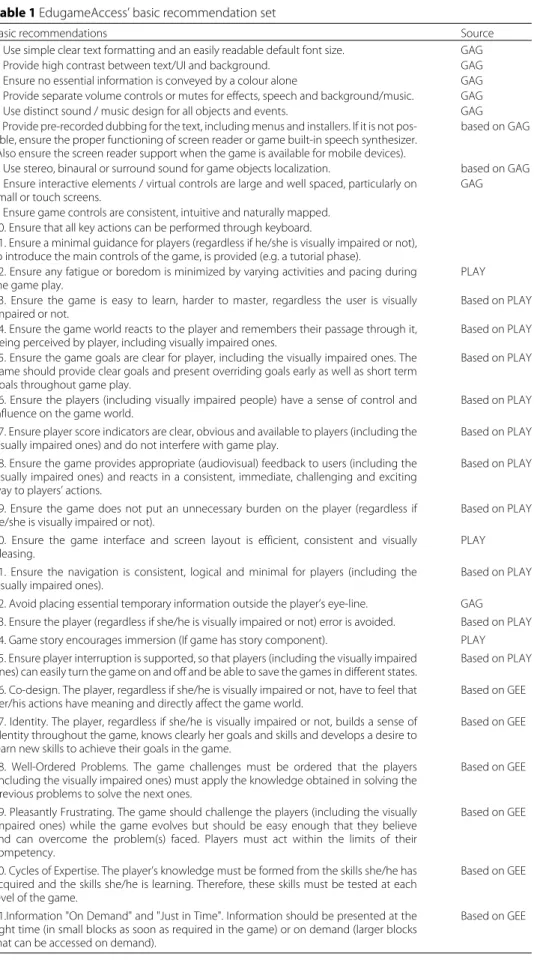
Since some of these recommendations do not apply to 2D educational games, EduGameAccess selects a relevant subset of guidelines, considering this scope, adapts and integrates this subset, aiming to provide a practical guide to educational game developers. Furthermore, since a typical development team seldom has the resources to develop fully accessible games, this set is divided into Basic, Intermediate and Advanced levels, accord-ing to their relevance and expense to implement. For this study, the Basic set (Table1) was used to guide the design, implementation and evaluation of the game Em Busca do Santo Grau – Accessible Version.
Em Busca do Santo Grau – accessible version
The educational game Em Busca do Santo Grau is a 2D adventure PC game developed in 2016 by LOA team with the aim of being a multidisciplinary and customisable educational game with a focus on teachers and students of all levels of education (Bordini et al.2016). The game brings the adventure of a young college student called Ariel, who needs to undergo a series of puzzles at an imaginary university in order to achieve her desired undergraduate diploma.
The game’s mechanics are mainly based on the player moving the protagonist through Top-Down scenarios (Fig.1). Through the interaction with objects and characters, in each stage the player needs to solve puzzles that is related to the content previously customized by the teacher. To do so, Ariel can be moved both by pressing W, A, S, D or the arrow keys, and E to perform actions (such as accessing computers, interacting with objects, opening doors, chatting with other characters, etc).
Table 1EdugameAccess’ basic recommendation set
Basic recommendations Source
1. Use simple clear text formatting and an easily readable default font size. GAG
2. Provide high contrast between text/UI and background. GAG
3. Ensure no essential information is conveyed by a colour alone GAG
4. Provide separate volume controls or mutes for effects, speech and background/music. GAG
5. Use distinct sound / music design for all objects and events. GAG
6. Provide pre-recorded dubbing for the text, including menus and installers. If it is not pos-sible, ensure the proper functioning of screen reader or game built-in speech synthesizer. (Also ensure the screen reader support when the game is available for mobile devices).
based on GAG
7. Use stereo, binaural or surround sound for game objects localization. based on GAG
8. Ensure interactive elements / virtual controls are large and well spaced, particularly on small or touch screens.
GAG
9. Ensure game controls are consistent, intuitive and naturally mapped. 10. Ensure that all key actions can be performed through keyboard.
11. Ensure a minimal guidance for players (regardless if he/she is visually impaired or not), to introduce the main controls of the game, is provided (e.g. a tutorial phase).
12. Ensure any fatigue or boredom is minimized by varying activities and pacing during the game play.
PLAY
13. Ensure the game is easy to learn, harder to master, regardless the user is visually impaired or not.
Based on PLAY
14. Ensure the game world reacts to the player and remembers their passage through it, being perceived by player, including visually impaired ones.
Based on PLAY
15. Ensure the game goals are clear for player, including the visually impaired ones. The game should provide clear goals and present overriding goals early as well as short term goals throughout game play.
Based on PLAY
16. Ensure the players (including visually impaired people) have a sense of control and influence on the game world.
Based on PLAY
17. Ensure player score indicators are clear, obvious and available to players (including the visually impaired ones) and do not interfere with game play.
Based on PLAY
18. Ensure the game provides appropriate (audiovisual) feedback to users (including the visually impaired ones) and reacts in a consistent, immediate, challenging and exciting way to players’ actions.
Based on PLAY
19. Ensure the game does not put an unnecessary burden on the player (regardless if he/she is visually impaired or not).
Based on PLAY
20. Ensure the game interface and screen layout is efficient, consistent and visually pleasing.
PLAY
21. Ensure the navigation is consistent, logical and minimal for players (including the visually impaired ones).
Based on PLAY
22. Avoid placing essential temporary information outside the player’s eye-line. GAG
23. Ensure the player (regardless if she/he is visually impaired or not) error is avoided. Based on PLAY
24. Game story encourages immersion (If game has story component). PLAY
25. Ensure player interruption is supported, so that players (including the visually impaired ones) can easily turn the game on and off and be able to save the games in different states.
Based on PLAY
26. Co-design. The player, regardless if she/he is visually impaired or not, have to feel that her/his actions have meaning and directly affect the game world.
Based on GEE
27. Identity. The player, regardless if she/he is visually impaired or not, builds a sense of identity throughout the game, knows clearly her goals and skills and develops a desire to learn new skills to achieve their goals in the game.
Based on GEE
28. Well-Ordered Problems. The game challenges must be ordered that the players (including the visually impaired ones) must apply the knowledge obtained in solving the previous problems to solve the next ones.
Based on GEE
29. Pleasantly Frustrating. The game should challenge the players (including the visually impaired ones) while the game evolves but should be easy enough that they believe and can overcome the problem(s) faced. Players must act within the limits of their competency.
Based on GEE
30. Cycles of Expertise. The player’s knowledge must be formed from the skills she/he has acquired and the skills she/he is learning. Therefore, these skills must be tested at each level of the game.
Based on GEE
31.Information "On Demand" and "Just in Time". Information should be presented at the right time (in small blocks as soon as required in the game) or on demand (larger blocks that can be accessed on demand).
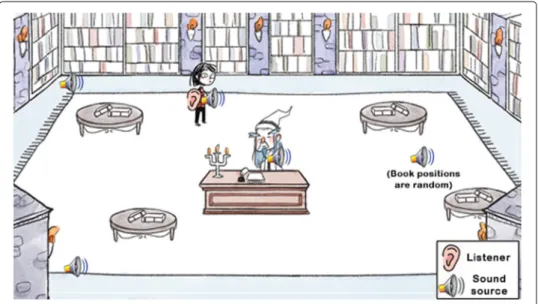
Fig. 1Tutorial stage with indication of the listener’s position and the scenario sound sources
starts the game with an initial number of 1000 points, which is changed according to the actions performed throughout the levels (i.e. completed tasks add 50 points whereas errors subtract 50 or 100 points). If all the points are lost, the player will need to restart the game. The scoring feature in this case can work as a motivation for players/apprentices to improve engagement, such as promoting replay and consequently improving their knowledge and skills.
Customisation
Educators tend to face obstacles when it comes to bringing digital technologies into their classes due to the difficulty of finding or developing resources to meet their needs, and even when they find such artifacts available, not all of them are adaptable to their teaching plans. As a possible solution, open educational resources (UNESCO Building Knowledge
2012), which are learning objects with open license that can be reused, adapted, remixed and redistributed by any person, can be considered feasible solutions capable of ensuring flexibility in the inclusion of educational content to be shared by technological means.
However, when we consider the development of complex educational resources such as games, which requires the involvement of a specialized team with different skills, it is not enough to provide teachers an open license to access and edit various source code files and images. It is necessary to provide adequate support to grant teachers and students sufficient autonomy in the creation of their customized instances of these resources, with little or no programming knowledge or game design skills.
It is within this scope that the REMAR2platform was created by the LOA team with the aim of facilitating and expanding the construction and reuse of open educational games, through a free online service that offers tools that facilitate customisation of educational games without the need of programming skills (Beder and Otsuka2019). Customised game instances can be generated and shared for different platforms (e.g. Web, Desktop and Mobile), and it is possible to add different didactic content into the challenges of
each game level, as well as choosing which stages will compose the customised version, adapting it to the intended pedagogical goals.
In this way, the customisation of Em Busca do Santo Grau game can be made through REMAR platform directly by teachers. Modular stages can be inserted in the game, such as those that provide the most suitable mechanics and customisation features according to the teacher’s educational demands and needs.
Due to the game’s modular and non-linear structure, which allows new scenarios to be designed and included later between its first and last stages, it was conceived the creation of three new accessible modules (described and detailed in the next sections), which were developed with the objective of including people with different types of visual impair-ment, more specifically colour blindness, low vision and blindness, so they could also have a playful learning experience, equivalent to sighted players.
Instructional design
The accessible version was developed and evaluated following the EduGameAccess rec-ommendations, which integrates some important learning principles: clear goals; imme-diate feedback; gradual difficulty problems; challenges and abilities balance; just-in-time information/help (see Table1).
Furthermore, the customization makes it possible to adjust the game to different con-texts and different educational goals. It is noteworthy that for the inclusion of visually impaired people, especially blind people, it is essential that all available information can be perceived through audio and all actions can be performed using the keyboard. The design, implementation and evaluation process are described next.
Game design
As the original version of Em Busca do Santo Grau is essentially visual, the cre-ation of accessible modules required rethinking how the game would be fully trans-ported to the sound universe to be perfectly played only by audio. The visual stimuli were maintained to guarantee the experience for both sighted and people with different types of visual impairment. The accessible game development involved iterative cycles of activities: requirements elicitation; brainstorming; researching; draft-ing/documentation; development of audio-visual components; prototyping/coding and testing.
In order to ensure the accessibility aspects for visually impaired people to access the game, some sound design techniques were followed: (i) the placement of the player’s posi-tion (their ears) in the same locaposi-tion as the protagonist to simulate a first person sense; (ii) the equalisation between soundscapes (general scenario sounds), speeches and char-acters actions, which should always sound clear in the foreground to ensure the player’s understanding (e.g. audio layers); (iii) the use of the stereo-panning effect to lateralise the audio and facilitate game events identification (e.g. if a character speaks on the left side of the screen, the player will hear his voice louder on the left speaker); (iv) the audio rep-resentation of all protagonist’s actions (e.g. walking, collecting items, suffering damages, etc.), and the characters and the objects around her.
(Archambault et al.2007; Salen and Zimmerman2012). The next subsections present the design of three accessible modules.
Tutorial
Em Busca do Santo Grau begins with a Tutorial stage in which the basic commands and actions are taught to the player (Fig. 1). In this level, Ariel meets the school principal (dubbed by one of the LOA members) who contests her low grades. As the principal speaks, she asks the player to perform some actions in order to learn the controllers, such as walking towards her table and pressing specific buttons to proceed with the conver-sation (E), repeat the last sentence (Q) or access the current score (ESC) through audio cues played from a screen reader. The figure below demonstrates where the main listener is located (that is, at the Ariel’s position) and the other scenario sound sources.
This stage was specifically designed for the game’s accessible version in order to support visually impaired players to learn its principles and mechanics. As this is an introductory scenario, customisation is not available in this case. The scenario ends when the principal decides to grant Ariel a second chance to find her lost diploma by overcoming a variety of university challenges, such as the challenges at the Football Pitch and at the Library, which will be presented in the next subsections.
The football pitch
This is the level where Ariel finds herself in a football pitch, with a crowd in the back-ground, a capybara mascot on the left side, a goalpost and a goalkeeper in the centre. At the beginning of the phase, the mascot asks Ariel to go towards him to report what problems she is facing in the scenario. To reach the Non-Playable Character (NPC), the player must follow the direction of the mascot’s voice emitted when the Q key is pressed.
The next challenge at this stage is based on the crowd throwing objects at the pitch during a sudden blackout. Ariel needs to dodge the objects in order to avoid being hit and taking damage. These objects emit a decreasing stereo whistle that becomes more intense as they approach the character’s position. The player’s duty is to try to walk out to the opposite side from which the sound is coming, which then causes the sound of it to decrease as the player moves away from the projectiles (Fig.2).
The final task is kicking the ball to the goal by solving two challenges that require numerical answers – such as Math or Physics exercises – to find the perfect coordinate. The phase ends as the player resolves both calculations, kicks the ball to the goal and passes through a newly revealed gate between the stands so that the heroine can continue with her quest to get the Diploma.
It is worth to say the required challenges can be customised through REMAR platform (Beder and Otsuka2019) according to the learning goals (Fig.3). Thus, customised game instances can be generated and shared for different platforms (e.g. Web and Desktop), and it is possible to add different didactic content into the challenges of each game stage.
Library
Fig. 2Football Pitch stage with indication of the listener’s position and all the scenario sound sources
protagonist. However, due to the librarian’s deafness, he asks the young student to locate them on the scene (Fig.4).
When a book is found, the player must discover the magic word through three tips or clues. The stage ends as soon as the three books are found, and the magic words are discovered. At this point, a secret passage between the shelves is revealed for Ariel to continue her adventure.
Similarly to Football Pitch stage, the required challenges in this stage can be customised through REMAR platform (Fig.5), where it is possible to define a secret word and three tips for each book.
Fig. 4Library stage with indication of the listener’s position and all the scenario sound sources
Implementation
The game was implemented using the engine Construct 2, which consists of event blocks to program all the mechanics and graphic behaviours in the game. For audio creation and editing, the digital audio workstation (DAW) Propellerhead Reason was used, containing an extensive library of plugins, instruments and effects that allow audio manipulation to achieve a good sound quality. Some Creative Commons (CC) sound effects were collected from free web audio libraries (such as Freesound) and mixed through the open-source digital audio editor Audacity. The characters’ voices were recorded by the LOA members at the university’s studio.
The game’s programming software also supports the placement of different receivers and stereo sound sources in the game environment (screen). This feature can help the player to identify the objects and characters on stage through the sound they emit – using the right and left channels of the speakers and/or stereoscopic headphones. In addition to the positioned sounds, screen reading was possible using a Construct 2 plugin called User Media, which adds a multimedia component to the game capable of synthesizing any textual object into voice, using any voice API[1]. Therefore, it was used the Google voice API, supported by all modern browsers.
This feature was essential for this project, considering that the didactic contents are customisable. In cases of games in which the textual structure of the levels is fixed, the best alternative is recording the dialogues and other texts, for the narration produces greater immersion within the game world. The version with the three accessible modules of Em Busca do Santo Grau has been exported to HTML5 and can be executed by any browser.
Evaluation
The game evaluation was conducted using three methods: specialists inspection, user testing and EGameFlow questionnaire (Fu et al.2009). The results are presented in the following subsections.
Evaluation by specialists
In order to analyse the game compliance with EduGameAccess set of recommendations, evaluations were carried out by 7 experts in Games and Human-Computer Interaction (HCI) at Federal University of São Carlos (from many areas and levels of studies such as Undergraduate and Graduation in Computer Science, Computer Engineering, Master in Computer Science and Doctor in HCI), between September and October, 2018.
The evaluators were invited to analyse the game according to the EduGameAccess’ basic recommendations, assigning grades from 0 to 5 to each recommendation or indicating it as not applicable to the game. All of them received a link to test the accessible modules of the game, and the list of basic recommendations of EduGameAccess.
Figure6presents a stacked bar chart representing each specialist grade assigned to each EduGameAccess recommendation.
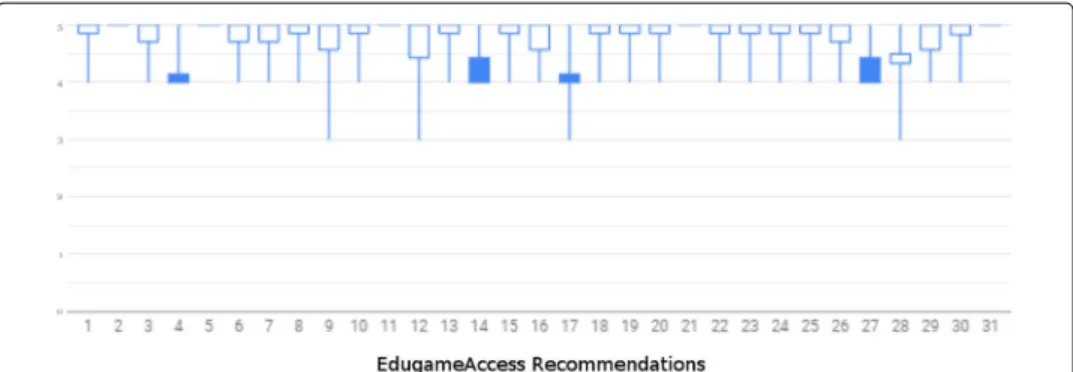
The boxplot chart in Fig.7represents the maximum grade and the minimum grade assigned to each recommendation. The base of the unpainted rectangle means the average
Fig. 7Boxplot chart - Specialists grades using EduGameAccess
of the grades, while the top of the unpainted rectangle represents the median. For painted rectangles, the opposite: the base indicates the median, and the top, the average.
It is possible to observe a predominance of 5 (maximal) grades in most recommen-dations, all of which present at least 3 specialists with a maximum score, except for recommendation 4 - about providing separate volume controls for sound effects, voice (dialogues, reading screen, narration, etc.) and background music. The game provides separate controls for sound effects and background music but does not provide voice volume control. In future versions of the game, it is therefore intended to include voice volume controls for previous recorded narrations and dialogues. However, a solution for volume control at run time for the speech synthesiser (for reading the customisable content) has not yet been found, as it is a native browser tool.
User testing
The user testing was performed at the end of the implementation, in order to validate the new modules in playability and accessibility. The tests were conducted with 17 users divided into 4 groups: 5 people with no visual impairment, 4 colour-blind, 5 with low vision and 3 blinds. During the test sessions, physical and emotional reactions, facial expressions, easiness and difficulties during the gameplay were observed. The volun-teers were asked to think-aloud while playing (think-aloud protocol), making possible to observe their intentions, doubts and difficulties (Lewis and Rieman1994).
The volunteer groups’ profiles were very diverse, therefore the development team could bring together players with high potential of identifying themselves in the game world, respecting the initially intended target public. The testers with no visual impairments were aged from 16 to 27, students ranging from High School to Master’s Degree, and all of them were familiarised with the daily use of technologies, being 3 of them casual players and 2 daily players.
During the tests, the users with low vision easily understood the game mechanics, and were able to play and finish all the tasks with no need of external help. Two of the testers made suggestions regarding the need of voice-synthesising the text typed in the answer boxes automatically, in order to make the orientation easier for the users, as the keys were being pressed - which is now done only under the use of the key "E". Altogether, it was possible to observe feelings and expressions of satisfaction from the players during their interaction.
Tests with colourblind users were similar to the players with low vision, as they easily manipulated the different controls in-game and quickly learned the mechanics. One of the users complained that he had previously faced troubles in differentiating shades of similar colours such as green and brown or green and red when played other games, but attested that Em Busca do Santo Grau was well balanced in this matter. The users did not express too many emotions during the playtest sessions, but declared satisfaction while being interviewed.
The volunteers without disabilities also had no difficulty in understanding the mechan-ics nor in completing the tasks. Besides, they showed interest in the challenge, in the gameplay and in the game main elements. One of them expressed fun and excitement ges-tures whereas another participant was quite thrilled with the challenges and the game’s references related to other media (e.g. games and movies).
The tests with blind players followed the same protocol as the tests conducted with other volunteers in which the users fulfill their required task. The first user demonstrated a reasonable understanding of the mechanics, despite showing difficulties and insecu-rity. In contrast, the second user evinced the biggest difficulties and demonstrated little understanding of the game mechanics. The main problems reported by this user were: not recognizing the game sounds and his/her next steps in the game. The third user demonstrated a complete understanding of the actions required to accomplish the task and demonstrated vigorous emotions, laughs and gestures.
The main problems identified in this process and possible solutions are presented in Table2.
eGameFlow
The eGameFlow, a validated instrument to measure learners’ enjoyment in educational games (Fu et al.2009), was answered by the 17 participants in the user testing. Figure8 Table 2User testing results
Identified Problems Proposed solutions
Some users did not wait for the synthesised voice instructions to finish, and tried keyboard commands at inappropriate times, for example, accessing the input field before hearing the question.
The dialogues and instructions can be very long for some players. A solution for future work is to imple-ment a speech synthesiser speed control so that the reading speed could be configured. Shorten the instructions.
Once the user has selected the input field to type in the answer, they no longer have keyboard access to the clues that would help them answer the question in the Library Level. This is a limitation of the Con-struct 2 game engine, which does not control the focus out of the input field once it is focused in it.
In web projects using HTML5, where text fields are used in game, the text field can be focused in (for text input) or out (to control the remainder of the layout). Specifically for projects generated via Con-struct 2, this is not possible. In future projects, game engines that have support for control of text fields, such as Unity, should be considered.
Some users attempted to move around the scenario by repeatedly pressing the directional keys, rather than holding them down.
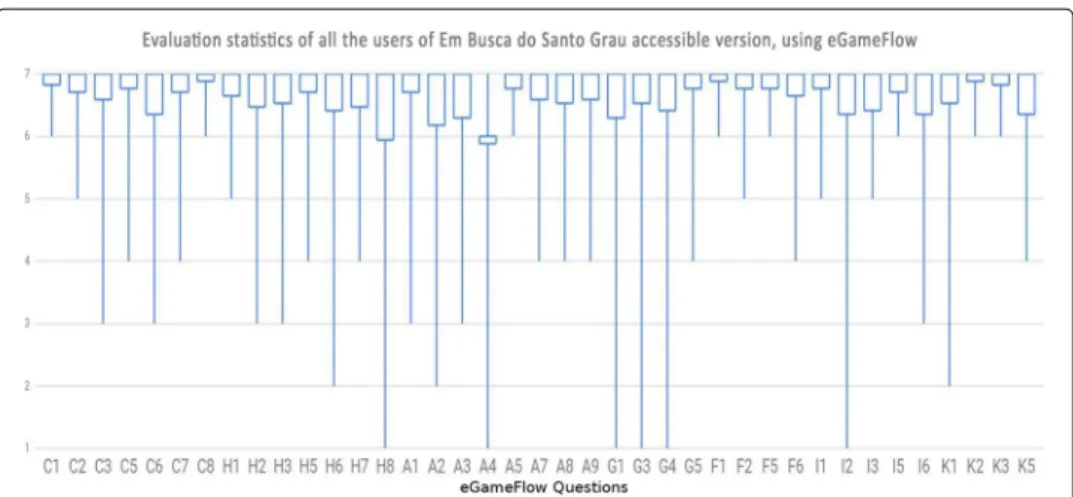
Fig. 8Box plot chart - User evaluation result using eGameFlow
represents the distribution of grades from 1 – fully disagree – to 7 – fully agree – for each of the 39 eGameFlow questions. The Fig.8presents a box plot chart with maximum, minimum, average and median grades for each eGameFlow question.
It is possible to observe that, even considering all categories of users, all medians were 7, except for question A4 - "Does not the game allow players to make mistakes that prevent them from advancing in the game?", which users did not fully agree with the information that the game contains only errors that would not prevent them from progression into the game. This happened because some users encountered a bug while answering the questions of the Football Level, where the second question was not read by the voice synthesiser or was read with the text of the first question. This happened because some browsers were too fast in processing the commands to activate the voice synthesiser, and in some cases, it triggered the commands before the game moved on to the next question. The bug was later solved and the issue did not appear anymore.
Results and final considerations
This work made it possible to observe the use of EduGameAccess set during the whole development course of an accessible educational game and to validate its effectiveness in supporting all stages of this process. The evaluation results indicated that EduGameAc-cess was effective in helping developers to produce good acEduGameAc-cessible educational games and provide equivalent gaming experiences for people with and without visual impairment.
A major difficulty faced through the development process was the limitations of the adopted engine, Construct 2, which does not offer full support for some accessibility resources, or they exist but are outdated. Even though it can generate a HTML5 web ver-sion for the game, the engine uses technologies such as HTML Canvas, which renders both text and image on the browser screen, making the game’ visual material unreadable to conventional screen readers.
development process, testing, taking part in the implementation decisions and refining the game as it grows during development.
The produced game is going to be available as an open educational resource in REMAR platform and can be used by anyone to create custom instances of this accessible educa-tional game. The source code alongside the complete set of game development artefacts are available in the GitHub project repository (available at: https://github.com/LOA-SEAD).
As a next step, the development team plans an adaptation of Em Busca do Santo Grau into a fully accessible version, where all modules are playable by both the visually impaired and sighted students. In addition, new evaluation and refinement cycles may be conducted.
Abbreviations
API: Application programming interface; CC: Creative commons; DAW: Digital audio workstation; GAG-SIG: Game accessibility special interest group; GAG: Game accessibility guidelines; HCI: Human-computer interaction; IGDA: The international game developers association; LOA: Laboratório de Objetos de Aprendizagem (Laboratory of Learning Objects); REMAR: Recursos Educacionais Multiplataforma Abertos na Rede (Open Multiplatform Educational Resources); UFSCar: Universidade Federal de São Carlos (Federal University of São Carlos)
Acknowledgements
The authors would like to thank the Coordenação de Aperfeiçoamento de Pessoal de Nível Superior - Brasil (CAPES) for this project funding. The authors would like to thank all volunteers who tested the game, who tried and discussed our approach. We thank our colleagues, who accompanied the project, and the "LOA team".
Authors’ contributions
The corresponding author can confirm that all authors have had scientific contribution in this manuscript. First and second authors were in charge of game design, sound design, implementation and tests. The third author conceived EduGameAccess and conducted the game evaluations. The last two authors provided supervision of the research. All authors reviewed the literature, read and approved the final manuscript.
Funding
This study was financed in part by the Coordenação de Aperfeiçoamento de Pessoal de Nível Superior Brasil (CAPES) -Finance Code 001.
Availability of data and materials
Em Busca do Santo Grau – Accessible Version is available as an open educational resource in REMAR platform (available at:http://remar.rnp.br) and can be used by anyone to create custom instances of this accessible educational game. The source code alongside the complete set of game development artifacts are available in the GitHub project repository (available at:https://github.com/LOA-SEAD/).
Ethics approval and consent to participate
Federal University of São Carlos Research Ethics Board reviewed the research and approved on ethical grounds on March 28, 2018.
Competing interests
The authors declare that they have no competing interests.
Author details
1Department of Computing, Federal University of São Carlos, São Carlos - SP, Brazil.2Institute of Arts, State University of
Campinas, Campinas - SP, Brazil.
Received: 5 September 2019 Accepted: 26 November 2019
References
Archambault, D., Ossmann, R., Gaudy, T., Miesenberger, K. (2007). Computer games and visually impaired people.
Upgrade,8(2), 43–53.
Balan, O., Moldoveanu, A., Moldoveanu, F. (2015). Navigational audio games: An effective approach toward improving spatial contextual learning for blind people.International Journal on Disability and Human Development,14(2), 109–118. Beder, D., & Otsuka, J. (2019). A platform for customization and publication of open educational games, InProceedings of
XX Simpósio Brasileiro de Informática na Educação (SBIE 2019).https://doi.org/10.5753/cbie.sbie.2019.902. Brazil. Bordini, R., Otsuka, J., Beder, D., de Camargo, A., Valério Neto L., Tsuda, M. (2016). Design de Em Busca do Santo Grau –
Desurvire, H., & Wiberg, C. (2009). Game Usability Heuristics (PLAY) for Evaluating and Designing Better Games: The Next Iteration, InOCSC’09 Proceedings of the 3d International Conference on Online Communities and Social Computing: Held as Part of HCI International 2009.https://doi.org/10.1007/978-3-642-02774-1_60(pp. 557–566). USA.
Fizek, S., Woletz, J.D., Beksa, J. (2015). Playing with sound and gesture in digital audio games. From prototype design to evaluation. In A Weisbecker, M Burmester, A Schmidt (Eds.),Mensch & Computer, Workshopband.https://doi.org/10. 1515/9783110443905-061.
Fontoura Junior, P. (2018).Recomendações para o Desenvolvimento de Jogos Educacionais Integrando Aspectos de Acessibilidade, Jogabilidade e Educacionais. Master’s thesis. Brazil: Department of Computing – Federal University of São Carlos.
Friberg, J., & Gärdenfors, D. (2004). Audio Games: New Perspectives on Game Audio, InProceedings of the 2004 ACM SIGCHI International Conference on Advances in Computer Entertainment Technology(pp. 148–154). USA: ACM.
Fu, F.L., Su, R.C., Yu, S.C. (2009). EGameFlow: A scale to measure learners’ enjoyment of e-learning games.Computers & Education,52(1), 101–112.
GAG Game Accessibility Guidelines (2019). Available at:http://gameaccessibilityguidelines.com. Accessed 24 Aug 2019. Gee, J. (2007).Good Video Games + Good Learning: Collected Essays on Video Games, Learning, and Literacy. USA: Peter Lang
Publishing.
Hartley, S. (2011). World report on disability (who).https://doi.org/10.13140/RG.2.1.4993.8644.
IBGE CENSO DEMOGRÁFICO 2010 (2010). Available at:http://biblioteca.ibge.gov.br/visualizacao/periodicos/94/ cd_2010_rel%igiao_deficiencia.pdf. Accessed 17 Oct 2019.
IGDA Game Access S.I.G. (2019). Available at:https://igda-gasig.org/about-game-accessibility/guidelines/visual/. Accessed 24 Aug 2019.
Klopfer, E., Osterweil, S., Salen, K. (2009).Moving learning games forward. Cambridge: The Education Arcade.
Lewis, C., & Rieman, J. (1994). Task-Centered User Interface Design: A Practical Introduction. Available at:http://grouplab. cpsc.ucalgary.ca/saul/hci_topics/tcsd-book/chap-1_v-1%.html. Accessed 24 Aug 2019.
Murray, J.H. (1997).Hamlet on the Holodeck: The Future of Narrative in Cyberspace. New York: The Free Press. Prensky, M. (2012).From digital natives to digital wisdom: Hopeful essays for 21st century learning. USA: Corwin. Salen, K., & Zimmerman, E. (2012).Regras do jogo: fundamentos do design de jogos. Brazil: Blucher.
UNESCO Building Knowledge, Societies (2012). United Nations Educational, Scientific and Cultural Organization. Available at:http://unesdoc.unesco.org/images/0022/002204/220416e.pdf. Accessed 24 Aug 2019.
Yuan, B., Folmer, E., Harris Jr. F.C. (2011). Game accessibility: a survey.Universal Access in the Information Society,10(1), 81–100.
Publisher’s Note