CanIt-Domain-PRO Administration Guide
for Version 9.2.4Roaring Penguin Software Inc. 24 April 2015
Contents
1 Introduction 19
1.1 Principles of Operation . . . 19
1.2 Handling False-Positives . . . 19
1.2.1 Spam-Control Delegation . . . 20
1.3 Organization of this Manual . . . 20
1.4 Definitions. . . 21
2 Operation 27 2.1 Principles of Operation . . . 27
2.2 Interaction between Whitelists and Blacklists . . . 28
2.2.1 RCPT TO: Actions . . . 29
2.2.2 Post-DATA Actions. . . 30
2.3 Streaming . . . 32
2.4 How Addresses are Streamed . . . 33
2.5 How Streaming Methods are Chosen . . . 33
2.6 Status of Messages . . . 36
2.7 Handling of Suspect Messages . . . 37
2.7.1 Handling Methods . . . 37
2.7.2 Secondary MX Relays . . . 38
2.8 The Database . . . 38
2.9 Remailing Messages . . . 39
3 Realms 41 3.1 Introduction to Realms . . . 41
3.2 Realm Names . . . 42
3.2.1 ThebaseRealm . . . 42
3.3 Creating Realms. . . 42
3.4 Realm Mappings . . . 43
3.5 Determining the Realm . . . 44
3.5.1 Mapping an Address to a Realm . . . 44
3.5.2 Mapping a Login Name to a Realm . . . 44
3.6 Realm Expiry . . . 45
3.6.1 Suspending Service to a Realm. . . 45
3.7 Realm Hierarchy . . . 45
3.8 Realm Custom Fields . . . 46
4 Streams 49 4.1 Introduction to Streams . . . 49
4.2 Realms . . . 49
4.3 The Definition of a Stream . . . 49
4.4 Users and E-Mail Addresses . . . 49
4.5 Mapping . . . 52
4.6 The Home Stream . . . 52
4.7 The “default” Stream . . . 53
5 CanIt-Domain-PRO Setup 55 5.1 Accessing The Web Interface . . . 55
5.1.1 License Key Screen. . . 55
5.1.2 Login Screen . . . 56
5.2 The Setup Menu. . . 57
5.3 Wizards . . . 58
5.3.1 Basic Setup Wizard . . . 58
5.3.2 RPTN Setup Wizard . . . 58
5.3.3 Dictionary Attack Detection Wizard . . . 58
5.4 Verification Servers . . . 59
5.4.1 Wildcard Verification Server . . . 61
5.4.2 SRS and Verification Servers . . . 62
5.5 Mail Routing . . . 62
5.5.1 Outbound Relaying . . . 64
5.5.2 Outbound Relaying for Select Domains . . . 64
5.6 Cluster Management . . . 65
5.6.1 Bandwidth Optimization for Copying Files . . . 66
CONTENTS 5
5.6.3 Renaming of Cluster Members . . . 67
5.7 Known Networks . . . 67
5.7.1 Overlapping Networks . . . 70
5.7.2 The SMTP-AUTH Pseudo-Network . . . 70
5.8 Rate-Limiting Outbound Mail . . . 71
5.8.1 Rate-Limiting by IP Address . . . 72
5.8.2 Fine-Grained Rate-Limiting Rules . . . 72
5.8.3 Notes about Rate-Limiting Rules . . . 74
5.9 Features . . . 75
5.9.1 Direct Queue Injection . . . 75
5.10 System Check . . . 76
5.11 Templates . . . 77
5.12 Theme Customization and Branding . . . 80
5.12.1 Creating or Editing a Customization . . . 81
5.12.2 Emergency Recovery from Bad Theme Customization . . . 82
5.13 HTTPS . . . 82
5.14 The Domain Mapping Table . . . 82
5.15 The Address Mapping Table . . . 84
5.15.1 Wild-Card Entries . . . 85
5.16 ThedefaultStream . . . 86
5.17 Mapping Scenarios . . . 86
5.17.1 Central Scanning with Opt-Out . . . 86
5.17.2 Single Domain . . . 87
5.17.3 Single Domain with Aliases and Mailing Lists . . . 87
5.18 Pausing Delivery to Selected Domains . . . 87
5.18.1 Pausing Delivery . . . 87
5.18.2 Resuming Delivery . . . 88
5.19 The Domain Overview Page . . . 88
5.20 Autotask® Integration . . . 89
5.20.1 Preparing Autotask . . . 89
5.20.2 Preparing CanIt-Domain-PRO . . . 90
5.20.3 Autotask Settings and Inheritance . . . 91
6 CanIt-Domain-PRO Administration 93 6.1 Global Settings . . . 93
6.2 SRS (Sender Rewriting Scheme) . . . 97
6.3 Real-Time DNS Blacklists . . . 98
6.3.1 Entering the Master List of DNS RBLs . . . 98
6.3.2 combined.bl.rptn.ca. . . 99
6.4 Phishing URLs . . . 100
6.4.1 Malicious URL Votes. . . 100
6.4.2 Known Phishing URLs . . . 102
6.4.3 Delaying Messages because of local Phishing Votes. . . 103
6.5 Users . . . 103
6.5.1 User Privileges . . . 104
6.5.2 Adding a User . . . 105
6.5.3 Editing a User . . . 106
6.5.4 Deleting a User . . . 107
6.5.5 Granting Access to Streams . . . 107
6.5.6 Switching Users . . . 107
6.6 Permitting Users to Opt In . . . 108
6.7 Groups. . . 109
6.7.1 Creating, Deleting and Editing Groups. . . 109
6.8 Viewing Active Streams . . . 110
6.8.1 Definition of an Active Stream . . . 111
6.8.2 The Active Stream Display . . . 111
6.8.3 Deleting a Stream. . . 112
6.9 Filtering Outbound Mail . . . 112
6.9.1 DKIM-Signing Outbound Mail . . . 112
6.10 Copying Rules from One Stream to Another . . . 115
6.11 Secondary MX Hosts . . . 116
6.12 Avoiding Backscatter . . . 116
6.13 Test Plugins . . . 117
6.13.1 The PhishingAddress Plugin . . . 118
6.13.2 The PhishingURL Plugin . . . 118
6.13.3 The OfficeMacros Plugin . . . 118
6.14 Emergency Blocking of Delivery Status Notifications . . . 118
6.15 Removing All Rules and Settings from a Stream . . . 119
CONTENTS 7
7.1 Introduction . . . 121
7.2 User Lookups . . . 121
7.2.1 IMAP and POP3 Authentication . . . 123
7.2.2 LDAP Authentication and Streaming . . . 125
7.2.3 Program Authentication and Streaming . . . 129
7.2.4 Program Authentication (Legacy Method) . . . 133
7.2.5 Theaccount-infoScript . . . 133
7.2.6 The Rewrite User Lookup . . . 133
7.3 Authentication Mappings . . . 134
8 Bayesian Filtering 137 8.1 Introduction to Bayesian Filtering . . . 137
8.2 Unauthenticated Voting . . . 137
8.3 The Bayes Journal. . . 138
8.4 Site-Wide and Realm-Wide Bayes Training . . . 138
8.5 RPTN . . . 138
8.6 Ruleset and Geolocation Data Updates . . . 139
9 Permissions 141 9.1 Introduction . . . 141
9.2 Stream Permissions . . . 141
9.3 Determining Permissions . . . 142
9.4 Granting Permissions . . . 143
9.4.1 Granting Stream Permissions. . . 143
9.4.2 Granting User Permissions . . . 145
9.5 Permission Grantability . . . 147
9.5.1 Grantability Algorithm . . . 148
10 Streams, Inheritance and the Simple GUI 149 10.1 Simplification . . . 149
10.2 Stream Inheritance . . . 149
10.3 Special Streams . . . 151
10.3.1 Final Streams . . . 151
10.3.2 Creating Special Streams . . . 151
10.3.3 Deleting Special Streams . . . 152
10.4 The Simplified GUI . . . 152
10.5 Inheritance from Non-Final Streams . . . 153
10.6 Inheritance from Opted-Out Streams . . . 153
11 Periodic Reports 155 11.1 Introduction . . . 155
11.1.1 Periodic Reports . . . 155
11.1.2 Charts . . . 155
11.2 Creating Charts . . . 157
11.3 Creating Periodic Reports. . . 157
11.4 Editing Periodic Reports . . . 158
11.5 Running a Report on Demand . . . 159
12 Locked Addresses 161 12.1 Introduction to Locked Addresses . . . 161
12.2 Preparing to use Locked Addresses . . . 161
12.2.1 Create a new domain . . . 161
12.2.2 Configure mail for the new domain . . . 161
12.2.3 Inform CanIt-Domain-PRO about the locked address domain . . . 162
12.2.4 Associate each login name with an e-mail address. . . 162
13 Attachment Handling 163 13.1 General Filename and MIME Type Rules . . . 163
13.2 Delaying Attachments . . . 163
13.2.1 Enabling the Feature . . . 163
13.2.2 Creating Delay Rules . . . 164
13.2.3 How It Works . . . 164
13.3 Stripping Attachments . . . 165
13.3.1 Approving the Release of Stripped Attachments . . . 166
14 URL Proxying 167 14.1 Configuring URL Proxying . . . 168
14.2 Proxying Known Phishing URLs . . . 169
14.2.1 Known Phishing Test Point . . . 169
15 CanIt Storage Manager 171 15.1 Storage Manager Concepts . . . 171
CONTENTS 9
15.2 Configuring the Storage Manager. . . 173
15.2.1 Enabling the Storage Manager . . . 173
15.2.2 The Configuration Wizard . . . 173
15.2.3 Local Configuration . . . 175
15.2.4 Starting the Storage Manager. . . 175
15.2.5 Data Stored in the Storage Manager . . . 176
15.3 Backup Considerations . . . 176
15.4 Running multiple Storage Managers . . . 176
15.5 ps Output . . . 177
16 Searching Logs 179 16.1 Introduction . . . 179
16.2 Log Basics . . . 179
16.3 Searching the Logs . . . 180
16.3.1 Performing a Search . . . 180
16.3.2 Fields . . . 181
16.3.3 Creating a Log Search Query. . . 182
16.4 Saving Log Searches . . . 183
16.4.1 Managing Saved Log Searches . . . 183
16.5 Log Search Results . . . 184
16.5.1 Detailed Results . . . 184
16.6 Forwarding Logs . . . 185
16.6.1 Enabling Log-Forwarding . . . 185
16.6.2 Configuring Log-Forwarding . . . 185
17 Tips 187 17.1 Greylisting . . . 187
17.2 Don’t Trust Sender Addresses . . . 188
17.3 Don’t Trust Sender Domains . . . 188
17.4 You May Trust Relay Hosts. . . 188
17.5 Custom Rules . . . 189
17.5.1 General Recommendations . . . 189
17.5.2 Things to avoid . . . 189
17.6 Group High-Scoring Messages Together . . . 189
17.7 Roaring Penguin Best-Practices . . . 190
17.8 General Anti-Spam Tips . . . 190
17.8.1 Use Receive-Only Addresses on your Web Site . . . 190
17.8.2 Do Not Reply to Spam . . . 190
18 Security 191 18.1 Don’t Run as Root . . . 191
18.2 Ownership and Permissions. . . 191
18.3 SSH . . . 192
18.4 PostgreSQL Security . . . 192
18.5 PHP Security . . . 192
18.6 Network Security . . . 192
18.7 Backups . . . 193
A The Domain Configuration Wizard 195 A.1 Introduction . . . 195
A.2 Entering the Domain Name . . . 195
A.3 Picking a Realm. . . 195
A.4 Configuring Streaming . . . 196
A.5 Configuring Authentication . . . 197
A.6 Configuring Routing and Verification. . . 198
A.7 Summary . . . 199
B Release Notes 201 C A Testing Topology for CanIt-Domain-PRO 275 C.1 Introduction . . . 275
C.2 Assumptions . . . 275
C.3 Network Setup . . . 275
C.4 Build the CanIt-Domain-PRO Server . . . 276
C.5 Configure the CanIt-Domain-PRO Server to Relay Mail . . . 276
C.5.1 Enable Relaying . . . 277
C.5.2 Configure Forwarding Relays . . . 277
C.5.3 Rebuild Sendmail Databases . . . 277
C.6 Route Test Mail . . . 277
C.6.1 Direct Injection . . . 278
C.6.2 Create a Test Subdomain . . . 278
C.7 Route Real Mail. . . 278
CONTENTS 11
D CanIt-Domain-PRO Architecture 281
D.1 Introduction . . . 281
D.2 CanIt-Domain-PRO Architecture . . . 282
D.3 Starting and Stopping CanIt-Domain-PRO . . . 283
D.4 Static Configuration Files . . . 284
D.4.1 Database Settings . . . 284
D.4.2 Cron Settings . . . 284
D.4.3 MIMEDefang Settings . . . 285
D.4.4 Filter Settings . . . 287
D.4.5 Ticker Settings . . . 288
D.4.6 Storage Manager Settings . . . 288
D.4.7 Maintenance Notification. . . 289
D.5 Tuning CanIt-Domain-PRO . . . 289
D.5.1 Memory . . . 290
D.5.2 Disk . . . 290
D.5.3 Solaris-Specific tmpfs Note . . . 290
D.5.4 CPU. . . 290
D.5.5 Sendmail . . . 290
D.6 Dealing with Overload . . . 291
D.6.1 Tune CanIt-Domain-PRO and Sendmail . . . 291
D.6.2 Network Architecture. . . 291
E CanIt-Domain-PRO HOWTOS 293 E.1 Restoring a Database from a Dump. . . 293
E.2 Firewall Settings . . . 294
E.2.1 Firewall Rules: External Hosts . . . 294
E.2.2 Firewall Rules: Internal Hosts . . . 294
E.2.3 Firewall Rules: Intra-Cluster Hosts . . . 295
E.3 Running Something after the Nightly Cron Job Completes . . . 295
E.4 Hooks . . . 296
E.5 Migrating CanIt-Domain-PRO to a Different Machine. . . 296
E.5.1 CanIt-Domain-PRO Clusters . . . 297
E.5.2 Storage Manager . . . 297
E.5.3 Migration Procedure . . . 297
E.6 Cloning a CanIt-Domain-PRO Machine . . . 300
F Using CanIt-Domain-PRO with memcached 301
F.1 Introduction . . . 301
F.2 Using memcached. . . 301
F.2.1 Installing memcached . . . 301
F.2.2 Configuring memcached . . . 301
F.2.3 Single vs. Multiple Caches . . . 302
F.2.4 Configuring CanIt-Domain-PRO to use memcached. . . 302
F.3 What is Cached . . . 303
G Using CanIt-Domain-PRO with PgBouncer 305 G.1 Introduction . . . 305
G.2 Installation . . . 305
G.3 Configuration . . . 305
G.3.1 Configuringuserlist.txt . . . 306
G.3.2 Configuringpgbouncer.ini . . . 306
G.3.3 Configuring CanIt-Domain-PRO to use PgBouncer . . . 306
H CanIt-Domain-PRO Logging 309 H.1 General Information. . . 309
H.2 Event Log Format . . . 310
I SNMP Agents for CanIt-Domain-PRO 313 I.1 Introduction . . . 313
I.2 The SNMP Agent . . . 313
I.2.1 Enabling the agent . . . 314
I.2.2 Configuring SNMPd . . . 314
I.2.3 Agent Data . . . 314
J Additional Scripts 317 J.1 reset-password.pl . . . 317
K Bayes Database Back-Ends 319 K.1 PostgreSQL Bayes Data Storage . . . 319
K.2 Berkeley Database Bayes Storage . . . 319
K.3 CDB Database Bayes Storage . . . 319
K.4 Cluster Considerations . . . 320
CONTENTS 13
K.5 Switching back to PostgreSQL Bayes Storage . . . 320
L System Check Tests 321 L.1 Disabling System Checks . . . 324
L.2 Anomaly Detection . . . 324
L.2.1 Disabling Recipient Verification Anomaly Testing . . . 325
L.2.2 More Details about Anomalies . . . 325
L.2.3 Suppressing Anomaly Notification Emails . . . 326
M The CanIt-Domain-PRO License 327 M.1 THE CANIT DATA LICENSE . . . 330
Index 331
List of Figures
2.1 Flow of Mail through CanIt-Domain-PRO . . . 28
2.2 RCPT TO: Decision. . . 29
2.3 Post-Data Decision . . . 31
2.4 Address Streaming . . . 35
2.5 Database Agents . . . 38
3.1 Administrative Levels . . . 41
3.2 Realm Screen . . . 42
3.3 Realm Mappings . . . 43
3.4 Realm Hierarchy Example . . . 46
3.5 Realm Custom Fields . . . 47
4.1 Streaming Scenarios . . . 51
5.1 License Key Screen . . . 55
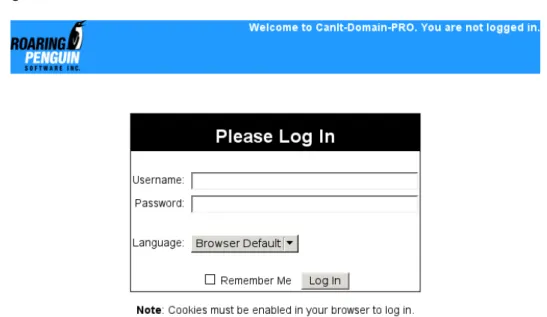
5.2 Login Screen . . . 56
5.3 Welcome Screen . . . 57
5.4 Verification Server Operation . . . 59
5.5 Verification Servers . . . 60
5.6 Domain Routing Screen. . . 62
5.7 Domain Routing Detail . . . 63
5.8 Cluster Management Page . . . 65
5.9 Known Networks . . . 67
5.10 Rate-Limiting Rules. . . 72
5.11 System Check . . . 77
5.12 Templates . . . 78
5.13 Theme Customizations . . . 80
5.14 Theme Customization Editor . . . 81
5.15 Domain Mappings . . . 83
5.16 Address Mappings . . . 85
5.17 Domain Overview Page . . . 88
5.18 Autotask Integration Settings . . . 90
6.1 Global Settings . . . 93
6.2 Master RBLs . . . 98
6.3 Phishing URL Votes . . . 100
6.4 Known Phishing URLs . . . 102
6.5 Users . . . 104
6.6 Add User . . . 105
6.7 Edit User . . . 106
6.8 Granting Access to Streams . . . 107
6.9 Stream Opt-In Approval . . . 108
6.10 Groups. . . 109
6.11 Group Members . . . 110
6.12 Active Streams . . . 111
6.13 Known Network with Associated Domains. . . 113
6.14 Adding a DKIM Key Pair . . . 113
6.15 DKIM Key Details . . . 114
6.16 Copying Rules . . . 115
6.17 Test Plugins . . . 117
6.18 Block Delivery Status Notifications Page. . . 119
7.1 User Lookup List . . . 122
7.2 User Lookup Wizard . . . 122
7.3 User Lookup: Method Selection . . . 122
7.4 IMAP/POP3 User Lookup . . . 124
7.5 LDAP User Lookup . . . 126
7.6 Program User Lookup. . . 129
7.7 Authentication Mappings . . . 134
9.1 Permissions Page . . . 143
9.2 Permissions Page . . . 143
9.3 Stream Permissions Page . . . 144
LIST OF FIGURES 17
9.5 Permission Grantability . . . 147
9.6 Grantable Permissions Detail . . . 148
10.1 Stream Inheritance Terminology . . . 150
10.2 Stream Inheritance Table . . . 150
10.3 Special Stream Table . . . 151
10.4 Simplified Interface . . . 152
11.1 Periodic Reports. . . 157
11.2 Add Periodic Report . . . 158
13.1 Delayed Attachments . . . 164
13.2 Attachment-Stripping Rules . . . 165
14.1 Redirected Link . . . 167
14.2 URL Proxy Rules . . . 168
15.1 CanIt Storage Manager . . . 172
15.2 Storage Manager Configuration. . . 174
16.1 Log Search Page . . . 180
16.2 Saved Log Searches . . . 183
16.3 Log Search Results . . . 184
16.4 Log Search Details . . . 185
16.5 Log Forwarding Page . . . 186
A.1 Domain Configuration: Enter Domain Name . . . 195
A.2 Domain Configuration: Enter Realm Name . . . 196
A.3 Domain Configuration: Configuring Streaming . . . 196
A.4 Domain Configuration: Configuring Authentication . . . 197
A.5 Domain Configuration: Configuring Routing and Verification . . . 198
C.1 Network Configurations. . . 276
D.1 CanIt-Domain-PRO Architecture . . . 282
L.1 Anomaly Notice. . . 324
L.2 Anomaly Details . . . 325
Chapter 1
Introduction
CanIt-Domain-PRO is server-based anti-spam software that stops spam from entering your network. This guide explains how to administer CanIt-Domain-PRO, and is intended for e-mail administrators. For installation instructions, please see the Installation Guide, and for end-user instructions, see the User’s Guide.
1.1
Principles of Operation
CanIt-DomaPRO uses many sophisticated rules and mechanisms to detect spam. These rules in-clude those in an open-source anti-spam package, and are very effective and broad-spectrum. Once CanIt-Domain-PRO decides that a message is probably spam, it is held for review.
You can configure CanIt-Domain-PRO to return an SMTP “temporary failure” code to the sending relay host for any message held for review. In this way, the message body is held in thesender’sspool directory and not in yours. A more complete description of how CanIt-Domain-PRO operates is given in Chapter2.
1.2
Handling False-Positives
Although CanIt-Domain-PRO’s rules for identifying spam are very accurate, no purely automated pro-cess can be 100% correct. That is why CanIt-Domain-PRO relies, in the end, on human intervention. In this way, it can guarantee that no legitimate e-mail message will ever be rejected, and you will never lose an important e-mail because of automated scanning.
At first glance, it seems that requiring human intervention is a step backwards—spam messages again must be reviewed by a person. In reality, CanIt-Domain-PRO still saves time and money for the following reasons:
• CanIt-Domain-PRO includes many features to lower your workload. (These features are de-scribed later in this manual.) You can scan and categorize e-mail messages using CanIt-Domain-PRO much more quickly than using mail reader software.
• As time passes, you will begin recognize mailing-list traffic and other traffic that tends to be falsely flagged as spam, and tell CanIt-Domain-PRO to always whitelist that traffic. Over time, this reduces the amount of human intervention required.
• If you are willing to take the risk of inappropriately rejected messages, you can configure CanIt-Domain-PRO to automatically reject very high-scoring messages.
1.2.1 Spam-Control Delegation
CanIt-Domain-PRO operates similarly to CanIt-PRO, except that it allows two levels of administrative delegation. In CanIt-PRO, the system administrator can create separatestreams. Stream owners can review quarantined mail within their streams. Only the single system administrator can create streams. In CanIt-Domain-PRO, however, the system administrator createsrealms, each of which has its own Realm Administrator. Realm Administrators, in turn, can createstreams, each of which has a Stream Owner responsible for settings within the stream.
Settings in different streams do not affect other streams.
1.3
Organization of this Manual
This manual is divided as follows:
Chapter1, “Introduction”, is this chapter. You should familiarize yourself with the terms in Section1.4 before proceeding.
Chapter2, “Operation”, describes the principles behind CanIt-Domain-PRO’s operation.
Chapter3, “Realms”, describes Realms. A Realm is a complete administrative unit in CanIt-Domain-PRO. You must read and understand this chapter before using CanIt-Domain-PRO in production. Chapter4, “Streams”, describes the concepts behind streaming. You must read and understand this chapter before using CanIt-Domain-PRO in production.
Chapter 5, “CanIt-Domain-PRO Setup”, describes basic setup steps you need to take to configure CanIt-Domain-PRO.
Chapter6, “PRO Administration”, describes tasks undertaken by the CanIt-Domain-PRO administrator.
Chapter7, “External Authentication”, describes how to integrate CanIt-Domain-PRO with an external authentication mechanism (such as LDAP or POP3.)
Chapter8, “Bayesian Filtering”, explains CanIt-Domain-PRO’s Bayesian filtering module. Bayesian filtering uses statistical analysis and training so that CanIt-Domain-PRO “learns” to recognize spam based on user feedback.
Chapter9, “Permissions”, describes how to control access to various parts of the CanIt-Domain-PRO Web interface.
Chapter10, “Streams, Inheritance and the Simple GUI”, describes how the CanIt-Domain-PRO ad-ministrator can set up different groups of spam-handling settings and allow end-users to select from
1.4. DEFINITIONS 21
one of a limited number of predetermined setups. The simplified interface is very useful if you wish to provide “canned” settings for unsophisticated users.
Chapter12, “Locked Addresses”, describes how CanIt-Domain-PRO permits users to generate ad-dresses that they can give out to strangers, but that those strangers cannot in turn give or sell to third-parties.
Chapter13, “Attachment Handling”, describes CanIt-Domain-PRO options for handling various at-tachments.
Chapter14, “URL Proxying”, describes a CanIt-Domain-PRO feature that can help mitigate phishing attacks that trick users into visiting hostile web sites and entering sensitive information.
Chapter 16, “Searching Logs”, describes CanIt-Domain-PRO’s log-indexing and searching feature (available only on appliance builds.)
Chapter 17, “Tips”, contains guidelines for reducing the workload of the spam-control officer and dealing with spam more effectively.
Chapter18, “Security”, contains information about CanIt-Domain-PRO security.
AppendixC, “A Testing Topology for PRO”, gives tips on how to test CanIt-Domain-PRO before putting it into production. This appendix also contains useful information on production network topology, so if you are planning on using CanIt-Domain-PRO as a relay-only server, you should read this appendix.
AppendixD, “CanIt-Domain-PRO Architecture”, discusses CanIt-Domain-PRO’s filter architecture in detail. It provides tips on tuning CanIt-Domain-PRO and describes the various configuration files used by CanIt-Domain-PRO.
AppendixE, “CanIt-Domain-PRO HOWTOs”, gives short “how-to” recipes for performing common CanIt-Domain-PRO administrative tasks, such as restoring a database from the text dump, or moving CanIt-Domain-PRO to another machine.
AppendixH, “CanIt-Domain-PRO Logging”, explains how CanIt-Domain-PRO logs statistics, warn-ing, and error messages.
AppendixJ, “Additional Scripts”, describes some additional scripts bundled with CanIt-Domain-PRO that you might find useful.
1.4
Definitions
We use many terms related to Internet e-mail in this manual. Here is a definition of some of the terms we use.
API Application Programming Interface. In the context of CanIt-Domain-PRO, the API is a method for interacting with CanIt-Domain-PRO from a program or script.
Backscatter Unwanted DSNs (see “DSN”) caused when e-mail systems respond to faked sender addresses.
Bayesian Analysis is a method whereby an anti-spam system keeps track of how often words appear in spam and non-spam. Once enough statistics have been accumulated, the system can calculate
the likelihood that a new message is spam.
Blacklist A list of domains, senders or hosts that are blocked from sending e-mail.
CIDR “Classless Inter-Domain Routing”. A method for specifying an entire set of contiguous IP addresses.
CanIt-Domain-PRO is an enhanced version of CanIt-PRO that allows two levels of delegation of responsibility. See the next three definitions for more details.
CanIt-PRO is an enhanced version of CanIt that allows flexible delegation of spam-control respon-sibilities rather than requiring a single spam-control officer.
CanIt is extra software built on top of MIMEDefang that provides sophisticated spam-management functions.
Cron A UNIX program that runs tasks periodically.
DKIM “DomainKeys Identified Mail”. A mechanism for proving that a particular organization’s servers have relayed an email message. DKIM uses cryptographic techniques to assert that a particular domain name is responsible for relaying the message.
DNS “Domain Name System”. The mechanism used on the Internet to translate host names to IP addresses and more generally, to associate various sorts of information with domain names.
DSN “Delivery Status Notification”. A message generated automatically to notify senders of prob-lems or failure to deliver an e-mail.
Daemon A long-running UNIX program that typically starts at system boot and continues running in the background until the system is shut down.
Envelope Mail messages often haveheadersspecifying the sender (the “From:” header) and recipi-ents (typically the “To:” header.) However, SMTP has a completely separate set of commands for specifying the sender and recipients. The sender and recipients specified in the SMTP com-mands are referred to as the envelope senderandenvelope recipients, and do not necessarily match the information in the message headers. CanIt-Domain-PRO uses both the Header From and Envelope Sender address in Sender and Domain rules. It always uses only Envelope Recip-ients in its recipient rules.
Envelope Sender The sender address used in the “MAIL FROM” SMTP command. This is not necessarily the same as theHeader Fromaddress. Most email readers display the Header From address rather than the Envelope Sender address.
Hash An algorithm that computes a short “signature” given a chunk of data. Different inputs are very likely to yield different signatures, so that a signature can be considered as a short-hand identifier for the original data.
Header From The sender address used in the “From:” header of an email message. This is the sender address displayed by most mail readers. SeeEnvelope Senderfor information about the SMTP sender address.
1.4. DEFINITIONS 23
Greylisting A technique to block spam from certain spam-sending software. It works by issuing a Temporary Failure Code the first time an e-mail arrives from an unknown sender and IP address. Legitimate SMTP servers will retry, allowing the message to be delivered. Some spam-sending software does not retry, and messages sent by such software will be blocked without any content-scanning if greylisting is enabled.
Joe-Job A technique in which spammers fake the sending address to be that of an innocent victim, who often receives DSNs (see “DSN”) and complaints.
Malware is software designed with a malicious purpose in mind. Examples of malware are viruses, trojans, and keyloggers.
MIMEDefang is a free (GPL’d) e-mail scanning program that integrates with Sendmail’s Milter API. It forms the basis for CanIt.
MIME “Multipurpose Internet Mail Extensions”. A set of rules for encoding different types of at-tachments as plain-text messages for transmission over SMTP.
Milter is a Sendmail interface that allows external programs to listen in on the SMTP dialog, and potentially modify Sendmail’s actions and SMTP responses.
Permanent Failure Code Also calledreject, this is a code sent to a relay host telling it that e-mail transmission has failed and will not succeed. (For example, this code is sent if someone tries to send e-mail to a nonexistent user.) The relay host typically e-mails a failure notification to the original sender and discards the message.
Phishing An attack in which someone forges e-mail pretending to be from a security organization, a bank, etc. and convinces naive users to reveal sensitive information like user-names and passwords.
PostgreSQL A free and open-source SQL database heavily used by CanIt-Domain-PRO.
Ransomware is a specific type of malware. It typically makes changes on your computer that are almost impossible to undo (such as encrypting all your files) and then demands payment within a short period of time to undo the damage.
Ratware is software dedicated to sending out large volumes of spam.
RBL “Real-time Blocklist”. A DNS-based system for checking in real-time whether or not hosts or domains should be blocked.
RPTN is the Roaring Penguin Traning Network. This is a system whereby multiple CanIt-Domain-PRO installations can share Bayes training data.
RSS stands for “Really Simple Syndication” and is a format for publishing “news feeds” on the Web. CanIt-Domain-PRO can produce an RSS feed showing pending incidents.
Realm Administrator is a user with administrative privileges in a realm. Unlike the System Admin-istrator, a Realm Administrator can only administer his or her own realm.
Realm is a “virtual CanIt-PRO”. Within a realm, realm administrators can create streams for end-users, and streams in one realm are independent of streams in another realm.
Relay Host When a mail server wishes to transmit e-mail to your server using SMTP, it establishes a connection with your mail server. The machine attempting to transmit mail to your server is called arelay host.
REST Representational State Transfer. An architectural style for interacting with an API over HTTP or HTTPS. CanIt-Domain-PRO’s API is REST-based.
Root Privileges A CanIt-Domain-PRO user with root privileges can create other users and configure basic operating parameters. Also, he or she can edit other users’ preferences and stream settings.
SMTP Dialog During the course of e-mail transmission, the two ends of an SMTP connection trans-mit commands and results back and forth. This conversation is called theSMTP dialog.
SMTP “Simple Mail Transfer Protocol”, as described in Internet RFC 2821. This is the protocol used to transmit e-mail over the Internet.
SPF stands for “Sender Policy Framework”. It is a mechanism that allows a domain’s administrator to list which hosts are allowed to originate e-mail claiming to come from that domain. For more details, please seehttp://www.openspf.org.
SRS stands for “Sender Rewriting Scheme”. It is used in conjunction with SPF to avoid spurious SPF failures when a CanIt-Domain-PRO machine forwards mail to a back-end server that performs SPF checks. For a description of SRS, please seehttp://en.wikipedia.org/wiki/ Sender_Rewriting_Scheme.
Sender’s Domain This is the domain part (everything after the@sign) in the sender’s e-mail address.
Sendmail A UNIX-based program for sending and receiving e-mail. Sendmail is designed to route mail from one mail server to another.
Spam Score A numerical score computed by CanIt-Domain-PRO that rates the likelihood that a mes-sage is spam.
Stream is a “virtual CanIt” machine offered by CanIt-PRO. If an incoming e-mail arrives for more than one recipient, and the recipients each wish to have his or her own private spam quarantine, CanIt-PRO re-mails the original message so each recipient has his or her own copy, and can dispatch it as he or she sees fit.
Syslog A UNIX program that centralizes the logging of messages from various system daemons.
System Administrator is a user with administrative privileges in thebaserealm. The System Ad-ministrator is responsible for overall administration of the CanIt-Domain-PRO installation.
Tempfail See “Temporary Failure Code”
Temporary Failure Code Also calledtempfail, this is a code sent to a relay host telling it that e-mail transmission has failed temporarily, and it should retry in a little while. Typically, the relay host retains the e-mail message in a spool directory and retries transmission periodically. The host
1.4. DEFINITIONS 25
eventually gives up after a certain period (typically, a few days) has elapsed without successful transmission.
Ticker A CanIt-Domain-PRO program that runs periodic maintenance tasks.
Ticker Host In a CanIt-Domain-PRO cluster consisting of more than one machine, exactly one host is designated to run the Ticker tasks. That host is called the Ticker Host.
Whitelist A list of domains, senders or hosts whose e-mail is permitted through without spam-scanning.
Chapter 2
Operation
2.1
Principles of Operation
CanIt-Domain-PRO watches each incoming SMTP message and operates as follows. Because differ-ent recipidiffer-ents can have differdiffer-ent settings, CanIt-Domain-PRO makes the following decisions at RCPT time (once the recipient is known):
• If the SMTP connection is from a blacklisted host, the RCPT command is rejected.
• If the message sender is blacklisted (or the domain is blacklisted), the RCPT command is re-jected.
• Otherwise, the message is collected and scanned.
After CanIt-Domain-PRO has scanned the message, it performs the following operations:
• Messages containing dangerous files (such as viruses) are discarded or rejected, depending on which option you choose.
• If the sender, relay host or domain are whitelisted, the message is accepted without being scanned for spam.
• Many spam-detection rules are applied to the message. If the message is judged not to be spam, it is accepted and the SMTP transaction succeeds. Otherwise, CanIt-Domain-PRO will hold the message locally.
For messages judged to be spam, CanIt-Domain-PRO takes the following steps:
• A unique ID is calculated by running the message body through a special hash function. The hash calculation is designed to be resistant to some forms of trivial message modification. • The ID is looked up in a database.
1. If the ID is not found in the database, it is entered as apendingmessage. CanIt-Domain-PRO will either hold a copy of the message locally or send a temporary failure code to the SMTP sender, depending on how CanIt-Domain-PRO has been configured.
2. If the ID is in the database with statuspending, CanIt-Domain-PRO may either save a local copy or return a temporary failure code to the SMTP sender, depending on how CanIt-Domain-PRO has been configured.
3. If the ID is in the database with statusspam, a permanent rejection code is sent to the SMTP sender.
4. If the ID is in the database with statusnot-spam, the message is accepted for delivery.
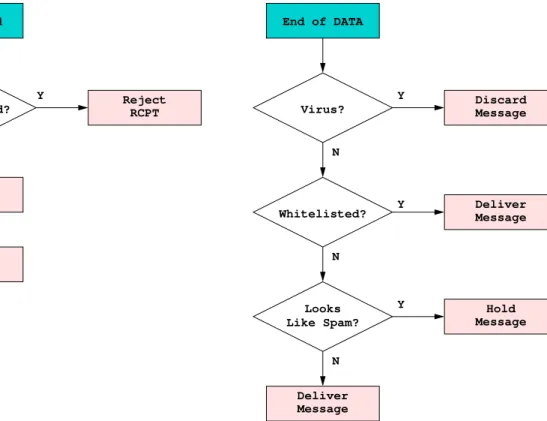
The flow of mail through CanIt-Domain-PRO is summarized in Figure 2.1. Note that this is the conceptualflow; in reality, several optimizations are performed that would only complicate the figure. See also Figures2.2on page29and2.3on page31for more accurate details about blacklisting and whitelisting. RCPT Command Blacklisted? Accept RCPT Reject RCPT Proceed to DATA
End of DATA
Virus? Whitelisted? Message Discard Message Deliver Looks Like Spam? Message Deliver Message Hold Y N Y N N Y N Y
Figure 2.1: Flow of Mail through CanIt-Domain-PRO
2.2
Interaction between Whitelists and Blacklists
CanIt-Domain-PRO must prioritize whitelists and blacklists. For example, suppose a sender is whitelisted, but the host the message comes from is blacklisted. What should CanIt-Domain-PRO do?
2.2. INTERACTION BETWEEN WHITELISTS AND BLACKLISTS 29
2.2.1 RCPT TO: Actions
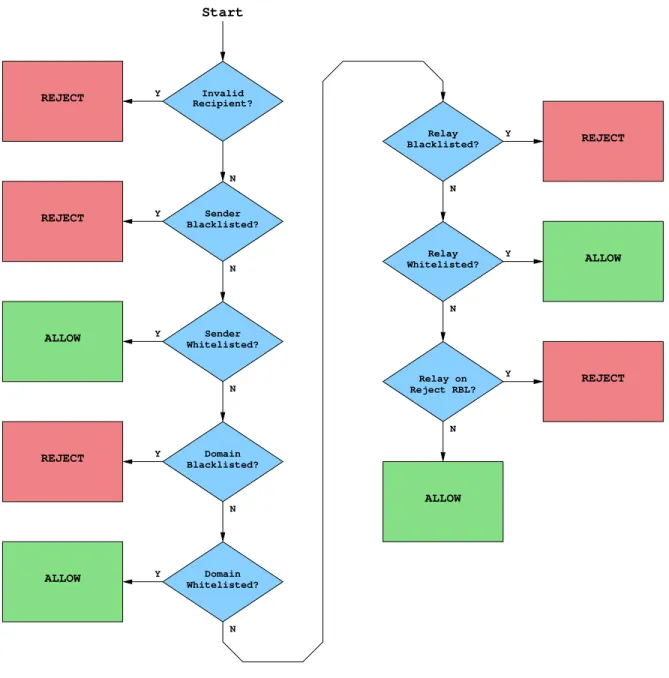
At the SMTP RCPT TO: command, CanIt-Domain-PRO examines the envelope sender and SMTP relay address, and makes decisions according to Figure2.2.
REJECT Sender Whitelisted? Whitelisted? Domain Domain Blacklisted? REJECT REJECT ALLOW ALLOW REJECT Whitelisted? Relay REJECT ALLOW ALLOW Relay Blacklisted? Y N Y N Relay on Reject RBL? Y N Sender Blacklisted? Y N Y N Y N Y N Recipient? Y N Start Invalid
Figure 2.2: RCPT TO: Decision
Here are the steps illustrated in Figure2.2. They determine the response to the RCPT TO: command. The first rule that matches returns the result; subsequent rules are not tested.
1. If the recipient is blacklisted, the command is rejected. Blacklisted recipients canneverreceive e-mail.
2. If the recipient has opted out of spam-scanning, the command is accepted.
3. If the sender address is blacklisted, reject the command with an SMTP failure code.
4. If the sender address is whitelisted, accept the command. (That is, permit the SMTP transaction to continue. The message may be rejected later for other reasons.)
5. If the domain of the sender is blacklisted, reject the command. 6. If the domain of the sender is whitelisted, accept the command. 7. If the sending relay’s IP address is blacklisted, reject the command. 8. If the sending relay’s IP address is whitelisted, accept the command.
9. If the sending relay is on a real-time blacklist for rejection, then reject the command. 10. Otherwise, accept the command.
2.2.2 Post-DATA Actions
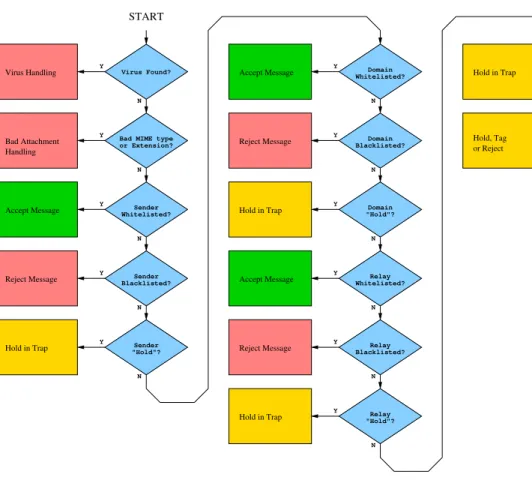
After the SMTP “DATA” command has transmitted the entire message, CanIt-Domain-PRO has enough information to determine a spam score. At this point, it makes decisions according to Fig-ure2.3.
2.2. INTERACTION BETWEEN WHITELISTS AND BLACKLISTS 31
START
Virus Handling
Accept Message
Reject Message
Hold in Trap Accept Message
Reject Message
Hold in Trap Bad Attachment
Handling
Reject Message Accept Message
Hold in Trap
Accept Message Hold in Trap
Hold, Tag or Reject Virus Found?
Sender Whitelisted? Bad MIME type or Extension? Sender Sender "Hold"? Blacklisted? Y Y Y Y N N N N "Hold" RBL Rule? High Spam Score? Y Y N N Whitelisted? Blacklisted? "Hold"? Relay Relay Relay Whitelisted? Domain Domain Domain Blacklisted? "Hold"? Y N Y N Y Y Y Y Y N N N N N
Figure 2.3: Post-Data Decision
Here are the steps illustrated in Figure2.3. They determine the response to the DATA command. The first rule which matches returns the result; subsequent rules are not tested. (There is one exception: If a “Hold Sender”, “Hold Domain” or “Hold Relay” rule is hit, but the message scores over the auto-reject threshold, the message is rejected rather than held for review.)
When a message is “held in the quarantine”, an SMTP temporary-failure code may be issued, or the message may be queued locally, depending on your global settings. When a message is “rejected”, the sending relay receives an SMTP failure code. If the message being rejected was queued locally, it is simply discarded. When a message is “accepted”, it is delivered, and removed from the local queue if it was queued locally.
1. If a virus was found in the message, then the action depends on the virus-handling setting. Here’s what happens for the various settings:
• Hold/Tag– the message is held in the quarantine (or tagged in a tag-only stream.) • Reject– the message is rejected with an SMTP failure code.
• Discard– the message is discarded. An SMTP success code is returned. • Accept– processing continues to step (2) below.
2. If a bad MIME part or filename extension was found, then if the bad part has a “Reject” setting, the message is rejected. Otherwise, the message is held in the quarantine.
3. If the user has opted-out of spam-scanning, the message is accepted 4. If the sender is whitelisted, the message is accepted.
5. If the sender is blacklisted, the message is rejected. It may seem superfluous to check for a blacklist here, given that the blacklist was checked during the RCPT command. However, by the DATA command, we have the From: header, and CanIt-Domain-PRO applies sender checks to the From: header adress also.
6. If the sender has a “Hold/Tag” setting, the message is held in the quarantine (or tagged in a tag-only stream.) However, if it scores over the auto-reject threshold, it will be rejected. 7. If the domain is whitelisted, the message is accepted.
8. If the domain is blacklisted, the message is rejected. Again, at this point, CanIt-Domain-PRO can make use of the From: header address.
9. If the domain has a “Hold/Tag” setting, the message is held in the quarantine or tagged. How-ever, if it scores over the auto-reject threshold, it will be rejected.
10. If the relay is whitelisted, the message is accepted.
11. If the relay has a “Hold/Tag” setting, the message is held in the quarantine or tagged. However, if it scores over the auto-reject threshold, it will be rejected.
12. If the relay is on a “Hold/Tag” real-time DNS blacklist, the message is held in the quarantine or tagged.
13. If CanIt-Domain-PRO is in “Tag Only” mode, the message is tagged (if it looks like spam) and accepted.
14. If the spam score is equal to or above the auto-reject threshold, the message is rejected. Oth-erwise, if the spam score is equal to or above the spam threshold, the message is held in the quarantine.
15. Otherwise, the message is accepted.
2.3
Streaming
Because CanIt-Domain-PRO allows different recipients to have different spam-processing rules, an incoming message for more than one recipient must bestreamed.
The diagram in Figure 2.1 shows what happens to messages after they have been streamed. If an incoming message arrives for more than one stream, copies are re-mailed to recipients in each stream, and the original message is discarded. Then, each re-mailed message folows the flow in Figure 2.1, with some minor differences that will be explained later.
In Figure2.1, all of the blacklisting and whitelisting decisions are unique to a stream. It is perfectly feasible for one stream to whitelist a sender, a second stream to blacklist it, and a third stream to do neither.
2.4. HOW ADDRESSES ARE STREAMED 33
Messages that are streamed and re-mailed are not held by issuing a temporary-failure code, because they would then reside in your own mail spool and waste resources during repeated sending attempts (until they are approved or rejected.) Instead, held messages are stored in the database, and re-mailed if approved or discarded if rejected.
2.4
How Addresses are Streamed
CanIt-Domain-PRO can map e-mail addresses to streams using the following techniques:
Database CanIt-Domain-PRO maintains a table of address-to-stream mappings in the Address Map-ping Table. If you choose the Database technique, then this table is consulted to perform the mapping. You hand-enter the mappings between addresses and streams. In addition, the
Databasetechnique allows a “wildcard” lookup if the original lookup does not exist.
AsIs This method simply uses the entire e-mail address as the stream name, after stripping angle-brackets and converting to lower-case. Therefore, [email protected] gets mapped to [email protected],
ChopDomain This method simply chops the domain part off the e-mail address. Therefore, [email protected] mapped toxzyyz.
ChopUser This method chops the user part off the e-mail address. Therefore, [email protected] mapped toexample.com.
Program This method runs theaccount-infoprogram to determine the stream. Please see Sec-tion7.2.4on page133for details.
User Lookup You can create so-called “User Lookups” that permit you to use LDAP or arbitrary scripts to map addresses to streams. These are described in Section7.2.
Note: No matter what stream method you choose, an exact-match database lookup is always done first. This lets you override the mapping for special cases. For example, if you host only a single domain, then the ChopDomainmethod is probably fine for most addresses. However, if you also host mailing lists, you’d like to stream spam for the lists to the mailing list owners. In that case, you can add special mappings [email protected], (wherejoe-owner is the person responsible forlist-name.)
Because the Program method is somewhat inefficient, CanIt-Domain-PRO caches results in the database table. This improves efficiency while retaining flexibility. By default, cached entries are valid for 24 hours, but you can adjust the timeout.
2.5
How Streaming Methods are Chosen
Each domain can be streamed using its own method. To select a streaming method, CanIt-Domain-PRO first looks up the domain in the Domain Mapping Table. This table holds a list of streaming
methods for each domain. If the lookup fails, CanIt-Domain-PRO looks up the wildcard entry “*” in the Domain Mapping Table and uses that method to stream the address.
2.5. HOW STREAMING METHODS ARE CHOSEN 35
Incoming Mail for [email protected]
method = lookup "example.com" in Domain Mapping Table
method = lookup "*" in
Domain Mapping Table method found?
method found?
stream = lookup Address Mapping Table "[email protected]" in stream found? method = ChopDomain ChopUser or AsIs? Return stream stream = adjust address
method = "Database"
method =
Program? to determine local user
Run account−info script Cache stream in Address Mapping Table
method =
LDAP in LDAP directory. Look up stream
stream = lookup Address Mapping Table "*" in
stream found? stream = lookup Address Mapping Table "user@*" in stream = lookup Address Mapping Table "*@example.com" in
stream found?
stream = "default" Y N N Y N Y N Y N Y Y Y N Y N stream found? N Y N
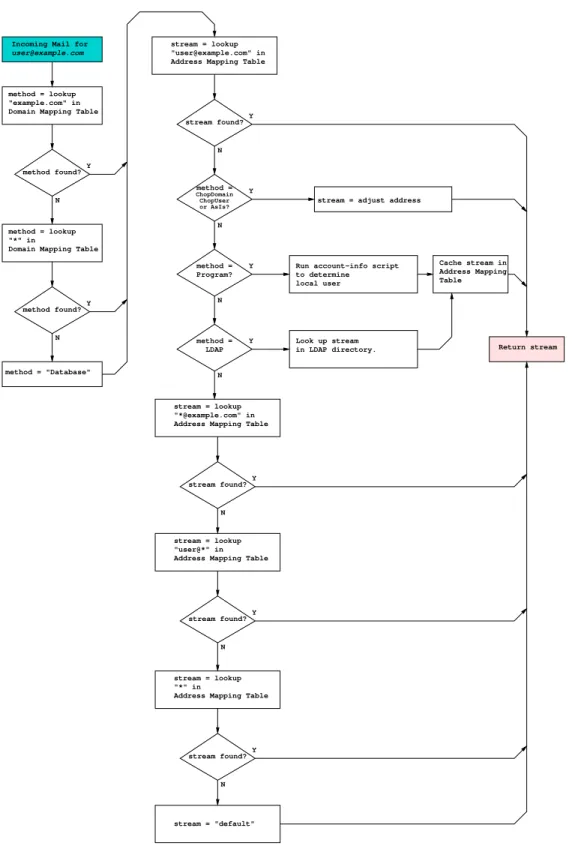
Figure 2.4: Address Streaming
Figure 2.4looks complicated, but the streaming process is very flexible, and actually quite simple. Here is a description of the figure, with some more details that would crowd the figure too much.
1. For an incoming message to [email protected], CanIt-Domain-PRO first looks up exam-ple.comin the Domain Mapping Table. If that lookup succeeds, CanIt-Domain-PRO will have a method (ChopDomain,ChopUser,Program,Databaseor a user-lookup name), and CanIt-Domain-PRO proceeds to Step4.
2. If the lookup fails, the leading component of the domain name is dropped (ie: “subdo-main.example.com” becomes “example.com”) and we retry Step1with the shorter name. 3. If lookups on all domain components fail, CanIt-Domain-PRO looks up*in the Domain
Map-ping Table. This allows you to set a default streaming method for all domains. If that lookup fails, the method defaults toDatabase.
4. Regardless of the method chosen, CanIt-Domain-PRO looks [email protected] the Ad-dress Mapping Table. If an exact match is found (and it is not expired if it is a cached entry), the result of that lookup is used as the stream.
5. Otherwise, CanIt-Domain-PRO determines the stream as follows:
• If the method isChopDomain, [email protected] is deleted, and the stream becomes user.
• If the method is ChopUser, the user@ part is deleted, and the stream becomes exam-ple.com.
• If the method isAsIs, the entire e-mail [email protected] used as the stream name.
• If the method is Program, CanIt-Domain-PRO runs the account-info program as described in Section7.2.4.
• If the method refers to a user-lookup, then the user-lookup is invoked to determine the stream. See Section7.2for details.
If the stream determination succeeded (AsIs, ChopDomain andChopUser always succeed;
Programfails if the program produces no output), then the stream is returned. Additionally, the stream may be cached in the Address Mapping Table.
6. If the previous step failed to determine a mapping method, or the method was set toDatabase, CanIt-Domain-PRO looks upuser@*. If that fails, then*@example.comin the address mapping table. This allows you to map all addresses in a particular domain to a stream. If that fails, as a last resort, CanIt-Domain-PRO looks up*in the address mapping table. If that final lookup fails, then a special stream nameddefaultis used.
2.6
Status of Messages
2.7. HANDLING OF SUSPECT MESSAGES 37
pending Messages enterpending state when they arrive, and remain there until they are marked as spam or nonspam. These messages are displayed in the Web-based “Pending Messages” list.
spam The spam-control officer can mark a message as spam. If a message marked asspamis re-ceived, a rejection notice is sent to the sending mail server, and the message is not delivered.
not-spam The spam-control officer can mark a message asnot-spam. If a message marked as not-spamis received, it is delivered as usual.
2.7
Handling of Suspect Messages
As discussed earlier, CanIt-Domain-PRO may be configured to issue an SMTP temporary failure response if a message is held because it is suspected of being spam. This response ensures that the message remains in the sender’s queue. The sender will retry transmission periodically, until one of three things happens:
• The message is marked asspam. On the next transmission attempt, it will be rejected with a permanent failure response.
• The message is marked asnot-spam. On the next transmission attempt, it will be accepted and delivered.
• The sending relay times out and bounces the message. Most relays retry transmissions for at least 3 days, so this will not happen unless you do not check the spam quarantine often enough.
2.7.1 Handling Methods
While keeping the message in the sender’s queue is useful, it does mean that your CanIt-Domain-PRO installation relies on the server to retransmit. It also may consume excessive bandwidth on a busy site. Therefore, CanIt-Domain-PRO has three options for handling suspicious messages:
1. The default handling,Until-Dispatched, always replies with a temporary failure indication until the CanIt-Domain-PRO operator marks a message asspamornot-spam.
2. TheFirst-Timehandling replies with a temporary failure indication thefirsttime a suspicious message is received. A lot of spamming software ignores error returns and will never retransmit the message. Failing it the first time, therefore, stops a lot of spam without human intervention. If the message is transmitted a second time, however, it is accepted and held in the CanIt-Domain-PRO database. If the operator marks the messagespam, it is simply deleted from the database. If the message is markednot-spam, CanIt-Domain-PRO re-mails it to the original recipient before deleting it from the database.
3. TheNeverhandling never replies with a temporary failure indication. Suspicious messages are always accepted and then held in CanIt-Domain-PRO’s database. Incoming messages immedi-ately move to thependingstate.
Please note that holding messages locally may greatly increase the disk space used by CanIt-Domain-PRO. Be sure to leave enough disk space to handle all messages you anticipate will be held locally.
2.7.2 Secondary MX Relays
Many organizations have secondary MX hosts that queue mail if the primary host is down. They then relay the queued mail when the primary MX host comes back up. Ideally, CanIt-Domain-PRO should run on all of your MX hosts. However, if it can only run on your primary MX host, then all other MX hosts should relay to the CanIt-Domain-PRO machine. You should then tell CanIt-Domain-PRO the IP addresses of the secondary MX hosts via the “Known Networks” facility so that CanIt-Domain-PRO can use theNever Tempfailhandling for messages from thoses hosts. (There is no point in keeping mail queued and retransmitted on your secondary MX hosts; it’s better to accept and hold the message on the CanIt-Domain-PRO machine.)
2.8
The Database
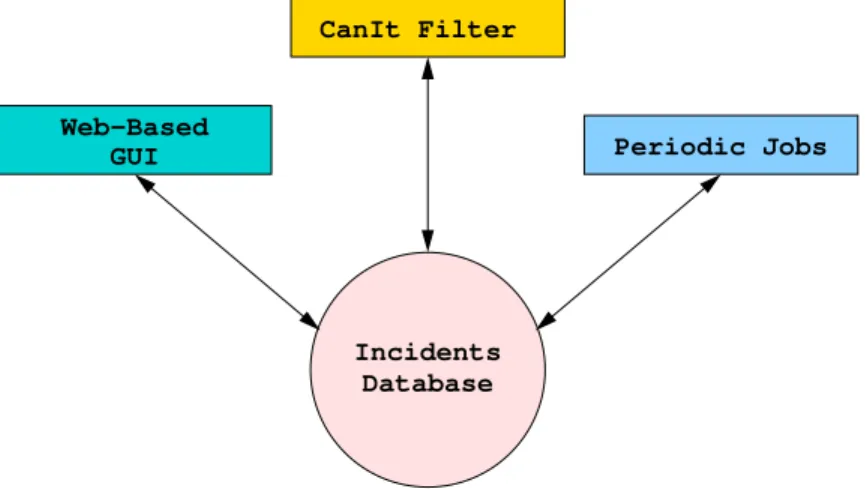
The incident database is key to the correct operation of CanIt-Domain-PRO. Three different agents operate on the database as shown in Figure2.5:
Incidents Database Web−Based
GUI Periodic Jobs
CanIt Filter
Figure 2.5: Database Agents
The agents operating on the database are:
• The CanIt-Domain-PRO Filter – This is the portion of CanIt-Domain-PRO that integrates with Sendmail and disposes of spam messages.
• The Web-Based GUI – This is used by users or administrators to mark messages as spam or legitimate. The Web-Based GUI also lets you monitor the levels of spam and take action against specific senders, domains or relay hosts.
• Periodic Jobs – These housekeeping jobs perform operations like moving expired pending mes-sages intospamstatus and purging very old messages from the database. Periodic jobs may be started from one of two places:
2.9. REMAILING MESSAGES 39
1. The/usr/share/canit/scripts/canit.cronscript, which should be run once a night.
2. As part of the operation of the CanIt-Domain-PRO daemon (canitd). Canitd is a daemon that starts on bootup and runs continuously, performing background maintenance tasks.
2.9
Remailing Messages
On occasion, CanIt-Domain-PRO will be forced to remail a message after discarding the original. The following scenarios cause remailing:
1. If a message comes in for recipients in more than one stream, CanIt-Domain-PRO generates one new copy foreachstream and mails out the copies. The original message is then discarded. You may see a message in the log file indicating that the message has been discarded; don’t panic. The copies are safely queued.
2. If a Pending message is held in the database and subsequently approved for release, CanIt-Domain-PRO fetches the message body from the database and remails it. This always takes place on the designated ticker host, no matter which host processed the original message. In all cases when CanIt-Domain-PRO remails a message, the message goes into Sendmail’s submission queue (most likely in the queue directory /var/spool/clientmqueue or /var/spool/mqueue-client. The message is only processed on the next run of the submis-sion queue. For this reason, you should keep the submissubmis-sion queue interval short (on the order of a minute or two.) On CanIt-Domain-PRO appliances, the submission interval is automatically config-ured for you. On other platforms, consult your system’s documentation for details on how to shorten Sendmail’s submission queue interval.
Chapter 3
Realms
3.1
Introduction to Realms
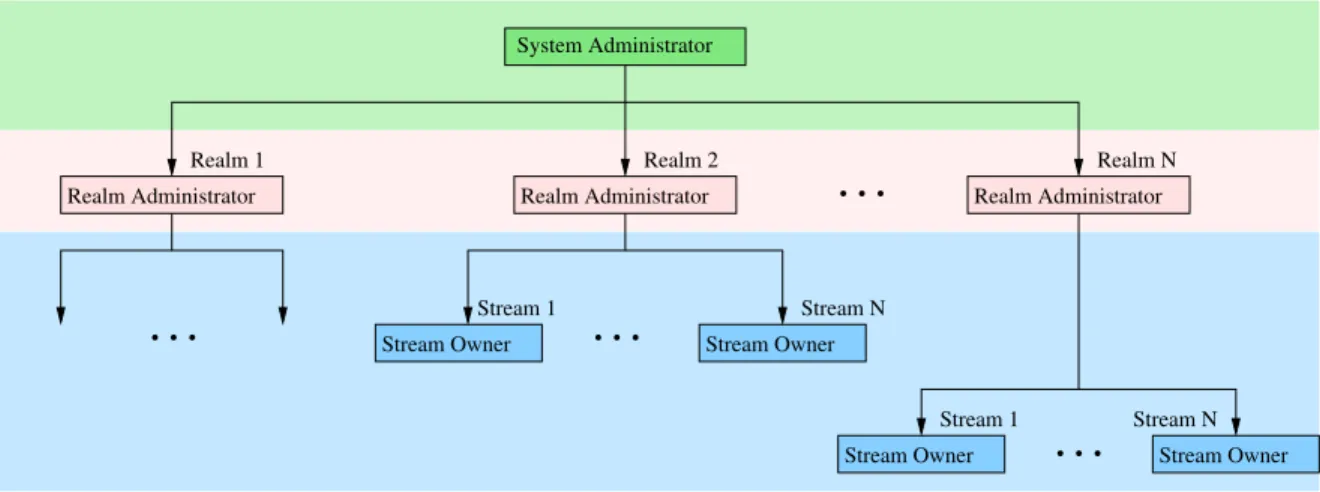
CanIt-Domain-PRO has three levels of administrative control:
1. TheSystem Administratoradministers all aspects of CanIt-Domain-PRO and is responsible for setting up and provisioning the system.
2. ARealm Administratoradministers settings and rules for a givenrealm. A realm encompasses one or more Internet domains. The realm administrator is responsible for provisioningstreams within his or her realm. A realm administrator is said to haveroot privilegeswithin a realm. 3. A Stream Owner administers settings and rules for his or her own stream. A stream owner
is typically an end-user or a person responsible for administering a small group of e-mail ad-dresses.
The administrative levels are illustrated in Figure3.1below:
Realm Administrator Realm Administrator Realm Administrator
Stream Owner Stream Owner
Stream Owner Stream Owner System Administrator
Realm 2
Realm 1 Realm N
Stream 1 Stream N
Stream 1 Stream N
Figure 3.1: Administrative Levels
3.2
Realm Names
A realm name can consists only of letters, numbers, dashes and underscores. That is, only the follow-ing characters can appear in a realm name:
A B C D E F G H I J K L M N O P Q R S T U V W X Y Z a b c d e f g h i j k l m n o p q r s t u v w x y z 0 1 2 3 4 5 6 7 8 9 0
-Realm names are case-sensitive; a realm namedREALM-ONEis different fromrealm-one.
3.2.1 ThebaseRealm
The realm namedbase is special. This realm always exists and cannot be deleted. Any user with root privileges in thebaserealm is considered an overall CanIt-Domain-PRO system administrator, and can access any realm and setting.
In other words, a realm administrator of thebaserealm is an overall CanIt-Domain-PRO administra-tor.
3.3
Creating Realms
Note: This section describes features that only the CanIt-Domain-PRO System Administrator can use. Click onSetupand thenRealms. The Realm Screen appears:
Figure 3.2: Realm Screen To create a realm:
1. Enter the realm name in theRealmbox.
3.4. REALM MAPPINGS 43
3. If you wish to enter an expiry date, do so in theExpirybox. See Section3.6for details about realm expiry.
4. Normally, all realms you create have thebase realm as a parent realm. If you wish to set a realm’s parent to something else, select a realm name from theParentpull-down mennu. See Section3.7for details about realm hierarchy.
5. ClickSubmit Changes.
To delete a realm:
1. Enable theDelete?checkbox for the realm you wish to delete.
2. ClickSubmit Changes.
Note that it is not possible to delete thebaserealm.
3.4
Realm Mappings
Note: Only the CanIt-Domain-PRO System Administrator can create new realm mappings. Realm adminis-trators can delete realm mappings (irrevocably) or remap a domain from one realm to another. To associate a domain with a realm, CanIt-Domain-PRO uses aRealm Mapping Table. To access this table, click onSetupand thenRealm Mappings. The Realm Mappings screen appears:
Figure 3.3: Realm Mappings
In this example, the domains roaringpenguin.com and roaringpenguin.ca are both mapped to theroaringpenguin realm, while artandframingsolutions.comis mapped toafs. If CanIt-Domain-PRO accepts mail for other domains, then they will be mapped to thebase
realm. Any domain without an explicit realm mapping will be mapped tobase. (The rules for realm mapping are summarized in Section3.5.)
To add a realm mapping:
1. Enter the domain name in theDomainbox.
2. Select the realm name in theRealmbox. Note that you must create realms before you can add mappings to them.
3. ClickSubmit Changes.
To delete a realm mapping:
• Enable the checkbox next to the mapping you wish to delete. • ClickSubmit Changes.
3.5
Determining the Realm
CanIt-Domain-PRO determines the realm for e-mail addresses and user names as follows:
3.5.1 Mapping an Address to a Realm
1. Given an e-mail address of the form[email protected], CanIt-Domain-PRO looks up the domain (domain.com) in the Realm Mapping Table and uses the realm found in the table. 2. If no realm was found in Step 1, the address is placed in thebaserealm.
Note: The addresses postmaster, postmaster@localhost andpostmaster@machine name arealways mapped to thebaserealm, no matter what. (Here,machine nameis the name of the host processing the email.)
3.5.2 Mapping a Login Name to a Realm
1. If a user’s login name is of the form[email protected], then CanIt-Domain-PRO uses the procedure described in Section3.5.1to determine the realm.
2. If a user logs in with a name of the formrealm:user, then CanIt-Domain-PRO usesrealm as the realm name.
3. Otherwise, CanIt-Domain-PRO uses the default realm as configured in the site/config.php configuration file. If no default realm is set in that file, then CanIt-Domain-PRO usesbaseas the realm name.
3.6. REALM EXPIRY 45
3.6
Realm Expiry
When you create a realm, you can set an expiry date. Whenever the realm administrator logs in to CanIt-Domain-PRO, he or she will receive a warning starting 30 days prior to the expiry date. If you are hosting CanIt-Domain-PRO realms on behalf of third-parties, this is a good way to remind them to renew their subscription. The expiry date normally has no other effect (in particular, CanIt-Domain-PRO will continue filtering mail as usual after the expiry date) and is intended only as a renewal reminder. If you do not set an expiry date, then the realm never expires.
3.6.1 Suspending Service to a Realm
While the expiry date field normally has no effect, if you set the expiry to the “magic” date 1990-01-01, then all service to the realm is suspended. What this means is:
• No users in that realm will be able to log in.
• Allmail to anyone in the realm will bepermanently rejectedwith a “Service suspended” error message.
Suspending service to a realm is a drastic step since it causes all mail to bounce. Please use it only as a last resort.
3.7
Realm Hierarchy
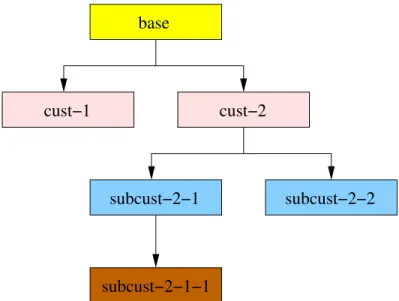
Realms normally have thebaserealm as their parent. However, if you are reselling CanIt-Domain-PRO services to others who wish to have their own set of realms for their customers, you can create a realm hierarchy. A realm administrator has access to his or her own realmandall realms under it. Consider Figure3.4:
base
cust−1 cust−2
subcust−2−1 subcust−2−2
subcust−2−1−1
Figure 3.4: Realm Hierarchy Example
In the example in Figure 3.4, the parent of cust-1 and cust-2 is base. The parent of subcust-2-1 and subcust-2-2 is cust-2, and the parent of subcust-2-1-1 is subcust-2-1.
• The administrative user in thebaserealm can access all realms. • The administrator incust-1can only access thecust-1realm.
• The administrator in cust-2 can access subcust-2-1, subcust-2-2 and subcust-2-1-1.
• The administrator insubcust-2-1can accesssubcust-2-1andsubcust-2-1-1. • The administrator insubcust-2-2can only accesssubcust-2-2.
• The administrator insubcust-2-1-1can only accesssubcust-2-1-1.
In the Realms screen (Figure3.2), click on Tree Viewto see a hierarchical view of the realms. You can restrict the view to a subtree of the entire hierarchy by selecting the root of the tree from theTree rootpull-down menu.
3.8
Realm Custom Fields
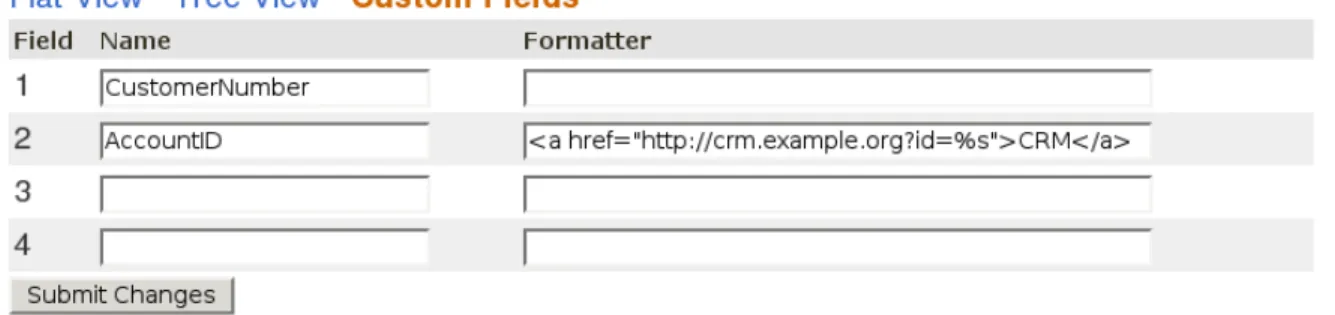
CanIt-Domain-PRO allows you to create up to four custom fields so you can associate various pieces of information with a realm. For example, you may wish to include a customer number with each realm. To configure custom fields, click onSetup and thenRealms. In the realm display, click on
3.8. REALM CUSTOM FIELDS 47
Figure 3.5: Realm Custom Fields To create custom fields:
1. Enter the name of the field in theNamebox.
2. If you wish to have the field displayed specially, enter a format string in theFormatbox. This string must contain exactly one%ssequence; this will be replaced by the value of the custom field. In the example in Figure3.5, Custom Field 2 (AccountID) will be displayed as a hyperlink, presumably to an accounting system.
3. ClickSubmit Changesto make the changes take effect.
Any custom fields you create are displayed as additional columns in the Realms screen (for the CanIt-Domain-PRO administrator only!). To remove a custom field, simply make theNamecolumn blank.
Chapter 4
Streams
4.1
Introduction to Streams
The stream is a central concept in CanIt-Domain-PRO. Understanding streams is essential to un-derstanding CanIt-Domain-PRO. Please be sure to read this chapter before configuring a production CanIt-Domain-PRO server.
4.2
Realms
Arealmis a collection of Internet domains, all of whose anti-spam settings and quarantines are provi-sioned by aRealm Administrator. Within a realm, there may be manystreams. Two streams with the same name can coexist in different realms; CanIt-Domain-PRO will consider them to be two different streams.
4.3
The Definition of a Stream
Astreamis a collection of rules and policies. Each stream in CanIt-Domain-PRO can have its own rules, settings, thresholds and policies.
Associated with each stream is aquarantine. A quarantine consists of messages that have been held based on the streams settings. For example, a message can be held because of its spam score, or because it contains a suspicious MIME type.
4.4
Users and E-Mail Addresses
Under many circumstances, a single e-mail address corresponds to a single user. For example, the e-mail [email protected] to the single userdfs.
However, most mail setups are more complicated than this. The first complication comes from aliases. For example, the user dfs may have, in addition to his normal e-mail address, aliases
[email protected]@roaringpenguin.com. We would most likely want the same settings and policies to apply to all three aliases.
Another complication comes from list addresses. For example, the e-mail address [email protected] does not correspond to any particular user. Instead, it is a list alias that expands to several users. It might make sense to have a separate set of policies forsales than for real users, or it might make sense to assign the policies used by one of the recipients on the saleslist.
As we see above, the mapping between users and e-mail addresses is not simple. A single e-mail address may result in delivery to several users (thesalesexample), or a single user may have several e-mail addresses that all deliver to the same place (the aliases example.)
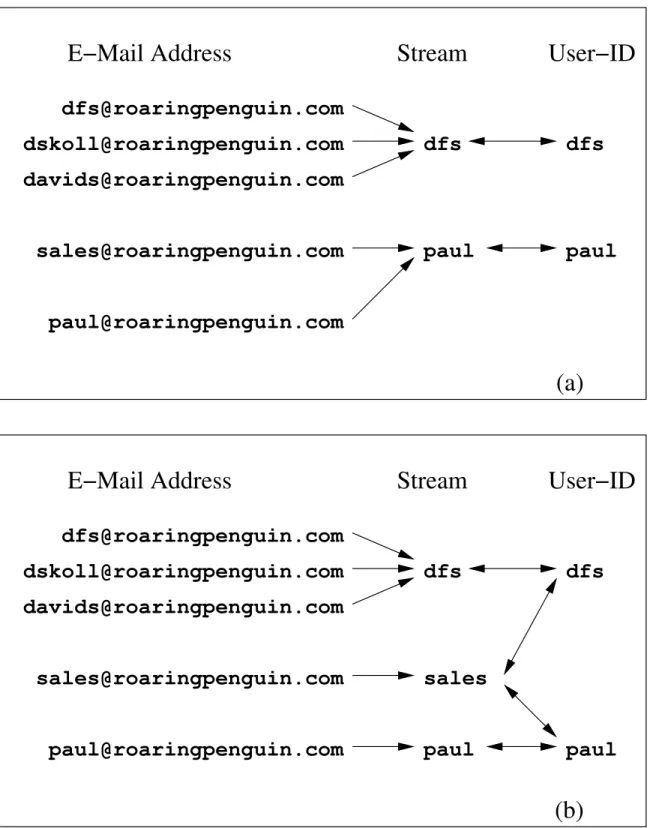
Streams were created to give you the flexibility of assigning policies. They act as an intermediate container between e-mail addresses and actual users, and let you assign policies any way you choose. As an example, consider Figure4.1:
4.4. USERS AND E-MAIL ADDRESSES 51
[email protected]
[email protected]
[email protected]
dfs
paul
Stream
E−Mail Address
User−ID
dfs
paul
(a)
[email protected]
[email protected]
[email protected]
[email protected]
[email protected]
dfs
Stream
E−Mail Address
User−ID
dfs
[email protected]
[email protected]
(b)
paul
paul
sales
Figure 4.1: Streaming Scenarios
Note that streaming affects only how CanIt-Domain-PRO directs mail for rule and quarantine pur-poses. Streaming doesnotalter the ultimate delivery address; normally, CanIt-Domain-PRO delivers