Deploying OpenStack on CentOS Using the KVM
Hypervisor and GlusterFS Distributed File System
∗
Anton Beloglazov, Sareh Fotuhi Piraghaj, Mohammed Alrokayan, and
Rajkumar Buyya
Cloud Computing and Distributed Systems (CLOUDS) Laboratory
Department of Computing and Information Systems
The University of Melbourne, Australia
[email protected]
[email protected]
[email protected]
[email protected]
14th of August 2012
AbstractCloud computing has proven to be a successful distributed computing model as demostrated by its wide spread industrial adoption. Apart from public Clouds, such as Amazon EC2, private and hybrid Cloud deployments are important for organizations of all scales. The availability of free open source Cloud platforms is essential to further drive the proliferation of private and hybrid Cloud computing environments. OpenStack is free open source Cloud computing software originally released by Rackspace and NASA, which strives to close the gap in the lack of a comprehensive Cloud platform with a fast pace of development and innovation, and supported by both an active community of people and large companies. In this work, we go through and discuss the steps required to come from bare hardware to a fully operational multi-node OpenStack installation. Every step discussed in this paper is implemented as a separate shell script making it easy to understand the intricate details of the installation process. The full set of installation scripts is reseased under the Apache 2.0 License and is publicly available online.
∗To cite this technical report, please use the following: Anton Beloglazov, Sareh Fotuhi Piraghaj,
Mohammed Alrokayan, and Rajkumar Buyya, “Deploying OpenStack on CentOS Using the KVM Hypervisor and GlusterFS Distributed File System,” Technical Report CLOUDS-TR-2012-3, Cloud Computing and Distributed Systems Laboratory, The University of Melbourne, August 14, 2012.
Contents
1 Introduction 3
2 Overview of the OpenStack Cloud Platform 5
3 Comparison of Open Source Cloud Platforms 7
4 Existing OpenStack Installation Tools 9
5 Step-by-Step OpenStack Deployment 10
5.1 Hardware Setup . . . 11
5.2 Organization of the Installation Package . . . 12
5.3 Configuration Files . . . 12
5.4 Installation Procedure . . . 13
5.4.1 CentOS . . . 13
5.4.2 Network Gateway . . . 15
5.4.3 GlusterFS Distributed Replicated Storage . . . 17
5.4.4 KVM . . . 20 5.4.5 OpenStack . . . 22 5.5 OpenStack Troubleshooting . . . 45 5.5.1 Glance . . . 45 5.5.2 Nova Compute . . . 46 5.5.3 Nova Network . . . 46 6 Conclusions 47 7 References 47
1
Introduction
The Cloud computing model leverages virtualization to deliver computing resources to users on-demand on a pay-per-use basis [1], [2]. It provides the properties of self-service and elasticity enabling users to dynamically and flexibly adjust their resource consumption according to the current workload. These properties of the Cloud computing model allow one to avoid high upfront investments in a computing infrastructure, thus reducing the time to market and facilitating a higher pace of innovation.
Cloud computing resources are delivered to users through three major service models:
• Infrastructure as a Service (IaaS): computing resources are delivered in the form of Virtual Machines (VMs). A VM provides to the user a view of a dedicated server. The user is capable of managing the system within a VM and deploying the required software. Examples of IaaS are Amazon EC21and Google Compute
Engine2.
• Platform as a Service (PaaS): the access to the resources is provided in the form of an Application Programming Interface (API) that is used for application development and deployment. In this model, the user does not have a direct access to the system resources, rather the resource allocation to applications is automatically managed by the platform. Examples of PaaS are Google App Engine3 and Microsoft Azure4.
• Software as a Service (SaaS): application-level software services are provided to the users on a subscription basis over the Internet. Examples of SaaS are Salesforce.com5 and applications from the Amazon Web Services Marketplace6.
In this work, we focus on the low level service model – IaaS. Apart from the service models, Cloud computing services are distinguished according to their deployment models. There are three basic deployment models:
• Public Cloud: computing resources are provided publicly over the Internet based on a pay-per-use model.
• Private Cloud: the Cloud infrastructure is owned by an organization, and hosted and operated internally.
• Hybrid Cloud: computing resources are provided by a composition of a private and public Clouds.
1Amazon EC2. http://aws.amazon.com/ec2/.
2Google Compute Engine. http://cloud.google.com/products/compute-engine.html. 3Google App Engine. http://cloud.google.com/products/.
4Microsoft Azure. http://www.windowsazure.com/. 5Salesforce.com. http://www.salesforce.com/.
Public Clouds, such as Amazon EC2, have initiated and driven the industrial adoption of the Cloud computing model. However, the software platforms utilized by public Cloud providers are usually proprietary disallowing their deployment on-premise. In other words, due to closed-source software, it is not possible to deploy the same software platform used, for example, by Amazon EC2 on a private computing infrastructure. Fortunately, there exist several open source Cloud platforms striving to address the issue, such as OpenStack, Eucalyptus, OpenNebula, and CloudStack. The mentioned projects basically allow anyone to not only deploy a private Cloud environment free of charge, but also contribute back to the development of the platform.
The aim of this work is to facilitate further development and adoption of open source Cloud computing software by providing a step-by-step guide to installing OpenStack on multiple compute nodes of a real-world testbed using a set of shell scripts. The difference from the existing tools for automated installation of OpenStack is that the purpose of this work is not only obtaining a fully operational OpenStack Cloud environment, but also learning the steps required to perform the installation from the ground up and understanding the responsibilities and interaction of the OpenStack components. This is achieved by splitting the installation process into multiple logical steps, and implementing each step as a separate shell script. In this paper, we go through and discuss each of the complete sequence of steps required to install OpenStack on top of CentOS 6.3 using the Kernel-based Virtual Machine (KVM) as a hypervisor and GlusterFS as a distributed replicated file system to enable live migration and provide fault tolerance. The source code described in this paper is released under the Apache 2.0 License and is publicly available online7.
In summary, this paper discusses and guides through the installation process of the following software:
• CentOS8: a free Linux Operating System (OS) distribution derived from the
Red Hat Enterprise Linux (RHEL) distribution.
• GlusterFS9: a distributed file system providing shared replicated storage across multiple servers over Ethernet or Infiniband. Having a storage system shared between the compute nodes is a requirement for enabling live migration of VM instances. However, having a centralized shared storage service, such as NAS limits the scalability and leads to a single point of failure. In contrast, the advantages of a distributed file system solution, such as GlusterFS, are: (1) no single point of failure, which means even if a server fails, the storage and data will remain available due to automatic replication over multiple servers; (2) higher scalability, as Input/Output (I/O) operations are distributed across
multiple servers; and (3) due to the data replication over multiple servers, if a data replica is available on the host, VM instances access the data locally rather than remotely over network improving the I/O performance.
• KVM10: a hypervisor providing full virtualization for Linux leveraging hardware-7The project repository. https://github.com/beloglazov/openstack-centos-kvm-glusterfs. 8CentOS.http://centos.org/.
9GlusterFS.http://gluster.org/. 10KVM.http://www.linux-kvm.org/.
assisted virtualization support of the Intel VT and AMD-V chipsets. The kernel component of KVM is included in the Linux kernel since the 2.6.20 version.
• OpenStack11: free open source IaaS Cloud computing software originally released
by Rackspace and NASA under the Apache 2.0 License in July 2010. The OpenStack project is currently lead and managed by the OpenStack Foundation, which is “an independent body providing shared resources to help achieve the OpenStack Mission by Protecting, Empowering, and Promoting OpenStack software and the community around it, including users, developers and the entire ecosystem”.12
In the next section we give an overview of the OpenStack software, its features, main components, and their interaction. In Section 3, we briefly compare 4 open source Cloud computing platforms, namely OpenStack, Eucalyptus, CloudStack, and OpenNebula. In Section 4, we discuss the existing tools for automated installation of OpenStack and the differences from our approach. In Section 5 we provide a detailed description and discussion of the steps required to install OpenStack on top of CentOS using KVM and GlusterFS. In Section 6, we conclude the paper with a summary and discussion of future directions.
2
Overview of the OpenStack Cloud Platform
Figure 1: A high level view of the OpenStack service interaction [3]
OpenStack is a free open source IaaS Cloud platform originally released by Rackspace and NASA under the Apache 2.0 License in July 2010. OpenStack controls and manages compute, storage, and network resource aggregated from multiple servers in a data center. The system provides a web interface (dashboard) and APIs compatible
11OpenStack. http://openstack.org/.
with Amazon EC2 to the administrators and users that allow flexible on-demand provisioning of resources. OpenStack also supports the Open Cloud Computing Interface (OCCI)13, which is an emerging standard defining IaaS APIs, and delivered
through the Open Grid Forum (OGF)14.
In April 2012, the project lead and management functions have been transferred to a newly formed OpenStack Foundation. The goals of the foundation are to support an open development process and community building, drive awareness and adoption, and encourage and maintain an ecosystem of companies powered by the OpenStack software. The OpenStack project is currently supported by more than 150 companies including AMD, Intel, Canonical, SUSE Linux, Red Hat, Cisco, Dell, HP, IBM and Yahoo!.
The OpenStack software is divided into several services shown in Figure 1 that through their interaction provide the overall system management capabilities. The main services include the following:
• OpenStack Compute (Nova): manages the life cycle of VM instances from scheduling and resource provisioning to live migration and security rules. By leveraging the virtualization API provided by Libvirt15, OpenStack Compute
supports multiple hypervisors, such as KVM and Xen.
• OpenStack Storage: provides block and object storage to use by VM instances. The block storage system allows the uses to create block storage devices and dynamically attach and detach them from VM instances using the dashboard or API. In addition to block storage, OpenStack provides a scalable distributed object storage called Swift, which is also accessible through an API.
• OpenStack Networking: provides API-driven network and IP address management capabilities. The system allows the users to create their own networks and assign static, floating, or dynamic IP addresses to VM instances.
• OpenStack Dashboard (Horizon): provides a web interface for the administrators and users to the system management capabilities, such as VM image management, VM instance life cycle management, and storage management.
• OpenStack Identity (Keystone): a centralized user account management service acting as an authentication and access control system. In addition, the service provides the access to a registry of the OpenStack services deployed in the data center and their communication endpoints.
• OpenStack Image (Glance): provides various VM image management capabilities, such as registration, delivery, and snapshotting. The service supports multiple VM image formats including Raw, AMI, VHD, VDI, qcow2, VMDK, and OVF.
13Open Cloud Computing Interface. http://occi-wg.org/. 14Open Grid Forum. http://www.ogf.org/.
The OpenStack software is architectured with an aim of providing decoupling between the services constituting the system. The services interact with each other through the public APIs they provide and using Keystone as a registry for obtaining the information about the communication endpoints. The OpenStack Compute service, also referred to as Nova, is built on a shared-nothing messaging-based architecture, which allows running the services on multiple servers. The services, which compose Nova communicate via the Advanced Message Queue Protocol (AMQP) using asynchronous calls to avoid blocking. More detailed information on installation and administration of OpenStack in given in the official manuals [4], [5]. In the next section we compare OpenStack with the other major open source Cloud platforms.
3
Comparison of Open Source Cloud Platforms
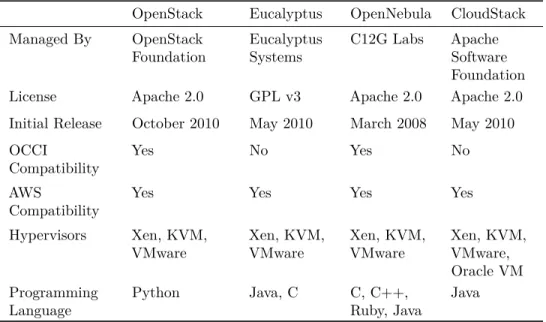
In this section, we briefly discuss and compare OpenStack with three other major open source Cloud platforms, namely Eucalyptus, OpenNebula, and CloudStack. Eucalyptus16is an open source IaaS Cloud platform developed by Eucalyptus Systems and released in March 2008 under the GPL v3 license. Eucalyptus is an acronym for “Elastic Utility Computing Architecture for Linking Your Programs To Useful Systems”. Prior to version 3.1, Eucalyptus had two editions: open source, and enterprise, which included extra features and commercial support. As of version 3.1, both the editions have been merged into a single open source project. In March 2012, Eucalyptus and Amazon Web Services (AWS) announced a partnership aimed at bringing and maintaining additional API compatibility between the Eucalyptus platform and AWS, which will enable simpler workload migration and deployment of hybrid Cloud environments17. The Eucalyptus platform is composed of the following
5 high-level components, each of which is implemented as a standalone web service:
• Cloud Controller: manages the underlying virtualized resources (servers, network, and storage) and provides a web interface and API compatible with Amazon EC2.
• Cluster Controller: controls VMs running on multiple physical nodes and man-ages the virtual networking between VMs, and between VMs and external users.
• Walrus: implements object storage accessible through an API compatible with Amazon S3.
• Storage Controller: provides block storage that can be dynamically attached to VMs, which is managed via an API compatible with Amazon Elastic Block Storage (EBS).
• Node Controller: controls the life cycle of VMs within a physical node using the functionality provided by the hypervisor.
16Eucalyptus. http://www.eucalyptus.com/.
OpenNebula18 is an open source IaaS Cloud platform originally established as a
research project back in 2005 by Ignacio M. Llorente and Rubén S. Montero. The software was first publicly released in March 2008 under the Apache 2.0 license. In March 2010, the authors of OpenNebula founded C12G Labs, an organization aiming to provide commercial support and services for the OpenNebula software. Currently, the OpenNebula project is managed by C12G Labs. OpenNebula supports several standard APIs, such as EC2 Query, OGF OCCI, and vCLoud. OpenNebula provides the following features and components:
• Users and Groups: OpenNebula supports multiple user accounts and groups, various authentication and authorization mechanisms, as well as Access Control Lists (ACL) allowing fine grained permission management.
• Virtualization Subsystem: communicates with the hypervisor installed on a physical host enabling the management and monitoring of the life cycle of VMs.
• Network Subsystem: manages virtual networking provided to interconnect VMs, supports VLANs and Open vSwitch.
• Storage Subsystem: supports several types of data stores for storing VM images.
• Clusters: are pools of hosts that share data stores and virtual networks, they can be used for load balancing, high availability, and high performance computing. CloudStack19is an open source IaaS Cloud platform originally developed by Cloud.com. In May 2010, most of the software was released under the GPL v3 license, while 5% of the code were kept proprietary. In July 2011, Citrix purchased Cloud.com and in August 2011 released the remaining code of CloudStack under the GPL v3 license. In April 2012, Citrix donated CloudStack to the Apache Software Foundation, while changing the license to Apache 2.0. CloudStack implements the Amazon EC2 and S3 APIs, as well as the vCloud API, in addition to its own API. CloudStack has a hierarchical structure, which enables management of multiple physical hosts from a single interface. The structure includes the following components:
• Availability Zones: represent geographical locations, which are used in the allocation of VM instances in data storage. An Availability Zone consists of at least one Pod, and Secondary Storage, which is shared by all Pods in the Zone.
• Pods: are collections of hardware configured to form Clusters. A Pod can contain one or more Clusters, and a Layer 2 switch architecture, which is shared by all Clusters in that Pod.
• Clusters: are groups of identical physical hosts running the same hypervisor. A Cluster has a dedicated Primary Storage device, where the VM instances are hosted.
18OpenNebula. http://opennebula.org/. 19CloudStack. http://cloudstack.org/.
• Primary Storage: is unique to each Cluster and is used to host VM instances.
• Secondary Storage: is used to store VM images and snapshots.
A comparison of the discussed Cloud platforms is summarized in Table 1. OpenStack Eucalyptus OpenNebula CloudStack Managed By OpenStack Foundation Eucalyptus Systems C12G Labs Apache Software Foundation
License Apache 2.0 GPL v3 Apache 2.0 Apache 2.0
Initial Release October 2010 May 2010 March 2008 May 2010 OCCI
Compatibility
Yes No Yes No
AWS
Compatibility
Yes Yes Yes Yes
Hypervisors Xen, KVM, VMware Xen, KVM, VMware Xen, KVM, VMware Xen, KVM, VMware, Oracle VM Programming Language Python Java, C C, C++, Ruby, Java Java
Table 1: Comparison of OpenStack, Eucalyptus, OpenNebula, and CloudStack
4
Existing OpenStack Installation Tools
There are several official OpenStack installation and administration guides [5]. These are invaluable sources of information about OpenStack; however, the official guides mainly focus on the configuration in Ubuntu, while the documentation for other Linux distributions, such as CentOS, is incomplete or missing. In this work, we aim to close to gap by providing a step-by-step guide to installing OpenStack on CentOS. Another difference of the current guide from the official documentation is that rather then describing a general installation procedure, we focus on concrete and tested steps required to obtain an operational OpenStack installation for our testbed. In other words, this guide can be considered to be an example of how OpenStack can be deployed on a real-world multi-node testbed.
One of the existing tools for automated installation of OpenStack is DevStack20.
DevStack is distributed in the form of a single shell script, which installs a complete OpenStack development environment. The officially supported Linux distributions are Ubuntu 12.04 (Precise) and Fedora 16. DevStack also comes with guides to installing
OpenStack in a VM, and on real hardware. The guides to installing OpenStack on hardware include both single node and multi-node installations. One of the drawbacks of the approach taken by DevStack is that in case of an error during the installation process, it is required to start installation from the beginning instead of just fixing the current step.
Another tool for automated installation of OpenStack is dodai-deploy21, which is
described in the OpenStack Compute Administration Manual [4]. dodai-deploy is a Puppet22service running on all the nodes and providing a web interface for automated installation of OpenStack. The service is developed and maintained to be run on Ubuntu. Several steps are required to install and configure the dodai-deploy service on the nodes. Once the service is started on the head and compute nodes, it is possible to install and configure OpenStack using the provided web interface or REST API. The difference of our approach from both DevStack and dodai-deploy is that instead of adding an abstraction layer and minimizing the number of steps required to be followed by the user to obtain an operational OpenStack installation, we aim to explicitly describe and perform every installation step in the form of a separate shell script. This allows the user to proceed slowly and customize individual steps when necessary. The purpose of our approach is not just obtaining an up and running OpenStack installation, but also learning the steps required to perform the installation from the ground up and understanding the responsibilities and interaction of the OpenStack components. Our installation scripts have been developed and tested on CentOS, which is a widely used server Linux distribution. Another difference of our approach from both DevStack and dodai-deploy is that we also set up GlusterFS to provide a distributed shared storage, which enables fault tolerance and efficient live migration of VM instances.
Red Hat, a platinum member of the OpenStack Foundation, has announced its commercial offering of OpenStack starting from the Folsom release with the availability in 201323. From the announcement it appears that the product will be delivered
through the official repositories for Red Hat Enterprise Linux 6.3 or higher, and will contain Red Hat’s proprietary code providing integration with other Red Hat products, such as Red Hat Enterprise Virtualization for managing virtualized data centers and Red Hat Enterprise Linux. This announcement is a solid step to the direction of adoption of OpenStack in enterprises requiring commercial services and support.
5
Step-by-Step OpenStack Deployment
As mentioned earlier, the aim of this work is to detail the steps required to perform a complete installation of OpenStack on multiple nodes. We split the installation process into multiple subsequent logical steps and provide a shell script for each of the steps. In this section, we explain and discuss every step needed to be followed
21Dodai-deploy. https://github.com/nii-cloud/dodai-deploy. 22Puppet. http://puppetlabs.com/.
to obtain a fully operational OpenStack installation on our testbed consisting of 1 controller and 4 compute nodes. The source code of the shell scripts described in this paper is released under the Apache 2.0 License and is publicly available online24.
5.1
Hardware Setup
The testbed used for testing the installation scripts consists of the following hardware:
• 1 x Dell Optiplex 745
– Intel(R) Core(TM) 2 CPU (2 cores, 2 threads) 6600 @ 2.40GHz – 2GB DDR2-667
– Seagate Barracuda 80GB, 7200 RPM SATA II (ST3808110AS) – Broadcom 5751 NetXtreme Gigabit Controller
• 4 x IBM System x3200 M3
– Intel(R) Xeon(R) CPU (4 cores, 8 threads), X3460 @ 2.80GHz – 4GB DDR3-1333
– Western Digital 250 GB, 7200 RPM SATA II (WD2502ABYS-23B7A) – Dual Gigabit Ethernet (2 x Intel 82574L Ethernet Controller)
• 1 x Netgear ProSafe 16-Port 10/100 Desktop Switch FS116
The Dell Optiplex 745 machine has been chosen to serve as a management host running all the major OpenStack services. The management host is referred to as thecontroller
further in the text. The 4 IBM System x3200 M3 servers are used ascompute hosts, i.e. for hosting VM instances.
Due to the specifics of our setup, the only one machine connected to the public network and the Internet is one of the IBM System x3200 M3 servers. This server is refereed to as thegateway. The gateway is connected to the public network via theeth0network interface.
All the machines form a local network connected via the Netgear FS116 network switch. The compute hosts are connected to the local network through theireth1 network interfaces. The controller is connected to the local network through itseth0 interface. To provide the access to the public network and the Internet, the gateway performs Network Address Translation (NAT) for the hosts from the local network.
5.2
Organization of the Installation Package
The project contains a number of directories, whose organization is explained in this section. The config directory includes configuration files, which are used by the installation scripts and should be modified prior to the installation. Thelibdirectory contains utility scripts that are shared by the other installation scripts. The doc
directory comprises the source and compiled versions of the documentation.
The remaining directories directly include the step-by-step installation scripts. The names of these directories have a specific format. The prefix (before the first dash) is the number denoting the order of execution. For example, the scripts from the directory with the prefix01 must be executed first, followed by the scripts from the directory with the prefix02, etc. The middle part of a directory name denotes the purpose of the scripts in this directory. The suffix (after the last dash) specifies the host, on which the scripts from this directory should be executed. There are 4 possible values of the target host prefix:
• all – execute the scripts on all the hosts;
• compute – execute the scripts on all the compute hosts;
• controller – execute the scripts on the controller;
• gateway – execute the scripts on the gateway.
For example, the first directory is named01-network-gateway, which means that (1) the scripts from this directory must be executed in the first place; (2) the scripts are supposed to do a network set up; and (3) the scripts must be executed only on the gateway. The name02-glusterfs-allmeans: (1) the scripts from this directory must be executed after the scripts from01-network-gateway; (2) the scripts set up GlusterFS; and (3) the scripts must be executed on all the hosts.
The names of the installation scripts themselves follow a similar convention. The prefix denotes the order, in which the scripts should be run, while the remaining part of the name describes the purpose of the script.
5.3
Configuration Files
Thelibdirectory contains configuration files used by the installation scripts. These configuration files should be modified prior to running the installation scripts. The configuration files are described below.
configrc: This file contains a number of environmental variables defining various aspects of OpenStack’s configuration, such as administration and service account credentials, as well as access points. The file must be “sourced” to export the variables into the current shell session. The file can be sourced directly by running: . configrc, or using the scripts described later. A simple test to
check whether the variables have been correctly exported is toechoany of the variables. For example,echo $OS_USERNAME must outputadminfor the default configuration.
hosts: This file contains a mapping between the IP addresses of the hosts in the local network and their host names. We apply the following host name convention: the compute hosts are namedcomputeX, whereX is replaced by the number of the host. According the described hardware setup, the default configuration defines 4 compute hosts: compute1 (192.168.0.1), compute2 (192.168.0.2), compute3
(192.168.0.3), compute4 (192.168.0.4); and 1 controller (192.168.0.5). As mentioned above, in our setup one of the compute hosts is connected to the public network and acts as a gateway. We assign to this host the host name
compute1, and also alias it asgateway.
ntp.conf: This file contains a list of Network Time Protocol (NTP) servers to use by all the hosts. It is important to set accessible servers, since time synchronization is important for OpenStack services to interact correctly. By default, this file defines servers used within the University of Melbourne. It is advised to replace the default configuration with a list of preferred servers.
It is important to replaced the default configuration defined in the described config-uration files, since the default configconfig-uration is tailored to the specific setup of our testbed.
5.4
Installation Procedure
5.4.1 CentOS
The installation scripts have been tested with CentOS 6.3, which has been installed on all the hosts. The CentOS installation mainly follows the standard process described in detail in the Red Hat Enterprise Linux 6 Installation Guide [6]. The steps of the installation process that differ from the standard are discussed in this section.
Network Configuration. The simplest way to configure network is during the OS installation process. As mentioned above, in our setup, the gateway is connected to two networks: to the public network through theeth0 interface; and to the local network through theeth1 interface. Since in our setup the public network configuration can be obtained from a DHCP server, in the configuration of theeth0interface it is only required to enable the automatic connection by enabling the “Connect Automatically” option. We use static configuration for the local network; therefore, eth1 has be configured manually. Apart from enabling the “Connect Automatically” option, it is necessary to configure IPv4 by adding an IP address and netmask. According to the configuration defined in thehostsfile described above, we assign 192.168.0.1/24 to the gateway.
One of the differences in the network configuration of the other compute hosts (compute2, compute3, andcompute4) from the gateway is thateth0 should be kept disabled, as it is unused. Theeth1 interface should be enabled by turning on the “Connect Automatically” option. The IP address and netmask foreth1 should be set to 192.168.0.X/24, whereX is replaced by the compute host number. The gateway for the compute hosts should be set to 192.168.0.1, which the IP address of the gateway. The controller is configured similarly to the compute hosts with the only difference that the configuration should be done foreth0instead of eth1, since the controller has only one network interface.
Hard Drive Partitioning. The hard drive partitioning scheme is the same for all the compute hosts, but differs for the controller. Table 2 shows the partitioning scheme for the compute hosts. vg_baseis a volume group comprising the standard OS partitions: lv_root, lv_homeandlv_swap. vg_glusteris a special volume group containing a singlelv_glusterpartition, which is dedicated to serve as a GlusterFS brick. Thelv_gluster logical volume is formatted using the XFS25 file system, as
recommended for GlusterFS bricks.
Device Size (MB) Mount Point / Volume Type
LVM Volume Groups
vg_base 20996
lv_root 10000 / ext4
lv_swap 6000 swap
lv_home 4996 /home ext4
vg_gluster 216972
lv_gluster 216972 /export/gluster xfs
Hard Drives
sda
sda1 500 /boot ext4
sda2 21000 vg_base PV (LVM)
sda3 216974 vg_gluster PV (LVM)
Table 2: The partitioning scheme for the compute hosts
Table 3 shows the partitioning scheme for the controller. It does not include a
vg_gluster volume group since the controller is not going to be a part of the Glus-terFS volume. However, the scheme includes two new important volume groups:
nova-volumesandvg_images. The nova-volumesvolume group is used by Open-Stack Nova to allocated volumes for VM instances. This volume group is managed by Nova; therefore, there is not need to create logical volumes manually. Thevg_images
volume group and itslv_imageslogical volume are devoted for storing VM images by OpenStack Glance. The mount point forlv_imagesis/var/lib/glance/images, which is the default directory used by Glance to store VM image files.
Device Size (MB) Mount Point / Volume Type
LVM Volume Groups nova-volumes 29996 Free 29996 vg_base 16996 lv_root 10000 / ext4 lv_swap 2000 swap
lv_home 4996 /home ext4
vg_images 28788
lv_images 28788 /var/lib/glance/images ext4
Hard Drives
sda
sda1 500 /boot ext4
sda2 17000 vg_base PV (LVM)
sda3 30000 nova-volumes PV (LVM)
sda4 28792 Extended
sda5 28788 vg_images PV (LVM)
Table 3: The partitioning scheme for the controller
5.4.2 Network Gateway
Once CentOS is installed on all the machines, the next step is to configure NAT on the gateway to enable the Internet access on all the hosts. First, it is necessary to check whether the Internet is available on the gateway itself. If the Internet is not available, the problem might be in the configuration of eth0, the network interface connected to the public network in our setup.
is available on the gateway, it is necessary to install the Git26 version control client to
be able to clone the repository containing the installation scripts. This can be done usingyum, the default package manager in CentOS, as follows:
yum install -y git
Next, the repository can be cloned using the following command:
git clone \
https://github.com/beloglazov/openstack-centos-kvm-glusterfs.git
Now, we can continue the installation using the scripts contained in the cloned Git repository. As described above, the starting point is the directory called
01-network-gateway.
cd openstack-centos-kvm-glusterfs/01-network-gateway
All the scripts described below can be run by executing./<script name>.shin the command line.
(1) 01-iptables-nat.sh
This script flushes all the default iptables rules to open all the ports. This is acceptable for testing; however, it is not recommended for production environments due to security concerns. Then, the script sets up NAT usingiptablesby forwarding packets frometh1(the local network interface) througheth0. The last stage is saving the definediptablesrules and restarting the service.
# Flush the iptables rules.
iptables -F
iptables -t nat -F iptables -t mangle -F
# Set up packet forwarding for NAT
iptables -t nat -A POSTROUTING -o eth0 -j MASQUERADE iptables -A FORWARD -i eth1 -j ACCEPT
iptables -A FORWARD -o eth1 -j ACCEPT
# Save the iptables configuration into a file and restart iptables
service iptables save service iptables restart
(2) 02-ip-forward.sh
By default, IP packet forwarding is disabled in CentOS; therefore, it is necessary to enable it by modifying the/etc/sysctl.confconfiguration file. This is done by the
02-ip-forward.shscript as follows: # Enable IP packet forwarding
sed -i ’s/net.ipv4.ip_forward = 0/net.ipv4.ip_forward = 1/g’ \
/etc/sysctl.conf
# Restart the network service
service network restart
(3) 03-copy-hosts.sh
This script copies thehosts file from theconfig directory to/etc locally, as well to all the other hosts: the remaining compute hosts and the controller. Thehosts
file defines a mapping between the IP addresses of the hosts and host names. For convenience, prior to copying you may use the ssh-copy-id program to copy the public key to the other hosts for password-less SSH connections. Once thehostsfile is copied to all the hosts, they can be accessed by using their respective host names instead of the IP addresses.
# Copy the hosts file into the local configuration cp ../config/hosts /etc/
# Copy the hosts file to the other nodes. scp ../config/hosts root@compute2:/etc/
scp ../config/hosts root@compute3:/etc/
scp ../config/hosts root@compute4:/etc/
scp ../config/hosts root@controller:/etc/
From this point, all the installation steps on any host can be performed remotely over SSH.
5.4.3 GlusterFS Distributed Replicated Storage
In this section, we describe how to set up distributed replicated storage using GlusterFS.
02-glusterfs-all (all nodes). The steps discussed in this section need to be run on all the hosts. The easiest way to manage multi-node installation is to SSH into all the hosts from another machine using separate terminals. This way the hosts can be conveniently managed from a single machine simultaneously. Before applying further installation scripts, it is necessary to run the following commands:
# Update the OS packages
yum update -y
# Install Git
yum install -y git
# Clone the repository
git clone \
https://github.com/beloglazov/openstack-centos-kvm-glusterfs.git
It is optional but might be useful to install other programs on all the hosts, such as
man,nano, oremacsfor reading manuals and editing files. (4) 01-iptables-flush.sh
This script flushes all the defaultiptablesrules to allow connections through all the ports. As mentioned above, this is insecure and not recommended for production environments. For production it is recommended to open only the required ports.
# Flush the iptables rules.
iptables -F
# Save the configuration and restart iptables
service iptables save service iptables restart
(5) 02-selinux-permissive.sh
This script switches SELinux27 into the permissive mode. By default, SELinux blocks
certain operations, such as VM migrations. Switching SELinux into the permissive mode is not recommended for production environments, but is acceptable for testing purposes.
# Set SELinux into the permissive mode
sed -i ’s/SELINUX=enforcing/SELINUX=permissive/g’ /etc/selinux/config
echo 0 > /selinux/enforce
(6) 03-glusterfs-install.sh
This script installs GlusterFS services and their dependencies.
# Install GlusterFS and its dependencies
yum -y install \
openssh-server wget fuse fuse-libs openib libibverbs \
http://download.gluster.org/pub/gluster/glusterfs/LATEST/\ CentOS/glusterfs-3.3.0-1.el6.x86_64.rpm \ http://download.gluster.org/pub/gluster/glusterfs/LATEST/\ CentOS/glusterfs-fuse-3.3.0-1.el6.x86_64.rpm \ http://download.gluster.org/pub/gluster/glusterfs/LATEST/\ CentOS/glusterfs-server-3.3.0-1.el6.x86_64.rpm (7) 04-glusterfs-start.sh
This script starts the GlusterFS service, and sets the service to start during the system start up.
# Start the GlusterFS service
service glusterd restart chkconfig glusterd on
03-glusterfs-controller (controller). The scripts described in this section need to be run only on the controller.
(8) 01-glusterfs-probe.sh
This script probes the compute hosts to add them to a GlusterFS cluster.
# Probe GlusterFS peer hosts
gluster peer probe compute1 gluster peer probe compute2 gluster peer probe compute3 gluster peer probe compute4
(9) 02-glusterfs-create-volume.sh
This scripts creates a GlusterFS volume out of the bricks exported by the compute hosts mounted to/export/glusterfor storing VM instances. The created GlusterFS volume is replicated across all the 4 compute hosts. Such replication provides fault tolerance, as if any of the compute hosts fail, the VM instance data will be available from the remaining replicas. Compared to a Network File System (NFS) exported by a single server, the complete replication provided by GlusterFS improves the read performance, since all the read operations are local. This is important to enable efficient live migration of VMs.
# Create a GlusterFS volume replicated over 4 gluster hosts
gluster volume create vm-instances replica 4 \
compute1:/export/gluster compute2:/export/gluster \
compute3:/export/gluster compute4:/export/gluster
# Start the created volume
gluster volume start vm-instances
04-glusterfs-all (all nodes). The script described in this section needs to be run on all the hosts.
(10) 01-glusterfs-mount.sh
This scripts adds a line to the/etc/fstab configuration file to automatically mount the GlusterFS volume during the system start up to the/var/lib/nova/instances
directory. The /var/lib/nova/instances directory is the default location where OpenStack Nova stores the VM instance related data. This directory must be mounted and shared by the controller and all the compute hosts to enable live migration of VMs. Even though the controller does not manage the data of VM instances, it is still necessary for it to have the access to the VM instance data directory to enable live migration. The reason is that the controller coordinates live migration by writing some temporary data to the shared directory. Themount -a command re-mounts everything from the config file after it has been modified.
# Mount the GlusterFS volume
mkdir -p /var/lib/nova/instances
echo "localhost:/vm-instances /var/lib/nova/instances \ glusterfs defaults 0 0" >> /etc/fstab
mount -a
5.4.4 KVM
The scripts included in the05-kvm-computedirectory need to be run on the compute hosts. KVM is not required on the controller, since it is not going to be used to host VM instances.
Prior to enabling KVM on a machine, it is important to make sure that the machine uses either Intel VT or AMD-V chipsets that support hardware-assisted virtualization. This feature might be disabled in the Basic Input Output System (BIOS); therefore, it is necessary to verify that it is enabled. To check whether hardware-assisted virtualization is supported by the hardware, the following Linux command can be used:
If the command returns any output, it means that the system supports hardware-assisted virtualization. Thevmxprocessor feature flag represents an Intel VT chipset, whereas thesvmflag represents AMD-V. Depending on the flag returned, you need to modify the02-kvm-modprobe.shscript.
(11) 01-kvm-install.sh
This script installs KVM and the related tools.
# Install KVM and the related tools
yum -y install kvm qemu-kvm qemu-kvm-tools
(12) 02-kvm-modprobe.sh
This script enables KVM in the OS. If thegrep -E ’vmx|svm’ /proc/cpuinfo com-mand described above returnedvmx, there is no need to modify this script, as it enables the Intel KVM module by default. If the command returnedsvm, it is necessary to comment themodprobe kvm-intelline and uncomment themodprobe kvm-amdline.
# Create a script for enabling the KVM kernel module echo "
modprobe kvm
# Uncomment this line if the host has an AMD CPU #modprobe kvm-amd
# Uncomment this line if the host has an Intel CPU modprobe kvm-intel " > /etc/sysconfig/modules/kvm.modules chmod +x /etc/sysconfig/modules/kvm.modules # Enable KVM /etc/sysconfig/modules/kvm.modules (13) 03-libvirt-install.sh
This script installs Libvirt28, its dependencies and the related tools. Libvirt provides an abstraction and a common Application Programming Interface (API) over various hypervisors. It is used by OpenStack to provide support for multiple hypervisors including KVM and Xen. After the installation, the script starts themessagebus and
avahi-daemonservices, which are prerequisites of Libvirt.
# Install Libvirt and its dependencies
yum -y install libvirt libvirt-python python-virtinst avahi dmidecode
# Start the services required by Libvirt
service messagebus restart service avahi-daemon restart
# Start the service during the system start up
chkconfig messagebus on chkconfig avahi-daemon on
(14) 04-libvirt-config.sh
This script modifies the Libvirt configuration to enable communication over TCP without authentication. This is required by OpenStack to enable live migration of VM instances.
# Enable the communication with Libvirt # over TCP without authentication.
sed -i ’s/#listen_tls = 0/listen_tls = 0/g’ \
/etc/libvirt/libvirtd.conf
sed -i ’s/#listen_tcp = 1/listen_tcp = 1/g’ \
/etc/libvirt/libvirtd.conf
sed -i ’s/#auth_tcp = "sasl"/auth_tcp = "none"/g’ \
/etc/libvirt/libvirtd.conf
sed -i ’s/#LIBVIRTD_ARGS="--listen"/LIBVIRTD_ARGS="--listen"/g’ \
/etc/sysconfig/libvirtd
(15) 05-libvirt-start.sh
This script starts thelibvirtdservice and sets it to automatically start during the system start up.
# Start the Libvirt service
service libvirtd restart chkconfig libvirtd on
5.4.5 OpenStack
This section contains a few subsection describing different phases of OpenStack installation.
06-openstack-all (all nodes). The scripts described in this section need to be executed on all the hosts.
(16) 01-epel-add-repo.sh
This scripts adds the Extra Packages for Enterprise Linux29(EPEL) repository, which
contains the OpenStack related packages.
# Add the EPEL repo: http://fedoraproject.org/wiki/EPEL
yum install -y http://dl.fedoraproject.org/pub/epel/6/i386/\
epel-release-6-7.noarch.rpm
(17) 02-ntp-install.sh
This script install the NTP service, which is required to automatically synchronize the time with external NTP servers.
# Install NTP
yum install -y ntp
(18) 03-ntp-config.sh
This script replaces the default servers specified in the/etc/ntp.confconfiguration file with the servers specified in theconfig/ntp.conf file described above. If the default set of servers is satisfactory, then the execution of this script is not required. # Fetch the NTP servers specified in ../config/ntp.conf
SERVER1=‘cat ../config/ntp.conf | sed ’1!d;q’‘
SERVER2=‘cat ../config/ntp.conf | sed ’2!d;q’‘
SERVER3=‘cat ../config/ntp.conf | sed ’3!d;q’‘ # Replace the default NTP servers with the above
sed -i "s/server 0.*pool.ntp.org/$SERVER1/g" /etc/ntp.conf
sed -i "s/server 1.*pool.ntp.org/$SERVER2/g" /etc/ntp.conf
sed -i "s/server 2.*pool.ntp.org/$SERVER3/g" /etc/ntp.conf
(19) 04-ntp-start.sh
This script starts thentpdateservice and sets it to start during the system start up. Upon the start, thentpdateservice synchronizes the time with the servers specified in the/etc/ntp.confconfiguration file.
# Start the NTP service
service ntpdate restart chkconfig ntpdate on
07-openstack-controller (controller). The scripts described in this section need to be run only on the controller host.
(20) 01-source-configrc.sh
This scripts is mainly used to remind of the necessity to “source” theconfigrcfile prior to continuing, since some scripts in this directory use the environmental variable defined inconfigrc. To source the file, it is necessary to run the following command:
. 01-source-configrc.sh.
echo "To make the environmental variables available \ in the current session, run: "
echo ". 01-source-configrc.sh"
# Export the variables defined in ../config/configrc . ../config/configrc
(21) 02-mysql-install.sh
This script installs the MySQL server, which is required to host the databases used by the OpenStack services.
# Install the MySQL server
yum install -y mysql mysql-server
(22) 03-mysql-start.sh
This script start the MySQL service and initializes the password of therootMySQL user using a variable from theconfigrcfile called$MYSQL_ROOT_PASSWORD.
# Start the MySQL service
service mysqld start chkconfig mysqld on
# Initialize the MySQL root password
mysqladmin -u root password $MYSQL_ROOT_PASSWORD
echo ""
echo "The MySQL root password has been set \
to the value of $MYSQL_ROOT_PASSWORD: \"$MYSQL_ROOT_PASSWORD\"" (23) 04-keystone-install.sh
This script installs Keystone - the OpenStack identity management service, and other OpenStack command line utilities.
# Install OpenStack utils and Keystone, the identity management service
yum install -y openstack-utils openstack-keystone
(24) 05-keystone-create-db.sh
This script creates a MySQL database for Keystone calledkeystone, which is used to store various identity data. The script also creates akeystoneuser and grants the user with full permissions to thekeystonedatabase.
# Create a database for Keystone
../lib/mysqlq.sh "CREATE DATABASE keystone;" # Create a keystone user and grant all privileges # to the keystone database
../lib/mysqlq.sh "GRANT ALL ON keystone.* TO ’keystone’@’controller’ \ IDENTIFIED BY ’$KEYSTONE_MYSQL_PASSWORD’;"
(25) 06-keystone-generate-admin-token.sh
Keystone allows two types of authentication for administrative action like creating users, tenants, etc:
1. Using an admin token andadmin_port(35357), e.g.:
keystone \
--token=<admin token> \
--endpoint=http://controller:35357/v2.0 user-list
2. Using an admin user andpublic_port(5000), e.g.:
keystone \
--os_username=admin \
--os_tenant_name=admin \
--os_password=<password> \
--os_auth_url=http://controller:5000/v2.0 user-list
Services, such as Glance and Nova, can also authenticate in Keystone using one of two ways. One way is to share the admin token among the services and authenticate using the token. However, it is also possible to use special users created in Keystone for each service. By default, these users are nova, glance, etc. The service users are assigned to the service tenant and admin role in that tenant.
nova \
--os_username=nova \
--os_password=<password> \
--os_tenant_name=service \
--os_auth_url=http://controller:5000/v2.0 list
One of two sets of authentication parameters is required to be specified in
/etc/nova/api-paste.ini. The first option is to set up the token-based authentica-tion, like the following:
auth_host = controller auth_protocol = http
admin_token = <admin token>
The second option is to set up the password-based authentication, as follows:
auth_host = controller auth_protocol = http
admin_tenant_name = service admin_user = nova
admin_password = <password>
The password-based authentication might be preferable, since it uses Keystone’s database backend to store user credentials. Therefore, it is possible to update user credentials, for example, using Keystone’s command line tools without the necessity to re-generate the admin token and update the configuration files.
Even though, the user name and password are specified in the config file, it is still necessary to provide these data when using the command line tools. One way to do this is to directly provide the credentials in the form of command line arguments, as shown above. Another approach, which we apply in this work, is to set corresponding environmental variables that will be automatically used by the command line tools. The06-keystone-generate-admin-token.shscript generates a random token used to authorize the Keystone admin account. The generated token is stored in the
./keystone-admin-tokenfile.
# Generate an admin token for Keystone and save it into # ./keystone-admin-token
openssl rand -hex 10 > keystone-admin-token
(26) 07-keystone-config.sh
This script modifies the configuration file of Keystone,/etc/keystone/keystone.conf. It sets the generated admin token and the MySQL connection configuration using the variables defined inconfigrc.
# Set the generated admin token in the Keystone configuration
openstack-config --set /etc/keystone/keystone.conf DEFAULT \
admin_token ‘cat keystone-admin-token‘ # Set the connection to the MySQL server
openstack-config --set /etc/keystone/keystone.conf sql connection \
mysql://keystone:$KEYSTONE_MYSQL_PASSWORD@controller/keystone
(27) 08-keystone-init-db.sh
This script initializes thekeystonedatabase using thekeystone-managecommand line tool. The executed command creates tables in the database.
# Initialize the database for Keystone
keystone-manage db_sync
(28) 09-keystone-permissions.sh
This script sets restrictive permissions (640) on the Keystone configuration file, since it contains the MySQL account credentials and the admin token. Then, the scripts sets the ownership of the Keystone related directories to thekeystoneuser andkeystone
group.
# Set restrictive permissions on the Keystone config file
chmod 640 /etc/keystone/keystone.conf
# Set the ownership for the Keystone related directories
chown -R keystone:keystone /var/log/keystone
chown -R keystone:keystone /var/lib/keystone
(29) 10-keystone-start.sh
This script starts the Keystone service and sets it to automatically start during the system start up.
# Start the Keystone service
service openstack-keystone restart chkconfig openstack-keystone on
The purpose of this script is to create user accounts, roles and tenants in Keystone for the admin user and service accounts for each OpenStack service: Keystone, Glance, and Nova. Since the process is complicated when done manually (it is necessary to define relations between database records), we use thekeystone-init project30 to
automate the process. Thekeystone-init project allows one to create a configuration file in the “YAML Ain’t Markup Language”31 (YAML) data format defining the
required OpenStack user accounts. Then, according the defined configuration, the required database records are automatically created.
Our script first installs a dependency ofkeystone-initand clones the project’s repository. Then, the script modifies the default configuration file provided with thekeystone-init
project by populating it with the values defined by the environmental variables defined inconfigrc. The last step of the script is to invokekeystone-init. The script does not remove thekeystone-init repository to allow one to browse the generated configuration file, e.g. to check the correctness. When the repository is not required anymore, it can be removed by executingrm -rf keystone-init.
# Install PyYAML, a YAML Python library
yum install -y PyYAML
# Clone a repository with Keystone initialization scripts
git clone https://github.com/nimbis/keystone-init.git
# Replace the default configuration with the values defined be the # environmental variables in configrc
sed -i "s/192.168.206.130/controller/g" \
keystone-init/config.yaml
sed -i "s/012345SECRET99TOKEN012345/‘cat keystone-admin-token‘/g" \
keystone-init/config.yaml
sed -i "s/name: openstackDemo/name: $OS_TENANT_NAME/g" \
keystone-init/config.yaml
sed -i "s/name: adminUser/name: $OS_USERNAME/g" \
keystone-init/config.yaml
sed -i "s/password: secretword/password: $OS_PASSWORD/g" \
keystone-init/config.yaml
sed -i "s/name: glance/name: $GLANCE_SERVICE_USERNAME/g" \
keystone-init/config.yaml
sed -i "s/password: glance/password: $GLANCE_SERVICE_PASSWORD/g" \
keystone-init/config.yaml
sed -i "s/name: nova/name: $NOVA_SERVICE_USERNAME/g" \
keystone-init/config.yaml
sed -i "s/password: nova/password: $NOVA_SERVICE_PASSWORD/g" \
keystone-init/config.yaml
sed -i "s/RegionOne/$OS_REGION_NAME/g" \
30Thekeystone-initproject. https://github.com/nimbis/keystone-init. 31YAML.http://en.wikipedia.org/wiki/YAML.
keystone-init/config.yaml
# Run the Keystone initialization script
./keystone-init/keystone-init.py ./keystone-init/config.yaml
echo ""
echo "The applied config file is keystone-init/config.yaml" echo "You may do ’rm -rf keystone-init’ to remove \
the no more needed keystone-init directory" (31) 12-glance-install.sh
This script install Glance – the OpenStack VM image management service. # Install OpenStack Glance, an image management service
yum install -y openstack-glance
(32) 13-glance-create-db.sh
This script creates a MySQL database for Glance calledglance, which is used to store VM image metadata. The script also creates aglanceuser and grants full permissions to theglancedatabase to this user.
# Create a database for Glance
../lib/mysqlq.sh "CREATE DATABASE glance;" # Create a glance user and grant all privileges # to the glance database
../lib/mysqlq.sh "GRANT ALL ON glance.* TO ’glance’@’controller’ \ IDENTIFIED BY ’$GLANCE_MYSQL_PASSWORD’;"
(33) 14-glance-config.sh
This scripts modifies the configuration files of the Glance services, which include the API and Registry services. Apart from various credentials, the script also sets Keystone as the identity management service used by Glance.
# Make Glance API use Keystone as the identity management service
openstack-config --set /etc/glance/glance-api.conf \
paste_deploy flavor keystone
# Set Glance API user credentials
openstack-config --set /etc/glance/glance-api-paste.ini \
openstack-config --set /etc/glance/glance-api-paste.ini \
filter:authtoken admin_user $GLANCE_SERVICE_USERNAME
openstack-config --set /etc/glance/glance-api-paste.ini \
filter:authtoken admin_password $GLANCE_SERVICE_PASSWORD
# Set Glance Cache user credentials
openstack-config --set /etc/glance/glance-cache.conf \
DEFAULT admin_tenant_name $GLANCE_SERVICE_TENANT
openstack-config --set /etc/glance/glance-cache.conf \
DEFAULT admin_user $GLANCE_SERVICE_USERNAME
openstack-config --set /etc/glance/glance-cache.conf \
DEFAULT admin_password $GLANCE_SERVICE_PASSWORD
# Set Glance Registry to use Keystone # as the identity management service
openstack-config --set /etc/glance/glance-registry.conf \
paste_deploy flavor keystone
# Set the connection to the MySQL server
openstack-config --set /etc/glance/glance-registry.conf \
DEFAULT sql_connection \
mysql://glance:$GLANCE_MYSQL_PASSWORD@controller/glance
# Set Glance Registry user credentials
openstack-config --set /etc/glance/glance-registry-paste.ini \
filter:authtoken admin_tenant_name $GLANCE_SERVICE_TENANT
openstack-config --set /etc/glance/glance-registry-paste.ini \
filter:authtoken admin_user $GLANCE_SERVICE_USERNAME
openstack-config --set /etc/glance/glance-registry-paste.ini \
filter:authtoken admin_password $GLANCE_SERVICE_PASSWORD
(34) 15-glance-init-db.sh
This scripts initializes theglancedatabase using theglance-managecommand line tool.
# Initialize the database for Glance
glance-manage db_sync
(35) 16-glance-permissions.sh
This scripts sets restrictive permissions (640) on the Glance configuration files, since they contain sensitive information. The script also set the ownership of the Glance related directories to theglanceuser andglancegroup.
# Set restrictive permissions for the Glance config files
chmod 640 /etc/glance/*.conf
chmod 640 /etc/glance/*.ini
# Set the ownership for the Glance related directories
chown -R glance:glance /var/log/glance
chown -R glance:glance /var/lib/glance
(36) 17-glance-start.sh
This script starts the Glance services: API and Registry. The script sets the services to automatically start during the system start up.
# Start the Glance Registry and API services
service openstack-glance-registry restart service openstack-glance-api restart chkconfig openstack-glance-registry on chkconfig openstack-glance-api on
(37) 18-add-cirros.sh
This script downloads the CirrOS VM image32and imports it into Glance. This image contains a pre-installed CirrOS, a Tiny OS specialized for running in a Cloud. The image is very simplistic: its size is just 9.4 MB. However, it is sufficient for testing OpenStack.
# Download the CirrOS VM image
mkdir /tmp/images
cd /tmp/images
wget https://launchpad.net/cirros/trunk/0.3.0/+download/\
cirros-0.3.0-x86_64-disk.img
# Add the downloaded image to Glance
glance add name="cirros-0.3.0-x86_64" is_public=true \
disk_format=qcow2 container_format=bare \ < cirros-0.3.0-x86_64-disk.img
# Remove the temporary directory rm -rf /tmp/images
(38) 19-add-ubuntu.sh
This script downloads the Ubuntu Cloud Image33and imports it into Glance. This
is a VM image with a pre-installed version of Ubuntu that is customized by Ubuntu engineering to run on Cloud platforms such as Openstack, Amazon EC2, and LXC.
# Download an Ubuntu Cloud image
mkdir /tmp/images
cd /tmp/images
wget http://uec-images.ubuntu.com/precise/current/\
precise-server-cloudimg-amd64-disk1.img
# Add the downloaded image to Glance
glance add name="ubuntu" is_public=true disk_format=qcow2 \
container_format=bare < precise-server-cloudimg-amd64-disk1.img
# Remove the temporary directory rm -rf /tmp/images
(39) 20-nova-install.sh
This script installs Nova – the OpenStack compute service, as well as the Qpid AMQP message broker. The message broker is required by the OpenStack services to communicate with each other.
# Install OpenStack Nova (compute service) # and the Qpid AMQP message broker
yum install -y openstack-nova* qpid-cpp-server
(40) 21-nova-create-db.sh
This script creates a MySQL database for Nova callednova, which is used to store VM instance metadata. The script also creates anovauser and grants full permissions to thenova database to this user. The script also enables the access to the database from hosts other than controller.
# Create a database for Nova
../lib/mysqlq.sh "CREATE DATABASE nova;" # Create a nova user and grant all privileges # to the nova database
../lib/mysqlq.sh "GRANT ALL ON nova.* TO ’nova’@’controller’ \ IDENTIFIED BY ’$NOVA_MYSQL_PASSWORD’;"
# The following is need to allow access
# from Nova services running on other hosts
../lib/mysqlq.sh "GRANT ALL ON nova.* TO ’nova’@’%’ \ IDENTIFIED BY ’$NOVA_MYSQL_PASSWORD’;"
(41) 22-nova-permissions.sh
This script sets restrictive permissions on the Nova configuration file, since it contains sensitive information, such as user credentials. The script also sets the ownership of the Nova related directories to thenova group.
# Set restrictive permissions for the Nova config file
chmod 640 /etc/nova/nova.conf
# Set the ownership for the Nova related directories
chown -R root:nova /etc/nova
chown -R nova:nova /var/lib/nova
(42) 23-nova-config.sh
The /etc/nova/nova.confconfiguration file should be present on all the compute hosts running Nova Compute, as well as on the controller, which runs the other Nova services. Moreover, the content of the configuration file should be the same on the controller and compute hosts. Therefore, a script that modifies the Nova configuration is placed in thelibdirectory and is shared by the corresponding installation scripts of the controller and compute hosts. The23-nova-config.shscript invokes the Nova configuration script provided in thelibdirectory.
# Run the Nova configuration script # defined in ../lib/nova-config.sh
../lib/nova-config.sh
The content of thenova-config.shscript is given below:
# This is a Nova configuration shared
# by the compute hosts, gateway and controller # Enable verbose output
openstack-config --set /etc/nova/nova.conf \
DEFAULT verbose True
# Set the connection to the MySQL server
openstack-config --set /etc/nova/nova.conf \
DEFAULT sql_connection \
# Make Nova use Keystone as the identity management service
openstack-config --set /etc/nova/nova.conf \
DEFAULT auth_strategy keystone
# Set the host name of the Qpid AMQP message broker
openstack-config --set /etc/nova/nova.conf \
DEFAULT qpid_hostname controller
# Set Nova user credentials
openstack-config --set /etc/nova/api-paste.ini \
filter:authtoken admin_tenant_name $NOVA_SERVICE_TENANT
openstack-config --set /etc/nova/api-paste.ini \
filter:authtoken admin_user $NOVA_SERVICE_USERNAME
openstack-config --set /etc/nova/api-paste.ini \
filter:authtoken admin_password $NOVA_SERVICE_PASSWORD
openstack-config --set /etc/nova/api-paste.ini \
filter:authtoken auth_uri $NOVA_OS_AUTH_URL
# Set the network configuration
openstack-config --set /etc/nova/nova.conf \
DEFAULT network_host compute1
openstack-config --set /etc/nova/nova.conf \
DEFAULT fixed_range 10.0.0.0/24
openstack-config --set /etc/nova/nova.conf \
DEFAULT flat_interface eth1
openstack-config --set /etc/nova/nova.conf \
DEFAULT flat_network_bridge br100
openstack-config --set /etc/nova/nova.conf \
DEFAULT public_interface eth1
# Set the Glance host name
openstack-config --set /etc/nova/nova.conf \
DEFAULT glance_host controller
# Set the VNC configuration
openstack-config --set /etc/nova/nova.conf \
DEFAULT vncserver_listen 0.0.0.0
openstack-config --set /etc/nova/nova.conf \
DEFAULT vncserver_proxyclient_address controller
# This is the host accessible from outside, # where novncproxy is running on
openstack-config --set /etc/nova/nova.conf \
DEFAULT novncproxy_base_url \
# This is the host accessible from outside, # where xvpvncproxy is running on
openstack-config --set /etc/nova/nova.conf \
DEFAULT xvpvncproxy_base_url \
http://$PUBLIC_IP_ADDRESS:6081/console
# Set the host name of the metadata service
openstack-config --set /etc/nova/nova.conf \
DEFAULT metadata_host $METADATA_HOST
Apart from user credentials, the script configures a few other important options:
• the identity management service – Keystone;
• the Qpid server host name – controller;
• the host running the Nova network service – compute1 (i.e. gateway);
• the network used for VMs – 10.0.0.0/24;
• the network interface used to bridge VMs to –eth1;
• the Linux bridge used by VMs – br100;
• the public network interface –eth1;
• the Glance service host name – controller;
• the VNC server host name – controller;
• the IP address of the host running VNC proxies (they must be run on the host that can be accessed from outside; in our setup it is the gateway) –
$PUBLIC_IP_ADDRESS;
• the Nova metadata service host name – controller. (43) 24-nova-init-db.sh
This scripts initializes thenovadatabase using thenova-manage command line tool. # Initialize the database for Nova
nova-manage db sync (44) 25-nova-start.sh
This script starts various Nova services, as well as their dependencies: the Qpid AMQP message broker, and iSCSI target daemon used by thenova-volumeservice.
# Start the Qpid AMQP message broker
service qpidd restart
# iSCSI target daemon for nova-volume
service tgtd restart
# Start OpenStack Nova services
service openstack-nova-api restart service openstack-nova-cert restart
service openstack-nova-consoleauth restart service openstack-nova-direct-api restart service openstack-nova-metadata-api restart service openstack-nova-scheduler restart service openstack-nova-volume restart
# Make the service start on the system startup
chkconfig qpidd on chkconfig tgtd on chkconfig openstack-nova-api on chkconfig openstack-nova-cert on chkconfig openstack-nova-consoleauth on chkconfig openstack-nova-direct-api on chkconfig openstack-nova-metadata-api on chkconfig openstack-nova-scheduler on chkconfig openstack-nova-volume on
08-openstack-compute (compute nodes). The scripts described in this section should be run on the compute hosts.
(45) 01-source-configrc.sh
This scripts is mainly used to remind of the necessity to “source” theconfigrcfile prior to continuing, since some scripts in this directory use the environmental variable defined inconfigrc. To source the file, it is necessary to run the following command:
. 01-source-configrc.sh.
echo "To make the environmental variables available \ in the current session, run: "
echo ". 01-source-configrc.sh"
# Export the variables defined in ../config/configrc . ../config/configrc
![Figure 1: A high level view of the OpenStack service interaction [3]](https://thumb-us.123doks.com/thumbv2/123dok_us/8757429.2374758/5.918.184.739.572.806/figure-high-level-view-openstack-service-interaction.webp)