ForceWare Graphics Drivers
Release 80 Notes
Version
84.43
For Windows XP / 2000
Windows XP Media Center Edition
2701 San Tomas Expressway Santa Clara, CA 95050 Notice
ALL NVIDIA DESIGN SPECIFICATIONS, REFERENCE BOARDS, FILES, DRAWINGS, DIAGNOSTICS, LISTS, AND OTHER DOCUMENTS (TOGETHER AND SEPARATELY, “MATERIALS”) ARE BEING PROVIDED “AS IS.” NVIDIA MAKES NO WARRANTIES,
EXPRESSED, IMPLIED, STATUTORY, OR OTHERWISE WITH RESPECT TO THE MATERIALS, AND EXPRESSLY DISCLAIMS ALL IMPLIED WARRANTIES OF NONINFRINGEMENT, MERCHANTABILITY, AND FITNESS FOR A PARTICULAR PURPOSE.
Information furnished is believed to be accurate and reliable. However, NVIDIA Corporation assumes no responsibility for the consequences of use of such information or for any infringement of patents or other rights of third parties that may result from its use. No license is granted by implication or otherwise under any patent or patent rights of NVIDIA Corporation. Specifications mentioned in this publication are subject to change without notice. This publication supersedes and replaces all information previously supplied. NVIDIA Corporation products are not authorized for use as critical components in life support devices or systems without express written approval of NVIDIA Corporation.
Trademarks
NVIDIA, the NVIDIA logo, 3DFX, 3DFX INTERACTIVE, the 3dfx Logo, STB, STB Systems and Design, the STB Logo, the StarBox Logo, NVIDIA nForce, GeForce, NVIDIA Quadro, NVDVD, NVIDIA Personal Cinema, NVIDIA Soundstorm, Vanta, TNT2, TNT, RIVA, RIVA TNT, VOODOO, VOODOO GRAPHICS, WAVEBAY, Accuview Antialiasing, the Audio & Nth Superscript Design Logo, CineFX, the Communications & Nth Superscript Design Logo, Detonator, Digital Vibrance Control, DualNet, FlowFX, ForceWare, GIGADUDE, Glide, GOFORCE, the Graphics & Nth Superscript Design Logo, Intellisample, M-BUFFER, nfiniteFX, NV, NVChess, nView, NVKeystone, NVOptimizer, NVPinball, NVRotate, NVSensor, NVSync, the Platform & Nth Superscript Design Logo, PowerMizer, Quincunx Antialiasing, Sceneshare, See What You've Been Missing, StreamThru, SuperStability, T-BUFFER, The Way It's Meant to be Played Logo, TwinBank, TwinView and the Video & Nth Superscript Design Logo are registered trademarks or trademarks of NVIDIA Corporation in the United States and/or other countries. Other company and product names may be trademarks or registered trademarks of the respective owners with which they are associated.
Intel, Indeo, and Pentium are registered trademarks of Intel Corporation.Microsoft, Windows, Windows
NT, Direct3D, DirectDraw, and DirectX are trademarks or registered trademarks of Microsoft
Corporation. OpenGL is a registered trademark of Silicon Graphics Inc. PCI Express, PCI-SIG, and the PCI-SIG design marks are registered trademarks and/or service marks of PCI-SIG.
Other company and product names may be trademarks or registered trademarks of the respective owners with which they are associated.
Copyright
1. Introduction to
Release 80 Notes
Structure of the Document . . . . 1
Changes in this Edition . . . . 1
2. Release 80 Driver Issues
Issues Resolved in Version 84.43. . . . 3Issues Resolved in Version 84.25. . . . 3
Issues Resolved in Version 84.21. . . . 3
Issues Resolved in Version 84.20. . . . 3
Issues Resolved in Version 84.12. . . . 3
Single GPU Issues Resolved . . . . 3
SLI Issues Resolved . . . . 4
Issues Resolved in Version 82.12. . . . 5
Issues Resolved in Version 81.98. . . . 5
Single GPU Issues Resolved . . . . 5
SLI-Related Issues Resolved . . . . 6
Issues Resolved in Version 81.95. . . . 7
Single GPU Issues Resolved . . . . 7
SLI-Related Issues Resolved . . . . 7
Issues Resolved in Version 81.94. . . . 9
Single GPU Issues Resolved . . . . 9
SLI-Related Issues Resolved . . . . 9
Issues Resolved in Version 81.87. . . 10
Single GPU Issues Resolved . . . 10
SLI-Related Issues Resolved . . . 11
Issues Resolved in Version 81.85. . . 12
Single GPU Issues Resolved . . . 12
SLI-Related Issues Resolved . . . 13
Issues Resolved in Version 81.84. . . 15
Single GPU Issues Resolved . . . 15
SLI-Related Issues Resolved . . . 15
Open Issues in Version 84.43. . . 17
NVIDIA Recommendations. . . 17
NVIDIA Issues—Single GPU. . . 18
NVIDIA Issues—SLI . . . 23
Not NVIDIA Issues . . . 26
Not NVIDIA Issues—Single GPU . . . 26
Not NVIDIA Issues—SLI . . . 32
Known Product Limitations . . . 34
Display Output Selection not Available on “Bridgeless” SLI . . . 35
SLI Connector Requirement on NVIDIA Quadro SLI Cards. . . 35
VIA and ATI AGP 3.0 Chipsets. . . 35
DVD Playback Issues with Dual NVIDIA Quadro NVS Cards. . . 36
PowerDVD 5.0 Does Not Display Correctly in nView Span Mode . . . 36
DirectX Fails When Detaching/Reattaching Displays in Dualview Mode . . . 36
OpenGL Viewport Scaling Problem in Horizontal Span Mode. . . 36
Driver Reports 256 MB Memory on NVIDIA Quadro FX 330 Cards . . . 36
Video Playback in nView Clone and Span Modes . . . 37
Monitor Ordering in the Windows Settings Page 37 DirectX Applications Run Only on Single Display Even in Multiview Mode . . . 39
Applying Workstation Application Profiles . . 39
Advanced Timing Adjustment Limitations . . 40
No Antialiasing of 3DMark03 Image Quality Screen Captures. . . 40
Medal of Honor Under Windows XP / Windows 2000 . . . 41
Hide Modes Check Box Cannot be Cleared. 41 Windows XP/2000 Issue with Settings Tab Monitor Positioning. . . 41
Gigabyte GA-6BX Motherboard . . . 42
Windows Media Player Hangs Playing MPEG Files . . . 42
AVI Playback Problems With Older Intel Indeo Codecs. . . 42
Antialiasing Problems With Certain Applications 43 VIA KX133 and 694X Chipsets With AGP 2X 43 Irongate Chipsets With AGP 1X . . . 43
Poor Quality S-Video Output on Some TVs . 43 AGP Programs May Hang With Athlon Processor . . . 44
Desktop Manager Does Not Re-Center Logon Screen . . . 44
Issues with Video Mirror–Windows XP/2000 44
3. The Release 80 Driver
Hardware and Software Support . . . 45Supported Operating Systems. . . 45
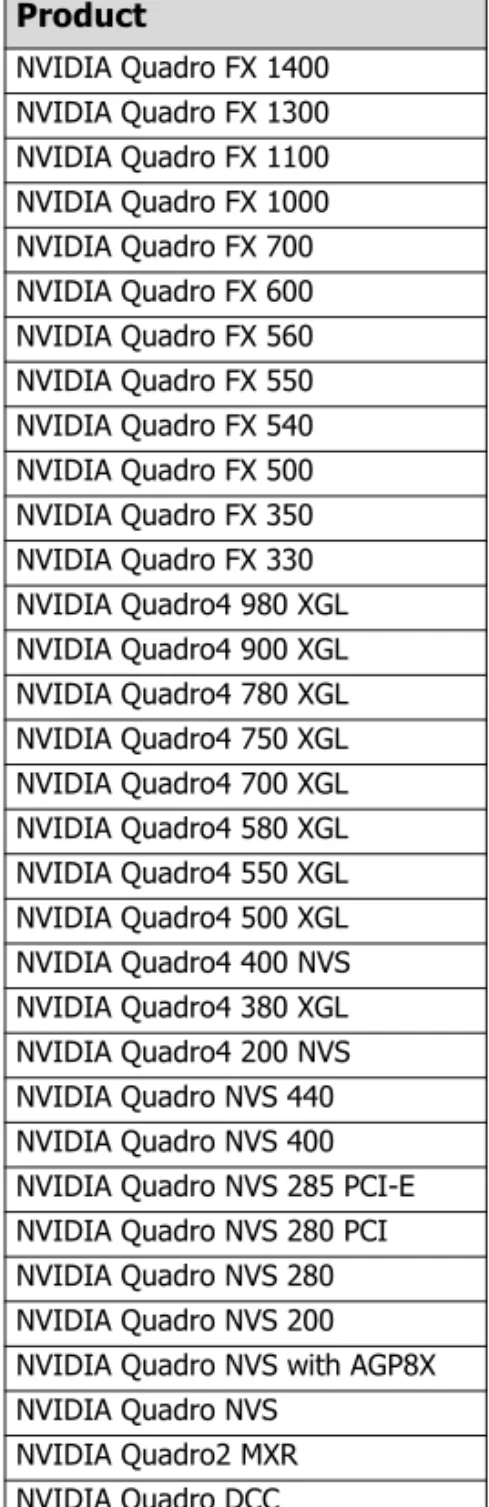
Supported NVIDIA Products. . . 46
Table of Contents
Supported Languages . . . 49
Driver Installation . . . 50
System Requirements . . . 50
Installation Instructions. . . 51
4. NVIDIA Driver History
Driver Release History . . . 56Release 80 Enhancements . . . 57
Additional Details by Driver Module . . . 58
Release 75 Enhancements . . . 59
OpenGL Enhancements . . . 59
SLI Support Improvements. . . 59
System-Wide Desktop Manager Settings . . 60
Control Panel Interface Changes . . . 60
Additional Details by Driver Module . . . 60
Release 70 Enhancements . . . 61
Support for Newest GeForce 6 Series GPUs 61 Additional SLI Support . . . 61
Improved Video Functionality . . . 61
Desktop Manager Wizard Improvements . . 62
Control Panel Interface Improvements. . . . 62
Release 65 Enhancements . . . 62
SLI Support . . . 62
512 MB Frame Buffer Support . . . 63
OS Support. . . 63
Enhancements in Driver Performance . . . . 63
Desktop Manager and Control Panel Improvements . . . 64
Release 60 Enhancements . . . 64
Latest GPU Support . . . 64
PCI Express Support. . . 64
Enhancements in Driver Performance . . . . 65
3D Graphics API Enhancements . . . 65
Release 55 Enhancements . . . 66
PCI Express Support. . . 66
PAE Support . . . 66
nView Desktop Manager Enhancements . . 66
User Interface Enhancements . . . 66
Video Support Enhancements . . . 66
3D Graphics API Enhancements. . . 67
Release 50 Enhancements . . . 67
64-Bit Support . . . 67
Dynamic Memory Mapping. . . 67
NVIDIA Unified Compiler. . . 67
Display Driver Changes and New Features . 67 Video—New Features . . . 68
PowerMizer—New Features . . . 68
User Interface Changes . . . 68
nView. . . 69
DirectX Graphics. . . 70
OpenGL . . . 70
Release 40 Enhancements . . . 71
Enhanced Display Driver, DirectX, and Video Capabilities. . . 71
New Graphical User Interface . . . 71
Enhanced nView Desktop Manager Features72 OpenGL Enhancements. . . 72
Release 35 Enhancements . . . 73
Release 25 Enhancements . . . 74
Release 20 Enhancements . . . 75
Release 10 Enhancements . . . 75
A. Mode Support for Windows
General Mode Support Information. . . 78Default Modes Supported by GPU . . . 79
Understanding the Mode Format . . . 79
GeForce FX Family, GeForce 6 Series, and GeForce 7 Series . . . 80
NVIDIA Quadro FX Family of High End GPUs . 87 GeForce3 Series of GPUs and NVIDIA Quadro DCC . . . 94
GeForce2 MX, GeForce4 MX, GeForce4 Ti Series, GeForce4 MX Integrated GPU, NVIDIA Quadro4, NVIDIA Quadro2, and NVIDIA Quadro NVS Series GPUs. . . 97
NVIDIA Quadro4 9xx / 7xx XGL Products. . 104 NVIDIA Quadro FX Family and NVIDIA Quadro NVS Series GPUs . . . . 110
Modes Supported by DACs and TV Encoders . 117 External DAC Mode Support . . . . 117
Table 2.1 Known Issues with Video Mirror . . . 44
Table 3.1 Supported NVIDIA Consumer Products . . . 46
Table 3.2 Supported NVIDIA Workstation Products . . . 47
Table 3.3 Hard Disk Space Requirements—English . . . 50
Table 3.4 Hard Disk Space Requirements—Non-English Languages . . . 50
Table 3.5 Hard Disk Space Requirements—Full International Package . . . 50
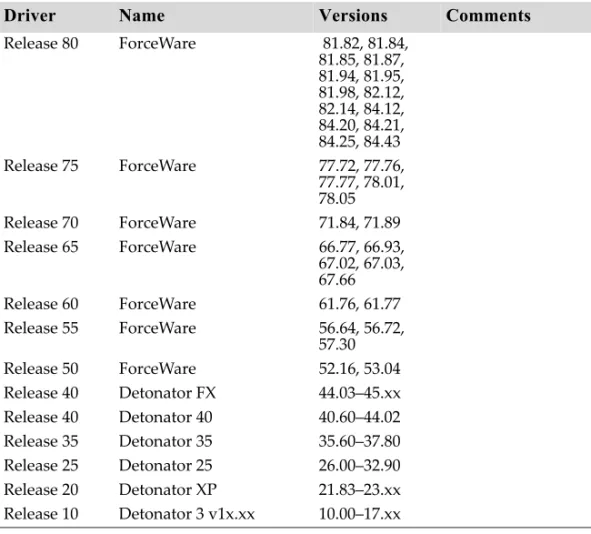
Table 4.1 NVIDIA Drivers for Windows . . . 56
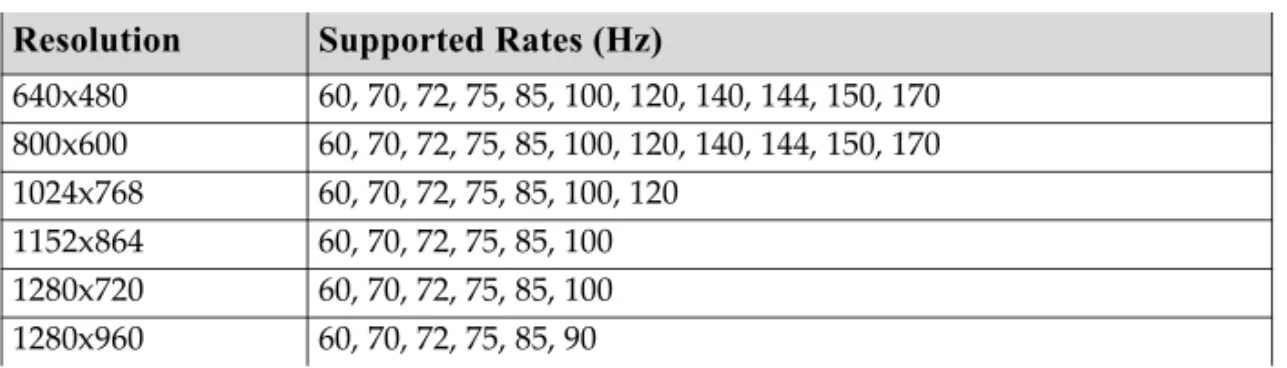
Table A.1 Modes Supported for High Resolution Displays . . . 78
Table A.2 Non-standard Modes Supported . . . 78
Table A.3 External DAC Modes (Fairchild FMS3815). . . . 117
Table A.4 External DAC Modes (Analog Devices ADV-7123). . . . 117
Table A.5 Mode Support for S-Video and Composite Out . . . . 118
Table A.6 Mode Support for Component YPrPb Out and DVI Out . . . . 118
C
H A P T E R
INTRODUCTION
TO
R
ELEASE
80 N
OTES
This edition of Release 80 Notes describes the Release 80 Drivers for Microsoft® Windows® and provides information applicable to all NVIDIA® drivers. NVIDIA provides these notes to describe performance improvements and bug fixes in each documented version of the driver.
Structure of the Document
This document is organized in the following sections: • “Release 80 Driver Issues” on page 2 gives a summary of
• Issues that have been resolved in this version.
• Issues that are open in this version
• Known limitations of the driver
• “The Release 80 Driver” on page 105 describes the NVIDIA products and languages supported by this driver, the system requirements, and how to install the driver.
• “NVIDIA Driver History” on page 55 describes the new features included in the Release 80 driver as well as information on previous driver releases. • “Mode Support for Windows” on page 77
Changes in this Edition
This edition of Release 80 Notes includes information about version 84.43 of the Release 80 driver. It discusses changes made to the driver since version 75.03 . These changes are discussed beginning with the chapter “Release 80 Driver Issues” on page 2.
C
H A P T E R
RELEASE
80 DRIVER
I
SSUES
This chapter describes open issues for version 84.43, and resolved issues and driver enhancements for versions of the Release 80 driver up to version 84.43. The chapter contains these sections:
•
“Issues Resolved in Version 84.43” on page 3
•
“Issues Resolved in Version 84.25” on page 3
•
“Issues Resolved in Version 84.21” on page 3
•
“Issues Resolved in Version 84.20” on page 3
•
“Issues Resolved in Version 84.12” on page 3
•
“Issues Resolved in Version 82.12” on page 5
•
“Issues Resolved in Version 81.98” on page 5
•
“Issues Resolved in Version 81.95” on page 7
•
“Issues Resolved in Version 81.94” on page 9
•
“Issues Resolved in Version 81.87” on page 10
•
“Issues Resolved in Version 81.85” on page 12
•
“Issues Resolved in Version 81.84” on page 15
•
“Open Issues in Version 84.43” on page 17
•
“Not NVIDIA Issues” on page 26
Issues Resolved in Version 84.43
The following are changes made and issues resolved since driver version 84.25:
• Added SLI profile for Tomb Raider: Legend
Issues Resolved in Version 84.25
The following are changes made and issues resolved since driver version 84.21:
• General compatibility fixes
Issues Resolved in Version 84.21
The following are changes made and issues resolved since driver version 84.20:
• Version 84.21 is WHQL certified.
Issues Resolved in Version 84.20
The following are changes made and issues resolved since driver version 84.12:
• Added support for the following products:
•
GeForce 7900 GTX/GT (PCI-E)
•GeForce 7600 GT (PCI-E)
•GeForce 6800 GS (AGP)
• GeForce 6800, Windows XP: Fixed–Hanger textures in space maps are
not rendered in Star Wars Battlefront 2.
• Windows XP: Increased performance when playing F.E.A.R with
antialiasing enabled.
Issues Resolved in Version 84.12
The following are changes made and issues resolved since driver version 82.12:
Single GPU Issues Resolved
• Windows XP, GeForce 7800 GTX: Dell 30
ʺ
panel DVI link hot plug
does not work properly.
• Windows XP: Corel Paint Shop Pro X does not work on dual-core
processors.
• GeForce 7 Series, GeForce 6 Series: Resolutions higher than 1280x800
are unavailable on the Dell 3007WFP panel with dual-link DVI GPUs.
• GeForce 7 Series, GeForce 6 Series: Serious Sam 2 freezes on Dual
Core CPUs.
• GeForce 7800 GTX/GT 512: 4x AA does not work at 2560x1600 on the
Apple 30
ʺ
Cinema display.
• GeForce 7800 GTX/GT: Reflective surfaces in Max Payne 2 are
unaffected by light sources.
• GeForce 7 Series, GeForce 6800: The NVIDIA Dawn Ultra demo runs
slowly on AGP systems.
• GeForce 7 Series: Global profile options are changed when changing
individual application profiles.
• GeForce 7 Series: There is no default color-correction option available
in the application profiles.
By design, the default setting for color profiles is “Not Available”.
• GeForce 6800, Windows XP: Star Wars Knight of the Old Republic 1
and 2 stutter badly with dual core CPUs.
• GeForce 6600, Windows XP Media Center Edition: Component out
options are not available in the NVIDIA TV Device Settings page.
This issue is resolved with BIOS version 5.43.02.89 or higher. Please contact
your OEM or graphics card manufacturer to receive this BIOS.
• GeForce 6600: “Run a DLL Error” occurs when changing resolutions
in nView Horizontal Span mode.
• GeForce FX 5950 Ultra: Dungeon Siege 2 intermittently hangs with a
black screen.
• Windows XP, GeForce FX 5900/5950: Graphics corruption occurs
with Lord of the Rings: Battle for Middle Earth 2.
SLI Issues Resolved
• GeForce 7 Series, GeForce 6 Series, SLI: Resolutions higher than
1280x800 are unavailable on the Dell 3007WFP panel with dual-link
DVI GPUs.
• GeForce 7800 GTX/GT, SLI: Cars and various objects do not render
properly in TOCA Race Driver 2 with any level antialiasing enabled.
• GeForce 7800 GTX/GT: Flickering occurs in the water in Serious Sam
2.
• GeForce 7800 GTX/GT, SLI: There is corruption when running
Ground Control 2 with SLI enabled.
• GeForce 6800, Windows XP, SLI: There is a large performance drop in
Far Cry when 8x SLI antialiasing is enabled, compared to 4x
antialiasing.
• GeForce 6600 (all models except GeForce 6600 VE), SLI: RUNDLL
error occurs when enabling SLI without the SLI connector.
Issues Resolved in Version 82.12
The following are changes made and issues resolved since driver version 81.98:
• Added support for the GeForce 6800 GS AGP.
Issues Resolved in Version 81.98
The following are changes made and issues resolved since driver version 81.95:
Single GPU Issues Resolved
• Removed the Direct Access functionality from the driver user
interface.
• Low Viewperf 8.01 scores occur with Dual Core and dual processor
systems.
• Rendering problems occur in Need for Speed: Most Wanted.
• GeForce 7 Series: Ground textures in Flight Simulator 2004 do not
render correctly when using “Ultra High” settings.
• GeForce 7800 GTX 512: The system cannot resume from Standby.
• GeForce 7800 GTX/GT: Running F.E.A.R. hangs the system on the
Apple 30
ʺ
Cinema display when Monitor Scaling is used.
• GeForce 7800 GTX/GT, GeForce 6800/6600: Ground and water
• GeForce 7800 GTX/GT, GeForce 6800: Shadows fail to render in
Splinter Cell 1.
• Dual GeForce 7800 GTX/GT: Everquest 2 launches to a black screen
when antialiasing is set to 2xQ at 1920 x 1200 resolution.
• GeForce 7800 GTX 512: Chronicles of Riddick does not run at
resolutions higher than 800x600.
• GeForce 7800, GeForce 6800: Corruption is seen in Flight Simulator
2004.
• GeForce 7800 GTX, GeForce 6800, Quadro FX 4500: The system slows
down with the Liquid Edition SD time line.
• GeForce 6800: Wrong colors appear when playing QuickTime trailers
using the non-native video resolution.
• GeForce 6800 Ultra / GeForce FX 5950 Ultra: Battlefield 2 has
corruption or crashes when a player switches from zoomed
commander view to zoomed sniper view.
• GeForce 6800: Shimmering or cropping of the full-screen video mirror
occurs when covering the video window with another window.
• GeForce 6150/6100, Windows XP Media Center Edition: The driver
does not recognize display connection changes that occur during a
system shutdown.
• GeForce 6100/6150, Windows Media Center Edition 2005 Update
Rollup 2: HD modes are listed as available when a TV is connected
using S-Video.
• GeForce 6150/6100, Windows XP Media Center Edition 2005: The
display remains inactive when resuming from Suspend mode.
• GeForce FX 5200: Textures disappear in CrimeLife v105.
• GeForce4 Ti 4200, Windows 98: Java applications crash when calling
OpenGL.
SLI-Related Issues Resolved
• GeForce 7800 GTX 512, SLI: In Battlefield 2 and other applications,
screen corruption occurs with SLI AA enabled.
• GeForce 7800 GTX, SLI: Everquest 2 launches to a black screen when
antialiasing s set to 2xQ.
• GeForce 6800, SLI: There is pausing in Colin McRae Rally 5 when SLI
is enabled.
• GeForce 6800, SLI: Corruption occurs on the golf course in Tiger
Woods 2006 with 2x antialiasing enabled.
• GeForce 6800, SLI: The desktop doesn
ʹ
t refresh after exiting Black and
White 2.
• GeForce 6800, SLI: Nothing appears below the SLI load balancing line
in 3DMark05 when SLI AA is enabled.
• GeForce 6600 VE, SLI: “Lack of video bridge” error message appears
when enabling SLI without the SLI connector.
• GeForce 6600, Windows XP, SLI: The system occasionally hangs
when playing Everquest 2.
• GeForce 6600, Windows XP, SLI: When the quality level is set to
Extreme Quality, EverQuest 2 does not render correctly with 4x
antialiasing enabled at 1600x1200.
Issues Resolved in Version 81.95
The following are changes made and issues resolved since driver version 81.94:
Single GPU Issues Resolved
• There is a possible incompatibility between the ForceWare graphics
driver and the current WDM driver.
• GeForce 7 Series: Modifying any Performance and Quality Setting
using the system tray icon turns off Gamma and Transparency
Antialiasing.
• GeForce 6800 Ultra: Textures are corrupted upon the first time
entering a zone in Guild Wars.
SLI-Related Issues Resolved
• GeForce 6 and 7 series, SLI: Updated F.E.A.R. SLI profile to achieve
better SLI performance and compatibility.
• GeForce 6600, SLI: Blue-screen crash occurs when starting a new
game in Civilization 4 with antialiasing enabled in the NVIDIA
control panel.
Issues Resolved in Version 81.94
The following are changes made and issues resolved since driver version 81.87
Single GPU Issues Resolved
• GeForce 7800 GT/GTX, GeForce 6800:
ʺ
Widescreen
ʺ
great shot
playback mode is corrupt in Tiger Woods 2006 with AFR2 mode
enabled.
• GeForce 7800 GTX/GT: Running OpenGL Games after Direct3D
hangs the system.
• GeForce 6800: Incorrect rendering in Half Life 2 Lost Coast / Day of
Defeat.
• GeForce 6 Series: With the latest FarCry 1.33 patch, HDR mode may
not work.
This is an issue with the application, and will be fixed in the next patch for
the game.
• Quadro FX 1300, Quadro FX 3400: Using GLSL
gl_ModelViewMatrixInverse generates warnings.
• GeForce FX 5950 Ultra: Battlefield 2 intermittently fails to show fog
on some distant objects.
• GeForce4 Ti, GeForce FX 5600: Java applications crash upon exiting.
SLI-Related Issues Resolved
• GeForce 7800 GTX, SLI:The PrintScreen function does not capture 8xS
AA, 8x SLI AA, and 16xS SLI AA correctly in Half-Life 2
• GeForce 7800 GTX/GT, SLI: Halo hangs after playing for a few
minutes.
• GeForce 7800 GTX/GT, SLI: Flat Out hangs or causes a system reboot
when launched with SLI enabled.
Issues Resolved in Version 81.87
The following are changes made and issues resolved since driver version 81.85
Single GPU Issues Resolved
• GeForce 6 and 7 Series GPUs, Windows XP: Improved compatibility
and performance on GPUs when playing Call of Duty 2.
• GeForce 7800 GTX/GT: Reflections are corrupt when set to high in
Serious Sam 2.
• GeForce 7800 GTX/GT: There is screen corruption when panning in
overscan shift mode.
• GeForce 7800 GTX/GT: Cyan-colored pixels appear randomly on the
water tower in F.E.A.R.
• GeForce Go 7800 GTX, Sager system: LCD compressed scaling mode
is not retained after rebooting the system.
• GeForce 6800: After switching playback from one DVR-MS file to
another, the second file experiences dropped frames.
• GeForce 6800 GT, GeForce FX 5950 Ultra: Medal of Honor: Pacific
Assault has sky and ship rendering artifacts.
• GeForce 6800/ 6600: Silent Hunter III characters located outside
experience random fogging effects.
• GeForce 6600: When applying a new resolution on a Samsung 30
ʺ
CRT via DVI, the resolution reverts after rebooting the system.
• GeForce 6600, HDTV, Windows XP MCE: The mouse cursor
disappears after when opening the MCE extensions resize Desktop
option with MCE in fullscreen mode.
• GeForce 6600, Windows XP MCE 2005: Fluctuation in video
brightness and color occurs when running a 1080i.ts file using VMR9.
• GeForce 6150/6100: Playing an HD MPEG2 clip while another is
playing causes corruption on the bottom half of the playback window.
• GeForce 6150/6100: The lower half of the screen fails to render at
• GeForce 6150/6100: Video tears when playing back MPEG HD clips
with latest WinDVD.
• GeForce FX 5900: Water rendering corruption occurs in Links 2003.
SLI-Related Issues Resolved
• GeForce 7 Series / 6 Series, SLI : The control panel may prompt for
restart when switching to SLI mode from DualView mode after
changing the primary display.
• GeForce 7800 GTX/GT, GeForce 6800 Ultra, SLI: The NVIDIA panel
intermittently prompts for a reboot after enabling dynamic SLI
coming out of Dualview.
• GeForce 7800 GTX, SLI: The Apple 30
ʺ
display loses sync when
installing the driver.
• GeForce 7800 GTX/GT, SLI: Rendering corruption occurs in 3D
applications when fixed aspect ratio is set for widescreen panels.
• GeForce 7800 GTX/GT, SLI: With SLI mode enabled using AFR2, the
opening video in Tiger Woods 2006 does not render.
• GeForce 7800 GTX/GT, GeForce 6800 Ultra, SLI: The NVIDIA panel
intermittently prompts for a reboot after enabling dynamic SLI
coming out of Dualview.
• [SLI]: It is not possible to reliably switch the output to a specific
display after enabling SLI.
• [SLI]: The screen goes blank after switching to the flat panel display
on the second GPU once after rebooting the system.
Issues Resolved in Version 81.85
The following are changes made and issues resolved since driver version 81.84
Single GPU Issues Resolved
• GeForce 7800 GTX/GT: Soft shadows in FEAR are not rendered
correctly.
• GeForce 7800 GTX/GT: The system crashes after a minute or so of
playing Half-Life 2: Lost Coast.
• GeForce 7800 GTX/GT: The Apple 30
ʺ
panel display splits into four
grids at 800x600, 1024x768, and 1600x900 resolutions.
• GeForce 7800 GTX/GT: Application performance drops when
Gamma Antialiasing is enabled.
• GeForce 7800 GTX/GT: The display becomes blurry with Gamma AA
enabled on Grand Theft Auto San Andreas.
• GeForce 7800 GTX, SLI: With SLI mode enabled, the mouse cursor
image occasionally sticks as the window resize graphic instead of
being restored to the pointer graphic.
• GeForce 7800 GTX SLI: Resuming from system Hibernate results in a
corrupt or distorted desktop.
• GeForce 7800 GTX/GT: F.E.A.R demo - The system hangs when
entering room with volumetric lighting.
• GeForce 7800 GTX: Random pixels appear during gameplay in
F.E.A.R.
• GeForce 7800 GTX / GeForce 6800 Ultra/ GeForce 6600: There is
intermittent glowing corruption around the edges of the screen in Far
Cry patch 1.33 when HDR is enabled.
This has been partially fixed in driver version 81.85. An upcoming patch for
Far Cry fixes the issue completely.
• GeForce 6 Series: With the latest FarCry patch, the application profile
breaks the HDR functionality.
This has been partially fixed in driver version 81.85. An upcomng patch for
Far Cry fixes the issue completely.
• GeForce 6 Series: Tiger Woods 2006 crashes.
• GeForce 6800 Ultra: There is pausing and corruption in Tiger Woods
2005.
• GeForce 6800 / 6800Ultra: Corrupt pixel-blocks and slow frame
rendering/long pauses occur in Colin McRae Rally 2005.
• GeForce 6800 Ultra: The system hangs when running 3D applications
on a x16 PCI-E system.
This issue is resolved with an update to the nForce4 430/410 motherboard
BIOS. Contact your motherboard manufacturer for the update.
• GeForce 6800 Ultra: Fable hangs during gameplay.
• GeForce 6800: De-interlacing problems occur with Friends Finale
DVD.
• GeForce 6800 Ultra: Prince of Persia: Warrior runs slowly, does not
render shadows, stops functioning, or crashes to the desktop.
• GeForce 6800 Ultra: Prince of Persia: Warrior quits to the desktop.
• GeForce 6800 Ultra: Splinter Cell: Pandora Tomorrow fails to render
shadows.
• GeForce 6800 Ultra: Flight Simulator 2004 has scenery corruption
when 3D clouds are not set at 100%.
• GeForce 6600, DVI-HDTV: The Underscan option is grayed out on
HDVT DVI outputs after setting an HDTV resolution
• GeForce FX 5950 Ultra: Far Cry has severely corrupt textures on the
Research map.
SLI-Related Issues Resolved
• GeForce 7800 GTX SLI: SLI auto display-detection does not detect
displays attached to the slave GPU.
This happened when switching the output or during boot-up.
• GeForce 7800 GTX/GT, SLI: Poor Tiger Woods 2006 performance with
SLI enabled.
• GeForce 7800 GTX SLI: Opening the inventory screen in Everquest 2
causes SLI performance to drop to single card level.
• GeForce 7800 GTX, SLI: There is video corruption with Bad Act Of
War and F.E.A.R.
• GeForce 7800 GTX/GT, GeForce 6800, SLI: The system hangs when
running EverQuest 2 at 1600x1200 with SLI 16x antialiasing enabled.
• GeForce 7800 GTX/GT, GeForce 6800, SLI: There is flickering and
stuttering in Battlefield 2 with antialiasing disabled.
• GeForce 7800 GTX/GT, GeForce 6800, SLI: Display output cannot be
switched to HDTV-Out or TV-Out.
• GeForce 7800 GTX/GT, GeForce 6600, SLI: The system hangs when
running 3D applications on a Dual x16 SLI system.
This issue is resolved with an update to the nForce4 430/410 motherboard
BIOS. Contact your motherboard manufacturer for the update.
• GeForce 7 Series / 6 Series, SLI: Switching from SLI to DualView
mode or DualView mode to SLI may cause the display to lose sync.
• GeForce 6800 Ultra SLI: Screen goes blank when changing to the
digital flat panel on the secondary SLI GPU.
• GeForce 6800, SLI: The player shadows in Madden 2006 flicker when
SLI is enabled.
• 3DMark05 and Far Cry experience poor performance on a dual x16
SLI system compared to a Dual x8 SLI system.
Issues Resolved in Version 81.84
Thes following are changes made and issues resolved since driver version 78.05 and 81.82:
Single GPU Issues Resolved
• GeForce 6800 Ultra: There is geometry corruption in Black & White 2;
triangles stretch to infinity.
• GeForce 6600, Windows XP: De-interlacing issue when playing The
Big Lobowski DVD.
• GeForce 6600 GT: Half Life 2 crashes with driver version 81.82.
• GeForce 6200 16 MB with TurboCache: Black & White 2: Missing
textures on some objects.
• GeForce 6 Series/GeForce FX Series, AGP, Windows XP: Audio sync
problems occur playing WMV9 files using Windows Media Player 10
with the Microsoft patch for DirectX VA WMV9 acceleration.
The problem occurred only in VMR mode and not in overlay mode.
• GeForce 6200 with TurboCache, Windows XP: Unreal Tournament
2004 has intermittent grayed-out screen with antialiasing enabled.
SLI-Related Issues Resolved
• GeForce 7 Series / 6 Series, SLI: Enabling SLI with a monitor
connected to the second GPU causes the display to go black.
• GeForce 7800 GT/GTX, SLI: Stuttering occurs with Black & White 2.
• GeForce 7800 GTX, SLI: Changing the DVI flat panel scaling results in
missing or corrupted modes.
• GeForce 7800 GTX, GeForce 6800 Ultra, SLI, Windows XP: Selecting
the option
ʺ
Detect Optimal Frequencies
ʺ
under the 3D Performance
setting could result in a system crash.
• GeForce 7800 GTX, GeForce 6800/6600/6200, SLI, Windows XP:
Introduction videos do not render in Tiger Woods 2005 in AFR mode.
• GeForce 7800 GTX/GT, GeForce 6800 Ultra, SLI: There is flickering
• GeForce 7800 GTX/Quadro FX 3400, SLI: When enabling SLI, a
message appears indicating that there is no video link bridge.
• GeForce 7800 GTX/GT, GeForce 6800, SLI: There is flickering and
stuttering in Battlefield 2 with antialiasing disabled.
• GeForce 7 Series, GeForce 6 Series, SLI: Turning on Gamma
Corrected AA disables SLI 8x AA and causes the display to fall back
to 4x AA.
• GeForce 6800 Ultra, SLI: Colin McRae Rally 2005 has screen
corruption, slow frame rendering during the race, and occasional
blue-screen crash.
• GeForce 6600, SLI: Corruption occurs in the game Painkiller when
setting the resolution to widescreen formats.
• GeForce 6600, SLI: Blue-screen crash occurs when enabling
antialiasing in Colin McRae Rally 5 demo with bridgeless mixed
memory boards.
• GeForce 6 Series, SLI: Overlocking does not work after dynamically
enabling or disabling SLI mode.
• The system crashes when dynamically enabling SLI mode.
• GeForce products, SLI: With SLI AA rendering enabled, there is
corruption while the flight-loading dialog box is opened in Flight Sim
2004.
• Quadro FX 3400, SLI: With SLI AA rendering enabled, there is poor
performance and occasional system hang with OpenGL applications.
• SLI page reports that the motherboard is not qualified to run SLI
when the display on the second GPU is the primary display.
• With SLI enabled, 3D applications fail to render to the display
attached to GPU2 in bridgeless operation.
This has been resolved by no longer allowing a display output selection
option under bridgeless SLI.
Open Issues in Version 84.43
As with every released driver, version 84.43 of the Release 80 driver has open issues and enhancement requests associated with it. This section includes lists of issues that are either not fixed or not implemented in this version. Some problems listed may not have been thoroughly investigated and, in fact, may not be NVIDIA issues. Others will have workaround solutions.
They are listed in the following sections:
•
“NVIDIA Recommendations” on page 17
•
“NVIDIA Issues—Single GPU” on page 18
•
“NVIDIA Issues—SLI” on page 23
NVIDIA Recommendations
• The GeForce 6800 Ultra 512MB works in single card mode with Apple
30 inch HD Cinema panel. However, an issue has been discovered
when running the GeForce 6800 Ultra 512MB card in SLI mode with
an Apple 30 inch HD Cinema display. This is due to an interaction
between the GPU, the application, and the ability to scale to
non-native panel resolutions of the Apple display.
All GeForce 6 series GPUs will work with Apple 23 and 20 inch HD
Cinema displays in single GPU mode.
NVIDIA recommends using the GeForce 6800 Ultra 512MB with the Apple
30 inch HD Cinema Display line only in non-SLI modes
.
• Single display modes such as TV only, DFP/LCD only or CRT only
provide the best performance and quality from Windows Media
Center Edition.
Dual display modes such Dualview and nView Clone and Span modes are
not recommended.
• When using the trial version of WinDVD 6 from InterVideo.com, you
may experience TV or DVD playback problems in Windows Media
Center if you change resolutions during video playback. This is most
often seen when switching from windowed to full screen mode.
This problem does not occur with the latest full OEM versions of WinDVD or
with other Windows Media Center qualified DVD decoders.
• If you perform a clean driver installation (no previous NVIDIA
drivers installed),
you must reboot your computer
. If you do not
reboot, the predefined application profiles will not be activated and
you may experience application stability problems.
NVIDIA Issues—Single GPU
• GeForce 7600GT/GS, GeForce 7900GT: With LCD and HDTV enabled
under Clone mode and the HDTV set to any mode other than 480i, the
HDTV mode switches to 480i upon reboot.
• There may be intermittent application compatibility issues with dual
core CPUs.
If you experience this issue, you can work around it by toggling off
multi-thread optimizations using the following instructions:
1 Launch regedit and determine the current primary display card by looking in
HKey_Local_Machine\Hardware\DeviceMap\Video
and note the GUID (global unique identifier assigned by Windows), which is the long string in brackets { } at the end of the entry
ʺ\device\video0ʺ.
2 Look in
HKey_Local_Machine\SYSTEM\CurrentControlSet\Control\Video\ {GUID}\0000
where {GUID} is the number derived from the previous step.
3 Open the ʺ0000ʺ directory and create a new DWORD called OGL_ThreadControl and give it a value of 2.
This will disable multithreading in the driver for all OpenGL applications.
4 If you want to disable driver multithreading for all Direct3D applications– In the same ʺ0000ʺ directory, create a new DWORD called
WTD_EXECMODEL and give it a value of 0.
• All GPUs: When adding Custom Resolutions, the user is not allowed
to select the
ʺ
monitor scaling
ʺ
option.
• Windows XP: Corruption occurs when running the Timburry
Buglooker demo.
• Windows XP: The system crashes after enabling NVKeystone with
antialiasing enabled.
• Video color-space range for DVI-only
1outputs is erroneously set to
standard mode (16-235) instead of extended mode (0-255).
A new detection feature to apply Standard CSC mode to TV outputs
(including NTSC, PAL, 480i, and 576i), included DVI-only outputs by
mistake.
Note:
The driver correctly applies extended mode to analog outputs, and
standard mode to TV outputs (including NTSC, PAL, 480i, and 576i).
A future driver release will correct this and apply the extended-mode color
space to DVI-only outputs.
You can work around this issue by forcing either standard or extended mode
as follows:
1 Launch regedit and determine the current primary display card by looking in
HKey_Local_Machine\Hardware\DeviceMap\Video
and note the GUID (global unique identifier assigned by Windows), which is the long string in brackets { } at the end of the entry
ʺ\device\video0ʺ.
2 Look in
HKey_Local_Machine\SYSTEM\CurrentControlSet\Control\Video\ {GUID}\0000
where {GUID} is the number derived from the previous step.
3 Open the ʺ0000ʺ directory and create a new DWORD called VMRCCCSStatus and give it a value of
0x3 - to force use of the standard YUV range of 16-235
0x1 - to force use of the extended YUV range of 0-255
GeForce 7 Series
• GeForce 7800 GTX, Dell 3007WFP: Playback of WMV/Quicktime
content is corrupted at 2560x1600 resolution in full-screen mode.
• GeForce 7800 GS AGP, Windows XP: Character polygon drops when
running the Final Fantasy XI benchmark.
• GeForce 7800 GTX, Windows XP: Blue-screen crash occurs when
playing Eve Online at 2560x1600 resolution.
• GeForce 7800 GTX: Changing the color setting through an application
profile does not work.
• GeForce 7800 GTX/GT, GeForce 6800, SLI: Water reflections are
corrupted in Black & White 2.
• GeForce 7800 GTX: Text in the game Fable flickers on and off, and
sometimes stops rendering, on a Dell flat panel display.
• GeForce 7800 GT/GTX, Windows XP Media Center Edition: Video
skips intermittently when playing HD network transport streaming
clips.
• GeForce 7800 GTX, Windows XP: When changing to a resolution
higher than 1024x768 in Need for Speed Underground 2 on a
1920x1200 widescreen flat panel, the application attempts to select the
next resolution it has above 1024x768, which is 1280x960 and not
supported by most flat panels.
A known workaround is to manually add the mode 1280x960 from NVIDIA's
Custom Timings control panel and then continue to select the resolution
needed.
• GeForce 7800 GTX, Windows XP: The desktop becomes shaky when
changing the resolution to 1920x1080 on a Viewsonic VP231wb.
• GeForce 7800 GTX Windows XP MCE 2005: Some artifacts appear
when de-interlacing is enabled on 1920x1080i video clips.
• GeForce 7800 GTX, Windows XP Media Center Edition 2005:
Changing the video acceleration while using Windows Media Player
10 to play
ʺ
PBS - Omaha Zoo RR.mpg
ʺ
crashes the application.
GeForce 6 Series
• GeForce 6800: With antialiasing enabled, DirectX 9 Blobs does not
render after the system has returned from a 3D screensaver.
• GeForce 6800 XT, Windows XP Media Center Edition: Hot key
display switching does not turn on some displays.
• GeForce 6800, Windows XP Media Center Edition: While Windows
Media Player 10 is playing a video file, MCE shows a blank screen
when launched.
• GeForce 6800: Shadow corruption occurs in the game Lineage II.
• GeForce 6800: A small square of bad pixels appears in the lower right
corner of the window when changing to 1600x1200 4xAA and 8xAF in
Age of Empires 3 and Colin McRae 2005 with highest quality settings
enabled.
• GeForce 6600, Windows XP Media Center Edition 2005 Update
Rollup2: The system restarts while playing a video using MCE.
• GeForce 6600, Windows XP Media Center Edition: With HD over
DVI, there are problems with the HD modes in the control panel.
• GeForce 6600: There is corruption in the water in the Painkiller
benchmark.
• GeForce 6600 128MB, Windows XP Media Center Edition 2005:The
MCE screen does not appear when switched to full-screen mode.
• GeForce 6600, Windows XP Media Center Edition 2005: MCE
application goes blank while playing a video file.
• GeForce 6600 AGP: When playing back HD content at high
resolutions (such as 1920x1080), the Power Indicator panel appears
warning that the graphics card is not receiving sufficient power.
• GeForce 6600, Windows XP Media Center Edition: Live TV teletext
flashes when viewed using PAL I.
• GeForce 6600, Windows XP Media Center Edition: While playing
MCE Live TV in Clone mode with full-screen video mirror, the
mirrored display is corrupted when resizing the application.
• GeForce 6200 128 MB, Windows XP Media Center Edition 2005: MCE
is not recovering properly when moving the application from one
display to the other while playing a WMV HD file.
• GeForce 6200 TurboCache (16 MB): The system crashes when playing
a media file with nStant Media in full-screen mode.
• GeForce 6200 with TurboCache (16 MB), Windows XP: Everquest 2
crashes or hangs when run at 1600x1200.
• GeForce 6200 with TurboCache (16 MB), Windows Media Center
2005: After switching DVD playback to full-screen mode, the screen
turns blank and then the desktop corrupts when returning to
windowed mode.
• GeForce 6200 with TurboCache (16MB), Windows XP Media Center
Edition 2005: Full-screen video mirroring is not supported.
• GeForce 6150/6100: Battlefield 2 has high frequency flicker of
horizontal bands scanning across the screen on bright backgrounds.
• GeForce 6150/6100, Windows XP Media Center Edition: Frame drops
occur when playing HD MPEG2 files in VMR7 mode.
GeForce FX Series
• GeForce FX 5950: Ultra Age of Mythology has screen flicker with
certain special effects.
• GeForce FX 5200: There is corruption in the Far Cry heads up
displays.
• GeForce FX 5200 Ultra, Windows Media Center Edition 2005, NVTV:
Live TV hangs when running in Dualview mode with Video Mirror
enabled.
NVIDIA Issues—SLI
GeForce 7 Series
• GeForce 7800 GTX/GT, SLI: The load balancing line is corrupted when
playing Civilizations 4 at 2560x1600.
• GeForce 7800 GTX 512MB, SLI: Blue-screen crash occurs or black
screen appears when toggling the DOS window while playing M2P
files using Windows Media Player 10.
• GeForce 7800 GTX/GT, SLI: Stuttering occurs in NHL2006 with SLI
AA enabled.
• Windows XP, GeForce 7800 GTX, SLI: F.E.A.R. may not run on the
AMD FX-60 with Asus A8MSLI32.
• GeForce 7800 GTX, SLI: There is graphics corruption when playing
IL2: Forgotten battles.
• GeForce 7800 GTX/GT, SLI: Counter-Strike: Source performance
decreases in SLI multi-GPU mode compared to single-GPU mode.
• GeForce 7800 GT/GTX, SLI: The display attached to GPU1/DVI2 is
not restored after disabling SLI.
• GeForce 7800 GTX/GT, GeForce 6 Series: Shadows do not render
correctly in Far Cry patch 1.33.
• GeForce 7800 GTX/GT, GeForce 6800/6800 Ultra/GT: When selecting
Detect Optimal Frequencies in the control panel, the desktop refresh
rate switches to 60Hz.
• GeForce 7800 GTX, SLI, Windows XP Professional x64: Half-Life 2
Day of Defeat does not run.
• GeForce 7800 GTX/GT, SLI: Non-active displays may be activated
after disabling SLI or rebooting the system.
• GeForce 7800 GTX/GT, SLI: Display does not respond appropriately
when using Pan-and-scan under SLI mode.
• GeForce 7800 GTX, SLI: Attempts to enable SLI dynamically
occasionally fails, requiring a system reboot.
• GeForce 7800 GTX, SLI, Windows XP: The computer crashes
intermittently when changing the desktop resolution to 1920x1080 on
a Viewsonic VP231wb.
GeForce 6 Series
• GeForce 6800 Ultra, SLI: The system hangs when looping 3DMark05
1.1.
• GeForce 6800, SLI: The audio is corrupt during the intro videos in Flat
Out when SLI is enabled.
• GeForce 6800, SLI: Stuttered rendering occurs during test 3 in
3DMark05 at 1600x1200 4xAA with SLI enabled.
• GeForce 6800, SLI: SLI split line indicates no scaling is occurring for
Age of Empires when run in windowed mode.
• GeForce 6800, SLI: The character portrait in Dungeon Siege 2 is
corrupted.
• GeForce 6800 Ultra, SLI: There are intermittent application failures
when using nForce4 SLI/SLI X16 motherboards.
• GeForce 6800 Ultra, SLI: Apple 30 inch display does not run with 512
MB graphics boards in SLI mode. You must switch to single GPU
mode to work.
• GeForce 6600, SLI, Windows XP: Double image of the scene appears
when running Star Wars Republic Commando.
• GeForce 6600, SLI, Windows XP: Corruption occurs along the SLI
split line when playing Grand Theft Auto : San Andreas.
• GeForce 6600, SLI, Windows XP: With antialiazing enabled from the
NVIDIA panel, car textures are corrupted in Need for Speed Most
Wanted, and ghosting occurs in FIFA 2006.
• GeForce 6600, SLI: The
Select display output
option is not available
for NVIDIA SLI without the SLI connector.
This is a known limitation of NVIDIA SLI when the SLI connector is not used.
• GeForce 6600, SLI, Windows XP: Gameplay and menu performance
drops when running Kohan 2: Kings of War in SLI mode with 4x
antialiasing enabled.
• GeForce 6600, SLI, Windows XP: Lock On: Modern Air Combat has
lower than expected performance at high resolutions with antialiasing
enabled.
• GeForce 6600, SLI, Windows XP: Corruption occurs in the game
Painkiller when setting the resolution to wide screen formats.
• GeForce 6600, SLI, Windows XP: The entire display blacks out briefly
when attempting to bring up the NVIDIA Control Panel.
Not NVIDIA Issues
This section lists issues that have been determined to not be due to the NVIDIA driver. They are organized in the following sections:
•
“Not NVIDIA Issues—Single GPU” on page 26
•
“Not NVIDIA Issues—SLI” on page 32
Not NVIDIA Issues—Single GPU
GeForce 7 Series
• GeForce 7800 GTX/GT: The Chronicles of Riddick does not render
correctly at 2560x1600 on the Apple 30
ʺ
Cinema display.
This is an issue with the application.
• GeForce 7 Series, GeForce 6 Series GPUs: Textures are not rendered in
Age of Empires 3 at 1600x1200 and higher resolutions.
This is an issue with the application.
• GeForce 7800 GTX, Windows XP Media Center Edition 2005
Update2: When running in window mode, there is tearing in the
video on the top of the screen when playing MPEG-2 high definition
clips on HDTV output.
This is an application issue with Media Center and does not occur if you run
Media Center in Fullscreen mode.
• GeForce 7800 GTX/GT: Transparency antialiasing does not work with
Grand Theft Auto San Andreas.
The driver does not apply Transparency antialiasing to triangles that are
alpha-blended. Applications with alpha blending do not benefit from
Transparency antialiasing.
• GeForce 7800 GT/GTX: Graphics are corrupted at the title screen in
Age of Empires 3.
This is not an NVIDIA bug, but an issue with the application.
• GeForce 7800 GT/GTX: F.E.A.R. Demo has blocky explosion effects.
This is not an NVIDIA bug, but an issue with the application.
• GeForce 7800 GTX: Age of Empires 3 demo fails to run when
connected to a DVI flat panel.
This is not an NVIDIA bug, but an issue with the application. Demo versions
of the application attempt to set a mode that is not supported on the flat
panel. To work around the issue, locate the file newprofile.xml and change
the resolution setting to 1024x768.
This is fixed in final versions of the game.
• GeForce 7800 GTX/GT, GeForce 6800: Textures are not rendered in
Age of Empires 3 at 1600x1200 and higher resolutions.
This is not an NVIDIA issue, but rather a bug in the application.
• GeForce 7800/GeForce 6800 GT: Shadow corruption/soft shadows
appear after changing video settings in F.E.A.R.
This is an issue with the application and is documented as such in the demo’s
release notes.Disabling antialiasing fixes the soft shadow corruption.
• GeForce 7800 GTX / GeForce 6 Series: The Chronicles of Riddick:
Escape from Butcher Bay does not run under OpenGL.
This issue is resolved by downloading and installing the game's 1.1 patch
available at
http://www.vugames.com/file_list.do?gamePlatformId=1839
.
This problem occurs as a result of the application checking the NVIDIA
OpenGL driver for a version 1.5 instead of 2.0.
• GeForce 7800 GTX, GeForce 6800/6800 Ultra, GeForce 6600 GT:
Explosion effects in the game Pariah result in full-screen corruption.
This is an issue with the application. To work around the issue, set the
variable
HasNvidiaTexM32Tex
in the file
pariah.ini
to (1). ((0) is the
default.)
• GeForce 7800 GTX / GeForce 6800 Ultra: Age of Empires 3 demo v1.0
has corruption on the title screen when running at high resolutions
(1600x1200) with antialiasing set to Medium or High, Shader Quality
set to Very High, and Shadow Quality set to Very High.
This is an issue with the application.
GeForce 6 Series
• GeForce 7 Series, GeForce 6 Series GPUs: Textures are not rendered in
Age of Empires 3 at 1600x1200 and higher resolutions.
• GeForce 7800 GT/GTX, GeForce 6800/6800 Ultra/GT: When selecting
Detect Optimal Frequencies in the control panel, the desktop refresh
rate switches to 60Hz.
• GeForce 7800 GTX/GT, GeForce 6800: Shadows fail to render in
Splinter Cell 1.
• GeForce 7800 GTX/GT, GeForce 6800/6600: Ground and water
textures are corrupted when zooming out in Civilization 4.
• GeForce 6800 PCI-E: The top of the video tears when watching a
transport stream clip in VMR mode with Windows Media Player.
• GeForce 6800: Corruption occurs on certain vehicles in Joint
Operations: Typhoon Rising.
• GeForce 6800: Command and Conquer Generals: Zero Hour displays
green tint.
• GeForce 6800: Flickering corruption appears around the mouse
cursor in Dungeon Siege 2.
• GeForce 6800, Windows XP Media Center Edition: Blue-screen crash
occurs when dragging Windows Media Player 10 window from the
primary to the secondary display.
• GeForce 6800 PCI-E: When played in Overlay mode, there is an initial
hesitation during the Galaxy Quest menu ship flyby.
• GeForce 7800 GTX / GeForce 6800 Ultra: Age of Empires 3 demo v1.0
has corruption on the title screen when running at high resolutions
(1600x1200) with antialiasing set to Medium or High, Shader Quality
set to Very High, and Shadow Quality set to Very High.
This is an issue with the application.
• GeForce 6800 / 6200: Battlefield 1942 has shimmering textures.
Battlefield 1942 uses negative LOD intensively in the game, but this should
not be used in conjunction with anisotropic filtering.
To reduce shimmering, set the advanced option "negative LOD bias" to
CLAMP, and then the image settings slider to High Quality.
• GeForce 7800/GeForce 6800 GT: Screen corruption may occur with
F.E.A.R. when antialiasing and soft shadows are enabled.
This is an issue with the application and is documented as such in the demo’s
release notes.Disabling antialiasing fixes the soft shadow corruption.
• GeForce 7800 GTX, GeForce 6800/6800 Ultra, GeForce 6600 GT:
Explosion effects in the game Pariah result in full-screen corruption.
This is an issue with the application. To work around the issue, set the
variable
HasNvidiaTexM32Tex
in the file
pariah.ini
to (1). ((0) is the
default.)
• GeForce 6800: Shadows are not rendering correctly in Ground
Control 2.
This is not an NVIDIA bug, but an issue with the application.
• Geforce 6800: Half-Life 2 fog is different when using ATI hardware.
This is not an NVIDIA bug, but rather an issue with the application.
• GeForce 6800: Aspect ratio is incorrect when movie transitions from
4:3 to 16:9 playback using PowerDVD5 Trail (download from the
Cyberlink Web site).
This is an application issue, and does not occur with other DVD players.
• GeForce 6800 Ultra, Windows XP: Movies are choppy in Prince of
Persia Warrior Within. However, gameplay is not affected.
This is not an NVIDIA bug, but rather an issue with the application.
• GeForce 6800 Ultra PCI-E: Shadows are not rendering correctly in
Ground Control 2.
• GeForce 6600/6800 (128MB): 3D Mark 2003 demo mode results in an
out of memory error at 1600x1200x32 with 4x antialiasing enabled.
This is not a bug. The problem occurs because there is not enough memory to
run 3D Mark03 in this mode with a 128MB board.
• GeForce 6600 GT: Antialiasing doesn’t work with Serious Sam II
Demo.
This is not a bug. HDR in Serious Sam II is not supported by the NVIDIA
control panel antialiasing.
• GeForce 6600 (128 MB): The game Hitman—Contracts refuses to start
with graphics options set to the maximum (1600x1200, 4x antialiasing,
16x anisotropic filtering).
• GeForce 6600, GeForce FX 5600 Ultra: There is intermittent corruption
on the first warning screen of some DVD titles.
A patch for this issue is available from Microsoft.
• GeForce 6600: Artifacts appear in the introduction videos and during
game play in Tomb Raider: Angel of Darkness at 1600x1200 and with
4x antialiasing enabled.
This is not an NVIDIA bug.
• GeForce 6200 (16MB/32MB): Game-loading errors occur with Tomb
Raider Angel of Darkness.
This is an issue with the application. You can work around this issue by
switching off the video using the command line switch “
-no_fmv
”.
• GeForce 6200 with TurboCache (16MB): A Direct3D out-of-memory
error occurs in Unreal Tournament 2003 when using the HardOCP
Benchmark Utility version 2.1.
This is not an NVIDIA bug.
• GeForce 6 Series: Stuttering occurs in the game EverQuest II.
NVIDIA has optimized performance in the 77.72 drivers to reduce stuttering
related to the GPU and drivers. However, in-game stuttering can still occur as
the result of the following system conditions:
•
Using high-quality/maximum-visual game settings on a PC with less than
1.5 GB of system memory—EverQuest II's highest quality settings are
extremely hardware intensive (graphics, memory, and CPU).
•
Misconfigured AGP aperture settings and fragmented hard disks can also
contribute to in-game stuttering.
• GeForce 6 Series, Windows XP: There is no difference in lighting after
turning the flashlight on and off a few times in Half-Life 2, resulting in
darkness even with the flashlight on.
This is not an NVIDIA bug, but rather an issue with the application.
GeForce FX Series
• GeForce FX 5950 Ultra: Call of Duty 2 crashes when
ʺ
optimal system
settings
ʺ
is chosen in the game options menu.
This is not an NVIDIA bug, but an issue with the application. It is fixed with
the full retail version of Call of Duty 2.
• GeForce FX 5950 Ultra, Windows ME: CodeCult benchmark does not
run properly.
This is not an NVIDIA bug.
• GeForce FX 5950 Ultra: Homeworld2 antialiased performance is slow.
This is not an NVIDIA bug, but is a known issue with the application. A game
patch 1.1 is available at
ftp://ftp.sierra.com/pub/sierra/homeworld2/
updates/homeworld2_update_en_10_11.exe
.
• GeForce FX 5600 Ultra, GeForce 6600: There is intermittent corruption
on the first warning screen of some DVD titles.
A patch for this issue is available from Microsoft.
• GeForce FX Series: Stuttering occurs in the game EverQuest II.
NVIDIA has optimized performance in the 77.72 drivers to reduce stuttering
related to the GPU and drivers. However, in-game stuttering can still occur as
the result of the following system conditions:
•
Using high-quality/maximum-visual game settings on a PC with less than
1.5 GB of system memory
EverQuest IIʹs highest quality settings are extremely hardware intensive (graphics, memory, and CPU).
•
Misconfigured AGP aperture settings and fragmented hard disks can also
contribute to in-game stuttering.
• GeForce FX, Windows ME: Gunmetal Demo introduction movie does
not display properly.
This is not an NVIDIA bug.
GeForce2 and GeForce4
• GeForce2, GeForce4 MX, Windows XP: City of Heroes crashes to the
desktop intermittently.
Not NVIDIA Issues—SLI
• SLI mode does not appear capable of being enabled with City of
Villains.
This issue occurs because City of Heroes and City of Villains share the same
executable name.
You can work around this issue by either
•
modifying the City of Heroes application profile (this will create a second
City of Heroes profile) to enable SLI AFR mode, or
•
set AFR as the rendering mode in Global Profile.
For more information on customizing SLI profiles, visit
www.slizone.com
and navigate to Learn More->How-to Guides.
• GeForce 6 and 7 Series, SLI: SLI does not work with OpenGL
applications when the SLI control panel page is open.
This is the correct behavior with SLI rendering. If you need to adjust SLI
settings for an OpenGL application you must adjust the NVIDIA control
panel settings with the application closed, then close the control panel and
open the application.
• GeForce 6 and 7 Series, SLI, Windows XP: With SLI enabled, Call of
Duty 2 performance appears to be slow.
For optimal SLI performance in Call of Duty 2, you must select 'YES' for
'Optimize for SLI' in the Graphics section of System Settings.
• GeForce 6 and 7 Series, SLI, Windows XP: After selecting
'
YES
ʹ
for
ʹ
Optimize for SLI
ʹ
in the Graphics section of System Settings when
playing Call of Duty 2, the setting resets to ‘No’ every time you restart
the game.
The problem is that the setting does not get saved to the player's config file.
You must make sure 'YES' is selected each time you launch the application or
you can ensure the setting gets written to the config file in one of the
following ways:
•
Type "seta r_multiGpu 1" in the console, or
•Add "seta r_multiGpu 1" to the shortcut, or
•
Add "seta r_multiGpu 1" directly to your config.cfg and config_mp.cfg
files in your directory under the "main/players" folder.
• GeForce 6800, SLI: If SLI antialiasing is enabled, the regular
antialiasing modes are not available after disabling SLI.
The regular antialiasing modes will be available if you disable SLI
antialiasing before disabling SLI. This works as it is designed.
• With SLI enabled, the SLI split line does not appear when VSync is
forced on.
This is not a bug, and the applications are, in fact, running in SLI mode. The
SLI split line/load bar is not supposed to appear when Vsync is enabled in
SLI mode.
• GeForce 6800/6600 GT: Slow performance with World of Warcraft in
SLI mode.
This is not an NVIDIA bug, but instead the result of a recent patch for World
of Warcraft to reduce mouse lag on slower computers by synchronizing the
GPU(s). This change is unnecessary for NVIDIA users, and particularly for
users with SLI configurations.
For optimal performance when playing World of Warcraft in SLI mode:
•Disable vertical sync within the World of Warcraft in-game video options.
•Enable "hardware mouse" acceleration and disable "smooth mouse" within
the World of Warcraft in-game video options.
ʺSmooth mouseʺ reduces mouse lag when the frame rate is low and ʺhardware mouseʺ is disabled.