1.
Optimizing software in C++
An optimization guide for Windows, Linux, and Mac
platforms
By Agner Fog. Technical University of Denmark. Copyright © 2004 - 2020. Last updated 2020-09-02.
Contents
1 Introduction ... 3
1.1 The costs of optimizing ... 4
2 Choosing the optimal platform ... 5
2.1 Choice of hardware platform ... 5
2.2 Choice of microprocessor ... 6
2.3 Choice of operating system ... 6
2.4 Choice of programming language ... 8
2.5 Choice of compiler ... 9
2.6 Choice of function libraries ... 11
2.7 Choice of user interface framework ... 13
2.8 Overcoming the drawbacks of the C++ language ... 14
3 Finding the biggest time consumers ... 15
3.1 How much is a clock cycle? ... 15
3.2 Use a profiler to find hot spots ... 16
3.3 Program installation ... 18
3.4 Automatic updates ... 18
3.5 Program loading ... 18
3.6 Dynamic linking and position-independent code ... 19
3.7 File access ... 19
3.8 System database ... 20
3.9 Other databases ... 20
3.10 Graphics ... 20
3.11 Other system resources ... 20
3.12 Network access ... 20
3.13 Memory access ... 21
3.14 Context switches ... 21
3.15 Dependency chains ... 21
3.16 Execution unit throughput ... 21
4 Performance and usability ... 22
5 Choosing the optimal algorithm ... 24
6 Development process ... 24
7 The efficiency of different C++ constructs ... 25
7.1 Different kinds of variable storage ... 25
7.2 Integers variables and operators ... 29
7.3 Floating point variables and operators ... 31
7.4 Enums ... 33
7.5 Booleans ... 33
7.6 Pointers and references ... 35
7.7 Function pointers ... 37
7.8 Member pointers ... 37
7.9 Smart pointers ... 37
7.10 Arrays ... 38
7.12 Branches and switch statements ... 43
7.13 Loops ... 45
7.14 Functions ... 47
7.15 Function parameters ... 50
7.16 Function return types ... 50
7.17 Function tail calls ... 51
7.18 Recursive functions ... 51
7.19 Structures and classes ... 52
7.20 Class data members (instance variables) ... 53
7.21 Class member functions (methods) ... 54
7.22 Virtual member functions ... 55
7.23 Runtime type identification (RTTI) ... 55
7.24 Inheritance ... 55
7.25 Constructors and destructors ... 56
7.26 Unions ... 57
7.27 Bitfields ... 57
7.28 Overloaded functions ... 58
7.29 Overloaded operators ... 58
7.30 Templates ... 58
7.31 Threads ... 61
7.32 Exceptions and error handling ... 62
7.33 Other cases of stack unwinding ... 66
7.34 Propagation of NAN and INF ... 66
7.35 Preprocessing directives ... 67
7.36 Namespaces ... 67
8 Optimizations in the compiler ... 67
8.1 How compilers optimize ... 67
8.2 Comparison of different compilers ... 76
8.3 Obstacles to optimization by compiler ... 79
8.4 Obstacles to optimization by CPU ... 83
8.5 Compiler optimization options ... 83
8.6 Optimization directives ... 84
8.7 Checking what the compiler does ... 86
9 Optimizing memory access ... 89
9.1 Caching of code and data ... 89
9.2 Cache organization ... 89
9.3 Functions that are used together should be stored together ... 90
9.4 Variables that are used together should be stored together ... 90
9.5 Alignment of data ... 92
9.6 Dynamic memory allocation ... 92
9.7 Data structures and container classes ... 95
9.8 Strings ... 102
9.9 Access data sequentially ... 103
9.10 Cache contentions in large data structures ... 103
9.11 Explicit cache control ... 105
10 Multithreading ... 107
10.1 Simultaneous multithreading ... 109
11 Out of order execution ... 110
12 Using vector operations ... 112
12.1 AVX instruction set and YMM registers ... 114
12.2 AVX512 instruction set and ZMM registers ... 114
12.3 Automatic vectorization ... 115
12.4 Using intrinsic functions ... 118
12.5 Using vector classes ... 121
12.6 Transforming serial code for vectorization ... 126
12.7 Mathematical functions for vectors ... 128
12.8 Aligning dynamically allocated memory ... 129
12.10 Conclusion ... 129
13 Making critical code in multiple versions for different instruction sets ... 131
13.1 CPU dispatch strategies... 132
13.2 Model-specific dispatching ... 133
13.3 Difficult cases ... 134
13.4 Test and maintenance ... 135
13.5 Implementation ... 136
13.6 CPU dispatching at load time in Linux ... 138
13.7 CPU dispatching in Intel compiler ... 139
14 Specific optimization topics ... 141
14.1 Use lookup tables ... 141
14.2 Bounds checking ... 143
14.3 Use bitwise operators for checking multiple values at once ... 145
14.4 Integer multiplication ... 146
14.5 Integer division ... 147
14.6 Floating point division ... 148
14.7 Do not mix float and double ... 150
14.8 Conversions between floating point numbers and integers ... 150
14.9 Using integer operations for manipulating floating point variables ... 151
14.10 Mathematical functions ... 155
14.11 Static versus dynamic libraries ... 155
14.12 Position-independent code ... 157
14.13 System programming ... 159
15 Metaprogramming ... 160
15.1 Template metaprogramming ... 160
15.2 Metaprogramming with constexpr branches ... 163
15.3 Metaprogramming with constexpr functions ... 164
16 Testing speed ... 164
16.1 Using performance monitor counters ... 166
16.2 The pitfalls of unit-testing ... 167
16.3 Worst-case testing ... 168
17 Optimization in embedded systems ... 169
18 Overview of compiler options... 171
19 Literature ... 175
20 Copyright notice ... 176
1 Introduction
This manual is for advanced programmers and software developers who want to make their software faster. It is assumed that the reader has a good knowledge of the C++ program-ming language and a basic understanding of how compilers work. The C++ language is chosen as the basis for this manual for reasons explained on page 8 below.
This manual is based mainly on my study of how compilers and microprocessors work. The recommendations are based on the x86 family of microprocessors from Intel, AMD and VIA including the 64-bit versions. The x86 processors are used in the most common platforms with Windows, Linux, BSD, and Mac OS X operating systems, though these operating systems can also be used with other microprocessors. Many of the advices may apply to other platforms and other compiled programming languages as well.
This is the first in a series of five manuals:
2. Optimizing subroutines in assembly language: An optimization guide for x86 platforms.
3. The microarchitecture of Intel, AMD, and VIA CPUs: An optimization guide for assembly programmers and compiler makers.
4. Instruction tables: Lists of instruction latencies, throughputs and micro-operation breakdowns for Intel, AMD, and VIA CPUs.
5. Calling conventions for different C++ compilers and operating systems.
The latest versions of these manuals are always available from www.agner.org/optimize. Copyright conditions are listed on page 176 below.
Programmers who are satisfied with making software in a high-level language need only read this first manual. The subsequent manuals are for those who want to go deeper into the technical details of instruction timing, assembly language programming, compiler technology, and microprocessor microarchitecture.
Please note that my optimization manuals are used by thousands of people. I simply do not have the time to answer questions from everybody. So please do not send your
programming questions to me. You will not get any answer. Beginners are advised to seek information elsewhere and get a good deal of programming experience before trying the techniques in the present manual. There are various discussion forums on the Internet where you can get answers to your programming questions if you cannot find the answers in the relevant books and manuals.
I want to thank the many people who have sent me corrections and suggestions for my optimization manuals. I am always happy to receive new relevant information.
1.1 The costs of optimizing
University courses in programming nowadays stress the importance of structured and object-oriented programming, modularity, reusability, and systematization of the software development process. These requirements are often conflicting with the requirements of optimizing the software for speed or size.
Today, it is not uncommon for software teachers to recommend that no function or method should be longer than a few lines. A few decades ago, the recommendation was the opposite: Do not put something in a separate subroutine if it is only called once. The
reasons for this shift in software writing style are that software projects have become bigger and more complex, that there is more focus on the costs of software development, and that computers have become more powerful.
The high priority of structured software development and the low priority of program efficiency is reflected, first and foremost, in the choice of programming language and interface frameworks. This is often a disadvantage for the end user who has to invest in ever more powerful computers to keep up with the ever bigger software packages and who is still frustrated by unacceptably long response times, even for simple tasks.
2 Choosing the optimal platform
2.1 Choice of hardware platform
The choice of hardware platform has become less important than it used to be. The distinctions between RISC and CISC processors, between PC's and mainframes, and between simple processors and vector processors are becoming increasingly blurred as the standard PC processors with CISC instruction sets have got RISC cores, vector processing instructions, multiple cores, and a processing speed exceeding that of yesterday's big mainframe computers.
Today, the choice of a hardware platform for a given task is often determined by considerations such as price, compatibility, second source, and the availability of good development tools, rather than by the processing power. Connecting several standard PC's in a network may be both cheaper and more efficient than investing in a big mainframe computer. Big supercomputers with massively parallel vector processing capabilities still have a niche in scientific computing, but for most purposes the standard PC processors are preferred because of their superior performance/price ratio.
The CISC instruction set (x86) of the standard PC processors is not optimal from a technological point of view. This instruction set is maintained for the sake of backwards compatibility with a lineage of software that dates back to around 1980 where RAM memory and disk space were scarce resources. However, the CISC instruction set is better than its reputation. The compactness of the code makes caching more efficient today where cache size is a limited resource. The CISC instruction set may actually be better than RISC in situations where code caching is critical. The worst problem of the x86 instruction set is the scarcity of registers. This problem has been alleviated in the 64-bit extension to the x86 instruction set where the number of registers has been doubled.
Thin clients that depend on network resources are not recommended for critical applications because the response times for network resources cannot be controlled.
Small hand-held devices are becoming more popular and used for an increasing number of purposes such as email and web browsing that previously required a PC. Similarly, we are seeing an increasing number of devices and machines with embedded microcontrollers. I am not making any specific recommendation about which platforms and operating systems are most efficient for such applications, but it is important to realize that such devices typically have much less memory and computing power than PCs. Therefore, it is even more important to economize the resource use on such systems than it is on a PC platform. However, with a well optimized software design, it is possible to get a good performance for many applications even on such small devices, as discussed on page 169.
This manual is based on the standard PC platform with an Intel, AMD, or VIA processor and a Windows, Linux, BSD, or Mac operating system running in 32-bit or 64-bit mode. Much of the advice given here may apply to other platforms as well, but the examples have been tested only on PC platforms.
Graphics accelerators
It is possible in some cases to use the high processing power of the processors on a graphics accelerator card for other purposes than rendering graphics on the screen.
However, such applications are highly system dependent and therefore not recommended if portability is important. This manual does not cover graphics processors.
Programmable logic devices
A programmable logic device is a chip that can be programmed in a hardware definition language, such as VHDL or Verilog. Common devices are CPLDs and FPGAs. The
difference between a software programming language, e.g. C++, and a hardware definition language is that the software programming language defines an algorithm of sequential instructions, where a hardware definition language defines hardware circuits consisting of digital building blocks such as gates, flip-flops, multiplexers, arithmetic units, etc. and the wires that connect them. The hardware definition language is inherently parallel because it defines electrical connections rather than sequences of operations.
A complex digital operation can often be executed faster in a programmable logic device than in a microprocessor because the hardware can be wired for a specific purpose.
It is possible to implement a microprocessor in an FPGA as a so-called soft processor. Such a soft processor is much slower than a dedicated microprocessor and therefore not
advantageous by itself. But a solution where a soft processor activates critical application-specific instructions that are coded in a hardware definition language in the same chip can be a very efficient solution in some cases. An even more powerful solution is the
combination of a dedicated microprocessor core and an FPGA in the same chip. Such hybrid solutions are now used in some embedded systems.
A look in my crystal ball reveals that similar solutions may some day be implemented in PC processors. The application program will be able to define application-specific instructions that can be coded in a hardware definition language. Such a processor will have an extra cache for the hardware definition code in addition to the code cache and the data cache.
2.2 Choice of microprocessor
The benchmark performance of competing brands of microprocessors are very similar thanks to heavy competition. Processors with multiple cores are advantageous for
applications that can be divided into multiple threads that run in parallel. Small lightweight processors with low power consumption are actually quite powerful and may be sufficient for less intensive applications.
2.3 Choice of operating system
All newer microprocessors in the x86 family can run in both 16-bit, 32-bit, and 64-bit mode. 16-bit mode is used in the old operating systems DOS and Windows 3.x. These systems use segmentation of the memory if the size of program or data exceeds 64 kbytes. This is quite inefficient. The modern microprocessors are not optimized for 16-bit mode and some operating systems are not backwards compatible with 16-bit programs. It is not
recommended to make 16-bit programs, except for small embedded systems.
The Windows and Linux operating systems give almost identical performance for 32-bit software because the two operating systems are using the same function calling
conventions. Everything that is said here about Linux also applies to BSD systems. The Intel-based Mac OS X operating system is based on BSD, but the compiler uses position-independent code and lazy binding by default, which makes it less efficient. The performance can be improved by using static linking and by not using position-independent code (option -fno-pic).
64 bit systems have several advantages over 32 bit systems:
• The number of registers is doubled. This makes it possible to store intermediate data and local variables in registers rather than in memory. The number of registers in 64-bit mode is even larger if the AVX512 instruction set is enabled.
• Function parameters are transferred in registers rather than on the stack. This makes function calls more efficient.
• The size of the integer registers is extended to 64 bits. This is an advantage in applications that use 64-bit integers.
• The allocation and deallocation of big memory blocks is more efficient.
• The SSE2 instruction set is supported on all 64-bit CPUs and operating systems. • The 64 bit instruction set supports self-relative addressing of data. This makes
position-independent code more efficient.
64 bit systems have the following disadvantages compared to 32 bit systems:
• Pointers, references, and stack entries use 64 bits rather than 32 bits. This makes data caching less efficient.
• Access to static or global arrays require a few extra instructions for address calculation in 64 bit mode if the image base is not guaranteed to be less than 231. This extra cost is seen in 64 bit Windows and Mac programs but rarely in Linux.
• Address calculation is more complicated in a large memory model where the combined size of code and data can exceed 2 Gbytes. This large memory model is hardly ever used, though.
• Some instructions are one byte longer in 64 bit mode than in 32 bit mode.
In general, you can expect 64-bit programs to run a little faster than 32-bit programs if there are many function calls, if there are many allocations of large memory blocks, or if the program can take advantage of 64-bit integer calculations. It is necessary to use 64-bit systems if the program uses more than 2 gigabytes of data.
The similarity between the operating systems disappears when running in 64-bit mode because the function calling conventions are different. 64-bit Windows allows only four function parameters to be transferred in registers, whereas 64-bit Linux, BSD and Mac allow up to fourteen parameters to be transferred in registers (6 integer and 8 floating point). There are also other details that make function calling more efficient in 64-bit Linux than in 64-bit Windows (See page 49 and manual 5: "Calling conventions for different C++
mitigated by making critical functions inline or static or by using a compiler that can do whole program optimization.
2.4 Choice of programming language
Before starting a new software project, it is important to decide which programming
language is best suited for the project at hand. Low-level languages are good for optimizing execution speed or program size, while high-level languages are good for making clear and well-structured code and for fast and easy development of user interfaces and interfaces to network resources, databases, etc.
The efficiency of the final application depends on the way the programming language is implemented. The highest efficiency is obtained when the code is compiled and distributed as binary executable code. Most implementations of C++, Pascal, and Fortran are based on compilers.
Several other programming languages are implemented with interpretation. The program code is distributed as it is and interpreted line by line when it is run. Examples include JavaScript, PHP, ASP, and UNIX shell script. Interpreted code is very inefficient because the body of a loop is interpreted again and again for every iteration of the loop.
Some implementations use just-in-time compilation. The program code is distributed and stored as it is, and is compiled when it is executed. An example is Perl.
Several modern programming languages use an intermediate code (byte code). The source code is compiled into an intermediate code, which is the code that is distributed. The
intermediate code cannot be executed as it is, but must go through a second step of
interpretation or compilation before it can run. Some implementations of Java are based on an interpreter which interprets the intermediate code by emulating the so-called Java virtual machine. The best Java machines use just-in-time compilation of the most used parts of the code. C#, managed C++, and other languages in Microsoft's .NET framework are based on just-in-time compilation of an intermediate code.
The reason for using an intermediate code is that it is intended to be platform-independent and compact. The biggest disadvantage of using an intermediate code is that the user must install a large runtime framework for interpreting or compiling the intermediate code. This framework typically uses much more resources than the code itself.
Another disadvantage of intermediate code is that it adds an extra level of abstraction which makes detailed optimization more difficult. On the other hand, a just-in-time compiler can optimize specifically for the CPU it is running on, while it is more complicated to make CPU-specific optimizations in precompiled code.
The history of programming languages and their implementations reveal a zigzag course that reflects the conflicting considerations of efficiency, platform independence, and easy development. For example, the first PC's had an interpreter for Basic. A compiler for Basic soon became available because the interpreted version of Basic was too slow. Today, the most popular version of Basic is Visual Basic .NET, which is implemented with an
intermediate code and just-in-time compilation. Some early implementations of Pascal used an intermediate code like the one that is used for Java today. But this language gained remarkably in popularity when a genuine compiler became available.
disadvantage of a very large runtime framework that must be loaded every time the program is run. The time it takes to load the framework and compile the program are often much more than the time it takes to execute the program; and the runtime framework may use more resources than the program itself when running. Programs using such a framework sometimes have unacceptably long response times for simple tasks like pressing a button or moving the mouse. The .NET framework should definitely be avoided when speed is critical.
The fastest execution is no doubt obtained with a fully compiled code. Compiled languages include C, C++, D, Pascal, Fortran, and several other less well-known languages. My preference is for C++ for several reasons. C++ is supported by some very good compilers and optimized function libraries. C++ is an advanced high-level language with a wealth of advanced features rarely found in other languages. But the C++ language also includes the low-level C language as a subset, giving access to low-level optimizations. Most C++ compilers are able to generate an assembly language output, which is useful for checking how well the compiler optimizes a piece of code. Furthermore, most C++ compilers allow assembly-like intrinsic functions, inline assembly, or easy linking to assembly language modules when the highest level of optimization is needed. The C++ language is portable in the sense that C++ compilers exist for all major platforms. Pascal has many of the
advantages of C++ but is not quite as versatile. Fortran is also quite efficient, but the syntax is very old-fashioned.
Development in C++ is quite efficient thanks to the availability of powerful development tools. One popular development tool is Microsoft Visual Studio. This tool can make two different implementations of C++, directly compiled code and intermediate code for the common language runtime of the .NET framework. Obviously, the directly compiled version is preferred when speed is important.
An important disadvantage of C++ relates to security. There are no checks for array bounds violation, integer overflow, and invalid pointers. The absence of such checks makes the code execute faster than other languages that do have such checks. But it is the responsi-bility of the programmer to make explicit checks for such errors in cases where they cannot be ruled out by the program logic. Some guidelines are provided below, on page 14.
C++ is definitely the preferred programming language when the optimization of performance has high priority. The gain in performance over other programming languages can be quite substantial. This gain in performance can easily justify a possible minor increase in develop-ment time when performance is important to the end user.
There may be situations where a high level framework based on intermediate code is needed for other reasons, but part of the code still needs careful optimization. A mixed implementation can be a viable solution in such cases. The most critical part of the code can be implemented in compiled C++ and the rest of the code, including user interface etc., can be implemented in the high level framework. The optimized part of the code can
possibly be compiled as a dynamic link library (DLL) which is called by the rest of the code. This is not an optimal solution because the high level framework still consumes a lot of resources, and the transitions between the two kinds of code gives an extra overhead which consumes CPU time. But this solution can still give a considerable improvement in
performance if the time-critical part of the code can be completely contained in a DLL.
2.5 Choice of compiler
past are now either obsolete or discontinued. I suspect that the number of compilers on the market may decrease further in the future.
Some of the best up-to-date compilers for x86 and x86-64 platforms are mentioned below. These compilers all support 32-bit and 64-bit code and automatic vectorization.
Microsoft Visual Studio
This is a very user friendly compiler with many features and a good debugger. The full version is very expensive, but a limited non-commercial version is available for free. Visual Studio can build code with various programming languages (C++, C#, Visual Basic) for various platforms. Make sure to choose the C++ language without the .NET framework for optimal performance. Visual Studio is not the best compiler in terms of code optimization, but it can be very useful during the development phase of a project. You may use a different compiler for the release version of your code if performance is important. It is possible to use the Visual Studio integrated development environment (IDE) with a different compiler.
Gnu
The gcc or Gnu compiler is among the best optimizing compilers available. It is less user friendly than Visual Studio, and sometimes you have to be a real nerd to understand the many command line options. This compiler is free and open source, and it is available for almost any platform. The stand-alone compiler is run from the command line, but several IDE's (integrated development environments) are available, including Eclipse, NetBeans, CodeBlocks, and many more.
Clang
The Clang compiler is a very good optimizing compiler. In many cases, it is actually the best one. Clang is very similar to the Gnu compiler with the same features and options. Clang is the most common compiler on the Mac platform, but it also supports Linux and Windows platforms. The Clang compiler is based on the LLVM (Low Level Virtual Machine), but the extra layer does not seem to hamper the performance.
The Clang compiler for Windows comes in different versions. The best version is currently the one that is available as a plugin to Microsoft Visual Studio version 16.2 or later. The Clang plugin to Visual Studio works only with CMake projects, which is quite complicated, but future support for normal MSBuild projects has been promised. In the meantime, you may as well use this compiler as a command line tool.
The Cygwin64 version of Clang is using a medium memory model by default. This is quite wasteful because it will use 64-bit absolute addresses rather than 32-bit relative addresses for static variables and constants. You can improve performance by
specifying -mcmodel=small. The medium memory model is needed only if you are making a direct link to a variable inside an external DLL (which is bad programming practice
anyway). Another disadvantage of the Cygwin version is that you have to include the Cygwin DLL when distributing the executable.
Intel C++ compiler
bypassing the CPU-dispatcher that checks whether the code is running on an Intel CPU. See page 139 for details).
The Intel compiler has certain optimization features that other compiles do not have, but often this just adds complexity to the code with little or no gain in performance.
Comments
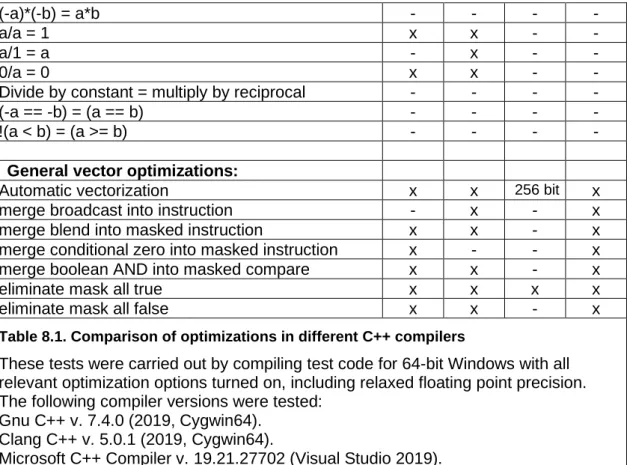
The open source compilers - Clang and Gnu - are the best ones in terms of code optimization according to my tests. See page 76 for a detailed test of the four compilers mentioned above.
All of the compilers can be used as command-line versions without an IDE. Free trial versions are available for the commercial compilers.
Mixing object files from different compilers is often possible if they have been compiled for the same platform and with similar options. The Intel compiler produces object files that are compatible with either Microsoft Visual Studio or the Gnu compiler, depending on the platform. Object files from Gnu and Clang compilers are also mutually compatible. Other combinations of compilers require that the linking functions are declared extern "C". Some of the older compilers use a different object file format that is not compatible with the compilers mentioned above.
The choice of compiler may in some cases be determined by the requirements of compati-bility with legacy code, specific preferences for the IDE, for debugging facilities, easy GUI development, database integration, web application integration, mixed language program-ming, etc. It may be useful to make the most critical modules with a different compiler in cases where the chosen compiler does not provide the best optimization. If the main project is written in a different programming language, then it may be necessary to put the
optimized C++ code in a dynamic link library (.DLL or .so). Otherwise, static linking is preferred.
2.6 Choice of function libraries
Some applications spend most of their execution time on executing library functions. Time-consuming library functions often belong to one of these categories:
• File input/output
• Graphics and sound processing
• Memory and string manipulation
• Mathematical functions
• Encryption, decryption, data compression
Most compilers include standard libraries for many of these purposes. Unfortunately, the standard libraries are not always fully optimized.
Library functions are typically small pieces of code that are used by many users in many different applications. Therefore, it is worthwhile to invest more efforts in optimizing library functions than in optimizing application-specific code. The best function libraries are highly optimized, using assembly language and automatic CPU-dispatching (see page 131) for the latest instruction set extensions.
significantly simply by using a different function library. If the application uses most of its time in library functions then it may not be necessary to optimize anything else than finding the most efficient library and economize the library function calls. It is recommended to try different libraries and see which one works best.
Some common function libraries are discussed below. Many libraries for special purposes are also available.
Microsoft
Comes with Microsoft compiler. Some functions are optimized well, others are not. Supports 32-bit and 64-bit Windows.
Gnu
Comes with the Gnu compiler. The 64-bit version is better than the 32-bit version. The Gnu compiler often inserts built-in code instead of the most common memory and string
instructions. The built-in code is not always optimal. Use option -fno-builtin to get library versions instead. The Gnu libraries support 32-bit and 64-bit Linux and BSD.
Mac
The libraries included with the Gnu compiler for Mac OS X (Darwin) are part of the Xnu project. Some of the most important functions are included in the operating system kernel in the so-called commpage. These functions are highly optimized for the Intel Core and later Intel processors. AMD processors and earlier Intel processors are not supported at all. Can only run on Mac platform.
Intel
The Intel compiler includes standard function libraries. Several special purpose libraries are also available, such as the "Intel Math Kernel Library" and "Integrated Performance
Primitives". These function libraries are highly optimized for large data sets. However, the Intel libraries do not always work well on AMD and VIA processors. See page 139 for an explanation and possible workaround. Supports all x86 and x86-64 platforms.
AMD
AMD core Math library contains optimized mathematical functions. It also works on Intel processors. The performance is inferior to the Intel libraries. Supports 64-bit Linux.
Asmlib
My own function library made for demonstration purposes. Available from
www.agner.org/optimize/asmlib.zip. Currently includes optimized versions of memory and string functions and some other functions that are difficult to find elsewhere. Faster than most other libraries when running on the newest processors. Supports all x86 and x86-64 platforms.
Comparison of function libraries
Test Processor
M ic roso ft C od eGear Inte l M
ac Gnu
32 -bi t G nu 32 -bi t -f no -bu ilt in G nu 64 bi t -f no -bu ilt in A sml ib
memcpy 16kB aligned operands
Intel Core 2
memcpy 16kB unaligned op.
Intel Core 2
0.63 0.75 0.18 0.11 1.21 0.57 0.44 0.12
memcpy 16kB aligned operands
AMD Opteron K8
0.24 0.25 0.24 n.a. 1.00 0.25 0.28 0.22
memcpy 16kB unaligned op.
AMD Opteron K8
0.38 0.44 0.40 n.a. 1.00 0.35 0.29 0.28
strlen 128 bytes
Intel Core 2
0.77 0.89 0.40 0.30 4.5 0.82 0.59 0.27
strlen 128 bytes
AMD Opteron K8
1.09 1.25 1.61 n.a. 2.23 0.95 0.6 1.19 Table 2.1. Comparing performance of different function libraries.
Numbers in the table are core clock cycles per byte of data (low numbers mean good performance). Aligned operands means that source and destination both have addresses divisible by 16.
Library versions tested (not up to date): Microsoft Visual studio 2008, v. 9.0 CodeGear Borland bcc, v. 5.5 Mac: Darwin8 g++ v 4.0.1. Gnu: Glibc v. 2.7, 2.8. Asmlib: v. 2.00.
Intel C++ compiler, v. 10.1.020. Functions _intel_fast_memcpy and
__intel_new_strlen in library libircmt.lib. Function names are undocumented.
2.7 Choice of user interface framework
Most of the code in a typical software project goes to the user interface. Applications that are not computationally intensive may very well spend more CPU time on the user interface than on the essential task of the program.
Application programmers rarely program their own graphical user interfaces from scratch. This would not only be a waste of the programmers' time, but also inconvenient to the end user. Menus, buttons, dialog boxes, etc. should be as standardized as possible for usability reasons. The programmer can use standard user interface elements that come with the operating system or libraries that come with compilers and development tools.
A popular user interface library for Windows and C++ is Microsoft Foundation Classes (MFC). Several graphical interface frameworks are available for Linux systems. The user interface library can be linked either as a runtime DLL or a static library. A runtime DLL takes more memory resources than a static library, except when several applications use the same DLL at the same time.
A user interface library may be bigger than the application itself and take more time to load. A light-weight alternative is the Windows Template Library (WTL). A WTL application is generally faster and more compact than an MFC application. The development time for WTL applications can be expected to be higher due to poor documentation and lack of advanced development tools.
The conclusion is that the choice of user interface framework must be a compromise between development time, usability, program compactness, and execution time. No universal solution is best for all applications.
2.8 Overcoming the drawbacks of the C++ language
While C++ has many advantages when it comes to optimization, it does have some disadvantages that make developers choose other programming languages. This section discusses how to overcome these disadvantages when C++ is chosen for the sake of optimization.
Portability
C++ is fully portable in the sense that the syntax is fully standardized and supported on all major platforms. However, C++ is also a language that allows direct access to hardware interfaces and system calls. These are of course system-specific. In order to facilitate porting between platforms, it is recommended to place the user interface and other system-specific parts of the code in a separate module, and to put the task-system-specific part of the code, which supposedly is system-independent, in another module.
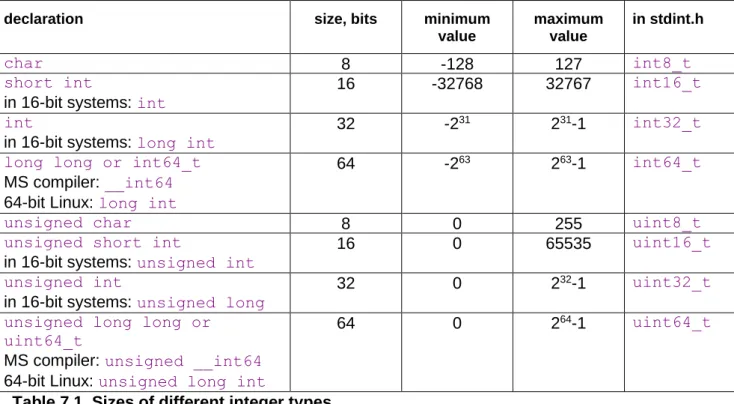
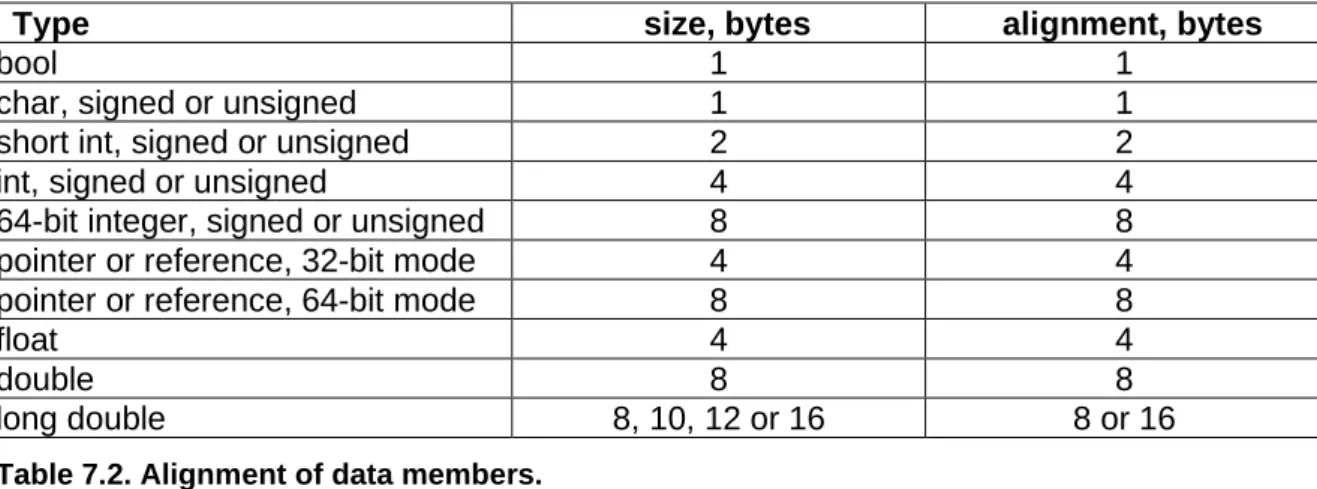
The size of integers and other hardware-related details depend on the hardware platform and operating system. See page 29 for details.
Development time
Some developers feel that a particular programming language and development tool is faster to use than others. While some of the difference is simply a matter of habit, it is true that some development tools have powerful facilities that do much of the trivial programming work automatically. The development time and maintainability of C++ projects can be
improved by consistent modularity and reusable classes.
Security
The most serious problem with the C++ language relates to security. Standard C++ imple-mentations have no checking for array bounds violations and invalid pointers. This is a frequent source of errors in C++ programs and also a possible point of attack for hackers. It is necessary to adhere to certain programming principles in order to prevent such errors in programs where security matters.
Problems with invalid pointers can be avoided by using references instead of pointers, by initializing pointers to zero, by setting pointers to zero whenever the objects they point to become invalid, and by avoiding pointer arithmetics and pointer type casting. Linked lists and other data structures that typically use pointers may be replaced by more efficient container class templates, as explained on page 95. Avoid the function scanf.
Violation of array bounds is probably the most common cause of errors in C++ programs. Writing past the end of an array can cause other variables to be overwritten, and even worse, it can overwrite the return address of the function in which the array is defined. This can cause all kinds of strange and unexpected behaviors. Arrays are often used as buffers for storing text or input data. A missing check for buffer overflow on input data is a common error that hackers often have exploited.
A good way to prevent such errors is to replace arrays by well-tested container classes. The standard template library (STL) is a useful source of such container classes. Unfortunately, many standard container classes use dynamic memory allocation in an inefficient way. See page 92 for examples of how to avoid dynamic memory allocation. See page 95 for
discussion of efficient container classes. An appendix to this manual at
Text strings are particularly problematic because there may be no certain limit to the length of a string. The old C-style method of storing strings in character arrays is fast and efficient, but not safe unless the length of each string is checked before storing. The standard
solution to this problem is to use string classes, such as string or CString. This is safe and flexible, but quite inefficient in large applications. The string classes allocate a new memory block every time a string is created or modified. This can cause the memory to be fragmented and involve a high overhead cost of heap management and garbage collection. A more efficient solution that does not compromise safety is to store all strings in one memory pool. See the examples in the appendix at
www.agner.org/optimize/cppexamples.zip for how to store strings in a memory pool. Integer overflow is another security problem. The official C standard says that the behavior of signed integers in case of overflow is "undefined". This allows the compiler to ignore overflow or assume that it does not occur. In the case of the Gnu compiler, the assumption that signed integer overflow does not occur has the unfortunate consequence that it allows the compiler to optimize away an overflow check. There are a number of possible remedies against this problem: (1) check for overflow before it occurs, (2) use unsigned integers - they are guaranteed to wrap around, (3) trap integer overflow with the option -ftrapv, but this is extremely inefficient, (4) get a compiler warning for such optimizations with
option -Wstrict-overflow=2, or (5) make the overflow behavior well-defined with option -fwrapv or -fno-strict-overflow.
You may deviate from the above security advices in critical parts of the code where speed is important. This can be permissible if the unsafe code is limited to well-tested functions, classes, templates or modules with a well-defined interface to the rest of the program.
3 Finding the biggest time consumers
3.1 How much is a clock cycle?
In this manual, I am using CPU clock cycles rather than seconds or microseconds as a time measure. This is because computers have very different speeds. If I write that something takes 10 μs today, then it may take only 5 μs on the next generation of computers and my manual will soon be obsolete. But if I write that something takes 10 clock cycles then it will still take 10 clock cycles even if the CPU clock frequency is doubled.
The length of a clock cycle is the reciprocal of the clock frequency. For example, if the clock frequency is 2 GHz then the length of a clock cycle is
ns.
5
.
0
GHz
2
1
=
A clock cycle on one computer is not always comparable to a clock cycle on another computer. The Pentium 4 (NetBurst) CPU is designed for a higher clock frequency than other CPUs, but it uses more clock cycles than other CPUs for executing the same piece of code in general.
time is so long that the user actually has to wait for a result then we will consider if there is something that can be improved.
3.2 Use a profiler to find hot spots
Before you start to optimize anything, you have to identify the critical parts of the program. In some programs, more than 99% of the time is spent in the innermost loop doing
mathematical calculations. In other programs, 99% of the time is spent on reading and writing data files while less than 1% goes to actually doing something on these data. It is very important to optimize the parts of the code that matters rather than the parts of the code that use only a small fraction of the total time. Optimizing less critical parts of the code will not only be a waste of time, it also makes the code less clear and more difficult to debug and maintain.
Most compiler packages include a profiler that can tell how many times each function is called and how much time it uses. There are also third-party profilers such as AQtime, Intel VTune and AMD CodeAnalyst.
There are several different profiling methods:
• Instrumentation: The compiler inserts extra code at each function call to count how many times the function is called and how much time it takes.
• Debugging. The profiler inserts temporary debug breakpoints at every function or every code line.
• Time-based sampling: The profiler tells the operating system to generate an interrupt, e.g. every millisecond. The profiler counts how many times an interrupt occurs in each part of the program. This requires no modification of the program under test, but is less reliable.
• Event-based sampling: The profiler tells the CPU to generate interrupts at certain events, for example every time a thousand cache misses have occurred. This makes it possible to see which part of the program has most cache misses, branch
mispredictions, floating point exceptions, etc. Event-based sampling requires a CPU-specific profiler. For Intel CPUs use Intel VTune, for AMD CPUs use AMD CodeAnalyst. Unfortunately, profilers are often unreliable. They sometimes give misleading results or fail completely because of technical problems.
Some common problems with profilers are:
• Coarse time measurement. If time is measured with millisecond resolution and the critical functions take microseconds to execute then measurements can become imprecise or simply zero.
• Execution time too small or too long. If the program under test finishes in a short time then the sampling generates too little data for analysis. If the program takes too long time to execute then the profiler may sample more data than it can handle.
• Waiting for user input. Many programs spend most of their time waiting for user input or network resources. This time is included in the profile. It may be necessary to modify the program to use a set of test data instead of user input in order to make profiling feasible. • Interference from other processes. The profiler measures not only the time spent in the
computer, including the profiler itself.
• Function addresses are obscured in optimized programs. The profiler identifies any hot spots in the program by their address and attempts to translate these addresses to function names. But a highly optimized program is often reorganized in such a way that there is no clear correspondence between function names and code addresses. The names of inlined functions may not be visible at all to the profiler. The result will be misleading reports of which functions take most time.
• Uses debug version of the code. Some profilers require that the code you are testing contains debug information in order to identify individual functions or code lines. The debug version of the code is not optimized.
• Jumps between CPU cores. A process or thread does not necessarily stay in the same processor core on multi-core CPUs, but event-counters do. This results in meaningless event counts for threads that jump between multiple CPU cores. You may need to lock a thread to a specific CPU core by setting a thread affinity mask.
• Poor reproducibility. Delays in program execution may be caused by random events that are not reproducible. Such events as task switches and garbage collection can occur at random times and make parts of the program appear to take longer time than normally. There are various alternatives to using a profiler. A simple alternative is to run the program in a debugger and press break while the program is running. If there is a hot spot that uses 90% of the CPU time then there is a 90% chance that the break will occur in this hot spot. Repeating the break a few times may be enough to identify a hot spot. Use the call stack in the debugger to identify the circumstances around the hot spot.
Sometimes, the best way to identify performance bottlenecks is to put measurement instruments directly into the code rather than using a ready-made profiler. This does not solve all the problems associated with profiling, but it often gives more reliable results. If you are not satisfied with the way a profiler works then you may put the desired measurement instruments into the program itself. You may add counter variables that count how many times each part of the program is executed. Furthermore, you may read the time before and after each of the most important or critical parts of the program to measure how much time each part takes. See page 164 for further discussion of this method.
Your measurement code should have #if directives around it so that it can be disabled in the final version of the code. Inserting your own profiling instruments in the code itself is a very useful way to keep track of the performance during the development of a program. The time measurements may require a very high resolution if time intervals are short. In Windows, you can use the GetTickCount or QueryPerformanceCounter functions for millisecond resolution. A much higher resolution can be obtained with the time stamp counter in the CPU, which counts at the CPU clock frequency (in Windows: __rdtsc()). The time stamp counter becomes invalid if a thread jumps between different CPU cores. You may have to fix the thread to a specific CPU core during time measurements to avoid this. (In Windows, SetThreadAffinityMask, in Linux, sched_setaffinity).
The program should be tested with a realistic set of test data. The test data should contain a typical degree of randomness in order to get a realistic number of cache misses and branch mispredictions.
A profiler is most useful for finding problems that relate to CPU-intensive code. But many programs use more time loading files or accessing databases, network and other resources than doing arithmetic operations. The most common time-consumers are discussed in the following sections.
3.3 Program installation
The time it takes to install a program package is not traditionally considered a software optimization issue. But it is certainly something that can steal the user's time. The time it takes to install a software package and make it work cannot be ignored if the goal of software optimization is to save time for the user. With the high complexity of modern software, it is not unusual for the installation process to take more than an hour. Neither is it unusual that a user has to reinstall a software package several times in order to find and resolve compatibility problems.
Software developers should take installation time and compatibility problems into account when deciding whether to base a software package on a complex framework requiring many files to be installed.
The installation process should always use standardized installation tools. It should be possible to select all installation options at the start so that the rest of the installation process can proceed unattended. Uninstallation should also proceed in a standardized manner.
3.4 Automatic updates
Many software programs automatically download updates through the Internet at regular time intervals. Some programs search for updates every time the computer starts up, even if the program is never used. A computer with many such programs installed can take several minutes to start up, which is a total waste of the user's time. Other programs use time searching for updates each time the program starts. The user may not need the updates if the current version satisfies the user's needs. The search for updates should be optional and off by default unless there is a compelling security reason for updating. The update process should run in a low priority thread, and only if the program is actually used. No program should leave a background process running when it is not in use. The installation of downloaded program updates should be postponed until the program is shut down and restarted anyway.
Updates to the operating system can be particularly time consuming. Sometimes it takes hours to install automatic updates to the operating system. This is very problematic because these time consuming updates may come unpredictably at inconvenient times. This can be a very big problem if the user has to turn off or log off the computer for security reasons before leaving their workplace and the system forbids the user to turn off the computer during the update process.
3.5 Program loading
Often, it takes more time to load a program than to execute it. The load time can be
annoyingly high for programs that are based on big runtime frameworks, intermediate code, interpreters, just-in-time compilers, etc., as is commonly the case with programs written in Java, C#, Visual Basic, etc.
up. Some modules may be loaded only when they are needed, or they may be swapped to the hard disk if the RAM size is insufficient.
The user expects immediate responses to simple actions like a key press or mouse move. It is unacceptable to the user if such a response is delayed for several seconds because it requires the loading of modules or resource files from disk. Memory-hungry applications force the operating system to swap memory to disk. Memory swapping is a frequent cause of unacceptably long response times to simple things like a mouse move or key press. Avoid an excessive number of DLLs, configuration files, resource files, help files etc.
scattered around on the hard disk. A few files, preferably in the same directory as the .exe file, is acceptable.
3.6 Dynamic linking and position-independent code
Function libraries can be implemented either as static link libraries (*.lib, *.a) or dynamic link libraries, also called shared objects (*.dll, *.so). There are several factors that can make dynamic link libraries slower than static link libraries. These factors are explained in detail on page 155 below.
Position-independent code is used in shared objects in Unix-like systems. Mac systems often use position-independent code everywhere by default. Position-independent code is inefficient, especially in 32-bit mode, for reasons explained on page 155 below.
3.7 File access
Reading or writing a file on a hard disk often takes much more time than processing the data in the file, especially if the user has a virus scanner that scans all files on access. Sequential forward access to a file is faster than random access. Reading or writing big blocks is faster than reading or writing a small bit at a time. Do not read or write less than a few kilobytes at a time.
You may mirror the entire file in a memory buffer and read or write it in one operation rather than reading or writing small bits in a non-sequential manner.
It is usually much faster to access a file that has been accessed recently than to access it the first time. This is because the file has been copied to the disk cache.
Files on remote or removable media such as floppy disks and USB sticks may not be cached. This can have quite dramatic consequences. I once made a Windows program that created a file by calling WritePrivateProfileString, which opens and closes the file for each line written. This worked sufficiently fast on a hard disk because of disk caching, but it took several minutes to write the file to a floppy disk.
3.8 System database
It can take several seconds to access the system database in Windows. It is more efficient to store application-specific information in a separate file than in the big registration
database in the Windows system. Note that the system may store the information in the database anyway if you are using functions such as GetPrivateProfileString and
WritePrivateProfileString to read and write configuration files (*.ini files).
3.9 Other databases
Many software applications use a database for storing user data. A database can consume a lot of CPU time, RAM and disk space. It may be possible to replace a database by a plain old data file in simple cases. Database queries can often be optimized by using indexes, working with sets rather than loops, etc. Optimizing database queries is beyond the scope of this manual, but you should be aware that there is often a lot to gain by optimizing database access.
3.10 Graphics
A graphical user interface can use a lot of computing resources. Typically, a specific
graphics framework is used. The operating system may supply such a framework in its API. In some cases, there is an extra layer of a third-party graphics framework between the operating system API and the application software. Such an extra framework can consume a lot of extra resources.
Each graphics operation in the application software is implemented as a function call to a graphics library or API function which then calls a device driver. A call to a graphics function is time consuming because it may go through multiple layers and it needs to switch to protected mode and back again. Obviously, it is more efficient to make a single call to a graphics function that draws a whole polygon or bitmap than to draw each pixel or line separately through multiple function calls.
The calculation of graphics objects in computer games and animations is of course also time consuming, especially if there is no graphics processing unit.
Various graphics function libraries and drivers differ a lot in performance. I have no specific recommendation of which one is best.
3.11 Other system resources
Writes to a printer or other device should preferably be done in big blocks rather than a small piece at a time because each call to a driver involves the overhead of switching to protected mode and back again.
Accessing system devices and using advanced facilities of the operating system can be time consuming because it may involve the loading of several drivers, configuration files and system modules.
3.12 Network access
These problems should be taken into account when deciding whether to store help files and other resources locally or remotely. If frequent updates are necessary then it may be
optimal to mirror the remote data locally.
Access to remote databases usually requires log on with a password. The log on process is known to be an annoying time consumer to many hard working software users. In some cases, the log on process may take more than a minute if the network or database is heavily loaded.
3.13 Memory access
Accessing data from RAM memory can take quite a long time compared to the time it takes to do calculations on the data. This is the reason why all modern computers have memory caches. Typically, there is a level-1 data cache of 8 - 64 Kbytes and a level-2 cache of 256 Kbytes to 2 Mbytes. There may also be a level-3 cache.
If the combined size of all data in a program is bigger than the level-2 cache and the data are scattered around in memory or accessed in a non-sequential manner then it is likely that memory access is the biggest time-consumer in the program. Reading or writing to a
variable in memory takes only 2-3 clock cycles if it is cached, but several hundred clock cycles if it is not cached. See page 25 about data storage and page 89 about memory caching.
3.14 Context switches
A context switch is a switch between different tasks in a multitasking environment, between different threads in a multithreaded program, or between different parts of a big program. Frequent context switches can reduce the performance because the contents of data cache, code cache, branch target buffer, branch pattern history, etc. may have to be renewed. Context switches are more frequent if the time slices allocated to each task or thread are smaller. The lengths of the time slices is determined by the operating system, not by the application program.
The number of context switches is smaller in a computer with multiple CPUs or a CPU with multiple cores.
3.15 Dependency chains
Modern microprocessors can do out-of-order execution. This means that if a piece of software specifies the calculation of A and then B, and the calculation of A is slow, then the microprocessor can begin the calculation of B before the calculation of A is finished.
Obviously, this is only possible if the value of A is not needed for the calculation of B. In order to take advantage of out-of-order execution, you have to avoid long dependency chains. A dependency chain is a series of calculations, where each calculation depends on the result of the preceding one. This prevents the CPU from doing multiple calculations simultaneously or out of order. See page 110 for examples of how to break a dependency chain.
3.16 Execution unit throughput
one addition every three clock cycles. But if all the additions are independent then you can have one addition every clock cycle.
The highest performance that can possibly be obtained in a computationally intensive program is achieved when none of the time-consumers mentioned in the above sections are dominating and there are no long dependency chains. In this case, the performance is limited by the throughput of the execution units rather than by the latency or by memory access.
The execution core of modern microprocessors is split between several execution units. Typically, there are two or more integer units, one or two floating point addition units, and one or two floating point multiplication units. This means that it is possible to do an integer addition, a floating point addition, and a floating point multiplication at the same time.
A code that does floating point calculations should therefore preferably have a balanced mix of additions and multiplications. Subtractions use the same unit as additions. Divisions take longer time. It is possible to do integer operations in-between the floating point operations without reducing the performance because the integer operations use different execution units. For example, a loop that does floating point calculations will typically use integer operations for incrementing a loop counter, comparing the loop counter with its limit, etc. In most cases, you can assume that these integer operations do not add to the total
computation time.
4 Performance and usability
A better performing software product is one that saves time for the user. Time is a precious resource for many computer users and much time is wasted on software that is slow, difficult to use, incompatible or error prone. All these problems are usability issues, and I believe that software performance should be seen in the broader perspective of usability. This is not a manual on usability, but I think that it is necessary here to draw the attention of software programmers to some of the most common obstacles to efficient use of software. For more on this topic, see my free E-book Usability for Nerds at Wikibooks.
The following list points out some typical sources of frustration and waste of time for software users as well as important usability problems that software developers should be aware of.
• Big runtime frameworks. The .NET framework and the Java virtual machine are frameworks that typically take much more resources than the programs they are
running. Such frameworks are frequent sources of resource problems and compatibility problems and they waste a lot of time both during installation of the framework itself, during installation of the program that runs under the framework, during start of the program, and while the program is running. The main reason why such runtime
frameworks are used at all is for the sake of cross-platform portability. Unfortunately, the cross-platform compatibility is not always as good as expected. I believe that the
portability could be achieved more efficiently by better standardization of programming languages, operating systems, and API's.
• Memory swapping. Software developers typically have more powerful computers with more RAM than end users have. The developers may therefore fail to see the excessive memory swapping and other resource problems that cause the resource-hungry
applications to perform poorly for the end user.
installation tools.
• Automatic updates. Automatic updating of software can cause problems if the network is unstable or if the new version causes problem that were not present in the old version. Updating mechanisms often disturb the users with nagging pop-up messages saying please install this important new update or even telling the user to restart the computer while he or she is busy concentrating on important work. The updating mechanism should never interrupt the user but only show a discrete icon signaling the availability of an update, or update automatically when the program is restarted anyway. Software distributors are often abusing the update mechanism to advertise new versions of their software. This is annoying to the user.
• Compatibility problems. All software should be tested on different platforms, different screen resolutions, different system color settings, and different user access rights. Software should use standard API calls rather than self-styled hacks and direct hardware access. Available protocols and standardized file formats should be used. Web systems should be tested in different browsers, different platforms, different screen resolutions, etc. Accessibility guidelines should be obeyed.
• Copy protection. Some copy protection schemes are based on hacks that violate or circumvent operating system standards. Such schemes are frequent sources of compatibility problems and system breakdown. Many copy protection schemes are based on hardware identification. Such schemes cause problems when the hardware is updated. Most copy protection schemes are annoying to the user and prevent legitimate backup copying without effectively preventing illegitimate copying. The benefits of a copy protection scheme should be weighed against the costs in terms of usability problems and necessary support.
• Hardware updating. The change of a hard disk or other hardware often requires that all software be reinstalled and user settings are lost. It is not unusual for the reinstallation work to take a whole workday or more. Many software applications need better backup features, and current operating systems need better support for hard disk copying. • Security. The vulnerability of software with network access to virus attacks and other
abuse is extremely costly to many users. Firewalls, virus scanners, and other protection means are among the most frequent causes of compatibility problems and system crash. Furthermore, it is not uncommon for virus scanners to consume more time than anything else on a computer. Security software that is part of the operating system is often more reliable than third party security software.
• Background services. Many services that run in the background are unnecessary for the user and a waste of resources. Consider running the services only when activated by the user.
• Feature bloat. It is common for software to add new features to each new version for marketing reasons. This may cause the software to be slower or require more resources, even if the user never uses the new features.
5 Choosing the optimal algorithm
The first thing to do when you want to optimize a piece of CPU-intensive software is to find the best algorithm. The choice of algorithm is very important for tasks such as sorting, searching, and mathematical calculations. In such cases, you can obtain much more by choosing the best algorithm than by optimizing the first algorithm that comes to mind. In some cases you may have to test several different algorithms in order to find the one that works best on a typical set of test data.
That being said, I must warn against overkill. Do not use an advanced and complicated algorithm if a simple algorithm can do the job fast enough. For example, some programmers use a hash table for even the smallest list of data. A hash table can improve search times dramatically for very large databases, but there is no reason to use it for lists that are so small that a binary search, or even a linear search, is fast enough. A hash table increases the size of the program as well as the size of data files. This can actually reduce speed if the bottleneck is file access or cache access rather than CPU time. Another disadvantage of complicated algorithms is that it makes program development more expensive and more error prone.
A discussion of different algorithms for different purposes is beyond the scope of this manual. You have to consult the general literature on algorithms and data structures for standard tasks such as sorting and searching, or the specific literature for more complicated mathematical tasks.
Before you start to code, you may consider whether others have done the job before you. Optimized function libraries for many standard tasks are available from a number of
sources. For example, the Boost collection contains well-tested libraries for many common purposes (www.boost.org). The "Intel Math Kernel Library" contains many functions for common mathematical calculations including linear algebra and statistics, and the "Intel Performance Primitives" library contains many functions for audio and video processing, signal processing, data compression and cryptography (www.intel.com). If you are using an Intel function library then make sure it works well on non-Intel processors, as explained on page 139.
It is often easier said than done to choose the optimal algorithm before you start to program. Many programmers have discovered that there are smarter ways of doing things only after they have put the whole software project together and tested it. The insight you gain by testing and analyzing program performance and studying the bottlenecks can lead to a better understanding of the whole structure of the problem. This new insight can lead to a complete redesign of the program, for example when you discover that there are smarter ways of organizing the data.
A complete redesign of a program that already works is of course a considerable job, but it may be quite a good investment. A redesign can not only improve the performance, it is also likely to lead to a more well-structured program that is easier to maintain. The time you spend on redesigning a program may in fact be less than the time you would have spent fighting with the problems of the original, poorly designed program.
6 Development process
There is a long standing debate about which software development process and software engineering principles to use. I am not going to recommend any specific model. Instead, I will make a few comments about how the development process can influence the