
© International Research Publications House http://www. irphouse.com /ijict.htm
E-learning Using Cloud Computing
Gunjan C. Bhure and Sneha M. BansodComputer Applications Department, Kavikulguru Institute of Technology & Science, Ramtek, Rashtrasant Tukadoji Maharaj Nagpur University, Nagpur.
Abstract
In the present day scenario of the education system it is very difficult for the education institutes/colleges to provide quality education to the students. The number of increasing infrastructure & facilities are still not making much progress due to the centralized approach but with the use of information technology the problems faced by the students and the educational institutes can be solved. Internet now a days is accessible from maximum telecommunication devices like desktops, laptops, tablets, mobiles, Music players, I-Pad, I-Pods etc making it more distributed compare to any centralized entity. Cloud computing is widely used in many fields due to its more advantages the services provided by the cloud computing can add good impact to educational institutes by reducing the cost of infrastructure compared to present working system.
Keywords: Cloud computing, E-learning, distributed system, information technology, telecommunications.
1.
Introduction
Cloud computing refers to applications and services that run on a distributed network using virtualized resources and accessed by common Internet protocols and networking standards. It is distinguished by the notion that resources are virtual and limitless and that details of the physical systems on which software runs are abstracted from the user.[1][2][3]
Cloud computing takes the technology, services, and applications that are similar to those on the Internet and turns them into a self-service utility. The use of the word “cloud” makes reference to the two essential concepts.
• Abstraction: Cloud computing abstracts the details of system implementation from users and developers. Applications run on physical systems that aren't specified, data is stored in locations that are unknown, administration of systems is outsourced to others, and access by users is ubiquitous.
• Virtualization: Cloud computing virtualizes systems by pooling and sharing resources. Systems and storage can be provisioned as needed from a centralized infrastructure, costs are assessed on a metered basis, multi-tenancy is enabled, and resources are scalable with agility.[1]
2.
Cloud Models
2.1 Deployment modelsA deployment model defines the purpose of the cloud and the nature of how the cloud is located, the NIST definition for the four deployment models is as follows
• Public cloud: The public cloud infrastructure is available for public use alternatively for a large industry group and is owned by an organization selling cloud services.
• Private cloud: The private cloud infrastructure is operated for the exclusive use of an organization. The cloud may be managed by that organization or a third party. Private clouds may be either on- or off-premises.
• Hybrid cloud: A hybrid cloud combines multiple clouds (private, community of public) where those clouds retain their unique identities, but are bound together as a unit. A hybrid cloud may offer standardized or proprietary access to data and applications, as well as application portability.
• Community cloud: A community cloud is one where the cloud has been organized to serve a common function or purpose
2.2 Service models
In the deployment model, different cloud types are an expression of the manner in which infrastructure is deployed. Three service types have been universally accepted.
• Infrastructure as a Service: IaaS provides virtual machines, virtual storage, virtual infrastructure, and other hardware assets as resources that clients can provision. The IaaS service provider manages all the infrastructure, while the client is responsible for all other aspects of the deployment. This can include the operating system, applications, and user interactions with the system.
• Platform as a Service: PaaS provides virtual machines, operating systems, applications, services, development frameworks, transactions, and control structures. The client can deploy its applications on the cloud infrastructure or use applications that were programmed using languages and tools that are supported by the PaaS service provider. The service provider manages the cloud infrastructure, the operating systems, and the enabling software. The client is responsible for installing and managing the application that it is deploying.
• Software as a Service: SaaS is a complete operating environment with applications, management, and the user interface. In the SaaS model, the application is provided to the client through a thin client interface (a browser, usually), and the customer's responsibility begins and ends with entering and managing its data and user interaction. Everything from the application down to the infrastructure is the vendor's responsibility.
The major players in the field of cloud computing are Google, Microsoft, Amazon, Yahoo and some legacy hardware vendors like IBM and Intel.[2]Many education institutions do not have the resources and infrastructure needed to run top e- learning solution. Moodle the biggest players in the field of e-learning software, have now versions of the base applications that are cloud oriented.[3][4]
E-learning is widely used today on different educational levels: continuous education, company trainings, academic courses, etc. There are various e-learning solutions from open source to commercial. There are at least two entities involved in an e-learning system: the students and the trainers.
The students' actions within an e-learning platform are: • Taking online course
• Taking exams • Sending feedback
• Sending homework, projects.
The trainers involved in e-learning solutions are: • Dealing with content management
• Preparing tests
• Assessing tests, homework, projects taken by students • Sending feedback
• Communicating with students (forums).
Each of these actions requires a certain degree of security, depending on the importance and data sensitivity.
Fig. 1: E-learning system Fig. 2: Simplified Structure of the Main Users of IT Services in a Typical University Now Using the Services of
Usually, e-learning systems are developed as distributed applications, but this is not necessary so. The architecture of a distributed e-learning system includes software components, like the client application, an application server and a database server (see Fig.1) and the necessary hardware components (client computer, communication infrastructure and servers).
The client hardware could be a mobile device or a desktop computer. The client application can be a simple web browser or a dedicated application. Even with the current hardware and software limitations, mobile devices are supporting multimedia based applications. Compared with desktop applications, nowadays mobile applications, especially multimedia-based applications, have serious limitations due the processing power and memory constraints. Due the fact that the data processing is on the server side, the use of mobile devices for learning is growing fast. Still, the mobile applications need to be optimized to be used for e- learning. The e-learning server will use cloud computing, so all the required resources will be adjusted as needed.
E-learning systems can use benefit from cloud computing using:
• Infrastructure: use an e-learning solution on the provider's infrastructure
• Platform: use and develop an e-learning solution based on the provider's development interface
• Services: use the e-learning solution given by the provider.
A very big concern is related to the data security because both the software and the data are located on remote servers that can crash or disappear without any additional warnings. Even if it seems not very reasonable, the cloud computing provides some major security benefits for individuals and companies that are using/developing e-learning solutions, like the following:
• Improved improbability – it is almost impossible for any interested person (thief) to determine where is located the machine that stores some wanted data (tests, exam questions, results) or to find out which is the physical component he needs to steal in order to get a digital asset;
• Virtualization – makes possible the rapid replacement of a compromised cloud located server without major costs or damages. It is very easy to create a clone of a virtual machine so the cloud downtime is expected to be reduced substantially;
• Centralized data storage – losing a cloud client is no longer a major incident while the main part of the applications and data is stored into the cloud so a new client can be connected very fast. Imagine what is happening today if a laptop that stores the examination questions is stolen;
• Monitoring of data access becomes easier in view of the fact that only one place should be supervised, not thousands of computers belonging to a university, for example. Also, the security changes can be easily tested and implemented since the cloud represents a unique entry point for all the clients.
Fig. 3: The Cloud Reference Model [2].
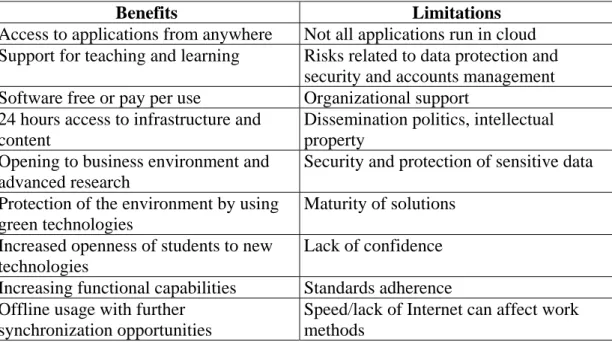
Table 1: Main Benefits and Limitations of Using Cloud Computing in Higher Education.
Benefits Limitations Access to applications from anywhere Not all applications run in cloud
Support for teaching and learning Risks related to data protection and security and accounts management Software free or pay per use Organizational support 24 hours access to infrastructure and
content
Dissemination politics, intellectual property
Opening to business environment and advanced research
Security and protection of sensitive data Protection of the environment by using
green technologies
Maturity of solutions Increased openness of students to new
technologies
Lack of confidence
Increasing functional capabilities Standards adherence Offline usage with further
synchronization opportunities
Speed/lack of Internet can affect work methods
Fig. 3: Cloud Strategy in Higher Education.[2]
3.
Conclusions
As cloud computing is emerging technology which can be utilized by a common handheld device it’s a beneficial to a institute so as to lower the cost of the infrastructure. AMAZON, GOOGLE, Microsoft, ORACLE all giants are preparing to provide the approach the reason for selecting the cloud as it promise very clear advantages. In spite of storing the digital contents into a single place, cloud supports the storage in distributed manner so the access becomes concurrent and unlikely centralized systems the idle nodes are utilized, making optimal use of the applications & resources, there are several tools like Microsoft Azure using which the users can develop the cloud applications.
The present working system is very critical as the educational institutes are increasing day by day & which is creating a gap between the educational institutes & the industrial requirements, however the technological enhancement in terms of the cloud computing can fill up the gap by providing free or paid training to the user using the system not requiring any additional cost.
4.
Acknowledgements
The work herewith represented is not possible without infrastructure, literature & motivation I am very thankful to the Dr. Bhaskar Patel, Principal KITS, Ramtek & the management for providing such a great environment & providing various infrastructural facilities without which this task could not be achieved, my sincere thanks to the Mr. Sanjay Borikar for constantly encouraging for such activities. I am very thankful to my dear & near ones.
References
[1] Barrie Sosansky (1993), Cloud Computing Bible.
[2] Marinela Mircea and Anca Ioana Andreescu (1990), Using Cloud Computing in
Higher Education: A Strategy to Improve Agility in the Current Financial Crisis in a regular journal, http://www.ibimapublishing.com/journals/CIBIMA/cibima.html Vol. 2011 (2011), Article ID 875547.
[3] PAUL POCATILU, FELICIAN ALECU, MARIUS VETRICI (1990), Measuring the
Efficiency of Cloud Computing for E-learning Systems,
![Fig. 3: Cloud Strategy in Higher Education.[2]](https://thumb-us.123doks.com/thumbv2/123dok_us/8519201.2286281/6.892.189.707.180.395/fig-cloud-strategy-in-higher-education.webp)
