OpenStack Operations Guide
Copyright © 2014 OpenStack Foundation Some rights reserved.
This book provides information about designing and operating OpenStack clouds.
Except where otherwise noted, this document is licensed under
Creative Commons Attribution 3.0 License.
Acknowledgments
The OpenStack Foundation supported the creation of this book with plane tickets to Austin, lodging (including one adventurous evening without power after a windstorm), and delicious food. For about USD $10,000, we could collaborate intensively for a week in the same room at the Rackspace Austin office. The authors are all members of the Open-Stack Foundation, which you can join. Go to the Foundation web site at
http://openstack.org/join.
We want to acknowledge our excellent host Rackers at Rackspace in Austin:
• Emma Richards of Rackspace Guest Relations took excellent care of our lunch orders and even set aside a pile of sticky notes that had fallen off the walls.
• Betsy Hagemeier, a Fanatical Executive Assistant, took care of a room reshuffle and helped us settle in for the week.
• The Real Estate team at Rackspace in Austin, also known as "The Vic-tors," were super responsive.
• Adam Powell in Racker IT supplied us with bandwidth each day and sec-ond monitors for those of us needing more screens.
• On Wednesday night we had a fun happy hour with the Austin Open-Stack Meetup group and Racker Katie Schmidt took great care of our group.
We also had some excellent input from outside of the room:
• Tim Bell from CERN gave us feedback on the outline before we started and reviewed it mid-week.
• Sébastien Han has written excellent blogs and generously gave his per-mission for re-use.
• Oisin Feeley read it, made some edits, and provided emailed feedback right when we asked.
Inside the book sprint room with us each day was our book sprint fa-cilitator Adam Hyde. Without his tireless support and encouragement, we would have thought a book of this scope was impossible in five days. Adam has proven the book sprint method effectively again and
OpenStack Ops Guide December 12, 2014
iv
again. He creates both tools and faith in collaborative authoring at www.booksprints.net.
We couldn't have pulled it off without so much supportive help and en-couragement.
Table of Contents
Preface ... xv
Introduction to OpenStack ... xv
Getting Started with OpenStack ... xv
Who This Book Is For ... xvii
How This Book Is Organized ... xix
Why and How We Wrote This Book ... xxii
How to Contribute to This Book ... xxvi
Conventions Used in This Book ... xxvii
I. Architecture ... 1
1. Example Architectures ... 3
Example Architecture—Legacy Networking (nova) ... 3
Example Architecture—OpenStack Networking ... 9
Parting Thoughts on Architectures ... 25
2. Provisioning and Deployment ... 27
Automated Deployment ... 27
Automated Configuration ... 30
Remote Management ... 31
Parting Thoughts for Provisioning and Deploying Open-Stack ... 31
Conclusion ... 32
3. Designing for Cloud Controllers and Cloud Management ... 33
Hardware Considerations ... 35
Separation of Services ... 35
Database ... 36
Message Queue ... 36
Conductor Services ... 37
Application Programming Interface (API) ... 38
Extensions ... 38
Scheduling ... 39
Images ... 39
Dashboard ... 40
Authentication and Authorization ... 40
Network Considerations ... 41
4. Compute Nodes ... 43
Choosing a CPU ... 43
Choosing a Hypervisor ... 44
Instance Storage Solutions ... 45
Overcommitting ... 49
Logging ... 50
Networking ... 50
OpenStack Ops Guide December 12, 2014
vi
5. Scaling ... 51
The Starting Point ... 51
Adding Cloud Controller Nodes ... 53
Segregating Your Cloud ... 54
Scalable Hardware ... 58
6. Storage Decisions ... 61
Ephemeral Storage ... 61
Persistent Storage ... 61
OpenStack Storage Concepts ... 64
Choosing Storage Backends ... 64
Conclusion ... 70
7. Network Design ... 71
Management Network ... 71
Public Addressing Options ... 72
IP Address Planning ... 72
Network Topology ... 74
Services for Networking ... 76
Conclusion ... 76
II. Operations ... 79
8. Lay of the Land ... 81
Using the OpenStack Dashboard for Administration ... 81
Command-Line Tools ... 81
Network Inspection ... 89
Users and Projects ... 90
Running Instances ... 90
Summary ... 91
9. Managing Projects and Users ... 93
Projects or Tenants? ... 93
Managing Projects ... 93
Quotas ... 95
User Management ... 104
Creating New Users ... 104
Associating Users with Projects ... 106
Summary ... 110 10. User-Facing Operations ... 111 Images ... 111 Flavors ... 114 Security Groups ... 116 Block Storage ... 120 Instances ... 122
Associating Security Groups ... 126
Floating IPs ... 127
Taking Snapshots ... 129
Instances in the Database ... 132
Good Luck! ... 133
11. Maintenance, Failures, and Debugging ... 135
Cloud Controller and Storage Proxy Failures and Mainte-nance ... 135
Compute Node Failures and Maintenance ... 137
Storage Node Failures and Maintenance ... 143
Handling a Complete Failure ... 145
Configuration Management ... 145
Working with Hardware ... 146
Databases ... 147
HDWMY ... 148
Determining Which Component Is Broken ... 149
Uninstalling ... 152
12. Network Troubleshooting ... 153
Using "ip a" to Check Interface States ... 153
Visualizing nova-network Traffic in the Cloud ... 154
Visualizing OpenStack Networking Service Traffic in the Cloud ... 155
Finding a Failure in the Path ... 163
tcpdump ... 163
iptables ... 165
Network Configuration in the Database for nova-network ... 165
Debugging DHCP Issues with nova-network ... 167
Debugging DNS Issues ... 171
Troubleshooting Open vSwitch ... 173
Dealing with Network Namespaces ... 174
Summary ... 175
13. Logging and Monitoring ... 177
Where Are the Logs? ... 177
Reading the Logs ... 178
Tracing Instance Requests ... 180
Adding Custom Logging Statements ... 180
RabbitMQ Web Management Interface or rabbitmqctl ... 181
Centrally Managing Logs ... 182
StackTach ... 184
Monitoring ... 184
Summary ... 191
14. Backup and Recovery ... 193
What to Back Up ... 193
OpenStack Ops Guide December 12, 2014
viii
File System Backups ... 194
Recovering Backups ... 196
Summary ... 197
15. Customization ... 199
Create an OpenStack Development Environment ... 199
Customizing Object Storage (Swift) Middleware ... 202
Customizing the OpenStack Compute (nova) Scheduler ... 209
Customizing the Dashboard (Horizon) ... 214
Conclusion ... 214
16. Upstream OpenStack ... 215
Getting Help ... 215
Reporting Bugs ... 216
Join the OpenStack Community ... 219
How to Contribute to the Documentation ... 220
Security Information ... 220
Finding Additional Information ... 221
17. Advanced Configuration ... 223
Differences Between Various Drivers ... 223
Implementing Periodic Tasks ... 223
Specific Configuration Topics ... 225
18. Upgrades ... 227
Pre-Upgrade Testing Environment ... 227
Preparing for a Rollback ... 229
Upgrades ... 230
Upgrade Levels ... 231
How to Perform an Upgrade from Grizzly to Havana— Ubuntu ... 232
How to Perform an Upgrade from Grizzly to Havana—Red Hat Enterprise Linux and Derivatives ... 239
How to Perform an Upgrade from Havana to Icehouse— Ubuntu ... 246
How to Perform an Upgrade from Havana to Icehouse— Red Hat Enterprise Linux and Derivatives ... 256
Cleaning Up and Final Configuration File Updates ... 266
Rolling Back a Failed Upgrade ... 267
A. Use Cases ... 273
NeCTAR ... 273
MIT CSAIL ... 274
DAIR ... 275
CERN ... 276
B. Tales From the Cryp^H^H^H^H Cloud ... 279
Double VLAN ... 279
Disappearing Images ... 284
The Valentine's Day Compute Node Massacre ... 286
Down the Rabbit Hole ... 287
Havana Haunted by the Dead ... 289
C. Working with Roadmaps ... 291
Information Available to You ... 292
Influencing the Roadmap ... 293
Aspects to Watch ... 294
Distributed Virtual Router ... 296
Replacement of Open vSwitch Plug-in with Modular Layer 2 ... 296
New API Versions ... 296
OpenStack on OpenStack (TripleO) ... 297
Data Processing (Sahara) ... 297
Bare-Metal Deployment (Ironic) ... 297
Database as a Service (Trove) ... 297
Messaging as a Service (Zaqar) ... 297
DNS as a Service (Designate) ... 298 Scheduler Improvements ... 298 D. Resources ... 299 OpenStack ... 299 Cloud (General) ... 299 Python ... 299 Networking ... 299 Systems Administration ... 300 Virtualization ... 300 Configuration Management ... 300 Glossary ... 301 Index ... 363
List of Figures
1. OpenStack Logical Architecture () ... 2
1.1. Basic node deployment ... 16
1.2. Performance node deployment ... 17
1.3. Controller node ... 18
1.4. Compute node ... 19
1.5. Network node ... 20
1.6. Storage node ... 21
2.1. Partition setup of drives ... 29
9.1. Dashboard's Create Project form ... 94
9.2. Edit Project Members tab ... 107
12.1. Traffic route for ping packet ... 154
12.2. Neutron network paths ... 157
List of Tables
1.1. Node types ... 12
1.2. Third-party component configuration ... 21
1.3. OpenStack component configuration ... 23
3.1. Cloud controller hardware sizing considerations ... 35
3.2. Deployment scenarios ... 36
5.1. OpenStack default flavors ... 52
5.2. OpenStack segregation methods ... 54
6.1. OpenStack storage ... 64
6.2. Persistent file-based storage support ... 65
7.1. Networking deployment options ... 74
9.1. Compute quota descriptions ... 96
9.2. Block Storage quota descriptions ... 102
10.1. Flavor parameters ... 115
11.1. Example service restoration priority list ... 145
Preface
Introduction to OpenStack ... xv
Getting Started with OpenStack ... xv
Who This Book Is For ... xvii
How This Book Is Organized ... xix
Why and How We Wrote This Book ... xxii
How to Contribute to This Book ... xxvi
Conventions Used in This Book ... xxvii OpenStack is an open source platform that lets you build an Infrastructure as a Service (IaaS) cloud that runs on commodity hardware.
Introduction to OpenStack
OpenStack believes in open source, open design, open development, all in an open community that encourages participation by anyone. The long-term vision for OpenStack is to produce a ubiquitous open source cloud computing platform that meets the needs of public and private cloud providers regardless of size. OpenStack services control large pools of com-pute, storage, and networking resources throughout a data center. The technology behind OpenStack consists of a series of interrelated projects delivering various components for a cloud infrastructure solu-tion. Each service provides an open API so that all of these resources can be managed through a dashboard that gives administrators control while empowering users to provision resources through a web interface, a com-mand-line client, or software development kits that support the API. Many OpenStack APIs are extensible, meaning you can keep compatibility with a core set of calls while providing access to more resources and innovating through API extensions. The OpenStack project is a global collaboration of developers and cloud computing technologists. The project produces an open standard cloud computing platform for both public and private clouds. By focusing on ease of implementation, massive scalability, a vari-ety of rich features, and tremendous extensibility, the project aims to deliv-er a practical and reliable cloud solution for all types of organizations.
Getting Started with OpenStack
As an open source project, one of the unique aspects of OpenStack is that it has many different levels at which you can begin to engage with it—you don't have to do everything yourself.
OpenStack Ops Guide December 12, 2014
xvi
Using OpenStack
You could ask, "Do I even need to build a cloud?" If you want to start us-ing a compute or storage service by just swipus-ing your credit card, you can go to eNovance, HP, Rackspace, or other organizations to start using their public OpenStack clouds. Using their OpenStack cloud resources is similar to accessing the publicly available Amazon Web Services Elastic Compute Cloud (EC2) or Simple Storage Solution (S3).
Plug and Play OpenStack
However, the enticing part of OpenStack might be to build your own pri-vate cloud, and there are several ways to accomplish this goal. Perhaps the simplest of all is an appliance-style solution. You purchase an appliance, unpack it, plug in the power and the network, and watch it transform in-to an OpenStack cloud with minimal additional configuration. Few, if any, other open source cloud products have such turnkey options. If a turnkey solution is interesting to you, take a look at Nebula One.
However, hardware choice is important for many applications, so if that applies to you, consider that there are several software distributions avail-able that you can run on servers, storage, and network products of your choosing. Canonical (where OpenStack replaced Eucalyptus as the default cloud option in 2011), Red Hat, and SUSE offer enterprise OpenStack so-lutions and support. You may also want to take a look at some of the spe-cialized distributions, such as those from Rackspace, Piston, SwiftStack, or Cloudscaling.
Alternatively, if you want someone to help guide you through the deci-sions about the underlying hardware or your applications, perhaps adding in a few features or integrating components along the way, consider con-tacting one of the system integrators with OpenStack experience, such as Mirantis or Metacloud.
If your preference is to build your own OpenStack expertise internally, a good way to kick-start that might be to attend or arrange a training ses-sion. The OpenStack Foundation recently launched a Training Marketplace where you can look for nearby events. Also, the OpenStack community is working to produce open source training materials.
Roll Your Own OpenStack
However, this guide has a different audience—those seeking flexibility from the OpenStack framework by conducting do-it-yourself solutions.
OpenStack is designed for horizontal scalability, so you can easily add new compute, network, and storage resources to grow your cloud over time. In addition to the pervasiveness of massive OpenStack public clouds, many organizations, such as PayPal, Intel, and Comcast, build large-scale private clouds. OpenStack offers much more than a typical software package be-cause it lets you integrate a number of different technologies to construct a cloud. This approach provides great flexibility, but the number of options might be daunting at first.
Who This Book Is For
This book is for those of you starting to run OpenStack clouds as well as those of you who were handed an operational one and want to keep it running well. Perhaps you're on a DevOps team, perhaps you are a system administrator starting to dabble in the cloud, or maybe you want to get on the OpenStack cloud team at your company. This book is for all of you. This guide assumes that you are familiar with a Linux distribution that sup-ports OpenStack, SQL databases, and virtualization. You must be comfort-able administering and configuring multiple Linux machines for network-ing. You must install and maintain an SQL database and occasionally run queries against it.
One of the most complex aspects of an OpenStack cloud is the network-ing configuration. You should be familiar with concepts such as DHCP, Lin-ux bridges, VLANs, and iptables. You must also have access to a network hardware expert who can configure the switches and routers required in your OpenStack cloud.
Tip
Cloud computing is a quite advanced topic, and this book requires a lot of background knowledge. However, if you are fairly new to cloud computing, we recommend that you make use of the Glossary [301] at the back of the book, as well as the online documentation for OpenStack and ad-ditional resources mentioned in this book in Appendix D, Re-sources [299].
Further Reading
There are other books on the OpenStack documentation website that can help you get the job done.
OpenStack Ops Guide December 12, 2014
xviii
OpenStack Guides
OpenStack Installation Guides Describes a manual installation process, as in, by hand, without automation, for multiple distributions based on a pack-aging system:
•Installation Guide for Debian 7.0 •Installation Guide for openSUSE and
SUSE Linux Enterprise Server
•Installation Guide for Red Hat Enter-prise Linux, CentOS, and Fedora •Installation Guide for Ubuntu
12.04/14.04 (LTS) Server OpenStack Configuration
Refer-ence Contains a reference listing of all con-figuration options for core and inte-grated OpenStack services by release version
OpenStack Cloud Administrator Guide
Contains how-to information for man-aging an OpenStack cloud as need-ed for your use cases, such as storage, computing, or software-defined-net-working
OpenStack High Availability Guide
Describes potential strategies for mak-ing your OpenStack services and relat-ed controllers and data stores highly available
OpenStack Security Guide Provides best practices and conceptu-al information about securing an Open-Stack cloud
Virtual Machine Image Guide Shows you how to obtain, create, and modify virtual machine images that are compatible with OpenStack
OpenStack End User Guide Shows OpenStack end users how to create and manage resources in an OpenStack cloud with the OpenStack
dashboard and OpenStack client com-mands
OpenStack Admin User Guide Shows OpenStack administrators how to create and manage resources in an OpenStack cloud with the OpenStack dashboard and OpenStack client com-mands
OpenStack API Quick Start A brief overview of how to send REST API requests to endpoints for Open-Stack services
How This Book Is Organized
This book is organized in two parts: the architecture decisions for design-ing OpenStack clouds and the repeated operations for runndesign-ing OpenStack clouds.
Part I:
Chapter 1, “Example Architec-tures” [3]
Because of all the decisions the other chapters discuss, this chapter describes the decisions made for this particular book and much of the justification for the example architecture.
Chapter 2, “Provisioning and Deployment” [27]
While this book doesn't describe instal-lation, we do recommend automation for deployment and configuration, dis-cussed in this chapter.
Chapter 3, “Designing for Cloud Controllers and Cloud Manage-ment” [33]
The cloud controller is an invention for the sake of consolidating and describ-ing which services run on which nodes. This chapter discusses hardware and network considerations as well as how to design the cloud controller for per-formance and separation of services. Chapter 4, “Compute
Nodes” [43]
This chapter describes the compute nodes, which are dedicated to running virtual machines. Some hardware choic-es come into play here, as well as log-ging and networking descriptions.
OpenStack Ops Guide December 12, 2014
xx
Chapter 5, “Scaling” [51] This chapter discusses the growth of your cloud resources through scaling and segregation considerations. Chapter 6, “Storage
Deci-sions” [61]
As with other architecture decisions, storage concepts within OpenStack take a lot of consideration, and this chapter lays out the choices for you. Chapter 7, “Network
De-sign” [71]
Your OpenStack cloud networking needs to fit into your existing networks while also enabling the best design for your users and administrators, and this chapter gives you in-depth information about networking decisions.
Part II:
Chapter 8, “Lay of the Land” [81]
This chapter is written to let you get your hands wrapped around your OpenStack cloud through com-mand-line tools and understanding what is already set up in your cloud. Chapter 9, “Managing Projects
and Users” [93]
This chapter walks through user-en-abling processes that all admins must face to manage users, give them quo-tas to parcel out resources, and so on. Chapter 10, “User-Facing
Opera-tions” [111] This chapter shows you how to useOpenStack cloud resources and train your users as well.
Chapter 11, “Maintenance,
Fail-ures, and Debugging” [135] This chapter goes into the common fail-ures that the authors have seen while running clouds in production, including troubleshooting.
Chapter 12, “Network Trou-bleshooting” [153]
Because network troubleshooting is es-pecially difficult with virtual resources, this chapter is chock-full of helpful tips and tricks for tracing network traffic, finding the root cause of networking failures, and debugging related ser-vices, such as DHCP and DNS.
Chapter 13, “Logging and Moni-toring” [177]
This chapter shows you where Open-Stack places logs and how to best read and manage logs for monitoring pur-poses.
Chapter 14, “Backup and
Recov-ery” [193] This chapter describes what you needto back up within OpenStack as well as best practices for recovering backups. Chapter 15,
“Customiza-tion” [199]
For readers who need to get a special-ized feature into OpenStack, this chap-ter describes how to use DevStack to write custom middleware or a custom scheduler to rebalance your resources. Chapter 16, “Upstream
Open-Stack” [215]
Because OpenStack is so, well, open, this chapter is dedicated to helping you navigate the community and find out where you can help and where you can get help.
Chapter 17, “Advanced
Configu-ration” [223] Much of OpenStack is driver-oriented,so you can plug in different solutions to the base set of services. This chapter describes some advanced configuration topics.
Chapter 18, “Up-grades” [227]
This chapter provides upgrade informa-tion based on the architectures used in this book.
OpenStack Ops Guide December 12, 2014
xxii
Back matter:
Appendix A, Use Cases [273] You can read a small selection of use cases from the OpenStack community with some technical details and further resources.
Appendix B, Tales From the Cryp^H^H^H^H Cloud [279]
These are shared legendary tales of im-age disappearances, VM massacres, and crazy troubleshooting techniques to share those hard-learned lessons and wisdom.
Appendix C, Working with Roadmaps [291]
Read about how to track the Open-Stack roadmap through the open and transparent development processes. Appendix D, Resources [299] So many OpenStack resources are
avail-able online because of the fast-mov-ing nature of the project, but there are also resources listed here that the authors found helpful while learning themselves.
Glossary [301] A list of terms used in this book is in-cluded, which is a subset of the larger OpenStack glossary available online.
Why and How We Wrote This Book
We wrote this book because we have deployed and maintained Open-Stack clouds for at least a year, and wanted to be able to distribute this knowledge to others. After months of being the point people for an Open-Stack cloud, we also wanted to have a document to hand to our system administrators so that they'd know how to operate the cloud on a daily basis—both reactively and pro-actively. We wanted to provide more de-tailed technical information about the decisions that deployers make along the way.
We wrote this book to help you:
• Design and create an architecture for your first nontrivial OpenStack cloud. After you read this guide, you'll know which questions to ask and how to organize your compute, networking, and storage resources and the associated software packages.
• Perform the day-to-day tasks required to administer a cloud.
We wrote this book in a book sprint, which is a facilitated, rapid develop-ment production method for books. For more information, see the Book-Sprints site. Your authors cobbled this book together in five days during February 2013, fueled by caffeine and the best takeout food that Austin, Texas, could offer.
On the first day, we filled white boards with colorful sticky notes to start to shape this nebulous book about how to architect and operate clouds:
We wrote furiously from our own experiences and bounced ideas between each other. At regular intervals we reviewed the shape and organization of the book and further molded it, leading to what you see today. The team includes:
Tom Fifield After learning about scalability in com-puting from particle physics exper-iments, such as ATLAS at the Large Hadron Collider (LHC) at CERN, Tom worked on OpenStack clouds in pro-duction to support the Australian pub-lic research sector. Tom currently serves
OpenStack Ops Guide December 12, 2014
xxiv
as an OpenStack community manager and works on OpenStack documenta-tion in his spare time.
Diane Fleming Diane works on the OpenStack API documentation tirelessly. She helped out wherever she could on this project.
Anne Gentle Anne is the documentation coordinator for OpenStack and also served as an in-dividual contributor to the Google Doc-umentation Summit in 2011, working with the Open Street Maps team. She has worked on book sprints in the past, with FLOSS Manuals’ Adam Hyde facili-tating. Anne lives in Austin, Texas.
Lorin Hochstein An academic turned software-develop-er-slash-operator, Lorin worked as the lead architect for Cloud Services at Nim-bis Services, where he deploys Open-Stack for technical computing applica-tions. He has been working with Open-Stack since the Cactus release. Previ-ously, he worked on high-performance computing extensions for OpenStack at University of Southern California's In-formation Sciences Institute (USC-ISI).
Adam Hyde Adam facilitated this book sprint. He al-so founded the books sprint methodol-ogy and is the most experienced book-sprint facilitator around. See http:// www.booksprints.net for more infor-mation. Adam founded FLOSS Manu-als—a community of some 3,000 indi-viduals developing Free Manuals about Free Software. He is also the founder and project manager for Booktype, an open source project for writing, edit-ing, and publishing books online and in print.
Jonathan Proulx Jon has been piloting an OpenStack cloud as a senior technical architect at
the MIT Computer Science and Artifi-cial Intelligence Lab for his researchers to have as much computing power as they need. He started contributing to OpenStack documentation and review-ing the documentation so that he could accelerate his learning.
Everett Toews Everett is a developer advocate at Rackspace making OpenStack and the Rackspace Cloud easy to use. Some-times developer, someSome-times advocate, and sometimes operator, he's built web applications, taught workshops, given presentations around the world, and deployed OpenStack for production use by academia and business.
Joe Topjian Joe has designed and deployed sever-al clouds at Cybera, a nonprofit where they are building e-infrastructure to support entrepreneurs and local re-searchers in Alberta, Canada. He also actively maintains and operates these clouds as a systems architect, and his experiences have generated a wealth of troubleshooting skills for cloud envi-ronments.
OpenStack community mem-bers
Many individual efforts keep a commu-nity book alive. Our commucommu-nity mem-bers updated content for this book year-round. Also, a year after the first sprint, Jon Proulx hosted a second two-day mini-sprint at MIT with the goal of updating the book for the latest re-lease. Since the book's inception, more than 30 contributors have supported this book. We have a tool chain for re-views, continuous builds, and trans-lations. Writers and developers con-tinuously review patches, enter doc bugs, edit content, and fix doc bugs. We want to recognize their efforts!
OpenStack Ops Guide December 12, 2014
xxvi
The following people have contribut-ed to this book: Akihiro Motoki, Ale-jandro Avella, Alexandra Settle, An-dreas Jaeger, Andy McCallum, Ben-jamin Stassart, Chandan Kumar, Chris Ricker, David Cramer, David Wittman, Denny Zhang, Emilien Macchi, Gau-vain Pocentek, Ignacio Barrio, James E. Blair, Jay Clark, Jeff White, Jeremy Stanley, K Jonathan Harker, KATO To-moyuki, Lana Brindley, Laura Alves, Lee Li, Lukasz Jernas, Mario B. Codeniera, Matthew Kassawara, Michael Still, Monty Taylor, Nermina Miller, Nigel Williams, Phil Hopkins, Russell Bryant, Sahid Orentino Ferdjaoui, Sandy Walsh, Sascha Peilicke, Sean M. Collins, Sergey Lukjanov, Shilla Saebi, Stephen Gordon, Summer Long, Uwe Stuehler, Vaibhav Bhatkar, Veronica Musso, Ying Chun "Daisy" Guo, Zhengguang Ou, and ZhiQiang Fan.
How to Contribute to This Book
The genesis of this book was an in-person event, but now that the book is in your hands, we want you to contribute to it. OpenStack documentation follows the coding principles of iterative work, with bug logging, investi-gating, and fixing. We also store the source content on GitHub and invite collaborators through the OpenStack Gerrit installation, which offers re-views. For the O'Reilly edition of this book, we are using the company's At-las system, which also stores source content on GitHub and enables collab-oration among contributors.
Learn more about how to contribute to the OpenStack docs at Documen-tation How To.
If you find a bug and can't fix it or aren't sure it's really a doc bug, log a bug at OpenStack Manuals. Tag the bug under Extra options with the
ops-guide tag to indicate that the bug is in this guide. You can assign
the bug to yourself if you know how to fix it. Also, a member of the Open-Stack doc-core team can triage the doc bug.
Conventions Used in This Book
The following typographical conventions are used in this book:
Italic Indicates new terms, URLs, email addresses, filenames, and file extensions.
Constant width Used for program listings, as well as
with-in paragraphs to refer to program ele-ments such as variable or function names, databases, data types, environment vari-ables, statements, and keywords.
Constant width bold Shows commands or other text that should
be typed literally by the user.
Constant width italic Shows text that should be replaced with
us-er-supplied values or by values determined by context.
Command prompts Commands prefixed with the # prompt
should be executed by the root user.
These examples can also be executed using the sudo command, if available.
Commands prefixed with the $ prompt can
be executed by any user, including root.
Tip
This element signifies a tip or suggestion.
Note
This element signifies a general note.
Warning
Designing an OpenStack cloud is a great achievement. It requires a robust under-standing of the requirements and needs of the cloud's users to determine the best possible configuration to meet them. OpenStack provides a great deal of flexibility to achieve your needs, and this part of the book aims to shine light on many of the deci-sions you need to make during the process.
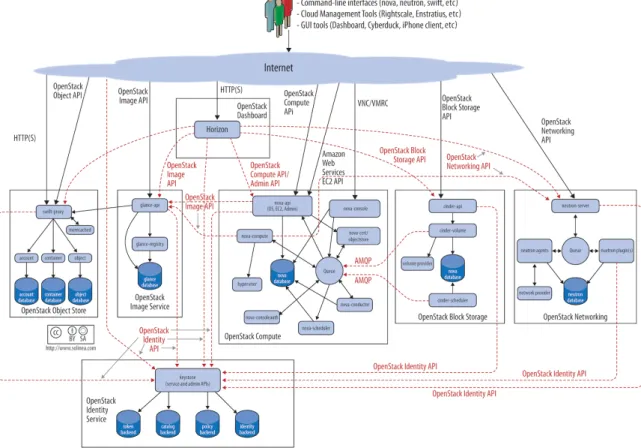
To design, deploy, and configure OpenStack, administrators must understand the logical architecture. A diagram can help you envision all the integrated services with-in OpenStack and how they with-interact with each other.
OpenStack modules are one of the following types:
Daemon Runs as a background process. On Linux plat-forms, a daemon is usually installed as a service.
Script Installs a virtual environment and runs tests.
Command-line interface (CLI) Enables users to submit API calls to OpenStack services through commands.
As shown, end users can interact through the dashboard, CLIs, and APIs. All services authenticate through a common Identity Service, and individual services interact with each other through public APIs, except where privileged administrator commands are necessary. Figure 1, “OpenStack Logical Architecture ()” [2] shows the most common, but not the only logical architecture for an OpenStack cloud.
OpenStack Ops Guide December 12, 2014
2
Figure 1. OpenStack Logical Architecture (
http://docs.openstack.org/
openstack-ops/content/figures/2/figures/osog_0001.png
)
1. Example Architectures
Example Architecture—Legacy Networking (nova) ... 3 Example Architecture—OpenStack Networking ... 9 Parting Thoughts on Architectures ... 25 To understand the possibilities OpenStack offers, it's best to start with ba-sic architectures that are tried-and-true and have been tested in produc-tion environments. We offer two such examples with basic pivots on the base operating system (Ubuntu and Red Hat Enterprise Linux) and the net-working architectures. There are other differences between these two ex-amples, but you should find the considerations made for the choices in each as well as a rationale for why it worked well in a given environment. Because OpenStack is highly configurable, with many different backends and network configuration options, it is difficult to write documentation that covers all possible OpenStack deployments. Therefore, this guide de-fines example architectures to simplify the task of documenting, as well as to provide the scope for this guide. Both of the offered architecture exam-ples are currently running in production and serving users.
Tip
As always, refer to the Glossary [301] if you are unclear about any of the terminology mentioned in these architec-tures.
Example Architecture—Legacy
Network-ing (nova)
This particular example architecture has been upgraded from Grizzly to Havana and tested in production environments where many public IP ad-dresses are available for assignment to multiple instances. You can find a second example architecture that uses OpenStack Networking (neutron) after this section. Each example offers high availability, meaning that if a particular node goes down, another node with the same configuration can take over the tasks so that service continues to be available.
Overview
The simplest architecture you can build upon for Compute has a single cloud controller and multiple compute nodes. The simplest architecture for
OpenStack Ops Guide December 12, 2014
4
Object Storage has five nodes: one for identifying users and proxying re-quests to the API, then four for storage itself to provide enough replica-tion for eventual consistency. This example architecture does not dictate a particular number of nodes, but shows the thinking and considerations that went into choosing this architecture including the features offered.
Components
Component Details
OpenStack release Havana
Host operating system Ubuntu 12.04 LTS or Red Hat Enterprise Linux 6.5, includ-ing derivatives such as CentOS and Scientific Linux OpenStack package repository Ubuntu Cloud Archive or RDO*
Hypervisor KVM
Database MySQL*
Message queue RabbitMQ for Ubuntu; Qpid for Red Hat Enterprise Linux and derivatives
Networking service nova-network
Network manager FlatDHCP
Single nova-network or multi-host? multi-host*
Image Service (glance) backend file Identity Service (keystone) driver SQL Block Storage Service (cinder) back-end
LVM/iSCSI
Live Migration backend Shared storage using NFS* Object storage OpenStack Object Storage (swift)
An asterisk (*) indicates when the example architecture deviates from the settings of a default installation. We'll offer explanations for those devia-tions next.
Note
The following features of OpenStack are supported by the ex-ample architecture documented in this guide, but are optional: •Dashboard: You probably want to offer a dashboard, but
your users may be more interested in API access only. •Block storage: You don't have to offer users block storage
if their use case only needs ephemeral storage on compute nodes, for example.
•Floating IP address: Floating IP addresses are public IP ad-dresses that you allocate from a predefined pool to assign to virtual machines at launch. Floating IP address ensure that the public IP address is available whenever an instance is booted. Not every organization can offer thousands of pub-lic floating IP addresses for thousands of instances, so this feature is considered optional.
•Live migration: If you need to move running virtual machine instances from one host to another with little or no service interruption, you would enable live migration, but it is con-sidered optional.
•Object storage: You may choose to store machine images on a file system rather than in object storage if you do not have the extra hardware for the required replication and redun-dancy that OpenStack Object Storage offers.
Rationale
This example architecture has been selected based on the current default feature set of OpenStack Havana, with an emphasis on stability. We be-lieve that many clouds that currently run OpenStack in production have made similar choices.
You must first choose the operating system that runs on all of the physical nodes. While OpenStack is supported on several distributions of Linux, we used Ubuntu 12.04 LTS (Long Term Support), which is used by the majority of the development community, has feature completeness compared with other distributions and has clear future support plans.
We recommend that you do not use the default Ubuntu OpenStack install packages and instead use the Ubuntu Cloud Archive. The Cloud Archive is a package repository supported by Canonical that allows you to upgrade to future OpenStack releases while remaining on Ubuntu 12.04.
KVM as a hypervisor complements the choice of Ubuntu—being a matched pair in terms of support, and also because of the significant degree of at-tention it garners from the OpenStack development community (including the authors, who mostly use KVM). It is also feature complete, free from li-censing charges and restrictions.
MySQL follows a similar trend. Despite its recent change of ownership, this database is the most tested for use with OpenStack and is heavily
docu-OpenStack Ops Guide December 12, 2014
6
mented. We deviate from the default database, SQLite, because SQLite is not an appropriate database for production usage.
The choice of RabbitMQ over other AMQP compatible options that are gaining support in OpenStack, such as ZeroMQ and Qpid, is due to its ease of use and significant testing in production. It also is the only option that supports features such as Compute cells. We recommend clustering with RabbitMQ, as it is an integral component of the system and fairly simple to implement due to its inbuilt nature.
As discussed in previous chapters, there are several options for networking in OpenStack Compute. We recommend FlatDHCP and to use Multi-Host networking mode for high availability, running one nova-network
dae-mon per OpenStack compute host. This provides a robust mechanism for ensuring network interruptions are isolated to individual compute hosts, and allows for the direct use of hardware network gateways.
Live Migration is supported by way of shared storage, with NFS as the dis-tributed file system.
Acknowledging that many small-scale deployments see running Object Storage just for the storage of virtual machine images as too costly, we opted for the file backend in the OpenStack Image Service (Glance). If your cloud will include Object Storage, you can easily add it as a backend. We chose the SQL backend for Identity Service (keystone) over others, such as LDAP. This backend is simple to install and is robust. The authors ac-knowledge that many installations want to bind with existing directory ser-vices and caution careful understanding of the array of options available. Block Storage (cinder) is installed natively on external storage nodes and uses the LVM/iSCSI plug-in. Most Block Storage Service plug-ins are tied to particular vendor products and implementations limiting their use to con-sumers of those hardware platforms, but LVM/iSCSI is robust and stable on commodity hardware.
While the cloud can be run without the OpenStack Dashboard, we consid-er it to be indispensable, not just for usconsid-er intconsid-eraction with the cloud, but also as a tool for operators. Additionally, the dashboard's use of Django makes it a flexible framework for extension.
Why not use the OpenStack Network Service (neutron)?
This example architecture does not use the OpenStack Network Service (neutron), because it does not yet support multi-host networking and our organizations (university, government) have access to a large range of publicly-accessible IPv4 addresses.Why use multi-host networking?
In a default OpenStack deployment, there is a single nova-network
ser-vice that runs within the cloud (usually on the cloud controller) that pro-vides services such as network address translation (NAT), DHCP, and DNS to the guest instances. If the single node that runs the nova-network
service goes down, you cannot access your instances, and the instances cannot access the Internet. The single node that runs the nova-network
service can become a bottleneck if excessive network traffic comes in and goes out of the cloud.
Tip
Multi-host is a high-availability option for the network configu-ration, where the nova-network service is run on every
com-pute node instead of running on only a single node.
Detailed Description
The reference architecture consists of multiple compute nodes, a cloud controller, an external NFS storage server for instance storage, and an OpenStack Block Storage server for volume storage. A network time ser-vice (Network Time Protocol, or NTP) synchronizes time on all the nodes. FlatDHCPManager in multi-host mode is used for the networking. A logical diagram for this example architecture shows which services are running on each node:
OpenStack Ops Guide December 12, 2014
8
The cloud controller runs the dashboard, the API services, the database (MySQL), a message queue server (RabbitMQ), the scheduler for choosing compute resources (nova-scheduler), Identity services (keystone, no-va-consoleauth), Image services (glance-api, glance-registry),
services for console access of guests, and Block Storage services, including the scheduler for storage resources (cinder-api and cinder-sched-uler).
Compute nodes are where the computing resources are held, and in our example architecture, they run the hypervisor (KVM), libvirt (the driver for the hypervisor, which enables live migration from node to node), no-va-compute, nova-api-metadata (generally only used when
run-ning in multi-host mode, it retrieves instance-specific metadata),
The network consists of two switches, one for the management or private traffic, and one that covers public access, including floating IPs. To sup-port this, the cloud controller and the compute nodes have two network cards. The OpenStack Block Storage and NFS storage servers only need to access the private network and therefore only need one network card, but multiple cards run in a bonded configuration are recommended if possi-ble. Floating IP access is direct to the Internet, whereas Flat IP access goes through a NAT. To envision the network traffic, use this diagram:
Optional Extensions
You can extend this reference architecture as follows:
• Add additional cloud controllers (see Chapter 11, “Maintenance, Fail-ures, and Debugging” [135]).
• Add an OpenStack Storage service (see the Object Storage chapter in the OpenStack Installation Guide for your distribution).
• Add additional OpenStack Block Storage hosts (see Chapter 11, “Mainte-nance, Failures, and Debugging” [135]).
Example Architecture—OpenStack
Net-working
This chapter provides an example architecture using OpenStack Network-ing, also known as the Neutron project, in a highly available environment.
OpenStack Ops Guide December 12, 2014
10
Overview
A highly-available environment can be put into place if you require an en-vironment that can scale horizontally, or want your cloud to continue to be operational in case of node failure. This example architecture has been written based on the current default feature set of OpenStack Havana, with an emphasis on high availability.
Components
Component Details
OpenStack release Havana
Host operating system Red Hat Enterprise Linux 6.5
OpenStack package repository Red Hat Distributed OpenStack (RDO)
Hypervisor KVM
Database MySQL
Message queue Qpid
Networking service OpenStack Networking
Tenant Network Separation VLAN Image Service (glance) backend GlusterFS Identity Service (keystone) driver SQL Block Storage Service (cinder)
back-end GlusterFS
Rationale
This example architecture has been selected based on the current default feature set of OpenStack Havana, with an emphasis on high availability. This architecture is currently being deployed in an internal Red Hat Open-Stack cloud and used to run hosted and shared services, which by their na-ture must be highly available.
This architecture's components have been selected for the following rea-sons:
Red Hat Enterprise Linux You must choose an operating sys-tem that can run on all of the physi-cal nodes. This example architecture is based on Red Hat Enterprise Linux, which offers reliability, long-term sup-port, certified testing, and is hardened. Enterprise customers, now moving
in-to OpenStack usage, typically require these advantages.
RDO The Red Hat Distributed OpenStack
package offers an easy way to down-load the most current OpenStack re-lease that is built for the Red Hat Enter-prise Linux platform.
KVM KVM is the supported hypervisor of
choice for Red Hat Enterprise Linux (and included in distribution). It is fea-ture complete and free from licensing charges and restrictions.
MySQL MySQL is used as the database back-end for all databases in the OpenStack environment. MySQL is the supported database of choice for Red Hat Enter-prise Linux (and included in distribu-tion); the database is open source, scal-able, and handles memory well.
Qpid Apache Qpid offers 100 percent
com-patibility with the Advanced Message Queuing Protocol Standard, and its broker is available for both C++ and Ja-va.
OpenStack Networking OpenStack Networking offers sophisti-cated networking functionality, includ-ing Layer 2 (L2) network segregation and provider networks.
VLAN Using a virtual local area network
of-fers broadcast control, security, and physical layer transparency. If need-ed, use VXLAN to extend your address space.
GlusterFS GlusterFS offers scalable storage. As your environment grows, you can con-tinue to add more storage nodes (in-stead of being restricted, for example, by an expensive storage array).
OpenStack Ops Guide December 12, 2014
12
Detailed Description
Node types
This section gives you a breakdown of the different nodes that make up the OpenStack environment. A node is a physical machine that is provi-sioned with an operating system, and running a defined software stack on top of it. Table 1.1, “Node types” [12] provides node descriptions and specifications.
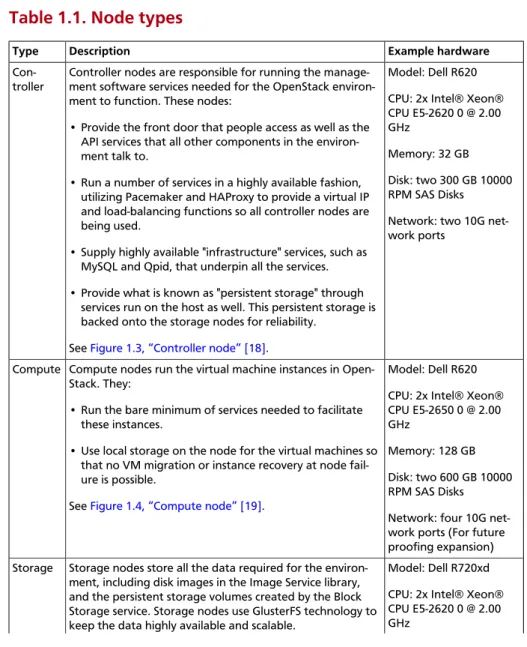
Table 1.1. Node types
Type Description Example hardware
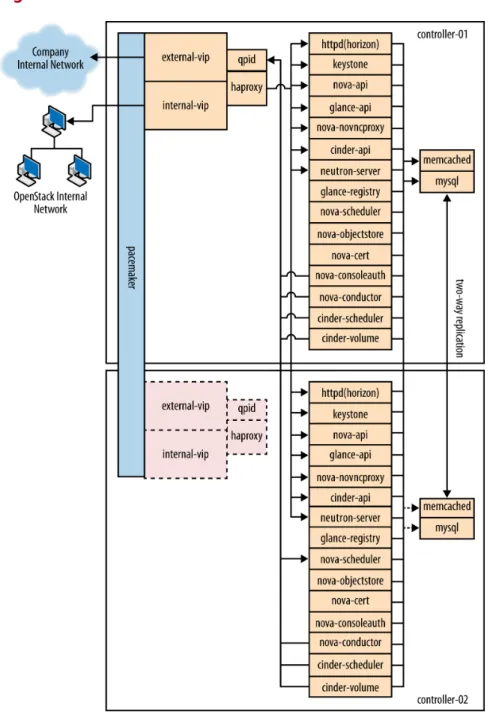
Con-troller Controller nodes are responsible for running the manage-ment software services needed for the OpenStack environ-ment to function. These nodes:
• Provide the front door that people access as well as the API services that all other components in the environ-ment talk to.
• Run a number of services in a highly available fashion, utilizing Pacemaker and HAProxy to provide a virtual IP and load-balancing functions so all controller nodes are being used.
• Supply highly available "infrastructure" services, such as MySQL and Qpid, that underpin all the services. • Provide what is known as "persistent storage" through
services run on the host as well. This persistent storage is backed onto the storage nodes for reliability.
See Figure 1.3, “Controller node” [18].
Model: Dell R620 CPU: 2x Intel® Xeon® CPU E5-2620 0 @ 2.00 GHz
Memory: 32 GB Disk: two 300 GB 10000 RPM SAS Disks Network: two 10G net-work ports
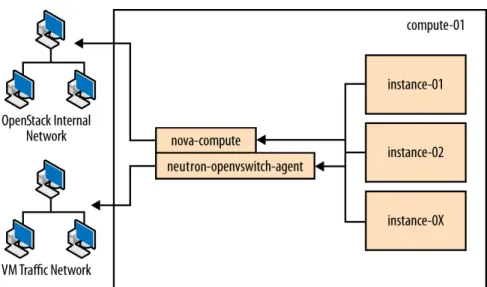
Compute Compute nodes run the virtual machine instances in Open-Stack. They:
• Run the bare minimum of services needed to facilitate these instances.
• Use local storage on the node for the virtual machines so that no VM migration or instance recovery at node fail-ure is possible.
See Figure 1.4, “Compute node” [19].
Model: Dell R620 CPU: 2x Intel® Xeon® CPU E5-2650 0 @ 2.00 GHz
Memory: 128 GB Disk: two 600 GB 10000 RPM SAS Disks Network: four 10G net-work ports (For future proofing expansion) Storage Storage nodes store all the data required for the
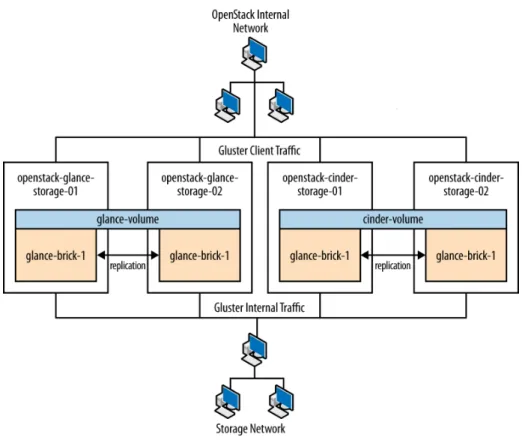
environ-ment, including disk images in the Image Service library, and the persistent storage volumes created by the Block Storage service. Storage nodes use GlusterFS technology to keep the data highly available and scalable.
Model: Dell R720xd CPU: 2x Intel® Xeon® CPU E5-2620 0 @ 2.00 GHz
Type Description Example hardware
See Figure 1.6, “Storage node” [21]. Memory: 64 GB Disk: two 500 GB 7200 RPM SAS Disks and twen-ty-four 600 GB 10000 RPM SAS Disks Raid Controller: PERC H710P Integrated RAID Controller, 1 GB NV Cache
Network: two 10G net-work ports
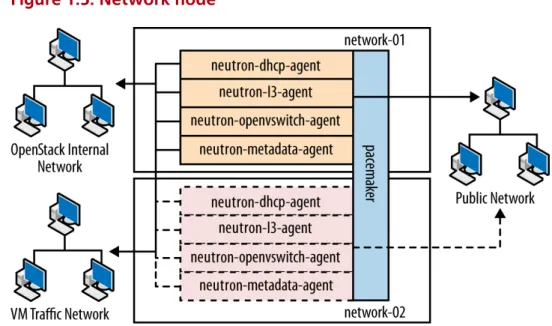
Network Network nodes are responsible for doing all the virtual working needed for people to create public or private works and uplink their virtual machines into external net-works. Network nodes:
• Form the only ingress and egress point for instances run-ning on top of OpenStack.
• Run all of the environment's networking services, with the exception of the networking API service (which runs on the controller node).
See Figure 1.5, “Network node” [20].
Model: Dell R620 CPU: 1x Intel® Xeon® CPU E5-2620 0 @ 2.00 GHz
Memory: 32 GB Disk: two 300 GB 10000 RPM SAS Disks Network: five 10G net-work ports
Utility Utility nodes are used by internal administration staff on-ly to provide a number of basic system administration func-tions needed to get the environment up and running and to maintain the hardware, OS, and software on which it runs.
These nodes run services such as provisioning, configuration management, monitoring, or GlusterFS management soft-ware. They are not required to scale, although these ma-chines are usually backed up.
Model: Dell R620 CPU: 2x Intel® Xeon® CPU E5-2620 0 @ 2.00 GHz
Memory: 32 GB Disk: two 500 GB 7200 RPM SAS Disks Network: two 10G net-work ports
Networking layout
The network contains all the management devices for all hardware in the environment (for example, by including Dell iDrac7 devices for the hard-ware nodes, and management interfaces for network switches). The net-work is accessed by internal staff only when diagnosing or recovering a hardware issue.
OpenStack internal network
This network is used for OpenStack management functions and traffic, in-cluding services needed for the provisioning of physical nodes (pxe, tftp,
OpenStack Ops Guide December 12, 2014
14
kickstart), traffic between various OpenStack node types using
Open-Stack APIs and messages (for example, nova-compute talking to key-stone or cinder-volume talking to nova-api), and all traffic for
stor-age data to the storstor-age layer underneath by the Gluster protocol. All phys-ical nodes have at least one network interface (typphys-ically eth0) in this
net-work. This network is only accessible from other VLANs on port 22 (for
Public Network
This network is a combination of:
• IP addresses for public-facing interfaces on the controller nodes (which end users will access the OpenStack services)
• A range of publicly routable, IPv4 network addresses to be used by OpenStack Networking for floating IPs. You may be restricted in your ac-cess to IPv4 addresses; a large range of IPv4 addresses is not neac-cessary. • Routers for private networks created within OpenStack.
This network is connected to the controller nodes so users can access the OpenStack interfaces, and connected to the network nodes to provide VMs with publicly routable traffic functionality. The network is also con-nected to the utility machines so that any utility services that need to be made public (such as system monitoring) can be accessed.
VM traffic network
This is a closed network that is not publicly routable and is simply used as a private, internal network for traffic between virtual machines in Open-Stack, and between the virtual machines and the network nodes that pro-vide l3 routes out to the public network (and floating IPs for connections back in to the VMs). Because this is a closed network, we are using a differ-ent address space to the others to clearly define the separation. Only Com-pute and OpenStack Networking nodes need to be connected to this net-work.
Node connectivity
The following section details how the nodes are connected to the differ-ent networks (see the section called “Networking layout” [13]) and what other considerations need to take place (for example, bonding) when con-necting nodes to the networks.
Initial deployment
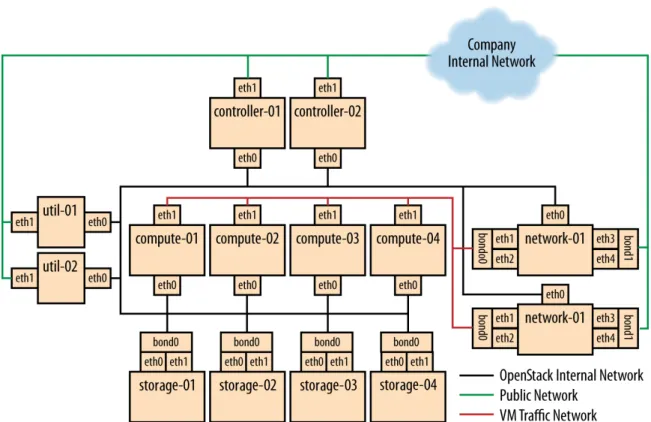
Initially, the connection setup should revolve around keeping the connec-tivity simple and straightforward in order to minimize deployment com-plexity and time to deploy. The deployment shown in Figure 1.1, “Basic node deployment” [16] aims to have 1 × 10G connectivity available to all compute nodes, while still leveraging bonding on appropriate nodes for maximum performance.
OpenStack Ops Guide December 12, 2014
16
Figure 1.1. Basic node deployment
Connectivity for maximum performance
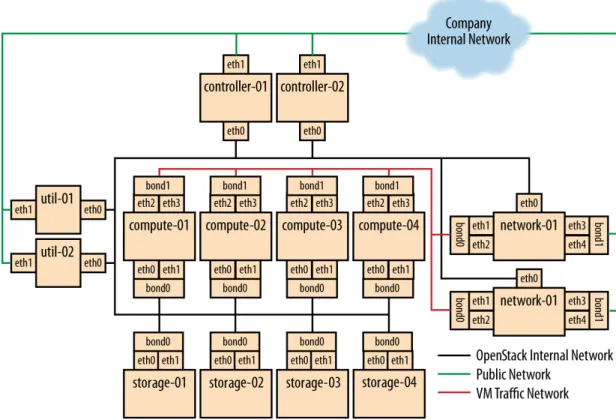
If the networking performance of the basic layout is not enough, you can move to Figure 1.2, “Performance node deployment” [17], which pro-vides 2 × 10G network links to all instances in the environment as well as providing more network bandwidth to the storage layer.
Figure 1.2. Performance node deployment
Node diagrams
The following diagrams (Figure 1.3, “Controller node” [18] through Figure 1.6, “Storage node” [21]) include logical information about the different types of nodes, indicating what services will be running on top of them and how they interact with each other. The diagrams also illustrate how the availability and scalability of services are achieved.
OpenStack Ops Guide December 12, 2014
18
OpenStack Ops Guide December 12, 2014
20
Figure 1.6. Storage node
Example Component Configuration
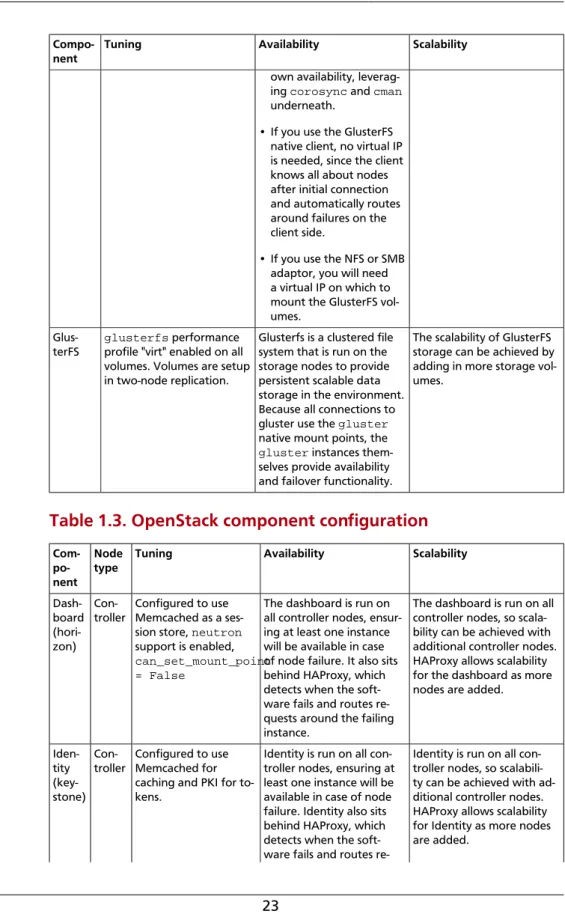
Table 1.2, “Third-party component configuration” [21] and Table 1.3, “OpenStack component configuration” [23] include example config-uration and considerations for both third-party and OpenStack compo-nents:
Table 1.2. Third-party component configuration
Compo-nent
Tuning Availability Scalability
MySQL binlog-format = row Master/master replication.
However, both nodes are not used at the same time. Replication keeps all nodes as close to being up to date as possible (although the asynchronous nature of the replication means a ful-ly consistent state is not possible). Connections to
Not heavily considered. Once load on the MySQL server increases enough that scalability needs to be considered, multiple mas-ters or a master/slave setup can be used.
OpenStack Ops Guide December 12, 2014
22
Compo-nent Tuning Availability Scalability
the database only happen through a Pacemaker vir-tual IP, ensuring that most problems that occur with master-master replication can be avoided. Qpid max-connections=1000
worker-threads=20 connection-back-log=10, sasl security
en-abled with SASL-BASIC au-thentication
Qpid is added as a resource to the Pacemaker software that runs on Controller nodes where Qpid is situat-ed. This ensures only one Qpid instance is running at one time, and the node with the Pacemaker virtual IP will always be the node running Qpid.
Not heavily considered. However, Qpid can be changed to run on all con-troller nodes for scalabili-ty and availabiliscalabili-ty purpos-es, and removed from Pace-maker.
HAProxy maxconn 3000 HAProxy is a software
lay-er-7 load balancer used to front door all clustered OpenStack API compo-nents and do SSL termina-tion. HAProxy can be added as a resource to the Pace-maker software that runs on the Controller nodes where HAProxy is situated. This ensures that only one HAProxy instance is running at one time, and the node with the Pacemaker virtual IP will always be the node running HAProxy.
Not considered. HAProxy has small enough perfor-mance overheads that a sin-gle instance should scale enough for this level of workload. If extra scalability is needed, keepalived or
other Layer-4 load balanc-ing can be introduced to be placed in front of multiple copies of HAProxy.
Mem-cached
MAXCONN="8192" CACHESIZE="30457"
Memcached is a fast in-memory key-value cache software that is used by OpenStack components for caching data and increasing performance. Memcached runs on all controller nodes, ensuring that should one go down, another instance of Memcached is available.
Not considered. A single instance of Memcached should be able to scale to the desired workloads. If scalability is desired, HAProxy can be placed in front of Memcached (in raw
tcp mode) to utilize
multi-ple Memcached instances for scalability. However, this might cause cache consis-tency issues.
Pace-maker Configured to usecorosync and cman as
a cluster communication stack/quorum manager, and as a two-node cluster.
Pacemaker is the clustering software used to ensure the availability of services run-ning on the controller and network nodes:
• Because Pacemaker is cluster software, the soft-ware itself handles its
If more nodes need to be made cluster aware, Pacemaker can scale to 64 nodes.
Compo-nent Tuning Availability Scalability
own availability, leverag-ing corosync and cman
underneath.
• If you use the GlusterFS native client, no virtual IP is needed, since the client knows all about nodes after initial connection and automatically routes around failures on the client side.
• If you use the NFS or SMB adaptor, you will need a virtual IP on which to mount the GlusterFS vol-umes.
Glus-terFS
glusterfs performance
profile "virt" enabled on all volumes. Volumes are setup in two-node replication.
Glusterfs is a clustered file system that is run on the storage nodes to provide persistent scalable data storage in the environment. Because all connections to gluster use the gluster
native mount points, the
gluster instances
them-selves provide availability and failover functionality.
The scalability of GlusterFS storage can be achieved by adding in more storage vol-umes.
Table 1.3. OpenStack component configuration
Com- po-nent
Node
type Tuning Availability Scalability
Dash-board (hori-zon)
Con-troller Configured to useMemcached as a ses-sion store, neutron
support is enabled,
can_set_mount_point = False
The dashboard is run on all controller nodes, ensur-ing at least one instance will be available in case of node failure. It also sits behind HAProxy, which detects when the soft-ware fails and routes re-quests around the failing instance.
The dashboard is run on all controller nodes, so scala-bility can be achieved with additional controller nodes. HAProxy allows scalability for the dashboard as more nodes are added.
Iden-tity (key-stone)
Con-troller Configured to useMemcached for caching and PKI for to-kens.
Identity is run on all con-troller nodes, ensuring at least one instance will be available in case of node failure. Identity also sits behind HAProxy, which detects when the soft-ware fails and routes
re-Identity is run on all con-troller nodes, so scalabili-ty can be achieved with ad-ditional controller nodes. HAProxy allows scalability for Identity as more nodes are added.
OpenStack Ops Guide December 12, 2014 24 Com- po-nent Node
type Tuning Availability Scalability
quests around the failing instance. Image Ser-vice (glance) Con-troller /var/lib/glance/ images is a GlusterFS native mount to a Gluster volume off the storage layer.
The Image Service is run on all controller nodes, ensuring at least one in-stance will be available in case of node failure. It al-so sits behind HAProxy, which detects when the software fails and routes requests around the failing instance.
The Image Service is run on all controller nodes, so scal-ability can be achieved with additional controller nodes. HAProxy allows scalabili-ty for the Image Service as more nodes are added.
Com-pute (nova) Con-troller, Com-pute Configured to use Qpid, qpid_heartbeat = 10, configured to
use Memcached for caching, configured to use libvirt,
config-ured to use neutron.
Configured no-va-consoleauth to
use Memcached for session management (so that it can have multiple copies and run in a load balancer).
The nova API, scheduler, objectstore, cert, con-soleauth, conductor, and vncproxy services are run on all controller nodes, en-suring at least one instance will be available in case of node failure. Compute is also behind HAProxy, which detects when the software fails and routes requests around the failing instance.
Compute's compute and conductor services, which run on the compute nodes, are only needed to run services on that node, so availability of those ser-vices is coupled tightly to the nodes that are avail-able. As long as a compute node is up, it will have the needed services running on top of it.
The nova API, scheduler, objectstore, cert, con-soleauth, conductor, and vncproxy services are run on all controller nodes, so scalability can be achieved with additional controller nodes. HAProxy allows scal-ability for Compute as more nodes are added. The scala-bility of services running on the compute nodes (com-pute, conductor) is achieved linearly by adding in more compute nodes. Block Stor-age (cin-der)
Con-troller Configuredto use Qpid,
qpid_heartbeat = 10, configured to use
a Gluster volume from the storage layer as the backend for Block Storage, using the Gluster native client.
Block Storage API, sched-uler, and volume services are run on all controller nodes, ensuring at least one instance will be avail-able in case of node fail-ure. Block Storage al-so sits behind HAProxy, which detects if the soft-ware fails and routes re-quests around the failing instance.
Block Storage API, sched-uler and volume services are run on all controller nodes, so scalability can be achieved with additional controller nodes. HAProxy allows scalability for Block Storage as more nodes are added. Open-Stack Con-troller, Configured to use QPID,
The OpenStack Network-ing service is run on all
con-The OpenStack Networking server service is run on all
Com- po-nent
Node
type Tuning Availability Scalability
Net- work-ing (neu-tron) Com-pute, Net-work qpid_heartbeat = 10, kernel
names-pace support enabled,
tenant_network_type = vlan, allow_overlapping_ips = true, tenant_network_type = vlan, bridge_uplinks = br-ex:em2, bridge_mappings = physnet1:br-ex
troller nodes, ensuring at least one instance will be available in case of node failure. It also sits behind HAProxy, which detects if the software fails and routes requests around the failing instance.
OpenStack Networking's
ovs-agent, l3-agent, dhcp-agent, and meta-data-agent services run
on the network nodes, as
lsb resources inside of
Pacemaker. This means that in the case of network node failure, services are kept running on another node. Finally, the ovs-agent service is also run
on all compute nodes, and in case of compute node failure, the other nodes will continue to function using the copy of the ser-vice running on them.
controller nodes, so scala-bility can be achieved with additional controller nodes. HAProxy allows scalability for OpenStack Networking as more nodes are added. Scalability of services run-ning on the network nodes is not currently supported by OpenStack Networking, so they are not be consid-ered. One copy of the ser-vices should be sufficient to handle the workload. Scal-ability of the ovs-agent
running on compute nodes is achieved by adding in more compute nodes as necessary.
Parting Thoughts on Architectures
With so many considerations and options available, our hope is to pro-vide a few clearly-marked and tested paths for your OpenStack explo-ration. If you're looking for additional ideas, check out Appendix A, Use Cases [273], the OpenStack Installation Guides, or the OpenStack User Stories page.
2. Provisioning and Deployment
Automated Deployment ... 27 Automated Configuration ... 30 Remote Management ... 31 Parting Thoughts for Provisioning and Deploying OpenStack ... 31 Conclusion ... 32 A critical part of a cloud's scalability is the amount of effort that it takes to run your cloud. To minimize the operational cost of running your cloud, set up and use an automated deployment and configuration infrastructure with a configuration management system, such as Puppet or Chef. Com-bined, these systems greatly reduce manual effort and the chance for op-erator error.
This infrastructure includes systems to automatically install the operating system's initial configuration and later coordinate the configuration of all services automatically and centrally, which reduces both manual effort and the chance for error. Examples include Ansible, Chef, Puppet, and Salt. You can even use OpenStack to deploy OpenStack, fondly named TripleO, for OpenStack On OpenStack.
Automated Deployment
An automated deployment system installs and configures operating sys-tems on new servers, without intervention, after the absolute minimum amount of manual work, including physical racking, MAC-to-IP assignment, and power configuration. Typically, solutions rely on wrappers around PXE boot and TFTP servers for the basic operating system install and then hand off to an automated configuration management system.
Both Ubuntu and Red Hat Enterprise Linux include mechanisms for config-uring the operating system, including preseed and kickstart, that you can use after a network boot. Typically, these are used to bootstrap an auto-mated configuration system. Alternatively, you can use an image-based ap-proach for deploying the operating system, such as systemimager. You can use both approaches with a virtualized infrastructure, such as when you run VMs to separate your control services and physical infrastructure. When you create a deployment plan, focus on a few vital areas because they are very hard to modify post deployment. The next two sections talk about configurations for: