Reference Architecture:
Lenovo Client Virtualization
with VMware Horizon
Reference Architecture for
VMware Horizon (with View)
Contains performance data and
sizing recommendations for
servers, storage, and networking
otrageincluding Lenovo clients,
servers, storage, and networking
hardware used in LCV solutions
recommended, 3 lines maximum
Describes variety of storage
models including SAN storage
and hyper-converged systems
Contains detailed bill of materials
for servers, storage, networking,
and racks
Mike Perks Kenny Bain
Chandrakandh Mouleeswaran
Last update: 24 June 2015
Version 1.2
ii Reference Architecture: Lenovo Client Virtualization with VMware Horizon
version 1.2
Table of Contents
1
Introduction ... 1
2
Architectural overview ... 2
3
Component model ... 3
3.1
VMware Horizon provisioning ... 5
3.2
Storage model ... 5
3.3
Atlantis Computing ... 6
3.3.1 Atlantis hyper-converged volume ... 6
3.3.2 Atlantis simple hybrid volume ... 7
3.3.3 Atlantis simple in-memory volume ... 7
3.4
VMware Virtual SAN ... 7
3.4.1 Virtual SAN Storage Policies ... 8
4
Operational model ... 10
4.1
Operational model scenarios ... 10
4.1.1 Enterprise operational model ... 11
4.1.2 Hyper-converged operational model ... 11
4.2
Hypervisor support ... 12
4.3
Compute servers for virtual desktops ... 12
4.3.1 Intel Xeon E5-2600 v3 processor family servers ... 13
4.3.2 Intel Xeon E5-2600 v3 processor family servers with Atlantis USX... 16
4.4
Compute servers for hosted desktops... 19
4.4.1 Intel Xeon E5-2600 v3 processor family servers ... 19
4.5
Compute servers for hyper-converged systems ... 20
4.5.1 Intel Xeon E5-2600 v3 processor family servers with VMware VSAN ... 20
4.5.2 Intel Xeon E5-2600 v3 processor family servers with Atlantis USX... 27
4.6
Graphics Acceleration ... 28
4.7
Management servers ... 31
4.8
Systems management ... 32
4.9
Shared storage ... 33
4.9.1 IBM Storwize V7000 and IBM Storwize V3700 storage ... 35
iii Reference Architecture: Lenovo Client Virtualization with VMware Horizon
version 1.2
4.10
Networking ... 38
4.10.1 10 GbE networking ... 38
4.10.2 10 GbE FCoE networking... 38
4.10.3 Fibre Channel networking ... 39
4.10.4 1 GbE administration networking ... 39
4.11
Racks ... 40
4.12
Proxy server ... 40
4.13
Deployment models ... 41
4.13.1 Deployment example 1: Flex Solution with single Flex System chassis ... 41
4.13.2 Deployment example 2: Flex System with 4500 stateless users ... 42
4.13.3 Deployment example 3: System x server with Storwize V7000 and FCoE ... 45
4.13.4 Deployment example 4: Hyper-converged using System x servers ... 47
4.13.5 Deployment example 5: Graphics acceleration for 120 CAD users ... 47
5
Appendix: Bill of materials ... 49
5.1
BOM for enterprise and SMB compute servers ... 49
5.2
BOM for hosted desktops ... 54
5.3
BOM for hyper-converged compute servers ... 58
5.4
BOM for enterprise and SMB management servers ... 61
5.5
BOM for shared storage ... 65
5.6
BOM for networking ... 67
5.7
BOM for racks ... 68
5.8
BOM for Flex System chassis ... 68
5.9
BOM for OEM storage hardware ... 69
5.10
BOM for OEM networking hardware ... 69
Resources ... 70
1 Reference Architecture: Lenovo Client Virtualization with VMware Horizon
version 1.2
1 Introduction
The intended audience for this document is technical IT architects, system administrators, and managers who are interested in server-based desktop virtualization and server-based computing (terminal services or application virtualization) that uses VMware Horizon™ (with View). In this document, the term client virtualization is used as to refer to all of these variations. Compare this term to server virtualization, which refers to the virtualization of server-based business logic and databases.
This document describes the reference architecture for VMware Horizon 6.x and also supports the previous versions of VMware Horizon 5.x. This document should be read with the Lenovo Client Virtualization (LCV) base reference architecture document that is available at this website: lenovopress.com/tips1275.
The business problem, business value, requirements, and hardware details are described in the LCV base reference architecture document and are not repeated here for brevity.
This document gives an architecture overview and logical component model of VMware Horizon. The
document also provides the operational model of VMware Horizon by combining Lenovo® hardware platforms such as Flex System™, System x®, NeXtScale System™, and RackSwitch networking with OEM hardware and software such as IBM Storwize and FlashSystem storage, VMware Virtual SAN, and Atlantis Computing software. The operational model presents performance benchmark measurements and discussion, sizing guidance, and some example deployment models. The last section contains detailed bill of material configurations for each piece of hardware.
2 Reference Architecture: Lenovo Client Virtualization with VMware Horizon
version 1.2
2 Architectural overview
Figure 1 shows all of the main features of the Lenovo Client Virtualization reference architecture with VMware Horizon on VMware ESXi hypervisor. It also shows remote access, authorization, and traffic monitoring. This reference architecture does not address the general issues of multi-site deployment and network management.
Shared Storage
FI
R
E
W
A
LL
Internet Clients
View Connection
Server
Internal Clients
Active Directory, DNS SQL Database Server
vCenter Server Proxy
Server
vCenter Pools
Stateless Virtual Desktops
H
yp
e
rvi
so
r
Dedicated Virtual Desktops
H
yp
e
rvi
so
r
Hosted Desktops and Apps
H
yp
e
rvi
so
r
Figure 1: LCV reference architecture with VMware Horizon
3 Reference Architecture: Lenovo Client Virtualization with VMware Horizon
version 1.2
3 Component model
Figure 2 is a layered view of the LCV solution that is mapped to the VMware Horizon virtualization infrastructure.
Support
Services
Lenovo Client Virtualization- VMware Horizon
Management Services
Directory
OS Licensing DHCP
DNS
View Client Devices
Client Agent Client Agent Client Agent Client AgentShared Storage
VM Repository VM Linked Clones User Data Files User Profiles NFS and CIFSM a n a g e m e n t P ro to c o ls
HTTP/HTTPS RDP and PCoIP
View Event Database
Administrator
GUIs for
Support
Services
View Horizon Administrator vCenter Operations for View vCenter Server View Connection ServerView Composer S u p p o rt S e rv ic e P ro to c o ls Hypervisor Hypervisor Dedicated Virtual Desktops Stateless Virtual Desktops Local SSD Storage VM Agent VM Agent Hypervisor Hosted Desktops and Apps Hosted Desktop Hosted Desktop Hosted Application VM Agent VM Agent Accelerator VM Accelerator VM Accelerator VM Lenovo Thin Client Manager
Figure 2: Component model with VMware Horizon
VMware Horizon with the VMware ESXi hypervisor features the following main components: View Horizon
Administrator
By using this web-based application, administrators can configure ViewConnection Server, deploy and manage View desktops, control user authentication, and troubleshoot user issues. It is installed during the installation of ViewConnection Server instances and is not required to be installed on local (administrator) devices.
vCenter Operations for View
This tool provides end-to-end visibility into the health, performance, and efficiency of the virtual desktop infrastructure (VDI) configuration. It enables administrators to proactively ensure the best user experience possible, avert incidents, and eliminate bottlenecks before they become larger issues.
4 Reference Architecture: Lenovo Client Virtualization with VMware Horizon
version 1.2 View Connection
Server
The VMware Horizon Connection Server is the point of contact for client devices that are requesting virtual desktops. It authenticates users and directs the virtual desktop request to the appropriate virtual machine (VM) or desktop, which ensures that only valid users are allowed access. After the authentication is complete, users are directed to their assigned VM or desktop.
If a virtual desktop is unavailable, the View Connection Server works with the management and the provisioning layer to have the VM ready and available. View Composer In a VMware vCenter Server instance, View Composer is installed. View
Composer is required when linked clones are created from a parent VM. vCenter Server By using a single console, vCenter Server provides centralized management of
the virtual machines (VMs) for the VMware ESXi hypervisor. VMware vCenter can be used to perform live migration (called VMware vMotion), which allows a running VM to be moved from one physical server to another without downtime. Redundancy for vCenter Server is achieved through VMware high availability (HA). The vCenter Server also contains a licensing server for VMware ESXi. vCenter SQL Server vCenter Server for VMware ESXi hypervisor requires an SQL database. The
vCenter SQL server might be Microsoft® Data Engine (MSDE), Oracle, or SQL Server. Because the vCenter SQL server is a critical component, redundant servers must be available to provide fault tolerance. Customer SQL databases (including respective redundancy) can be used.
View Event database VMware Horizon can be configured to record events and their details into a Microsoft SQL Server or Oracle database. Business intelligence (BI) reporting engines can be used to analyze this database.
Clients VMware Horizon supports a broad set of devices and all major device operating platforms, including Apple iOS, Google Android, and Google ChromeOS. Each client device has a VMware View Client, which acts as the agent to
communicate with the virtual desktop.
RDP, PCoIP The virtual desktop image is streamed to the user access device by using the display protocol. Depending on the solution, the choice of protocols available are Remote Desktop Protocol (RDP) and PC over IP (PCoIP).
Hypervisor ESXi ESXi is a bare-metal hypervisor for the compute servers. ESXi also contains support for VSAN storage. For more information, see “VMware Virtual SAN” on page 6.
Accelerator VM The optional accelerator VM in this case is Atlantis Computing. For more information, see “Atlantis Computing” on page 6.
Shared storage Shared storage is used to store user profiles and user data files. Depending on the provisioning model that is used, different data is stored for VM images. For more information, see “Storage model”.
5 Reference Architecture: Lenovo Client Virtualization with VMware Horizon
version 1.2
For more information, see the Lenovo Client Virtualization base reference architecture document that is available at this website: lenovopress.com/tips1275.
3.1 VMware Horizon provisioning
VMware Horizon supports stateless and dedicated models. Provisioning for VMware Horizon is a function of vCenter server and View Composer for linked clones.
vCenter Server allows for manually created pools and automatic pools. It allows for provisioning full clones and linked clones of a parent image for dedicated and stateless virtual desktops.
Because dedicated virtual desktops use large amounts of storage, linked clones can be used to reduce the storage requirements. Linked clones are created from a snapshot (replica) that is taken from a golden master image. The golden master image and replica should be on shared storage area network (SAN) storage. One pool can contain up to 1000 linked clones.
This document describes the use of automated pools (with linked clones) for dedicated and stateless virtual desktops. The deployment requirements for full clones are beyond the scope of this document.
3.2 Storage model
This section describes the different types of shared data stored for stateless and dedicated desktops. Stateless and dedicated virtual desktops should have the following common shared storage items:
The paging file (or vSwap) is transient data that can be redirected to Network File System (NFS) storage. In general, it is recommended to disable swapping, which reduces storage use (shared or local). The desktop memory size should be chosen to match the user workload rather than depending on a smaller image and swapping, which reduces overall desktop performance.
User profiles (from Microsoft Roaming Profiles) are stored by using Common Internet File System (CIFS).
User data files are stored by using CIFS.
Dedicated virtual desktops or stateless virtual desktops that need mobility require the following items to be on NFS or block I/O shared storage:
NFS or block I/O is used to store all virtual desktops’ associated data, such as the master image, replicas, and linked clones.
NFS is used to store View Composer persistent disks when View Persona Management is used for user profile and user data files. This feature is not recommended.
NFS is used to store all virtual images for linked clones. The replicas and linked clones can be stored on local solid-state drive (SSD) storage. These items are discarded when the VM is shut down.
For more information, see the following VMware knowledge base article about creating linked clones on NFS storage:
6 Reference Architecture: Lenovo Client Virtualization with VMware Horizon
version 1.2
3.3 Atlantis Computing
Atlantis Computing provides a software-defined storage solution, which can deliver better performance than physical PC and reduce storage requirements by up to 95% in virtual desktop environments of all types. The key is Atlantis HyperDup content-aware data services, which fundamentally changes the way VMs use storage. This change reduces the storage footprints by up to 95% while minimizing (and in some cases, entirely
eliminating) I/O to external storage. The net effect is a reduced CAPEX and a marked increase in performance to start, log in, start applications, search, and use virtual desktops or hosted desktops and applications. Atlantis software uses random access memory (RAM) for write-back caching of data blocks, real-time inline
de-duplication of data, coalescing of blocks, and compression, which significantly reduces the data that is cached and persistently stored in addition to greatly reducing network traffic.
Atlantis software works with any type of heterogeneous storage, including server RAM, direct-attached storage (DAS), SAN, or network-attached storage (NAS). It is provided as a VMware ESXi compatible VM that presents the virtualized storage to the hypervisor as a native data store, which makes deployment and integration straightforward. Atlantis Computing also provides other utilities for managing VMs and backing up and recovering data stores.
Atlantis provides a number of volume types suitable for virtual desktops and shared desktops. Different volume types support different application requirements and deployment models. Table 1 compares the Atlantis volume types.
Table 1: Atlantis Volume Types Volume Type Min Number of Servers Performance Tier Capacity
Tier HA Comments
Hyper-
converged Cluster of 3
Memory or
local flash DAS USX HA
Good balance between performance and capacity Simple
Hybrid 1
Memory or flash
Shared
storage Hypervisor HA
Functionally equivalent to Atlantis ILIO Persistent VDI Simple
All Flash 1 Local flash
Shared
flash Hypervisor HA
Good performance, but lower capacity
Simple
In-Memory 1
Memory or flash Memory or flash N/A (daily backup)
Functionally equivalent to Atlantis ILIO Diskless VDI
3.3.1
Atlantis hyper-converged volume
Atlantis hyper-converged volumes are a hybrid between memory or local flash for accelerating performance and direct access storage (DAS) for capacity and provide a good balance between performance and capacity needed for virtual desktops.
As shown in Figure 3, hyper-converged volumes are clustered across three or more servers and have built-in resiliency in which the volume can be migrated to other servers in the cluster in case of server failure or entering maintenance mode. Hyper-converged volumes are supported for ESXi.
7 Reference Architecture: Lenovo Client Virtualization with VMware Horizon
version 1.2 Figure 3: Atlantis USX Hyper-converged Cluster
3.3.2
Atlantis simple hybrid volume
Atlantis simple hybrid volumes are targeted at dedicated virtual desktop environments. This volume type provides the optimal solution for desktop virtualization customers that are using traditional or existing storage technologies that are optimized by Atlantis software with server RAM. In this scenario, Atlantis employs memory as a tier and uses a small amount of server RAM for all I/O processing while using the existing SAN, NAS, or all-flash arrays storage as the primary storage. Atlantis storage optimizations increase the number of desktops that the storage can support by up to 20 times while improving performance. Disk-backed
configurations can use various different storage types, including host-based flash memory cards, external all-flash arrays, and conventional spinning disk arrays.
A variation of the simple hybrid volume type is the simple all-flash volume that uses fast, low-latency shared flash storage whereby very little RAM is used and all I/O requests are sent to the flash storage after the inline de-duplication and compression are performed.
This reference architecture concentrates on the simple hybrid volume type for dedicated desktops, stateless desktops that use local SSDs, and host-shared desktops and applications. To cover the widest variety of shared storage, the simple all-flash volume type is not considered.
3.3.3
Atlantis simple in-memory volume
Atlantis simple in-memory volumes eliminate storage from stateless VDI deployments by using local server RAM and in-memory storage optimization technology. Server RAM is used as the primary storage for stateless virtual desktops, which ensures that read and write I/O occurs at memory speeds and eliminates network traffic. An option allows for in-line compression and decompression to reduce the RAM usage. SnapClone technology is used to persist the data store in case of VM reboots, power outages, or other failures.
3.4 VMware Virtual SAN
VMware Virtual SAN™ (VSAN) is a Software Defined Storage (SDS) solution embedded in the ESXi hypervisor. Virtual SAN pools flash caching devices and magnetic disks across three or more 10 GbE connected servers into a single shared datastore that is resilient and simple to manage.
Virtual SAN can be scaled to 64 servers, with each server supporting up to 5 disk groups, with each disk group consisting of a single flash caching device (SSD) and up to 7 HDDs. Performance and capacity can easily be increased simply by adding more components: disks, flash or servers.
8 Reference Architecture: Lenovo Client Virtualization with VMware Horizon
version 1.2
The flash cache is used to accelerate both reads and writes. Frequently read data is kept in read cache; writes are coalesced in cache and destaged to disk efficiently, greatly improving application performance.
VSAN manages data in the form of flexible data containers that are called objects and the following types of objects for VMs are available:
VM Home
VM swap (.vswp) VMDK (.vmdk) Snapshots (.vmsn)
Internally, VM objects are split into multiple components that are based on performance and availability requirements that are defined in the VM storage profile. These components are distributed across multiple hosts in a cluster to tolerate simultaneous failures and meet performance requirements. VSAN uses a distributed RAID architecture to distribute data across the cluster. Components are distributed with the use of the following main techniques:
Striping (RAID 0): Number of stripes per object Mirroring (RAID 1): Number of failures to tolerate
For more information about VMware Horizon virtual desktop types, objects, and components, see “VMware Virtual SAN Design and Sizing Guide for Horizon Virtual Desktop Infrastructures”, which is available at this website: vmware.com/files/pdf/products/vsan/VMW-TMD-Virt-SAN-Dsn-Szing-Guid-Horizon-View.pdf
3.4.1
Virtual SAN Storage Policies
Virtual SAN uses Storage Policy-based Management (SPBM) function in vSphere to enable policy driven virtual machine provisioning, and uses vSphere APIs for Storage Awareness (VASA) to expose VSAN's storage capabilities to vCenter.
This approach means that storage resources are dynamically provisioned based on requested policy, and not pre-allocated as with many traditional storage solutions. Storage services are precisely aligned to VM
boundaries; change the policy, and VSAN will implement the changes for the selected VMs.
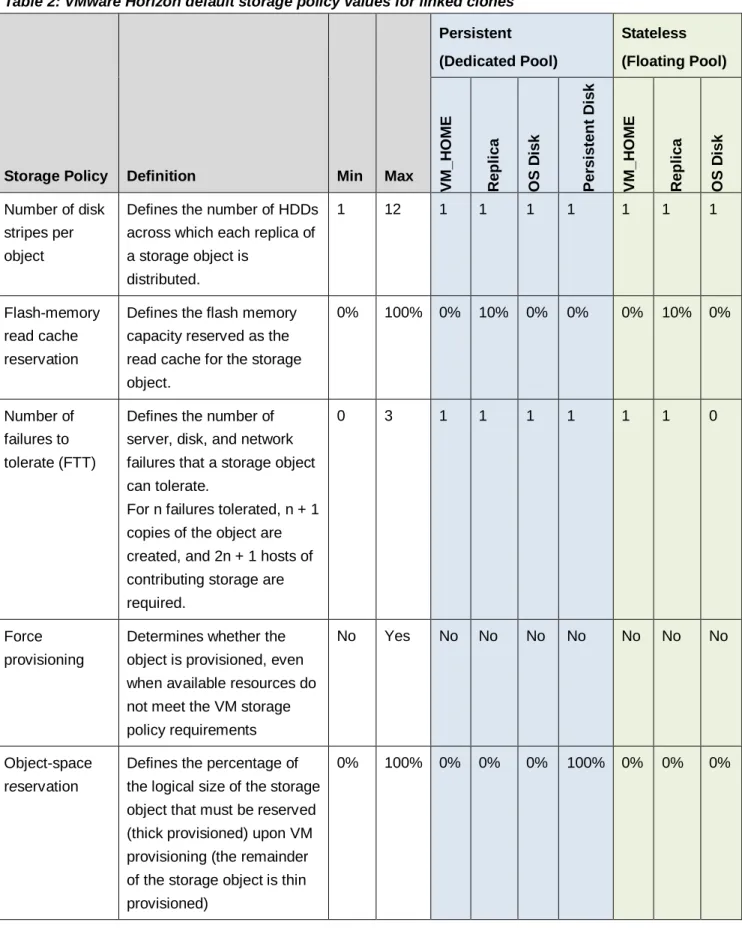
VMware Horizon has predefined storage policies and default values for linked clones and full clones. Table 2 lists the VMware Horizon default storage policies for linked clones.
9 Reference Architecture: Lenovo Client Virtualization with VMware Horizon
version 1.2
Table 2: VMware Horizon default storage policy values for linked clones
Storage Policy Definition Min Max
Persistent (Dedicated Pool) Stateless (Floating Pool) VM_ H O ME R e p li c a O S D is k Pe rs is te n t D is k VM_ H O ME R e p li c a O S D is k
Number of disk stripes per object
Defines the number of HDDs across which each replica of a storage object is
distributed.
1 12 1 1 1 1 1 1 1
Flash-memory read cache reservation
Defines the flash memory capacity reserved as the read cache for the storage object.
0% 100% 0% 10% 0% 0% 0% 10% 0%
Number of failures to tolerate (FTT)
Defines the number of server, disk, and network failures that a storage object can tolerate.
For n failures tolerated, n + 1 copies of the object are created, and 2n + 1 hosts of contributing storage are required.
0 3 1 1 1 1 1 1 0
Force provisioning
Determines whether the object is provisioned, even when available resources do not meet the VM storage policy requirements
No Yes No No No No No No No
Object-space reservation
Defines the percentage of the logical size of the storage object that must be reserved (thick provisioned) upon VM provisioning (the remainder of the storage object is thin provisioned)
10 Reference Architecture: Lenovo Client Virtualization with VMware Horizon
version 1.2
4 Operational model
This section describes the options for mapping the logical components of a client virtualization solution onto hardware and software. The “Operational model scenarios” section gives an overview of the available mappings and has pointers into the other sections for the related hardware. Each subsection contains
performance data, has recommendations on how to size for that particular hardware, and a pointer to the BOM configurations that are described in section 5 on page 49. The last part of this section contains some
deployment models for example customer scenarios.
4.1 Operational model scenarios
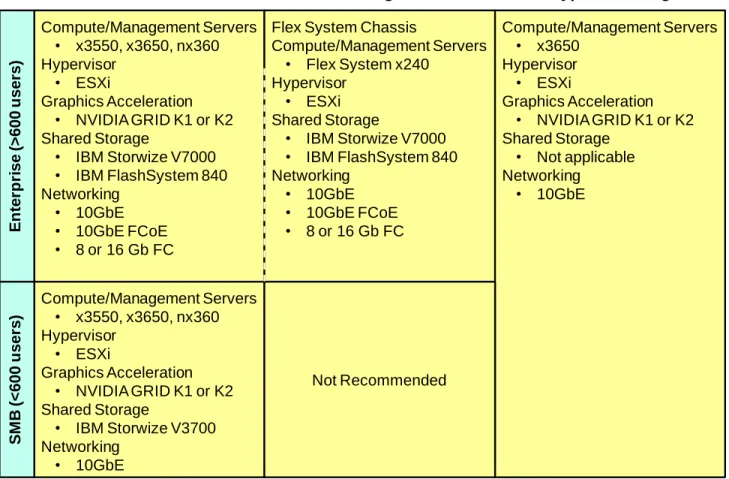
Figure 4 shows the following operational models (solutions) in Lenovo Client Virtualization: enterprise, small-medium business (SMB), and hyper-converged.
Traditional
Converged
Hyper-converged
Compute/Management Servers • x3550, x3650, nx360 Hypervisor
• ESXi
Graphics Acceleration • NVIDIA GRID K1 or K2 Shared Storage
• IBM Storwize V7000 • IBM FlashSystem 840 Networking
• 10GbE • 10GbE FCoE • 8 or 16 Gb FC
Flex System Chassis
Compute/Management Servers • Flex System x240
Hypervisor • ESXi Shared Storage
• IBM Storwize V7000 • IBM FlashSystem 840 Networking
• 10GbE • 10GbE FCoE • 8 or 16 Gb FC
Compute/Management Servers • x3550, x3650, nx360 Hypervisor
• ESXi
Graphics Acceleration • NVIDIA GRID K1 or K2 Shared Storage
• IBM Storwize V3700 Networking • 10GbE Compute/Management Servers • x3650 Hypervisor • ESXi Graphics Acceleration • NVIDIA GRID K1 or K2 Shared Storage
• Not applicable Networking • 10GbE Not Recommended En ter p ri se (> 600 u ser s) SM B (< 600 u ser s)
Figure 4: Operational model scenarios
The vertical axis is split into two halves: greater than 600 users is termed Enterprise and less than 600 is termed SMB. The 600 user split is not exact and provides rough guidance between Enterprise and SMB. The last column in Figure 4 (labelled “hyper-converged”) spans both halves because a hyper-converged solution can be deployed in a linear fashion from a small number of users (100) up to a large number of users (>4000). The horizontal axis is split into three columns. The left-most column represents traditional rack-based systems with top-of-rack (TOR) switches and shared storage. The middle column represents converged systems where the compute, networking, and sometimes storage are converged into a chassis, such as the Flex System. The
11 Reference Architecture: Lenovo Client Virtualization with VMware Horizon
version 1.2
right-most column represents hyper-converged systems and the software that is used in these systems. For the purposes of this reference architecture, the traditional and converged columns are merged for enterprise solutions; the only significant differences are the networking, form factor, and capabilities of the compute servers.
Converged systems are not generally recommended for the SMB space because the converged hardware chassis can be more overhead when only a few compute nodes are needed. Other compute nodes in the converged chassis can be used for other workloads to make this hardware architecture more cost-effective. The VMware ESXi 6.0 hypervisor is recommended for all operational models. Similar performance results were also achieved with the ESXi 5.5 U2 hypervisor. The ESXi hypervisor is convenient because it can boot from a USB flash drive or “boot from SAN” and does not require any extra local storage.
4.1.1
Enterprise operational model
For the enterprise operational model, see the following sections for more information about each component, its performance, and sizing guidance:
4.2 Hypervisor support
4.3 Compute servers for virtual desktops 4.4 Compute servers for hosted desktops 4.6 Graphics Acceleration
4.7 Management servers 4.8 Systems management 4.9 Shared storage 4.10 Networking 4.11 Racks 4.12 Proxy server
To show the enterprise operational model for different sized customer environments, four different sizing models are provided for supporting 600, 1500, 4500, and 10000 users.
The SMB model is the same as the Enterprise model for traditional systems.
4.1.2
Hyper-converged operational model
For the hyper-converged operational model, see the following sections for more information about each component, its performance, and sizing guidance:
4.2 Hypervisor support
4.5 Compute servers for hyper-converged 4.6 Graphics Acceleration
4.7 Management servers 4.8 Systems management 4.10.1 10 GbE networking 4.11 Racks
12 Reference Architecture: Lenovo Client Virtualization with VMware Horizon
version 1.2
To show the hyper-converged operational model for different sized customer environments, four different sizing models are provided for supporting 300, 600, 1500, and 3000 users. The management server VMs for a hyper-converged cluster can either be in a separate hyper-converged cluster or on traditional shared storage.
4.2 Hypervisor support
The VMware Horizon reference architecture was tested with VMware ESXi 6.0 hypervisor.
The hypervisor is convenient because it can start from a USB flash drive and does not require any more local storage. Alternatively, ESXi can be booted from SAN shared storage. For the VMware ESXi hypervisor, the number of vCenter clusters depends on the number of compute servers.
For stateless desktops, local SSDs can be used to store the VMware replicas and linked clones for improved performance. Two replicas must be stored for each master image. Each stateless virtual desktop requires a linked clone, which tends to grow over time until it is refreshed at log out. Two enterprise high speed 200 GB SSDs in a RAID 0 configuration should be sufficient for most user scenarios; however, 400 GB (or even 800 GB SSDs) might be needed. Because of the stateless nature of the architecture, there is little added value in configuring reliable SSDs in more redundant configurations.
To use the latest version ESXi, download the image from the following website and upgrade by using vCenter: ibm.com/systems/x/os/vmware/.
4.3 Compute servers for virtual desktops
This section describes stateless and dedicated virtual desktop models. Stateless desktops that allow live migration of a VM from one physical server to another are considered the same as dedicated desktops because they both require shared storage. In some customer environments, stateless and dedicated desktop models might be required, which requires a hybrid implementation.
Compute servers are servers that run a hypervisor and host virtual desktops. There are several considerations for the performance of the compute server, including the processor family and clock speed, the number of processors, the speed and size of main memory, and local storage options.
The use of the Aero theme in Microsoft Windows® 7 or other intensive workloads has an effect on the
maximum number of virtual desktops that can be supported on each compute server. Windows 8 also requires more processor resources than Windows 7, whereas little difference was observed between 32-bit and 64-bit Windows 7. Although a slower processor can be used and still not exhaust the processor power, it is a good policy to have excess capacity.
Another important consideration for compute servers is system memory. For stateless users, the typical range of memory that is required for each desktop is 2 GB - 4 GB. For dedicated users, the range of memory for each desktop is 2 GB - 6 GB. Designers and engineers that require graphics acceleration might need 8 GB - 16 GB of RAM per desktop. In general, power users that require larger memory sizes also require more virtual processors. This reference architecture standardizes on 2 GB per desktop as the minimum requirement of a Windows 7 desktop. The virtual desktop memory should be large enough so that swapping is not needed and vSwap can be disabled.
13 Reference Architecture: Lenovo Client Virtualization with VMware Horizon
version 1.2
4.3.1
Intel Xeon E5-2600 v3 processor family servers
This section shows the performance results and sizing guidance for Lenovo compute servers based on the Intel Xeon E5-2600 v3 processors (Haswell).
ESXi 6.0 performance results
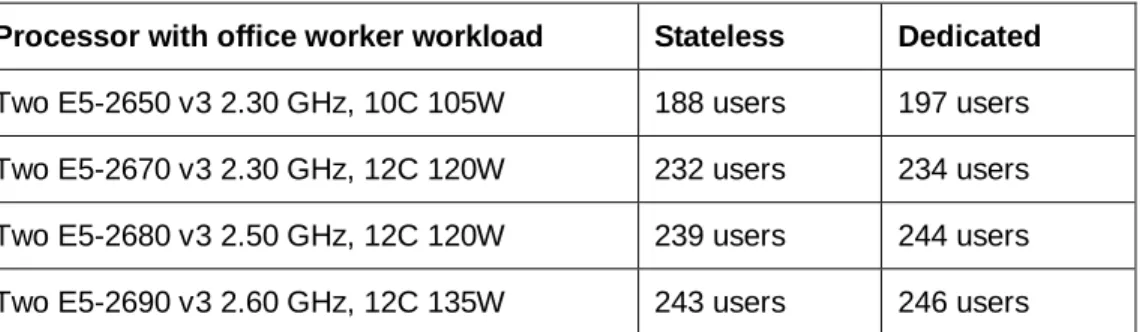
Table 3 lists the Login VSI performance of E5-2600 v3 processors from Intel that use the Login VSI 4.1 office worker workload with ESXi 6.0. Similar performance results were also achieved with ESXi 5.5 U2.
Table 3: Performance with office worker workload
Processor with office worker workload Stateless Dedicated Two E5-2650 v3 2.30 GHz, 10C 105W 188 users 197 users Two E5-2670 v3 2.30 GHz, 12C 120W 232 users 234 users Two E5-2680 v3 2.50 GHz, 12C 120W 239 users 244 users Two E5-2690 v3 2.60 GHz, 12C 135W 243 users 246 users Table 4 lists the results for the Login VSI 4.1 knowledge worker workload. Table 4: Performance with knowledge worker workload
Processor with knowledge worker workload Stateless Dedicated Two E5-2680 v3 2.50 GHz, 12C 120W 189 users 190 users Two E5-2690 v3 2.60 GHz, 12C 135W 191 users 200 users Table 5 lists the results for the Login VSI 4.1 power worker workload.
Table 5: Performance with power worker workload
Processor with power worker workload Stateless Dedicated Two E5-2680 v3 2.50 GHz, 12C 120W 178 users 174 users
These results indicate the comparative processor performance. The following conclusions can be drawn: The performance for stateless and dedicated virtual desktops is similar.
The Xeon E5-2650v3 processor has performance that is similar to the previously recommended Xeon E5-2690v2 processor (IvyBridge), but uses less power and is less expensive.
The Xeon E5-2690v3 processor does not have significantly better performance than the Xeon E5-2680v3 processor; therefore, the E5-2680v3 is preferred because of the lower cost.
Between the Xeon E5-2650v3 (2.30 GHz, 10C 105W) and the Xeon E5-2680v3 (2.50 GHz, 12C 120W) series processors are the Xeon E5-2660v3 (2.6 GHz 10C 105W) and the Xeon E5-2670v3 (2.3GHz 12C 120W) series processors. The cost per user increases with each processor but with a corresponding increase in user density. The Xeon E5-2680v3 processor has good user density, but the significant increase in cost might outweigh this advantage. Also, many configurations are bound by memory; therefore, a faster processor might not provide any added value. Some users require the fastest processor and for those users, the Xeon
14 Reference Architecture: Lenovo Client Virtualization with VMware Horizon
version 1.2
E5-2680v3 processor is the best choice. However, the Xeon E5-2650v3 processor is recommended for an average configuration. The Xeon E5-2680v3 processor is recommended for power workers.
Previous Reference Architectures used Login VSI 3.7 medium and heavy workloads. Table 6 gives a
comparison with the newer Login VSI 4.1 office worker and knowledge worker workloads. The table shows that Login VSI 3.7 is on average 20% to 30% higher than Login VSI 4.1.
Table 6: Comparison of Login VSI 3.7 and 4.1 Workloads
Processor Workload Stateless Dedicated
Two E5-2650 v3 2.30 GHz, 10C 105W 4.1 Office worker 188 users 197 users Two E5-2650 v3 2.30 GHz, 10C 105W 3.7 Medium 254 users 260 users Two E5-2690 v3 2.60 GHz, 12C 135W 4.1 Office worker 243 users 246 users Two E5-2690 v3 2.60 GHz, 12C 135W 3.7 Medium 316 users 313 users Two E5-2690 v3 2.60 GHz, 12C 135W 4.1 Knowledge worker 191 users 200 users Two E5-2690 v3 2.60 GHz, 12C 135W 3.7 Heavy 275 users 277 users
Table 7 compares the E5-2600 v3 processors with the previous generation E5-2600 v2 processors by using the Login VSI 3.7 workloads to show the relative performance improvement. On average, the E5-2600 v3 processors are 25% - 30% faster than the previous generation with the equivalent processor names. Table 7: Comparison of E5-2600 v2 and E5-2600 v3 processors
Processor Workload Stateless Dedicated
Two E5-2650 v2 2.60 GHz, 8C 85W 3.7 Medium 202 users 205 users Two E5-2650 v3 2.30 GHz, 10C 105W 3.7 Medium 254 users 260 users Two E5-2690 v2 3.0 GHz, 10C 130W 3.7 Medium 240 users 260 users Two E5-2690 v3 2.60 GHz, 12C 135W 3.7 Medium 316 users 313 users Two E5-2690 v2 3.0 GHz, 10C 130W 3.7 Heavy 208 users 220 users Two E5-2690 v3 2.60 GHz, 12C 135W 3.7 Heavy 275 users 277 users
Compute server recommendation for Office and Knowledge workers
The default recommendation for this processor family is the Xeon E5-2650v3 processor and 384 GB of system memory because this configuration provides the best coverage for a range of users. For users who need VMs that are larger than 3 GB, Lenovo recommends the use of up to 768 GB and the Xeon E5-2680v3 processor. Lenovo testing shows that 150 users per server is a good baseline and has an average of 76% usage of the processors in the server. If a server goes down, users on that server must be transferred to the remaining servers. For this degraded failover case, Lenovo testing shows that 180 users per server have an average of 89% usage of the processor. It is important to keep this 25% headroom on servers to cope with possible failover scenarios. Lenovo recommends a general failover ratio of 5:1.
15 Reference Architecture: Lenovo Client Virtualization with VMware Horizon
version 1.2
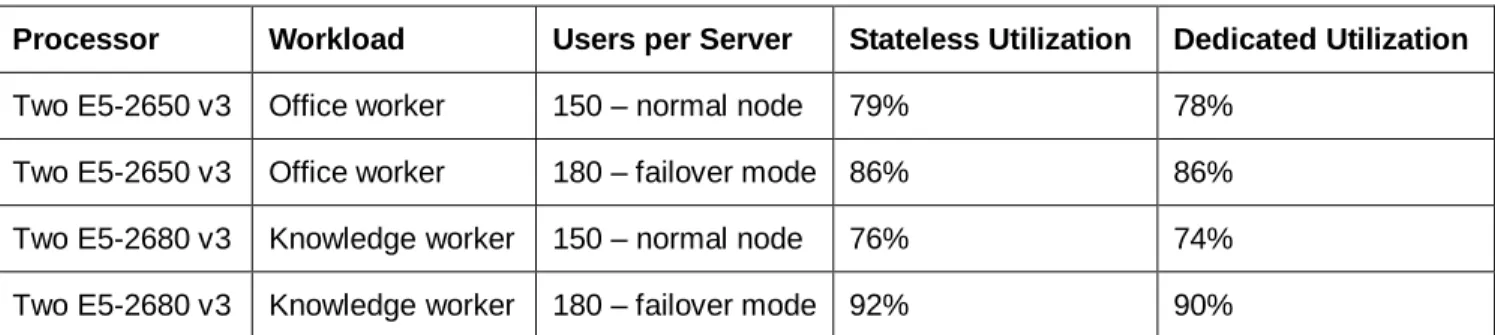
Table 8 lists the processor usage with ESXi for the recommended user counts for normal mode and failover mode.
Table 8: Processor usage
Processor Workload Users per Server Stateless Utilization Dedicated Utilization Two E5-2650 v3 Office worker 150 – normal node 79% 78%
Two E5-2650 v3 Office worker 180 – failover mode 86% 86% Two E5-2680 v3 Knowledge worker 150 – normal node 76% 74% Two E5-2680 v3 Knowledge worker 180 – failover mode 92% 90%
Table 9 lists the recommended number of virtual desktops per server for different VM memory sizes. The number of users is reduced in some cases to fit within the available memory and still maintain a reasonably balanced system of compute and memory.
Table 9: Recommended number of virtual desktops per server
Processor E5-2650v3 E5-2650v3 E5-2680v3
VM memory size 2 GB (default) 3 GB 4 GB
System memory 384 GB 512 GB 768 GB
Desktops per server (normal mode) 150 140 150
Desktops per server (failover mode) 180 168 180
Table 10 lists the approximate number of compute servers that are needed for different numbers of users and VM sizes.
Table 10: Compute servers needed for different numbers of users and VM sizes
Desktop memory size (2 GB or 4 GB) 600 users 1500 users 4500 users 10000 users
Compute servers @150 users (normal) 5 10 30 68
Compute servers @180 users (failover) 4 8 25 56
Failover ratio 4:1 4:1 5:1 5:1
Desktop memory size (3 GB) 600 users 1500 users 4500 users 10000 users
Compute servers @140 users (normal) 5 11 33 72
Compute servers @168 users (failover) 4 9 27 60
Failover ratio 4:1 4.5:1 4.5:1 5:1
Compute server recommendation for power workers
For power workers, the default recommendation for this processor family is the Xeon E5-2680v3 processor and 384 GB of system memory. For users who need VMs that are larger than 3 GB, Lenovo recommends up to 768 GB of system memory.
16 Reference Architecture: Lenovo Client Virtualization with VMware Horizon
version 1.2
Lenovo testing shows that 125 users per server is a good baseline and has an average of 86% usage of the processors in the server. If a server goes down, users on that server must be transferred to the remaining servers. For this degraded failover case, Lenovo testing shows that 150 users per server have an average of 92% usage of the processor. It is important to keep this 25% headroom on servers to cope with possible failover scenarios. Lenovo recommends a general failover ratio of 5:1.
Table 11 lists the processor usage with ESXi for the recommended user counts for normal mode and failover mode.
Table 11: Processor usage
Processor Workload Users per Server Stateless Utilization Dedicated Utilization Two E5-2680 v3 Power worker 125 – normal node 87% 85%
Two E5-2680 v3 Power worker 150 – failover mode 93% 92%
Table 12 lists the recommended number of virtual desktops per server for different VM memory. The number of power users is reduced to fit within the available memory and still maintain a reasonably balanced system of compute and memory.
Table 12: Recommended number of virtual desktops per server
Processor E5-2680v3 E5-2680v3 E5-2680v3
VM memory size 3 GB (default) 4 GB 6 GB
System memory 384 GB 512 GB 768 GB
Desktops per server (normal mode) 105 105 105
Desktops per server (failover mode) 126 126 126
Table 13 lists the approximate number of compute servers that are needed for different numbers of power users and VM sizes.
Table 13: Compute servers needed for different numbers of power users and VM sizes
Desktop memory size 600 users 1500 users 4500 users 10000 users
Compute servers @105 users (normal) 6 15 43 96
Compute servers @126 users (failover) 5 12 36 80
Failover ratio 5:1 4:1 5:1 5:1
4.3.2
Intel Xeon E5-2600 v3 processor family servers with Atlantis USX
Atlantis USX provides storage optimization by using a 100% software solution. There is a cost for processor and memory usage while offering decreased storage usage and increased input/output operations per second (IOPS). This section contains performance measurements for processor and memory utilization of USX simple hybrid volumes and gives an indication of the storage usage and performance.
For persistent desktops, USX simple hybrid volumes provide acceleration to shared storage. For environments that are not using Atlantis USX, it is recommended to use linked clones to conserve shared storage space.
17 Reference Architecture: Lenovo Client Virtualization with VMware Horizon
version 1.2
However, with Atlantis USX hybrid volumes, it is recommended to use full clones for persistent desktops because they de-duplicate more efficiently than the linked clones and can support more desktops per server. For stateless desktops, USX simple hybrid volumes provide storage acceleration for local SSDs. USX simple in-memory volumes are not considered for stateless desktops because they require a large amount of memory. Table 14 lists the Login VSI performance of USX simple hybrid volumes that uses two E5-2680 v3 processors and ESXi 6.0.
Table 14: ESXi 6.0 performance with USX hybrid volume
Login VSI 4.1 Workload Hypervisor Stateless Dedicated
Office worker ESXi 6.0 199 users 203 users
Knowledge worker ESXi 6.0 179 users 179 users
Power worker ESXi 6.0 158 users 152 users
A comparison of performance with and without the Atlantis VM shows that increase of 20 - 30% with the Atlantis VM. This result is to be expected and it is recommended that higher-end processors (such as the E5-2680v3) are used to maximize density.
For office workers and knowledge workers, Lenovo testing shows that 125 users per server is a good baseline and has an average of 80% usage of the processors in the server. If a server goes down, users on that server must be transferred to the remaining servers. For this degraded failover case, Lenovo testing shows that 150 users per server have an average of 92% usage of the processor. For power workers, Lenovo testing shows that 100 users per server is a good baseline and has an average of 78% usage of the processors in the server. If a server goes down, users on that server must be transferred to the remaining servers. For this degraded failover case, Lenovo testing shows that 120 users per server have an average of 89% usage of the processor. It is important to keep this 25% headroom on servers to cope with possible failover scenarios. Lenovo
recommends a general failover ratio of 5:1.
Table 15 lists the processor usage with ESXi for the recommended user counts for normal mode and failover mode.
Table 15: Processor usage
Processor Workload Users per Server Stateless Utilization Dedicated Utilization Two E5-2680 v3 Knowledge worker 125 – normal node 80% 80%
Two E5-2680 v3 Knowledge worker 150 – failover mode 91% 93%
Two E5-2680 v3 Power worker 100 – normal node 75% 81%
Two E5-2680 v3 Power worker 120 – failover mode 87% 90%
It is still a best practice to separate the user folder and any other shared folders into separate storage. This configuration leaves all of the other possible changes that might occur in a full clone to be stored in the simple hybrid volume. This configuration is highly dependent on the environment. Testing by Atlantis Computing suggests that 3.5 GB of unique data per persistent desktop is sufficient.
18 Reference Architecture: Lenovo Client Virtualization with VMware Horizon
version 1.2
Atlantis USX uses de-duplication and compression to reduce the storage required for VMs. Experience shows that an 85% - 95% reduction is possible, depending on the VMs.
Assuming each VM is 30 GB, the uncompressed storage requirement for 150 full clones is 4500 GB. The simple hybrid volume needs to be only 10% of this requirement, which is 450 GB. To allow some room for growth and the Atlantis VM, a 600 GB volume should be allocated.
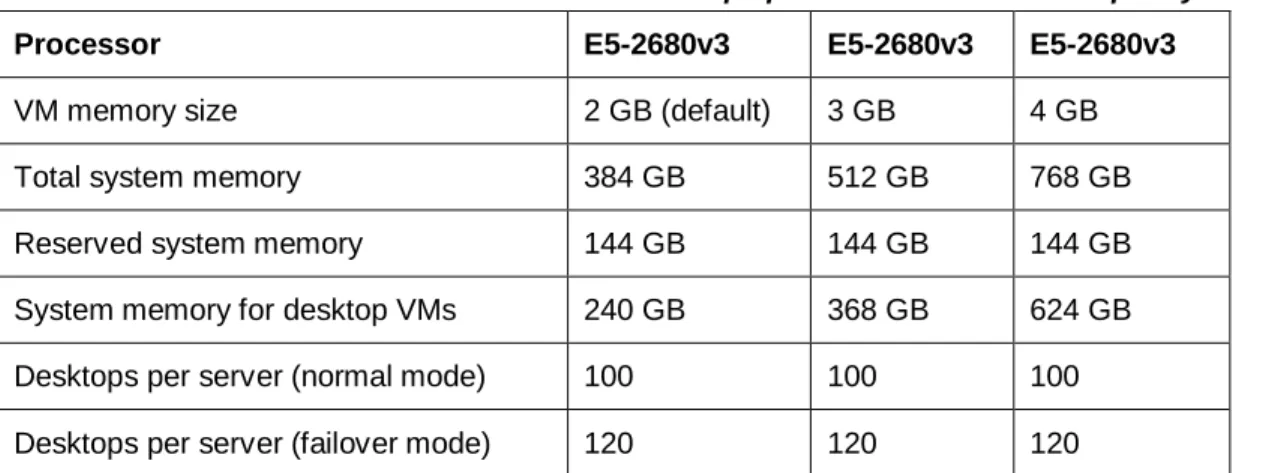
Atlantis has some requirements on memory. The VM requires 5 GB, and 5% of the storage volume is used for in memory metadata. In the example of a 450 GB volume, this size is 22.5 GB. The default size for the RAM cache is 15%, but it is recommended to increase this size to 25% for the write-heavy VDI workload. In the example of a 450 GB volume, this size is 112.5 GB.
Assuming 4 GB for the hypervisor, 144 GB (22.5 + 112.5 + 5 + 4) of system memory should be reserved. It is recommended that at least 384 GB of server memory is used for USX simple hybrid VDI deployments. Proof of concept (POC) testing can help determine the actual amount of RAM.
Table 16 lists the recommended number of virtual desktops per server for different VM memory sizes. Table 16: Recommended number of virtual desktops per server with USX simple hybrid volumes
Processor E5-2680v3 E5-2680v3 E5-2680v3
VM memory size 2 GB (default) 3 GB 4 GB
Total system memory 384 GB 512 GB 768 GB
Reserved system memory 144 GB 144 GB 144 GB
System memory for desktop VMs 240 GB 368 GB 624 GB
Desktops per server (normal mode) 100 100 100
Desktops per server (failover mode) 120 120 120
Table 17 lists the number of compute servers that are needed for different numbers of users and VM sizes. A server with 384 GB system memory is used for 2 GB VMs, 512 GB system memory is used for 3 GB VMs, and 768 GB system memory is used for 4 GB VMs.
Table 17: Compute servers needed for different numbers of users with USX simple hybrid volumes 600 users 1500 users 4500 users 10000 users
Compute servers for 100 users (normal) 6 15 45 100
Compute servers for 120 users (failover) 5 13 38 84
Failover ratio 5:1 6.5:1 5:1 5:1
As a result of the use of Atlantis simple hybrid volumes, the only read operations are to fill the cache for the first time. For all practical purposes, the remaining reads are few and at most 1 IOPS per VM. Writes to persistent storage are still needed for starting, logging in, remaining in steady state, and logging off, but the overall IOPS count is substantially reduced.
Assuming the use of a fast, low-latency shared storage device, a single VM boot can take 20 - 25 seconds to get past the display of the logon window and get all of the other services fully loaded. This process takes this
19 Reference Architecture: Lenovo Client Virtualization with VMware Horizon
version 1.2
time because boot operations are mainly read operations, although the actual boot time can vary depending on the VM.
Login time for a single desktop varies, depending on the VM image but can be extremely quick. In some cases, the login will take less than 6 seconds. Scale-out testing across a cluster of servers shows that one new login every 6 seconds can be supported over a long period. Therefore, at any one instant, there can be multiple logins underway and the main bottleneck is the processor.
4.4 Compute servers for hosted desktops
This section describes compute servers for hosted desktops, which is a new feature in VMware Horizon 6.x. Hosted desktops are more suited to task workers that require little in desktop customization.
As the name implies, multiple desktops share a single VM; however, because of this sharing, the compute resources often are exhausted before memory. Lenovo testing showed that 128 GB of memory is sufficient for servers with two processors.
Other testing showed that the performance differences between four, six, or eight VMs is minimal; therefore, four VMs are recommended to reduce the license costs for Windows Server 2012 R2.
For more information, see “BOM for hosted desktops” section on page 54.
4.4.1
Intel Xeon E5-2600 v3 processor family servers
Table 18 lists the processor performance results for different size workloads that use four Windows Server 2012 R2 VMs with the Xeon E5-2600v3 series processors and ESXi 6.0 hypervisor.
Table 18: Performance results for hosted desktops using the E5-2600 v3 processors
Processor Workload Hosted Desktops
Two E5-2650 v3 2.30 GHz, 10C 105W Office Worker 222 users Two E5-2690 v3 2.60 GHz, 12C 135W Office Worker 298 users Two E5-2690 v3 2.60 GHz, 12C 135W Knowledge Worker 244 users
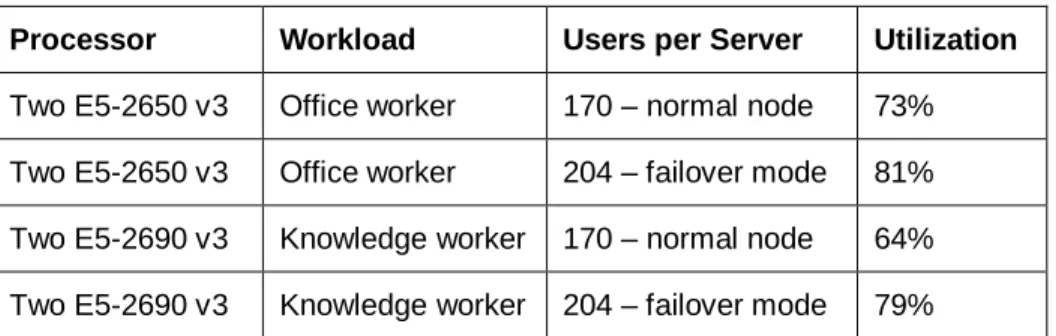
Lenovo testing shows that 170 hosted desktops per server is a good baseline. If a server goes down, users on that server must be transferred to the remaining servers. For this degraded failover case, Lenovo recommends 204 hosted desktops per server. It is important to keep 25% headroom on servers to cope with possible failover scenarios. Lenovo recommends a general failover ratio of 5:1.
Table 19 lists the processor usage for the recommended number of users. Table 19: Processor usage
Processor Workload Users per Server Utilization Two E5-2650 v3 Office worker 170 – normal node 73% Two E5-2650 v3 Office worker 204 – failover mode 81% Two E5-2690 v3 Knowledge worker 170 – normal node 64% Two E5-2690 v3 Knowledge worker 204 – failover mode 79%
20 Reference Architecture: Lenovo Client Virtualization with VMware Horizon
version 1.2
Table 20 lists the number of compute servers that are needed for different number of users. Each compute server has 128 GB of system memory for the four VMs.
Table 20: Compute servers needed for different numbers of users and VM sizes
600 users 1500 users 4500 users 10000 users
Compute servers for 170 users (normal) 4 10 27 59
Compute servers for 204 users (failover) 3 8 22 49
Failover ratio 3:1 4:1 4.5:1 5:1
4.5 Compute servers for hyper-converged systems
This section presents the compute servers for different hyper-converged systems including VMware VSAN and Atlantis USX. Additional processing and memory is often required to support storing data locally, as well as additional SSDs or HDDs. Typically HDDs are used for data capacity and SSDs and memory is used for provide performance. As the price per GB for flash memory continues to reduce, there is a trend to also use all SSDs to provide the overall best performance for hyper-converged systems.
For more information, see “BOM for hyper-converged compute servers” on page 58.
4.5.1
Intel Xeon E5-2600 v3 processor family servers with VMware VSAN
VMware VSAN is tested by using the office worker and knowledge worker workloads of Login VSI 4.1. Four Lenovo x3650 M5 servers with E5-2680v3 processors were networked together by using a 10 GbE TOR switch with two 10 GbE connections per server.
Server Performance and Sizing Recommendations
Each server was configured with two disk groups of different sizes. A single disk group does not provide the necessary resiliency. The two disk groups per server had one 400 GB SSD and three or six HDDs. Both disk groups provided more than enough capacity for the linked clone VMs.
Table 21 lists the Login VSI results for stateless desktops by using linked clones and the VMware default storage policy of number of failures to tolerate (FTT) of 0 and stripe of 1.
Table 21: Performance results for stateless desktops
Workload
Storage Policy Stateless desktops tested
Used Capacity
VSI max for 2 disk groups
OS Disk 1 SSD and
6 HDDs
1 SSD and 3 HDDs Office worker FTT = 0 and Stripe = 1 1000 5.26 TB 888 886 Knowledge worker FTT = 0 and Stripe = 1 800 4.45 TB 696 674 Power worker FTT = 0 and Stripe = 1 800 4.45 TB N/A 590
Table 22 lists the Login VSI results for persistent desktops by using linked clones and the VMware default storage policy of fault tolerance of 1 and 1 stripe.
21 Reference Architecture: Lenovo Client Virtualization with VMware Horizon
version 1.2 Table 22: Performance results for dedicated desktops
Test Scenario
Storage Policy Dedicated desktops tested
Used Capacity
VSI max for 2 disk groups OS
Disk
Persisten t Disk
1 SSD and 6 HDDs
1 SSD and 3 HDDs Office worker FTT = 1
Stripe = 1
FTT = 1 Stripe = 1
1000 10.86 TB 905 895
Knowledge worker FTT = 1 Stripe = 1
FTT = 1 Stripe = 1
800 9.28 TB 700 668
Power worker FTT = 1 Stripe = 1
FTT = 1 Stripe = 1
800 9.28 TB N/A 590
These results show that there is no significant performance difference between disk groups with three and seven HDDs and there are enough IOPS for the disk writes. Persistent desktops might need more hard drive capacity or larger SSDs to improve performance for full clones or provide space for growth of linked clones. The Lenovo M5210 raid controller for the x3650 M5 can be used in two modes: integrated MegaRaid (iMR) mode without the flash cache module or MegaRaid (MR) mode with the flash cache module and at least 1 GB of battery backed flash memory. In both modes, RAID 0 virtual drives were configured for use by the disk groups. For more information, see this website: lenovopress.com/tips1069.html.
Table 23 lists the measured queue depth for the M5210 raid controller in iMR and MR modes. Lenovo
recommends using the M5210 raid controller with the flash cache module because it has a much better queue depth and has better IOPS performance.
Table 23: Raid Controller Queue Depth
Raid Controller iMR mode queue depth MR mode queue depth Drive queue depth
M5210 234 895 128
Compute server recommendation for Office workers and Knowledge workers
Lenovo testing shows that 125 users per server is a good baseline and has an average of 77% usage of the processors in the server. If a server goes down, users on that server must be transferred to the remaining servers. For this degraded failover case, Lenovo testing shows that 150 users per server have an average of 89% usage rate. It is important to keep 25% headroom on servers to cope with possible failover scenarios. Lenovo recommends a general failover ratio of 5:1.
22 Reference Architecture: Lenovo Client Virtualization with VMware Horizon
version 1.2
Table 24 lists the processor usage for the recommended number of users Table 24: Processor usage
Processor Workload Users per Server Stateless Utilization Dedicated Utilization Two E5-2680 v3 Office worker 125 – normal node 51% 50%
Two E5-2680 v3 Office worker 150 – failover mode 62% 59% Two E5-2680 v3 Knowledge worker 125 – normal node 62% 61% Two E5-2680 v3 Knowledge worker 150 – failover mode 81% 78%
Table 25 lists the recommended number of virtual desktops per server for different VM memory sizes. The number of users is reduced in some cases to fit within the available memory and still maintain a reasonably balanced system of compute and memory.
Table 25: Recommended number of virtual desktops per server for VSAN
Processor E5-2680 v3 E5-2680 v3 E5-2680 v3
VM memory size 2 GB (default) 3 GB 4 GB
System memory 384 GB 512 GB 768 GB
VSAN overhead 32 GB 32 GB 32 GB
Desktops per server (normal mode) 125 125 125
Desktops per server (failover mode) 150 150 150
Table 26 shows the number of servers that is needed for different numbers of users. By using the target of 125 users per server, the maximum number of users is 4000. The minimum number of servers that is required for VSAN is 3 and this requirement is reflected in the extra capacity for 300 user case because the configuration can actually support up to 450 users.
Table 26: Compute servers needed for different numbers of users for VSAN
300 users 600 users 1500 users 3000 users
Compute servers for 125 users (normal) 4 5 12 24
Compute servers for 150 users (failover) 3 4 10 20
Failover ratio 3:1 4:1 5:1 5:1
Compute server recommendation for Power workers
Lenovo testing shows that 100 power users per server is a good baseline and has an average of 66% usage of the processors in the server. If a server goes down, users on that server must be transferred to the remaining servers. For this degraded failover case, Lenovo testing shows that 120 users per server have an average of 79% usage rate. It is important to keep 25% headroom on servers to cope with possible failover scenarios. Lenovo recommends a general failover ratio of 5:1.
23 Reference Architecture: Lenovo Client Virtualization with VMware Horizon
version 1.2
Table 27 lists the processor usage for the recommended number of users Table 27: Processor usage
Processor Workload Users per Server Stateless Utilization Dedicated Utilization Two E5-2680 v3 Power worker 100 – normal node 69% 63%
Two E5-2680 v3 Power worker 120 – failover mode 81% 78%
Table 28 lists the recommended number of virtual desktops per server for different VM memory sizes. The number of users is reduced in some cases to fit within the available memory and still maintain a reasonably balanced system of compute and memory.
Table 28: Recommended number of virtual desktops per server for VSAN
Processor E5-2680 v3 E5-2680 v3 E5-2680 v3
VM memory size 3 GB 4 GB 6 GB
System memory 384 GB 512 GB 768 GB
VSAN overhead 24 GB 32 GB 32 GB
Desktops per server (normal mode) 100 100 100
Desktops per server (failover mode) 120 120 120
Table 29 shows the number of servers that is needed for different numbers of users. By using the target of 100 users per server, the maximum number of power users is 3200. The minimum number of servers that is required for VSAN is three and this requirement is reflected in the extra capacity for 300 user case because the configuration can actually support up to 360 users.
Table 29: Compute servers needed for different numbers of users for VSAN
300 users 600 users 1500 users 3000 users
Compute servers for 100 users (normal) 4 6 15 30
Compute servers for 120 users (failover) 3 5 13 25
Failover ratio 3:1 5:1 6:1 5:1
VSAN processor and I/O usage graphs
The processor and I/O usage graphs from esxtop are helpful to understand the performance characteristics of VSAN. The graphs are for 150 users per server and three servers to show the worst-case load in a failover scenario.
Figure 5 shows the processor usage with three curves (one for each server). The Y axis is percentage usage 0% - 100%. The curves have the classic Login VSI shape with a gradual increase of processor usage and then flat during the steady state period. The curves then go close to 0 as the logoffs are completed.
24 Reference Architecture: Lenovo Client Virtualization with VMware Horizon
version 1.2
Stateless 450 users on 3 servers Dedicated 450 users on 3 servers
Figure 5: VSAN processor usage for 450 virtual desktops
Figure 6 shows the SSD reads and writes with six curves, one for each SSD. The Y axis is 0 - 10,000 IOPS for the reads and 0 - 3,000 IOPS for the writes. The read curves generally show a gradual increase of reads until the steady state and then drop off again for the logoff phase. This pattern is more well-defined for the second set of curves for the SSD writes.
Stateless 450 users on 3 servers Dedicated 450 users on 3 servers
Figure 6: VSAN SSD reads and writes for 450 virtual desktops
Figure 7 shows the HDD reads and writes with 36 curves, one for each HDD. The Y axis is 0 - 2,000 IOPS for the reads and 0 - 1,000 IOPS for the writes. The number of read IOPS has an average peak of 200 IOPS and
25 Reference Architecture: Lenovo Client Virtualization with VMware Horizon
version 1.2
many of the drives are idle much of the time. The number of write IOPS has a peak of 500 IOPS; however, as can be seen, the writes occur in batches as data is destaged from the SSD cache onto the greater capacity HDDs. The first group of write peaks is during the logon and last group of write peaks correspond to the logoff period.
Stateless 450 users on 3 servers Dedicated 450 users on 3 servers
Figure 7: VSAN HDD reads and writes for 450 virtual desktops
VSAN Resiliency Tests
An important part of a hyper-converged system is the resiliency to failures when a compute server is unavailable. System performance was measured for the following use cases that featured 450 users:
Enter maintenance mode by using the VSAN migration mode of “ensure accessibility” (VSAN default) Enter maintenance mode by using the VSAN migration mode of “no data migration”
Server power off by using the VSAN migration mode of “ensure accessibility” (VSAN default) For each use case, Login VSI was run and then the compute server was removed. This process was done during the login phase as new virtual desktops are logged in and during the steady state phase. For the steady state phase, 114 - 120 VMs must be migrated from the “failed” server to the other three servers with each server gaining 38 - 40 VMs.
26 Reference Architecture: Lenovo Client Virtualization with VMware Horizon
version 1.2
Table 30 lists the completion time or downtime for the VSAN system with the three different use cases. Table 30: VSAN Resiliency Testing and Recovery Time
Use Case vSAN Migration Mode
Login Phase Steady State Phase Completion
Time (seconds)
Downtime (seconds)
Completion Time (seconds)
Downtime (seconds)
Maintenance Mode Ensure Accessibility 605 0 598 0
Maintenance Mode No Data Migration 408 0 430 0
Server power off Ensure Accessibility N/A 226 N/A 316
For the two maintenance mode cases, all of the VMs migrated smoothly to the other servers and there was no significant interruption in the Login VSI test.
For the power off use case, there is a significant period for the system to readjust. During the login phase for a Login VSI test, the following process was observed:
1. All logged in users were logged out from the failed node.
2. Login failed for all new users logging to the desktops running on the failed node. 3. Desktop status changed to "Agent Unreachable" for all desktops in the failed node. 4. All desktops are migrated to other nodes.
5. Desktops status changed to "Available" 6. Login continued successfully for all new users.
In a production system, users with persistent desktops that are running on the failed server must login again after their VM was successfully migrated to another server. Stateless users can continue working almost immediately, assuming that the system is not at full capacity and other stateless VMs are ready to be used. Figure 8 shows the processor usage for the four servers during the login phase and steady state phase by using Login VSI with the knowledge worker workload when one of the servers is powered off. The processor spike for the three remaining servers is apparent.
Login Phase Steady State Phase
27 Reference Architecture: Lenovo Client Virtualization with VMware Horizon
version 1.2
There is an impact on performance and time lag if a hyper-converged server suffers a catastrophic failure yet VSAN can recover quite quickly. However, this situation is best avoided and it is important to build in
redundancy at multiple levels for all mission critical systems.
4.5.2
Intel Xeon E5-2600 v3 processor family servers with Atlantis USX
Atlantis USX is tested by using the knowledge worker workload of Login VSI 4.1. Four Lenovo x3650 M5 servers with E5-2680v3 processors were networked together by using a 10 GbE TOR switch. Atlantis USX was installed and four 400 GB SSDs per server were used to create an all-flash hyper-converged volume across the four servers that were running ESXi 5.5 U2.
This configuration was tested with 500 dedicated virtual desktops on four servers and then three servers to see the difference if one server is unavailable. Table 31 lists the processor usage for the recommended number of users.
Table 31: Processor usage for Atlantis USX
Processor Workload Servers Users per Server Utilization Two E5-2680 v3 Knowledge worker 4 125 – normal node 66% Two E5-2680 v3 Knowledge worker 3 167 – failover mode 89%
From these measurements, Lenovo recommends 125 user per server in normal mode and 150 users per server in failover mode. Lenovo recommends a general failover ratio of 5:1.
Table 32 lists the recommended number of virtual desktops per server for different VM memory sizes. Table 32: Recommended number of virtual desktops per server for Atlantis USX
Processor E5-2680 v3 E5-2680 v3 E5-2680 v3
VM memory size 2 GB (default) 3 GB 4 GB
System memory 384 GB 512 GB 768 GB
Memory for ESXi and Atlantis USX 63 GB 63 GB 63 GB
Memory for VMs 321 GB 449 GB 705 GB
Desktops per server (normal mode) 125 125 125
Desktops per server (failover mode) 150 150 150
Table 33 lists the approximate number of compute servers that are needed for different numbers of users and VM sizes.
Table 33: Compute servers needed for different numbers of users for Atlantis USX
Desktop memory size 300 users 600 users 1500 users 3000 users
Compute servers for 125 users (normal) 4 5 12 24
Compute servers for 150 users (failover) 3 4 10 20
28 Reference Architecture: Lenovo Client Virtualization with VMware Horizon
version 1.2
An important part of a hyper-converged system is the resiliency to failures when a compute server is no unavailable. Login VSI was run and then the compute server was powered off. This process was done during the steady state phase. For the steady state phase, 114 - 120 VMs were migrated from the “failed” server to the other three servers with each server gaining 38 - 40 VMs.
Figure 9 shows the processor usage for the four servers during the steady state phase and when one of the servers is powered off. The processor spike for the three remaining servers is noticeable.
Figure 9: Atlantis USX processor usage: server power off
There is an impact on performance and time lag if a hyper-converged server suffers a catastrophic failure yet VSAN can recover quite quickly. However, this situation is best avoided as it is important to build in redundancy at multiple levels for all mission critical systems.
4.6 Graphics Acceleration
The VMware ESXi 6.0 hypervisor supports the following options for graphics acceleration:
Dedicated GPU with one GPU per user, which is called virtual dedicated graphics acceleration (vDGA) mode.
Shared GPU with users sharing a GPU, which is called virtual shared graphics acceleration (vSGA) mode and is not recommended because of user contention for shared use of the GPU.
GPU hardware virtualization (vGPU) that partitions each GPU for 1 - 8 users. This option requires Horizon 6.1.
VMware also provides software emulation of a GPU, which can be processor-intensive and disruptive to other users who have a choppy experience because of reduced processor performance. Software emulation is not recommended for any user who requires graphics acceleration.
The performance of graphics acceleration was tested on the NVIDIA GRID K1 and GRID K2 adapters by using the Lenovo System x3650 M5 server and the Lenovo NeXtScale nx360 M5 server. Each of these servers supports up to two GRID adapters. No significant performance differences were found between these two servers when used for graphics acceleration and the results apply to both.