G00224286
Critical Capabilities for Mobile BI
Published: 10 April 2012
Analyst(s): Joao Tapadinhas
Mobile business intelligence is growing fast in the corporate landscape, with
many companies piloting or planning deployment initiatives. This research
will help BI leaders understand the disparate capabilities available in the
market and facilitate the selection of a mobile BI solution.
Key Findings
■ The key adoption drivers for mobile business intelligence (BI) relate to ease of use and an engaging experience. More advanced capabilities, such as the use of GPS or information exploration in offline mode, are only available in some of the tools, and don't generally drive user adoption.
■ Mobile BI solutions split into three technological categories. Most of them are native
applications for iOS or Android devices, a few others are typical Web-based solutions, and a third (growing) group is made up of hybrid solutions — rendering HTML content inside a native application container and behaving largely like their Web-based counterparts.
■ Several solutions promote a "design once, consume everywhere" authoring approach for desktop and mobile devices. This strategy alone fails to provide a good mobile experience, due to smaller screen sizes and touchscreen interfaces.
■ Most mobile BI vendors leverage mobile security capabilities, delivering secure authentication, VPN and Hypertext Transfer Protocol Secure (HTTPS) support, code signing and validation, application sandboxes, local data encryption and remote wipe, creating a BI ecosystem that is more secure than that of a traditional laptop setup.
Recommendations
For leaders of BI teams:
■ Make sure to optimize BI content for smaller screens and touch-based interfaces, to avoid user frustration and promote adoption.
■ Select the mobile BI tool according to the organization's required capabilities, and don't be restricted to the incumbent vendor if it fails to fulfill your needs. To meet your requirements, consider the addition of a pure-play mobile BI vendor, to augment the existing BI platform.
What You Need to Know
Mobility, in the form of smartphones and tablets acting as computing devices, has proved very popular with consumers, and is now making its way into the corporate market. Email is still the killer application, but an increasing number of initiatives are being launched in areas such as ERP, CRM, sales force automation and BI (which is covered by this report).
Confirming this trend, Gartner's latest survey of 1,364 organizations that use BI tools indicates that: 8% are actively using mobility for BI; an additional 13% are running pilot initiatives; and an
additional 33% have plans to deploy mobile BI within 12 months. This represents an unusual adoption rate for a BI capability, considering that its growth trigger, after a marginal uptake for years, was the release of the iPad in 2010 — just two years ago.
Traditional BI vendors are updating their platforms for mobility but, in some cases, they are lagging behind customer demand for ease of use, functionality or mobile ecosystem support (such as Google Android). Also, many require the latest platform version to deliver mobility capabilities — which isn't always the version deployed by organizations. These factors have created the
opportunity for a number of new players in the market, which are able to mobilize BI content from incumbent vendors by tapping into their platforms at the report definition layer, and which can "translate" report layouts and security definitions onto mobile devices.
These pure-play mobile BI vendors' tools may be more than a momentary answer to a market problem, as they can connect to multiple platforms (a common situation in many organizations), and work as BI information aggregators on mobile devices. We evaluate some of these solutions in this research note, as an alternative to traditional BI vendors' products.
Strategic Planning Assumption(s)
By 2013, 33% of BI functionality will be consumed via handheld devices.
Analysis
Introduction
Increasingly, the main question regarding mobile BI is, "How can we implement mobile BI?" rather than "Should we do it?" The challenge is not in proving its value — as it is easy to sell (to
executives, for example) — but in selecting the correct tool for a successful initiative, as many organizations lack an understanding about currently supported capabilities from incumbent vendors and new players in the market.
To help address this issue, this research evaluates 11 vendors with 12 products that could implement five typical use cases that fit a broad range of needs in organizations. They serve different user constituencies and represent an increasingly sophisticated level of maturity: ■ BI content mobilization — existing BI users that need mobility for basic BI consumption. ■ Mobile dashboards — executive and management roles in the organization.
■ Field workers' reports— sales, service and other workers on the go. ■ Mobile analytics— knowledge workers.
■ Mobile BI applications — customers and partners using customer-facing BI applications. To support this evaluation, each product was evaluated on 11 critical capabilities, examining and comparing the tools in terms of how they provide support for 45 items of functionality.
Product Class Definition
Mobile BI is not simply a BI Web portal accessed through a smartphone or tablet. To be able to act as mobile BI solutions, the tools must be able to deliver BI content that leverages the touchscreen experience, minimizing the drawbacks of smaller screens, low performance and reduced memory, and taking advantage of some of the unique capabilities of mobile devices, such as location awareness.
The products included in this research were built specifically (or at least optimized) to have relevant enhancements in most of those areas, and to be able to serve mobile devices adequately,
differentiating them from traditional Web portal access to BI content.
Critical Capabilities Definition
Mobile BI capabilities are still evolving as vendors gain experience in mobility and customers demand the right functionality to fulfill their needs. Most of the tools in the market focus on report and dashboard delivery, but more advanced and less common capabilities are also evaluated in this research. We assess the tools' ability to provide analytics, rich application functionality (such as multimedia or write-back to operational systems), and custom BI application development for mobile devices. Most organizations won't try to explore these capabilities in a first project, but BI leaders should take them into account to be able to define a road map that delivers more
sophisticated functionality in the future.
We consider 11 critical capabilities, divided into two groups:
Critical Capabilities for End Users
■ Information display and interaction. ■ Information exploration.
■ Context awareness. ■ Offline mode exploration. ■ Rich application functionality. ■ Multiple device support.
Critical Capabilities for Developers and System Administrators
■ Ease of use for developers.■ Application development. ■ Administration.
■ Security.
Each capability is further analyzed according to several functional items that will have different levels of relevance for different organizations, or even disparate implementations within the same organization. When selecting a mobile tool, BI leaders must go beyond the use case evaluation, and must identify the functionality items that are mandatory according to their business and technical requirements, to assess their level of support.
Evaluation Methodology Used
To be able to deliver a unified and coherent evaluation, we asked the participating vendors to identify their reference solution. In most cases these were Apple iPad solutions — the most pervasive device in mobile BI initiatives — although many initiatives also support other devices. We then used the set of questions presented below to assess 45 functionality items that were rated in each tool as: "no support," "partial support" or "full support," according to a broad range of evidence provided by vendors, such as:
■ Software demonstrations.
■ Recorded videos.
■ Screen shots.
■ Sample dashboards and applications.
■ Reference to user manual excerpts or other publicly available information.
■ Written responses.
This assessment of supported functionality played a major role in the product evaluation, and was complemented with a comparative analysis of how each tool fulfilled each of the eleven critical capabilities, resulting in a final score ranging from 1.0 to 5.0. Two solutions that provide full support for the touchscreen experience, for example, might do so with different levels of user-friendliness, and would be differentiated accordingly in the final scoring.
Critical Capabilities for End Users
The end user is the main target for this group of capabilities, and the experience provided is globally considered more relevant than the breadth and depth of functionality. With mobile BI, many
companies are looking for a solution to deliver BI capabilities to the CxO level, line of business managers, salespeople and field workers — all of them wary of complex information systems.
Information Display and Interaction
■ Rich visual experience. Does the application offer visually compelling outputs, with animated components, large icons, buttons, menus and selectors, an adequate font size according to the device's screen size, and engaging charts and table layouts?
■ Information overlay on maps. Is the application capable of overlaying on maps at least three types of geo-located information, such as shaded regions, bubbles, pie charts or routes? ■ Solutions without street-level detail, or that need to be integrated with external mapping
solutions that require additional licensing costs from customers, will be considered as having partial support.
■ Touchscreen experience. Is the touchscreen interface leveraged, adhering to mobile
conventions and using gestures (such as swipe, tap and pinch) to interact with the information, instead of, for example, scroll bars?
■ Are users able to interact with report components, getting feedback on their actions, such as tapping a bar on a chart and obtaining information detail?
■ Responsiveness. After the initial report loading, do users get an immediate response from their actions, such as opening a list box or changing a filter selection?
■ Solutions that require online interaction with a server, and that depend on communications, will be considered, at most, as having partial support.
■ Dashboard delivery. Does the application provide easy to use reports, structured in multiple pages or tabs, with prebuilt information visualizations such as key performance indicators (KPIs), tables, charts and maps, and is it able to provide a quick overview of a business topic to a casual user?
Information Exploration
■ Guided information exploration. Does the application allow predefined navigation from one report to another, by clicking data fields and other report components, allowing for the creation of information exploration paths?
■ Does the application provide drilling to details through interaction with table cells and chart components?
■ Does the application support linking between information visualizations, such as selecting a row in a table and changing the information displayed on an associated graph?
■ Table manipulation. Does the application support sort, column hiding, removal or repositioning within a table?
■ Manipulation of graphical visualizations. Does the application provide ways to manipulate visual representations of data, such as zooming and panning on a specific area of a bubble chart, or highlighting a line or bar?
■ Map manipulation. Are users able to drill into the information on maps and change detail or focus, with actions such as tap, zoom in and out, and pan?
■ Report development on the device. Can the user, on the mobile device, assemble and save new reports using prebuilt components or ad hoc query building functionality?
Analytics
■ Ad hoc information exploration. Is the user able to freely explore a set of predefined data, using methods such as drag and drop or multiple interactions with tables and charts, to build and change queries?
■ Packaged analytics. Does the application have available predefined, domain-specific, analytic models that the user can apply to a set of information or events, to generate a result (such as "additional product to recommend when customers make a purchase")?
■ Mobile optimized packaged applications will score better than desktop-based solutions that can also run on mobile devices.
■ Scenario simulations. Is the application capable of "what if" scenario modeling, enabling analysts to alter certain parameters to test their impact?
■ Impact analysis using dashboards with sliders, selectors or limited data entry features to evaluate an outcome will be considered partial support.
■ Analytic model development on the device. Is the user able to build and save analytic models, such as a predictive model, that can later be applied to derive an outcome?
■ Automated trend lines in graphs won't be considered as support in this item. But solutions that allow the development (on the desktop) of an analytic model and its inclusion as a metric or attribute in a mobile table or chart are considered as having partial support.
Context Awareness
■ GPS integration. Is the application able to use GPS to automatically filter reports, delivering, for example, the sales performance of a store being visited?
■ Camera integration. Is the application capable of using the device's camera to read bar codes or identify images to, for example, filter reports?
■ Voice integration. Is the application able to execute or filter reports according to voice commands?
■ Sensor integration. Is the application capable of sensor integration such as compass, gyroscope or accelerometer?
■ Solutions that can detect device rotation and adequately render BI content that respects orientation will be considered as having partial support.
Offline Mode Exploration
■ Offline information navigation. Are users able to navigate information without an active data connection, using locally stored information?
■ Automated information download. Is it possible to automatically download pre-selected reports or dashboards, in the background, or upon application activation?
■ On-demand information download. Are users able, on the device, to select and immediately download a report for later exploration without a data connection?
Rich Application Functionality
■ Collaboration. Does the application provide collaboration features such as annotations, screen shot emailing, discussion threads and mobile screen sharing for live discussions?
■ Alerting. Does the application provide notifications generated by predefined data monitoring rules or event occurrences (for example, KPI threshold achieved)?
■ Only integration with native mobile notification systems, such as Apple Push Notifications, will be considered as full support.
■ BI platform-based alerts through email or SMS will be considered as partial support. ■ Write-back. Is the application capable of simple data entry, such as filling a customer order
form, and writing back to business applications?
■ Is the application capable of workflow triggering in business applications?
■ Multimedia support. Does the application support rich content (such as photos, video, sound and text files) as part of a BI report?
■ Augmented reality. Is the application able to overlay information on top of a video stream from a camera, or a map that is being updated in real time according to the user's position and orientation?
Multiple Device Support
■ Research In Motion (RIM). Does the application support RIM smartphones and tablets? ■ Microsoft. Does the application support Microsoft smartphones and tablets?
Critical Capabilities for Developers and System Administrators
Developers and system administrators require a different set of capabilities. Their focus is on how to leverage existing BI assets — platforms, data sources, reports and metadata — in developing new reports and managing and securing the mobile devices. For more advanced scenarios, they will also care about the development of custom mobile BI applications for internal use or customer-facing deployment.
Ease of Use for Developers
■ Integrated development workbench. Does the application share a single workbench for desktop- and mobile-based report development, requiring similar skills?
■ Reuse of existing content. Is the application capable of displaying existing reports without modifications to the design?
■ Solutions that leverage existing content but that require conversion or rework to mobilize it will be considered as having partial support.
■ New content development. Is the process to create new mobile content quick and straightforward?
■ Solutions that require actions in different development workbenches, even if they are quick and straightforward, will be considered as partial support.
■ Cross-BI platform integration. Is the application capable of integration, at the metadata or report layer level — not only at a data layer level — with at least two external BI platforms from different vendors, and can it leverage metadata, security and users' definitions to mobilize existing BI content?
Application Development
■ Mobile application integration. Does the application allow the integration of mobile BI outputs into external applications, or the integration of external application components into the mobile BI application?
■ Application customization. Does the application provide customization capabilities for deployment with a "skinned" interface, using customers' brand and image?
■ Application distribution. Does the application provide processes for user-driven setup,
including, if needed, self-service installation and automated parameters definition to connect to a BI server, allowing for wide mobile BI application distribution (for example, for customer-facing BI applications)?
■ Development software development kit (SDK). Does the application provide a development SDK for advanced mobile BI application customization and integration?
■ To be evaluated as having full support, applications have to provide an SDK with specialized mobile BI capabilities.
Administration
■ Integrated mobile infrastructure. Does the application share the same server infrastructure as the desktop BI platform, leveraging existing metadata, security and users' definitions?
■ Administrator-driven setup. Does the application provide capabilities for administrator-driven setup, including, if needed, remote installation and automated parameters definition to connect to a BI server?
■ Application management. Does the application provide capabilities to force upgrade and patch installation, and to delete or configure the client application remotely?
Security
■ Communications security. Does the application support two-factor authentication certificates for the device and BI server, encrypted communications (such as HTTPS) and VPN
connections?
■ Data security. Does the application encrypt locally stored data? Does it support remote data wipe capabilities and the option for cache deletion when exiting the application?
■ Web-based solutions that don't store local data on the device will be considered as having full support.
■ Application security. Does the application require a password to access BI content online and, if supported, in offline mode?
■ BI objects and user security. Does the application implement access filters to BI objects and user-based access restrictions to BI content?
Use Cases
Organizations have different usage scenarios for mobile BI. Often, within the same organization, use cases will evolve as new constituencies adopt mobility, forcing BI leaders to plan beyond their first project, so they can address future needs with the same software solution.
Our critical capabilities research focuses on five use cases (see Table 1):
■ BI content mobilization. This is the first step in mobile BI for many organizations. The driving objective is the direct transposition of content built for desktop consumption into mobile
content that can serve existing BI users. Solutions will often be built around simple BI reporting, as opposed to visually rich mobile dashboards. Capabilities not available or with reduced relevance in traditional BI, such as context awareness or rich application functionality, won't be needed in this use case.
■ Management dashboards. These are used to deliver KPIs, and need to be simple to use, interactive and engaging to serve the top levels of the organization's hierarchy. They will usually require access to multiple information sources that might be spread between several BI
platforms. Having broader access to — sometimes sensitive — information demands a secure environment to prevent severe problems in case of device loss.
■ Field workers' reports. In this use case we target constituencies such as sales teams, store, warehouse and production plant managers, truck drivers, doctors or security forces. Their "office" is away from a desk or a meeting room at headquarters, requiring better mobility support and, in some cases, maps, GPS and offline navigation. The information scope is narrower but may need detail down to the customer or transaction record, in which case an online connection is required.
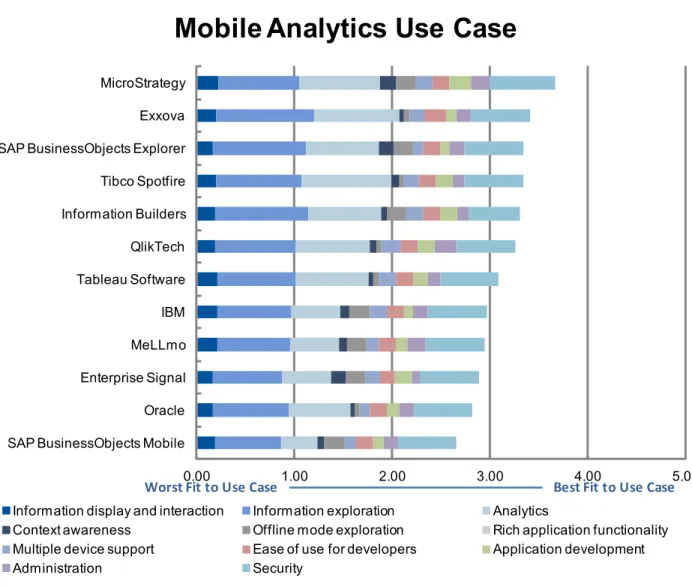
■ Mobile analytics. The title for the use case can be an overstatement of the overall market maturity but, by including a wide range of information exploration capabilities (such as
information navigation, filters or drilling), and heavily weighting the analytics critical capability, we'll be able to evaluate solutions that can address business users' needs beyond descriptive BI in static reports.
■ Mobile BI applications. Includes the creation of software that runs, from a user's perspective, autonomously from a BI platform. This can happen with the repackaging of mobile BI tools, rebranded and fit for a single domain purpose, the integration of BI content with business applications being mobilized in the company, or the development of customer-facing BI applications used by partners or customers. Capabilities that serve developers and system administrators are paramount to the success of the use case.
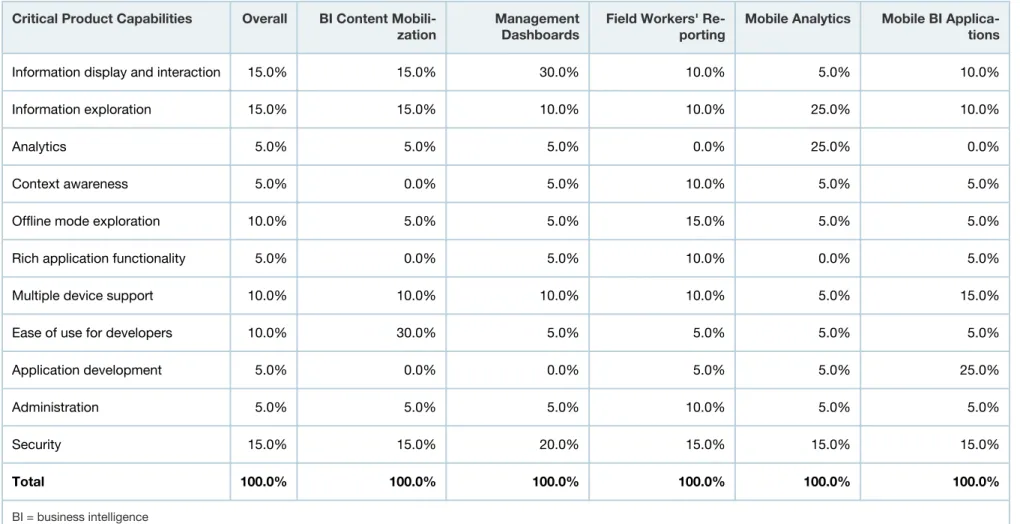
Table 1. Weighting for Critical Capabilities in Use Cases
Critical Product Capabilities Overall BI Content
Mobili-zation ManagementDashboards Field Workers' Re-porting Mobile Analytics Mobile BI Applica-tions
Information display and interaction 15.0% 15.0% 30.0% 10.0% 5.0% 10.0%
Information exploration 15.0% 15.0% 10.0% 10.0% 25.0% 10.0%
Analytics 5.0% 5.0% 5.0% 0.0% 25.0% 0.0%
Context awareness 5.0% 0.0% 5.0% 10.0% 5.0% 5.0%
Offline mode exploration 10.0% 5.0% 5.0% 15.0% 5.0% 5.0%
Rich application functionality 5.0% 0.0% 5.0% 10.0% 0.0% 5.0%
Multiple device support 10.0% 10.0% 10.0% 10.0% 5.0% 15.0%
Ease of use for developers 10.0% 30.0% 5.0% 5.0% 5.0% 5.0%
Application development 5.0% 0.0% 0.0% 5.0% 5.0% 25.0%
Administration 5.0% 5.0% 5.0% 10.0% 5.0% 5.0%
Security 15.0% 15.0% 20.0% 15.0% 15.0% 15.0%
Total 100.0% 100.0% 100.0% 100.0% 100.0% 100.0%
BI = business intelligence Source: Gartner (April 2012)
Inclusion Criteria
We included all vendors with a mobile BI solution available in the market, from the Leaders and Challengers quadrants of the "Magic Quadrant for Business Intelligence Platforms." These are: IBM, Information Builders, MicroStrategy, Oracle, QlikTech, Tableau Software and Tibco Spotfire.
To be able to present an alternative to traditional BI solutions, we also added three pure-play vendors that Gartner's customers reference in our interactions about mobile BI: Enterprise Signal, Exxova and MeLLmo.
Critical Capabilities Rating
Each product that meets our inclusion criteria has been evaluated on a scale of 1.0 to 5.0, with 1.0 being the lowest score and 5.0 the highest score (see Table 2).
Table 2. Product Rating on Critical Capabilities
Product Rating Enter-prise Signal
Exxo-va IBM Informa-tion Builders
MeLLmo
Micro-Strategy Oracle TechQlik- Busines-SAP sObjects Explorer
SAP Busines-sObjects Mobile
Tableau Soft-ware
Tibco Spotfire
Information display
and interaction 3.4 4.0 4.3 3.8 4.2 4.5 3.4 3.8 3.3 3.7 4.2 3.9
Information exploration 2.8 4.0 3.0 3.8 3.0 3.3 3.1 3.3 3.8 2.7 3.2 3.5
Analytics 2.0 3.5 2.0 3.0 2.0 3.3 2.5 3.0 3.0 1.5 3.0 3.7
Context awareness 3.1 1.0 2.0 1.0 1.5 3.2 1.0 1.5 3.0 1.5 1.0 1.5
Offline mode
explora-tion 4.0 1.0 4.0 4.0 4.0 4.0 1.0 1.0 4.0 4.0 1.0 1.0
Rich application
func-tionality 3.0 3.0 2.6 3.4 1.4 3.8 3.0 3.4 2.6 2.2 2.2 2.6
Multiple device
sup-port 3.0 3.0 3.5 3.5 2.5 3.5 2.0 3.8 2.0 2.5 3.5 3.0
Ease of use for devel-opers
3.0 4.5 3.5 3.5 3.5 3.5 3.5 3.5 3.5 3.5 3.5 3.5
Application
develop-ment 3.5 2.0 2.0 3.5 2.5 4.5 2.5 3.5 2.0 2.0 3.2 3.5
Administration 1.7 3.2 3.0 2.3 3.7 3.7 3.0 4.5 3.0 3.0 2.3 2.3
Security 4.0 4.0 4.0 3.5 4.0 4.5 4.0 4.0 4.0 4.0 4.0 4.0
To determine an overall score for each product in the use cases, the ratings in Table 2 are multiplied by the weightings shown in Table 1. These scores are shown in Figure 1.
Figure 1. Overall Score for Each Vendor's Product Based on the Non-Weighted Score for Each Critical Capability
0 5 10 15 20 25 30 35 40 45 MicroStrategy
Information Builders QlikTech SAP BusinessObjects Explorer IBM Enterprise Signal Exxova Tibco Spotfire MeLLmo Tableau Software SAP BusinessObjects Mobile Oracle
Product Rating Chart
Information display and interaction Information exploration Analytics
Context awareness Offline mode exploration Rich application functionality Multiple device support Ease of use for developers Application development Administration Security
Table 3. Product Score in Use Cases
Use Cases Enter-prise Signal
Exxo-va IBM Informa-tion Builders
MeLLmo
Micro-Strategy Oracle TechQlik- Busines-SAP sObjects Explorer
SAP Busines-sObjects Mobile
Tableau
Software SpotfireTibco
Overall 3.2 3.3 3.4 3.4 3.2 3.9 2.8 3.3 3.3 3.1 3.1 3.1
BI content mo-bilization
3.1 3.8 3.5 3.5 3.5 3.8 3.2 3.5 3.4 3.3 3.4 3.4
Management
dashboards 3.2 3.5 3.6 3.4 3.4 4.0 3.0 3.5 3.3 3.2 3.4 3.4
Field workers'
reporting 3.2 2.9 3.3 3.3 3.1 3.9 2.6 3.1 3.2 3.0 2.7 2.8
Mobile analytics 2.9 3.4 3.0 3.3 2.9 3.7 2.8 3.3 3.3 2.7 3.1 3.3
Mobile BI
appli-cations 3.3 3.0 3.1 3.4 3.0 4.0 2.8 3.5 2.9 2.8 3.2 3.2
BI = business intelligence Source: Gartner (April 2012)
Product Viability
Product viability is distinct from the critical capability scores for each product. It is our assessment of the vendor's strategy and the vendor's ability to enhance and support a product throughout its expected life cycle; it is not an evaluation of the vendor as a whole. Four major areas are
considered: strategy, support, execution and investment. Strategy includes how a vendor's strategy for a particular product fits in relation to the vendor's other product lines, its market direction and its business overall. Support includes the quality of technical and account support, as well as
customers' experiences with that product. Execution considers a vendor's structure and processes for sales, marketing, pricing and deal management. Investment considers the vendor's financial health and the likelihood of the individual business unit responsible for a product to continue
investing in it. Each product is rated on a five-point scale from poor to outstanding for each of these four areas, and it is then assigned an overall product viability rating (see Table 4).
Table 4. Product Viability Ratings
Vendor/ Product Name
Enter-prise Signal
Exxova IBM Informa-tion Build-ers
MeLLmo
Micro-Strategy Oracle Qlik-Tech SAP Busi- ness-Ob-jects Ex-plorer
SAP Busi- ness-Ob-jects Mo-bile
Tableau Soft-ware
Tibco Spotfire
Product
Vi-ability Fair Good Excel-lent Excellent Excellent Outstand-ing Good Excel-lent Excellent Excellent Good Good Source: Gartner (April 2012)
The weighted capabilities scores for all use cases are displayed as components of the overall score (see Figures 2 to 7).
Figure 2. Vendors' Product Scores for Overall Use Case
0.00 1.00 2.00 3.00 4.00 5.00 MicroStrategy
Information Builders IBM SAP BusinessObjects Explorer QlikTech Exxova MeLLmo Enterprise Signal Tibco Spotfire Tableau Software SAP BusinessObjects Mobile Oracle
Overall Use Case
Information display and interaction Information exploration Analytics
Context awareness Offline mode exploration Rich application functionality Multiple device support Ease of use for developers Application development Administration Security
Best Fit to Use Case Worst Fit to Use Case
As of April 2012
The weighted capabilities scores for all use cases are displayed as components of the overall score.
Figure 3. Vendors' Product Scores for BI Content Mobilization Use Case
0.00 1.00 2.00 3.00 4.00 5.00
Exxova MicroStrategy IBM Information Builders QlikTech MeLLmo Tableau Software SAP BusinessObjects Explorer Tibco Spotfire SAP BusinessObjects Mobile Oracle Enterprise Signal
BI Content Mobilization Use Case
Information display and interaction Information exploration Analytics
Context awareness Offline mode exploration Rich application functionality Multiple device support Ease of use for developers Application development
Administration Security
Best Fit to Use Case Worst Fit to Use Case
BI = business intelligence As of April 2012
The weighted capabilities scores for all use cases are displayed as components of the overall score.
Figure 4. Vendors' Product Scores for BI Management Dashboards Use Case
0.00 1.00 2.00 3.00 4.00 5.00
MicroStrategy IBM Exxova QlikTech Information Builders MeLLmo Tableau Software Tibco Spotfire SAP BusinessObjects Explorer Enterprise Signal SAP BusinessObjects Mobile Oracle
Management Dashboards Use Case
Information display and interaction Information exploration Analytics
Context awareness Offline mode exploration Rich application functionality Multiple device support Ease of use for developers Application development
Administration Security
Best Fit to Use Case Worst Fit to Use Case
BI = business intelligence As of April 2012
The weighted capabilities scores for all use cases are displayed as components of the overall score.
Figure 5. Vendors' Product Scores for Field Workers' Reporting Use Case
0.00 1.00 2.00 3.00 4.00 5.00
MicroStrategy IBM Information Builders SAP BusinessObjects Explorer Enterprise Signal QlikTech MeLLmo SAP BusinessObjects Mobile Exxova Tibco Spotfire Tableau Software Oracle
Field Workers Reporting Use Case
Information display and interaction Information exploration Analytics
Context awareness Offline mode exploration Rich application functionality Multiple device support Ease of use for developers Application development
Administration Security
Best Fit to Use Case Worst Fit to Use Case
As of April 2012
The weighted capabilities scores for all use cases are displayed as components of the overall score.
Figure 6. Vendors' Product Scores for Mobile Analytics Use Case
0.00 1.00 2.00 3.00 4.00 5.00
MicroStrategy Exxova SAP BusinessObjects Explorer Tibco Spotfire Information Builders QlikTech Tableau Software IBM MeLLmo Enterprise Signal Oracle SAP BusinessObjects Mobile
Mobile Analytics Use Case
Information display and interaction Information exploration Analytics
Context awareness Offline mode exploration Rich application functionality Multiple device support Ease of use for developers Application development
Administration Security
Best Fit to Use Case Worst Fit to Use Case
As of April 2012
The weighted capabilities scores for all use cases are displayed as components of the overall score.
Figure 7. Vendors' Product Scores for Mobile BI Applications Use Case
0.00 1.00 2.00 3.00 4.00 5.00
MicroStrategy QlikTech Information Builders Enterprise Signal Tibco Spotfire Tableau Software IBM MeLLmo Exxova SAP BusinessObjects Explorer SAP BusinessObjects Mobile Oracle
Mobile BI Applications Use Case
Information display and interaction Information exploration Analytics
Context awareness Offline mode exploration Rich application functionality Multiple device support Ease of use for developers Application development
Administration Security
Best Fit to Use Case Worst Fit to Use Case
BI = business intelligence As of April 2012
The weighted capabilities scores for all use cases are displayed as components of the overall score.
Vendors
Enterprise Signal
SurfBI
Enterprise Signal delivers SurfBI, a native application for Apple iOS and Google Android devices, which can be used for two different purposes: the quick mobilization of Oracle BI content, using a two-step conversion wizard; or the development of customized mobile dashboards, from a number of data sources such as IBM Cognos and SAP BusinessObjects data universes. The capability to add information widgets on top of background images, such as a number of products sold per section on top of a retail store plant, can create easy to use and engaging solutions for a broad range of field workers. Coupled with the write-back features available in SurfBI, and Enterprise Signal's support for customization, this could be a viable option for BI integration with business applications and processes.
Strengths: Enterprise Signal is a vendor willing to work on customers' specialized implementations, adding value to SurfBI that some organizations will recognize and require. The mobilization of Oracle BI content, migrating it to native content on iOS and Android devices, is also a benefit that could be leveraged by Oracle Business Intelligence Enterprise Edition (OBIEE) customers.
Areas of improvement: SurfBI won't satisfy every need in terms of dashboard development, as organizations searching for flexibility in BI outputs will be hampered by a limited number of predefined design templates, which clearly reduce customers' options. The Oracle migration process also needs additional management effort, because SurfBI copies the source metadata but won't refresh automatically in case of changes in OBIEE.
End users' capabilities: SurfBI has a reasonable number of graphic visualizations, such as bar, line, bubble, waterfall and scatter charts, but presents them in predefined grid formats (such as two by two), reducing the visual impact and constraining dashboard design capabilities. The available maps, without street-level detail, add basic geographic representations of data that will be enough for some organizations, but which will fall short for more demanding location-focused reports. The tool delivers a fair level of touchscreen interactivity and has a responsive user interface.
The availability of several mobile packaged analytics solutions in areas such as CRM, service management and manufacturing will deliver a quick start for some implementations and should be evaluated with the base mobile BI tool.
End users can easily activate disconnected mode, and the tool will download reports in the background while users navigate the application.
Enterprise Signal is investing effort into taking SurfBI to what can be considered today as niche use cases that will use a camera to filter a report based on a bar code, or search using voice
commands. More appealing to a broader audience will be the capability to integrate with
operational applications, through write-back to an order system (for example) after a user reviews product stocks on a dashboard (see Table 5).
Table 5. Enterprise Signal's Support for End Users' Capabilities
Capabilities Item Out-of-the-Box Support
Information display and interaction Rich information visualization OO Information overlay on maps OO Touchscreen experience OO Responsiveness OOO Dashboard delivery OOO Information exploration Guided information exploration OOO Table manipulation OO Graphics manipulation OO Map manipulation OO Report development on the device -Analytics Ad hoc information exploration
-Packaged analytics OOO Scenario simulations -Analytic model development -Context awareness GPS integration OOO
Camera integration OOO Voice integration OO Sensor integration -Offline mode exploration Offline information navigation OOO
Automated information download OOO Manual information download OOO Rich application functionality Collaboration OO
Alerting -Write-back OOO Multimedia support OOO Augmented reality -Multiple device support Apple OOO
Google OOO
RIM
-Microsoft
-RIM = Research In Motion
Key: "OOO" = full support, "OO" = partial support, "-" = not supported Source: Gartner (April 2012)
Developers' and administrators' capabilities: SurfBI is an easy and quick solution to mobilize Oracle BI reports. The process migrates report definitions and leverages user definitions and security restrictions, effectively transforming Web-based outputs in a native BI application to be mobile-friendly. A new platform addition to manage is always a burden to a busy IT team. Making this Java-based software that can run on an application server in the company will minimize the impact and required effort (see Table 6).
Table 6. Enterprise Signal's Support for Developers' and Administrators' Capabilities
Capabilities Item Out-of-the-Box Support
Ease of use for developers Integrated development workbench -Reuse of existing content OO New content development OO Cross-BI platform integration OO Application development Mobile application integration OOO
Application customization OO Application distribution OOO Development SDK OO Administration Integrated mobile infrastructure OO
Administrator-driven setup -Application management -Security Communications security OO
Data security OO Application security OOO BI objects and user security OOO
BI = business intelligence, SDK = software development kit
Key: "OOO" = full support, "OO" = partial support, "-" = not supported Source: Gartner (April 2012)
Exxova
MyBI
MyBI, a native application for iPad and Android tablets, takes a different approach to mobile BI when compared with most of the solutions on the market. It relies on existing BI platforms such as those from SAP or Oracle to generate the BI content, and, through Exxova's Mobile Access Server, it interprets the objects destined for a desktop PC and renders them on the mobile's native
shares similarities with desktop virtualization tools, like XenDesktop from Citrix, but goes further than streaming screen outputs to the device and returning touch commands to the server. It understands how the BI platform operates, and leverages operational metadata, user definitions and security to improve the user experience, creating a native skin on top of the original Web outputs, with aids such as a quick access panel to favorite reports or a mini map to quickly pan and zoom a dashboard.
Strengths: MyBI acts as a virtual BI platform, aggregating information from SAP and Oracle BI tools (support for Microsoft will become available in the near future), and delivering it on mobile devices. This is a benefit for companies with several BI platforms that don't want to deploy different mobile BI solutions from their incumbent vendors. Even with only one platform deployed in the
organization, this solution can still generate value by immediately mobilizing all the existing BI content and capabilities, without any rewrites, including consumption of Flash-based Xcelsius dashboards on iPads.
Areas of improvement: Exxova has technology to tap into the content generation engines of SAP and Oracle and to isolate the presentation layer that will be handled on the mobile device. Although mitigated by the openness trends we see in the market, the connection to Oracle and SAP could represent a risk if these vendors decide to change or close the platform to external applications. In terms of the product's capabilities, the most relevant drawback is the fact that the source BI platform will be completely unaware of mobility, generating desktop BI content which can include scroll bars, small checkboxes or right-click menus, for example. Some content will look displaced and will be difficult to navigate on the mobile device, needing a design update to improve the user experience.
End users' capabilities: MyBI can leverage rich visualizations developed for the desktop. It can display engaging visual components to provide graphic animations as sophisticated as a spinning globe, like Google Earth, with KPIs on the surface. Maps are also fully supported, in all the detail that the source platforms can provide. Rendered objects inherit the desktop's properties and can provide interactive layouts, and the system is able to leverage mobile-specific touch commands (like swipe to pan) and seamlessly merge them with desktop activities such as drag and drop or simulated "right mouse button clicks" to access context menus. Interface responsiveness depends on fast communications to deliver a satisfying experience. MyBI tries to solve the problem of
minimizing round-trip activities by handling heavy processing activities on the server and leveraging the native application on the device whenever possible, keeping communications to a minimum. Information exploration includes all the capabilities from the source platforms (like SAP
BusinessObjects Explorer or Oracle Hyperion), such as guided navigation, filtering, drilling or even drag and drop, to build a new report or ad hoc query against an online analytical processing (OLAP) cube.
Offline mode is not an option, as the tool relies fully on server operation to be able to get content from the source BI platform.
GPS integration also won't be available because this is a mobile-specific capability, but other rich application functionality (such as collaboration or multimedia) is supported (see Table 7).
Table 7. Exxova's Support for End Users' Capabilities
Capabilities Item Out-of-the-Box Support
Information display and interaction Rich information visualization OOO Information overlay on maps OOO Touchscreen experience OO Responsiveness OO Dashboard delivery OOO Information exploration Guided information exploration OOO Table manipulation OOO Graphics manipulation OOO Map manipulation OOO Report development on the device OOO Analytics Ad hoc information exploration OOO Packaged analytics OO Scenario simulations OOO Analytic model development -Context awareness GPS integration -Camera integration -Voice integration -Sensor integration -Offline mode exploration Offline information navigation -Automated information download -Manual information download -Rich application functionality Collaboration OO
Alerting OO Write-back OO Multimedia support OOO Augmented reality -Multiple device support Apple OOO
Google OOO
RIM
-Microsoft
-RIM = Research In Motion
Key: "OOO" = full support, "OO" = partial support, "–" = not supported Source: Gartner (April 2012)
Developers and administrators' capabilities: Leveraging existing BI content with MyBI doesn't require any mobile development effort, as the creation of new content is done on the source
platform. However, if the organization wants to optimize the mobile user experience, it has to design for a different screen form factor, and be aware that a touchscreen will be used to make selections and apply filters.
BI administration becomes more complex with mobile BI, because there is an additional system to administer. MyBI helps by leveraging existing user and security definitions, and by having basic capabilities for semi-automated application deployment and device authorization. Still, the use of a mobile device management platform is highly recommended (see Table 8).
Table 8. Exxova Developers' and Administrators' Capabilities support
Capabilities Item Out-of-the-Box Support
Ease of use for developers Integrated development workbench OOO Reuse of existing content OOO New content development OOO Cross-BI platform integration OOO Application development Mobile application integration
-Application customization -Application distribution OOO Development SDK -Administration Integrated mobile infrastructure OO
Administrator-driven setup OO Application management OO Security Communications security OO Data security OOO Application security OOO BI objects and user security OOO
BI = business intelligence, SDK = software development kit
Key: "OOO" = full support, "OO" = partial support, "–" = not supported Source: Gartner (April 2012)
IBM
IBM Cognos Mobile
IBM Cognos Mobile for the iPad is a native application tightly integrated with the Cognos
infrastructure, leveraging content, development effort and security definitions. It's currently focused on delivering BI dashboards, exploring Active Reports capabilities, which allow a portable and disconnected exploration of information. Given the broad range of offerings from IBM under the
mobile capabilities, including advanced analytics and performance management. This will
differentiate IBM's solutions from the single-focus players, and will increase its appeal to customers starting mobile projects.
Strengths: The main strengths of Cognos Mobile are targeted at IBM's existing customer base, with a seamless integration into the BI platform and a shared authoring effort for desktop and mobile devices. Beyond that, the set of available mobile capabilities is robust and a credible solution for dashboard deployment, especially if disconnected information navigation — another strength of the product — is a requirement. IBM's bold and continued investment in the areas of BI, analytics and performance management is also a reassurance that the mobile solution will evolve to deliver more functionality in the future.
Areas of improvement: IBM Cognos Mobile's mapping capabilities need to improve, to provide better exploration of geographic information and to better leverage the GPS integration. Write-back capabilities, coupled with tools to develop customized mobile BI applications (namely a mobile application SDK), would also allow for more advanced use cases. Finally, although Cognos Mobile can be integrated with mobile device management tools for application deployment and
management, it would benefit from an automated setup, through configuration profiles emailed to the user.
End users' capabilities: Cognos Mobile provides flexible dashboard design options that can deliver engaging results. The available components are visually effective and suitable for mobile usage with optimizations such as large fonts, tap-friendly selectors and enlarged pop-ups for displaying charts. Maps are provided (albeit with limited capabilities in terms of their detail and exploration options), allowing the overlay of information. The user interface could sometimes
provide better interactivity in graphics, such as tapping to display information detail, but the issue is overcome through useful information navigation capabilities, stacked tables or pop-up windows with details, for example. The tool benefits from being a native application offering a responsive user experience and making good use of the touchscreen interface.
Information exploration capabilities have the required depth for regular business users, and the navigation to detail is friendly enough to appeal to technology-savvy users, such as a typical CFO or line of business manager.
Power users that need broad analytic capabilities, such as ad hoc querying or predictive modeling, won't be able to use Cognos Mobile. An additional benefit from using an IBM product is its ability to mobilize some of the available packaged analytic offerings. These aren't mobile-specific, but some could be used in this environment.
IBM Cognos is currently supporting iPad and BlackBerry phones with native applications, but it also has a Web-based solution for Android, BlackBerry PlayBook and iPhone mobile devices. Gartner expects a native application to be available for Android, following development road map trends we've seen in the market from other vendors (see Table 9).
Table 9. IBM's Support for End Users' Capabilities
Capabilities Item Out-of-the-Box Support
Information display and Interaction Rich information visualization OOO Information overlay on maps OO Touchscreen experience OOO Responsiveness OOO Dashboard delivery OOO Information exploration Guided information exploration OOO Table manipulation OO Graphics manipulation OO Map manipulation OO Report development on the device -Analytics Ad hoc information exploration
-Packaged analytics OO Scenario simulations -Analytic model development OO Context awareness GPS integration OOO
Camera integration -Voice integration -Sensor integration -Offline mode exploration Offline information navigation OOO
Automated information download OOO Manual information download OOO Rich application functionality Collaboration OO
Alerting OO Write-back -Multimedia support OOO Augmented reality -Multiple device support Apple OOO
Google OOO
RIM OOO
Microsoft OO
RIM = Research In Motion
Key: "OOO" = full support, "OO" = partial support, "-" = not supported Source: Gartner (April 2012)
Developers and administrators' capabilities: IBM provides capabilities to deliver existing desktop Cognos BI content through mobile devices, leveraging the development workbench and existing designer skills.
Administration is also eased by the use of the existing platform, although it benefits from the addition of an external mobile device management platform to support device management and application deployment and management.
Application customization and integration, such as integrating a sales dashboard with order entry forms to replenish stocks, is not yet an option in native mode, as no SDK is available, although the Web-based solution could be used with customization to achieve the same goal (see Table 10).
Table 10. IBM's Support for Developers' and Administrators' Capabilities
Capabilities Item Out-of-the-Box Support
Ease of use for developers Integrated development workbench OOO Reuse of existing content OOO New content development OOO Cross-BI platform integration -Application development Mobile application integration -Application customization -Application distribution OO Development SDK -Administration Integrated mobile infrastructure OOO
Administrator-driven setup -Application management -Security Communications security OOO
Data security OO Application security OOO BI objects and user security OOO
BI = business intelligence, SDK = software development kit
Key: "OOO" = full support, "OO" = partial support, "-" = not supported Source: Gartner (April 2012)
Information Builders
WebFOCUS Mobile
Information Builders offers Web-based BI content in the form of Active Technologies, which can be used offline in any browser. To improve the iOS experience, a native application (called Mobile Faves) has been added, which acts as a Web content management tool on Apple devices, making this a hybrid solution — a native container rendering Web content. In all other mobile platforms
The purpose is to create a single authoring process for consumption on every device type —
desktop or mobile — but to still provide functionality native to the platform they run on (for example, point and click and pull-down menus on a desktop and larger tap and swipe options on mobile touchscreens). This should solve some of the typical drawbacks of Web content, including offline mode navigation and interactivity for information exploration, providing an experience that, although still Web-based, is closer to native than most other solutions.
Strengths: The main strengths of Mobile Faves, apart from the single authoring effort, are in its information exploration capabilities, directly derived from the desktop solution. An end user, on a mobile device, will be able to interact with tables, sorting, creating new metrics, filtering,
aggregating or pivoting and changing calculations as needed. The offline navigation mode that can be used by some content is also relevant to many users.
Areas of improvement: One drawback of this tool is the experience users have while navigating the information — it's a Web-based solution and that can be seen in the touchscreen experience, which will sometimes look awkward to users of mobile devices. GPS integration is also unavailable, so maps can be used to display information but won't be enhanced by location awareness from the device.
End users' capabilities: Mobile Faves leverages a comprehensive number of visual components from the desktop BI solution. Animations are preserved, but so is some of the Web look and feel from the original platform, which can hamper the mobile experience.
Many of the visualizations and tables are interactive, with detailed pop-ups, chart reformatting and even the capability to change displayed metrics. Users can improve the responsiveness of the interface by downloading the content to the device, and by being able to work without round trips to the server, delivering, on this case, a close to native experience. An additional offline exploration mode is based on Information Builders' Active Reports technology, which allows Web-based files to be sent via email and to be consumed on the mobile device.
With the right dashboard design, Information Builders is able to offer a wide range of information exploration capabilities to mobile device users. Although it cannot replace advanced analytical processes on a desktop PC, it will be enough to cover most needs of users on the go.
Multiple device support must also be highlighted as a flagship objective in the area of mobility for Information Builders. Organizations with this requirement high on their list of priorities should evaluate this solution (see Table 11).
Table 11. Information Builders' Support for End Users' Capabilities
Capabilities Item Out-of-the-Box Support
Information display and interaction Rich information visualization OO Information overlay on maps OOO Touchscreen experience OO Responsiveness OO Dashboard delivery OOO Information exploration Guided information exploration OOO Table manipulation OOO Graphics manipulation OOO Map manipulation OOO Report development on the device OO Analytics Ad hoc information exploration OOO
Packaged analytics -Scenario simulations OO Analytic model development OO Context awareness GPS integration
-Camera integration -Voice integration -Sensor integration -Offline mode exploration Offline information navigation OOO
Automated information download OOO Manual information download OOO Rich application functionality Collaboration OO
Alerting OO Write-back OOO Multimedia support OOO Augmented reality -Multiple device support Apple OOO
Google OO
RIM OO
Microsoft OO
RIM = Research In Motion
Key: "OOO" = full support, "OO" = partial support, "-" = not supported Source: Gartner (April 2012)
Developers and administrators' capabilities: For developers and BI system administrators, Mobile Faves is a welcome option, bearing in mind the strategic objective of delivering a similar experience across platforms — existing design skills will be fully leveraged, in the same BI
infrastructure, using the same administration processes. The BI infrastructure will only be disturbed by the native application deployment and management processes that will require the use of the mobile device management tools for large-scale installations (see Table 12).
Table 12. Information Builders' Support for Developers' and Administrators' Capabilities
Capabilities Item Out-of-the-Box Support
Ease of use for developers Integrated development workbench OOO Reuse of existing content OOO New content development OOO Cross-BI platform integration -Application development Mobile application integration OOO
Application customization OOO Application distribution OOO Development SDK OO Administration Integrated mobile infrastructure OOO
Administrator-driven setup -Application management -Security Communications security OO
Data security OO Application security OOO BI objects and user security OOO
BI = business intelligence, SDK = software development kit
Key: "OOO" = full support, "OO" = partial support, "-" = not supported Source: Gartner (April 2012)
MeLLmo
Roambi Analytics
MeLLmo, a startup company focused on the mobilization of information, develops Roambi Analytics, a native application for the iPhone and the iPad. The product is recognized by most companies investigating mobile BI due to its high visual impact, its ease of use and its ability to mobilize BI content from several platforms, including IBM Cognos, Microsoft Reporting Services,
Reports. The company makes Roambi Lite available for personal use. Users can subscribe for an account at the company's website, download the application from Apple's App Store, and
experience the mobile solution by uploading Excel-based data to a cloud service. This has helped to spread the word in the consumer market and, consequently, to companies that employ users that have downloaded it. Public exposure, due to the volume of downloads and good ratings in the App Store, also explain the product's market awareness, which is far larger than the company's size would suggest.
Strengths: Roambi Analytics' greatest strengths are the engaging and easy to use interface, coupled with an easy interface to plug into BI platform reports. This is a step up from the more common access to a data layer, allowing for the transformation of traditional static reports into interactive outputs on a mobile device. It uses only nine visualizations in the latest ES4 release, but its impact on BI users is high. They appreciate the product's simplicity and, at the same time, the possibility of navigating, filtering and interacting with their information in an engaging way.
Areas of improvement: There's usually a trade-off between simplicity and depth of usage. By having such a simple tool, the amount of capabilities and its customization options are low and may not fit every need. While keeping each visualization easy to use, Roambi Analytics would benefit from additional engaging information visualizations, including maps (which are absent from the current solution). The need for additional development effort to mobilize existing BI reports, although small for each one, is also an issue that will prevent some customers from adopting the tool.
End users' capabilities: The tool makes good use of the touchscreen interface and leaves no traces of the underlying BI platform behavior or user interface — the experience is fully mobile. Its seamless offline mode helps in the delivery of a responsive operation, and opens the opportunity for new use cases. Even so, the solution is hampered by the lack of location awareness capabilities (which would mean integration with the GPS), and by some limitations in its information exploration capabilities, like the option of selecting an item on a table and having a linked chart filtered.
Analytics is an area where Roambi also needs to improve to appeal to a broader audience. The newest release (ES4) added two new visualizations: "layers" and "squares," which provide some depth to the ad hoc exploration of information, slightly reducing the gap in this area (see Table 13).
Table 13. MeLLmo's Support for End Users' Capabilities
Capabilities Item Out-of-the-Box Support
Information display and interaction Rich information visualization OOO Information overlay on maps -Touchscreen experience OOO Responsiveness OOO Dashboard delivery OOO Information exploration Guided information exploration OO
Table manipulation OOO Graphics manipulation OOO Map manipulation -Report development on the device -Analytics Ad hoc information exploration OO
Packaged analytics -Scenario simulations -Analytic model development -Context awareness GPS integration -Camera integration -Voice integration -Sensor integration OO Offline mode exploration Offline information navigation OOO
Automated information download OOO Manual information download OOO Rich application functionality Collaboration OO
Alerting -Write-back -Multimedia support -Augmented reality -Multiple device support Apple OOO
-RIM OO
Microsoft
-RIM = Research In Motion
Key: "OOO" = full support, "OO" = partial support, "-" = not supported Source: Gartner (April 2012)
Developers' and administrators' capabilities: Roambi developers don't have difficult or lengthy tasks to perform, but they still need to invest effort in each report that needs to be ported to the mobile device. Additionally, BI system administrators will need to take care of a new platform, although it is able to leverage existing security and user definitions, and is capable of helping in the deployment of the application through an automated configuration Web link (see Table 14).
Table 14. MeLLmo's Support for Developers' and Administrators' Capabilities
Capabilities Item Out-of-the-Box Support
Ease of use for developers Integrated development workbench -Reuse of existing content OO New content development OO Cross-BI platform integration OOO Application development Mobile application integration OO
Application customization OO Application distribution OO Development SDK -Administration Integrated mobile infrastructure OO
Administrator-driven setup OO Application management OOO Security Communications security OOO Data security OO Application security OOO BI objects and user security OOO
BI = business intelligence, SDK = software development kit
Key: "OOO" = full support, "OO" = partial support, "-" = not supported Source: Gartner (April 2012)
MicroStrategy
MicroStrategy Mobile
MicroStrategy has been investing heavily in mobility, and this is clearly reflected in its product: a mature and broad-scope mobile BI solution. MicroStrategy Mobile has native versions for iOS and Android devices, delivering the same level of functionality. While existing BI content can be
interface, offline mode navigation, GPS integration and a rich gallery of information display components optimized for mobile usage.
Strengths: MicroStrategy provides the breadth of capability, seamless mobile device integration and engaging user experience that, if exploited properly, can foster BI adoption by new user
constituencies. The possibility to develop native mobile BI applications to support custom scenarios is also a plus in more advanced BI environments. The tight integration with an existing
MicroStrategy BI platform eases the development and administration support, but still provides plenty of options for mobile-specific optimization. Another benefit is that, looking at the product's track record for the past two years, we can see a stream of incremental innovation, with new versions frequently available on Apple's App Store for download.
Areas of improvement: MicroStrategy remains what can be called an "incumbent BI platform," which means that customers with BI solutions from other vendors, which want to deploy mobile BI (having selecting MicroStrategy Mobile as a solution), would need to implement its core BI
infrastructure, instead of a simple mobile BI component. This will add a full-sized BI platform to the organization, with duplicated components and development effort, creating a new silo to support. For many, namely companies with larger BI deployments, it will be a clear indication that companies should look for a solution somewhere else, or wait for their vendor to deliver the required
functionality. MicroStrategy is aware of this but, as a strategic goal, prefers to press on replacing competitors' BI platforms, rather than selling an isolated pure-play mobile BI product.
End users' capabilities: MicroStrategy users will recognize some of the visual components from the desktop solution, but the mobile experience adds new capabilities and an application-like experience, instead of simple dashboard distribution. It enables the creation of guided information exploration paths that can lead less experienced users to the information they need, as well as stacked layers of information that is actionable through swipe commands, zoomable maps, location awareness, multimedia content and, in an emergent use case, write-back capabilities to business applications.
By offering the capability to skin and customize applications, making them available in rebranded form on the App Store, MicroStrategy drives its partners to the business of creating packaged analytics applications. Using this capability, there are mobile-specific solutions available in the App Store — not just Web solutions that can run on a mobile device — in areas such as retail analytics or supply chain optimization.
Other analytics capabilities, such as ad hoc information exploration, are still an area where
MicroStrategy's mobile solution could improve. The use of information filtering solutions, supported by data visualizations, delivers some degree of open question exploration, but there is room for impactful enhancements in future versions (see Table 15).
Table 15. MicroStrategy's Support for End Users' Capabilities
Capabilities Item Out-of-the-Box Support
Information display and interaction Rich information visualization OOO Information overlay on maps OOO Touchscreen experience OOO Responsiveness OOO Dashboard delivery OOO Information exploration Guided information exploration OOO Table manipulation OO Graphics manipulation OOO Map manipulation OOO Report development on the device -Analytics Ad hoc information exploration OO
Packaged analytics OOO Scenario simulations OO Analytic model development OO Context awareness GPS integration OOO
Camera integration OOO Voice integration -Sensor integration OO Offline mode exploration Offline information navigation OOO
Automated information download OOO Manual information download OOO Rich application functionality Collaboration OO
Alerting OOO Write-back OOO Multimedia support OOO Augmented reality -Multiple device support Apple OOO
Google OOO
RIM OO
Microsoft
-RIM = Research In Motion
Key: "OOO" = full support, "OO" = partial support, "-" = not supported Source: Gartner (April 2012)
Developers and administrators' capabilities: MicroStrategy Mobile developers leverage the tool's desktop development workbench, which provides additional customization options for the
mobilization of traditional dashboards. The required effort for mobilization is low when compared with the effort to design and implement a standard dashboard from scratch, but it will still be relevant for some organizations.
Using the mobile SDK, MicroStrategy customers can develop their own applications, eventually integrating BI with other business applications, including write-back capabilities. Following the standard processes, these can be uploaded to public or private application stores with
Table 16. MicroStrategy's Support for Developers' and Administrators' Capabilities
Capabilities Item Out-of-the-Box Support
Ease of use for developers Integrated development workbench OOO Reuse of existing content OOO New content development OOO Cross-BI platform integration -Application development Mobile application integration OOO
Application customization OOO Application distribution OOO Development SDK OOO Administration Integrated mobile infrastructure OOO Administrator-driven setup OO Application management OO Security Communications security OOO
Data security OOO Application security OOO BI objects and user security OOO
BI = business intelligence, SDK = software development kit
Key: "OOO" = full support, "OO" = partial support, "-" = not supported Source: Gartner (April 2012)
Oracle
Oracle Mobile
Oracle released its first mobile BI product (Oracle Business Intelligence Mobile 11.1.1.5) in May 2011 as a response to competition, not as a first-to-market disruptive innovation. It utilizes a hybrid iOS application that renders the standard Web content in a native container, but the transition to mobility is yet to be fully achieved. As it has a static output that retains most of the look and