PUBLIC
SAP Financial Services Network
2015-08-21
Content
1 About SAP Financial Services Network. . . .3
2 SAP FSN from a Bird's Eye Perspective. . . .4
3 Capabilities. . . . 6
3.1 Integration Capabilities. . . .6
3.2 Connectivity (Adapters). . . .9
Using SAP NetWeaver PI on Premise. . . .10
Using the FSN Connector. . . 11
Using SSH File Transfer Protocol (SFTP). . . 12
3.3 Service Reliability. . . .13
3.4 Supported Quality-of-Service. . . .14
4 Security Information. . . .15
4.1 Technical System Landscape. . . .15
4.2 Tenant Isolation. . . 16
4.3 Communication Security. . . .17
4.4 Data Storage Security. . . .19
4.5 Security of the Onboarding Process. . . 19
4.6 High Availability. . . 19
5 Support Information. . . . 20
6 Onboarding and Service Activation. . . .21
6.1 Use Cases. . . 21
SFTP Server@Bank. . . .22
SFTP Server@SAP. . . .24
SFTP Server@SAP and SFTP Server@Bank (Hybrid Use Case). . . 26
Corporation Using FSN Connector. . . 28
Connecting to "Off-Network" Banks (SFTP Server@Bank). . . .32
1
About SAP Financial Services Network
SAP Financial Services Network (SAP FSN) is an innovative on-demand solution that connects financial institutions and other financial service providers with their corporate customers on a secure network owned and managed by SAP. The network offers multiple services in one single channel while supporting the deployment of new services. As key benefits, the solution simplifies connectivity, automates financial transactions, reduces payment rejection rates, eases reconciliation, and provides enhanced visibility to corporate treasury.
Note
As an example, let us look at a corporation with relationships with multiple financial service providers. SAP FSN enables this corporation to establish a communication channel with these financial service providers, and to request payment order processing, for example, for paying salaries to its employees. The exchange of financial data (for example, advices of payment) between the corporation and the corresponding financial service providers is handled by SAP FSN.
When a financial institution and corporation want to connect, they first need to register to SAP FSN and complete the onboarding process. Once they are onboarded and the SAP FSN subscriber that the newly onboarded customer wishes to connect to is identified, a service activation process takes place to connect the two. This is done for each connection required. The connected parties can then commence the exchange of messages across the network.
SAP FSN supports integration capabilities such as content-based routing and mapping, as well as certain connectivity options.
Note
This document provides an overview of the capabilities and concepts of SAP FSN and an overview of the security-related aspects.
Summary of Benefits Provided by SAP FSN
SAP FSN provides the following benefits:
● Pay-as-you-go subscription model
● Faster onboarding of financial institutions and corporations
● Reduced operational risk
● Better visibility and control
● No additional cost for maintaining hardware and software
● Lower total cost of ownership (TCO)
2
SAP FSN from a Bird's Eye Perspective
SAP FSN is an integration platform that enables multiple participants (financial service providers and their corporate customers) to exchange financial data in a reliable and secure way.
For each participant connected to SAP FSN, separate resources (memory, CPU, and file system) are allocated in the SAP HANA Cloud. In the runtime of an SAP FSN scenario, these resources are referred to as tenants. Let us assume that two participants (participant 1 and participant 2) exchange financial data with each other through SAP FSN. Tenant 1 is allocated to (assigned to) participant 1, and tenant 2 is assigned to participant 2. The exchange of data through SAP FSN then works in the following way:
1. Participant 1 sends the financial data to tenant 1. 2. Tenant 1 forwards the data to tenant 2.
3. Tenant 2 sends the data to participant 2.
The communication paths between the participants and the tenants of SAP FSN can be configured in a way that secure data transfer is guaranteed (for example, based on SSL transport security). In addition, the communication between the tenants (communication path 2 within the SAP FSN platform) is also secured by SSL transport layer security.
Note
SAP FSN is designed in such a way that each tenant uses a separate database schema. As a result, data isolation among the different participants using SAP FSN is also ensured.
Since data structures in business-to-business scenarios usually differ between the different participants that exchange data with each other, communication through SAP FSN also can include transformation (mapping) steps. If mappings are required for the communication between two participants through SAP FSN, the data sent from a participant to SAP FSN is first transformed into a reference data model (also referred to as a canonical data model). The communication between the related tenants within SAP FSN does not then need any further transformation steps, as all tenants “understand” the canonical data model. Transformation only has to be applied for the external communication between tenants and related participants.
3
Capabilities
3.1
Integration Capabilities
There is a wide range of integration capabilities that define different ways how messages can be processed on a the integration platform and exchanged between sender and receiver systems.
The following figure illustrates, as one example, the routing capability, that allows you to forward a message from one participant to multiple receivers.
Integration capabilities are configured within integration flow steps (in the Integration Designer).
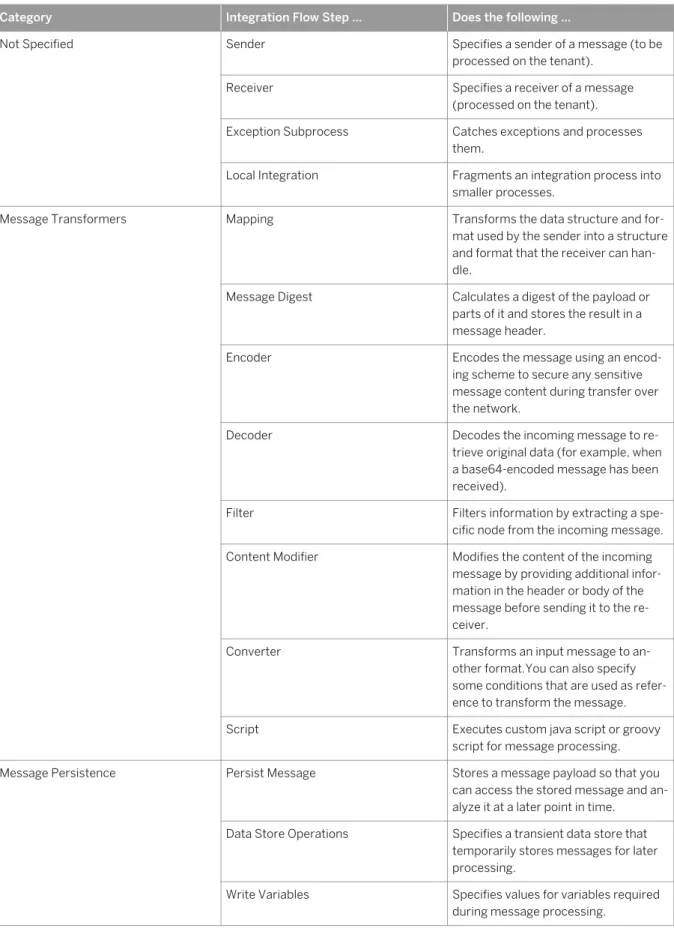
The following table lists the available integration capabilities, arranged by the related integration flow step types.
Table 1: Integration Capabilities
Category Integration Flow Step ... Does the following …
Not Specified Sender Specifies a sender of a message (to be processed on the tenant).
Receiver Specifies a receiver of a message (processed on the tenant). Exception Subprocess Catches exceptions and processes
them.
Local Integration Fragments an integration process into smaller processes.
Message Transformers Mapping Transforms the data structure and for mat used by the sender into a structure and format that the receiver can han dle.
Message Digest Calculates a digest of the payload or parts of it and stores the result in a message header.
Encoder Encodes the message using an encod ing scheme to secure any sensitive message content during transfer over the network.
Decoder Decodes the incoming message to re trieve original data (for example, when a base64-encoded message has been received).
Filter Filters information by extracting a spe cific node from the incoming message. Content Modifier Modifies the content of the incoming
message by providing additional infor mation in the header or body of the message before sending it to the re ceiver.
Converter Transforms an input message to an other format.You can also specify some conditions that are used as refer ence to transform the message. Script Executes custom java script or groovy
script for message processing. Message Persistence Persist Message Stores a message payload so that you
can access the stored message and an alyze it at a later point in time.
Data Store Operations Specifies a transient data store that temporarily stores messages for later processing.
Write Variables Specifies values for variables required during message processing.
Category Integration Flow Step ... Does the following …
Security Elements Content Encryptor Digitally encrypts the content of a mes sage.
Content Decryptor Decrypts the content of a message. Message Signer Digitally signs a message.
Signature Verifier Verifies a signature.
Events Timer Start Sets a date and time when the integra tion process should run once or repeti tively.
Escalation Event Stops message processing; for syn chronous messages, an error mes sages is sent to the sender.
Tasks Service Call Calls an external system.
Message Routing
Forwards (routes) a message to one or more receivers.
The platform also supports routing that depends on the content of the message (content-based routing).
For example, the tenant detects that a message has a particular field value, and forwards it to the specific receiver participant that handles requests from the sender participant.
Splitter Decomposes a composite message into a series of individual messages and sends them to a receiver.
Router Routes a message to one or more re ceivers.
Aggregator Combines multiple incoming messages into a single message.
Multicast Sends the same message to more than one receiver.
This step provides the option to define the sequence in which the message transfer is initiated to the receivers. Join Brings together the messages from dif
ferent routes before combining them into a single message.
Is used in combination with the Gather
element. Join only brings together the messages from different routes with out affecting the content of messages. Gather Merges messages from more than one
route in an integration process.
Note
For mappings, XSLT (Extensible Stylesheet Language Transformations) 2.0 is supported.
Note
Automatic stream caching mechanism is enabled to support streaming of large data and to avoid out-of-memory problems. This caching mechanism adds an interceptor between two processors, and caches
streams either in memory or, if the stream is larger than 64 KB, in the file system. Hence enabling the streams to be read several times from the cache with reduced memory consumption .
Mapping
Mapping transforms (maps) sender into receiver data structures.
In scenarios spanning different application systems or different organizations and enterprises, it is very likely that the structure of the data exchanged between two participants will differ on both sides of a connection due to business-related reasons. To enable a seamless exchange of data, the data structures on both sides of a connection have to be transformed (or: mapped) into each other. There is the option to apply structural mapping of XML documents.
You can re-use existing on-premise content (service interfaces / message mappings / operation mappings / XSLT based mappings) from an SAP Enterprise Services Repository (EHP 1 for SAP NetWeaver 7.3).
Value mappings allow you to map different representations of an object to each other.
Value mappings are useful when performing a dynamic value lookup of an object that has different
representations in different contexts. In value mappings, you map these different representations of an object to each other by setting mapping rules in a value mapping table.
Note
For example: You can use a value mappingto map a Merchant ID to a Customer ID, where Merchant ID is an external application representation of a customer, while Customer ID is an internal SAP representation.
3.2 Connectivity (Adapters)
You have the option to specify which technical protocols should be used to connect a sender or a receiver to the tenant.
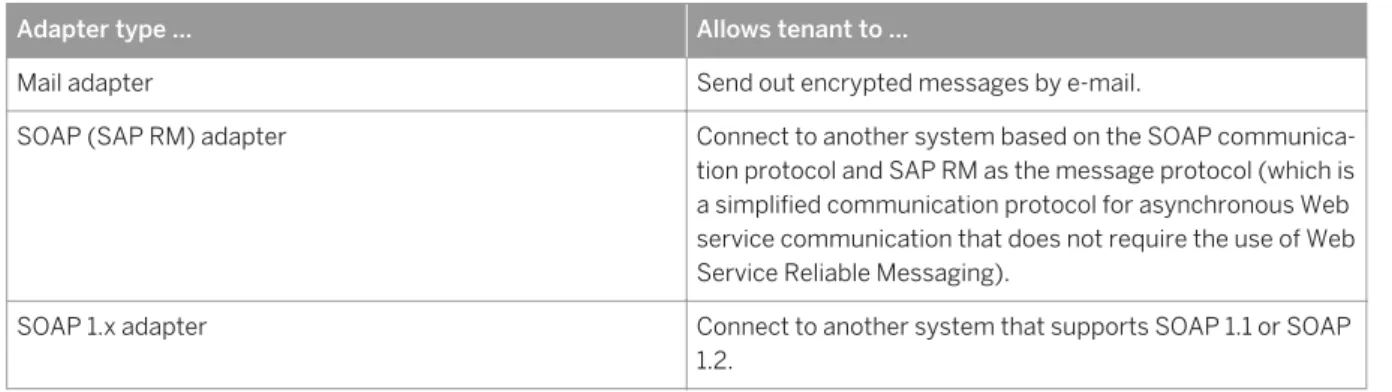
The following adapters are available:
Table 2: Adapter Types
Adapter type ... Allows tenant to ...
Mail adapter Send out encrypted messages by e-mail.
SOAP (SAP RM) adapter Connect to another system based on the SOAP communica tion protocol and SAP RM as the message protocol (which is a simplified communication protocol for asynchronous Web service communication that does not require the use of Web Service Reliable Messaging).
SOAP 1.x adapter Connect to another system that supports SOAP 1.1 or SOAP 1.2.
Adapter type ... Allows tenant to ...
HTTP adapter Connect to a receiver system using the HTTP protocol. SFTP adapter Connect to another system using the SSH File Transfer Pro
tocol.
3.2.1
Using SAP NetWeaver PI on Premise
A participant (corporation or financial service provider) can connect to SAP FSN using an on-premise SAP NetWeaver Process Integration (PI) system (release SAP NetWeaver PI 7.1 or higher).
This connectivity option is illustrated in the following figure.
Using this option, the participant communicates with SAP FSN via the Web Services Reliable Messaging (WS-RM) communication protocol.
Assuming that both corporation and financial service provider use WS-RM and the financial service provider uses PI on premise, the components interact with each other in the following way:
● A corporation sends Web service messages (in business terms, a payment instruction) to SAP FSN and receives WS messages (status or statement) from SAP FSN.
● SAP FSN forwards the messages from the corporate system to the on-premise PI system of the financial service provider and vice versa.
● The on-premise PI system (of the financial service provider) converts the payment message into a file and places the file in a folder of the financial service provider. It picks up the file and converts it into the status/ statement message and forwards it to SAP FSN.
For the payment instruction, the on-premise PI system represents the WS provider. For the status/statement message, the corporate system represents the WS provider.
This connectivity option supports secure data exchange based on public key technology (mutual authentication based on X.509 certificates).
3.2.2 Using the FSN Connector
A corporation connects to SAP FSN using the Connector for the SAP Financial Services Network (FSN connector).
This connectivity option is illustrated in the following figure. The FSN connector implicitly uses Web Services Reliable Messaging (WS-RM).
Note
The FSN connector is an add-on available for releases of SAP ERP 6.0 EHP 0 and higher.
The FSN connector is integrated with the payment processing functions in SAP ERP. Following a payment run, corporations can send the payment files automatically to financial service providers through SAP FSN. In return, SAP ERP receives payment status reports and financial service providers' statements through SAP FSN, and then automatically processes them.
A corporation can communicate with multiple financial service providers using a single instance of the FSN connector, provided that these financial service providers are subscribed to SAP FSN and the corporation has performed the required service activation with the respective financial service provider. The FSN connector also provides a programming interface that enables corporations to further enhance the system to send and receive files from other business processes.
3.2.3 Using SSH File Transfer Protocol (SFTP)
A participant (corporation or financial service provider) can connect to SAP FSN using SSH File Transfer Protocol (SFTP).
This connectivity option requires an SFTP server to be installed within the landscape. The setup of components depends on whether the SFTP server is installed on the SAP side or within the customer landscape.
Connectivity Using an SFTP Server in the Customer Landscape
If a participant (the customer) has an SFTP server installed, it can communicate directly with SAP FSN. The data exchange works in the following way:
● Outbound processing (from SAP FSN to participant): SAP FSN writes a file to a directory on the SFTP server on the participant side.
● Inbound processing (from participant to SAP FSN): SAP FSN periodically reads files from the SFTP server on the participant side.
Connectivity Using an SFTP Client in the Customer Landscape
SAP FSN leverages an SFTP server hosted within the SAP Data Center (SAP cloud). This SFTP server is deployed in the demilitarized zone (DMZ) of the solution. SAP FSN supports reliable file transfer to the SFTP server based on the SFTP protocol. On the participant side, an SFTP client is required to connect to the SFTP server.
The following figure illustrates the setup of components.
The data exchange works in the following way:
● Outbound processing (from SAP FSN to the SFTP server): SAP FSN writes a file to a directory on the SFTP server. The participant can access and download files stored in this directory on the SFTP server. Each participant of SAP FSN can access only its assigned directories on the SFTP server.
● Inbound processing (from SFTP server to SAP FSN): A participant can access its assigned directory on the SFTP server and store the files. SAP FSN periodically reads the files from the SFTP server.
Note
In particular, the following versions of SFTP are supported:
● SSH version 2 (as specified at http://tools.ietf.org/html/rfc4251 )
● SSH File Transfer Protocol (sFTP) version 3 or higher
Note
This connectivity option supports secure data exchange based on public key technology.
3.3 Service Reliability
SAP FSN message processing capabilities will be available with 99% uptime, running 24 hours a day, 7 days a week, and 365 days a year.
3.4 Supported Quality-of-Service
SAP FSN supports the quality of service At Least Once. With this service, once SAP FSN receives a message from a sender participant, it stores the message and sends a technical acknowledgment to the sender. It then tries to deliver the message to the receiver participant. If the receiver is not available, SAP FSN tries again at defined time intervals until the message is sent to the receiver. If the maximum number of retries (as configured) is reached and the receiver is still not available, SAP FSN throws an alert.
4 Security Information
This section provides an overview of the security-relevant aspects of SAP FSN. Security in SAP FSN includes the following aspects:
● Security aspects of the involved components of the technical system landscape
Scenarios based on SAP FSN include SAP’s cloud-based integration platform as well as back-end systems on the connected participant's side. Security of an SAP FSN scenario is directly dependent on the security of the involved components.
● Tenant isolation
For each participant connected to SAP FSN, separate resources (memory, CPU, and file system) of the cloud-based integration platform are allocated – although all participants might share the same hardware. This concept is also referred to as tenant isolation.
● Communication security
During the operation of an SAP FSN scenario, the connected participants exchange data with each other based on the configured transport protocol. These protocols support different options to protect the exchanged data against unauthorized access. In addition to security at transport level, the content of the exchanged messages can also be protected by means of digital encryption and signature.
● Data storage security
At several phases of the lifecycle of an SAP FSN scenario, data is stored and, therefore, exposed to the risk of unauthorized access. There are several measures to protect stored data in SAP FSN.
In an error situation, dedicated experts at SAP have limited access rights to evaluate the situation. However, access to customer's business data is prevented.
● Security aspects of the onboarding process
During the connection setup between a participant and SAP FSN, data has to be exchanged between experts on the SAP and customers side. Several measures are applied to secure this data exchange.
● High availability
Several measures are taken to ensure robust operation and a high level of operational performance of the SAP FSN runtime.
4.1 Technical System Landscape
SAP FSN is a cloud-based network that offers a single connection point across multiple services, businesses, and financial service providers. Using SAP FSN, financial service providers can perform business processes with their corporate customers.
The underlying exchange of data is an important foundation for the provision of these services. The following figure shows the technical system landscape of SAP FSN.
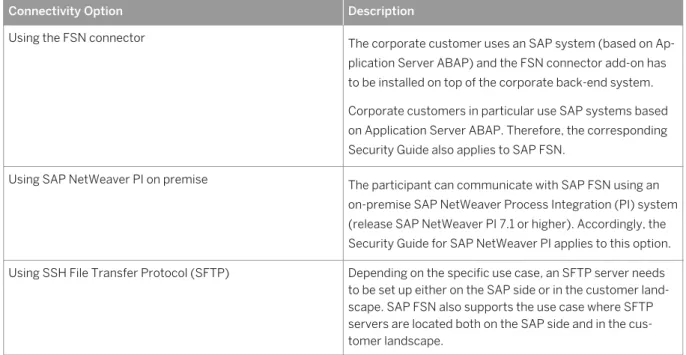
To exchange data with SAP FSN, financial service providers and their corporate customers can choose between the following connectivity options – each supporting separate levels of security.
Table 3: Security Aspects Related to the Technical System Landscape
Connectivity Option Description
Using the FSN connector The corporate customer uses an SAP system (based on Ap plication Server ABAP) and the FSN connector add-on has to be installed on top of the corporate back-end system. Corporate customers in particular use SAP systems based on Application Server ABAP. Therefore, the corresponding Security Guide also applies to SAP FSN.
Using SAP NetWeaver PI on premise The participant can communicate with SAP FSN using an on-premise SAP NetWeaver Process Integration (PI) system (release SAP NetWeaver PI 7.1 or higher). Accordingly, the Security Guide for SAP NetWeaver PI applies to this option. Using SSH File Transfer Protocol (SFTP) Depending on the specific use case, an SFTP server needs
to be set up either on the SAP side or in the customer land scape. SAP FSN also supports the use case where SFTP servers are located both on the SAP side and in the cus tomer landscape.
4.2 Tenant Isolation
For each participant connected to SAP FSN, separate resources (memory, CPU, and file system) of the cloud-based integration platform are allocated – although all participants might share the same hardware.
This concept is also referred to as tenant isolation.
Note
A tenant represents the resources of the cloud-based integration platform of SAP FSN allocated to a participant.
At runtime, SAP FSN processes the data that is exchanged between the involved participants on a cluster of different virtual machines (VMs) hosted in the SAP cloud, with each VM assigned to the corresponding tenant allocated to the connected participant.
Note
A virtual machine (VM) is a software implementation of a machine that executes a program like a physical machine.
SAP FSN is designed so that it always makes sure that the involved VMs are strictly separated from each other with regard to the related participants.
In addition, each tenant uses a separate database schema, which guarantees that data of different participants is strictly separated.
The following figure illustrates this concept for the communication between a corporation and a financial service provider.
To enable a corporation to communicate with a financial service provider using SAP FSN, tenants have to be specified for both the corporation and the financial service provider. At runtime, the corporation connects to the corporate tenant either directly through the FSN Connector or through SFTP. The financial service provider connects to its tenant either through SFTP or WS-RM (using SAP Netweaver PI).
The communication between the tenants within a cluster (in the example, the communication of the corporate tenant and the tenant of the financial service provider) is secured by transport level encryption (through HTTPS/SSL). If desired by the customer, encryption and digital signature based on PKCS#7 can also be applied for this communication path.
With regard to the message flow between a corporation and a financial service provider, tenant isolation comes into play in the following way: For the message flow (with payment instruction) from a corporation to a financial service provider, the corporate tenant acts as the sender tenant and the tenant of the financial service provider as the receiver tenant. Similarly, for the message flow (with payment status) from the financial service provider to the corporation, the tenant of the financial service provider acts as the sender tenant and the corporate tenant as the receiver tenant. SAP FSN supports data isolation between these tenants by splitting the message processing step between the sender and receiver tenants.
When the sender triggers a message to the receiver, the sender tenant processes the first part of the message (containing the sender mapping). Then the message is forwarded to the receiver tenant via a secure channel (based on SSL). The receiver tenant then continues the processing (with the receiver mapping). This ensures that the data of sender and receiver tenants is processed separately by its respective tenants.
This approach also ensures that mappings are owned and managed by the tenants of the respective sender and receiver participants.
4.3 Communication Security
This section provides an overview of the security features of SAP FSN corresponding to the various types of communication and transport protocol.
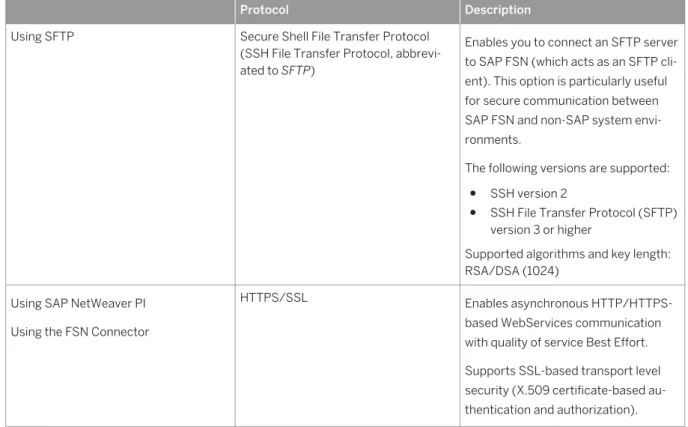
The chosen transport protocol comprises options to secure the communication, as summarized in the following table.
Table 4: Overview of Connectivity Options and Transport Level Security
Protocol Description
Using SFTP Secure Shell File Transfer Protocol (SSH File Transfer Protocol, abbrevi ated to SFTP)
Enables you to connect an SFTP server to SAP FSN (which acts as an SFTP cli ent). This option is particularly useful for secure communication between SAP FSN and non-SAP system envi ronments.
The following versions are supported:
● SSH version 2
● SSH File Transfer Protocol (SFTP) version 3 or higher
Supported algorithms and key length: RSA/DSA (1024)
Using SAP NetWeaver PI Using the FSN Connector
HTTPS/SSL Enables asynchronous HTTP/HTTPS-based WebServices communication with quality of service Best Effort. Supports SSL-based transport level security (X.509 certificate-based au thentication and authorization).
On top of the chosen transport protocol, you have the option to apply additional measures to protect the exchanged data at the message level.
The following options are available:
● Encryption/decryption of message content
Encryption allows you to encode the content of a message in such a way that only authorized parties can read it.
● Digital signing/verifying messages
A digital signature ensures the authenticity of a message by guaranteeing the identity of the signer and that the message was not altered after signing.
Message level security based on PKCS#7/CMS Enveloped Data and Signed Data.
Note
PKCS stands for Public Key Cryptography Standards. Digitally signing a message within FSN is based on the CMS type Signed Data. Digitally encrypting or decrypting the content of a message is based on the CMS type Enveloped Data.
4.4 Data Storage Security
Data related to processed messages is stored for 90 days by default.
This time can be configured individually, if desired by the customer. Storage is in separate, tenant-specific database schemas, which are not shared across tenants.
4.5 Security of the Onboarding Process
To set up the connection of a new participant and SAP FSN for the first time, experts on both the participant's and on the SAP side have to interact in a coordinated way during the onboarding process. During this process, confidential data has to be exchanged between SAP and the participant, such as server addresses or public key certificates, as well as the names of the involved persons.
To increase the security level of the SAP-participant information exchange, access to the relevant data is restricted to a small circle of experts involved in the onboarding process.
The information exchange has to take place in a coordinated way and be aligned with the configuration tasks on each side of the communication.
4.6 High Availability
To ensure that a cluster can operate reliably even if individual virtual machines crash, failover mechanisms are implemented: If a virtual machine crashes while processing a message, this incident is detected by the cluster and a new virtual machine is started automatically to take over the task of the crashed virtual machine. Software update of the runtime environment is accomplished with a minimum downtime of about 1 minute.
5
Support Information
If you require any support or have queries, you can contact SAP:
● SAP Financial Services Network telephone numbers for support (24x7) on SAP Service Marketplace ● 24x7 via incident report to be created on the component LOD-FSN at http://support.sap.com
6
Onboarding and Service Activation
Two kinds of process are relevant when starting operating scenarios based on SAP FSN:
● Onboarding: This is the process of connecting a participant (either a financial service provider or a corporation) to SAP FSN. Onboarding covers all tasks that are necessary in order to configure the data exchange and the connection between the corporation's or financial service provider’s system and SAP FSN.
A customer is onboarded to both a test and a production landscape.
Before a financial service provider can start collaborating with a corporate customer based on SAP FSN, the financial services provider and the corporate customer both have to be connected to FSN. In other words, onboarding is a one-time activity that is a prerequisite for service activation.
● Service activation: This is the process when a financial service provider starts collaboration with a corporate customer. On request, SAP activates the connection between the two participants and informs them once the connection is complete. This allows the newly connected participants to carry out message flow testing across the service prior to moving into the production landscape.
A customer service activation is carried out in both a test and a production landscape.
6.1 Use Cases
There are different onboarding use cases depending on the kind of participant (bank or corporation) and on the chosen connectivity between participant and SAP FSN. Depending on the use case, the details of some steps of the onboarding process vary.
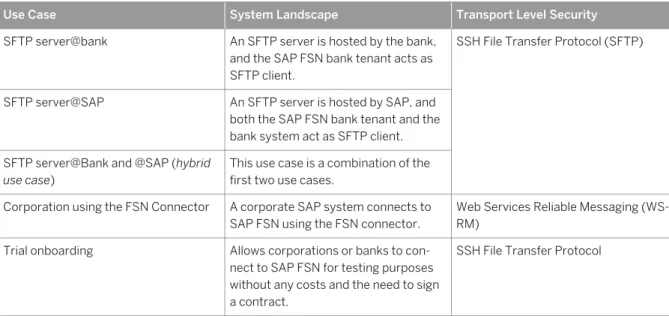
The following basic use cases are supported:
Table 5: Overview of Onboarding Use Cases
Use Case System Landscape Transport Level Security
SFTP server@bank An SFTP server is hosted by the bank, and the SAP FSN bank tenant acts as SFTP client.
SSH File Transfer Protocol (SFTP)
SFTP server@SAP An SFTP server is hosted by SAP, and both the SAP FSN bank tenant and the bank system act as SFTP client. SFTP server@Bank and @SAP (hybrid
use case)
This use case is a combination of the first two use cases.
Corporation using the FSN Connector A corporate SAP system connects to SAP FSN using the FSN connector.
Web Services Reliable Messaging (WS-RM)
Trial onboarding Allows corporations or banks to con nect to SAP FSN for testing purposes without any costs and the need to sign a contract.
Use Case System Landscape Transport Level Security Connecting a corporation to off-net
work banks
Allows you to set up the network that way that a corporation connects to one or more banks that are not associated with a corresponding bank tenant. This option allows you to set up a business network for corporation in a minimum time scope without the need to set up FSN connectivity to all involved banks separately.
SSH File Transfer Protocol (and SFTP server hosted by bank)
Note
SFTP polling is supported in the following way: the same file can be polled by multiple endpoints configured to use the SFTP channel.
On top of the basic use cases, additional use cases that depend on the following aspects:
● Applied message level security
● Implementing the pull communication pattern
Using this pattern, messages received by a sender participant are stored in a tenant-specific data store at SAP FSN. The receiver participant then polls (reads) the message from there. This pattern shifts the control of message processing to the participant. That way, failure situations due to unattainability of a receiver can be prevented.
● Setting up a virtual private network (VPN) environment
This option is available for participants connecting to SAP FSN using SFTP.
Customers can optionally start a trial onboarding process that allows them to connect to SAP FSN for testing purposes without any costs and the need to sign a contract.
Related Information
SFTP Server@Bank [page 22] SFTP Server@SAP [page 24]
SFTP Server@SAP and SFTP Server@Bank (Hybrid Use Case) [page 26] Corporation Using FSN Connector [page 28]
Connecting to "Off-Network" Banks (SFTP Server@Bank) [page 32]
6.1.1
SFTP Server@Bank
You can set up SFTP-based communication between a bank and SAP FSN with an SFTP server hosted by the bank. This topic explains the setup of components and summarizes the keys that need to be exchanged during onboarding.
The message sent to the bank from the simulated corporation is processed first by the SAP FSN corporate tenant (simulation) and handed over from there to the bank tenant. The bank tenant (as SFTP client) writes the SFTP message to the SFTP server on the bank side.
For the data flow in the other direction, SAP FSN (bank tenant) as SFTP client picks up (pulls) the data from the SFTP server and forwards the data to the corporate tenant (simulation).
For productive operation, the corporate tenant (simulation) is replaced by the productive corporate tenant and the simulated corporate system by the productive one.
The following figure shows the overview of the required keys on the SAP side and on the bank side.
To ensure secure data transfer between the components, asymmetric SSH key pairs are used to encrypt and decrypt the symmetric keys that are actually used to secure the data transfer session between two
components (session keys).
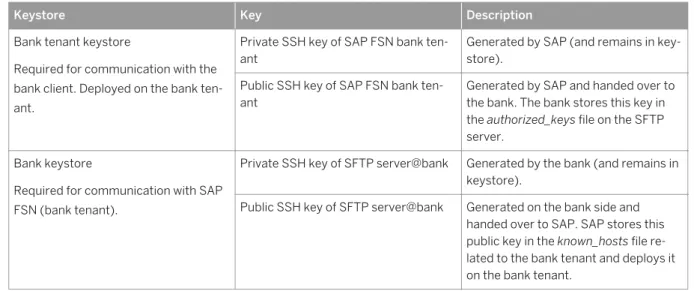
The following table summarizes how the different keys are related to each other and what role they play in the secure SSH connection process.
Note
Note that separate key sets are used for test and for productive usage. Therefore, the components bank tenant and bank SFTP server in the figure stand for either test or productive bank tenant and bank SFTP server (both connected to the same simulated corporate tenant during bank onboarding).
Table 6: Required SSH Keys
Keystore Key Description
Bank tenant keystore
Required for communication with the bank client. Deployed on the bank ten ant.
Private SSH key of SAP FSN bank ten ant
Generated by SAP (and remains in key store).
Public SSH key of SAP FSN bank ten ant
Generated by SAP and handed over to the bank. The bank stores this key in the authorized_keys file on the SFTP server.
Bank keystore
Required for communication with SAP FSN (bank tenant).
Private SSH key of SFTP server@bank Generated by the bank (and remains in keystore).
Public SSH key of SFTP server@bank Generated on the bank side and handed over to SAP. SAP stores this public key in the known_hosts file re lated to the bank tenant and deploys it on the bank tenant.
To implement this setup, the required key pairs have to be generated on each side of the communication and the public keys have to be exchanged with the corresponding counterpart.
To keep an overview of all required and exchanged keys during onboarding and productive operation, we recommend that you adhere to specific key-naming conventions.
6.1.2
SFTP Server@SAP
You can set up SFTP-based communication between a bank and SAP FSN with an SFTP server hosted at SAP. This topic explains the setup of components and summarizes the keys that need to be exchanged during onboarding.
The bank tenant as SFTP client writes a payment message to the SFTP server. The bank sends an acknowledgment message to the SFTP server (to a bank-specific inbox). In the other direction, the bank tenant as SFTP client picks up the message from the SFTP server from a bank-specific inbox.
To ensure secure data transfer between the components, asymmetric SSH key pairs are used to encrypt and decrypt the symmetric keys that are actually used to secure the data transfer session between two
components (session keys).
The following figure shows the involved components and indicates the required SSH keys.
In this setup, both SAP FSN and the bank system act as SFTP clients when writing (pushing) or reading (pulling) files to or from the SFTP server. A proxy and a load balancer are interconnected between the bank tenant or SFTP client@bank and the SFTP server@SAP for calls reaching the SFTP server@SAP.
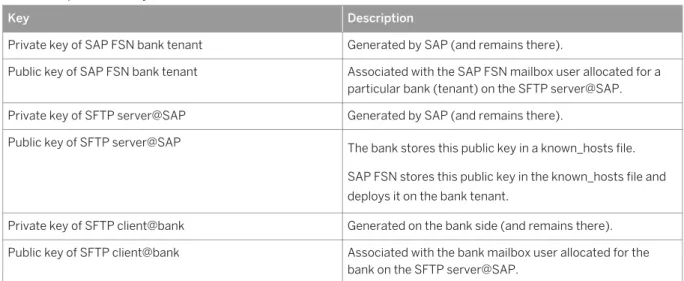
Note that no keys need to be deployed on the load balancer. The required keys are forwarded from the SFTP server. The following table summarizes the different required keys and indicates what role they play in the secure SSH connection process.
Note
Table 7: Required SSH Keys
Key Description
Private key of SAP FSN bank tenant Generated by SAP (and remains there).
Public key of SAP FSN bank tenant Associated with the SAP FSN mailbox user allocated for a particular bank (tenant) on the SFTP server@SAP. Private key of SFTP server@SAP Generated by SAP (and remains there).
Public key of SFTP server@SAP The bank stores this public key in a known_hosts file. SAP FSN stores this public key in the known_hosts file and deploys it on the bank tenant.
Private key of SFTP client@bank Generated on the bank side (and remains there). Public key of SFTP client@bank Associated with the bank mailbox user allocated for the
bank on the SFTP server@SAP.
To implement this setup, the required key pairs have to be generated on each side of the communication and the public keys have to be exchanged with the corresponding counterpart, as illustrated in the figure and table above.
To keep an overview of all required and exchanged keys during onboarding and productive operation, we recommend that you adhere to specific key-naming conventions.
6.1.3
SFTP Server@SAP and SFTP Server@Bank (Hybrid
Use Case)
You can set up SFTP-based communication between a bank and SAP FSN with SFTP servers hosted both at SAP and on the bank side. This topic explains the setup of components and summarizes the keys that need to be exchanged during onboarding.
For the SFTP server@SAP the same concepts apply as for the use case SFTP Server at SAP. The following figure shows the involved components and indicates the required SSH keys.
In this use case, the SAP FSN runtime (bank tenant) acts as SFTP client in the following cases:
● When pushing files to the SFTP server@bank
● When pulling files from the SFTP server@SAP
The SFTP client@bank also acts as SFTP client when pushing files to the SFTP server@SAP.
As this use case is a combination of the use cases SFTP server@SAP and SFTP server@bank, additional keys are required and need to be exchanged during onboarding. However, for the individual keys the same applies as already described for the two other use cases. Therefore, refer to the corresponding sections. In summary, note the following:
● The SAP FSN runtime (bank tenant) is connected to the SFTP server@bank. Therefore, the public key of the bank tenant is required to configure the SFTP server@bank and the public key of the SFTP
server@bank is required to configure the SAP FSN runtime.
● The SAP FSN runtime (bank tenant) is connected to the SFTP server@SAP. Therefore, the public key of the bank tenant is required to configure the SFTP server@SAP and the public key of the SFTP server@SAP is required to configure the SAP FSN runtime.
● The SFTP server@SAP is connected to the SFTP client@bank. Therefore, the public key of the SFTP client@bank is required to configure the SFTP server@SAP and the public key of the SFTP server@SAP is required to configure the SFTP client@bank.
6.1.4 Corporation Using FSN Connector
This section summarizes the concepts behind WS-RM-based connectivity between a corporation (using the FSN connector) and SAP FSN.
To set up a secure connection between a corporation and SAP FSN (based on WS-RM), the following data has to be exchanged between SAP and the corporation:
● WSDL documents to configure Web service provider and clients on both sides of the communication
● Public key certificates
Required Binding Information (WSDL Files)
The following figure illustrates which WSDL documents need to be exchanged and at which point in the configuration procedure these become relevant on both sides of the communication.
Two different WSDL files are required when the following configuration tasks are performed:
● Corporate WSDL (describes binding for corporation as WS provider)
○ The corporate system administrator generates this WSDL when configuring the corporation system as WS provider.
○ The SAP Cloud Service Center consultant needs this WSDL to specify FSN as WS consumer.
● SAP FSN WSDL (describes binding for SAP FSN as WS provider)
○ The SAP Cloud Service Center consultant needs this WSDL to specify FSN as WS provider.
○ The corporate system administrator needs this WSDL to configure the logical port in the corporate system.
Required Keystores and Public Key Certificates
Transport level security HTTPS/SSL is based on X.509 certificates. The following figure shows the required keystores and certificates for the communication from the corporation to the corporate tenant.
In total, the following keystores are required to set up SSL-based communication between a corporate system and SAP FSN.
Table 8:
Keystore Certificate/Key Required By Description
SAP FSN client keystore (keystore.jks file) Has to be deployed on the corporate tenant.
SAP FSN client certificate (public and private key) signed by CA
SAP Contains the public and pri vate keys required to au thenticate SAP FSN as the sender of messages (for messages sent from SAP FSN to a corporate back-end system or to a bank tenant). The client certificate is gen erated by SAP and then signed by a certification au thority (CA).
Note
For SSL-based communi cation, a separate private key should be used for each corporation. As it is only possible to deploy the complete keystore (containing the private and public key), a sepa rate keystore has to be created for each corpora tion.
Corporate server root certifi cate (certificate of issuer of corporate certificate)
SAP Required to authenticate the corporate system as the re ceiver of messages. This certificate has to be im ported into the SAP FSN cli ent keystore.
SAP FSN server keystore Corporate client root certifi cate
SAP Required to authenticate the corporate system when sending messages sent to the corporate tenant. This certificate needs to be im ported into the SAP FSN server keystore.
Keystore Certificate/Key Required By Description SAP FSN client root certifi
cate
SAP Required for the following:
● To authenticate the bank tenant as the sender of messages (in bound messages sent from the bank tenant to the corporate tenant)
● To authenticate the cor porate tenant as the sender of messages (in bound messages sent from the corporate ten ant to the bank tenant) Corporate client keystore
Configured using the Trust Manager (transaction
STRUST)
Corporate client certificate (public and private key part)
Corporation Required to authenticate the corporate system as the sender of messages. SAP FSN server root certifi
cate (certificate of issuer of SAP FSN server certificate)
Corporation Required to authenticate SAP FSN as the receiver of messages.
The load balancer handles inbound message process ing with regard to SAP HANA Cloud. SAP has to hand over this root certificate to the corporation (of the sending corporate system). This cer tificate has to be imported into the client keystore (PSE).
Corporate server keystore Configured using the Trust Manager (transaction
STRUST)
SAP FSN client root certifi cate (certificate of issuer of SAP FSN client certificate)
Corporation Required to authenticate SAP FSN as the sender of messages.
In addition to the certificates illustrated in the figure and summarized in the table, the SAP FSN client certificate is required to configure the user mapping in the corporate back-end system. This mapping is required because messages from SAP FSN have to run under a technical user and therefore have to be mapped prior to being processed in the corporate back-end system.
To keep an overview of all required and exchanged keys during onboarding and productive operation, we recommend that you adhere to specific key-naming conventions.
6.1.5
Connecting to "Off-Network" Banks (SFTP
Server@Bank)
You can set up the network so that a corporation connects to one or more banks that are not associated with a corresponding bank tenant.
This option allows you to set up a business network for a corporation relatively quickly, without having to set up FSN connectivity to all involved banks separately.
This option comes with the following constraints:
● This option is only supported for SFTP connectivity and for landscapes where the SFTP server is hosted by the involved banks.
● Only FSN standard messages can be used.
Technical Landscape
The following figure illustrates the landscape.
The figure illustrates a case where a corporation is connected to two banks.
In this setup, the corporate tenant is connected to the SFTP servers (hosted on the side of the involved banks). This way, for each connection to a bank, the tenant acts as the SFTP client only and sends files to the SFTP server@bank, and polls the SFTP server@bank for files from the bank to the corporation (push/pull by the tenant).
Integration Flow Specifics
Due to the lack of bank tenants, all processing steps that correspond to the bank have to be performed on the corporate tenant.
Connection Setup Steps
The following minimum steps are required to set up the proposed connection:
● Agreeing on the standard format used by the bank
● Exchanging SSH public keys for bank-side SFTP servers
● Configuring SSH credentials
● Deploying the bank integration flow on the corporate tenant
7
FSN-Specific Requirements
To be able to use the full function scope of SAP FSN, all participants need to fulfill a set of requirements.
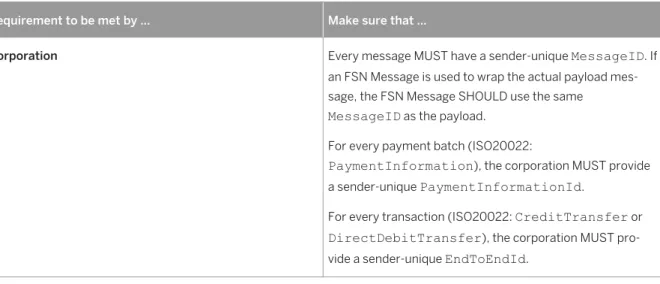
Rules to Ensure Full Monitoring Capabilities
Table 9: Monitoring-Specific Requirements
Requirement to be met by ... Make sure that ...
Corporation Every message MUST have a sender-unique MessageID. If an FSN Message is used to wrap the actual payload mes sage, the FSN Message SHOULD use the same
MessageID as the payload. For every payment batch (ISO20022:
PaymentInformation), the corporation MUST provide a sender-unique PaymentInformationId.
For every transaction (ISO20022: CreditTransfer or DirectDebitTransfer), the corporation MUST pro vide a sender-unique EndToEndId.
Requirement to be met by ... Make sure that ...
Bank Every message MUST have a sender-unique MessageID. If an FSN Message is used to wrap the actual payload mes sage, the FSN Message SHOULD use the same
MessageID as the payload.
For every transmitted transaction, the bank SHOULD pro vide at least one status report (using a pain.002 or equiva lent), at either message, batch, or transaction level.
● If the status is reported at transaction level, it SHOULD include the full original EndToEndId of the transac tion.
● If the status is reported at batch level, it SHOULD in clude the original PaymentInformationId of the transaction.
● If the status is reported at message level, it SHOULD in clude the original MessageId of the transaction. For every accepted transaction, the bank SHOULD provide an entry in an account statement (camt.053/52 or equiva lent), which includes the original reference either to the transaction or to the complete batch.
● If the statement is reported at transaction level, it SHOULD include the full original EndToEndId of the transaction.
● If the statement is reported at batch level, it SHOULD include the original PaymentInformationId of the batch.
If these requirements are not met, monitoring using the Business Cockpit will be restricted or even impossible.
Note
Sender-unique ID means that the sending system ensures that the ID is unique for this system over a period of at least one year.
Important Disclaimers and Legal Information
Coding Samples
Any software coding and/or code lines / strings ("Code") included in this documentation are only examples and are not intended to be used in a productive system environment. The Code is only intended to better explain and visualize the syntax and phrasing rules of certain coding. SAP does not warrant the correctness and completeness of the Code given herein, and SAP shall not be liable for errors or damages caused by the usage of the Code, unless damages were caused by SAP intentionally or by SAP's gross negligence.
Accessibility
The information contained in the SAP documentation represents SAP's current view of accessibility criteria as of the date of publication; it is in no way intended to be a binding guideline on how to ensure accessibility of software products. SAP in particular disclaims any liability in relation to this document. This disclaimer, however, does not apply in cases of wilful misconduct or gross negligence of SAP. Furthermore, this document does not result in any direct or indirect contractual obligations of SAP.
Gender-Neutral Language
As far as possible, SAP documentation is gender neutral. Depending on the context, the reader is addressed directly with "you", or a gender-neutral noun (such as "sales person" or "working days") is used. If when referring to members of both sexes, however, the third-person singular cannot be avoided or a gender-neutral noun does not exist, SAP reserves the right to use the masculine form of the noun and pronoun. This is to ensure that the documentation remains comprehensible.
Internet Hyperlinks
The SAP documentation may contain hyperlinks to the Internet. These hyperlinks are intended to serve as a hint about where to find related information. SAP does not warrant the availability and correctness of this related information or the ability of this information to serve a particular purpose. SAP shall not be liable for any damages caused by the use of related information unless damages have been caused by SAP's gross negligence or willful misconduct. All links are categorized for transparency (see: http://help.sap.com/disclaimer).
www.sap.com/contactsap
© 2015 SAP SE or an SAP affiliate company. All rights reserved. No part of this publication may be reproduced or transmitted in any form or for any purpose without the express permission of SAP SE or an SAP affiliate company. The information contained herein may be changed without prior notice.
Some software products marketed by SAP SE and its distributors contain proprietary software components of other software vendors. National product specifications may vary.
These materials are provided by SAP SE or an SAP affiliate company for informational purposes only, without representation or warranty of any kind, and SAP or its affiliated companies shall not be liable for errors or omissions with respect to the materials. The only warranties for SAP or SAP affiliate company products and services are those that are set forth in the express warranty statements accompanying such products and services, if any. Nothing herein should be construed as constituting an additional warranty. SAP and other SAP products and services mentioned herein as well as their respective logos are trademarks or registered trademarks of SAP SE (or an SAP affiliate company) in Germany and other