AC 800M
EtherNet/IP DeviceNet Linking Device LD 800DN
AC 800M
NOTICE
This document contains information about one or more ABB products and may include a description of or a reference to one or more standards that may be generally relevant to the ABB products. ABB may have one or more patents or pending patent applications protecting the intellectual property in the ABB product(s) described in this publication.The presence of any such description of a standard or reference to a standard is not a representation that all of the ABB products referenced in this document support all of the features of the described or referenced standard. In order to determine the specific features supported by a particular ABB product, the reader should consult the product specifications for the particular ABB product. The information in this document is subject to change without notice and should not be construed as a commitment by ABB. ABB assumes no re-sponsibility for any errors that may appear in this document.
In no event shall ABB be liable for direct, indirect, special, incidental or con-sequential damages of any nature or kind arising from the use of this doc-ument, nor shall ABB be liable for incidental or consequential damages arising from use of any software or hardware described in this document. This document and parts thereof must not be reproduced or copied without written permission from ABB, and the contents thereof must not be impart-ed to a third party nor usimpart-ed for any unauthorizimpart-ed purpose.
The software or hardware described in this document is furnished under a license and may be used, copied, or disclosed only in accordance with the terms of such license.
This product meets the requirements specified in EMC Directive 89/336/ EEC and in Low Voltage Directive 72/23/EEC.
TRADEMARKS
All rights to copyrights, registered trademarks, and trademarks reside with their respective owners.
Copyright © 2003-2010 by ABB. All rights reserved.
Release: June 2010
TABLE OF CONTENTS
Section 1 - Installation
Introduction ... 9
Installation Items Checklist... 9
Installation and Operation Requirements... 9
Connectors ... 10
Connect Power ... 11
Connecting to DeviceNet ... 12
DeviceNet Connector ... 12
Setting the MAC ID Using the BWConfig Tool ... 12
Connecting to Ethernet... 14
Ethernet Connector ... 14
Setting the IP Address ... 15
Configuration Port Connector ... 19
Section 2 - Technical Specifications Environmental Specifications... 21
EMC Directive Compliance ... 21
Electrical Specifications ... 21
Table of Contents
Safety Summary
Electrostatic Sensitive Device
Devices labeled with this symbol require special handling precautions as described in the installation section.
GENERAL WARNINGS
Equipment Environment
All components, whether in transportation, operation or storage, must be in a noncorrosive environment.
Electrical Shock Hazard During Maintenance
Disconnect power or take precautions to insure that contact with energized parts is avoided when servicing.
SPECIFIC WARNINGS
Page 10: Substitution of components may impair suitability for Class 1, Division 2.
SPECIFIC CAUTIONS
Page 10: When in hazardous locations turn off power before replacing or wiring modules.
Page 10: Do not disconnect equipment unless power has been switched off or the area is known to be nonhazardous.
Section 1 Installation
Introduction
This section describes the installation requirements for DeviceNet Linking Device LD 800DN and the installation procedure.
Installation Items Checklist
• EtherNet to DeviceNet Linking Device LD 800DN. • EtherNet/IP DeviceNet Configuration manual
(9ARD000014*).
• Power cable for connection to supplied 2 position connector. • DeviceNet cable for connection to supplied 5 position
connector.
• Ethernet cable for connection to RJ45 connector.
Installation and Operation Requirements
Power, input and output (I/O) wiring must be in accordance with Class 1, Division 2 wiring methods article 501-4 (b) of the National Electric code, NFPA 70 and in accordance with local codes.
• Terminal tightening torque must be between 5 lbs-in to 7 lbs-in (0,5 Nm - 0,8 Nm).
Connectors Section 1 Installation
10 3BSE059754R0001
• For use in Class 2 circuits only.
• Suitable for Surrounding temperature of 65°C max. • Use 60/75 C copper wire only.
Connectors
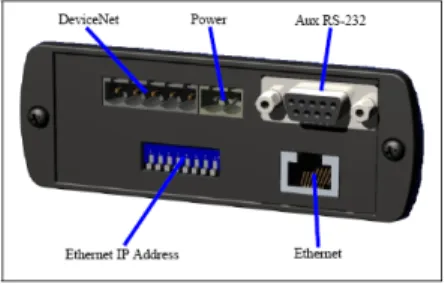
The following Figure 1 displays the connectors for LD 800DN. Substitution of components may impair suitability for Class 1, Division 2.
When in hazardous locations turn off power before replacing or wiring modules.
Do not disconnect equipment unless power has been switched off or the area is known to be nonhazardous.
Section 1 Installation Connect Power
Connect Power
The LD 800DN requires 24 V DC power for the 2 position terminal block connector.
Figure 1. Connectors for LD 800DN
Connecting to DeviceNet Section 1 Installation
12 3BSE059754R0001
Connecting to DeviceNet
DeviceNet Connector
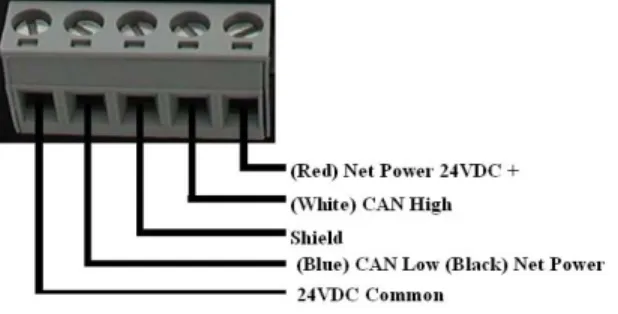
DeviceNet is connected to the 5 position terminal block connector.
A 120 ohm termination resistor (Two pieces included with the product) needs to be placed at the beginning and at the end of the Controller-Area Network (CAN). The termination resistor is placed between CAN High and CAN Low signals.
Setting the MAC ID Using the BWConfig Tool
The factory default DeviceNet settings are: MAC ID 63. The following are the steps for setting the MAC ID using BWConfig Tool:
Section 1 Installation Setting the MAC ID Using the BWConfig Tool
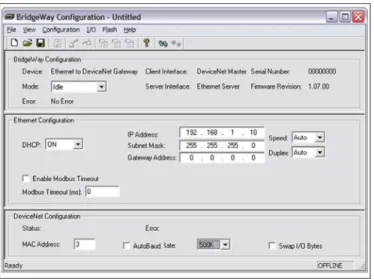
1. Launch the BWConfig tool, a window is displayed as
shown in Figure 4.
2. Edit the MAC Address provided in the DeviceNet Configuration pane and download the configuration to LD 800DN.
After the configuration is downloaded, the BWConfig tool will automatically reset the LD 800DN. For complete information on using BWConfig tool, refer to LD 800DN section of EtherNet/IP DeviceNet Configuration manual (9ARD000014*).
Connecting to Ethernet Section 1 Installation
14 3BSE059754R0001
Connecting to Ethernet
Ethernet Connector
The Ethernet cable is connected to the RJ45 connector at the end of the module.
Section 1 Installation Setting the IP Address
Setting the IP Address
The following are the various ways of setting ip address for LD 800DN:
– Setting the IP Address Using the BWConfig Tool. – Setting the IP Address with the Configuration Switch. – Setting the IP Address Using the Web Page.
Setting the IP Address Using the BWConfig Tool The Ethernet configuration can be set using the BWConfig tool. The following are the steps for setting the IP Address using BWConfig Tool:
1. Launch the BWConfig tool, a window is displayed as
shown in Figure 4.
2. Edit the IP Address in the Ethernet configuration pane and download the configuration to LD 800DN.
After the configuration is downloaded, the BWConfig tool will automatically reset the LD 800DN. For complete information on using BWConfig Tool, refer to LD 800DN section of EtherNet/IP DeviceNet Configuration manual (9ARD000014*).
Setting the IP Address Section 1 Installation
16 3BSE059754R0001
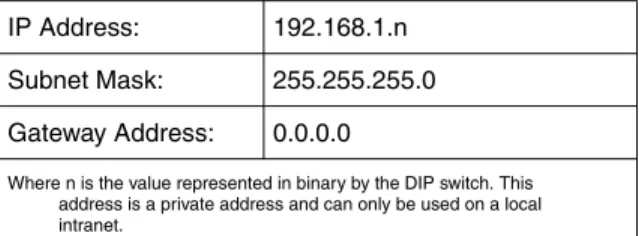
Setting the IP Address with the Configuration Switch The IP configuration switch is an 8 position DIP switch located at the end of the module. If any of the 8 switches are in ON position, then the following IP address is set.
Example:
Table 1. IP addresses
IP Address: 192.168.1.n Subnet Mask: 255.255.255.0 Gateway Address: 0.0.0.0
Where n is the value represented in binary by the DIP switch. This address is a private address and can only be used on a local intranet.
Section 1 Installation Setting the IP Address
The switch represents the binary value 00010100, or 20 decimal. (The switch position is shown in White in the diagram.) The resulting IP address is 192.168.1.20.
Setting the IP Address Using the Web Page
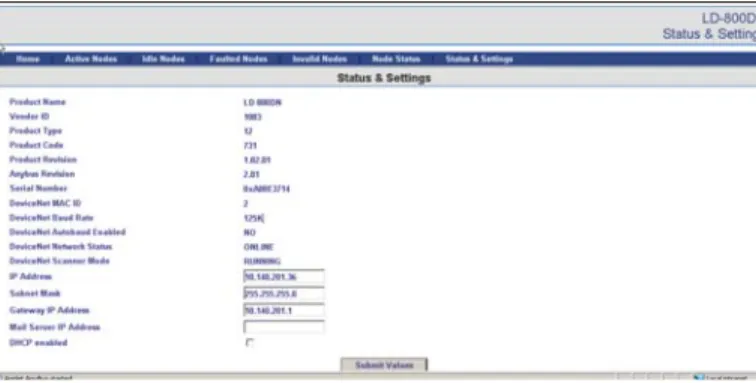
The IP address can also be configured using the Status and Settings web page. The web pages are accessed by typing the current IP address of the LD 800DN into a web browser URL. The Status and Settings web page appears as shown in Figure 6.
This procedure of setting IP address using the Configuration Switch takes precedence over all the other procedures.
Setting the IP Address Section 1 Installation
18 3BSE059754R0001
The IP address, subnet mask, and default gateway address are displayed in the text boxes on the web page. Edit the IP address values accordingly. Select Submit Values to set the addresses for LD 800DN.
The Reset Module button can be used to reset the LD 800DN from the web browser. The Scanner Mode will display RESETTING...
while the module resets and comes back online. The web page is refreshed after the module has booted.
Figure 6. Status and Settings Webpage
A power cycle or module reset is required for the changes to take effect after selecting the Submit Values button.
Section 1 Installation Configuration Port Connector
Configuration Port Connector
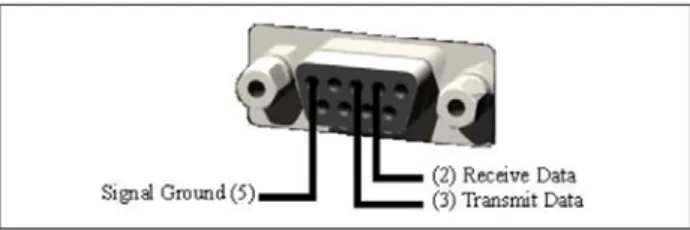
The configuration port is the 9-pin D-Subminiature female connector at the end of the LD 800DN. Figure 7 shows the connections to be made.
The LD 800DN is connected to a PC for configuration using a null-modem cable. A null-modem cable has pin 2 and pin 3
If the web browser is configured to cache web pages, it may appear that the LD 800DN has not changed address after the module is power cycled. Ensure that the browsers settings are configured to always reload pages. This can be done on Internet Explorer in the
Temporary Internet Files Settings by selecting the
Every Visit to the page option. This option enables the browser to check for any changes on the page.
Configuration Port Connector Section 1 Installation
20 3BSE059754R0001
swapped so that Transmit line of the PC is connected to the LD 800DN Receive line, and Receive line of the PC is connected to the LD 800DN Transmit line.
The LD 800DN does not use the modem control signals specified for a DTE connector. Connecting the module through devices, such as isolation modules, which assume control of these lines may result in unreliable BWConfig communication.
Section 2 Technical Specifications
Environmental Specifications
Operating Temperature: 0° C to 65° C. Non-Operating Temperature: -25° C to 85° C.
EMC Directive Compliance
This product is tested to meet the Council Directive 2004/108/EC Electromagnetic Compatibility (EMC) by applying the following standards, in whole or in part, documented in a technical construction file:
• EN61000-6-4-EMC Generic Emission Standard for Industrial Environment.
• EN61000-6-2-EMC Generic Immunity Standard for Industrial Environment.
This product is intended for use in an industrial environment.
Electrical Specifications
Power Supply: 12 VDC - 30 VDC.
Further Technical Information Section 2 Technical Specifications
22 3BSE059754R0001
Further Technical Information
For further technical information on LD 800DN, refer to EtherNet/IPDeviceNet Configuration manual (9ARD000014*).
Copyright © 2003-2010 by ABB. All Rights Reserved
ABB AB ControlSystems
Västerås, Sweden Phone: +46 (0) 21 32 50 00 Fax: +46 (0) 21 13 78 45
E-Mail: [email protected]
www.abb.com/controlsystems
ABB Industry Pte Ltd Control Systems
Singapore
Phone: +65 6776 5711 Fax: +65 6778 0222
E-Mail: [email protected]
www.abb.com/controlsystems
ABB Automation GmbH Control Systems
Mannheim, Germany Phone: +49 1805 26 67 76 Fax: +49 1805 77 63 29
E-Mail: [email protected]
www.abb.de/controlsystems ABB Inc.
Control Systems
Wickliffe, Ohio, USA Phone: +1 440 585 8500 Fax: +1 440 585 8756
E-Mail: [email protected]
www.abb.com/controlsystems
Contact us
Power and productivity for a better worldTM
3BSE0