Marlena Kruger and Riana Bester
CTI Education Group, GHO, Johannesburg, South Africa
[email protected]
[email protected]
Abstract: CTI is an accredited private higher education institution (university) with the Higher Education Council (HEC) in South Africa. Its head office is in Fourways, Johannesburg. CTI has 12 campuses nationwide and offers higher certificates and degrees in commerce and information technology. These BCom and BSc degrees were rolled out to all 12 campuses from January 2013. All first year students received 10“ Samsung tablets with their textbooks and course materials in digital format. We’ve worked closely with all role-players to ensure that all pillars for successful implementation of the e-book tablet project are in place. Timeous completion and conversion of course materials and e-textbooks for the start of the academic year in 2013 took extra time and focus of a dedicated project manager and multi-disciplinary team members. Several aspects were focused on during the conceptual, preparation and planning phases in 2012 (phase 1). This phase included aspects such as the student pilot project to establish the most suitable tablet to procure for students and lecturers, upgrading of infrastructure on campuses, lecturer training and the development of support materials, guidelines and rules for user standards. Phase 2 started in January 2013 with the implementation of a design-based research project which includes several planned interventions to ensure continuous development and support of lecturers and students with the focus on enhancing the academic experience of students. During this phase qualitative and quantitative methodologies were implemented and included the sharing of experiences using different digital media, tools and instruments to gather data from lecturers, students and other role-players. Data was analysed and compared with different theoretical frameworks for using integrating innovative technologies in learning environments. Changes that took place in teaching and learning practices will be discussed by way of using the technology integration matrix and other measurements to determine the development and movement of teaching and learning practices towards emerging pedagogies for the information age. More detail of research methodologies, actions and interventions as well as data gathering methods during project will be focused on and shared in this article.
Keywords: mobile learning, e-textbooks, tablet computers, faculty development, students’ enhancement of academic experience
1.
Background: Discussion of research problem and motivation for study
Previously, CTI students received printed textbooks that were included in their fees. From 2013, new degree and higher certificate students are receiving tablet computers with e-books instead of printed text books. This per se is not a problem but research on the use of tablet computers for teaching and learning is needed for various reasons. Firstly: Literature regarding the use of tablet computers in higher education is limited to publications that report on using it as e book readers. In the second place does very little evidence exist of research that investigated a project of this extent specifically in higher education in South Africa. The third reason for more research is that most of the educational applications available for the use on tablet computers are focused on primary and secondary learners.
At CTI, a research project was started in January 2013, to identify the critical issues that will influence the optimum utilisation of tablets and e-books to improve the quality of teaching, learning and assessment. The focus of this paper is on one of three perspectives that were investigated in a research project at CTI, namely the lecturers’ perspective. The other two perspectives, which include that of the students and the infrastructure, will be briefly discussed and referred to where relevant.
ISSN 1479-4403 52 ©ACPIL
Reference this paper as: Marlena Kruger and Riana Bester. “Integrating eLearning to Support Medical Education at the New University of Botswana School of Medicine” The Electronic Journal of e-Learning Volume 12 Issue 1 2014, (pp52-76), available online at www.ejel.org
1.1 Problem statement
Challenges for lecturers who used tablets during the first semester of 2013 at CTI include the following:
• Tablet computers, like other technologies, have the potential to become a distraction to students in class if it is not applied for structured activities.
• Additional to this, a high percentage of CTI’s lecturers have never used a tablet computer for teaching, learning and assessment and some lecturers have never used a tablet computer at all.
Issues experienced by CTI’s students include that
Many of our students come from communities where not only infrastructure like wireless networks often does not exist but basic resources like electricity is also not a given.
Technology has not been implemented in all schools and many students did not have exposure to the use of technology for teaching, learning and assessment.
These problems lead to our research question:
“What are the principles (critical issues) for the optimum utilisation of tablets and e-books to improve the quality of teaching, learning and assessment in a private higher education institution in South Africa?”
1.2 Aims and objectives of the study
The research problem discussed, as well as the research question that was stated above determines that aim of this research project should be to identify principles for the optimum utilisation of tablets and e-books to improve the quality of teaching, learning and assessment in a private higher education institution in South Africa.
To achieve this aim the following objectives were formulated, from three perspectives:
1.2.1 Lecturer perspective
• To provide iterative cycles of collaborative learning opportunities for lecturers in order to guide them through stages of acquisition, participation and contribution and eventually transformative (improved) practice (Stetsenko, 2008).
• To gather evidence that will demonstrate how lecturers integrate technology in the classroom regarding
o Approaches/strategies that they apply o Methods that they employ
o Specific technologies/applications that they use
• To subsequently identify principles of best practice of using tablets for teaching, learning and assessment, in other words to identify models of best practice, and record ‘lessons learnt’
1.2.2 Student perspective
• To investigate the impact of the use of tablets and e-books on teaching, learning and assessment
• To investigate the impact of the use of tablets on “changing the digital difference” and equipping studentswith additional skills
• To conduct a practical, usability study from the students’ perspective
1.2.3 Institutional (CTI) perspective
• To monitor and timeously identify problem areas
• To describe and adjust the infrastructure on campuses according to the needs of all users This paper will concentrate on the first perspective, namely that of the lecturers.
2.
Literature review and theoretical framework
Marc Prensky (2001) started a generational debate about the use of ICTs in education, early in the new millennium. He implied a generational division in this regard when he named young people who use digital technology with confidence because they grew up with it, “digital natives” and older, “more mature” users of technology, “digital immigrants”. Prensky alleged that the digital native generation have different expectations of life in general, and also specifically of learning.
Although this information is helpful it regrettably led to sweeping statements about digital natives such as
“...they are forcing a change in the model of pedagogy...” (Tapscott, 2009). This is presently the cause of
needlessly high levels of distress amongst many educators who often fear that learners might not respect them because of their lesser experience with technology. Some educators feel bewildered about the influence that technology might have on learning (Palfrey & Gasser quoted in Jones) and some even seem to be in a state of “moral panic” (Bennet, Maton, & Kervin, 2008). However, there is no clear-cut proof that young students intentionally form generational cohorts or express generation based demands pertaining to the use of technology for their studies (Jones & Binhui, 2011). Students who commence higher education, do not all possess the same level of technology proficiency (Nakamaru, 2011) and therefore do not belong to a single, homogeneous digital generation (Jones & Binhui, 2011). Furthermore, can the diversity of technology users not solely be ascribed to a difference in age; demographic factors play an equally important role (Jones & Binhui, 2011). This is especially relevant in the South-African context. Although a “digital difference” might exist between educators and learners it is fortunately not rigid and impossible to overcome (Jones & Binhui, 2011). Almost a decade after he introduced the “digital native and immigrant” idea, Prensky introduced a new
concept, namely that of “digital wisdom” (Prensky, 2009). He now proposed that everyone can become a
“digitally enhanced individual” with digital wisdom obtainable through sufficient engagement with technology.
This should reassure the older generation of educators but it also obligesthemto attain digital wisdom for the sake of their learners, since technology has become an essential part of human development (Jones & Binhui, 2011). Related to Prensky’s ideas is Stoerger’s (2009) metaphor, the “Digital Melting Pot”. It describes the
variety of technological aptitude and the co-existence of today’s technology users effectively. This also
emphasises the opportunities for participation during which less competent technology users can become transformed through their own interaction with technology, as well as by the contributions of peers and other more experienced individuals (Stetsenko, 2008). Educators should be brave and humble enough to be lifelong learners and accept to learn not only with their learners(students) but also from them!
Educators should therefore make the most of technology as a meditational tool for teaching and learning and not simply dismiss it as a distraction. This will nonetheless only be possible if the integration of technology in the curriculum is well informed in order to promote meaningful learning. A more detailed and structured description for this melting pot of technology mediated doings is provided by Engeström’s (Engeström, 2009) notion of an activity system depicted in Figure 2. This idea of Engeström was derived from Vygotsky’s “Mediation triangle” and both these concepts are anchored in the Cultural Historical Activity Theory (CHAT), which is the theoretical framework of this study. According to Vygotsky, human action is object orientated and artefact (tool) mediated. His original notion of mediation is illustrated in Figure 1.
Figure 1: Vygotsky's mediation triangle Figure 2: Engeström’s activity system
In spite of its simple structure, this diagram not only indicates the relationship between three central elements of human action: subject, instrument, and object (Engeström, Miettinen, & Punamäki, 1999), but also exemplifies the importance of tools in the mediation process as well as the fact that human action is always purposeful and directed at achieving a specific goal. Lautenbach (2005) described activity as human doings that work towards a common goal by employing internal or external tools, in order to reach a desired outcome. He (Lautenbach, 2011b) also stated that educational technologies can provide and support interventions by extending the human mediating presence.
However, Vygotsky’s triangle does not explain this role that other humans play during activity. For this reason Engeström extended Vygotsky triangle to include another three elements; the community, its associated rules as well as the division of labour that is a result of diversity. Although this system is more complex, it is more applicable when focusing on the integration and use of technologies in the learning environment.
3.
Research design and methodology
A mixed method (qualitative as well as quantitative) research approach was followed to gather data for the lecturer perspective i.e. to identify principles for the optimum implementation of tablet computers and e-books by lecturers, to improve their learning facilitation. A Design-based Research (DBR) design is most appropriate for the CTI educational context. This research design is seen as a “socially responsible” design for educational research (Reeves, Herrington, & Oliver, 2005) and we believe it to be in line with the vision of ICEL to bring together, as well as gain understanding of academic research and proven best practices. Another reason for our choice of methodology is that an activity system is normally used as unit of analysis during Design-based research (Engeström, 2009). The origin and concept of an extended activity system as part of CHAT was already explained during the literature review (Lautenbach, 2011).
3.1 Design-based research
Various alternative terms are often used for this mostly qualitative research design; “design experiment”, “design research” and “development research”. The purpose of this research approach is to develop solutions
to educational challenges in naturalistic learning situations and entails the implementation of practical interventions.
These interventions should never randomly be put into practice, but should always be anchored in theory, carefully planned and adhering to the following criteria:
Design-based Research is:
• Theory-driven; testing theoretical suppositions, which guide the design of interventions
• Interventionist; includes not only designed learning settings but also the systematic investigation of expected relationship between aspects of the intervention on learning
• Process-focused; trying to comprehend both the learning process and the influence of the designed interventions on that learning.
• Utility oriented; aiming to produce practical knowledge for educational improvement
• Collaborative; knowledge is constructed through participation and contribution of both the researcher and the participants
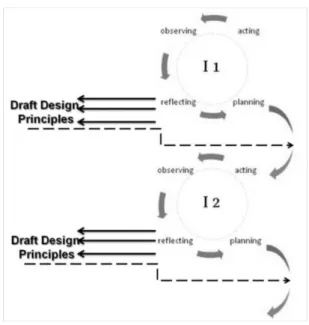
• Iterative; consisting of repeated cycles of planning, acting, observing and reflecting. Each cycle will consist of four distinctive, yet overlapping phases of planning, acting, observing and reflecting. Cycles will follow and build on each other as illustrated in Figure 4 (Adapted from (Rhodes, 2012) that follows.
Figure 3: Successive learning interventions
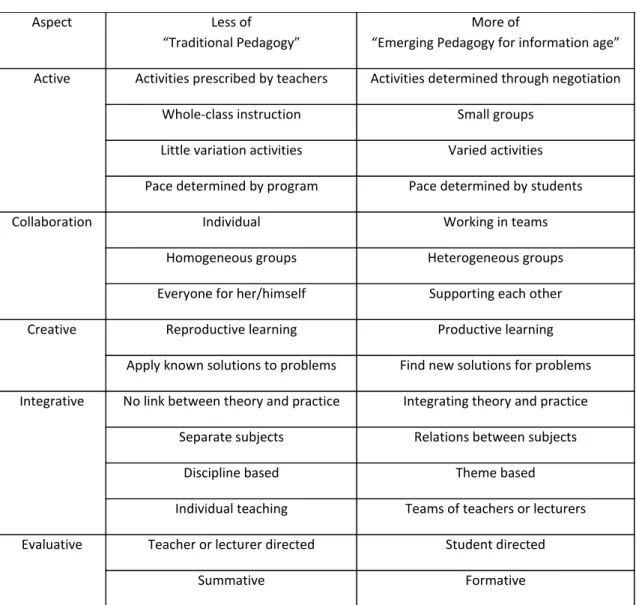
Our study, and the planned series of interventions (PSI) will be based on this model. Each intervention cycle will be planned by the researcher as a collaborative learning opportunity, providing suggestions of applications, methods and strategies to use on the tablet. Activities will be planned to include those that are active, collaborative, creative, integrative as well as evaluative, concentrating on developing a new pedagogy that is appropriate for the information age and not just adapt existing traditional pedagogies for the sake of using technology (See Table 1). Using this strategy to assist lecturers should encourage them to start transforming their learning facilitation (teaching) as well. During the “acting” phase lecturers will be requested to participate in the learning activities to acquire new knowledge and skills. Support will be available at all times. During the “observing” phase participants will be encouraged to contribute by providing suggestions of their own. The “reflection” phase will guide the planning of subsequent interventions. During this phase the researcher will identify preliminary principles for the optimal utilisation of tablets for teaching, learning and assessment. These principles will be the result of combined efforts by the researcher and the participants and can be included or adapted for subsequent phases.
Table 1: Classroom practice using emerging pedagogy for information age
4.
Actions and timeframes
The following learning opportunities/interventions were planned (see tables) For November 2012:
o
A first learning intervention in the form of face-to-face tablet and e-book training workshops wasplanned, presented (“acted out”) and observed on all 12 CTI campuses. Feedback was requested
in the form of a survey.
•
For the first semester of 2013:o An “online learning space” to build a community of practice
o A “Research and Development Seminar” (RDS) on each campus to identify champions
o
One central “Research Indaba” (RI) where selected lecturers (champions) from all campuses will report and share their progress and learn from each other’s experiences.•
For the second semester of 2013:Aspect Less of
“Traditional Pedagogy”
More of
“Emerging Pedagogy for information age” Active Activities prescribed by teachers Activities determined through negotiation
Whole-class instruction Small groups
Little variation activities Varied activities Pace determined by program Pace determined by students
Collaboration Individual Working in teams
Homogeneous groups Heterogeneous groups
Everyone for her/himself Supporting each other
Creative Reproductive learning Productive learning
Apply known solutions to problems Find new solutions for problems Integrative No link between theory and practice Integrating theory and practice
Separate subjects Relations between subjects
Discipline based Theme based
Individual teaching Teams of teachers or lecturers Evaluative Teacher or lecturer directed Student directed
Summative Formative
o A continuation of electronic learning interventions and community of practice o A second RDS on each campus to identify champions during November. The following interventions have already taken place:
4.1 Intervention 1:
Tablet and e-book orientation workshops were conducted in November and December 2012 on all 12 of CTI’s campuses. The lecturers received their tablets as well as hard copies of support manuals at these face-to-face and “hands-on” sessions. About 100 lecturers attended these workshops. After these workshops, in January 2013, a questionnaire was sent out to lecturers to evaluate their attitudes towards the use of tablets before and after the training as well as after the holidays. Thirty-seven lecturers completed and returned the questionnaire. The results obtained from this questionnaire indicated that the majority of the lecturers felt more positive after the training than before.
4.2 Intervention 2:
In February 2013, an online community was created on Google Groups to provide learning and collaboration opportunities for lecturers. Three learning tasks were posted.
The purpose of the first learning task, namely to post a collage of themselves, was to encourage lecturers to introduce themselves on this platform, in order to nurture a culture of collaboration and develop this group as a community of practice (COP). Additional, this activity introduced those that have never used a platform such as Google Groups, to the basic functions of it.
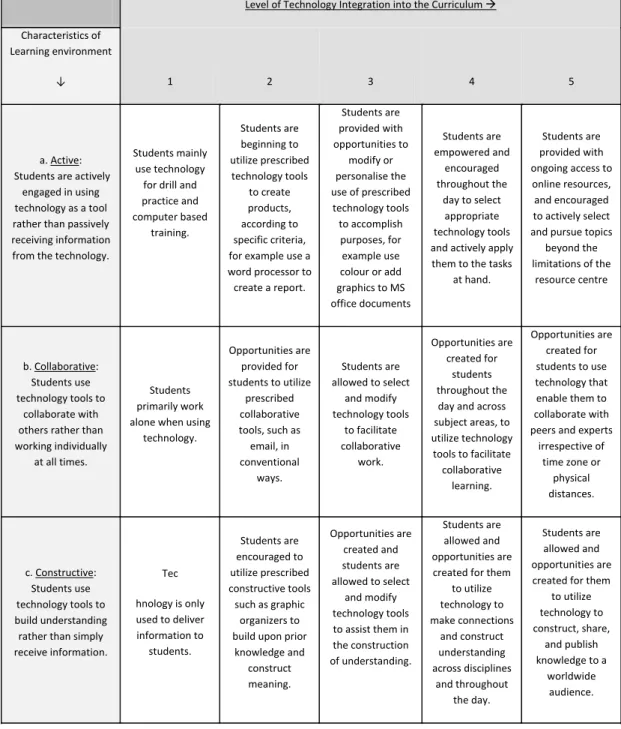
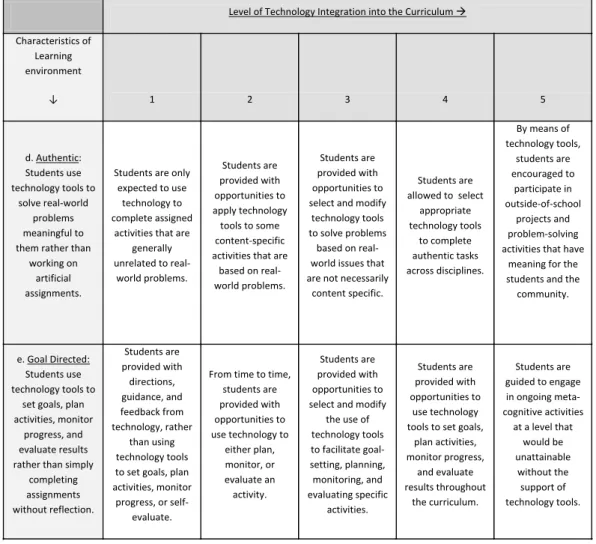
The second learning task on Google Groups firstly aimed to introduce the lecturers to the Technology Integration Matrix (TIM), depicted in Table 1, as a theoretical framework for their teaching with technology. It secondly served as an evaluation tool to choose appropriate technologies for teaching and learning with the help of the tablets. The lecturers were requested to evaluate “Socrative”, an assessment tool, as well as another application of their own choice with the TIM. Table 2 provides an example of how the TIM can be used to evaluate technologies as mediating tools.
The third learning task continued on the foundation laid by the second, where the lecturers were requested to plan a specific lesson or a short series of lessons and indicate which platforms and applications they would use to utilise the tablets in a blended learning approach. They were asked to choose resources with the TIM in mind.
Table 2: Technology Integration Matrix
Level of Technology Integration into the Curriculum
Characteristics of Learning environment
↓ 1 2 3 4 5
a. Active: Students are actively
engaged in using technology as a tool rather than passively receiving information from the technology.
Students mainly use technology
for drill and practice and computer based training. Students are beginning to utilize prescribed technology tools to create products, according to specific criteria, for example use a word processor to create a report.
Students are provided with opportunities to
modify or personalise the use of prescribed technology tools to accomplish purposes, for
example use colour or add graphics to MS office documents
Students are empowered and
encouraged throughout the
day to select appropriate technology tools and actively apply them to the tasks
at hand.
Students are provided with ongoing access to online resources, and encouraged to actively select and pursue topics
beyond the limitations of the
resource centre
b. Collaborative: Students use technology tools to
collaborate with others rather than working individually
at all times.
Students primarily work alone when using
technology.
Opportunities are provided for students to utilize
prescribed collaborative tools, such as email, in conventional
ways.
Students are allowed to select
and modify technology tools to facilitate collaborative work. Opportunities are created for students throughout the day and across subject areas, to utilize technology tools to facilitate collaborative
learning.
Opportunities are created for students to use technology that enable them to collaborate with peers and experts
irrespective of time zone or
physical distances.
c. Constructive: Students use technology tools to build understanding rather than simply receive information.
Tec hnology is only used to deliver information to students. Students are encouraged to utilize prescribed constructive tools such as graphic
organizers to build upon prior
knowledge and construct meaning. Opportunities are created and students are allowed to select
and modify technology tools to assist them in the construction of understanding.
Students are allowed and opportunities are created for them
to utilize technology to make connections and construct understanding across disciplines and throughout the day. Students are allowed and opportunities are created for them
to utilize technology to construct, share,
and publish knowledge to a
worldwide audience.
Table 3: Evaluation of applications with the Technology Integration Matrix
4.3 Interventions 3 and 4:
In May and June of this year, Research and Development Seminars (RDSs) were conducted at each of CTI’s 12 campuses. In addition, a national Research Indaba (RI) was held in Johannesburg at the end of June. During these events, lecturers had the opportunity to report on their experiences with tablets and e-books during the
Level of Technology Integration into the Curriculum
Characteristics of Learning environment
↓ 1 2 3 4 5
d. Authentic: Students use technology tools to
solve real-world problems meaningful to them rather than
working on artificial assignments.
Students are only expected to use
technology to complete assigned
activities that are generally unrelated to
real-world problems.
Students are provided with opportunities to apply technology tools to some content-specific activities that are
based on real-world problems.
Students are provided with opportunities to select and modify
technology tools to solve problems
based on real-world issues that are not necessarily
content specific.
Students are allowed to select
appropriate technology tools
to complete authentic tasks across disciplines.
By means of technology tools, students are encouraged to participate in outside-of-school projects and problem-solving activities that have
meaning for the students and the
community.
e. Goal Directed: Students use technology tools to
set goals, plan activities, monitor
progress, and evaluate results rather than simply
completing assignments without reflection. Students are provided with directions, guidance, and feedback from technology, rather than using technology tools to set goals, plan activities, monitor
progress, or self-evaluate.
From time to time, students are provided with opportunities to use technology to
either plan, monitor, or evaluate an activity. Students are provided with opportunities to select and modify
the use of technology tools to facilitate goal-setting, planning, monitoring, and evaluating specific activities. Students are provided with opportunities to use technology tools to set goals,
plan activities, monitor progress, and evaluate results throughout the curriculum. Students are guided to engage in ongoing meta-cognitive activities
at a level that would be unattainable
without the support of technology tools.
first semester of 2013. Lecturers were asked to convey what they did, what worked, what did not work as well as to make recommendations for the future implementation of technology in teaching, learning and assessment at CTI. Their presentations were observed and evaluated. 44 lecturers reported at the RDSs and 24 of these again at the RI. During a qualitative analysis of the data (observation of presentations and document analysis of 44 PowerPoint presentations), the most important issues (categories) were identified.
To triangulate this qualitative data and enhance the reliability and validity thereof, a questionnaire with 38 questions – based on the identified issues – was compiled and distributed to all lecturers who received tablets during the first semester of 2013. A total of 69 questionnaires were received back between 11 and 19 July 2013 and was subsequently analysed. This number of 69 represents 53% of the 130 lecturers who received tablets. The next section includes an analysis and graphical comparisons between the qualitative and quantitative data.
4.4
Intervention5During the second semester (July – October 2013), a second extended electronic learning intervention using another online space, namely “Edmodo” was initiated and monitored. The first objective was yet again to build and strengthen the community of practice between participating lecturers across time and distance that separate CTI’s 12 campuses. The second objective was to introduce the use of a learning management system. We hoped that newcomers would be inspired to participate after observing the feedback of the ‘more experienced’ lecturers that already participated during the interventions of the first semester.
Edmodo was chosen for several reasons. Lecturers can (and should) invite students to join the classrooms that they create. Edmodo can be used to communicate with their students, share information, post assignments and perform assessments. Other lecturers can also join as “observing teachers” and can therefore benefit not only by means of their own participation but also by observing that of other lecturers. Lecturers (“Teachers” on Edmodo) can join communities
The difference between the electronic learning intervention of the first semester and this was that students can be included and their participation observed
Again 3 learning tasks were given to the lecturers
A qualitative analysis of lecturers’ reflection diaries still need to be completed.
5.
Findings and data analysis
5.1 Data collection methods and instruments
As previously discussed, Design-based Research requires a mixed method approach because qualitative as well as supporting quantitative data is needed. Therefore a variety of instruments were be utilised.
5.1.1 Questionnaires
Two different questionnaires were used, to obtain three different data sets, as discussed in the previous section:
- Toobtainbiographical data of students and lecturers.
- To obtain qualitative data of lecturers’ first experience (feelings/attitudes) with tablets as well as the training workshops
- To determine the progress and level of integration of technology according to the “Technology Integration Matrix”
5.1.2 Document analysis
Online resources like e-mails, participation on the electronic platform and PowerPoint presentations will be analysed.
5.1.3 Evaluation forms
Evaluation forms of lecturers’ presentations at the Research and Development seminars that will be hosted on all twelve campuses. These forms will be completed by peers (other lecturers), principals and academic coordinators.
5.2 Findings of intervention 1
These findings were obtained from the first questionnaire. This sample of participants consisted of lectures that responded by completing the questionnaire and represents 32% of the total of the lecturers that attended the training.
The first section of questions aimed to collect biographical information regarding the lecturers and include age, gender and subject area.
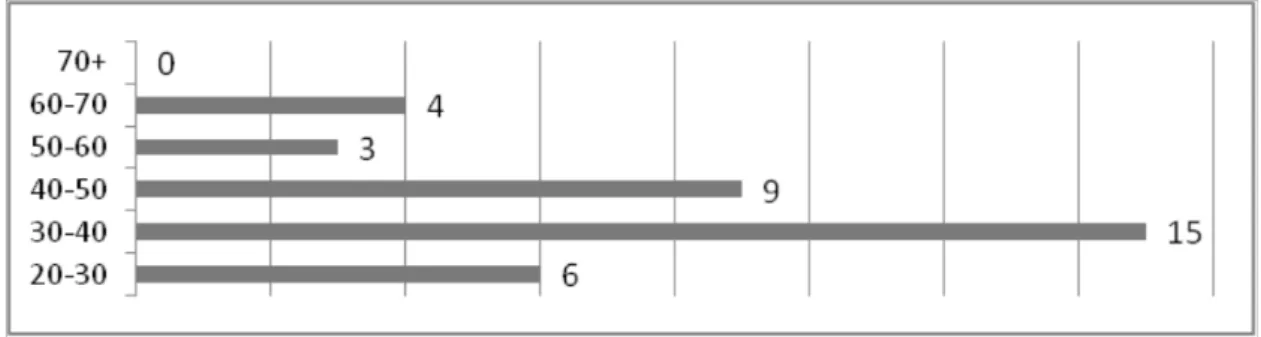
The age distribution of the sample of the participating lecturers is shown below in Figure 5.
Figure 4: Age of sample of participating lecturers 14 of this sample were female and 23 male
12 of the sample of participants are IT lecturers, 24 are Business lecturers and 1 person teaches in both fields of study.
The second section of questions was aimed at collecting data regarding the use of technology by the lecturers. Only 4 of the 37 participants indicated that they have never used computers for teaching purposes before. 15 lecturers have used tablets before and 22 have not.
10 of the 15 lecturers who used tablets previously, used Samsung tablets.
The third and last section of the questionnaire included open ended questions, to determine the attitudes of the lecturers towards the use of tablet computers before and after the training workshops. The results are depicted below in Figure 5.
Figure 5: Attitude changes of lecturers before and after training workshops - Percentage 5.3 Findings of intervention 2
The lecturers who attended the campus RDSs and the RI were asked to answer the following four open-ended questions during their presentations:
• What did you do?
• What worked?
• What did not work?
• What do you recommend now?
In this section, qualitative as well as quantitative findings will be presented – mainly in the form of graphs – and then analysed, interpreted and discussed.
5.3.1 What did they do?
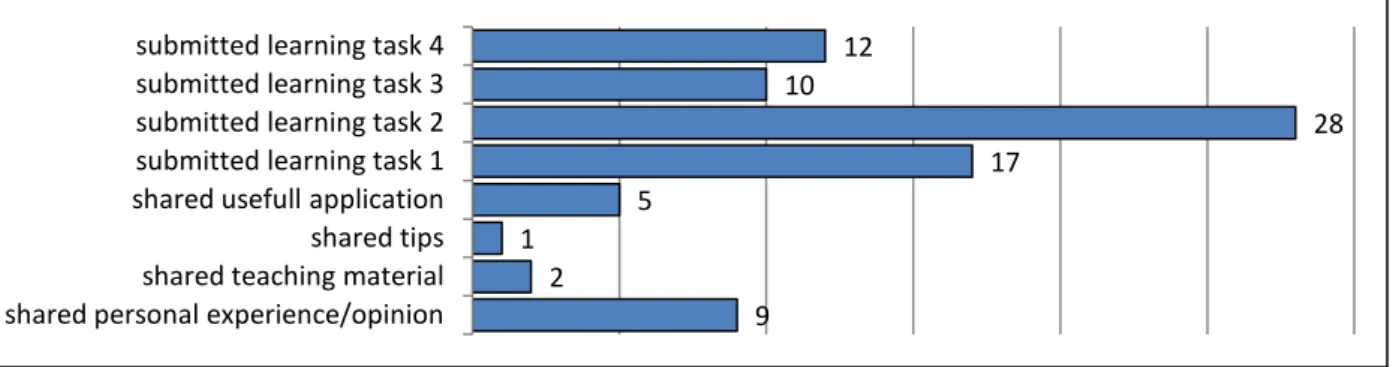
Lecturers had the opportunity to report on what they did during the first semester even before the RDS and RI. All lecturers who received tablets were invited to join the COP, which was created on “Google Groups” in February. They were requested to participate in four Learning Tasks during the course of the first semester. These were described in paragraph 1.3: Intervention 2. Lecturers were also encouraged to share information and ask advice from other group members. An analysis of the 84 posts on Google Groups showed that the lecturers used this platform as follows.
Figure 6: Lecturer activities on COP in first semester – “What did you do?”
This chart indicates that lecturers used the COP mainly to submit their Learning Tasks (50 of the 84 posts). However, during the RDSs, several lecturers reported that although they did not participate in the COP, they observed the activities of the group members, and benefitted from it (“lurked”). These lecturers also remarked that their non-participation was mainly due to a lack of time.
During the RDSs, all lecturers reported back on how they accessed and used the e-books (CTI course books and Pearson eText) as well as other applications. These applications are:
• Cite me
• Droid edit
• Dropbox
• E planner
• Ebscohost
• Edmodo
• End note
• English dictionary offline
• Evernote
• Freebookcentre.net
• G talk
• Google drive
• HR exec magazine
• HR management
• HR tools
• Khan academy
• Kingsoft Office
• Mind tools
• Online personality tests
• SocrativeWhat worked?
The lecturer presentations from the RDSs and RI yielded valuable qualitative data. After having analysed this data, various themes were identified. These themes can be arranged into the following four categories:
• On-campus infrastructure
• Device-specific issues/requirements/preferences
• Software-specific issues/requirements/preferences 9 2
1 5
17 28
10 12
shared personal experience/opinion shared teaching material shared tips shared usefull application submitted learning task 1 submitted learning task 2 submitted learning task 3 submitted learning task 4
• Implications for teaching and learning.
The identified problems were addressed in the questionnaire to determine the opinions of a bigger sample of lecturers.
At this point, it is necessary to stress that the charts representing the qualitative data (derived from the lecturer presentations) should at all times be read and interpreted in conjunction with the related charts
representing the quantitative data obtained from the questionnaire.
6.
Qualitative data obtained from the analysis of lecturer presentations
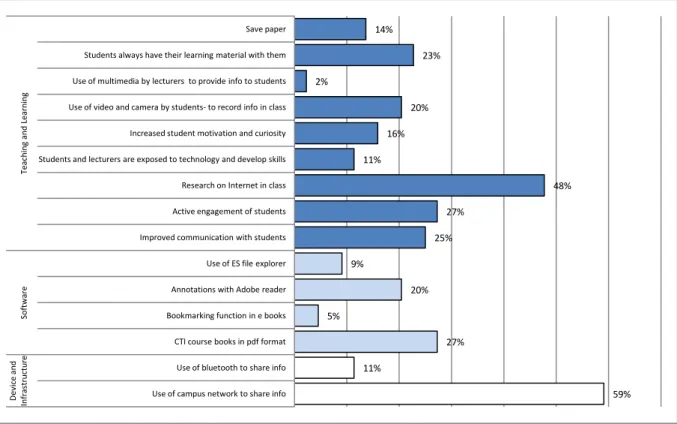
The following graph represents the variety of themes mentioned by lecturers during presentations at the RDSs and RI.
Figure 7: Qualitative data - "What worked?"
The aspect that lecturers reported most favourably on (59% of lecturers mentioned it) was the convenience and ease of sharing information with their students on the campus network. Related to this was lecturer satisfaction with the CTI course books that were also available on the campus network. Another very prominent, positive aspect was that the majority of lecturers agreed that the use of tablets and e-books enhances teaching and learning. A substantial proportion of the lecturers (27%) were of the opinion that tablets encourage the active engagement of students, and an even larger proportion (48%) were more specific and mentioned that the tablets enable students to do online research in class. For this reason, a set of questions addressing the remaining four aspects of the TIM was included in the questionnaire.
7.
Quantitative data obtained from the lecturer questionnaire
Questions relating to the TIM (refer to paragraph 1.3, Intervention 2) were included in the questionnaire because the TIM was used as a theoretical framework for the learning tasks completed by the lecturers during
59% 11% 27% 5% 20% 9% 25% 27% 48% 11% 16% 20% 2% 23% 14%
Use of campus network to share info Use of bluetooth to share info CTI course books in pdf format Bookmarking function in e books Annotations with Adobe reader Use of ES file explorer Improved communication with students Active engagement of students Research on Internet in class Students and lecturers are exposed to technology and develop skills Increased student motivation and curiosity Use of video and camera by students- to record info in class Use of multimedia by lecturers to provide info to students Students always have their learning material with them Save paper De vi ce a nd Infr as tr uc tur e So ft w ar e Te ac hi ng a nd Le ar ni ng
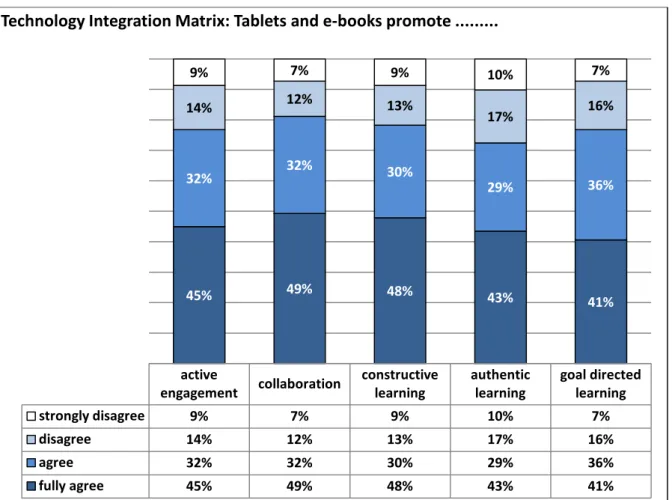
the first semester. The TIM was also used as a tool for reflection with which lecturers could evaluate the different elements of their own teaching and learning practices. The majority of the lecturers agreed or fully agreed that the use of tablets promotes transformative teaching and learning practices because it fosters active engagement, collaboration as well as constructive, authentic and goal-directed learning.
Figure 8: Benefits of tablets and e-books for teaching and learning according to TIM
There were a number of other related topics that emerged from the presentations that indicated that lecturers believe that the use of tablets augments teaching and learning. These topics were specifically addressed in the questionnaire and yielded the following results:
active
engagement collaboration constructive learning authentic learning goal directed learning
strongly disagree 9% 7% 9% 10% 7%
disagree 14% 12% 13% 17% 16%
agree 32% 32% 30% 29% 36%
fully agree 45% 49% 48% 43% 41%
45% 49% 48% 43% 41%
32% 32% 30% 29% 36%
14% 12% 13%
17% 16%
9% 7% 9% 10% 7%
Technology Integration Matrix: Tablets and e-books promote ...
Figure 9: Other benefits of tablets and e-books for teaching and learning
The most important insight from this section (“What worked?”) is therefore that lecturers feel that the use of tablets can help improve the quality of teaching and learning as well as promote transformative teaching practices.
7.1.1 What did not work?
8.
Qualitative data obtained from
theanalysis of lecturer
presentationsNote: Please remember to interpret the qualitative data in conjunction with the related quantitative data.
The analysis of the lecturer presentations provided valuable qualitative data regarding the nature of problems experienced on the various campuses. These problems were divided into the following four categories:
• On-campus infrastructure
• Device-specific issues
• Software-specific issues
• Implications for teaching and learning.
The information gleaned from the lecturer presentations was used to compile the questionnaire where the above categories of problems were addressed by means of more specific questions. The opinions of a bigger sample of lecturers could therefore be obtained in the form of quantitative data.
communication opportunities
increase
students can have learning material with
them all the time
the use of multimedia extend learning opportunities beyond
the classroom
multimedia cater for more learning styles
strongly disagree 6% 1% 0% 1%
disagree 9% 12% 4% 7%
agree 25% 23% 39% 33%
fully agree 61% 64% 57% 58%
61% 64% 57% 58%
25% 23% 39% 33%
9% 12%
4% 7%
6% 1% 1%
0% 10% 20% 30% 40% 50% 60% 70% 80% 90% 100%
Tablets and e-books promote teaching and learning because...
Figure 5 represents the problems mentioned by lecturers during their presentations at the RDSs and the RI.
Figure 10: Qualitative data: "What did not work?"
The insufficient Wi-Fi coverage on the campuses was by far the most prevalent cause of frustration for lecturers (64% mentioned this). Following on this were the problems encountered with the Pearson eText application (32%) and the students’ inability to use technology (23%).
9.
Quantitative data obtained from the lecturer questionnaire
The majority of lecturers, namely 48 of the 69 (69%), described the Wi-Fi coverage as insufficient or unsatisfactory.
64% 7%
5%
18% 18% 5%
7%
32% 16%
7% 11% 7%
11% 14%
23% 5%
2%
30%
Insufficient campus Wi-Fi Limited access to Internet sites Limited file storage space Difficult to make notes Difficult to type Battery life insufficient; no charging facilities for students Cause eyestrain Pearson eText Application (general) Pearson eText-access time to bookshelves Pearson eText-no access to notes offline Polaris Office Difficult to do assignments on tablet Cannot present from tablet IT students cannot program on tablets Students have limited digital literacy The use of tablets is too time consuming Use of tablets encourages plagiarism Tablets are a distraction to students
Inf
ra
st
ruc
tur
e
Dev
ice
So
ftw
ar
e
Te
ac
hi
ng
a
nd
Le
ar
ni
ng
Figure 11: Quality of Wi-Fi coverage on campuses
The remaining 29% of lecturers that indicated otherwise might be lecturers who were lucky enough to have good Wi-Fi coverage in their classes and offices. During the RDSs, lecturers reported that Wi-Fi coverage was either generally bad or only good in certain areas on a campus. A few lecturers remarked during the presentations how students soon identified the “good” areas and gathered there, often on staircases and in the passages.
Forty of the 69 lecturers (58%) who completed the questionnaire had used Pearson eText books and therefore the Pearson eText application (see Figure 7). Thirty of these 40 lecturers, therefore 75%, who used Pearson eText books indicated that they experienced problems with the eText application (see Figure 8).
Figure 12: Types of e-books used in the first semester
Several lecturers indicated that they experienced problems with some of the standard applications on the tablets. This matter therefore seemed worth investigating with specific questions in the questionnaire.
A comparison of the problems experienced with the applications revealed the following results (see figure 8): most of the problems experienced by lecturers, excluding those experienced with Pearson eText, were with CTI course books and the distribution of material via the campus networks. This seemed to be directly related to the Wi-Fi coverage and campus infrastructure. One other application that caused frustration was “Polaris Office”, one of the standard applications on the Samsung Galaxy tablet. A substantial number of lecturers suggested that the “Kingsoft Office” application be used instead. It will therefore be tested in the second semester and recommendations will be made accordingly. It is possible that the problems experienced with ES File Explorer occurred when lecturers tried to up- or download material to or from the campus networks. Ten per cent of lecturers experienced problems with Adobe Reader, a situation that can be resolved by using this software more often.
7%
22%
30%
39%
excellent good unsatisfactory insufficient
Quality of Wi-Fi coverage on campuses
28%
39% 30%
Pearson eText CTI Course books Pearson eText and CTI Course books
Types of e-books used in the first semester
Figure 13: Problems experienced with applications used on the tablet
The concerns of lecturers who participated in the RDSs and the RI regarding students’ lack of digital literacy were reiterated in their answers to a specific question in the questionnaire addressing this problem (see Figure 9).
Figure 14: Students' lack of digital literacy makes the use of tablets impossible
Forty-one of the 69 lecturers agreed or fully agreed that this makes the use of tablets for teaching and learning impossible. This amounts to 60% of the lecturers who completed the questionnaire. A change in the format
CTI
coursebooks Pearson e text Polaris Office
Distributing material via the campus network
Bluetooth ES file expl Adobe reader
I did not use it 25% 52% 51% 51% 51% 51% 51%
numerous 1% 25% 14% 14% 14% 14% 14%
a few 33% 19% 16% 16% 16% 16% 16%
not at all 41% 4% 19% 19% 19% 19% 19%
41%
4%
19% 19% 19% 19% 19% 33%
19%
16% 16% 16% 16% 16%
1%
25%
14% 14% 14% 14% 14%
25%
52% 51% 51% 51% 51% 51%
Problems experienced with applications used on the tablet
36% 23%
38% 3%
fully agree agree disagree strongly disagree
Students' lack of digital literacy makes the use of tablets impossible
and frequency of the training for students might alleviate the problem and alter this opinion. Student training and support, as well as the planned involvement of resource centre staff in this regard, will be discussed in the following section.
9.1.1 Recommendations made by lecturers
10.
Qualitative data obtained from observations and document analysis of lecturer
presentations
Note: Please remember to interpret the qualitative data in conjunction with the related quantitative data.
Figure 10 denotes the various themes of recommendations made by lecturers during their presentations at the RDSs and the RI. The recommendation most often made by lecturers was that to upgrade the campuses’ Wi-Fi networks came out the strongest. The second group of most common suggestions recommendation related to student training. The third recommendation was that a Learning Management System (LMS) be implemented to support blended learning was the third important need that was identified. The fourth aspect that needs consideration, implied by several requests that were made, was for either a different device or added functionalities to the device that is currently being used. These four recommendations obtained by the qualitative data analysis were further investigated and confirmed by means of specific questions in the questionnaire (see figures 11-14).
Figure 15: Qualitative data: Recommendations made by lecturers
30% 5%
20% 14%
7% 7% 2%
7% 2%
5%
14% 7%
18%
27%
Upgrade infra structure Provide easier access to Internet Device with 3G connectivity Different device Device with stylus Device with keyboard Device with multi-task/window capabilities Projector connection to tablet Make tablet gadgets available on campus for students CTI to provide airtime for students Changes to CTI course books PDFs instead of Pearson e text Implement a LMS More frequent training during semester
Infr
as
tr
uc
tur
e
De
vic
e
So
ft
w
ar
e
Te
ac
hi
ng
and
Le
arn
in
g
11.
Quantitative data obtained from the lecturer questionnaire
Answers to the questions pertaining to the format of future training for lecturers as well as students (see Figure 11) indicated not only that lecturers feel the face face-to to-face element should not be completely removed but also and that an electronic component should be added to provide a blended learning approach and on-going accessibility to training material and learning opportunities.
Figure 16: Requested format of training
The need to change the format and frequency of training for students exists because students are allowed to register late in the semester and they receive their tablets only once payment for their studies has been finalised. As a result, many students attended the training without devices and could not use it when they received it as late as March in certain cases. Students admitted in the mid-year intake in July might have similar experiences. The inclusion of electronic elements like video clips would enable these students to master some of the skills more independently and will lessen the burden on lecturers and Academic Coordinators (ACs). As part of the blended learning approach, it has been decided to involve the resource centre staff (librarians as well as assistants) in the technology support for students. Capacity building and equipping them with tablets has already begun and will be explored and implemented in the second semester. The responses to the question regarding the need for an LMS indicate that 87% of the lecturers are of the opinion that it is necessary.
Figure 17: The need for an LMS
The implementation of an LMS or another support platform is therefore undeniably urgent. 35%
28%
1% 6%
64% 67%
Student training Lecturer training
Training should be ...
face to face only electronically e.g. video clips only a blend of the two methods
87% 9%
4% 0%
definitely possibly not neccesary definitely not
Need LMS
Forty-seven of the 69 lecturers (68%) who completed the questionnaire suggested that an alternative device should replace the tablets currently in use.
Figure 18: The need for a different device
Functionalities that are deemed necessary include the following:
Figure 19: Functionalities requested for device
The need for a device with 3G connectivity is the most urgent and was requested by 83% of the lecturers who completed the questionnaire. This problem is purely hardware related and fairly easy to solve. The next two needs, namely those for a device with a keyboard and multiple window display capability, are possible to overcome by using the device more often and improving the skills needed. The need for a device with more storage capacity can be overcome by replacing the current device by one that has a USB port.
12.
Recommendations and proposed actions
As mentioned earlier in this report, four categories of problems experienced by lecturers regarding the use of tablets and e-books for teaching and learning were identified. These categories are as follows: In the first place, infrastructure, secondly and thirdly device and software specific requirements and preferences and
54% 1%
13%
32%
For all students Only for Commerce students. Only for IT students. No
Different device?
3G a keyboard a stylus more storage capacity display capabilitiy multiple window
definitely not 0% 1% 3% 0% 0%
not neccesary 6% 20% 39% 35% 10%
possibly 12% 25% 23% 29% 28%
definitely 83% 54% 35% 36% 62%
83%
54%
35% 36%
62% 12%
25%
23% 29%
28%
6%
20%
39% 35%
10%
1% 3%
0% 20% 40% 60% 80% 100% 120%
Device needs...
finally implications for teaching and learning. The following actions have either already been taken or are currently being investigated.
12.1 Upgrade campus networks and Wi-Fi coverage
This specific aspect was repeatedly addressed through lecturers’ reactions and answers to all three questions asked at the RDSs and the RI:
• What worked?
The distribution of material through the campus network and the active engagement of students by the use of Internet in class worked well. The success of both of these activities is dependent on the reliability of the infrastructure on campuses.
• What did not work?
The Wi-Fi coverage on campuses is insufficient.
• Recommendations made by lecturers
The recommendation most made was to upgrade the Wi-Fi coverage and campus infrastructure.
It can be reported that the upgrade to increase the number of access points and accommodate more concurrent users has already been completed. Details are available from Russell Lang at CTI GHO ([email protected]).
12.2 Pearson eText: Books and applications (software problems)
This academic semester (second semester: July–November 2013), CTI is only using two Pearson eText books and they are available in e-pdf format on the campus network. We need to consider this a more permanent solution until another workable application can be found. Alternative applications are currently being tested by Pearson.
12.3 Alternative device or added functionalities
This request cannot really be ignored and is currently being investigated. One device that seems to be a good replacement is the “Netbook”. This device has 3G connectivity, USB ports as well as a keyboard and is smaller than a laptop, which makes it more mobile. However, it cannot be concluded if this need for a different device is a case of preference by lecturers only. The results of the student survey will either confirm or negate this. 12.4 Change in the format and frequency of student training
As discussed in the previous section, this issue is related to late admissions of students and the due date for payment. We have already found some suitable YouTube videos that can be uploaded to the campus networks. The inclusion of this electronic element as part of the training should alleviate some of the concerns about students’ lack of digital literacy. Another action that should improve the support for students is the involvement of resource centre staff. Campuses were requested to make at least one device available to the staff in the resource centre. This will enable them to provide more personal support to students that need help with the use of tablets and e-books.
12.5 LMS implementation
An LMS or similar electronic platform is necessary to support on-going blended learning and training. However, it will place more pressure on campuses’ infrastructure. For this reason we are delaying a full scale implementation and are investigating some options. Edmodo, an open source application, is currently used by 23 lecturers on many campuses. The request to explore this application is part of the learning tasks for the lecturers participating in the COP in the second semester. “My labs +”, a Pearson product, is another alternative that we will start investigating in August. E-portal, a Moodle-based LMS, currently used by Midrand Graduate Institute (MGI) will also be reviewed.
13.
Conclusion – from a lecturer perspective
The overall aim of the implementation of tablets and e-books is to improve the quality of education, i.e. improve and transform current, outdated teaching and learning practices. The focus of this part of the research project focused on the professional development of lecturers and the implementation of core characteristics of an engaged and enabling learning environment, such as interaction and collaboration, together with constructive, authentic and goal-directed learning (TIM) in order to achieve better retention, pass and graduation throughput rates of our students and to prepare them for the workplace (increase employability of all CTI students).
The continuous professional development of lecturers to become lifelong learners is essential - more specifically with regards to developing their 21st Century teaching skills (including their digital literacy skills such as the use of social media and educational technologies) and providing them with ongoing support in a technology-enhanced learning environment are some of the critical pillars to ensure successful implementation of new technologies such as e-books and tablets in the learning environment.
There were five important factors identified during the first semester, of which the most important two were that of insufficient IT infrastructure and associated bandwidth and connectivity. Based on some interviews and critical feedback already received during the first part of the first semester from lecturers and students (before the finalisation of this research report), we already had to implement “interim” solutions to ensure better user experiences on campuses from the start of the second semester (although unfortunately not all campuses could be upgraded before the start of second semester).
Sufficient IT infrastructure, together with the smooth downloading of Pearson eText books to be available offline and off campus, as critical factors for the overall successful implementation of this project and the further roll-out of tablets and e-books to all first year students on all CTI and MGI campuses at the beginning of 2014, must be highlighted and be given the highest priority. The remaining three factors that were identified from the lecturers’ perspective of the research project that have an influence on the optimal implementation of tablets and e-books namely the choice of device and software, as well as the perceived influence of tablets on teaching and learning, the format of lecturer and student training and support as well as the implementation of an LMS have already been communicated to the relevant people and where possible being addressed and further explored. The further roll-out of this project in the second semester, based on the flexible approach in the form of Design-based research will continue and is essential for further and ongoing developments and overall improvement of efficacy.
References
Bennet, S., Maton, K., & Kervin, L. (2008). The digital natives debates: a critical review of evidence. British
Journal of Educational Technology, 39(5), 775-786.
Lautenbach, G. V. (2011, October 12). Expansive learning cycles: Lecturers using educational technologies for teaching and learning. Johannesburg, Gauteng, South Africa.
Lautenbach, G. V. (2011). Student-generated design principles for transforming an educational technology
module. University of Johannesburg, Department of Mathematics, Science, Technology & Computer
Education. Johannesburg: University of Johannesburg.
Leont'ev, A. (1974). The problem of activity in psychology. Soviet Psychology, 13(2), 4-33.
Madyarov, I. (2008). Contradictions in a distance content-based English as a foreign language course: Activity
theoretical perspective. USF Graduate School. Graduate School Theses and Dissertations.
Nakamaru, S. (2011). Making (and not making) connections with Web 2.0 technologies. National Council of Teachers of English.
Reeves, T. C., Herrington, J., & Oliver, R. (2005). Design Research: A socially Responsible Approach to Instructional Technology Research in Higher Education. Journal of Computing in Higher Education, 16(2), 96-111.
Rhodes, N. (2012). Accounting education: Closing the gap between Technology, Education and Accounting in
Higher Education Institutions. Johannesburg: University of Johnnesburg.
Stetsenko, A. (2008). From relational ontology to transformative activist stance on development and learning: Expanding Vygotsky's (CHAT) project. Cult Stud of Sci Educ, 471-491.
Stoerger, S. (2009). The digital melting pot: Bridging the digital native-immigrant divide. First Monday, 14(7). Tapscott, D. (2009). Grown Up Digital: How the Net Generation Is Changing Your World. McGraw-Hill.