1
Integration guide Rabo OmniKassa
2
CONTENTS
1. Introduction ... 4 2. Payment flows ... 5 3. Protocol description ... 7 3.1 POST fields ... 73.1.1 the Data field syntax ... 7
3.1.2 the Seal field syntax ... 7
4. How to implement a payment? ... 8
4.1 Payment request ... 8
4.1.1 Fields of the payment request ... 8
4.1.2 Example ... 8
4.1.3 Error cases ... 8
4.2 Payment response ... 10
4.2.1 Manual notification ... 10
4.2.2 Automatic notification ... 10
4.2.3 Troubleshooting in case of not received responses Rabo OmniKassa ... 10
4.2.4 Error management – No Seal field in the response ... 11
5. How to SEAL a MESSAGE? ... 12
5.1 Why seal a message? ... 12
5.2 Method used to seal a message ... 12
5.3 Coding examples ... 12
5.3.1 Java ... 12
5.3.2 Php 5 ... 13
5.3.3 .net... 13
6. How to TEST? ... 15
6.1 Test iDEAL transaction ... 15
6.2 Test Minitix transaction ... 16
3
6.4 Test acceptgiro/incasso/rembours transactions ... 16
7. How to GO LIVE? ... 18 7.1 Merchant identifiers ... 18 7.2 Pre-live tests ... 18 7.3 Production / go live ... 18 8. Messages description ... 20 8.1 Payment request ... 20 8.1.1 Mandatory fields ... 20 8.1.2 Optional fields ... 20
8.2 Responses / Notifications (automatic and manual) ... 21
9. Data dictionnary ... 23
9.1 Format convention ... 23
9.2 Fields description ... 24
9.3 Currency codes & amounts ... 25
9.4 Customer languages ... 26
9.5 Payment means ... 26
9.6 The Rabo OmniKassa response code ... 27
9.7 iDEAL acceptance details ... 28
9.8 MiniTix acceptance details ... 30
4
1. INTRODUCTION
This document explains exchanges between merchants’ site and the Rabo OmniKassa server, using the Rabo OmniKassa redirect connector’s gateway.
This connector aims to be as easy as possible to implement on merchant’s side and consists of requests and responses made in the form of HTTP(S) posts to and from the Rabo OmniKassa payment server. Requirements
Technical
To develop a client for the redirect connector, you will need knowledge in one of the languages commonly used for web programming, such as Java, PHP or .NET.
Security
The Payment platform is PCI DSS compliant (Payment Card Industry Data Security Standard) which represents a security standard defined by VISA and MASTERCARD…. With the Rabo OmniKassa, the merchant doesn’t need to know the PAN (Personal Account Number) used for payments. We are referring for example to the consumer’s credit card number.
The request and responses exchanged between the webshop and the payment server are secured via a shared secret key. The Secret key must be stored in a secure environment on the webshops’ website. In case of (possible) corruption of the secret key, the merchant has to call within the shortest delay the technical support team of Rabo OmniKassa to renew it.
This team is reachable from Monday to Saturday between 8:00’ AM and 8:00’ PM and on Sunday between 8:00’ AM and 4:00’ PM calling 0900-0400180.
5
2. PAYMENT FLOWS
The objective is to implement the 3 payment flows, exchanged by payment occurrence between the webshop and the payment server.
Flow 1:
Once the customer proceeds with the payment step starting from merchant website, (payment
transaction), a payment request must be sent to the Rabo OmniKassa’ server, using the URL provided to the merchant for this purpose. The simplest way is to do this using an HTML FORM, but any other solution sending an HTTP POST is also suitable.
Flow 2:
Then the customer is redirected to the paypage of the Rabo OmniKassa’ payment server for performing the actual payment operation.
When this step is completed, either successfully or resulting in an error, responses are sent from the payment server to the response URLs provided as parameters of the payment request.
Flow 3:
Payment step 3a: Manual response sent as HTTP(S) POSTs by the payment server to the normal return URL as provided in the payment request whenever the customer clicks on the return to merchant’s website link on the paypage. Then customer should be redirected to the suitable page on merchant’s website.Note that this only happens when customer clicks on related link, which is not mandatory or guaranteed.
Payment page on merchant’s website Rabo OmniKassa redirect connector gateway Rabo OmniKassa payment server paypage (On which the customer can choose his/her payment mean and enter the according bank information) 1: The customer proceeds to the payment(paymen t request) Return page on merchant’s website
3a: The customer returns to merchant webshop website
(manual response)
Automatic response
3b: The connector sends a automatic response to merchant webshop website 2: The connector redirects the customer to the paypages (redirect)
6 Payment step3b: Automatic responses are always sent as HTTP(S) POSTs by the payment server
to the automatic response URL provided in the payment request whenever the payment process is completed.
Notice:
In the case the payment operation did not succeed, the customer is redirected to an error page on which he/she can click on a link to return to the merchant’s website. At this moment the transaction is considered as interrupted. If for instance, another payment mean is preferred, the whole payment transaction must be performed again starting from merchant’s website.
7
3. PROTOCOL DESCRIPTION
3
3..11 PPOOSSTT FFIIEELLDDSS
Three fields can be provided in the payment requests and the payment responses *.
Data Contains all the information of the transaction gathered in a single string as explained in §3.1.1
InterfaceVersion Version of the connector’s interface in use.
Seal Used to validate the integrity of the data. Computed from the Data field and secret key as explained in §3.1.2
*All the fields are mandatory.
3.1.1 the Data field syntax
The Data field value is built according to the following scheme:
<field name>=<value name>|<field name>=<value name>|<field name>=<value name>…
All the fields needed for the transaction (see details in the data dictionary §9) must be put in the string. The field ordering doesn’t matter.
Example for a payment request:
amount=55|currencyCode=978|merchantId=011223744550001|normalReturnUrl=http://www.normalreturnurl.com|transacti onReference=534654|keyVersion=1
3.1.2 the Seal field syntax
The Seal field value is built by appending the secret key to the Data field value (see §3.1.1) and then getting the result’s bytes as UTF-8 and then ciphering the bytes using SHA256 algorithm (see also §3.1.1) :
8
4. HOW TO IMPLEMENT A PAYMENT?
4
4..11 PPAAYYMMEENNTT RREEQQUUEESSTT
The payment request must be made as an HTTP post to connector’s gateway.
The easiest way to proceed is by using an HTML form and using the POST method. See example below. 4.1.1 Fields of the payment request
All the data of the payment request must be provided in the POST request fields as detailed in §3.1.
InterfaceVersion must be set to HP_1.0.
See data dictionary for a description of parameters of the payment request, their format and their optional or mandatory nature.
4.1.2 Example
<form method="post" action="https://url.to.payment.server/paymentServlet"> <input type="hidden" name="Data"
value="amount=55|currencyCode=978|merchantId=011223744550001|normalReturnUrl=http://www.normalreturnurl.com|tr ansactionReference=534654|keyVersion=1">
<input type="hidden" name="InterfaceVersion" value="HP_1.0">
<input type="hidden" name="Seal" value="21a57f2fe765e1ae4a8bf15d73fc1bf2a533f547f2343d12a499d9c0592044d4"> <input type="submit" value="Proceed to payment">
</form>
4.1.3 Error cases
When the payment request is received by the gateway, the provided fields’ values are checked. What follows is the list of errors that may arise, with their explanation and hints to solve the problems encountered.
Note that, as the resulting error page is displayed to the customer, full error detail will only be shown on the demo environment used at integration step. Once in Production, only a generic message such as “Error while processing your payment request. Please contact the merchant.” will be displayed.
Message Cause Solution
Invalid POST field: <field name> The POST request contains a field which is unknown
Check the available POST fields in user guide
Missing mandatory POST field: < field name>
The mandatory POST field < field name> is missing in the POST request
Check the mandatory POST fields in user guide
9
Message Cause Solution
Unknown interface version: <version>
The value <version> of the POST
field InterfaceVersion is unknown Check available interface versions in user guide Invalid keyword: <param
name>=<param value>
The request contains a
parameter <param name> which is not expected in the payment request
Check the payment request parameters in data dictionary
Invalid parameter size: <param name>=<param value>
Value of parameter <param name> does not have the correct size
Check expected payment request parameter’s value size in data dictionary
Invalid parameter value: <param name>=<param value>
Value of parameter <param name> does not have the right format
Check expected payment request parameter’s value format in data dictionary
Missing mandatory parameter: <param name>
The mandatory parameter <param name> is missing in the payment request
Check the mandatory payment request parameters in data dictionary
Unknown key version: <version> The value <version> of the parameter keyVersion is unknown
Check available key versions for your merchant in merchant extranet Unknown merchant Id: <ID> The merchant ID is not known in
database Check your merchant Id
Invalid seal The payment request seal check failed due to a miscomputed value in the payment request or a modification of one or many parameters’ values between its generation and receipt on the Rabo OmniKassa gateway
Check the seal computation rules in data dictionary
Transaction already processed: <transaction reference>
A payment request with the same transactionReference value has already been received and processed by the gateway
Ensure that the transaction reference is unique for a given transaction
Any other message Contact Support Team Rabo
10 4
4..22 PPAAYYMMEENNTT RREESSPPOONNSSEE
Response to a payment request can come in two ways: manual and/or automatic response (also called notifications). There’s no difference in meaning between the terms ‘response’ and ‘notification’ in this document.
4.2.1 Manual notification
After the customer completed his/her payment operation on the paypage, he can click a link “back to merchant’s website” which will return him to the adequate page on merchant’s website which URL is provided in the <normalReturnUrl> parameter within the payment request.
This hit will be sent as an HTTP POST request to the target URL, along with the parameters of the transaction as sent in the payment request plus some additional information (status, payment mean used…). The provided URL targets must be able to process the information provided by the notification posts coming from the Rabo OmniKassa gateway.
See POST fields details in §3.1.
IMPORTANT: Note that parameters of the response will have the exact upper and lower case characters as given in this document.
InterfaceVersion will be set to HP_1.0.
See the Rabo OmniKassa data dictionary for a description of parameters contained in the notification.
IMPORTANT: Note that the customer may never click this link (browser closed or crashed, page closed…). So the manual notification alone cannot be relied on to be warned of the completion of the payment request.
4.2.2 Automatic notification
If an automaticResponseUrl has been set as payment request parameter (it is optional), the Rabo OmniKassa payment server sends a response to it as HTTP POST requests built the same way as for manual response.
See POST fields details in §3.1.
IMPORTANT: Note that parameters of the response will have the exact casing as given in this document. I.e. the names are composed of upper and lower case letters.
InterfaceVersion will be set to HP_1.0.
See the Rabo OmniKassa data dictionary for the description of parameters contained in the response. 4.2.3 Troubleshooting in case of not received responses Rabo OmniKassa
In the case you do not receive the reponse on your server, you’re pleased to find here a list of verifications to do:
11 Check that notifications URLs are provided in the payment request and if so, that those are
valid.
Provided URLs must be reachable from external internet access. An access control (login/password or IP filter) or a firewall may block access to your server.
Hits to the notification URLs should appear in your server’s access log (hit history). If you use a non standard port, it must be within the 80 and 9999 range.
You cannot add context parameters to the notification URLs. Instead, use the orderId which you provided in the payment request (optional field) and which is given back in the ‘ response’ parameters.
4.2.4 Error management – No Seal field in the response
In case of error such as “unknown Merchant ID”, the payment server cannot seal the response because it cannot retrieve the secret key used by the webshop. In that case, the payment server sends a response without the Seal field.
12
5. HOW TO SEAL A MESSAGE?
5
5..11 WWHHYY SSEEAALL AA MMEESSSSAAGGEE??
The parameters of the transaction (payment request) are transmitted via customer’s browser. So a dishonest customer may modify them before it is transmitted to the payment server.
Therefore, it is necessary to add a security system to enforce integrity of the transaction parameters. The fact that the seal is OK means two things:
- The integrity of the messages request and response; no alteration during the exchange, - The authentication of the sender and receiver because they share the same secret key (“secret
Key”).
Note: In case of corruption of the key, the merchant has to call the Support Team Rabo OmniKassa to renew it.
This team is reachable from Monday to Saturday between 8:00’AM and 8:00’ PM and on Sunday between 8:00’ AM and 4:00’ PM calling 0900-0400180.
5
5..22 MMEETTHHOODD UUSSEEDD TTOO SSEEAALL AA MMEESSSSAAGGEE
Sealing is done by computing a ciphered value from transaction parameters (Data) and an appended secret key (secret Key) unknown from the customer. Strings are converted to UTF8 bytes before ciphering.
The cipher algorithm (SHA256) produces an undecipherable result which is computed again on connector’s side for comparison.
The result must be set as a hexadecimal value in the Seal POST field. 5
5..33 CCOODDIINNGG EEXXAAMMPPLLEESS 5.3.1 Java
import java.security.MessageDigest;
public class ExampleSHA256 { /**
* table to convert a nibble to a hex char. */
static final char[] hexChar = {
'0' , '1' , '2' , '3' ,
'4' , '5' , '6' , '7' ,
'8' , '9' , 'a' , 'b' ,
'c' , 'd' , 'e' , 'f'};
/**
* Fast convert a byte array to a hex string * with possible leading zero.
13 * @param b array of bytes to convert to string
* @return hex representation, two chars per byte. */
public static String encodeHexString ( byte[] b ) {
StringBuffer sb = new StringBuffer( b.length * 2 );
for ( int i=0; i<b.length; i++ )
{
// look up high nibble char
sb.append( hexChar [( b[i] & 0xf0 ) >>> 4] );
// look up low nibble char
sb.append( hexChar [b[i] & 0x0f] );
}
return sb.toString(); }
/**
* Computes the seal
* @param the Data the parameters to cipher
* @param secretKey the secret key to append to the parameters * @return hex representation of the seal, two chars per byte. */
public static String computeSeal(String Data, String secretKey) throws
Exception {
MessageDigest md = MessageDigest.getInstance("SHA-256");
md.update((Data+secretKey).getBytes("UTF-8"));
return encodeHexString(md.digest()); }
/**
* @param args */
public static void main(String[] args) {
try {
System.out.println (computeSeal("parameters", "key"));
} catch (Exception e) { e.printStackTrace(); } } } 5.3.2 Php 5 <?php
echo hash('sha256', $Data.$secretKey); ?>
Data and secretKey must use UTF-8 charset. See utf8_encode to convert from ISO-8859-1 to UTF-8. 5.3.3 .net
(Done using a simple form “Form1” containing two text fields for input: txtRabo, txtSecretKey and one for output: lblHEX)
14 using System; using System.Collections.Generic; using System.ComponentModel; using System.Data; using System.Drawing; using System.Text; using System.Windows.Forms; using System.Security.Cryptography; namespace ExampleDotNET {
public partial class Form1 : Form
{
public Form1()
{
InitializeComponent(); }
private void cmdGO_Click(object sender, EventArgs e)
{
String sChaine = txtRabo.Text + txtSecretKey.Text;
UTF8Encoding utf8 = new UTF8Encoding();
Byte[] encodedBytes = utf8.GetBytes(sChaine);
byte[] shaResult;
SHA256 shaM = new SHA256Managed();
shaResult = shaM.ComputeHash(encodedBytes); lblHEX.Text = ByteArrayToHEX(shaResult); }
private string ByteArrayToHEX(byte[] ba)
{
StringBuilder hex = new StringBuilder(ba.Length * 2);
foreach (byte b in ba)
hex.AppendFormat("{0:x2}", b);
return hex.ToString();
} } }
15
6. HOW TO TEST?
The Rabo OmniKassa simulation environment enables users to perform test transactions using a test webshop ID. It is not possible to use your own webshop ID in this environment; this results in an error message. The following payment methods can be used for testing purposes: iDEAL, MiniTix, Visa, MasterCard and Maestro, along with the cash services Giro Collection Form, Collection, and reimbursement.
The table below contains technical information required for the simulation environment, along with an important announcement:
Simulation URL connector https://payment-webinit.simu.omnikassa.rabobank.nl/paymentServlet
Webshop ID (merchantId) 002020000000001
Version key 1
SecretKey 002020000000001_KEY1
Please note
For every transaction, you must enter a unique transaction reference in the ‘transactionReference’ field. In the simulation environment you can use your Chamber of Commerce registration number (for
example) for this purpose, followed by a code for your webshop you choose yourself (if you operate more than one webshop) and a reference of your choice.
Example: if your Chamber of Commerce registration number is 12345678, the webshop code is 01, and the order ID from your webshop package is 1, this will generate transaction reference 12345678011.
6
6..11 TTEESSTT IIDDEEAALL TTRRAANNSSAACCTTIIOONN
When you select IDEAL as the payment mean, you are routed to the test iDEAL server that simulates an iDEAL transaction from the amount of the transaction. Afterwards you are returned to payment server that displays a receipt with the result of the transaction.
iDEAL simulation rules
Transaction Amount iDEAL response 2€ Transaction cancelled
3€ Transaction expired
4€ Transaction opened
16 Other cases Transaction success
6
6..22 TTEESSTT MIMINNIITTIIXX TTRRAANNSSAACCTTIIOONN
When you select MINITIX, you are routed to the test “MiniTix server” that simulates a MiniTix transaction from the amount of the transaction. Afterwards you are returned to payment server that displays a receipt with the result of the transaction.
MiniTix Simulation rules
On the MiniTix simulation page different buttons are displayed to test all possible cases.
6
6..33 TTEESSTT CCAARRDD TTRRAANNSSAACCTTIIOONN
When you select VISA, MASTERCARD or MAESTRO, you are routed to the capture card page. On this page you have to fill the form.
Card simulation rules
o The brand used is defined by the 6 first digits. The PAN (Primary Account Number) length must be between 16 and 19 digits.
Card brand Card prefix
VISA 410000
MASTERCARD 510000
MAESTRO 500000
o You can simulate all the response codes (see appendix §9.6) by changing the last two digits. o The security code size must be 3 or 4 digits.
Example: if you use the card number “4100000000000005” you will simulate a VISA card payment: your payment will be refused with next listed response code ”05 – authorization refused”.
6
6..44 TTEESSTT AACCCCEEPPTTGGIIRROO//IINNCCAASSSSOO//RREEMMBBOOUURRSS TTRRAANNSSAACCTTIIOONNSS
When you select INCASSO, ACCEPTGIRO or REMBOURS, you are routed directly to a specific payment information page for the selected payment mean with no action possible. You can only select the “return to merchant’s website” button on this page. In other words, there are no specific response codes for testing with one of these payment means.
18
7. HOW TO GO LIVE?
The next step is to go to the live environment for proceeding with last “pre-live” verifications before you are able to work with Rabo OmniKassa in production. This phase will allow controlling the right
registration of your contract parameters following requested/accepted payment means. 7
7..11 MMEERRCCHHAANNTT IIDDEENNTTIIFFIIEERRSS The URL to use for the live/pre-live environment is:
https://payment-webinit.omnikassa.rabobank.nl/paymentServlet
To access to the live server, you have to get 3 identifiers:
- The merchant Id (“webwinkel ID”) that identifies the webshop on the payment server - The keyVersion, and
- the secretKey.
The last two listed identifies are used to seal the request and check the response
The merchant ID is provided by the Support Team Rabo OmniKassa during the registration phase. You’ll find your assigned keyVersion and secretKey using URL https://download.omnikassa.rabobank.nl. You can connect to this URL by using a <login> and <password> given by the Support Team Rabo OmniKassa during the registration phase.
7
7..22 PPRREE-L-LIIVVEE TTEESSTTSS
During the “pre-live tests, the merchant has to use a real card number, iDEAL account and MiniTix account numbers because the transactions are sent to the real acquirer to get an authorization. For Visa or MasterCard, there is no remittance process foreseen meaning no debit/credit operation for the buyer and the merchant can be expected.
In case of iDEAL and MiniTix, there is a single message sent to the payment mean acquirer that includes authorization and payment. The single message mode means that, in this case, a debit/credit operation is generated for the buyer and the merchant.
We suggest that the merchant uses his own creditcard, iDEAL account and MiniTix account numbers to generate these ”pre-live” transactions.
7
7..33 PPRROODDUUCCTTIIOONN // GGOO LLIIVVEE
When the “pre-live” tests are finished and successfully completed, the merchant has to send back (via a reply) on previous received e-mail (after reception and processing of Rabo OmniKassa contract) the approval form to the Support Team Rabo OmniKassa with mention of the expected Rabo OmniKassa “go live” date.
19 You’re free to do this for all web shops at once (by sending back the e-mail only once) or by web shop
(sending back the e-mail several times, depending on your choice of the ‘go live’ dates for your web shops) .
20
8. MESSAGES DESCRIPTION
8
8..11 PPAAYYMMEENNTT RREEQQUUEESSTT
8.1.1 Mandatory fields
These fields must be provided for each transaction.
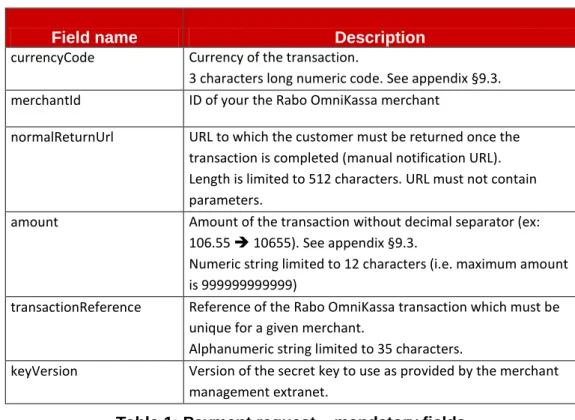
Field name Description currencyCode Currency of the transaction.
3 characters long numeric code. See appendix §9.3. merchantId ID of your the Rabo OmniKassa merchant
normalReturnUrl URL to which the customer must be returned once the transaction is completed (manual notification URL). Length is limited to 512 characters. URL must not contain parameters.
amount Amount of the transaction without decimal separator (ex: 106.55 10655). See appendix §9.3.
Numeric string limited to 12 characters (i.e. maximum amount is 999999999999)
transactionReference Reference of the Rabo OmniKassa transaction which must be unique for a given merchant.
Alphanumeric string limited to 35 characters.
keyVersion Version of the secret key to use as provided by the merchant management extranet.
Table 1: Payment request – mandatory fields 8.1.2 Optional fields
Field name Description automaticResponseUrl URL to use for automatic notification.
Length is limited to 512 characters. Note: URL may not contain parameters.
customerLanguage Language used to display the paypage or the error page. Default is user’s browser language.
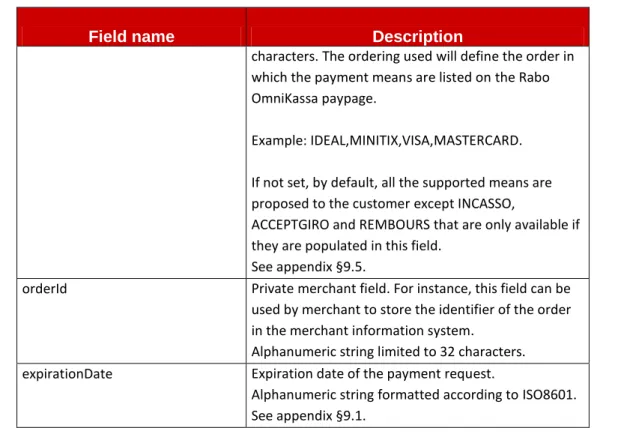
2 characters long code. See appendix §9.4. paymentMeanBrandList List of the authorized payment mean is the case a
restriction should occur.
Contains the list of Rabo OmniKassa accepted payment mean brand codes, comma separated. Payment means listed must be listed in capital
21 Field name Description
characters. The ordering used will define the order in which the payment means are listed on the Rabo OmniKassa paypage.
Example: IDEAL,MINITIX,VISA,MASTERCARD. If not set, by default, all the supported means are proposed to the customer except INCASSO,
ACCEPTGIRO and REMBOURS that are only available if they are populated in this field.
See appendix §9.5.
orderId Private merchant field. For instance, this field can be used by merchant to store the identifier of the order in the merchant information system.
Alphanumeric string limited to 32 characters. expirationDate Expiration date of the payment request.
Alphanumeric string formatted according to ISO8601. See appendix §9.1.
Table 2: Payment request – optional fields
8
8..22 RREESSPPOONNSSEESS // NNOOTTIIFFIICCAATTIIOONNSS ((AAUUTTOOMMAATTIICC AANNDD MMAANNUUAALL))
The content of the automatic and manual responses of the Rabo OmniKassa Payment Web are identical. It will vary according to the status of the payment request.
Field name Description amount As provided in the payment request. currencyCode As provided in the payment request. merchantId As provided in the payment request. transactionReference As provided in the payment request. keyVersion As provided in the payment request.
orderId As optionally provided in the payment request.
responseCode Rabo OmniKassa response code of the payment request. See appendix §9.6.
transactionDateTime
If the payment is sent to acquirer for authorization:
Date/Time in the Rabo OmniKassa system when the payment is sent to acquirer in merchant's time zone. Otherwise, date time when the Rabo OmniKassa response code is produced on
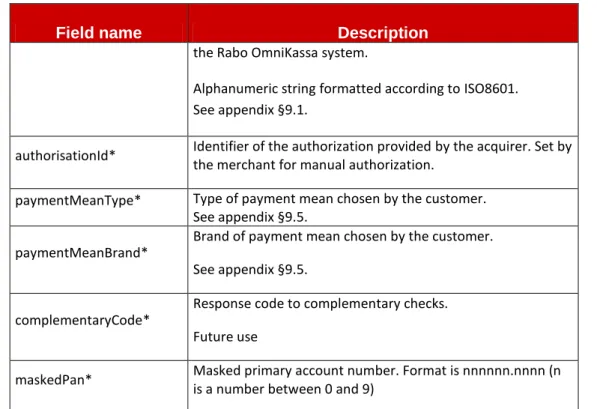
22 Field name Description
the Rabo OmniKassa system.
Alphanumeric string formatted according to ISO8601. See appendix §9.1.
authorisationId* Identifier of the authorization provided by the acquirer. Set by the merchant for manual authorization.
paymentMeanType* Type of payment mean chosen by the customer. See appendix §9.5.
paymentMeanBrand*
Brand of payment mean chosen by the customer. See appendix §9.5.
complementaryCode*
Response code to complementary checks. Future use
maskedPan* Masked primary account number. Format is nnnnnn.nnnn (n is a number between 0 and 9)
*: these fields are provided when available, depending on the transaction status and the payment mean which was chosen.
23
9. DATA DICTIONNARY
9
9..11 FFOORRMMAATT CCOONNVVEENNTTIIOONN
. This chapter describes the convention related to the Format Column used in Field Description
Value Description
N Indicate that Numeric value [0-9] is accepted A Indicate that Alphabetic value [aA-zZ] is accepted S Indicate that Special characters are accepted Numeric Indicate the maximum size of the field
YYYY Indicate the year
YY Indicate the 2 last digit of the year MM Indicate the month
DD Indicate the day hh Indicate hours (24h) mm Indicate minutes
ss Indicate seconds
ISO8601
Indicate an ISO8601 DateTime format (ANS25): YYYY-MM-DDThh:mm:sszzzzzz
YYYY-MM-DD : Year, Month, Day, with ‘-‘ as a separator
T : « T » static value indicating that the following is a time description. hh:mm:ss : Hour, Minute, Second with ‘:’ as a separator. A fraction of a
second can be added to this time using a dot or a comma as a separator. zzzzzz : time zone or time shift compared to UTC using one of the following
formats : « Z » or « +hh:mm » or « -hh:mm » url Indicates that an url is accepted
base64Url ANS with following accepted special characters [_-=]
restrictedString ANS with following accepted special characters [[email protected]+] and blank listString ANS with following accepted special characters [[email protected]+,] and blank
24
Value Description
extendedString ANS with following special characters [.-,;:_|?!<>+=*^/\&~#”’`{}()[]$%@] and blank
Table 4: data dictionary – format convention
9
9..22 FFIIEELLDDSS DDEESSCCRRIIPPTTIIOONN
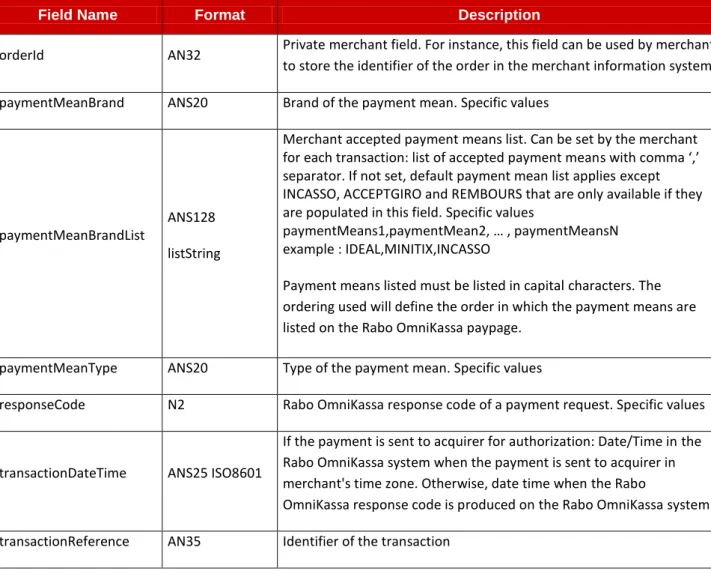
The table below describes all fields.
Please note that whenever “specific values” are mentioned in the description column, the list of values is provided in the “specific values” section of this document.
Field Name Format Description
amount N12 Final amount of a transaction (Debit or Credit) or amount of an operation (refund, cancel, …)
authorisationId AN10 Identifier of the authorization provided by the acquirer. Set by the merchant for manual authorization.
automaticResponseUrl ANS512 url This is the ‘address’ to which the Rabo OmniKassa service should automatically notify the merchant after a payment or a process captureDay N2 Settlement delay (in days) indicator – Future use
captureMode ANS20
Indicates the capture mode (automatic or fulfillment) – Future use complementaryCode N2 Response code to complementary checks. Future use
complementaryInfo ANS255
extendedString Description of the complementary code – Future use currencyCode N3 Currency of the amount. Specific values
customerLanguage A2 Language of the customer, used for presentation. Specific values expirationdate ANS25 ISO8601 Expiration date of the payment request (UTC timezone)
keyVersion N10 Identifier of the Merchant secret key
maskedPan NS11 Masked primary account number. Format is nnnnnn.nnnn (n is a number between 0 and 9)
merchantId N15 Identifier of the merchant
normalReturnUrl ANS512 url This is the ‘internet address’ used by the Rabo OmniKassa service to redirect the user after the payment.
25
Field Name Format Description
orderId AN32 Private merchant field. For instance, this field can be used by merchant to store the identifier of the order in the merchant information system paymentMeanBrand ANS20 Brand of the payment mean. Specific values
paymentMeanBrandList
ANS128 listString
Merchant accepted payment means list. Can be set by the merchant for each transaction: list of accepted payment means with comma ‘,’ separator. If not set, default payment mean list applies except INCASSO, ACCEPTGIRO and REMBOURS that are only available if they are populated in this field. Specific values
paymentMeans1,paymentMean2, … , paymentMeansN example : IDEAL,MINITIX,INCASSO
Payment means listed must be listed in capital characters. The ordering used will define the order in which the payment means are listed on the Rabo OmniKassa paypage.
paymentMeanType ANS20 Type of the payment mean. Specific values
responseCode N2 Rabo OmniKassa response code of a payment request. Specific values
transactionDateTime ANS25 ISO8601
If the payment is sent to acquirer for authorization: Date/Time in the Rabo OmniKassa system when the payment is sent to acquirer in merchant's time zone. Otherwise, date time when the Rabo
OmniKassa response code is produced on the Rabo OmniKassa system. transactionReference AN35 Identifier of the transaction
Table 5: data dictionary – fields description
9
9..33 CCUURRRREENNCCYY CCOODDEESS && AAMMOOUUNNTTSS
The currency code are given in the ISO 4217-Numeric codification.
To set fields amounts, this table describes for each following currency a sample amount and the value. The fractional unity in the following table stands for the currency number of decimals.
Currency name Currency code
Value Fractional unity
Example
Amount Fields amount
Euro 978 2 106,55 10655
American Dollar 840 2 106.55 10655
Swiss Franc 756 2 106,55 10655
26 Currency name Currency code
Value Fractional unity
Example
Amount Fields amount
Canadian Dollar 124 2 106.55 10655 Yen 392 0 106 106 Australian Dollar 036 2 106.55 10655 Norwegian crown 578 2 106.55 10655 Swedish crown 752 2 106.55 10655 Danish crown 208 2 106.55 10655
Table 6: data dictionary – currency code
9
9..44 CCUUSSTTOOMMEERR LLAANNGGUUAAGGEESS
Here is the list of the main language codes used (ISO 639-1 Alpha2) and their meaning.
Code Language en English fr French de German it Italian es Spanish nl Dutch
Table 7: data dictionary – customer language
9 9..55 PPAAYYMMEENNTT MMEEAANNSS PaymentMeanBand PaymentMeanType iDEAL CREDIT_TRANSFER VISA CARD MASTERCARD
27 PaymentMeanBand PaymentMeanType MAESTRO MINITIX OTHER INCASSO OTHER ACCEPTGIRO OTHER REMBOURS OTHER
Table 8: data dictionary – payment means 9
9..66 TTHHEERRAABBOOOOMMNNIIKKAASSSSAARRESESPPOONNSSEE CCOODDEE
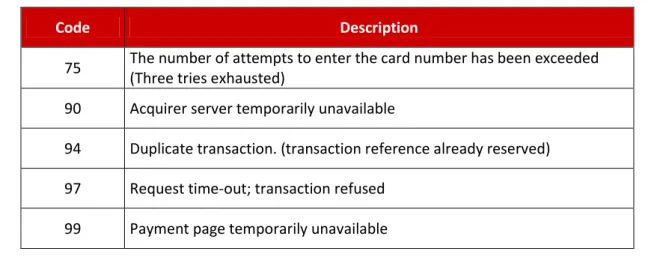
Depending on the end of payment, the returned responseCode can be:
Code Description
00 Transaction success, authorization accepted (transaction succeeded, authorization accepted).
02 Please phone the bank because the authorization limit on the card has been exceeded
03 Invalid merchant contract
05 Do not honor, authorization refused
12 Invalid transaction, check the parameters sent in the request. 14 Invalid card number or invalid Card Security Code or Card (for
MasterCard) or invalid Card Verification Value (for Visa) 17 Cancellation of payment by the end user
24 Invalid status.
25 Transaction not found in database 30 Invalid format
34 Fraud suspicion
40 Operation not allowed to this merchant 60 Pending transaction
28
Code Description
75 The number of attempts to enter the card number has been exceeded (Three tries exhausted)
90 Acquirer server temporarily unavailable
94 Duplicate transaction. (transaction reference already reserved) 97 Request time-out; transaction refused
99 Payment page temporarily unavailable
Table 9: data dictionary – response code
See §9.7 for details on IDEAL response codes and §9.8 for details on MiniTix response codes. 9
9..77 IIDDEEAALL AACCCCEEPPTTAANNCCEEDDEETTAAIILLSS
This chapter gives details on the response code mapping of iDEAL scheme acceptance.
iDEAL Rabo OmniKassa
iDEAL Status
field values iDEAL Description
responseCode Rabo OmniKassa Transactions stored in Rabo OmniKassa Open Result not known (yet). A new request is
necessary to obtain the status. 60 (1)
it depends on the final iDEAL responseCode Failure sending
in Issuer unavailable, set by iDEAL acquirer 90 No
Success Positive result; the payment is
guaranteed. 00
yes
(Status=Remitted to the bank)
Cancelled Negative result due to cancellation by
consumer; no payment has been made. 17 No
Expired
Negative result due to expiry of validity; no
payment has been made.
97 (3) No
Failure Negative result due to other reasons. 05 (4) yes (Status=Refused) Table 10: iDEAL response code mapping
29 (1)
Transaction not finalized, the Rabo OmniKassa is waiting for the final iDEAL status. (3)
The Rabo OmniKassa responseCode 97 is sent from the Rabo OmniKassa paypage timeout (4)
30 9
9..88 MMIINNIITTIIXX AACCCCEEPPTTAANNCCEEDDEETTAAIILLSS
This chapter gives details on the response code mapping of MiniTix scheme acceptance.
MiniTix Rabo OmniKassa
Minitix errorCode field values
MiniTix Description responseCode Rabo OmniKassa Transactions stored in Rabo OmniKassa 10 Syntax error 05 no 20 Integrity error 05 no
30 Merchant not known 05 no
31 Merchant disabled 05 no
40 Payment cancelled 17 no
80 Request outside time window 97 no
90 System error 90 no
100 Unauthorized customer 05 yes (Status=Refused)
110 Payment confirmation started 99 no
120 Insufficient balance 05 yes (Status=Refused)
NA Transaction OK 00
yes
(Status=Remitted to the bank)
Table 11: MiniTix response code mapping
9
9..99 IINNCCAASSSSOO, ,ACACCCEEPPTTGGIIRROO AANNDD RREEMMBBOOUURRSS AACCCCEEPPTTAANNCCEE DDEETTAAIILLSS
Based on the way of integration in Rabo OmniKassa, there are no payment mean specific request response codes regarding these payment means, near the general used response codes (for details, please refer to “Error cases- §4.1.3”).