Philip J. Fulcher. Creation of PortfolioSpace, a Social Portfolio. A Master’s Project for the M.S. in I.S. degree. April, 2009. 29 pages. Advisor: Gary Marchionini.
This paper describes the creation of PortfolioSpace, a social digital portfolio creation system. It describes the original design and alpha release of the system, as well as its current beta release.
Headings:
Online social networks
Portfolios in education -- Computer-aided design.
by
Philip J. Fulcher
A Master’s project submitted to the faculty of the School of Information and Library Science of the University of North Carolina at Chapel Hill
in partial fulfillment of the requirements for the degree of Master of Science in
Information/Library Science.
Chapel Hill, North Carolina
April 2009
Approved by
_______________________________________
INTRODUCTION
1A major problem facing the monolithic online social networks of today is that of context.
Facebook combines multiple contexts. There is no difference between work friends or
personal friends. Important information is lost when these relationships are taken out of
context. My link to my wife is very different from the one to my boss, but that
information is lost without context. In this paper, I propose and build an online social
network named PortfolioSpace that plants relationships in a purely work-contextualized
space.
PortfolioSpace began as two projects in the spring of 2008 at the School of Information
and Library Science at UNC-Chapel Hill. The original proposal began as a project in
Fred Stutzman's Social Networks course. The majority of PortfolioSpace’s interface was
designed in Professor Barbara Wildemuth's User Interface Design course.
SOCIAL NETWORKS AND SOCIAL CAPITAL
Online social networks reveal the hidden social network around us. In the real world, I
can only see my immediate friends – people I know directly. My second tier of friends
(friends of my friends) is mostly invisible to me. Most tiers beyond that are completely
invisible to me. With online social networks, I can see all tiers of my social network and
Now that the social network is visible to me, I can capitalize on the social capital there.
For instance, say I would like to work for a company, but I do not know anyone who
works there. Using an online social network, though, I may see that a friend of a friend
does work for that company. Now I have a link to the company – someone who can put
in a good word for me or pass a resume along. I have used the social network for my own
gain.
SOCIAL CONTEXT
These examples are easy to see in personal or job-related social networks because so
much has been done to reveal these networks to us. Facebook, MySpace, LinkedIn, and
Doostang allow us to easily track what friends and co-workers we have. However, none
of these services put these relationships in the context of the actual work accomplished.
There is no current way that I have found that creates a network via work done rather
than social links. For example, in Facebook a social link can be described in many ways,
such as “I attended school with this person,” or “We worked together.” These are
tangentially related to work done, but are still primarily social links. There is no
indication of what, if any, work happened.
Most online social networks also eschew hierarchy. All social links are equal. Again
taking Facebook as an example, if I were to friend one of my professors, there is no way
to say that that he is my professor. I can only say we are members of the same school.
This does not really capture the true nature of the hierarchical link between us. The
Work done and hierarchical links provide important context to social links. It is a very
different thing to say “I am at the same school as Fred Stutzman,” rather than “I
completed a project for Fred Stutzman as his student.” This link is very different from
what typical online social networks reveal and has potential to provide different social
capital.
PROPOSAL
To pursue this work-contextualized social network, I propose an online portfolio system.
Users can create a portfolio of their work, providing the finished product itself, as well as
descriptions of the work done. With each new element of the portfolio, links can be
formed with others involved in the project. These links will be of two classes: partners
and advisors. Partners are equal in standing and indicate co-workers on a portfolio
element. Advisors are those higher in the hierarchy of work relations, such as professors
or supervisors. The portfolio elements will appear in all linked portfolios with a
designation of role. Once these links are present, the system will allow for traversal of
those links. This system, entitled PortfolioSpace, is constructed at
http://apps.facebook.com/portfoliospace.
DESIGN
ORIGINAL DESIGN
Much of the interface and functionality of PortfolioSpace was laid out in two earlier
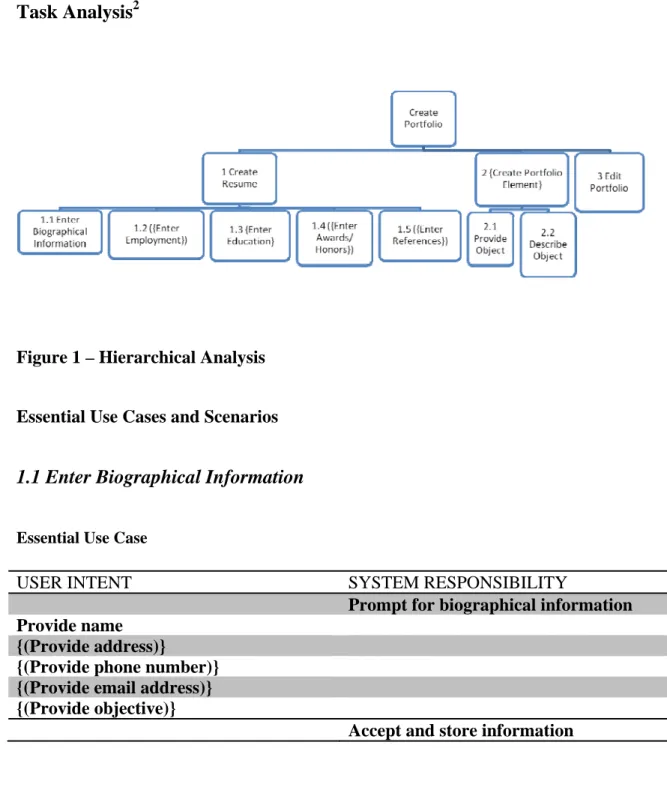
Task Analysis2
Figure 1 – Hierarchical Analysis
Essential Use Cases and Scenarios
1.1 Enter Biographical Information
Essential Use Case
USER INTENT SYSTEM RESPONSIBILITY
Prompt for biographical information Provide name
{(Provide address)}
{(Provide phone number)} {(Provide email address)} {(Provide objective)}
1.2 Enter Employment
Essential Use Case
USER INTENT SYSTEM RESPONSIBILITY
Prompt for employment information
Provide job title
Provide employer
Provide employer location
Provide date of employment
Provide job description
Accept and store information
Scenario
[Blaine is an Information Science graduate student. Preparing for job applications, he sits
down at his own computer one weekend to prepare his portfolio.]
The system prompts Blaine for his most recent employment. He knows this off the top of
his head and enters it quickly. He stalls on his job description, though. “What exactly do
I do?” he wonders. “I do a lot of different stuff, but I need to condense it down to a few
sentences. And I need to make my work sound interesting and challenging when I submit
this to employers.” He hems and haws and finally turns out a job description. The
system prompts him for his other employment. For the next several entries, he has to
think hard about the employer details. He also hesitates on the job description for each
1.3 Enter Education
Essential Use Case
USER INTENT SYSTEM RESPONSIBILITY
Prompt for education information
Provide degree title, including level of degree
and major
Provide university
Provide date of graduation
Accept and store information
1.4 Enter Awards/Honors
Essential Use Case
USER INTENT SYSTEM RESPONSIBILITY
Prompt for awards/honors information
Provide award/honor title
Provide presenter
Provide date of award/honor
Accept and store information
1.6 Enter References
Essential Use Case
USER INTENT SYSTEM RESPONSIBILITY
Prompt for reference information
Provide name
{(Provide address)}
{(Provide phone number)}
{(Provide email address)}
Scenario 1
The system prompts Blaine for his references. He hesitates, as he hasn’t officially asked
anyone to be a reference. He stops what he’s doing and sends off emails to possible
references. He skips over references for now.
Scenario 2
The system prompts Blaine for his references. He has his references list handy from
graduate school applications and enters the proper information.
2.1 Provide Object
Essential Use Case
USER INTENT SYSTEM RESPONSIBILITY
Prompt for object category – text, picture,
presentation, sound, video, or hyperlink
Provide object category
Present suitable prompts according to object
category
Provide object
Accept and store object as new portfolio
element
Scenario 1
[Lindsay is a Music Education undergraduate student who is in her final year. As part of
her school requirements, she must compile a digital portfolio of her work. The school
has already decided what entries must be included and has provided this portfolio system
to complete the task. Lindsay’s seminar class has chosen today to go to the campus
computer lab to start their portfolio creation. The professor moves around the room to
environment becomes fairly noisy and uncomfortable for Lindsay, as she enjoys working
in a quiet space.]
Lindsay is prompted for her first portfolio element. She references her portfolio
directions and decides to begin with her research papers. She selects Research Paper
from the category list. The system prompts her for the paper’s file. She digs around in
her bag and produces a flash drive with her papers on it. She plugs it into the computer,
browses for the correct file and chooses it.
Scenario 2
Lindsay is prompted for her first portfolio element. She references her portfolio
directions and decides to begin with her research papers. She selects Research Paper
from the category list. The system prompts her for the paper’s file. She digs around in
her bag and produces a flash drive with her papers on it. She plugs it into the computer,
browses for the correct file, but can’t find it. It must be on her computer at home. She
wants to move on but worries she’ll forget about this research paper later. She makes a
2.2 Describe Object
Essential Use Case
USER INTENT SYSTEM RESPONSIBILITY
Select object
Prompt for description of object
Provide title of object
(Provide purpose of object)
Provide description of object
({Provide names of other people who worked
on this object})
({Provide names of advisors or professors for
this object})
Accept and store information
Scenario
The system prompts Lindsay to describe her research paper. She opens the file, copies
the title, and enters it in the space. She can’t remember the purpose of the paper, though.
The assignment was long ago and fairly open-ended. She skips over it. In order to
describe the paper, she skims over the first few pages to remind herself of it. She copies
some text from the introduction and conclusion paragraph and pastes it in the description
box. Since she has the paper open, she copies the names of her partner and her
4 Edit Portfolio
Essential Use Case
USER INTENT SYSTEM RESPONSIBILITY
({Navigate to desired area
Make changes according to area
Accept and store information})
Scenario
After finishing arranging this portfolio, Blaine begins to rethink some things as he reads
over them. He goes back to the resume section and edits his job descriptions. He goes
back to his elements and makes some description changes there as well.
CHANGES TO ORIGINAL DESIGN
The original design and functionality emphasized the creation of the portfolio itself. The
idea was that this was a portfolio creation system with social elements attached. As my
thinking progressed, the portfolio creation became more mundane and the power of the
social network being created became more and more important. The original design
talked much of how users will create portfolios and why. The current system is less
focused on simple portfolio creation and much more tied to the social network aspect of
the system. For example, the “Arrange Portfolio” task has been completely dropped. All
user portfolios will look the same with no option for arranging, not or there any pressing
desire to do so. The portfolio display is still dominated by portfolio element description
and resume information, but several key elements have been added, most importantly the
worked with or for. This allows for a quick reference to network links without looking
through portfolio elements first.
The original task analysis and interface design did not address the issue of privacy at all.
A new task of privacy settings was added. These settings affect who can see what parts of
the user’s portfolio. This task has its own page, mirroring the rest of the overall design.
One key element of the user interface was significantly changed. The Portfolio Elements
tab was initially designed like the Resume tab where all functionality occurred on one
page. This means that the resume data is created, edited, and deleted by the user on one
page. This did not work for the portfolio element tab; there was simply too much on one
page. The tab was broken into three pages: view all portfolio elements, create a portfolio
element, and edit a portfolio element. This allowed for the user to focus on one task at a
time, rather than being inundated with many different options at once. By hiding
functionality that is not needed, I was able to tie this tab back into the overall design
philosophy of the system.
Creation
PortfolioSpace has gestated for over a year at this point. I first proposed the system in
spring 2008 and began user interface design after that. Within a month, a non-working
prototype was finished and evaluated. After another month, the prototype had basic
functionality. As part of the user interface design, an initial draft for a formal usability
Work was frozen after this to pursue other, more pressing projects, and work resumed in
January 2009.
Timeline
• February 2008
o Original system proposal o User Analysis
o Task Analysis • March 2008
o Initial interface design
o Interface prototype completed o Begin function coding
• April 2008
o First prototype presentation and feedback o Alpha Release
o Plans for usability testing drawn up • January 2009
o Project schedule created o Old code brought up to date o Privacy policy written • February 2009
o Primary development phase • March 2009
o Beta Release
Alpha Release
PortfolioSpace entered Alpha in April 2008. Functionally, this period was really a proof
of concept. Users could add and remove portfolio elements and link those elements to a
single partner and a single advisor. Elements could not be edited. File upload worked, but
was not very robust. No privacy controls had been built. However, a mock network of
users and elements could be set up and demonstrated.
In addition, the majority of the user interface had already been designed. The application
subtasks, the user could easily navigate through the system while only focusing on one
task at a time. The resume tab, where users enter personal, employment, and education
information, was mostly complete and would not change greatly through the rest of
development. Since this tab was such a success, judging by informal user polling, the
Portfolio Elements tab was initially modeled after it. This proved unwieldy and was
changed during the beta release.
Beta Release
PortfolioSpace re-entered development in 2009. Changes in the Facebook platform
necessitated updating the old code to bring it up to date. Once the Alpha release was
functional again, preparatory work for the Beta release began.
Privacy Policy
Of utmost importance was that a suitable privacy policy be created. I consulted the
TRUSTe website, a leading provider of privacy seals and resolver of privacy disputes.
Their document Your Online Privacy Policy was instrumental in creating the current
privacy policy. I wanted to emphasize their points about a privacy-policy being
consumer-friendly. According to TRUSTe, such a policy is:
• Accessible
• Easy to understand
• Neither too short nor too long • Prioritized
• Updated as needed
PortfolioSpace's privacy policy is short and to the point. Technically, this is not a full
case of legal trouble. However, with this beta release being so limited, I felt it could wait
until a later release date. For now, this policy covers enough to inform the user without
being so long that it would remain unread. The privacy policy is linked at the bottom of
all system pages and shown here.
We collect:
• Personal information such as your name, email address and phone number when
you register to use PortfolioSpace.
• Resume information such as your employment and education history when you
provide us with that information.
• Portfolio information such as work you've done and those you've worked with
when you add them to your portfolio or those you have worked with do so.
• Anonymous information such as your IP address, browser name and version, and
pages you have accessed. This information is not tied to any personally
identifiable information.
We use this information to:
• Maintain your account with us
• Communicate with you
• Enable you to share this info with others at your discretion.
• Evaluate our services by maintaining traffic and performance logs and generating
reports of use. All information in these reports is anonymous and will never
We will never sell, rent, or share your information with any third party you
haven't approved except where required by law.
Your choices:
• You can select who to share your information, resume, and portfolio with. By
default, all sharing is turned off until you enable it.
• You can control what messages we can send you.
• You can tell us to delete your information at any time. We will not retain this
information once deleted except in periodic backups. Because our backups are
automated, your information will not be fully purged from our systems until
backups cycle again. We pledge not to retrieve deleted information from these
backups.
Terms of Service
PortfolioSpace is offered as-is. As this is an academic effort in constant flux, no
guarantees are made by the developer. If you have questions or other concerns
about these policies, please send an email to
[email protected] at any time.
Development
Since much of the interface was already completed, the next focus was on filling missing
functionality. The following feature list was created, organized by priority:
I. Essential
3. Link verification (subject to privacy policy) 4. Allow for non-friends to be linked
5. Allow for easy user feedback at any time
II. Important
1. Edit portfolio elements 2. Link to hosted work 3. Option to not upload work
4. Elements still have "owner" - partner link should be equilateral 5. Ability to add work you advised
6. Search
III. Optional
1. Tagging
2. Allow for viewing outside of Facebook 3. Optimize for speed
Development lasted from January to March. Most features were successfully
implemented, but, as in any project, some features were left by the wayside. In the end,
link verification, the ability to add work the user advised, and the optional features were
left unimplemented. Link verification is still important to the system as it grows, but not
essential at these early stages. Its initial ranking of "essential" was ill-advised. Link
verification is an issue of trust within a large system. Within a small beta release such as
this, this is not as important as getting the rest of the system off the ground.
Results
PortfolioSpace launched in March 2009 and is located at
Screenshots
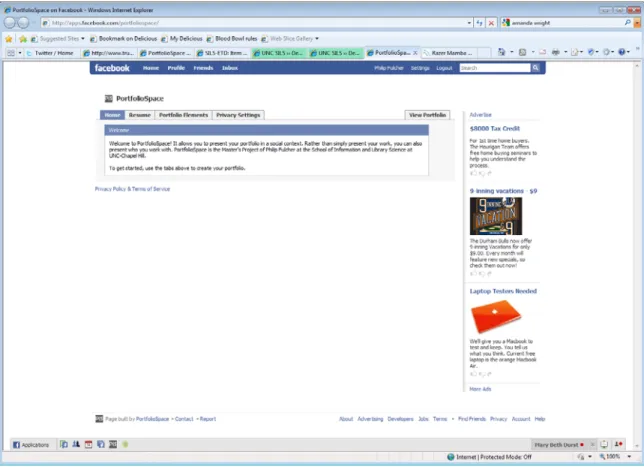
Figure 2. Index page
This is the first page users see after registering for the system and accepting the terms of
service. It displays the overall layout of the system. Tabs at the top of the page separate
tasks into separate pages. A link to the privacy policy and terms of service is at the
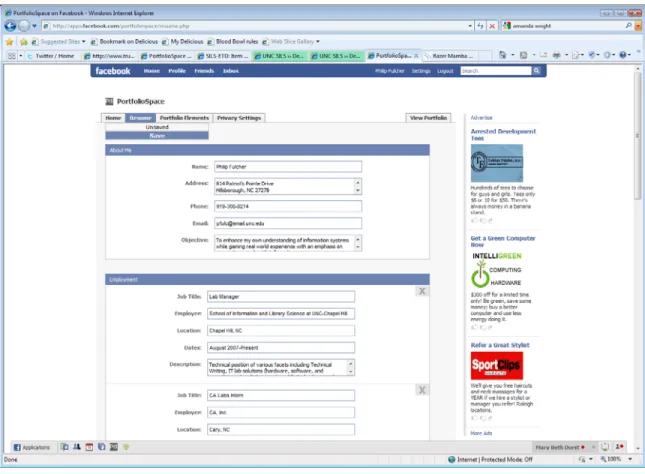
Figure 3. Resume page
The resume page uses Ajax to allow the user to add information to their resume without
loading a page. The page is divided into sections for different resume elements: contact
information, employment, education, awards, and references. Each section has an “add”
button at the bottom, allowing the user to add another information element to each
section. For example, the user would click the “add” button below the employment
section each time he or she wanted to add another job to your employment history. Each
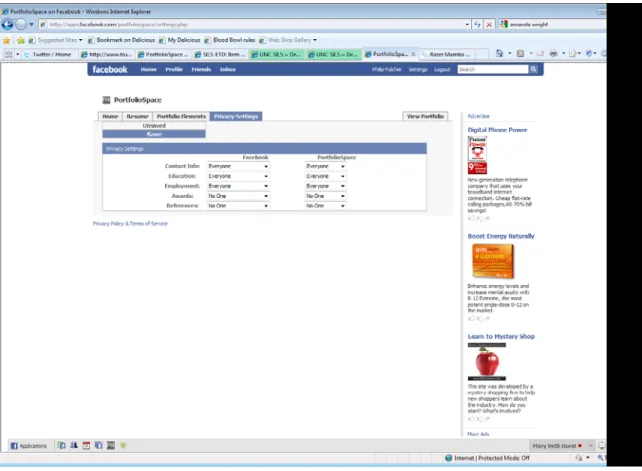
Figure 4. Privacy Settings page
The privacy settings page allows the user to reveal elements of their resume to other
users. Because PortfolioSpace exists within Facebook, the user can allow different
permissions to those who are part of PortfolioSpace or those who are only part of
Facebook. The default is to hide resume information from everyone. In this way, the user
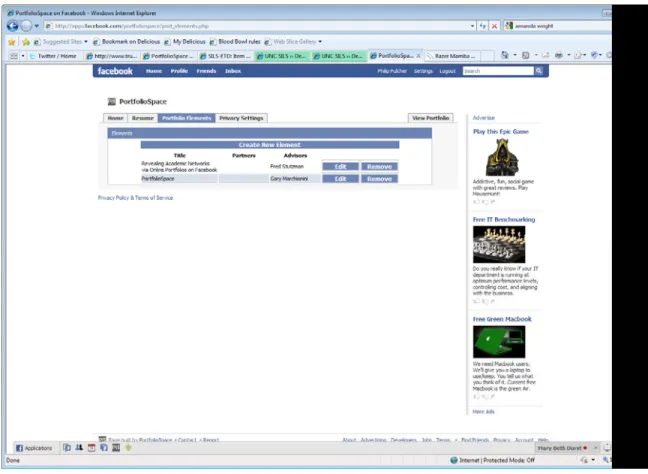
Figure 5. View Portfolio Elements page
The View Portfolio Elements page gives the user a place to manage the elements of their
portfolio. They may add, edit, and delete elements from this page. Again, Ajax is used to
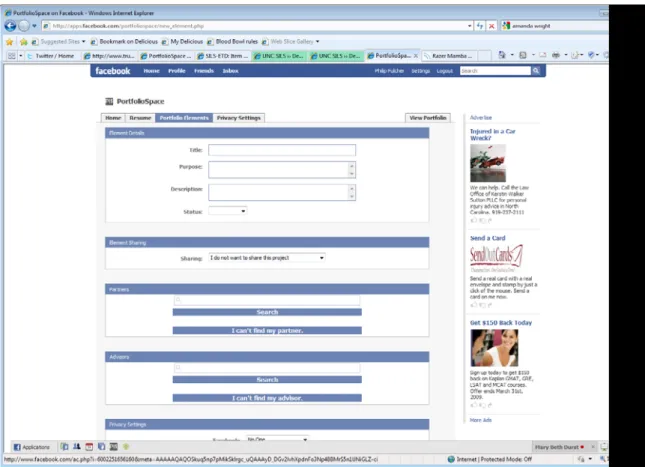
Figure 6. Create/Edit Element page
This page allows the user to create a new element. The first section allows the user to
describe the element and its purpose. The “Sharing” section allows the user to either link
to a web page where the project is posted or upload the project to PortfolioSpace. The
“Partners” and “Advisors” section have an Ajax search function that searches for both
current PortfolioSpace users and Facebook users. Each result has a link to that person’s
Facebook profile or PortfolioSpace portfolio to confirm their identity. If the partner or
advisor does not exist in either system, an “I can’t find my partner” option is at the
bottom of the section. This allows the user to enter the partner or advisor’s name and
mirroring the options on the Resume Privacy Settings page. The Edit Element page is a
mirror of the create element page, it simply updates records instead of creating them.
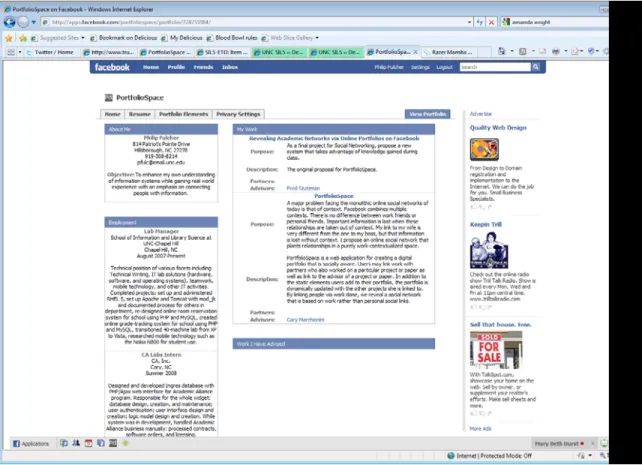
Figure 7. View Portfolio page
The View Portfolio page is where user information is displayed and the social network is
exposed. Along the left is the user’s resume information and links to everyone he or she
has worked with. Each name has a link to that user’s portfolio. The right part of the page
lists the user’s work in two sections: My Work and Work I Have Advised. The title of
each project is a link to display that project. The partners and advisors of each project are
Successes and Difficulties
Most essential functionality is implemented. The system has ten registered users with
links to four unregistered users. Seven portfolio elements have been created and shared.
Unfortunately, it is hard to pull any real conclusions from this data. From informal user
polling, there have been some bugs and issues, but the system on a whole has been
praised.
PortfolioSpace makes intelligent use of Ajax. In other projects, I have over-used Ajax to
the point of absurdity. One previous project never had a page load; everything was loaded
and done via JavaScript. PortfolioSpace uses Ajax to avoid page loads when necessary.
For example, on the resume page, users can add new jobs or degrees without having to
reload the page. Everything for the resume task happens on that one page. Rather than
just making things prettier, the Ajax used here enhances the usability of the site by
limiting the task to one page and area of focus, rather than spreading it across several
pages.
Furthermore, Ajax works around some of the speed issues of the Facebook platform. the
Facebook platform as a whole is rather slow because of its structure. When a user
requests a page, the Facebook requests the page from PortfolioSpace. Facebook processes
the page and finally displays it. This results in a lot of transit time and multiple processes
for a single page load. By eliminating page loads when possible, the speed of the system
is improved, providing a better user experience.
With any system of considerable size, problems are going to arise. Many difficulties lay
framework) and PHP. With so many operations happening in different places, it quickly
became obvious that an error reporting system would be necessary for the project. A table
was added to the database to store the error reports. Each operation had an error state
defined and description created. A small PHP script would display these errors in HTML
in an admin section. This slowed development, but made troubleshooting much easier
and will aid in future development.
The inherent difficulties of developing for the Facebook Platform have to be addressed.
Facebook Markup Language (FBML), Facebook JavaScript (FBJS), and Facebook Query
Language (FQL) cause more problems than they solve. FBML allows for consistent
styling, but is inflexible. If you want to keep the styling, but do something slightly
different, you're left grabbing styles from their CSS and building your own tables, trying
to copy what they've accomplished. FBJS prohibits many of the standard JavaScript
functions and replaces them with new ones. Development time is spent re-learning how
to do things that were previously easy. FQL prohibits table joins, so any operation
involving more than one table requires at least two queries and often more.
Developing the system alone was also a trial. Because I worked alone, I had only one
perspective of the system. I should have been more active in seeking an outside
perspective to aid my own. When I ran into problems, I often barreled ahead with one
solution, only to find it did not work and I had to begin anew. After observing some users
with the system, it was clear that were attempting to use the system in ways I had not
considered. One user, a music director, wanted to display her latest concert with her
students. The idea that a portfolio element could be linked to dozens of people was not
operations could handle such a thing, the actual portfolio display could not display that
many partners appropriately.
Despite the difficulty of working alone, I was able to effectively manage the project.
Before work began, objectives and a time line were set up and work proceeded along that
path. The work thus followed a long a pre-determined path that allows for greater
predictability of time and work in the project.
Future Work
Obvious future work includes going back to my planned list of functions and including
all of them. Once this is done, there are already plans drawn up for a usability evaluation.
The testing is iterative and modeled after Slaven, Paterson, and Ewers’ work in Why One
is Never Enough: A Case Study of Iterative Testing of a Library’s Online Services
(Slaven, Paterson, & Ewers). The system is finally at a stage where usability testing
could show real results. Before this, the system simply was not complete enough to give
to users for testing. Iterative testing would work out the kinks and bugs left in the system
as well as find good feedback from users about the overall system.
Beyond functionality and usability lies the ultimate question: is this a useful product?
This will only become apparent as more people use the system and build networks.
Conclusion
PortfolioSpace represents months of preparation and development. This paper can only
development in many areas: systems analysis, user interface design, database design, web
development, project management, and social networking. With the system finally
released to beta, real study of a work-contextualized social network such as this can
begin. Regardless of theoretical benefits, a social network is useless without a population.
I hope that a population finds PortfolioSpace, and it realizes its potential. Going forward,
the success of this system is much less dependent on me, and much more dependent on
its users.
Notes
1 Excerpted from The Power of Context in Online Social Networks.
Bibliography
Facebook. (n.d.). Statistics. Retrieved March 29, 2008, from Facebook: http://www.facebook.com/press/info.php?statistics
Fulcher, Philip. (2008). The Power of Context in Online Social Networks. Class paper.
Fulcher, Philip. (2008). PortfolioSpace Design Documentation. Class paper.
Slaven, C., Paterson, G., & Ewers, B. (2007). Why Once is Never Enough: A Case Study of Iterative Usability Testing of a Library's Online Services. Information Online 2007.
Sydney.