Huiying Ma. Implementation of An Event-based Business Document Indexing and Retrieving System. A Master’s Paper for the M.S. in I.S degree. April, 2016. 40 pages. Advisor: Ryan Shaw
This paper presents a business event-based indexing and retrieval system that enables searching for business articles and journals based on not only their full texts but also business events detected through natural language processing(NLP). The system was implemented using Apache Solr as the indexing and searching platform, on top of which I built my own algorithms and methods for document indexing and retrieving. The development of this system involved source document collection and tagging, indexing algorithm design and implementation, and system evaluation. Progress to date has shown that both precision and recall have been improved when searching using event-relevant key words and this also provide a way to retrieve entities combine with events.
Headings:
Document Indexing
Document Retrieval
Natural Language Processing – Results Application
Apache Solr Implementation
IMPLEMENTATION OF AN EVENT-BASED BUSINESS DOCUMENT INDEXING AND RETRIEVING SYSTEM
by Huiying Ma
A Master’s paper submitted to the faculty of the School of Information and Library Science of the University of North Carolina at Chapel Hill
in partial fulfillment of the requirements for the degree of Master of Science in
Information Science.
Chapel Hill, North Carolina
April 2016
Approved by
Table of Contents
Table of Contents ... 1
INTRODUCTION ... 2
LITERATURE REVIEW ... 4
METHODS ... 8
EVALUATION ... 16
LIMITATION AND FUTURE WORK ... 23
CONCLUSION ... 26
Acknowledgement ... 28
Bibliography ... 29
Appendix I – Python Script for parsing the source HTML files ... 31
Appendix II -‐ source HTML file sample ... 34
Appendix III – XML file sample for indexing on Apache Solr ... 36
I
NTRODUCTIONThe economic success or stagnation of a geographic region depends on a complex
interplay of factors. Understanding this complexity requires collecting data on
transactions that occur among a changing set of firms and people, which can be
represented as business events, such as layoff, initial public offering(IPO), and
investments, etc. So business researchers usually care more about these business events
than other words in a business news or document.
Typical indexing methods provide ways for researchers to search the full text of
documents using keywords. However, sometimes business events don’t show in the
documents as keywords or have little relevance with the exact words occurred in the
documents. Using traditional indexing and retrieving methods might have some problems
and result in low precision when conducting a business event search. Though sometimes
searching for business events using the full text keywords might have a good recall, but
there are many irrelevant documents that researchers need to read, which is a waste of
time and effort.
So the system I’m proposing is to develop an event-based business document indexing
and retrieving system to provide user with better results when searching business events
business journal website and was pre-processed using a natural language processing
(NLP). So the documents used for this system are HTML files with all detected business
entities such as name, location, organization and business events such as layoff, IPO
tagged using CSS classes. I used Apache Solr as the indexing and retrieving platform and
indexed the source documents on Solr according to specific algorithms. These algorithms
can provide users with various ways to search by keywords, event and entity tags or their
combination and improve the precision and recall of the results.
In this paper, I present a system for event-based business documents indexing and
retrieving, addressing the outlined problems. The rest of the paper is structured as follows:
Literature Review section discusses the related work, Methods section discusses the
methods and algorithms used for this system and how I implemented all of them, the
Results and Evaluation section describe the results and evaluation. Conclusions and
L
ITERATURER
EVIEWThere are several papers discussed about document indexing and retrieving, some of
them used probabilistic models to analyze the relationship between words and documents
for indexing and retrieving.
FUHR et al. (1991) presented a probabilistic learning approach for document indexing by
giving the weight of the index terms with respect to the document. Mahleko and
Wombacher’s paper (2006) focused on matching business processes when conducting
complex searching. They used N-Gram Index for the proposed method and data is stored
in a relational database. Their work improved the performance in word sequential
scanning. However, this kind of method doesn’t suit for unstructured data such as
business news or articles.
Nowadays, more and more data that we can acquire and need analysis are unstructured
documents. And those hiding inside the documents are knowledge that need to be
discovered and managed. Alavi’s article (2001) talked about knowledge management and
knowledge management systems. It discussed that managing organizational memory
Organizational memory includes knowledge residing in various component forms,
including written documents, structured information store in electronic database, codified
human knowledge stored in expert systems, documented organizational procdures and
processes and tacit knowledge acquired by individuals and networks of individuals (Tan
et al, 1999). Much of an organization’s explicit knowledge resides in unstructured
documents in the form of memos, design blueprints, notes, meeting minutes, etc.
(Dworman, 1998). So how to analyze the unstructured documents and build a system to
index and retrieve those documents by knowledge that might not showed in the
documents obviously becomes more and more important. Sparck Jones (1972) describes
an intelligent retrieval system as a system with a knowledge base and inferential
capabilities that can be used to establish connections between a request and a set of
documents.
Some papers focused on analyzing the documents and cluster them based on multi-words
phrase and detected events. Hammouda and Kamel's paper (2004) focused on
phrase-based document indexing for web document clustering. They believe that document
clustering should be based not only on single word analysis, but on phrases as well. So I
think the same is true for document indexing and retrieving: what the words mean when
they appear together matters more than the exact words showed in the document.
Tseng and Chou's paper (2006) presented that lots of cumulated historical business data
and information for helping contemporary administrative decision-making is hidden in
warehousing, unlike traditional document management system, including extensive
semantic information about documents, cross-document feature relation, and document
grouping or clustering to provide a more accurate and more efficient access to
text-oriented business intelligence. So same as the business researchers, they care more about
the information that is not very obvious as the numerical data, they need more
information on the events.
A lot of documents don’t show events as exact words in the contents, however, we can
detect the events based on the phrases and contexts of the contents. Sometimes natural
language processing(NLP) models can do this part and mine the knowledge that is not
obvious in words. In Raisinghani’s paper (2003), it showed that the goal of data mining is
to obtain useful knowledge from an analysis of collections of data. Such a task is
inherently interactive and iterative. As a result, a typical data-mining system will go
through several phases. The phases start with the raw data and finish with the resulting
extracted knowledge that was produced as a result of some stages, and the last stage is
interpretation and evaluation. The patterns identified by the system are interpreted into
knowledge that can then be used to support human decision-making, e.g., prediction and
classification tasks, summarizing the contents of a database, or explaining observed
phenomena (Han & Kamber, 2000).[3]
More and more researchers started their research on event detection to detect useful
information that is not obvious as keywords in unstructured document such as news or
information about events, trends, and relationships in an organization's external
environment, permits an organization to adapt to its environment and to develop effective
responses to improve the organization's position in the future. So this information is very
important to business researchers as well as the companies.
The system I propose makes use of the results of a NLP model and provides a way to
index and retrieve the documents based on the results: the business events detected
automatically by the model. Representing the events in a document is also very important.
Vecera el al.'s paper (2007) proposed and implemented several approaches to represent
events in searchable indices and discussed their advantages and disadvantages. They
provided some insights into the performance considerations in this area by comparing
Lucene.NET with the indexing capabilities of MS SQL Server 2005. They focused more
on the relationship between events and care less about the document itself, but their
approach to use Apache Lucene provide a good direction for document events
representation, indexing and retrieving.
Over all, many researchers have studied phrase or event based document indexing and
retrieval and event detection, but few have combined the document indexing and
retrieving with the result from NLP. So the system I’m presenting will provide a way to
combine these two parts and make use of each other to provide a better indexing and
M
ETHODS1. Data
The data used for this project are business news articles from a local business journal
website, articles that discuss or mention business events involving local companies and
organizations. The source data was downloaded as HTML source code and then was
pre-processed by an Information Extraction(IE) NLP model developed by another student in
SILS, UNC. The NLP model analyzed the main contents in the articles and returned a
simple version of HTML files with all main texts with information detected marked as
article tags and CSS classes. The IE model detects business entities, including person,
location and organization, and business events, including ‘IPO’ and ‘Layoff’ for now.
Figure 1 shows a sample of the result HTML file returned by the IE model. The sample
HTML source code can also be found in the appendix.
For the contents of the articles, I manually chose and download the business journals by
reading them and picked the articles that contains business events such as ‘Layoff’ and
‘IPO’. So overall there are 106 articles pre-processed HTML file, 51 of them have the
exact word ‘layoff’ in their contents and 61 of them have the exact word ‘IPO’ in their
contents. For the 51 articles talking about ‘Layoff’, 32 of them really talk about layoff as
topic of the article. For example, we do not consider the following sentence as a layoff
event even if
Figure 1 Sample HTML data open by a web brwoser
it has a ‘layoff’ keyword inside:
“After the flurry of activity immediately following the news of a layoff , most of us get back into our work and routines and move on -- it 's just human nature.”
For the 61 articles having ‘IPO’, 16 of them talks about a real IPO event, which
we define as a company has already successfully sale stock and have a price. The other
45 articles, though have ‘IPO’ as keywords inside the contents, didn’t talk about a real
IPO event. They might talk about a company file for ‘IPO’, attempting to ‘IPO’, failed or
canceled ‘IPO’, which we consider them not talking about an ‘IPO’ event. For example,
“Square Inc. , the mobile payments company co-founded by St. Louis natives Jack Dorsey and Jim McKelvey , is slated to price shares late Wednesday for its initial public offering.”
And the sentence following will not be marked as an ‘IPO’ event because it just filed to
go public:
“Square , the multibillion-dollar mobile payments company founded by native St. Louisans Jack Dorsey and Jim McKelvey , has filed to go public with an initial offering of $ 275 million , a figure that could increase as it nears”
2. Document structure analysis
The documents used for indexing and retrieving are HTML files showed as Figure 1, and
the full HTML source code sample is showed in appendex. Figure 2 shows one extract
sentence structure and the corresponding HTML source part. Each document has a title,
time of publication, tags given by the IE model and the contents marked different entities
and events in different color as Figure 2 shows. The title, time, tags have their own ‘id’s
in the HTML file and the information marked by different color are classified by CSS
‘class’es.
In this project, we need to build index upon the information detected by the IE model and
the free-texts in the articles as well. For example, we need the function of retrieving all
the articles talking about event ‘layoff’, or all the articles talking about an organization
names ‘Sears’ has the event ‘layoff’. In general, I’d like to build the full-text index upon
Figure 2 Corresponding document structure in browser and HTML source
3. Indexing method
Considering the need of building full-text index upon the classes and ids of HTML files
and provide a function to retrieve all the articles, I choose Apache Lucene as the indexing
platform. Apache Lucene is a high-performance, full-featured text search engine library
and it has many powerful, accurate and efficient search algorithms. It provides many
query types such as phrase queries, wildcard queries, etc. Most importantly, it provides a
function of field searching, such as title, author and contents, which is the exact function
needed in this project.
After reading the reference file of Apache Lucene, I decided to choose Apache Solr as the
indexing and retrieving platform. Solr is the popular open source enterprise search
platform built on Apache Lucene and it’s a standalone enterprise search server with a
REST-like API. I can index documents in it via JSON, XML, CSV or binary over HTTP
and also query it via HTTP GET and receive JSON, XML, CSV or binary results.[]
Solr is a very powerful tool for document indexing and we can build our own schema and
field types to store the contents of the documents. Another important feature is that
writing code. Consider all the features Solr can provide, I choose it as the platform for
indexing and retrieving.
4. Indexing algorithm design
After setting up Apache Solr, the next step would be building algorithms to map the
contents of the documents into different fields and index them into Solr. According to the
document structure showed as Figure 2, I decided to use the class and id names as the
field names and the texts inside those tags as contents of that field. Take Figure 2 as an
example, I use the class name ‘Layoff’, ‘organization’ and ‘number’ as field names, and
map the sentence into ‘layoff’ field, ‘Sears’ and ‘N.C. Department of Commerce’ into
‘organization’ field, and ‘56’ into ‘number’ field.
After reading the reference guide of Apache Solr, a Solr index can accept data from many
different sources, including XML files, comma- separated value(CSV) files, data
extracted from tables in a database, and files in common file formats such as Microsoft
Word or PDF. We can easily uploading XML files by sending HTTP requests to the Solr
server from any environment where such requests can be generated. So then I tried using
“curl” command to run the HTTP requests using shell scripts to post one of the HTML
file in the directory to do a simple test. When getting the results, I found that Solr only
got some metadata by default configuration, such as ‘content_type’ and ‘content
encoding’ but nothing about the real content texts and tags such as layoff and
Solr’s ExtractingRequestHandler helped a lot in maping the HTML tags and contents and
Solr gives us a way to map tags into Solr fields using XPath. When I try to index all text
contents in <p> tags into ‘content’ field, not only the text content in p tags, but also the
‘id’ names and the tag names inside the p tags are indexed into the same field. I’ve also
tried other ways to solve this problem but didn’t find a proper way. After learning and
trying, I finally decided to transfer the HTML files that need to be indexed into the
standard type that Solr can easily accept. For this project, I decided to transfer the HTML
into XML files, mapping different contents into different tags according to the classes
and ids, as Figure 3 shows.
Figure 3 Corresponding XML structure
I built the HTML parsing script using Python to transfer the HTML files into XML files.
I used the HTMLParser and BeautifulSoup library to parse the HTML contents and tags.
I defined filename, article_title, time, article_tag and all_content as predefined fields that
each document should have. Then I detect all the attributes(classes names) in the HTML
files and find the texts and only the texts inside a tag that have those attributes. The
python script code can be found in the appendix.
After processing by the parsing script, I got a list of XML files correlate with the HTML
files by file names. Figure 3 shows a part of an example XML file and the full source
files that used to send HTTP request to Solr for indexing. The command used to send the
files into Solr can be found in appendix.
5. Retrieving mdthod
Solr features a Web interface that makes it easy for Solr administrators and programmers
to view Solr configuration details, run queries and analyze document fields in order to
fine-tune a Solr configuration and access online documentation and other help. The path
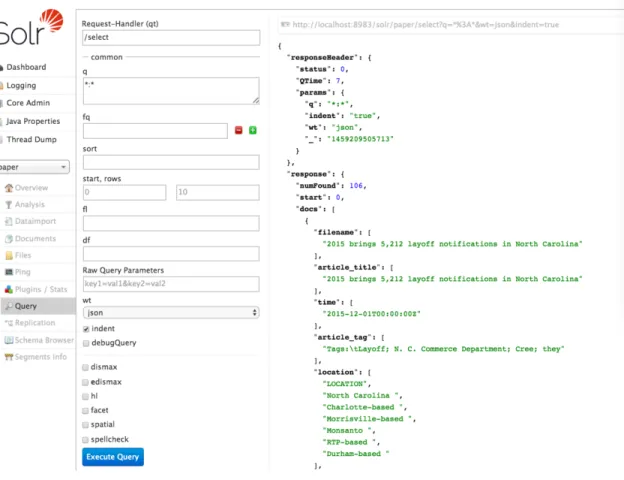
to the Solr Admin UI is http://hostname:port/solr. The part used for query and analysis is
the ‘Query’ part, the interface is as shown in Figure 4.
Solr provides a very powerful REST-like API for query and return the results in JSON or
XML type. We can do most part of query functions in this UI, however, this UI only
shows all the data and contents in JSON format and can not provide us a view for the
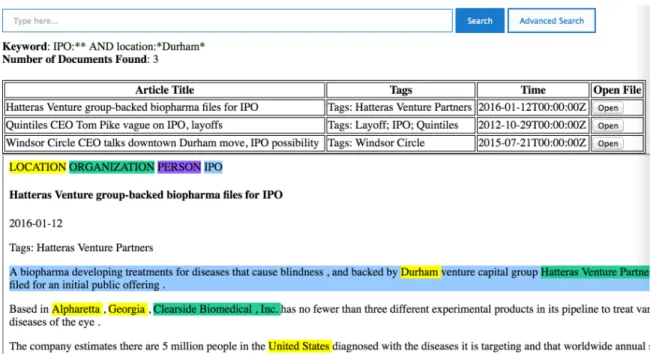
documents. So I developed a very basic web interface based on the Solr REST API to
retrieve all the documents based on queries and provide users a link to open the original
marked HTML file. The interface I developed is shown in Figure 5.
Figure 5 Basic UI build upon Solr API
This UI provide an ‘open’ link for users to open the original file below to see the
mark-ups and provide a way to check the results in details and more intuitionally.
Solr provides lots of Query parsers which supports the function of searching by keywords,
phrases, fields and the combinations. Detailed commands of queries can be found in the
E
VALUATIONI’ll evaluate the system by calculate the precisions and recalls for specific searching tasks.
There’s an ‘all_content’ field in each document for indexing and I’ll use that as the
full-text index for all the full-texts in the document for contrast to other full-texts indexed by fields.
1. Search Tasks and results
1.1 Search for ‘Layoff’ events
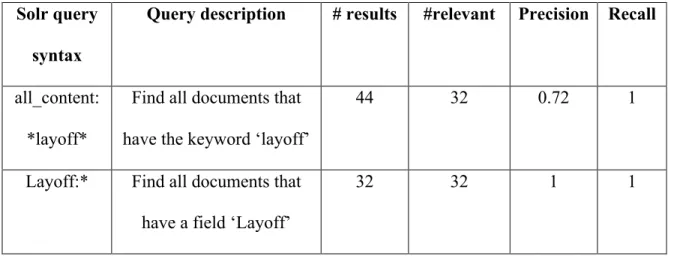
In this search task, I’ll search for all the documents that have ‘layoff’ events (32 in total)
and contrast the result between searching keyword ‘layoff’ in the all_content field and
searching for documents that have a field ‘Layoff’, which means that document has
sentences marked as ‘layoff’ event. The results are shown in the Table 1 below, it lists the
Solr query syntax for all content full-text index retrieving and the query syntax for field
index retrieving and the description for each syntax. The final four columns showed the
result of the query and the relevant document number, in this case means the number of
documents that have the ‘layoff’ event markups, precision and recall.
1.2 Search for Companies that have ‘layoff’ events
The retrieval task 1 above aims to solve the problem that uses usually want to search for
business events base on the understanding of the article, not only base on the free texts.
This task will be focus on retrieving the events and the entities related with the events.
company that have ‘Layoff’ events. I chose to use the example of company name ‘IBM’
and event ‘layoff’ as the searching features and the searching task would be search all the
documents that talk about IBM’s layoff event. The results are shown in table 2 below.
Table 1 results and evaluation of searching 'Layoff' events
Solr query
syntax
Query description # results #relevant Precision Recall
all_content:
*layoff*
Find all documents that
have the keyword ‘layoff’
44 32 0.72 1
Layoff:* Find all documents that
have a field ‘Layoff’
32 32 1 1
Table 2 results and evaluation for searching ‘IBM’s layoff event’
Solr query syntax Query description # results #relevant Precision Recall
all_content:(*IBM
* AND *layoff*)
Find all documents
that have keywords
‘IBM’ and ‘layoff’
15 10 0.53 1
Layoff:*IBM* Find all documents
that have keyword
‘IBM’ in ‘Layoff’
field
8 8 1 0.8
There are overall 10 documents talking about IBM’s layoff event and each retrieving
calculated the F1 score and the results showed that the F1 score for the first query is 0.69,
and the F1 score for the second query is 0.89.
1.3 Search for ‘IPO’ events
Different from the event ‘layoff’, IPO might have multiple stages for a company. For
example, a company can first attempt to IPO, file for IPO, cancel IPO, and start to sell
stocks to public or change stock price. The events mentioned above could all be
considered as ‘IPO’ events. However, sometimes researchers or users only care about
those companies that really IPOed and might want to get the stock price for research or
business strategy analysis.
In this project, each document has a article tag, for this event the IE model detects each
document to see if it has a real ‘IPO’ event, if the document really talks about an IPO
event, there would be a tag ‘IPO’ in the ‘Tags’ part in the document and I indexed all the
tags inside the ‘article_tag’ field. One more different part is that though some sentences
are not talking about a real IPO event, if they have events like file for IPO, attempt to IPO,
etc., the IE model would still mark that sentence with ‘Layoff’ marks. Figure 6 shows
how the tags and marks word, since the document in Figure 6 doesn’t have an ‘IPO’ tag,
we do not consider this document as relevant during the retrieval of ‘IPO’ events but we
Figure 6 Document sample not considered as a real 'IPO' event
So for this task we just want to search for all the documents that have ‘IPO’ as their tags,
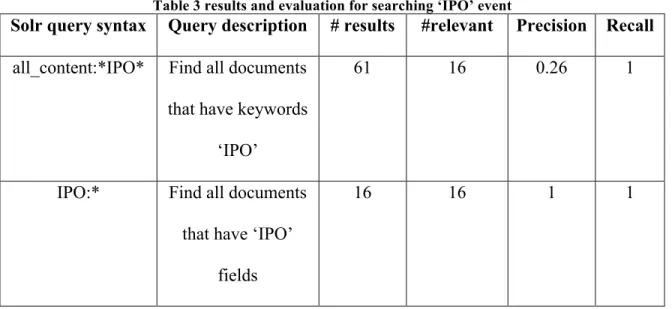
which means real IPO events, those who filed IPO or failed or canceled IPO doesn’t
count as real IPO events. Table 3 shows the result for this task.
Table 3 results and evaluation for searching ‘IPO’ event
Solr query syntax Query description # results #relevant Precision Recall
all_content:*IPO* Find all documents
that have keywords
‘IPO’
61 16 0.26 1
IPO:* Find all documents
that have ‘IPO’
fields
2. Results analysis
As we can see from the three tables above, all the first rows, which represents the results
just search keywords inside the all the contents in each document have relatively lower
precision, but have very high recall, all for 100 percent recall. That’s because for this
project, the problem I want to solve is that to give more precise results that only showing
the document with the specific event, not only with the specific word. Most of the events
that do have the exact word like ‘IPO’ and ‘layoff’, but sentence with those words might
not be relevant to that event, so I want to eliminate those irrelevant results and improve
the precision to make the researchers to conduct more efficient document retrieving and
save more time.
As the second rows of the tables showed above, all the precisions have improved to 100
percent, which means that all the result I got using the second row’s query syntax are
relevant documents with specific events inside of it. One thing need to be noticed is that
in the second task, the recall in the first indexing method was 100 percent, but when I use
the field indexing and retrieving method, the recall decreased to 80 percent. That’s
because I only retrieved the documents that have the word ‘IBM’ inside the sentences
that have been marked up as a ‘Layoff’ event. There’s a possibility that the company
name doesn’t show in the event sentences, but showed in other part of the article. So this
becomes a part that still needs improvement by doing more research on query parsers that
Solr provided, but overall, the precision has improved a lot and the F1 score showed that
there’s still significant improvement for using the new syntax indexing and querying for
In the second task, I combined both entities and events together to find the relative
documents and got a 100 percent precision. Though the recall is not perfect and still
needs improvement, the overall result is still positive that this system can provide users a
very efficient way to index and retrieve documents based on the business events and
entities as well and search them in combination. Also, compared to the first task, the
precision of the result improved nearly 50 percent in the second task while the first task
only improved 30 percent. This means that this system is very significant for indexing
and retrieving business events. This is very important to users and showed that the
problem I mentioned at the beginning of this paper has been solved in most parts.
For the third task, the precision improved a lot for about 70 percent. The reason for this
significant improvement is that we pre-defined the tags of the articles by the IE model.
With this model we can exclude the events that doesn’t meet our needs and only return
those have the real events inside. This result also showed that there’s a very close
relationship between the searching results with the results of the NLP models because the
results showed exactly how the IE model works. So in other words, this system provides
a way to examine the results of the NLP model.
Overall, Apache Solr provided us with a very convenient way to index and retrieve
documents base on the algorithms designed by ourselves and also provided a very
powerful query parser to conduct queries based on fields. Also, the REST-like API Solr
provided is also very convenient to configure and don’t need much coding steps. This is
indexing algorithms. Also Solr is friendly for both relational database like MySQL and
L
IMITATION AND FUTURE WORK1. Limitations
The first limitation is about the data. The data used for this project was manually
downloaded from the local business journal by searching keywords on the website. So
there’s the limitation that almost all the articles downloaded have the exact keywords
such as ‘layoff’ and ‘IPO’, this concluded the results of 100 percent recall for both
indexing methods. I think I need more documents with these events but do not have the
exact keyword inside. Also, the data was chosen manually and not random enough in
event distributions, almost all the documents are related to layoff or IPO events.
The next limitation is that the documents used for indexing and retrieving are all the
results pre-processed by a NLP IE model. So we can say that some of the precision of this
system depends on the precision of the NLP model. For example, we index the IPO
events all based on the article tags, which is generated by the NLP model, so the
precision of that model might have significant influence to the precision of this system.
And the definition of each event is also pre defined and detected by the NLP model and
that might have the uncertainty of building the system generally.
For this project, I just used two events and didn’t make it generally to other business
the algorithms and designs theoretically make sense for all the business events, but lack
of data still becomes a limitation.
For Apache Solr part, Solr provides lots of query syntax and functions, but I just tried few
of them. There might be other functions that could perform even better to solve our
problems of indexing and retrieving. And the number of documents is not very large
conduct the evaluation of load balance or other cloud functions Solr provides.
2. Future Work
For the data part, I’ll get more data for experiment in the future. Data in the future should
be random enough and have different type of business events for indexing and retrieving.
Also I think I need to explore more types of documents because all the documents used
for this project come from the same website. I need to explore other websites and process
the documents then make this system generally for all kinds of articles and documents.
Another part that could be improved is the Solr indexing and query algorithms and
syntaxes. I’m now using an external script to parse the document and build indexes,
however, there might be other ways to solve this problem and it worth a try. Also Solr
provides multiple ways for query and different Tokenizers for indexing analysis. I think
the problem that caused lower recall for field indexing and retrieving in the event and
entity retrieving can also be solved by other queries provided by Solr. In the future I
might add query result ranking and grouping and faceting functions for the searching
Also, Solr provides perfect performance in load balancing and thread sharding. If the
document number becomes very large and this load balancing function could provide a
way to improve the processing time make the system much more efficient.
The most important part is that since this system correlates closely with the NLP model,
this system might become an examination tool for the NLP model because this system
provides a way to show the results exactly the way NLP model process the document. If
there’s a way to interact in this system to improve the training of the IE model, the
precision of this system could also be improved and this two system can learn from each
other and improve together. This is also a part of the original intention of building this
C
ONCLUSIONIn this project, I built an event-based business document indexing and retrieving system,
aiming at solving the problems of improving the precision of the results when searching
for business events and event with entities combinations. I chose the business documents
from a local business journal and pre-processed them with an Information Extraction
NLP model. Then I build the algorithms for indexing in Apache Solr and provided query
syntax to perform different type of retrieving for events and entities and combinations as
well.
The results were positive in this project for that I improved the retrieving precision a lot
and still get a very high recall. This indicates that this project has fulfilled my initial
purpose to give researchers a more precise results talking about business events. This
system combined with the NLP model and provides a convenient way for users to get
access to the results of the natural language processing to have better results.
However, there are still some parts that need improvement, such as the generalization of
the data, more exploration of Apache Solr, etc. And there are some parts that can be
improved or developed in the future, such as the interact with the NLP model and a more
user friendly interface to let users who have domain knowledge of business events to try
Overall, this project do provide a better way for event-based business document indexing
and retrieving and embedded modern indexing method Apache Solr to make it a up to
Acknowledgement
Bibliography
[1] Alavi, M., & Leidner, D. E. (2001). Review: Knowledge management and knowledge
management systems: Conceptual foundations and research issues. MIS quarterly,
107-136.
[2] Jackson, P., & Moulinier, I. (2007). Natural language processing for online
applications: Text retrieval, extraction and categorization (Vol. 5). John Benjamins
Publishing.
[3] Raisinghani, M. S. (Ed.). (2003). Business Intelligence in the Digital Economy:
Opportunities, Limitations and Risks: Opportunities, Limitations and Risks. Igi Global.
[4] Frakes, W. B. (1992). Introduction to information storage and retrieval systems.
Space, 14, 10
[5] Fuhr, N., & Buckley, C. (1991). A probabilistic learning approach for document
indexing. ACM Transactions on Information Systems (TOIS), 9(3), 223-248.
[6] Hammouda, K. M., & Kamel, M. S. (2004). Efficient phrase-based document
indexing for web document clustering. Knowledge and Data Engineering, IEEE
Transactions on, 16(10), 1279-1296.
[7] Mahleko, B., & Wombacher, A. (2006, September). Indexing business processes
based on annotated finite state automata. In Web Services, 2006. ICWS'06. International
[8] Srinivasan, P. (1996). Optimal document-indexing vocabulary for MEDLINE.
Information Processing & Management, 32(5), 503-514.
[9] Tseng, F. S., & Chou, A. Y. (2006). The concept of document warehousing for
multi-dimensional modeling of textual-based business intelligence. Decision Support Systems,
42(2), 727-744.
[10] Vecera, R., Rozsnyai, S., & Roth, H. (2007, April). Indexing and search of
correlated business events. In Availability, Reliability and Security, 2007. ARES 2007.
The Second International Conference on (pp. 1124-1134). IEEE.
[11] Vecera, R., Rozsnyai, S., & Roth, H. (2007, April). Indexing and search of
correlated business events. In Availability, Reliability and Security, 2007. ARES 2007.
The Second International Conference on (pp. 1124-1134). IEEE.
[12] Aliguliyev, R. M. (2009). A new sentence similarity measure and sentence based
extractive technique for automatic text summarization. Expert Systems with Applications,
36(4), 7764-7772.
[13] Wei, C. P., & Lee, Y. H. (2004). Event detection from online news documents for
supporting environmental scanning. Decision Support Systems, 36(4), 385-401.
[14] http://lucene.apache.org/solr/features.html
Appendix I – Python Script for parsing the source HTML files
from bs4 import BeautifulSoup, NavigableString, Tag from htmlparse import *
import os
__author__ = 'huiyingma'
path = "/Users/huiyingma/Desktop/test/"
output_path = "/Users/huiyingma/Desktop/test_xml/"
def main():
# path = "/Users/huiyingmeva/Desktop/output/" for filename in os.listdir(path):
if filename[-4:]=='html': transfer_to_xml(filename)
def transfer_to_xml(filename):
soup = BeautifulSoup(open(path+filename), 'html.parser') print_basic(soup,filename)
print_attributes(soup,get_html_parser(filename).attributes,filename) # print_all_contents(get_html_parser(filename).data,filename) print_all_texts(soup,filename)
print_footer(filename)
#read the html file def readfile(filename):
in_file = open(path+filename,"r") file_content = in_file.read() in_file.close()
return file_content
#print the header of the xml file def print_header(filename):
output_file = open(output_path+filename[:-5]+".xml","w") output_file.writelines("<add>\n<doc>\n")
#print the footer of the html file def print_footer(filename):
#print the xml record in specific format def print_xml(name,data,filename):
output_file = open(output_path+filename[:-5]+".xml","a")
output_file.writelines("<field name=\"" + name + "\">" + data + "</field>\n")
#return the html parser instance def get_html_parser(filename): file_content = readfile(filename) hp = MyHTMLParser()
hp.feed(file_content) hp.close()
return hp
#print the basic information, including title, time and tag def print_basic(soup,filename):
print_header(filename)
title = soup.find('h4').contents[0]
time = soup.find('p',attrs={"id":"time"}).contents[0]
article_tag = soup.find('p',attrs={"id":"article_tag"}).contents[0] print_xml("filename",filename[:-5],filename)
print_xml("article_title",title,filename) print_xml("time",time,filename)
print_xml("article_tag",article_tag,filename)
#print the contents that have attributes
def print_attributes(soup,attributes,filename): for attribute in attributes:
#find all the span tags that contain the attributes in the attributes list content = soup.find_all("span",attrs={"class":attribute})
for content_element in content:
#print the content of span tag in xml format
print_xml(attribute,content_element.contents[0],filename)
p_contents = soup.find_all("p",attrs={"class":attribute}) for p_content in p_contents:
all_content = p_content.contents text = ""
for p in all_content:
#check if the content is string or nested span tag if isinstance(p,NavigableString):
text += p else:
print_xml(attribute,text,filename)
def print_all_texts(soup,filename): texts = soup.findAll(text=True) visible_texts = filter(visible, texts) content = ""
for text in visible_texts:
content = content + text + " "
print_xml("all_content",content,filename)
def visible(element):
if element.parent.name == 'style': return False
return True
main()
from HTMLParser import HTMLParser
class MyHTMLParser(HTMLParser): def __init__(self):
HTMLParser.__init__(self) self.attributes = []
self.data = ""
def handle_starttag(self, tag, attrs): if tag == "span" or tag == "p": if len(attrs) == 0: pass else:
for (variable, value) in attrs: if variable == "class":
Appendix II - source HTML file sample
<!DOCTYPE html> <html>
<head> <style>
.location {background-color: yellow;}
.organization {background-color: #33CC99;}
.person {background-color: #9966FF;}
.IPO {background-color: #99CCFF;}
</style> </head> <body>
<span class = 'location'>LOCATION</span>
<span class = 'organization'>ORGANIZATION</span> <span class = 'person'>PERSON</span>
<span class = 'IPO'>IPO</span> <div>
<h4>Alternative health Internet firm announces
unconventional IPO</h4>
<p id='time'>2002-01-07</p>
<p id='article_tag' >Tags: Internet</p> <p class = "IPO">
<span class='organization'>BioQuest </span> <span class='organization'>International </span> <span class='organization'>Inc. </span>, a <span class='location'>Fairfax </span>
<span class='location'>Station </span>, <span class='location'>Va. </span>,
<span class='organization'>Internet </span>
firm serving the alternative health care sector , is offering what it calls the
<span class='ordinal'>first </span>
initial public offering marketed over the
<span class='organization'>Internet </span>. </p> <p class = "IPO">The IPO , called a direct public offering , calls for the sale of
<span class='number'>one </span> <span class='number'>million </span> shares of stock at a minimum price of
<span class='money'>$ </span><span class='money'>10 </span>
<p >The highest <span class='number'>one </span> <span class='number'>million </span>
bids in the range will receive shares . </p>
<p >If acceptable bids are not received , the IPO will be
canceled , a
<span class='organization'>BioQuest </span>
<span class='title'>spokesman </span>said . </p> <p class = "IPO">`` This levels the playing field to allow average investors to participate in an IPO , '' said <span class='person'>Peter </span>
<span class='person'>Casey </span>, a <span class='title'>spokesman </span>for
<span class='organization'>BioQuest </span>. </p> <p class = "IPO">The IPO began
<span class='date'>the </span>
<span class='date'>week </span>after <span class='date'>Thanksgiving </span>,
<span class='person'>Casey </span>said , and ends <span class='date'>March </span><span class='date'>9 </span>. </p>
<p >The firm plans to be traded on the
<span class='organization'>Nasdaq </span>. </p>
<p class = "IPO">Information on the IPO is available at
www.bioquestipo.com . </p>
Appendix III – XML file sample for indexing on Apache Solr
<add> <doc>
<field name="filename">Alternative health Internet firm announces
unconventional IPO</field>
<field name="article_title">Alternative health Internet firm
announces unconventional IPO</field>
<field name="time">2002-01-07</field>
<field name="article_tag">Tags: Internet</field> <field name="location">LOCATION</field>
<field name="location">Fairfax </field> <field name="location">Station </field> <field name="location">Va. </field>
<field name="organization">ORGANIZATION</field> <field name="organization">BioQuest </field> <field name="organization">International </field> <field name="organization">Inc. </field>
<field name="organization">Internet </field> <field name="organization">Internet </field> <field name="organization">BioQuest </field> <field name="organization">BioQuest </field> <field name="organization">Nasdaq </field> <field name="person">PERSON</field>
<field name="person">Peter </field> <field name="person">Casey </field> <field name="person">Casey </field> <field name="IPO">IPO</field>
<field name="IPO">BioQuest International Inc. , a Fairfax Station , Va. , Internet firm serving the alternative health care sector , is offering what it calls the first initial public offering
marketed over the Internet . </field>
<field name="IPO">The IPO , called a direct public offering , calls for the sale of one million shares of stock at a minimum
price of $ 10 and a maximum of $ 16 . </field>
<field name="IPO">`` This levels the playing field to allow average investors to participate in an IPO , '' said Peter Casey
, a spokesman for BioQuest . </field>
<field name="IPO">The IPO began the week after Thanksgiving ,
Casey said , and ends March 9 . </field>
<field name="IPO">Information on the IPO is available at
www.bioquestipo.com . </field>
<field name="number">one </field> <field name="number">million </field> <field name="number">one </field> <field name="number">million </field> <field name="money">$ </field>
<field name="money">10 </field> <field name="money">$ </field> <field name="money">16 </field>
<field name="title">spokesman </field> <field name="title">spokesman </field> <field name="date">the </field>
<field name="date">week </field>
<field name="date">Thanksgiving </field> <field name="date">March </field>
<field name="date">9 </field> <field name="all_content">html
LOCATION ORGANIZATION PERSON IPO
Alternative health Internet firm announces unconventional IPO 2002-01-07 Tags: Internet BioQuest International Inc. , a Fairfax Station , Va. , Internet firm serving the
alternative health care sector , is offering what it calls the first initial public offering marketed over the Internet . The IPO , called a direct public offering , calls for the sale of one million shares of stock at a minimum price of $ 10 and a maximum of $ 16 .
The highest one million bids in the range will receive shares .
If acceptable bids are not received , the IPO will be canceled , a BioQuest spokesman said .
`` This levels the playing field to allow average investors to participate in an IPO , '' said Peter Casey , a spokesman for BioQuest .
The IPO began the week after Thanksgiving , Casey said , and ends March 9 .
The firm plans to be traded on the Nasdaq .
Information on the IPO is available at www.bioquestipo.com .
Appendix IV – Solr retrieval commands
Solr Commands Description
bin/solr create –c
name (terminal) Create a new core to store the new index, ‘name’ represents the core name
bin/post –c name
path (terminal) Post all the documents in the file path to Solr for indexing, ‘name’ specify the core name
q = “query” Defines a query using standard query syntax. This parameter is mandatory
? Matches a single character
* Matches zero or more sequential characters
AND Requires both terms on either side of the Boolean operator to be present for a match
OR Requires that either term (or both terms) be present for a match
rows = “number” Define the number of document you want Solr to return
fl = ‘filename’ Define the fields that be returned by Solr, for example, only return filename for each document
…… More on official reference guide