Chapter 16
End-user computing
Learning objectives
After this lecture, you will be able to:
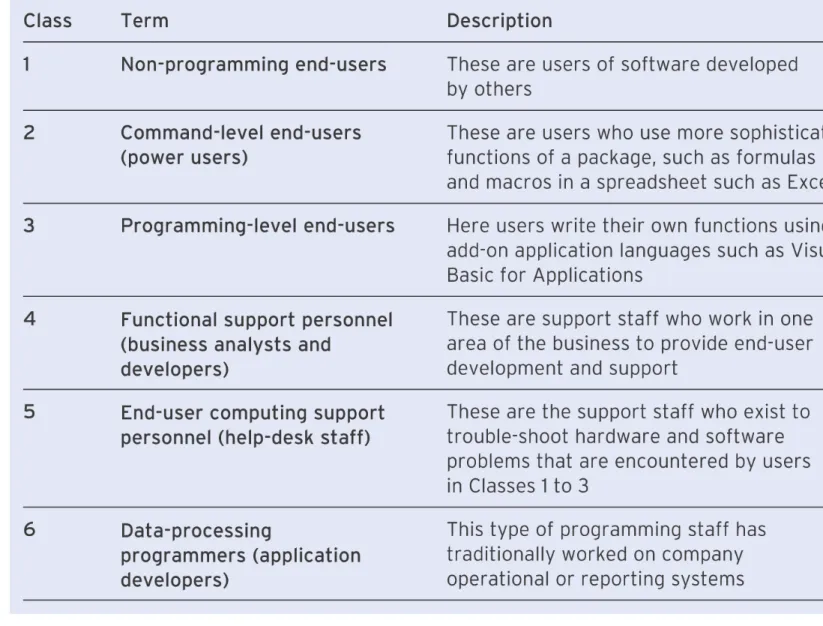
• define the range of services that must be delivered to support
end-users effectively;
• distinguish between the general term end-user computing and
the more specific end-user development;
• analyse the risks associated with pursuing end-user
development of information systems as part of a company’s IS
strategy;
• recommend policies for the effective management of end-user
computing within an organisation;
Management issues
• Managerial issues involved in controlling the use
of information systems by end-users include the
following:
– Assessing the emphasis to be placed on end-user
software development activities.
– Providing a suitable support function to assist
end-users in their use of computers.
– Ensuring the appropriate skill levels for end-users
through staff development and training.
End-user computing
•
End-user computing (EUC)
: All uses of
computers by business people who are not
information systems professionals.
•
End-user development (EUD)
: Systems
End-user IS services
•
End-user IS services
: All services required to
support end-users in running their PCs and
developing and using applications
1.
Provide a help-desk service
.
2.
Achieve standardisation of software.
3.
Ensure network efficiency.
4.
Provide training.
Managing costs
• The costs involved in running a help desk are
indicated by the Help Desk Institute annual
survey (2004) which shows that the median cost
of an incident reported via phone is $20.
TCO
•
Total cost of ownership (TCO): TCO refers to the
total cost for a company operating a computer. This
includes not only the purchase or leasing cost but
also the cost of all the services needed to support the
end-user.
• TCO includes non-purchase costs such as:
– the loss of productive work time when users are unable
to use their computer;
– the loss of productive work time when someone is
trying to fix a colleague’s problem (this type of unofficial
support can be very costly);
Recommendations on reducing TCO
•
People – training end-users and IT staff to make
optimal use of cost-controlling processes and
technologies.
•
Processes – automating some tasks and
streamlining others, ranging from asset tracking to
software updating.
Employee communications monitoring
•
Employee communications monitoring: companies
monitor staff e-mails and web sites that they access
•
Acceptable use policy: statement of employee
activities involving use of networked computers that
are not considered acceptable by the management
•
Scanning software: identifies e-mail or web page
access that breaches company guidelines or
acceptable use policies
End-user computing
• The term
end-user computing
has different meanings according
to the context in which it is used. The following statements could
all refer to end-user computing:
– all tools by which non-data-processing staff handle their own problems without professional programmers;
– creative use of data processing by non-data-processing experts; – complex computing by non-data-processing professionals to
answer organisational information needs;
– non-technical end-users using user-friendly, fourth-generation languages (4GLs) and PCs to generate reports or build decision support systems;
– the use of computer hardware and software by people in
Three main types of end-user computing
• The three main types of end-user computing can
be defined as:
– end-user-developed computer-based information
systems for personal, departmental or
organisation-wide use, where the end-user is a non-IT professional;
– end-user control of which hardware and package
The IT help desk
•
Help desk
: A central facility in an organisation
which provides end-user help-desk services such
as phone support for troubleshooting end-user
Roles of IT Help desk
• Help-desk support for user problems: Support can be offered via a number of routes, including telephone, e-mail and in person.
• Advice on software purchase: This ensures that the software is suitable for its purpose and is compatible with hardware, other software and company purchasing schemes.
• Advice on hardware purchase: This will usually be a centralised standard, again to take advantage of discounts and limiting support contracts.
• Advice on how end-user development should be approached: The support person will suggest the best approaches for developing
software, such as following the main parts of the lifecycle. These can be defined through more detailed training.
• Application development: For larger systems, the IC staff may be involved in performing the systems analysis and design or more difficult aspects of the programming.
• Training: In particular, on packages or development techniques.
Help-desk technologies
•
Asset management software
: Help-desk staff need to know
the technical details of the systems being used in the company
and the software loaded on them. This is achieved by asset
management software such as Microsoft Systems Management
server. This can also distribute new software automatically.
•
Computer telephony integration (CTI)
: CTI gives automatic
phone number identification and the system will then load up
the details of the computer, its current user and configuration.
This allows first-tier calls to be answered much faster.
•
Case-based reasoning
: These systems use artificial
Help-desk technologies (continued)
•
Web-based intranet access
: Users can access frequently
asked questions, send an e-mail or type in keywords describing
their problems. Problems solved this way will save help-desk
staff in the time spent dealing with straightforward queries.
•
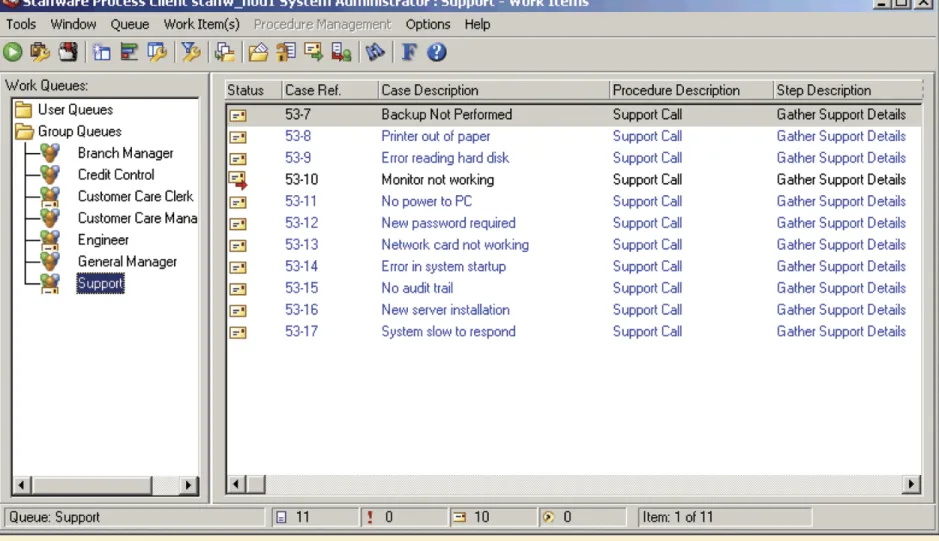
Workflow
: Workflow systems can be used to prioritise user
Figure 16.1 Workflow system from TIBCO Software being used to prioritise
End-user development
•
End-user development of applications represents a
major trend in the use of information technology in
organisations.
• McGill et al. (2003) explain that
‘
User-developed applications (UDAs) are computer-
based applications for which non-information systems
professionals assume primary development
responsibility.
Typical EUD applications
• Reports from a corporate database using standard enquiries defined by the IS/IT function.
• Simple ad hoc queries to databases defined by the user. For someone in an airline, for example, these might include access to a frequent flier database, customer reservation system or crew rostering system to monitor performance of each.
• What-if? analysis using tools such as spreadsheet models or more specialised tools such as risk or financial management packages or business intelligence software, used for monitoring sales and
marketing performance of information stored in a data warehouse. • Writing company information for a company intranet.
• Development of applications such as a job costing tool or production scheduling system, using easy-to-use, high-level tools such as
Reasons for growth of EUD
• Applications backlog: The demand for new applications by users exceeds the capacity of the IS department or IS outsourcing company to develop them.
• Improved toolsets such as Visual Basic for Applications.
• The desire by users to query and analyse data and generate reports from information stored on databases available across the corporate network.
• A trend to decentralisation of computing to user departments for systems to support departmental activities.
• Reduced expense of application development when conducted by end-users (from departmental rather than information systems budget).
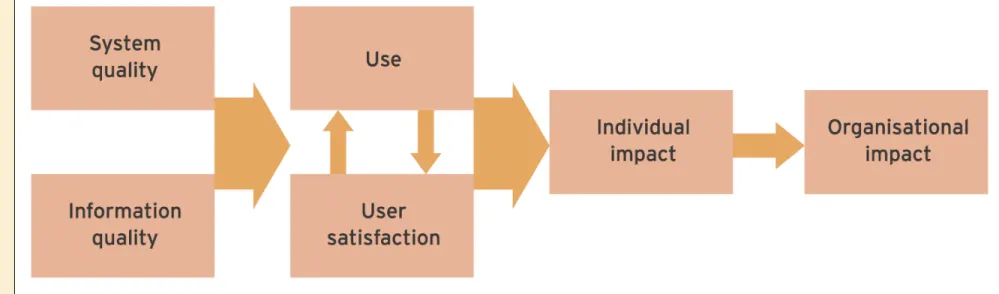
• Better fit between end-user-developed software and their
Figure 16.3 A model of IS success that can be applied to end-user developed
Stages of development of EUD
• Isolation: A few scattered pioneers of EUD develop small-scale business tools within their area. Initially, little support from central IS.
• Standalone: Larger-scale applications that may be of importance to a department are developed. At this stage, an information centre may be developed to support an increase in demand for user computing services. • Manual integration: Here, different end-user applications need to exchange
data. This happens through manual intervention, with files being transferred by floppy disk or across the network or even with rekeying of information. Information centre development has continued to support the needs of these larger-scale applications by providing training and skills and specifying
standards for hardware, software and the development process.
• Automated integration: Users start to link into corporate applications to gain seamless access to information.
Risks of EUD
• Using information that is out of date
• Information requires export from other information
systems before it can be analysed by the
end-user application
• Corruption of centrally held data by uploading
erroneous data
• Development of insecure systems without
EUD control approaches
• Training: Provision of relevant training courses both in how to program and in how to approach systems development in a structured way (the second of these is often omitted). This happened at the Open
University, where many of the end-users wanted to omit the analysis course.
• Suitability review: Authorisation of major end-user new developments by business and IS managers to check that they are necessary (this should not be necessary for smaller-scale developments since
otherwise creativity may be stifled).
• Standards for development: Such standards will recommend that documentation and structured testing of all user-developed software occurs. Detailed standards might include clear data definitions,
EUD control approaches (continued)
• Guidance from end-user support personnel: IC or help-desk staff can provide training in techniques used to develop software.
• Software and data audits: Regular audits of software produced by end-users should occur for data and application quality. There is an apocryphal story of a company that had an end-user-developed
spreadsheet for making investment decisions which had an error in a formula that lost the company millions of pounds each year!
• Ensuring corporate data security: Ensure that users are not permitted to enter data directly into central databases except via applications
especially written for the purpose by the IS department which has the necessary validation rules to ensure data quality. For analysis of