single-line
users
guide
business
telephone
TABLE OF CONTENTS
1)
FEATURES...……...2
1.1
FLASH
1.2
LAST NUMBER REDIAL
1.3
MUTE
1.4
HANDSET VOLUME CONTROL
1.5
DATA PORT
1.6
HEARING AID COMPATIBLE
2)
UNPACKING THE B100...2
3)
INSTALLATION...…...3
3.1
DESKTOP INSTALLATION...3
3.2
WALL MOUNTING...…...3
3.3
WALL MOUNT CLIP…...4
4)
USING THE DATA PORT...4
5)
ADJUSTING THE RINGER VOLUME ...…....………4
6)
HANDSET VOLUME CONTROL...5
7)
OPERATION ...5
7.1
PLACING AND ANSWERING CALLS WITH THE HANDSET...……...5
7.2
USING REDIAL...…………...5
7.3
USING FLASH...5
7.4
USING MUTE...5
8)
MESSAGE WAITING...5
9)
CARE …...……….……..………..…….5
10) REQUIREMENTS OF PART 68 – FCC RULES ………...6
11) REQUIREMENTS OF PART 15 – FCC RULES ………...6
12) INDUSTRY OF CANADA REQUIREMENTS ………...6
13) IMPORTANT SAFETY INSTRUCTIONS ………...……7
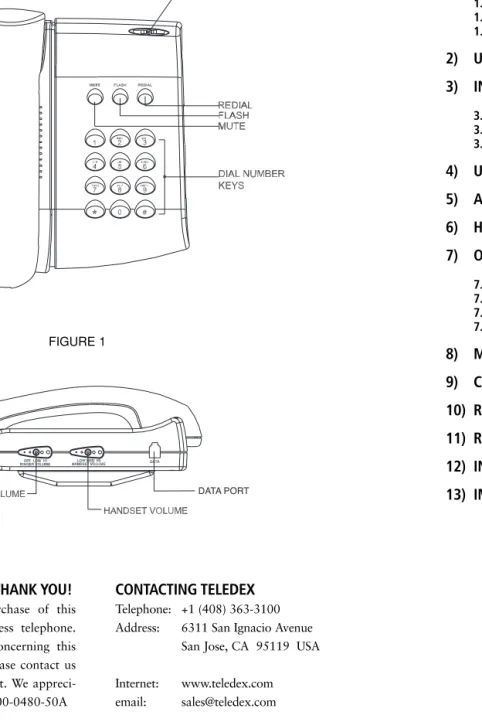
B100 TELEPHONE DIAGRAM
CONTACTING TELEDEX
Telephone: +1 (408) 363-3100
Address:
6311 San Ignacio Avenue
San Jose, CA 95119 USA
Internet:
www.teledex.com
email:
[email protected]
CONGRATULATIONS AND THANK YOU!
Congratulations on your purchase of this
quality Teledex analog business telephone.
If you have any questions concerning this
telephone or its operation, please contact us
via one of the methods at right. We
appreci-ate your purchase! p/n 600-0480-50A
FIGURE 1
1. FEATURES
The Teledex B100 is a single-line telephone with a compact footprint and basic
functionality that is ideal for non-critical areas that do not require multiple lines
or displays.
Your B100 has these useful features:
1.1
FLASH – Sends an electronic hook-switch signal for use with special
phone services such as call waiting
1.2
LAST NUMBER REDIAL – Lets you quickly dial the last number dialed.
1.3 MUTE – Mutes the handset microphone.
1.4
HANDSET VOLUME CONTROL – Lets you control the volume of the
sound you hear through the handset.
1.5 DATA PORT – For connecting an additional phone, laptop/desktop
computer or fax/answering machine to the B100 on the same line.
1.6
HEARING AID COMPATIBLE
The B100 is ETL listed to UL standards and meets all applicable FCC standards and
requirements.
2. UNPACKING YOUR B100
Inside the box, you will find all of the items needed for installation, as shown below:
Check to be sure that your package includes all the above items. If any items are
missing or damaged, please contact the distributor where you purchased the phone.
3. INSTALLATION
3.1 DESKTOP INSTALLATION
1)
Plug one end of the handset coiled cord into the handset. Plug the other
end of the cord into the handset jack located on the left side of the phone
base. (Refer to figure 3.)
2)
Place the handset in the handset cradle.
3)
Plug one end of the supplied line cord into the LINE jack on the bottom of
your phone. Then route the line cord through the left slot of the desk/wall
mount bracket.
4)
Plug the other end of the modular cord into the wall jack.
3.2 WALL MOUNTING
1)
Plug one end of the handset coiled cord into the handset. Plug the other
end of the cord into the handset jack located on the left side of the phone
base (please refer to figure 3.)
2)
Place the handset in the handset cradle.
3)
Remove the desk/wall mount bracket from the bottom of the B100. Rotate
the bracket 180º and re-install it into the four slots on the bottom of the B100.
4)
Connect the short line cord into the LINE jack on the bottom of your
phone. Connect the other end of the line cord to the line jack on the wall
mount plate.
5)
Slip the phone onto the wall plate jack, lining up the wall mounting holes,
and then slide the telephone down so it is firmly in place.
FIGURE 4
FIGURE 2
3.3 WALL MOUNTING CLIP
1)
Located on the front of the telephone, above the speaker grill, is the wall
mounting clip. Remove this clip by firmly pushing it upward, in the
direction of the hook switch.
2)
Rotate the clip 180º so that the side with the protruding edge is towards
the top. This edge will hold the handset (please refer to figure 5.)
4. USING THE DATA PORT
The data port is located on the right hand side of the telephone, as it is facing you.
Use this jack to connect a laptop or desktop computer, answering or fax machine in
parallel to the same phone line to which the telephone is connected.
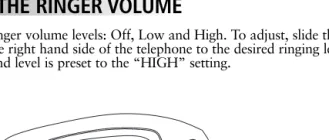
5. ADJUSTING THE RINGER VOLUME
Your B100 has three ringer volume levels: Off, Low and High. To adjust, slide the
switch located along the right hand side of the telephone to the desired ringing level.
NOTE: The ringer sound level is preset to the “HIGH” setting.
6. HANDSET VOLUME CONTROL
There are three (3) volume levels for the handset volume. To increase or decrease the
handset volume, press the VOLUME UP or DOWN keys.
7. OPERATION
7.1 PLACING AND ANSWERING CALLS USING THE HANDSET
To make a call, pick up the handset. When you hear the dial tone, dial the desired
number. To answer an incoming call, pick up the handset.
7.2 USING REDIAL
The redial function allows you to redial the number that was last dialed. Pick up the
handset and press the REDIAL key. The number will be dialed automatically.
7.3 USING FLASH
The FLASH key supports custom calling features. For example, if you have
subscribed to call waiting, press FLASH to answer an incoming call without
disconnecting the current call. Press FLASH again to return to the first call.
7.4 USING MUTE
To temporarily switch off the handset microphone, press MUTE. The MUTE
indica-tor lights and the microphone turns off, but you can still hear the person on the
other end of your conversation. Press MUTE again to resume your conversation.
8. MESSAGE WAITING
There is an oval-shaped LED at the top of the telephone that provides you with a
visual indication that you have a message. Consult your service provider or system
administrator for instructions on how to access these messages.
9. CARING FOR YOUR B100
Your B100 telephone is an example of superior design and craftsmanship. These
suggestions will help you care for your phone so you can enjoy trouble-free service
for many years.
1) Keep the phone dry. If it gets wet, wipe it dry immediately. Liquids may
contain minerals that can corrode the electronic circuitry.
2) Use and store the phone only in normal temperature environments. Extreme
temperatures can shorten the life of electronic devices and distort or melt plastic
parts.
3) Keep the phone away from dust and dirt, which can cause premature wear of
parts.
4) Handle the phone gently and carefully. Dropping it can damage internal circuit
boards or external parts, and can cause the phone to work improperly.
Modifying or tampering with the phone’s internal components can cause a
malfunc-tion. If your phone is not performing as it should, see your distributor for assistance.
If the trouble is affecting the telephone lines, the phone company or service provider
may ask you to disconnect the phone until the problem is resolved.
FIGURE 5
FIGURE 6
FIGURE 7
REQUIREMENTS OF PART 68- FCC RULES
This device has been granted a registration number by the Federal Communications Commission, under Part 68 rules and regulations for direct connection to the telephone lines. In order to comply with these FCC rules, the following instructions must be carefully read and applicable portions followed completely:
1. Direct connection to the telephone lines may be made only through the standard modular cord furnished, to the utility installed jack. No connection may be made to party or coin phone lines. On the bottom of the phone is a label that contains among other information, the FCC Registration Number and the Ringer Equivalence number (REN) for this equipment. If requested this information must be provided to the tele-phone company. The USOC lack for this equipment is RJIIC.
2. The telephone company, under certain circumstances, may temporarily discontinue and make changes in Facilities and services, which may affect the operation of the users’ equipment. However, the user shall be given adequate notice in writing to allow the user to maintain uninterrupted service.
3. In certain circumstances, it may be necessary for the Telephone Company to request information from you concerning the equipment which you have connected to your telephone line. Upon request of the telephone company, provide the FCC registration number and the ringer equivalence number of the equipment which is connected to your line; this information will be found on the device.
4. If any of your telephone equipment is not operating properly, you should immediately remove it from the telephone line. It may cause harm to the telephone network.
5. If the telephone company notes a problem, they may temporarily discontinue service. When practical, they will notify you in advance of a disconnection. If advance notice is not feasible, the telephone company must: promptly notify you of such temporary discontinuance; afford the opportunity to correct the condition; inform you of your rights to bring a complaint to the FCC under their rules.
6. Repairs to the device may be made only by the manufacturer or an authorized service agency. This applies at any time during and after warranty. If unauthorized repair is performed, registration, connection to the telephone lines and remainder of warranty period all becomes null and void.
7. This equipment is hearing aid compatible. 8. This telephone must be connected behind a PBX.
REQUIREMENTS OF PART 15 - FCC RULES
NOTE: This equipment has been tested and found to comply with the limits for a Class B digital device, pursuant to Part 15 of the FCC Rules. These limits are designed to provide reasonable protection against harmful interference in a residential installation. This equipment generates, uses, and can radiate radio frequency energy and, if not installed and used in accordance with the instruction, may cause harmful inter-ference to radio communications. However, there is not a guarantee that interinter-ference will not occur in a particular installation. If this equipment does cause harmful interference to radio or television reception, which can be determined by turning the equipment off and on, the user is encouraged to try to correct the interference by one or more of the following measures: 1) Move the telephone away from
the receiver. 2) Consult the dealer or an experienced radio/TV technician for help. Any changes made by the user not approved by the manufacturer can void the user’s authority to operate the telephone.
INDUSTRY OF CANADA REQUIREMENTS
NOTICE: The Industry Canada label identifies certified equipment. This certification means that the equip-ment meets certain telecommunications network protective operational and safety requireequip-ments as prescribed in the appropriate Terminal Equipment Technical Requirements documents. The department does not guar-antee the equipment will operate to the user satisfaction. Before installing this equipment, users should ensure that it is permissible to be connected to the facilities of the local Telecommunications Company. The equip-ment must also be installed using an acceptable method of connection. The customer should be aware that compliance with the above conditions may not prevent degradation of service in some situations. Repairs to certified equipment should be coordinated by a representative designated by the supplier. Any repairs or alterations made by the user to this equipment, or equipment malfunctions, may give the telecommunications company cause to request the user to disconnect the equipment. Users should ensure for their own protection that the electrical ground connections of the power utility, Telephone lines, and internal metallic water pipe systems, if present, are connected together. This precaution may be particularly important in rural areas. Caution: Users should not attempt to make such connections themselves, but should contact the appropriate electric inspection authority or electrician, as appropriate. The Ringer Equivalence Number (REN) of this device is Z.
Notice: The Ringer Equivalence Number (REN) assigned to each terminal device provides an indication of the maximum number of terminals allowed to be connected to a telephone interface. The termination on an interface may consist of any combination of devices subject only to the requirement that the sum of the Ringer Equivalence Numbers of all the devices does not exceed 5. This telephone connects to the telephone network under the connecting arrangement code CA11A.
IMPORTANT SAFETY INSTRUCTIONS
WHEN USING YOUR TELEPHONE EQUIPMENT, BASIC SAFETY PRECAUTIONS SHOULD ALWAYS BE FOLLOWED TO REDUCE THE RISK OF FIRE, ELECTRIC SHOCK AND INJURY TO PERSONS. INCLUDING THE FOLLOWING:
1. READ AND UNDERSTAND ALL INSTRUCTIONS.
2. FOLLOW ALL WARNINGS AND INSTRUCTIONS MARKED ON THE PRODUCT.
3. UNPLUG THE PRODUCT FROM THE WALL OUTLET BEFORE CLEANING. DO NOT USE LIQ-UID CLEANER OR AEROSOL CLEANERS. USE A DAMP CLOTH FOR CLEANING.
4. DO NOT USE THIS PRODUCT NEAR WATER, FOR EXAMPLE: NEAR A BATHTUB, WASH BOWL, KITCHEN SINK OR LAUNDRY TUB, IN A WET BASEMENT, OR NEAR A SWIMMING POOL. 5. DO NOT PLACE THIS PRODUCT ON AN UNSTABLE CART, STAND OR TABLE. THE PRODUCT MAY FALL, CAUSING SERIOUS DAMAGE TO THE PRODUCT.
6. SLOTS AND OPENINGS IN THE CABINET AND THE BACK OF BOTTOM ARE PROVIDED FOR VENTILATION. THESE OPENINGS MUST NOT BE BLOCKED OR COVERED. THE OPENINGS SHOULD NEVER BE BLOCKED BY PLACING THE PRODUCT ON A BED, SOFA, RUG OR ANY OTHER SIMILAR SURFACE. THIS PRODUCT SHOULD NEVER BE PLACED NEAR OR OVER A RADIATOR OR HEAT REGISTER. THIS PRODUCT SHOULD NOT BE PLACED IN A BUILT-IN INSTALLATION UNLESS PROPER VENTILATION IS PROVIDED.
7. NEVER PUSH OBJECTS OF ANY KIND INTO THIS PRODUCT THROUGH CABINET SLOTS AS THEY MAY TOUCH DANGEROUS VOLTAGE POINTS OR CAUSE A SHORT CIRCUIT THAT COULD RESULT IN A FIRE OR ELECTRIC SHOCK. NEVER SPILL LIQUID OF ANY KIND ON THE PRODUCT.
8. TO REDUCE THE RISK OF ELECTRIC SHOCK, DO NOT DISASSEMBLE THIS PRODUCT. IF SER-VICE IS NECESSARY, SEND OR TAKE THE TELEPHONE TO A QUALIFIED SERSER-VICE FACILITY. OPENING OR REMOVING COVERS MAY EXPOSE YOU TO DANGEROUS VOLTAGES OR OTHER RISKS. INCORRECT REASSEMBLY CAN CAUSE ELECTRIC SHOCK WHEN THE APPLIANCE IS SUBSEQUENTLY USED.
9. UNPLUG THIS PRODUCT FROM THE WALL OUTLET AND REFER SERVICING TO QUALIFIED SERVICE PERSONNEL UNDER THE FOLLOWING CONDITIONS:
• IF THE POWER SUPPLY CORD OR PLUG IS DAMAGED OR FRAYED • IF LIQUID HAS BEEN SPILLED INTO THE PRODUCT
• IF THE PRODUCT HAS BEEN EXPOSED TO RAIN OR WATER
• IF THE PRODUCT DOES NOT OPERATE NORMALLY BY FOLLOWING THE OPERATING INSTRUCTIONS. ADJUST ONLY THOSE CONTROLS THAT ARE COVERED BY THE OPERAT ING INSTRUCTIONS, AS IMPROPER ADJUSTMENT OF OTHER CONTROLS MAY RESULT IN DAMAGE AND WILL OFTEN REQUIRE EXTENSIVE WORK BY A QUALIFED TECHNICIAN TO RESTORE THE PRODUCT TO NORMAL OPERATION.
• IF THE PRODUCT HAS BEEN DROPPED OR THE CABINET HAS BEEN DAMAGED. • IF THE PRODUCT EXHIBITS A DISTINCT CHANGE IN PERFORMANCE.
10. AVOID USING THE TELEPHONE DURING AN ELECTRICAL STORM. THERE MAY BE A REMOTE RISK OF ELECTRIC SHOCK FROM LIGHTNING.