ABSTRACT
SRINIVASAN, JAGANNATH. EMFS: An Email Based Distributed File System. (Under the direction of Xiaosong Ma.)
The pervasiveness of the Internet has fueled the massive growth of online cloud services. They are extremely varied, ranging from offering software as a service to online backup services to high performance computing solutions. Cloud services are very user friendly, extremely re-liable and stable. Their most useful feature is accessibility - they allow access to the service through the Internet from any machine at any location. Recently, cloud storage services for per-sonal data management and sharing have become very popular. However, existing cloud services like Google Docs, Microsoft Office Live, and Jungle Disk are not designed for general-purpose file accesses: they either tightly couple application services with storage, or are commercial applications which charge a fee to utilize their storage services.
EMFS: An Email Based Distributed File System
by
Jagannath Srinivasan
A thesis submitted to the Graduate Faculty of North Carolina State University
in partial fulfillment of the requirements for the Degree of
Master of Science
Computer Science
Raleigh, North Carolina
2010
APPROVED BY:
Ting Yu Vincent Freeh
Xiaosong Ma
DEDICATION
BIOGRAPHY
ACKNOWLEDGEMENTS
First of all, I would like to offer special thanks to my advisor, Dr. Xiaosong Ma, for her insight, encouragement and patience in guiding me through this work as well as through my graduate studies. I also wish to thank Dr. Ting Yu and Wei Wei with whom I have collaborated closely for this work. I would also like to thank Dr. Vincent Freeh, for serving as a member of my thesis committee.
I am also grateful to the members of my research group - Amey Deshpande, Karthik Vi-jayakumar, Divya Dinakar, Feng Ji, Zhe Zhang and others for their cooperation and valuable inputs.
I am especially indebted to my friends, here at NCSU and elsewhere - Arjun Prasad Dasarakothapalli, Alphonse Hansel Anthony, Sandheep Kumar, Kasturirangan Parthasarathy, Arun Rajasekaran, Jayakumar Nanjappan, Pradeep Dorairaj, Sankarnarayanan Ravi, Adithya Raghavan, Arjun Ramakrishnan and Vikram Manoharan. Thanks for all the wonderful mem-ories.
TABLE OF CONTENTS
List of Tables . . . vii
List of Figures . . . .viii
Chapter 1 Introduction . . . 1
1.1 Motivation . . . 1
1.2 Research Overview . . . 2
1.2.1 Problem Definition . . . 2
1.2.2 Summary of Contributions . . . 3
Chapter 2 Background . . . 4
2.1 Filesystem in user space (FUSE) . . . 4
2.1.1 Architecture . . . 4
2.1.2 Interface . . . 5
2.2 Email Access Protocols . . . 5
2.2.1 Simple Mail Transfer Protocol . . . 5
2.2.2 Post Office Protocol . . . 6
2.2.3 Internet Message Access Protocol . . . 6
2.3 Related Work . . . 6
Chapter 3 EMFS Overview . . . 8
3.1 Overview . . . 8
3.1.1 Target Workload and Design Goals . . . 8
3.1.2 EMFS Software Layers . . . 8
3.2 EMFS Structure . . . 12
3.2.1 Email Transfer and Retrieval Protocols . . . 12
3.2.2 Metadata . . . 12
3.2.3 File Data . . . 15
3.2.4 Versioning . . . 16
3.3 Operations . . . 16
3.3.1 Metadata and Data Access . . . 16
3.4 Optimizations . . . 21
3.4.1 Email-based RAID . . . 21
3.4.2 File Striping . . . 22
3.4.3 Data Replication . . . 23
3.4.4 Fast Recovery . . . 26
3.4.5 Garbage Collection . . . 26
Chapter 4 Performance Evaluation . . . 28
4.1 Experiment Setup . . . 28
4.1.1 Evaluation Workloads . . . 28
4.1.2 Basic Parameter Variation . . . 29
4.1.3 Comparison with Other Systems . . . 33
Chapter 5 Conclusions . . . 41
LIST OF TABLES
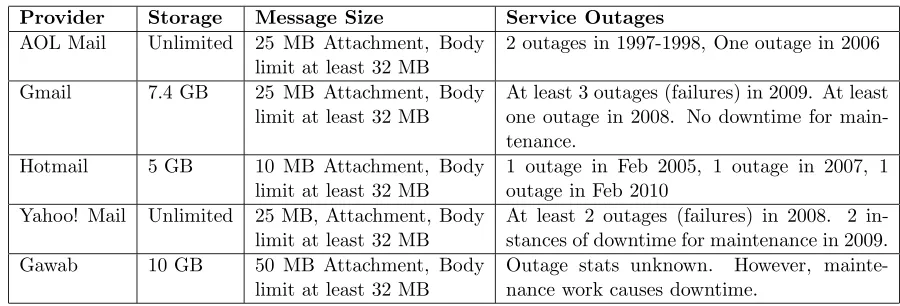
Table 1.1 Email Service Provider Statistics . . . 2
Table 2.1 Spam control mechanisms of different email service providers . . . 7
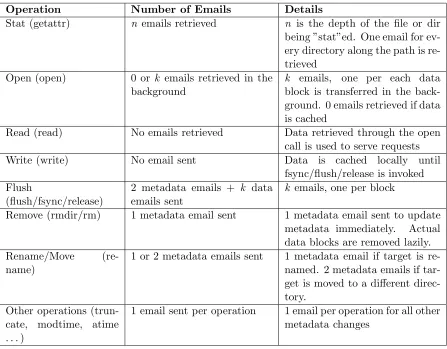
Table 3.1 Common data and metadata operations in EMFS . . . 18
LIST OF FIGURES
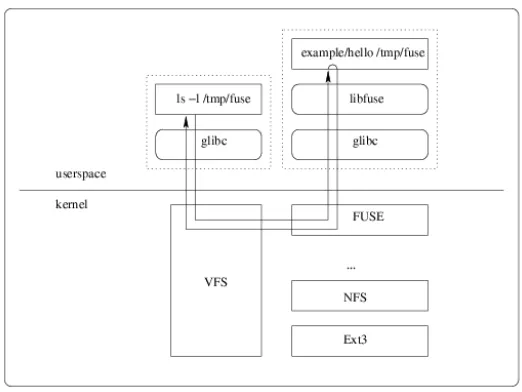
Figure 2.1 Typical path of a file system call of a user space file system running over
FUSE . . . 5
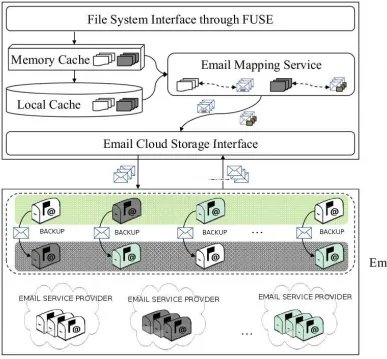
Figure 3.1 EMFS Design Overview . . . 9
Figure 3.2 The Structure of Metadata Email . . . 13
Figure 3.3 Two failure cases . . . 20
Figure 3.4 Virtual Cloud Storage . . . 22
Figure 4.1 Single email sending/retrieving performance . . . 30
Figure 4.2 Single email read performance . . . 31
Figure 4.3 Single email write performance . . . 32
Figure 4.4 Whole file access latency with different block size and stripe width (Gmail). File Size 32 KB . . . 33
Figure 4.5 Whole file access latency with different block size and stripe width (Gmail). File Size 32 MB . . . 33
Figure 4.6 Varying number of files using Postmark . . . 35
Figure 4.7 Varying transaction bias using Postmark . . . 36
Figure 4.8 Read Performance of a 16 MB file using IOZone . . . 37
Chapter 1
Introduction
1.1
Motivation
The pervasiveness of the Internet has ensured the massive growth of cloud services. Cloud services are popular because of their scalability and reliability. In addition, they are very user friendly because they are accessible from any machine over the Internet. The most popular and widely used services are hosted online with little or no information being stored on the user’s local computer. Users are provided with a wide range of cloud services. Gmail, MSN Hotmail and other email services, Google Docs, Facebook etc ... offer software as a service to users. Amazon S3 offers storage as a service and allows users to store and retrieve data through simple interfaces. Google AppEngine offers an infrastructure service which can be used to host our own applications on top of the Google cloud infrastructure.
Table 1.1: Email Service Provider Statistics
Provider Storage Message Size Service Outages
AOL Mail Unlimited 25 MB Attachment, Body limit at least 32 MB
2 outages in 1997-1998, One outage in 2006
Gmail 7.4 GB 25 MB Attachment, Body limit at least 32 MB
At least 3 outages (failures) in 2009. At least one outage in 2008. No downtime for main-tenance.
Hotmail 5 GB 10 MB Attachment, Body limit at least 32 MB
1 outage in Feb 2005, 1 outage in 2007, 1 outage in Feb 2010
Yahoo! Mail Unlimited 25 MB, Attachment, Body limit at least 32 MB
At least 2 outages (failures) in 2008. 2 in-stances of downtime for maintenance in 2009. Gawab 10 GB 50 MB Attachment, Body
limit at least 32 MB
Outage stats unknown. However, mainte-nance work causes downtime.
1.2
Research Overview
1.2.1 Problem Definition
Online email services are highly available and reliable with a near zero percent chance of loss of data. In addition, these services offer a very large storage quota. For example, Gmail currently offers 7.4 GB of free space, Hotmail offers 5 GB and Yahoo Mail offers unlimited storage. Table 1.1 lists storage quotas, message size limits and server outage statistics of popular email service providers.
existing distributed file systems using several suitable benchmarks.
In order to evaluate this file system, we develop a prototype using the Python API of Filesystem in User SpacE (FUSE). FUSE offers a simple API that allows a user to develop file systems that run in the user space. Python was chosen for its simplicity and flexibility in developing applications. A more detailed explanation of FUSE is discussed in chapter 2.
1.2.2 Summary of Contributions
We established the potential of email services in earlier sections and its possible suitability as a suitable cloud storage platform for personal users. This thesis makes the following contributions:
1. The author proposed a design for a distributed file system called EMFS with a RAID-like back end storage based on web email services.
2. The author implemented a complete, configurable nearly POSIX compliant file system with storage over web email services.
3. The author carried out several tests using synthetic and real-world workloads and com-pared EMFS to existing distributed file systems.
Chapter 2
Background
2.1
Filesystem in user space (FUSE)
2.1.1 Architecture
Figure 2.1: Typical path of a file system call of a user space file system running over FUSE
2.1.2 Interface
FUSE provides a comprehensive API that can be used to develop fully POSIX compliant file systems. The API has also been to ported to several languages for ease of development. EMFS has been implemented in the Python port of the FUSE API. The FUSE API provides interfaces for standard file system calls, such as stat, open, read, write, readdir, create, mknod, rm, rmdir,
fsync, flush, and release.
2.2
Email Access Protocols
Most online email service providers provide provide access to their services through three major protocols namely, Internet Message Access Protocol (IMAP) [7], Simple Message Transfer Pro-tocol (SMTP) [23] and Post Office ProPro-tocol (POP3) [30]. These three proPro-tocols are discussed in detail below.
2.2.1 Simple Mail Transfer Protocol
there is one major drawback associated with the protocol. Almost all online email service providers have set up several control techniques in order to restrict SPAM. Many of these control techniques deal with restricting the heavy use of SMTP as messages can be sent between two accounts using only this protocol. Table 2.1 lists some of the common spam control mechanisms employed by major service providers. SMTP is supported by all email service providers as it is the standard way to transfer messages between two mail accounts.
2.2.2 Post Office Protocol
POP is a message access protocol. It can be used to retrieve messages from mailboxes but not send messages to other accounts. POP offers simple ”download and delete” semantics, where messages once downloaded from the email servers, are usually deleted on the servers leaving the copy on the client as the only copy of the message. However, most modern email access client provide a method whereby the user can leave a copy of the messages on the server.
2.2.3 Internet Message Access Protocol
IMAP is another message access protocol like POP. IMAP is a much more complete protocol and offers more complex functionality than POP for remote message retrieval. It has several useful features. It allows separate access to individual parts of a message, like the headers, the subject, the body and the attachments. This allows users and email clients to manipulate these parts separately allowing for more efficient processing. Unlike POP, for message access IMAP requests only the ID of those messages that have arrived later than the message that was retrieved last. POP has to retrieve the IDs of all the messages in the inbox, which may cause problems for large mailboxes. Most importantly, IMAP allows users to ”append” a message to their mailbox, like saving a draft email. This feature cannot be used to send emails to other mail accounts. Hence this feature is not controlled by anti-spam techniques like SMTP. Because of these complex and useful features, EMFS uses IMAP to both retrieve and upload (append) messages.
2.3
Related Work
Table 2.1: Spam control mechanisms of different email service providers Service Provider Control Mechanisms Details
Gmail Daily limit on the number of messages sent, limit on the number of recipients per email
500 emails allowed to be sent daily, Maximum 500 recipients per email (from the web interface) and 100 per email (from client applications)
AOL Challenge/Response system CAPTCHA verification if too many emails are sent out quickly
Yahoo Mail SPAM Guard Complex application which uses a vari-ety of techniques
Gawab Mail Server disconnection, Tarpet-ting
Server disconnects user if too many emails are sent quickly. Tarpetting: Time delay introduced after every transaction.
Online cloud storage and data processing services like Google Docs [17] and Microsoft Live Office [32] are closely related areas. However, these services tightly bind data storage with application services, often causing incompatibility problems. Online general purpose storage services include DropBox [11], Jungle Disk [21], Microsoft SkyDrive [41] and Zumo Drive [51]. These services generally allow users to map a local volume to online storage disks for easy access. Our research indicates that it is possible to utilise free email services to obtain similar storage functionality and performance. The difference lies in the fact that EMFS targets at building a general purpose file system while focusing on email specific issues and taking advantage of increasingly powerful web email services.
Chapter 3
EMFS Overview
3.1
Overview
3.1.1 Target Workload and Design Goals
EMFS provides an email-based cloud storage for personal users. Each user configures the system such that he has his own personal cloud storage space. It is assumed that users do not share this space with others. EMFS focuses on dealing with personal workloads of typical users [50], including reading, editing, and backing up documents such as word, powerpoint, excel, pdf, etc. Such workloads may have hundreds of files and directories, but the file size of most of these files may range only from several kilobytes to tens of megabytes [2]. Our design goals for personal cloud storage are summarized as follows:
1. Usability We aim at not only providing an easy-to-access interface for personal users to access the data stored on their personal cloud, but also enabling them to use existing applications to edit files on top of this storage.
2. Scalability We should be able to increase the capacity of personal cloud storage when needed, and efficiently handle the increasing amount of files as time goes by.
3. Reliability As with other cloud systems, EMFS should be highly reliable and available. In particular, EMFS should be able to work even if some email services are out of service.
We use existing email services and techniques to achieve the above goals.
3.1.2 EMFS Software Layers
email accounts, from providers such as Google, Gawab, and AOL. The EMFS client is split into several components; the FUSE file system interface, the local disk and metadata caches, the email mapping service and the email cloud storage interface. The email mapping service manages distributed storage, treating each email account as a virtual disk. Data is stored as attachments as part of emails. The email mapping service also carries out optional data placement strategies, such as striping and replication, across multiple email accounts. The client also presents an approximate-POSIX file system interface to the user, which enables existing applications to run on top of EMFS without any modifications.
The EMFS package, comprising of the client layer, is implemented in around 3000 lines of Python code and runs on the users’ client machine. Note that the EMFS package does not have any server side code. It uses existing email services and their interfaces to store, search for and retrieve data. Thus, since EMFS has a ”dumb server”, it is not able to make use of server side optimizations to provide extra features and improve performance. For example, with a smart server, a system will be able to easily handle consistency issues, provide concurrent access to data and possible conflict detection and resolution. The system will also be able to do background replication and garbage collection, processes which take up client side bandwidth without such a server.
Email Services EMFS ultimately stores its data in emails provided by service providers such as Google, Gawab and AOL. These email services usually run their own massive datacenters to store their customers’ data. These services also provide high reliability by replicating data with their datacenters to guard against data loss. These datacenters also have fail safe mechanisms in order to provide high availability and guard against network connectivity problems and crashes. EMFS takes the full advantage of these potential benefits provided by existing email services to build a more reliable system.
Virtual Cloud Storage The virtual cloud storage (VCS) is a logical component in the EMFS system. The VCS presents to the user, virtual ”disks” organized like a RAID [33] to store all data and metadata in the system. VCS does not place any restrictions on where data and metadata should be stored as they are treated the same way. Each virtual disk is actually an email account, created online with a web email service provider. The VCS exposes a thin interface which utilises email protocols to store and retrieve emails from these virtual disks. As mentioned before, the VCS organizes these virtual disks in RAID fashion. Multiple email accounts, not necessarily from the same service provider, are indexed in an array to simulate a RAID. Data is striped into different disks to improve performance.
storage, by adding more email accounts to the system. However, availability can still be an issue, as email servers may break down. Downtime due to maintenance also causes availability issues. Although this may not be a frequent occurrence, it can potentially render certain email accounts inaccessible for some time. For example Gmail had a few outages in 2009 [16], leading to users being unable to access their accounts for a few hours each time. Other service providers have also experienced some failures, as indicated in table 1.1.
To address this issue, EMFS is designed to remain available even if some email accounts are temporarily out of reach. This is achieved through the replication mechanism of EMFS. With replication enabled, each virtual disk may replicate data to other backup disks. The number of replicas can be configured to suit the user’s needs. As shown in figure 1, each disk replicates the data it stores to other disks, with former disk being referred to as aprimary and the latter disks as backup disks. The primary and backup disks together are referred to as a replication group. These disks are configured by the user. The primary servers are accessed for all uncached data and metadata requests unless there are availability issues. Whenever EMFS detects that a particular primary disk is unavailable, it immediately switches operations to a backup disk from the same replication group. It is advisable that email accounts in a replication group are hosted on different service providers, as this would ensure that if one service provider is unavailable, a backup email account which is hosted on a different service provider can be utilized instead.
Client As shown in Figure 3.1, the client layer consists of the File System Interface (FSI), the memory cache, the local disk cache, the email mapping service and the email cloud storage interface. The FSI provides an approximate-POSIX interface via FUSE [44]. We say the EMFS interface is approximate-POSIX because it selectively relaxes certain consistency semantics in order to optimize performance. For example, EMFS does not maintain the last accessed time. This time is set to the time of creation and is not changed on further accesses. This is to optimize performance by reducing the number of metadata updates that need to be sent. Otherwise, EMFS would need to send a metadata update for every file close, updating the last accessed time.
see if the required metadata and file data can be retrieved from the local caches. In case the cache are unable to fulfil the request, they forward the request to the email messaging service. The email messaging service utilises the email cloud storage interface to retrieve data from the underlying email storage through a lean interface.
Single User Design As mentioned before, EMFS targets personal file accesses, and is de-signed to be accessed by a single user, with the assumption that this user will not share storage with others or allow concurrent access to his/her data. This is partly due to the consideration that EMFS does not have a full fledged server to handle issues such as real time synchroniza-tion, conflict detection and resolusynchroniza-tion, etc. These issues cannot be solved utilising just a client without severely hampering performance. These assumptions greatly simplify the design of EMFS, allowing us to effectively handle and optimize other more important issues.
3.2
EMFS Structure
EMFS is built on top of email services provided by third-party email service providers. Data and metadata are stored as contents of emails, either as attachments or as part of the body of the emails. In EMFS, there are two types of emails, metadata emails and data emails. As their names indicate, a metadata email stores metadata for files and directories, and a data email is used to stored file data. These emails are sent to and received from email servers through standard email protocols such as IMAP and SMTP discussed in chapter 2.2
3.2.1 Email Transfer and Retrieval Protocols
The most common protocols in use today for transfer and retrieval of emails are the Simple Mail Transfer Protocol (SMTP), the Internet Message Access Protocol (IMAP) and the Post Office Protocol (POP). SMTP can be used only for transfer of emails to the server while IMAP and POP are primarily used for retrieving emails. Each protocol has its own advantages and disadvantages which have been discussed in chapter 2. As mentioned before, EMFS uses the IMAP protocol to both send messages (using the append feature) and retrieve emails.
3.2.2 Metadata
Data can be stored in many places in an email - the headers, the subject line, the email body and as attachments. The first 3 locations are ideal for storing metadata because we can then use IMAP to search these fields directly without having to download the email. In EMFS, metadata is stored in the body section of emails. Subject lines of these emails contain unique a set of unique identifiers, that can be used to search for and directly retrieve a single metadata email if needed. Metadata emails are created for directories only and no separate metadata email for files exist. Instead the metadata for files are stored in their parent directory’s metadata email. Directory metadata emails contain the metadata for all subdirectories and files under the directory. Figure 3.2 illustrates what is contained in a typical metadata email.
timestamp + version
<dir id=‘timestamp’ name=‘desktop’ … />
<dir id=‘timestamp’ name=‘temp’ … />
Subject
p
p
…
<file id=‘timestamp’ name=‘code.py’ status=‘0|1’ blockSize=‘128KB’ …>
<block id=‘0’ version=‘1’ raidIndex=‘0’ status=‘0|1’ size=‘128KB’ />
Body
<block id=‘1’ version=‘1’ raidIndex=‘1’ status=‘0|1’ size=‘128KB’ />
…
</file>
<file …>…</file>
…
Figure 3.2: The Structure of Metadata Email
Metadata is stored in EMFS in XML format. The subject line lists the id of the directory under question along with its version number. As email storage is similar to a log fs, where data is not overwritten, the version number is used to identify the latest version of the metadata. The directory id is a unique id in the file system, which can be used to differentiate this directory from other directories and files. It is this id, along with the version number, which is used, to search for and retrieve the metadata email of a directory. The body of the email contains the metadata entries for all of the subdirectories and files under this directory. There are three types of entries, which are explained below.
• <dir> entry represents a directory in the file system. The directory entry contains
• <file> entry represents a file in the file system. The file entry is more complex than a
<dir>entry as a file naturally has more metadata attributes than a directory. The most important attributes listed in a file entry are id, name, status, block size, and file size. Each file entry will also contain several <block> entries, which are described below.
• <block> entry represents a single block in a file. These entries are used to identify
and describe each block in the file. Each block entry describe a file block using several attributes - block index, block version number, RAID index, status, data size and so on. These entries are always associated a file since each block has to be a part of a file.
Please note that each metadata email contains the metadata for a directory’s children and
not for that directory itself. The metadata for that directory is stored in its parent directory’s
metadata email. The root directory of the file system has no metadata associated with itself and is only associated with a unique id which is known internally to the filesystem. Hence the metadata email describing the root’s children can always be accessed using this id without any other lookups. The root directory’s metadata email is fetched and cached at system start up. As mentioned before, the metadata email for a directory is searched using its unique id and its version number, both of which are found in its parent directory’s metadata email. Thus, before the metadata email for a directory can be found, the email for its parent directory needs to be retrieved in order for us to find the id and version number of the target directory. A lookup for any directory’s contents is performed in a series of steps. First the ids and version numbers of each directory along the requested path need to retrieved one by one, starting with the directory directly under the root. This information is then used to retrieve that directory’s metadata email in order to determine the id and version number of the next directory along the path. Eventually, the id of the target directory is looked up from its parent directory’s metadata email, following which, its metadata email is recovered and the contents listed. For example, if the path ’/dir1/dir2/.../dirn’ is requested, then the metadata emails for dir1 is first retrieved, using which the id for dir2 is identified. dir2 is then retrieved and the same process is followed till the email for dirn is retrieved. The same process is followed even if a file inside dirn is requested, except that at the end the file is retrieved. It should be noted that metadata is cached locally the first time it is retrieved, hence making subsequent requests much faster.
directory’s metadata email. Because of this choice, we need only to retrieve metadata emails of all the directories along the requested path to list the contents of the target directory, regardless of the number of files and directories it contains. If instead, we had separate metadata emails for each file and directory, we would need to retrieve several emails - one for each child in the target directory in addition to the emails of the parent directories along the path, thereby incurring a performance penalty and generally slowing down the system. Another advantage of this metadata structure is that the metadata for files and directories is stored across multiple emails, making it easy to handle hundreds of files and directories in the file system without considering the size limit of a single email. If directories grow to be really large, containing thousands of children, this design can also be modified the single metadata email for that directory into two or more emails for scalability and performance.
One possible disadvantage with this design is that any change to the metadata of a file or directory implies that the entire metadata email of its parent directory needs to be resent to the email server. However, because each metadata entry is around 70 bytes or less, and the number of files in each directory is not going to be very large for personal users [2], the size of each metadata email is not going to be large enough to slow down the performance of the system.
We feel this metadata stucture (where metadata for files and directories are not closely maintained together and not completely separated) is very scalable, easily extensible and effi-cient. With a global metadata design, where the metadata about all files and directories are stored in a single file, updates to metadata become very inefficient. The global metadata file could be cached on system startup for better performance. However, any updates to metadata would mean that the entire file would have to be transferred to the server. This would prove extremely inefficient for a system with a large number of files and directories.
3.2.3 File Data
identifer for every block is always present in the metadata email of the parent directory of the file. This email must be retrieved first in order to identify and read blocks of a file. For fast and efficient retrieval of the blocks, the subject line of each email containing a file block, contains the block identifier of that block. Thus, each time when a block is needed, the system directly retrieves the email containing the subject with the matching block identifier.
Each file metadata entry is also associated with a version number and status. These at-tributes are utilized to maintain consistency and facilitate failure recovery which is described in section 3.3.1. In addition, version numbers also facilitate versioning which is described in 3.2.4. Each block entry is associated with a RAID index which is described in 3.4.2.
3.2.4 Versioning
It is obvious that email storage is somewhat like a log structured file system, where all updates (data and metadata), are appended instead of overwritten. This characteristic of email storage can be used to create a versioning file system. Although an email based versioning file system would be straight forward to implement, it is currently not supported by EMFS. The metadata structure of EMFS already maintains version numbers for files, using which it would be possible to recover earlier versions of files. In addition, earlier versions of metadata, which would still be available on the email storage servers, can be used as a ”snapshot” of the filesystem at various times of its lifetime. This metadata snapshotting would be useful, among other things to address consistency issues [42] when failures occur. By utilising the strong search features of IMAP, it would be easy to recover earlier versions of files and metadata at no additional cost.
3.3
Operations
3.3.1 Metadata and Data Access Metadata Operations
Metadata Update Any updates to metadata update caused by operations such as rename,
rmdir, chmod, mkdir are immediately synchronously committed to the server. To improve the
performance for metadata update operations, the metadata structure is designed to minimize the number of metadata emails that need to be committed to the server. For example, mkdir
creates a new directory under the current directory. To fulfil this operation, a new directory metadata entry is added to the metadata email of the current directory, and the version number of the metadata email is increased by 1. This email is then immediately committed to the server. Since the new directory does not have any files or subdirectories, no metadata email for that directory needs to be sent out immediately. This step is delayed until a file or directory is created under this directory. In this way, only one email update needs to be committed to the server. A similar strategy is followed for newly created files as their size is 0. The rmdir
operation is another example. To delete a directory, we remove the target directory’s entry from the metadata email of its parent directory. The version number of the parent directory’s email is incremented and sent out to the server. There is no need to delete the metadata email of the target directory and, its files and subdirectories immediately. This can be cleaned up lazily,, during regular garbage collection, which is described in Section 3.4.5. Cleaning up these emails lazily also has an additional advantage, in that it may be useful to restore accidentally deleted files and directories. This feature is not currently implemented however.
Typical Data Access Operations
Any time a file is created in EMFS, a new metadata email for the parent directory is created and sent out. The size of the file is set to 0 on creation, and remains so until data is written to the file. If no data is written to the file, then no data emails are sent out. Opening a file involves fetching the metadata email of the parent directory to check whether the file exists and if so, identify its unique id. Following this, file data is fetched in the background. On subsequent read() calls, the fetched data is returned according to the request. If a read() call requests a data block which hasn’t been retrieved yet, a request to retrieve that block is immediately sent out. The process which issued the read() call then needs to wait till the data block is received. No changes, except the file access times are made to the metadata on read() calls.
invoked. This is for performance considerations as transferring data over the network on every write() call is expensive. Other systems like AFS also follow the same semantics for the similar reasons. Table 3.1 details some common file operations and how EMFS handles them.
Since repeatedly accessing email servers for every request will be very costly, EMFS uses a local cache to improve performance. The design and working of this cache is described in the following section.
Table 3.1: Common data and metadata operations in EMFS Operation Number of Emails Details
Stat (getattr) n emails retrieved n is the depth of the file or dir being ”stat”ed. One email for ev-ery directory along the path is re-trieved
Open (open) 0 or k emails retrieved in the background
k emails, one per each data block is transferred in the back-ground. 0 emails retrieved if data is cached
Read (read) No emails retrieved Data retrieved through the open call is used to serve requests Write (write) No email sent Data is cached locally until
fsync/flush/release is invoked Flush
(flush/fsync/release)
2 metadata emails + k data emails sent
k emails, one per block
Remove (rmdir/rm) 1 metadata email sent 1 metadata email sent to update metadata immediately. Actual data blocks are removed lazily. Rename/Move
(re-name)
1 or 2 metadata emails sent 1 metadata email if target is re-named. 2 metadata emails if tar-get is moved to a different direc-tory.
Other operations (trun-cate, modtime, atime . . . )
1 email sent per operation 1 email per operation for all other metadata changes
Client Cache Management
bottleneck. Any time a file is written to the server (whenever a fsync() or flush() is invoked), data is first written to the disk cache and then sent out to the email server. Similarly, whenever a block b of a file f is requested, the local cache is first searched to see if the block is cached. Only if the block is not found in the cache are requests sent out to the email server to retrieve data. On retrieval, the block is cached for future requests. EMFS assumes there is always enough space on disk to cache required files on disk. For most users, this won’t be a problem as average files of a typical user are of size 189 KB and 90% of files on a disk are smaller than 1 MB [2]. Data in the disk cache is not deleted even if the system is unmounted. Hence even on subsequent mounts, data reads will be really quick. Additionally, whenever a file is opened, the full file is read into a memory buffer. Data from this memory buffer is used to service any read() calls. On write() calls, any data that is being written is stored in this memory buffer. When flush() or fsync() is invoked, this data is flushed to disk and then to the email servers. This memory buffer is cleared whenever the file is closed.
All metadata pertaining to a file or directory are cached upon first access. This metadata cache is maintained in memory and is deleted on system unmount. Although this system has been designed for single user access, the same user can access it from different computers. Because of this, metadata may become stale causing consistency problems. Hence the metadata cache is flushed periodically to maintain metadata cache consistency. The flushing interval may be configured by the user. Due to this same problem, cached data blocks are always checked against the version number in the metadata, which is ensured to be consistent, to make sure that they are indeed the latest copy of the file being accessed. If they are not, the cached block is deleted and the latest one is retrieved from email. Caching is an optional parameter of EMFS and can be turned off if needed.
Consistency and Failure Recovery
As mentioned earlier, EMFS is design for single user access. But the same user could access the system from different computers, causing cache incoherence. The previous section discussed how to handle this inconsistency. This section addresses the more difficult challenge of file system consistency and how to recover from inconsistent states. Essentially, this section addresses the following question: How do we ensure that the transfer of data and metadata together is atomic?
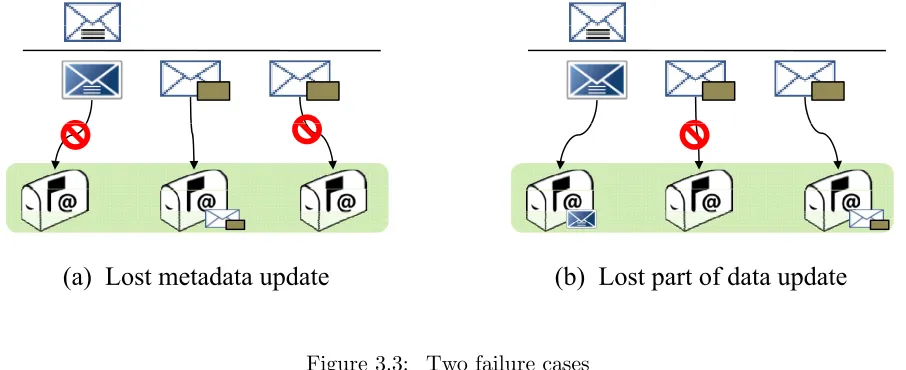
To answer the previous question, we need to consider three scenarios where the filesystem may become inconsistent due to a system crash, network problem or other anomaly:
1. Both metadata and data emails are lost.
2. Data is transferred to the email server but metadata is lost.
(a) Lost metadata update
(b) Lost part of data update
Figure 3.3: Two failure cases
EMFS assumes that data loss cannot occur once any data or metadata email has been trans-ferred successfully to the email server. Except in the cases where the client system crashes, EMFS will always receive a confirmation from the email server confirming successful trans-missions. In the absence of such a confirmation, EMFS assumes that the email has not been received by the server. The first two cases listed above are pretty simple to handle. As in traditional systems, the file system cannot do anything to recover whenever metadata is lost. The system simply has to notify the user of the failure and prompt him to try again. It is the third case which is more complex. To protect against this type of failure, EMFS undertakes the following procedure. Whenever a file needs to be written to the server, one metadata email and as many data emails as needed, are sent out to the email server at the same time. This metadata email has a ”status” field set for the file that is being transferred, which indicates that the file is dirty. Once the system receives confirmation that the data blocks have been transferred successfully, it sends out another metadata email which clears the status field which was set previously.
number are available on the server. If they are, the status bit is cleared and the metadata updated. If the data blocks are not present on the server, the system assumes that the data has been lost, and reverts back to the previous version of the file. Thus file system consistency is always preserved in EMFS.
By default, EMFS makes all transfers to the email servers synchronous and atomic. The user is made to wait until the transfer ends. The transfer may be a success or failure, but in either case the user knows immediately whether the transfer was a success or whether something went wrong. Thus the system provides a ”strong” guarantee about system consistency. However, the system is configurable to make all updates take place in the background. In this case, any update will first be made to the local cache following which it will be transferred asynchronously to the server. With this ”weak” configuration, the system can only guarantee eventual consistency. It should be noted that the user will experience lesser latency and improved performance, as all transfers take place asynchronously. It is possible to switch from one consistency configuration to another any time the user wishes to do so.
3.4
Optimizations
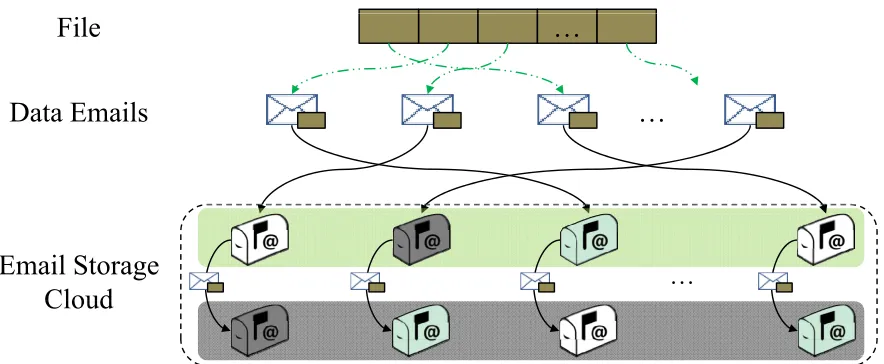
In this section, we discuss the design and working of the Email Storage Cloud (ESC) in detail. ESC is built on top of multiple email services as shown in Figure 3.1. The ESC provides storage within the ”cloud” and provides scalability and reliability through appropriate email storage organization, data striping and replication. Figure 3.4 shows an overview of how the ESC organizes data and metadata emails, and stripes and replicates data between multiple email accounts.
3.4.1 Email-based RAID
…
File
Data Emails
…
Data Emails
Email Storage
Cloud
…
Cloud
Figure 3.4: Virtual Cloud Storage
another working account. As long as the replacement has all the data that the unavailable account had, everything will continue running smoothly. With email-RAID, instead of storing all the blocks of a file in a single email account, we stripe different blocks into different disks to improve the throughput of the system and achieve high aggregate bandwidth. Metadata is not striped in EMFS and is written to a single disk. Metadata emails are usually small and no additional advantage is gained by striping them. Furthermore, striping metadata complicates their retrieval and may slow down the system. To enhance the reliability and availability, each virtual disk in ESC has backup disks. Each backup disk is an exact replica of the primary disk in our system.
3.4.2 File Striping
Data striping is a general technique to improve the performance by achieving high aggregate bandwidth, which is a key concept in RAID [33]. In EMFS, a file is split into multiple blocks according to a blocksize parameter. There are many ways by which data can be striped. A simple way is to store blocks of a file into disks in round-robin fashion, starting from the first disk. With this method, no additional metadata needs to be stored for each block to identify the email account they are stored in. For example, withn virtual disks, where the disk indices range from 0 ton−1, a block ican be found on disk i%n. However, the major disadvantage
to address this issue would be to randomly choose the disk where the first block is to be stored and then continue in round-robin fashion. If the first disk index is x, block i can be found on the disk with indexx+i%n. With this method, the only additional piece of metadata we need to store is the position of the first block of the file. However, since ”virtual” disks here are email accounts, it is possible that each email account may have a different storage quota depending on the service provider, leading to possible storage problems with the round-robin approach.
EMFS takes on a more flexible approach but incurs the cost of additional metadata. In this scheme, each block can be stored on any disk as long as the disk has enough free space. However, to identify where each block is stored, we have to know the index of the disk that stores the block. The RAIDIndex parameter in each <block> metadata entry is used for this purpose. Even though any block can be stored on any disk, EMFS tries to maximize client side bandwidth by trying to write to all n servers. For example, with n servers and more than n
blocks, EMFS tries to write to allnservers at least once, provided that each server has enough space. This is so that we can fully utilize the available client side bandwidth. It should be noted that once EMFS has been configured for a set of virtual disks, the indices or the order of the disks cannot be changed. Additional disks can be added as needed to increase storage, but disks cannot be removed from the configuration without loss of data (unless a backup disk is inserted in place of the disk that has been removed). A block is assigned a disk to be written to, with its corresponding RAID Index, on creation. Further writes and rewrites to the block always go to the same RAID Index. This is in order to simplify EMFS operations and also to facilitate manual versioning of files. With this design, previous versions of blocks can be found on the same disk without any need to maintain additional metadata.
Although we use the same block size for blocks in a file, we can choose different block sizes for different files according to the file size, the number of available disks, and other factors like network bandwidth. There is no single block size that would be appropriate for different network environments and system workloads. In Chapter 4, the influence of these factors on
theblocksize and the performance of the system is discussed.
3.4.3 Data Replication
in a replication group are assigned the same disk. One disk from the group is considered as the ”primary” disk and the rest are called ”backup” disks. With a simple configuration, all data writes go to the primary disk. Data from this disk is then replicated to the backup disks using one of two replication methods discussed below. In case of failure or unavailability of the primary disk, it can be replaced by any other disk from the same replication group. Once a replication group has been configured, disks from the group can be removed as long as there is at least one disk to read and write to. Additional disks can be added to the group. Any new data written to this group will be replicated on the new disk. However data written earlier will not be copied to the new disks by EMFS currently. However, it would be easy to design a daemon which keeps track of and completes tasks such as these.
Data in EMFS can be replicated through two different methods: client-side parallel repli-cation (CSPR) and server-side chain replirepli-cation (SSCR). In CSPR, the responsibility lies with EMFS to replicate explicitly deciding when and where replicas must be stored. With this de-sign, the EMFS client will send copies of the same file to the primary disk as well as its backup disks. The disadvantage of this method is that it increases the client’s responsibility, and more importantly, uses up already limited bandwidth on the client side. This type of explicit repli-cation may be done synchronously, so that replicas are created whenever a block is written to the primary disk or asynchronously, with replication taking place in the background to reduce the burden on the client network. Synchronous replication, while being more reliable, reduces performance by taking up more bandwidth. It may also be overkill, considering that we are replicating to ensure availability due to email server down time and not to guard against data loss. Downtime statistics for popular email services are given in table??. As shown in the table, email services do not fail frequently, are highly reliable and hence replication can be carried out asynchronously or lazily.
blocked by SPAM guards, thus making the entire system unreliable.
EMFS adopts lazy replication of data using the IMAP append feature. Replication is done manually by the client and this ensures that the system is reliable and does not suffer from performance loss.
Replication StrategiesRather than naively mirroring each account by copying emails to ensure availability, we can use different strategies to improve performance and availability.
• Read-one and Write-one In this strategy, all reads and writes from EMFS go to the
same email account, the primary email account. For replication, a set of backup email accounts are configured. Any email sent to the primary email account will be forwarded to the backup email accounts. If the primary email account becomes unavailable, one of the backup email accounts can be used as the new primary email account and accept read and write requests.
In this case, replication may be achieved using either of the two replication methods discussed above However, it is possible with SSCR or with asynchronous CSR that some emails have not been replicated to all backup accounts. In this case when the primary account goes down, the backup accounts may have to be synchronized with the primary account to ensure consistency. Thus, a ”replication pending” list needs to be maintained by the client to keep track of what emails still need to replicated.
• Read-one and Write-allWith this strategy, all remote reads go to one email account,
which is treated as the primary email account, and every write goes to all email accounts in the replication group, including the primary email account. Since we’re writing to all email accounts, strong consistency is ensured at the loss of performance. If the primary email server goes down, any backup server can immediately replace the primary server, without the need for further updates.
• Read-fast and Write-fastThis strategy has been developed from our observation that
3.4.4 Fast Recovery
Email services provided by third-party service providers are supposed to be highly available and extremely reliable, but failures do happen from time to time regardless of the efforts of service providers. For example, Google had a few outages over the past few years [16]. As discussed earlier, EMFS is configured to handle email server failures such as these. In EMFS, each email account may be configured with a few backup email accounts, each of which is a mirror of the primary account. These accounts together form the replication group. If the primary disk fails somehow, the system can quickly identify which disk fails. We cache a connection to each primary disk and send no-op messages to the server from time to time to keep the connection alive. Once there is no response from a server, we assume that the server breaks down and that the email account is not available temporarily. To recover the system, we just simply treat a backup disk in the same replication group as the new primary disk.
Like primary accounts, backup accounts may also fail. A backup failure is not as critical as a primary disk failure and hence dealing with this type of failure is not as critical. If any backup server is found to be unresponsive, the system can adopt different ways to deal with it. A simple way to handle this situation would be to first inform the client of the backup failure, and then ask the user to manually configure a new backup account. An automatic configuration tool may be designed to help the user set up a new backup and transfer data from the primary disk to the new backup. EMFS currently does not support this automatic configuration tool.
3.4.5 Garbage Collection
In EMFS, any metadata update or data update will generate a new version of metadata or data, which will be appended to the physical storage of email servers as new emails. The older versions of data and metadata are not immediately reclaimed by the system. EMFS reclaims storage space occupied by redundant data lazily as this increases performance, while simplifying design.
There are different cases where redundant data is generated. First, since any modification to data or metadata generates a new version, many versions of metadata, files, blocks and directories exist in our file system. Old versions are not necessary to maintain the system in a consistent state when versioning is not supported. Second, when a file or directory is deleted, the system only updates the metadata to indicate that that file or directory doesn’t exist. The contents of the actual file or directory will still exist on the server untild eleted explicitly from the server. These emails can be deleted later on to reclaim some space on the system. In addition, redundant data may also appear on email servers due to system or network crashes.
knows what has been modified. For example, if a file entry is in an old metadata email but not in a new metadata email, it indicates that the file was deleted. Similarly if the file entry is present, but the version numbers differ, it indicates that the file has been modified. Therefore the older version of the file may not be needed. First, all emails related to the deleted file or older version of the file are removed completely. This can be easily achieved as the unique id of the file is known from the old metadata email. Then the metadata email itself is deleted, once it has been completely scanned and processed.
Orphaned blocks, which are created during network or system crashes when a file has been partially transferred to the server, are detected the next time the file is opened. The status
bit for the file entry will indicate that the file is in an inconsistent state and at this point, the server will be checked to see if the whole file is present. If not, blocks of the partial file are deleted and the file is reverted back to the previous version.
3.5
Security
Chapter 4
Performance Evaluation
4.1
Experiment Setup
We evaluate our prototype using a combination of microbenchmarks, macrobenchmarks and synthetic benchmarks. We compare our results against 4 other existing systems, JungleDisk, GmailFS, NFS, and AFS, and report the feasibility and effectiveness of our approach. Experi-ments were run on an Intel duo-core machine (2.66 Ghz) with 3 GB of RAM running Ubuntu 8.10. The machine was connected to the Internet using a wired connection with a download speed of 6.3 MBps and an upload speed of about 4.8 MBps, measured using online internet speed testing sites. Email accounts from three service providers, Gmail, Gawab Mail, and NCSU Campus Mail (Google Apps) were used for evaluation.
4.1.1 Evaluation Workloads
Evaluation of our system is done in two phases. First, we use synthetic benchmarks to show how the performance of our system varies with different parameters. We then use the most optimal configuration, derived from the results of these benchmarks, to compare our prototype against existing systems.
The following parameters of the system were varied to show their effects on performance:
block size, stripe width, number of connections, stripe servers, and mode of replication. The
block size is the size of the data chunk being transferred in one email. A file is split into
several chunks of size block size and transferred to the servers. stripe width indicates the number of email accounts being used for data access. In all performance evaluation tests, a separate email account was used for dedicated metadata access. Several IMAP connections can be created and used simultaneously per email account. For example, Gmail allows seven simultaneous connections per account. The number of connections used is indicated by the
of replication to show their impact on performance. Different service providers provide varying levels of performance and this variation can be taken advantage of for replication purposes (as discussed in 3.4.3). We also assume that all service providers provide the same level of service, without discrimination, to all email accounts of the same class, hosted on their servers.
Comparison of our system against Jungle Disk and Gmail FS was done using 5 benchmarks: Postmark [22] - a macrobenchmark, , IOZone [20], an Open Office workload [5] (suitably mod-ified to simulate ”real user” access) and synthetic benchmarks.
Postmark: Postmark is a macro benchmark that measures performance for network based systems by simulating access on short lived small files. It is used to create a large number of files of varying sizes and too measure performance on a series of transactions conducted on these small files. Version 1.51 of the benchmark is used for evaluation.
IOZone: IOZone is a popular benchmark used to test filesystem performance. IOZone is highly flexible and can be configured to simulate several different workloads such as random reads and writes, sequential reads and writes, and stride reads. Version 3.287 has been used for evaluation of EMFS.
Office Workload: The Office workload is part of the Battery Life Toolkit (BLTK) which measures battery performance. The workload has been suitably modified to do the following: open Writer from the Open Office package, input data into it from a specified file, perform common work processing tasks such as save and repllace, save the file and close it.
Synthetic Benchmark: This benchmark is used to write and read files of varying sizes. It is used to test the performance of the system for writes, and reads for varying file and block sizes and stripe widths.
Since this system is currently designed for a single user scenario, multi-threaded benchmarks were not considered. However, FUSE itself is inherently multi-threaded and initializes a pool of 10 threads to service concurrent file system requests. For all performance evaluation tests either the time taken for data transfer to or from a server or the throughput is measured. Higher throughput and lower transfer times are indications of good performance.
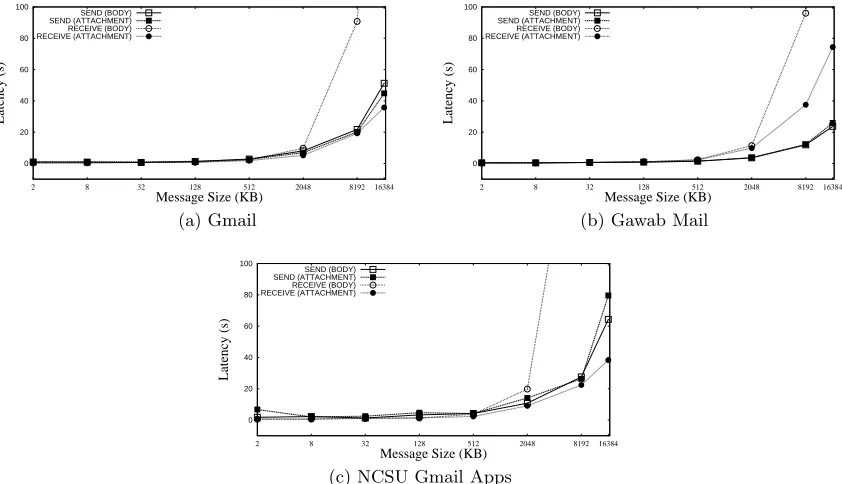
4.1.2 Basic Parameter Variation
0 20 40 60 80 100
2 8 32 128 512 2048 8192 16384
Latency (s)
Message Size (KB)
SEND (BODY) SEND (ATTACHMENT) RECEIVE (BODY) RECEIVE (ATTACHMENT) (a) Gmail 0 20 40 60 80 100
2 8 32 128 512 2048 8192 16384
Latency (s)
Message Size (KB)
SEND (BODY) SEND (ATTACHMENT) RECEIVE (BODY) RECEIVE (ATTACHMENT)
(b) Gawab Mail
0 20 40 60 80 100
2 8 32 128 512 2048 8192 16384
Latency (s)
Message Size (KB)
SEND (BODY) SEND (ATTACHMENT) RECEIVE (BODY) RECEIVE (ATTACHMENT)
(c) NCSU Gmail Apps
Figure 4.1: Single email sending/retrieving performance
0 5 10 15 20 25 30
128 256 512 1024 2048 4096
Latency (s)
Blocksize (KB)
BODY (1 CONNECTION) BODY (2 CONNECTIONS) ATTACHMENT (1 CONNECTION) ATTACHMENT (2 CONNECTIONS)
(a) Gmail 0 5 10 15 20 25 30 35 40
128 256 512 1024 2048 4096
Latency (s)
Blocksize (KB)
BODY (1 CONNECTION) BODY (2 CONNECTIONS) ATTACHMENT (1 CONNECTION) ATTACHMENT (2 CONNECTIONS)
(b) Gawab Mail
0 10 20 30 40 50 60
128 256 512 1024 2048 4096
Latency (s)
Blocksize (KB)
BODY (1 CONNECTION) BODY (2 CONNECTIONS) ATTACHMENT (1 CONNECTION) ATTACHMENT (2 CONNECTIONS)
(c) NCSU Gmail Apps
Figure 4.2: Single email read performance
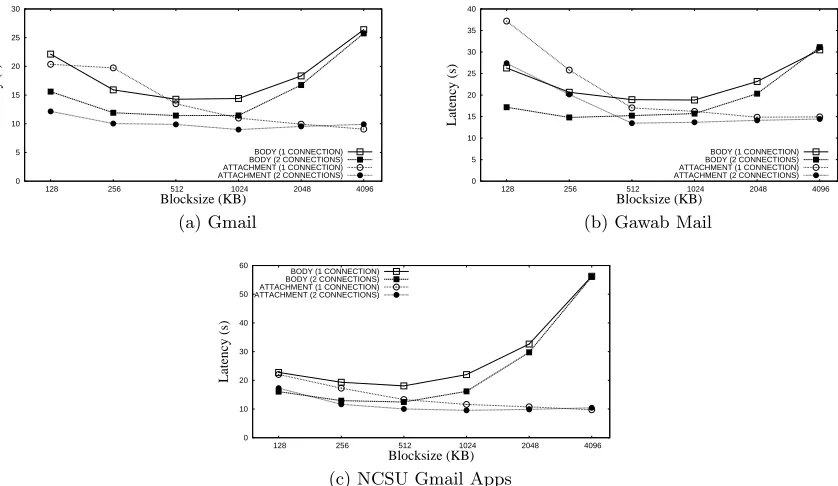
comparison to the file size, several blocks need to be sent to/received from the email servers. In this case, all connections to an email account are used simultaneously, utilizing more client size bandwidth and thereby reducing transfer time. As the block size approaches the file size, less number of blocks need to be accessed, and the difference in performance, between using one connection and two connections, is lowered. For both reads and writes, having smaller blocksizes actually increases the response time and hampers performance. This is because with smaller blocksizes more number of emails need to be sent or retrieved, thereby incurring overhead due to having more round trips to the servers and also due to email protocols (headers and handshakes). The results also indicate that some service providers are faster when emails are sent to them (Gawab), while others are faster when emails are retrieved (Gmail). This fact can be used to implemented the read-fast/write-fast mode of operation discussed earlier to improve performance. The write performance of the Gawab servers is much better than that of the Gmail servers. This is probably due to a variety of potential reasons, like more complex security mechanisms in Gmail than Gawab and differing implementations of the IMAP RFC by each service provider.
0 5 10 15 20 25 30 35 40 45 50
128 256 512 1024 2048 4096
Latency (s)
Blocksize (KB)
BODY (1 CONNECTION) BODY (2 CONNECTIONS) ATTACHMENT (1 CONNECTION) ATTACHMENT (2 CONNECTIONS)
(a) Gmail 0 5 10 15 20 25
128 256 512 1024 2048 4096
Latency (s)
Blocksize (KB)
BODY (1 CONNECTION) BODY (2 CONNECTIONS) ATTACHMENT (1 CONNECTION) ATTACHMENT (2 CONNECTIONS)
(b) Gawab Mail
0 10 20 30 40 50 60
128 256 512 1024 2048 4096
Latency (s)
Blocksize (KB)
BODY (1 CONNECTION) BODY (2 CONNECTIONS) ATTACHMENT (1 CONNECTION) ATTACHMENT (2 CONNECTIONS)
(c) NCSU Gmail Apps
Figure 4.3: Single email write performance
In addition the block size was varied to judge its effect on the data transfer time. Email accounts from Gmail were used. For both reads and writes, increasing the stripe width definitely increases the performance. This is because, we write data to all servers in the stripe width simultaneously. So with stripe width n, we write n times more data, with the total transfer time being approximately equal to just one round trip time. This effect is more profoundly seen in figures 4.4a and 4.4b for smaller files than for larger files. Furthermore, block sizes of 512 KB or 1024 KB give the lowest transfer times for larger files.
In summary, we see that with a single account and one connection, as the file size increases, the data transfer time also increases. Furthermore, data stored in attachments can be trans-ferred faster than data stored in body. Striping data to multiple accounts certainly helps boost performance, and lowers the response times for both reading and writing. Having multiple connections per email account also lowers the data transfer times, especially when the block size is small when compared to the file size. We also see that among the servers tested, Gawab provides optimal speeds for writing, while Gmail is better for reading.
0 2 4 6 8 10 12 14
0 2 4 6 8 10 12 14 16 18 20
Latency (s) Blocksize (KB) STRIPE 1 STRIPE 2 STRIPE 4 STRIPE 8 (a) Read 0 5 10 15 20 25 30 35
0 2 4 6 8 10 12 14 16 18 20
Latency (s) Blocksize (KB) STRIPE 1 STRIPE 2 STRIPE 4 STRIPE 8 (b) Write
Figure 4.4: Whole file access latency with different block size and stripe width (Gmail). File Size 32 KB
0 10 20 30 40 50 60 70 80 90 100
256 512 1024 2048 4096
Latency (s) Blocksize (KB) STRIPE 1 STRIPE 2 STRIPE 4 STRIPE 8 (a) Read 0 20 40 60 80 100 120
256 512 1024 2048 4096
Latency (s) Blocksize (KB) STRIPE 1 STRIPE 2 STRIPE 4 STRIPE 8 (b) Write
Figure 4.5: Whole file access latency with different block size and stripe width (Gmail). File Size 32 MB
From the results shown in 4.5, we see that blocksize 512 KB produces the best performance.
4.1.3 Comparison with Other Systems
from the local disk cache for both of the above configurations. However, lazy replication does take place with the write-fast configuration.
Both NFS and AFS servers were configured on dedicated machines, similar in configuration to our test machine. Jungle Disk, which stores data on the Amazon S3 servers, was configured such that background or asynchronous transfers were disabled. All three systems employed a local disk cache to cache data.
Postmark
Postmark creates several files initially and performs several transactions on these files. Before the benchmark finishes, any remaining files created by the benchmark are deleted completely. A single transaction involves two operations in total, one from reading/appending and one more from creating/deleting a file. The biases for each of these operations are configurable. Files created as part of transactions are not included in the number of files configured when the benchmark is started. Two configurations of Postmark were used to conduct the comparison. Any particular configuration of Postmark, regardless of the number of times the benchmark is run or the underlying file system it is run on, always reads and writes the same amount of data and performs the same set of transactions.
When a single run is finished, the read and write throughputs, as well as the time taken to complete the benchmark is reported. However, Postmark reports throughput in a strange man-ner. Read and write throughputs are calculated as the total amount of data read or written, divided by the total time taken to run the benchmark. The total time taken to run the bench-mark includes the time taken for the initial creation of files, time for performing all transactions and the time for finally deleting any remaining files. Hence, the read to write throughput ratio is always constant for any particular configuration, for any file system. Therefore, we have decided to report the total time taken to complete a single run of the benchmark, instead of the throughput reported by Postmark, as we feel this would be a more accurate measure for comparison.
0 2000 4000 6000 8000 10000 12000 14000 16000
50 Files 200 Files 500 Files
Time for Completion (s)
NFS AFS Jungle Disk EMFS-Normal EMFS-Write Fast
Figure 4.6: Varying number of files using Postmark
when large numbers of files are created and transferred immediately. Jungle disk is better than EMFS but still pales in comparison to NFS and AFS. The reason for the poor performance of EMFS is due to the fact that email protocols were never meant for large data transfers. Additionally, EMFS was tested using strict synchronous writes as were the other systems. However, because of the handicap of a ”dumb” server, EMFS has to send two metadata emails for every write, to ensure consistency. This becomes expensive when a lot of files are written consecutively. Jungle Disk is proprietary software and hence we cannot conclusively state why it performs slower than AFS or NFS.
0 1000 2000 3000 4000 5000 6000 7000 8000 9000 10000
Equal Bias Read Heavy Append Heavy Create Heavy
Time for completion (KBps)
NFS AFS Jungle Disk EMFS-Normal EMFS-Write Fast
Figure 4.7: Varying transaction bias using Postmark
finishes faster than all the other configurations for all systems, because less data is written to the servers. All systems utilize their own local caches as well as the OS page and buffer caches. Hence the difference in performance arises mostly due to the difference in write throughput. Both the append heavy and create heavy configurations transfer nearly write the same amount of data to the server and hence their performance is very similar. For these two settings, 2743 MB and 3134 MB of data respectively is transferred over the network and EMFS struggles with such large quantities of data. This is again due to the nature of the email protocols.
IOZone
IOZone can be used to thoroughly test a file system’s performance using several different work-loads. For benchmarking EMFS, IOZone was used to create a file of size 16 MB and test the performance of the system using varying block sizes with three different workloads: write/re-write, read/re-read and random read/random write. Furthermore IOZone was configured so that every write was synchronous (using the O SYNC flag) and such that the time taken for the file close was also included in calculations. IOZone performs these tests sequentially, one immediately after the other, for a given file and block size.
150000 200000 250000 300000 350000
128 256 512 1024 2048 4096
Throughput (KBps) Blocksize (KB) AFS JUNGLE DISK EMFS-NORMAL EMFS-WRITE FAST (a) Read 500000 1e+06 1.5e+06 2e+06 2.5e+06
128 256 512 1024 2048 4096
Throughput (KBps) Blocksize (KB) AFS JUNGLE DISK EMFS-NORMAL EMFS-WRITE FAST (b) Re-read 500000 1e+06 1.5e+06 2e+06 2.5e+06 3e+06
128 256 512 1024 2048 4096
Throughput (KBps) Blocksize (KB) AFS JUNGLE DISK EMFS-NORMAL EMFS-WRITE FAST
(c) Random Read
Figure 4.8: Read Performance of a 16 MB file using IOZone
0 100 200 300 400 500 600 700 800 900 1000
128 256 512 1024 2048 4096
Throughput (KBps) Blocksize (KB) NFS AFS JUNGLE DISK EMFS-NORMAL EMFS-WRITE FAST (a) Write 0 100 200 300 400 500 600 700 800 900 1000
128 256 512 1024 2048 4096
Throughput (KBps) Blocksize (KB) NFS AFS JUNGLE DISK EMFS-NORMAL EMFS-WRITE FAST (b) Re-write 0 100 200 300 400 500 600 700 800 900 1000
128 256 512 1024 2048 4096
Throughput (KBps) Blocksize (KB) NFS AFS JUNGLE DISK EMFS-NORMAL EMFS-WRITE FAST
(c) Random write
Figure 4.9: Write Performance of a 16 MB file using IOZone
Figures 4.9 shows the write performance of a 16 MB file in block sizes ranging from 128 KB to 4 MB. Clearly, all systems display the same trend for all file writes, regardless of the write access pattern (write, re-write, and random write). In order to accurately reflect the time taken for the system to transfer the file to the server, the IOZone test was configured such that the file closing time was included in throughput calculation. All the systems under comparison transfer the entire file to the server only on close() or flush() and not on every write() call. Any changes made to the file are cached locally regardless of the access pattern of writes (write, rewrite or random writes). The changed file is then transferred to the server and hence the write through-put is dominated by the network bandwidth rather than anything else. The results also show that EMFS writes are slightly better than Jungle Disk in terms of Write Performance. This is possibly because Jungle Disk sends out additional metadata updates, such as the last accessed time, separately on file close(), as mentioned above in the discussion on read performance. This introduces an extra delay of about 0.5 to 1 second, resulting in the slightly lower performance. As before, NFS and AFS are much faster due to their being highly optimized systems utilizing protocols used for fast and efficient data transfer.
Open Office
The BLTK Open Office benchmark simulates a real user office document editing trace. It was originally designed to test battery life on laptops running typical user workloads. To compare these systems, it has been modified to test out keystroke and local processing delay on Open Office Writer files. The automated scenario opens an existing Open Office Writer file from the target file system and proceeds to perform typical office document editing functions, such as typing in new pages of text, deleting existing text, find and replace etc. . . for about ten minutes. Finally, the edited document is saved back to the target file system and the scenario ends. The main aim of this benchmark is to show that the local processing time on EMFS is negligible when compared to any other distributed file system. We compare the running time of the benchmark against other distributed file systems as well as the local file system. Any delays, be it due to keystrokes, slow reads, slow writes would be accurately reflected in the running time of the benchmark. Table 4.1 reports the percentage scores of each file system, normalized over the score of the local file system. The difference in scores seen is mainly due to the document being saved at the end of the scenario. This involves network operations and hence introduces a small delay of 3 to 4 seconds, lowering the score.
Summary
Table 4.1: File System Performance for a typical Office Workload File System Normalized Score
Local 100
NFS 92.07
AFS 91.23
Jungle Disk 90.04
EMFS - Normal (Gmail) 88.36 EMFS - Read-Write Fast 90.2