Semiconductor Equipment Security Guidelines – Virus Protection
International SEMATECH Manufacturing Initiative
© 2007 International SEMATECH Manufacturing Initiative, Inc. Advanced Materials Research Center, AMRC, InternationalSEMATECHManufacturingInitiative, and
ISMI are servicemarks of SEMATECH, Inc. SEMATECH, the SEMATECH logo, AdvancedTechnology DevelopmentFacility, ATDF, and the ATDF logo are registered servicemarks of SEMATECH, Inc. All other
Semiconductor Equipment Security Guidelines – Virus Protection
Technology Transfer #04104567C-ENG International SEMATECH Manufacturing Initiative June 15, 2007Abstract: This document from the MFGM045M project describes IC maker issues, requirements, guidelines, and in this revision current best known methods to address semiconductor equipment security. Equipment security requirements include system availability, integrity, performance, network security, and product and platform security. The three components of security are the hardware-connectivity, software-logical, and business layers. This document is intended for IC maker and supplier IT network, hardware, operating system, and security professionals; IC maker process engineers, equipment engineers, and operations; supplier application developers and software architects; and supplier customer service and field service engineers.
Keywords: Computer Hardware, Computer Software, Data Management Systems, Network Security, Virus Protection
Authors: Harvey Wohlwend
Approvals: Harvey Wohlwend, Project Manager/Author Brad Van Eck, Program Manager
Scott Kramer, Director, ISMI
ISMI Technology Transfer #04104567C-ENG Table of Contents 1 EXECUTIVE SUMMARY ...1 2 INTENDED AUDIENCE...1 3 REFERENCES ...1 4 REQUIREMENTS ...1 4.1 System Availability...2 4.2 Integrity ...2 4.3 Performance ...2 4.4 Network Security ...2
4.5 Product and Platform Security ...2
5 SECURITY ARCHITECTURE ...2 5.1 Hardware-Connectivity Layer...3 5.1.1 Platform...3 5.1.2 Network...3 5.1.3 Firewalls...3 5.1.4 Proxies...4 5.2 Software-Logical Layer ...4
5.2.1 System Hardening of Proxies...4
5.2.2 Network Shares ...4
5.3 Business Layer ...4
6 SECURITY GUIDELINES ...5
6.1 IC Maker Responsibilities...5
6.1.1 Use Firewalls in the IC Maker Factory Network ...5
6.1.2 Provide Proxies for Communications Between Equipment and the Factory ...5
6.1.3 Institute Business Processes for Local Users of Equipment ...5
6.2 OEM Responsibilities ...6
6.2.1 Provide Network Security for Equipment...6
6.2.2 Wireless Networks ...7
6.2.3 Security Upgrades ...7
6.2.4 Hardened Computer Configurations ...7
6.2.5 Business Processes ...8
7 BEST KNOWN METHODS...8
7.1 Network Security Best Known Methods ...9
7.2 Port Security Best Known Methods...10
7.3 Virus Management Best Known Methods ...12
7.4 Patch Management Best Known Methods ...13
iv
Technology Transfer #04104567C-ENG ISMI
List of Figures
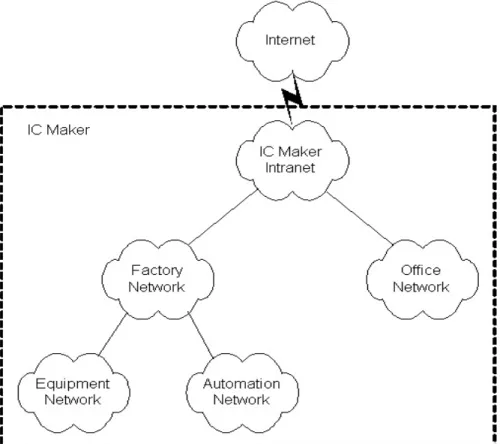
Figure 1 Typical IC Maker Network Environment...3
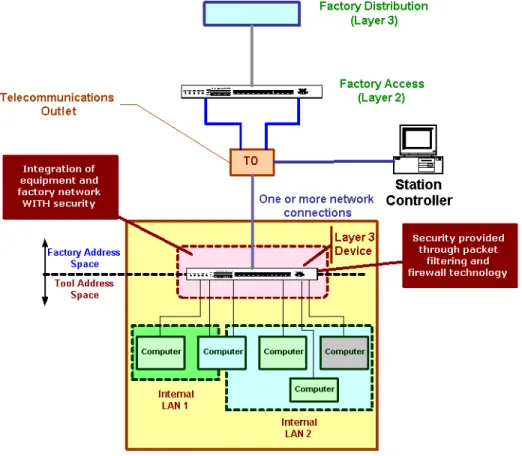
Figure 2 Equipment Internal Network with a TCP/IP Layer 3 Device...6
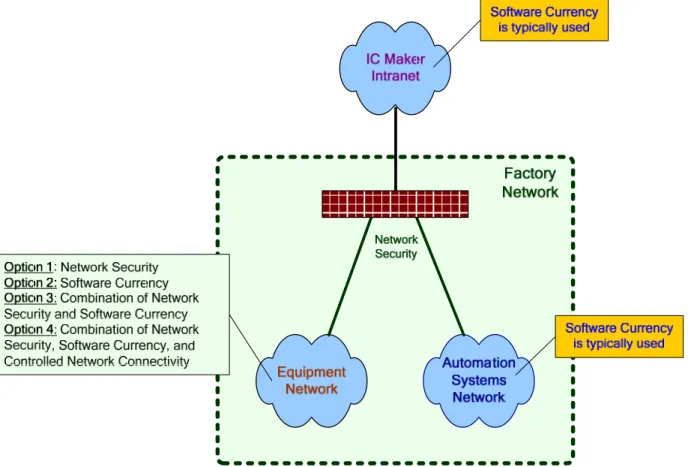
Figure 3 Factory Security Approach...8
List of Tables Table 1 Network Security Best Known Methods...9
Table 2 Port Security Best Known Methods ...10
Table 3 Virus Management Best Known Methods ...12
ISMI Technology Transfer #04104567C-ENG Acknowledgments
The author wishes to acknowledge the contributions of the ISMI e-Manufacturing Information and Virus Protection working group to these guidelines.
ISMI Technology Transfer #04104567C-ENG 1 EXECUTIVE SUMMARY
This document describes IC maker issues, requirements, and guidelines to address
semiconductor equipment security. These are ISMI member company consensus guidelines and the expectations are they will be followed. Support for these guidelines reduces the risk of security attacks. It describes the capabilities to successfully integrate equipment into an IC maker’s Intranet, including the following:
• Guidelines based on standard and non-proprietary capabilities
• Configuration guidelines for physical components such as network equipment, computers, operating systems, and products for IT personnel
• Security design guidelines for equipment application architects and designers This document does not
• Recommend products or services
• Endorse or advocate security business models • Use cost estimations in the recommendations
• Recommend deviations from these guidelines based on individual company policies and practices
2 INTENDED AUDIENCE
The intended audience for this document is
• IC maker and supplier IT network, hardware, operating system, and security professionals
• IC maker process engineers, equipment engineers, and operations • Supplier application developers and software architects
• Supplier customer service and field service engineers
3 REFERENCES
1. e-Diagnostics Guidebook, Technology Transfer #01084153D-ENG, www.ismi.sematech.org/emanufacturing/ediagguide.htm.
2. IEEE Std 802.1x, Port Based Network Access Control, www.ieee802.org/1/pages/802.1X-rev.html, http://www.microsoft.com/technet/community/columns/cableguy/cg0402.mspx.
4 REQUIREMENTS
The equipment security requirements include system availability, integrity, performance,
network security, and product and platform security. Any vulnerabilities and impacts from cyber attacks to the office are also applicable to the factory. The term “anti-virus” includes virus, spyware, and worm protection.
2
Technology Transfer #04104567C-ENG ISMI
These guidelines describe requirements for both the IC maker and the original equipment manufacturer (OEM).
4.1 System Availability
High availability of equipment is one of the cornerstones of manufacturing productivity and profitability. Cyber attacks pose a direct threat to availability by impacting both scheduled and unscheduled downtimes.
4.2 Integrity
Integrity of the system is the confidence that when a user interacts with the system that the configuration (i.e., settings, recipes, and machine constants) has not been changed. Cyber attacks are becoming increasingly more malicious by altering product and system configurations causing Denial of Service scenarios.
4.3 Performance
System performance is critical to expected throughput requirements of manufacturing. Viruses, worms, and spyware often cause product, system, and network performance issues that could impact manufacturing throughput and production.
4.4 Network Security
Most semiconductor equipment is connected to a local area network (LAN) for connection to factory automation, general purpose administration, support and to the Internet for e-Diagnostics. Placing equipment on the network subjects it to network-based cyber attacks similar to the general purpose computers. Additionally, equipment use commercial off-the-shelf operating systems such as Windows, Linux, UNIX, etc., which could bring cyber security issues typical of office environments to manufacturing areas. Two scenarios are distinctly possible: equipment being impacted by the office environment or vice versa, and one set of equipment impacting other equipment (i.e., secondary infections).
4.5 Product and Platform Security
Today’s operating systems and products provide a software platform for applications.
Applications rely on the platform for many services. The platform and products have become a focus of many cyber attacks. Hackers continue to find methods to reach the platforms and products over the network and expose weaknesses and vulnerabilities.
5 SECURITY ARCHITECTURE
The security architecture is detailed in Section 7 of the ISMI e-Diagnostics Guidebook.1 The three components of security are the hardware-connectivity, software-logical, and business layers.
ISMI Technology Transfer #04104567C-ENG 5.1 Hardware-Connectivity Layer
This layer focuses on the computer-to-computer connectivity between equipment and other systems in and through the IC maker’s Intranet. The capabilities of hardware-connectivity relevant to equipment security are the platform, the network, firewalls, and proxies. 5.1.1 Platform
The platform includes the hardware, operating system, and software products. TCP/IP is typically integrated with the operating system. Products that make up the platform also include anti-virus software.
5.1.2 Network
The network components include TCP/IP layer 2 components such as virtual LANs (VLANs), wireless LANs (WLANs), and corresponding layer 2 security methods. Whether wired or wireless, the same virus protection safeguards apply.
5.1.3 Firewalls
There are several opportunities to use firewalls within a factory. Firewalls are the transitions from the IC maker’s Intranet to the IC maker’s Factory, from the IC maker’s automation network to IC maker’s equipment network, and from the IC maker’s equipment network to the equipment (see Figure 1).
4
Technology Transfer #04104567C-ENG ISMI
5.1.4 Proxies
In addition to firewalls, proxies form the core of the network security. Proxies enable controlled network access to specific applications. They are required to be bastion hosts. Bastion hosts are defined as computers with updated operating systems and products complemented with only the required services and applications. Proxies must perform anti-virus checks of file transfers over the network.
5.2 Software-Logical Layer
This layer focuses on the dynamic aspects of security, especially when end users or applications use software. The specific areas of interest are user-level security and network protocol security. One of the areas of overlap with the hardware-connectivity layer is proxies. This section deals with the software implementation of proxies. The key capabilities of interest to equipment security are system hardening and network shares.
5.2.1 System Hardening of Proxies
The equipment operating system and all applications must have the following capabilities: • Be set such that unnecessary programs and services are never turned on
• Have strong password policies
• Support applications running with minimum privileges
• Where ever applicable, have equipment run independently of each other from a networking perspective
• Support remote access to equipment only by proxies
• Support logging and auditing of all security-related configuration changes • Record all security-related error information in log files
• Support a multi-user and multi-tasking environment Strong password policies may require:
• At least one letter, one numeral, and one special character • Locking accounts after three consecutive failed logons • Changing passwords every 90 days
• Not reusing the previous five passwords 5.2.2 Network Shares
The operating system must be configured for controlled access to network shares. 5.3 Business Layer
The business layer focuses on the business aspects of implementing security. The relevant areas for equipment are business policies such as the following:
• Firewall security • Operating systems
ISMI Technology Transfer #04104567C-ENG • Software configurations
• Procedures for backup and recovery • Auditing all configuration elements
6 SECURITY GUIDELINES
Relevant equipment security capabilities are summarized in terms of 1) pro-action vs. reaction, and 2) IC maker vs. original OEM roles and responsibilities.
Equipment is typically connected to the equipment network, which is a sub-network of the factory network. Since most viruses, worms, and spyware originate from the office network and spread to the equipment network, network security is inherently proactive in nature. Controlling access over the network by filtering packets based on the source destination address-network protocol of all communications to and from the equipment prevents the spread of viruses, worms, and spyware through network applications. In addition, application proxies with anti-virus software protection particularly for file transfers further augment the security of equipment. The largest risk to network security is the possibility of infections from local computer users through removable media like floppy disks, CDs, memory sticks, laptops,
personal digital assistants (PDAs), etc. This weakness can be mitigated through development and implementation of strong business processes that require all local users to scan removable media for viruses before using them locally.
Virus scanning is a requirement. Scanning must be done on file transfers and network transfers to and from the equipment.
Restricting Internet access to only the required functions helps reduce the risk of viruses, worms, and spyware infecting the equipment.
IC makers and OEMs have clearly distinct roles and responsibilities for securing process equipment.
6.1 IC Maker Responsibilities
6.1.1 Use Firewalls in the IC Maker Factory Network
Network security techniques are required as part of an overall plan to protect equipment from virus attacks. Firewalls (and routers) separate the office from the factory and the equipment from the rest of the factory.
6.1.2 Provide Proxies for Communications Between Equipment and the Factory This requires the standardization of network protocols across all equipment types and the development of proxy solutions for protocols that do not have standard third-party solutions. 6.1.3 Institute Business Processes for Local Users of Equipment
Business processes include having
• Proven backup and recovery procedures
• Requirements for mobile devices (e.g., operating system and applications level, patch level, etc.)
6
Technology Transfer #04104567C-ENG ISMI
• Scans of removable media and mobile devices for anti-virus
• Infrastructure to update anti-virus protection (e.g., virus definition distribution server) 6.2 OEM Responsibilities
6.2.1 Provide Network Security for Equipment
Some IC makers require OEMs to provide a TCP/IP layer 3 device (router or switch) within the internal, private equipment network for controlled access between the factory network and the equipment (see Figure 2). Inserting the layer 3 device protects all the computers on the network and may potentially reduce the need for ongoing security patching. It is recommended that the layer 3 device be put between the factory’s equipment network and the equipment’s internal network.
ISMI Technology Transfer #04104567C-ENG If used, this device must provide the following capabilities.
• Static Packet Filtering
– This provides source address-destination address-network protocol access control for all communications in and out of the equipment.
• Firewall Capabilities
– This controls dynamic port allocation by mechanisms such as stateful inspection. • Network Address Translation
– Only required computers in the equipment can be accessed from the factory network.
6.2.2 Wireless Networks
Wireless networks that are LAN replacements are not allowed within an equipment instance. This is true for all wireless network standards because of weak encryption standards,
performance issues, and concern over multiple wireless network interference. Wireless networks between equipment are not allowed since it is impossible to control the interference between different wireless networks (i.e., frequency range).
Wireless communication between factory components (e.g., ID readers) and the equipment is allowed. A sensor network that is internal to the equipment is allowed as long as it does not impact equipment processing.
6.2.3 Security Upgrades
For new equipment, as it is being shipped from the OEM, IC makers require the supplier to support and provide an operating system (version, service pack, and hot fixes) and anti-virus capabilities that are in the currently supported phase of their product lifecycle.
Security software upgrade support for equipment is optional and provided as a service for interested IC Makers. The service details include qualification and support for the operating system, applications, and anti-virus capabilities. The IC Maker and the equipment supplier must agree upon the frequency of security updates.
The guidelines defined in this document are applicable to all operating systems. 6.2.4 Hardened Computer Configurations
Hardened computer configurations must
• Have strong password policies (e.g., non-blank passwords) • Prohibit network shares for “anybody” or “public”
• Be set such that unnecessary programs and services are never turned on • Support applications running with minimum privileges
• Where ever applicable, have equipment run independently of each other from a networking perspective
• Support logging and auditing of all security-related configuration changes • Record all security-related error information in log files
8
Technology Transfer #04104567C-ENG ISMI
6.2.5 Business Processes
6.2.5.1 Backup/Recovery Procedures
The OEM provides partial and full backup and recovery capability of each equipment instance that the IC maker implements in its factories.
6.2.5.2 Field Service Engineers
OEM procedures must enforce keeping their laptops at a minimum security level, including keeping current with security patch levels and anti-virus software and scanning removable media for viruses. The OEM must document processes and procedures for connecting the field service engineers’ laptops to equipment on factory floor. This documentation must be shareable with the IC maker.
7 BEST KNOWN METHODS
This composite set of best known methods (BKMs) reflects a collection of ISMI member company practices in protecting their factories and its equipment. Figure 3 describes, in general terms, the different approaches to securing various factory components.
ISMI Technology Transfer #04104567C-ENG Security is improved by a combination of technology solutions, business processes, and
practices. Security is primarily driven by technology with judicious use of business processes and practices. Controlling the computers that can be connected to the network is an example of a business process. Use of firewalls is a technology solution.
The following BKMs describe network security, port security, virus management, and software currency (patching and patch management). These high level best know methods highlight the complexities and challenges that influence the total cost of ownership for securing IC
manufacturing.
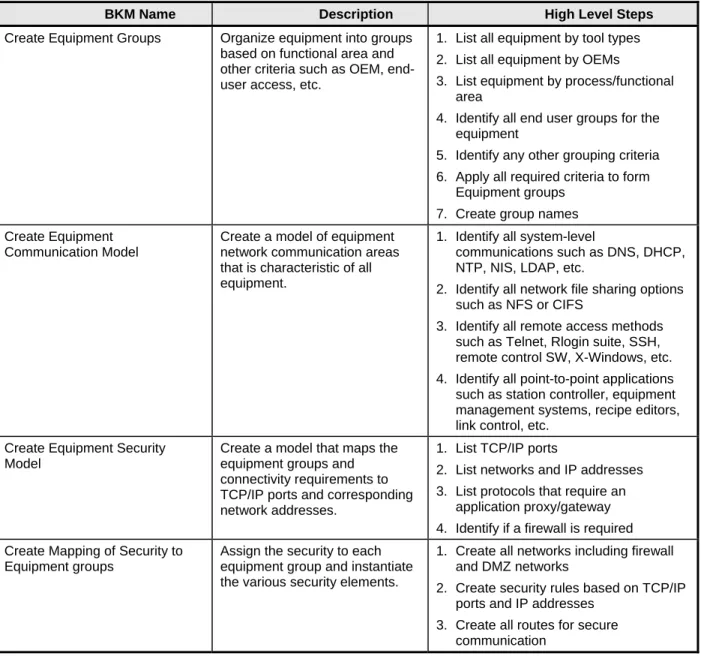
7.1 Network Security Best Known Methods
Network security is a method to secure an environment by controlling which computers and applications can communicate on the network.
Table 1 Network Security Best Known Methods
BKM Name Description High Level Steps
Create Equipment Groups Organize equipment into groups based on functional area and other criteria such as OEM, end-user access, etc.
1. List all equipment by tool types 2. List all equipment by OEMs
3. List equipment by process/functional area
4. Identify all end user groups for the equipment
5. Identify any other grouping criteria 6. Apply all required criteria to form
Equipment groups 7. Create group names Create Equipment
Communication Model
Create a model of equipment network communication areas that is characteristic of all equipment.
1. Identify all system-level
communications such as DNS, DHCP, NTP, NIS, LDAP, etc.
2. Identify all network file sharing options such as NFS or CIFS
3. Identify all remote access methods such as Telnet, Rlogin suite, SSH, remote control SW, X-Windows, etc. 4. Identify all point-to-point applications such as station controller, equipment management systems, recipe editors, link control, etc.
Create Equipment Security Model
Create a model that maps the equipment groups and connectivity requirements to TCP/IP ports and corresponding network addresses.
1. List TCP/IP ports
2. List networks and IP addresses 3. List protocols that require an
application proxy/gateway 4. Identify if a firewall is required Create Mapping of Security to
Equipment groups
Assign the security to each equipment group and instantiate the various security elements.
1. Create all networks including firewall and DMZ networks
2. Create security rules based on TCP/IP ports and IP addresses
3. Create all routes for secure communication
10
Technology Transfer #04104567C-ENG ISMI
BKM Name Description High Level Steps
Move Equipment into Equipment Groups
Move the equipment into the assigned network and turn the security rules on.
1. Move equipment and other computers onto the network as defined in Create Mapping of Security to Equipment groups
2. Turn on security rules as defined in Create Mapping of Security to Equipment groups
7.2 Port Security Best Known Methods
Port security is a method to control network access in a cleanroom environment, particularly where new technologies such as 802.1x are not available.
In these BKMs, “actor” refers to a network or IT professional.
Table 2 Port Security Best Known Methods
BKM Name Description High Level Steps
Get Equipment Information This BKM enables the actor to procure and organize the equipment network information. This is required when equipment is installed in the factory and
connected to the network.
1. Get list of all equipment instances and sort it based on instance names 2. For each equipment instance, identify
the DNS hostname for each of the network interfaces
Get TO (telecommunication outlet) Information
This BKM enables the actor to procure and organize the TO information. This is required when equipment will be connected to the network via the TO port.
1. Get list of all TO instances
2. For each TO, identify which TO ports are active and connected to the access layer switches
Get Switch Port Information This BKM enables the actor to procure and organize the access layer switch ports. This is required when equipment is installed in the factory and connected to the network.
1. Get list of all switches and the switch port instances within each switch. Sort it based on switch names.
2. For each switch port instance, identify if the switch port is used and the media access control (MAC) address seen on the switch port
Get Equipment to TO Port Mapping
This BKM enables the actor to determine which equipment interface is connected to what TO port. This is required when equipment is installed and connected to the network.
1. Get list of all equipment network interfaces
2. Map it to the TO port designated for the equipment interface (Manual process based on the area where equipment, TO, and which are located) Get TO Port to Switch Port
Mapping
This BKM enables the actor to determine the one-to-one
relationship between the TO ports and switch ports. This is required when equipment is installed in the factory and connected to the network.
1. Get list of all TO ports
2. Map the TO port (designated for the equipment interface) to an available switch port. (Manual process based on the area where equipment, TO, and switch are located)
ISMI Technology Transfer #04104567C-ENG
BKM Name Description High Level Steps
Get Equipment to Switch Port Mapping
This BKM enables the actor to map the equipment interface to the switch port. This is required when equipment is installed in the factory and connected to the network.
1. Get equipment interface-to-TO port mapping
2. Get TO port-to-switch port mapping.
3. Create the preliminary equipment interface-to-switch port mapping.
4. From the address resolution protocol (ARP) cache, get equipment interface IP address to MAC address mapping
5. From the corresponding switch port, get the MAC address seen on the switch port
6. The ARP cache MAC address must match the switch port MAC address. Reset Port Configuration This BKM enables the actor to
reset the port to default
parameters. This is required when a new switch is brought up into the environment or a port is no longer needed (idle).
1. Set VLAN to unused VLAN number (e.g., 999 in 1264 is routable non-trunked VLAN)
2. Set a unique dummy MAC address on the port
3. Disable the switch port Set Port Configuration The Set Port Configuration enables
the actor to set the port
configuration of a specified port. This is typically required in an established factory where equipment is already connected with no preexisting default.
1. Number of MAC addresses allowed: specified
2. Set each MAC address on the specified port one by one
New Equipment Install This BKM enables the actors in the addition of a new tool with one MAC Address to the network. Note that this is not a move from another port.
1. Assign the port to designated VLAN (connection via TO for the tool) 2. Wait until equipment connects to the
network
3. Determine the last seen MAC address within the same timeframe of the tool connection.
4. Set the last seen MAC address on the switch port
5. Enable the port Move Equipment to a Known
Location
This BKM enables the actor to move equipment from one port to another in the same time frame.
1. Capture the MAC addresses, VLAN, and other related information from existing port
2. Reset port configuration on existing port
3. Get new destination port (it assumes that port is checked for usage) 4. Apply new tool install procedure Check Port In Use This BKM enables the actor to
check if a port is in use. This is typically needed to guarantee a successful move operation.
1. Is the port enabled?
2. Is the port connected to a TO port?
3. Are there MAC addresses on the TO port?
12
Technology Transfer #04104567C-ENG ISMI
7.3 Virus Management Best Known Methods
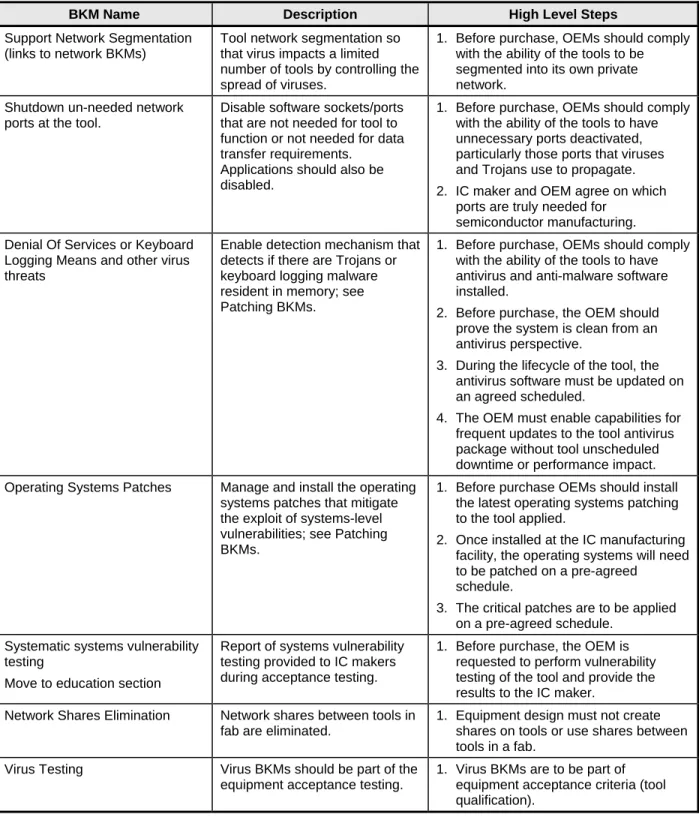
The goal of these BKMs is reducing downtime due to viruses by leveraging standard virus management techniques.
Table 3 Virus Management Best Known Methods
BKM Name Description High Level Steps
Support Network Segmentation (links to network BKMs)
Tool network segmentation so that virus impacts a limited number of tools by controlling the spread of viruses.
1. Before purchase, OEMs should comply with the ability of the tools to be segmented into its own private network.
Shutdown un-needed network ports at the tool.
Disable software sockets/ports that are not needed for tool to function or not needed for data transfer requirements.
Applications should also be disabled.
1. Before purchase, OEMs should comply with the ability of the tools to have unnecessary ports deactivated, particularly those ports that viruses and Trojans use to propagate. 2. IC maker and OEM agree on which
ports are truly needed for semiconductor manufacturing. Denial Of Services or Keyboard
Logging Means and other virus threats
Enable detection mechanism that detects if there are Trojans or keyboard logging malware resident in memory; see Patching BKMs.
1. Before purchase, OEMs should comply with the ability of the tools to have antivirus and anti-malware software installed.
2. Before purchase, the OEM should prove the system is clean from an antivirus perspective.
3. During the lifecycle of the tool, the antivirus software must be updated on an agreed scheduled.
4. The OEM must enable capabilities for frequent updates to the tool antivirus package without tool unscheduled downtime or performance impact. Operating Systems Patches Manage and install the operating
systems patches that mitigate the exploit of systems-level vulnerabilities; see Patching BKMs.
1. Before purchase OEMs should install the latest operating systems patching to the tool applied.
2. Once installed at the IC manufacturing facility, the operating systems will need to be patched on a pre-agreed
schedule.
3. The critical patches are to be applied on a pre-agreed schedule.
Systematic systems vulnerability testing
Move to education section
Report of systems vulnerability testing provided to IC makers during acceptance testing.
1. Before purchase, the OEM is requested to perform vulnerability testing of the tool and provide the results to the IC maker.
Network Shares Elimination Network shares between tools in fab are eliminated.
1. Equipment design must not create shares on tools or use shares between tools in a fab.
Virus Testing Virus BKMs should be part of the equipment acceptance testing.
1. Virus BKMs are to be part of equipment acceptance criteria (tool qualification).
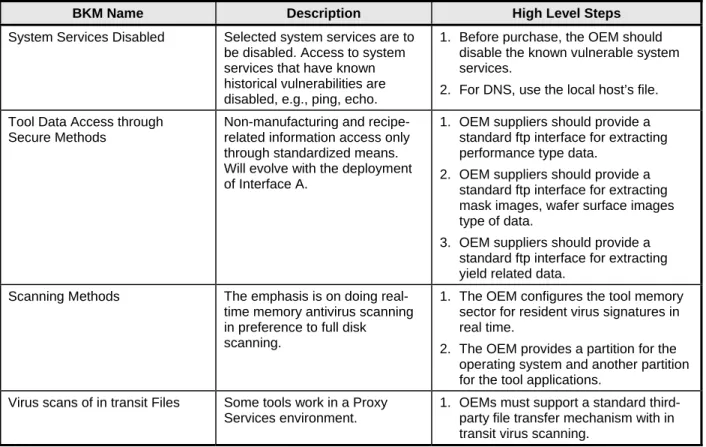
ISMI Technology Transfer #04104567C-ENG
BKM Name Description High Level Steps
System Services Disabled Selected system services are to be disabled. Access to system services that have known historical vulnerabilities are disabled, e.g., ping, echo.
1. Before purchase, the OEM should disable the known vulnerable system services.
2. For DNS, use the local host’s file.
Tool Data Access through Secure Methods
Non-manufacturing and recipe-related information access only through standardized means. Will evolve with the deployment of Interface A.
1. OEM suppliers should provide a standard ftp interface for extracting performance type data.
2. OEM suppliers should provide a standard ftp interface for extracting mask images, wafer surface images type of data.
3. OEM suppliers should provide a standard ftp interface for extracting yield related data.
Scanning Methods The emphasis is on doing real-time memory antivirus scanning in preference to full disk scanning.
1. The OEM configures the tool memory sector for resident virus signatures in real time.
2. The OEM provides a partition for the operating system and another partition for the tool applications.
Virus scans of in transit Files Some tools work in a Proxy Services environment.
1. OEMs must support a standard third-party file transfer mechanism with in transit virus scanning.
7.4 Patch Management Best Known Methods
The following is a method to leverage software currency to enable computer security. Table 4 Patch Management Best Known Methods
BKM Name Description High Level Steps
Demand for Patch Management Support
Ensure OEMs are aware of strict patch management requirements.
1. Ensure internal IC maker alignment on security.
2. Include requirements in capital equipment and procurement
specifications and in acceptance test. 3. Before shipping, OEMs must comply
with IC maker’s patch management policy.
4. Before shipping, make sure OEMs comply with shipping all systems with software in “Mainstream Support Phase.”
5. OEMs must provide IT support to the IC maker.
14
Technology Transfer #04104567C-ENG ISMI
BKM Name Description High Level Steps
Identify Patching Candidates Organize patching candidates based on internally developed criteria, e.g., usage threat exposure, testing requirements, priorities, performance, reliability, cost, and other business
conditions such as contractual obligations.
1. Inventory all tool computers in the enterprise including a list of tool owners or responsible administrators and OEM contacts.
2. Identify the systems that satisfy the criteria to meet security requirements. 3. Identify all computers that need to be
patched.
4. Identify computer systems that can be patched according to legal and contractual considerations, etc. 5. Group systems based on different
threat exposure levels, e.g., not networked, networked, mail, and internet enabled.
Implement Patch Management Infrastructure
Provide proper support so equipment is not exposed to cyber attacks and the environment supports ease of updating.
1. Implement up-to-date communication ron security patches by email, web pages, and others.
2. Create an internal software repository for easy download and deployment (e.g., web pages, file share, Windows Server Update Service (WSUS) a.s.o. Evaluate Security Bulletins Schedule regular meetings, based
on software suppliers’ notification cycle, to assess security bulletins. Provide prioritized list of updates to be made by the supplier and the IC maker. This work is integrated into the corporate initiative to protect the Intranet resources.
1. Identify to which systems the patch is applicable.
2. Identify the impact on the network (system down, data loss, higher traffic, etc.) if the vulnerability would be exploited.
3. Evaluate the potential distribution of threats (e.g., severity of threat identified, anonymous or valid login required, by email or automatically) and if an exploit is already available. 4. Evaluate any mitigating factors or
workarounds.
5. Determine an internal priority level for each security patch based on the criteria stated above.
Create Software Upgrade Plan For computers that need to be patched, identify the degree of software change and effort required.
1. Identify candidate equipment (e.g., a single system from each tool set). 2. Identify testing strategy based on
patch impact, e.g., scope of change, test plan, test cases, total test time, reboot requirement, expected time to deploy, roll back plan, short-term mitigation technique if long-term solution.
3. Identify timeframes for conducting the tests.
4. Notify tool owners and OEM contacts for certifying and testing.
ISMI Technology Transfer #04104567C-ENG
BKM Name Description High Level Steps
Execute Software Upgrade Perform the software upgrade. Because corporate IT has no access (organization scope) to most tool equipment, have the tool owners and/or OEM field service contacts for IT perform the upgrades.
1. Make available all recommended patches in a well-defined location for easy deployment.
2. Depending on the internal priority and contractual considerations, wait for the OEM’s certification for specific patches or proceed with testing immediately. 3. Schedule the equipment identified for
testing.
4. Perform the upgrade on targeted equipment.
5. Perform testing, collect results, and compare against desired results. If rollback is required, execute mitigation plan.
6. If testing is successful, proliferate enterprise-wide security upgrades. This is a major task that could cover multiple factories.
8 SUMMARY
The pro-action of network security makes equipment security a requirement. Virus protection is ultimately provided by a combination of network security, business processes, and keeping software current. The IC maker’s BKMs in this document are wide-ranging and include pro-activeness throughout network security, reducing the number of viruses in the cleanroom environment. Patching makes the equipment more resilient to cyber attacks.
International SEMATECH Manufacturing Initiative Technology Transfer 2706 Montopolis Drive Austin, TX 78741 http://ismi.sematech.org e-mail: [email protected]