Exploring User Interfaces for Search and
Content Based Clinical Decision Support
in Electronic Health Record Systems
Alexander Perry
Master of Science in Informatics Supervisor: Øystein Nytrø, IDI Submission date: June 2013
Abstract
Both electronic health records (EHR) and clinical decision support (CDS) are each important attributions to clinicians and clinical workflow. Electronic health records provide clinicians with crucial patient information at the point of care, while clinical decision support gives well-founded and well-documented clinical recommendations at the point of decision making.
This thesis explores how patient information from EHRs could be utilized as a basis for better and more effective decision support. Additionally, two methods of accessing decision support recommendations are created and studied. One is based on search, with known elements from common general and medical search interfaces. The other performs automatic ranking of relevant recommendations based on patient information from a popular norwegian EHR system.
To find out how these two prototypes should integrate and utilize information from an EHR system, a case-based experiment was conducted. This is a quali-tative measure of user feedback, with elements from quantiquali-tative research. User satisfaction were measured by using methods such as user testing, interviews and surveys.
User feedback suggest that clinical workflow have much to gain from integrating EHR with CDS, as well as computerizing and making clinical national recommen-dations available in an EHR context. It is also clear that elements like search and automation are important features in an integrated system, and further research of decision support may include an integration of these elements.
Sammendrag
B˚ade elektroniske pasientjournaler (EPJ) og klinisk beslutningsstøtte er hver for seg viktige bidrag til klinikere og klinisk arbeidsflyt. Elektroniske pasientjour-naler gir klinikere kritisk pasientinformasjon til rett sted og rett tid, og klinisk beslutningsstøtte gir velbegrunnede og godt dokumenterte kliniske anbefalinger p˚a beslutningspunktet.
Denne masteroppgaven omhandler hvordan pasientinformasjon fra EPJ kan benyttes som grunnlag for bedre og mer effektiv beslutningsstøtte. I tillegg er to metoder for ˚a tilgjengeliggjøre beslutningsstøtte-anbefalinger opprettet og studert. Den ene er basert p˚a søk, med kjente elementer fra felles allmenne og medisinske søkegrensesnitt. Den andre utfører automatisk rangering av relevante anbefalinger basert p˚a pasientinformasjon fra et populært norsk EPJ-system.
For ˚a finne ut hvordan disse to prototypene best kan integreres og utnytte in-formasjon fra en EPJ-system, ble et case-basert eksperiment utført. Dette er et kvalitativ m˚al av tilbakemeldinger fra brukerne, med elementer fra kvantitativ forskning. Brukernes tilfredshet ble m˚alt ved hjelp av metoder som brukertesting, intervjuer og spørreundersøkelser.
Tilbakemeldinger fra brukerne tyder p˚a at klinisk arbeidsflyt har mye ˚a tjene p˚a ˚a integrere EPJ med beslutningsstøtte, samt digitalisering av anbefalinger og ˚a gjøre kliniske nasjonale anbefalinger tilgjengelige i kontekst av elektroniske pasien-tjournaler. Det er ogs˚a klart at elementer som søk og automatisering er viktige funksjoner i et integrert system, og videre forskning for beslutningsstøtte kan om-fatte integrering av disse elementene.
Preface
This master thesis is the result of my master degree in Human Computer Inter-action (HCI) at the Norwegian University of Science and Technology. The thesis utilizes HCI in an interesting domain; health informatics. It was written as a part of the EviCare study, with help from DIPS AS.
I would like to thank my supervisor Øystein Nytrø for sharing his knowledge of and experience from health informatics, and Terje Rødsand for providing guidance and expertise regarding alternative usability test methods. DIPS, the Norwegian Knowledge Centre for the Health Services and others in the EviCare project gave valuable feedback and advice, and I submit my gratitude to them as well.
Friends and family also helped with their ongoing support, which is greatly appre-ciated.
Contents
1 Introduction 1
1.1 Context . . . 2
1.2 Report Outline . . . 3
2 Background 5 2.1 Electronic Health Record Systems (EHR) . . . 5
2.2 Clinical Decision Support (CDS) . . . 5
2.3 Clinical Guidelines . . . 6 3 Research Method 13 4 Problem Definition 15 4.1 Common Problems . . . 15 4.2 Project Description . . . 16 4.3 Research Questions . . . 16
5 State of the Art 19 5.1 Medical Information Retrieval . . . 19
6 Experiment Design 25 6.1 Goal . . . 25
6.2 Electronic Health Record System (EHR) . . . 25
6.3 Clinical Decision Support System (CDSS) . . . 26
6.4 Target Audience . . . 27 6.5 Patient Case . . . 27 6.6 Usability Testing . . . 28 6.7 Preliminary Survey . . . 29 6.8 Variables . . . 29 6.9 Hypothesis . . . 29
7 Prototypes 31
7.1 Guidelines and Recommendations . . . 31
7.2 Guideline Access using Search . . . 32
7.3 Automatic Guideline Ordering . . . 34
7.4 Integrating modules and DIPS . . . 35
7.5 Back End . . . 36 7.6 Front End . . . 40 8 Experiment Execution 41 8.1 Recruiting Participants . . . 41 8.2 Observation . . . 41 8.3 Usability Lab . . . 42
8.4 DIPS Test Hospital . . . 43
8.5 Google Drive . . . 43
8.6 Preliminary Survey . . . 44
8.7 Preparation . . . 45
8.8 Task Execution . . . 45
8.9 System Usability Scale . . . 46
8.10 Interview . . . 47
9 Results 49 9.1 Preliminary Survey . . . 49
9.2 Usability test . . . 52
10 Discussion 65 10.1 Guideline Access using Search . . . 65
10.2 Automatic Guideline Ranking . . . 67
10.3 Overall credibility . . . 68 11 Limitations 71 11.1 Prototypes . . . 71 11.2 Experiment . . . 74 12 Conclusion 77 12.1 Research Questions . . . 77 12.2 Process Evaluation . . . 80 13 Future Work 81 13.1 Guideline Access using Search . . . 81
13.2 Automatic Guideline Ranking . . . 85
13.3 Combining AGR and GAS . . . 87
13.5 Future Experiments . . . 89
A Forms vii
A.1 Tasks . . . vii A.2 Pre-study Form . . . x A.3 System Usability Scale Form . . . xi
B Figures xiii
B.1 Source code . . . xiii B.2 The Prototypes . . . xiv
List of Figures
1.1 Overview over this and adjacent projects . . . 2
2.1 Screenshot of recommendations for cholesterol lowering treatment, from Helsebiblioteket.no . . . 8
2.2 Grading system for knowledge basis used in guidelines, from Helse-biblioteket.no . . . 9
2.3 Grading of documentation used in guidelines, from Helsebiblioteket.no 10 5.1 Helsebiblioteket.no, stroke guidelines, secondary prevention . . . 20
5.2 Screenshot of Yahoo Directory showing various categories and sub-categories . . . 21
5.3 UpToDate search interface with a simplistic design . . . 23
5.4 Breadcrumbs in Windows Explorer . . . 24
5.5 Breadcrumbs at Helsebiblioteket.no . . . 24
6.1 Screenshot of DIPS with patient records . . . 26
7.1 Screenshot of recommendations for cholesterol lowering treatment, from Helsebiblioteket.no . . . 32
7.2 Screenshot of DIPS with Guideline Access using Search (GAS) . . . 33
7.3 Screenshot of Google Custom Search in GAS . . . 34
7.4 Guideline for cholesterol lowering treatment in GAS . . . 36
7.5 Overview over GAS, AGR and DIPS . . . 38
7.6 AGR modules initial design with and without Bootstrap styling . . 40
8.1 Screenshot of Tobii Studio . . . 42
8.2 Form answered by participants before usability tests . . . 44
8.3 Screenshot showing Tobii Studio with DIPS and a video of the par-ticipant in the lower right corner . . . 47
9.1 Chart showing what method of guideline fetching participants prefer 49 9.2 Chart showing participants class year . . . 50
9.4 Chart showing participants prior experience with stroke patients . . 51
9.5 Table of clinical domains practiced by the participants . . . 52
9.6 Screenshot of DIPS and tasks in a browser window . . . 53
9.7 Table of search terms and total frequency . . . 54
9.8 Comparison of GAS and Automatic Guideline Ranking (AGR) . . . 55
9.9 SUS scores from the AGR module . . . 56
9.10 SUS scores from the GAS module . . . 56
9.11 Chart showing which module the participants preferred . . . 58
9.12 Table showing recommendations for further treatment . . . 60
9.13 Google Autocomplete in action . . . 62
9.14 GAS with frequently searched terms . . . 62
10.1 Search cycle in GAS . . . 66
10.2 Screenshot from Tobii Studio with discharge notes in DIPS . . . 68
11.1 IE6 market share from jan. 2008 to jan. 2013 (source: NetMarket-Share (2013)) . . . 72
12.1 Navigational spectrum, with GAS and AGR as two extremes . . . . 77
13.1 GAS with search suggestion (”Did you mean?”) . . . 83
13.2 GAS with frequently searched terms . . . 84
13.3 Mockup of a navigational menu for AGR . . . 86
13.4 Mockup of AGR with navigational menu . . . 87
A.1 Form answered by participants before usability tests . . . x
A.2 System Usability Scale (SUS) form . . . xii
B.1 PHP redirect script . . . xiii
B.2 XML recommendation structure . . . xiii
B.3 AGR module initial design with Bootstrap styling . . . xiv
B.4 AGR module without Bootstrap styling . . . xv
B.5 Screenshot of DIPS . . . xvi
B.6 Screenshot of DIPS with GAS . . . xvii
B.7 Guideline for cholesterol lowering treatment in GAS . . . xviii
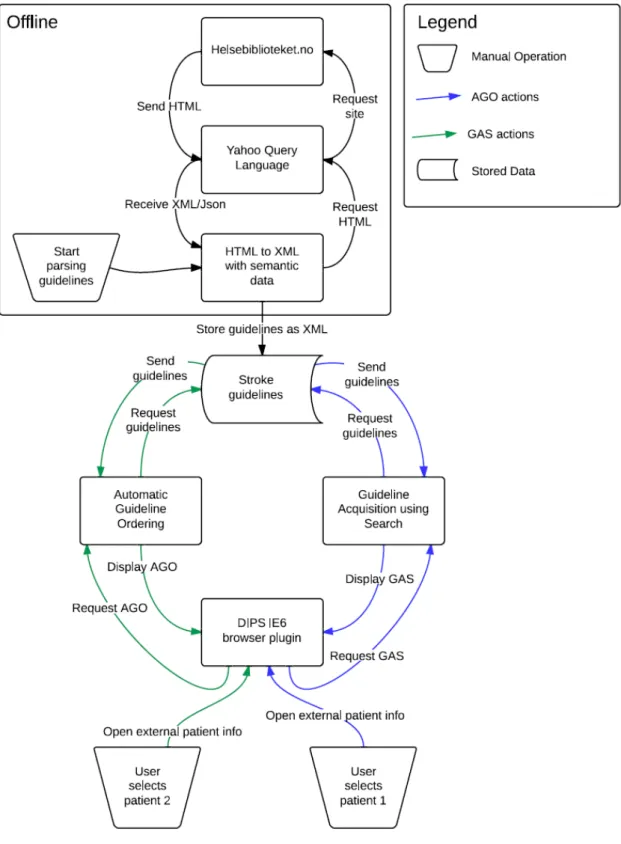
B.8 Overview over this and adjacent projects . . . xix
Acronyms
CDSS Clinical Decision Support System
CDSSs Clinical Decision Support Systems
CDS Clinical Decision Support
EPJ Electronic Patient Journal
DIPS Distribuert Informasjons- og Pasientdatasystem i Sykehus
AGR Automatic Guideline Ranking
GAS Guideline Access using Search
EBM Evidence Based Medicine
EHR Electronic Health Record
NSEP National Centre for Electronic Patient Records
SUS System Usability Scale
RTA Retrospective Think Aloud
IE6 Internet Explorer 6
IE Internet Explorer
HTML Hyper Text Markup Language
CSS Cascading Style Sheets
NOKC Norwegian Knowledge Centre for the Health Services
GCS Google Custom Search
XML Extensible Markup Language
YQL Yahoo Query Language
API Application Programming Interface
SQL Structured Query Language
Chapter 1
Introduction
This thesis is part of a larger research project called EviCare (2013), which focuses on integrating evidence-based medicine in clinical information systems. Contribu-tors include Innlandet hospital trust, Norwegian Knowledge Centre for the Health Services, Norwegian University of Science and Technology (Department of Com-puter and Information Science), Datakvalitet AS and Distribuert Informasjons- og Pasientdatasystem i Sykehus (DIPS). EviCare’s main goal is to
develop methods and technology for providing Evidence Based Medicine (EBM) at the point of care, integrated with an Electronic Health Record (EHR) or other health information systems directly involved in the clinical process, resulting in higher quality of care and a more detailed, transparent documentation of care processes. (EviCare, 2009)
Other projects under the EviCare umbrella focus on parsing and tagging of Electronic Patient Journal (EPJ)s with semantic metadata, while this project ex-plores how this data is best used to support clinicians where and when they make their clinical decisions (clinical decision support).
This thesis will focus more on one of EviCares subgoals, which is to createpractical and usable guideline interfaces - both to healthcare providers and to patients (Evi-Care, 2009). More specifically, it will focus on creating varying prototype modules integrated in a clinical information system developed by DIPS. The purpose is to present a set of relevant national clinical recommendations based on selected patient information. This patient information is parsed by other systems in the EviCare project, which then defines recommendation relevance and presents the results to the prototypes in this project.
1.1
Context
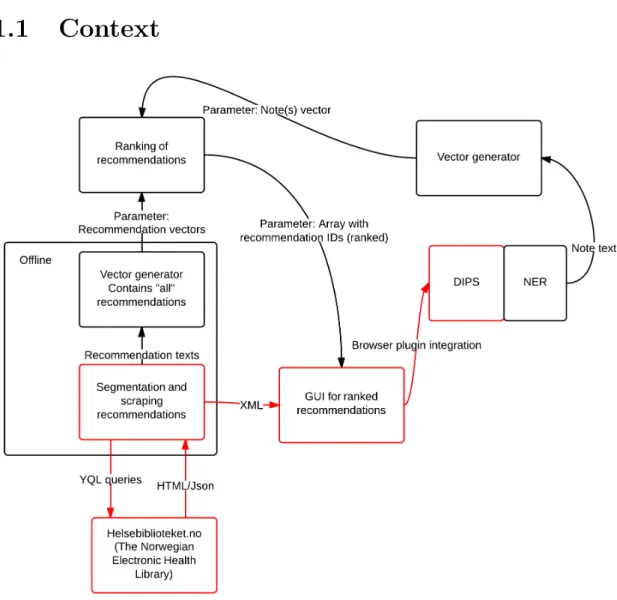
Figure 1.1: Overview over this and adjacent projects
Figure 1.1 represents an overview over the project and adjacent projects under the EviCare umbrella. Boxes and arrows marked in red belongs to this project. An offline script scrapes1 guidelines from a webside controlled by Norwegian
Knowl-edge Centre for the Health Services (NOKC) called Helsebiblioteket.no (or The Norwegian Electronic Health Library). The scraped results is stored in Extensible Markup Language (XML) format and sent to a prototype website which presents them in ranked order in a Graphical User Interface (GUI). This prototype is then integrated into the DIPS EHR system, and this integrated system is subject to usability testing and evaluation.
Other notable projects include tagging of electronic patient notes (or electronic
patient records), vector generating from these notes, vector generating based on recommendations, and actual ranking of recommendations. These ranked recom-mendations are presented in a array with recommendation IDs, which is compatible with prototypes in this project.
1.2
Report Outline
Following is a presentation of the different chapters with a consise description.
Background
Describes the underlying terminology and relevant research projects in the different domains this thesis visits.
Research Method
Works as a baseline for the research conducted in this project, with a description of the chosen research method.
Problem Definition
Defines concrete research questions based on a problem description.
State of the Art
Outlines the current sitation in domains relevant to this master project.
Experiment Design
Specifies research method by defining a concrete research plan.
Prototypes
Provides a description of the prototypes created, and the implementation of these prototypes.
Experiment Execution
This chapter further elaborates on the experiment by describing the execution in detail.
Results
Lists all relevant data results gained from the research.
Discussion
Evaluates and analyse the results in the preceding chapter.
Limitations
Lists and describes key prototype and research method limitations.
Conclusion
Links research questions with discussion, evaluates the project outcome and pro-cess.
Future Work
Chapter 2
Background
The following background research and definitions provides a base for further ex-ploration of clinical decision support in electronic health record systems. First, electronic health record systems (EHR) are presented and defined, then clinicial decision support systems are explained, followed by an description of clinical guide-lines (used for clinical decision support).
2.1
Electronic Health Record Systems (EHR)
Gunter and Terry (2005) defines electronic health record systems as longitudinal collection of electronic health information about individual patients and popula-tions. These records often include patients medical history, laboratory results, and personal information like gender, date of birth, social security number and weight. This information is collected from paper and electronic medical records and usually made available for clinicians at hospitals and clinics through networked information systems. These networks range from small and simple networks with few hospitals to wide-range networks on a national basis.
2.2
Clinical Decision Support (CDS)
Clinical decision support (CDS) help clinical workflow by delivering decision sup-port at the point of decision making, to improve patient care. (Garg et al., 2005) Dr. Robert Hayward of the Centre for Health Evidence suggest that clinical deci-sion support may be the missing link between better health information and better health. (Hayward, 2004)
Hunt et al. (1998) defines Clinical Decision Support as
decision making, in which characteristics of individual patients are used to generate patient-specific assessments or recommendations that are then presented to clinicians for consideration
Earlier studies of Clinical Decision Support Systems (CDSSs) are primarly quantitative studies of the effect of such systems on patient care (Garg et al., 2005), or the actual Clinical Decision Support System (CDSS) itself. (Berlin et al., 2006) They often leave out or neglect qualitative measures like user satisfaction (where the user is either the patient or the clinician) and the clinician’s competence level. Kawamoto et al. (2005) did a systematic review of randomised controlled trials of clinical decision support systems, to identify features which improves clinical practice. Findings suggest that the following features significally improves patient care:
• Computerizing clinical decision support
• Delivering decision support at the point of decision making
• Automatic integration of decision support in clinical workflow
• Provide actionable recommendations
It is clear that organizing, collecting and presenting clinical information in an effective and usable manner enables higher quality clinical workflow. It will also most certantly improve information flow, and availability. Another notable finding is that systems with automatic deliverance of clinical decision support had higher success rates than systems where clinicians had to seek out information by them-selves. The link between automatic decision support and effective decision support systems is so strong that Kawamoto et al. (2005) suggest implementation of such features in systems wherever it is possible. Todays case is however so that clin-ical decision support is primarly done through manual systems, or computerized systems with no automated workflow integration and absent emphasis on usability.
2.3
Clinical Guidelines
Clinical guidelines are designed to give clear and concrete recommendations with-out any form of bias by the source. Guidelines form a link between clinical re-search and clinical practice by adding evidence-based care to clinical workflows. A committee to advise the public health service in USA have defined clinical guidelines as systematically developed statements to assist practitioner and patient decisions about appropriate health care for specific clinical circumstances. The pri-mary method of integrating clinical guidelines into patient care is often by analog
methods like through libraries, or through online services like Helsebiblioteket.no. Helsebiblioteket.no is a initiative taken by the NOKC, which develop norwegian clinical recommendations using EBM and makes them available at the point of care. NOKC was established in 2004 and is organized under the Norwegian Direc-torate of Health. (The Norwegian Knowledge Centre for the Health Services, 2004) Recommendations are based on revised and aggregated research results. Quality measures of this research include systematical review of different relevant sources.
2.3.1
Stroke Guidelines
This project will base the clinical decision support on the Norwegian national stroke recommendations found at Helsebiblioteket.no (link). These guidelines are chosen based on the well-documented research groundwork from Helsebib-lioteket. Stroke recommendations and guidelines are based on two national guide-line databases and supplementing research results. (Hill, 2008; for Chronic Condi-tions , UK) The selected group of guidelines is even more specific, only guidelines relevant to secondary treatment of stroke patients are used. These guidelines are less controversial than several of the other national norwegian guidelines.
2.3.2
Grading
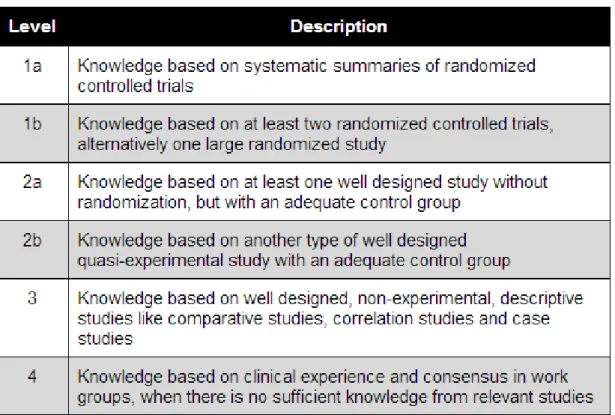
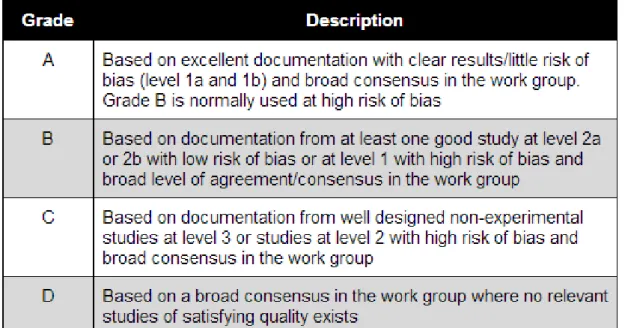
The grading of recommendations are based on a grading model developed by a scottish guideline organization called Scottish Intercollegiate Guidelines Group (SIGN) (Healthcare Improvement Scotland, 2013). Knowledge basis is graded per recommendation, on a level basis. Figure 2.3 and 2.2 shows the breakdown of this grading system, originally from Helsebiblioteket (2013) and translated into English.
The different grades are developed by multiple work groups comprised of clini-cal experts, which have evaluated the documentation strength with ethiclini-cal, polit-ical and econompolit-ical circumstances in mind.
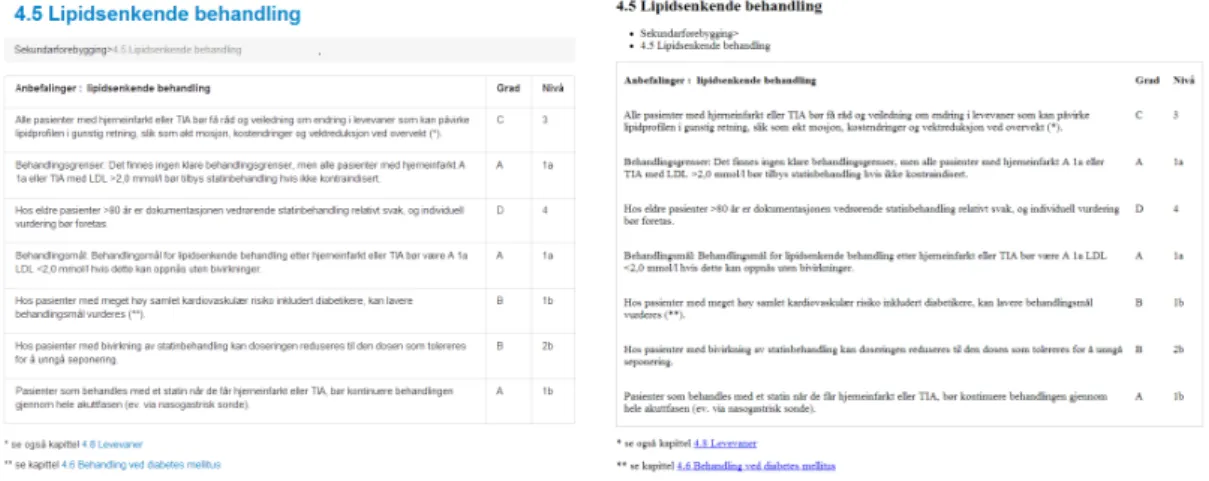
Figure 2.1: Screenshot of recommendations for cholesterol lowering treatment, from Helsebiblioteket.no
Figure 2.2: Grading system for knowledge basis used in guidelines, from Helsebib-lioteket.no
Figure 2.3: Grading of documentation used in guidelines, from Helsebiblioteket.no
2.3.3
Key Features
Guideline use does not guarantee increased quality in patient care. In order to achieve high quality care, recommendations must be consise, non-conflicting, ac-cepted by clinicians/the users, and integrated into the clinical workflow. (Boxwala et al., 2001) Integration into the clinical workflow could be solved by integrating guideline browsing and/or search interfaces into CDSSs. Main reasons for guide-lines with insignificant influence on patient care quality include (but are not limited to): (Cabana et al., 1999)
1. Lack of awareness
clinicians are unaware of the guideline’s existence.
2. Lack of agreement
clinicians simply does not agree with given recommendations.
3. Inertia of previous practice
Lack of awareness could be linked to how easy the guidelines are to obtain. If clinicians have to discover guidelines almost randomly by browsing through a set of trustworthy sources, then the required effort is possibly to demanding, and clinicians will discard the search.
Lack of agreement are an important point, as not all guidelines are deemed correct by all clinicians. Many (including stroke) guidelines are however based on credible and tested background research with detailed documentation. Guide-lines may also produce inconsistency in Clinical Decision Support (CDS) and some guidelines even give conflicting recommendations. Systems will need to be trans-parent with both background research and documentation, without overflowing clinicians with information.
Inertia of previous practice are somewhat related to the previous point, where sources are deemed non-credible by clinicians. In these situations, clinicians will most likely discard recommendations, and use their own experience.
Chapter 3
Research Method
In research, there is two common methods for data collection and analysis. The first focuses on data based on numbers, or quantitative data. Data collection in this research method are primarly done through means of experiments and sur-veys. (Oates, 2006, chapter 17) Experiments arestrategies which investigates cause and effect relationships, seeking to disprove a casual link between a factor and an observed outcome. (Oates, 2006, chapter 9) The goal of a survey is to collect a large amount of data in a standarized and systematic way. Generalizable data is often the focus point.
Qualitatative data collection and analysis focus on all non-numeric data such as data from interviews, websites and developer models. (Oates, 2006, chapter 18) Common methods of data obtainment include case studies, and ethnogra-phy. Ethnography describes people or cultures and their norms, while case studies focuses on one instance; either an organization, a development project or an in-formation system. Data analysis in qualitative methods may include quantitative analysis methods.
A combination of both qualitative and quantitative methods are used in this re-search project, by conducting a exploratory case-based experiment. Case-based experiment focuses on a given case, which in this project is a CDSS. But it also features some experiment based methods, with hypothesis and controlled variables. The hypothesis here is that user satisfaction will increase with clinical decision sup-port integrated into electronic health record systems. In addition, theory suggest that clinicians would adopt computerized clinical decision support into their work-flows when certain factors are met. Factors includeavailability,credibility, and
relevance.
The experiment is meant to investigate changes in user satisfaction, and perceived availability, credibility and relevance when using different means of acquiring clin-ical guidelines. An EHR system is the system used in testing, while the variable is an integrated module for guideline obtainment. This module is the independent
variable in the experiment, meaning that it is changed under controlled circum-stances, in order to produce different results. Variation lies in navigation, where one variant is to be implemented with a search-based interface, while the other is to be implemented using automatic content-based interaction. Content-based, meaning based on electronic health records from the EHR system. These results are then analysed, and the analysis provides evidence which may confirm or con-tradict the hypotheses. The purpose of this experiment is to do exploratory work, and then provide recommendations for future tests and future systems based on the resulting data. System Usability Scales are used for supplementing data col-lection.
Results are defined by self-reporting data, and data is collected by using usability tests and interviews. The group of participants is as homogenous as possible under these circumstances. They are medical students from the same medical study at NTNU, but with differing practical clinical experience. Recruitment of partici-pants is somewhat at random, with the exception of specifying class year. Their responses constitutes the independent variables, which means variables that can not be controlled by adjusting the circumstances. Experiment design is explained more thoroughly in chapter 6.
Chapter 4
Problem Definition
This chapter further elaborates on findings described in chapter 2, and defines the problem this project sets out to solve in the form of research questions.
4.1
Common Problems
Chapter 2 stated several problem related to clinical decision support, and con-cluded that clinical decision support is as good as useless without certain features. These features include (but are not limited to)computerization,workflow inte-gration, andavailability, and provide a basis for further research in this project.
4.1.1
Workflow Integration
This exploratory research tries to find out how clinical decision support systems best can be integrated in a clinical workflow, and use elements from this workflow to provide decision support.
4.1.2
Computerization
Clinical decision support is widely used, but many solutions depend on manual data collection with one local source of information. Digital solutions does exist, but information here may contradict local practice at the site of decision making. Other computerized information systems does exist, and could provide a basis for a clinical decision support system.
4.1.3
Availability
Navigation is often cumbersome when information sources for recommendations are spread out over analog sources such as libraries, and digital sources such as
differing online databases like UpToDate (2013) and Helsebiblioteket.no.
Different sources for guidelines and recommendations also often use several differ-ent means of navigation, which gives clinicians inconsistdiffer-ent interfaces in the tools they rely on. Guidelines and recommendations become unavailable to some extent for clinicians as a consequence of incosistent (and sometimes bad) interaction de-sign. Helsebiblioteket.no is the main source of national guidelines in Norway, and they operate with several different interfaces based on what type of guidelines and recommendations clinicians are seeking.
4.2
Project Description
The goal is to explore how search-based and content-based interfaces to national stroke guidelines can best utilize information such as EHR in an integrated en-vironment. The stroke guideline contains many, fine-grained, recommendations for different problems, different phases of the disease, different patient states and preferences.
The method is to test different levels and modes of user interaction, as well as dif-ferent rankings and presentations of the recommendations in the stroke guideline. In order to do realistic testing, a web-based interface will be fully integrated in an existing and working EHR system (DIPS) with a comprehensive and truthful patient case. Testing will involve medical students with hospital experience, an will be performed in the IDI (Department of Computer and Information Science) usability lab for health information systems. The hypothesis is that a higher level of user interaction in CDSSs affects user satisfaction in a positive way and, as a consequence, the overall usability will improve.
4.3
Research Questions
The idea is to test integrated CDSS (in an EHR) and see how different variations in user interaction affect users, usability and workflow. These are the main two research questions to be answered in this thesis, with specifying subquestions;
RQ1 How can a CDSS best utilize patient information as a context for ranking relevant recommendations?
RQ1.1 Which of search-based or content-based recommendation ranking gives best user satisfaction?
RQ2.1 How does clinical users respond to integrated decision support in the EHR system?
RQ2.2 How does automated computerized decision support compare to manual decision support?
Chapter 5
State of the Art
Chapter 2 introduced terms such as clinical decision support, electronic health records and clinical guidelines. This chapter describes the currentState of the Art1
of medical information retrieval methods which utilize such systems and features, with focus on functionality and design.
5.1
Medical Information Retrieval
Medical search engines are widely used, but there are few qualitative studies on the effects of integrating said search engines into CDSSs and guideline retrieval. Helsebiblioteket.no is a collection of Norwegian national guidelines, and provides additional links to other guideline databases. The website utilizes different nav-igational interfaces such as search and manual browsing. Guidelines for stroke treatment, prevention and rehabilitation are grouped in categories based on time of care. These categories function as chapters, where different guidelines function as subchapters. Figure 5.1 shows the interface for the national stroke guidelines, and the category for secondary preventative guidelines is selected.
1Definition of SoA:the highest level of development at a particular time (especially the present
Figure 5.1: Helsebiblioteket.no, stroke guidelines, secondary prevention
5.1.1
Clustering
Clustering is another way of organizing items, where the actual presentation of information is somewhat similar to structured guided browsing and searching.
Items are grouped together in different categories, by how alike the different items are. Clustering are often automatic, and is achieved by analyzing phrases or words. (Cutting et al., 1992) They are then presented in categories relevant to their content. This automation is a clear advantage over structured guided browsing, but clustured information retrieval often involve unclear or illogical categories and labeling. (Baeza-Yates and Ribeiro-Neto, 2011, page 39)
5.1.2
Structured Guided Browsing
Structured guided browsing is also often used in websites like Helsebiblioteket, where different documents are collected in parent categories. Helsebiblioteket does noe utilize structured guided browsing, meaning that the organization of guidelines deviate from other structured hierarchies. Structured guided browsing means browsing through a hierarchy of information using data structures as a guiding tool. Data in such models are often structured in hierarchies, or in tree structures. Directories like Yahoo (2013a) uses structured guided browsing with a tree structure, where parent domains such as Arts and Humanities contain child nodes with other sub-domains such as Photography, History, and Literature. A directory is basically a collection of documents, where the documents are collected in parent categories.
Figure 5.2: Screenshot of Yahoo Directory showing various categories and subcat-egories
5.1.3
Search
Directories offers precision when searching for information, but offer little to no recall. Low recall is due to low web coverage, and less than 1% of all web pages are covered. (Baeza-Yates and Ribeiro-Neto, 2011, page 499-500). Search based browsing covers a lot more, and directories are often combined with search solu-tions to improve recall. Search engines are today clear leaders when it comes to information retrieval on the world wide web. Google claimed to have indexed 26 million sites in 1998, which increased to one billion sites in 2000. In 2008, Google hit the one trillion mark, and that is only a part of the whole web. (Alpert and Hajaj, 2008)
A recent survey of nine similar online tools for medical information retrieval found that nephrologists2 use well known medical information systems like UpToDate (guideline collection) (UpToDate, 2013) and PubMed (search interface to a med-ical research database) (US National Library of Medicine, 2013) well as general search engines such as Google Search. (Shariff and Garg, 2011) These results show that it is possible to create medical information retrieval solutions by utilizing search as a way of finding relevant information. It is important to note though, that this particular study does not focus on clinician satisfaction and how much the clinicians trust these sources. Medical information retrieval sites could clearly benefit from other large information sources. Google is the clear leader on this front, and the simple yet effective design of Google Search is a significant reason for the site’s popularity. The site uses the familiar search rectangle, which has been used almost since day one, and is being used by several other search providers. This design element is dubbed The Search Rectangle Paradigm in (Baeza-Yates and Ribeiro-Neto, 2011, page 481-482). With little excessive information, any person is able to find what they want with little to no training. Previously mentioned UpToDate has incorporated this simple design to some degree, while also incorporating topic search, which enables clinicians to define topics for their search queries.
Figure 5.3: UpToDate search interface with a simplistic design
Simple design creates a lower barrier, which is useful as studies show that lack of training is one factor that hinders clinicians when searching for information. (Doney et al., 2005) In order to make a successful medical information source with a search interface, designers of those sites needs to focus on the users. Clinicians are the target audience in this scenario, and they need effective and trustworthy sources. A time consuming information retrieval process with results overflowing with conflicting and thus unreliable information are the main reasons for clinicians skepticism. (Scott and Fairweather, 2000) The clinicians needs relevant informa-tion and clinical decision support at the point of care, they normally have little to no time for browsing medical sources at libraries to gain knowledge. (Lappa, 2005)
5.1.4
Context in Browsing
A downside to manual browsing is that users risk losing context when diving deep into different substructures. Helsebiblioteket.no features a element in each chapter called breadcrumbs, which show users the chapter context, with preceding chapters. Breadcrumbs depicts the path from the root node to the selected node, as shown in these screenshots from Windows Explorer in Windows 7 and from Helsebiblioteket.no:
Figure 5.4: Breadcrumbs in Windows Explorer
Chapter 6
Experiment Design
The experiment design is based on earlier master theses in the EviCare project by Terje Røsand (2012) and Zheng Wang (2012). Terjes thesis focused on methodol-ogy around usability testing with think aloud and eye tracking while Zheng Wangs thesis focused on the actual integration of clinical guidelines and electronic patient journals, and more specifically on requirements in that domain.
6.1
Goal
This experiments goal is to measure user satisfaction of a CDSS integrated with an EHR, and at the same time look at how this integration may affect clinical workflow. Two different means of guideline navigation in clinical decision support are measured against each other mainly through user testing and retrospective interviews, with system usablity scales (SUS) as supplement.
6.2
Electronic Health Record System (EHR)
The chosen EHR system is created and maintained by DIPS, and used in a range of hospitals and clinics in the norwegian health sector, with notable hospitals like St. Olavs Hospital in Trondheim, and Akershus University Hospital. In addition to delivering electronic health records at the point of care, the system also offers a patient administration interface. DIPS EHR enables easier clinical collaboration and patient information access and offers features such as multimedial information and speech recognition for digital dictation.
Figure 6.1: Screenshot of DIPS with patient records
6.3
Clinical Decision Support System (CDSS)
The case in this case-based experiment is not the DIPS EHR system, but rather a CDSS module integrated in this system. Two different prototype modules are to be created and integrated into the EHR system. One with search-based navigation, and another content-based system. Search-based means greater user interaction, where clinicians would define their own searches based on health record informa-tion in the DIPS EHR system. Content-based means little to no user interacinforma-tion. Guidelines are presented using data from a ranking algorithm, and presented in ranked order based on the content in the selected patients electronic health record. Both prototypes presents stroke guidelines described in chapter 2.3 to the clini-cians. The technical implementation of both guidelines are also described further in chapter 7.
6.4
Target Audience
The DIPS system is intended to be used by hospital clinicians, nurses, physicians and other health personnel required by law to maintain a record of patient care and treatment. As seen in chapter 2, experienced clinicians often weigh their own opinion more than external recommendations like the national guidelines this ex-periment utilizes. Nevertheless, the target audience for this exex-periment is recently graduated clinicians, since they are easier to recruit. If experienced clinicians trust their own opinions and experience more, then inexperienced students may have more of an open mind towards new and external input.
Clinicians in also often have tight schedules, and therefore are less likely to partake in such experiments as this. While students often have the same problems with tight schedules, they are more available. They also frequent the hospital buildings where the usability lab is located. Since it is important to recruit clinicians with actual experience from practical work, the target group were adjusted to include only medical students from third grade to sixth grade. These students have also gained sufficient expertise on clinical guideline use from several courses at NTNU.
6.5
Patient Case
To make this experiment as realistic as possible, a patient case with discharge notes, lab values and other relevant information is used. This patient case is re-freshed and slightly modified from a previous experiment in the EviCare project. Although only one patient case is used, there is two patient entries in the DIPS sys-tem. One patient were called “Stein Henriksen” and one called “Vidar Havnut”. The former corresponds with the search-based interface, while the latter corre-sponds with the content-based list of guidelines. Participant were presented the following patient case before the usability test, in norwegian:
Pasienten er en mann født 20.06.1961, og fikk et hjerneslag for to ˚ar siden. P˚a Rikshospitalet ble han behandlet for ˚apen foramen ovale. Han har vært p˚a poliklinikken to ganger tidligere, og dette var det tredje besøket. Hans LDL kolesterolniv˚a var p˚a 2,4.
I følge retningslinjene, skal alle pasienter som har f˚att hjerneslag og har et LDL-niv˚a over 2,0 bli tilbudt statinbehandling, noe som er et lipidsenkende legemiddel.
6.6
Usability Testing
Usability is defined by Nielsen (2012) as aquality attribute that assesses how easy user interfaces are to use. Usability testing is a method of studying usability of a given user interface. The most effective and advantegeous method of usability testing is user testing. User testing involves testing the user interface with users representative for the target audience of the test object. These user tests are often conducted in usability labs, and data collection is done through observation. The usability evaluation in this experiment is done mainly user testing and interviews, and are performed at a usability lab.
A usability test is conducted by giving the user a set of actions/tasks to perform and then observe the user without (or with little) interruption. These tasks are predefined and based on previous observations of clinicians workflow from earlier research projects. The target audience are clinicians, and two different prototype alternatives are created based on the research questions.
6.6.1
Usability
Usability is defined by the International Organization for Standardization in ISO 9241-11 as the extent to which a product can be used by specified users to achieve specified goals with effectiveness, efficiency and satisfaction in a specified context of use (Iso, 1998) (Nielsen, 2012)
6.6.1.1 Effectiveness
It is common to measure the effectiveness of a system by measuring the users ability to carry out a given set of tasks. Accuracy is also a common measurement unit for determining the effectiveness.
6.6.1.2 Efficiency
Efficiency is often measured with task completion time; the amount of time the user spend per task. Number of completed tasks in a given time period is also a common method of measurement.
6.6.1.3 User Satisfaction
User satisfaction is an important factor in usability research, and this qualitative way of measuring usability is more relevant to the overall goal in this experiment.
6.6.2
Think Aloud and Retrospective Think Aloud
Think aloud methods are often used in connection with usability testing. Test users are encouraged to verbalize their thoughts while performing tasks. This method were first introduced by Lewis (1982), and later reviewed by Lewis and Rieman. (Lewis and Rieman, 1993). This method is so common due to its effectiveness when it comes data gathering about factors that affects satisfaction, effectiveness and efficiency. Think aloud have to be used in combination with video and audio recording, or note taking (less effective), in order to fully utilize the method.
6.7
Preliminary Survey
Participants were asked to answer a simple preliminary survey, which gathered data about their previous experience in relation to stroke patients and guideline use. It also mapped their age, gender, name and class year. The purpose of this survey is to map prior experience with clinical guidelines and user habits when using clinical decision support. The goal is to see what methods of accessing guidelines participants in the experiment prefer, and how much they use clinical guidelines as decision support in general.
6.8
Variables
Experiments are conducted by alteringindependent variables to see how the depen-dent variables are affected. Independent variables include variables that are under control, such as the CDS prototype modules in this experiment. One module is search-based, and another is content-based (based on ranked guidelines which in turn is based on content) as mentioned in chapter 3. The dependent variables are not controllable, and clinicians self-reporting data is the dependent variables in this experiment. This means that feedback from the interviews, usability tests, surveys and forms act as dependent variables.
6.9
Hypothesis
The hypothesis here is that features with automated decision support such as the content-based solution (with pre-ranked guidelines based on EHR content) gives a better user satisfaction than the search-based one. This is only true if the content-based system inhibits a non-intrusive design and offers what clinicians see as relevant guidelines.
Another hypothesis is that computerized integration between EHR and CDS cre-ates a workflow which clinicians prefer over manual decision support. Manual meaning decision support by means of external digital guideline collections, or accessing physical guideline collections.
Chapter 7
Prototypes
In order to see what differences in guideline navigation does to user satisfaction, it is necessary to test solutions with varying navigational methods. Chapter 5 mentions search and tree structured browsing, two different possible solutions for accessing clinical guidelines. To measure what affect these features have on clin-ician workflow and user satisfaction, they need to be separated. Therefore, one prototype1 is created for each feature; one search-based and one content-based. Another goal of this exploratory research is to see how much users trust automated solutions in integrated clinical decision support. The prototype which provides decision support through browsing receive ranked lists of guidelines. This list is generated based on patient content in EPJs. The prototype use this list to present relevant guidelines.
These two prototypes are to be integrated into a system for EHRs, created by DIPS. Each prototype module is accessed through a browser plugin, and the search module is called Guideline Access using Search or GAS for short. The module with automated decision support is called Automated Guideline Ranking or AGR for short. Refer to the list of Acronyms for an overview over this and other acronyms used in this thesis (or just click the acronyms in the text when reading the pdf). On the back-end, a system parses guidelines from Helsebiblioteket.no. (The Norwegian Knowledge Centre for the Health Services (NOKC), 2013)
7.1
Guidelines and Recommendations
Guidelines are parsed from Helsebiblioteket.no as a table, where each row repre-sents a recommendation. The table content is the only consistent element being used for this experiment, presentation and styling is altered. Figure 7.1 shows
the original guideline for cholesterol lowering treatment. Each row in the table represents a recommendation, with grading and level information.
Figure 7.1: Screenshot of recommendations for cholesterol lowering treatment, from Helsebiblioteket.no
7.2
Guideline Access using Search
GAS features a simplistic user interface, inspired by the rectangle paradigm used in Google Search and UpToDate. The rectangle paradigm is mentioned in chapter 5.1. Google Custom Search is used as a basis for the search functionality, due to more effective implementation.
The most effective and feature rich way to implement this is to use a custom search provided by Google.
Figure 7.2: Screenshot of DIPS with GAS
7.2.1
Google Custom Search
Google Custom Search (GCS) features a simple search interface, very similar to the official Google Search user interface. It uses the search rectangle paradigm, where the most dominant element in the GUI is an input box for search queries. GCS enables customization through a simple web interface, where developers can do simple stylistic and functionality adjustments. Google Custom Search (2013) The functionality features include (but are not limited to) defining and selecting synonymous terms, selection of sites to crawl2, and custom autocompletion. In
GAS, custom synonyms are used with clinical terms.
2Definition of web crawling: Traversing web sites systematically for the purpose of web
Figure 7.3: Screenshot of Google Custom Search in GAS
URLs to the guidelines in the result list are blanked out, to remove irrelevant and confusing elements. Advertisements are also obviously disabled, as this would greatly reduce credibility and defy the simplistic design.
7.3
Automatic Guideline Ordering
AGR are a more static module than GAS, only displaying the parsed guidelines in a specific order. The purpose of AGR is to explore how users interact with automated decision support, ie. automatic access to relevant recommendations. Another module in the EviCare project features an algorithm where guidelines are ranked based on tagged EPJs in the DIPS system. AGR requires input in form of an array of recommendation IDs, and the order in the array denotes the guideline order in the module interface.
Adjacent projects ranking algorithms and EPJ tagging are finished in parallell with this project. Therefore, a pre-determined static array list of ranked recommenda-tions is created for testing purposes. Relevance to the patient case are pre-defined by clinicians, and guidelines are ordered as following:
1. Cholesterol lowering treatment (Lipidsenkende behandling)
2. Blood pressure lowering treatment (Blodtrykssenkende behandling)
3. Secondary prevetion of cerebral hemorrhage (Sekundærforebygging ved hjerneblødning)
5. Elucidation for secondary prevetion (Utredning for sekundærforebygging)
6. Antithrombotic treatment (Antitrombotisk behandling)
7. Diabetes mellitus and treatment (Behandling ved diabetes mellitus)
8. Carotisstenose and treatment (Behandling ved karotisstenose)
9. Living habits (Levevaner)
10. Secondary treatment, pregnancy and breastfeeding (Sekundærforebygging ved graviditet og amming)
A problem with users browsing through results is that users often lose per-ception of context, which is discussed further in chapter 5.1. AGR is designed to show contextual information both through chapter headings and breadcrumbs, to combat this issue.
7.4
Integrating modules and DIPS
Decision support are not at all integrated in to the DIPS EPJ system today, and clinicians are forced to either rely their own (or colleagues) experience and knowl-edge, use static sources like the hospital library, or look up guidelines through several online sources. This affects clinicians workflow to a certain degree, by taking up time which could have been used on patient care, and by reducing moti-vation to update clinical practice by using modern and verified recommendations. Systems found at sites like PubMed (US National Library of Medicine, 2013) and Helsebiblioteket.no (The Norwegian Knowledge Centre for the Health Services (NOKC), 2013) could easily be integrated into CDSSs like the DIPS system, and therefore be integrated into clinicial workflow.
The DIPS system features a module-based web browser plugin, which is set to open a given web address controlled by National Centre for Electronic Patient Records (NSEP). A PHP-script is located at this web address, and the purpose of this script is to redirect users to either two of the prototype modules. It de-cides based on a patientID, which is given as a parameter. The two modules are linked to two test patients, where patient one (Stein Henriksen) has a patientID of
1000270and patient two (Vidar Havnut) has a patientID of 1000218. The two
modules are temporarily hosted at NTNUs servers, for easy access during tests. Test participants are not affected by this, as the browser plugin only displays the actual site, and removes other non-relevant information like URLs. The redirect script is shown in figure B.1. The modules are located in a windows calledexternal patient information
Figure 7.4: Guideline for cholesterol lowering treatment in GAS
7.5
Back End
Guidelines used in this projects are also useful for other projects under the Evi-Care umbrella. Helsebiblioteket.no lacks an official Application Programming Interface (API) for external use of guidelines, so guidelines are only accessable by browsing or searching through the website. Back end services at Helsebib-lioteket.no stores guidelines in several different structures, and this project there-fore only focuses on the structure of the stroke guidelines. These are extractable to XML, but contains irrelevant meta data and lack relevant meta data. This issue is discussed further in chapter 11.1.1: API Access vs Scraping. Timing is also essential here, it was quicker to access guidelines through the website, rather than through NOKC. So to access the guidelines automatically using the website, it is necessary to use scraping. Scraping is the action of taking content from one web site for use un another.
An offline Python script scrapes guidelines from Helsebiblioteket.no (link) using the Yahoo Query Language (see chapter 7.5.2), and translates the semi struc-tured Hyper Text Markup Language (HTML) to strucstruc-tured files in XML format. These files include all recommendations from a selected set of guidelines (here:
the national stroke guidelines). Recommendations are given an ID in the
for-mat recommendation#, where # represents a number. This number is zero
indexed, and the index starts at the first recommendation it finds, while incre-menting through all recommendations in the selected guidelines.
7.5.1
XML structure
Results are stored in separate XML files for each guideline, where the hierarchy and metadata structure is as shown in figure B.2. It is a tree structure where the domain is the top node, and guidelines are child nodes. Recommendations are almost not altered from their original table structure, with the exception of adding identifying numbers in the attribute recommendationID.
7.5.2
Yahoo Query Language and XPath
Web scraping is done by using a popular third party tool created by Yahoo, called Yahoo Query Language (YQL). YQL is an expressive SQL-like language that lets you query, filter, and join data across Web services (Yahoo, 2013b). Yahoo pro-vides a public API, for free, which simplifies web scraping for developers. The query is quite similar to queries in Structured Query Language (SQL), and sup-ports XPath. XPath is a language designed for adressing parts of the XML struc-ture, especially XML nodes. It was defined by the World Wide Web Consortium, and hit version 1.0 in 1999. (World Wide Web Consortium, 1999) Version 2.0 is the current version, but YQL currently supports version 1.0.
The script utilizes YQL for scraping the stroke guidelines (and other structured national guidelines, by applying some changes). It fetches table of contents, or an overview over all recommendations in the stroke guideline (or other cho-sen guideline, based on the url) from http://www.helsebiblioteket.no/
Retningslinjer/Hjerneslag/Innhold. From there, it visits all links and
sublinks still using YQL. Each link either contains a set of subchapters (example) or a set of recommendations example.
The script separates links containing recommendations from links containing sub-chapters using XPath. The XPath expression
//*[@id=’recommendations’]/ancestor::divsearches for a node in the
XML structure containing an idattribute where the value is ’recommendations’. It then selects the recommendation node, goes to the nearest ancester, and returns the content of this node.
7.5.3
Python
Python is a effective and powerful cross-platform programming language, inspired by other common programming languages like Java, Perl and Ruby. Main focus areas include readability, intuitivity, and syntax close to natural language.(Python, 2013) Python received its name from the Monty Python movies.
7.5.3.1 ElementTree
ElementTree is a default library for Python. This library enables developers to create XML node structure using simple functions. It is here used for creating the stroke guideline XML file, but may be altered to create similar files for other guidelines.
7.6
Front End
A JavaScript based script parses the XML file, with help of jQuery library. The ac-tual web site content is structured using HTML and Cascading Style Sheets (CSS). Most of the CSS file is created using Twitters Bootstrap framework (Twitter, 2013), which makes the site much more appealing. Both jQuery and Bootstrap significally improves the development process, which in turn simplifies implemen-tation of changes to the prototype. Figure 7.6 shows the initial design both with and without Bootstrap styling. Bootstrap also offers several features through JavaScript scripts, features such as expanding and collapsing elements. These fea-tures are used in AGR for expanding and collapsing guidelines, but were dropped later on in the process, which will be further explained in chapter 11: Limita-tions. For a more detailed view of the differences between Bootstrap styling and no styling, refer to appendix B.2.
Chapter 8
Experiment Execution
This chapter describes the implementation and execution of the experiment design from chapter 6.
8.1
Recruiting Participants
The easiest way to recruit medical students at NTNU, is through their student organization Placebo (2013). Students were contacted per mail, through Placebos mailing lists for each class. The usability lab were booked from april 2nd to april 9th, calculating 1,5 hours per participant. 12 students participated in the experiment, this number were chosen on beforehand. Five to six participants is often enough to uncover common errors and flaws of any given prototype. But in order to ensure a significant amount of data for the analysis, 12 participants were selected.
A non-student were selected as the pilot participant. The purpose of this pilot were to uncover flaws with the experiment design, and to get a better approximation of time needed for each participant. The pilot participant were an graduate engineer working at NSEP, with knowledge about several clinical domains, and the use of clinical guidelines.
8.2
Observation
There were only one observer throughout the experiment, taking notes with time stamps from significant findings. Those findings included most actions directly related to searching for and finding guidelines, and evaluating their relevance. One example of significant action is where the user first enters the window for external patient information.
8.3
Usability Lab
All tests were performed in NTNU IDIs usability lab at NSEP. The lab contains a computer, the Tobii EyeTracker system, video cameras and microphones. Video cameras were directed at the participant, and recorded during task execution and interviews. Two microphones were directed at the participant and observer and recorded audio at the same time as the video camera.
8.3.1
Tobii EyeTracker and Tobii Studio
An eye tracker is a system that gathers data, data which calculates where on the computer screen (and effectively in the DIPS system) the participants are looking. This is done by illuminating the participants eyes and recording the reflection. Tobii EyeTracker is the eye tracker hardware used in this experiment, while Tobii Studio is the software suite for recording, altering and exporting eye tracker data. (Tobii, 2013)
Figure 8.1: Screenshot of Tobii Studio
Eye tracking data is used by participants and observer/interviewer for evalu-ating the usability test and task execution. The red dots in figure 8.1 depicts eye movements, and simplifies the evaluation for participants. They clearly see what
their focus points were when using the system, which in turn facilitates reflection during interview sessions.
8.4
DIPS Test Hospital
DIPS helped set up a test version of the DIPS EHR system, a so called test hos-pital. This is the same system used for earlier experiments in EviCare, with some modifications. The test hospital contains a module/window calledEkstern Pasi-entinformasjon, meant to be used for external information about the patient. In this case, the window were used for fetching the guidelines.
8.5
Google Drive
Presentation of surveys, forms and task list were done by using Google Drive. Google Drive is a collection of several tools for document creation, manipulation, publishing and sharing. Documents include spreadsheets, text, presentations and forms. Tools used in this experiment include the word processor called Google Docs and the tool for creating forms and surveys called Google Forms.
Google Docs is a collaborative tool for editing text documents. Experiment description, tasks, and other information were presented to the participants using Docs, through a web browser. All of the above were presented using only one Docs document, with links to surveys created in and hosted by Google Forms.
Google Forms is simply put a way to collect data through customizable online forms. All surveys in this experiment were created and published through Google Forms. Data collection and representation is automatic, which makes Google Forms fairly easy to use.
8.6
Preliminary Survey
The preliminary survey was distributed via email prior to the usability test. Most participants answered the survey before they showed up at the usability lab, and some answered the survey at the lab, right before the test.
8.7
Preparation
Before the actual recording and first task, the participants were introduced to usability testing by the observer. They were made aware of their surroundings in the lab, and the fact that their actions during the test would be recorded (with answering of System Usability Scale (SUS) forms and preparation as exceptions). They were also explained that the test subject was the DIPS system, and not the participant. This helped ease their concerns about own competence and experience level. In addition to explaining the usability test method, some participants were also given the opportunity to refresh or gain knowledge about clinical guidelines. All introductory explanation were given both textually and orally.
8.8
Task Execution
After completing the introduction and EyeTracker calibration the recording started, and the task execution began. Participants were asked to do two sets of tasks, one for each guideline module and patient. The tasks in each task group were more or less identical, with minor differences. Tasks were given in norwegian, the same as the surrounding help text.
The first set of tasks focused on search:
1. Find and select patient “Henriksen, Stein”
2. Ensure that the selected patient is “Henriksen, Stein”
3. Find the related discharge notes
4. Find relevant guidelines using the window for external patient information
• Open the window called “external patient information”
• Search for relevant guidelines based on the discharge notes you read earlier
The second set of tasks focused on automated ranking:
1. Find and select patient “Havnut, Vidar”
• The case history is the same as in task 1
• You are free to re-read the discharge notes
3. Find relevant guidelines using the window for external patient information
• Open the window called “external patient information”
• Find the most relevant guidelines based on the discharge notes you read earlier
In the end of each set of tasks, the participant were to evaluate guidelines and find the most relevant one, and then recommend further treatment.
8.9
System Usability Scale
After each usability test, the participants were asked to fill out a SUS form (Brooke, 1996). This form is basically a likert scale1 (first invented by Likert (1932)), with scores from 0 to 5. A score of 0 represents strong agreement, while a score of 5 represents strong disagreement. Common SUS forms consist of 10 statements about a given system, where respondents tick of a number representing their level of AGReement. The data is then processed using a formula where the results give an indication of usability. SUS forms are useful in situations where multiple system or iterations of a system are compared with each other. Here, the AGR module were compared to the GAS module.
Both SUS forms were created and published in Google Forms, and responses were anonymously stored in Google Drive for analysis. There was no point in storing information about each responder, and anonymous surveys solves common ethical and legal dilemmas. An example of the SUS forms is located in appendix A.3.
8.10
Interview
Figure 8.3: Screenshot showing Tobii Studio with DIPS and a video of the partic-ipant in the lower right corner
After answering the SUS forms, participants were asked several questions in an semi structured interview. The goal of the interview were to uncover more details and data around the usability test, in addition to give the participants an oppor-tunity to elaborate on their SUS form answers.
To encourage reflection, participants watched a video of their own usability test, and answered questions related to a given task on the video. This combination of retrospective think aloud and semi structured interview made it easier for the par-ticipants to remember their actions, It also created a simple way to point out pos-itive or negative elements in the design or workflow, by pausing, scrolling through the video and physically point at the screen while explaining. The video contained a small screen with a recording of the participant, a main screen showing the screen recording, and dots on the screen depicting eye movements. There were two ses-sions of retrospective think aloud and interviews, one after each set of tasks. Questions varied throughout the experiment, tailored for each individual situa-tion and participant. Although quessitua-tions were adapted and changed, some main themes remained despite of the specific context. Recurring themes included:
• user satisfaction in both modules
• credibility
• next step of action/most relevant guideline
• suggestions for improvements
• information amount
Chapter 9
Results
This chapter presents the results from the usability tests, interviews, surveys, and system usability scales. Only results relevant to the research questions are included, with other significant findings.
9.1
Preliminary Survey
As mentioned in chapter 6.7, the participants received a survey before the experi-ment execution. This subchapter comprises the resulting data from those surveys. Some identifying data are left out, in order to anonymize participants.
When asked about their preferred method of guideline browsing, ten participants preferred electronic guidelines, two were indifferent and no one preferred browsing through paper based guidelines (meaning books, printouts etc.).
Experience and knowledge level was an important factor in this experiment, and the easiest way to map a students basic knowledge level is to determine their class year. Both experience and knowledge vary from participant to participant, but class year gives a satisfying approximation. So one question in the survey simply asked them to provide their class year. The majority of higher grade students are less available than lower grade students, due to obligatory clinical practice. Therefore, the largest subgroup in the participant group consisted of six third grade students. The other half of the participant group consisted of four 4th grade students, and two 5th grade students.
Figure 9.2: Chart showing participants class year
Another way to measure their experience level is to map their knowledge and experience with certain elements from the test like stroke patients and national clinical guidelines. Data from the survey show that half of the participants use guidelines in any form “now and then”, while two seldom access guidelines. Only one participant had no prior experience with guidelines. The remaining three participants answered that they often benefit from guidelines.
Figure 9.3: Chart showing how often participants use clinical guidelines
When it comes to stroke patients, almost everyone (10 of 12) answered that they have previous experience with that domain.
Figure 9.4: Chart showing participants prior experience with stroke patients
In addition to mapping their background with stroke patients, they also listed other domains they have practiced. The table in figure 9.5 lists the submitted domains, and the number of participants which have prior experience with each domain.
Figure 9.5: Table of clinical domains practiced by the participants
9.2
Usability test
Many of the participants understood and adopted the think aloud method during the usability testing and task execution. Some did however fail to think aloud during most of the test, and some used it rather sporadic.