S. Chick, P. J. Sánchez, D. Ferrin, and D. J. Morrice, eds.
EXTEND: AN INTERACTIVE SIMULATION TOOL David Krahl
Imagine That, Inc. 6830 Via Del Oro, Suite 230 San Jose, CA 95119, U.S.A.
ABSTRACT Components with a complete user interface can be
created by model builders with drag-and-drop ease. These components can then be saved in a library and used in any future modeling projects.
The Extend simulation environment provides the tools for all levels of modelers to efficiently create accurate, credi-ble, and usable models. Extend’s design facilitates every phase of the simulation project, from creating, validating, and verifying the model, to the construction of a user inter-face which allows others to analyze the system. Simulation tool developers can use Extend’s built-in, compiled lan-guage, ModL, to create reusable modeling components. All of this is done within a single, self-contained software pro-gram that does not require external interfaces, compilers, or code generators.
When the model is completed, an interface is often created to make the model usable and immediately recog-nizable by someone unfamiliar with the construction of the model. Extend includes drag-and-drop tools for user inter-face creation as well as a variety of methods for communi-cating with other programs such as Microsoft Excel and Access. This type of interface creation generally requires no programming and can be done in very little time.
2 EXTEND PRODUCTS
1 INTRODUCTION
The Extend family of products is designed to meet the needs of the entire enterprise. Table 1 illustrates the range of Ex-tend-based products sold directly by Imagine That! In addi-tion to these, third-party developers have created their own vertical market modules in diverse areas such as chemical processing, supply chain, pulp and paper manufacturing, and others. All products based on Extend include:
Expectations for simulation software by modelers and non-modelers are higher than ever. A robust simulation engine is only a starting point. Modern simulation software must include reusable modeling components, end-user interface creation tools, flexible reporting mechanisms, and a broad array of methods for communicating with other programs.
Extend includes a unique message-based simulation engine that provides rapid model execution and flexible model construction. Extend’s blocks can be easily config-ured and combined to model very complex systems. This is demonstrated by the wide range of industries that use Ex-tend, such as consumer products, communications, manu-facturing, service, healthcare, and logistics.
• • • • •
Drag and drop modeling
A full suite of interprocess communication tools for communicating with other applications Hierarchical modeling capabilities Evolutionary optimization
A complete development environment for build-ing custom components.
The automatic animation, debugging tools, and model transparency aid in validating and verifying a model. Ex-tend’s model transparency allows the modeler to easily see how the model is operating. This includes interactive model execution, modeling components that display his-torical information about the model behavior and the inter-action between other components, and an interactive de-bugger which, along with open source, allows the modeler to see every detail of the model operation including event scheduling, resource assignment, and even how subtle tim-ing issues are resolved. These tools reduce the amount of time required to gain confidence in the model.
3 EXTEND INNOVATION
Originally released in 1988, Extend brought capabilities to the desktop that were previously available only on main-frame computers. The vision which led to the first graphi-cal user-interface based simulation environment continues today. In the process of developing and enhancing Extend, Imagine That! has scored a number of “firsts” in the simu-lation industry. Table 2 illustrates a few of the pioneering features in Extend.
Values represent a single number. Examples of values include the number of items in queue, the result of a ran-dom sample, and the level of fluid in a tank.
Table 1: The Extend Product Family
Extend Product Description Typical use
Extend CP Drag and drop simulation for continuous
model-ing Continuous modeling of scientific and engi-neering systems Extend OR Advanced discrete event modeling capabilities
added to the continuous modeling of Extend CP Manufacturing, healthcare, communications, service industries, transportation, logistics, and business processes
Extend Industry Adds an integrated database and high speed
sys-tems modeling to Extend OR Complex systems where it is useful to separate the model data from the structure or high speed / high volume processes
Extend Suite Adds Proof Animation and Stat::Fit for
distribu-tion fitting to the Extend Industry package Organizations which need to model complex processes and build high quality animations
Table 2: Firsts for Extend Simulation Software Year Innovation
1988 First template-based (library) simulation system 1988 First open source modeling components 1988 First simulation software designed for a GUI 1992 First hierarchical modeling environment 1992 First message-based discrete event architecture 1995 First Windows/Macintosh simulation system 1998 First DDE scriptable simulation environment 2001 First open source optimizer
2001 First drag and drop ActiveX/COM support 2001 First integrated support for Proof Animation 2001 First integrated support for network
communi-cation
2003 First integrated support for Internet data transfer
Each block has connectors that are the interface points of the block. Figure 1 shows the connector symbols for the item and value connectors.
Item Input
Value Input Value Output
Item Output
Figure 1: Value and Item Connectors
Connections are lines used to specify the logical flow from one block to another. Double lines represent item connections and single lines represent value connections. The concept of value connections in addition to item con-nections is unique to Extend. Other contemporary simula-tion applicasimula-tions require that a funcsimula-tion be written when-ever a simulation input is based on a value from another point in the model. In Extend, this type of logic is per-formed without programming of any type.
4 THE EXTEND MODELING ENVIRONMENT
Before looking into how Extend can be used to build mod-els, it is helpful to understand the Extend modeling envi-ronment (Imagine That, Inc. 2003)
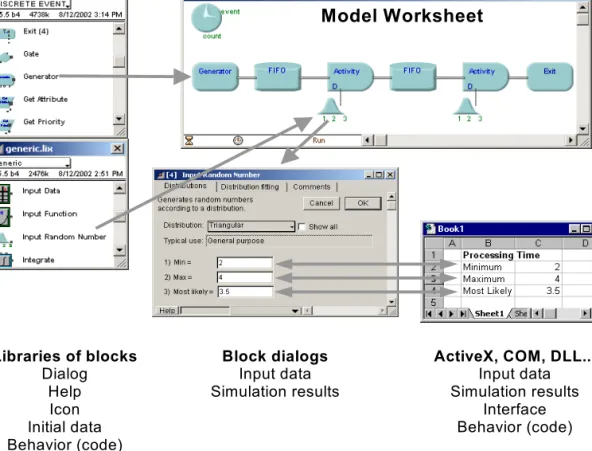
Extend models are constructed with library-based iconic blocks. Each block describes a calculation or a step in a process. Block dialogs are the mechanism for entering model data and reporting block results. Blocks reside in li-braries. Each library represents a grouping of blocks with similar characteristics such as Discrete Event, Plotter, Electronics, or Business Process Reengineering. Blocks are placed on the model worksheet by dragging them from the library window onto the worksheet. The flow is then estab-lished between the blocks. Figure 2 illustrates the overall structure of an Extend model.
Connected references are relative rather than absolute. This means that it is possible to easily create reusable components. In addition, the logic of the model is visible to anyone examining the model structure. To simplify the ap-pearance of the model, the connections can be hidden. Figure 2 illustrates the relationship between the libraries, blocks, worksheet and any external programs (such as an ActiveX object, Excel, or a DLL) which may be linked to Extend. It also shows the visual nature of an Extend model. Note that the Input Random Number blocks can be clearly recognized as providing the delay (D) for the activities. There are two types of logical flows between the
Ex-tend blocks. The first type of flow is that of “items”, which represent the objects that move through the system. Items can have attributes and priorities associated with them. Ex-amples of items include parts, patients, or a packet of in-formation. The second type of logical flow is “values”, which will change over time during the simulation run.
5 SINGLE SERVER, SINGLE QUEUE EXAMPLE
The following example is of a single server, single queue system. For the purpose of illustration, the model of a car
ActiveX, COM, DLL... Input data Simulation results Interface Behavior (code)
Model Worksheet
Libraries of blocks Dialog Help Icon Initial data Behavior (code) Block dialogs Input data Simulation resultsFigure 2: Extend Modeling Structure
5.1 Graphical Output wash will be used. This car wash will include one wash
bay and one waiting line. The model for this car wash is
shown in Figure 3. A Discrete Event Plotter graphically displays model met-rics (values). In this example (Figure 4), the Plotter will graph the contents of the Queue (the number of dirty cars waiting in line) over time. Here the length connector (L) on the Queue FIFO is connected to an input on the Plotter.
Figure 3: A Single Server Single Queue Model The block on the far left is a Generator block that pe-riodically creates items (in this case dirty cars). Following this is a Queue, FIFO block that holds the cars until re-quested by the next block. The wash bay is represented by the Activity Delay block with a limited capacity of one processing unit. The delay for the activity is specified by an Input Random Number block (connected to the “D” or delay connector). Each time a car arrives to the activity, a new value is sampled from the Input Random Number block. The last block in the model is an Exit block that re-moves the cars from the system.
Figure 4: Discrete Event Plotter Added to Model Figure 5 illustrates a sample plot from this model. Note the data for the plotter is displayed below the plot. This information is saved with the model and does not dis-appear when the model is saved and then reloaded. 5.2 Model Results
Combining basic elements like this allows the Extend modeler to build complex systems quickly and accurately. The overall structure of the model segment is easily deter-mined by glancing at the model.
During and after the simulation run, the results of the simu-lation are reported within the blocks, displayed on plotters, sent to reports, and exported to other applications. Double-clicking on each block reveals the information collected
from the simulation run. For example, double-clicking on the Queue, FIFO block opens a dialog showing the infor-mation found in Figure 6. Each block reports its own statis-tical information.
Figure 5: Plot of Queue Length
Figure 6: Dialog of Queue FIFO
The Plotter block shows the number of items stored in the Queue, FIFO over time in both graphical and tabular format.
Simulation results may be stored in a table, plotted, cloned to a different area of the worksheet, exported to an-other program such as a spreadsheet or database, displayed in an animation, or even used to control some aspect of the outside world through external device drivers.
5.3 Connectivity with Other Applications
The term interprocess communication (IPC) describes the act of two applications communicating and sharing data with one another. This feature allows the integration of ex-ternal data and applications into and out of Extend models. Automatic communication between Extend and other ap-plications can take one of five forms:
• •
• • •
ODBC (Open DataBase Connectivity)
Embedded ActiveX or OLE (Object Linking and Embedding) objects
DLL (Dynamic-Link Library).
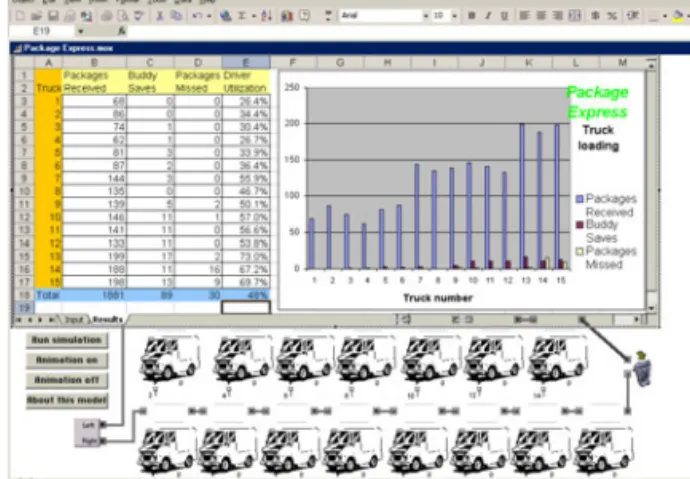
Figure 7 illustrates an embedded Excel spreadsheet used as a reporting mechanism for a model. The informa-tion in the spreadsheet is “linked” to the model with Ex-tend’s Paste-Link functionality.
Figure 7: ActiveX Excel Spreadsheet Embedded in Extend The popularity of interfacing models with other appli-cations (especially Microsoft Excel) makes these features powerful tools for model developers. Extend modelers do not have to program in an external language to communi-cate with other applications. Instead, information can be transferred using standard modeling components. As user interface development is a large portion of the time re-quired to build a model, particularly when the model is de-signed to be used by non-modelers, this can represent a significant time savings.
5.4 Integrated Database
The Extend Industry and Extend Suite packages contain an integrated relational database that provides a complete data management system for model input and output. The data-base is built directly into the model and contains product data, process information, and experimental results.
By separating your data from the model, the database enables fast scenario implementation, flexible analysis and improved project management.
• • • •
Configure tables for experiments and reports Use database-aware blocks to build powerful model constructs
Assign strings to items using database-aware at-tributes
“Paste-Link” where the information is
automati-cally updated between Extend and Excel Leverage dates, times and other data formats such as currency.
Blocks that utilize the IPC functions to communi-cate directly with other applications
The Industry database is relational and parent-child re-lationships can be used to better organize the information in the model. For example, each entry in a table of part types can reference its own unique routing table. This is an extremely powerful feature for organizing the information used in complex simulation models. This allows the mod-eler to easily modify model parameters in a central location without having to change values that are distributed throughout the model.
5.5 Data Analysis
Extend offers a number of methods for analyzing both in-put and outin-put data. These range from internal analysis fea-tures to built-in interfaces with other applications.
An interface to distribution-fitting programs is pro-vided to aid users in selecting the appropriate statistical distribution based on empirical data collected in the field.
Sensitivity analysis can be performed to determine how sensitive a system is to changes in specific input parameters. For example: to determine how sensitive the car wash is to changes in the inter-arrival time of dirty cars, sensitivity analysis can be performed on the inter-arrival mean parame-ter of the Generator block. By selecting the inparame-ter-arrival time dialog item and choosing Sensitize Parameter from the Edit menu, the change in the parameter value from one run to the next is defined. Cycling through different inter-arrival times for the dirty cars and comparing the results from the differ-ent runs, an understanding of how sensitive the car wash is to the arrival rate of dirty cars can be obtained.
Finally, the Statistics library helps users to collect and analyze output data. Blocks from the Statistics library automatically gather data from the specific blocks and cal-culate confidence intervals.
Extend’s block architecture aids the modeler in devel-oping custom statistical calculations. Virtually any statistic can be calculated by combining the appropriate blocks. This makes it easier to develop custom reports displaying statistics familiar to the model end-user.
5.6 Optimization
Extend’s Evolutionary Optimizer employs powerful “en-hanced evolutionary” algorithms to determine the best pos-sible model configuration. Using a drag and drop interface, performance metrics and parameters that can be varied are entered into the Optimizer block. These parameters are used in an equation that defines the objective function. When the model is run, the Optimizer block generates al-ternatives and locates the statistically best configuration. Unlike external optimizers, Extend’s optimization is well integrated into the program. For example, when the opti-mization process is complete, model parameters are auto-matically set to the optimal configuration. In addition, be-cause the Optimizer has been implemented in a block, the source code is available for examination and modification.
6 CUSTOMIZING EXTEND
The above discussion illustrates the highly graphical and interactive nature of Extend. However, Extend can also take the shape of the modeled system. Interfaces, compo-nents, and graphics can be created which tailor the model to a specific application area.
The most visible aspect of a custom model is the user interface. By modifying an existing interface or creating a new one, the simulation modeler is able to create a model which can be exercised by someone more familiar with the system than with the simulation tool. This means that mod-els can be built that fit naturally into the conceptual frame-work of the person using the model. The following sections will describe some of the tools provided in Extend that fa-cilitate customization.
6.1 Animation
Animation is a powerful presentation and debugging tool that can greatly increase model clarity. In Extend, anima-tion icons moving from block to block represent the flow of items through the system. Users can choose from a number of icons provided with Extend, create their own in an external drawing package, or import them.
Animation is automatically a part of every Extend model. A default animation is displayed when “Show Animation” is turned on. Animation features can be added to a model in the form of different animation pictures that represent various types of items, displaying values, levels, color changes, or even sounds in response to simulation events. In addition, custom animation can be added to dis-play pictures and text, level indicators, and pixel maps.
For more sophisticated animation, Extend Suite in-cludes Wolverine Software’s animation package, Proof Animation. Activities, Resources, Generators, and Exit blocks each have specific functionality to send information to the Proof animation during simulation execution (Wol-verine Software Corporation 2002). Additional animation features in Proof can be accessed in Extend through the Proof library of blocks and Extend’s equation blocks. This allows Extend modelers to easily utilize the industry’s most sophisticated animation package.
6.2 Hierarchical Modeling
In the past, there have been at least two definitions of hierar-chy in simulation modeling. The first definition, model hier-archy, coined by Imagine That, Inc (Imagine That, 1992), describes the grouping or aggregation of system components (blocks) into a single object. Extend includes extensive sup-port for this through the its ability to combine multiple blocks into a single block and then store these new blocks in libraries for later re-use. The second definition, structural hi-erarchy refers to programming new components based on
By utilizing hierarchy, modelers are able to rapidly and accurately create reusable model segments. For exam-ple, a call center may have a number of similar groups of agents (differing in number of agents and call time distri-bution). One hierarchical block can be built and, using cloning, a user interface and report are created. This block can then be replicated multiple times. The only changes that need to be made are easily accessible in the hierarchi-cal block’s user interface.
existing code. Extend’s open source architecture allows pro-grammers to view and modify Existing modeling compo-nents, potentially creating new ones.
Extend provides unlimited layers of model hierarchy, created using a simple menu command. Hierarchy allows models to be subdivided into logical components or sub-models, represented by a single descriptive icon. Double-clicking on the hierarchical block opens a new window displaying the sub-model. This greatly simplifies the repre-sentation of a model and allows the user to hide and show
model details as appropriate for the target audience. 6.3 Dialog Cloning and the Notebook Even a medium-sized call center model can become
difficult to maintain if all of the modeling components must be at the same level. Extend’s hierarchy allows the modeler to decompose the model into smaller, more man-ageable segments. Additionally, new model segments can be added by dropping in a new hierarchical block. Figure 8 illustrates the use of hierarchy to organize a model where each icon encapsulates a separate model segment.
As noted earlier, input and output parameters associated with the model can be found in the dialogs of the appropri-ate blocks. While this provides an intuitive association be-tween system metrics and the constructs used to model them, it can make searching for specific data cumbersome. This is especially true when working with large models containing many layers of hierarchy. An effective way of dealing with this is to use the Extend Notebook and the cloning feature. With the Notebook, a single custom inter-face can be created that consolidates critical parameters, results, and model control to a central location.
The Notebook is a separate window associated with each model. Initially, the Notebook is a blank worksheet to which text, pictures, and clones can be added. Clones are di-rect links to dialog parameters and are created by selecting the Cloning Tool from the tool bar and using it to drag a dia-log parameter from a block diadia-log to the Notebook or model worksheet. Figure 9 illustrates creating a clone by selecting the clone tool (an alternate cursor type) and dragging a dia-log variable from a block onto the model Notebook.
Figure 8: Call Center Model with Hierarchical Blocks By selecting a group of blocks and choosing Make Se-lection Hierarchical from the Model menu, a section of the model can be encapsulated within a hierarchical block. Ex-tend’s hierarchy fully encapsulates the enclosed block and does not require the renaming of variables and connec-tions. All of the connection names within the hierarchical block are local to that block. This allows multiple instances of identical hierarchical blocks in the same model (Pidd and Castro 1998). The hierarchical blocks can be copied within a model or saved to a library to be used again in other models. The icon for the hierarchical block can be modified by using the built-in icon editor or by importing an existing picture. While the representation of the model is more intuitive and simple than a non-hierarchical model, all of the detail of the model can still be accessed by dou-ble-clicking on any of the hierarchical blocks to display the underlying sub-model.
Figure 9: Creating a Clone with the Clone Tool Once a clone is created, any changes to the clone are immediately reflected in the block and vice-versa.
There-fore, it is no longer necessary to access the block’s dialog to change an input parameter or view updated results. Creative use of the Notebook can result in a simple yet ef-fective interface for a large, complex model. As an illustra-tion of how the Notebook can be used to consolidate im-portant parameters into one location, Figure 10 shows the Notebook for the Call Center model.
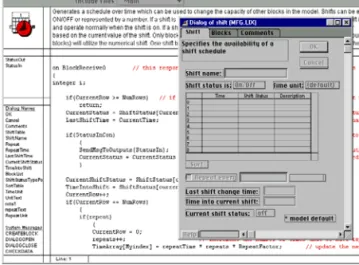
Figure 11: ModL Block Development Environment The advantages of a development environment such as this are obvious. Model builders are able to easily and re-liably create new or modified modeling constructs for de-manding modeling situations or new applications.
Figure 10: Notebook for Call Center Model
The significance of a powerful programming language such as ModL should not be underestimated. Traditional simulation “languages” or scripting environments typically lack full sets of language features such as flexible condition statements (some are limited to a single condition at a time), user defined data structures, and user interface development tools. Because ModL has all of these features (and more), there is rarely a need for a modeler to resort to an external language such as C++ or Visual Basic. With Extend and ModL, only one language and interface needs to be learned. And, since ModL is based on the C language, its learning curve is typically short. With less time learning and switch-ing between languages, model developers are able to de-velop more sophisticated models in less time.
Cloning and the Notebook are another example of the tools available in Extend which facilitate model develop-ment. Without this feature set, the modeler would be re-quired to learn and utilize a procedural programming lan-guage to develop a similar user interface.
6.4 Block Development
The block development environment is one of Extend’s most powerful features. While the majority of Extend users find the pre-built constructs sufficient for their needs, the block development environment provides a way for users to expand their modeling capabilities to perform unusual or highly specialized tasks. It typically takes only minutes for someone with programming experience to learn the basics of building modeling components in Extend.
This level of extensibility has prompted many users to develop libraries of custom blocks for specific industries. Users and third-party developers have created libraries for modeling high-speed production systems, chemical proc-esses, silicon wafer fabrication, pulp and paper mills, envi-ronmental processes, and radio and microwave communi-cation systems. Some blocks coded by customers can be found on the Imagine That, Inc. company web site
(http://www.imaginethatinc.com/).
Extend’s open source architecture allows access to the structure of most blocks that are shipped with Extend. By opening the structure, the icon, dialog, help text, and pro-gramming code of the block can be edited. The interface and functionality of any block can be modified or a new block created from scratch.
ModL is the powerful and flexible language used to define the behavior of each block. This language provides high-level functions and features while having a familiar look and feel for users with experience programming in C. In addition, external XCMDs and DLLs can be called from within ModL, giving the option of programming in any language which supports this feature (such as C or Pascal).
6.5 Scripting
Scripting is a feature that allows models to be created and/or modified through a suite of ModL functions. With this functionality, users can create objects that automati-cally build and modify models. With scripting, users can develop their own model building “wizards” or self-modifying models. Without having to rely on general-purpose “wizards” provided by the software vendor, users can develop “wizards” specific to their needs and can have The ModL development environment with its interface
for editing the dialog, help, icons, connectors, and code, is illustrated in Figure 11. Other tools include block perform-ance profiling, “include” files, and an interactive debugger.
complete control over the level of detail and accuracy re-sulting from automated model building.
Coupled with Extend’s ability to communicate with other applications using interprocess communication (IPC), scripting provides an easy way to allow other ap-plications to control every aspect of Extend, including building the model, importing/exporting data, and run-ning the simulation.
7 MODEL INTERACTIVITY
Simulation should be fun. Simulation tools should allow modelers to get in and play with the system. Much of the benefit of building a simulation model comes from the un-derstanding of the modeled system that is gained by merely constructing, validating, and verifying the model. Simula-tion software should make it easy to try alternatives and immediately see the effect. Interactivity is thoroughly em-bedded in Extend’s architecture. In Extend, model parame-ters can be changed mid-run without requiring the modeler to program which parameters can be changed. When the user clicks on a dialog value, the simulation pauses giving the modeler time to enter a new value. When the simula-tion resumes, the new value will be used by the model. In addition, when a value has been changed a message han-dler can check for errors or inform other blocks that a value change has taken place.
Controls such as sliders and switches allow the model user to interactively operate the model. Adding this type of functionality to an Extend model requires only that the control be added and connected to the relevant blocks.
Even more interesting types of model interactivity can be created though the use of embedded ActiveX controls. Extend blocks can be built that access a commercially available control (such as an Excel spreadsheet) and dy-namically communicate to the control while the simulation is running.
8 WHAT MAKES EXTEND UNIQUE
Extend provides features and capabilities not found in other simulation software. This allows the modeler to con-centrate on the modeling process and quickly produce a model that is easy to manipulate and communicate to oth-ers. These features include:
• • • • • • •
Interactivity: Even during a model run, Extend parameters and model logic can be changed “on the fly.” Extend’s point and click interactivity translates into faster answers and quicker, easier restating of problems.
Reuseability: Extend blocks (modeling compo-nents and hierarchical sub-models) can be saved in libraries, reused in other simulations, and even distributed to other modelers. This feature in-creases productivity and consistency of design.
Scalability: Because of Extend’s unlimited hier-archical structure, it is used to produce enterprise-wide models with hundreds of thousands of blocks.
Visual Transparency: Extend’s block icons are designed specifically to convey the structure and behavior of the model at a glance.
Connectivity: Extend supports the COM model (ActiveX/OLE) and ODBC. Unlike other simula-tion tools, these technologies have been imple-mented in Extend as modeling components so that interapplication communication is a drag and drop operation, with no programming necessary. Extendability (Open Source): The blocks that come with Extend are developed using Extend’s compiled language and integrated development environment. They are open source to allow modification and enhancement. This speeds the evolution of better modeling techniques, as the user can improve components and develop new proprietary components.
Third Party Support: Because of its integrated development environment, Extend has proven to be the simulation engine of choice for more third party applications than any other simulation tool. 9 SAMPLE APPLICATION
Since Extend is a general purpose simulation program, it has been used in many types of simulation projects. Areas where Extend has been successfully applied include manu-facturing, service industries, business process reengineer-ing, communications, logistics, healthcare, control systems, science, environmental studies, and high speed processing. The sample application here is of a supply chain model for a major manufacturer of paint application tools.
Other sample applications including medical labora-tory automation, supply chain management, pulp and paper processing, and high speed manufacturing are available in earlier versions of this paper (Krahl 2001).
9.1 Supply Chain Simulation
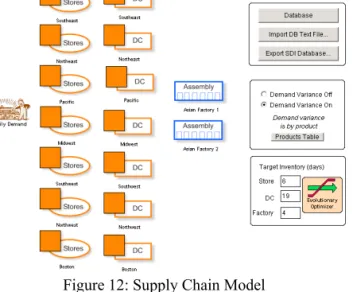
James Dailey & Associates, an independent developer of simulation tools using Extend, recently completed a sup-ply-chain model for Wagner SprayTech, a leading supplier of consumer and professional paint application tools. As production of SKU's was being established in China, Wag-ner was particularly interested in communicating optimum inventory and ordering policies both internally and exter-nally to better manage this lengthened supply-chain. Figure 12 shows the top level of the model. Each store, distribu-tion center, and assembly operadistribu-tion is a hierarchical block. The model logic can be found by drilling down into each of these top level blocks.
Figure 12: Supply Chain Model
The model was built with extensive use of the internal database capability This organized the large amount of data typically found in a supply chain model while simultane-ously minimizing model run time. The final model simu-lated annual supply chain activity of 16 inventory nodes plus assembly line product mix constraints and delays. Ex-tend's Evolutionary Optimizer was implemented to find op-timum safety stock levels at each of the node levels under expected demand variance and service level requirements. The optimizer located the best policy (to 99% confidence level) in less than 90 minutes.
10 SUMMARY
Is Extend the one-click answer to all of the world’s simula-tion needs? Of course not. But its intuitive interface, rich set of modeling components, extensive authoring and de-velopment environment, and more advanced simulation technology make it a better solution for simulation engi-neers who need to efficiently utilize their modeling time. REFERENCES
Imagine That, Inc. 1992. Extend Software Manual. San Jose, CA.
Imagine That, Inc. 2003. Extend 6 Developer’s Reference San Jose, CA.
Imagine That, Inc. 2003. Extend 6 User’s Guide. San Jose, CA.
Krahl, Dave. 2001. The Extend simulation environment. In Proceedings of the 2001 Winter Simulation Confer-ence, ed. B. A. Peters, J. S. Smith, D. J. Medeiros, and M. W. Rohrer, 217-225. IEEE, Piscataway, NJ. Pidd, M. and R. Bayer Castro. 1998. Hierarchical modeling
in discrete simulation. In Proceedings of the 1998 Winter Simulation Conference Proceedings, ed. D. J
Medeiros, E. F. Johnson, J. S. Carson, M. S. Manivan-nan, 383-389. IEEE, Piscataway, NJ
Wolverine Software Corporation. 2002. Using Proof Ani-mation. Annandale, VA
AUTHOR BIOGRAPHY
DAVID KRAHL, a Certified Modeling and Simulation Professional, is Vice President of Technical Sales with Imagine That, Inc. He received a MS in Project and Sys-tems Management in 1996 from Golden Gate University and a BS in Industrial Engineering from the Rochester In-stitute of Technology in 1986. Mr. Krahl has worked ex-tensively with a range of simulation programs including Extend, SLAM II, TESS, Factor, AIM, GPSS, SIMAN, XCELL+ and MAP/1. A few of the companies that Mr. Krahl has worked with as a consultant and educator are Chrysler, Ford, Williams International, Tefen, Raytheon, and Boeing. He is actively involved in the simulation community and is an adjunct faculty member at Golden Gate University. His email address is <mailto:davek@
imaginethatinc.com> and the Imagine That Inc.