Enhancement of the Usability of SOA Services
for Novice Users
Submitted in the Faculty of Science and Agriculture in fulfilment for the degree
Master of Science
In
Computer Science
ByYalezo Sabelo
Supervisor: Prof Mamello Thinyane December 2014
Telkom Centre of Excellence in ICT4D Computer Science Department
Private Bag 1314 Alice
ii
Declaration
I, the undersigned hereby declare that the work that is contained in this thesis is my own original work, and it has not been submitted to any educational institution for similar or any other degree. Any information that is extracted from other sources is acknowledged.
Name: S Yalezo Date: December 2014
iii
Acknowledgement
I would like to thank my family especially Mrs Buyiswa Yalezo my mother for supporting me throughout the year, not forgetting my brothers for inspiring me. In addition, I would like to thank Prof M. Thinyane for providing me with the opportunity to do research under his guidance; support and giving me the liberty to explore various research topics. My colleagues and friends thank you for the support, motivation and joy you brought. Finally, I would like to thank Telkom for the funding. Lastly, I would like to thank God that I am serving for having such mercy for me; truly, his grace is sufficient for me.
iv
Abstract
Recently, the automation of service integration has provided a significant advantage in delivering services to novice users. This art of integrating various services is known as Service Composition and its main purpose is to simplify the development process for web applications and facilitates reuse of services. It is one of the paradigms that enables services to end-users (i.e.service provisioning) through the outsourcing of web contents and it requires users to share and reuse services in more collaborative ways. Most service composers are effective at enabling integration of web contents, but they do not enable universal access across different groups of users. This is because, the currently existing content aggregators require complex interactions in order to create web applications (e.g., Web Service Business Process Execution Language (WS-BPEL)) as a result not all users are able to use such web tools. This trend demands changes in the web tools that end-users use to gain and share information, hence this research uses Mashups as a service composition technique to allow novice users to integrate publicly available Service Oriented Architecture (SOA) services, where there is a minimal active web application development.
Mashups being the platforms that integrate disparate web Application Programming Interfaces (APIs) to create user defined web applications; presents a great opportunity for service provisioning. However, their usability for novice users remains invalidated since Mashup tools are not easy to use they require basic programming skills which makes the process of designing and creating Mashups difficult. This is because Mashup tools access heterogeneous web contents using public web APIs and the process of integrating them become complex since web APIs are tailored by different vendors. Moreover, the design of Mashup editors is unnecessary complex; as a result, users do not know where to start when creating Mashups. This research address the gap between Mashup tools and usability by the designing and implementing a semantically enriched Mashup tool to discover, annotate and compose APIs to improve the utilization of SOA services by novice users. The researchers conducted an analysis of the already existing Mashup tools to identify challenges and weaknesses experienced by novice Mashup users. The findings from the requirement analysis formulated the system usability requirements that informed the design and implementation of the proposed Mashup tool. The proposed architecture addressed three layers: composition, annotation and discovery. The researchers developed a simple Mashup tool referred to as soa-Services Provisioner (SerPro) that allowed novice users to create web application flexibly. Its usability and effectiveness was validated. The proposed Mashup tool enhanced the usability
v
of SOA services, since data analysis and results showed that it was usable to novice users by scoring a System Usability Scale (SUS) score of 72.08. Furthermore, this research discusses the research limitations and future work for further improvements.
vi Table of Contents Declaration ... ii Acknowledgement ... iii Abstract ... iv Table of figures ... xi
Table of listings... xiii
List of Tables ... xiv
List of Acronyms ... xv Publications ... xvii 1 Chapter 1: Introduction... 1 1.1 Introduction ... 1 1.2 Research Rationale ... 1 1.2.1 ICTs ... 2 1.2.2 Mashups ... 3 1.2.3 Significance of Mashups ... 4
1.2.4 Factors Affecting Mashup Usability ... 5
1.3 Research Problem ... 6
1.4 Research Questions ... 6
1.5 Research Objectives ... 6
1.6 Methodology and Research Design ... 7
1.7 Contributions of the Research ... 8
1.8 Chapter Outline ... 8
1.9 Conclusion ... 9
Part I: Research Context and Related Work ... 10
2 Chapter 2: Literature Review ... 11
2.1 Introduction ... 11
2.2 Service Composition ... 11
2.2.1 Portals ... 11
2.2.2 Mashups ... 12
2.3 Mashups as a Service Composition Technique ... 14
2.3.1 Adopted Web Technologies ... 15
vii
2.4 EUP in Mashup Editors ... 18
2.4.1 Widgets ... 18
2.4.2 Pipes and Filters ... 19
2.4.3 Data Federation ... 19
2.5 Designing Mashups ... 19
2.5.1 Mashup Engine ... 20
2.5.2 Mashup Editor ... 21
2.5.3 Mashup Tool Architecture... 21
2.5.4 Mashup Tool Execution Environments ... 22
2.6 Mashup Tools Composition Styles ... 23
2.6.1 Composition Patterns ... 24
2.6.2 Workflows on Mashup process ... 25
2.7 Web content mining ... 26
2.7.1 Web Page ... 26
2.7.2 Web API Documentation ... 26
2.7.3 RPC-style Web APIs ... 26
2.7.4 RESTful Web APIs ... 27
2.7.5 SOAP ... 27
2.7.6 Mashup Repositories ... 28
2.8 Applications of Mashups ... 28
2.9 Challenges Facing Mashups ... 30
2.10 Usability of Mashup Tools ... 31
2.10.1 Definition of Usability ... 31
2.10.2 Usability Goals ... 31
2.10.3 Evaluator-Based Usability Evaluation Methods ... 32
2.10.4 User-based Usability Evaluation Methods ... 33
2.11 Conclusion ... 34
3 Chapter 3: Homogenization of Web Contents... 36
viii
3.2 Ontology as a Web 3.0 Service ... 36
3.3 Semantic Annotations ... 37
3.3.1 Service Description ... 37
3.3.2 Service Discovery ... 40
3.3.3 Services Publication ... 40
3.3.4 Service Selection and Matching ... 41
3.4 Related Work ... 41
3.4.1 Usability in Mashup Tools ... 41
3.4.2 Web APIs Homogenization ... 43
3.5 Homogenization Process ... 43
3.6 Conclusion ... 44
Part II: Methodology and System Modelling ... 46
4 Chapter 4: Methodology ... 47
4.1 Introduction ... 47
4.2 Research Methodology ... 47
4.3 Research Approach and Design ... 49
4.3.1 Literature Review ... 49 4.3.2 System Requirements ... 49 4.3.2.1 Requirements Gathering ... 50 4.3.3 Design ... 55 4.3.4 Research Prototyping ... 56 4.3.5 System Evaluation ... 57 4.3.6 Research Conclusion ... 58 4.4 Conclusion ... 58
5 Chapter 5: Mashup Design ... 59
5.1 Introduction ... 59
5.2 Design Process ... 59
5.3 Mashup Engine ... 61
5.4 API Editor ... 62
ix
5.4.2 Annotation Layer ... 63
5.5 Mashup Editor ... 64
5.5.1 Visual Composer Layer ... 64
5.5.2 Service Construction ... 65
5.5.3 Request Handling and Data Passing ... 66
5.5.4 Use Case Diagrams ... 68
5.6 Conclusion ... 68
Part III: Development and Implementation ... 69
6 Chapter 6: Implementation and Development ... 70
6.1 Introduction ... 70
6.2 Development Process ... 70
6.3 Mashup Engine ... 72
6.4 SerPro API Editor (SAE) ... 75
6.5 Mashup Editor ... 82
6.5.1 Connecting Widgets ... 83
6.5.2 Construction Requests ... 84
6.6 Research Implementation Technologies ... 86
6.7 Conclusion ... 88
Part IV: Experimentation and Research summary ... 89
7 Chapter 7: Experimentation and Discussion ... 90
7.1 Introduction ... 90 7.2 Validation Process ... 90 7.3 Usability Testing ... 91 7.3.1 Methodology ... 91 7.3.2 Findings of SUS ... 91 7.4 Acceptance Testing ... 94 7.4.1 Methodology ... 94 7.4.2 Findings ... 98
7.5 Comparison of Mashup tools ... 99
x
7.5.2 SUS ... 102
7.6 Discussion ... 104
7.6.1 Composition Style ... 104
7.6.2 Semantic Web Technologies ... 104
7.6.3 Usability of SOA Services ... 104
7.7 Conclusion ... 106
8 Chapter 8: Research Conclusion ... 107
8.1 Introduction ... 107
8.2 Research Summary ... 107
8.3 Addressing Research Objectives ... 109
8.4 Research Limitations and Challenges ... 112
8.5 Research Contribution and Recommendation ... 113
8.6 Future Work ... 113
8.7 Conclusion ... 114
Part V: Reference Material ... 115
References ... 116
Appendix A: Ethical clearance ... 124
Appendix B: SUS questionnaire and Mashup Tool SUS scores... 125
Appendix B.1.SUS questionnaire ... 125
Appendix B.2.Review of Mashup Tools ... 127
xi
Table of figures
Figure 1-1.Research overview ... 1
Figure 1-2.Yahoo! Pipes (Jones & Churchill, 2009) ... 4
Figure 2-1.Microsoft Popfly (Loton, 2008) ... 13
Figure 2-2.SOA artefacts ... 14
Figure 2-3.SWS formation adapted: (Pedrinaci & Domingue, 2010) ... 16
Figure 2-4.Programmable Web (ProgrammableWeb, 2014) ... 28
Figure 3-1.Web evolution (Spivack, 2008)... 36
Figure 3-2.Annotation methods adapted: (Kopeck & Vitvar, 2008) ... 38
Figure 4-1.Research union (Saunders et al., 2011) ... 48
Figure 4-2.Requirements activity... 50
Figure 4-3.Comparison Of Mashup Tools ... 53
Figure 4-4.Research model ... 56
Figure 5-1.Mashup tool functionality ... 59
Figure 5-2.System architecture ... 60
Figure 5-3.Administrator use case ... 62
Figure 5-4.SerPro API editor flow diagram ... 63
Figure 5-5.Use case diagram for API editor ... 64
Figure 5-6.Widget transformation ... 65
Figure 5-7.Service creation sequence diagram ... 65
Figure 5-8.Request handling sequence diagram ... 67
Figure 5-9.End-user use case diagram ... 68
Figure 6-1.Development process ... 70
Figure 6-2.Mashup tool data flow ... 71
Figure 6-3.Mashup Engine UML class diagram ... 74
Figure 6-4.SerPro annotating tool ... 75
Figure 6-5.API editor workflow ... 76
Figure 6-6.Plain HTML FlickerAddComments service ... 78
Figure 6-7.Sesame server ... 80
Figure 6-8.Mashup Editor ... 82
Figure 6-9.Mashup editor development UML diagram ... 85
Figure 6-10.Development Structure ... 86
xii
Figure 7-2.Frequency of users SUS question responses ... 92
Figure 7-3.SUS scores Box of Whisker ... 94
Figure 7-4.Question 1 vs. user‘s responses ... 95
Figure 7-5.Question 2 vs. user‘s responses ... 96
Figure 7-6.Question 3 vs. user‘s responses ... 96
Figure 7-7.Question 4 vs. user‘s responses ... 97
Figure 7-8.Mashup Tool Comparison ... 103
Figure 8-1.Growth of web APIs (ProgrammableWeb, 2014) ... 107
Figure B-1.Microsoft Popfly whisker box ... 128
Figure B-2.Intel mash maker house rentals (Ennals & Shadle 2007) ... 128
Figure B-3.Intel MashMaker whisker box ... 129
Figure B-4.Yahoo Pipes whisker box ... 132
Figure B-5.MobiMash (Cappiello et al., 2012)... 133
Figure B-6.MobiMash whisker box ... 134
Figure B-7.Marmite (Wong & Hong, 2007) ... 135
Figure B-8.Marmite whisker box ... 136
xiii
Table of listings
Listing 5-1. Request handling algorithm ... 67
Listing 6-1.Executing a widget ... 72
Listing 6-2. Adding APIs to Sesame... 72
Listing 6-3.Saving Mashup details ... 72
Listing 6-4.Populating Mashup details ... 73
Listing 6-5.Executing a published Mashup ... 73
Listing 6-6.Structuring XML to JSON ... 73
Listing 6-7.RDF representation of FlickerAddComments service ... 78
Listing 6-8.Serializes the HTML info to JSON Object ... 79
Listing 6-9.Annotating API details with Ontology ... 79
Listing 6-10.Uploading RDF files to Sesame server ... 79
Listing 6-11.Querying API from Sesame ... 80
Listing 6-12.JSON file Writer... 81
Listing 6-13.Creates DOJO compatible template ... 81
Listing 6-14.Json file structure ... 81
Listing 6-15.Connecting and wiring two widgets ... 83
Listing 6-16.Unwiring two widgets ... 83
Listing 6-17.Executing request ... 84
Listing 6-18.Instantiating request ... 84
Listing 6-19.Sending request to the Mashup Engine ... 84
xiv
List of Tables
Table 1-1.Research design ... 8
Table 7-1.SUS score in each question from 12 users ... 92
Table 7-2.SUS scores of proposed Mashup tool ... 93
Table 7-3.Five Whisker terms ... 93
Table 7-4.Comparison Analysis... 99
Table 7-5.SUS score of Mashup tool ... 102
Table B-1.Microsoft Popfly SUS scores ... 127
Table B-2.IntelMashMaker SUS score ... 129
Table B-3. Yahoo SUS vs. users ... 131
Table B-4.MobiMAsh SUS score ... 133
Table B-5.Marmite SUS score ... 135
xv
List of Acronyms
AJAX Asynchronous JavaScript And XML
AL Application logic
API Application Programming Interface
BPM Business Process Management
CRUD Create, Read, Update and Delete
CSS Cascading Style Sheet
CSV Comma Separated Value
DA Data Application
DHTML Dynamics Hypertext Mark-up Language
DOM Document Object Model
EUD End-User Development
EUP End-User Programming
GUI Graphical User Interface
hREST Hypertext Mark-up Language for Representational State Transfer
HTML Hypertext Mark-up Language
HTTP Hypertext Transfer Protocol
ICT Information and Communication Technology
JIT Just In Time
JSON JavaScript Object Notation
OWL Web Ontology Language
QoS Quality of Service
RDF Resource Description Framework
RDFs Resource Description Framework Schemas
REST Representational State Transfer
RO Research Objective
RQ Research Question
xvi
SAWSDL Semantically Annotated Web Service Description Language
SerPro soa-Services Provisioner
SOA Service Oriented Architecture
SOAP Simple Object Access Protocol
SOWER Sweet is nOt a Wsdl EditoR
SPARQL SPARQL Protocol and RDF Query Language
SUS System Usability Scale
SWEET Semantic Web sErvice Editing Tool
SWS Semantic Web Services
UCSD User Centred System design
UDDI Universal Description and Discovery Interface
UI User Application
URI Universal Resource Identifier
URL Universal Resource Locator
WADL Web Application Description Language
WMSL Web Mashup Scripting Language
WS-BEL Web Service Business Execution Language
WSDL Web Service Description Language
WSMF Web Service Modelling Framework
WSMO Web Service Modelling Ontology
WSMX Web Service Modelling Execution
WWW World Wide Web
XHR XMLHttpRequest
XML Extensive Mark-up Language
xvii
Publications
In the course of the research the following papers were published:
I. YALEZO S, THINYANE M (2013). Enabling Service Composition in ICTD Contexts through GUI Mashup Tool, Southern Africa Telecommunication Networks and Applications Conference (SATNAC 2013), Spier Wine Estate, Stellenbosch, South Africa.
II. YALEZO S, THINYANE M (2014). SerPro: A Mashup tool for enhanced usability for novice users, Southern Africa Telecommunication Networks and Applications Conference (SATNAC 2014), BoardWalk, Port Elizabeth, South Africa.
1
1
Chapter 1: Introduction
1.1 Introduction
This chapter briefly introduces the research details. It discusses Information and Communication Technologies (ICTs) and background of Mashups. It also covers the thesis statement, research questions, objectives, methodology and chapter outline. In summary, this chapter gives a reader the background and the context of the research project.
1.2 Research Rationale
Web applications play an increasingly vital role in the day-to-day lives of millions of people (ranging from social media to online services). This increase has led to web applications overtaking traditional desktop software in terms of the usefulness to end-users (Spivack, 2008). Such a growth in popularity of web applications has been driven by organisations offering a diverse range of online services that provide users with dynamic and feature-rich environments (Halfond, 2010). These trends suggest that the use and importance of web applications will continue to increase significantly in the years to come, and this growth requires high demand of usable web tools. Hence, there is a need for usable web tools to allow novice users to be able to use such technologies.
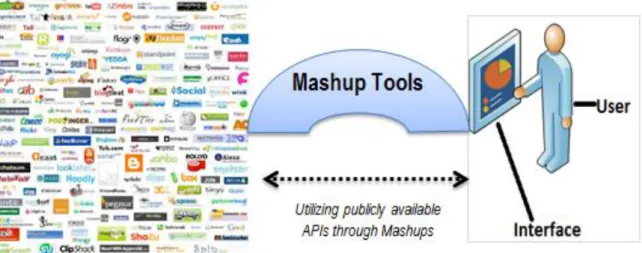
Figure 1-1.Research overview
On the left of Figure 1-1: are the plethora of restful APIs and on the right are the novice users who utilizes the publicly available APIs using Mashup Tools. In this research, novice users are referred to as type of users who are eager to use the web to gain and share information but do not have programming skills (i.e., computer literate).
2
As mentioned in the research title and as illustrated by Figure 1-1 , this research concerns the evaluation of Mashup tools to enhance the utilization and usability of SOA services by novice users. This research involves usability, which is one of the basic objectives in Human-Computer Interaction (HCI), since HCI is a study that involves the interaction between people and computers. Usability is referred to as the extent to which a user can learn, understand and be satisfied by a system. This means that usability is the measures of how easy the interface is to use and whether the required functionality are provided so that users can do what they want to do. It is difficult to ensure that a system is usable since design goals sometimes conflict one another. The priority of design goals is influenced by the context of use and the targeted group, hence, this research aims to improve the usability of SOA services using Mashup tools with a specific focus on novice users
.
The usability of software‘s is an important aspect for the success of organisation that uses web applications. Moreover, high demands for web applications motivates the development of tools and services that enable web-users to generate web applications that combine content from multiple sources to provide unique services that suit their situational needs. These types of applications are referred to as Mashups (Tuchinda et al., 2008). In Mashup tools, the Mashup Engine that is the software that automates the integration of disparate services to form new services is manages the integration of services then a Mashup editor is used to design and create the Mashup applications.
1.2.1 ICTs
ICT are a diverse set of technological tools and resources used to communicate, and to create, publicize, store, and manage information (Fillip, 2005). Communication and information are at the very heart of web applications, and subsequently the use of ICTs in delivering e-services has a long history. ICTs had been involved in programmes undertaken by governmental agencies, public and private educational institutions and non-profit organisations to provide a better life and improve socio-economic conditions around the world and in Africa (Bertot et al., 2012). This is in the context of 70 % of the population in developing countries having access to a fixed or mobile telephone internet services (Fillip, 2005);and they include the least connected regions of Africa. Such an increased rate of internet connections demands the use of web tools to enhance the utilization of SOA services. The used communication technologies increase the accountability of online service delivery to the underserved regions, in an innovative, fast, and cost-efficient manner. As ICTs targets
3
developing countries by creating new ways of doing business and delivering services. Through extending the use of ICTs, this research aim to promote the utilization of SOA services available on the web via a usable Mashup tool, to enable novice users to easily access and benefit from the web. These tools present great opportunities in ICT context since they allow development of web application where there are minimal coding skills. The next subsection briefly discusses Mashups.
1.2.2 Mashups
The dispersed data and services around the web needed to accomplish the user‘s goals, and are not in a form amenable to the user‘s needs and capabilities. It is extremely unlikely for the web site developers to fulfil all the user‘s needs. For this reason, Mashup tools that aid novice users to create web application that suit their needs evolved. One of the earliest and best-known Mashups is housingmaps.com, which crawl rental listings from the Craigslist community web site and puts them on Google Maps (Wong & Hong, 2007; Di Fabbrizio et al., 2009). Rather than having to go through each of the text listings and manually entering each address into a map service, this Mashup makes it easy for end-users to see a map of all the available listings. Mashups combine disparate service to create envisioned personalized services.
There are three types of Mashups namely: Consumer, Data, and Enterprise Mashups (Koschmider et al., 2009). Consumer Mashups (sometimes referred to as Graphical User Interface (GUI) Mashups) are web-based applications that use mainly the presentation layer to interact with the users. Data Mashups are web-based applications that mainly integrate data sources. Enterprise Mashups are web-based applications that are mainly process based Mashups. This research focus is on consumer Mashups to enhance their usability for novice users particular those in rural communities where ICT4D interventions are increasingly being deployed.
Figure 1-2, below illustrates a Mashup application that was created using Yahoo Pipes (i.e. Mashup tool). The purpose of the Mashup designed in Figure 1-2, is to fetch feed and filter results according regular expression, for instance the above example filters everything that is not a video, game and audiobook. At the bottom of the Figure 1-2, results are shown with artist names and the name of the songs or albums.
4
Figure 1-2.Yahoo! Pipes (Jones & Churchill, 2009) The next subsection discusses the significance of Mashup tools.
1.2.3 Significance of Mashups
Mashup applications have recently received a significant attention as one of the supportive web applications. There are three main reasons for this new trend (Latih et al., 2011): The first one is the availability of tools that have enabled end users to develop Mashup applications. The second reason is the availability of web technologies that support this activity. Lastly is the interest and acceptance of Mashup application development by enterprise users. Mashups are the key enablers for a flexible interaction between users and web application since they enhance web contents with cost efficiency and content reuse at the same time they facilitate sharing of resources amongst different businesses and organisations. Most tools to help novice users create Mashups tend to emphasize programming techniques that are beyond the skills and abilities of average web users. Furthermore, most of the end-user programming tools tend to focus on GUIs (e.g. automating repetitive actions) rather than processing existing web based content and services. Hence, it is inappropriate for end users to carry out online tasks using these tools. One of the challenges experienced by Mashups is heterogeneity of web resources.
5 1.2.4 Factors Affecting Mashup Usability
This research has identified two factors that affect the usability of Mashups namely: design of interaction platforms and heterogeneity of resources. The design of Mashup editors or interaction techniques affects usability of Mashups by not providing an intuitive design so that users can be able to create Mashups without initial up skilling. Heterogeneity is the measure of degree to which web contents differ. If two agents agree on how to represent and communicate the data, a seamless and conflict-free integration is established. To achieve semantic interoperability two agents (i.e. both humans and machines) need to agree on how to understand the data. The level of understanding differs and depends mostly on the complexity of the formalized knowledge.
Heterogeneity present many challenges to Mashups, since the key guiding principles in Mashups are sharing and reuse. It makes it hard for Mashup to discover web contents and combine them to form new services that satisfies users (Maué et al., 2009). The following listing discusses heterogeneities that hinder flexible integration of web resources:
i. Application-specific knowledge:there are specificidentifiers or terms that are used in an organisations which makes the underlying data hardly usable for other users (Ioannou, 2010). The manner in which such data is represented can only be understood by a certain application, since it was built for a specific domain rather than the entire application domains. Consequently other applications fail to discover such specific data, as it is constrained to a very limited user group.
ii. Hierarchical problems: probably the most common issue in service discovery is the different level of expertise between the client and the data provider. The way that data is represented often differs in terms of meaning since the order and the perception of using certain words and structure is different (Momeni, 2011). Although some words are spelled the same, they typical differ in meaning according to the contexts of use. Hierarchical challenge makes it impossible to match a user's query and service description even if the chosen languages differ.
Modern web applications have new features and capabilities that significantly increase their complexity. These features and capabilities include dynamically generated HTML contents, interaction with external systems, data structures and data from multiple sources. The dynamic nature of modern web applications limits the use of such techniques. Since the set of generated web contents can vary at runtime, a service composer might be unable to integrate
6
various web API contents sufficiently; that degrades robustness and result in a cumbersome service combination.
1.3 Research Problem
Although there has been an extensive amount of research in Mashup tools (Soriano et al., 2008; Upadhyaya & Zou, 2012; Fisichella & Matera., 2011), many of the techniques developed are not able to adapt to modern web application development approaches. The content used by Mashup tools differ since it is extracted through one or more APIs, for instance the structure or the form of the returned data by web application is a good example of this difference. Eventually these differences cause Mashups to be unusable to novice users since programming skills are needed.
The overall goal of this research is to improve usability of Mashups focussing on novice users. Subsequently, this research focuses on two key parts of this task: the design of a service composer (Mashup tool) and the homogenization of web APIs, in order to allow integration of various public web APIs without the knowledge of programming skills. To address this problem, the thesis statement for the dissertation is as follows: Semantically enriched web tools to discover transform and compose web contents from public APIs (disparate service) can improve the usability of SOA services to novice users.
1.4 Research Questions
With the stated research problem, the main research question is how can a usable Mashup tool that targets novice users be developed? Following are the sub-questions the research seeks to answer:
RQ1. What impedes the usability of Mashup tools?
RQ2. What are the different techniques for Mashup tool service composition?
RQ3. How can annotation and discovery of APIs be implemented, so as to achieve a smooth composition?
RQ4. How can semantic web technologies be utilized to improve usability of Mashups? 1.5 Research Objectives
The main research objective is to develop a usable Mashup tool for novice users to utilize SOA services, and is accomplished through the following sub-objectives:
RO1. To identify usability shortfalls of the existing Mashup tools. RO2. To investigate service composition on Mashup tools
7
RO3. To investigate semantic technique on annotating and discovering services. RO4. To implement a Mashup tool and a Mashup editor
RO5. To implement a homogenization layer and evaluate its effectiveness.
In order to achieve the above research objectives, the next section discusses the methodology used.
1.6 Methodology and Research Design
This section briefly discusses the methodology that was used to achieve the research objectives. It outlines the steps that were taken to the completion the research. Furthermore, it outlines the research design (i.e. how the objectives and question were achieved by mapping them to research methods and chapters used). The following listing discusses the steps that were undertaken in order to complete the research:
i. Literature review on the background of Mashups, existing Mashup tools, types of Mashups and components of Mashups was undertaken through journals, articles, dissertations, conference proceedings and textbooks.
ii. The design of Mashup workflow and control flow between Mashup tooland its components was modelled using Unified Modelling Langauage (UML) diagrams; flow, use-case, and sequence diagrams.
iii. The Mashup tool was implemented using Java, Eclipse and Tomcat. Mashup editor was developed through GUI libraries such as jsPlumb and API editor was developed using JQuery, and lastly Mashup engine was developed through Java and servlets. iv. The Mashup tool was validated through surveys and questionnaires and analyzed
through graphs.
v. Discussion and conclusion was based on how well the analyzed data fit to the research objectives.
The above listing outlined the research methodology, Table 1-1, details how the research questions were addressed in order to accomplish the research.
8 Table 1-1.Research design
Research question Research objective Research Method Chapter
RQ1 RO1 users observations,
surveys, focus group
Chap 2
RQ2 RO2 & RO5 Literature and
system design
Chap 5 & 6
RQ3 RO4 & RO5 System design and
implementation
Chap 3 ,5 & 6
RQ4 RO5 Focus group,
Interviews and SUS score
Chap 6 & 7
The following section discusses the contribution of this study. 1.7 Contributions of the Research
As the studies showed that for a massive adoption of Mashups, end-users must be supported by lowering the complexity involved with describing, finding and composing web APIs (Duke et al., 2010;Kenda et al., 2013). A simple Mashup tool, which discovers and compose web APIs was implemented, and it allowed novice users to access and utilise the publicly available online SOA services offered by the businesses and organisations. The improvements and the challenges encountered are discussed in (Section 8.4).
1.8 Chapter Outline
This section presents how the rest of the dissertation chapters are organised.
Chapter 2: this chapter focuses on literature review about Mashups. It discusses how to design Mashups and the basic requirements in Mashup developments. Thereafter advantages and benefits are presented followed by the challenges and issues affecting Mashups.
Chapter 3: this focuses on the usability of Mashup tools. This chapter discusses the key web technologies used to mitigate the heterogeneity of web APIs. It solely focuses on semantic annotations and ontology developments up to date. Furthermore, the initiatives and approaches developed by other researches are discussed.
9
Chapter 4: this chapter addresses the methodology that was used to achieve the research objectives. Different types of philosophies are discussed and motivation towards the choices made to each research method used.
Chapter 5: this chapter focus on the design of the proposed Mashup tool. The system architecture is presented together with its components and modules. Three layers are addressed, namely: discovery, annotation and composition layer. Moreover, user interactions are presented using UML diagram.
Chapter 6: this chapter discusses the implementation of the proposed tool with the aid of code snippets. The implementation technologies are also discussed.
Chapter 7: this chapter focuses on the evaluation and validation of the system. Two tests are presented (i.e., the usability and the acceptance testing). Focus group, SUS and the interview are then used present the results.
Chapter 8: this chapter presents the discussion from the obtain results. It interprets the meaning, significance and importance of the obtained results. Research limitation and recommendations are presented and finally the research summary and the overall conclusion of the research.
1.9 Conclusion
Mashup tools are explicitly designed for sharing and reusing the publicly available web APIs. They are useful for diverse areas and can support a great variety of input and output structured data (i.e. eXtensive Mark-up Language (XML) and JavaScript Object Notation (JSON)). These tools in general have intuitive designs and easy-to-use web interfaces that require little training for beginners. The extraction, recombination and integration of data with these tools are easier than writing code in a particular programming language. In addition, users can share their application amongst one another since the participation of users is a major benefit in web 2.0 tools. As it is only users who know what they want, Mashups allows them to design and create new web applications much more rapidly than with traditional software engineering methods. Despite the strengths some issues arise when using Mashup tools as discussed in the problem statement, nevertheless, they still hold a great opportunity in provisioning service to novice users.
10
11
2
Chapter 2: Literature Review
2.1 IntroductionThe previous chapter discussed the applications and significance of Mashups. This chapter discusses service composition and the types of content aggregation that had been used in the past years namely Portals and Mashups. Content aggregation is the concept of facilitating the sharing and reuse of services or resources on the web. It offers many benefits as it decreases the cost and the time it takes to implement complete web applications. This chapter also focuses on Mashup design, challenges facing Mashups and a brief discussion on usability of Mashups.
2.2 Service Composition
The integration of web services into composite applications is regarded as service composition. Service composition is usually performed on the business logic layer, and results in executable plans that fulfil certain requirements of the newly created web application (Nestler et al., 2009). It refers to a way of delivering enterprise solutions by assembling them from already existing components, instead of building them from scratch. It also includes personalization and customization abilities, so that users can easily and quickly modify specific functionalities. Service composition contains two steps namely: retrieval of data, and combination of web contents. This process of service composition involves the aggregation of content from various web resources used to form a specific service. Web services are used as the basic components (sometimes referred to as APIs) used to form Mashups. There are two flavours of web services: Simple Object Access Protocol (SOAP) and Representational State Transfer (REST), both flavours can be exploited as usable building blocks for the creation of new web applications. There are initiatives aiming at promoting service composition (also known as content aggregators) such as Mashups, Portals and WS-BPEL (Weske et al., 2006). The research does not discuss on WS-BPEL as it is out of the scope. There have been some research inputs towards the combination of various web contents and they include portals and Mashups; the rest of this section details on both approaches.
2.2.1 Portals
Portals being an older technology designed as an extension to traditional dynamic web applications, in which the process of converting data content into marked-up web pages is split into two phases: generating fragments and aggregating fragments into pages (Miah et al.,
12
2012). Each mark-up fragment is generated by a portlet, and the Portal combines them into a single web page. Portlets may be hosted locally on the Portal server or remotely on a separate server. The Portal technology defines a complete event model covering reads and updates. A request for an aggregate page on a portal is translated into individual read operations on all the portlets that form the page. Portal technology is about server-side and presentation-tier aggregation; moreover, it cannot be used to drive more robust forms of application integration such as two-way interaction. The research does not discuss details of portals as they are out of the scope. As of weaknesses they portrayed, portals are now implemented using the Mashup styles.
2.2.2 Mashups
Mashups are web applications that combine presentation, functionality and data from multiple services to help users solve tasks not originally envisioned by the web site designers (Lin et al., 2009). Mashup tools are software tools that assist users in developing Mashup applications. There exist various Mashup tools that are targeted at certain types of users namely; technical users and novice users. Technical users are a group of users that have a skill in programming. End-users are users that do not have programming skill however they are computers literate (Latih et al., 2011).
2.2.2.1 Definition of Mashups
This subsection defines the building components of a Mashup tool namely: Mashup application, Mashup engine, and Mashup editor.
Definition 1: Mashup applications are referred to as Mashups, which are the resultant application created through Mashup editors and/ or Mashup engine.
Definition 2: Mashup engine is the software program designed to automate the process of service composition and;
Definition 3: Mashup editor are the visual support elements used for user interaction. Mashup engine together with Mashup editor form what the research refer to as a Mashup tool.
Different architectures are used by different Mashups, and Mashup architectures are discussed in (Section 2.5.3). The following subsection discusses the background of Mashups.
13 2.2.2.2 Mashup Background
Mashups started in a musical domain by remixing isolated original songs to form new ones (Ogrinz, 2009). With the quick adaptations and advantages offered in the music domain, Mashups were adopted by the web domain. Since the birth of web Mashups, businesses had been creating Mashups and the process was manual according to (Ogrinz,2009). Moreover Ogrinz (2009), claims that Microsoft Excel is arguably the father of the corporate data Mashups, since for years, Excel end-users were duplicating data to feed their calculation engines. Spreadsheet-based Mashups were used throughout the enterprise without the involvement of IT. According to Meditskos and Bassiliades (2011), Daniel et al. (2012a), Mashup tools enabled the automation of integrating resources so that users could easily utilize the available web resources, nevertheless, there are still Mashups that are developed manually which strongly targets programmers. Tuchinda et al. (2008) argue that Mashup editors together with Mashup tools enabled web users to generate web applications that combine content from multiple sources, and provide them as unique services that suite their situational needs. Following Figure 2-1 illustrates a Mashup application that is developed using a Mashup tool:
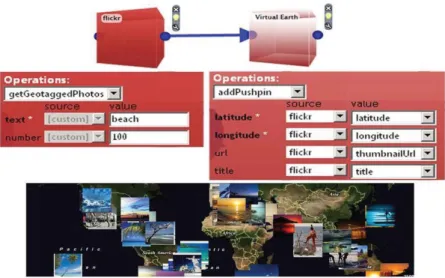
Figure 2-1.Microsoft Popfly (Loton, 2008)
Figure 2-1, shows a Mashup example in which the Flicker block sends a list of images about ―beaches‖ with their geographical coordinates to the Virtual Earth block (Figure 2-1: top and middle) to display them on a map (Figure 2-1: bottom).
As web Mashups were used to combine data, functionality and presentation to create new web-based applications. Cetin et al. (2007) proposed web Mashups as a one of the approaches that could be used for migration of legacy system to better paradigms, for instance SOA.
14
Migration is defined as the movement of services from old operating environment to new ones with minimal coding. Mashup facilitate more general platforms and execution environment such as SOA. As the goal of this research is to create a usable Mashup tool that allow novice users to build Mashups easily with no programming experience; Mashup tools are chosen as the key service composition enablers. The following sections give a brief background of concepts and web technologies employed by the Mashup tools.
2.3 Mashups as a Service Composition Technique
Mashups are about simplicity, usability, and ease of access. This simplicity has the upper hand over feature completeness or full extensibility. There are two formalities, which lead to identification of heterogeneous web contents as a challenge within Mashup tools namely: sharing and reuse. Sharing of web contents is of great importance as it allows various groups of users to utilize services created by the others. Mashups facilitate sharing by cataloguing newly created services to a repository, which is normally implemented through a middleware. The second focus of Mashups is geared towards web content reuse. Web content reuse is a study that had evolved several technologies in order to gain its true potential. Web contents are derived from web resources in order to simplify the development of Mashups applications.
In order to embrace the primary goals of Mashup tools, studies shows that they are implemented as SOA centric web based application (Benhaddi et al., 2012). SOA facilitates the two formalities through its building blocks and service architecture and is composed of three actors namely service provider, service consumer and repository (Chapin, 2010). With the belief that Mashups implement SOA, Figure 2-2 illustrates that claim and further discusses on what basis does the claim holds.
15
In web services and SOA as stated in the above paragraph that there are three building blocks known as: producer, consumer and repository of the services. Service producer provides and publishes web services to a registry, so that consumers can be aware of services that are available. Service consumer is the user of the services. Mashup editors correspond to consumers and Mashup tools correspond to service providers and lastly the repository maps to both the databases and the online resources used by the Mashups. The next section discusses the adopted web technologies used by Mashups for added robustness.
2.3.1 Adopted Web Technologies
This section presents the web technologies and paradigms that are adopted by the Mashup tools to mitigate the challenges experienced by Mashup developers such as heterogeneity. This subsection does not detail on Mashup challenges rather it focuses on some employed concepts that reduces complexity in Mashup development. In order to homogenize data, Semantic Web Services (SWS) promises to produce web services that are semantically annotated. SWS yields web services that are intelligent (i.e. they can be automatically or semi-automatically described, published, selected and discovered) (Rao, 2004). The aim of the SWS is to create a platform where both humans and web machine agents are able to consume information in the web, using semantic web technologies and web services. There are initiatives that have to be considered in the context of SWS:
i. It uses the Web Service Modelling Ontology (WSMO) which refines and extends the Web Service Modelling Framework (WSMF) with ontologies. The WSMF is a framework used to model the development and the description of Web services based on two main requirements: maximal decoupling and strong mediation. WSMO also employs a concept known as Web Service Modelling Language (WSML), which is the language that allows the writing of annotations for web services using WSMF.
ii. Lastly, SWS uses Web Service Modelling Execution (WSMX) as an execution environment in order to discover, select and invoke web services. SWS are capable of referring to the consumer and provider information and perceiving the conditions in order to automatically settle contracts through negotiation (Choi et al., 2006).
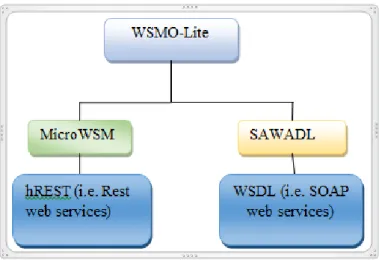
There are other annotation-based approaches such as Semantically Annotated Web Service Description Language (SAWSDL), Hypertext Mark-up Language for REST
16
Services (hRESTS) and WSMO-lite, which enabled the creation of lightweight semantic web services, which are discussed in (Section 3.3). With the introduction of SWS, the Figure 2-3 below shows the key concepts used by Mashups according to (Choi et al., 2006; Pedrinaci & Domingue, 2010).
Figure 2-3.SWS formation adapted: (Pedrinaci & Domingue, 2010)
As depicted in Figure 2-3, World Wide Web (WWW) has played a major role in associating web contents with humans. It offered users with limited access due to the scarcity and costs that were involved such that only a certain group of users were able to use the web -: university or college and research labs (Pedrinaci & Domingue, 2010). It mainly used Hypertext Transfer Protocol (HTTP), Hypertext Mark-up Language (HTML) and Universal Resource Identifier‘s (URI) as the core protocols. This first wave of web evolution is referred to as web 1.0, were users could only read from the Web but they could not do further interactions (O‘reilly, 2007). The following subsection details some of the key technologies in web 2.0, which is second wave of the web that allows users to be both producers and consumer of web resources.
2.3.2 Web Services and Semantic Web Technologies
Web services are defined as self-contained, modular units of application logic, which provide business functionality to other applications via an internet connection. They can be integrated with each other to fulfil the user's requirement, regardless of the languages that are used to implement them and the platforms where they are executed (Pedrinaci et al., 2012). Web
17
services present many benefits to the web such that its functionality need to be described with additional pieces of information called semantic annotation which adds meaning to them (Srivastava & Koehler, 2003). Furthermore web services are semantically annotated with ontologies using Semantic web technologies (Feier et al., 2005). In order to establish understanding between that will not restrict the usability of web services mostly to human users and machine user around the web.
According to Koschmider et al. (2009), Mashups implements SOA since most of SOA-centric organisations use web services which are also used by the Mashups. Web services implement SOA, which is a set of well-defined interfaces and guidelines used in software development. Moreover, web services are said to be operations that can be performed on an online resource. They use XML languages such as Web Service Description Language (WSDL) to describe them, SOAP to access them and Universal Description Discovery Integration (UDDI) to discover them (Rao, 2004). These XML languages allow different applications to exchange data regardless of the operating systems, programming languages and execution environments underlying those applications.
Semantic web promises to make web contents machine understandable, allowing machines and applications to access a variety of heterogeneous resources. They also process, integrate web content, and produce added-value output for users. The way in which semantic web technologies work is as such: pages not only store content as a set of unrelated words in a document, but also code their meaning and structure, by so doing they give access to millions of resources, irrespective of their physical location and language (Rao, 2004). In general, the Semantic web languages include the following standards:
i. The Resource Description Framework (RDF) which is family of standards that leverages URI and XML for meaningful descriptions using triples. Triples allow resources to be described in the form of metadata by means of <subjects, predicates, object>. URI uniquely identifies resources and relations amongst them (Pietro et al., 2008).
ii. RDF Schema (RDFS) is an extension of RDF, which defines a simple modelling language on top of RDF and it enables the representation of class, property and constraint.
iii. Ontologies specification languages, such as Web Ontology Language (OWL) as conceptual or data models.
18
There are many advantages when semantic web technologies are combined with web services to leverage WWW. They result in SWS, which is all about making web services intelligent by annotating them with semantic web technologies (Benjamins et al., 2002).
This section discussed the two ways of aggregating content namely portal and Mashups. Mashups seemed to be the successors of Portals and some of the Mashup key web enabling technologies and concepts were discussed. Before delving into details on how Mashup tools are designed, the research discusses a concept of great importance towards developing web application for novice users. The concept is known as End User Programming (EUP) and is discussed in the following section.
2.4 EUP in Mashup Editors
EUP is playing an increasingly central role in shaping software to meet the broad, varied, rapidly changing needs of the world as the number of users continues to grow in the web (Wong & Hong, 2007). Programming is referred to as the process of transforming a mental plan of desired actions for a computer into a representation that can be understood by the computer. End-user programmers are users who are not formally trained in programming, yet need to program in order to accomplish their daily task (Mehandjiev & Angeli, 2012). EUP enables end users to create their own programs. End-user programmers are also defined as people who write programs, but not as their primary job function i.e. they write programs in support of achieving their main goal allowing diverse communities to use software‘s and application without knowledge of computer programming. EUP include paradigms such as widgets, Pipes and filters (Bolin, 2005). Programming for end users is one of the important parts of in this research, since the main aim is to allow novice users to access SOA services and create web applications with simplicity. The next sub sections details on the EUP paradigms.
2.4.1 Widgets
A web widget is a small application with limited functionality that can be installed and executed within a web page by an end user (Soylu et al., 2011). A widget occupies a portion of a webpage and does something useful with the information that is fetched from other websites and it can be represented in a certain style. Widgets are typically created in Dynamic HTML (DHTML), JavaScript, or Adobe Flash. A widget is a stand-alone application that can be embedded into third party sites by any user on a page where they have rights of ownership (Batard et al., 2011). They also allow users to turn personal content into dynamic web apps that can be shared on websites where the code can be installed. Widgets are used as small
19
stand-alone web application in Mashups. They can be connected with each other through Pipes and filters to create meaningful applications.
2.4.2 Pipes and Filters
Many Mashups leverage the Pipes and Filters integration pattern to create the logic for data combination (Latih et al., 2011). The implementation of pipes and filters pattern consists of a series of interconnected components. Each component performs a specific function such as filtering unnecessary data or joining records. The connection between components denotes that the output from one component is the input to the other component (Xuanzhe et al., 2010). The advantage of using the pipes and filters pattern is the simplicity in modelling data flows. Each pipe or filter in the flow is explicitly defined and their integration is driven by the data flow (Cao et al., 2010). Data sources are filtered, processed and combined to produce new mashed-up information. In addition, it is easier to maintain the Mashups built using this pattern since the Mashups execute exactly as they are designed following the flow paths at runtime.
2.4.3 Data Federation
The data federation pattern aims to efficiently federate both structured and unstructured data from multiple disparate sources (Latih et al., 2011). It helps to mitigate the burden of aggregating, correlating and correcting relevant yet heterogonous data. This pattern supports data operations against a virtual view. At design time, views of the data sources are declared and the relationships between such views are defined as operations including joins, unions, projections, selections and aggregations. The data federation pattern can be realized by several pipes and filters, each providing the Mashup component with an interface to access the data (Papadakis et al., 2011). In the context of Mashups, the data redundancy, therefore, this data can be stored and reused later without going through the data processing pipes and filters every time they are needed. Thus introducing some level of redundancy can both simplify the design and improve the responsiveness of Mashups.
In the following sections, a thorough look is conducted on Mashups design, which is the crucial process that determines the success of a Mashup tool.
2.5 Designing Mashups
This section discusses the requirements needed to develop Mashups. The architecture, support and execution environments are discussed. The next subsection presents the design and support provided by the Mashup Engine and the Mashup editor.
20 2.5.1 Mashup Engine
Mashup tools apply in different domains for different users; therefore, the way they offer support to users varies. According to Latih et al. (2011), Mashup tools can be categorized into three domains automated, semi-automated and manual (scripting tools). This research does not discuss about the Mashup tools that offers manual support to integrate APIs, as they mainly target developers.
2.5.1.1 Automated Mashup Tools
This category of Mashup tools normally supports the development of situational Mashup applications. A situational application is an application that is developed rapidly to address an immediate need of an individual or small community. It is created for a specific situation and it is utilized only for short periods while the situation exists. It is a Just-in-time (JIT) solution but not necessarily short-lived. Examples of Mashup tool that support the development of situational Mashup applications are MaxMash and Automatic Mashup of Composite Application (Latih et al., 2011).
2.5.1.2 Semi-Automated Mashup Tools
Semi-automated Mashup tools were developed to support end user in developing Mashup applications. Such tools are developed based on End-User Development (EUD) paradigms (Bolin, 2005). EUD paradigms provide programming capabilities for everyone by pushing on different aspects of computing technologies. One of the EUD paradigms is wiring or dataflow paradigm is where several selected widgets that support particular functions are connect together for example are Yahoo! Pipes and Marmite. There are also tools that use widgets only to create Mashups, each widget represents a particular function, users just select it for use and they get response for example; tools like iGoogle and Netvibes.
2.5.1.3 Scripting Tools
Lastly, Scripting tools Mashup applications require some form of programming or coding. The
coding process is simplified by using scripting languages rather than the normal programming languages. Such Mashup tools are developed for technical users. An example of a Mashup tool in this category is Web Mashup Scripting Language (WMSL) (Sabbouh et al., 2007).
The research adopts the semi-automated style, since it assists users in creating Mashups although the process and tasks are not fully automated. The next subsection details the design
21
of Mashup editors, since designing a Mashup tool not only needs support offered by the Mashup engine to integrate public web APIs but also need Mashup editor which allows novice users to interact with Mashup tools easily and flexible.
2.5.2 Mashup Editor
Mashup editor is an environment that allows end users to remix the available public web APIs. According to Latih et al. (2011), there are three types of support offered by Mashup editors namely: Visual Mashup editor, Browser extension application and Web portal Mashup tools.
2.5.2.1 Visual Mashup Editor
A visual Mashup editor allows users to create Mashup application by manipulating program elements graphically rather than by specifying them textually. For instance, Yahoo! Pipes let users to develop Mashup applications via a visual editor by selecting a few modules and wire them together (Latih et al., 2011).
2.5.2.2 Browser Extension
A browser extension application is developed as a plug-in application to web browsers. By using this tool, users can develop a Mashup while browsing the web for instance Intel Mashmaker. It is a plug-in to Firefox web browser and it suggest to users on what type of data to integrate. Other browser extension Mashup tools are Marmite and Vegemite (Latih et al., 2011).
2.5.2.3 Web Portal Mashup Tools
Web portal Mashup tools are simple tools that provide users with a dashboard full of widgets ready to be mashed. In this type of Mashup tool, data sources are aggregate into a single layout. They reuse the existing Mashup applications, for example, users can stream their emails from Gmail, get local and world weather information, and pull RSS from their favourite sites. Other examples are MyYahoo and Facebook (Latih et al., 2011; Miah et al., 2012).
The next subsection discusses the components, composition and execution environments of Mashups and the type of support offered by the Mashup tools to integrate public web APIs. 2.5.3 Mashup Tool Architecture
This subsection discusses the two architectures of Mashup application that is server side Mashups and client side Mashup. These architectures enable developers to realise the
22
lucrative side for mixing contents. Some developers prefer client-side and some server-side depending on resources and situation in hand. Furthermore, this subsection covers the types of support offered by Mashup tools. Noting that Mashup tools objective is to simplify the integration process by automating instead of manually combining various web resources. Mashups are designed with two different architectures, depending on where process and data integration takes place. If it takes place on the server-side, the Mashup is called a server-side Mashup. In this case, once the result is produced on the server, it will be pushed to the client for the sake of presentation. Alternatively, both integration and visualization tasks can be performed in client browser, which results in a client-side Mashup (Aghaee & Pautasso, 2010). Moreover, in a server-side Mashup all the requests from the client pass through the server, which acts as a proxy to make calls to the other web sites (Aghaee & Pautasso, 2010). Server side Mashups are more secured and support multithreading. Multithreading is when a serve execute different threads simultaneously to solve task at hand, and threads are the lightweight processes (i.e. each thread serve a unique function). They are secured since the data transmission between the Mashup client and the server is normally done through client-side XMLHttpRequest (XHR) calls though when dealing with real time data, the communication can be through web sockets (Anttonen et al., 2011). This research focuses on using server side as the location for content mixing.
The integration process side is not enough for the design of a Mashup tool since prior development; it has to be clear what execution environment the Mashup tool targets. The next subsection discusses how Mashups behave at runtime.
2.5.4 Mashup Tool Execution Environments
A Mashup execution environment defines the device that Mashup application can run on. There are two devices that currently run Mashups applications namely desktop and mobile devices. Desktop Mashups includes PC, laptops and servers while mobile devices include smart phones, tablets and Personal Digital Assistant (PDA). Mobile Mashups serve as an alternative solution as compared to hybrid apps, since they can be accessed from any browsers on any platform that enables portability. Hybrid apps and mobile Mashup combines reusable components from a large pool of web APIs, while mobile Mashups can also be developed using end-user programming Mashup tools such as Yahoo! Pipes. Such end user tools require less effort as opposed to hybrid apps since they are platform-independent and building them requires no programming skills. These observed trends in Mashup domain
23
increases demands on the standards and the methodologies that are used to build Mashups, so that they can accommodate mobile devices. For instance with the use of Cascading Style Sheet (CSS3) and HTML5, desktop Mashups can be easily ported to mobile browsers and vice versa (Aghaee & Pautasso, 2010).
This section discussed the design and support offered by Mashup tools, the next section discusses the technologies and patterns used to integrate data.
2.6 Mashup Tools Composition Styles
The composition model determines how components are integrated to form the Mashup, assuming components are readily available. To facilitate end-user compositions, the composition model should be as simple as possible. A composition model has several distinct characteristics: output type, orchestration style, and data-passing styles (Benslimane et al., 2008):
i. First, we distinguish the model‘s output type. As with components in input, composition output can be of type Data Application (DA), Application logic (AL), or User Interface (UI), depending on whether the composition provides data, programmable APIs, or applications with a user interface.
ii. The second characteristic is orchestration style. Orchestrating components implies specifying how developers define and synchronize the components‘ execution. Three main approaches exist:
a. Flow-based styles define orchestration as sequencing or partial order among tasks or components and are expressed through flow chart-like formalisms. b. Event-based approaches use publishes– subscribe models. They‘re particularly
powerful for maintaining synchronized behaviour among components.
c. In the layout-based style, components (with or without user interfaces) are arranged in the composite application‘s common layout. Each component‘s behaviour is specified individually by accounting for the other components‘ reactions to user interactions.
iii. Lastly, is the data passing style of a Mashup tool. There are two data-passing approaches: a dataflow approach, in which data flows from component to component; and a blackboard approach, in which data is written to variables, which serve as the source and target of operation invocation on components, much like in programming languages.
24
This subsection discussed the different composition styles used within Mashup development, and the next subsection presents the data integration patterns.
2.6.1 Composition Patterns
To integrate data in Mashups requires Mashup patterns. Design patterns in software industry are general reusable solutions to some commonly occurring problem. Patterns describe how a certain type of problem can be solved in many different situations. Ogrinz (2009) classifies Mashup patterns into five categories: harvest patterns, enhance patterns, assemble patterns, manage patterns, and test patterns:
2.6.1.1 Harvesting Pattern
Harvesting pattern is used to extract data from both structured and unstructured sources. Structured sources can be databases, RSS feeds, XML, and other data streams. Unstructured sources can be web sites, binary files, or free form text. Harvest patterns include mechanisms to navigate to important information and then retrieve it. For instance, Ogrinz (2009) identifies two harvest patterns referred to as API Enabler and Infinite Monkeys. The former is used to create REST or other kind of interface for previously closed resources, and the latter is used to extract larger quantities of data to be examined more closely later. Often these two can be combined or executed in parallel.
2.6.1.2 Enhance Patterns
Enhance patterns make keeping Mashups running less time and money consuming. This happens in five ways: extending Mashups to a wider audience, fixing bugs without touching the underlying code, making software more user friendly, improving the ―findability‖ of data, and incorporating changing business rules. Enhance patterns have emphasis on changing the interaction model of a Mashup to keep it useful.
2.6.1.3 Assemble Patterns
Assemble patterns can be used when developing the core function of Mashups: adding resources together from multiple sources to create some-thing new. Often the problem to be solved with assemble patterns is availability of source data in suitable format or converting data from a format to another. Sometimes the problem is the amount of data, which is so excessive that presenting it to the user becomes an issue.