DEVELOPMENT AND DEPLOYMENT OF
ACADEMIC FACING
ADMINISTRATIVE TOOLS AND SERVICES
J. Ross Nicoll
A Thesis Submitted for the Degree of PhD at the
University of St Andrews
2015
Full metadata for this item is available in Research@StAndrews:FullText
at:
http://research-repository.st-andrews.ac.uk/
Please use this identifier to cite or link to this item:
http://hdl.handle.net/10023/6857
This item is protected by original copyright
Development and Deployment of
Academic Facing
Administrative Tools and Services
A thesis to be submitted to the
UNIVERSITY OF ST ANDREWS
for the degree of
DOCTOR OF PHILOSOPHY
by
J. Ross Nicoll
The demand for higher education has increased dramatically in the last decade. At the same time, institutions have faced continual pressure to reduce costs and increase quality of edu-cation, while delivering that education to greater numbers of students. The introduction of software systems such as virtual learning environments, online learning resources and cen-tralised student record systems has become routine in attempts to address these demands. However, these approaches suffer from a variety of limitations:
• They do not take all stakeholders’ needs into account.
• They do not seek to reduce administrative overheads in academic processes.
• They do not reflect institution-specific academic policies.
• They do not integrate readily with other information systems.
• They are not capable of adequately modelling the complex authorisation roles and organisational structure of a real institution.
• They are not well suited to rapidly changing policies and requirements.
• Their implementation is not informed by sound software engineering practises or data architecture design.
Crucially, as a consequence of these drawbacks such systems can increase administrative workload for academic staff.
I, J. Ross Nicoll, hereby certify that this thesis, which is approximately 60,500 words in length, has been written by me, and that it is the record of work carried out by me, or principally by myself in collaboration with others as acknowledged, and that it has not been submitted in any previous application for a higher degree.
I was admitted as a research student in 27th September 2005 and as a candidate for the degree of Doctor of Philosophy in 27th September 2008; the higher study for which this is a record was carried out in the University of St Andrews between 2005 and 2013.
Date signature of candidate
2. Supervior’s declarations:
I hereby certify that the candidate has fulfilled the conditions of the Resolution and Regu-lations appropriate for the degree of Doctor of Philosophy in the University of St Andrews and that the candidate is qualified to submit this thesis in application for that degree.
Date signature of supervisor
3. Permission for publication:
No embargo on print copy No embargo on electronic copy
Date signature of candidate
An incredible number of students and staff have been involved with the MMS project over the last decade, and attempting to thank everyone who has had an influence on the system is an impossibility. As such these acknowledgements can only hope to address the most important contributions.
First and foremost I would like to thank my supervisor and mentor, Colin Allison, for the motivation, encouragement, and above all else his confidence throughout.
A number of other research staff have contributed directly and indirectly to MMS over the years. The early coursework and attendance tools for MMS were developed by David McKechan and Bin Ling, and their feedback on the API design helped shape its early formative years.
Alex Bain has provided invaluable feedback and encouragement in his role as school ad-ministrator for Computer Science, particularly for administrative process analysis.
Stuart Purdie, who joined the team in 2005, has worked tirelessly on many of the tools, as well as the rendering and institution abstraction layers and his contributions to these elements cannot be overstated. I would particularly like to thank him for his constant challenges and feedback.
Victoria Davidson has been key to the support and training for MMS since she joined the team in 2009.
signif-Many thanks must go to a number of open source projects for libraries and other software on which MMS depends (all URLs correct as of 9th May 2013):
• Apache Commons FileUpload1 provides support for uploading files such as
course-work
• Apache Log4J2for log reporting
• Apache POI3to provide Excel spreadsheet support
• Apache Tomcat4as servlet container to host the application
• Bouncy Castle Crypto APIs5 to provide cryptographic e-mail signing
• Freemarker6 as a template engine for rendering output
• iText7 to provide PDF export support
• Java8as language and virtual machine
• JFreechart9to produce graphs for reporting statistics
• JUnit10for unit and integration tests
• Mozilla Rhino11to provide scripting support
The icons used within MMS are from the Crystal package (http://www.everaldo.
com/crystal/, visited 1st March 2008), although the icon original Crystal icon (Crystal
SVG) set they are taken from appears to no longer be available.
1http://commons.apache.org/fileupload/
2http://logging.apache.org/log4j/
3http://poi.apache.org/
4http://tomcat.apache.org/
5
http://www.bouncycastle.org/
6http://freemarker.org/
7
http://www.lowagie.com/iText/- please note that version 2 is used due to changes in
licens-ing in later versions
8http://www.java.com/
9http://www.jfree.org/jfreechart/
10
http://www.junit.org/
MMS is based on work dating back to 1998, and accordingly credit must be given to a great many individuals.
Of the work described in this thesis, the architectural design of MMS is my own work based on experiences working with TAGS’ design12. The core framework is primarily my own
work with the notable exception of the “Flex” table rendering API. In detail:
• The handling of users, modules, groups, and tools, with a design building on previous work and university structures was my work.
• Initial design and development of the roles model which provides the authorisation layer was my work, as was handing of role variability across the institution and the understanding of anti-roles.
• The request handling, routing and validation components were primarily my design and development.
• Moodle integration was my work.
• Re-integration of DIF to provide disability information display was Stuart Purdie’s work.
• Display of exceptional circumstance information was Stuart Purdie’s work.
• Academic alerts requirements were specified by senior management at the University of St Andrews, however design and development was my work.
12TAGS was maintained by David McKechan prior to my involvement with the project, and led by Colin
source weighting/confidence management.
Of the integrations with external systems:
• Data Warehouse, SITS:Vision and advisor’s database integrations have been worked on by myself and Stuart Purdie.
• Integration with Talis Aspire (reading lists) is my own design and development.
• Integration with the EvaSys Education Survey Automation Suite is my own design and development.
• Integration with virtual worlds was my idea, design and development.
Of the tools hosted within MMS:
• The coursework tool was originally written by David McKechan, but has been very extensively rewritten since then by Stuart Purdie and myself.
• The exam and final grade tools were designed and developed primarily by Stuart Purdie.
• The file share and notebook tools were initially derived from TAGS’ design, but revised design and all development was my work.
• The design and development of the quiz tool was my own work, based on suggestions provided by the Department of Film Studies and Clare Kerbey.
• The student group sign-up tool was Stuart Purdie’s design and development based on requests from administrative support.
• Academic Alerts emerged from a policy review lead by the VP: Teaching and Learn-ing and Deans. The refinement, implementation and deployment was my work.
• School/unit-level tools for bulk management of administrative tasks (for example student/staff on modules) was my design and development.
• Coversheet generation support was my design and development.
Contents
List of Figures ix
List of Tables xi
1 Introduction 1
1.1 Motivation . . . 3
1.2 Background . . . 4
1.3 Structure of Thesis . . . 7
2 Context and Related Work 9 2.1 Virtual Learning Environments . . . 10
2.1.1 Blackboard Learn . . . 11
2.1.2 Moodle . . . 12
2.1.3 Sakai CLE . . . 13
2.1.4 ANGEL Learning Management Suite . . . 13
2.1.5 WebCT . . . 14
2.1.6 Bodington . . . 15
2.2 Other Software . . . 16
2.2.1 BOSS . . . 16
2.2.2 Mobile Applications . . . 17
2.2.3 SITS . . . 18
2.2.4 uPortal . . . 20
2.3 Architecture . . . 20
2.3.1 Model-View-Controller . . . 20
2.3.2 Spring . . . 21
2.4 Project Background . . . 21
2.4.4 DIF . . . 26
2.5 Publishing Models . . . 27
3 Challenges 29 3.1 Process Complexity . . . 31
3.1.1 School and Subject . . . 31
3.1.2 Intended Award . . . 31
3.1.3 Mode of Attendance . . . 32
3.2 Acceptance By Users . . . 32
3.3 Exceptions to Established Process . . . 33
3.4 Process Innovation . . . 34
3.5 Supporting a Research Project . . . 34
3.5.1 Effort Management . . . 35
3.5.2 User Support and Training . . . 36
4 Design 37 4.1 Lessons Learnt from TAGS . . . 39
4.1.1 Improvements in Relation to TAGS . . . 40
4.1.2 Data Modelling . . . 42
4.1.3 Authorisation (Users, Groups and Roles) . . . 42
4.2 MMS is not a VLE . . . 43
4.3 MMS is Not Solely for Academics . . . 45
4.4 MMS Models the Institution . . . 46
4.5 MMS Implements and Supports Policy . . . 46
4.6 MMS Is Easy to Support . . . 47
4.7 MMS Supports Multiple User Interfaces . . . 47
4.7.1 Web . . . 48
4.7.2 E-mail Based UI . . . 50
4.7.3 RSS and iCalendar Feeds . . . 52
4.8 Database Design . . . 55
4.8.1 Version Control . . . 55
4.8.2 File Storage Layout . . . 57
5.2 Technology . . . 62
5.3 MVC Pattern . . . 63
5.4 RESTful . . . 65
5.4.1 URLs . . . 66
5.5 URL Design . . . 66
5.5.1 Natural Keys for Content . . . 68
5.5.2 Natural Keys for Coursework, Exams, etc. . . 69
5.6 Authentication and Identity Management . . . 70
5.6.1 User Identity . . . 70
5.7 Authorisation . . . 71
5.7.1 Authorisation API . . . 74
5.7.2 Path-Based Authorisation . . . 76
5.7.3 Limitations . . . 78
5.8 Error Handling . . . 78
5.8.1 Error Report Emails . . . 79
5.8.2 Error Pages . . . 79
5.9 Security Policy Enforcement . . . 82
5.9.1 User Interface . . . 83
5.9.2 Request Parsing and Validation Framework . . . 85
5.9.3 Change Auditing . . . 87
5.9.4 Data Security and Integrity . . . 88
5.10 Data Rendering . . . 89
5.10.1 Data Model . . . 90
5.10.2 Rendering Process . . . 91
5.10.3 Render Configuration . . . 91
5.10.4 Calculated Fields . . . 92
5.11 Institution Abstraction Layer . . . 92
5.11.1 Implementation . . . 93
5.11.2 Data Model . . . 94
5.11.3 Abstract Marking Scales . . . 95
5.11.4 Marking Scales . . . 97
5.13.1 Marks and Grades . . . 101
5.13.2 Attendance . . . 102
5.13.3 Student Contact . . . 102
5.13.4 Coursework Submission . . . 102
5.14 Conclusion . . . 103
6 Integrations 104 6.1 Data Sources . . . 105
6.1.1 SITS:Vision . . . 105
6.1.2 WebCT . . . 106
6.1.3 Moodle as a Data Source . . . 106
6.1.4 Talis Aspire (Reading Lists) . . . 107
6.1.5 IMS QTI Support . . . 107
6.2 Data Consumers . . . 107
6.2.1 SITS:Vision . . . 107
6.2.2 Mobile App Support . . . 108
6.2.3 Google Search Appliance . . . 109
6.2.4 EvaSys (Module Evaluation) . . . 110
6.2.5 Moodle . . . 110
6.3 External System Management . . . 111
6.3.1 Turnitin . . . 111
6.3.2 Virtual World Administration . . . 112
6.3.3 Facebook . . . 115
7 User Tools 117 7.1 Benefits . . . 118
7.2 Configuration . . . 120
7.2.1 Module Activation . . . 120
7.2.2 Student Enrolments . . . 123
7.2.3 Staff Roles . . . 125
7.2.4 School-level Bulk Administration . . . 126
7.3 Student Management . . . 128
7.3.4 Lecture Attendance Management . . . 131
7.3.5 Announcements . . . 133
7.4 Student Assessment . . . 134
7.4.1 Coursework Management . . . 134
7.4.2 Exam Marking Tool . . . 139
7.5 Grade Reporting . . . 141
7.5.1 Model Tests . . . 142
7.6 Academic Policy . . . 143
7.6.1 Final Grades . . . 143
7.6.2 Coursework Grades . . . 146
7.6.3 Double Marking . . . 146
7.6.4 Anonymous/Blind Marking . . . 147
7.6.5 Lateness Policies . . . 148
7.7 Learning and Teaching . . . 149
7.7.1 File Share Tool . . . 149
7.7.2 Notebook Tool . . . 152
7.7.3 Forum Tool . . . 154
7.7.4 Quiz Tool . . . 154
7.8 Conclusion . . . 155
8 Case Study: Academic Alerts 157 8.1 Context . . . 157
8.2 Introduction of Academic Alerts . . . 158
8.3 Use of MMS . . . 158
8.4 Process . . . 159
8.5 Issuing Alerts . . . 159
8.6 Presentation . . . 161
8.7 Institution-Level Management . . . 162
8.8 Conclusion . . . 162
9 Case Study: Postgraduate Research Student Administration 163 9.1 Context . . . 163
9.5 Examination Process Forms . . . 166
9.6 Conclusion . . . 167
10 Case Study: LAVA 168 10.1 Context . . . 168
10.2 Use of MMS . . . 169
10.3 New Developers . . . 169
10.4 Student Workflow Modelling . . . 170
10.5 Dig Site Management . . . 171
10.6 Virtual Site Tour . . . 172
10.7 Collaborative Form . . . 173
10.8 Use of MMS Data in External Learning Tools . . . 174
11 Adoption and Evaluation 176 11.1 End-User Surveys . . . 176
11.1.1 Questionnaire Summer 2006/7 . . . 177
11.1.2 Questionnaire Winter 2009/0 . . . 178
11.1.3 Questionnaire Summer 2012/3 . . . 179
11.1.4 Summary . . . 184
11.2 End-User Interviews . . . 184
11.2.1 Questions . . . 185
11.2.2 Roles and Main Tasks . . . 185
11.2.3 Effectiveness of MMS . . . 187
11.2.4 Feedback on MMS . . . 188
11.2.5 Summary . . . 189
11.2.6 Addressing Challenges . . . 190
11.3 Web Server Access Logs . . . 190
11.3.1 Methodology . . . 191
11.3.2 Access in First Week of Semester One . . . 193
11.3.3 Status Codes . . . 193
11.4 Usage . . . 195
11.4.1 Logins . . . 195
11.5 Researcher/Developer Feedback . . . 201
11.5.1 MMS Team . . . 201
11.5.2 LAVA . . . 202
11.6 Summary . . . 202
12 Future Work 203 12.1 Design . . . 204
12.2 Usability . . . 204
12.3 Organisational Architecture . . . 205
12.3.1 Modelling as Parallel Hierarchies . . . 205
12.3.2 Cross-cutting Concerns . . . 207
12.3.3 Cross-institution Support . . . 207
12.4 Software Architecture . . . 208
12.4.1 Object-Relational Mapping with Version Control . . . 208
12.4.2 Merged Rendering and Parsing Definition . . . 209
12.4.3 Web Services . . . 210
12.5 Features . . . 211
12.5.1 Anonymisation . . . 211
12.5.2 eBook . . . 212
12.5.3 MOOCs . . . 212
12.5.4 Mobile/Tablet Support . . . 213
12.5.5 Email User Interface . . . 214
12.5.6 Journal Tool . . . 215
12.5.7 Server-side Scripting . . . 216
12.5.8 WebDAV . . . 216
12.5.9 Blockchain-based Audit . . . 217
13 Conclusion 219
A Survey 2010 236
B Survey 2013 240
List of Figures
1.1 Time-line of MMS Development . . . 5
2.1 Screenshots of Moodle . . . 12
2.2 Screenshot of e-Vision . . . 19
2.3 TAGS: Users, Groups and Resources Model . . . 22
2.4 Finesse Portfolio Summary Page . . . 26
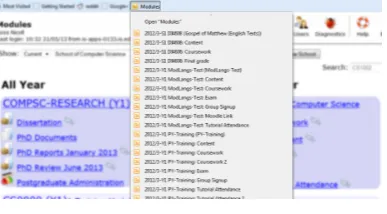
4.1 Smart Bookmarks (Firefox) . . . 54
4.2 Example of Data Tables with Version Control . . . 56
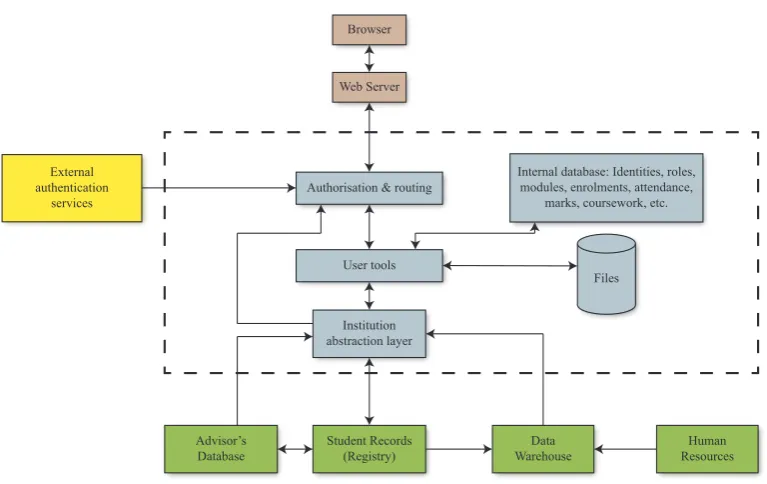
5.1 MMS Architecture Overview . . . 63
5.2 Decomposition of URL . . . 68
5.3 MMS Authorisation Model (Prototype) . . . 71
5.4 MMS Authorisation Model (2002) . . . 72
5.5 MMS Authorisation Model . . . 75
5.6 Extract from Module Controller Interface . . . 76
5.7 Sample Error Email . . . 80
5.8 Sample Error Page . . . 81
5.9 Template Fragment showing HTML Escaping . . . 84
5.10 Example Table with Sub-columns . . . 90
7.1 Screenshot of Module Activation . . . 121
7.2 Screenshot of Configuring Enrolments on Module . . . 124
7.3 Screenshot of Configuring Staff on Module . . . 125
7.4 Screenshots of Enrolment Tool . . . 129
7.5 Screenshots of Tutorial Attendance System . . . 132
7.6 Screenshots of Lecture Attendance Management . . . 132
7.10 Screenshot of Scratchspace Tool . . . 150
7.11 Screenshot of Content Tool . . . 153
7.12 Screenshot of Notebook Tool . . . 153
8.1 Screenshot of Raising an Academic Alert . . . 160
8.2 Screenshot of Bulk Academic Alert Raising . . . 161
10.1 Screenshots of Archaeological Dig Management . . . 172
10.2 Screenshots of Virtual Tour . . . 173
10.3 Screenshots of Collaborative Form . . . 174
11.1 Staff Roles (2010) . . . 180
11.2 Staff Time Taken (2010) . . . 180
11.3 Staff Time Taken (2013) . . . 183
11.4 Student Change Desirability . . . 183
11.5 Access By Day of Week . . . 191
11.6 Access By Week of Semesters 1 & 2 . . . 192
11.7 Activity in Week One of Semester One . . . 193
11.8 Logins in Week One, by Semester and Academic Year . . . 196
11.9 Modules Containing Core Tool Types . . . 199
11.10Assignments by Academic Year . . . 200
List of Tables
2.1 Summary of Related Web Applications . . . 10
5.1 Example Mark Translation . . . 99
7.1 Institutional Benefits for User Tools . . . 119
9.1 Return Rates for Progress Reports to Pro-Dean . . . 167
11.1 Survey 2007 Results . . . 178
11.2 Survey 2013 SUS Results . . . 181
11.3 HTTP Response Statuses by Academic Year . . . 194
11.4 Logins in Week One, by Semester and Academic Year . . . 196
11.5 Modules by School and Academic Year . . . 197
11.6 Modules Containing Tools, by Academic Year . . . 198
11.7 Assignments by Academic Year . . . 199
11.8 Total Assignments and Assignments using Turnitin, by Academic Year . . . 200
Chapter 1
Introduction
This thesis considers firstly “Can academic administrative overheads can be reduced through the use of web applications?” The underlying work has been iterative, and further questions will be addressed through the course of the work.
Given the recent and continued increases in demand for student places at higher education institutions[58][45], there is a clear need to reduce overheads in higher education teach-ing, to enable academic staff time to be devoted primarily to teaching and research tasks. Reduction and changes in higher education funding[48] provide motivation for increased competition in the higher education sector as a whole.
Increases in administrative costs in higher education are well documented[41][40] [69]1.
Jürgen also reports that over 40% of professors’ time (in England, the Netherlands and Sweden) is spent on administration[27]. This illustrates a clear opportunity for reducing costs through minimising academic time spent on administrative tasks, enabling a better return on investment.
The preceding TAGS[5] and INSIDE[21] systems had proven that web applications have scope for use in administration, however their designs required major work in order to extend significantly further.
I will describe the design and implementation of a web-based application suite, the Mod-ule Management System[1][2] (MMS), which is in active use across the University of St
Andrews since 2010. MMS provides an inter-connected set of tools for common admin-istrative tasks, seeking to both streamline these tasks and reduce risk of mistakes. These tools are enabled by a software framework which tackles a number of challenges:
• Institutional data models are extremely complex. As an example the SITS:Vision student record system alone contains well over 2,000 inter-related data tables.
• Institutional data may lack a single “golden source” in some cases, instead requiring that multiple data sources must be examined in order to ensure the most accurate data is captured. These problems typically arise where individual software systems lack the capability to accurately model the data.
• Institution policies may vary significantly not just between institutions but also within a single institution.
• Policies and requirements are frequently revised or corrected during an academic year, requiring frequent changes to implementation, sometimes against extremely limited timescales.
• Data may be edited concurrently and independently by a large number of users, and this can lead to confusion with regards to the origins of changes to data. This in turn can result in users mis-attributing changes, and in some cases to assume that a change is caused by a software error, which undermines confidence in software systems.
• Security must be enforced throughout the system, in line with institutional policies.
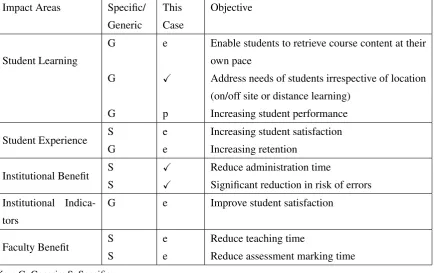
In their 2013 paper White and Davis describe an institutional benefits framework used to analyse benefits a project will provide[134]. In that context, MMS’ objectives are focused on the impact areas “Institutional Benefit”, “Institutional Indicators” and “Faculty Benefit”, reducing costs to the institution by decreasing workload on staff, while reducing risks in data management. Further impact areas “Student Learning” and “Student Experience” also benefit from the streamlining of administrative processes, but this is a side-effect rather than the primary intention of the software.
to resolve other requirements is counter-productive to the overall goals. Accordingly there are challenges in minimising expenditure while still achieving the project goals.
MMS is designed to support a set of complementary approaches to reducing administrative overheads in a higher education environment. These approaches are, in brief: correcting issues in data quality, reducing risks to data quality, exposing centrally maintained data to end users in a useful way, emphasising currency of data provided to end-users, providing user tools for reviewing and managing processes, proactively responding to data issues, and minimising user interaction with administrative software.
This thesis will examine the background context from which MMS was designed, the chal-lenges encountered in both the development and roll-out of MMS, the design principles on which MMS is based, how the challenges have been addressed by the framework and user tools, and lastly evaluate the system’s design and success in reducing overheads.
MMS at the University of St Andrews currently has over 14,000 student users2 and 5,800 staff users, and receives 60,000–80,000 HTTP requests during a typical weekday.
1.1
Motivation
The datasets used in administration are inherently shared between multiple members of staff, and in many cases directly involve the students the data relates to (for example course-work submission and return of assessment outcomes). Further, administrative course-workflows frequently require multiple staff working together to complete a task. As such collaborative tools are an obvious fit for the use-case.
Dedicated student record systems such as SITS:Vision3 are adequate for modelling the actual structure of student data, but are ill-suited for use by students and academic staff due to their complexity, typically requiring specialised training to use effectively. Student record systems may also require the use of application-specific client software, as is the case with SITS:Vision, adding further obstacles to widespread usage of the systems.
2This figure includes a number of alumni, visiting students, etc. and is therefore significantly higher than
the number of full time students
3http://www.tribalgroup.com/technology/sitsvision/Pages/default.aspx
A web interface was chosen to provide a platform which is widely available to end-users, well understood, trivial to update and asynchronous. In comparison to obvious alternatives such as a dedicated desktop application, the interface design is inherently limited in its flexibility (such as range of form elements), however this is considered a worthwhile trade-off for the near-universal availability of compatible computers. The relatively recent HTML 5 specification significantly mitigates these limitations.
Data and workflow management tasks are chosen as key improvement targets because both were partially addressed by TAGS and INSIDE. This experience suggested a number of possible further improvements to the application designs, which led to the design of MMS.
1.2
Background
MMS is a major step forward, building on previous research projects at St Andrews, namely Tutors and Groups Support[5] (TAGS) and Institutionally Secure Integrated Data Environment[21] (INSIDE), and addressing emerging requirements from the academic staff at university. MMS incorporates lessons learnt from both of these projects, in its end-user functionality, however its core framework has been completely redesigned and rewritten.
MMS was designed to overcome architectural, functional, security, development and per-formance limitations inherent in the design of the TAGS framework, while adopting best practises from INSIDE’s integration with core institutional record systems. In doing so MMS blends elements from virtual learning environments (VLEs) with student records systems and web portals. MMS is intrinsically staff-centric in its designs, with student-facing functionality present only as needed to achieve improvements for academic staff. Development of MMS started in the summer of 2002, and went live within the School of Computer Science in September of the same year, in time for the start of the academic year 2002/3. Use of the INSIDE proof-of-concept software was discontinued ahead of 2002/3 as MMS acted as the production edition, while TAGS remains in-use for a number of teaching-centric projects at other institutions. A brief history of projects prior to MMS, along with the development timeline of MMS, is shown in figure 1.1).
Adoption of MMS was solely driven by academics opting to use it within their modules, and as such as it had to quickly show value.
Date Event
1999 TAGS project begins 2000 INSIDE project begins
2001 TAGS ported from from Tcl to Java
2002 Development of MMS begins, MMS goes live within the School of Computer Science
2002 INSIDE proof-of-concept software obsoleted by MMS 2003 MMS adopted by the School of Mathematics
2003 Disability Information Flow (DIF) tool added as a sub-component of MMS
2004 DIF split off as a separate application 2005 Start of work covered by this thesis
2007 MMS deployed onto hardware managed by Library and In-formation Services
2007 DIF replaced by SITS:Vision based application
2007 MMS goes live in the Schools of Economics, Philosophy, and Psychology
2009 MMS required to be used in reporting all module grades 2010 MMS and Moodle replace WebCT for institutional virtual
learning environment. DIF integrated into MMS in re-sponse to demand from academic staff
Figure 1.1: Time-line of MMS Development
MMS today has over a dozen different tools that can be made available through each taught course module, historical data back to the academic year 2005/6, and over 13,000 users in its database. Since the academic year 2009/0 it is a required part of reporting final grades from every module in the university, and as such used in some capacity by every teaching unit.
The abstract raised the following drawbacks with current approaches to conventional VLEs and student record systems:
• They do not seek to reduce administrative overheads in academic processes.
• They do not reflect institution-specific academic policies.
• They do not integrate readily with other information systems.
• They are not capable of adequately modelling the complex authorisation roles and organisational structure of a real institution.
• They are not well suited to rapidly changing policies and requirements.
• Their implementation is not informed by sound software engineering practises or data architecture design.
By comparison, this thesis shows how MMS addresses these points:
• MMS takes all stakeholders’ needs into account, as is evidenced by the design based on feedback from not just academics, but also students, administrative staff and man-agement. This is discussed further in section 4.3 of the design chapter.
• MMS seeks to reduce administrative overheads in academic processes, though im-proved management of data. Specifically the integration with other information sys-tems both minimises configuration, and enables data held in MMS to be transferred to other systems without requiring manual intervention or migration (for example the final grade reporting tool described in 7.5). The data architecture is designed to minimise risks through normalisation and data integrity constraints, and audits most data changes over time in order to establish clear detail on how and when changes have been made, (see chapter 4, section 4.8). The effectiveness in reducing these overheads is the basis of the evaluation in chapter 11.
• MMS reflects academic policies, such as Academics Alerts (see chapter 8), Final Grade reporting (see chapter 7, sections 7.6.1 and 7.5), postgraduate research exam-ination panel nomexam-ination and annual reports to the Pro Deans (chapter 9).
• MMS successfully models the complex authorisation roles and organisational struc-ture of the institutions, as described in chapter 5, section 5.7.
• MMS is well suited to rapidly changing policies and requirements, through use of approaches including resilient architectural design and user-facing scripting tools. The benefits of this can be seen in the ability for users to manage school-level policies on lateness, final grade calculation and marking scales themselves (see section 7.6). This also enables rapid change, as illustrated with Academic Alerts (chapter 8), the move to Moodle as institutional VLE (the impact of which on MMS’ requirements is described in section 7.7) and development of LAVA (chapter 10).
• MMS implementation is informed by sound software engineering practises and data architecture design as described in the Architecture chapter. See sections 5.3 and 5.4 for adaptation of standard design patterns, section 5.13 for isolation of concerns, and sections 5.5 and 5.8 for novel work in software design. Data architecture (both in the database and as files on disk) is described in the design chapter, section 4.8.
1.3
Structure of Thesis
General context of the project is provided in chapter 2 (Context), which describes a number of applications to illustrate other work in the area, as well as differentiate MMS from that work. Challenges (chapter 3) examines in detail the difficulties developing software in higher education, which must be overcome to enable the tools which form the user-facing elements of MMS.
Chapters 4 and 5 (Design and Software Architecture) look at how these challenges were solved. Design describes the theory of MMS’ design and the principles it is based on, while Software Architecture looks at implementation of the framework based on this design which supports the embedded tools described later. The design and software architecture pair with the challenges described earlier in the thesis, and contain a number of novel elements which underpin to MMS’ success (data version control, institution modelling, inclusion of administrative staff in design, server-side scripting, etc.)
Chapter 7 (User Tools) introduces the user-facing tools which deliver MMS’ core function-ality, and are the main elements of functionality used to reduce administrative overheads. Other tools are also provided with the intention of encouraging use of MMS and improving the user experience, especially those tools more orientated towards learning and teaching. A number of the tools described are specific to MMS or have unique features and form part of the novel work of this thesis.
Howing described MMS, this is followed by three case studies (chapters 8 to 10) looking at the use of MMS as an academic policy implementation tool (Academic Alerts), a workflow management tool (Postgraduate Research Student Administration), as and as a research framework (LAVA). Each of these chapters incorporates elements of evaluation.
Evaluation of MMS (in chapter 11) is performed in terms of usage statistics over time, and surveys of the users will be used to assess acceptance of MMS. A summary of the main successes and failures is included at the end of this chapter.
Chapter 2
Context and Related Work
The context for MMS is easily introduced by the substantial number of web applications designed for improving higher education. Virtual learning environments (VLEs) are now commonplace, and comprise a large proportion of these applications. Examples such as ANGEL Learning Management Suite, Blackboard Learn1, Bodington2, Moodle3, Sakai
CLE4 and WebCT provide a variety of tools and a framework to support them, however
they are all primarily focused on improving learning effectiveness.
In contrast MMS provides a very different range of tools aimed at module administration, with learning and teaching as a secondary goal. It also seeks to facilitate development of such tools, simplifying the development process for others to be able to readily add further functionality.
There are some similarities to the BOSS5, and uPortal6applications. BOSS is an advanced coursework submission tool with automated marking functionality, and uPortal is a web portal designed to collate and present information and tools to students and staff. Both of these reflect some of the functionality of MMS and accordingly a detailed comparison is presented later in this chapter.
1http://www.blackboard.com/Platforms/Learn/Products/Blackboard-Learn.
aspx- accessed 13th November 2013
2http://sourceforge.net/projects/bodington/- accessed 13th November 2013
3https://moodle.org/- accessed 13th November 2013
4http://www.sakaiproject.org/- Accessed 13th November 2013
5http://www.dcs.warwick.ac.uk/boss/index.php
This chapter will look at VLEs, other related web applications, architecture and API de-sign, and end with a quick introduction to the preceding applications at St Andrews which influenced MMS’ design. A broad summary of comparable applications is shown in table 2.1, and as can be clearly seen there is a trend towards shrinking choice over time, with few new applications being launched, and those projects which continue being merged under single organisations.
Application Category Publisher Still Active
ANGEL Learning VLE Blackboard No
Blackboard Learn VLE Blackboard Yes
Bodington VLE University of Leeds No
BOSS Coursework Submission University of Warwick Yes
Moodle VLE Moodle Pty Ltd Yes
Sakai VLE Apereo Foundation Yes
SITS:Vision Student Records Tribal Yes
uPortal Web Portal Apereo Foundation Yes
WebCT VLE Blackboard Yes
Table 2.1: Summary of Related Web Applications
2.1
Virtual Learning Environments
Given the nature of MMS as a student-facing web application, comparisons with virtual learning environments (VLEs) such as Blackboard Learn7, Moodle8 and Sakai CLE9 are common. VLEs have seen widespread adoption across higher education[57][18], and as such are frequently encountered by users, who commonly infer similarity in some of the tools provided by these systems to mean that the applications are intended for similar pur-poses.
However VLEs focus on improving the delivery of teaching, and can actually increase workload on academic staff[47][91][113]. In contrast, MMS focuses on improving
admin-7http://www.blackboard.com/Platforms/Learn/Products/Blackboard-Learn.
aspx- accessed 6th June 2013
8https://moodle.org/- accessed 6th June 2013
istration, and has teaching-related functionality only in terms of this goal, rather than as a primary feature.
Since this thesis was started, Blackboard Inc. have acquired two of the key VLEs covered in this context survey (ANGEL and WebCT), and these two platforms are being phased out in preference of Blackboard Learn.
Additionally Bodington (initially developed at the University of Leeds) has since been replaced by other VLEs (Blackboard at Leeds, Sakai at Oxford).
This leaves the marketplace substantially slimmer than when this thesis was started (no specific conclusion is intended about this fact). These historic projects are included below for reference.
2.1.1
Blackboard Learn
Blackboard Learn is a widely used commercial virtual learning environment by Black-board Inc. Learn provides a wide range of tools for content delivery, online assessment and collaboration. Blackboard Inc. have previously purchased WebCT[52] and ANGEL Learning[53], and accordingly Learn has functionality taken from both of these software packages, making it an obvious choice for institutions moving from ANGEL Learning or WebCT.
Course-level tools provided by Learn include assignment submission and grading, calendar, course content management, discussion boards, notifications, wiki.
Building Blocks
simple calculations.
As a technology however it is interesting, and suggests a possible approach to modularising MMS in future (through managed, hosted applications).
2.1.2
Moodle
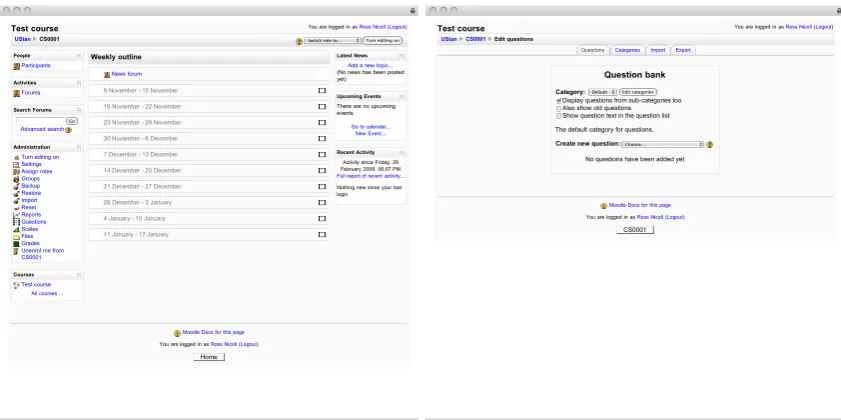
Moodle is an open source course management system, which provides a selection of tools use in delivering course content and assessments to students. Beyond simple content man-agement, it provides quizzes, discussion forums, event tracking, Wikis, and analysis tools for monitoring academic performance. Commercial hosting and support options are avail-able from a variety of companies, but the project itself is open source and free to use. Example screenshots of Moodle are shown in figure 2.1.
Test course You are logged in as Ross Nicoll (Logout)
UStan CS0001 Switch role to... Turn editing on
People Participants Activities Forums Search Forums Go Advanced search Administration Turn editing on Settings Assign roles Groups Backup Restore Import Reset Reports Questions Scales Files Grades Unenrol me from CS0001
Courses Test course
All courses ...
Weekly outline
News forum
9 November - 15 November
16 November - 22 November
23 November - 29 November
30 November - 6 December
7 December - 13 December
14 December - 20 December
21 December - 27 December
28 December - 3 January
4 January - 10 January
11 January - 17 January
Latest News Add a new topic... (No news has been posted yet)
Upcoming Events
There are no upcoming events
Go to calendar...
New Event... Recent Activity
Activity since Friday, 29 February 2008, 06:07 PM
Full report of recent activity...
Nothing new since your last login
Moodle Docs for this page
You are logged in as Ross Nicoll (Logout)
Home
Test course You are logged in as Ross Nicoll (Logout)
UStan CS0001 Edit questions
Question bank
Category:Default Edit categories Display questions from sub-categories too Also show old questions Show question text in the question list
The default category for questions.
Create new question:Choose... No questions have been added yet
Moodle Docs for this page
You are logged in as Ross Nicoll (Logout)
[image:33.595.118.539.350.560.2]CS0001 Categories Import Export Questions
Figure 2.1: Screenshots of Moodle
Moodle has proven extremely popular, with tens of thousands of registered Moodle instal-lations worldwide, including over 4,000 in the UK alone. During the writing of this thesis, the total number of registered installations increased from around 35,000 in 2008, to over 82,000 as at 26th June 2013[85].
Unlike MMS, Moodle is written in PHP. Its database layer was designed based on function-ality of MySQL 3.x[50] and therefore lacks foreign key constraints, leading to significant numbers of constraint violations[108]. The database structure, while significantly improved over earlier versions, still embeds complex data types in single fields, for example the “dis-playoptions” field of the “resource” table (this example based on Moodle 2.6):
a:2:{s:12:"printheading";i:0;s:10:"printintro";i:1;}
This leads to data which is hard to interpret or manipulate without reference to the appli-cation code, as well as requiring that any changes to any item of data affect all contained data within the same field. This potentially could cause unexpected results if two users are manipulating the same data concurrently, as one user could overwrite changes made by another depending on the database locking model.
2.1.3
Sakai CLE
Sakai CLE (Collaboration and Learning Environment) is an open source VLE developed by the Sakai Foundation, which recently merged with JASIG (who manage uPortal) to form the Apereo Foundation[30].
Sakai CLE not only provides conventional learning management functionality, but its tools can also be used for research and project collaboration and digital portfolios of work. Key points of similarity with MMS include support for coursework assignments, content management tools, and a grade book for storing grades (however this does not handle transfer of data back to central records).
2.1.4
ANGEL Learning Management Suite
In May 2009, ANGEL Learning was acquired by Blackboard, who currently sell the sys-tem under the name “Blackboard Learn ANGEL Edition10.” Blackboard have also added
functionality to their core Learn product, based on functionality provided by ANGEL.
2.1.5
WebCT
WebCT is a virtual learning environment, developed by Murray W. Goldberg in 1996 at the University of British Columbia[38][37]. It is of particular note as it was the original VLE used at the University of St Andrews[131] for delivery of course content.
WebCT provided a variety of tools, including:
Announcements Sends announcements of course-related events to students and staff.
Assignments Provides details of assignments to students, and provides both space for
them to submit coursework to, and to hold marks for that coursework.
Calendar Provides a calendar of events, handling both as shared events for an entire
course, and an individual user.
Chat and Whiteboard Provides for users with a method for synchronous communication
(chat room), as well as a whiteboard for sharing visual data such as slides.
Course Content Stores course content in a file-system structure, ready for access by
stu-dents. Course content can also be played back from SCORM modules.
Discussion Provides for asynchronous communication about a course, as well as
assign-ment of marks to conversations.
HTML Creator A WYSIWYG (What You See Is What You Get) HTML editor, allowing
non-technical users to compose HTML pages without requiring them to learn HTML first.
Learning Modules Sequences course components, such as content, assessments,
assign-ments, media library components, SCORM modules, chat rooms, etc. to provide a learning path for students to follow.
10
http://www.blackboard.com/Platforms/Learn/Products/Blackboard-Learn/
Mail Provides a secure e-mail facility for students and staff to communicate privately with each other. However e-mail can only be received from other users of the system.
Media Library The Media Library is a collection of pictures, video files, audio files
and/or glossary entries.
Quizzes WebCT provides for a wide variety of different tests to be administered to
stu-dents, to evaluate how well they have understood course material. Some of these tests can be automatically marked (multiple choice, calculated, fill in the blank) while others are manually marked by course staff (paragraph/essay-style).
Self Tests Similar to quizzes, except intended to allows students to assess their own
knowl-edge of course material, rather than for assessment by teaching staff.
Surveys Provides a way of gathering feedback about the course, in an anonymous manner,
using a series of staff-defined questions.
2.1.6
Bodington
Bodington was originally developed by the University of Leeds. It proceeded to expand to a number of other institutions including the University of Oxford, University of Manchester, University of York, UHI Millennium Institute and Eton College.
As of release 2.6.0 Bodington provided a substantial set of course management features:
Group communication room A discussion space similar to TAGS’ notebook service
Logbook For students for keep notes on their coursework
Content management For course content
Questionnaire For performing surveys of the user base
Simple tests With options for either automatic or manual marking
These features are however all intended for use in assisting learning, and are student-focused rather than administrative.
Note that the last released version as of the time of writing is 2.8.011, however documen-tation is difficult to acquire due to the main project website no longer being available, and therefore a historical list has been used.
2.2
Other Software
2.2.1
BOSS
BOSS12(BOSS Online Submission System) is a coursework submission and marking tool
developed at the University of Warwick[60]. Unusually for the software systems detailed here it focuses on providing a single service, namely electronic submission of coursework, and assessment of that coursework. The functionality it provides is similar to that of the coursework submission tool included in MMS, although BOSS expands upon that func-tionality by providing tools for automatic marking of coursework. However BOSS appears to lack integration with central student records.
Evaluation of the BOSS system has shown the use of electronic mark sheets as an effective tool in reducing time taken for marking[61], supporting the theory that web applications can reduce time taken in other administrative tasks.
From a technical point of view it is also interesting in that BOSS has support for alterna-tive user interfaces – as well as a web interface, it comes with more traditional desktop application clients for students and staff. It does this by splitting the application into two parts, a core ”engine” and the user interface, which communicate using Java remote method invocation (RMI).
11http://sourceforge.net/projects/bodington/files/bodington/2.8.0/ -
ac-cessed 14th May 2013
12
2.2.2
Mobile Applications
Mobile applications targeting higher education environments frequently include function-ality for delivering academic-related data to students. Examples include campusM13from oMbiel, u360 Mobile14from Straxis Technology and uMobile15from Jasig.
While there are no generally available mobile applications for MMS, a number of different applications have been prototyped[73][125]. Please note that web applications with an al-ternative rendering specifically for mobile platforms are not covered in this section, instead this only addresses “native” applications.
Stand-alone Mobile Applications
Stand-alone applications such as campusM and u360 Mobile (targeting the UK and US higher education markets respectively) have the advantage that they do not require the in-stitution to have a specific software package (such as Moodle, Blackboard Learn or uPortal) to use, however they also require more work to integrate with such platforms (if even pos-sible) and institutional data sources.
The majority of the functionality presented by these applications closely reflects content directly available from an institutional website, such as a staff directory, library catalogue search, news feeds, calendar of events, course catalogue, etc. Where they do provide func-tionality that does depend on or integrate well with mobile platforms such as campus maps and alert (push) messaging, this functionality does not overlap with functionality provided by MMS.
By comparison mobile application prototypes for MMS have focused on dealing with time and/or location sensitive information such as grades received, tutorial group signup and attendance monitoring.
13http://www.campusm.com/- accessed 11th June 2013
14http://www.u360mobile.com/- accessed 11th June 2013
Integrated Mobile Applications
Mobile applications which integrate with a specific piece of software have the advantage of a data service whose development is interwoven with that of the application. The parent application is likely to already be installed and well established at the institution, mean-ing that data quality and availability are much less likely to be problems. However, this also inherently makes these applications inflexible, dependent on functionality of their host application.
uMobile, which integrates with the uPortal portal platform, is based on the Appcelera-tor Titanium SDK16. This provides a flexible and powerful framework, including mobile-orientated functionality such as maps, location and push notifications, however its included default features (calendar, news, video, staff directory, search and maps) do not overlap with MMS.
Moodle Mobile17 is based on the Phonegap framework18, although an earlier version was a “native” iOS application. It provides a mobile-optimised interface to some of Moodle’s functionality, such as course content, or messaging students. The functionality is teaching-centric, and has limited overlap with MMS (for example it does allow access to course content, but doesn’t appear to provide grade data).
2.2.3
SITS
The SITS:Vision student and course management system, developed by Tribal, is one of the most popular student management systems in the UK, and is the system of choice at the University of St Andrews. The data it manages overlaps heavily with the data maintained within MMS, including student and staff details, taught modules, module enrolments, stu-dents’ final grades from modules, etc. There are significant data elements it stores which MMS does not, such as degree courses, and details of potential students, as well as ele-ments that it could store but does not at St Andrews, such as marks or grades for individual items of assessed work.
16http://docs.appcelerator.com/titanium/latest/- accessed 22nd February 2015
17
http://docs.moodle.org/dev/Moodle_Mobile- accessed 15th July 2013
Figure 2.2: Screenshot of e-Vision
Unlike MMS, it is a desktop application intended primarily for use by expert users. It has a web portal interface, e-Vision (shown in figure 2.2), designed for a more general user-base, however the workflows presented by e-Vision are generally constrained by the underlying data structures. For example users can generally edit a single record at a time, and workflow during editing is tightly controlled (note instructions not to refresh or use the back button, in the screenshot).
2.2.4
uPortal
uPortal19is interesting as a further example of a web application intended for use in an
edu-cational context, which is not focused on delivery or administration of a course. uPortal is, as the name suggests, a web portal application, which aggregates interfaces and data from a number of sources to provide a central location for students and staff to find webmail, news feeds, calendar, etc.
It is in use at a large number of institutions, including the University of St Andrews, where it provides functionality including matriculation, checking personal details, and links to coursework and modules within both Moodle and MMS.
uPortal has similarities to MMS in that both pull together data from a wide variety of sources, however uPortal takes data which has already been formatted as HTML (through portlets), whereas MMS uses the raw data and handles presentation itself. Here the in-tents are different, and while uPortal is simpler, it lacks the ability to readily mix data sets together (for example merging students on modules with calendars).
2.3
Architecture
While the most obvious aspects of MMS are its end user functionality, its architecture is also key. MMS provides a web application framework, which simplifies development of tools for use in a higher education context. This framework encourages effective design of tools, while providing support for authentication and authorisation. It enables use of a wide variety of institutional data sources and systems, through an abstraction layer which manages much of the complexity for the tool developers.
2.3.1
Model-View-Controller
MMS’ web interface is derived from the Model-View-Controller (MVC) pattern[65], which it encourages in its hosted tools through provision of a data model, and easy tools for sep-arating the controller and view. The main modification to the MVC model as implemented
in MMS is the addition of a layer which handles security, particularly in relation to access controls to entities within MMS (such as modules, course content, students, etc.)
2.3.2
Spring
In the context of Java application architecture, especially MVC web applications, the Spring framework is an obvious comparison. Spring is a framework based around use of aspect-orientated programming (see Kiczales et. al.[64] for an introduction to aspect oriented programming) to modify Java Beans, injecting significant new functionality such as transaction handling, security, web application support, etc.
Like MMS, Spring provides a framework which includes web request dispatching and parsing support, database querying and manipulation utility classes, model-view-controller support, web services, etc. It differs from MMS in that it provides a generic framework, whereas MMS is targeted at dealing with data structures in a higher education institution. Whereas Spring uses aspect-orientated programming to provide much of its functionality, MMS acts as a wrapping layer which directly calls its hosted tools. This approach ensures that flow of control is clearer as it is limited to utilising conventional Java language features, however it does so at the cost of requiring hosted tools to be designed for the framework. In comparison, Spring uses proxy classes to modify behaviour of existing classes, leading to non-obvious flow of control. The number of distinct method calls used by Spring as part of this process also leads to stack traces which have a high proportion of framework lines compared to the hosted application[94], further confusing the process of debugging errors.
2.4
Project Background
The initial design of MMS was formed from experiences with a variety of applications. These applications allowed experimentation with different designs, use cases, development languages etc., and from them the architecture and intent of the first version of MMS was formed.
actually a sister-project of MMS, not a predecessor and ran from 2004 to 2007) has since been merged into MMS.
2.4.1
Tutors and Group Support
TAGS[5] was a Scottish Higher Education Funding Council (SHEFC)20funded project to research, develop and deploy networked learning environments. The TAGS project was started in 1999. It was developed in the Tcl scripting language, using the cgi.tcl[70] ex-tension for web support, although later additions also used Perl and Python in parts, and it was finally re-written in Java during 2001-2002[90]. The core TAGS framework provided authentication (against its own user database), and simple authorisation based on a model based on users, groups and resources.
John
Alice
Mark
Jane
Users Groups
CS1002
CS1004
MT1002 S1
MT1002 S2
Resources
Coursework
Tutorial attendance
Lecture notes Coursework
Figure 2.3: TAGS: Users, Groups and Resources Model
Under this model (shown in figure 2.3), users and resources could be assigned to groups in a many-many relationship. When resources are assigned to groups, they can be set as possessing read and/or write access privileges. Users then have the union of accesses provided to each resource, by all groups they belong to. It rapidly became apparent that as TAGS was used in several distinct institutions, the number of users, groups and resources visible to staff was overwhelming, and a new structural unit was required in order to model institutions. These were referred to as “domains”. Users, groups and resources could all be assigned to domains in a many-many relationship, although most were assigned to a single domain, with exceptions for cases such as system administrators who actually operated across multiple institutions.
TAGS provided a number of tools for supporting course administration:
Archival Tool A management tool which can create archive files of static HTML repre-senting the content of a group, including both users and resources. An archive could be downloaded to a local disk or kept online. All the components of an archive, including user IDs and resource instances, could then be deleted from the TAGS sys-tem without losing the details of a particular class and their work. This allowed for recycling of groups across multiple academic years as a method of mitigating clutter.
Document Approval Tool Provides coursework spaces into which students can upload
work. Staff can then mark that coursework and/or provide feedback on it. Staff can be automatically notified by e-mail when students upload coursework, and students in turn can be notified when their work is marked.
Protected Page Set Wraps a set of files within the TAGS security infrastructure so that
users must log in to access the files.
Reflective Marksheet A tool for students to reflect on their own work, with space for
feedback from tutors.
Tasklist Extends the protected page set to provide a sequenced set of page for students to
read and/or complete work within.
Tutorial Attendance and Performance Register Holds records of student attendance at
tutorials or other events which run weekly. Tutors maintain the records for their own tutorial group, with students restricted to only viewing their own records. Module coordinators can view and edit any records within their module(s).
TAGS also contained the following general (not subject-specific) tools for collaborative coursework:
File share Allows users to share files amongst a group. Permissions to upload/download
from the file share are configured by its owner, allowing it to be used not just as a free-for-all storage space but also as staff-only file share, a drop-box for students to upload work to or a way of letting staff serve files to students.
Document Sharing Tool Similar in functionality to the file share tool, but with added
Notebook A simple single-threaded messaging system, intended to provide a space for students to discuss team work, for example which shares to buy/sell as part of a stock trading exercise.
Questions and Answers Similar in design to the notebook, except that instead of focusing
on discussions between students, it focuses on student-tutor communication. Stu-dents could submit questions to teaching staff, who could then reply either solely to the student, or share the answer with the whole class where it was relevant to a wider audience.
URL A link to some resource, typically external although links into parts of TAGS have been used before to simplify navigation.
URL Book A set of links, almost identical to the URL service.
Similar tools to many of these were developed in MMS, although the designs would be expanded significantly to handle substantially more complex use cases. Expansions to these tools included functionality such as scripted mark calculation, adding folders to the file share and discussion threads to the notebook. Finally, TAGS contained a small number of teaching tools specific to individual taught subjects. Detailed specifics of these tools are beyond the scope of this thesis, however a brief summary is provided below:
Portfolio (Finance, Accounting, Management, and Economics) Provides a virtual stock
portfolio, allowing students to see what profit/loss they would have made on shares without the need for real money. Uses live (15 minute delayed) data from the Lon-don Stock Exchange. Commonly used with the Notebook resource to provide a log of why students made certain trading decisions[44][109].
Model Patients for Clinician Training (Medicine) MediCAL helped train students in
di-agnosis of medical conditions, using video clips of real patients presenting symptoms a variety of conditions[6]).
Ecrire/Ecrira (Modern Languages) Provides a framework for students to learn foreign
languages (specifically French or Spanish) within, working as part of a group to translate a text.
Genetics Case Study Similar to the MediCAL tool, provided anonymised patient case
Subject-specific tools were not ported to MMS through lack of demand; most of the projects had lapsed into inactivity, with the exception of the portfolio tool, which was not in use at St Andrews. Functionality to support such tools is however part of MMS, and the LAVA project (see 10) is an example of these.
2.4.2
INSIDE
An Institutionally Secure Integrated Data Environment (INSIDE)[13] [14][21][66][67], the second project from which MMS evolved, was a JISC funded project[56] at the Universities of Durham and St Andrews. INSIDE sought to understand the barriers to sharing student records data inside and between institutions. It provided some proof-of-concept software to show how the data maintained in legacy systems such as SITS could be made useful to the academic populace at large through web-based exposure.
The INSIDE project primarily provided insight into the difficulties inherent in using insti-tutional information bases. In particular, it highlighted severe weaknesses in data currency, for example those caused by delays in updating the central Data Warehouse at St Andrews. One of the key tools in INSIDE provided the ability to check for and report disparities between School, Central and Data Warehouse views of students enrolled on an academic module, allowing academic staff to quickly identify such mismatches.
Lessons learnt from INSIDE meant that by the time MMS was ready for deployment steps had been taken to significantly improve data quality, and users could be forewarned of likely issues. INSIDE also provided the basis for the design of the enrolment resource type, significantly accelerating its development.
2.4.3
Finesse
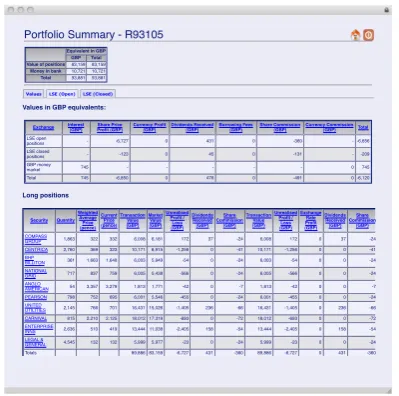
It has various use case scenarios; some institutions have students trade independently, while others have them work in groups. A shared notebook is also provided by Finesse, which some institutions have their students use to discuss and explain their strategy.
Finesse was originally implemented as a separate application, then later merged into TAGS, so it could use the same framework for authorisation and authentication. With recent changes in the requirements for Finesse, in particular ease of maintenance, moves have been made towards separating it from TAGS.
Portfolio Summary - R93105
Equivalent in GBP GBP Total Value of positions83,15983,159
Money in bank 10,72110,721 Total 93,88193,881
Values LSE (Open)LSE (Closed)
Values in GBP equivalents:
Exchange Interest(GBP) Share PriceProfit (GBP) Currency Profit(GBP) Dividends Received(GBP) Borrowing Fees(GBP) Share Commission(GBP) Currency Commission(GBP) Total LSE open
positions - -6,727 0 431 0 -360 - -6,656
LSE closed
positions - -123 0 45 0 -131 --209
GBP money
market 745 - - - 0 745
Total 745 -6,850 0 476 0 -491 0 -6,120
Long positions
Security QuantityWeightedAverage Price (pence) Current Price (pence) Transaction Value (GBP) Market Value (GBP)
UnrealisedProfit / Loss (GBP) Dividends Received (GBP) Share Commission (GBP) Transaction Value (GBP)
UnrealisedProfit / Loss (GBP) ExchangeRate Profit (GBP) Dividends Received (GBP) Share Commission (GBP) COMPASS
GROUP 1,863 322 332 6,008 6,181 172 37 -24 6,008 172 0 37 -24
CENTRICA 2,760 369 323 10,171 8,915 -1,256 0 -41 10,171 -1,256 0 0 -41
BHP
BILLITON 361 1,663 1,648 6,003 5,949 -54 0 -24 6,003 -54 0 0 -24
NATIONAL
GRID 717 837 759 6,005 5,438 -566 0 -24 6,005 -566 0 0 -24
ANGLO
AMERICAN 54 3,357 3,279 1,813 1,771 -42 0 -7 1,813 -42 0 0 -7
PEARSON 798 752 695 6,001 5,546 -455 0 -24 6,001 -455 0 0 -24
UNITED
UTILITIES 2,145 766 701 16,431 15,026 -1,405 236 -66 16,431 -1,405 0 236 -66
CARNIVAL 815 2,210 2,125 18,012 17,319 -693 0 -72 18,012 -693 0 0 -72
ENTERPRISE
INNS 2,636 510 419 13,444 11,038 -2,405 158 -54 13,444 -2,405 0 158 -54
LEGAL &
GENERAL 4,545 132 132 5,999 5,977 -23 0 -24 5,999 -23 0 0 -24
[image:47.595.230.430.231.429.2]Totals 89,886 83,159 -6,727 431 -360 89,886 -6,727 0 431 -360
Figure 2.4: Finesse Portfolio Summary Page
2.4.4
DIF
The Disability Information Flow (DIF) project, as a sister project to MMS, also sought reduce the administrative overhead of ensuring information about students with special needs (for example lecture notes on coloured paper, or extra time in exams) was distributed to the correct members of staff in a timely manner[71].
DIF was designed by Bin Ling and Dave Roberts[72] [4], and I was responsible for the implementation. It tracked the staff responsible for teaching each module, the administra-tive staff for each academic unit which modules students are taking, and the details of any special requirements for students. Student module associations and special requirements were automatically imported (although more detailed versions of requirements could be entered manually), while details of staff roles had to be manually entered due to none being maintained by central Registry.
The first version was intended as a rapid prototype, and was embedded into the MMS framework to accelerate development, although it was later split off into a separate code base. DIF was used for several years, before finally being replaced in 2007 by a function-ality within SITS:Vision, which used e-Vision as a user interface for academic staff. Lessons learnt from DIF were extremely useful in the design of MMS’ API and data struc-tures for dealing with academic units, particularly with unusual configurations such as mod-ules being taught by staff belonging to other units. Further, the functionality was eventually re-integrated into MMS in 2010 in response to dissatisfaction with the SITS:Vision based solution.
2.5
Publishing Models
The applications described above can be split into open source (Moodle, uPortal) and closed source (ANGEL, Learn, WebCT) projects. Further, while most are generic ap-plications which do not target specific institutions, a few (Bodington, BOSS) are in-house applications tailored more closely to the institution where they have been developed. MMS’ licensing model is currently effectively closed source (copyright retained by the University of St Andrews), although permission is being sought in order to release the code.
By comparison closed source projects are typically better resourced, with full time devel-oper teams working on the code, however leave the customer dependent upon the publisher for updates and support. Historically closed source projects have often been better ported, although it is now common for open source projects to be available with paid sup-port. Moodle Pty offer paid support for Moodle, and there are number of service providers for support for uPortal.
For staff at St Andrews, MMS blends open and closed source models, in that the source code is not readily available however the scripts used to implement academic policy (dis-cussed in detail in section 7.6) are exposed to staff who are encouraged to review them to ensure accuracy of implementation.
Chapter 3
Challenges
This chapter will expands on the design, adoption and support challenges addressed by the MMS project, focusing on the underlying causes. This work provides a basis for later chapters, which describe the solutions developed.
Wilson[137] and Yuan et al[140] examine the suitability of existing standards processes for use in a higher education context, and describe community-led informal processes which better suit the requirements of higher education software development. This provides con-text for higher education specific requirements and challenges.
Software design for higher education administration requires the architect to overcome a number of challenges specific to the sector, which are often overlooked, understated or/and misunderstood. Many of these have become apparent as MMS has been rolled out across the institution, both from the researchers’ own experiences using the system or from user feedback. These challenges include: