© 2016, IRJET | Impact Factor value: 4.45 | ISO 9001:2008 Certified Journal
| Page 796
BIT Student Helpline Application Based on Android Platform
Bhavika Gaurkar
1, Deepa Amne
2, Ashwathy Manimala
3B.E Student, Department of Computer Science and Engineering, Ballarpur Institute of Technology, Bamni,
Dist.Chandrapur, Gondwana University, Gadhchiroli, Maharashtra,
India
1.
B.E Student, Department of Computer Science and Engineering, Ballarpur Institute of Technology, Bamni,
Dist.Chandrapur, Gondwana University, Gadhchiroli, Maharashtra,
India
2.
Assistant Professor, Department of Computer Science and Engieenering, Ballarpur Institute of Technology,
Bamni, Dist.Chandrapur, Gondwana University, Maharashtra
India
3.
---***---Abstract : The present Smartphone provides features such
as fast connectivity, interactive user interface fast processing speed and better response time giving rise to new possibilities for m-learning applications [1]. Morden learning theory has found that learning performance can be improved effectively through co-operate/collaborative learning. To overcome the problems that are keeping the student from giving the best in the academic performance a mobile application is developed so as to overcome student fear and make them confidant to ask questions related to their subject through this application. This application is not only limited to a person as each questions and answers will be posted publicly helping everyone having same doubts getting an opportunity to be successful in understanding the subject much more clearly. This app thus describes a technical benefits of using this application, which is easy to access and user friendly, and aims to assist teachers to make use of this application to help students overcome the fear of asking questions. This application will be tried at Ballarpur Institute of Technology, Ballarpur.Keyword
:
Android based, online social networking,collaborative learning, mobile learning, smartphone.
INTRODUCTION
This application describes a student and teacher based android application for educational purposes. This is a free and open source consortium for faculty and student in engineering. As the internet is developed into a main educational offer the educator and the student access to a engineering advancement. While it is possible to obtain information using one of the many popular internet search engines, the result may not be relevant to each desired search topic. The application described in this paper provides each student to communicate with teacher
to clarify doubts regarding subject. Teacher answering to the questions not only help a student but it will be benefited to every student as every answer will be public and can be seen by everyone. This helps in understanding the subject much more in depth and leading to further more curios question to come up thus by helping each of the students to think and understand a subject in multiple dimensions. And will help in overcoming fear by communicating with faculties. This messenger application will increase the understanding of any subject.
Whatsapp is smart phone application for instant messaging. Lately the applications popularity has risen. One of the unique feature of the application is its ability to enhance communication within a teacher and student. Therefore we have chosen to invent “Bit Student Helpline Application” to communicate between them privately. The proposes system includes mobile system based on android platform for student, web based application developed in android studio faculty members and firebase for the data base this system provides student with notification, personal queries.
1.Mobile Learning and Collaborative Learning
© 2016, IRJET | Impact Factor value: 4.45 | ISO 9001:2008 Certified Journal
| Page 797
experience [3]. Besides, collaboration becomes an essentialcompetency in current society. Robert E. Slavin in johns Hopkins University addressed the concept of collaborative learning in 1983 [1]. According to Julita Vassileva’s study in 2008 [4] claimed that the social/collaborative learning environment needs to have three main purpose: 1) It would help learners to find the “right puzzle piece” of knowledge. 2) Further, it would also help learners to find “right” people to collaborate to teach or to help learners. 3) The most important, it could motivate/incentivize learners to learn [4]. In over study, not only the mobile learning environment we want to achieve, but also the collaborative learning environment we want to fulfil. The three purposes mentioned above could also be part of our goals in our proposed system [5].
2. Android Based Mobile Environment
The android based mobile system is built on version Kitkat, Lollipop, Marshmallow, Nougat. The Android operating system is built on a software stack environment, which consist of java application running on Java- based, object-oriented application framework on top of java core libraries running on a virtual machine [5].
3. Literature
We are developing Android Application basically this concept is use for teacher and student communication. If student having any queries they can frankly ask to teacher via this app without any hesitation. Firstly student and teacher has to register them on app. Afterward they can access this application. Student has to put their queries on inbox after that they have to select teacher and send them. After getting question by student teacher has to answer their queries and all this question and their answer are displaying on news feed and this news feed can be seen by every student as well as teachser also if anyone not satisfied with their answer they can comment on particular answer in news feed.
4.
P
ROPOSEM
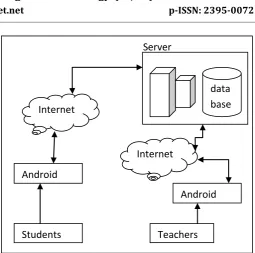
ETHODOLOGY [image:2.595.304.560.61.314.2]Fig.1 gives a brief overview of our mobile query application. We propose a client-server system, which considers the set of objective as defined. The client application is created for Android devices and has in mind all the key participants in an academic environment and the server side application will manage the databases [1].
Fig. Architecture System
I.E
XISTINGM
ETHODOLOGYStudent Helpline App is inspired from popular question-and-answer site Quora. Quora is where questions are asked, answered, edited and organized by its community of uses. Users can collaborate by editing question and suggesting edit to other users’ answer. Quora requires users to register with their real names rather than an internet pseudonym (screen name), and visitors unwilling to log in or use cookies have had to resort to workarounds to use the site. User may also log in with their Google and Facebook accounts using the open ID protocol. They can up vote or down vote answers, and suggest edits to extant answer provided by other users. The quora community includes some well-known people, such as Dustin Moskovitz, Jimmy Wales, Tim Bergling and Adrian Lamo. About 40% of Quora users are from India as of January 2016.
II.M
ODULEThe system is divided into Three modules for:
1. Students 2. Teachers 3. Newsfeed
Server
Students
Teachers
© 2016, IRJET | Impact Factor value: 4.45 | ISO 9001:2008 Certified Journal
| Page 798
1.Students
The students can ask their related subject queries from their mobile application to the web-based application meant for the teachers. The student require internet connection to post the study related questions from the frontend . .For a class of a particular branch for each year, a login ID and a password will be assigned thus allowing all student to access the Android-based application [1].
2. Teachers
The queries sent by the student can be viewed on this application and the respective teacher can thus answer appropriately to their queries. For a class of a particular branch for each year, there will be a same login ID but a different password assigned thus allowing the teachers members to access the web-based application [1].
3. Newsfeed
In this module answer will be posted after replaying the question ask by student. We can comment on posted question and add as favorite question.
© 2016, IRJET | Impact Factor value: 4.45 | ISO 9001:2008 Certified Journal
| Page 799
After clicking on top left button we have access to left panel.Left panel consist of following options they are Newsfeed, Queri, Add important and Profile.
a)How does Newsfeed and Queries button in left panel work ?
The user can post answer by clicking on queries option in left panel. After clicking on queries button you will be taken to a page, fill the following options given in the page and to post the question click on the Ask Question button given at the bottom of the queries page.
All the questions posted by the users can be seen at the newsfeed.
© 2016, IRJET | Impact Factor value: 4.45 | ISO 9001:2008 Certified Journal
| Page 800
c)Add ImportantTo mark any questions as important one can do it using add important option. To mark any question as important long press any question to get access to add to favorite option.
The questions that are marked as important will have a star on the right side of the questions.
d)Profile Setting
The user can get his/her account information such as user id and user profile by clicking on edit option in profile which is available in the left panel.
© 2016, IRJET | Impact Factor value: 4.45 | ISO 9001:2008 Certified Journal
| Page 801
e)Email your QuestionThis option can be used when student wants to ask particular question to particular teacher who has not registered to the app using an Email option, this option is available at bottom right of newsfeed.
4. CONCLUSION AND FUTURE SCOPE
We have outlined a set of objectives and architectural specification that would describe a collaborative mobile learning system. This application will help students ask questions on their subjects to the faculty members of their college. This app also allows students to post answer to the questions asked by other students. We will make compatible with all android versions.
This application will help to become more efficient. In future our app will include more information as per student requirements. Our app will fulfill every need of student in future we will add notes availability in one application.
R
EFERENCES[1] R.E Slavin, Collaborative Learning, New York: Longman, 1983.
[2] B. Tudor and C. Pettey, “Gartner Says Worldwide Mobile
Phone Sales Grew 35 Percent in Third Quarter 2010; Smartphone Sales Increased 96 Percent”. Retrieved February
19,2011 from
http://www.gartner.com/it/page.jsp?id=1466313
[3] S. H. Ye and Y. C. Hung, “The Study of Self-Seamless Teaching Strategy for Ubiquitous Learning Environment,” 6th IEEE International Conference on Wireless, Mobile, and Ubiquitous Technologies in Education, 2010,pp.182-186.
[4] j.Vassileva,”Toward social learning environment”.IEEE Transactions on Learning Technology, Volume 1, Issue 4, 2008,pp.199-214.
[5] Hsuan-Che Yang Wen-Ying Wang. Facilitating Academic Service-Learning with Android-Based Application and Ubiquitous Computing Environment.Ubi-Media Computing (U-Media),2011 4th International Conference on,2011.
BIOGRAPHY
Bhavika Gaurkar: Student of Ballarpur Institute of Technology, Bamni, Ballarpur, Gondawana University. Pursuing Bachelor of Engineering in Computer Science & Engineering.
Deepa Amne: Assistant Professor at Ballarpur Institute of Technology, Bamni, Ballarpur, Gondawana University. Department of Engineering in Computer Science & Engineering, Maharashtra.